
Semrush Ad Intelligence Alternative in 2026: PPC Research or Creative Evidence?
A 2026 decision framework for choosing a Semrush ad intelligence alternative — when PPC keyword and spend research wins, when competitor creative and video evidence wins, how AdClarity fits, a fair-trial method, and how to build a two-layer stack.
Semrush Ad Intelligence Alternative in 2026: PPC Research or Creative Evidence?
By the AdMapix Research Desk — Updated June 21, 2026
Most people searching for a "Semrush ad intelligence alternative" are not actually looking for a smaller, cheaper Semrush. They are stuck on a specific decision and want the tool that resolves it — and more often than not, the tool they need is in a different category entirely. Semrush is built around paid search and the wider SEO/PPC ecosystem: competitor keywords, ad copy, landing pages, estimated spend, and an enormous suite of search-marketing features. It is genuinely excellent at that job. But "ad intelligence" is a slippery phrase, and a large share of the people typing it want something Semrush was never designed to deliver: the actual competitor creatives — the paid-social videos, the hooks, the offers — and the ability to turn that creative evidence into a brief or a client report.
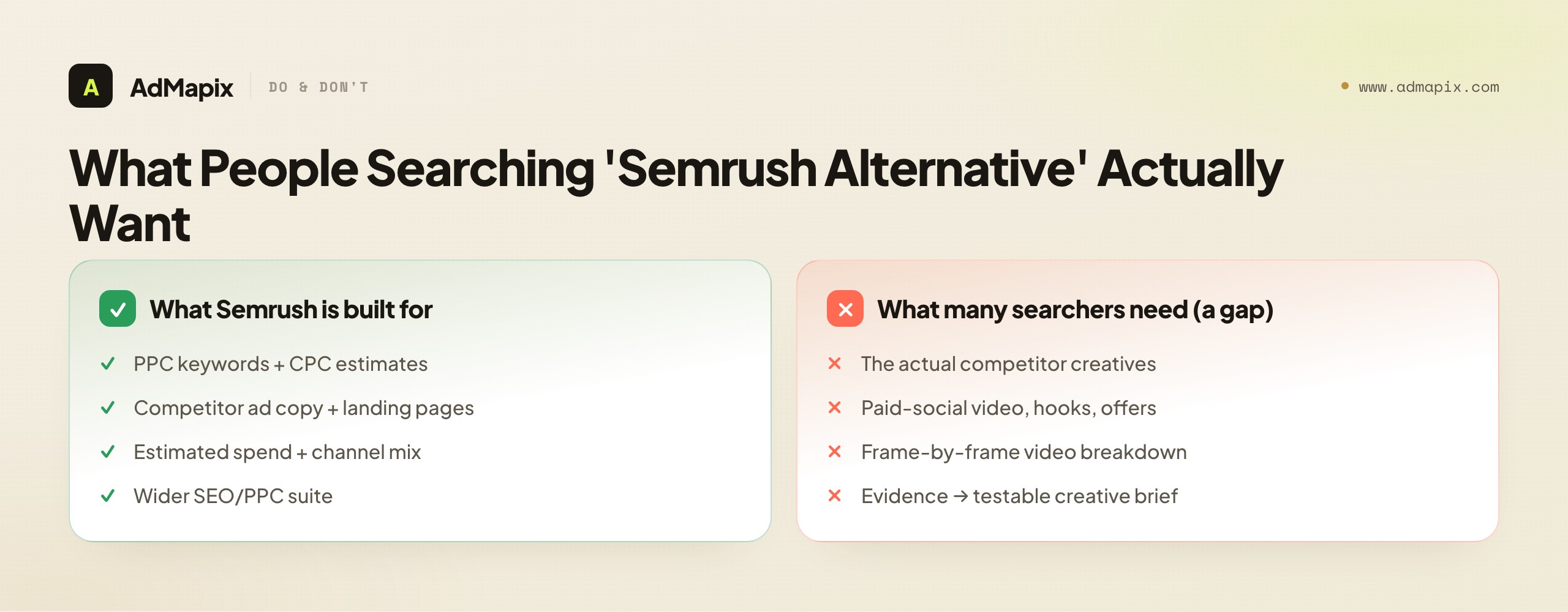
That gap between what Semrush does and what the searcher needs is where most mismatched purchases happen, and it is expensive in both directions. Buy a keyword-and-spend suite to solve a creative problem and you will have rich PPC data and still no competitor ads to study on Monday. Buy a creative tool to solve a keyword problem and you will have a beautiful creative library and no idea which terms to bid on. This guide is for PPC managers, paid-social buyers, agencies, founders, and creative strategists trying to decide which layer they are actually missing. We will define precisely what Semrush (and its AdClarity app) measure, separate the two distinct jobs hiding inside "ad intelligence," lay out exactly when each kind of tool wins, give you a fair-trial method so you decide from your own evidence, and show how strong teams run a two-layer stack instead of forcing one tool to cover both. We are honest throughout about where AdMapix fits — the creative-evidence layer — and where it does not — PPC keyword research and spend measurement — because recommending the wrong category is the costliest mistake in this whole space.
TL;DR — Choosing a Semrush Ad Intelligence Alternative
- "Ad intelligence" is two jobs, not one. PPC/search-and-spend research (keywords, ad copy, landing pages, estimated spend, channel mix) and creative-evidence research (the actual ads — hooks, video, offers). Semrush owns the first; the second is a different category.
- Choose Semrush (or a PPC alternative) when the decision is paid search: which keywords and bids, what competitors spend and where, which ad copy and landing pages they run, and SEO-adjacent research.
- Choose a creative-evidence tool like AdMapix when the decision is which ad concept, hook, video, or offer to test next — answered with real creative you can search, save, break down, and brief from.
- AdClarity (Semrush's app) is spend-and-channel intelligence, not a creative bench. It extends the measurement angle — how much, where — but it does not explain why a hook converts or how a video is built.
- All spend, impression, and keyword figures from any third-party tool are modeled estimates. Treat them as directional, never as the advertiser's billing data, and never present a creative library as proof of a competitor's ROAS.
- Decide from a trial, not a feature list. Run one competitor set, one market, one weekly decision through each candidate and judge time-to-deliverable, not chart count.
What "Ad Intelligence" Means — and Why It Splits in Two
The phrase "ad intelligence" causes more bad purchases than any other term in competitive research, because it names two fundamentally different jobs served by two different tool categories. Get the split clear before you look at a single product page and the rest of the decision becomes easy.
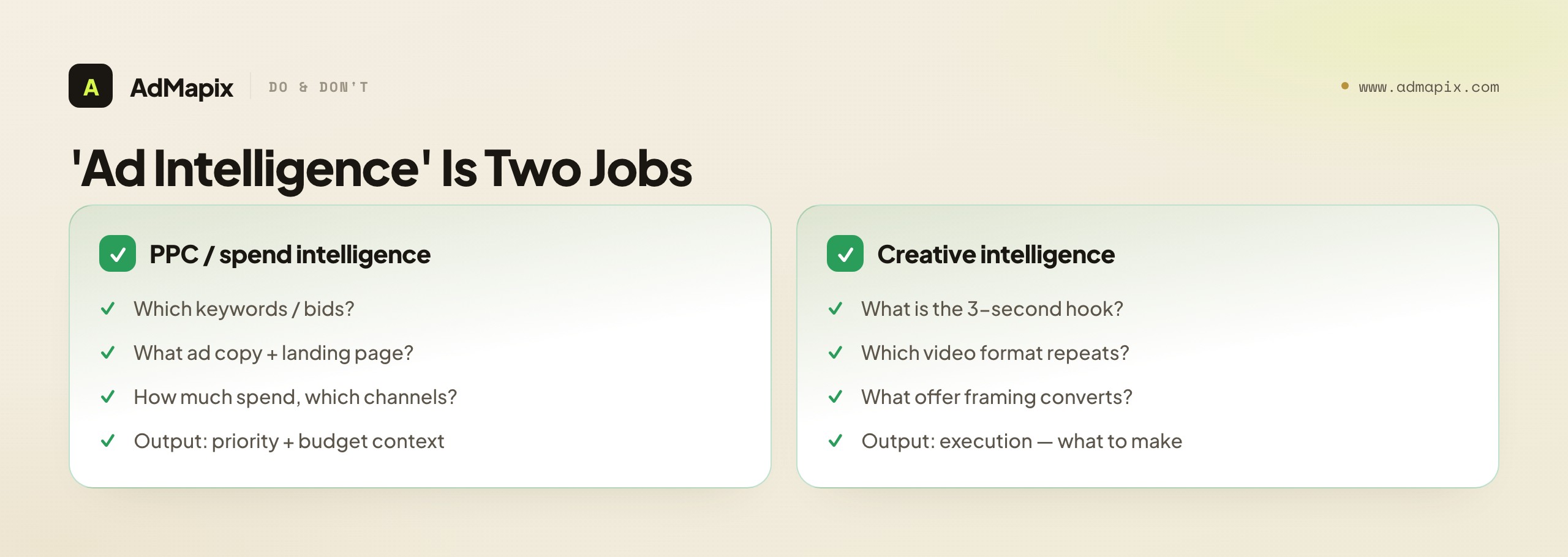
The first job is PPC and spend intelligence: understanding competitors' paid-search strategy and budget posture. Which keywords are they bidding on, and at roughly what CPC? What does their ad copy say, and where does it send the click? How much are they estimated to spend, and across which channels? This is the territory Semrush owns — keyword-led, measurement-first, deeply integrated with SEO research. It is the layer you use to plan a paid-search campaign, find keyword gaps, benchmark estimated spend, and decide budget allocation across channels. The output is a strategic and quantitative map: which terms matter, who's bidding, how much money is moving.
The second job is creative intelligence: understanding what competitors are actually showing in their ads, especially on paid social where the creative carries the performance. What is the hook in the first three seconds of their top video? What offer framing converts — discount, bundle, urgency, social proof? Which creative format repeats across a winning campaign, and which did they kill after a week? This is a completely different layer. Its output is not a keyword list or a spend estimate but the actual executions — the ads themselves, searched, saved, broken down frame by frame, and turned into testable briefs.
Here is the trap that catches so many buyers: both layers get marketed as "ad intelligence" and "competitor research," so teams assume a premium suite covers both. It does not. Semrush can tell you a competitor bids heavily on a keyword and spends across paid social; it cannot show you the specific video winning for them on that channel. A creative tool can show you that video and break down why it works; it cannot tell you which keywords the competitor bids on or their estimated CPC. Naming which job is your bottleneck — before you compare tools — is the entire decision.
What Semrush (and AdClarity) Actually Measure
To choose a Semrush alternative intelligently, be precise about what Semrush is and isn't. Per its own positioning, Semrush's Advertising Research surfaces competitor paid-search strategies, PPC spend estimates, keywords, ad copy, and landing pages, while the broader Advertising Toolkit covers campaign planning and ad execution across search, listings, display, video, and social. Its AdClarity app extends this with cross-channel advertising intelligence focused on estimated spend and channel mix. For the PPC-and-spend job, this is a category leader.
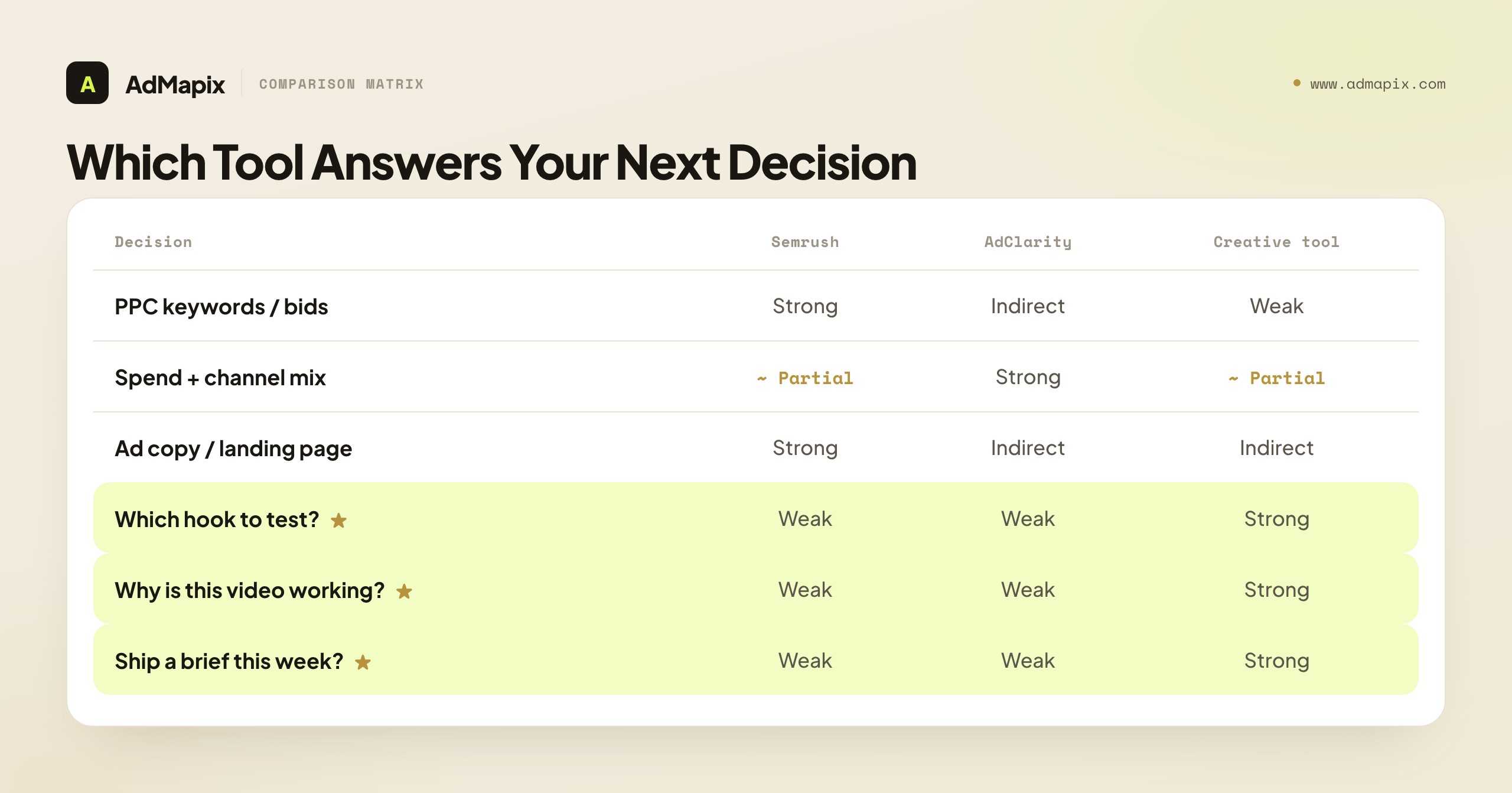
| Your next decision | What you need | Semrush fit | AdClarity fit | Creative-evidence fit |
|---|---|---|---|---|
| Which PPC keywords and bids? | Paid keyword data, CPC estimates, ad copy | Strong | Indirect | Weak |
| What's the competitor spending, and where? | Estimated spend, channel mix | Partial | Strong | Partial |
| Which ad copy / landing page do they run? | Search ad text, destination references | Strong | Indirect | Indirect |
| Which ad concept or hook do we test? | Real creatives, hooks, formats | Weak | Weak | Strong |
| Why is this video working? | Frame-by-frame video breakdown | Weak | Weak | Strong |
| Can I ship a creative brief this week? | Saved media + analysis + report | Weak | Weak | Strong |
The pattern is clear: the top three rows — keywords, spend, copy/landing pages — are where Semrush and AdClarity shine, and the bottom three rows — concept, video, brief — are where a creative-evidence tool takes over. If two or more of your real decisions land in the bottom half, a keyword-and-spend suite alone will not unblock you, no matter how much PPC data it surfaces.
One distinction worth holding onto: Semrush Advertising Research and AdClarity are not the same tool. Advertising Research is keyword-and-copy-led (what terms, what ad text, what landing page); AdClarity is spend-and-channel-led (how much, on which channels, in which markets). They answer different PPC-adjacent questions, so even inside the Semrush ecosystem you have to name which one your decision needs. And neither is a creative library — both are measurement-first.
When Semrush (or a PPC Alternative) Is the Right Call
Reach for Semrush — or a PPC-research alternative — when your work starts from keywords, paid-search strategy, or budget benchmarking rather than from the creative itself. There is a clear set of jobs where a keyword-and-spend suite is exactly right and a creative library would leave you guessing.
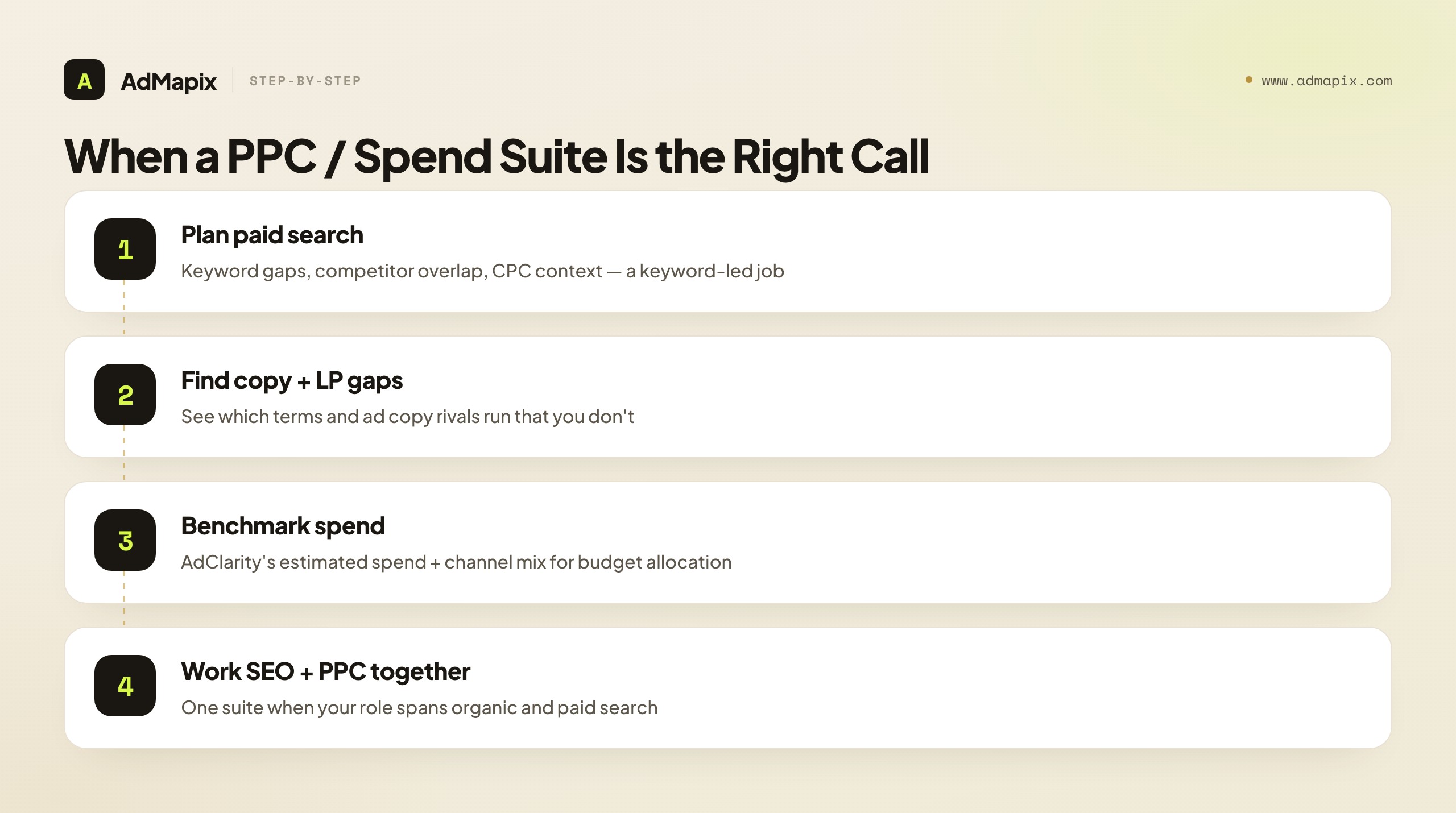
Planning a paid-search campaign. When the question is "which keywords should we bid on, at what estimated CPC, and what gaps have competitors left," that is Semrush's home turf. Keyword research, competitor keyword overlap, and copy references are the relevant signals, and no creative library produces them.
Finding keyword and copy gaps. If you want to see which search terms a rival ranks or bids on that you don't, and how their ad copy is framed, a PPC suite surfaces that directly. This is search-strategy intelligence, and it precedes any paid-social creative work.
Benchmarking estimated spend and channel mix. When leadership or a client asks "roughly how much is Competitor X spending, and on which channels," AdClarity's spend-and-channel view is the relevant tool. It informs budget allocation at the strategy level — though, as we'll cover, those figures are estimates, not billing data.
Working SEO and PPC together. Semrush's real strength for many teams is the integration of paid and organic research in one suite. If your role spans SEO and PPC, the keyword-led ecosystem is a genuine efficiency, and splitting it into separate tools would cost you context.
Allocating budget across channels. If the decision is "should we shift spend from search to paid social, and where are competitors investing," channel-mix visibility is the relevant signal — a measurement job, not a creative one.
If your decision lives in this list, a PPC suite is your starting point. And if Semrush itself is more suite than you need, a lighter PPC-research alternative may serve — but you are still shopping in the keyword-and-spend category, not solving a creative-evidence gap. For the search-specific competitor workflow this supports, see search ads intelligence and the AdWords intelligence playbook.
When a Creative-Evidence Alternative Wins
Now the other half — and the reason most people search for a Semrush alternative in the first place. Reach for a creative-evidence tool when the next deliverable is built from the ads themselves rather than from keywords or spend estimates. The tell is in the language of the request.
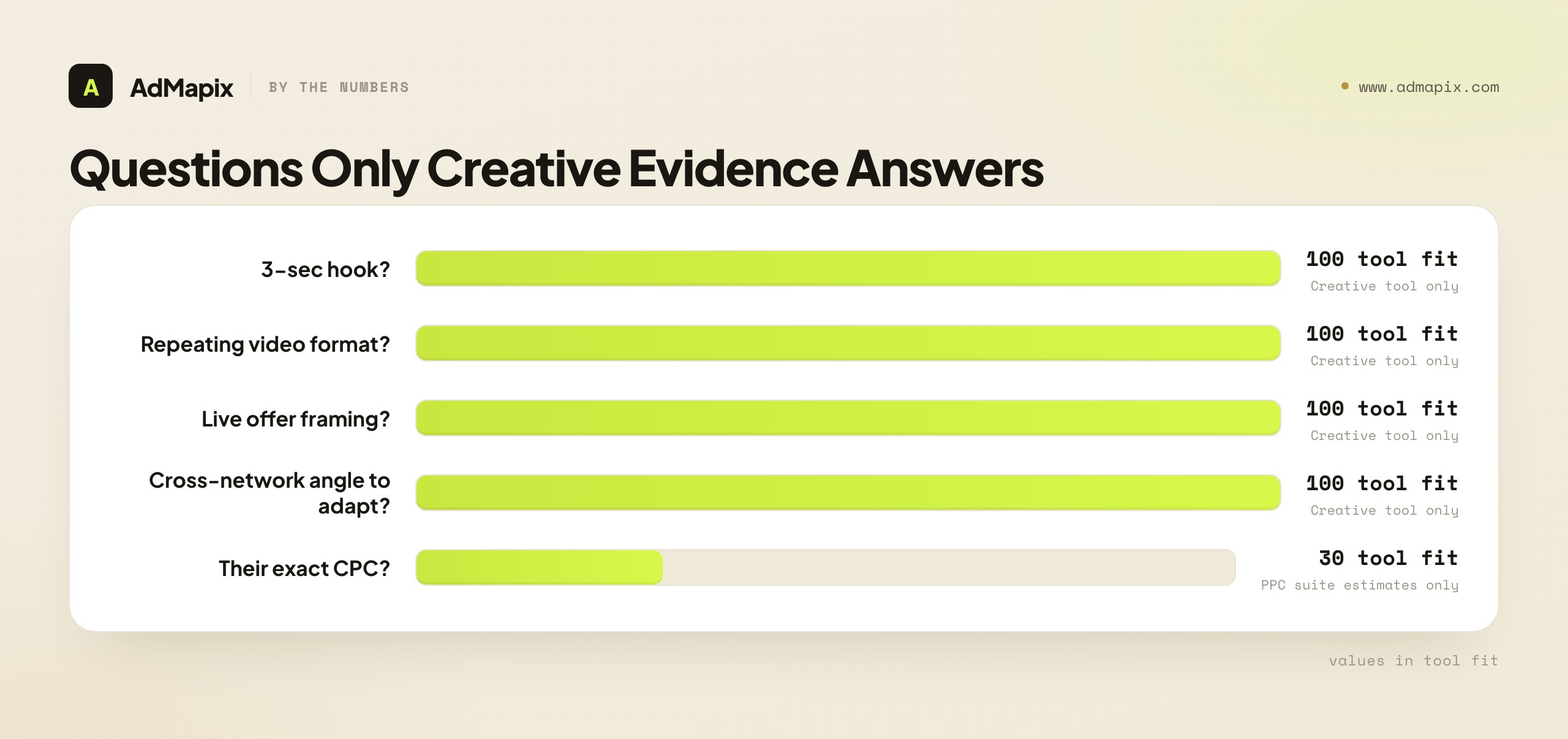
When a strategist, paid-social buyer, or creative lead asks any of these, no keyword-and-spend suite can help:
- "Which ad concept or hook should we test next?"
- "What is the competitor doing in the first three seconds of their top video?"
- "Which creative format and offer repeats across their winning paid-social campaigns?"
- "Show me the actual ad, not an estimate of their CPC."
- "What angle is working on Meta that we should adapt for TikTok?"
- "Can I turn this into a creative brief a designer executes by Friday?"
These are all creative-evidence questions. They require seeing and saving the real creative, then breaking down what makes it work — which is precisely what a keyword-led suite is not built to produce. Semrush gives you ad copy text and landing-page references; it does not give you a searchable wall of competitor video and image creatives you can analyze frame by frame and brief from. That is a different category: cross-network creative search plus video analysis.
This is the gap a creative-evidence tool like AdMapix is built for: search competitor ad creatives across networks, save the strongest examples as media, run video analysis on the ones worth studying, tag recurring patterns, and compile the findings into a brief or report. The deeper reason this layer is hard to substitute: on paid social especially, the creative is the campaign. Two advertisers can bid on identical keywords and spend similar budgets — information a PPC suite surfaces perfectly — yet one dramatically outperforms because its hooks, pacing, and offers are sharper. That performance gap is invisible to keyword and spend data and fully visible to creative analysis. If your disadvantage is creative, no amount of PPC research fixes it, because PPC research was never measuring the variable that's hurting you.
Why Cross-Network Visibility Matters — Even Coming From a Search Tool
There is a subtle reason a creative-evidence layer is especially valuable for teams arriving from a search-led suite like Semrush: cross-network creative coverage, which keyword and spend tools by their nature don't provide. A PPC suite can tell you a competitor is active and spending across channels, but it shows you the measurement of that activity, not the creative on each network — and the creative is where the migrating patterns live.
Winning ad angles travel across platforms. A hook crushing it on Meta this month frequently lands on TikTok the next, and the same product is routinely advertised with different framings on different networks to suit each platform's native grammar. If your competitive research only covers paid search, you miss this entirely: you see which keywords a rival bids on, but not the paid-social creative angle that is about to reshape your category. Worse, if you watch only your own channel's creative, you see each winning angle only after it has already saturated your platform and lost its edge. Cross-network creative visibility lets you assemble the full set of proven angles, spot the ones migrating toward your channel before they arrive, and adapt the strongest while it's still fresh.
This is precisely the blind spot a search-and-spend suite leaves open, and it's a structural one — not a feature Semrush is missing, but a category it doesn't operate in. The combination you actually want for the creative job is cross-network creative search with history: every network's executions in one searchable workspace, preserved over time so you can see how an angle traveled and how long it persisted. A keyword suite consolidates search data; a creative tool consolidates creative across networks. They're complements, not competitors. For the broader multi-channel version of this workflow, see spy on ads across all platforms.
How Reliable Is Estimated Spend, Really?
Because so much of the Semrush-alternative decision hinges on spend and keyword estimates, it's worth being precise about how much to trust them — getting this wrong is how solid research turns into a deck a competitor dismantles in one sentence.
No third-party tool sees inside a competitor's ad account. Estimated spend, impressions, CPC, and channel mix are modeled approximations built from observable signals and panel data, not the advertiser's billing records. Different vendors use different methods and panels, which is exactly why two reputable tools can report meaningfully different spend numbers for the same brand — neither is "lying," they're two models of an unobservable truth. The practical rules that keep you credible:
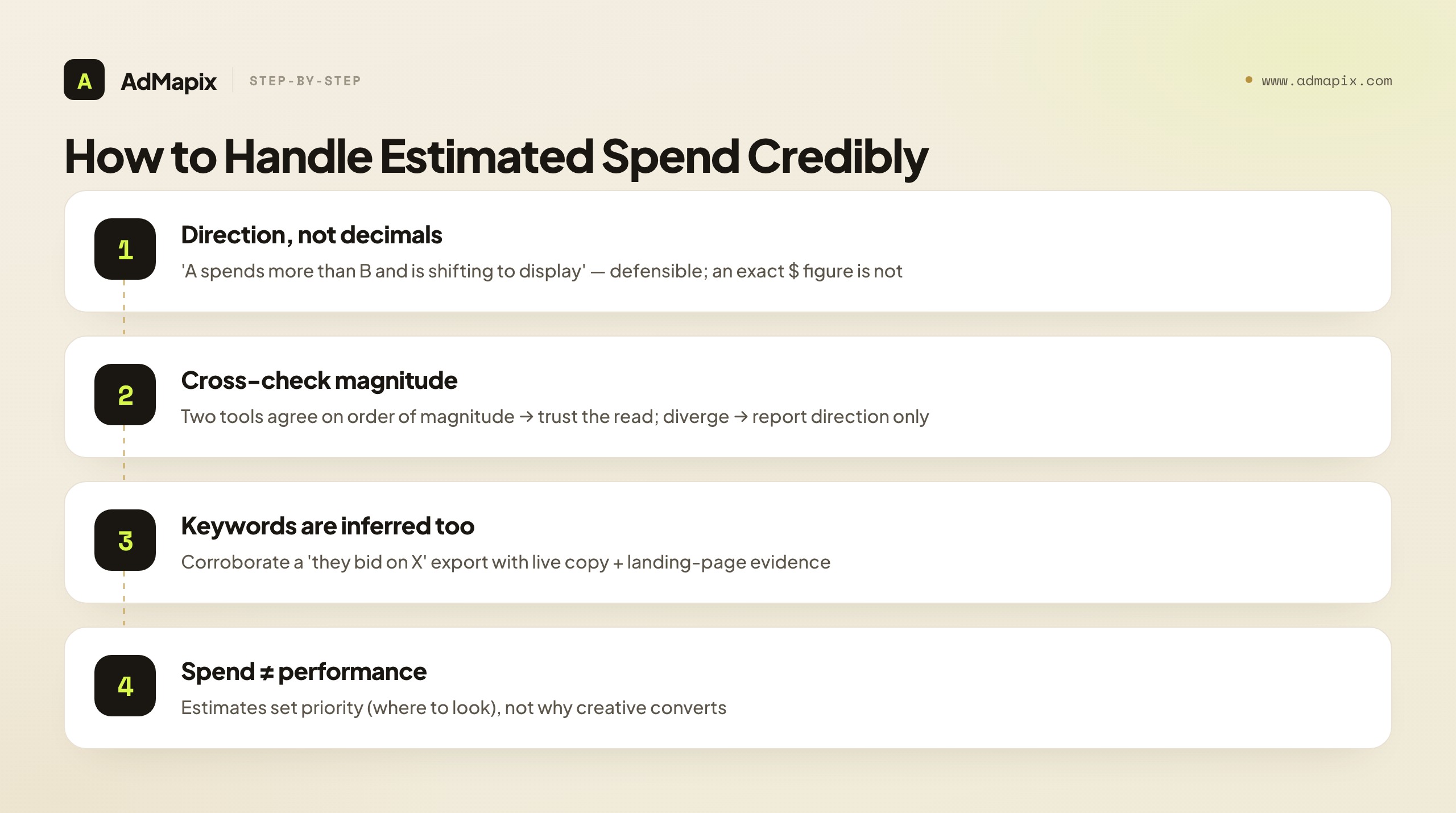
- Use estimates for direction and relative comparison, not precision. "Competitor A spends materially more than Competitor B on paid search, and is shifting budget toward display" is a defensible, useful read. "Competitor A spent exactly $47,300 last month" is a model's guess dressed as a fact — never present it to a client as billing-accurate.
- Cross-check magnitude, not decimals. When two tools roughly agree on the order of magnitude and the direction of change, trust that read. When they diverge wildly, trust neither's absolute figure and report only the direction.
- Keyword inference is directional too. A "competitor keywords" export is modeled overlap, not their actual bid list. Treat it as a discovery starting point, then corroborate with live ad-copy and landing-page evidence before claiming "they bid on X."
- Spend estimates set priority; they don't explain performance. Knowing a rival spends heavily on a channel tells you where to look, not why their creative converts. That "why" lives in the creative layer.
There's a practical reason two tools disagree that's worth understanding rather than just tolerating: spend models infer budget from different inputs — some weight observed impressions and estimated CPMs, others lean on panel-derived traffic and channel signals — and each vendor's panel covers different regions, channels, and advertiser sizes unevenly. A tool with strong US paid-search coverage may badly under-read a competitor's spend in Southeast Asia or on a network it samples thinly. So the divergence isn't random noise; it's a signal about where each model is confident. The disciplined move is to know your tools' coverage strengths and weight their estimates accordingly in the markets and channels that matter to you, rather than averaging two numbers that were never measuring the same slice.
The honest framing in any report is "here's the estimated scale and direction of their investment, and here's the creative observably running" — keeping modeled spend and observed creative in separate, clearly-labeled columns. Conflating "estimated to spend a lot" with "this specific ad earned a high ROAS" is the fastest way to lose a room.
What Public Ad Data Can — and Cannot — Prove
Beyond spend specifically, every tool in this space leans on public or modeled signals, so intellectual honesty about the limits is what keeps your reports defensible. The boundary is sharp once you draw it.
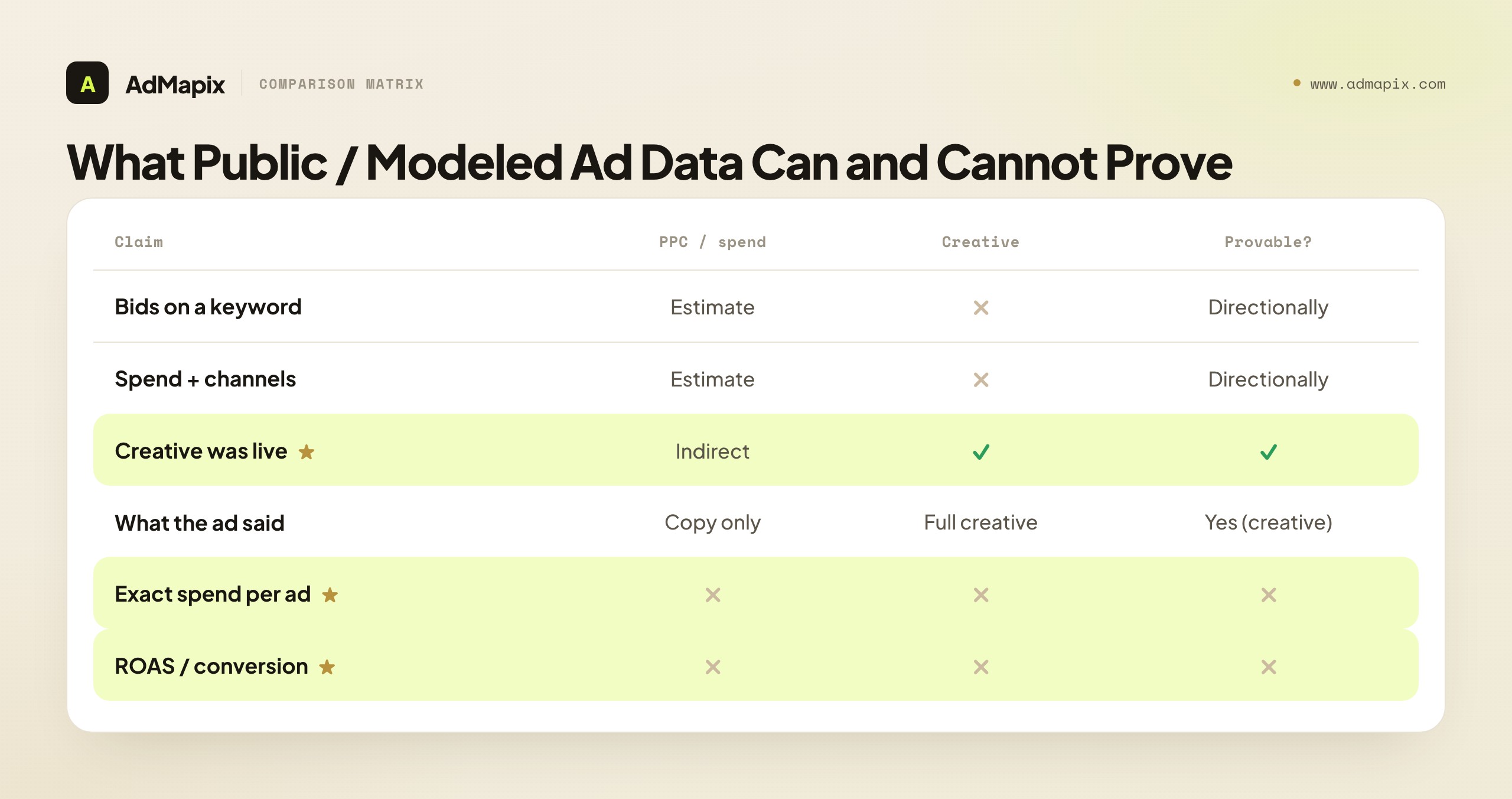
| Claim | PPC / spend suite | Creative evidence | Provable? |
|---|---|---|---|
| "They bid on / target this keyword" | Modeled estimate | No | Directionally |
| "Roughly this much spend, on these channels" | Modeled estimate | No | Directionally |
| "This creative was live and observable" | Indirect | Yes — saved it | Yes |
| "Here's what the ad / video said" | Copy text only | Yes, full creative | Yes (creative) |
| "Exact spend behind this one creative" | No | No | No |
| "Exact targeting parameters" | No | No | No |
| "The conversion rate / ROAS it earned" | No | No | No |
Read this as the outer boundary of every claim in your reports. Modeled tools can give a directional read on keywords and spend; a creative library can prove an ad ran and let you study its structure. Neither can prove the spend behind a single creative, the exact targeting, or the conversion performance — those live inside the advertiser's private account, and no external tool sees them. The correct report framing is "here is what is observably in market and likely working, and here is the estimated scale of investment," never "here is what this campaign earned." Keep two columns mentally separate at all times: observed/estimated (you saw it, or a model approximated it) versus performed (it converted). Conflating them turns competitive intelligence into a claim you can't defend.
The Two-Layer Stack: How Strong Teams Set This Up
The teams that get the most from competitive research stop forcing one tool to do both jobs and instead run a deliberate two-layer stack: a PPC/spend-intelligence layer for context and budget, and a creative-evidence layer for executions and testing. Each answers what the other can't.
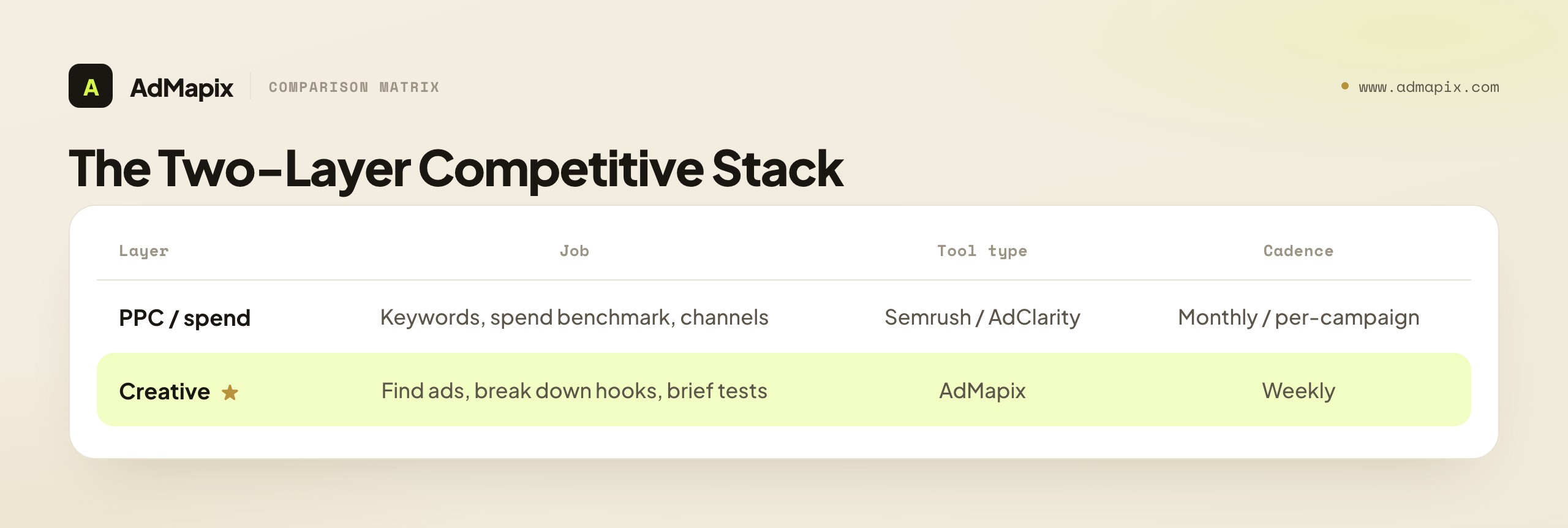
| Layer | Job | Tool type | Output | Cadence |
|---|---|---|---|---|
| PPC / spend | Keyword strategy, spend benchmark, channel allocation | Semrush / AdClarity / PPC alt | Keywords, CPC, estimated spend, channel mix | Monthly / per-campaign |
| Creative | Find live ads, break down hooks and offers, brief tests | AdMapix | Saved creatives, video breakdowns, briefs | Weekly |
The two layers run on different clocks, which is part of why one tool can't serve both well. PPC and spend intelligence is a slower, planning-led loop — you set keyword strategy and rebalance channel budgets per campaign or per month, and modeled estimates are well suited to that pace. Creative intelligence is a fast loop — winning paid-social ads fatigue in days, new angles appear weekly, and your testing cadence demands fresh creative evidence on a much tighter schedule. A tool optimized for monthly keyword-and-spend research is not built for the weekly creative grind, and vice versa.
The handoff between layers is where value compounds. The PPC/spend layer tells you where to look: this competitor is bidding hard on these terms, spending up on this channel, shifting budget toward paid social. The creative layer tells you what to test: here are the actual ads winning on that channel, here is the hook driving them, here is the brief. Spend context without creative evidence is a budget map with no executions; creative evidence without spend context is execution with no sense of where the money — and therefore the competitive pressure — is concentrated. Run both and you get prioritized, executable intelligence. For the broader stacked workflow, see competitive analysis in paid advertising and the structured competitor ad analysis framework.
How to Run a Fair Head-to-Head Trial
Don't decide from feature pages or sales demos — decide from a parallel trial on your evidence. Feature lists reward the tool with the longest spec sheet; a real trial rewards the tool that produces your next deliverable fastest. Here's a method that yields a defensible decision in about a week.
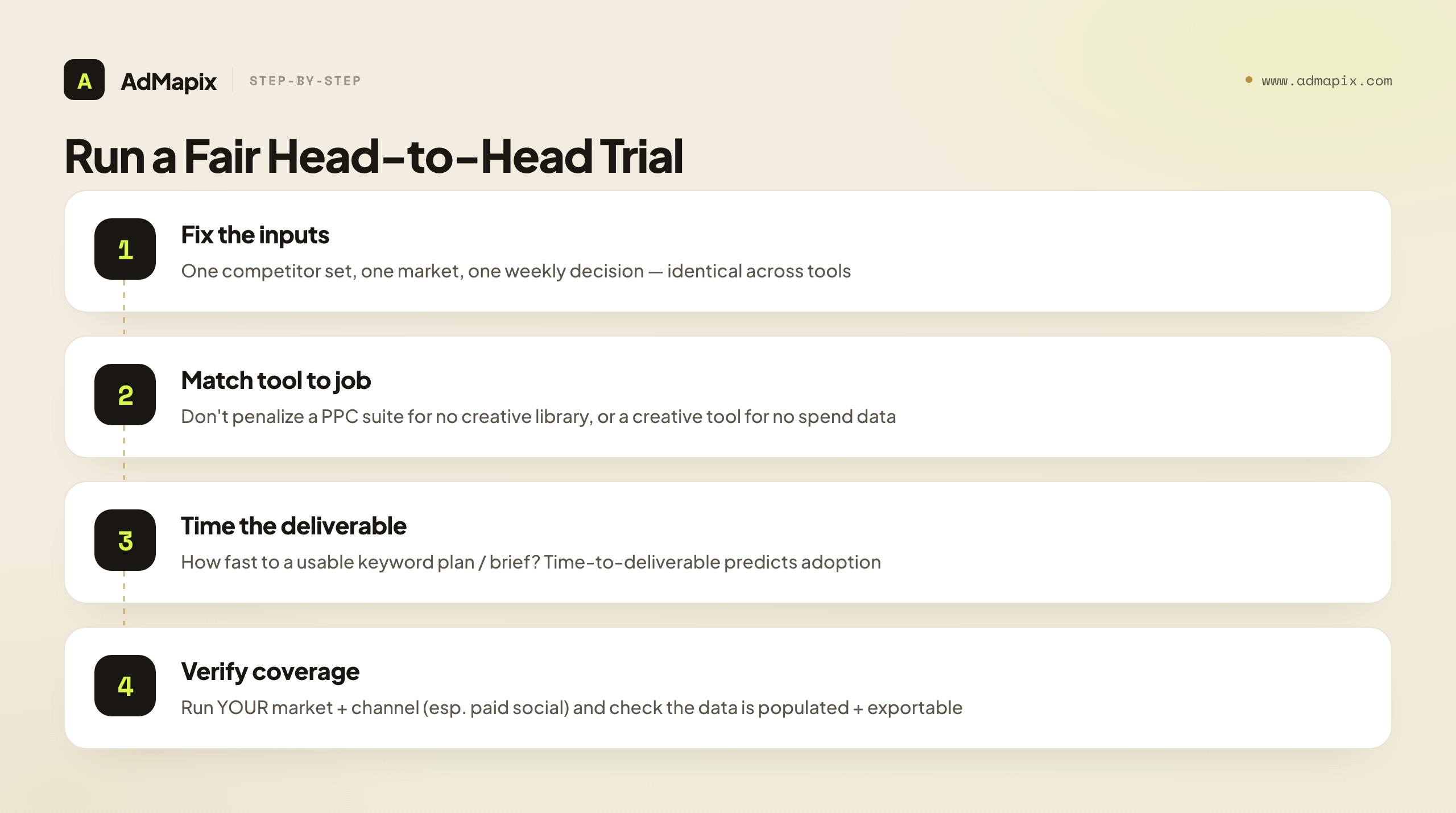
1. Fix the inputs. Pick one competitor set (three to five rivals), one target market, and one concrete weekly decision you actually need — for example, "which keywords to add" (PPC) or "which hook to test next" (creative). Load identical inputs into each candidate so the comparison is apples to apples.
2. Name the job, then judge the right tool on it. This is the step most trials botch. If your decision is creative, don't penalize a PPC suite for lacking a creative library, and don't credit a creative tool for lacking spend estimates — you're testing which tool serves your job, not which has more features. Match the tool category to the bottleneck you named in step 1.
3. Time the deliverable. For each tool, measure how long it takes to produce a usable output for your decision — a keyword plan, a spend benchmark, a creative brief. Time-to-deliverable is the most predictive metric of whether a tool actually gets used; slow-to-deliverable tools quietly get abandoned no matter how rich their data.
4. Check evidence quality and export. Can you trust the output and get it out? For a PPC suite, do the keyword and spend estimates match your real-world sense? For a creative tool, is the creative current, and can you export saved media and briefs into the format your team or client uses? Trapped data is unused data.
5. Verify coverage in your market and channel. Demos run on the tool's strongest data. Run your exact category, market, and channel (especially paid social, which keyword suites cover thinly) and check whether the data is genuinely populated or sparse.
6. Decide on the deliverable, not the dashboard. The winning tool makes your next action clearer, faster. If two tools win on different jobs — a PPC suite for keywords, a creative tool for briefs — that's your signal to run both in a two-layer stack rather than buy one compromise tool.
Match the Tool to Your Role
The right Semrush alternative also depends on who you are and what your week looks like, because the same "ad intelligence" need shows up differently across roles. Mapping yourself to a role makes the PPC-vs-creative call concrete.
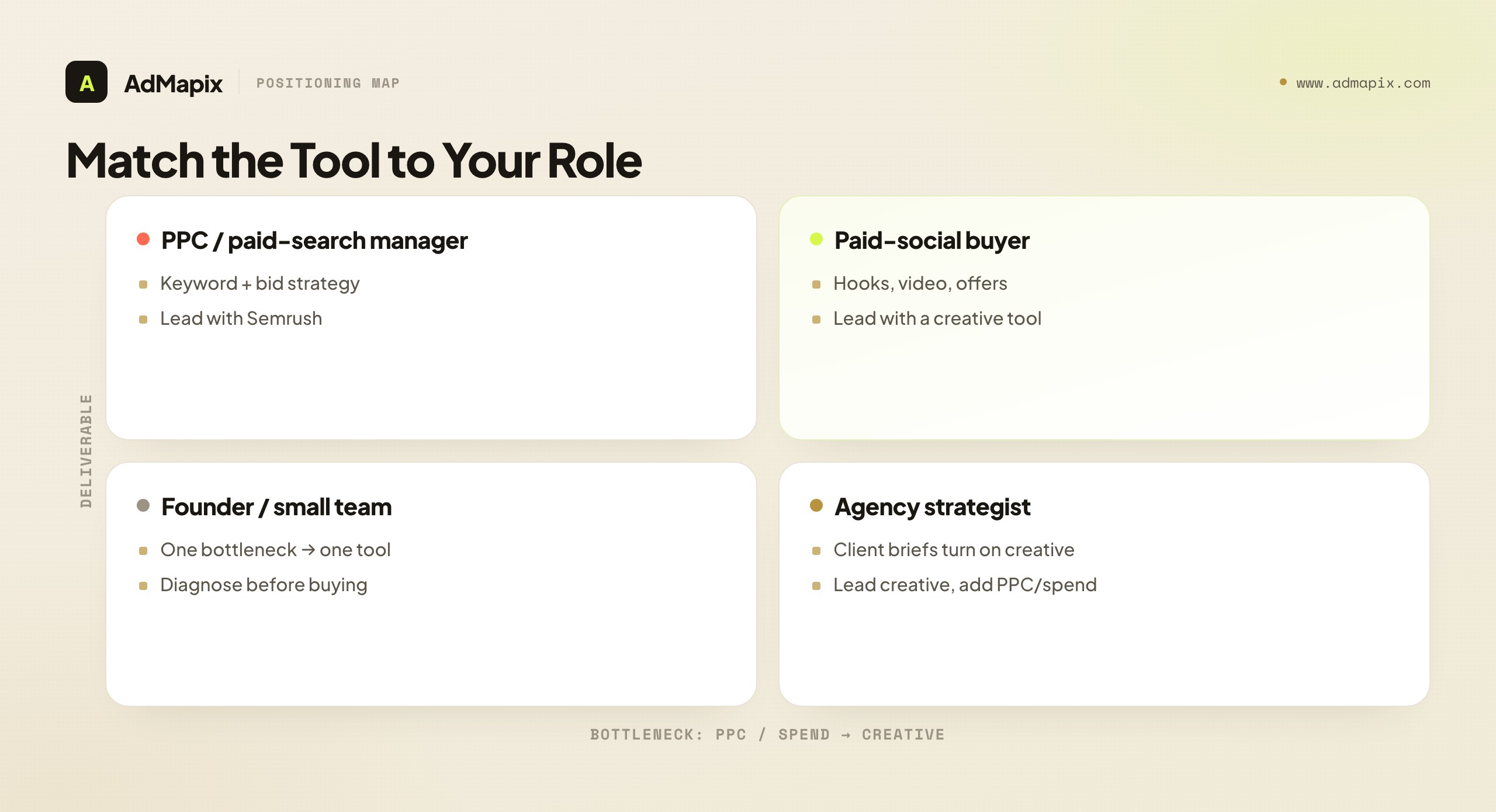
PPC / paid-search manager. Your week is keyword strategy, bid management, and ad-copy testing on search. Your bottleneck is genuinely PPC research — keyword gaps, competitor copy, CPC context — so a keyword-and-spend suite leads, and creative evidence is occasional context for the rare display or video campaign. You're one of the few roles that genuinely leads with the Semrush layer.
Paid-social buyer. Your performance lives or dies on creative — hooks, video, offers — so your bottleneck is almost always creative evidence, not keywords. Lead with a creative-intelligence tool; pull in spend estimates only to gauge how hard a competitor is pushing a channel. A keyword suite, however powerful, won't tell you the next thumbstop to test.
Agency strategist. You serve multiple clients and need both layers, but the deliverable decides. Client creative briefs and pitch decks usually turn on creative direction — "here's what's winning in your category and what we'll test" — a creative-evidence job. PPC and spend data strengthen the pitch (here's the scale and the keyword opportunity) but rarely close it on their own. Most agencies lead with the creative layer for recurring client work and pull in PPC/spend for campaign planning and new-business sizing.
Founder or small-team marketer. Budget is tight and the bottleneck is usually singular. Diagnose ruthlessly: if you can't decide what to bid on or where the budget should go, a PPC/spend suite; if you can decide that but your ads underperform, a creative tool. Buy one tool for your one bottleneck, and resist the broader-sounding platform — breadth you won't use is just expensive shelfware.
The thread: the same phrase means different purchases for different roles, and the deliverable you're judged on — a keyword plan, a client deck, a tested creative brief — is the most reliable guide to which layer leads.
Cost: Compare Price Per Decision, Not Sticker Price
Pricing is where the PPC-vs-creative decision quietly goes wrong, because the two categories are priced for different buyers and comparing their headline numbers tells you almost nothing useful. A full suite like Semrush is priced for teams that need an integrated SEO-and-PPC research platform across many features — its value is in breadth and the depth of keyword and spend data. A focused creative-intelligence tool is priced for teams whose recurring job is finding and testing ad creative. Putting the two sticker prices side by side is a category error; you are comparing the cost of a keyword-and-spend research suite to the cost of a creative testing workbench.
The framing that actually helps is cost per decision made. A tool is cheap or expensive only relative to how many real decisions it lets you make and how fast. A PPC suite that costs more but unblocks your keyword strategy and spend benchmarking every campaign is cheap for that job. A creative tool that costs less but produces a tested brief every week is cheap for that job. The expensive purchase, in both directions, is the mismatched one: a keyword suite bought to answer creative questions sits half-used because it never produces the brief the team needed, and a creative tool bought to answer keyword questions can't plan a paid-search campaign no matter how many seats you buy. The waste isn't the price tag — it's paying anything at all for a tool that doesn't move your actual bottleneck.
Two practical implications follow. First, don't downgrade across categories to save money — a cheaper PPC tool does not solve a creative gap, it just makes the gap cheaper to keep. If your bottleneck is creative, the cost question is "which creative tool earns its keep," not "which keyword suite is cheapest." Second, a two-layer stack is usually cheaper than it looks, because each tool is doing the job it's priced for, and neither is over-bought to cover a job it can't. A right-sized PPC tool plus a right-sized creative tool frequently beats paying suite rates for a platform you're stretching to cover a creative layer it was never built to serve. Run the cost question through your actual weekly deliverable and the right-sized purchase usually becomes obvious.
When You Might Not Need a Creative Tool At All
Honest tool selection includes naming the cases where the answer is "buy neither category" or "you already have what you need," because the most expensive purchase is the one that solves a problem you don't actually have. A guide that only ever concludes "you need the other tool" isn't a decision framework; it's a sales funnel. So here are the situations where a creative-evidence layer is genuinely not your next move — and a Semrush-style PPC suite, or even just the free libraries, is enough.
When you genuinely only run paid search. If your entire program is text search ads and you have no display, video, YouTube, Performance Max, or paid-social creative, the creative-evidence layer is lower priority by design. Your performance lever is keywords, copy, and landing pages — exactly Semrush's strengths — and a creative library would mostly sit unused. Add creative tooling when your channel mix broadens beyond text search, not before.
When your bottleneck is upstream of the ad entirely. If your real constraint is a landing page that converts poorly, a weak offer, or pricing that loses on its own merits, no amount of competitor creative evidence fixes it. Studying rival hooks while your post-click experience leaks customers is optimizing the wrong stage. Diagnose where the funnel actually breaks; if it breaks after the click, conversion-rate work beats any ad library.
When you have very few competitors running creative. In a thin or nascent category where two or three rivals advertise sporadically on social, the creative-evidence pool is too shallow to justify a weekly research cadence or a dedicated tool. You can monitor those few manually in the free public libraries. The paid creative tool earns its keep when competitor volume and creative throughput make manual monitoring the bottleneck — below that threshold, the free libraries plus a spreadsheet suffice.
When the free public libraries already answer your question. For occasional, low-stakes "what is this one rival running right now" checks, the Meta Ad Library and Google Ads Transparency Center are free and often enough. The case for a paid creative tool rests on history (public ads vanish when campaigns stop), cross-network consolidation (one workspace instead of tab-hopping), and volume (more competitors than you can track by hand). If none of those three apply yet, the free layer is the right starting point.
The thread: a creative-evidence tool is the right answer when your bottleneck is genuinely competitor creative at a cadence and volume manual work can't sustain, on channels where creative carries the performance. When the bottleneck is elsewhere — a search-only program, a leaky funnel, a thin category, or a need the free libraries already meet — naming that honestly saves you a subscription you'd regret. The same discipline applies to the PPC layer: don't buy a full Semrush suite to answer a question a lighter keyword tool or your own Google Ads account already covers. Buy for the bottleneck that's actually blocking your next decision, and be willing to conclude that the answer is "neither, yet."
A Worked Example: Same Competitors, Different Right Tools
Frameworks land better with a concrete walk-through, and the PPC-vs-creative decision is a case where two teams researching the same competitors reach different right answers — which is exactly the point.
Team A — a PPC manager at a B2B SaaS company. Her week is keyword strategy and bid management on Google Ads. Her bottleneck is genuinely PPC research: which terms competitors bid on that she doesn't, how their ad copy is framed, and where the CPC pressure is rising. She runs five competitors through Semrush's Advertising Research, finds a cluster of high-intent comparison keywords her account isn't covering, reads the rivals' ad copy and landing pages, and ships a keyword-and-copy plan by Friday. A creative library would have shown her competitor videos she has no campaign to run — interesting, but not the deliverable her job demanded this week. For her, Semrush is the right lead tool, and creative tooling is something she'd add only if the company expands into paid social or YouTube.
Team B — a paid-social buyer at a DTC brand. He researches the same five competitors, but his performance lives or dies on Meta and TikTok creative — hooks, video, offers. He runs the competitors through a creative-evidence tool, finds three of them converging on a "time-savings" angle in short-form video, extracts the mechanism, and writes a test brief by Friday. Semrush would have told him those rivals bid on certain keywords and spend across paid social — useful context for how hard they're pushing, but nothing he can turn into a thumbstop. He uses estimated spend only to gauge which competitor is escalating, then leads with the creative layer for the actual brief.
Same five competitors, opposite correct tools — because the deliverable, not the rival list, decides the category. Team A needed a keyword-and-copy plan; Team B needed a creative brief. Neither team's tool would have produced the other's deliverable, and neither answer was discoverable by comparing feature lists — only by naming the weekly decision each was actually blocked on. The instructive failure would have been either buying the other's tool because it was the more familiar name, then discovering it answers a question they didn't have. This is also why the strongest setups run both layers: Team A's company, once it launches paid social, will want the creative layer beside Semrush, and Team B's brand benefits from spend context in front of the creative work. The two-tool stack isn't redundancy; it's coverage of two genuinely different jobs.
How to Combine the Two Layers in a Weekly Workflow
For teams that do run both a PPC suite and a creative-evidence tool, the value is highest when they're wired into one routine rather than checked in isolation. Here's a lightweight weekly loop that uses each layer for the job it's best at and hands off cleanly between them — the whole thing takes under an hour and compounds over a quarter.
Start with the spend-and-keyword layer to set priority. Early in the week, scan the PPC/spend view for movement: a competitor whose estimated spend is climbing on a channel, a new keyword cluster a rival started bidding on, a shift in which terms carry the most pressure. You're not collecting creative yet — you're deciding where to look. The PPC layer's job here is to point the creative research at the competitor and channel where the money and the keyword pressure are concentrated, so you don't spread the creative work thin across rivals who aren't actually escalating.
Hand off to the creative layer to decide what to test. Take the competitor and channel the spend layer flagged, and run them through the creative-evidence tool: pull the live ads, break down the hooks and offers, tag the repeating mechanism. This is where the week's actual deliverable comes from — a test brief grounded in what's winning on the channel where a rival is spending up. The spend layer told you the money is there; the creative layer tells you what angle the money is buying, which is the part you can actually act on.
Close the loop on your own analytics. Whatever test the creative layer produced, run it and let your own account data confirm or kill it — neither the spend estimate nor the saved ad proves performance, only your results do. Over a quarter, this loop builds a private record connecting where competitors invested (PPC layer), what creative they ran there (creative layer), and what actually worked for you (your analytics) — a three-way history that makes each subsequent week's prioritization sharper. That compounding is the real payoff of running both layers in one workflow rather than as two disconnected subscriptions.
One discipline keeps this loop honest: resist the temptation to let the spend layer alone drive creative decisions. A high estimated spend on a channel tells you a competitor is committed there, not that their creative is good — plenty of well-funded campaigns run mediocre ads. The spend signal is a prioritization input, narrowing where you point the creative microscope; it is never a substitute for actually looking at the ads. Teams that skip the creative step and brief straight off spend estimates end up chasing competitors who spend a lot rather than competitors whose creative is worth learning from, which are not the same list. Always let the creative layer have the final word on what to test, with the spend layer doing only the job it's good at: telling you where to aim.
Turning Creative Evidence Into a Testable Brief
Finding competitor ads is only half the creative job; the value is in converting evidence into a testable brief, and this is where teams most often stall. A folder of saved competitor ads that never becomes a test is research theater — it feels productive and changes nothing. Here is the discipline that turns observed creative into something your team can actually run, and it is exactly the step a keyword-and-spend suite cannot perform for you.
Start from the mechanism, not the surface. When you save a strong competitor ad, the temptation is to note what it looks like ("UGC video, fast cuts"). The useful move is to extract the mechanism — what buyer anxiety or desire the ad addresses. If a rival's hook is "still tracking expenses by hand?", the mechanism is the pain of slow, error-prone manual work, and the offer answers it with automation. The mechanism is portable; the exact execution is not. You test the mechanism in your voice with your proof, not a clone of their footage — copying the surface imports a claim your funnel may not back, and cedes the creative initiative.
Look for repetition, because repetition is the signal. A single competitor ad is an experiment that may have failed. The same hook or offer running across multiple ads, or persisting for weeks, is far stronger evidence that the mechanism is working — running ads costs money, so persistence is a vote. Tag recurring patterns across your saved set; angles that repeat across several competitors are the highest-confidence ones to test first, because the market has validated them more than once. (This is also where spend context earns its keep: a repeating creative on a channel where a competitor is estimated to be spending up is a doubly strong signal — the PPC layer telling you the money is there, the creative layer telling you the angle is.)
Write the brief as a hypothesis, not a description. A testable brief names the mechanism, the angle, the format, and what you expect to learn — "test a 'reclaim your evening' time-savings hook in 15-second UGC, because three competitors run time-savings angles and our current creative leads on features." That framing forces the research to produce a decision (run this test) rather than a summary (here are some ads). End every creative-research session on a brief, or the session didn't earn its place in the week.
Close the loop on your own data. Competitor evidence generates hypotheses; only your own results confirm them. After a test runs, compare the outcome against the competitor pattern that inspired it — did the validated-elsewhere angle work for you? Over a quarter this builds a private library of what trended, what you tested, and what actually converted in your account, which is the asset that makes next quarter's briefs faster and sharper. For the structured version of turning competitor signal into hypotheses, see the competitor ad analysis framework.
Common Mistakes When Choosing a Semrush Alternative
The failure modes are predictable, which makes them preventable. Almost every wrong purchase here traces to one of these.
- Using a spend or keyword suite to write a creative brief. PPC and spend data set priorities but never explain the hook, the video structure, or the offer. If your bottleneck is creative, a different PPC tool is still the wrong category.
- Using a creative library for measurement. Saved ads don't replace keyword research, spend benchmarking, viewability, or brand-safety measurement. Keep the jobs separate.
- Trusting estimated spend as exact. Modeled spend, impressions, and CPC are directional. Present them as billing-accurate and a client with their own data dismantles the deck instantly.
- Confusing Advertising Research with AdClarity. They answer different PPC-adjacent questions — keyword/copy versus spend/channel. Check which matches your decision before assuming "Semrush" covers it.
- Comparing tools on feature count. The longest spec sheet rarely wins the real job. What matters is which tool produces your next deliverable fastest.
- Deciding from a demo instead of a trial. Vendor demos run on the vendor's best data. Decide on your competitor set, in your market, against your weekly decision.
- Assuming one tool covers both layers. PPC research and creative testing are different jobs on different clocks. Pretending one tool does both leaves a gap — usually the creative gap, because buyers underestimate it.
When to Use AdMapix (Honest Positioning)
Use AdMapix when your bottleneck is competitor creative evidence, not keyword or spend research — that is, when you already have (or don't need) PPC context and now need to see, save, and break down the ads behind it. We'll state plainly what it is and isn't, because recommending it for the wrong job would waste your money.
AdMapix is a cross-network ad creative tool for creative strategists, paid-social buyers, and agencies who need to find live competitor ads, study the video, tag recurring patterns, and turn them into testable briefs and client reports on a weekly cadence. It is the layer that complements a PPC suite rather than replacing it.
AdMapix is not a PPC keyword-research, CPC-bidding, or enterprise spend-measurement tool. It does not estimate keyword bids, surface paid-search copy at the keyword level, or model market-wide spend. If your job is keyword strategy, CPC context, or spend benchmarking, a suite like Semrush (or AdClarity for spend specifically) leads, and you can layer AdMapix on top once the question shifts from what to bid on to what creative to make.
A practical workflow: run your competitor set in Search AdMapix to surface what's currently live, keep the strongest creatives in Media, use Video Analysis to break down the hooks and structure worth testing, and compile the patterns in Reports. When the weekly loop saves real briefing time, compare seats on Pricing or start from Login. For the wider landscape of tools to evaluate alongside it, see best ad spy tools 2026, marketing intelligence tools, and the parallel Similarweb alternative for ad intelligence.
FAQ
What is the best Semrush ad intelligence alternative?
There is no single best alternative — it depends on the layer you're missing. If you need PPC keywords, CPC estimates, ad copy, and landing-page research, stay in a suite (Semrush or a lighter PPC alternative). If you need real competitor creatives, video breakdowns, and report-ready evidence, a creative-evidence tool like AdMapix fits better. Name your bottleneck first; the right alternative follows directly from it.
Can AdMapix replace Semrush?
Not for keyword research or spend measurement. AdMapix covers the creative layer — searching competitor ads across networks, saving media, analyzing videos, tagging patterns, and building reports — which is a different category from Semrush's PPC-and-SEO suite. Most teams that need both run a suite for keyword and spend context and AdMapix for creative evidence, rather than treating one as a replacement for the other.
Is AdClarity the same as Semrush Advertising Research?
No. Advertising Research focuses on paid-search keywords, ad copy, and landing pages, while the AdClarity app focuses on cross-channel advertising intelligence and estimated spend. One is keyword-and-copy-led; the other is spend-and-channel-led. They answer different questions, so check which one matches your decision before assuming "Semrush" covers it — and note that neither is a creative library.
How reliable are Semrush's spend and keyword estimates?
They're modeled approximations, not the advertiser's billing data, so they're reliable for direction and relative comparison but not for exact figures. Different tools use different methods and can report different numbers for the same brand. Use the estimates to set priorities and spot trends — "Competitor A spends more and is shifting toward display" — and never present an exact dollar figure to a client as billing-accurate. Corroborate keyword inferences with live ad-copy and landing-page evidence before claiming a competitor bids on a specific term.
When should I use both Semrush and AdMapix?
Use them together when you need keyword-and-spend context plus creative direction. Let Semrush (or AdClarity) tell you which terms competitors bid on, roughly how much they spend, and where — then use AdMapix to collect the actual creatives, analyze the videos, and turn the patterns into a brief. The suite tells you where to look and how the budget pressure is distributed; the creative tool tells you what to test.
Does a creative tool help if I only run paid search, not paid social?
Less than for a paid-social team, but not zero. Paid search leans more on copy and keywords — Semrush's strengths — so a creative library is lower priority. But if you run any display, video, YouTube, or Performance Max creative, the creative layer matters, and watching competitors' paid-social creative often reveals messaging angles that translate into stronger search ad copy and landing pages. For a pure text-search-only program, lead with the PPC suite; add creative tooling when your channel mix broadens.
How should I test these alternatives fairly?
Pick one competitor set, one market, and one concrete weekly decision. Run the same brands and dates through each tool and compare on a single criterion: which produces a usable deliverable faster. Match the tool category to your named bottleneck — don't penalize a PPC suite for lacking a creative library or a creative tool for lacking keyword data. Judge evidence quality, export, coverage in your real market and channel, and whether the next action is clearer — not which dashboard has more charts.
Can public ad data tell me what a competitor actually spent or earned?
No. Modeled tools can give a directional estimate of spend and keywords, and a creative library can prove an ad ran and let you study it — but none of it reveals the exact spend, targeting, or conversion performance behind a specific campaign. Those live inside the advertiser's private account. Frame findings as "estimated investment and observed creative," keep modeled and observed data in separate labeled columns, and never present a creative library as proof of a competitor's ROAS.
What's the difference between PPC intelligence and creative intelligence?
PPC intelligence is keyword-and-spend-led: which terms competitors bid on, at what estimated CPC, how much they spend, and across which channels. Creative intelligence is execution-led: the actual hooks, videos, and offers running in their ads. PPC intelligence sets priority and budget context (where to compete, how much pressure there is); creative intelligence sets execution (what to make). They're different tool categories on different cadences, which is why one suite rarely serves both well.
What's the single biggest mistake in choosing a Semrush alternative?
Buying a keyword-and-spend suite to solve a creative problem (or the reverse). Many teams searching for a "Semrush ad intelligence alternative" actually have a creative-evidence gap — they need to see competitor ads, not more keyword data — yet they shop in the PPC category and stay stuck. Name your bottleneck first: if your next deliverable is built from the ads themselves, you need a creative-intelligence tool; if it's built from keywords, copy, and spend, you need a PPC suite. Match the category to the job and the choice becomes obvious.
Key Takeaways
- "Ad intelligence" splits into two jobs — PPC/spend research and creative evidence — served by two different tool categories that share a vocabulary. Name your bottleneck before you buy.
- Use Semrush (or a PPC alternative) for keywords, ad copy, landing pages, and SEO-adjacent research; use AdClarity for spend and channel allocation. Both are measurement-first, not creative benches.
- Use a creative-evidence alternative like AdMapix when the deliverable is built from the ads themselves: search, save, analyze video, tag, and report on a weekly cadence.
- Treat all estimated spend, impressions, and keyword data as directional — never billing-accurate — and never present a creative library as proof of a competitor's ROAS.
- The strongest setup is a two-layer stack: a PPC/spend tool for slow, planning-led decisions and a creative tool for the fast, weekly creative loop. Test candidates on one competitor set and one weekly decision, judging time-to-deliverable, not feature count.
Related Reading
- Similarweb alternative for ad intelligence — the market-data sibling of this PPC-vs-creative decision
- Best ad spy tools 2026 — the full landscape of creative-intelligence tools to evaluate alongside AdMapix
- Search ads intelligence — the paid-search competitor workflow Semrush supports
- AdWords intelligence playbook — the Google Ads competitive-research method behind PPC intelligence
- Competitor ad analysis framework — turning competitor evidence into testable hypotheses
- Competitive analysis in paid advertising — the multi-channel workflow a two-layer stack feeds
Sources
Official source pages were checked as of June 21, 2026. Product naming, packaging, access, and coverage can change, so re-verify before relying on specifics.
- Semrush Advertising Toolkit — competitive research, campaign planning, and ad execution across search, listings, display, video, and social.
- Semrush Advertising Research — competitor paid-search strategies, PPC spend estimates, keywords, ad copy, and landing pages.
- Semrush AdClarity app — competitive ad intelligence across channels and markets focused on estimated spend.
- Google Ads Transparency Center — public record of advertisers' live ads across Google's networks.
- Meta Ad Library — public evidence layer for observing live competitor creative across Meta platforms.
AdMapix is our product. Its data scope is cross-network ad creative search, saved media, video analysis, tagging, and reports; it does not estimate keyword bids, PPC spend, or market-wide budgets.
Turn these observations into your next creative study
Open the creative library and select samples for your market, network and research question.
Related Articles
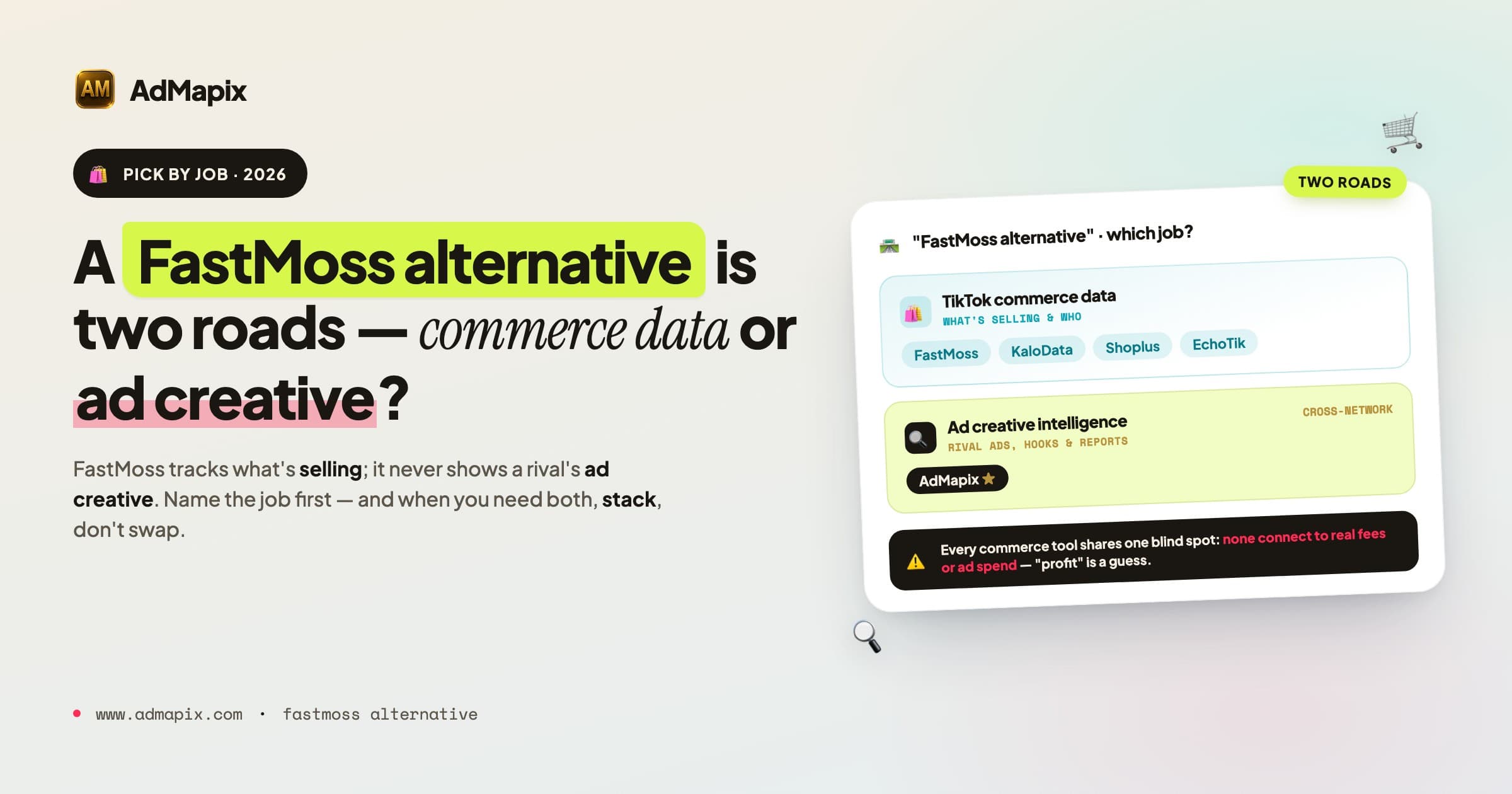
Best FastMoss Alternatives in 2026: KaloData, Shoplus, EchoTik & AdMapix Compared
A decision-first guide to the best FastMoss alternatives in 2026: compare TikTok Shop commerce data tools (KaloData, Shoplus, EchoTik) against ad creative intelligence tools, with full comparison tables, role-based picks, a migration checklist, and an honest FAQ.
Appfigures Alternative: How to Choose Between App Analytics and Ad Creative Intelligence in 2026
A decision-first guide to picking an Appfigures alternative. Separate owned-app analytics, download and revenue estimates, and ASO reporting from competitor ad creative and video intelligence, with comparison tables and a buying framework.
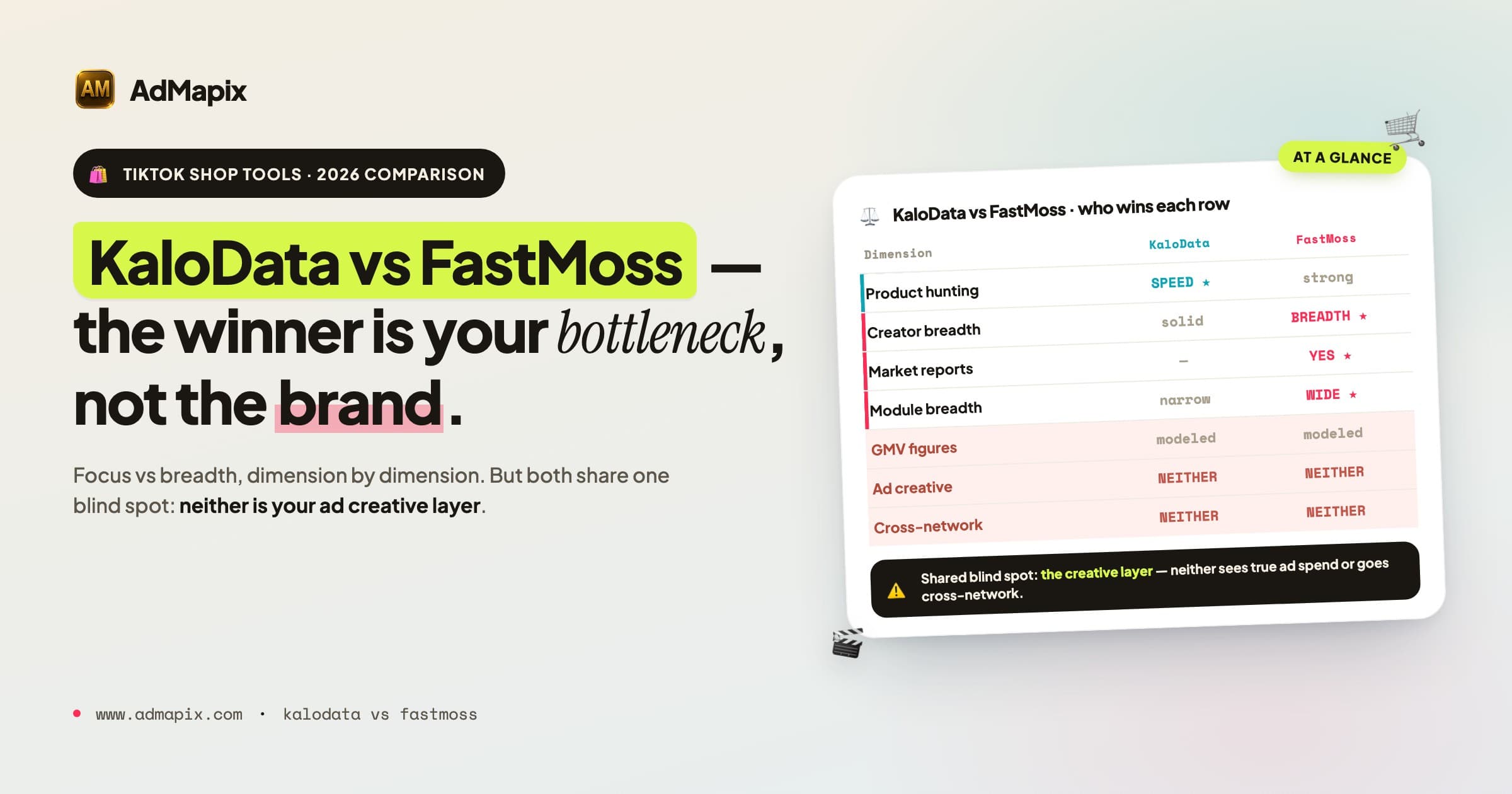
KaloData vs FastMoss in 2026: Which TikTok Shop Tool Is Better? (Full Comparison)
A decision-first KaloData vs FastMoss comparison for 2026: GMV estimation, creator data, market coverage, pricing, shared blind spots, who each tool fits, and where cross-network ad intelligence like AdMapix fills the gap.