
Pathmatics Alternative in 2026: Ad Spend Intelligence vs. Creative Workflow
A complete 2026 buyer's guide to choosing a Pathmatics alternative — why teams look past Pathmatics (now Sensor Tower), what it actually measures, a layered comparison of spend-intelligence suites versus creative-workflow tools across coverage, data type, price, and fit, who should choose which, a practical migration plan, the honest limits of estimated spend, and where a lighter cross-network creative tool like AdMapix fits.
Pathmatics Alternative in 2026: Ad Spend Intelligence vs. Creative Workflow
By the AdMapix Research Team — Updated June 21, 2026
If you are evaluating a Pathmatics alternative, the real question is not which tool is bigger — it is which job you are actually buying for. Pathmatics, now part of Sensor Tower, is built for enterprise digital advertising intelligence: spend estimates, impressions, share of voice, targeting, and media-buying strategy across social, display, video, mobile, and OTT. That is a fundamentally different layer from a creative workflow, where you search competitor ads, save the strongest examples, break down video, and turn what you find into a brief or a report. Most teams who go looking for a "Pathmatics alternative" are really discovering that the layer they need next is not the layer Pathmatics sells — and buying the wrong layer is how marketing teams end up paying enterprise prices for a dashboard nobody opens.
This guide is for enterprise marketers, agency strategists, app-growth and UA teams, and creative leads deciding which layer they actually need next — and where a lighter, creative-focused tool like AdMapix fits versus a heavyweight spend-intelligence suite. We will define exactly what Pathmatics measures, why teams look for alternatives, how the spend-intelligence and creative-workflow layers genuinely differ across coverage, data type, price, and fit, who should choose which, how to run a fair migration test, and the honest limits of any externally estimated spend number. The goal is not to talk you out of Pathmatics — for the right team it is excellent — but to make sure you buy the layer your next decision actually lives in.
TL;DR — Choosing a Pathmatics Alternative in One Screen
- Pathmatics (Sensor Tower) is a spend-intelligence layer: estimated spend, impressions, share of voice, targeting, and flighting across channels. Pick it when budget allocation and competitive benchmarking are the decision.
- A creative-workflow tool is a different layer: find, save, break down, and explain competitor ads fast. Pick it when the next decision is which hook, format, or offer to test.
- Most teams do not need a single replacement. They need to name the layer that is missing and buy only that — not the broadest dashboard.
- "Alternative" usually means one of three things: the price is too high for the job, the output is spend when you needed creative, or the workflow is too heavy for a weekly cadence.
- Estimated spend is direction, not accounting. No external tool sees a competitor's books; treat every number as modeled inference and say so in the report.
- AdMapix fits the creative layer: cross-network ad creative search, saved media, video analysis, tagging, and reports. It does not estimate spend or measure impressions, so it complements a spend suite rather than replacing it.
- Run a one-competitor, one-market test and judge candidates on time-to-decision and evidence quality, not feature count.
Why Teams Look for a Pathmatics Alternative
Pathmatics is a capable, established platform, so the search for an alternative is rarely about it being "bad." It is almost always about a mismatch between what the platform sells and what the buyer's next decision needs. In practice, the reasons cluster into a short, recognizable list.

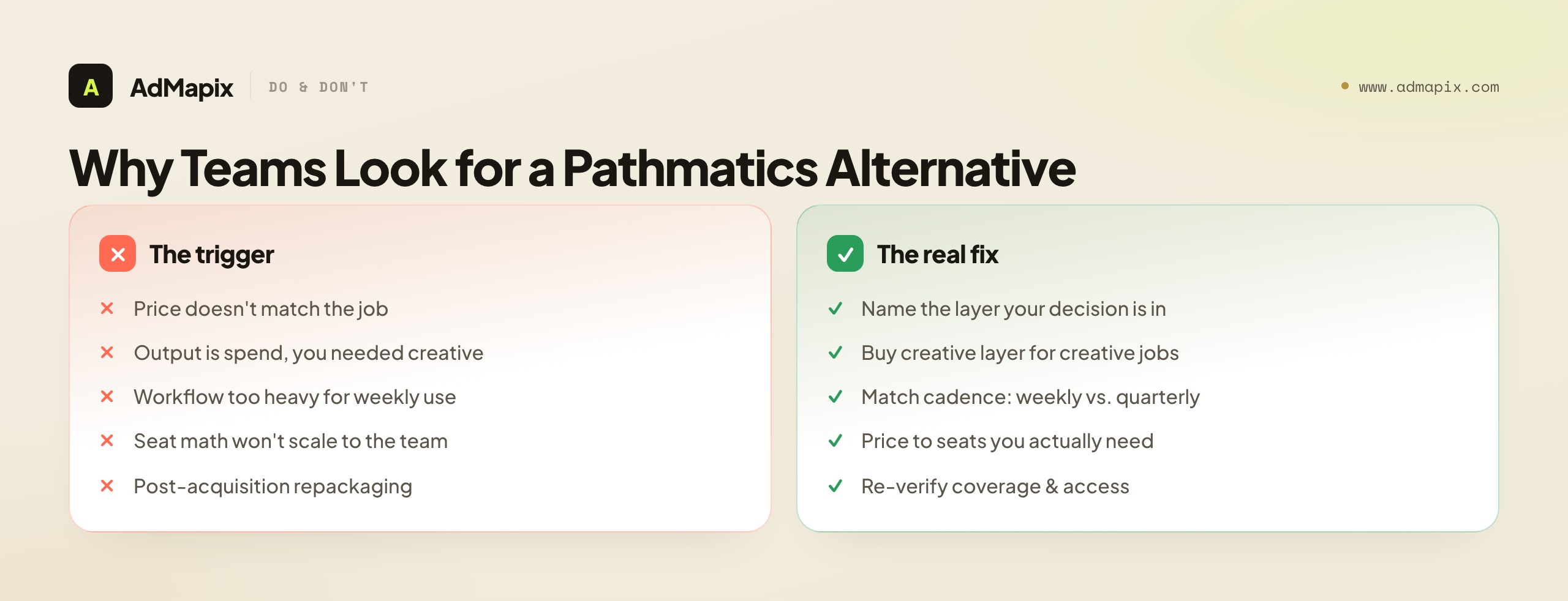
The price does not match the job. Pathmatics sits in the enterprise tier, priced and packaged for media-intelligence teams running budget-allocation and benchmarking decisions. A creative strategist who just needs to find and explain competitor ads is paying for a planning suite to do a workflow task — a classic over-buy.
The output is spend when you needed creative. Pathmatics answers "how much and where." If your next decision is "which hook, which first three seconds, which offer do we test," a spend number does not get you there. Teams discover this after the data lands: rich on budget, thin on the creative reasoning they actually needed.
The workflow is too heavy for a weekly cadence. Enterprise intelligence suites are built for periodic, strategic analysis, not for the fast, repeated, "what changed this week" loop a creative team runs. The friction of the heavyweight tool means it gets opened quarterly, not weekly — and a tool you do not open is not an asset.
The seat math does not scale to the team. Enterprise seats are expensive, so giving every creative and UA person access is rarely justified. The result is a single shared seat and a bottleneck, which is the opposite of the fast, distributed creative research most teams actually want.
Post-acquisition uncertainty. Pathmatics is now part of Sensor Tower, and any acquisition brings repackaging, renaming, and re-pricing over time. Teams reasonably re-evaluate their stack when a tool changes hands, to confirm the coverage and access they bought still match what they need.
None of these means Pathmatics is the wrong tool — for an enterprise media team running budget decisions, it may be exactly right. They mean the buyer's job and the tool's job have drifted apart, and the fix is to name the layer the job lives in before shopping for a replacement.
A useful diagnostic before you shop at all: ask what you were going to do with the Pathmatics data the last three times you opened it (or wished you had it). If the honest answer is "build a budget benchmark for leadership" or "decide where to shift channel spend," you are a spend-layer buyer and an alternative means a peer suite. If the answer is "figure out what hook to test" or "show a client what competitors are running," you are a creative-layer buyer who has been trying to extract creative reasoning from a planning tool — and no amount of switching between spend suites will fix that, because the entire category is built for a different job. This one diagnostic resolves most "Pathmatics alternative" searches faster than any feature comparison, because it surfaces the layer mismatch that is usually the real problem hiding behind the price or workflow complaint. Run it first, and you will either confirm you genuinely need the spend layer (in which case compare peer suites on coverage and price) or discover you have been shopping the wrong category entirely (in which case the creative layer is your real destination).
What Pathmatics Actually Measures
Pathmatics is an ad-spend and media-intelligence platform, not a creative library you browse for inspiration. According to its Sensor Tower product page, it surfaces digital advertising spend and impression trends, creatives, messaging, CTAs, audience profiles, targeting, and flighting. Its LinkedIn product page frames the output as spend, impressions, share of voice, targeting, and buying strategy across social, display, video, mobile, and OTT.

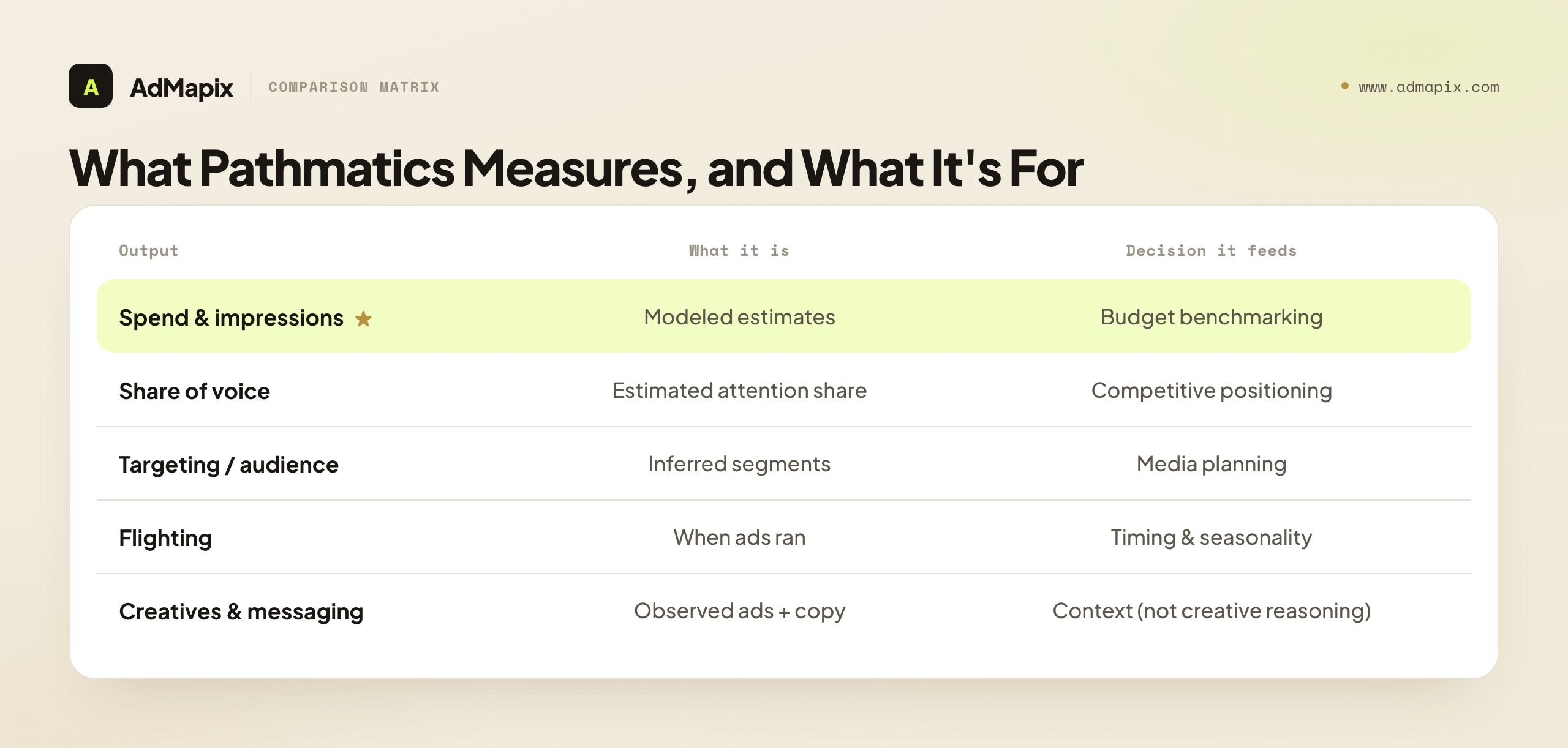
The key word is estimates. Pathmatics models how much brands appear to be spending and where, so a media team can benchmark a competitor's budget and channel mix. That modeling is genuinely hard to reproduce yourself — it stitches together observed placements across many surfaces into a coherent spend-and-share picture — and it is the reason enterprises pay for it. But it answers "how much and where," not "why this specific ad works." Those are different decisions, owned by different people, and conflating them is the root of most bad tool purchases.
It helps to be precise about what each part of the Pathmatics output is for. Spend and impression estimates feed budget benchmarking — are we out-investing or being out-invested. Share of voice feeds competitive positioning — who owns attention in a category. Targeting and audience profiles feed planning — which segments a competitor is buying. Flighting feeds timing — when a competitor ramps and pulls back. Every one of those is a planning and benchmarking signal aimed at media and leadership. None of them is a creative reasoning signal aimed at the strategist deciding which concept to test next. That single distinction is the spine of this entire guide.
There is a subtle point about the creatives Pathmatics does show. A spend-intelligence suite surfaces creatives as evidence for the spend model and as context — here is what the budget was spent on — not as a creative-research workspace. So you can often see a competitor's ads inside Pathmatics, which leads some buyers to assume it covers the creative layer too. It does not, in the way a creative team needs: there is no fast, taggable, video-broken-down, report-ready workflow built around those creatives, because that was never the product's job. The creatives are there to substantiate the spend story, not to power a weekly test-ideation loop. Mistaking "I can see some competitor ads in here" for "this is my creative-research tool" is one of the quieter ways teams end up under-served — they have a planning suite that happens to display creatives, not a creative workflow that happens to show context. Knowing the difference is what stops you from concluding you do not need a creative tool when in fact you have only ever seen creatives as a byproduct of a spend report.
Two Layers, Not One Tool
The fastest way to choose a Pathmatics alternative is to decide which layer your next decision lives in. Spend intelligence and creative workflow are separate problems, and a tool that is excellent at one is usually mediocre at the other — not because of poor engineering, but because they are built for different users solving different problems.

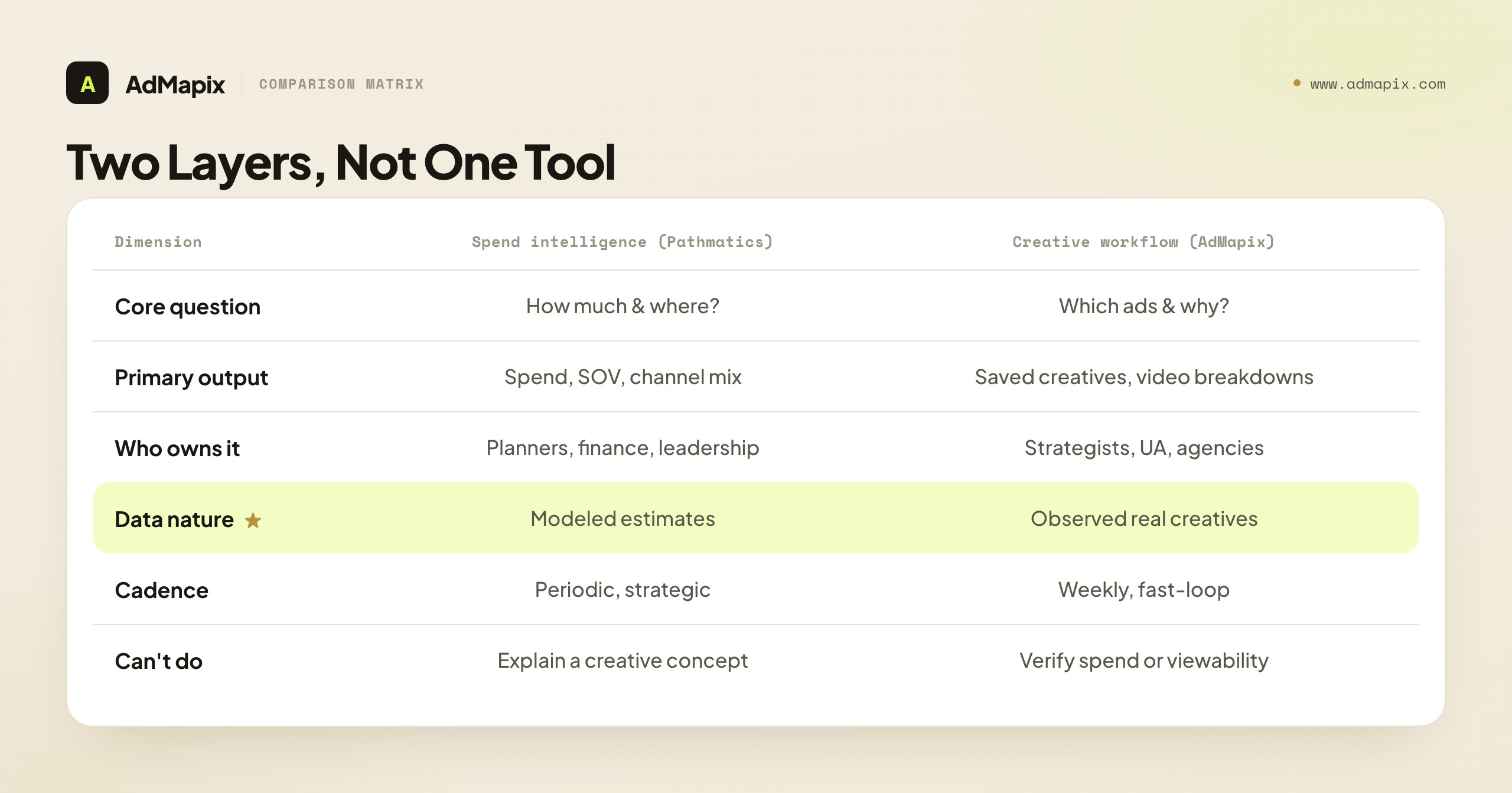
| Dimension | Ad spend intelligence (Pathmatics) | Creative workflow (e.g. AdMapix) |
|---|---|---|
| Core question | How much is a competitor spending, and where? | Which ads, hooks, and formats are they running, and why? |
| Primary output | Spend estimate, SOV, channel mix, flighting | Saved creatives, video breakdowns, tagged examples, brief |
| Who owns it | Media buyers, planners, finance, leadership | Creative strategists, UA teams, agency producers |
| Data nature | Modeled estimates across channels | Observed, real ad creatives you can view |
| Decision it drives | Budget allocation, benchmarking | What to test next, what to brief |
| Cadence | Periodic, strategic | Weekly, fast-loop |
| What it cannot do | Explain a specific creative concept | Verify spend, viewability, or invalid traffic |
Naming the layer first saves real money. A creative strategist does not need a six-figure media-intelligence seat to decide which hook to test, and a media planner cannot allocate budget from a folder of competitor videos. When a team says "we need a Pathmatics alternative," the productive first response is a question: which row of this table is your next decision in? Answer that, and the shortlist writes itself.
The reason this two-layer split is so durable — and not just a marketing distinction — is that the two layers are built on fundamentally different data foundations. A spend-intelligence suite is a modeling product: its core engineering is the algorithm that infers budgets and impressions from scattered observed placements, and its value is the credibility of that model. A creative-workflow tool is a retrieval-and-analysis product: its core engineering is finding, storing, and dissecting actual creatives at scale, and its value is the breadth and depth of the observed library plus the quality of the breakdown. These are different products with different cost structures and different moats, which is precisely why one tool rarely excels at both. When a vendor claims to do both equally well, the honest read is usually that one side is the real product and the other is a thin bolt-on — and you should test the side you actually need rather than trusting the bundled promise. The cleanest stacks come from picking the best product in each layer for your specific job, not the most convincing all-in-one pitch.
The Alternatives, Compared by Layer
"Pathmatics alternative" returns a messy list that mixes spend-intelligence suites, ad-spy tools, and creative-workflow platforms — categories that solve different problems. Sorting candidates by layer is the only way to compare fairly. Here is the landscape, grouped by what each category is actually for.

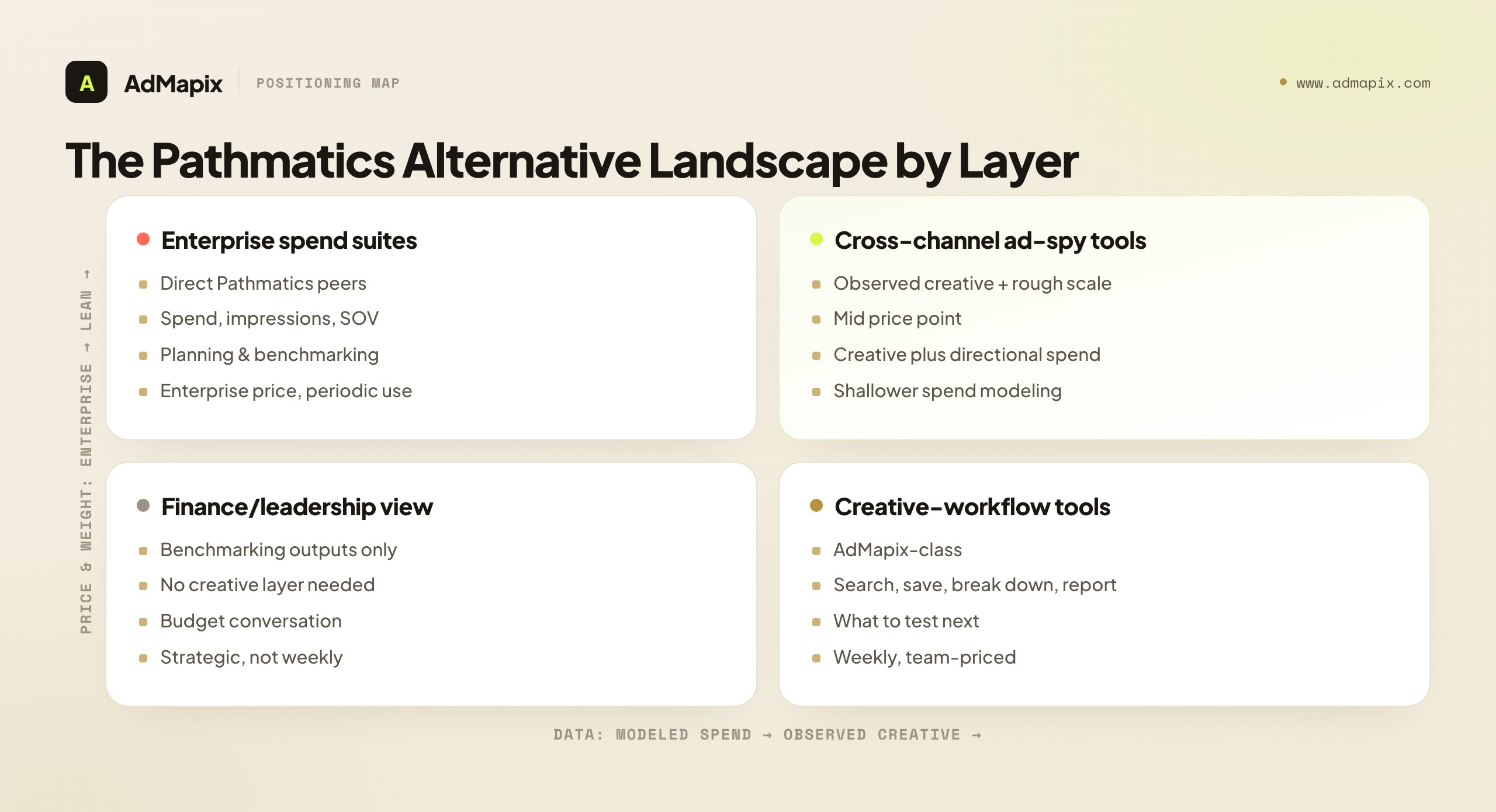
Enterprise spend-intelligence suites (the direct Pathmatics peers) model spend, impressions, and share of voice across channels for media planning and benchmarking. They are the right alternative only if your decision is genuinely budget allocation. Expect enterprise pricing, periodic-analysis workflows, and modeled — not audited — numbers. If Pathmatics' coverage or price is the issue but the job is still spend benchmarking, a peer suite is your lane.
Cross-channel ad-spy tools sit between the layers: they show observed creatives across networks, sometimes with rough spend or impressions proxies, at a lower price point than enterprise suites. They suit teams that want competitor creative plus a directional sense of scale, without an enterprise contract. The trade-off is shallower spend modeling than a true intelligence suite.
Creative-workflow platforms (like AdMapix) are the other layer entirely: search competitor ad creative across networks, save the strongest as evidence, break down video, tag patterns, and produce reports. They are the right alternative when the decision is creative — what to test, what to brief — not budget. They do not estimate spend, and they are priced and built for a fast weekly loop rather than a quarterly planning cycle.
The comparison that matters is not feature-by-feature across all three — it is "which layer is my decision in," then a within-layer comparison on coverage, data freshness, price, and time-to-decision. Comparing a creative-workflow tool against an enterprise spend suite on "does it estimate spend" is asking a screwdriver why it is a poor hammer.
Comparing on Coverage, Data Type, and Price
Within whichever layer you have chosen, three axes decide the call: coverage (which networks and markets), data type (modeled vs. observed), and price-to-fit. Reading these honestly is what separates a confident purchase from buyer's remorse.

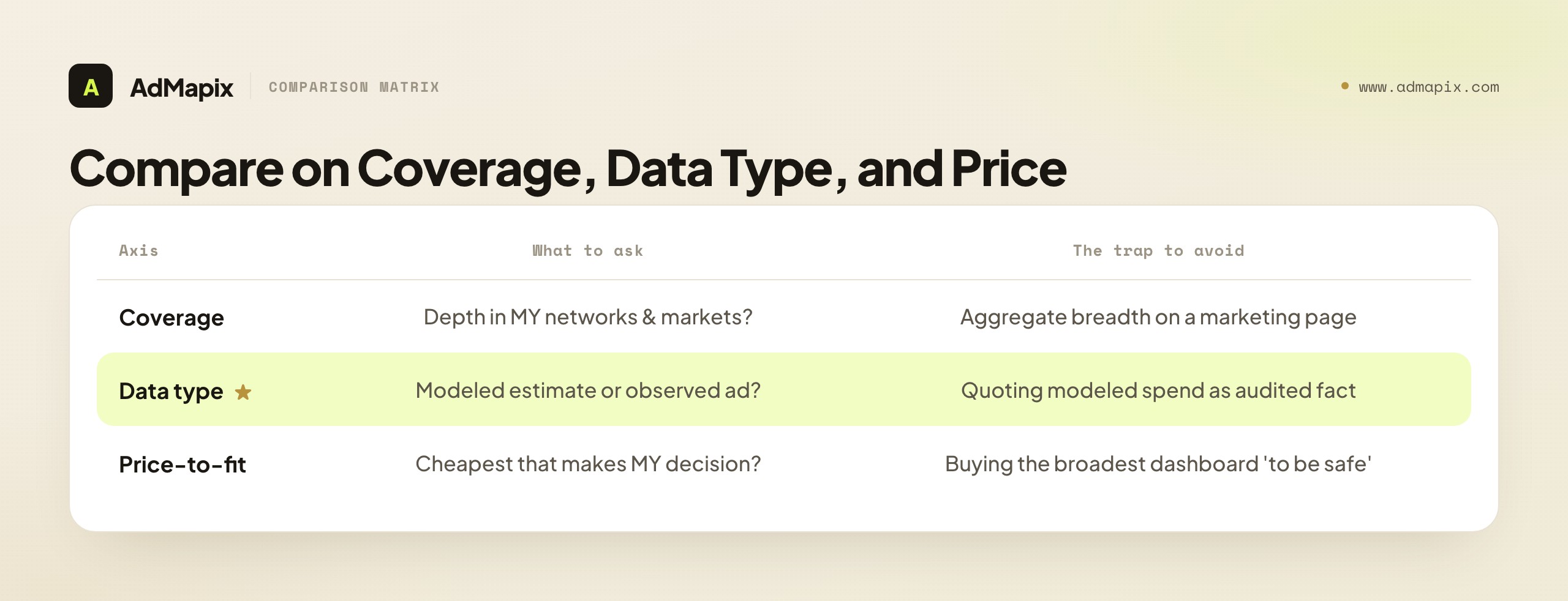
Coverage. Ask which networks and markets a tool actually covers for your category, not in aggregate. A suite that is strong on US display and OTT may be thin on the mobile or short-video networks where your competitors actually live. Coverage breadth on a marketing page is meaningless until you confirm depth in your specific lanes — run a known competitor through and check the tool surfaces what you already know they run.
Data type — modeled vs. observed. This is the axis buyers most often miss. Spend suites give you modeled numbers: an algorithm's estimate of budget and impressions, excellent for relative comparison and trend direction, never a true figure. Creative-workflow tools give you observed data: the actual ad that ran, concrete and verifiable, but silent on budget and performance. Neither is "better" — they answer different questions. The mistake is treating a modeled spend number as audited fact, or treating an observed creative as proof it converted.
Price-to-fit. Enterprise suites carry enterprise prices justified by the modeling work; creative-workflow tools are priced for distributed, weekly use. The right question is not "what is cheapest" but "what is the cheapest tool that gets my specific decision made reliably." A pricey suite that nails budget benchmarking is well-bought for a media team; the same suite bought to write creative briefs is expensive shelfware. Match the price tier to the decision frequency and the seat count you actually need.
The honest framing: there is rarely a single tool that wins all three axes for all jobs. Pick the layer, then optimize coverage-for-your-category, the right data type for your question, and price-to-fit — in that order.
A note on how these axes interact, because they are not independent. Coverage and data type trade off against each other in predictable ways: the broadest cross-channel coverage usually comes from modeled estimates (it is easier to model spend across many surfaces than to observe and store every creative everywhere), while the richest observed-creative depth tends to be strongest on the specific networks a creative tool focuses on. So "maximum coverage" and "maximum observed-creative fidelity" pull in opposite directions, and which you prioritize should follow your layer choice, not the other way around. If your decision is benchmarking, accept modeled data and optimize coverage breadth; if your decision is creative, accept narrower network focus and optimize observed-creative depth and video breakdown. Trying to maximize both at once is how teams end up paying for an enterprise suite and feeling like the creative detail is still thin — they bought breadth when their decision needed depth. Let the layer decide which axis to maximize, and the trade-off stops feeling like a compromise and starts feeling like a fit.
Who Should Choose What
Match the tool to the team and the decision, not to the longest feature list. Below is a practical mapping from common situations to a recommendation.

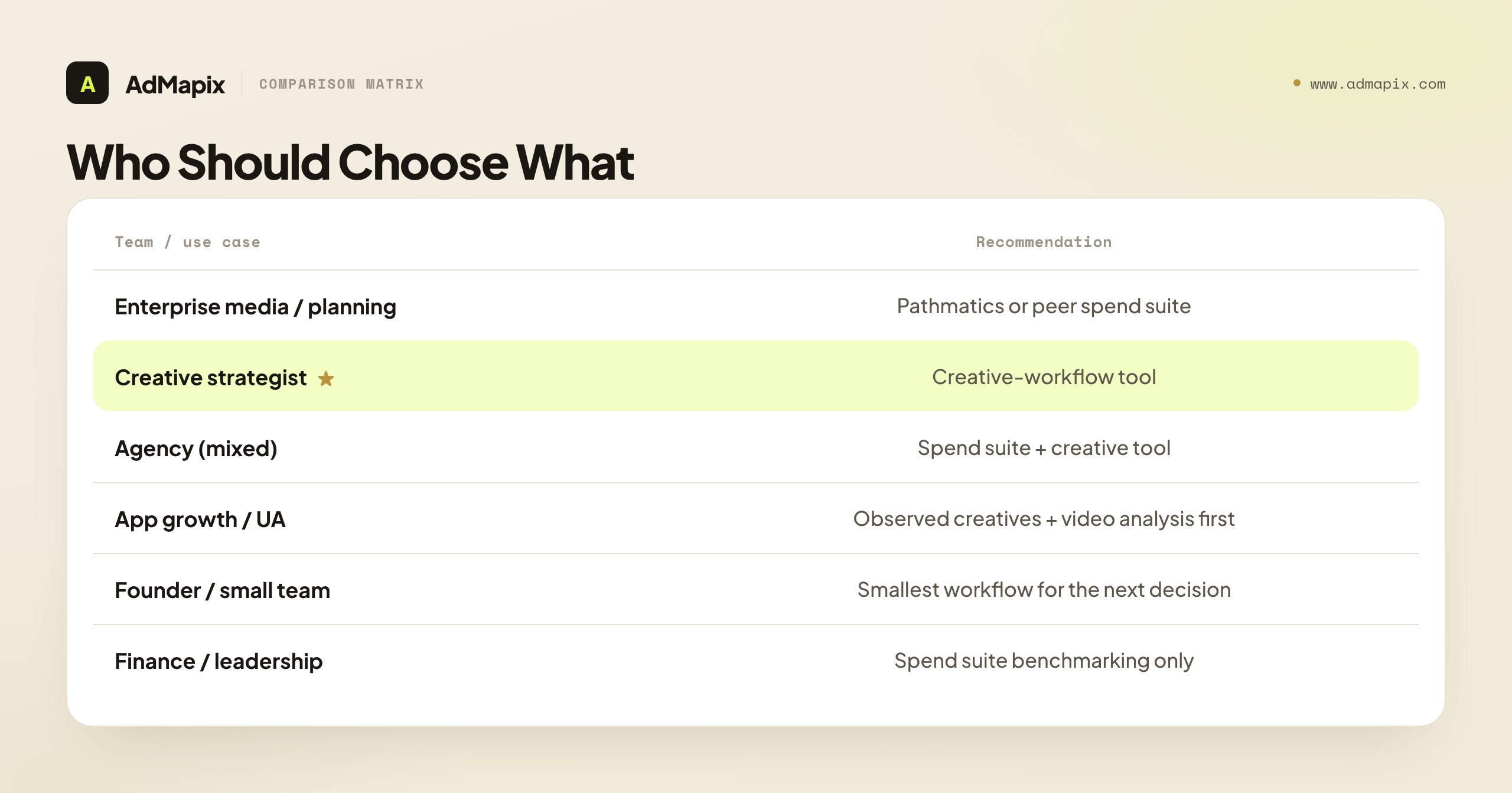
| Team or use case | Practical recommendation |
|---|---|
| Enterprise media / planning team | Use Pathmatics or a comparable spend-intelligence suite when budget allocation, SOV, and benchmarking are the decision. |
| Creative strategist | Use a creative-workflow tool when the next decision is which concept, hook, video pattern, or offer to test. |
| Agency (mixed needs) | Use a spend suite for strategy context and a creative tool for client-ready ad evidence and reports — two layers, two tools. |
| App growth / UA team | Prioritize observed creatives and video analysis; pair with a spend tool only if benchmarking budgets genuinely matters. |
| Founder / small team | Buy the smallest workflow that answers the next decision, not the broadest dashboard. |
| Finance / leadership | Use the spend suite's benchmarking outputs; you do not need the creative layer at all. |
The pattern across this table: the more your decision is about money and where it goes, the more you want the spend layer; the more it is about what to make and test, the more you want the creative layer. Many organizations legitimately need both — the error is buying one to do the other's job.
It is worth lingering on the agency case, because agencies feel this split most acutely. An agency sells two distinct things to clients: strategic counsel ("here is where the category is investing and where the white space is") and creative execution ("here are the ads we will make and why"). The first is a spend-layer story — benchmarking, share of voice, channel mix — that impresses in a quarterly business review. The second is a creative-layer story — competitor hooks, formats, and offers turned into a test plan — that drives the actual work. An agency that buys only the spend layer can talk strategy but arrives at creative reviews empty-handed; one that buys only the creative layer ships great ads but cannot frame the strategic context a client expects. The mature agency stack carries both, deliberately, and bills the cost across enough clients that the two-layer investment is trivial per account. Recognizing that you are a two-layer buyer is itself the insight; most agencies discover it the first time a client asks a budget question their creative tool cannot answer, or a creative question their spend suite cannot.
A Practical Migration Plan
If you have decided to move off Pathmatics — or to add the creative layer alongside it — a disciplined switch beats a feature-list bake-off. Here is a migration plan that surfaces real fit fast.

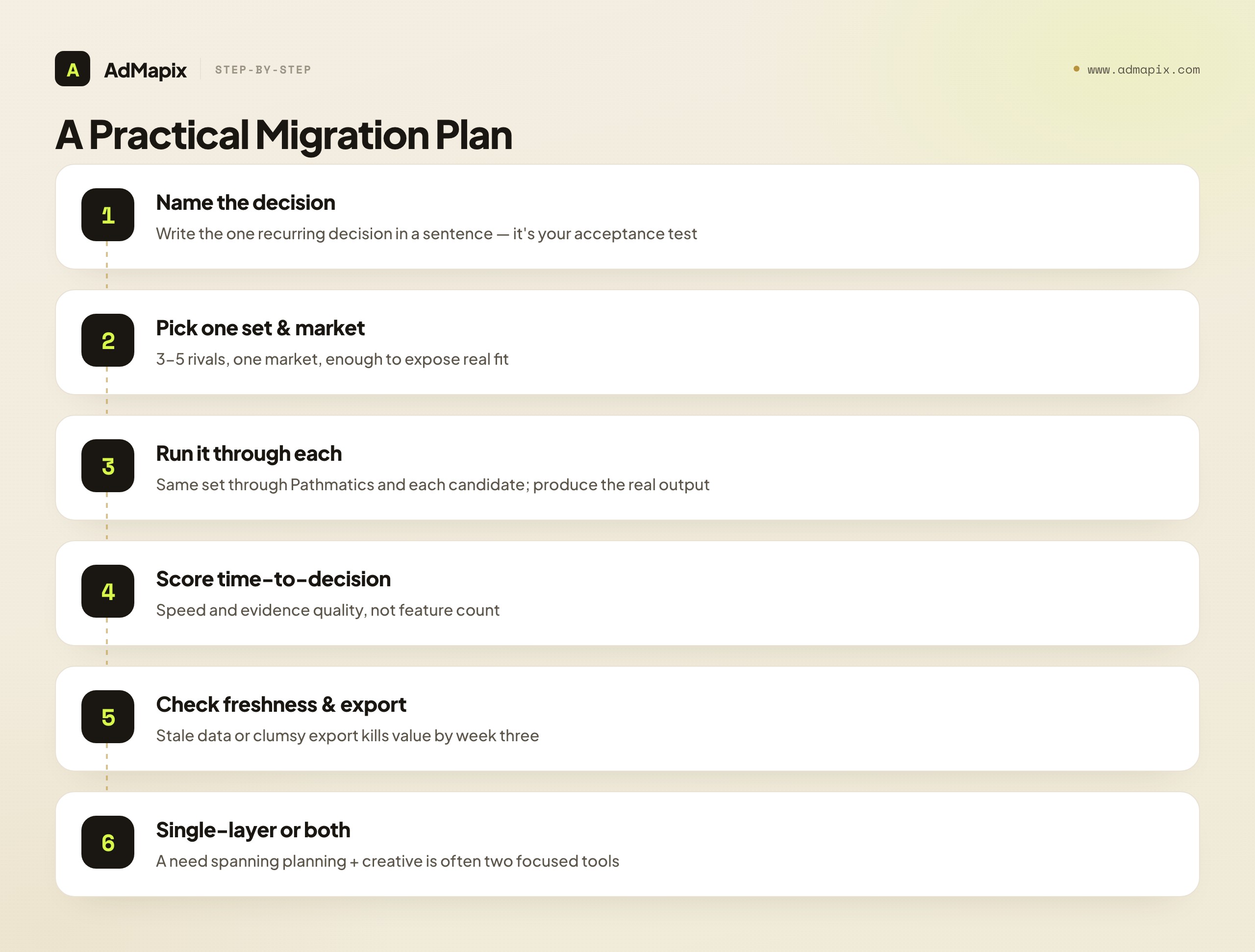
- Name the decision you are migrating for. Write the single recurring decision in one sentence — "allocate next quarter's budget against three rivals" or "decide which two hooks to test each week." This sentence is your acceptance test; a tool either makes that decision faster or it does not.
- Pick one competitor set and one market. Three to five rivals in one market is enough to expose fit. A broad evaluation across every category just hides the tool's weaknesses in noise.
- Run the same set through each candidate. Put the identical competitor set through Pathmatics and each alternative, and produce the actual output your decision needs — a benchmarking slide or a creative brief — from each.
- Score on time-to-decision and evidence quality. Not feature count. How fast did you get to a defensible decision, and how trustworthy was the evidence behind it? A cheaper tool that gets you there faster usually wins.
- Check data freshness and export. Confirm how current the data is and how easily you can export or report it — stale data or a clumsy export quietly kills a tool's value in week three.
- Decide single-layer or both. If your real need spans planning and creative, the honest answer is often two focused tools, not one that half-does both. Budget for the layer split rather than forcing one tool to stretch.
The discipline that makes this work is step one. A migration anchored to a named, recurring decision evaluates tools on the only thing that matters — whether they make that decision better — instead of drowning in a feature comparison that flatters whichever vendor has the longest list.
A Worked Example: Two Teams, Two Right Answers
Abstract frameworks land harder with a concrete case, so here are two teams running the same migration plan and arriving — correctly — at opposite answers. Both started by typing "Pathmatics alternative" into a search bar; both ended up somewhere they would not have predicted.
Team A: an enterprise media-planning team. Their named decision is "allocate next quarter's paid budget across five rival categories, and defend the allocation to leadership." They pick five competitors in two markets, run them through Pathmatics and two peer spend suites, and produce a benchmarking deck from each. The scoring is decisive: the creative-workflow tools they also trialed cannot produce a defensible budget benchmark at all — they show creatives, not spend — so they are eliminated immediately, correctly, for being the wrong layer. Among the spend suites, the winner is whichever covers their specific channels (heavy OTT and display) most deeply at the best price-to-fit. Their right answer is a spend suite; "alternative to Pathmatics" for them means "a peer suite that covers our channels better or cheaper." The creative layer never enters the decision.
Team B: a growth team at a DTC brand. Their named decision is "decide which two ad hooks to test each week against three rivals." They run the same migration plan: three competitors, one market, through Pathmatics and a couple of creative-workflow tools. Here Pathmatics underwhelms — not because it is weak, but because a spend estimate and a share-of-voice chart do not tell them which hook to test. The output they need is the actual competitor creatives, broken down by hook and structure, turned into a weekly brief — and that is what the creative-workflow tool produces in minutes while the spend suite produces a planning artifact they cannot act on. Their right answer is a creative tool; the enterprise spend seat they were about to buy would have been expensive shelfware. The spend layer never enters their decision.
The lesson is the whole guide in miniature: the same search term, the same migration plan, two completely different correct outcomes — because the decisions were in different layers. Team A's mistake would have been buying a creative tool to benchmark budgets; Team B's would have been buying a spend suite to write creative briefs. Naming the decision first is what kept each of them from the other's error. When you run your own migration test, write your decision sentence down before you open any tool, and let it eliminate the wrong layer ruthlessly — that single sentence is worth more than any feature comparison.
How Pathmatics Pricing Shapes the Alternative Search
Pricing is the single most common trigger behind a "Pathmatics alternative" search, so it deserves a clear-eyed look — not the exact dollar figure, which is quote-based and changes, but the shape of the pricing and why that shape pushes certain teams to look elsewhere.
Enterprise spend-intelligence suites like Pathmatics are sold on annual, quote-based contracts, typically negotiated by seat count, the channels and markets you need covered, and the depth of data access. That model is built for a procurement conversation, not a self-serve signup — which tells you a lot about who it is for. It assumes a media or intelligence team where a handful of expensive seats, used for periodic strategic analysis, are easily justified by the budget decisions they inform. For that buyer, the price is rational: a few points of share movement or a smarter quarterly allocation pays for the seat many times over.
The shape becomes a problem the moment the user is not that buyer. A creative team that wants every strategist and UA person to research competitor ads weekly cannot economically put them all on enterprise seats — so they end up with one shared login and a bottleneck, which defeats the purpose of distributed creative research. An agency that needs client-ready ad evidence across many accounts faces the same math. And a founder or small team simply cannot justify an enterprise annual contract to answer a creative question. In every one of these cases, the pricing is not "too expensive" in the abstract; it is mispriced for that job, because the job is a high-frequency, many-seats creative workflow and the pricing is built for a low-frequency, few-seats planning function.
This is why the price trigger so reliably leads to the layer realization. When a team works out that they cannot afford to put the whole team on a spend suite, the productive next question is not "what is a cheaper spend suite" — it is "do we even need the spend layer for this decision, or do we need a team-priced creative layer." For a large share of searchers, the honest answer is the latter, and the pricing pain was just the symptom that surfaced it. Match the price model to the cadence and seat count your decision actually needs, and the right category usually becomes obvious.
Pathmatics in the Sensor Tower Ecosystem
A second reason teams re-evaluate is the acquisition context: Pathmatics is now part of Sensor Tower, and understanding that context helps you judge both the tool and the alternatives sensibly.
Sensor Tower is a large app- and digital-intelligence company, and folding Pathmatics in placed the ad-spend-intelligence capability inside a broader suite that also spans app analytics, store intelligence, and usage data. For an enterprise that wants app and advertising intelligence under one vendor, that consolidation is a genuine plus — one relationship, one data ecosystem, cross-referenced signals. For a team that only ever needed the Pathmatics piece, the same consolidation can feel like buying into a larger platform than the job requires.
The practical implications are worth naming. Acquisitions reliably bring some repackaging over time — renamed tiers, bundled modules, adjusted pricing, and shifting access boundaries — which is exactly why a freshness check belongs in any evaluation. It is not a criticism of Sensor Tower; it is simply the normal life of an acquired enterprise product, and it means the coverage, packaging, and price you remember from a year ago may not be what is on offer today. Before you commit a stack, re-verify what the current Pathmatics product actually includes for your category and seats, and weigh whether you want the standalone capability or the broader ecosystem. If you want only the ad-creative-research slice, that is a strong signal you are really shopping the creative layer, where a focused tool will serve the job more directly than a broad intelligence ecosystem.
What Public Ad Data Can and Cannot Prove
No external tool sees a competitor's books, so treat every layer's output as inference, not fact. This is the section that protects your credibility, because the most expensive mistakes in competitive intelligence come from presenting modeled estimates as audited truth.

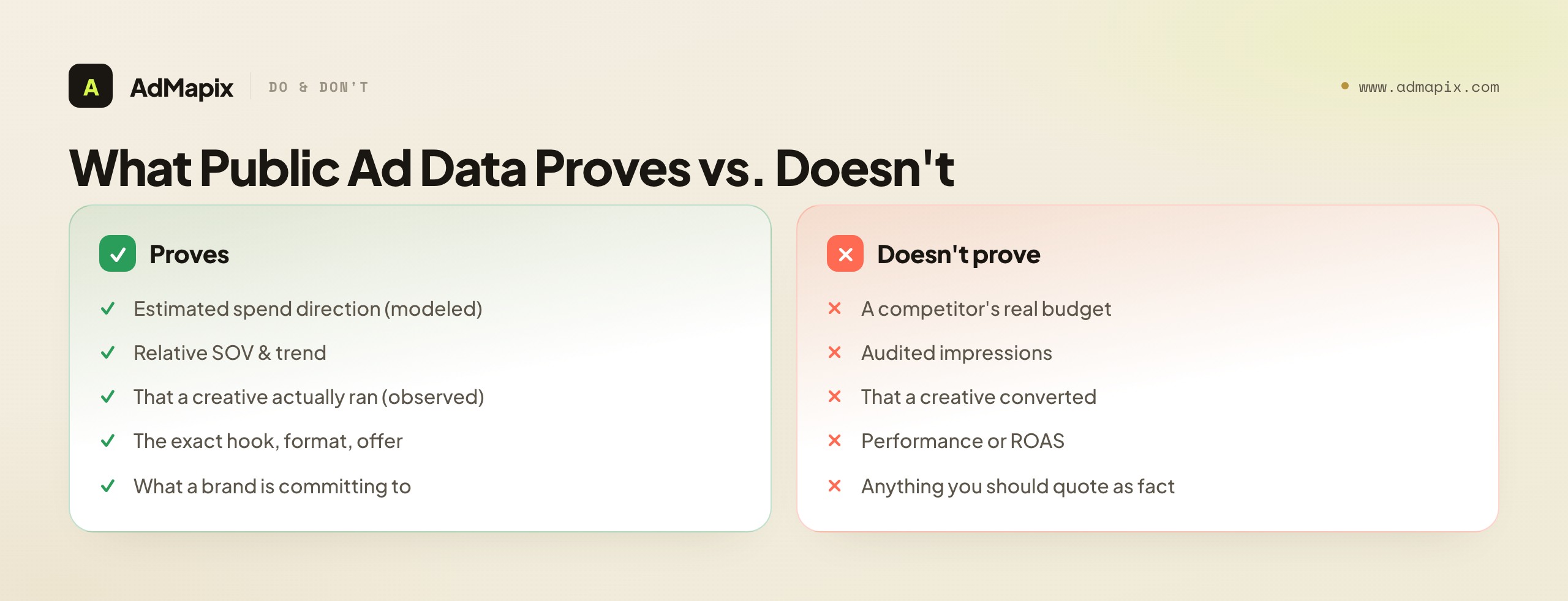
What spend platforms prove. Tools like Pathmatics publish estimated spend and impressions, modeled from observed placements. They are genuinely useful for relative comparison and trend direction — is a competitor ramping or pulling back, are we roughly out-invested in a channel. They are not a true budget figure, and the advertiser's actual numbers may differ materially.
What creative tools prove. Creative-workflow tools show observed ads — concrete, verifiable evidence of what ran. That is strong: you can see the exact hook, format, and offer a brand committed to. But a saved ad does not tell you its budget, its performance, or whether it converted. Observed-that-it-ran is not the same as proven-that-it-worked.
The honest read. Use spend estimates for direction and benchmarking, use observed creatives for what concepts a brand is actually committing to, and never present either as the competitor's audited numbers. When you cannot prove a figure, say so in the report rather than implying a precision you do not have. A directional claim, clearly labeled — "estimated spend up roughly a tier, high confidence; actual budget unknown" — is more useful and more credible than a fabricated exact number. The teams that win with competitive intelligence are the ones whose claims survive scrutiny, and survival starts with honest labeling.
Common Mistakes When Choosing a Pathmatics Alternative
The failure modes here are predictable, which means they are avoidable. Naming them is the cheapest insurance against a wasted purchase.

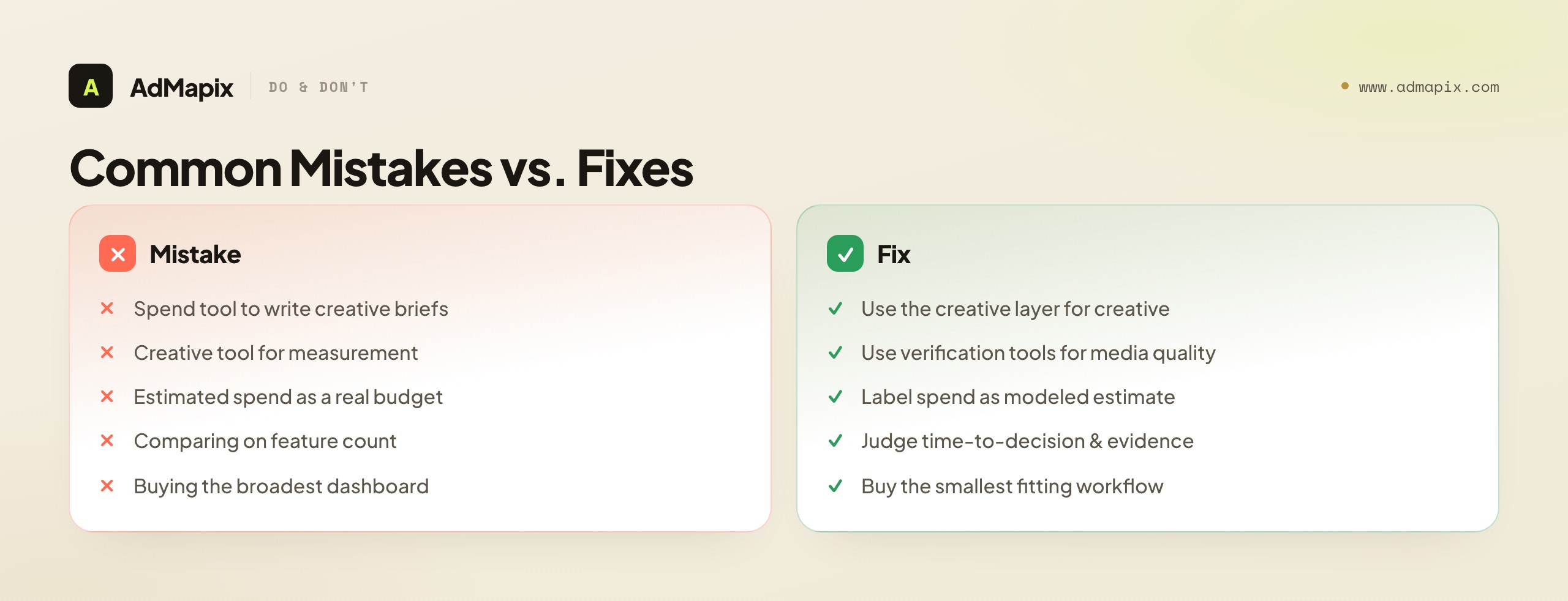
- Using a spend tool to write creative briefs. Spend and SOV tell you where budget goes; they do not explain the hook, the first three seconds of a video, or the offer. Buying spend to do creative work is the single most common mismatch.
- Using a creative tool for measurement. Browsing competitor ads does not replace viewability, invalid-traffic, or brand-safety verification. The creative layer does not measure media quality.
- Treating estimated spend as a real budget. Modeled spend is for relative comparison, not exact accounting. Quoting it as fact erodes your credibility the moment a number is challenged.
- Comparing on feature count. Workflow fit and time-to-decision matter far more than how many modules a platform lists. The longest feature list rarely makes the fastest decision.
- Buying the broadest dashboard. The instinct to buy the most comprehensive suite "to be safe" produces expensive shelfware. Buy the smallest workflow that answers your next decision.
- Skipping a freshness check. Enterprise products get renamed, repackaged, and re-priced — especially post-acquisition. Verify current access, coverage, and pricing before you commit a stack to it.
- Forcing one tool to span both layers. When a real need spans planning and creative, two focused tools usually beat one that half-does both.
Building a Two-Layer Stack Without Overpaying
For many teams the honest answer is not "replace Pathmatics" or "skip it" but "build a deliberate two-layer stack" — a spend layer for planning and a creative layer for testing — sized so neither is overbought. Done well, this is cheaper and more effective than forcing a single tool to span both jobs. Here is how to assemble it without waste.
Start by mapping your recurring decisions to layers explicitly. List the competitive decisions your team actually makes on a cadence — budget allocation, channel benchmarking, which hooks to test, which offers to counter — and tag each one "spend" or "creative." The tally tells you how much of each layer you genuinely need. A team with one quarterly budget decision and twenty weekly creative decisions should obviously invest most of its tooling budget and seats in the creative layer, not the spend one — yet the instinct to buy the prestigious enterprise suite first often inverts that, leaving the high-frequency work under-served.
Then size each layer to its true usage. The spend layer is usually low-seat and periodic, so a small number of seats on a capable suite — or even a lighter spend-proxy tool if your benchmarking needs are modest — covers it. The creative layer is high-seat and weekly, so it should be priced and provisioned for the whole team, which is exactly where a team-priced creative-workflow tool beats stretching a few enterprise seats across people who keep hitting a shared-login bottleneck. The goal is to put cheap, fast access where the frequent work happens and reserve the expensive, deep access for the rare strategic call.
Finally, connect the layers at the workflow level, not the data level. You do not need the two tools to integrate technically; you need a habit that hands off between them. The standard loop: the spend layer flags where a competitor is investing and ramping (the planning signal), and the creative layer then answers what they are running there and what you should test in response (the creative signal). Spend sets direction; creative decides the move. A team that runs that handoff deliberately gets the full value of both layers at a fraction of the cost of an all-in-one enterprise contract — and avoids the two classic failures of buying one layer to do the other's job, or buying a giant suite and using a tenth of it.
When to Use AdMapix
AdMapix fits when the missing layer is competitor creative evidence, not spend measurement. AdMapix is a cross-network ad creative search and intelligence tool: you search competitor ads across markets, save the strongest examples, run video analysis on the ones worth dissecting, tag them, and turn the patterns into a report. It is built for creative strategists, UA teams, and agencies who need to decide what to test next — fast, weekly, and at a price that scales to the whole team rather than a single shared enterprise seat.

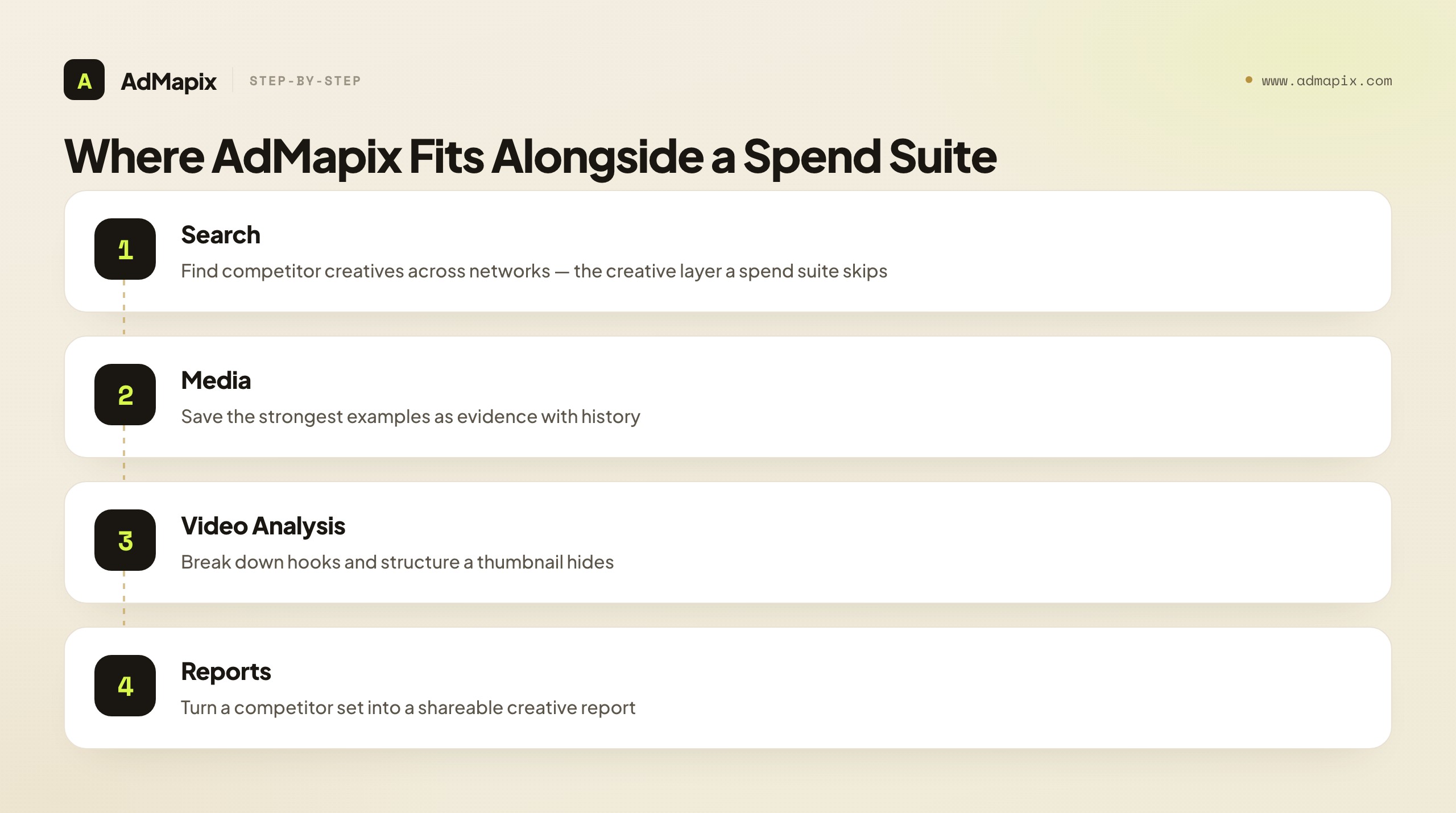
Where it earns its place against the Pathmatics layer: AdMapix does the creative-reasoning work a spend suite cannot. Use Search AdMapix to find competitor creatives across networks, Media to keep the strongest examples as saved evidence with history, Video Analysis to break down hooks and structure a static thumbnail hides, and Reports to turn a competitor set into a shareable output. When a workflow becomes weekly, run the same competitor set once in Search, keep the best examples in Media, and compare seats on Pricing or start from Login.
It is explicitly not for you if your decision is budget allocation, share-of-voice benchmarking, or spend verification — that is the Pathmatics layer, and AdMapix does not estimate spend, measure impressions, or model share of voice. It does not pretend to. Many teams run both: a spend suite for the planning and benchmarking conversation, AdMapix for the creative one. The honest positioning is that AdMapix replaces or strengthens the creative layer of a Pathmatics-style stack, not the measurement layer — and naming that split is exactly the discipline this whole guide is built around.
Putting It Together: Buy the Layer, Not the Brand
The whole decision reduces to one move: name the layer your next decision lives in, then buy only that. Pathmatics is an excellent spend-intelligence suite for media teams whose decision is budget allocation and competitive benchmarking — and for that team, the right "alternative" is usually a peer spend suite, chosen on coverage-for-your-category and price-to-fit. But a large share of people searching for a "Pathmatics alternative" are creative strategists, UA teams, and agencies whose real decision is which hook, format, or offer to test — a creative-workflow decision the spend layer was never built to make.
For that team, the alternative is not a smaller spend suite; it is a different layer entirely. Run the one-competitor, one-market migration test, judge candidates on time-to-decision and evidence quality rather than feature count, label every estimated number as the modeled inference it is, and accept that a real need spanning planning and creative is often two focused tools, not one stretched thin. Do that, and you stop overpaying for a dashboard nobody opens and start buying exactly the capability your next decision requires — which, in the end, is the only thing a tool purchase should ever be about.
FAQ
What is the best Pathmatics alternative?
There is no single best alternative, because it depends on the layer you need. If you need spend estimates, impressions, and share of voice, look at other enterprise media-intelligence suites and compare on coverage for your category and price-to-fit. If you need to find, save, and explain competitor creatives, a creative-workflow tool like AdMapix is a closer fit. Name the recurring decision first, then the shortlist writes itself.
Can AdMapix replace Pathmatics?
Not fully, and it does not claim to. AdMapix replaces or strengthens the creative layer — cross-network ad search, saved media, video analysis, tagging, and reports. It does not estimate ad spend, measure impressions, or model share of voice, so it cannot replace Pathmatics for media planning, benchmarking, or budget allocation. Many teams run both: AdMapix for the creative decision, a spend suite for the planning one.
Why do teams move off Pathmatics?
Usually because of a mismatch, not a defect. The most common reasons are price not matching the job (an enterprise suite bought for a workflow task), output being spend when the team needed creative reasoning, a workflow too heavy for a weekly cadence, seat costs that do not scale to the whole team, and post-acquisition repackaging prompting a stack re-evaluation. For an enterprise media team, Pathmatics may still be exactly right.
Is Pathmatics ad spend data exact?
No. Pathmatics publishes modeled estimates of spend and impressions, not audited figures from the advertiser. They are reliable for relative comparison and trend direction — who is ramping, who is pulling back — but you should never present them as a competitor's real budget. Label them as estimates in any report, and state the uncertainty rather than implying precision you do not have.
How is a creative-workflow tool different from a spend-intelligence suite?
They answer different questions for different people. A spend suite answers "how much is a competitor spending and where," with modeled estimates, for media planners and leadership making budget decisions. A creative-workflow tool answers "which ads, hooks, and formats are they running, and why," with observed creatives, for strategists deciding what to test. One drives budget allocation; the other drives the test backlog.
When should I use both Pathmatics and AdMapix?
Use a spend-intelligence platform for the planning and benchmarking conversation — how much competitors appear to spend and where — then use AdMapix to collect the actual ads, break down video, and produce a creative report. The spend tool sets strategic direction; the creative tool decides what to test next. The two layers complement rather than compete.
How should I test a Pathmatics alternative?
Pick one competitor set, one market, and one recurring decision. Run that set through Pathmatics and each candidate, and produce the real output your decision needs from each — a benchmarking slide or a creative brief. Judge on evidence quality, how fresh the data is, how fast you can export or report, and whether your next action is clearer. A cheaper tool that gets you to a decision faster usually wins.
What does Pathmatics actually cover?
Per Sensor Tower, Pathmatics surfaces digital advertising spend and impression trends, creatives, messaging, CTAs, audience profiles, targeting, and flighting, with share-of-voice and buying-strategy outputs across social, display, video, mobile, and OTT. Confirm current coverage for your specific networks and markets before committing — aggregate breadth on a marketing page is not the same as depth in your category.
Is an enterprise spend suite worth it for a small team?
Usually not, unless budget benchmarking is genuinely your recurring decision. Enterprise suites are priced and built for periodic, strategic planning at organizations where a few points of share movement justify the cost. A small team or a creative-led shop almost always gets more from a lighter, weekly-cadence creative tool — and can add spend intelligence later if benchmarking becomes a real, recurring need.
Does AdMapix estimate competitor ad spend?
No. AdMapix is a creative-layer tool — it searches, saves, analyzes, and reports on observed competitor creatives across networks. It does not model spend, impressions, or share of voice, and it does not pretend to. If your decision is budget allocation or spend benchmarking, that is the spend-intelligence layer's job; AdMapix complements it by handling the creative reasoning a spend number cannot.
Key Takeaways
- Decide the layer before the tool: spend intelligence and creative workflow are different jobs for different people, and a tool great at one is usually weak at the other.
- Choose Pathmatics (or a comparable suite) when budget allocation, SOV, and benchmarking are the decision; choose a creative-workflow tool when the next decision is which hook, format, or offer to test.
- Compare within a layer on coverage-for-your-category, data type (modeled vs. observed), and price-to-fit — in that order — not on raw feature count.
- Treat all external data as inference: estimated spend for direction, observed creatives for committed concepts, and state the limits in your report.
- Run a one-competitor, one-market migration test anchored to a single recurring decision, and accept that a need spanning planning and creative is often two focused tools, not one stretched thin.
Related Reading
- Best Ad Spy Tools 2026 — a broader roundup of ad-intelligence and ad-spy tools across categories and price tiers.
- Best Ad Intelligence Tools — how the intelligence and creative layers map across the market.
- Competitor Ad Spend in 2026: How to Track and Estimate a Rival's Budget — the honest method for working with estimated spend like Pathmatics produces.
- Ad Spy Tools by Channel: Meta, TikTok, Google, YouTube, Native — how coverage differs across networks when comparing tools.
- Adbeat Alternative — a parallel buyer's framework for another display-focused intelligence tool.
Sources
Official and public source pages were checked as of June 21, 2026. Product naming, access, coverage, and pricing for enterprise advertising tools can change quickly — verify current details before committing a stack.
- Pathmatics by Sensor Tower — product page — digital advertising intelligence: spend and impression trends, creatives, messaging, CTAs, audience profiles, targeting, and flighting.
- Pathmatics by Sensor Tower — LinkedIn product page — spend, impressions, share of voice, targeting, and buying strategy across social, display, video, mobile, and OTT.
- Sensor Tower — digital advertising overview — the broader Sensor Tower advertising-intelligence context Pathmatics now sits within.
Turn these observations into your next creative study
Open the creative library and select samples for your market, network and research question.
Related Articles
Semrush Ad Intelligence Alternative in 2026: PPC Research or Creative Evidence?
A 2026 decision framework for choosing a Semrush ad intelligence alternative — when PPC keyword and spend research wins, when competitor creative and video evidence wins, how AdClarity fits, a fair-trial method, and how to build a two-layer stack.
Best FastMoss Alternatives in 2026: KaloData, Shoplus, EchoTik & AdMapix Compared
A decision-first guide to the best FastMoss alternatives in 2026: compare TikTok Shop commerce data tools (KaloData, Shoplus, EchoTik) against ad creative intelligence tools, with full comparison tables, role-based picks, a migration checklist, and an honest FAQ.
Appfigures Alternative: How to Choose Between App Analytics and Ad Creative Intelligence in 2026
A decision-first guide to picking an Appfigures alternative. Separate owned-app analytics, download and revenue estimates, and ASO reporting from competitor ad creative and video intelligence, with comparison tables and a buying framework.