
Best Ad Intelligence Tools 2026: Compared by Decision, Price and Coverage
Compare the best ad intelligence tools for 2026 by the decision they support, channel coverage, data freshness and entry price (checked September 2026): official libraries, Semrush, Similarweb, Sensor Tower Pathmatics, BigSpy, AdSpy, Minea and AdMapix.
By the AdMapix Research Desk · Updated September 7, 2026
Quick answer. There is no single best ad intelligence tool. Pick by the decision you need to make: Semrush for paid-search and PPC context, BigSpy or Minea for ecommerce creative discovery, Sensor Tower Pathmatics for enterprise digital and mobile spend signals, AdSpy for Facebook and Instagram research, and AdMapix when the job is mobile app and game creatives with app rankings beside them and a report-ready output. Judge any ad intelligence platform on freshness, filters, metadata and exportability, never on screenshot count. Prices below were checked on vendor pages in September 2026 and change often.
Ad Intelligence Tools Compared (September 2026)
| Tool or source | Best for | Data focus | Entry price (checked Sept 2026) | Main limitation |
|---|---|---|---|---|
| Official ad libraries | Free baseline checks and primary-source verification | Public platform ads and transparency surfaces | Free | One advertiser at a time; manual and fragmented |
| Semrush Advertising Research | Search and PPC competitor context | Paid search keywords, competitor domains, ad copy history | Advertising Toolkit from $99/month | Not a social creative library |
| Similarweb | Market, traffic and competitive web strategy | Web traffic, PPC context, market benchmarking | Starter from $125/month billed annually ($199 monthly) | Broader than a creative team needs |
| Sensor Tower Pathmatics | Enterprise digital ads and mobile market intelligence | Digital advertising, modeled spend signals, app intelligence | Enterprise, sales-quoted | Usually overkill for small teams |
| BigSpy | Broad ad spy and ecommerce creative discovery | Social and native ad examples | Free plan; Pro $149/month | Requires manual interpretation |
| AdSpy | Facebook and Instagram ad search | Social ad examples with affiliate-oriented fields | $149/month | Narrow channel focus |
| Minea | Ecommerce and dropshipping ad intelligence | Product ads, store ideas, creator-style research | See vendor pricing | Less suitable for B2B search strategy |
| AdMapix | Mobile app and game creative research with app context; team-ready reports | Indexed video, image and playable creatives across Meta, TikTok and Google with app rankings and modeled market signals | Starter $19.90/month; free tier to start | An index, not a complete campaign history; no private spend or ROAS |
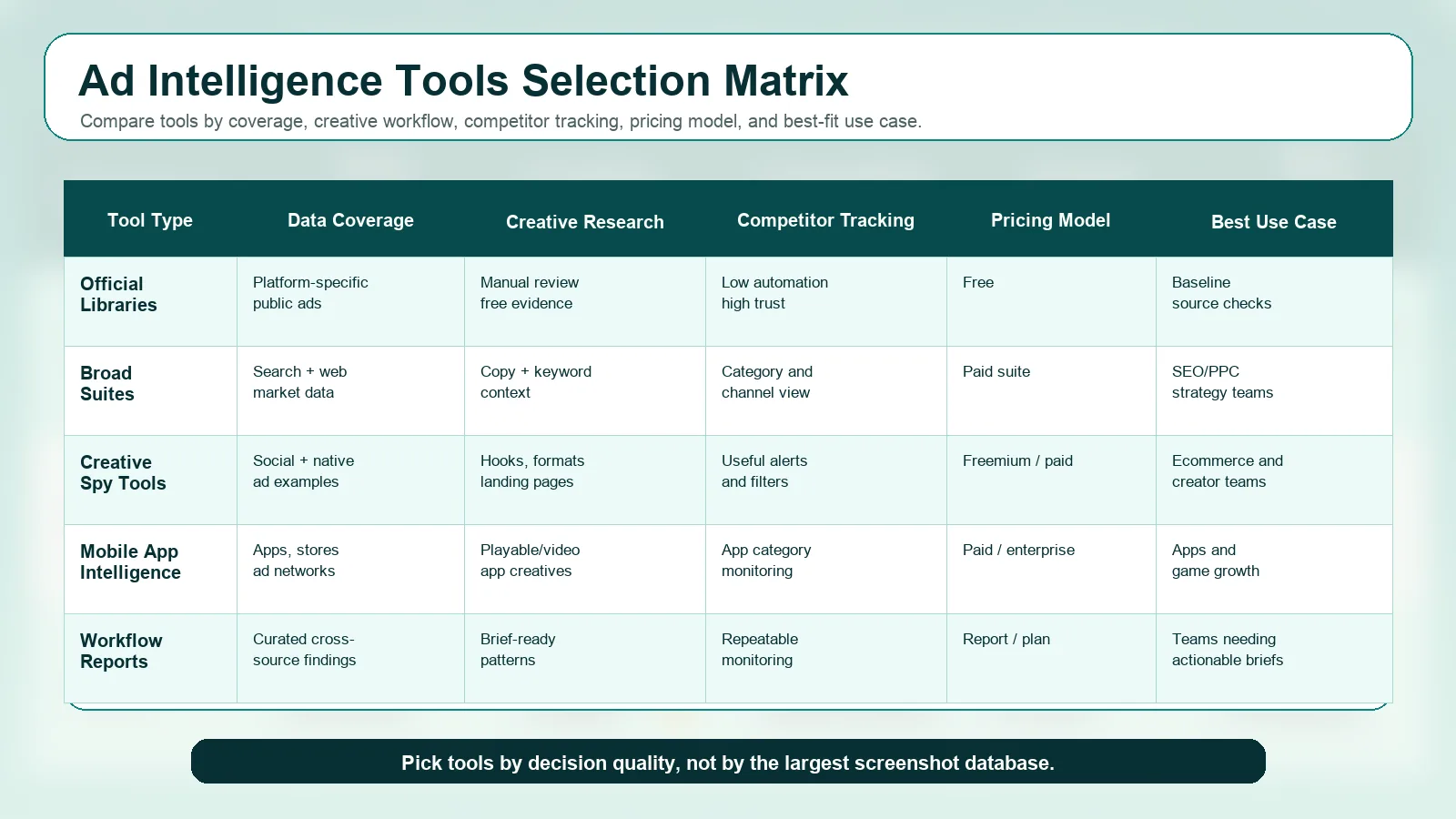
Each tool has its own section further down. Use this table to shortlist, not to decide. The right stack is usually one broad suite, one creative research tool and one reporting workflow; the sections below explain what each category does and does not answer. If you only need PPC keyword tools, the narrower SpyFu alternatives comparison covers that job; if you only need social creative search, see best ad spy tools.
Ad intelligence tools help teams find competitor ads, understand creative patterns, monitor market changes, and turn public signals into better campaign decisions. The hard part is not finding a database with a lot of ads. The hard part is choosing ad intelligence software that fits your channel mix, workflow, budget, and decision speed. This guide is written for growth teams, agencies, ecommerce marketers, app marketers, game marketers, and founders evaluating an ad intelligence platform. If you need the category definition first, read our advertising intelligence guide; for the discipline that sits around the tools, evidence tiers and the weekly routine, read competitive advertising intelligence. This page focuses on tool selection.
Disclosure: AdMapix is our product. We include it where mobile app context and the reporting workflow are the deciding factors, and we separate that from what public sources can and cannot prove.
How To Choose Ad Intelligence Tools
Start with the decision you need to make.
| Decision | Tool capability you need |
|---|---|
| "What creative should we produce next?" | Creative search, tagging, examples, landing page context, exportable briefs |
| "Which competitors are increasing pressure?" | Monitoring, date filters, competitor lists, channel movement, alerts |
| "Which search ads and keywords matter?" | PPC competitor data, SERP checks, keyword and landing page context |
| "What are ecommerce brands testing?" | Product angles, offers, UGC formats, landing pages, social ad examples |
| "What are mobile apps and games running?" | Mobile ad intelligence, app store context, playable/video creative, country filters |
| "What should leadership see?" | Clean reports, summaries, change tracking, and decision-ready notes |
The wrong way to choose is to ask, "Which tool has the most ads?" Large coverage is useful, but decision quality depends on freshness, filters, metadata, source context, and whether the tool helps your team act.
How We Evaluated
We compared each ad intelligence tool on the criteria that change campaign decisions, not on raw library size:
- Channel coverage - search, social, native, and mobile/app, in the markets you actually sell in.
- Data freshness - how fast new ads and creative changes show up.
- Creative format support - video, static, playable, and landing-page context.
- Filtering and metadata - format, copy, CTA, advertiser, country, and dates.
- Workflow output - can a finding become a brief, doc, or client report?
- Monitoring - can it track competitors repeatedly, not just once?
- Pricing transparency - published and predictable, or sales-gated.
To keep this grounded in real data instead of vendor claims: in June 2026, a single AdMapix search for "puzzle game" returned around 7,000 indexed creatives, and the freshest results had been added the same day we ran the query. The top results spanned video, static image, and playable-HTML demos - each tagged to its app, developer, and first-seen date - and one advertiser alone appeared as 13 separate video variants. That per-variant, same-day, multi-format view is what separates a usable ad intelligence platform from a big-but-stale screenshot archive.
Tool Category 1: Official Ad Libraries
Official ad libraries are the cheapest way to start digital ads intelligence. They are not always convenient, but they are useful for source checks.
Useful sources:
| Source | Best use |
|---|---|
| Google Ads Transparency Center | Check Google ecosystem advertiser creatives and landing pages. |
| Meta Ad Library help resource | Understand Meta public ad library access and policy context. |
| TikTok Creative Center | Research short-form ad examples, formats, and category creative. |
| Apple Ads | Understand App Store search advertising context. |
Official libraries are best when:
| Good fit | Weak fit |
|---|---|
| You need to verify a specific advertiser or claim. | You need fast cross-platform reporting. |
| You have a small budget. | You need team exports and monitoring. |
| You want primary-source evidence. | You need historical pattern analysis at scale. |
If your team is early, start here. If your team is spending heavily or briefing creatives weekly, you will likely outgrow manual checks. Display and programmatic placements are the weakest spot for official libraries; our competitor display ads guide explains what you can still infer from them.
Tool Category 2: Broad Marketing And PPC Suites
Broad marketing suites are useful when ad intelligence is part of a wider SEO, PPC, traffic, or competitive strategy workflow.
Semrush Advertising Research
Semrush Advertising Research is useful for paid search and PPC competitor analysis. It fits teams that already use Semrush for SEO or competitive research and want search ad copy, competitor domains, and keyword context in the same workspace.
Best for:
| Use case | Why it fits |
|---|---|
| PPC teams | Search ad and keyword context matter more than visual creative volume. |
| SEO + paid search teams | Organic and paid competitive research can sit together. |
| Agencies | Client reports often need PPC, SEO, and competitor context. |
Watch out for:
| Limitation | What to do |
|---|---|
| It is not primarily a social creative swipe file. | Pair it with a creative ad intelligence tool if you need visual examples. |
| Pricing is suite-based. | The Advertising Toolkit starts at $99/month (checked September 2026); check current plans and add-ons before shortlisting, and compare it with the other PPC keyword tools if search is your only job. |
Similarweb
Similarweb is better understood as a competitive market and web strategy platform than a pure ad spy tool. It can be valuable when teams need traffic, market context, audience movement, and digital strategy signals alongside ad intelligence.
Best for:
| Use case | Why it fits |
|---|---|
| Market strategy | Competitive traffic and web behavior matter. |
| Enterprise marketing | Teams need benchmarks beyond ad creatives. |
| Category analysis | Market movement is as important as individual ads. |
Watch out for:
| Limitation | What to do |
|---|---|
| It may be broader than a creative team needs. | Use it for market context, not only creative examples. |
| Pricing may require sales evaluation. | Treat it as a strategic platform decision. |
Tool Category 3: Enterprise Digital And Mobile Intelligence
Sensor Tower Pathmatics
Sensor Tower Pathmatics is positioned for digital advertising intelligence and is especially relevant when teams need enterprise-level competitive views, digital ad market signals, or mobile/app intelligence.
Best for:
| Use case | Why it fits |
|---|---|
| Mobile ad intelligence | App and mobile market context are central. |
| Enterprise competitor monitoring | Larger teams need broader coverage and governance. |
| Media strategy | Spend and channel signals can matter more than individual screenshots. |
Watch out for:
| Limitation | What to do |
|---|---|
| It may be too heavy for small teams. | Use only if the decision size justifies enterprise tooling. |
| Enterprise tools still need interpretation. | Build a weekly decision workflow, not only dashboards. |
Tool Category 4: Creative Spy Tools
Creative spy tools are useful when the team needs examples quickly. They are popular with ecommerce teams, performance marketers, dropshippers, and creative strategists.
BigSpy
BigSpy is a broad ad spy tool used for finding ad examples across social and native channels. It can help teams discover creative angles, landing page patterns, ecommerce offers, and social proof formats.
Best for:
| Use case | Why it fits |
|---|---|
| Ecommerce ad intelligence | Product angles and social creatives are easier to collect. |
| Startup testing | Broad examples help teams learn fast. |
| Creative brainstorming | Teams can build a swipe file quickly. |
Watch out for:
| Limitation | What to do |
|---|---|
| A visible ad is not proof of profitability. | Look for repetition, landing page match, and product economics. |
| Data can become noisy. | Tag examples and remove irrelevant categories. |
AdSpy
AdSpy focuses on social ad discovery, especially Facebook and Instagram-style research. It is useful when a team wants a searchable creative database for social ads.
Best for:
| Use case | Why it fits |
|---|---|
| Social media creative research | The channel focus is clear. |
| Direct response examples | Teams can review hooks, offers, and claims. |
| Competitor social monitoring | Useful when Meta-style ads are central. |
Watch out for:
| Limitation | What to do |
|---|---|
| It does not replace search ads intelligence. | Pair it with PPC tools or manual SERP checks. |
| Creative examples need context. | Always inspect landing pages and offers. |
Minea
Minea is often used for ecommerce ad intelligence, product discovery, and dropshipping-style research. It fits teams that care about product angles, social proof, stores, and ad examples.
Best for:
| Use case | Why it fits |
|---|---|
| Ecommerce creative discovery | Product and offer patterns matter. |
| Store research | Ecommerce funnels need landing and product context. |
| Creator-style examples | UGC and social proof are important. |
Watch out for:
| Limitation | What to do |
|---|---|
| Ecommerce bias may not fit B2B. | Use B2B-specific sources for SaaS and enterprise markets. |
| Product trend data can be volatile. | Validate with margin, supply, and audience fit. |
Tool Category 5: Workflow And Reporting Tools
Many teams do not need another raw database. They need a repeatable way to turn competitor evidence into decisions.
AdMapix is built for that workflow: competitor ad research, creative pattern analysis, and report-ready outputs for growth teams. Use AdMapix reports when the main need is not "show me every ad," but "show me what changed, what it means, and what we should test."
Best for:
| Use case | Why it fits |
|---|---|
| Teams without time to tag every example manually | Reports compress research into decisions. |
| Agencies | Client-ready briefs matter. |
| App and game marketers | Creative patterns and competitor workflows need context. |
| Founders | Fast market reads are more useful than raw exports. |
The Starter plan is $19.90/month and a free tier lets you run searches before paying (checked September 2026 on pricing). If your question is which analytics stack measures your own paid performance rather than competitors', that is a different category; see paid ads analytics tools.
How To Build The Right Stack
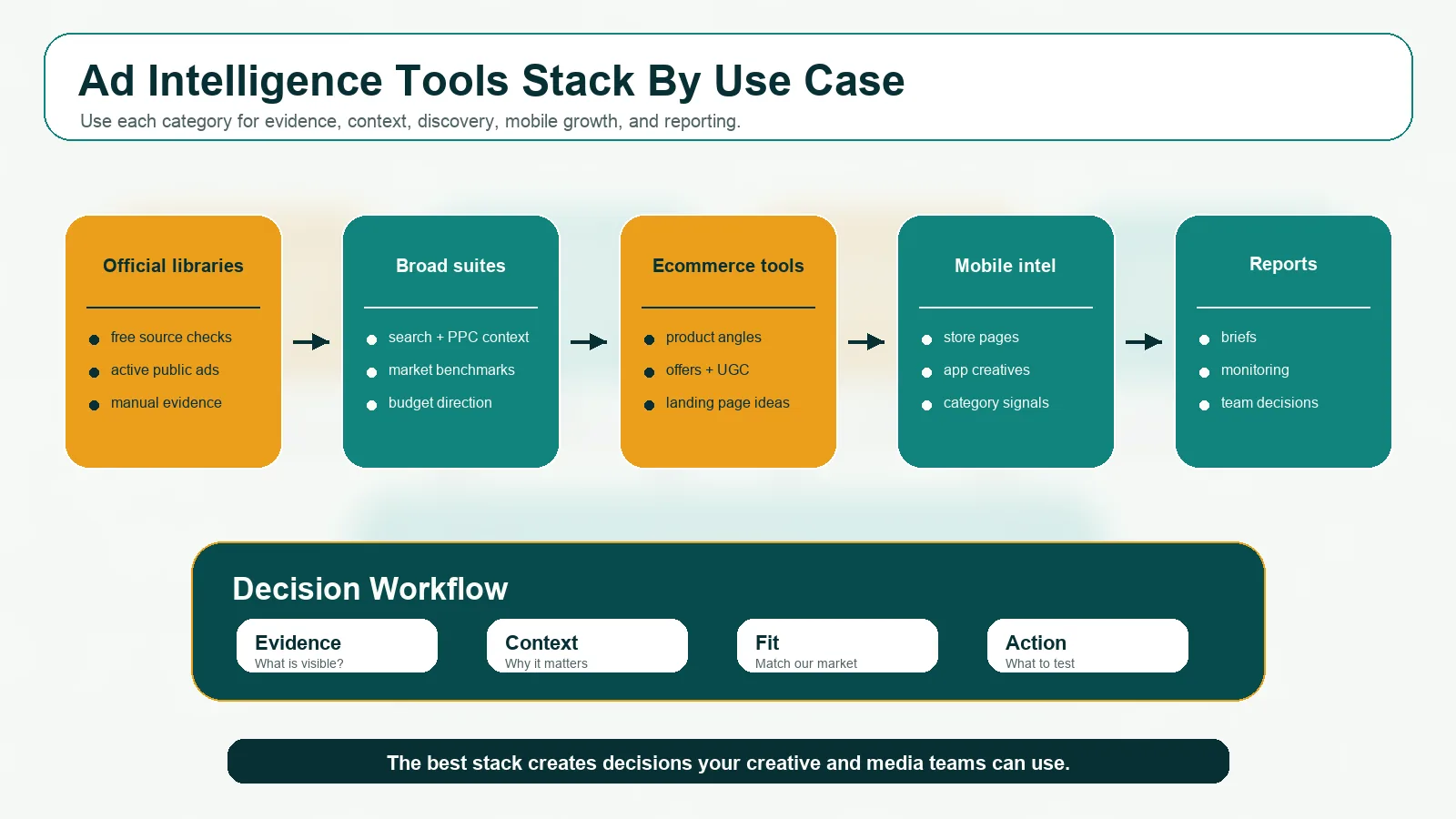
A good tool stack separates source evidence, market context, creative discovery, mobile/app intelligence, and reporting.
Use this stack logic:
| Team type | Suggested stack |
|---|---|
| Small startup | Official ad libraries + one creative spy tool + manual brief template |
| Ecommerce brand | BigSpy or Minea + Meta/TikTok checks + landing page teardown + reporting workflow |
| Mobile app team | Sensor Tower-style mobile intelligence + app store review + paid creative research |
| SaaS PPC team | Semrush-style PPC research + SERP checks + landing page analysis |
| Agency | Broad competitive suite + creative spy tool + reporting workflow |
| Leadership team | Curated AdMapix-style reports + high-level trend and competitor movement summaries |
The most common mistake is buying overlapping tools. If two tools answer the same question, keep the one that produces better decisions for your team.
Pricing Model Notes
Ad intelligence platform pricing usually falls into five models:
| Pricing model | What it usually means | Good fit |
|---|---|---|
| Free official tools | Manual access to public libraries | Early research and verification |
| Freemium or low-cost self-serve | Limited searches, exports, or history | Startups and ecommerce testing |
| Paid SaaS suite | Broader SEO, PPC, traffic, or creative modules | Teams that need multiple workflows |
| Enterprise contract | Larger coverage, seats, governance, and support | Brands, agencies, and mature teams |
| Report or service model | Curated insights and briefs | Teams that need decisions more than raw data |
Do not compare only monthly price. Compare total workflow cost:
| Hidden cost | Why it matters |
|---|---|
| Manual tagging time | Cheap tools can become expensive if analysts spend hours cleaning data. |
| Bad coverage | Missing the right channel makes the tool irrelevant. |
| Stale data | Old ads can mislead creative planning. |
| No export path | Research that cannot become a brief is hard to operationalize. |
| No monitoring | One-time research misses competitor changes. |
Data Quality Checklist
Before buying ad intelligence software, check:
| Requirement | Why it matters |
|---|---|
| Source coverage | Does it cover your actual channels, markets, and competitors? |
| Freshness | How quickly does it reflect new ads or changes? |
| History | Can you see if an ad or offer persists over time? |
| Metadata | Does it include format, copy, CTA, landing URL, market, dates, or platform? |
| Filtering | Can your team find relevant ads without drowning in noise? |
| Exports | Can findings move into briefs, docs, or client reports? |
| Monitoring | Can it track competitors repeatedly? |
| Interpretation | Does it help explain what to do, or only show examples? |
For a deeper framework, read the advertising intelligence guide.
Example Workflow: From Query To Brief
Here is how the tool choice plays out in practice, using a real AdMapix query.
Scenario: A casual-game UA team needs to refresh puzzle-game creatives before the next test cycle.
Question: What formats and hooks are active puzzle-game advertisers running right now?
AdMapix query: puzzle game (creative search, sorted by most recently indexed).
What it returned (June 2026):
- Around 7,000 indexed creatives for the single term, with the newest added the same day.
- A format mix of video, static image, and playable-HTML demos - not just screenshots.
- Per-creative metadata: app, developer, first-seen date, and video length.
- One advertiser running 13 distinct video variants of the same game - a clear creative-iteration signal.
Decision: Prioritize testing short (15-30s) video hooks plus at least one playable concept, and track the 13-variant advertiser as a pace-setter to benchmark against.
Why it matters: The output is a creative brief grounded in what is live this week, not a folder of undated screenshots. That is the difference between a tool that shows ads and one that drives the next test.
Common Mistakes
Mistake 1: Choosing The Biggest Database
Big databases are useful, but the largest screenshot collection is not automatically the best ad intelligence tool. If the tool cannot answer your decision question, it will create more noise.
Mistake 2: Buying A Tool For One Channel While Your Funnel Is Cross-Channel
If your funnel includes search ads, TikTok creatives, app stores, landing pages, and creators, a single-channel tool may leave blind spots. Either accept the limitation or pair it with other sources.
Mistake 3: Treating Competitor Ads As Instructions
Competitor ads are hypotheses. They show what others are testing, not what will work for your economics, audience, or product.
Mistake 4: Ignoring Landing Pages
Ad creative and landing pages must be reviewed together. A competitor's ad may work because the page, offer, and proof are tightly matched.
Mistake 5: Forgetting The Human Workflow
Someone still has to classify, interpret, brief, test, and monitor. The tool should reduce that work, not hide it.
FAQ
What are ad intelligence tools?
Ad intelligence tools help teams find competitor ads, study creative patterns, monitor market changes, inspect landing pages, and turn advertising signals into campaign decisions.
What is the best ad intelligence tool?
There is no universal best tool. The best choice depends on whether you need PPC research, ecommerce ad intelligence, mobile ad intelligence, social creative discovery, executive reports, or recurring competitor monitoring.
Are free ad libraries enough?
Free ad libraries are enough for baseline checks and primary-source verification. They are usually not enough for fast cross-platform reporting, tagging, historical analysis, or weekly monitoring.
Which tool is best for ecommerce ad intelligence?
Ecommerce teams often benefit from creative spy tools such as BigSpy or Minea, plus manual landing page and store analysis. The key is to validate product economics before copying any visible ad.
Which tool is best for mobile ad intelligence?
Mobile teams should prioritize app store context, playable/video creatives, mobile ad networks, country filters, and retention-quality interpretation. Enterprise teams may evaluate Sensor Tower Pathmatics-style mobile intelligence; smaller teams can pair public sources with curated reports.
How should agencies choose ad intelligence software?
Agencies should choose tools that support exports, monitoring, client-ready summaries, repeatable workflows, and enough source coverage for each client category.
Key Takeaways
- The best ad intelligence tool is the one that fits your channel mix and decision speed - database size is a weak signal.
- Use free official libraries for verification, broad suites for PPC and market context, creative spy tools for examples, and mobile intelligence when app ecosystems matter.
- Score every tool on freshness, filters, metadata, exports, and monitoring before you compare monthly price.
- Competitor ads are hypotheses, not instructions - validate against your own economics and landing pages.
- When the real need is "what changed and what should we test," a report-first workflow like AdMapix beats another raw database.
Related Workflows By Intent
Use the tool comparison above with the right execution guide:
Bottom Line
The best ad intelligence tools are not the ones with the most screenshots. They are the tools that help your team make better decisions faster.
Use free official sources for verification. Use broad suites for market and PPC context. Use creative spy tools for examples. Use mobile intelligence when app ecosystems matter. Use reporting workflows when the team needs briefs and decisions, not raw databases.
If you want competitor ad research that is already structured into patterns, insights, and next actions, sign in to AdMapix and run your first competitor query.
Sources
- Google Ads Transparency Center - official advertiser ad lookup (accessed June 2026).
- Meta Ad Library - public ad transparency surface for Meta platforms (accessed June 2026).
- TikTok Creative Center - short-form ad examples and trends (accessed June 2026).
- First-party data: AdMapix creative index, "puzzle game" query, June 2026. Coverage, freshness, and format figures are reproducible by running the same search.
Turn these observations into your next creative study
Open the creative library and select samples for your market, network and research question.
Related Articles
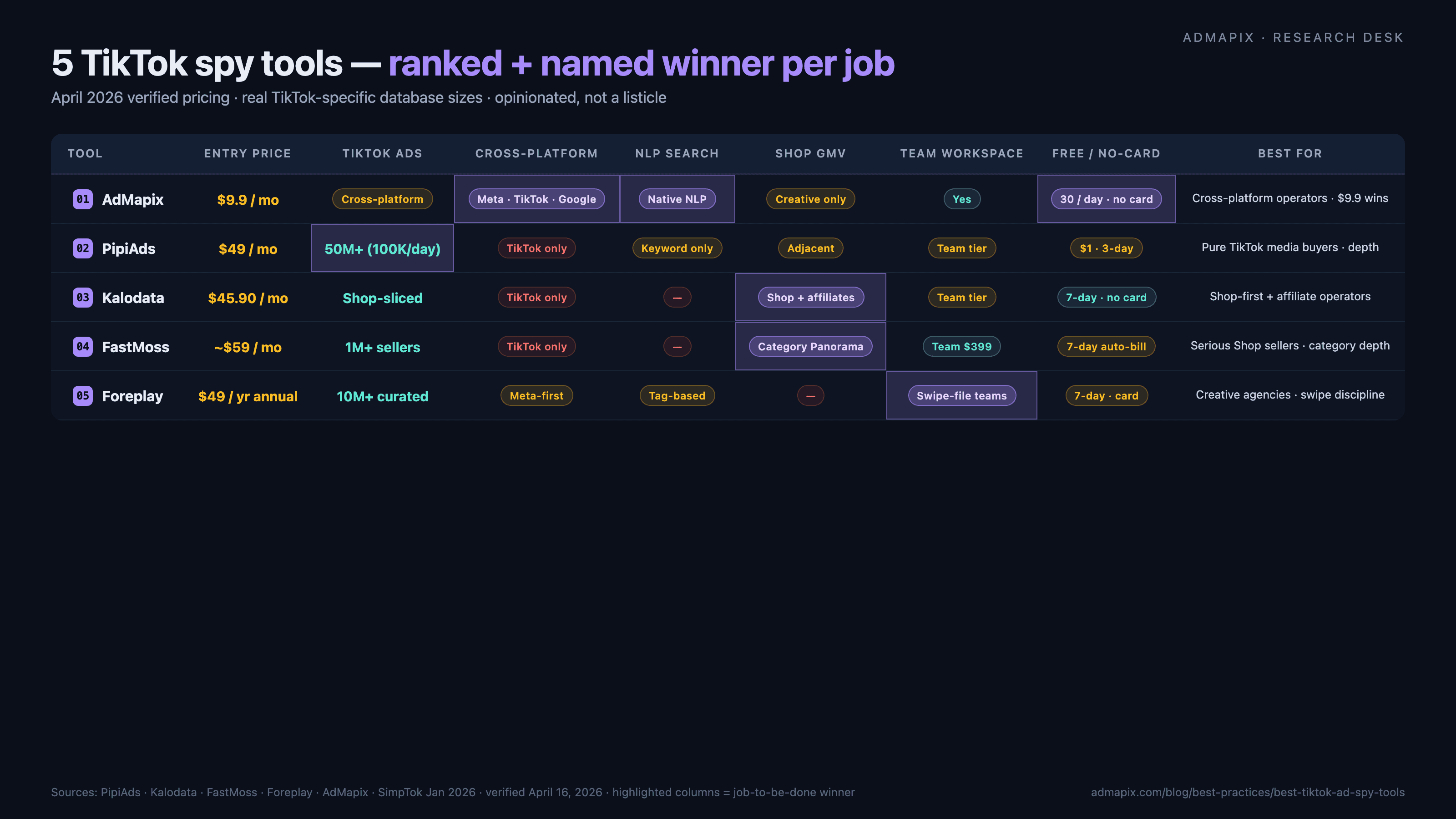
Best TikTok Ad Spy Tools 2026: Ranked, Tested, Opinionated (Not a Listicle)
Named winners, no hedging: AdMapix ($19.90) wins cross-platform NLP search, PipiAds ($49, 50M+ TikTok ads) wins pure TikTok creative depth, Kalodata ($45.90) wins Shop GMV and creator intelligence, FastMoss (~$59) wins Shop-seller analytics, Foreplay ($49 annual) wins creative-team workflow. Verified April 2026 pricing, real database sizes, honest weaknesses, a decision framework pointing at one tool per job, Chrome-extension red flags, and the post-DSA landscape.
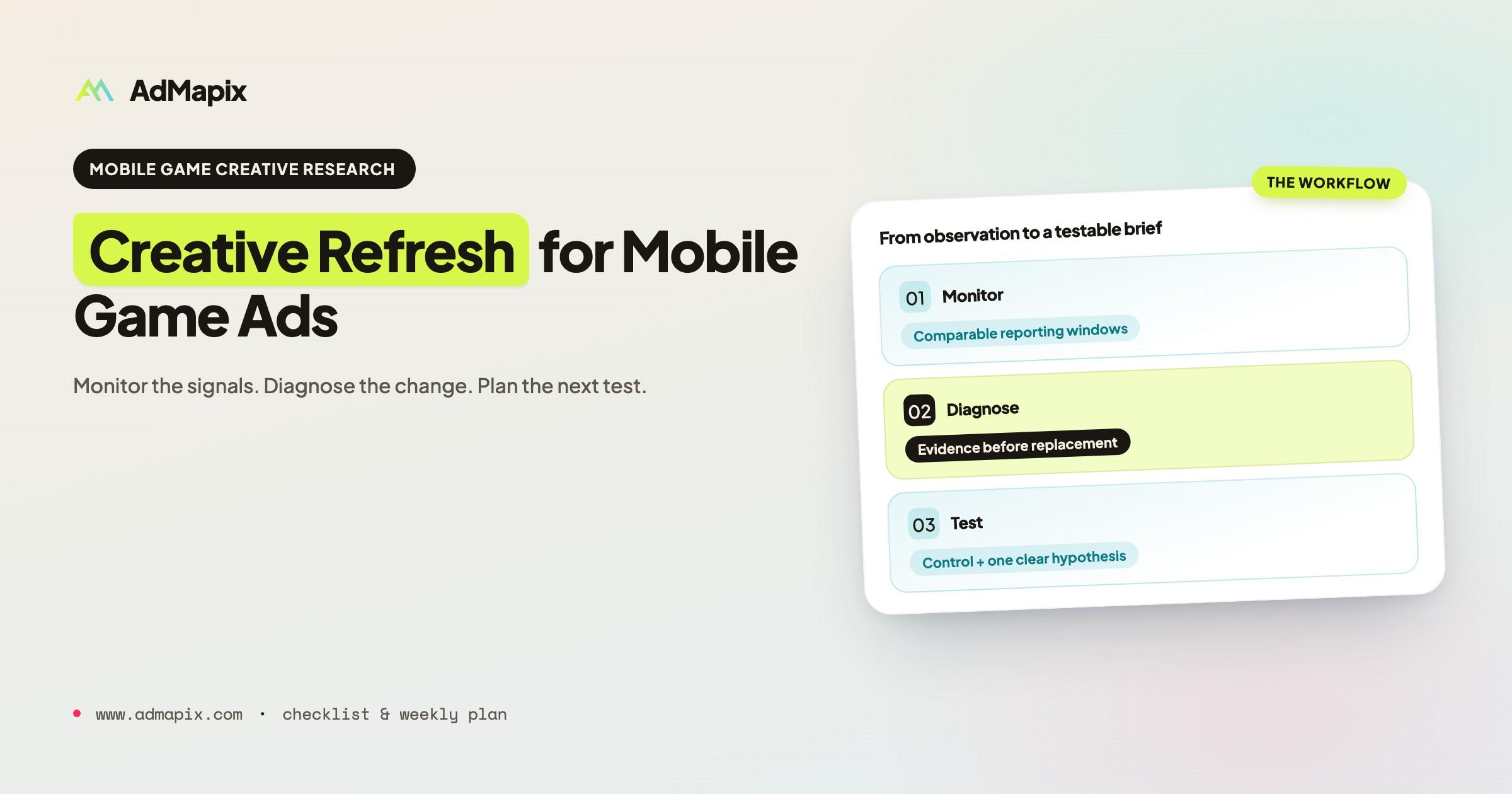
Creative Refresh Strategy for Mobile Game Ads: A Practical Playbook
Learn when to refresh mobile game ad creatives using real fatigue signals, not gut feel — and build a pipeline that prevents creative crises.
Competitor Ad Analysis in 2026: The 5-Dimension Framework, Templates & SOP
A complete competitor ad analysis playbook for 2026 — a 5-dimension scoring framework, a 10-question creative teardown checklist, ready-to-use Notion and Airtable templates, a weekly-to-quarterly SOP, and the Meta Ad Library impressions shortcuts that make competitive ad research up to 60% faster.