
Google Search Ads Spy Tool: What You Can Actually See
Learn what a Google search ads spy tool can actually show, what remains private, and how to combine Transparency Center, SERP checks, and PPC intelligence.
A Google search ads spy workflow should separate visible evidence from private account assumptions.
Google Search Ads Spy Tool: What You Can Actually See
A Google search ads spy tool helps you study public competitor search ads, visible copy patterns, landing pages, and estimated PPC signals. It does not give you a competitor's private Google Ads account.
That distinction matters. Many marketers search for a Google ads spy tool expecting exact keywords, bids, budgets, Quality Score, targeting, conversion rates, or ROAS. Those data points are private. What you can collect is still useful: public ad examples, controlled SERP observations, landing-page paths, message repetition, and your own account-side Auction Insights where eligible.
This guide explains what a Google search ads spy tool can actually show, what remains private, and how to combine free methods with paid search ads intelligence.
If your team is asking how to spy on Google ads, the practical answer is to build a compliant research system around public evidence, controlled sampling, and documented assumptions.
For a broader manual workflow, read how to check competitors' Google Ads. For the official public ad surface, read our Google Ads Transparency Center guide. This Day55 article focuses on search ad spy tools and tool-assisted workflows.
What a Google Search Ads Spy Tool Can Show
A good search ads spy workflow helps you organize visible evidence.
| Visible evidence | What it helps you infer |
|---|---|
| Public advertiser examples | Which messages or offers are being used |
| Search result sampling | Which competitors appear on selected queries |
| Ad headlines and descriptions | How rivals frame outcomes, proof, and CTAs |
| Visible assets or extensions | Which sitelinks, callouts, or structured cues support the ad |
| Landing page URLs | Whether the ad connects to a specific funnel |
| Repetition over time | Which claims may be important enough to keep running |
| Estimated PPC signals | Directional keyword or competitor research, not exact account data |
This is enough to support better PPC decisions. It can tell you where your copy is weaker, where a competitor has a stronger landing page, where your query coverage may be thin, or where your offer does not match search intent.
What You Cannot See
A Google search ads spy tool cannot reveal private account economics.
| Private data | Why it is not visible from outside |
|---|---|
| Exact keyword list | The query you test may not be the keyword or match type that triggered the ad |
| Exact bids | Bids are account settings and auction-dependent |
| Daily or lifetime budget | Budget data is not public for competitor accounts |
| Quality Score | Account-specific and not visible externally |
| Conversion rate | Only the advertiser sees conversion performance |
| ROAS or CAC | Requires internal cost and revenue data |
| Full targeting settings | Audiences, exclusions, and bid strategies are private |
Google's Ad Rank documentation explains that ad position and eligibility involve multiple factors, including bid, quality, thresholds, auction competitiveness, user context, and assets. From the outside, you can observe placement patterns, but you cannot know the exact inputs.
Free Workflow with Google Ads Transparency Center
Start with the Google Ads Transparency Center. It can show public advertiser examples across Google's ecosystem.
Use this workflow:
- Search by advertiser or competitor brand.
- Review public ad examples and visible formats.
- Save the advertiser, date, visible ad copy, destination page, and market context.
- Group examples by offer, problem, product, or buyer stage.
- Compare what you find with live SERP sampling and landing-page checks.
- Repeat weekly before treating a message as a meaningful pattern.
The Transparency Center is useful for public discovery, but it is not a complete PPC intelligence platform. It should be one source inside a broader search ads intelligence workflow.
Manual SERP Sampling
Manual SERP sampling means checking a controlled query set and recording what appears. It is basic, but it is still one of the most useful ways to understand live search competition.
Build query groups:
| Query group | Example pattern | What it reveals |
|---|---|---|
| Category | "ad intelligence tool" | Broad commercial competition |
| Problem | "track competitor ads" | Pain-led positioning |
| Comparison | "tool A alternative" | Switching and substitution intent |
| Brand-adjacent | "[your brand] alternative" | Conquesting and defensive pressure |
| Feature | "google search ads spy tool" | Tool-specific demand |
Control the environment as much as possible: country, device, browser state, date, and query wording. Do not make decisions from one personalized search.
Manual sampling pairs well with Google Ads competitor analysis because it forces the team to anchor research in real search intent.
Paid PPC Intelligence Features
Paid tools become useful when you need scale, history, saved examples, and team workflows.
Look for these features:
| Feature | Why it matters |
|---|---|
| Competitor domain lookup | Find visible search ad examples by advertiser or domain |
| Keyword estimates | Generate directional keyword opportunities |
| Ad copy history | See whether messages repeat or change |
| Landing-page capture | Connect ad promise to funnel support |
| SERP monitoring | Track specific query sets over time |
| Alerts | Detect new competitor messages faster |
| Team tagging | Classify intent, offer, proof, CTA, and priority |
| Exports | Move findings into PPC briefs and reports |
Paid tools still estimate. Treat them as research accelerators, not sources of exact competitor account truth.
For broader tool comparisons, use best ad spy tools. If you need recurring evidence, use AdMapix reports.
Search Ad Teardown Framework
Do not review Google competitor ads with vague notes. Use a scorecard.
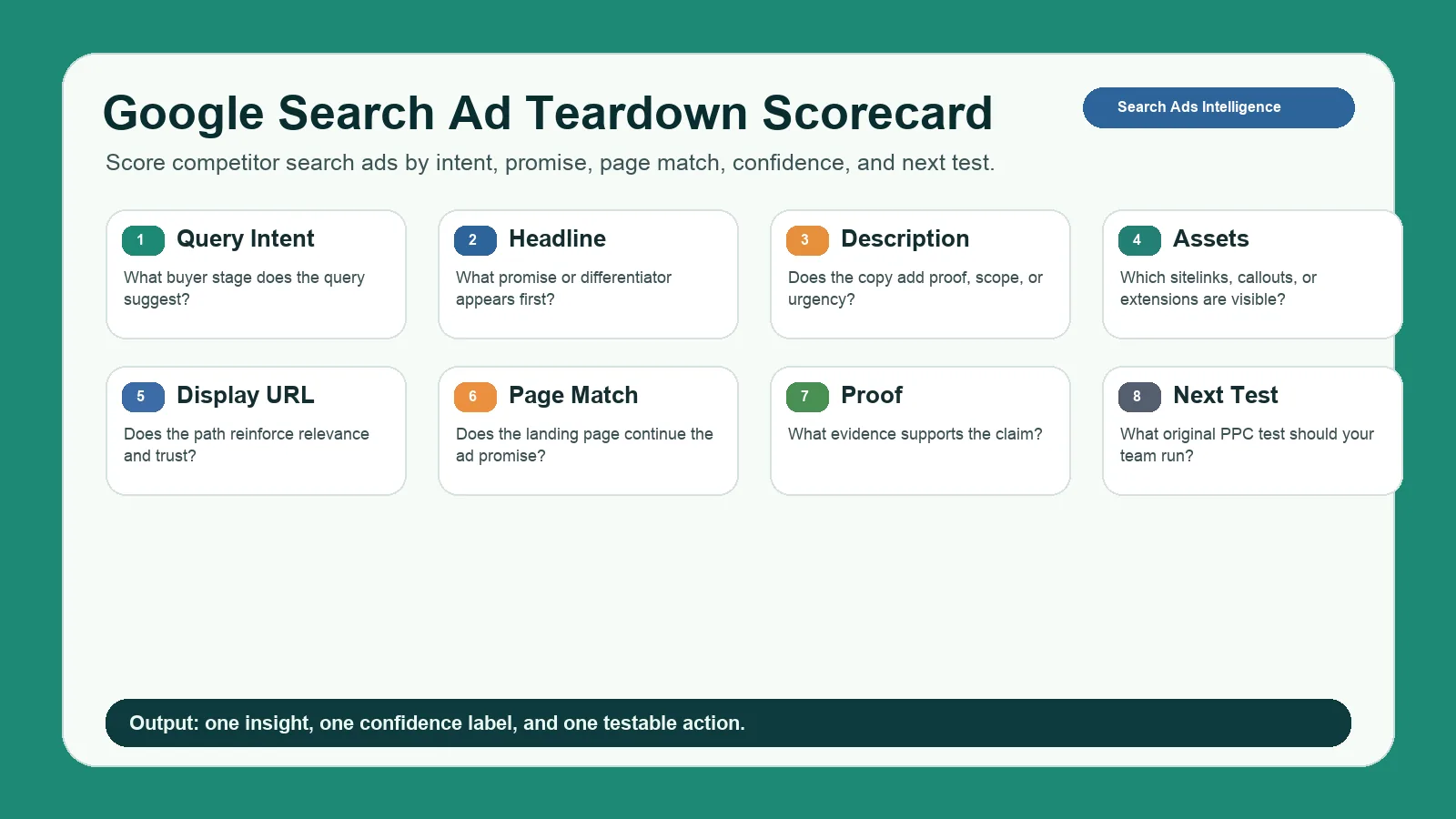
A teardown scorecard keeps PPC competitor research focused on query intent, message match, proof, and testable actions.
| Component | Question |
|---|---|
| Query intent | What buyer stage does the query suggest? |
| Headline promise | What outcome or differentiator appears first? |
| Description | Does the copy add proof, specificity, or urgency? |
| Assets | Which sitelinks, callouts, or other visible assets support the ad? |
| Display URL | Does the path reinforce relevance and trust? |
| Landing page | Does the destination continue the same promise? |
| Proof | What evidence supports the claim? |
| Confidence | Is this one sample or a repeated pattern? |
| Next test | What original PPC test should your team run? |
Google's responsive search ads help is a useful reference for understanding how multiple headlines and descriptions can be assembled. When you study competitor search ads, remember that the visible ad may be one combination from a larger set of assets.
Landing-Page Analysis
The ad is only half the evidence. The landing page shows whether the competitor built a real funnel behind the message.
Inspect:
| Page element | What to check |
|---|---|
| Headline | Does it repeat the ad's main promise? |
| Above-the-fold proof | Does the page support the claim quickly? |
| CTA | Is the next action aligned with search intent? |
| Offer | Demo, trial, report, pricing, comparison, audit, or app install |
| Objection handling | Does the page address price, trust, time, or migration concerns? |
| Page specificity | Dedicated campaign page or generic homepage? |
| Mobile performance | Does the page work for mobile search clicks? |
If a competitor ad promises "see competitor ads in minutes" and the landing page shows a specific workflow, that is a stronger pattern than an ad pointing to a generic homepage.
Use Auction Insights Carefully
If you run Google Ads yourself, Auction Insights can add account-side context for auctions you participate in. Google's Auction Insights help explains metrics such as impression share, overlap rate, position above rate, and outranking share.
Use it carefully:
| Auction Insights can help with | It cannot tell you |
|---|---|
| Which competitors overlap with your auctions | Their full account coverage |
| Whether overlap changes over time | Exact budgets or bids |
| Whether a rival appears above you more often | Their Quality Score or conversion rate |
| Which campaigns face competitive pressure | Competitor campaign structure |
Combine Auction Insights with public ad examples, SERP sampling, and landing-page reviews. No single source is enough.
Weekly Google Competitor Ads Tracker
Keep the tracker practical.
| Field | Example |
|---|---|
| Date | 2026-04-17 |
| Query | "google search ads spy tool" |
| Competitor | Brand A |
| Source | SERP sample, Transparency Center, paid tool, Auction Insights |
| Headline promise | "Find competitor Google ads fast" |
| Visible assets | Sitelinks, pricing page, report, demo CTA |
| Landing page | Dedicated PPC intelligence page |
| Confidence | Low, medium, high |
| Action | Test stronger proof in headline |
Review the tracker weekly. Look for new advertisers, repeated messages, offer changes, and landing-page improvements. The goal is not to obsess over competitors. The goal is to keep your own PPC tests grounded in market evidence.
Free vs Paid: Which Workflow Should You Use?
Use the simplest workflow that supports the decision you need to make.
| Need | Best workflow |
|---|---|
| Quick competitor check | Transparency Center plus manual SERP sampling |
| One-off landing-page comparison | Manual SERP and page review |
| Weekly PPC competitor monitoring | Structured tracker or reporting workflow |
| Many competitors or locations | Paid PPC intelligence tool |
| Team brief or client report | Tool with saved examples, tags, and exports |
| Cross-channel research | Combine Google search with Meta, TikTok, YouTube, display, and native data |
If the workflow becomes recurring, consider pricing for continuous monitoring. If you only need one manual audit, stay lightweight.
Turn Findings into PPC Tests
The useful output of a google search ads spy tool is not a copied ad. It is a cleaner test backlog. After you collect Google competitor ads, translate each observation into one hypothesis, one asset change, and one measurement window.
| Finding | Hypothesis | Test |
|---|---|---|
| Competitors repeat a speed claim | Buyers may value time-to-insight more than feature depth | Test a headline that leads with speed, then support it with specific proof |
| Several ads send traffic to comparison pages | Searchers may be close to vendor selection | Build a comparison landing page and measure qualified demo rate |
| A rival uses report or audit CTAs | The query may need evidence before a sales call | Test a report-first CTA against a demo-first CTA |
| Most ads use generic proof | Specific evidence may stand out | Add numbers, screenshots, review snippets, or workflow examples |
Keep the test original. Search ads intelligence should help you understand market pressure, not clone a rival's positioning. If your proof is weaker than the competitor's proof, fix the offer or landing page before you change ad copy.
Common Mistakes
| Mistake | Better approach |
|---|---|
| Assuming a query equals a keyword | Label query evidence separately from keyword inference |
| Claiming exact bids or budgets | Use directional confidence levels |
| Saving ad copy without the landing page | Capture the full click path |
| Reviewing one personalized SERP | Use controlled sampling |
| Ignoring buyer intent | Group ads by query intent first |
| Copying competitor claims | Extract the pattern and rebuild it with your own proof |
| Treating paid tools as exact truth | Use them as research accelerators |
FAQ
What is a Google search ads spy tool?
A Google search ads spy tool helps marketers find and analyze public competitor search ad examples, visible copy, estimated PPC signals, and landing-page patterns.
How do I spy on Google ads?
Use Google Ads Transparency Center, controlled SERP sampling, competitor landing-page reviews, paid PPC intelligence tools, and your own Auction Insights where eligible.
Can I see competitor Google Ads keywords?
You can infer likely keyword intent from queries and tool estimates, but you usually cannot see a competitor's exact keyword list or match types.
Can I see competitor bids or budgets?
Usually no. Exact bids, budgets, Quality Score, conversion rates, and ROAS are private account data. Treat any external estimate as directional.
Is Google Ads Transparency Center enough?
It is enough for public ad discovery, but not enough for historical tracking, query-level SERP sampling, team workflows, alerts, or PPC reporting.
What should I analyze in Google competitor ads?
Analyze query intent, headline promise, description, visible assets, display URL, landing-page match, proof, CTA, repetition, confidence, and next test.
Conclusion
A Google search ads spy tool is valuable when it keeps your team honest: what did we actually see, what are we inferring, and what test should we run next?
Use public ad examples, controlled SERP sampling, landing-page analysis, account-side Auction Insights, and paid PPC intelligence carefully. Do not pretend to see private bids, budgets, or conversion data. Build a repeatable workflow and turn the strongest pattern into your own test.
For the broader operating system behind this page, read search ads intelligence. For recurring Google competitor ads tracking, start with AdMapix reports. For continuous ad intelligence across channels, review pricing.
Turn these observations into your next creative study
Open the creative library and select samples for your market, network and research question.
Related Articles
Facebook Ads Spy Tool: Free Methods vs Paid Platforms (2026)
How to spy on competitors' Facebook and Instagram ads in 2026: the free Meta Ads Library workflow, when it stops being enough, a comparison of paid Facebook ad spy tools with September 2026 pricing, what to capture from every ad, and a decision matrix for choosing.

YouTube Ads Spy Tool: How to Find Competitor Video Ads
Find competitor YouTube ads with free and paid workflows. Learn what data is visible, how to analyze video hooks, and how to turn examples into creative tests.
Native Ad Spy Tools 2026: Compare Anstrex, AdPlexity, Adbeat & More
Four native ad spy tools (Anstrex, AdPlexity, Adbeat, SpyOver) plus two social/video complements compared by network coverage, landing-page capture, entry price, and best fit, with prices checked on vendor sites in September 2026. Includes a free research workflow, a creative teardown framework, and compliance guardrails.