
Search Ads Intelligence: Find Competitor Google Ads, Keywords & Landing Pages
Learn how to find competitor Google Ads, map keyword themes, inspect landing pages, compare ad copy and CTAs, and turn PPC search intelligence into campaign tests.
Reviewed and updated by the AdMapix editorial team on September 5, 2026.
A practical workflow for turning public search-ad signals into repeatable competitor research.
Quick answer for searchers: Search ads intelligence helps you find competitor Google Ads, keyword themes, landing pages, ad copy, offers, and CTA patterns — then turn those signals into PPC tests.
What you can discover before you buy a tool:
- competitor Google Ads copy and repeated promises
- keyword themes by intent, market, and device
- landing pages competitors route paid search traffic to
- offer angles, extensions, CTAs, and proof points
- gaps where your ads can make a sharper claim
Search ads intelligence is the practice of finding, organizing, and interpreting competitor search ads so your team can make better PPC decisions. It helps you see which advertisers are visible for high-intent queries, what promises they repeat, which landing pages they use, and what gaps your own campaigns can test.
The key word is "intelligence." A screenshot of a competitor's ad is not enough. Search ads intelligence connects the query, advertiser, ad copy, extension signals, landing page, offer, and timing into a decision your team can act on. If you need the broader category first, read our advertising intelligence guide. If you are comparing vendors, use our ad intelligence tools comparison. This guide focuses specifically on competitor search ads.
Compare search-ad research methods before buying
This guide focuses on Google paid search. Choose a method by whether you need a current public creative, your own auction overlap, historical keyword estimates, or a repeatable evidence record.
| Method | Input → useful output | Access | Boundary |
|---|---|---|---|
| Google Ads Transparency Center | Advertiser search → public ad examples | Public interface | Not a complete competitor keyword/bid list |
| Auction Insights | Eligible data in your Google Ads account → auction-overlap metrics | Your own eligible account data | Only the reporting scope you select; absence is not proof a rival never competes |
| Manual result and landing-page checks | A query, market, device and timestamp → an observed ad and destination | Manual research | A personalized, time-specific sample |
| SpyFu | Competitor domain → estimated PPC keywords and ad history | Plan-dependent | Estimated coverage is not the competitor's private account |
| Semrush Advertising Research | Domain and supported market → paid-search research | Plan-dependent | Confirm country, history and export access before purchase |
Official sources and product documentation checked September 5, 2026. This is a methods comparison, not a hands-on accuracy ranking. Use AdMapix for supported creative/app evidence alongside this workflow; do not assume that an AdMapix search returns a competitor's complete keyword list.
Example evidence record: from query to a copy test
The following is an illustrative record template, not a claim that a particular company ran this ad. For a query such as “project management software for agencies,” record the actual market, device, timestamp, advertiser, visible ad text and destination.
| Record | Example of the analysis to perform |
|---|---|
| Observed promise | Copy the exact claim, such as a visible client-reporting feature; keep a screenshot/source link |
| Destination check | Verify whether the landing page demonstrates that feature and preserves the offer |
| Interpretation | Agency-specific reporting may be the message being tested; the keyword that triggered the ad remains unknown |
| Our next test | Demonstrate our own reporting workflow in one original variant; keep the comparison conditions explicit |
| Outcome | Judge our variant using our account's agreed conversion definition, not a competitor's ad duration |
Repeat the record over time to track copy and landing-page changes. One result cannot tell you match type, exact bid or campaign profitability.
What Search Ads Intelligence Means
Search ads intelligence answers questions like:
| Question | Useful answer |
|---|---|
| Which competitors appear on our highest-intent searches? | A competitor list by query, market, device, and date. |
| What claims do their search ads repeat? | A message map: speed, price, migration, trust, integration, discount, or category leadership. |
| Which landing pages do they send traffic to? | A funnel map with page type, proof, offer, CTA, and conversion friction. |
| Are they defending brand terms or conquesting ours? | A brand-bidding watchlist and response plan. |
| What should we test next? | Copy tests, landing-page changes, keyword groups, extensions, and monitoring alerts. |
This is narrower than full advertising intelligence. It does not cover every social ad, video ad, or app creative. It is also different from ad analytics. Ad analytics tells you what happened in your account. Search ads intelligence tells you what the search market is showing around your keywords.
What You Can And Cannot Know
Good PPC competitor research starts with data boundaries. Search ads can reveal a lot, but they do not reveal everything.
| Signal | What it can show | What it cannot prove |
|---|---|---|
| Live SERP checks | Visible advertisers, ad copy, extensions, page destinations | Exact impression share across all users |
| Google Ads Transparency Center | Advertiser ads and creative surfaces Google makes public | Full bidding strategy, match types, or private targeting |
| Auction Insights | Competitors overlapping with your own account auctions | Competitors outside your campaigns or keywords |
| PPC research tools | Estimated keywords, copy history, domains, and competitive patterns | Perfect spend, exact ROI, or all personalized variants |
| Landing pages | Offer, proof, CTA, tracking patterns, product positioning | Internal conversion rate or margin |
| Repeated ad messages | Likely message priority or active test themes | Whether the ad is profitable |
The mistake is to treat any search ads spy tool as if it can see inside a competitor's Google Ads account. It cannot. The right standard is directional confidence: enough evidence to decide what to monitor, what to test, and what to avoid copying.
Free Methods For Finding Competitor Search Ads
Start with free methods before buying a tool. They are slower, but they teach your team how search ads intelligence actually works.
1. Manual SERP Checks
Open an incognito window, set the target market and language as closely as possible, and search your priority terms. Capture:
| Field | Why it matters |
|---|---|
| Query | Search intent changes the advertiser set. |
| Location | Localized auctions can look completely different. |
| Device | Mobile and desktop often show different assets. |
| Date and time | Search results move, so every capture needs a timestamp. |
| Advertiser | Track direct competitors, marketplaces, affiliates, and lead-gen pages separately. |
| Ad promise | Record the claim, not only the visible headline. |
| Extensions | Sitelinks, callouts, snippets, and structured assets reveal positioning. |
| Landing page | Save the destination URL and page type. |
Manual SERP checks are imperfect because personalization, location, and auction timing affect results. That does not make them useless. It means you should treat one screenshot as a signal, not the truth.
2. Google Ads Transparency Center
Use the Google Ads Transparency Center to search advertisers and review ads Google exposes publicly. It is useful because it comes from Google, requires no paid account, and helps confirm whether a brand is actively running public ads.
Use it to answer:
| Question | How to use the signal |
|---|---|
| Is this advertiser active? | Check whether recent ads exist and how broad the creative set appears. |
| Which claims repeat? | Compare recurring phrases across Search, Shopping, Display, YouTube, or other visible formats. |
| Which pages do they send traffic to? | Open and archive landing pages for proof, offer, and CTA analysis. |
| Are they using multiple market messages? | Compare ads by country where available. |
If you need a platform walkthrough, use our Google Ads Transparency Center guide.
3. Auction Insights
If you run Google Ads, Auction Insights is one of the most useful first-party views for search competition. It does not show ad copy, but it shows which domains overlap with your auctions and how visibility compares.
Use it alongside external research:
| Auction Insights signal | Search ads intelligence question |
|---|---|
| Impression share | Which competitors are visible in the same auctions? |
| Overlap rate | Who shows up when we show up? |
| Position above rate | Who is outranking us more often? |
| Top of page rate | Which competitors appear to prioritize premium visibility? |
| Outranking share | Are we consistently losing visibility to a specific domain? |
Auction Insights is not a replacement for competitor ad research. It is the account-side mirror that helps you validate whether public SERP checks are relevant to your actual auctions.
4. Landing Page Review
Search ads and landing pages must be reviewed together. A competitor's ad may look ordinary, but the landing page may carry the real strategy: proof, pricing, migration copy, comparison tables, lead magnets, demos, trust badges, or localized offers.
For each competitor page, capture:
| Page element | What to record |
|---|---|
| H1 and hero claim | Does it match the ad promise? |
| Primary CTA | Demo, trial, quote, purchase, download, or call? |
| Proof | Reviews, logos, case studies, screenshots, guarantees, compliance claims |
| Offer | Discount, bundle, free trial, audit, template, or migration help |
| Friction | Form length, pricing visibility, page speed, mobile layout |
| Differentiation | What they emphasize that your page does not |
This is where many teams find the real opportunity. You may not need a more aggressive bid. You may need a landing page that better matches the intent you already buy.
Paid Workflow: When A Tool Becomes Worth It
Manual methods break when you need recurring coverage across many competitors, countries, and keywords. That is where a Google search ads spy tool or broader ad intelligence platform becomes useful.
Paid tools are worth considering when:
| Situation | Why a tool helps |
|---|---|
| You monitor 20+ competitors | Manual advertiser checks become too slow. |
| You work across multiple markets | Country and language views need structure. |
| You report to clients or leadership | Screenshots are not enough; you need repeatable summaries. |
| You need historical context | One SERP check cannot show whether messaging changed. |
| You manage both PPC and SEO | Search ad copy can reveal commercial intent that also informs landing pages and SEO pages. |
Semrush Advertising Research is useful for paid search competitor context, especially if your team already uses Semrush. Broader ad intelligence tools can help when you need search, social, creative, and landing-page intelligence together.
AdMapix fits the workflow when the issue is not "show me one more database," but "turn competitor evidence into a report my team can act on." If you need recurring competitor monitoring, start with AdMapix reports or review pricing.
How To Find Search Ads Of Competitors Without Misleading Yourself
The phrase "find search ads of competitors" sounds simple. In practice, teams mislead themselves in four ways.
| Mistake | Better approach |
|---|---|
| Checking one keyword once | Build a query set and repeat checks over time. |
| Treating one market as universal | Separate findings by country, language, and device. |
| Copying headline wording | Extract the message mechanism, then write original copy. |
| Ignoring the landing page | Review page proof and offer before judging the ad. |
| Trusting exact spend estimates | Use spend data directionally, not as a precise financial statement. |
Use a simple evidence standard:
| Confidence level | Evidence required |
|---|---|
| Low | One screenshot or one tool result. |
| Medium | Repeated SERP visibility plus a matching landing page. |
| High | Repeated visibility across days, PPC tool support, landing-page consistency, and Auction Insights overlap. |
This standard keeps competitor research useful without turning it into guesswork.
Competitor Search Ad Teardown Template
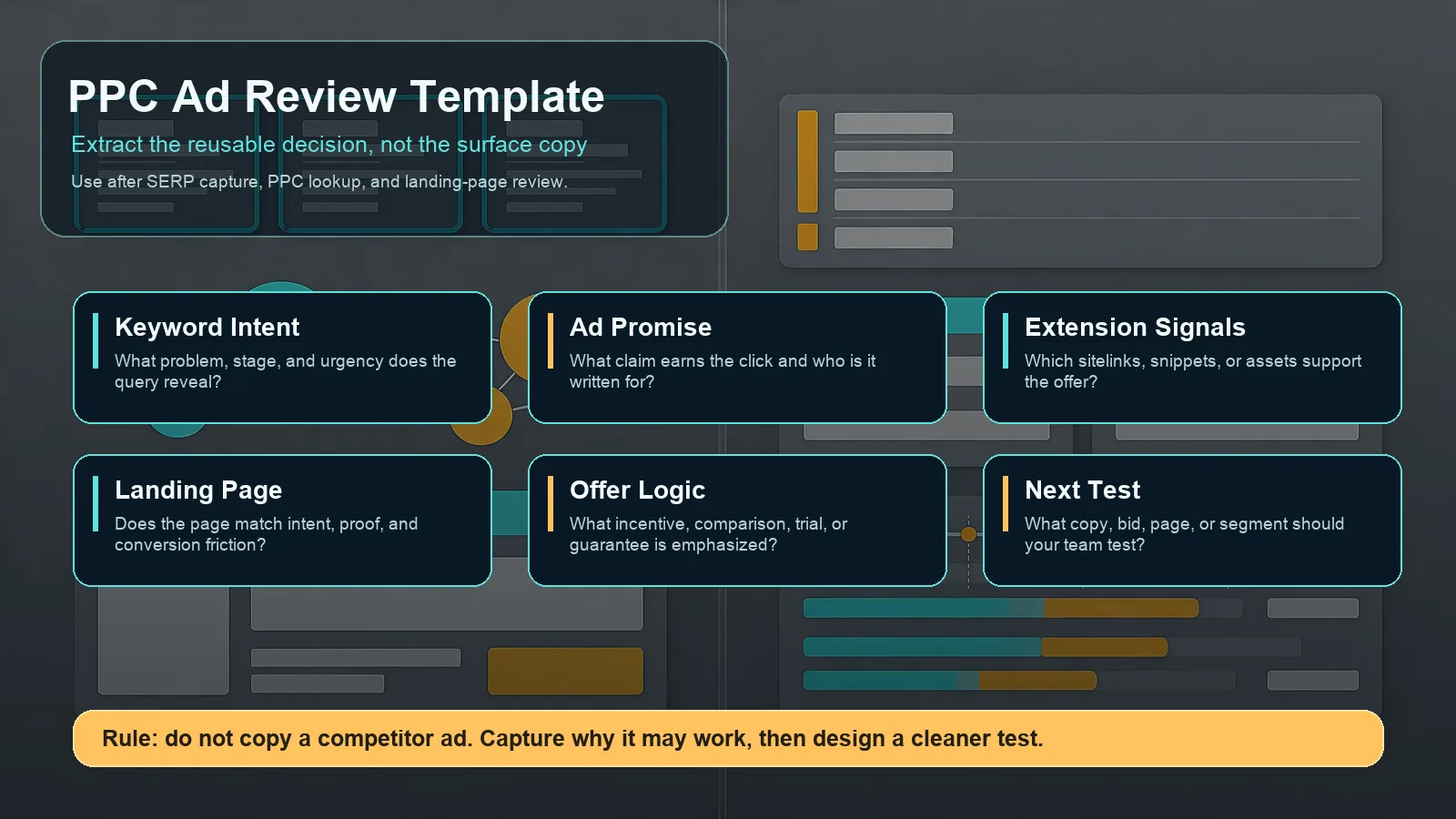
Use a teardown template to avoid copying ads blindly and extract decisions your team can test.
When you capture a competitor search ad, fill this template before making a campaign change.
| Field | Prompt |
|---|---|
| Keyword intent | What problem does this query reveal? Is the user comparing, buying, switching, learning, or troubleshooting? |
| Advertiser type | Direct competitor, marketplace, publisher, affiliate, agency, reseller, or unrelated brand? |
| Ad promise | What is the main promise: cheaper, faster, safer, easier, official, local, premium, or specialized? |
| Proof signal | Does the ad or page support the promise with reviews, logos, demos, examples, or guarantees? |
| Extension usage | Which sitelinks, callouts, snippets, or assets reinforce the ad? |
| Landing page match | Does the destination page match the query and ad promise? |
| Offer logic | What incentive or conversion path is being used? |
| Differentiation gap | What can your page say more credibly? |
| Test action | What should become a copy test, landing-page test, bid change, or monitoring alert? |
Example:
| Observation | Decision |
|---|---|
| Three competitors use "migration" language on high-intent SaaS terms. | Build a migration-focused ad group and landing page only if you can prove migration speed. |
| A direct competitor sends brand-comparison queries to a comparison page. | Build a defensive comparison page with factual claims and compliance review. |
| Competitors repeat "free audit" across local service terms. | Test a low-friction audit CTA, but measure lead quality before scaling. |
| Search ads emphasize "official" or "certified." | Review whether your trust proof is too weak for the query. |
The output should never be "copy this ad." The output should be a cleaner hypothesis.
Turning Search Ads Intelligence Into Campaign Decisions
Useful search ads intelligence ends with a decision, not a folder of screenshots.
| Finding | Possible decision |
|---|---|
| Competitors own top visibility on comparison terms | Build comparison landing pages and test stronger proof. |
| Search ads repeat price messaging | Decide whether to compete on price, bundle value, or quality proof. |
| Competitors use sitelinks for integrations | Add integration-specific assets and landing pages. |
| A competitor starts bidding on your brand | Monitor brand SERPs and review defensive copy. |
| Landing pages are generic despite specific ads | Create a more specific page and test message match. |
| No strong ads appear on a high-intent query | Test the query with cautious budget; the gap may be real or demand may be weak. |
Create a weekly operating rhythm:
| Cadence | Task |
|---|---|
| Weekly | Check 10-20 priority queries and active competitors. |
| Biweekly | Review landing page changes and ad copy patterns. |
| Monthly | Summarize message shifts, new entrants, and test recommendations. |
| Quarterly | Rebuild the keyword and competitor watchlist. |
For fast-moving SaaS, ecommerce, app, and agency markets, weekly is usually worth it. For slower B2B categories, monthly may be enough unless a launch, pricing change, or brand-bidding issue appears.
Search Ads Intelligence Checklist
Before acting on competitor search ads, confirm:
| Check | Pass standard |
|---|---|
| Query set | Includes brand, category, comparison, problem, and alternative terms. |
| Market context | Country, language, and device are recorded. |
| Source mix | SERP checks, Transparency Center, Auction Insights, PPC tools, and landing pages are separated. |
| Evidence quality | Findings are based on repeated signals, not one screenshot. |
| Landing page review | Ad promise and page proof are analyzed together. |
| Compliance review | Brand bidding, trademark language, and claims are reviewed before launch. |
| Test design | Every insight becomes a measurable test or monitoring rule. |
This checklist prevents the two common failure modes: overreacting to weak evidence and underreacting to visible competitor movement.
FAQ
What is search ads intelligence?
Search ads intelligence is the process of collecting and analyzing competitor search ad signals, including live SERPs, Google Ads Transparency Center data, Auction Insights, PPC tool estimates, ad copy, extensions, and landing pages, so teams can make better PPC and landing-page decisions.
How do I find search ads of competitors?
Start with manual SERP checks for priority queries, then search advertisers in the Google Ads Transparency Center, review your Auction Insights if you run Google Ads, and use paid PPC or ad intelligence tools when you need recurring monitoring across many competitors and markets.
Is there a Google search ads spy tool?
There are PPC research tools and ad intelligence platforms that estimate competitor search ads, keywords, and copy history. Treat them as directional research tools, not a direct view into a competitor's private Google Ads account.
Can I see a competitor's Google Ads keywords?
You can infer possible keywords from SERP checks, PPC research tools, landing pages, and ad copy patterns. You generally cannot see the exact match types, bids, quality scores, or full private keyword list inside a competitor's account.
Can search ads intelligence show exact competitor ad spend?
No public method can reliably show exact competitor ad spend. Some tools provide estimates, and Auction Insights can show relative overlap for your own auctions, but exact spend and ROI remain private.
How often should I monitor competitor search ads?
Monitor high-priority search markets weekly if paid search is a major growth channel. For slower categories, a monthly review may be enough. Increase cadence around launches, pricing changes, new competitors, brand bidding, or seasonal campaigns.
Conclusion
Search ads intelligence is not about spying for copy to imitate. It is a disciplined way to observe competitor search ads, inspect the pages behind them, separate strong signals from noise, and turn evidence into better PPC decisions.
Use free methods first, add tools when monitoring becomes too slow, and keep every finding tied to a test. If you need the tool-selection lens, use the Google Search Ads spy tool guide. If you want competitor search ad research structured into reports instead of screenshots, start with AdMapix reports.
Turn these observations into your next creative study
Open the creative library and select samples for your market, network and research question.
Related Articles
Advertising Intelligence: What It Is and How Growth Teams Use It
A practical 2026 guide to advertising intelligence, including data sources, competitor ad workflows, use cases, quality checks, and how growth teams turn signals into decisions.
Fake Mobile Game Ads: Why They Exist and How to Spot Them
Why mobile game ads show different gameplay, how to check whether the advertised game is real, and what marketers can learn from the creative patterns.
In-Game Advertising: What Brands and Game Studios Need to Know
A practical 2026 guide to in-game advertising formats, inventory types, brand safety, measurement, examples, and competitor research.