
Google Ads Transparency Center: Official URL & How to Use It (2026)
Direct URL, 30-second walkthrough, 2026 payer-name and PMax Search Partner updates, Meta Ad Library comparison, and 15 competitive signals you can pull from the free tool.
<!-- admapix-data:v1 -->Quick answer (reviewed 2026-07-10): Google's official Ads Transparency Center is at https://adstransparency.google.com/. Search a verified advertiser or domain, select the relevant market and dates, and record only the ads and fields the live result shows.
Evidence boundary: Start from the official Google Ads Transparency Center and Google policy help; fields vary by advertiser, market, and policy.
Next step: Continue with our Google competitor research guide or review AdMapix methodology before citing estimated data.
Beyond One Advertiser: a Baseline for "Is That a Lot?" (AdMapix Data)
When researching an advertiser in the Transparency Center, a cross-network index provides an additional sample: in the last 30 days the AdMapix index newly picked up 14.7M image/video creatives. Active volume by vertical:
| Vertical | Image/video creatives active in the last 30 days |
|---|---|
| E-commerce | 5.0M |
| Games | 4.3M |
| Finance | 670.0K |
Align country, dates, platform and deduplication rules before comparing records. Creative counts are not spend; cross-network totals do not establish whether a company is increasing its budget.
Source: the AdMapix creative index, 2026-08-09 to 2026-09-08. All figures are counts of creatives active within that window, not lifetime totals. Create a free AdMapix account to inspect currently indexed records →
<!-- /admapix-data -->Quick FAQ
Is the Google Ads Transparency Center free?
The public transparency search is available without an AdMapix subscription; access details are controlled by Google.
Does it reveal a competitor's conversions or exact budget?
Do not assume so. Record only fields displayed in the current result and keep inference separate from evidence.
<!-- /admapix-p0-low-ctr-refresh-2026-07-10 -->By the AdMapix Editorial Team · Updated April 16, 2026
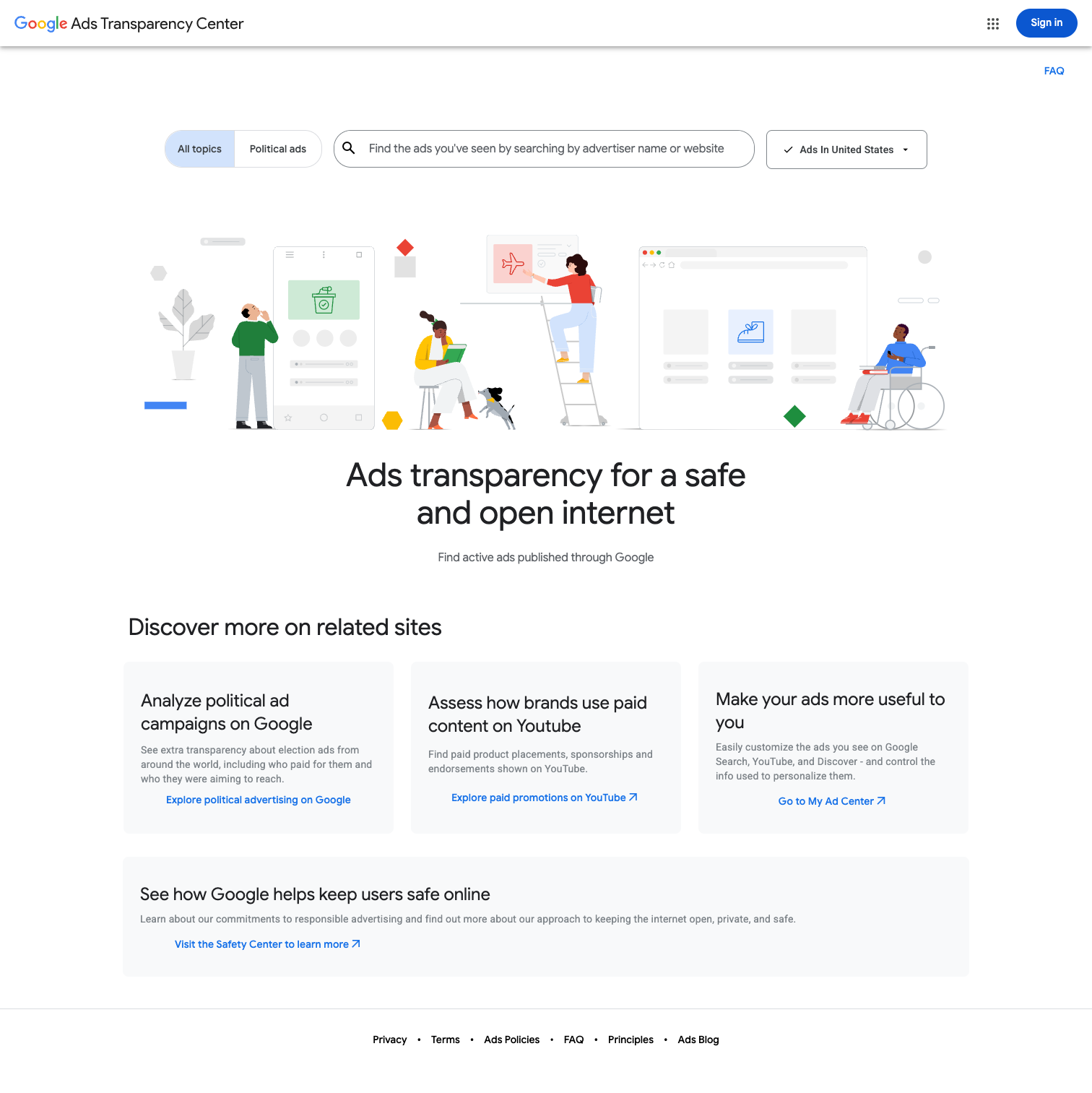
The Google Ads Transparency Center lives at https://adstransparency.google.com/. It's Google's free, public archive of every verified advertiser's active and recent ads across Search, Shopping, Display, YouTube, Maps, and Play — searchable by advertiser name, country, date range, and ad format. No login, no fee. Here's what's new for 2026, what you can infer, and where the tool quietly falls short.
TL;DR
- URL: https://adstransparency.google.com/ (bookmark it — the "About this ad" shortcut also works)
- What you see: verified advertiser name, country, creatives (image/video/text), ad format, run dates, landing-page host, political-ad regional spend + payer name
- What you infer (15 signals tease): creative rotation cadence, bid-pattern shifts, geo priority, offer A/B tests, LP evolution, brand vs direct-response split, reseller vs brand, YouTube-first vs Search-first, political-ad involvement, Performance Max partner mix, regulatory pressure, Q4 spend surge, competitor-keyword cycling, PMax Search Partner domain quality, AIO-era creative shift
- When to upgrade: the second you need spend, CTR, targeting, keywords, or cross-platform coverage — the Transparency Center is a creative archive, not an intelligence platform
This is a pillar for PPC managers, journalists, compliance teams, and brand-safety staff who want every useful angle on the tool in one place. We open the UI almost daily and we've seen the 2026 changes land in real time. What follows is the honest version — no vendor spin.
1. What Is the Google Ads Transparency Center?
The Google Ads Transparency Center is a public, searchable archive of ads Google has served on behalf of verified advertisers. Google launched it on March 29, 2023, largely as a response to EU Digital Services Act (DSA) pressure, US election-integrity scrutiny, and the critique that — unlike Meta — Google had no durable ad library. The tool indexes ads across every Google-owned surface: Search, Shopping, Display (GDN), YouTube (including Shorts), Gmail, Maps, and the Play Store.
Since launch the archive has expanded aggressively. In 2024 Google added payer disclosure for political ads beyond elections, broadened region filtering to every country where Google serves ads, and surfaced inactive creatives for up to thirteen months (longer for political ads in the EU). In 2025 Google began rolling out payer-name requirements for all advertisers — not just political — so the legal name of the paying entity (rather than a marketing brand) now shows up on the ad card. 2026 brought the biggest tooling push since launch, covered in section 6.
The official mission is fighting scam ads, giving the public a view of who's running what, and letting regulators and researchers audit platform behavior. The productive side-effect is a permanent window into rival creative decks — which is what we're going to exploit for the rest of this guide.
2. Where to Find It + 30-Second Walkthrough
The direct address is adstransparency.google.com — no login, no cookie wall, no rate limit that affects casual use. Two other entry points: the "About this ad" icon next to every served Google ad (click it, then "See more ads this advertiser has run") and the deep-link format https://adstransparency.google.com/advertiser/ADVERTISER_ID which you can share once you've located a target.
Your 30-second walkthrough:
- Open https://adstransparency.google.com/.
- Type an advertiser's legal name (not their brand) in the search box — e.g., "Alphabet Inc.", "HubSpot, Inc.", "Shopify Commerce Singapore Pte. Ltd." If the legal name fails, paste the landing-page domain (shopify.com). Domain search is faster than name search and usually more reliable, because verification records sometimes lag the marketing brand.
- Pick the advertiser from the dropdown — confirm the verified country (blue check + country code) matches your target.
- On the advertiser page, filter by date range, country, ad format (Text / Image / Video), and platform (Search, YouTube, Display, Shopping, Maps, Play).
- Click any creative to see run dates, landing URL host, and — for political ads — payer and regional spend buckets.
Two 2026 niceties: the "When & where ads showed" pane is now default-expanded, and the date-range picker remembers your last filter when you hop between advertisers in the same session. It doesn't remember across sessions; there is no account-level history.
3. How to Search: By Advertiser, Country, Date, Format, and Platform
By advertiser name. Use the exact legal entity string from the billing profile. If you only have a brand in hand, test the three likely patterns ("Company Inc.", "Company, LLC", "Company Pte. Ltd.") — for multinationals, Nike US and Nike Netherlands are usually different advertiser records.
By landing-page domain. The workaround we reach for most. Paste the bare domain (no scheme, no slash). The Transparency Center resolves ads whose landing host matches, bypassing any mismatch between brand and legal entity. It also surfaces reseller records when an agency is the actual advertiser of record.
By country. The filter maps to where the ad was served, not where the advertiser is registered. Hold the advertiser constant and walk through ten countries to see how localization and offer emphasis shift. For political ads, country filtering also reveals regional spend buckets.
By date range. Defaults to the last 30 days; stretch to 13 months for a full picture. Older creatives fall off unless they're political ads in the EU. Date filtering is useful for spotting paused campaigns — gaps tell you about pacing.
By ad format and platform. Filter one at a time: Search (text), YouTube (video), Display (image/HTML5), Shopping (product listing), Maps (promoted pin), Play (app install). The format breakdown tells you where the media budget concentrates. A heavy-YouTube, light-Search advertiser is building awareness; the reverse is capture-intent direct response.
4. What You'll Actually See
On the advertiser profile you get a grid of every ad served within the selected filters. Each card shows the creative (image, video thumbnail, or text), ad format, run date range, verified advertiser name, verified country, and a preview of the landing URL host. Click into a creative and Google surfaces platforms the ad ran on (this is what changed in February 2026 — more below), the regional impression distribution in bucketed ranges, and — for political ads — the payer name, total spend range, and regional spend breakdown.
Image creatives save via right-click. Video creatives stream from Google's CDN with time-limited signed URLs; saving them requires a yt-dlp-style tool. Text ads are just HTML — copy and paste. Landing URLs are shown but not clickable.
For non-political ads you don't see exact spend, but the run-dates matrix is almost as useful for pacing inference. For political ads you get buckets ($0–100, $100–1K, $1K–50K, $50K–100K, $100K+) per region, a total spend bucket, and the payer name in bold — post-2025 that payer reflects the actual billing entity rather than a marketing brand, and it's the most analytically rich detail on the tool today.
5. What It Hides
The Transparency Center is a creative archive, not a performance archive. Understand the hiding list before you build a process around it:
- Exact non-political spend. Zero. Not a bucket, not a range, not a rank. You see dates and creatives, not dollars.
- Targeting. No audiences, no remarketing lists, no geotargets (beyond "ad was served in country X"), no device slices, no demographic overlays.
- Performance. No CTR, conversion rate, CPA, ROAS, impression share, or quality-score signal. The ads are archived as shown, not as measured.
- Bid levels and keyword lists. Nothing. Google publishes ads, not auctions. If you want keywords you bid on a third-party tool or you monitor SERPs yourself.
- Landing-page content over time. You see the host of the LP; you don't see what the LP said when the ad ran. If the advertiser rewrote their LP last Tuesday, the Transparency Center has no memory of the pre-rewrite version.
- Account structure. No campaigns, no ad groups, no bid strategies. Just ads.
- Real-time indexing. There's a 24–48 hour indexing lag for most new ads, sometimes longer for political ads that require verification re-checks.
The hiding list is why serious buyers pair the Transparency Center with paid tools. For journalism or brand-safety spot-checks, the free tool is often enough. For launch planning against a known rival, you'll eat through its limits by Thursday of week one.
6. 2026-Specific Updates: A Deep Dive
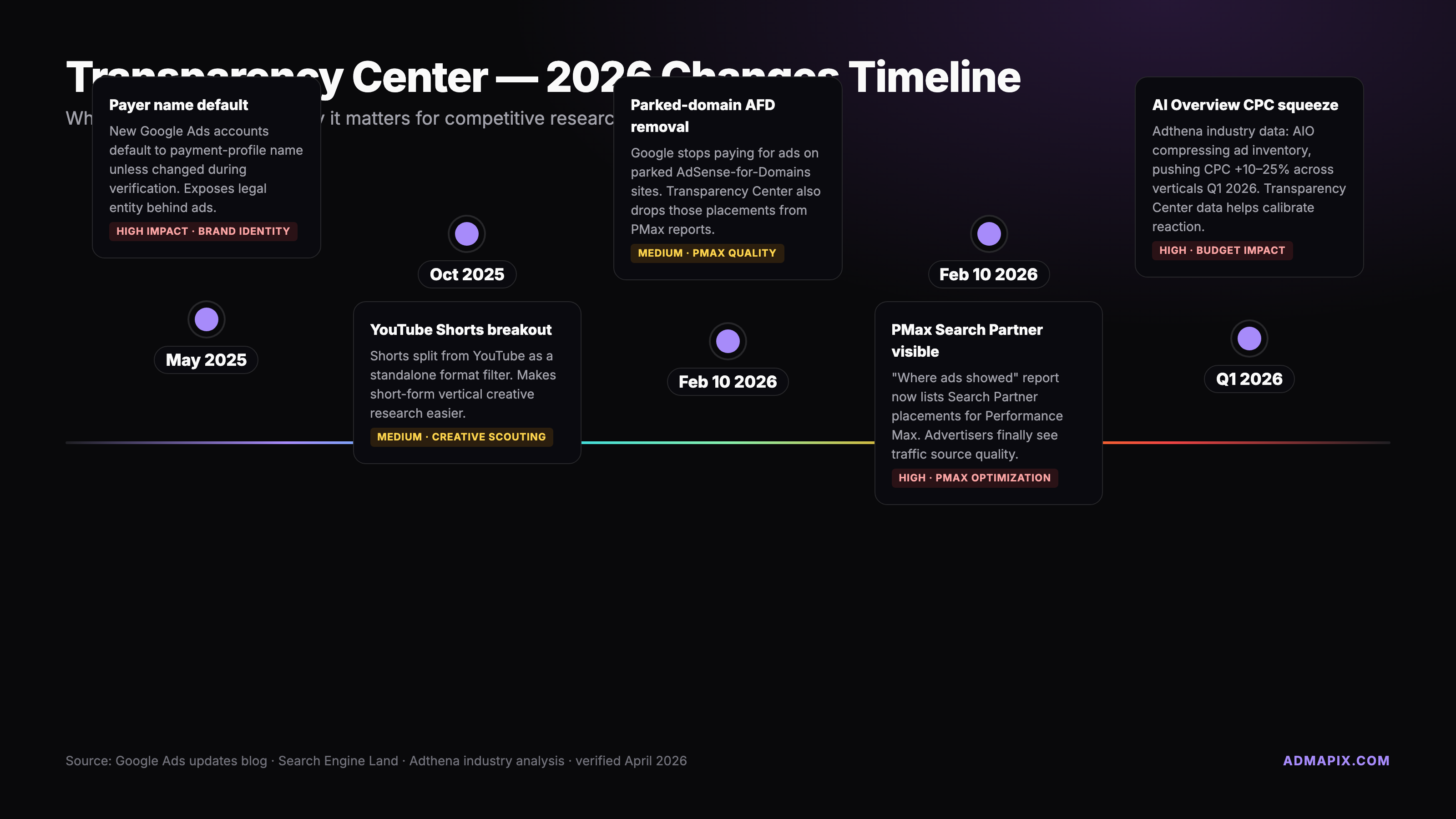
2026 is the year the Transparency Center grew sharper teeth. Five changes matter — we rank them by how much they affect day-to-day competitive research.
Payer-name default for new accounts (late 2025 through early 2026). Every new advertiser's payment-profile legal name is defaulted into the "payer" field unless explicitly edited. Most teams don't audit verification after setup, so brand-owner parent entities, agency reseller names, and personal names for sole proprietors are now surfacing publicly. We've seen DTC brands with payer names that don't match the marketing brand at all, and agencies whose client portfolios are inferable by searching the agency's legal name. Search Engine Land has the cleanest primary-source coverage — read it before your next new-account setup.
PMax Search Partner placements visible (February 10, 2026). Until February, Performance Max ads were opaque about where on the Search Partner network they ran. Google changed the "When & where ads showed" detail to list individual Search Partner domains. You can finally see whether a PMax campaign piles impressions on reputable news sites or on long-tail placeholder domains. Practical upshot: you can now judge competitor PMax setups by partner quality, not just PMax presence.
Parked-domain AFD removed (Feb 10, 2026). Same release: Google stopped serving AdSense for Domains on parked domains and yanked the associated placement data. If partner-domain lists look cleaner than in January, that's why. A chunk of "weirdly placed" 2025 PMax impressions won't re-appear in historical views.
YouTube Shorts direct-link restoration and breakout. Mid-2025 Google restored clickable direct links on Shorts ads. In early 2026 the Transparency Center began breaking out Shorts as its own format tag, so filter-by-format now surfaces Shorts-first advertisers at a glance.
AI Overviews compressing paid inventory. Not a Transparency Center update per se — a SERP-structural shift with direct read-through. AIOs now occupy the top of more informational SERPs and push CPCs up 10–25% across research-heavy verticals. The read-through: advertisers hit by AIO impression-share loss are rotating more creatives and leaning harder into YouTube + Shorts. Three Search copy variants a week in 2026 versus one a month in 2024 is often AIO squeeze at work.
7. Google Ads Transparency Center vs Meta Ad Library
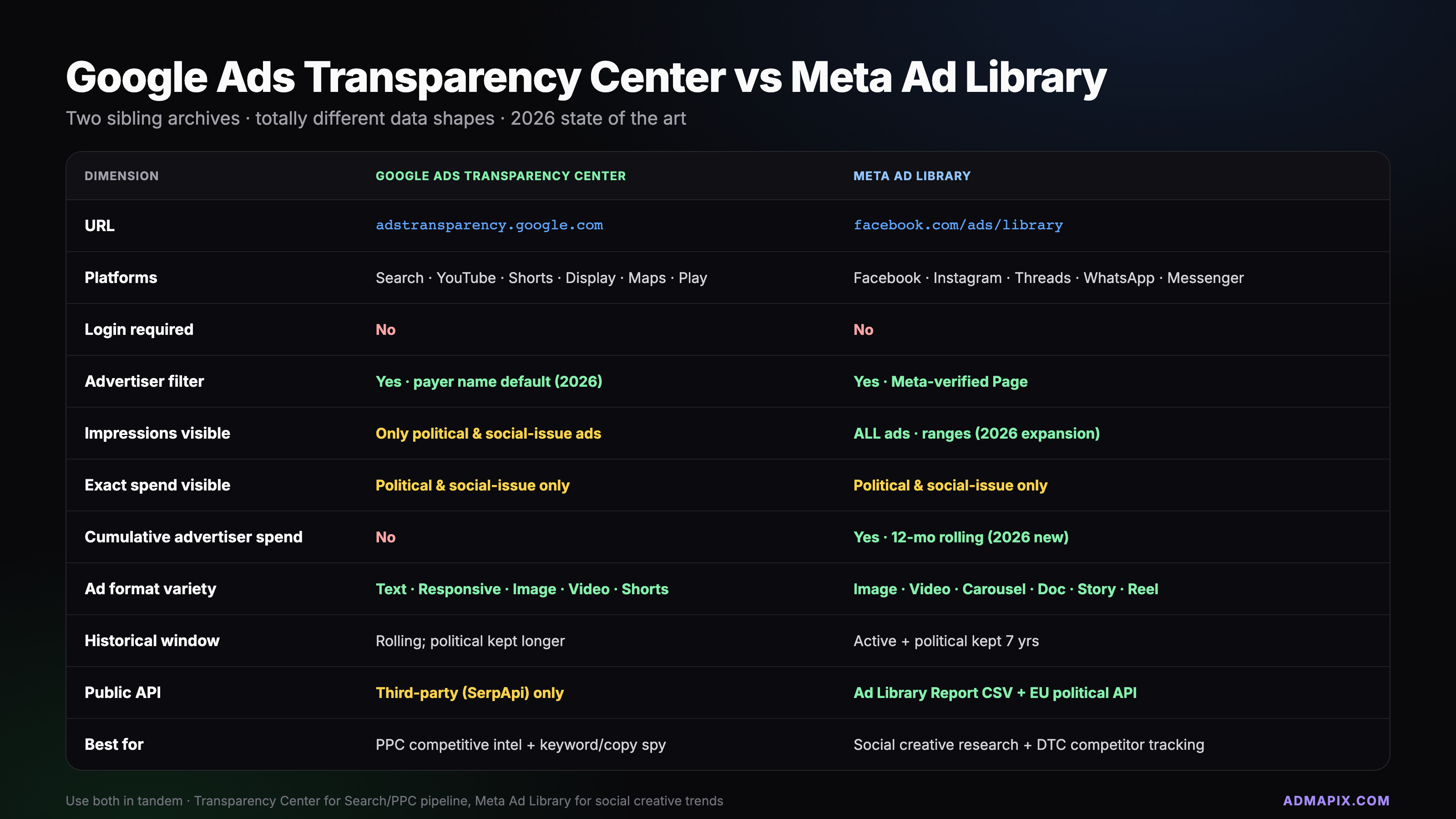
If you've used the Meta Ad Library, expect a family resemblance — not a twin. Same regulatory problem, different tones:
| Dimension | Google Ads Transparency Center | Meta Ad Library |
|---|---|---|
| Coverage | Google Search, YouTube, Display, Shopping, Maps, Gmail, Play | Facebook, Instagram, Messenger, WhatsApp (limited), Threads (rolling) |
| Retention | ~13 months for all ads; longer for political (esp. EU) | 7 years for social-issue/political ads; ~90 days for all other ads |
| Political ad detail | Payer name + regional spend buckets + impression ranges | Payer name + spend ranges + demographics (age/gender/geo) |
| Non-political spend | None shown | None shown for most regions; EU shows reach ranges |
| Creative download | Image yes, video via signed URL (expires) | Image yes, video preview-only |
| Filter precision | Advertiser, country, date, format, platform | Advertiser, country, platform, language, date, keyword (inside ad text!) |
| Keyword/copy search inside ads | No | Yes — Meta lets you search words inside ad creative |
| Official API | No | Yes (Ad Library API, token-gated) |
| Third-party scrape tolerance | Low — reverse-engineered endpoints, grey area | Medium — API exists, also widely scraped |
The biggest practical gap is keyword-in-creative search. Meta lets you type "free shipping" and find every ad whose copy contains those words. Google doesn't — you need an advertiser first, then their creatives. This makes Meta the better tool for copy-trend research and Google the better tool for advertiser-centric research. For a deeper walkthrough and how to pair the two, see our Meta Ad Library guide.
8. 15 Signals You Can Infer From the Transparency Center
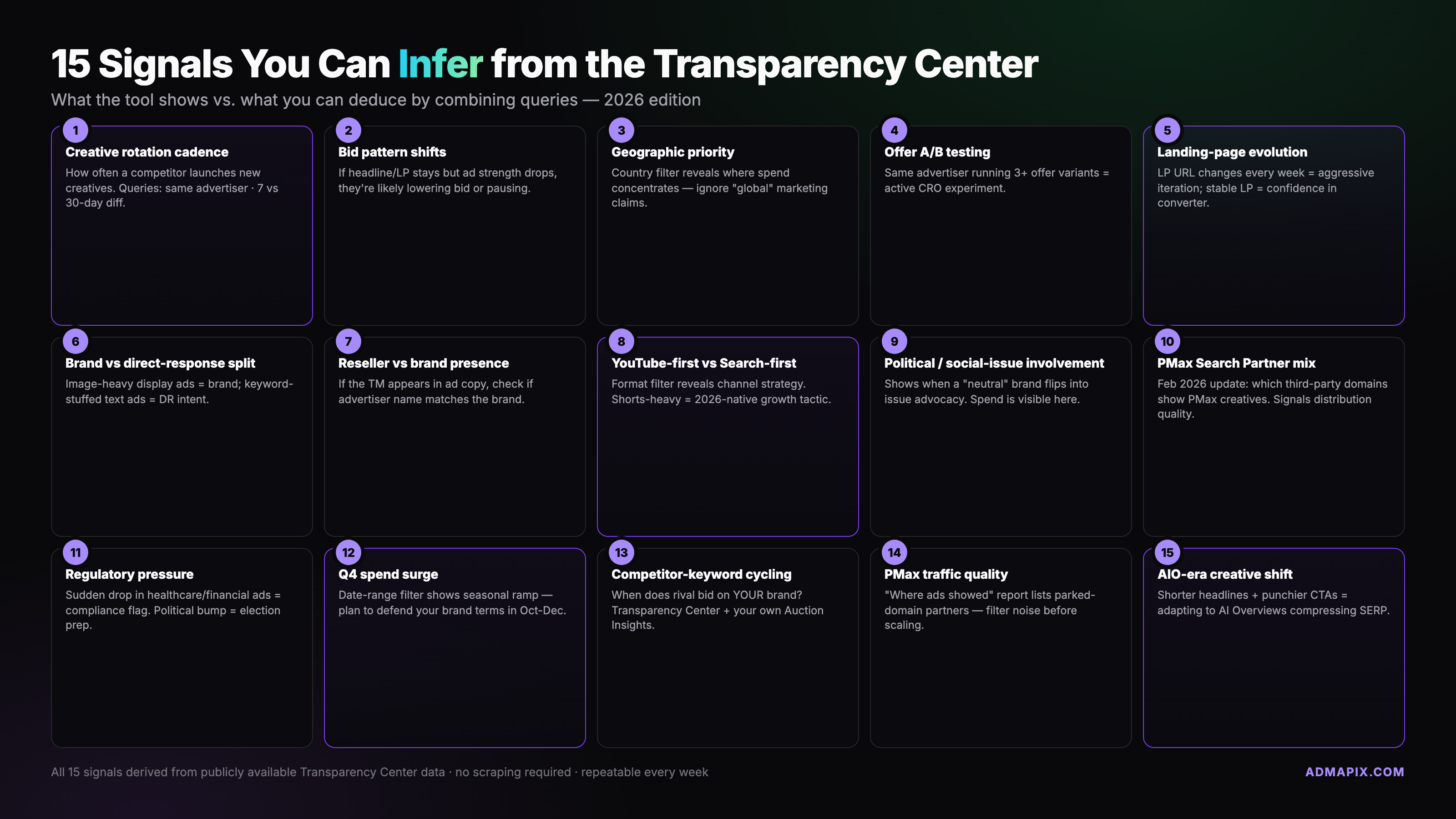
This is the section the rest of the web doesn't write. Any single query is worth very little. Ten queries against the same advertiser, with the right filter combinations, yield a surprisingly dense picture. The fifteen signals we routinely pull:
1. Creative rotation cadence. Filter a single advertiser by date range and sort creatives by first-seen. The time between new creative introductions reveals testing intensity. A fast-rotating shop (3–5 new creatives per week) is running aggressive A/B testing and probably has a performance-creative team. A slow-rotating shop (1–2 per month) is likely running a static brand campaign. Queries to run: advertiser → date range last 90 days → format image → sort by first-seen.
2. Bid-pattern changes by run-date gaps. Scan the run-date bars for the same creative across months. Gaps longer than a week suggest bid-strategy pauses (budget cap hit, target CPA miss, or a deliberate dayparting cycle). Continuous bars suggest evergreen always-on. Queries: advertiser → creative pinned → year view of run dates.
3. Geographic priority order. Hold the advertiser constant and cycle the country filter across your five target markets. The country with the highest creative count + tightest run-date density is the priority market. The country with sparse records is either just-entered or being wound down. Queries: advertiser → country US, UK, DE, JP, SG in sequence → creative count per country.
4. Offer/price A/B tests. On text ads, look for the same headline with swapped price points or promo codes. On image ads, look for the same layout with different hero claims. This tells you which offers the rival is actively testing — and implicitly, which offers they've already rejected. Queries: advertiser → format text → sort by recent → scan headlines for price/promo variance.
5. Landing-page (LP) evolution via URL fingerprints. The Transparency Center shows LP hosts but also often preserves URL path patterns in the creative itself. Trace the path structure (e.g., /lp/summer-sale → /lp/back-to-school → /lp/holiday-preview) across months to see the LP-theme roadmap. Queries: advertiser → text ads → read LP hosts → compare across quarters.
6. Brand-building vs direct-response split. Count ads by format. High YouTube + Display share with low Search share = brand-building play. High Search + Shopping share = direct-response. A 50/50 split with rising YouTube is a team that recently got budget approval to fund awareness. Queries: advertiser → format filter one at a time → creative-count ratio.
7. Reseller vs brand-direct media buying. Check the advertiser legal name against the landing domain. A mismatch (e.g., agency LLC advertising client.com) indicates reseller media buying. This tells you the client uses an agency, which means the buying logic is often conservative and turnover is possible. Queries: advertiser → LP host → compare strings.
8. YouTube-first vs Search-first go-to-market. For new advertisers (first-seen within 90 days), look at which format they launched with. Search-first = bottom-funnel capture bet. YouTube-first = top-funnel brand bet. Shopping-first = product-catalog DTC. Queries: advertiser new → sort by first-seen ascending → inspect earliest format.
9. Political-ad involvement (even indirect). A B2B vendor that appears in political-ad searches for a lobbying trade group is doing indirect political adjacency. Same advertiser running a political ad in an election year is a compliance flag and a hint about executive alignment. Queries: advertiser → filter political ads toggle → review regional spend buckets.
10. Performance Max partner-domain mix. Since February 10, 2026, you can see PMax Search Partner domains. Scan the list. Reputable high-quality news sites = solid PMax setup. Long-tail placeholder domains = PMax running on low-quality supply, which is often a sign of either negligent account management or a brand-safety risk. Queries: advertiser → PMax ad → "When & where ads showed" → scroll partner domains.
11. Regulatory pressure footprint. EU-served ads retain more metadata than US-served ads. An advertiser with thin EU retention but dense US retention might have paused EU entirely due to DSA compliance cost. Queries: advertiser → country EU country → retention density vs US.
12. Q4 spend surge detection. Count creatives launched in October through December vs March through May. Heavy Q4 creative drop = budget inflation for holidays. Flat Q4 = either a non-retail vertical or an account holding back (budget cap, offline shift). Queries: advertiser → date range Oct 1 – Dec 31 previous year vs Mar 1 – May 31 → creative count.
13. Competitor-keyword cycling on text ads. Scan text ad headlines over six months. If headlines rotate brand terms like "[Rival] alternative" or "better than [Rival]", the advertiser is running competitor-keyword bidding. The frequency tells you how aggressively. For more on the legal and strategic side of this, our guide to bidding on competitor brand keywords walks through it. Queries: advertiser → format text → date range 6 months → scan headlines for rival names.
14. PMax Search Partner domain quality shift over time. Look at the same PMax advertiser's partner domains in a January 2026 snapshot vs April 2026 snapshot. If quality improved, they're actively managing the placement list. If it degraded, they're on autopilot — which is a competitive opening. Queries: advertiser → PMax ad → snapshot date A → snapshot date B → compare partner domains.
15. AIO-era creative shift. Look for the 2025–2026 transition in creative output. Advertisers hit by AIO impression-share loss typically show a visible bump in creative-rotation speed and a move toward YouTube + Shorts. Flat 2024-vs-2026 output means either an AIO-immune niche or an account that isn't responding to market conditions. Queries: advertiser → date range full 2024 → format breakdown → same for 2026 → compare.
None of these signals is definitive alone. Stacked — three, five, eight of them pulled against the same rival — they produce a picture that rivals paid tools for the early diligence phase. They don't replace spend data, but they anchor your hypotheses before you spend a dollar on a paid license.
For a step-by-step cross-comparison against three named competitors using this signal framework, see our competitor Google Ads check guide — it walks the same framework through real advertiser examples.
9. Use Cases: Competitive Intel, Journalism, Brand Safety, Trademark Defense
Competitive intelligence is the loudest use case. PPC managers open the Transparency Center before every quarterly plan. We use it to fingerprint the rival creative deck, map the format mix, and predict which offers will hit our SERPs next. Combined with the 15-signal framework above, a disciplined analyst can get 60–70% of the intelligence a paid spy tool delivers — enough to scope the question before buying seats.
Journalism is a close second. Election reporting, scam-ad investigations, and influence-operation research all lean on the Transparency Center as a primary source. The payer-name field is the journalism field — it's the one piece of data that tells readers who funded this message. 2026's payer-name default makes this field more honest than it's ever been, which is a win for reporters and a small headache for advertisers who didn't realize their parent entity would be surfaced.
Brand-safety and trademark defense rely on the tool to catch infringers. Type your brand into the advertiser-search box regularly. Any result that isn't you running as you is a potential trademark case or affiliate gone rogue. The reseller-vs-brand-direct signal (#7 above) is the fast filter — if an unknown LLC is advertising yourdomain.com, that's the brand-safety alert to investigate first.
Compliance teams use the tool to audit their own agencies. If your media agency has ads running in the Transparency Center under a payer name you don't recognize, that's a contract question. If ads are running in countries outside your approved list, that's a compliance question. If ads ran during a period you explicitly paused, that's an invoice question.
Affiliate verification rounds out the core use cases. Most affiliate programs ban certain keyword types (brand bidding, trademark + competitor combos). The Transparency Center is how brand teams catch affiliates who violate — search your own brand, sort by advertiser, investigate any name that isn't yours.
10. API Access and Scraping Rules
There is no official public API for the Google Ads Transparency Center. Google's position is consistent: they publish the archive for public viewing, not for automated ingestion at scale. The UI pages accept human traffic; anything beyond human traffic (headless browsers, batch scrapers, endpoint hammering) violates Google's terms of service.
Several third-party vendors — SerpApi, SearchApi, Apify, and a handful of smaller players — offer Transparency Center data through reverse-engineered endpoints. They typically return 40 results per page (sometimes 100 maximum), parse the same DOM Google serves, and charge per call. The legal picture around these services is grey: US courts have generally held that scraping publicly accessible data is not prosecutable under the Computer Fraud and Abuse Act (hiQ v. LinkedIn et al.), but Google's specific terms-of-service language and its willingness to block scrapers at the IP/fingerprint level put consistent production scraping at business risk. If you're building a commercial product on top, talk to your legal team.
Practical rule of thumb: manual research through the UI is fine. Small one-off scrapes for a research report are usually tolerated. Ongoing production scraping at scale is a risk that a licensed paid alternative avoids. If your use case needs scale, the cost of a paid tool is lower than the cost of a cease-and-desist.
11. When to Upgrade to Paid Tools
The Transparency Center does exactly what Google designed it to do — it's a creative archive. The moment you need any of the following, you've outgrown it:
- Spend estimates in dollars (not buckets), broken out by channel and campaign
- Keyword lists the advertiser is buying
- CTR, CPC, and conversion signal — performance metrics, not just creative shown
- Targeting hypotheses — what audiences, placements, or lookalikes the rival uses
- Cross-platform coverage — the same advertiser's Meta, TikTok, LinkedIn, and programmatic activity in one view
- Alerts when a rival launches a new creative or changes spend pattern
- Historical depth beyond 13 months
- Bulk export and API access for dashboards
That's where paid ad intelligence tools earn their keep. Semrush, Similarweb, SpyFu, and AdMapix each approach the problem from a different angle — keyword-centric, traffic-centric, spend-centric, and cross-platform respectively. AdMapix is the cross-platform complement we build; the Transparency Center tells you what a rival showed, and AdMapix tells you what it cost them and where else they're showing up (Meta, TikTok, LinkedIn, and programmatic in one workspace). Two free-to-paid upgrades we recommend reading in order: our cross-platform ad spy guide for tool selection, and /pricing for what a serious license costs in 2026.
A reasonable workflow: use the Transparency Center for weekly competitive pulses and quarterly creative archaeology. Use a paid tool for the quantitative work — spend, keywords, audience hypotheses, alerts. The two stack; they don't substitute.
12. Frequently Asked Questions
Is the Google Ads Transparency Center free? Yes. There's no login, no paywall, no API token required for human browsing. Google makes the tool available as part of its regulatory and transparency commitments. Third-party vendors who wrap the data (SerpApi, Apify) charge their own access fees — but the tool itself is free.
Why can't I find a specific brand I know runs Google Ads? Three common reasons. One, the brand hasn't completed advertiser verification — unverified advertisers don't appear. Two, you're searching the marketing brand name when the legal entity is different ("Meta" vs "Meta Platforms, Inc."); try landing-domain search instead. Three, the ads ran outside the retention window (older than ~13 months for non-political). If none of those fit, the advertiser may have paused all campaigns for long enough that the archive expired their inventory.
How far back does the data go? Roughly 13 months for standard ads. Political ads are retained longer — in the EU, several years under DSA rules; in the US, for a regulatory-audit window that varies. There's no guaranteed "forever" archive for any ad category. If you need historical depth, capture what you need when you see it.
Can I download the creatives? Images, yes — right-click save works. Video creatives stream from Google's CDN via signed URLs that expire; capturing them cleanly requires a downloader tool and an understanding that the URL is not a permanent reference. Text ads can be copied directly. Landing URLs are displayed but not clickable; you'll copy-paste if you want to visit.
Does the Transparency Center show actual ad spend? Only for political ads, and only in bucketed ranges — not exact dollar figures. Non-political ads show no spend at all. If you need spend estimates, that's a paid-tool conversation.
What was the biggest change in 2026? A tie between the payer-name default for new accounts (your verification legal name now defaults into public view unless you edit it) and the February 10, 2026 release that made Performance Max Search Partner domains visible in the "When & where ads showed" section. The payer-name change affects every new advertiser; the PMax visibility change affects every analyst studying PMax competitors.
{
  "@context": "https://schema.org",
  "@type": "FAQPage",
  "mainEntity": [
    {
      "@type": "Question",
      "name": "Is the Google Ads Transparency Center free?",
      "acceptedAnswer": {
        "@type": "Answer",
        "text": "Yes. There's no login, no paywall, no API token required for human browsing. Google makes the tool available as part of its regulatory and transparency commitments. Third-party vendors who wrap the data charge their own access fees, but the tool itself is free."
      }
    },
    {
      "@type": "Question",
      "name": "Why can't I find a specific brand I know runs Google Ads?",
      "acceptedAnswer": {
        "@type": "Answer",
        "text": "Three common reasons: the advertiser hasn't completed verification, you're searching a marketing brand name when the legal entity is different (try landing-domain search instead), or the ads ran outside the roughly 13-month retention window."
      }
    },
    {
      "@type": "Question",
      "name": "How far back does the Google Ads Transparency Center data go?",
      "acceptedAnswer": {
        "@type": "Answer",
        "text": "Roughly 13 months for standard ads. Political ads are retained longer, especially in the EU under DSA rules. There is no guaranteed forever archive, so capture what you need when you see it."
      }
    },
    {
      "@type": "Question",
      "name": "Can I download creatives from the Transparency Center?",
      "acceptedAnswer": {
        "@type": "Answer",
        "text": "Images yes via right-click save. Video creatives stream from Google's CDN via signed URLs that expire; saving them requires a downloader. Text ads can be copied directly. Landing URLs are displayed but not clickable."
      }
    },
    {
      "@type": "Question",
      "name": "Does the Google Ads Transparency Center show actual ad spend?",
      "acceptedAnswer": {
        "@type": "Answer",
        "text": "Only for political ads, and only in bucketed ranges rather than exact dollar figures. Non-political ads show no spend at all. For spend estimates, a paid ad-intelligence tool is required."
      }
    },
    {
      "@type": "Question",
      "name": "What was the biggest Transparency Center change in 2026?",
      "acceptedAnswer": {
        "@type": "Answer",
        "text": "A tie between the payer-name default for new accounts (verification legal names default into public view unless edited) and the February 10, 2026 release that made Performance Max Search Partner domains visible in the When & where ads showed section."
      }
    }
  ]
}Further Reading and Sources
- adstransparency.google.com — the tool itself
- Google Ads Help — Ads Transparency policy — official policy reference
- Google Ads Help — Advertiser verification — payer-name and verification rules
- Search Engine Land — payer-name rule coverage — 2025 payer-name update
- Search Engine Land — PMax Search Partner visibility (Feb 2026) — 2026 placement-data release
- Search Engine Journal — PMax Search Partner domains — placement quality deep dive
- Google Transparency Report — broader transparency context
If this pillar was useful, the natural next reads are our sibling guide to checking competitor Google Ads step-by-step and our Meta Ad Library walkthrough for the other half of the free-tool story. For the paid upgrade path, our 2026 ad spy tools review is the most current roundup we publish.
Turn these observations into your next creative study
Open the creative library and select samples for your market, network and research question.
Related Articles
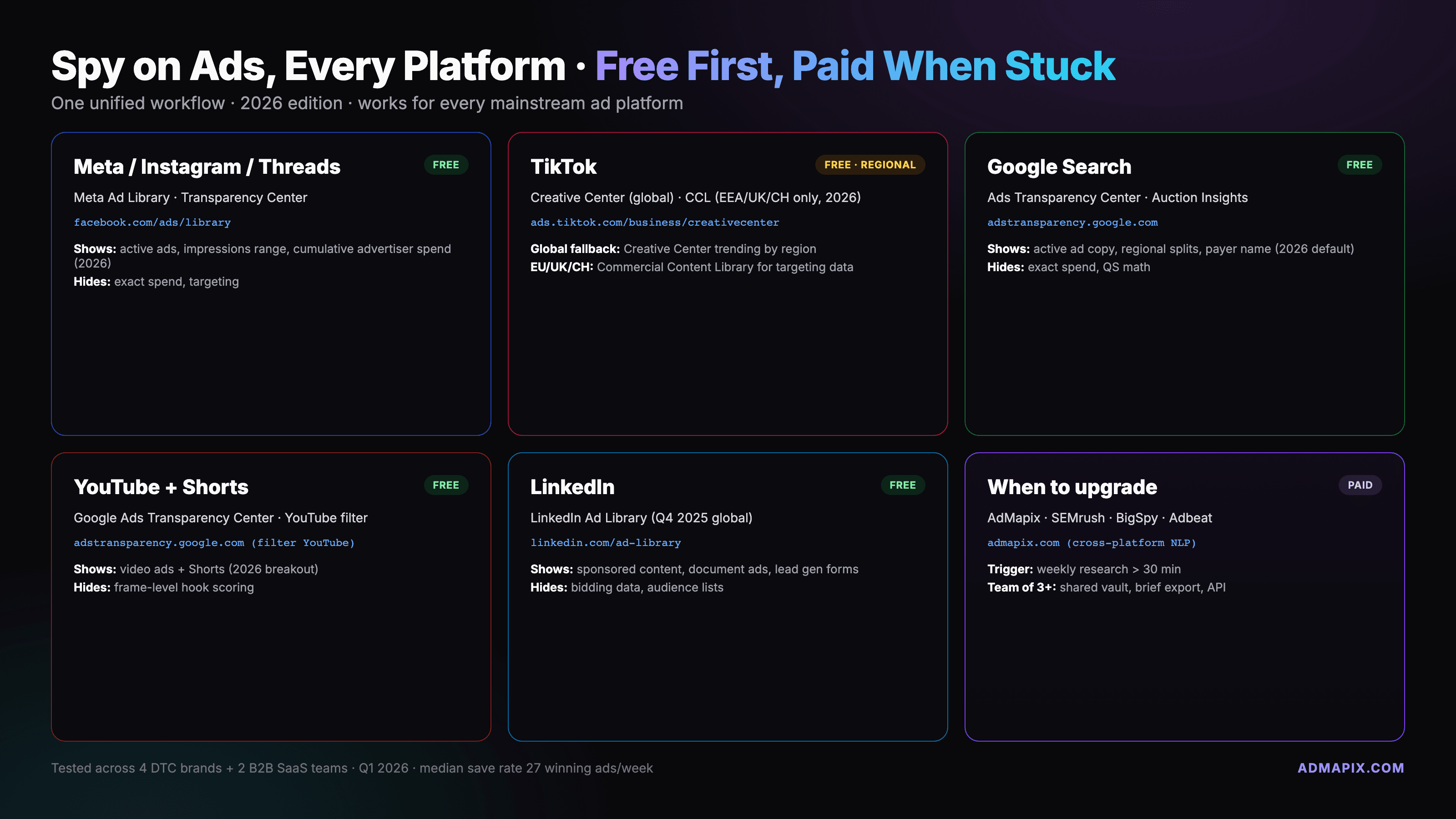
How to Spy on Ads on Any Platform: The 2026 Cross-Platform Playbook
A unified workflow for spying on Facebook, Instagram, TikTok, YouTube, Google, and LinkedIn ads using free official libraries first and paid tools only when you hit the limits.
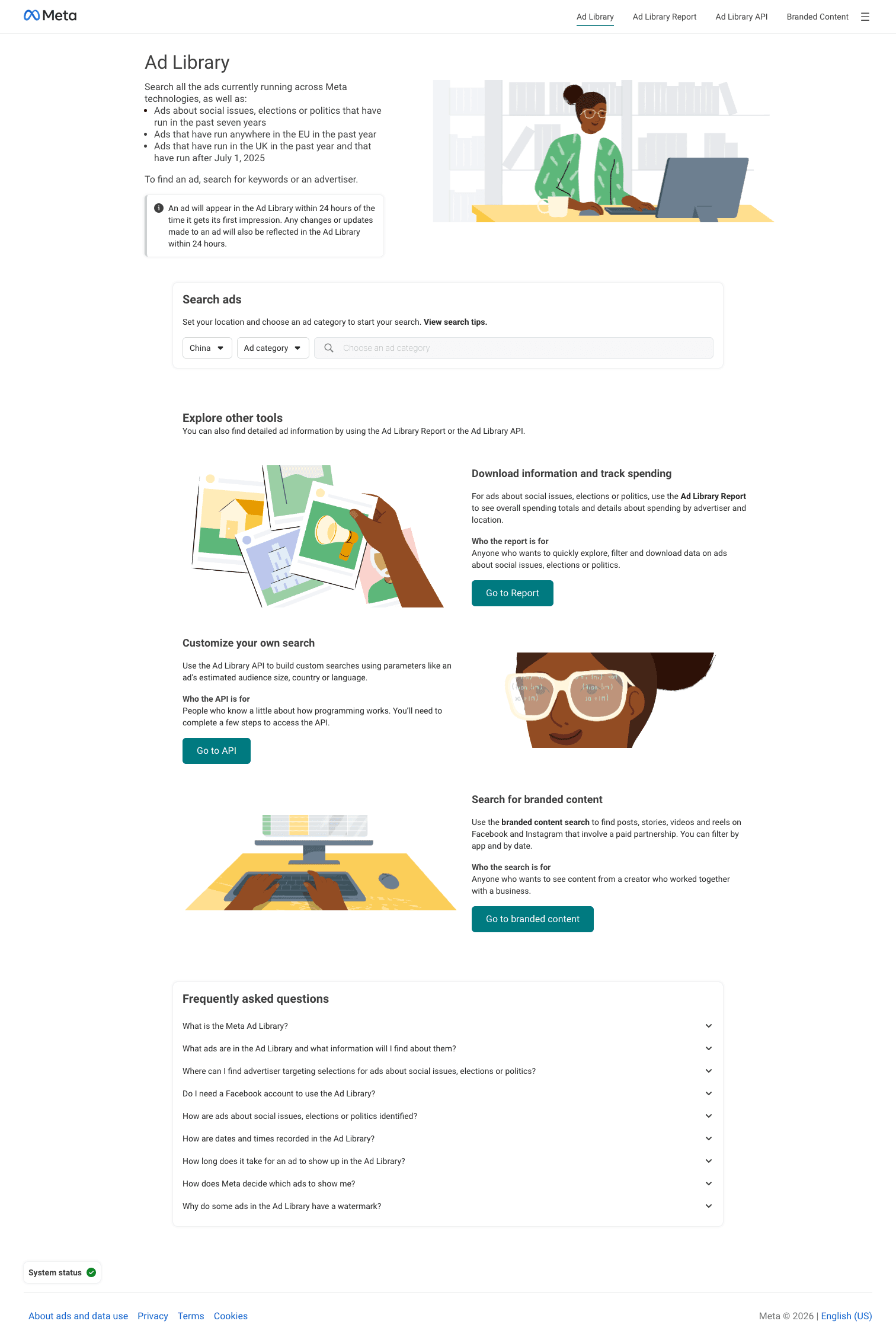
Where Is Facebook Ads Library? Official Meta URL & 3-Step Guide
The Facebook Ad Library lives at facebook.com/ads/library. Free, no login. Here's the exact URL, a 6-step walkthrough, what you can see, and what the 2026 update changed.
How to Check Competitors' Google Ads (AdWords) in 2026: Free and Paid Methods
See what competitors run on Google Ads (formerly AdWords) with the free Ads Transparency Center and Auction Insights, then decide when paid tools like Semrush or SpyFu earn their cost. Includes a monitoring sheet and a 20-minute weekly routine.