How to Spy on Ads on Any Platform: The 2026 Cross-Platform Playbook
A unified workflow for spying on Facebook, Instagram, TikTok, YouTube, Google, and LinkedIn ads using free official libraries first and paid tools only when you hit the limits.
By the AdMapix Ad Intelligence Team · Updated April 16, 2026
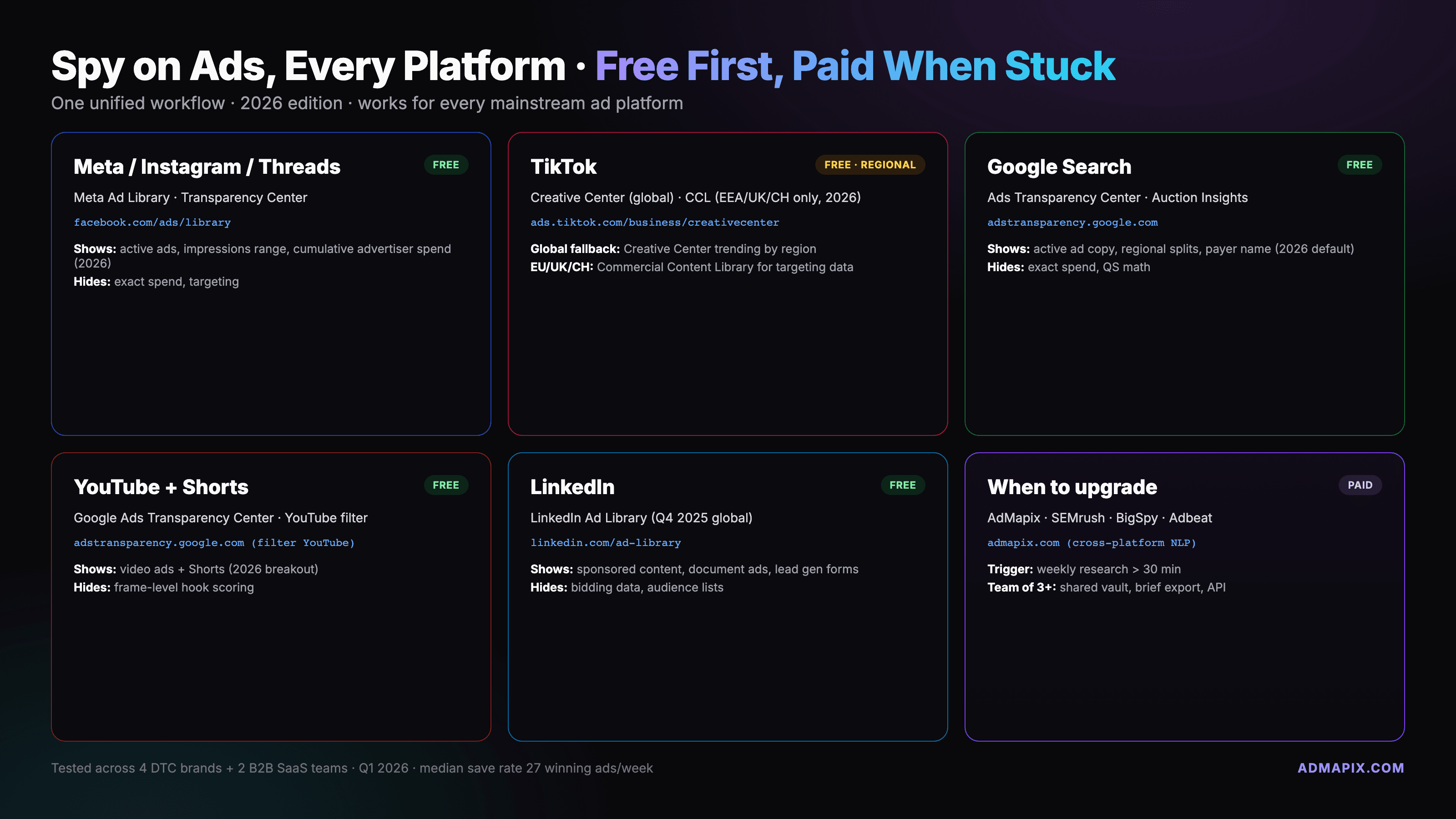
To spy on ads across every major platform in 2026, start with four free official libraries: the Meta Ad Library for Facebook and Instagram, TikTok Creative Center for TikTok, Google Ads Transparency Center for YouTube and Google Search, and the LinkedIn Ad Library for B2B. Run free tools first, reach for paid aggregators only when you hit real limits — then log everything into one unified tracker. This guide walks the per-platform SOP and the cross-platform template we use weekly.
TL;DR — the 30-Minute Weekly Cadence
What you need: 4 free tools (Meta Ad Library, TikTok Creative Center, Google Ads Transparency Center, LinkedIn Ad Library) + 2 paid options (an aggregator like AdMapix or Minea for creative grouping, and a search-ad tool like SpyFu or Semrush for keyword-level Google spy) + 1 shared Notion/Airtable tracker with 9 columns across all 6 platforms. Budget 30 minutes every Monday to pull fresh creatives from each platform, log the ones that are still running, and flag anything worth saving to the vault. That's the whole system.
1. The Cross-Platform Ad-Spying Framework
Every solid ad-spy workflow we've built for clients over the last three years follows the same order of operations: official library first, paid aggregator second, and only then any kind of reverse engineering. This order is not a preference. It exists because official libraries are free, comprehensive within their platform, and — critically — legally uncontroversial because the ads are already public. Paid tools add speed, history, and cross-platform grouping; they don't replace the raw source.
We start free for three reasons. First, the Meta Ad Library alone covers both Facebook and Instagram (and now Threads placements, more on that below), which is roughly 60% of what most consumer brands run. Second, TikTok's Creative Center is globally accessible and shows top-performing creatives by vertical, region, and timeframe — no login needed. Third, Google's Ads Transparency Center, launched in 2023 and heavily expanded in 2024 and 2025, now covers Search, Display, YouTube, and YouTube Shorts with advertiser-level filters. Between Meta, TikTok, and Google, you've already mapped the ad creative landscape for almost any B2C category on earth.
Paid tools earn their keep in three specific scenarios: (1) you need 6+ months of ad history (official libraries surface live and recent-only), (2) you need to group related creatives across platforms under one advertiser, or (3) you need landing-page and funnel metadata that libraries don't expose. For a full paid-tool shortlist see our best ad spy tools of 2026 comparison. For the platform-agnostic strategic view that sits above this playbook, see our sibling guide on spying on competitors' ads in 2026.
The 60-second test we use: can you see the ad live on the platform or in its official library? If yes, that's your primary source — log it. If no, the ad has likely rotated off, and you need paid history. That single decision drives 90% of your tool choices.
One more framing principle before we get into the platform specifics. Ad spying is a compounding activity, not a one-shot audit. The value of your tracker on week one is close to zero — a thin list of observations that feel random. The value at week twelve is meaningful — you can see creative cycles, offer rotations, seasonality, and which competitors are scaling vs coasting. The value at week fifty is genuinely strategic — you have a proprietary creative dataset tagged with your team's judgment that no paid tool can hand you out of the box. The whole point of the unified SOP in this guide is to make the weekly cadence low-friction enough that you actually keep doing it. Thirty minutes a Monday, compounding. That's the game.
2. How to Spy on Facebook Ads (Meta Ad Library Deep-Dive)
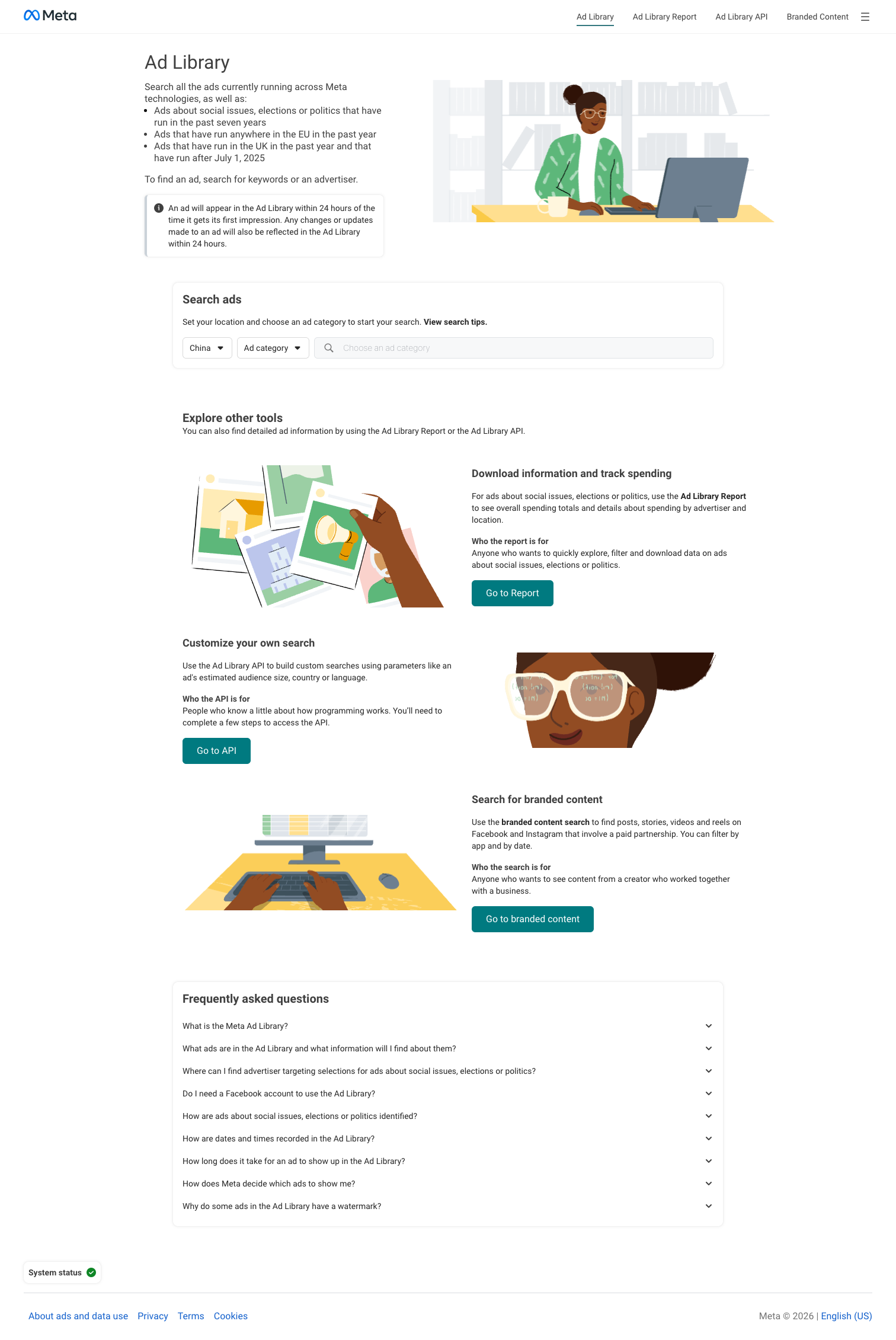
Facebook is the easiest platform to spy on because Meta is legally required to surface every active ad through the Meta Ad Library. Go to facebook.com/ads/library, pick your country, and set the category to "All ads" (not just political) to see what any advertiser is running right now. Type a competitor's Page name in the search box and you'll get every live ad they're running on Facebook, Instagram, Messenger, and Audience Network.
The filters are where most marketers under-use the library. We default to: Country = the geo we care about, Ad category = All ads, Ad platform = all four checkboxes, and Active status = Active. From there, four tactics get us 80% of what a paid tool would:
- Advertiser profile cumulative spend — Meta now surfaces a running total of verified EU/UK advertiser spend on the advertiser's Page Transparency panel. Even for non-EU advertisers, the creative count and earliest-start date tell you how aggressively they're scaling.
- Date range sweep — sort by "First seen" and jump back 30, 60, and 90 days. Creatives that have survived 60+ days are almost always winners being scaled.
- Page Transparency shortcut — on any Facebook Page, click "Page transparency" in the sidebar, then "Ads from this Page." One click, no search bar needed.
- Reverse-lookup via "Why am I seeing this ad" — when an ad shows up in your own feed, the three-dot menu → "Why am I seeing this ad" → advertiser detail link opens the same Ad Library entry. This is how we catch competitors we didn't know existed.
One 2026 callout: Meta Ad Library now surfaces Threads placements under the unified "Ad platform" filter. If a competitor is running Threads-specific creative, you'll see it flagged in the ad detail panel. For a deeper walkthrough, including all 11 filter states and mobile-access quirks, see our dedicated Meta Ad Library guide.
3. How to Spy on Instagram Ads (Unified Under Meta Ad Library)
Instagram ads run through the same Meta Ad Library — there is no separate Instagram library, and there hasn't been one since Meta unified the system. The spy workflow is identical to Facebook with two adjustments.
First, filter Ad platform = Instagram to isolate Instagram-only runs. This matters because many advertisers only run certain creative formats (Reels, Stories) on Instagram while pushing feed-native video to Facebook. The platform filter shows you which creatives the advertiser has Instagram-checked, even if they also run elsewhere.
Second, pay attention to creative format. Instagram Reels ads, Stories ads, and feed ads show up side by side in the Ad Library, but they have wildly different hook conventions. Reels ads front-load a visual pattern-break in the first 0.8 seconds; Stories ads lean on text overlay in the top third to survive tap-through; feed ads carry the longest copy. When you log an Instagram ad into your tracker, note the placement — it dictates which hook style the advertiser is betting on.
The mobile-preview view is an under-used feature: click any ad and toggle to "mobile" preview to see it as a user would. Desktop preview hides the actual thumb-stopping moment that matters for a 90%-mobile platform. For the tactical-level Facebook workflow that applies here too, revisit our Meta Ad Library guide.
The Instagram-specific signal we save hardest for is Reels watch-time pattern in the opening 2 seconds. Advertisers who are clearly winning on Instagram Reels do one of three things in those two seconds: a hard visual cut (background swap, object drop, face-to-camera entry), a contrarian hook line in text overlay that contradicts expectation, or a muted-capable visual demo that doesn't require sound. When you log an Instagram Reels ad, write down which of those three the advertiser is using — you'll start to see patterns by category within a few weeks, and the pattern tells you which hook template is currently working.
4. How to Spy on TikTok Ads (Creative Center vs Commercial Content Library)
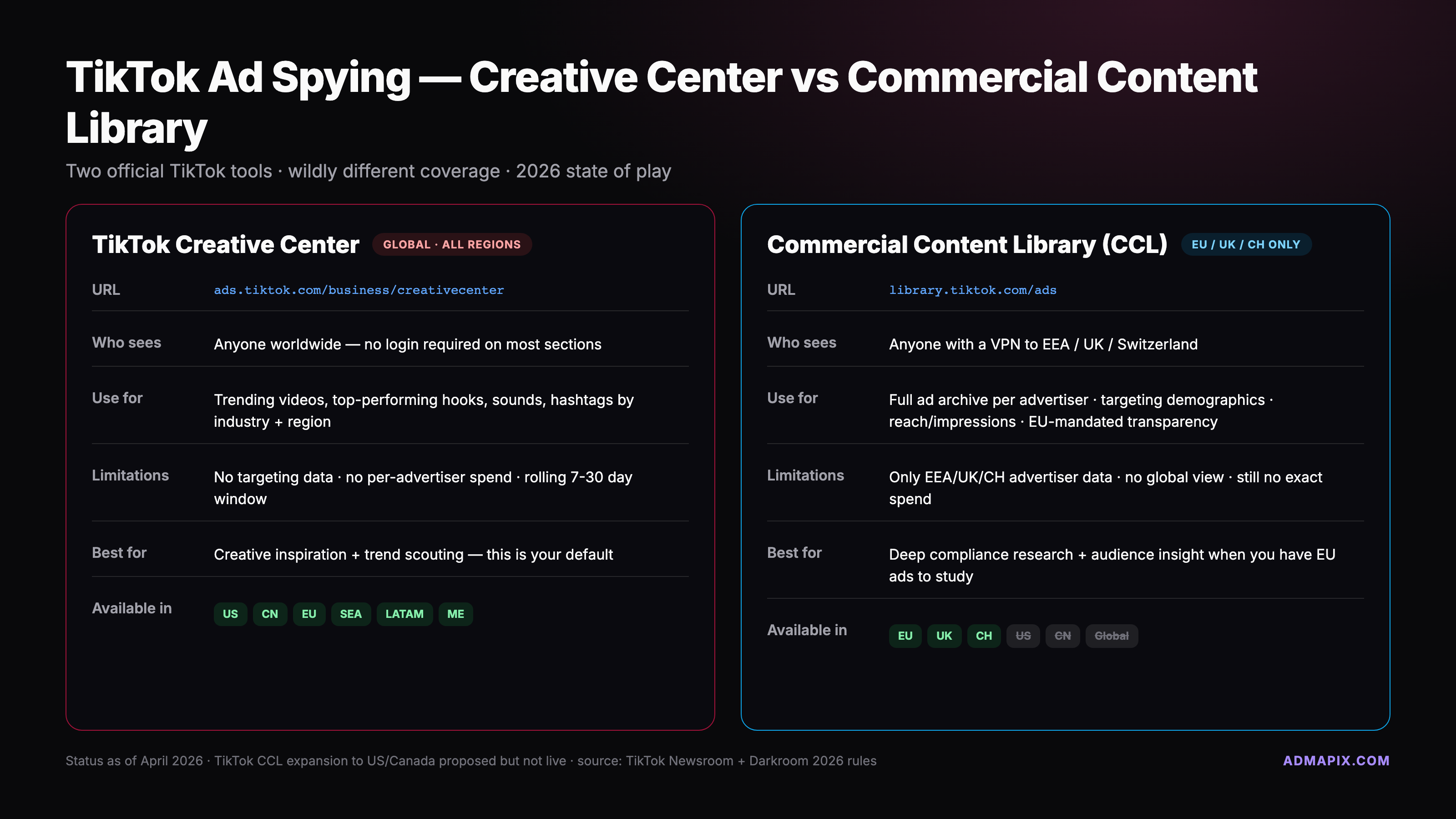
TikTok has two official libraries, and knowing which one to use where is half the battle in 2026. The TikTok Creative Center is global, free, no-login-optional, and it's where 95% of operators should start. The Commercial Content Library is restricted to the EEA, UK, and Switzerland — it's a regulatory library, not a global product — and as of April 2026 TikTok has announced but not yet shipped the global rollout.
In Creative Center, go to Inspiration → Top Ads to see the best-performing ads filtered by region, industry, and objective (conversion, traffic, app install). The dashboard shows CTR, CVR, and 6-second view-through estimates — these are TikTok's own numbers, which makes them more trustworthy than any third-party estimate. We pair Top Ads with Trends → Hashtag and Trends → Songs because TikTok's algorithm still rewards audio-trend alignment; spying on creative without spying on the sound track underneath is half a job.
If you're in the EEA, UK, or Switzerland, Commercial Content Library gives you the extra layer: advertiser-level spend bands, targeting parameters, and ad reach estimates. Outside those regions you won't see it — not because TikTok is blocking you, but because the library itself simply doesn't index ads shown outside the covered geos. For a regularly updated breakdown of what Commercial Content Library covers versus Creative Center, industry sources like Darkroom's TikTok transparency tracker are worth bookmarking.
Where paid tools earn their place on TikTok: e-commerce dropship angle spying (where BigSpy and Pipiads have giant historical libraries), and spending estimates for non-EEA advertisers. If you need to see what a US dropship brand was running 4 months ago, Creative Center will let you down and a paid aggregator won't.
5. How to Spy on YouTube Ads + Shorts (Google Ads Transparency Center)
YouTube ads all run through Google Ads, so YouTube spying lives inside the Google Ads Transparency Center. Type an advertiser name or domain, and the Transparency Center returns every active ad across Search, Display, YouTube, and YouTube Shorts. Three filter states do most of the heavy lifting:
- Format = Video — isolates YouTube ads from Search and Display.
- Format = Shorts (new in 2025, broken out as its own filter in early 2026) — surfaces vertical-only YouTube Shorts creatives. This matters because Shorts ads have completely different hook conventions from in-stream skippable ads.
- Region = [your target] — YouTube ad serving is regional, and the Transparency Center respects that.
The three-dot "About this ad" shortcut is the reverse-lookup equivalent of "Why am I seeing this ad" on Meta. Click the three dots on any YouTube ad, choose "About this ad," and you'll get a link to the Transparency Center entry for that verified advertiser. This is how we catch advertisers who are running YouTube aggressively but aren't on our competitor radar yet.
Two 2026 callouts. First, Google started breaking out YouTube Shorts as a separate format in the Transparency Center in early 2026 — before that, Shorts ads were lumped in with video and hard to isolate. Second, the Transparency Center's advertiser-verification requirement (launched globally in 2024) means you can now trust the advertiser identity shown. If a domain shows up as "verified advertiser: [Company Inc.]", that's a legally identified entity, not a spoofer.
6. How to Spy on Google Search Ads (Transparency Center + Auction Insights)
Google Search ad spying has two free sources and they work best together. The Transparency Center (same URL as above) lets you filter by format = Search and see every active text ad a given advertiser is running, including the headline and description combinations. It does not show you the keywords triggering those ads — that's a known limitation and one of the main reasons paid Google spy tools like SpyFu and its alternatives still have a market.
The second free source is Auction Insights, available inside your own Google Ads account under any campaign or ad group. Auction Insights tells you who else is bidding on the same keyword you are, with impression share, overlap rate, and top-of-page rate for each competing advertiser. It doesn't show their ad copy, but combined with Transparency Center (which does show copy but not keywords), you get the full picture: who's bidding on my keywords + what ads they're showing. For the full 7-step Google-specific workflow, see our dedicated Google ads competitor guide.
One 2026-specific callout worth flagging: Google's AI Overview continues to squeeze organic and paid real estate on high-intent informational queries. According to coverage from Search Engine Land and others, the effective click-through rate on paid-search positions below AI Overviews has dropped 15–30% for many verticals. Spying on who's still bidding aggressively in AI Overview-dominated SERPs tells you who has the margin to play in a compressed click environment — that's genuinely strategic intel, not just creative sightseeing.
7. How to Spy on LinkedIn Ads (LinkedIn Ad Library, Global 2025+)
LinkedIn shipped its Ad Library to the EU in mid-2024 and rolled it out globally in Q4 2025. You can search by company name, click through to a company's Ad Library page, and see every ad that company is currently running — including sponsored posts, InMail, conversation ads, and lead-gen forms.
The Q4 2025 expansion added campaign objective (brand awareness, website visits, lead generation, etc.) and audience-size buckets to the ad detail view. This is a big deal for B2B: you can finally see whether a competitor is running brand-awareness creative to a 500k+ audience or lead-gen creative to a 10–50k niche list, and the creative choices make much more sense in context.
LinkedIn is a lower-volume but higher-value spy target for B2B teams. We recommend checking competitors' LinkedIn Ad Library entries quarterly rather than weekly — B2B creative cycles are longer and there's less noise to wade through. A quarterly sweep is usually enough to catch repositioning, new offers, and ICP shifts.
Two workflow tips specific to LinkedIn. First, cross-reference the Ad Library entry with the advertiser's organic LinkedIn activity — B2B companies often test an angle organically for a few weeks before paying to amplify it, and the organic-to-paid handoff is your earliest signal that a message is about to scale. Second, sponsored content on LinkedIn often links to gated assets (ebooks, reports, webinars). The gated-asset title is usually more revealing than the ad copy itself, because it names the pain point the advertiser is betting budget on. Log the asset titles in your tracker's Notes column — over a quarter you'll see the ICP pain hierarchy emerge.
8. Free vs Paid — When to Upgrade
Free tools cover roughly 70% of ad-spy use cases for an operator running on a $0 tool budget. You upgrade to paid when one of three triggers fires:
- You need 6+ months of ad history. Official libraries show live and recently-inactive ads, but they're not archives. If you're investigating a competitor's historical playbook for a pitch or a pricing decision, paid tools are the only reliable source.
- You need creative grouping across platforms. No official library tells you "this advertiser is running this same concept on Facebook, TikTok, and YouTube simultaneously." Paid aggregators do, and that cross-platform concept view is usually the difference between cataloguing ads and understanding strategy.
- You need automated alerts and tagging. Checking libraries manually every Monday works until you're tracking 15+ competitors across 5 platforms, at which point a paid tool with alerts, tagging, and vault saving pays for itself in an hour a week.
For our unified cross-platform pick, AdMapix consolidates Meta, TikTok, YouTube, and Google Search creatives under one search with product-level grouping — it's the option we recommend for teams who want the cross-platform aggregator layer without paying for four separate tools. For a neutral comparison of the full paid landscape, see our best ad spy tools of 2026 shortlist. For China-based teams (出海投手) who need to spy on Meta, TikTok, YouTube, and Google creatives without wrestling with proxies or VPN routing, AdMapix's 国内直连 endpoint is the most reliable unified entry point we've tested, with a Chinese UI and product/industry grouping.
9. The Unified 6-Platform SOP — One Tracker to Rule Them All
This is the part that turns spying from a hobby into a system. Every ad you pull from any of the 6 platforms above goes into one shared Notion or Airtable base with the same 9-column schema. The schema is deliberately platform-agnostic so you can sort and filter across all 6 without data-shape fights.
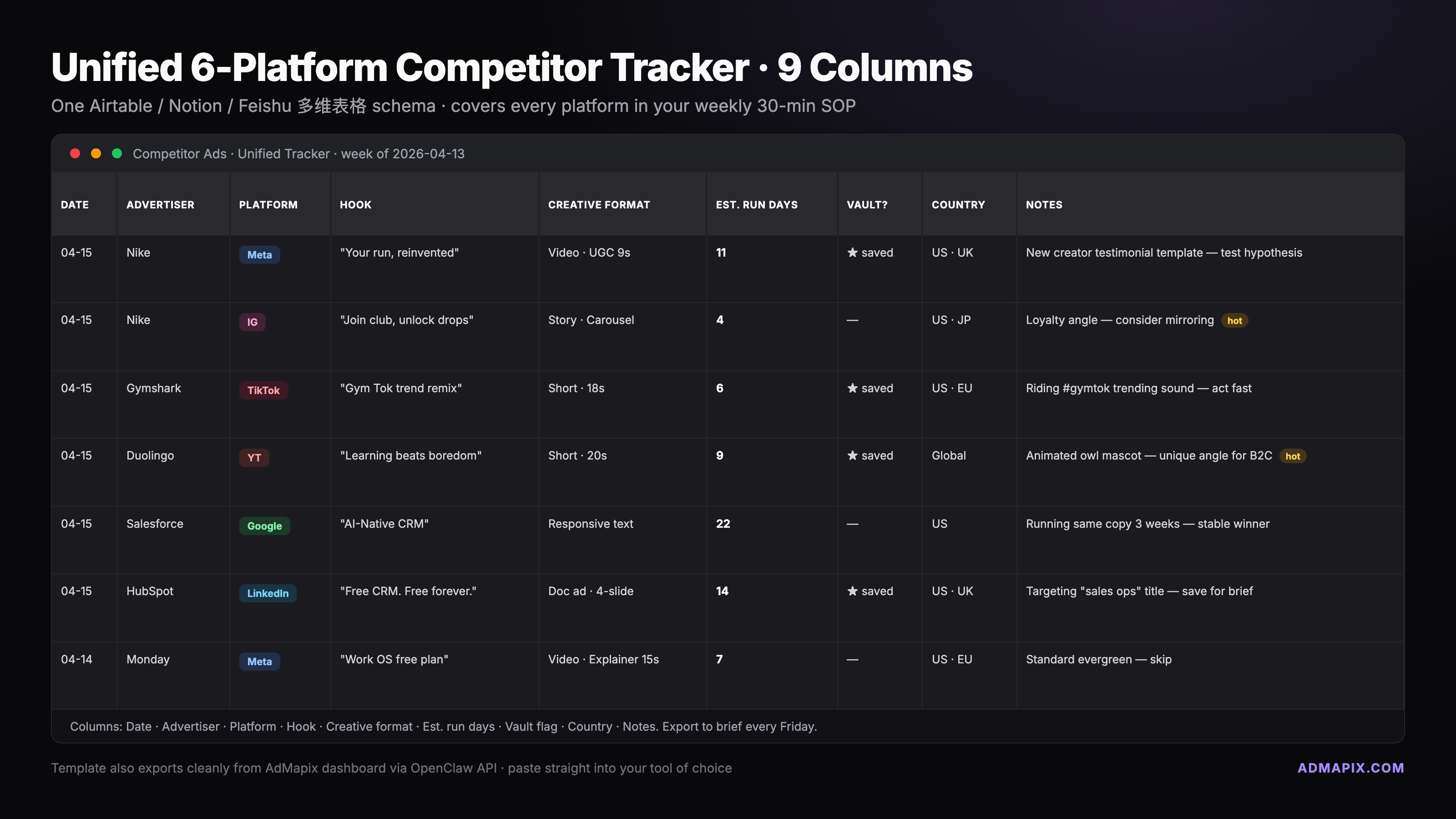
The 9-Column Tracker Schema
| # | Column | What it holds | Example |
|---|---|---|---|
| 1 | Date | The date you logged it (ISO) | 2026-04-14 |
| 2 | Advertiser | Brand or Page name | Notion Labs |
| 3 | Platform | FB / IG / TT / YT / GS / LI | TT |
| 4 | Hook | First-3-second hook in your own words | "POV: your PM asked for one more doc" |
| 5 | Creative Format | Single / carousel / video / Reels / Shorts / Search-text | Video (vertical) |
| 6 | Estimated Run Days | Days since first-seen date (from library) | 47 |
| 7 | Save-to-Vault | Y/N flag for the creatives you study deeply | Y |
| 8 | Country | Country(ies) where you saw it run | US, UK, AU |
| 9 | Notes | Offer, CTA, landing URL, anything else | "$50 off first month, LP = /pricing-b" |
The Save-to-Vault flag is the critical column. Most ads you log are reference material — good, interesting, worth knowing. A small fraction (we aim for maybe 5%) are worth saving to a deep-study vault where you rewatch them, transcribe them, screenshot frame-by-frame, and look for the actual craft lesson. Flag those with Y and revisit them monthly.
Platform-Specific Sub-Table: Where to Look and What You'll Find
| Platform | Where to look | What you'll find | How long it takes |
|---|---|---|---|
| Meta Ad Library → advertiser search | All live FB ads, 11 filter states, Page Transparency | 5 min | |
| Meta Ad Library → filter Platform=IG | IG-specific placements, Reels, Stories | 3 min | |
| TikTok (global) | Creative Center → Top Ads | Top creative by region/industry, CTR/CVR data | 5 min |
| TikTok (EEA/UK/CH) | Commercial Content Library | Advertiser spend bands, reach, targeting | 5 min |
| YouTube + Shorts | Google Ads Transparency Center → Format=Video / Shorts | All active video and Shorts ads | 4 min |
| Google Search | Transparency Center (copy) + Auction Insights (keywords) | Live search ads + bidders on your keywords | 5 min |
| LinkedIn Ad Library → company search | Live sponsored content, objective, audience band | 3 min |
Total weekly time: about 30 minutes across all 7 rows, or 20 if you skip Commercial Content Library because you're outside the EEA.
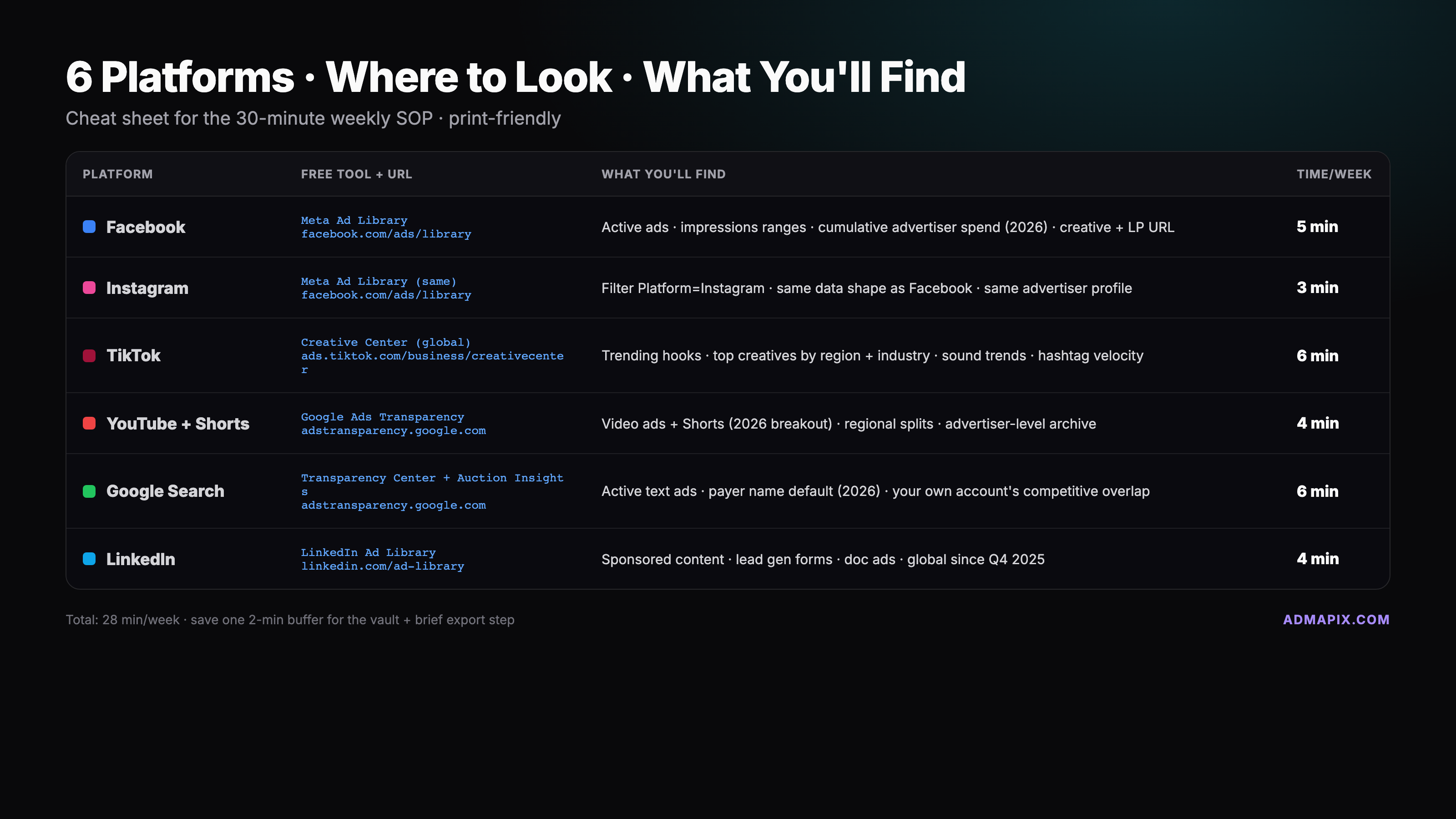
For the single-platform tracker this extends, and the rest of the cross-platform strategy context, see our how-to-spy-on-competitors-ads playbook.
10. Legal and Ethical Boundaries
Everything in this guide uses publicly available data that the platforms themselves have published through official transparency programs. That said, there are three guardrails worth stating explicitly because they cover 95% of the questions teams ask us.
Public data is fair game; lifting creative is not. Studying a hook, understanding a positioning choice, logging a competitor's creative format cadence — all standard competitive intelligence. Copying the creative asset itself, or a close derivative, opens you to IP and trademark risk even if the source library made the asset public.
Screenshots for internal analysis are fine; screenshots published externally need care. An ad logged into your private tracker is no different from any other competitive research file. Publishing that screenshot in a blog post, LinkedIn thread, or conference deck puts you in third-party usage territory — usually covered by fair-use for commentary, but check with your legal team if you're publishing at scale.
Don't reverse-engineer targeting through unauthorized means. Platforms expose targeting transparency through specific channels (Commercial Content Library for TikTok EEA, audience-size buckets for LinkedIn, "Why am I seeing this ad" on Meta). Use those. Don't scrape, don't spoof profiles to get served specific ads, and don't exploit quirks to surface private targeting data. The ROI on sketchy-source intel is never worth the account-ban or legal-exposure risk.
11. FAQ
1. Is spying on competitors' ads legal? Yes, when you use official libraries and transparency tools. Every platform listed here publishes ads through legally sanctioned programs — Meta Ad Library exists because of regulatory requirements, TikTok Commercial Content Library exists because of the EU Digital Services Act, Google's Transparency Center exists for the same reason. Using them for competitive research is standard practice. Republishing creative assets at scale is a different question — see the legal section above.
2. Can I see competitor targeting? Partially. You can see placements (which platforms the ad runs on) on Meta Ad Library, audience-size bands on LinkedIn Ad Library, and in the EEA/UK/Switzerland you can see more granular targeting on TikTok Commercial Content Library. You generally cannot see exact demographic, interest, or custom-audience targeting — those are not surfaced in any public library and likely never will be.
3. When should I pay for a spy tool instead of using free libraries? Three triggers: you need 6+ months of history, you need cross-platform creative grouping, or you're tracking 15+ competitors and manual checks don't scale. Free tools dominate the first 70% of use cases; paid tools own the rest. Our paid tool shortlist walks the options.
4. Why don't I see every ad a competitor is running? A few reasons: the ad may have finished running and fallen out of the "active" filter, it may be running in a geo you haven't selected, or it may be a placement type (like certain audience-network ads) that the library doesn't surface. For non-EEA TikTok advertisers specifically, the Commercial Content Library won't show anything — Creative Center is your fallback.
5. What about Snapchat, Reddit, X, and Pinterest? Snapchat has no public ad library and no plans to ship one. Reddit launched a limited ad transparency page in late 2025 but it only covers political and regulated categories. X does not expose a public ad library at the time of writing. Pinterest has a Trends dashboard but no per-advertiser library. For these platforms, paid aggregators are currently the only systematic spy option.
6. 国内怎么访问 Meta Ad Library 和 Google Transparency Center? Meta Ad Library and Google Ads Transparency Center both require stable access to Meta and Google infrastructure, which is not consistently reachable from mainland China without a compliant proxy. TikTok Creative Center is the only one of the free tools with reliable 国内直连 access. For teams who need unified cross-platform spy coverage without proxy fragility, an aggregator with 国内直连 endpoints (like AdMapix) is usually more reliable than patching together DIY VPN routes.
{
  "@context": "https://schema.org",
  "@type": "FAQPage",
  "mainEntity": [
    {
      "@type": "Question",
      "name": "Is spying on competitors' ads legal?",
      "acceptedAnswer": {
        "@type": "Answer",
        "text": "Yes, when you use official libraries and transparency tools. Meta Ad Library, TikTok Commercial Content Library, Google Ads Transparency Center, and LinkedIn Ad Library all publish ads through legally sanctioned programs, and using them for competitive research is standard practice."
      }
    },
    {
      "@type": "Question",
      "name": "Can I see competitor targeting?",
      "acceptedAnswer": {
        "@type": "Answer",
        "text": "Partially. You can see placements on Meta Ad Library, audience-size bands on LinkedIn Ad Library, and more granular targeting on TikTok Commercial Content Library in the EEA, UK, and Switzerland. Exact demographic, interest, or custom-audience targeting is not surfaced in any public library."
      }
    },
    {
      "@type": "Question",
      "name": "When should I pay for a spy tool instead of using free libraries?",
      "acceptedAnswer": {
        "@type": "Answer",
        "text": "Three triggers: you need 6+ months of ad history, you need cross-platform creative grouping, or you are tracking 15 or more competitors and manual checks don't scale. Free tools cover roughly 70% of use cases; paid tools own the remainder."
      }
    },
    {
      "@type": "Question",
      "name": "Why don't I see every ad a competitor is running?",
      "acceptedAnswer": {
        "@type": "Answer",
        "text": "The ad may have finished running, may be running in a geo you haven't selected, or may be a placement type the library doesn't surface. For non-EEA TikTok advertisers, Commercial Content Library won't show anything and Creative Center is the fallback."
      }
    },
    {
      "@type": "Question",
      "name": "What about Snapchat, Reddit, X, and Pinterest?",
      "acceptedAnswer": {
        "@type": "Answer",
        "text": "Snapchat has no public ad library. Reddit launched a limited transparency page in late 2025 covering political and regulated categories only. X does not expose a public ad library. Pinterest has a Trends dashboard but no per-advertiser library. For these platforms, paid aggregators are currently the only systematic spy option."
      }
    },
    {
      "@type": "Question",
      "name": "How do I access Meta Ad Library and Google Transparency Center from mainland China?",
      "acceptedAnswer": {
        "@type": "Answer",
        "text": "Meta Ad Library and Google Ads Transparency Center require stable access to Meta and Google infrastructure, which is not consistently reachable from mainland China without a compliant proxy. TikTok Creative Center has reliable direct access. Aggregators with domestic endpoints can consolidate all platforms without proxy fragility."
      }
    }
  ]
}
Spying on ads is a weekly habit, not a one-time project. Thirty minutes every Monday, the same 9-column tracker, the same 7 sources — and in six months you'll have a library of hooks, formats, and offers that outperforms what any paid tool can hand you, because it's tagged with your own strategic lens. The free tools are genuinely good enough to start today. Start today.
See what competitors are really running
Search 6M+ ad creatives, landing pages, and weekly spend across 200+ countries. No credit card, no commitment.
Related Articles

Video Ad Production at Scale: AI Tools, Templates, and Testing Frameworks for 2026
A practical guide to scaling video ad production: AI generation tools that actually work, template systems for rapid iteration, platform-specific format requirements, and how to build a testing flywheel that improves performance with every batch.
Retargeting Ads Strategy in 2026: Competitor Analysis, Segmentation, and Creative Testing
A data-driven retargeting ads strategy combining competitor intelligence, audience segmentation, and creative testing. Learn what competitors run for retargeting and how to build a testable retargeting workflow.
LinkedIn Ads Competitor Research: How to Analyze B2B Rivals in 2026
A systematic approach to LinkedIn Ads competitor research: use the LinkedIn Ads Library, infer targeting from ad copy patterns, analyze B2B landing pages, and turn findings into testable LinkedIn campaign hypotheses.