
LinkedIn Ads Competitor Research in 2026: The Complete B2B Intelligence Playbook
A complete 2026 system for LinkedIn Ads competitor research — how to use the LinkedIn Ad Library, what you can and can't see, how to infer B2B targeting from public signals, how to teardown rival creative and messaging, an ABM-driven monitoring workflow, and a cross-network method that pairs LinkedIn with Meta and Google so your B2B competitive intelligence is full-funnel, not single-channel.
LinkedIn Ads Competitor Research in 2026: The Complete B2B Intelligence Playbook
By the AdMapix Research Team — Updated June 21, 2026
LinkedIn Ads competitor research is the single most underexploited intelligence source in B2B marketing — and that is precisely why it pays. LinkedIn is the most expensive major ad platform on earth: CPCs routinely run $5–$15, CPMs clear $50 in competitive software categories, and a single Sponsored Content placement to a director-level audience can cost more than a week of TikTok reach. When every click costs the price of a coffee, the penalty for shipping the wrong creative is brutal, and the reward for knowing exactly what your rivals are testing — before you spend a dollar — is proportionally enormous. Yet the overwhelming majority of B2B teams run Google Ads and Meta competitor analysis and treat LinkedIn as an afterthought. This guide fixes that. It is a complete, repeatable system for turning the publicly visible signal your competitors leak on LinkedIn into testable hypotheses for your own pipeline.
We have analyzed competitor ad sets across SaaS, fintech, cybersecurity, professional services, and developer tools, and the same pattern keeps appearing: teams that "look at competitor LinkedIn ads" without a method drown in screenshots and ship nothing, while teams that treat LinkedIn ads as signal intelligence — structured, dimensional, cross-referenced against landing pages and other channels — ship two to four winning angles every quarter. The difference is never access. Anyone can open the LinkedIn Ad Library. The difference is methodology, and the willingness to do inference where the platform refuses to hand you the answer. This article is that methodology, written so you can copy it into your own stack today, starting with five competitors and a spreadsheet.
TL;DR — LinkedIn Ads Competitor Research in One Screen
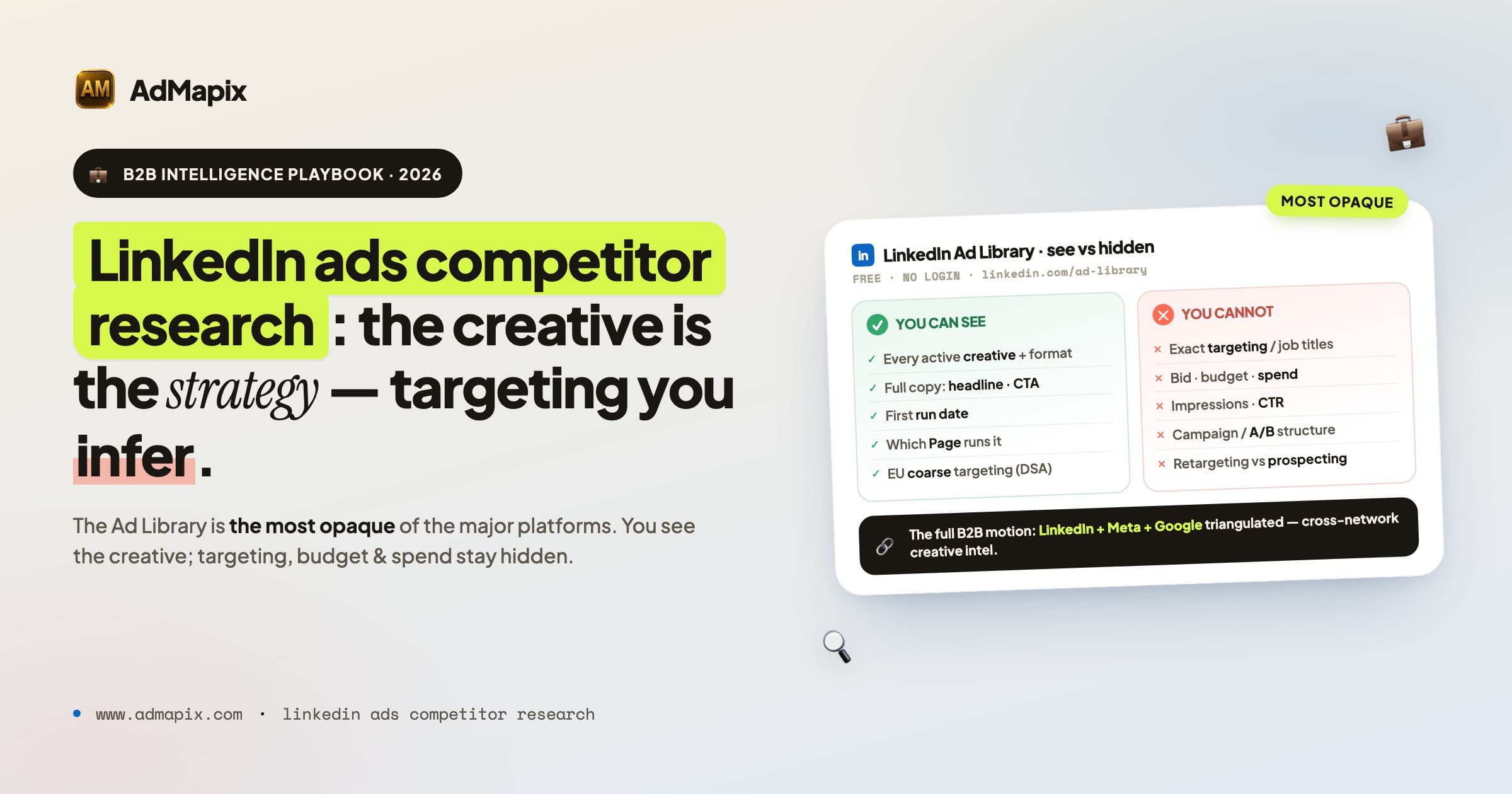
- The LinkedIn Ad Library is free, login-optional, and shows every active ad from any Page — but it is the most opaque of the major transparency tools. You see the creative, copy, and run date; you see nothing about targeting, budget, or impressions.
- Targeting is inferable, not visible. Job-title language, company-size cues, industry jargon, format choice, and landing-page ICP all leak who a competitor is buying. Track those signals over 4–8 weeks and the inference becomes reliable enough to bet on.
- The creative IS the strategy on LinkedIn. Because the audience is defined by professional identity rather than behavior, ad copy patterns reveal targeting more clearly here than on any other platform. Decode the messaging archetype and you have decoded the campaign.
- Pair every ad with its landing page. B2B landing pages carry more strategic information than consumer pages — offer type, social-proof format, form friction, and pricing visibility together expose the full-funnel motion.
- ABM changes the lens. On LinkedIn, adjacent competitors fighting for the same buyer persona are often more instructive than direct ones, and a competitor's account-based plays surface as named-segment messaging and Sponsored Messaging.
- Single-channel research is half the picture. Decode LinkedIn alongside Meta and Google, and you see the complete B2B media motion — top-of-funnel demand creation, retargeting, and brand defense — rather than one expensive slice of it.
- Every finding must become a test, not a copy. LinkedIn's audience punishes copy-paste creative from other platforms. The output of every weekly review is one testable LinkedIn campaign hypothesis, never a swipe file.
What LinkedIn Ads Competitor Research Actually Is (and Isn't)
LinkedIn Ads competitor research is the structured extraction of creative, messaging, targeting, offer, and funnel signal from a rival's LinkedIn paid media, turned into hypotheses you can test on your own account. It is not opening the Ad Library once a quarter, screenshotting a few ads, and dropping them into a "competitor inspiration" folder that nobody reopens.
The distinction matters because LinkedIn rewards methodology more than any other channel. On Meta you can lean on the impressions filter and EU spend data; on Google you can read auction insights and the Transparency Center's date and region breakdowns. LinkedIn gives you almost nothing structured — so the entire value comes from systematic observation over time plus disciplined inference. A single snapshot of a competitor's LinkedIn ads tells you essentially nothing. A four-week time series of their creative cadence, format mix, messaging shifts, and landing-page changes tells you their entire go-to-market posture.
The mindset is signal intelligence, not espionage. You are not trying to steal a competitor's exact ad. You are trying to read what the market is responding to — which positioning is being doubled down on, which offer is being pushed, which buyer persona is suddenly getting attention — and convert that into a test that fits your product and your ICP.
There is also a structural reason LinkedIn deserves a dedicated practice rather than a footnote in your general competitor research. B2B buying is a committee sport. The average enterprise software purchase now involves six to ten stakeholders, a buying cycle measured in months, and a research process that starts long before anyone fills out a form. LinkedIn is where that early, anonymous research happens — where a VP of Engineering first encounters a category, where a CFO forms an opinion about a vendor's credibility, where a champion gathers ammunition to sell internally. The ads your competitors run on LinkedIn are therefore aimed at the top and middle of a long, multi-threaded funnel, which means they encode positioning and category strategy far more than they encode a quick conversion ask. Reading them correctly tells you not just what creative a rival is testing, but how they are trying to shape the buying committee's perception of the entire category — including your place in it.
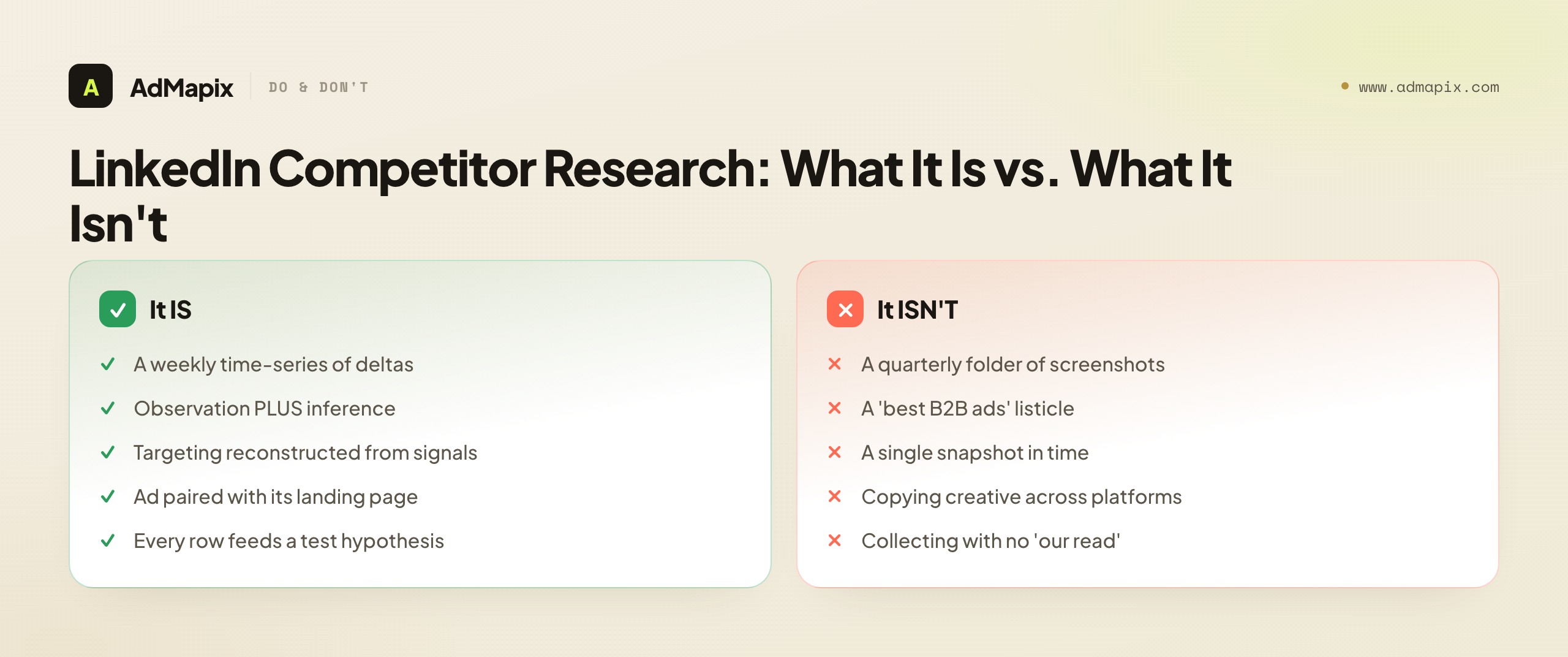
The failure mode is always the same. Teams confuse collection with analysis. Collecting LinkedIn ads is trivial and feels productive; it produces a folder. Analysis is harder and feels slow; it produces a hypothesis. The folder never ships a campaign. The hypothesis does. Everything in this playbook is designed to keep you on the hypothesis side of that line.
What the LinkedIn Ad Library Actually Shows (and Doesn't)
LinkedIn launched its Ad Library in mid-2024, the last of the major platforms to comply with the EU Digital Services Act transparency wave that produced Meta's Ad Library and Google's Ads Transparency Center. It is reachable at linkedin.com/ad-library, requires no login, and lets you search any company by name to see every ad that Page is currently running.
What you can see:
- Every active ad creative — Single Image, Carousel, Video, Document (PDF) ads, Text Ads, and the visible shell of Conversation/Message ad formats
- The full ad copy: headline, introductory text, and the CTA button label
- The date the ad first started running
- Which LinkedIn Page is running it (and therefore the advertiser)
- The ad format and creative type
- For ads shown to EU audiences, a "Targeting" disclosure that lists broad parameter categories used (a DSA requirement) — far coarser than the actual campaign setup, but a real, underused signal
What you cannot see:
- Precise targeting criteria — exact job titles, seniorities, company-size bands, skills, group memberships, or matched/uploaded audiences
- Bid amount, daily budget, or total spend
- Impression volume, reach, click-through, or any engagement metric
- Campaign or ad-set structure — you see flat creatives, not how they are organized
- A/B test structure — which creatives are variants of the same test versus separate campaigns
- Retargeting versus prospecting designation
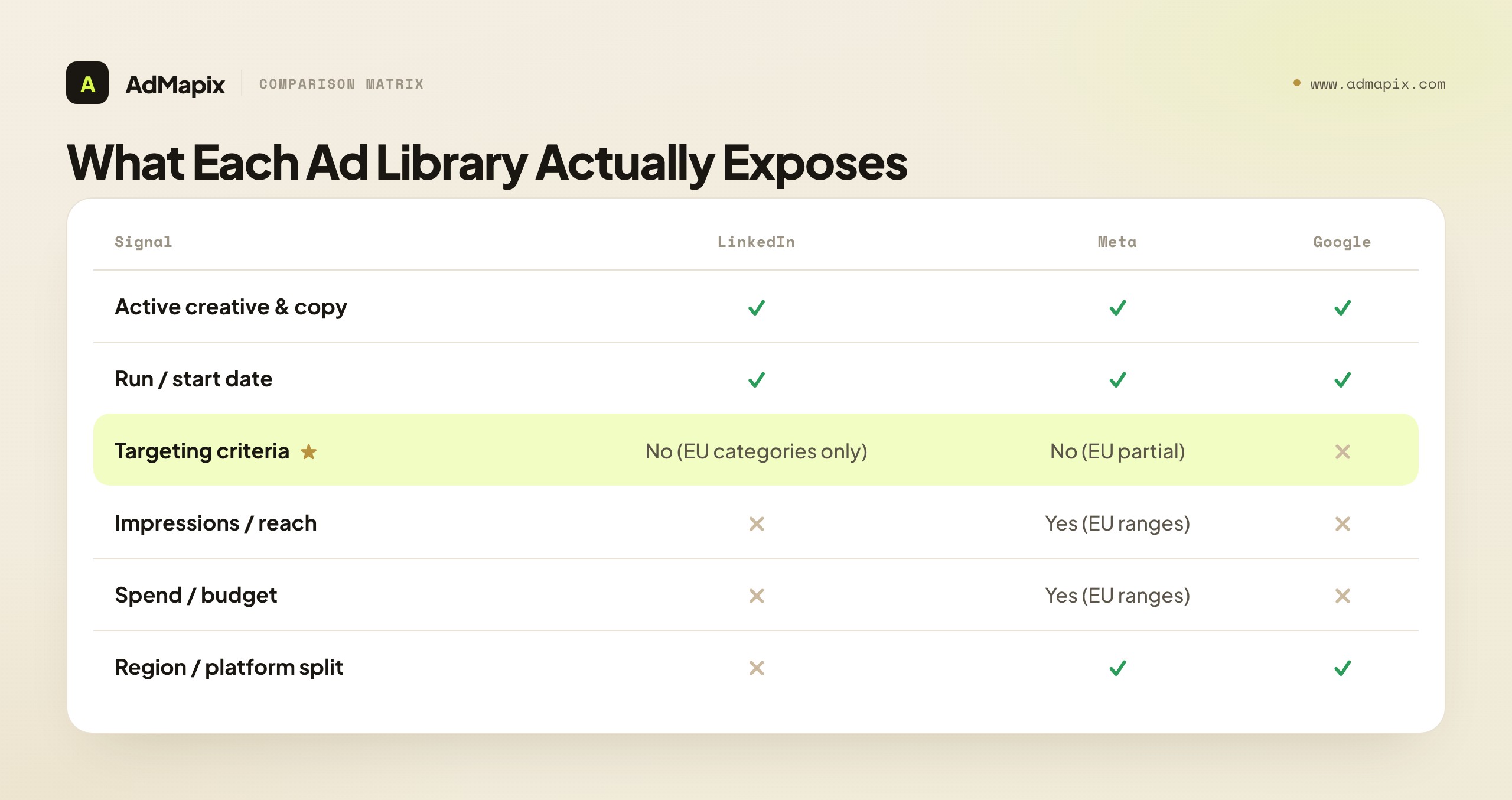
The honest summary: LinkedIn's Ad Library is the most opaque of the major platforms. Meta shows you all active ads across Facebook and Instagram with platform distribution and, in the EU, reach and spend ranges. Google's Transparency Center shows ads by format, region, and date served. LinkedIn shows you the creative and the company — and, for EU-served ads, a coarse targeting-category disclosure. That is it.
This opacity is not a dead end. It is the reason inference skills create an edge here that they cannot create on Meta. On Meta, the data is handed to you, so everyone who looks sees the same thing. On LinkedIn, the data must be constructed from public signals, so the team that builds a disciplined inference process consistently knows things their competitors' competitors never figure out. The rest of this guide is that inference process.
A practical note on the EU targeting disclosure, because it is the one structured signal most people overlook. Under the Digital Services Act, platforms must, for ads served to users in the EU, disclose the broad categories of parameters used to target them — things like "age," "location," "interests," or "audience lists." LinkedIn surfaces this on a per-ad basis for qualifying creatives. It will not tell you "VP of Finance at companies with 500–1,000 employees in Germany," but it may confirm that the advertiser used a "company" parameter, a "job" parameter, and a "location" parameter — which validates your copy-based inference rather than contradicting it. When your reading of the creative says "this looks like tight, named-segment targeting" and the EU disclosure confirms job and company parameters were in play, your confidence should rise sharply. Treat the disclosure as a confirmation layer on top of inference, never as a substitute for it, and always check whether the ad you are looking at is one served to EU audiences, because non-EU creatives will not carry it.
One more habit that pays off: log the absence of ads, not just their presence. A competitor who was running fifteen creatives last month and shows zero today has either paused spend, exhausted a budget cycle, or pivoted off LinkedIn entirely — each of which is a meaningful strategic signal. Because the Ad Library only shows currently active ads and keeps no public archive of dead ones, your own time-series log is the only record that a competitor's LinkedIn presence rose and fell. That historical memory, which the platform deliberately does not give you, is one of the most valuable assets a disciplined tracker builds over a year.
How to Infer B2B Targeting From Public Signals
LinkedIn refuses to tell you who a competitor is targeting. But targeting choices are not invisible — they are encoded in the words and formats a competitor chooses, because effective B2B ads are written for a specific buyer. Read the encoding and you reconstruct the brief.
Job-title and seniority signals. The pronouns and role language in the copy betray the targeted seniority almost every time:
- "VP of Sales," "Sales Leaders," "Heads of Revenue" → senior, named-seniority targeting
- "your team," "your reports," "give your reps" → people-manager targeting
- "individual contributor," "hands-on," "stop doing X manually" → IC-level targeting
- "we help [companies] do X" → decision-maker targeting (the buyer, not the user)
- First-person practitioner voice ("I spent 6 years in security ops…") → IC or senior-IC targeting where peer credibility converts
Company-size signals. Size shows up in vocabulary, price anchors, and the logos a competitor is willing to show:
- Explicit words: "startup," "scale-up," "SMB," "mid-market," "enterprise"
- Price anchors: "$X/seat," "starting at," "custom pricing" all imply a size band
- Case-study logos: the companies featured are the stated ICP — a wall of Fortune 500 logos is an enterprise targeting tell
- Language complexity and compliance density rise with company size
Industry signals. Vertical jargon and regulatory references are the cleanest industry tells available:
- Function-specific jargon ("MRR," "pipeline coverage," "MTTR," "DAU/MAU") → targeting that function
- Regulation references ("SOC 2," "HIPAA," "GDPR," "PCI-DSS," "FedRAMP") → regulated verticals, often a named-industry filter
- Named use cases ("engineering onboarding," "claims automation," "trade reconciliation") → functional teams inside specific industries
Geo signals. Monolingual creative, currency, and local references expose geo filters that the Ad Library will not name:
- A competitor running the same product in only one language is almost certainly geo-targeting
- Local currency, local events, regional compliance references
- City- or country-named copy ("for teams in the DACH region")
Format-as-targeting signals. On LinkedIn, format choice is one of the loudest targeting signals because each format maps to a funnel stage and audience size:
- Document (PDF carousel) ads → users who consume longer strategic content → senior, considered buyers, often a thought-leadership ABM play
- Video ads → brand-awareness stage → broader prospecting audiences
- Conversation / Message ads → high-intent, small, expensive audiences → classic ABM and matched-audience targeting
- Lead Gen Form ads → mid-funnel, conversion-ready prospecting → a measured, ROI-tracked motion
- Single Image, broad copy → top-of-funnel reach
- Single Image, hyper-specific copy ("for [job title] at [industry] companies") → tight, ABM-adjacent targeting despite a cheap format
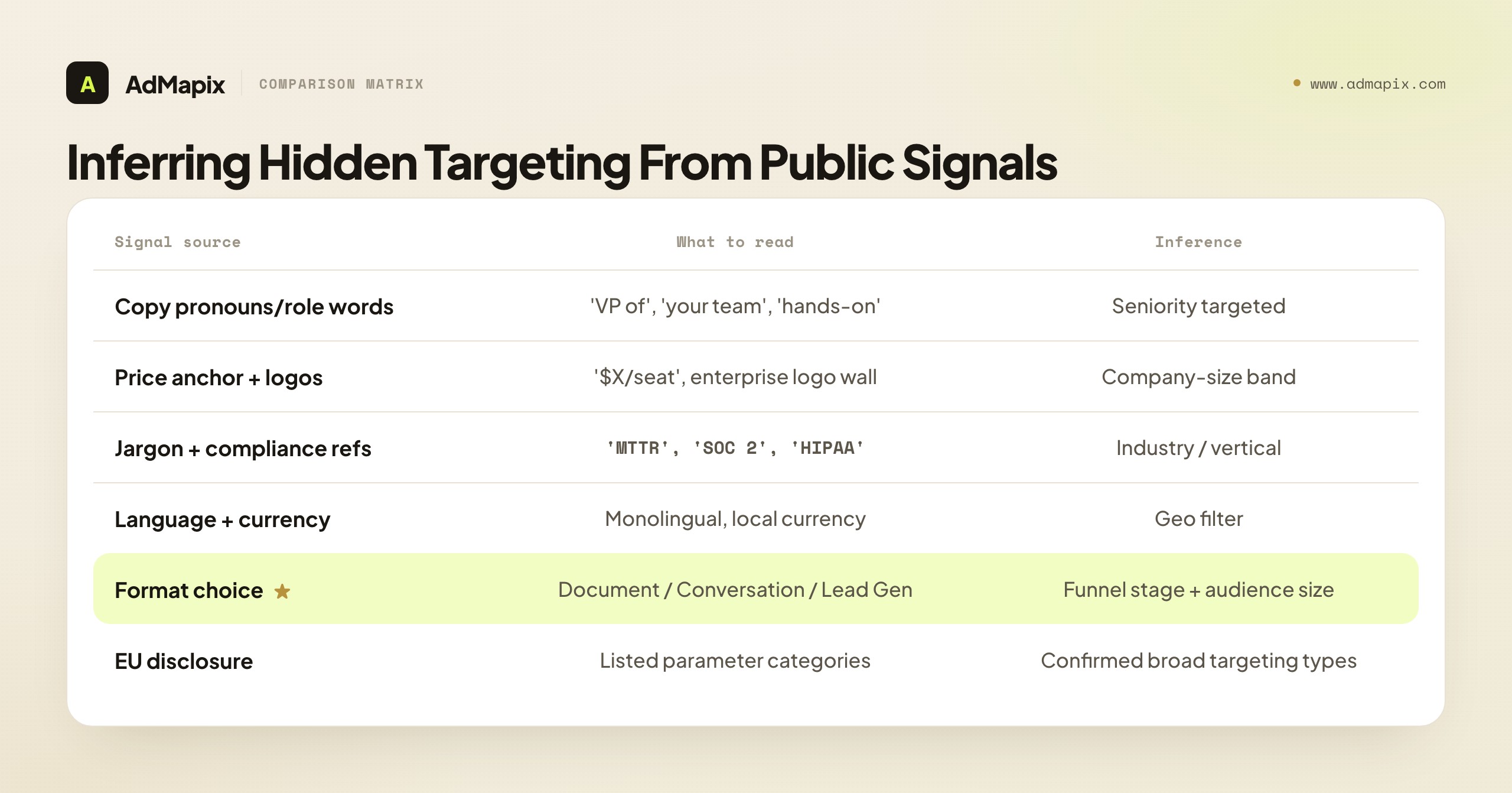
No single signal is definitive. The reliability comes from convergence. When a competitor's copy uses VP-level language, their logos are all enterprise, their jargon is finance-specific, and they lean on Document and Conversation ads, you can state with real confidence: this competitor is running an enterprise ABM motion against senior finance buyers. That is a targeting reconstruction you can act on — and it took zero access to their ad account.
The LinkedIn Competitor Ad Teardown Template
For each competitor, track these fields on a weekly cadence. The goal is pattern detection over time, not a one-off screenshot dump. A plain spreadsheet (one tab per competitor, one row per week) is all you need to start.
| Field | What to record | Why it matters |
|---|---|---|
| Active ad count | Number of live ads in the Ad Library | Proxy for campaign investment and testing intensity |
| Format mix | % Single Image / Carousel / Video / Document / Text / Conversation | Maps directly to funnel stage and audience size |
| Headline pattern | Price-led, feature-led, social-proof-led, urgency-led, problem-callout | Reveals positioning and the angle being doubled down on |
| Offer type | Demo, free trial, content download, webinar, consultation, report | Reveals the conversion strategy and funnel depth |
| Inferred targeting | Seniority + size + industry + geo (from copy/format) | Reconstructs the brief LinkedIn hides |
| EU targeting disclosure | Parameter categories listed on EU-served ads | The one piece of structured targeting LinkedIn does expose |
| Landing page | URL, offer alignment, social proof, form friction, pricing visibility | Reveals the full-funnel motion, not just the hook |
| Ad lifespan | How long each creative stays live | Stale = neglected; rapid rotation = active testing |
| New-ad velocity | New creatives launched per week | Proxy for testing budget and creative-team capacity |
| Messaging shift | Any change in positioning/angle vs. last week | The single highest-value signal — strategy in motion |
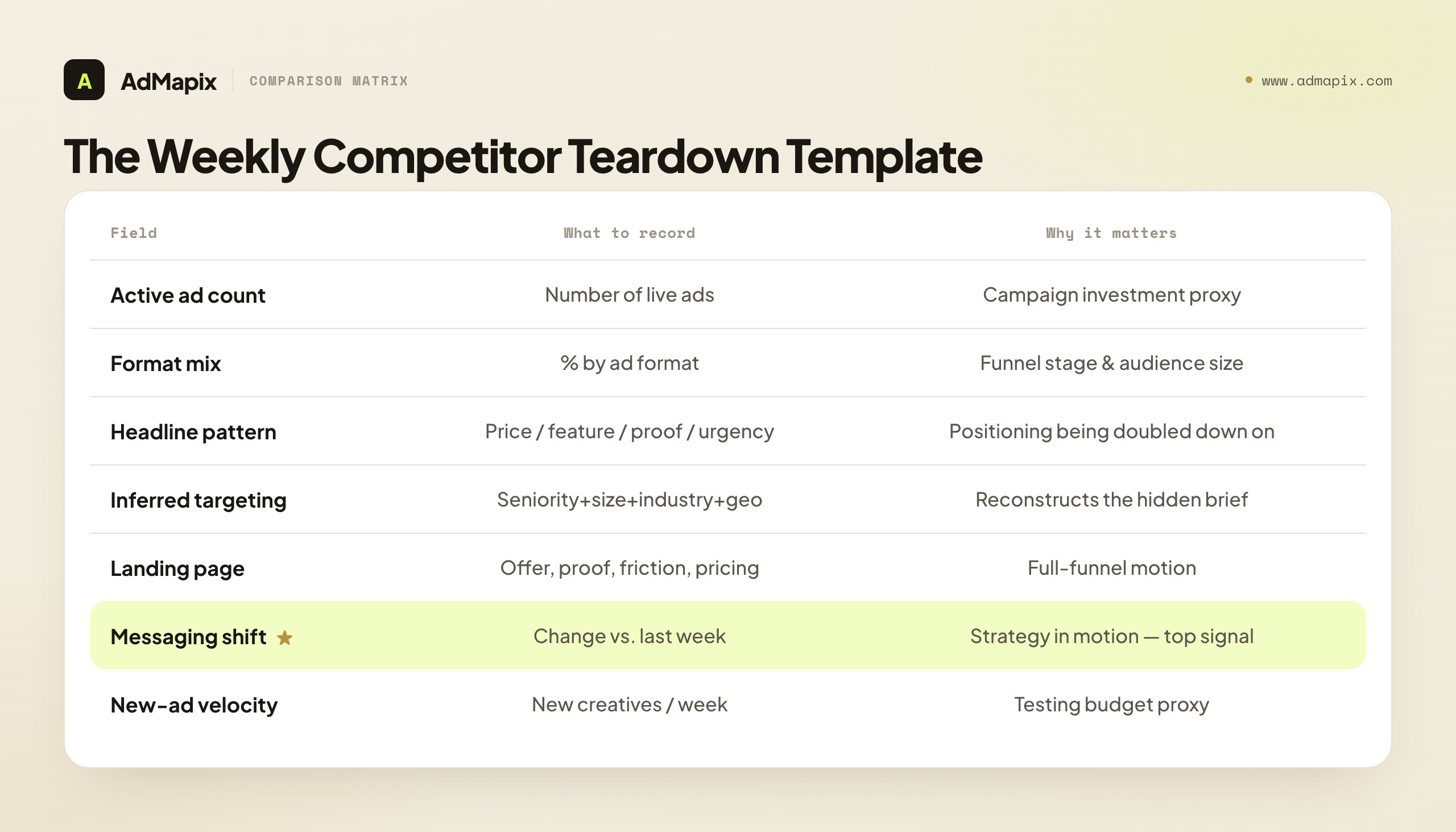
The two rows that earn their keep are messaging shift and new-ad velocity. A competitor who suddenly pivots from feature-led to outcome-led copy across multiple new creatives in one week is telling you about a repositioning before it hits their website banner or their sales deck. A competitor whose ad count triples in a fortnight is telling you a budget moment — a raise, a launch, a quarterly push — is underway. Those are the moments competitive intelligence justifies its existence.
Decoding B2B Creative and Messaging Archetypes
LinkedIn creative clusters into a small set of repeatable archetypes. Learning to name them lets you classify any competitor ad in seconds and, more importantly, see which archetype a rival is betting on this quarter.
The thought-leadership Document ad. A PDF carousel teaching something genuinely useful — a benchmark, a framework, a teardown. The CTA is soft ("Download the report"). This is a top-of-funnel authority play aimed at senior buyers; when a competitor leans into it, they are building category credibility and a remarketing pool, not chasing this-week demos.
The problem-callout Single Image. Opens with the buyer's pain in their own words ("Still reconciling trades in spreadsheets?"). Direct, conversion-oriented, usually paired with a demo or trial CTA. Heavy use signals a competitor in efficiency-harvest mode, milking a known-converting pain.
The social-proof creative. Customer logos, a hard metric ("cut onboarding time 60%"), or a named-customer testimonial. The proof format reveals ICP: enterprise logos signal up-market targeting; a "join 4,000+ teams" counter signals SMB volume.
The founder / origin video. A talking-head founder explaining why the product exists. Hard to fatigue, builds challenger trust, and signals a competitor leaning on narrative because they cannot yet out-feature the incumbent.
The demo-first creative. Product UI in the first two seconds. Feature-led, aimed at problem-aware, solution-shopping buyers. Long run times with low refresh suggest it is quietly converting.
The offer / urgency creative. "Limited spots," "ends this quarter," webinar registration. Spikes around launches and end-of-quarter pushes; a reliable budget-rhythm tell.
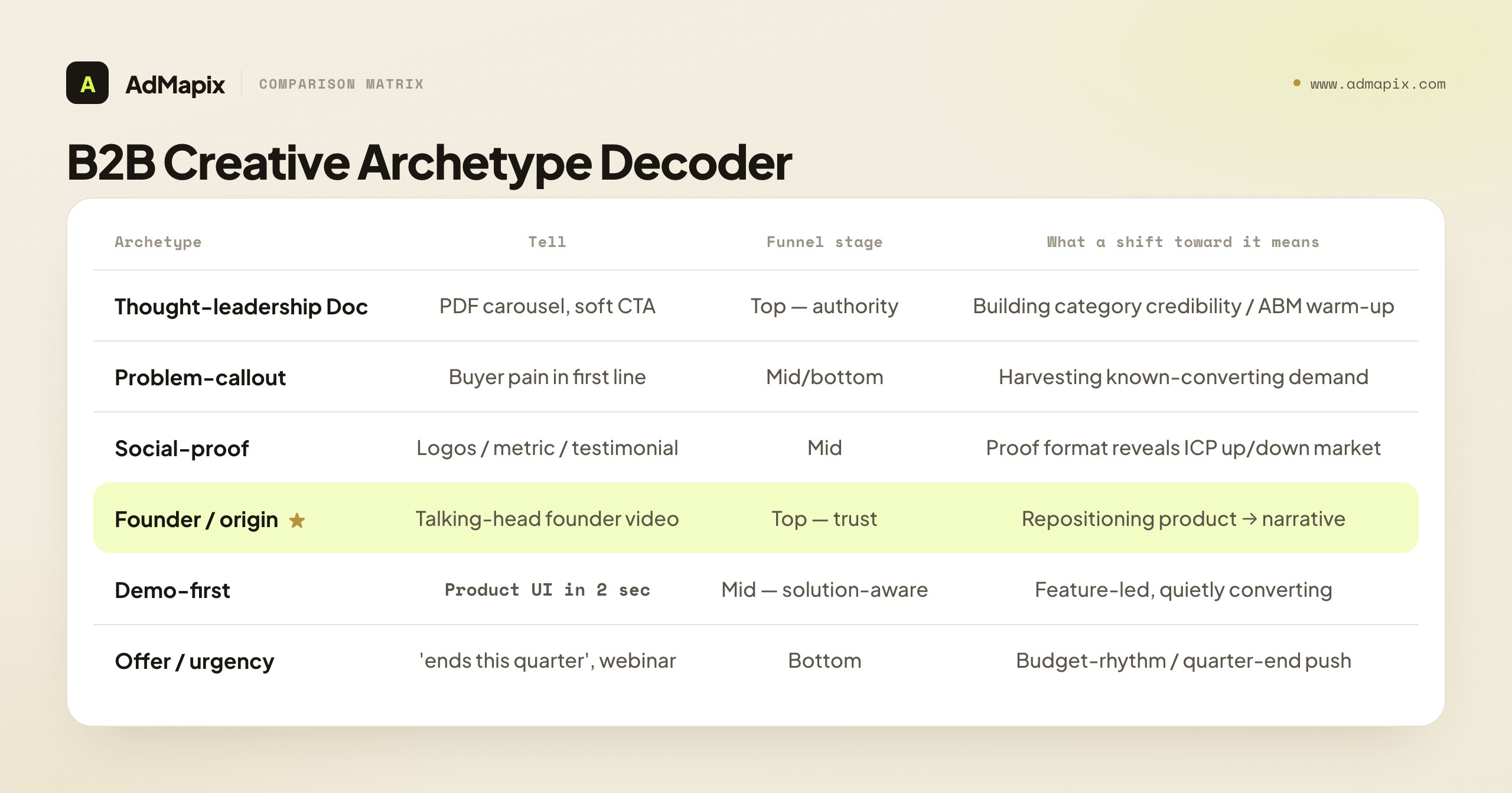
Once you can classify archetypes, watch the mix shift. A competitor moving from thought-leadership Documents toward problem-callout Single Images is moving down-funnel — harvesting demand they spent the previous quarter creating. A competitor adding founder videos to a feature-heavy library is repositioning from product to narrative, usually because a better-funded rival is out-featuring them. The archetype mix is a strategy readout, updated weekly, for free.
Pair Every LinkedIn Ad With Its Landing Page
As on every platform, the ad is the hook and the landing page is the strategy — but on LinkedIn this pairing is unusually revealing, because B2B landing pages carry far more strategic information than consumer pages. For each competitor ad you track, document the destination:
- Headline alignment — does the landing-page headline deliver on the ad's promise, or is there a message-match gap you can exploit?
- Offer type — demo request, content download, webinar registration, "contact sales," free trial, or self-serve signup (each implies a different funnel and ACV)
- Social-proof format — customer logos, case studies, named testimonials, G2/Capterra badges, or a raw customer count (the format encodes the ICP)
- Pricing visibility — public pricing page, "contact sales," or fully hidden (a tell about deal size and sales-led vs. product-led motion)
- Form friction — number of fields, single- vs. multi-step, phone required, work-email gate, or progressive profiling
- Content depth — how much information precedes the CTA (long pages signal considered, high-ACV purchases)
- Tech and retargeting setup — open dev tools and check for the LinkedIn Insight Tag, Meta Pixel, Google tags, and a CRM/marketing-automation script; this reveals their retargeting and attribution stack
A consistent finding across hundreds of teardowns: the most aggressive LinkedIn advertisers often have the weakest landing pages. They invest in reach and creative but neglect conversion — message-match gaps, bloated forms, hidden pricing where transparency would convert. When you find a competitor with high ad volume pointing at a leaky page, you have found a gap you can out-execute without outspending them. That is the most actionable output of the entire exercise: not "copy their ad," but "they are buying expensive clicks and wasting them at the door — beat them on the door."
Pay particular attention to the choice between native Lead Gen Forms and off-platform landing pages, because that single decision encodes a competitor's entire attribution and follow-up philosophy. A Lead Gen Form keeps the user on LinkedIn and pre-fills their profile data, which lifts conversion rate but hands you a lead with thin context and no website-behavior signal. An off-platform landing page costs conversion rate but captures richer intent and lets the advertiser run their own retargeting and progressive profiling. When a competitor moves from off-platform pages to Lead Gen Forms, they are usually optimizing for raw lead volume and cost-per-lead — often under pressure to show pipeline quickly. When they move the other way, they are prioritizing lead quality and full-funnel control, which signals a more mature, sales-led motion willing to trade volume for fit. Neither is right or wrong; the direction of the change tells you which way their internal metrics are pushing them, and therefore where they are vulnerable. A competitor chasing lead volume can be beaten on lead quality; a competitor chasing quality can be out-paced on speed and coverage.
The ABM Lens: Reading Account-Based Competitor Plays
LinkedIn is the home of account-based marketing, so a complete competitor-research practice reads ABM signals, not just broad-reach creative. ABM plays show up in public in identifiable ways.
Named-segment messaging. Copy that addresses a specific role at a specific kind of company ("For RevOps leaders at Series B SaaS companies") is the public footprint of a tightly targeted, account-based campaign. The more specific the addressee, the smaller and more expensive the audience.
Conversation and Message ad presence. These formats are inherently ABM-leaning — small, high-intent, expensive audiences. A competitor running them is spending up to reach a defined list, often a matched or uploaded account list you cannot see but can infer from the message persona.
Thought-leadership cadence aimed at a single persona. A steady drip of Document ads all speaking to the same role signals an account-based nurture motion: warm the target accounts with value before the sales team reaches out.
Adjacent-competitor attention. Here is the ABM-era insight most teams miss: on LinkedIn, your most instructive competitor is frequently adjacent, not direct. A company with a different product but the same buyer persona is competing for the exact same scarce professional attention and budget line. They may be running the sharpest plays against your buyer while you watch only your feature-for-feature rivals. Always include two or three adjacent competitors — same buyer, different product — in your tracking set.
The practical move: maintain a short list of the named accounts and personas your competitors appear to be courting, inferred from their most specific creative. When a competitor's Conversation ads and Document drip all converge on, say, "Heads of Platform Engineering at fintechs," you have reconstructed their ABM target list closely enough to decide whether to defend those accounts or pick a different beachhead.
A Worked Example: Reading One Competitor End to End
Abstract principles only stick when you watch them applied, so here is a composite teardown of how a single competitor reads when you run the full method over four weeks. The competitor is a mid-market workflow-automation SaaS — call it "Rival Co" — and you are tracking them because they share your buyer (operations and RevOps leaders) even though their product overlaps yours only partially. This is exactly the adjacent-competitor case the ABM lens tells you to prioritize.
Week one, the scan. Rival Co has eleven active ads: four Document carousels, three Single Image, two Video, and two Conversation ads. The Document ads all teach variations of "how to cut manual ops work," the Single Image ads open with a pain callout ("Still stitching tools together by hand?"), and the Conversation ads address "RevOps leaders at Series B–C companies" by name. Already the inference writes itself: the Documents are a top-of-funnel authority play, the Single Images are harvesting demand mid-funnel, and the Conversation ads are an account-based push at a specific, fundable company stage. The presence of all three layers at once tells you Rival Co is running a coordinated funnel on LinkedIn, not a one-off blast — a sign of a real budget and a marketing team that knows the channel.
Week one, the landing pages. You click through in a clean browser. The Document CTA leads to an ungated benchmark report (smart — it builds a retargeting pool). The Single Image CTA leads to a demo page with a nine-field form, no pricing anywhere, and a single G2 badge. The Conversation ad leads to a "talk to our team" calendar. The read: strong top-of-funnel, but the demo page is leaking — nine fields and hidden pricing on a mid-funnel page aimed at busy ops leaders is friction you could out-execute with a tighter form and transparent pricing.
Week two and three, the deltas. Ad count holds at eleven, but the mix shifts: two of the Single Image pain-callout ads disappear and are replaced by two founder-voice Videos. Nothing else changes. This is the single most valuable observation of the month. A shift from pain-callout toward founder narrative, with no change in volume, signals a deliberate repositioning from "we solve a problem" to "trust us, we get you" — usually a defensive move against a better-funded rival who is out-feature-listing them. The 30-day first-mover window is open.
Week four, the synthesis. You now have a complete read: Rival Co runs a coordinated three-layer LinkedIn funnel at RevOps leaders in Series B–C companies, their conversion page leaks at the form, and they are mid-pivot from problem-led to trust-led messaging. Three hypotheses fall out immediately — (1) a tighter, transparent-pricing demo page beats their leaky one for the same buyer, (2) a founder-trust angle is winning in this category right now and you should test your own before it saturates, and (3) their ABM list skews Series B–C, so earlier-stage or enterprise accounts may be comparatively undefended. Each is a one-page brief, each has a metric, and none of them required a single piece of data the platform handed you. That is the method working: zero access, a reconstructed strategy, and three testable bets.
Turning Competitor LinkedIn Ads Into Your Own Tests
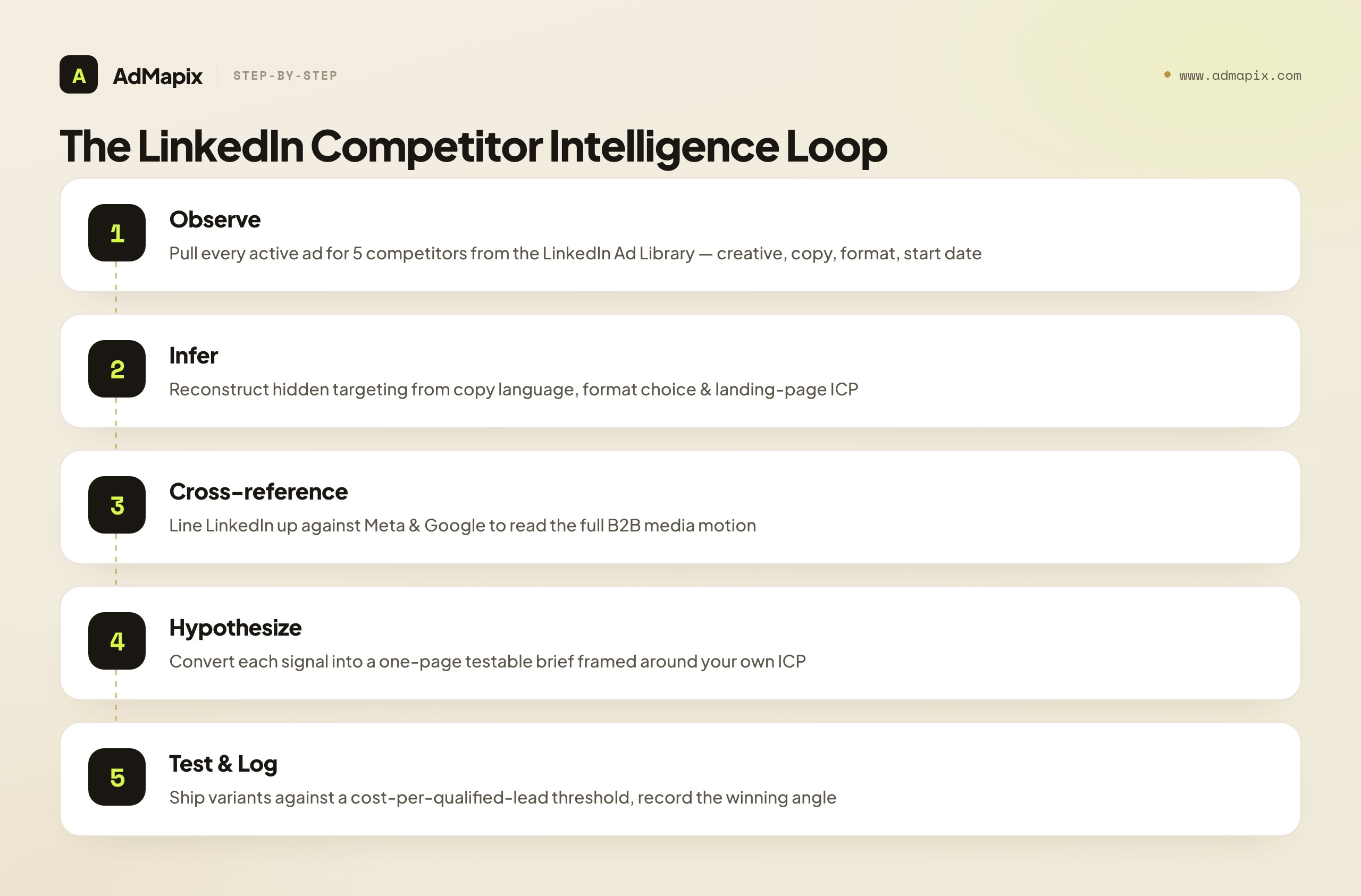
Research that does not ship is cosplay. Every signal you extract must become a one-page testable brief that fits your product, not a screenshot you admire. The translation pattern is always the same: observation → inference → hypothesis → test → logged learning.
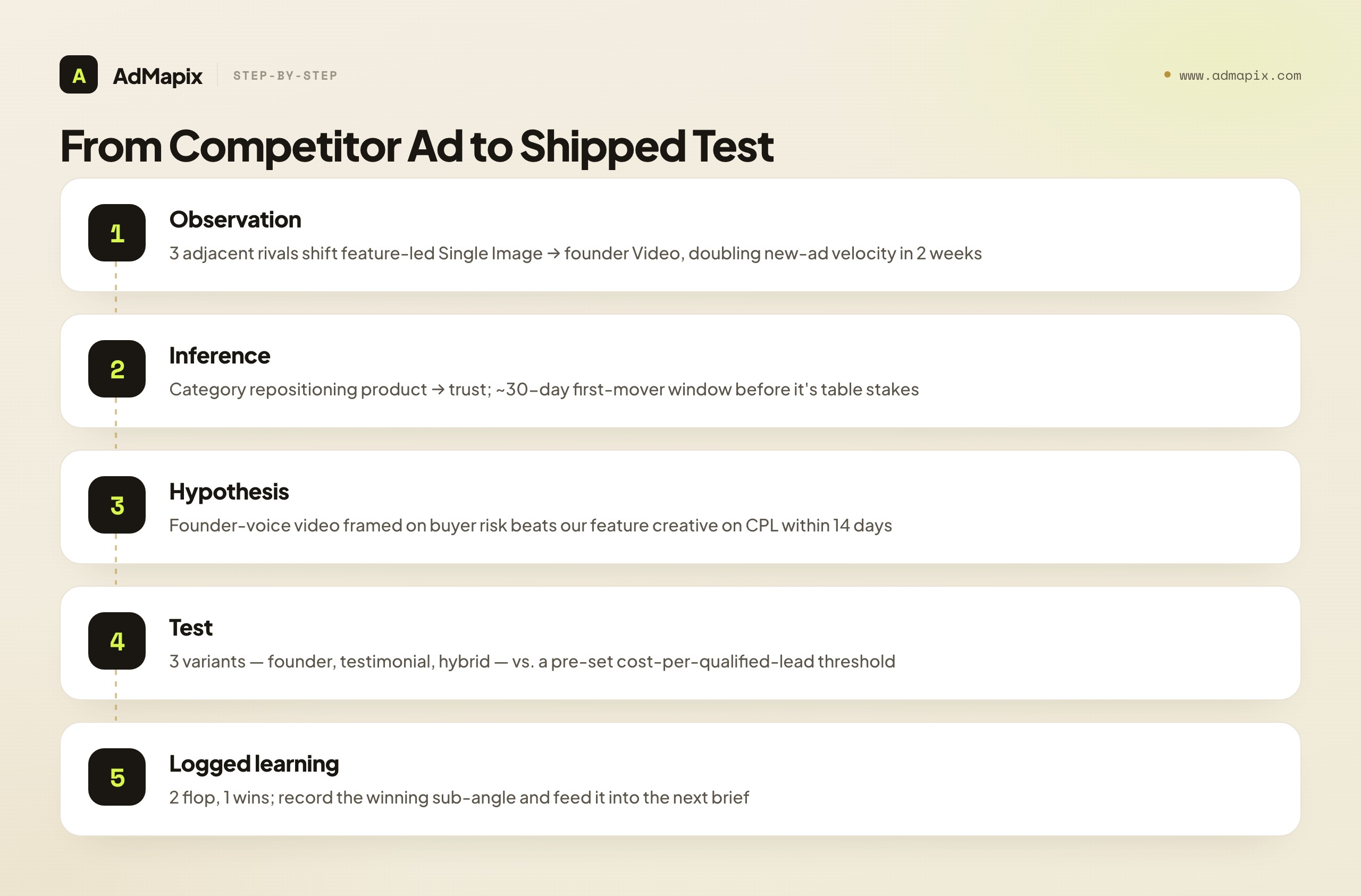
Observation: "Three adjacent competitors shifted from feature-led Single Image ads to founder-narrative Video in the last two weeks, doubling new-ad velocity."
Inference: "The category is repositioning from product to trust/narrative; there is a roughly 30-day first-mover window before this becomes table stakes, and our feature-led ads are about to look dated."
Hypothesis: "A founder-voice video that frames our product around the buyer's risk, not our features, will beat our current feature creative on cost-per-lead within 14 days."
Test: Ship three variants — one direct founder video, one practitioner-testimonial, one hybrid — against a controlled audience, measured on cost-per-qualified-lead against a pre-set threshold.
Logged learning: Record what won, what the winning sub-angle was, and feed it back into the next brief. Two flops and one winner is a normal, healthy result.
The discipline that makes this work: never copy creative across platforms. LinkedIn's audience is defined by professional identity and is in a deliberate, work-mode mindset; an angle that crushes on Meta's interest-and-behavior audience frequently flops here, and vice versa. A competitor's LinkedIn ad is evidence about what works on LinkedIn for that buyer — treat it as a hypothesis input, run it through your own ICP, and let your own test data decide. Copy-paste creative is the fastest way to burn $12 clicks.
A Weekly LinkedIn Competitor Monitoring Workflow
The whole system runs in 30 minutes a week. Adapt the general competitive-monitoring cadence specifically for LinkedIn's slower-moving strategy clock.
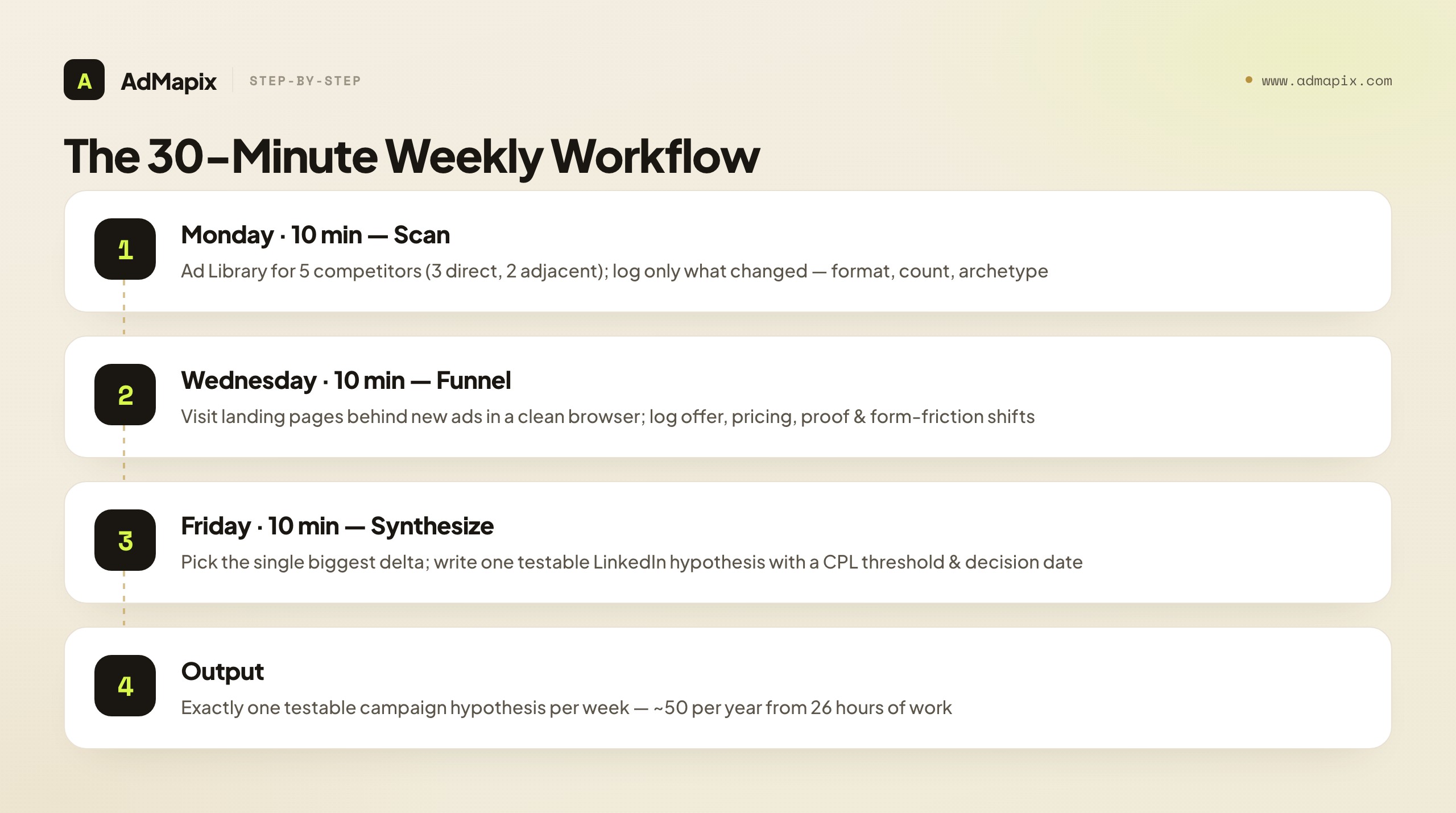
Monday — Scan (10 min). Open the LinkedIn Ad Library for your top five competitors (three direct, two adjacent). Note new creatives, format-mix changes, ad-count swings, and any messaging-archetype shift. Log only what changed — you are looking for deltas, not a fresh inventory.
Wednesday — Funnel (10 min). Visit the landing pages behind any new ads found Monday. Document offer changes, pricing-visibility shifts, social-proof updates, and form-friction changes. Use a clean browser/incognito so your own retargeting cookies do not distort what you see.
Friday — Synthesize (10 min). Review the week's deltas, pick the single most meaningful pattern change, and convert it into one testable LinkedIn campaign hypothesis for next week. Add it to your test backlog with a CPL/CPQL threshold and a decision date.
If you are doing it right, the output is exactly one testable LinkedIn campaign hypothesis every Friday — fifty hypotheses a year, from 26 hours of work. LinkedIn ad strategies change more slowly than Meta or TikTok, so weekly is plenty for pattern detection; you are not racing a daily creative clock, you are reading a quarterly strategy clock at weekly resolution.
Estimating a Competitor's LinkedIn Investment Without Spend Data
LinkedIn hands you no impressions, no budget, no reach — the bluntest blackout of any major transparency surface. That sounds like it makes spend estimation impossible. It does not. It makes it inferential, which, on a channel this expensive, is a skill worth building because the cost of misreading a rival's commitment is measured in five-figure quarterly budgets. You will never produce an exact dollar figure, but you can reliably rank competitors by investment intensity and catch the moment one of them steps on the gas — and ranking plus inflection is usually all a planning decision actually needs.
Three observable proxies, triangulated, carry most of the signal. The first is active ad count over time. A competitor sitting at three live creatives for months is dabbling; one running twenty-plus and refreshing them weekly is funding a real program. Absolute counts mean little across companies — some run many near-identical variants, others run a few they rarely touch — but the trajectory of a single competitor's count is a clean investment proxy. A count that doubles in a fortnight is a budget event: a raise, a launch, a new quarter, or a new marketing leader who believes in the channel.
The second proxy is format mix weighted by cost. Not all LinkedIn formats cost the same to run, and a competitor's format choices betray how much they are willing to spend per touch. Conversation and Message ads are expensive, small-audience, high-intent formats — a competitor running several of them is spending up to reach a defined list, which signals both budget and a sales-led, account-based posture. A library that is heavy on Document and Video ads signals sustained top-of-funnel investment, because those formats earn their keep over a long nurture, not a quick conversion. A library that is all cheap Single Image and Text Ads, by contrast, often signals a thinner budget or a purely efficiency-harvest motion. Weight the format mix by its typical cost-to-run and you get a coarse but useful read on how aggressively a rival is funding the channel.
The third proxy is creative production velocity. Net-new creatives per week is a direct readout of creative-team capacity, and creative capacity tracks budget closely — you do not staff a high-velocity LinkedIn testing program without the spend to feed it. A competitor shipping six fresh creatives a week is operating a funded, resourced testing machine; one shipping one stale creative a month is coasting. Velocity is also the proxy least likely to be gamed, because sustaining it genuinely costs money and people.
Layer a fourth, softer signal on top: the category-CPM floor. You can reason from public LinkedIn benchmarks that reaching senior, narrowly defined B2B audiences in competitive software categories rarely clears under a $50–$80 CPM, with CPCs commonly in the $8–$15 band and frequently higher for tight ABM segments. So when a competitor is visibly running a sustained, multi-format, high-velocity program against an obviously senior, narrow audience — readable straight from the copy and format inference earlier in this guide — you can bound their spend from below: this is not a few hundred dollars a month, it is a serious line item. You are not pricing their campaign to the dollar; you are establishing an order of magnitude and a direction, which is exactly the input a budget-allocation or competitive-response decision needs. Record these proxies in the same weekly teardown sheet, watch the trajectory rather than the snapshot, and you will know which rivals are escalating on LinkedIn long before it shows up anywhere they intended you to see it.
Cross-Network B2B Competitor Research: LinkedIn + Meta + Google
The most important upgrade to LinkedIn competitor research is to stop doing it in isolation. A B2B buyer's journey is never single-channel, so a single-channel teardown is structurally incomplete. The same competitor is usually running a coordinated motion: demand creation and ABM on LinkedIn, retargeting and lower-cost reach on Meta, and brand defense plus high-intent capture on Google.
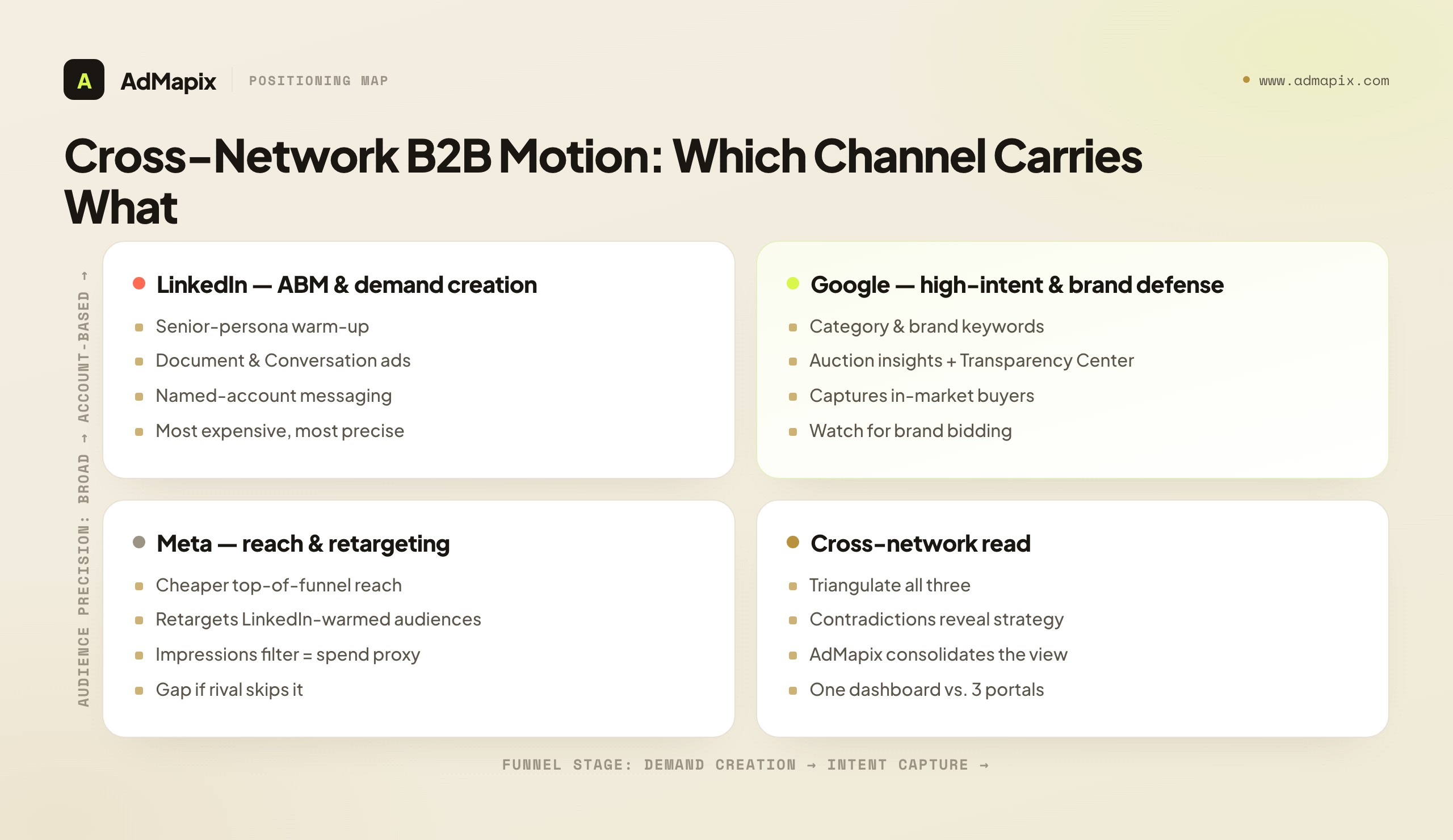
Triangulating the three transparency surfaces gives you the full motion:
- LinkedIn Ad Library → the demand-creation and ABM layer: who they are courting, what positioning they are building, which senior personas they are warming
- Meta Ad Library → the retargeting and broader-reach layer, with the impressions filter and EU reach/spend ranges acting as a spend proxy LinkedIn never gives you; B2B brands frequently run cheaper Meta retargeting against the audiences they built expensively on LinkedIn
- Google Ads Transparency Center + auction insights → the high-intent capture and brand-defense layer: are they bidding on your brand, on category keywords, running PMax, defending their own terms
When you line these up for one competitor, contradictions and confirmations jump out. A competitor pushing a new positioning on LinkedIn whose Google brand-defense suddenly intensifies is anticipating a competitive attack. A competitor with heavy LinkedIn demand creation but zero Meta retargeting is leaving warmed audiences on the table — a gap you can take. The cross-network view turns five disconnected screenshots into a single readable strategy.
This is also where dedicated tooling earns its place. Manual tracking across three transparency portals works for five competitors, but it does not scale to fifteen, it has no history once an ad goes dark, and it cannot alert you the moment a rival launches. This is the seam AdMapix is built for: cross-network B2B competitor ad-creative intelligence in one view — LinkedIn alongside Meta, Google, TikTok, and more — with saved reports, searchable creative history, and competitive alerts, so the weekly scan becomes a glance at a dashboard instead of a tour of five portals. AdMapix sits in the "cross-network creative intelligence" slot of the stack: it does not replace your judgment or the inference work, it removes the manual collection so your 30 weekly minutes go entirely to analysis and hypothesis-writing. See reports or review pricing to see where it fits your team.
A Realistic Tooling Stack for LinkedIn Competitor Research
You do not need to buy anything to start, and you should not over-buy. Match the stack to how many competitors you track and whether you need history and alerts.
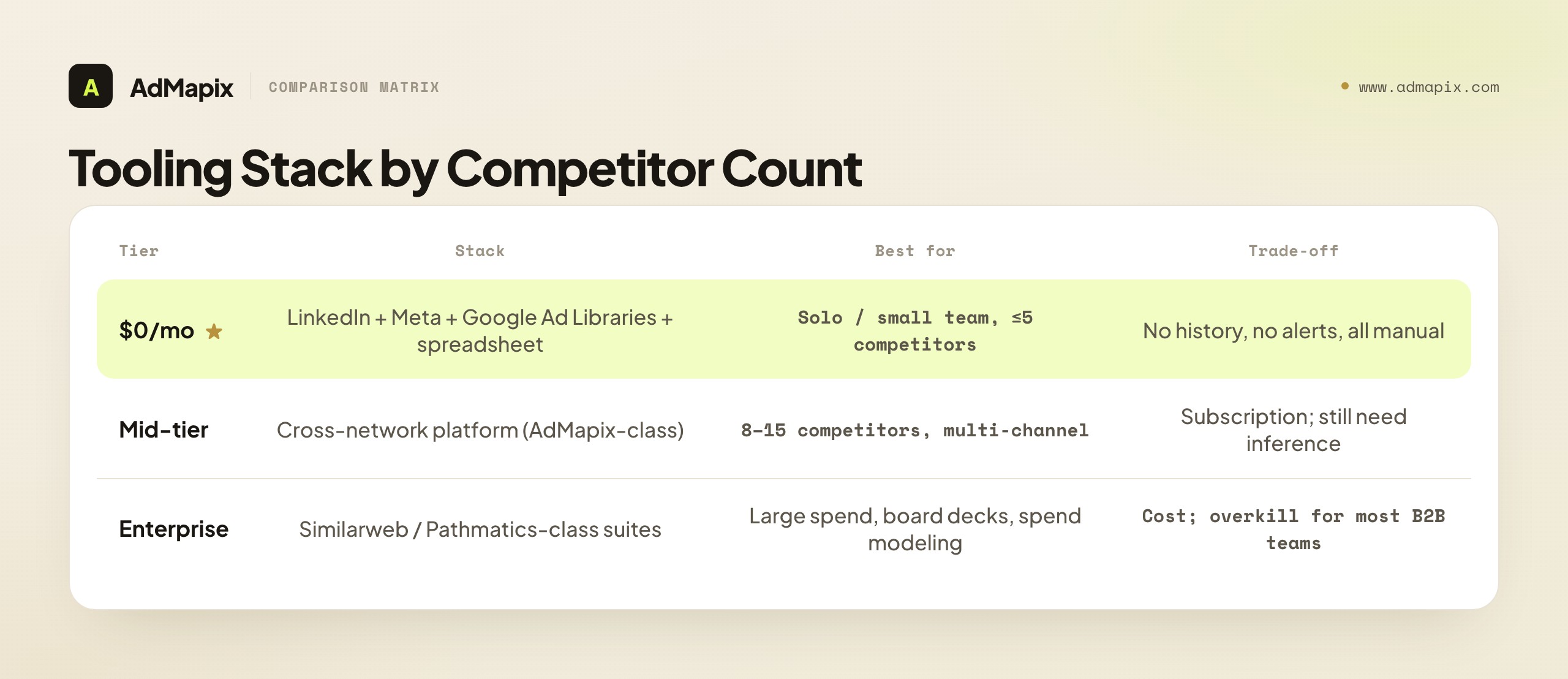
- $0/mo (start here): LinkedIn Ad Library + Meta Ad Library + Google Ads Transparency Center + a spreadsheet. Covers roughly 80% of the value for a team monitoring five competitors. The hard ceiling: no history once ads go dark, no alerts, and you reconstruct everything by hand each week.
- Mid-tier (cross-network + history): A cross-network ad-intelligence platform such as AdMapix that consolidates LinkedIn with Meta/Google/TikTok, keeps searchable creative history, and pushes alerts on new launches. The right move once you cross ~8–10 competitors or need to brief stakeholders without re-doing the research each time.
- Enterprise (spend modeling + decks): Broad market-intelligence suites (Similarweb, Pathmatics-class tools) for spend estimation and board-level reporting. Justified at large spend with a dedicated competitive-intelligence function; overkill for most B2B teams and no substitute for the inference discipline above.
The trap to avoid is buying an expensive enterprise suite to skip the methodology. Tools accelerate collection; they do not do the inference. A disciplined analyst with the free stack and this playbook out-performs an undisciplined team with a five-figure subscription, every time.
A reasonable upgrade path looks like this. Start free, run the 30-minute weekly workflow against five competitors for a full quarter, and prove to yourself that the practice produces shipped tests with measurable results. Once you have that proof and the competitor set grows past what a spreadsheet can hold in your head — typically around eight to ten tracked accounts, or the moment you start re-doing the same research to brief different stakeholders — move to a cross-network platform that gives you history and alerts. Only reach for enterprise spend-modeling suites if you have a dedicated competitive-intelligence headcount and a budget large enough that a few points of share movement justify the cost. Buying ahead of that curve wastes money; buying behind it wastes your analysts' time on manual collection that a tool would erase. The right tool is always the cheapest one that removes your current bottleneck, and for most B2B teams the bottleneck is consolidation and memory, not raw access.
Common LinkedIn Competitor Research Mistakes
- Ignoring LinkedIn entirely. Most B2B teams run Google and Meta competitor research and skip LinkedIn — while their most important rivals quietly build senior-buyer audiences on the channel with no opposition. The empty channel is the opportunity.
- Only watching direct competitors. On LinkedIn, adjacent competitors fighting for the same buyer persona are frequently more instructive than feature-for-feature rivals. They are competing for the same scarce professional attention even with a different product.
- Taking a single snapshot. One screenshot of a competitor's LinkedIn ads is nearly worthless. The value is in the time series — watching format mix, messaging archetypes, and landing pages shift over four to eight weeks.
- Equating ad count with success. Some of the most active LinkedIn advertisers are burning venture money on untargeted reach. Volume proves spend, not effectiveness. Read the landing page and the targeting inference before you conclude anything.
- Copying creative across platforms. An angle that wins on Meta or TikTok often dies on LinkedIn's work-mode, identity-defined audience. Every finding is a hypothesis to test on LinkedIn, never a creative to paste.
- Collecting without inferring. The folder of screenshots is the death of competitive intelligence. If a tracked competitor row has no "our read" — no inferred targeting, no hypothesis — it is collection, not analysis.
- Skipping the cross-network view. LinkedIn is one slice of a coordinated B2B motion. Reading it without Meta and Google leaves you guessing at the retargeting and intent-capture layers that often carry the conversion.
FAQ
Can I see who my competitors are targeting on LinkedIn Ads?
Not directly. LinkedIn does not expose precise targeting — job titles, seniorities, company-size bands, skills, or matched audiences are all hidden. The one exception is the coarse "targeting category" disclosure on ads served to EU audiences, a DSA requirement that lists broad parameter types but not the actual setup. Everything finer than that you infer from copy language, format choice, and landing-page ICP, validated by tracking the same competitor across multiple weeks.
Is the LinkedIn Ad Library free, and do I need an account?
Yes, it is free, and no account is required. It is reachable at linkedin.com/ad-library. You search any company by name and see every ad that Page is currently running, along with the creative, copy, format, and start date.
How is LinkedIn competitor research different from Google Ads or Meta?
Three structural differences. First, LinkedIn's audience is defined by professional identity rather than behavior or interest, so ad copy patterns signal targeting far more clearly — the creative is the strategy. Second, LinkedIn CPCs run roughly 5–10x higher, so the cost of getting it wrong is proportionally larger and good intelligence pays off faster. Third, LinkedIn's Ad Library is the most opaque of the three: you get the least structured data from the platform, which means inference skill, not data access, is the differentiator.
How often should I check competitor LinkedIn ads?
Weekly for your top five — three direct and two adjacent — B2B competitors, and monthly for broader category monitoring. LinkedIn ad strategies shift more slowly than Meta or TikTok, so a weekly scan is sufficient to catch every meaningful pattern change. The 30-minute Monday/Wednesday/Friday cadence in this guide is built for exactly that rhythm.
What can I learn from a competitor's ad format choice on LinkedIn?
A lot, because format maps to funnel stage and audience size. Document (PDF) ads signal senior, considered buyers and often a thought-leadership ABM play. Video signals brand-awareness prospecting. Conversation/Message ads signal small, high-intent, expensive ABM audiences. Lead Gen Form ads signal a measured mid-funnel conversion motion. A shift in a competitor's format mix is one of the clearest readouts of a change in their funnel strategy.
How do I research a competitor's account-based marketing on LinkedIn?
Read the public footprint of ABM: named-segment copy that addresses a specific role at a specific company type, the presence of Conversation/Message ads (inherently account-based), and a steady Document-ad drip aimed at a single persona. Together these reconstruct the personas and account types a competitor is courting, even though the actual matched-audience list stays hidden. Track the most specific creative to infer their target list.
Should I research only my direct competitors?
No. On LinkedIn, adjacent competitors — different product, same buyer persona — are often more instructive than direct ones, because they are competing for the identical scarce professional attention and budget line. Always include two or three adjacents in your tracking set alongside your direct rivals; they frequently surface the sharpest plays against your buyer.
What tools help with LinkedIn Ads competitor research?
The free foundation is the LinkedIn Ad Library, paired with the Meta Ad Library and Google Ads Transparency Center for the cross-network view. Manual spreadsheet tracking covers teams watching fewer than five competitors. For cross-network competitive intelligence that puts LinkedIn alongside Meta, Google, and TikTok with saved reports, searchable creative history, and alerts, AdMapix is purpose-built for the consolidation and monitoring layer.
How does AdMapix support LinkedIn competitive intelligence?
AdMapix tracks competitor ad creative across LinkedIn alongside the other major ad networks, with saved reports, searchable history, and competitive alerts. For B2B teams that need cross-channel visibility — not just LinkedIn — it provides one unified view, so the manual collection across multiple transparency portals collapses into a single dashboard and your time goes to analysis and testing. See reports or review pricing.
How do I turn a competitor's LinkedIn ad into something I can actually test?
Run the observation through the chain: observation → inference → hypothesis → test → logged learning. Name what changed, infer what it implies about the market, write a one-page hypothesis framed around your ICP, ship two to three controlled variants against a pre-set cost-per-qualified-lead threshold, and log the winning sub-angle. Never copy the creative directly — LinkedIn's audience punishes cross-platform copy-paste; treat every finding as a hypothesis your own test data confirms or kills.
Can I estimate how much a competitor spends on LinkedIn Ads?
Not to the dollar — LinkedIn discloses no budget, impressions, or reach. But you can reliably rank competitors by investment intensity and detect when one escalates, using three triangulated proxies tracked over time: active ad count trajectory, format mix weighted by cost (Conversation and Message ads are expensive, account-based plays; cheap Single Image at high volume suggests a thinner or efficiency-only motion), and net-new creative velocity per week. Combine those with LinkedIn's known category-CPM floor — senior, narrow B2B audiences rarely clear under a $50–$80 CPM — and you can bound a serious program's spend from below and read its direction, which is what budget-response decisions actually need.
What's the fastest way to start LinkedIn competitor research from zero?
Pick five companies — three direct rivals and two adjacent ones that share your buyer but sell a different product — and open each in the LinkedIn Ad Library. Spend twenty minutes logging, for each, their active ad count, format mix, dominant messaging archetype, and the landing page behind one representative ad. That single pass is your week-one baseline. Everything after is delta detection: each following week you only record what changed against that baseline, and convert the most meaningful change into one testable hypothesis. You do not need a tool, a budget, or a team to begin — a spreadsheet and the free Ad Library produce a usable competitive read inside the first hour.
Related Reading
- Competitor Ad Analysis in 2026: The 5-Dimension Framework, Templates & SOP — the scoring model and SOP this LinkedIn playbook plugs into
- How to Spy on Competitors' Ads in 2026 (30-Min/Week Workflow) — the cross-channel weekly workflow, of which LinkedIn is one lane
- Paid Ads Competitor Research in 2026: The Complete Competitive Analysis Playbook — the broader competitive-research system
- Google Ads Competitor Analysis: 6 Ways to Find What Rivals Run — the intent-capture and brand-defense lane of the cross-network view
- Ad Spy Tools by Channel: Meta, TikTok, Google, YouTube, Native — how the transparency surfaces compare across platforms
- Competitor Ad Spend in 2026: How to Track and Estimate a Rival's Ad Budget — estimating budget when, as on LinkedIn, spend is hidden
Authoritative Sources
- LinkedIn Ad Library — the official LinkedIn ad transparency surface
- LinkedIn Ad Library help documentation — official docs on what the Ad Library shows and how to use it
- LinkedIn Marketing Solutions: ad formats — the official reference for every LinkedIn ad format referenced above
- Meta Ad Library — the cross-network retargeting and reach layer
- Google Ads Transparency Center — the cross-network intent-capture and brand-defense layer
- EU Digital Services Act — ad transparency overview — the regulation behind every major platform's ad library
- WordStream: how to see competitors' ads — a solid primer on the competitive-research mindset
Turn these observations into your next creative study
Open the creative library and select samples for your market, network and research question.
Related Articles
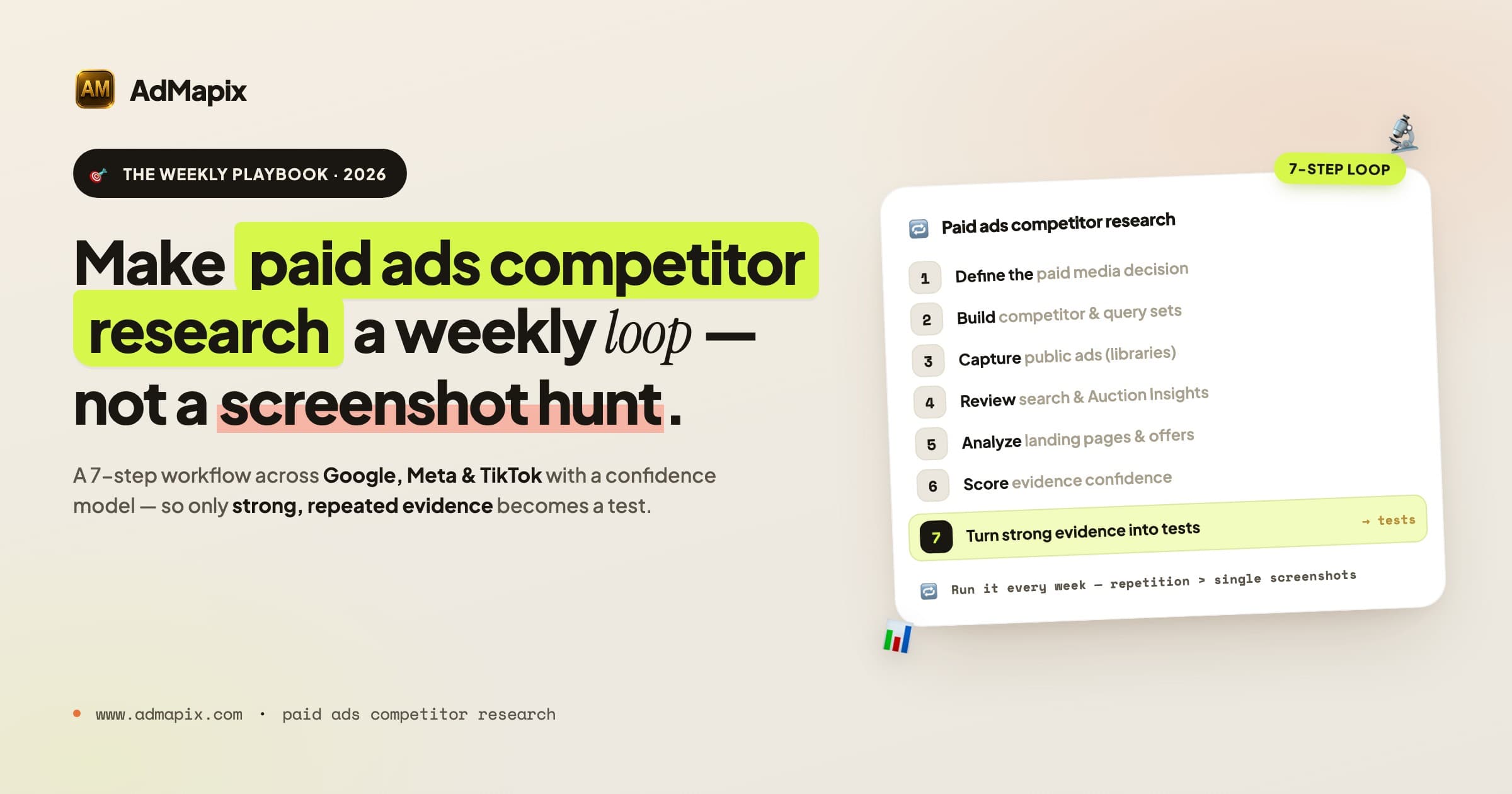
Paid Ads Competitor Research in 2026: The Complete Competitive Analysis Playbook
A 7,000-word 2026 playbook for paid ads competitor research and competitive analysis: ad libraries, SERP and Auction Insights, landing pages, confidence scoring, channel-by-channel SOPs, metrics, and a weekly operating system.
AdWords Intelligence in 2026: A Google Ads Competitive Intelligence Playbook
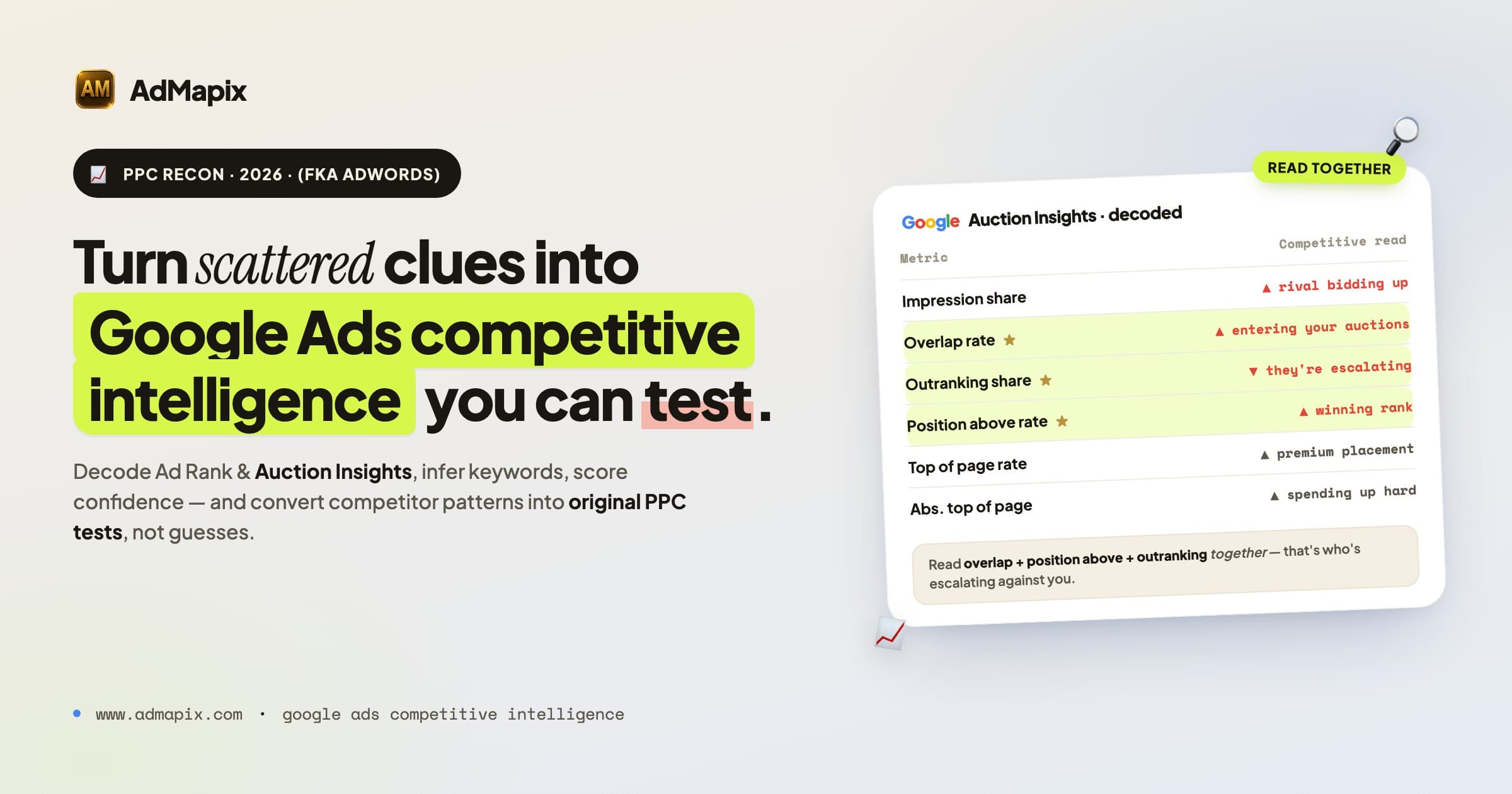
A complete 2026 Google Ads competitive intelligence workflow: research competitors with public ads, decode Ad Rank and Auction Insights, infer keywords, dissect landing pages, score confidence, and turn findings into original PPC tests.
Google Ads Auction Insights vs Transparency Center: When to Use Each
A practical comparison of Google Ads Auction Insights and Google Ads Transparency Center for PPC competitor research in 2026.