
Google Ads Competitor Analysis: 6 Ways to Find What Rivals Run
Google Ads competitor analysis guide: use Transparency Center, SERP checks, PPC data, and ad intelligence workflows to understand rival campaigns.
Google Ads competitor analysis works best when public visibility, keyword context, landing pages, and repeated tracking are combined.
By the AdMapix Research Team
Google Ads competitor analysis is difficult because Google does not give you a complete competitor dashboard. You can see some public ad examples, inspect live SERPs, estimate keyword and spend signals with PPC tools, and analyze landing pages. You usually cannot see exact competitor budgets, conversion rates, quality scores, or account structure.
That means the job is not to “spy perfectly.” The job is to combine evidence, estimates, and repeated observations into useful decisions: which keywords to defend, which offer angles to test, which landing pages to improve, and which competitor moves deserve weekly monitoring.
This guide explains six practical ways to do google ads competitor analysis without pretending that public data is more precise than it is.
What You Can and Cannot See
Start with realistic expectations.
| You can often see | You usually cannot see |
|---|---|
| Some visible advertiser examples | Exact daily spend |
| Search ad copy in live SERPs | Conversion rate |
| Landing page promises | Quality Score |
| Public display and video examples | Full account structure |
| Keyword estimates from third-party tools | True profitability |
| Auction overlap inside your own account | Competitors' internal bidding rules |
This is why competitor analysis google ads work should separate evidence from interpretation.
Evidence:
| Evidence type | Example |
|---|---|
| Public ad example | Ad found in Google Ads Transparency Center. |
| SERP capture | Screenshot of a competitor ad on a high-intent query. |
| Landing page capture | Competitor changed pricing page or lead form. |
| Auction Insights | Overlap rate or impression-share movement in your account. |
| Tool estimate | PPC tool shows likely paid keyword or copy history. |
Interpretation:
| Interpretation | Risk |
|---|---|
| “They are spending more.” | Could be true, but visible volume is not exact budget. |
| “This ad is winning.” | Activity is not proof of profit. |
| “We should copy this copy.” | Copying removes differentiation and can create policy or legal risk. |
| “They own this keyword.” | SERP visibility changes by time, location, device, and auction. |
Good google ads competitor research keeps these two layers separate.
Method 1: Google Ads Transparency Center
Google Ads Transparency Center is the first place to check public advertiser examples.
Use it to answer:
| Question | What to inspect |
|---|---|
| What messages are visible? | Headlines, descriptions, product claims, offer language. |
| What formats are used? | Search-style ads, display creatives, video examples where visible. |
| Which regions matter? | Country or market-level visibility signals. |
| Are creatives repeated? | Repeated messages may indicate a campaign theme. |
| What landing page is used? | Click path, offer, proof, and conversion action. |
The Transparency Center is useful, but it is not a complete campaign archive. It does not replace keyword-level checks, PPC estimates, or landing-page monitoring.
If you need a step-by-step walkthrough, read our Google Ads Transparency Center guide.
Method 2: Manual SERP Checks
Manual SERP checks help you understand live search context.
Use this process:
- Choose a short list of high-intent keywords.
- Search in the target market and device context when possible.
- Record visible competitor ads.
- Save the query, location, date, time, device, and landing page.
- Compare whether the same competitors appear across repeated checks.
- Write the likely search intent and offer angle.
Manual checks are useful for queries where timing matters:
| Query type | Why it matters |
|---|---|
| Brand defense | Competitors may bid on your brand or adjacent brand terms. |
| Comparison | Searchers may be choosing between tools. |
| Pricing | Offer, trial, and discount language becomes more important. |
| Problem-aware | Competitors may frame the pain point differently. |
| Category | You can see who is trying to own broad commercial demand. |
If your user is asking “how to check competitors ads on google,” this is the most direct workflow. It is also the easiest method to overuse. Focus on keywords that can change budget or landing-page decisions.
Method 3: PPC Data Tools
PPC tools can estimate paid keywords, ad copy, search volume, CPC, and competitor movement. These estimates are useful, but they are still estimates.
Use PPC tools to collect:
| Data point | Use |
|---|---|
| Paid keyword estimates | Build a target query list for manual review. |
| Ad copy history | See repeated claims and positioning angles. |
| Competitor overlap | Identify brands competing for similar intent. |
| CPC and volume | Prioritize terms that may matter commercially. |
| Landing page URLs | Review funnel and message match. |
Tools like Semrush include Advertising Research workflows for paid search research. Use them to guide investigation, not to replace evidence. For example, a tool can suggest that a competitor appears on a keyword, but a live SERP check and landing-page review still tell you more about the current message.
The highest-value output is not a giant keyword export. It is a ranked list:
| Priority | Criteria |
|---|---|
| High | High intent, visible competitor activity, strong commercial value. |
| Medium | Relevant but not urgent, or estimate without repeated evidence. |
| Low | Low relevance, weak evidence, or no clear action. |
Method 4: Search Ads Intelligence
Search ads intelligence connects ad copy, landing pages, keyword intent, and repeated observations.
It helps you find search ads of competitors, but more importantly, it helps explain what those ads are trying to do.
Track:
| Layer | What to analyze |
|---|---|
| Keyword intent | Problem, comparison, pricing, brand, category, feature. |
| Headline angle | Speed, price, trust, automation, outcome, support, migration. |
| Description angle | Proof, risk reduction, feature depth, guarantee, urgency. |
| CTA | Trial, demo, quote, download, audit, contact sales. |
| Landing page match | Does the page continue the same promise? |
| Repetition | Does the same message appear over time or across terms? |
For a deeper workflow, use our search ads intelligence guide. That page focuses on search-specific signal extraction. This Day46 article shows how search ads intelligence fits into a broader Google Ads competitor analysis system.
Method 5: Landing Page Monitoring
Landing pages are where competitor strategy becomes clearer.
Track:
| Page element | What it can reveal |
|---|---|
| Hero headline | Main positioning and target pain point. |
| Offer | Free trial, demo, bundle, discount, consultation, audit. |
| Proof | Reviews, customer logos, metrics, case studies, guarantees. |
| Comparison content | Whether the competitor is entering direct comparison mode. |
| Form or checkout | Funnel friction and conversion intent. |
| Pricing changes | Packaging, discounting, or enterprise positioning. |
A competitor changing ad copy is interesting. A competitor changing ad copy and landing page at the same time is more important.
Record the landing-page state with a date. If the same offer persists for several weeks, it may be worth testing a response. If it disappears quickly, it may have been a short experiment.
Method 6: AdMapix Workflow
AdMapix fits the point where raw observations need to become report-ready insights.
Use a workflow like this:
| Step | Output |
|---|---|
| Define competitor set | Direct competitors, substitutes, category leaders. |
| Define keyword set | Brand, comparison, category, problem, pricing, feature terms. |
| Collect public evidence | Transparency Center, SERP checks, landing pages, saved examples. |
| Add estimates | PPC tool data, spend direction clues, Auction Insights context. |
| Score signals | High, medium, low priority. |
| Assign action | Test copy, audit landing page, monitor weekly, update budget model. |
If you want a structured output instead of rebuilding this process manually, use AdMapix reports. If you need recurring monitoring, review pricing.
A 90-Minute Google Ads Competitor Research Workflow
If you are starting from zero, do not try to analyze every keyword and every competitor. Run a focused 90-minute review first.
| Time | Task | Output |
|---|---|---|
| 0-10 minutes | Pick 10 to 20 keywords | Brand, comparison, category, pricing, and problem-aware terms. |
| 10-25 minutes | Check public advertiser examples | Transparency Center findings and visible creative examples. |
| 25-45 minutes | Run manual SERP checks | Current ad copy, landing pages, and SERP context. |
| 45-60 minutes | Add PPC estimates | Estimated paid keywords, CPC, and competitor overlap. |
| 60-75 minutes | Review landing pages | Offer, proof, CTA, comparison content, pricing changes. |
| 75-85 minutes | Score signals | High, medium, low priority. |
| 85-90 minutes | Assign actions | Test, defend, monitor, audit, or ignore. |
This workflow keeps the analysis tight. It is also easier to repeat weekly.
Use this priority logic:
| Priority | Criteria | Example action |
|---|---|---|
| High | High-intent keyword, repeated competitor presence, strong offer, landing-page match. | Brief a test or defend the keyword this week. |
| Medium | Relevant competitor signal, but only one source or unclear impact. | Monitor next week and collect more evidence. |
| Low | Weak keyword fit, one-off ad, no landing-page match, or no action available. | Archive the observation. |
If the review shows a possible budget or pacing shift, connect it to ad spend tracking. If it shows a repeated creative or offer pattern, add it to your weekly ad tracking workflow. If the user question is simply how to check competitors ads on google, start with the focused process in our Google Ads competitor checking guide, then come back to this pillar for the full system.
Reporting Checklist
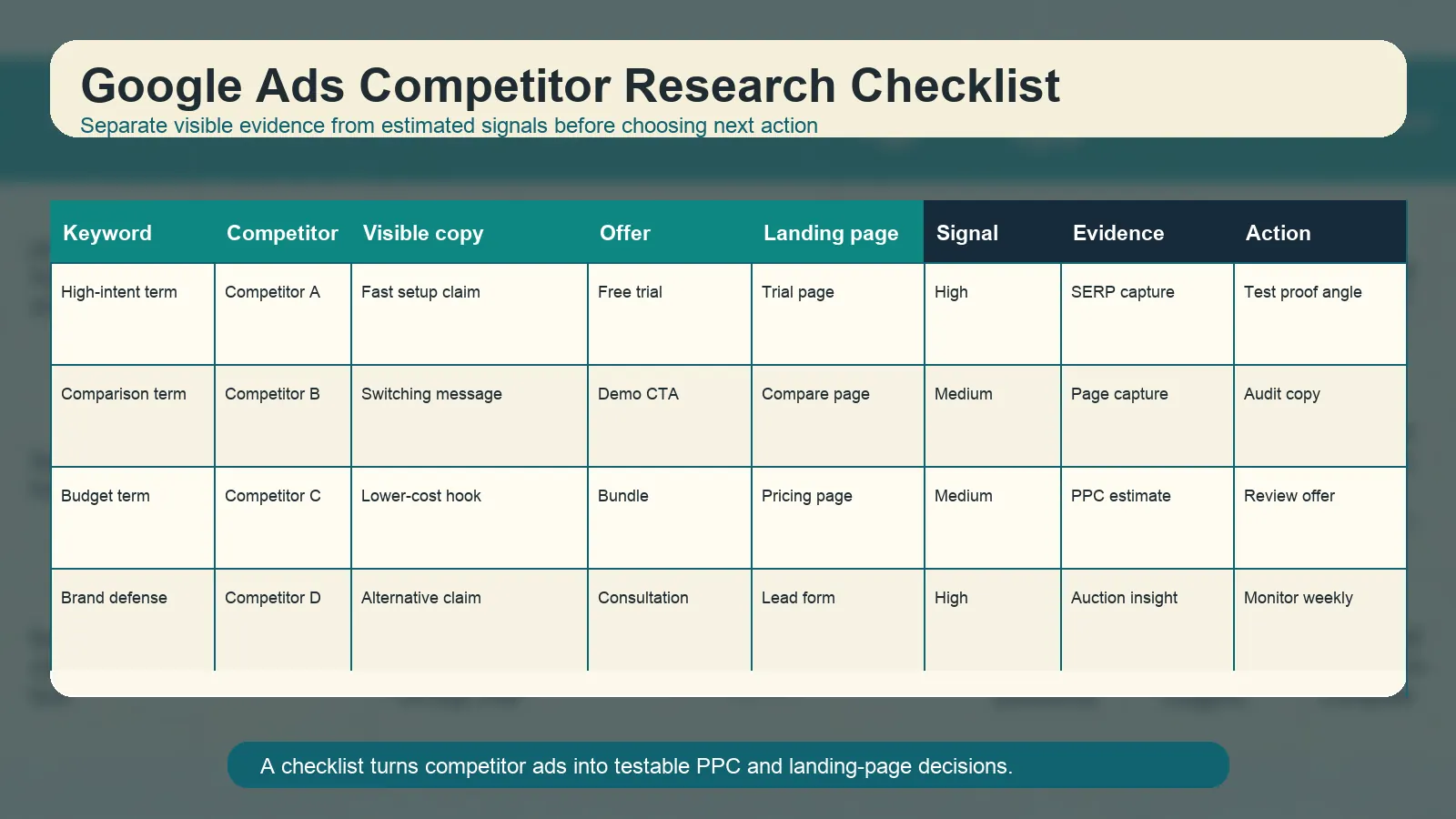
A good Google Ads competitor research checklist separates visible evidence from estimated signals.
Use this report structure:
| Field | What to include |
|---|---|
| Keyword | The query or keyword theme. |
| Competitor | The advertiser or competitor group. |
| Visible copy | Headline, description, CTA, or ad claim. |
| Offer | Trial, demo, discount, bundle, calculator, lead magnet. |
| Landing page | Page type and message match. |
| Spend signal | Directional clue, not exact budget unless you own the data. |
| Evidence | SERP capture, Transparency Center link, report, page capture. |
| Next action | Test, monitor, audit, defend, ignore, or escalate. |
Example:
| Finding | Action |
|---|---|
| Competitor repeats “fast setup” across category and comparison terms. | Test proof-led setup-time angle. |
| Competitor sends pricing queries to a calculator page. | Audit pricing-page CTA and objection handling. |
| Competitor appears more often in Auction Insights for brand-adjacent terms. | Review brand defense and match type controls. |
| Competitor uses a new comparison page. | Check whether your comparison messaging is outdated. |
The goal is not to produce a long report. The goal is to produce a report that changes what your team does next.
Brand Keywords and Policy Risk
Google Ads competitor analysis often leads to brand-keyword questions. Can you bid on competitor terms? Can competitors bid on yours? What should you do if a rival appears on your brand search?
This is sensitive because advertising policy, trademark risk, and local legal context are not the same thing. Start with our competitor brand keywords guide before making a bidding decision.
For analysis, keep the practical workflow separate:
| Scenario | Response |
|---|---|
| Competitor appears on your brand query | Capture evidence, check frequency, review brand campaign coverage. |
| Competitor uses your trademark in copy | Review policy and legal context before escalating. |
| Your brand CPC rises | Check Auction Insights and query mix before assuming one cause. |
| You want to bid on competitor terms | Model cost, legal risk, landing-page fit, and conversion quality. |
Do not let competitor research automatically become competitor copying.
Common Mistakes
| Mistake | Why it hurts |
|---|---|
| Treating public examples as complete data | You may miss keywords, bids, targeting, and performance. |
| Checking only one day | SERPs vary by time, location, device, and auction. |
| Ignoring landing pages | The ad promise may not explain the full funnel. |
| Copying competitor ad text | It weakens differentiation and can create policy or legal risk. |
| Confusing estimates with facts | PPC estimates should guide investigation, not end it. |
| No next action | Analysis without action becomes reporting theater. |
The best teams keep a decision log. If a competitor insight led to a test, record what you changed and what happened. Over time, your own response data becomes more valuable than the competitor snapshot.
FAQ
Can I see competitors Google Ads?
You can see some public Google ad examples through Transparency Center, live SERPs, and related tools. You usually cannot see a competitor's full account, exact spend, conversion rate, or profitability.
How do I do google ads competitor analysis?
Start with a target keyword list, inspect public advertiser examples, run manual SERP checks, use PPC estimates, review landing pages, separate evidence from interpretation, and assign next actions.
What can Google Ads Transparency Center show?
It can show public advertiser examples and visible ad formats. It is useful for evidence collection, but it is not a full PPC intelligence platform or exact spend report.
Can I find search ads of competitors?
Yes, you can find search ads of competitors through manual SERP checks, Transparency Center examples where available, PPC data tools, and search ads intelligence workflows.
Can I see competitor Google Ads budget?
Usually not exactly. You can estimate direction with ad volume, active duration, paid visibility, PPC tool estimates, Auction Insights in your own account, and landing-page investment.
What should a Google Ads competitor analysis report include?
Include keyword, competitor, visible ad copy, offer, landing page, spend signal, evidence, interpretation, priority, next action, owner, and date.
Final Takeaway
Google Ads competitor analysis is useful when it respects the limits of the data. Public ad examples, SERP checks, PPC estimates, search ads intelligence, and landing pages each show one part of the picture.
Combine them into a repeatable workflow, separate evidence from assumptions, and turn every meaningful signal into a clear PPC or landing-page decision. If you want that workflow prepared as a report, start with AdMapix reports.
Turn these observations into your next creative study
Open the creative library and select samples for your market, network and research question.
Related Articles

Ad Tracking for Competitive Research: What to Track Weekly
Ad tracking workflow for competitive research: what to monitor weekly, which changes matter, and how to turn signals into campaign decisions.

Creative Ads Library: Where to Find Winning Ad Creative Examples
A practical guide to creative ads libraries: where to find ad examples, how to filter them, and how to build your own swipe file.
Ad Analytics vs Ad Intelligence: Metrics, Workflows, and Tools
Learn what ad analytics means, which metrics matter, how it differs from ad intelligence, and how growth teams combine both workflows.