
Ad Spend Monitoring: Track Your Own Pacing and Competitor Budget Signals
How to monitor ad spend on both sides: a pacing, alert and weekly-check routine for your own accounts, then a signal model, estimation scorecard and dashboard for competitor budget movement without pretending public data shows exact spend.
Track budget movement through repeated signals, not false precision.
By the AdMapix Research Desk - Updated September 7, 2026
Ad spend tracking helps marketing teams understand where budget pressure is rising, which competitors are becoming more aggressive, and when visible campaign activity deserves a response. The useful version is not "tell me the exact competitor ad spend." Exact private budgets are usually not public. The useful version is "show me whether competitor spend appears to be moving up, down, or sideways, and which evidence supports that judgment."
Quick answer. Ad spend monitoring has two halves. For your own accounts, monitor pacing against budget, spend per result, and alerts, using the platform's own reports and rules; that half is exact. For competitors, exact spend is private, so you track direction from repeated public signals and score confidence. This guide covers both: a pacing routine for your own paid ads first, then the competitor signal model, estimation scorecard and weekly dashboard. It fits naturally after advertising intelligence, search ads intelligence, and our ad intelligence tools comparison.
What Ad Spend Tracking Means
Ad spend tracking is the practice of monitoring paid media signals over time so a team can understand budget movement and competitive pressure.
It can include:
| Area | What you monitor |
|---|---|
| Your own spend | Platform budgets, pacing, CPA, ROAS, impression share, and forecast variance. |
| Competitor activity | Visible ads, creative volume, search visibility, landing-page changes, and offer pressure. |
| Market pressure | New entrants, seasonal pushes, price wars, brand bidding, and channel expansion. |
| Reporting cadence | Weekly checks, monthly summaries, quarterly watchlist resets. |
Most searches for "monitor ad spend" are about the first row: keeping your own accounts on budget. That half is exact because you own the data, so it comes first below. Competitor ad spend tracking is harder because you only see public surfaces, estimates, and indirect signals; the rest of the guide is about doing that honestly.
Monitor Your Own Ad Spend: Pacing, Alerts, and the Weekly Check
Own-account spend monitoring answers three questions every week: are we pacing to budget, is spend per result drifting, and did anything spend where it should not have. None of it needs a third-party tool; it needs a consistent routine and a few rules inside the ad platforms.
| Check | How to do it | Rule of thumb |
|---|---|---|
| Pacing to budget | Divide month-to-date spend by the share of the month elapsed. A campaign at 60% of budget on day 15 of 30 is pacing 20% hot. | Investigate anything more than 10% off pace either way; underspend hides delivery problems as often as overspend hides waste. |
| Spend per result | Track cost per install, lead or purchase by campaign and by creative, not only at account level | A creative that doubles its cost per result while spend keeps rising is the first thing to pause |
| Unexpected spend | Look for campaigns that spent while you thought they were paused, duplicated ad sets, and budget changes nobody logged | Every budget change gets a dated note with an owner |
| Platform alerts | Google Ads automated rules can change budgets, pause items and email you when conditions are met; Meta and TikTok ad accounts offer account-level spending limits and rule-based notifications | Set one hard account limit per platform and one email rule for daily spend above a threshold |
| Cross-platform total | Sum daily spend across Google, Meta, TikTok, Apple and networks in one sheet or your MMP | The platforms will never add themselves up for you |
A simple pacing sheet has one row per campaign: monthly budget, spend to date, expected spend to date, variance, cost per result this week versus last, and a next action. If that sheet is the first thing the owner opens on Monday, most budget surprises disappear. For the analytics layer that measures which creatives earned the results, see paid ads analytics tools; this guide stays on spend.
Once your own spend is under control, the interesting question becomes what competitors are doing with theirs. That is where the exactness ends.
Why Exact Competitor Ad Spend Is Usually Not Public
Competitor ad spend is not the same as competitor ad activity.
You may see:
| Visible signal | What it suggests |
|---|---|
| More active ads | The advertiser is testing or scaling more creative. |
| More markets | The advertiser may be expanding budget geographically. |
| More search visibility | The advertiser may be bidding more aggressively on certain terms. |
| More landing pages | The advertiser may be investing in funnel segmentation. |
| More frequent offer changes | The advertiser may be trying to improve conversion or defend share. |
You usually cannot see:
| Hidden item | Why it matters |
|---|---|
| Exact daily spend | Platforms do not publish most advertiser budgets. |
| Bids and match types | These are account-level settings. |
| Quality Score and auction dynamics | These affect cost and visibility but are private. |
| Conversion rate and margin | A visible ad may be expensive, profitable, or wasteful. |
| Retargeting and audience logic | Public views rarely reveal private segmentation. |
This boundary matters for E-E-A-T and content quality. Any guide promising to reveal exact competitor budgets from public data is likely overstating the data. A better ad spend tracker estimates direction and confidence, then ties every conclusion to evidence.
Reliable Signals For Ad Spend Monitoring
Use a signal model instead of a single metric.
| Signal | What to watch | Why it matters |
|---|---|---|
| Creative volume | New ads, variants, formats, and refresh cadence | More variants can indicate active testing or scale. |
| SERP pressure | Repeated top-page visibility, overlap, and brand bidding | Search auctions reveal high-intent pressure. |
| Channel mix | New platforms, placements, formats, or countries | Expansion often requires budget. |
| Landing pages | New pages, offer-specific pages, comparison pages | Funnel investment often follows spend. |
| Offer changes | Discounts, free audits, trials, bundles, urgency | Offers often change when teams fight for conversion. |
| Messaging repetition | Same claim across ads and pages | Repetition suggests priority, even if profitability is unknown. |
| Account overlap | Auction Insights, rank movement, direct SERP checks | First-party overlap helps validate public signals. |
Do not score a competitor as "spending more" from one signal alone. Use a confidence ladder:
| Confidence | Evidence |
|---|---|
| Low | One visible signal: one new ad, one screenshot, or one tool estimate. |
| Medium | Three related signals: more ads, consistent landing page, repeated SERP visibility. |
| High | Five or more signals across multiple sources and dates, including account-side overlap where available. |
Search Ad Spend Tracking Workflow
Search is often the cleanest place to start because the query gives you intent.
Use this weekly workflow:
| Step | What to do |
|---|---|
| 1. Build a query set | Include brand, category, comparison, alternative, problem, and high-intent terms. |
| 2. Run SERP checks | Capture advertisers, ad copy, extensions, top-page visibility, location, device, and date. |
| 3. Review Google surfaces | Use Google Ads Transparency Center to confirm advertiser activity. |
| 4. Check your account overlap | Use Auction Insights when you run Google Ads. |
| 5. Review landing pages | Save page URLs, offers, proof, CTA, and page type. |
| 6. Score movement | Mark each competitor as budget up, budget down, stable, new entrant, or unclear. |
| 7. Decide action | Watch, test copy, update landing page, defend brand terms, or alert leadership. |
If you need the search-specific workflow, read our search ads intelligence guide. The short version is simple: search ad spend tracking should connect query intent, visibility, ad copy, landing page, and evidence date.
Paid Social And Display Spend Signals
Social and display are noisier because you often lack query intent. That does not make them useless. It means you need different signals.
| Signal | What to capture |
|---|---|
| Creative volume | Number of active variants, refresh speed, formats, and hooks. |
| Format mix | Static, video, carousel, creator-style, UGC, product demo, comparison. |
| Offer repetition | Discounts, bundles, free trials, quizzes, audits, gated content. |
| Landing-page destination | Product page, collection page, lead form, comparison page, app store page. |
| Market spread | Countries, languages, and localized pages. |
| Frequency of refresh | New concepts every few days may indicate active testing. |
| Platform consistency | The same offer across search, Meta, TikTok, YouTube, or display signals a broader push. |
For Meta-specific spend research, use our track competitor Facebook ad spend guide. The weekly routine that turns these signals into decisions, with evidence tiers and a report template, is in our competitive advertising intelligence guide. For broad category context, pair official platform libraries with structured reports instead of relying on screenshots alone.
Useful sources include:
| Source | Best use |
|---|---|
| Google Ads Transparency Center | Verify advertiser activity and public Google ad surfaces. |
| Meta Ad Library help resource | Understand Meta public ad library access and policy context. |
| Semrush Advertising Research | Research paid search competitors, ad copy, and domains. |
| AdMapix reports | Turn scattered competitor signals into summaries and action notes. |
Competitor Ad Spend Estimation Model
Use an estimation model that separates evidence from interpretation.
| Component | Score 0 | Score 1 | Score 2 |
|---|---|---|---|
| Creative volume | No visible change | Some new variants | Large refresh or many new concepts |
| Search visibility | Not visible | Visible on a few terms | Repeated top visibility on priority terms |
| Channel mix | Same channels | One new channel or format | Multiple new channels or markets |
| Landing pages | No changes | One page update | New page set or offer-specific funnel |
| Offer pressure | No change | One offer test | Repeated offer or aggressive incentive |
| Evidence recency | Older than 30 days | Last 14-30 days | Last 7 days |
Then classify:
| Total score | Interpretation | Action |
|---|---|---|
| 0-3 | No clear movement | Continue monthly watch. |
| 4-6 | Possible movement | Review weekly and collect more evidence. |
| 7-9 | Likely budget pressure | Create a short action brief. |
| 10-12 | Strong budget movement signal | Escalate to campaign owner and leadership. |
This is not exact spend tracking. It is a consistent way to reduce guesswork. The model is useful because it forces every "competitor is spending more" claim to show its evidence.
Weekly Ad Spend Monitoring Dashboard
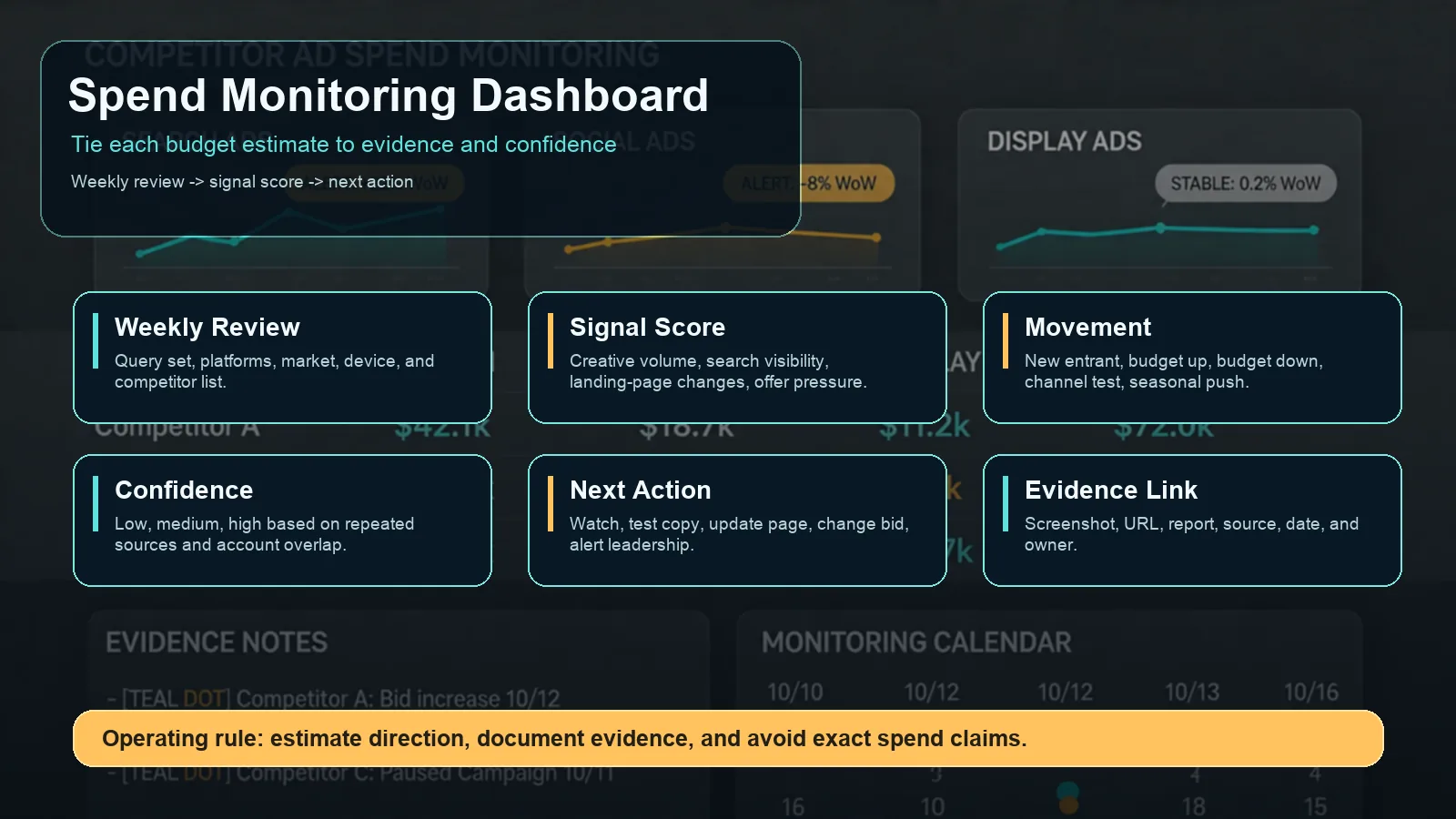
A weekly monitoring dashboard keeps competitor spend estimates tied to evidence and confidence.
Build a dashboard with these fields:
| Field | Example |
|---|---|
| Competitor | Competitor A |
| Channel | Google Search, Meta, TikTok, YouTube, Display |
| Market | US, UK, Germany, Brazil, Japan |
| Signal type | Creative volume, SERP pressure, landing page, offer, channel mix |
| Signal score | 0, 1, or 2 |
| Confidence | Low, medium, high |
| Evidence link | Screenshot, ad library URL, SERP capture, landing page, report |
| Change since last review | New, up, down, stable, unclear |
| Recommended action | Watch, test, update page, defend brand, notify owner |
| Owner | PPC lead, creative lead, landing-page owner, leadership |
Your dashboard should not be a graveyard of screenshots. Every row needs a decision field.
What A Good Ad Spend Tracker Should Do
The best ad spend tracker is not always the tool with the biggest database. It is the tool or workflow that helps your team make reliable decisions.
Evaluate tools by:
| Criterion | What to ask |
|---|---|
| Channel coverage | Does it cover the platforms where your competitors actually advertise? |
| Market coverage | Can you filter by country, language, and date? |
| Evidence quality | Can you inspect source examples instead of only seeing estimates? |
| Historical view | Can you compare movement over time? |
| Landing-page context | Does it show where ads send traffic? |
| Reporting workflow | Can your team turn findings into briefs, alerts, or dashboards? |
| Confidence language | Does it label estimates as estimates, or pretend they are exact? |
Many teams combine one PPC data source, one official library workflow, and one reporting layer. If your team wants dated competitor creative evidence next to app rankings rather than another raw dashboard, the AdMapix ad spy workspace covers the creative-volume and channel-mix rows of the model above; it does not show competitor spend.
Common Mistakes
Avoid these mistakes when tracking competitor ad spend:
| Mistake | Why it hurts |
|---|---|
| Treating estimated spend as exact | It creates false confidence and bad budget decisions. |
| Ignoring landing pages | Budget movement often appears in funnel changes before it appears in spend estimates. |
| Mixing channels without context | A TikTok creative surge does not mean Google Search spend changed. |
| Forgetting seasonality | Competitor movement may reflect Black Friday, product launch, or category seasonality. |
| Reporting screenshots without decisions | Leadership needs implication, confidence, and action. |
| Copying competitor offers blindly | You do not know their margin, inventory, conversion rate, or payback window. |
The better rule: estimate direction, document evidence, and turn each finding into a testable response.
FAQ
What is ad spend tracking?
Ad spend tracking is the process of monitoring paid media budgets, pacing, and competitive advertising signals over time. For your own accounts, it uses direct platform data. For competitors, it uses public ads, search visibility, creative volume, landing pages, official libraries, and estimated tool data.
How do I monitor my own ad spend?
Compare month-to-date spend with the share of the month elapsed for every campaign, track cost per result by campaign and creative, set an account-level spending limit and at least one automated rule or alert per platform, and keep one cross-platform sheet that sums daily spend. Review it weekly with an owner and a next action per row.
Can I see competitor ad spend exactly?
Usually no. Exact competitor ad spend, bids, ROI, and conversion rates are private. Some tools estimate spend, but those estimates should be treated as directional signals, not exact financial data.
How do tools estimate competitor ad spend?
Tools may combine visible ads, keyword estimates, traffic estimates, panel data, platform libraries, historical observations, and modeling assumptions. The methodology varies by provider, so always look for source evidence and confidence language.
What is the best ad spend tracker?
The best ad spend tracker depends on your channel mix. PPC-heavy teams may need search advertising research and Auction Insights. Social-heavy teams need creative volume and library monitoring. Agencies often need reporting workflows that combine multiple sources into client-ready summaries.
Which signals show that a competitor is increasing budget?
Look for repeated signals: more creative variants, more markets, more top-page search visibility, new channels, refreshed landing pages, stronger offers, and more frequent campaign changes. One signal alone is weak; repeated signals across sources are stronger.
How often should I monitor competitor ad spend?
Weekly monitoring is useful for active paid categories, competitive launches, brand bidding, and seasonal campaigns. Monthly monitoring may be enough for slower categories. The cadence should match how often competitors change ads and offers.
Conclusion
Ad spend tracking is useful when it is honest about uncertainty. You cannot reliably see exact competitor budgets from public data, but you can monitor signals that indicate budget movement, channel pressure, and campaign intent.
The winning workflow is simple: track signals consistently, score confidence, document evidence, and decide what your team should test or monitor next. If manual competitor monitoring is taking too much time, sign in to AdMapix and pull dated competitor creative evidence into the scorecard instead of collecting screenshots by hand.
Turn these observations into your next creative study
Open the creative library and select samples for your market, network and research question.
Related Articles
Search Ads Intelligence: Find Competitor Google Ads, Keywords & Landing Pages
Learn how to find competitor Google Ads, map keyword themes, inspect landing pages, compare ad copy and CTAs, and turn PPC search intelligence into campaign tests.
Advertising Intelligence: What It Is and How Growth Teams Use It
A practical 2026 guide to advertising intelligence, including data sources, competitor ad workflows, use cases, quality checks, and how growth teams turn signals into decisions.
Fake Mobile Game Ads: Why They Exist and How to Spot Them
Why mobile game ads show different gameplay, how to check whether the advertised game is real, and what marketers can learn from the creative patterns.