Ad Tracking for Competitive Research: What to Track Weekly
Ad tracking workflow for competitive research: what to monitor weekly, which changes matter, and how to turn signals into campaign decisions.

Weekly ad tracking works when every observed change is tied to evidence and a next action.
By the AdMapix Research Team
Ad tracking for competitive research means monitoring competitor ads over time and recording the changes that could affect your own campaigns. It is not just saving screenshots. A useful ad tracking workflow tells you what changed, where the evidence came from, why it matters, and what action your team should take next.
This is different from one-time competitor research. A one-time report tells you what competitors looked like on a given day. A weekly tracking system shows whether they are changing creative, shifting channels, testing new offers, increasing visible volume, updating landing pages, or repeating the same message long enough to treat it as a serious pattern.
If your main question is budget movement, start with our ad spend tracking guide. If your question is broader competitive advertising tracking, use this article as the weekly operating workflow.
What Ad Tracking Means
Ad tracking is the process of monitoring ad activity over time.
In competitive research, it usually includes:
| Tracking area | What you monitor |
|---|---|
| Competitor ads | New ads, paused ads, repeated ads, message changes, format changes. |
| Creative changes | Hook, offer, proof, CTA, visual system, video structure, UGC style. |
| Channel signals | Search, social, display, video, app placements, retargeting behavior. |
| Spend signals | Directional clues such as volume, frequency, active duration, and visibility. |
| Landing pages | Pricing, trial, proof, checkout, demo flow, case studies, page structure. |
| Next actions | Tests, budget checks, copy updates, page audits, creative briefs. |
The key word is “over time.” A single competitor ad might be noise. A repeated format, recurring offer, or visible cross-channel push is more likely to matter.
Ad tracking should answer three questions:
| Question | Good answer |
|---|---|
| What changed? | Competitor launched a new trial offer across Meta and Google. |
| Why do we care? | The offer attacks our pricing objection and appears in high-intent placements. |
| What do we do? | Draft a counter-positioning test and audit our trial messaging. |
Without the third answer, tracking becomes passive observation.
What to Track Weekly
A weekly cadence is usually enough for most teams. Daily tracking creates too much noise unless you are in a fast-moving category, managing a launch, or monitoring a direct response war.
Use this weekly checklist:
| Check | What to record | Decision it supports |
|---|---|---|
| New competitor ads | New messages, new offers, new formats, new landing pages. | Creative briefing and offer monitoring. |
| Repeated ads | Ads that stay active or reappear across weeks. | Pattern validation. |
| Creative refreshes | New hooks, new visuals, new proof, new CTA. | Creative testing roadmap. |
| Channel shifts | More visible activity in search, display, video, TikTok, Meta, or app placements. | Budget and channel review. |
| Landing page changes | Pricing, demo flow, case studies, trial, checkout, comparison pages. | Message-match and conversion review. |
| Spend direction clues | Volume, duration, frequency, paid visibility, Auction Insights where available. | Directional ad spend tracking. |
| Your response | Test, ignore, monitor, brief, audit, or escalate. | Team execution. |
If a change cannot influence a decision, do not spend much time tracking it.
Creative Signals
Creative signals are the easiest to see and the easiest to overread. Your goal is to separate surface changes from strategic changes.
Track these creative signals:
| Signal | What it can mean |
|---|---|
| New opening hook | Competitor is testing a different pain point or audience segment. |
| New proof type | They may be trying to overcome trust, price, or product-risk objections. |
| New CTA | The funnel objective may have changed from education to conversion. |
| New video format | They may be adapting to TikTok, Reels, Shorts, or creator-led assets. |
| Repeated visual system | Brand or conversion system may be working well enough to standardize. |
| More variants around one idea | The idea is important enough to test, even if performance is unknown. |
Use your creative ads library to store these examples. Do not only save the final ad. Save the reason it matters.
For each creative example, write:
| Note | Example |
|---|---|
| Mechanism | “First-person pain-point hook followed by product demo.” |
| Audience | “Likely aimed at budget-conscious trial users.” |
| Proof | “Uses customer count rather than review quote.” |
| Risk | “Claim would need support before we test something similar.” |
| Test idea | “Original variant: compare setup time vs manual workflow.” |
That note is more useful than a screenshot.
Channel and Placement Signals
Competitors rarely move every channel at once. Ad tracking should show where visible pressure is increasing.
Track:
| Channel | How to monitor |
|---|---|
| Search | SERP checks, ad copy changes, landing-page changes, search ads intelligence tools. |
| Meta | Meta Ads Library visibility and page-level active ads. |
| TikTok | Creative Center, competitor accounts, creator-style ad examples. |
| Display | Public ad examples, display placements, creative repeats, retargeting clues. |
| YouTube | Google Ads Transparency Center and video ad examples. |
| App placements | Mobile ad intelligence reports and creative examples. |
When you track competitors display ads, focus on creative repetition and landing-page match. Display ads often look generic in isolation. The useful question is whether the same visual, offer, or claim appears repeatedly enough to suggest a campaign theme.
Do not confuse channel presence with channel success. Public signals show activity, not profit. Use them to form hypotheses, not conclusions.
Spend and Pacing Signals
Exact competitor spend is usually not public. Good ad tracking uses directional signals.
Useful directional signals include:
| Signal | Interpretation |
|---|---|
| More active ads | Possible test expansion, but could also be low-budget experimentation. |
| Longer active duration | The ad may be worth keeping, or the team may not refresh often. |
| Repeated format across platforms | Higher confidence that the campaign theme matters. |
| Higher search visibility | Possible increased bidding, stronger relevance, or keyword expansion. |
| Auction Insights movement | Your own account may show overlap and impression-share changes. |
| Landing-page investment | A new page can signal a serious funnel push. |
Google explains Auction Insights as a way to compare performance with other advertisers in the same auctions, but it only applies inside your own account context. Use Google Ads Auction Insights as one input, not a complete competitor spend dashboard.
For broader budget estimation, read the dedicated ad spend tracking workflow. This Day45 workflow is about repeat monitoring and action selection.
Landing Page and Offer Signals
Landing pages often reveal more than the ad.
Track these page changes:
| Page signal | Why it matters |
|---|---|
| New pricing page | Competitor may be changing packaging, discounting, or enterprise motion. |
| New trial offer | They may be reducing friction or responding to conversion pressure. |
| New proof block | They may be addressing trust objections. |
| New comparison page | They may be moving into competitor conquesting. |
| New calculator or quiz | They may be qualifying leads before sales contact. |
| Checkout changes | They may be trying to reduce purchase friction. |
The best ad tracking reports connect ad promise to landing-page proof. A competitor changing both at once is more meaningful than a minor ad-copy tweak.
Tool Setup and Evidence Rules
Use public and private sources together.
Public sources can include:
| Source | Use |
|---|---|
| Google Ads Transparency Center | Inspect visible Google advertiser examples. |
| Meta official Ads Library help | Understand how Meta Ads Library can support public ad review. |
| TikTok Creative Center | Track short-form creative examples and patterns. |
| Manual SERP checks | Capture live search context and landing-page flow. |
| Competitor landing pages | Watch offer, pricing, proof, and funnel changes. |
Private or first-party sources can include:
| Source | Use |
|---|---|
| Your Google Ads Auction Insights | Directional auction overlap and impression-share context. |
| CRM notes | Competitor mentions from sales calls. |
| Win/loss notes | Which competitor claims are affecting deals. |
| Analytics | Whether your own conversion rate changed after a competitor push. |
| AdMapix reports | Structured competitor ad examples, creative patterns, and evidence links. |
Set evidence rules before you start:
| Rule | Why it matters |
|---|---|
| Every observation needs a source | Prevents “I saw this somewhere” reporting. |
| Separate evidence from interpretation | A screenshot is evidence; “they are winning” is interpretation. |
| Use severity levels | High, medium, low keeps the report actionable. |
| Assign an owner | Unowned observations do not turn into tests. |
| Archive old signals | Outdated competitor ads can mislead current decisions. |
Weekly Reporting Template
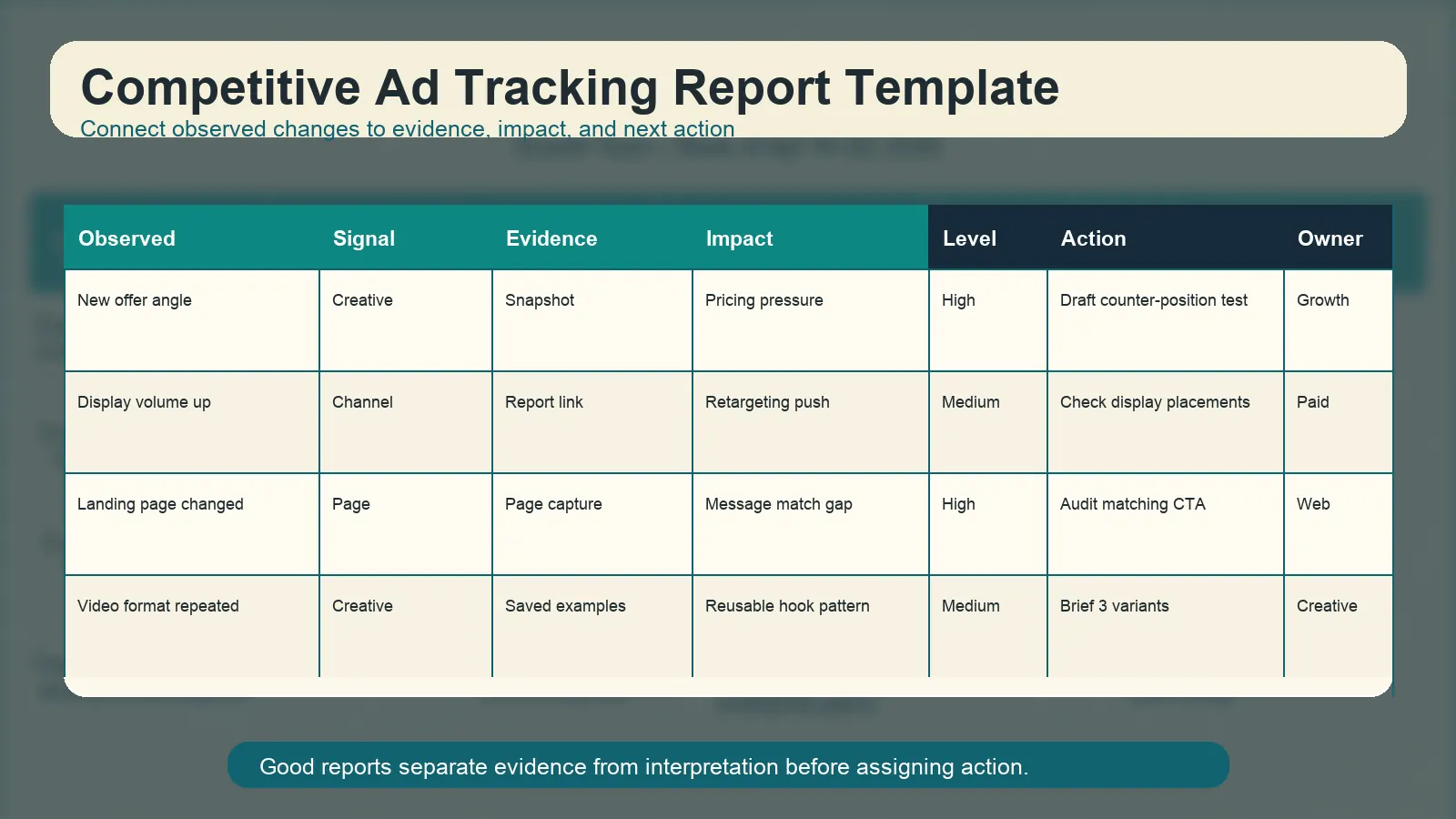
A report template keeps ad tracking focused on decisions instead of screenshots.
Use a simple weekly report:
| Field | What to include |
|---|---|
| Observed change | What changed since last review. |
| Signal type | Creative, channel, spend, landing page, offer, SERP, pricing. |
| Evidence | Link, screenshot, report, page capture, or dated note. |
| Impact | Why it may matter to your campaign. |
| Priority | High, medium, low. |
| Next action | Test, audit, monitor, ignore, brief, or escalate. |
| Owner | Who will do the next step. |
Example:
| Observed change | Signal type | Impact | Next action |
|---|---|---|---|
| Competitor repeats a “free setup” offer in search and display. | Offer + channel | Pricing objection may be more important this month. | Test a setup-time comparison angle. |
| Competitor adds a comparison landing page. | Landing page | They may be entering competitor conquesting. | Audit our own comparison messaging. |
| Competitor uses three similar UGC hooks on TikTok. | Creative | Pain-point hook may be resonating. | Brief original UGC variants using the same mechanism. |
The report should be short enough to read in five minutes and specific enough to trigger action.
Common Mistakes
| Mistake | Fix |
|---|---|
| Tracking too many competitors | Focus on direct competitors, substitutes, and category leaders. |
| Saving screenshots without notes | Add mechanism, evidence date, and next action. |
| Treating activity as performance | Public activity is a signal, not proof. |
| Ignoring landing pages | Ads and landing pages should be reviewed together. |
| No weekly owner | Assign one person to maintain the report. |
| No decision log | Record which observations led to tests and what happened. |
The last point is important. Over time, your own decision log becomes more valuable than the competitor archive.
FAQ
What is ad tracking in competitive research?
Ad tracking in competitive research is the ongoing process of monitoring competitor ads, creative changes, channel shifts, landing pages, and directional spend signals so your team can decide what to test, ignore, or investigate.
How often should I track competitor ads?
Weekly is enough for most teams. Daily tracking is useful during launches, major promotions, aggressive competitor battles, or fast-moving categories. Monthly tracking is usually too slow for paid acquisition teams.
Can I track competitor ad spend exactly?
Usually no. Exact competitor ad spend is rarely public. You can use directional signals such as ad volume, active duration, search visibility, Auction Insights, landing-page investment, and third-party estimates.
What changes matter most in competitive advertising tracking?
The most important changes are repeated creative themes, new offers, channel expansion, landing-page updates, search visibility shifts, and messages that directly attack your positioning.
How do I track competitors display ads?
To track competitors display ads, collect visible display examples, record placement context when available, tag the offer and creative mechanism, compare landing pages, and monitor whether the same visual or claim repeats over multiple weeks.
What should an ad tracking report include?
An ad tracking report should include observed change, signal type, evidence, impact, priority, next action, owner, and date. Keep it short and decision-oriented.
Final Takeaway
Ad tracking is valuable when it creates decisions. The weekly rhythm is simple: monitor competitor ads, log evidence, score severity, connect the signal to creative or funnel impact, and assign a next action.
If search visibility is part of the weekly review, use search ads intelligence and the Google Search Ads spy tool workflow for the PPC layer. If Meta freshness is the issue, use the Facebook Ads Library update frequency guide. If you want weekly competitor ad tracking without rebuilding the process manually, start with AdMapix reports.
See what competitors are really running
Search 6M+ ad creatives, landing pages, and weekly spend across 200+ countries. No credit card, no commitment.
Related Articles
Video Ad Production at Scale: AI Tools, Templates, and Testing Frameworks for 2026
A practical guide to scaling video ad production: AI generation tools that actually work, template systems for rapid iteration, platform-specific format requirements, and how to build a testing flywheel that improves performance with every batch.
Retargeting Ads Strategy in 2026: Competitor Analysis, Segmentation, and Creative Testing
A data-driven retargeting ads strategy combining competitor intelligence, audience segmentation, and creative testing. Learn what competitors run for retargeting and how to build a testable retargeting workflow.
LinkedIn Ads Competitor Research: How to Analyze B2B Rivals in 2026
A systematic approach to LinkedIn Ads competitor research: use the LinkedIn Ads Library, infer targeting from ad copy patterns, analyze B2B landing pages, and turn findings into testable LinkedIn campaign hypotheses.