
How Often Does Facebook Ads Library Update? 2026 Timing & Delays
Direct answer to Facebook Ads Library update timing: how often it refreshes, why delays happen, what Meta documents, and how to monitor competitor ads without assuming real-time data.
Facebook Ads Library is useful for competitor monitoring, but it should not be treated as a guaranteed real-time feed.
How Often Does Facebook Ads Library Update?
Short answer: Facebook Ads Library is not fully real-time. It updates continuously, but new or changed ads can appear with delays depending on review status, region, ad category, account visibility, and Meta indexing.
The practical answer: Facebook Ads Library updates continuously, but you should not treat it as a real-time system with a fixed public refresh SLA. A new or changed ad can appear quickly, but there can also be a Facebook Ads Library delay caused by review status, geography, ad category, account/page visibility, policy handling, API scope, or normal indexing lag.
For competitor research, the safer workflow is:
| Need | Recommended cadence |
|---|---|
| Active competitor monitoring | Check daily or use saved reports |
| Fast-moving launches | Check multiple times in the first 24-48 hours |
| Weekly creative research | Review once or twice per week |
| Historical analysis | Use stable snapshots and notes |
| API-based research | Confirm fields and eligibility before assuming coverage |
Meta's Ad Library is the public search interface. Meta's Ad Library API documentation shows fields and parameters such as active status, delivery dates, reached countries, media type, publisher platforms, search terms, page IDs, and creative text fields. What the public documentation does not provide is a universal promise like "every commercial ad appears within X minutes."
This guide explains how to think about Facebook Ads Library update timing, Meta Ad Library refresh rate, why ads may be missing, and how to monitor competitors without overreacting to one delayed result.
For a broader walkthrough, read the Facebook Ads Library complete guide. If you need to preserve examples once you find them, use the download videos from Meta Ads Library guide.
What Meta Documents
Meta documents what the Ad Library and API can search, not a simple refresh-rate guarantee.
The API documentation describes:
| Documented area | What it means for update checks |
|---|---|
ad_active_status | You can search active, inactive, or all eligible ads where supported |
ad_delivery_date_min and ad_delivery_date_max | Delivery dates help you narrow time windows |
ad_reached_countries | Country filtering is required in API queries |
publisher_platforms | Ads can be filtered by Meta technologies such as Facebook or Instagram |
media_type | You can separate image, video, meme, and other creative types |
search_terms and search_type | Query logic changes what appears |
search_page_ids | Page-specific searches reduce noise |
From this, we can infer a practical point: update frequency is not one number. It depends on the combination of ad status, page, country, ad type, search method, and whether you are using the UI or API.
Why a Facebook Ads Library Delay Happens
A missing ad does not always mean the competitor is not running it.
Common delay sources include:
| Delay source | What you may see |
|---|---|
| Ad review or policy status | The ad exists in the account but is not eligible for public display yet |
| Search query mismatch | The ad appears under page search but not keyword search |
| Country filter mismatch | You are checking the wrong reached country |
| Platform filter mismatch | The ad is running on Instagram but you are expecting Facebook results |
| Creative or text variation | The version you saw in-feed uses different text than your query |
| Inactive or paused status | It may disappear from active-only views |
| API eligibility limits | Some API access differs by ad category and region |
| Indexing lag | Public surfaces may not update at the same moment as delivery systems |
The biggest mistake is assuming one empty search proves an ad is gone. Always check page search, keyword search, country, media type, platform, and active status before drawing a conclusion.
When the question is how long an ad has been live rather than whether it shows up today, a spy tool with dated observations records first- and last-seen dates independently of the Library's display lag.
A Practical Monitoring Workflow
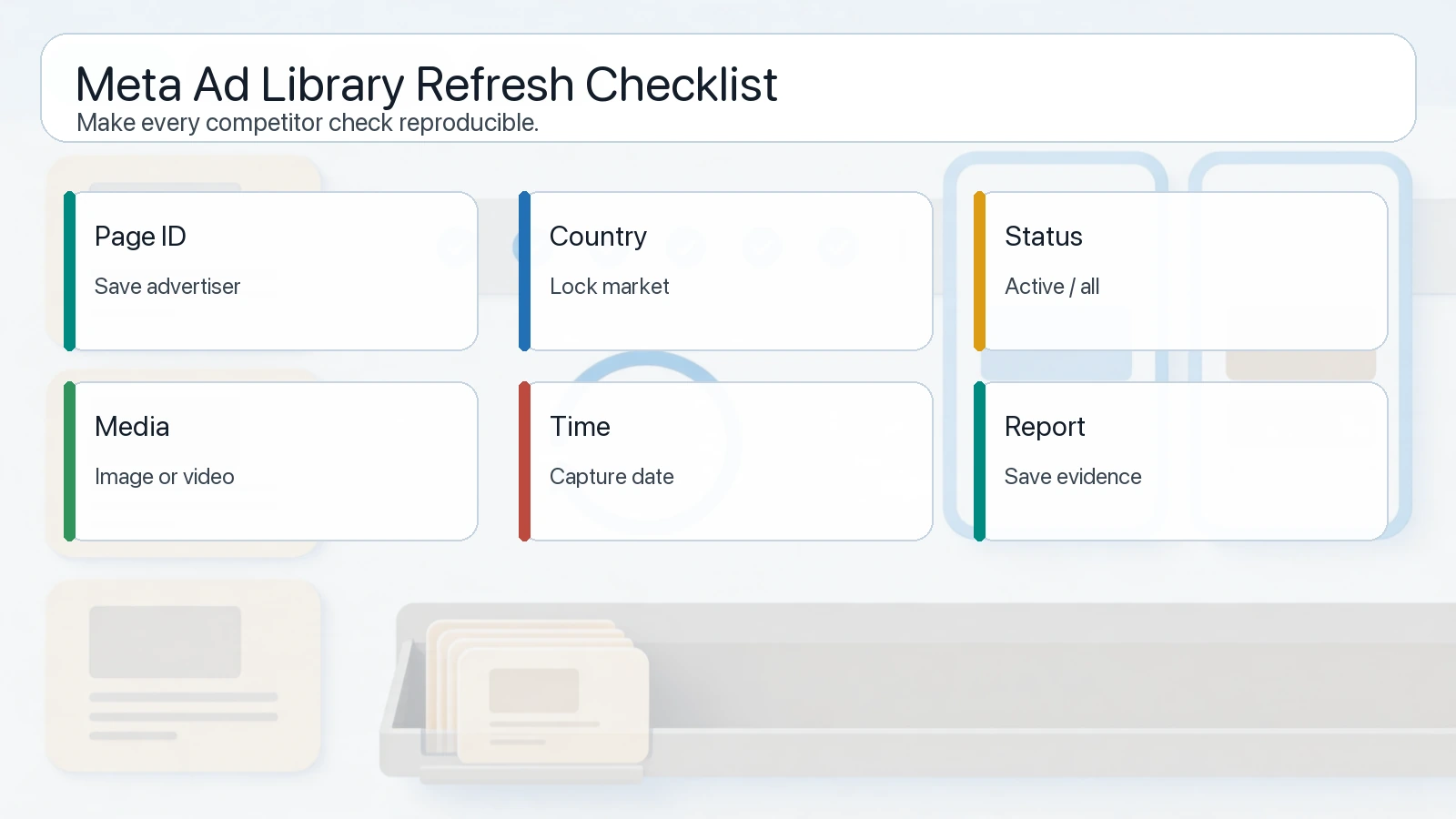
A reliable refresh workflow records what you searched, when you searched, and which filters were active.
Use this workflow when tracking a competitor:
| Step | Action |
|---|---|
| 1. Save the competitor page | Page search is usually less ambiguous than keyword search |
| 2. Define target countries | Do not mix all markets in one check |
| 3. Check active ads first | Start with what appears to be currently running |
| 4. Save the search timestamp | You need to know when the snapshot was taken |
| 5. Record filters | Country, platform, media type, active status, keyword |
| 6. Check again later | Compare the same query, not a different one |
| 7. Save candidates | Use reports or a sheet so examples do not disappear from memory |
| 8. Review patterns weekly | Individual ad timing matters less than repeated creative patterns |
For fast launches, use a tighter cadence:
| Time window | What to do |
|---|---|
| First day | Check the competitor page and known terms more than once |
| Days 2-3 | Watch for variants, new formats, and platform expansion |
| End of week | Group creatives into patterns |
| End of month | Decide which patterns deserve a test brief |
This is where AdMapix reports help. Instead of manually remembering every query, you can save competitor views and compare creative patterns over time.
When Third-Party Data Can Feel Fresher
Third-party ad intelligence tools can feel faster because they are built for monitoring workflows: saved advertisers, repeated checks, snapshots, creative metadata, and team review.
But "fresher" should be interpreted carefully.
| Claim | How to evaluate it |
|---|---|
| Faster discovery | Does the tool show when it captured the ad? |
| More complete history | Does it preserve ads after they disappear from active views? |
| Better filters | Can you filter by advertiser, format, market, platform, and creative type? |
| Better workflow | Can your team save, tag, export, and brief from the same place? |
| Better proof | Does it connect creative data to performance, or only visibility? |
No public or third-party tool can magically show every internal performance metric. Use third-party tools to reduce monitoring effort, not to replace your own campaign testing.
How to Avoid Bad Conclusions
Use these rules when interpreting a Facebook Ads Library update:
| Bad conclusion | Better interpretation |
|---|---|
| "The competitor stopped all ads." | Maybe your filters changed or the ads are not visible in that country |
| "This ad just launched today." | It may be newly visible to you, not newly created |
| "This ad is winning because it is active." | Active status is a signal, not proof of profitability |
| "The library is broken." | Check page search, country, active status, media type, and platform first |
| "We need to copy it now." | Convert the pattern into an original test brief |
For broader competitor research, pair this article with how to spy on competitors' ads and winning Facebook ads case study.
FAQ
How fast does Facebook Ads Library update?
It updates continuously, but Meta does not publish a universal real-time refresh SLA for every commercial ad. Treat it as a monitoring tool with possible delay, not as a guaranteed live feed.
Why is my competitor ad missing?
Common reasons include wrong country, wrong page, wrong keyword, active-only filtering, media type mismatch, platform mismatch, ad review status, policy handling, or normal indexing lag.
Is Meta Ad Library real-time?
No public documentation should be interpreted as a guarantee that Meta Ad Library is fully real-time. It is best used for recurring monitoring and pattern analysis.
How often should I check Facebook Ads Library?
For active competitor monitoring, check daily or use saved reports. For normal research, once or twice per week is usually enough. For launches, check more often in the first 24-48 hours.
Can third-party tools be fresher?
They can be more useful for repeated monitoring because they save snapshots, filters, and advertiser views. Still, they should be used as research inputs, not proof of competitor profitability.
Conclusion
Facebook Ads Library update timing is best understood as a practical monitoring problem, not a single refresh-rate number. The tool can surface current competitor activity, but delays and filter mismatches happen.
Build a repeatable workflow: save competitors, keep filters consistent, record timestamps, compare snapshots, and turn patterns into briefs. If you need the full product walkthrough first, use the Facebook Ads Library complete guide. If you want to make monitoring faster, use AdMapix reports and choose a plan on pricing that matches your monitoring volume.
Turn these observations into your next creative study
Open the creative library and select samples for your market, network and research question.
Related Articles
Playable Ads: Examples, Development Workflow, and When to Use Them
A practical guide to playable ads for app marketers: examples, playable ads development workflow, technical QA, testing, and competitor research.
Competitor Ads: How to Find, Analyze, and Track Rival Campaigns
A practical guide to finding competitor ads across search, display, social, video, native, and landing pages, then turning visible patterns into campaign tests.
Competitor Display Ads: Examples & Targeting Clues
Find competitor display ad examples, record placement context and develop audience hypotheses without claiming access to private targeting settings.