
Ad Spy Tools by Channel: Meta, TikTok, Google, YouTube, Native
Choose ad spy tools by channel. Compare Meta, TikTok, Google Search, YouTube, native, display, and mobile app ad research workflows.
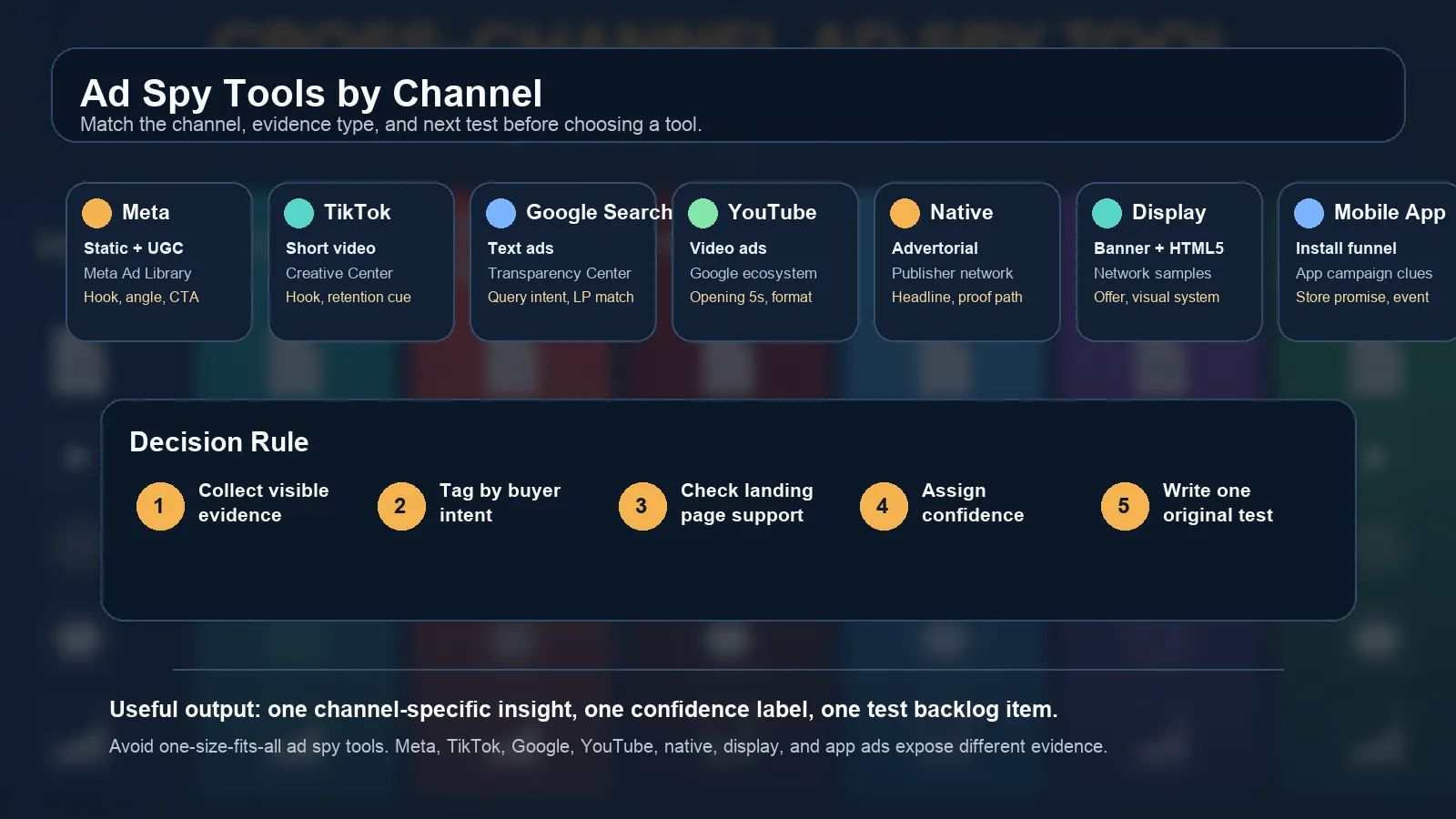
Ad Spy Tools by Channel: Meta, TikTok, Google, YouTube, Native
Ad spy tools are not interchangeable. A great Facebook ads spy tool can still be weak for Google Search. A strong TikTok ad spy tool may be almost useless for native advertorial research. A native ad spy tool can reveal publisher funnels that social libraries never show.
That is the mistake most ads spy tools guides make. They rank tools as if every channel exposes the same evidence. They do not. Meta gives you public creative examples. TikTok rewards fast hook and format analysis. Google Search needs query sampling and landing-page match checks. YouTube requires video teardown. Native and display demand publisher, advertorial, and offer-path evidence. Mobile app advertising adds store-page, install funnel, and in-app event context.
This guide shows how to choose ad spy tools by channel, what evidence to collect, when free sources are enough, and when a paid workflow is worth it.
If you want a broad ranked list, start with our best ad spy tools 2026. This article is different: it is a channel selection guide for teams that already know they need competitive ad intelligence.
Why Channel Fit Matters
The best ad spy tool for your team is the one that matches the channel you actually need to analyze.
| Channel | Primary evidence | Research question |
|---|---|---|
| Meta and Facebook | Static creatives, UGC angles, copy, CTA, active advertisers | What angles and offers are competitors testing? |
| TikTok | Short video hooks, formats, creators, trend signals | Which creative patterns are gaining attention? |
| Google Search | Query intent, text ads, landing pages, public advertiser examples | Which messages show up for commercial search intent? |
| YouTube | Opening hook, video format, CTA, landing-page match | How does the competitor sell through video? |
| Native and display | Headlines, advertorials, publisher context, bridge pages | Which story angle moves a cold reader? |
| Mobile app ads | App store promise, install funnel, event claim, channel mix | How does the app acquire users and frame value? |
One ad spy tool rarely handles all of these equally well. The safe workflow is to define the channel first, then define the evidence you need, then choose the tool.
Channel Decision Matrix
Use this scorecard before buying another subscription.
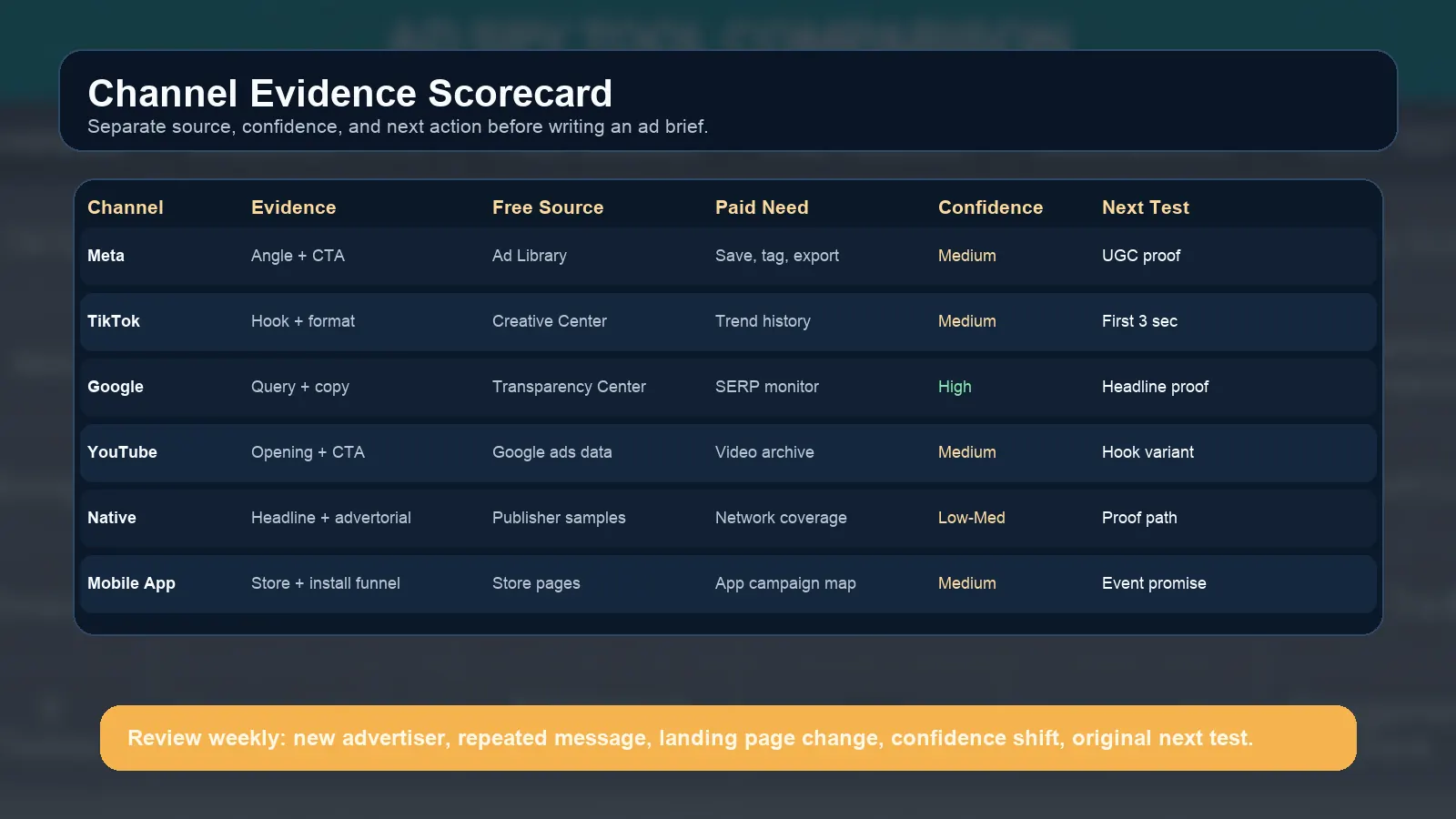
A scorecard keeps channel evidence, confidence, and next tests separate.
| Decision factor | Ask this before choosing a tool |
|---|---|
| Channel | Are we researching Meta, TikTok, Google Search, YouTube, native, display, or mobile apps? |
| Evidence | Do we need creative examples, video hooks, query-level ads, landing pages, or app funnels? |
| Free source | Is the official ad library enough for this decision? |
| Paid need | Do we need saved examples, history, alerts, exports, or team tagging? |
| Confidence | Is this one sample, a repeated pattern, or a tracked trend? |
| Next test | What original ad, landing page, or offer test will we run? |
The output should never be "copy this ad." The output should be one insight, one confidence label, and one test your team can run with its own proof.
Meta and Facebook Ads Spy Tools
Meta is usually the first channel people think of when they search for an ad spy tool. That makes sense because Facebook and Instagram ads are heavily creative-driven, and public examples are easy to browse through the Meta Ad Library.
A good Meta workflow captures:
| Evidence | Why it matters |
|---|---|
| Creative format | Static, carousel, UGC video, creator-style testimonial, offer card |
| Hook | What problem or desire appears first |
| Body copy | How the advertiser frames pain, urgency, proof, and objection handling |
| CTA | Shop, learn more, book demo, download, compare, start trial |
| Landing page | Whether the page continues the same claim |
| Repetition | Whether the same angle appears across multiple ads |
Use a dedicated facebook ads spy tool when manual Meta Ad Library research becomes too slow. Paid tools help when you need saved creatives, tags, team comments, bulk exports, and weekly tracking across multiple competitors.
Do not treat Meta evidence as universal. A winning Meta UGC hook does not automatically become a winning Google Search headline. It may become a test hypothesis, but the search ad still needs to match query intent.
TikTok Ad Spy Tool Workflow
TikTok research is less about polished ad copy and more about attention mechanics. A useful TikTok Creative Center review looks for video structure, pacing, creator style, product demonstration, and the reason a viewer keeps watching.
A TikTok ad spy tool should help you capture:
| Evidence | What to record |
|---|---|
| First 3 seconds | Pattern interrupt, product reveal, pain point, social proof |
| Video format | Creator demo, street interview, before/after, listicle, skit, screen recording |
| Offer | Discount, bundle, quiz, app install, trial, lead magnet |
| Proof | Review overlay, app screen, results claim, testimonial, comparison |
| Comment or trend context | Whether the ad borrows from a broader content trend |
| Landing path | TikTok Shop, product page, app store, lead form, quiz funnel |
Use a tiktok ad spy tool when your team needs high-volume creative review, hook tagging, or trend tracking. Manual browsing is enough for occasional inspiration. It is not enough for weekly creative planning.
The key is to translate TikTok findings into original formats. If five competitors use creator demos, do not copy the same script. Identify the underlying structure: problem, product motion, proof, and CTA.
Google Search Ads Spy Tools
Google Search is a different problem. You are not primarily studying visuals. You are studying intent, query language, ad copy, visible assets, and landing-page match.
Start with the Google Ads Transparency Center and controlled SERP sampling. Then use a Google search ads spy tool or PPC intelligence workflow when you need scale.
Capture:
| Evidence | Why it matters |
|---|---|
| Query | The search intent you tested |
| Advertiser | Which competitor appears |
| Headline promise | The outcome or differentiator shown first |
| Description | Proof, urgency, feature, or qualification |
| Visible assets | Sitelinks, callouts, snippets, or other visible support |
| Landing page | Whether the destination matches the query and ad |
| Confidence | One-off sample or repeated across time and location |
The big limitation: external tools cannot show exact competitor bids, budgets, Quality Score, conversion rates, or full keyword lists. Treat keyword and spend data as estimates. The value is in repeatable search ads intelligence, not in pretending you can see a rival's private Google Ads account.
YouTube Ads Spy Tools
YouTube sits between creative research and performance research. The ad is a video, but the channel often connects to Google Ads targeting, YouTube placements, and landing-page conversion paths.
Google's video ad formats documentation shows why format matters: skippable in-stream, non-skippable in-stream, in-feed, bumper, Shorts, and Masthead ads behave differently. That means a YouTube spy workflow should not only save a video. It should label the format and the role it plays.
Review:
| Evidence | What to analyze |
|---|---|
| Opening 5 seconds | Does the hook earn attention before skip behavior? |
| Format | Skippable, non-skippable, bumper, Shorts, in-feed, app install |
| Script arc | Problem, demo, proof, objection, CTA |
| Visual proof | Product screen, result, testimonial, comparison |
| CTA | Watch, install, book demo, visit site, compare, download |
| Landing page | Does the destination support the same promise? |
Use a YouTube ads spy tool when video examples need to be saved, tagged, compared, and turned into creative briefs. Use manual review when you only need a small sample for one campaign.
Native and Display Ad Spy Tools
Native and display research is easy to do badly. Many teams only save the banner or headline and miss the advertorial, bridge page, publisher context, or final offer.
Google's native ads elements guide is useful because it clarifies how native ads are assembled from elements such as attribution, icon, call to action, media content, and title. A serious native workflow needs to capture those elements and the page sequence around them.
A native ad spy tool should help you collect:
| Evidence | Why it matters |
|---|---|
| Headline angle | The curiosity, problem, or benefit used to earn the click |
| Thumbnail or media | Whether the creative relies on product, person, result, or pattern interrupt |
| Publisher context | Where the ad appears and what reader mindset it targets |
| Advertorial | The story, claims, proof, and compliance risk |
| Final offer | Trial, subscription, product, report, quote, demo, app install |
| Bridge quality | Whether the funnel is trustworthy or thin arbitrage |
Display ad spy research has a similar issue. The banner is only the entry point. You still need the landing page, offer, proof, frequency pattern, and placement context before writing a test.
Mobile App Ad Spy Tools
Mobile app ad research overlaps with Meta, TikTok, YouTube, Google, and in-app networks, but the evidence needs an app-growth lens.
For app teams, record:
| Evidence | Why it matters |
|---|---|
| Store promise | What the app claims before install |
| Creative format | Playable, UGC, demo, comparison, reward, fake gameplay, feature walkthrough |
| App event | Install, registration, subscription, purchase, level completion, trial |
| Market | Country, language, category, device context |
| Post-click path | App Store, Google Play, pre-lander, web-to-app page |
| Monetization cue | Subscription, IAP, ads, trial, freemium, paid install |
If you run app UA, connect this article with paid user acquisition when that guide is live, and use AdMapix reports for recurring competitor monitoring. The key is to judge the ad by the event it is trying to drive, not only by whether the creative looks strong.
Free vs Paid Channel Stack
Free official libraries are enough when you need a small sample, a quick competitor check, or a one-time creative brief.
Paid ad spy tools are worth it when you need:
| Need | Why paid tools help |
|---|---|
| History | See whether messages repeat or disappear |
| Alerts | Detect new competitor campaigns faster |
| Saved examples | Build a reusable creative and copy library |
| Team tagging | Assign channel, angle, proof, CTA, funnel stage, and priority |
| Exports | Move evidence into reports, briefs, and planning docs |
| Cross-channel comparison | Compare Meta, TikTok, Google, YouTube, native, display, and app ads in one workflow |
The question is not "free or paid?" The question is "what decision will this research support?" If the decision is a one-off creative brainstorm, stay lightweight. If the decision is weekly budget allocation or competitor monitoring, use a structured paid workflow.
Weekly Cross-Channel Tracker
Build one tracker across channels, but do not force every channel into the same fields.
| Field | Example |
|---|---|
| Date | 2026-04-17 |
| Channel | TikTok, Meta, Google Search, YouTube, native, display, app |
| Competitor | Brand A |
| Source | Official library, SERP sample, paid tool, report |
| Evidence type | Hook, headline, query, landing page, advertorial, store page |
| Angle | Speed, price, proof, comparison, social proof, new feature |
| Confidence | Low, medium, high |
| Action | Test a new headline, hook, landing section, or offer |
Review it weekly. Watch for repeated messages, new channels, landing-page changes, offer changes, and confidence shifts. The tracker should make your own tests sharper, not make the team reactive.
For recurring evidence collection, use AdMapix reports. For a continuous ad intelligence workflow, review pricing.
Common Mistakes
| Mistake | Better approach |
|---|---|
| Buying one tool before defining the channel | Start with the channel and evidence type |
| Treating all ad libraries as complete | Know what each official library does and does not expose |
| Copying competitor ads | Extract patterns and rebuild them with your own proof |
| Ignoring landing pages | Capture the full click path |
| Mixing confidence levels | Label one-off examples separately from repeated trends |
| Comparing Meta UGC to Google Search copy directly | Translate the insight to the channel's format |
| Saving examples without an action | End each finding with a test backlog item |
Channel And Vertical Guides
Use the channel framework above with the specific guide that matches the research job.
FAQ
What are ad spy tools?
Ad spy tools help marketers discover and analyze public competitor ads, creative patterns, landing pages, offers, and estimated channel signals.
What is the best ad spy tool?
The best ad spy tool depends on the channel. Meta, TikTok, Google Search, YouTube, native, display, and mobile app advertising each require different evidence.
Are ads spy tools legal to use?
Using public ad libraries and compliant research tools is generally normal competitive research. Do not bypass access controls, scrape private accounts, or copy protected creative assets.
Is a free ad library enough?
Free sources are enough for quick checks and one-off inspiration. Paid tools help when you need history, alerts, saved examples, exports, and team workflows.
Which tool should I use for TikTok?
Use TikTok Creative Center for free discovery. Use a dedicated TikTok ad spy tool when you need high-volume hook review, trend tracking, and saved creative workflows.
Which tool should I use for native ads?
Use a native ad spy tool when you need publisher context, advertorial capture, landing-page paths, and offer analysis. Saving only the headline is not enough.
Conclusion
Ad spy tools work best when you choose them by channel. Meta, TikTok, Google Search, YouTube, native, display, and mobile app ads expose different evidence and require different review habits.
Start with the channel, define the evidence, check what a free source can show, then decide whether paid tooling is needed. The goal is not to copy competitors. The goal is to turn visible market evidence into original tests.
For a recurring cross-channel workflow, start with AdMapix reports. If you need continuous monitoring and team collaboration, review pricing.
Turn these observations into your next creative study
Open the creative library and select samples for your market, network and research question.
Related Articles
Google Search Ads Spy Tool: What You Can Actually See
Learn what a Google search ads spy tool can actually show, what remains private, and how to combine Transparency Center, SERP checks, and PPC intelligence.
Facebook Ads Spy Tool: Free Methods vs Paid Platforms (2026)
How to spy on competitors' Facebook and Instagram ads in 2026: the free Meta Ads Library workflow, when it stops being enough, a comparison of paid Facebook ad spy tools with September 2026 pricing, what to capture from every ad, and a decision matrix for choosing.
YouTube Ads Spy Tool: How to Find Competitor Video Ads
Find competitor YouTube ads with free and paid workflows. Learn what data is visible, how to analyze video hooks, and how to turn examples into creative tests.