YouTube Ads Spy Tool: How to Find Competitor Video Ads
Find competitor YouTube ads with free and paid workflows. Learn what data is visible, how to analyze video hooks, and how to turn examples into creative tests.

A YouTube ad spy workflow should connect discovery, video analysis, landing-page review, and testing decisions.
YouTube Ads Spy Tool: How to Find Competitor Video Ads
A YouTube ads spy tool helps you find, save, and analyze competitor video ads. The useful output is not a folder of videos. The useful output is a clearer answer to three questions: what hook is the competitor testing, what offer does the video push, and what landing-page path supports the ad?
YouTube competitor ads are valuable because video reveals more than static creative. You can study the opening three seconds, the pacing, the proof, the product demo, the speaker, the CTA, and the page after the click. But you still cannot see everything. A public video ad does not reveal exact spend, bid strategy, audience targeting, conversion rate, or ROAS.
This guide explains how to spy on YouTube ads using free and paid workflows, what to capture from competitor videos, how to score examples, and how to turn video ad research into tests.
For broader channel coverage, start with our platform-by-platform ad spying guide. For Google-specific ad discovery, use the Google Ads Transparency Center guide. This Day53 article is narrower: YouTube and video ad research.
What a YouTube Ads Spy Tool Can Show
A YouTube ads spy tool or research workflow can show public signals. It cannot show private account settings.
| Visible signal | Useful inference | What it does not prove |
|---|---|---|
| Public video ad example | Competitor is testing or running a video message | Exact spend or profitability |
| First three seconds | How the ad tries to stop the viewer | View-through rate or retention data |
| CTA and offer | What action the advertiser wants | Conversion rate or CAC |
| Landing page URL | Funnel and message match | Sales volume or ROAS |
| Repeated creative concept | Possible priority or iteration | Full creative inventory |
| Ad format clues | Awareness, consideration, or action intent | Exact targeting settings |
This distinction matters. Strong video ad research separates observation from inference. You can say, "this competitor repeats a free audit offer across multiple video ads." You should not say, "this competitor is spending $50,000 per month and the ad is profitable" unless you have verified internal data.
Free Workflow with Google Ads Transparency Center
The best free starting point is the Google Ads Transparency Center. It can show public advertiser examples across Google's ad ecosystem, including video-related examples when available.
Use this process:
- Search by competitor brand or advertiser name.
- Filter by geography if relevant.
- Review active and recent examples.
- Save the video ad reference, date, visible copy, and destination page.
- Click through when available to inspect the landing page.
- Repeat weekly before calling a concept "winning."
If the competitor has many public examples, group them by offer instead of saving every asset. For example, group by demo CTA, app install CTA, report download, free trial, discount, or comparison claim.
The free workflow is best when you need a directional read. It is not enough for deep creative history, alerts, cross-competitor dashboards, or team-level tracking.
What to Capture from YouTube Competitor Ads
When you find YouTube competitor ads, capture the full video-to-page path.
| Field | What to record |
|---|---|
| Advertiser | Brand, domain, or account identity |
| Source | Transparency Center, live YouTube placement, report, or tool |
| Date | When you observed the ad |
| Market | Country, language, and device context |
| Video length | Short, mid-length, long, bumper, or unknown |
| First three seconds | Opening frame, hook, speaker, pattern interrupt |
| Core promise | The main outcome or pain point |
| Proof | Product demo, testimonial, data, logos, case evidence |
| Offer | Trial, demo, app install, discount, report, consultation |
| CTA | Spoken CTA, visual CTA, button, end card |
| Landing page | URL, headline, proof, form, pricing, next step |
| Action | Monitor, reject, test, brief, or research deeper |
The first three seconds deserve special attention. If the viewer skips or ignores the ad, the rest of the message does not matter. This is why a video ad spy tool should support hook analysis, not just video collection.
Match Video Format to Buyer Stage
YouTube ads do not all serve the same job. A six-second bumper, a short product demo, a long testimonial, and a retargeting offer should not be judged with the same criteria.
YouTube's official advertising page and Google's video campaign documentation are useful starting points for understanding video advertising goals and formats. In competitor research, translate that into buyer-stage analysis.
| Buyer stage | Common video job | What to inspect |
|---|---|---|
| Awareness | Make the viewer notice a problem or brand | Opening visual, simple promise, memorability |
| Consideration | Explain why the product or offer matters | Demo, use case, proof, objection handling |
| Comparison | Help the viewer evaluate alternatives | Differentiation, credibility, switching argument |
| Action | Push a concrete next step | CTA, urgency, offer clarity, landing-page match |
| Retargeting | Bring back a warm audience | Reminder, proof, lower-friction CTA |
This matters because a competitor video may look weak if you judge it by the wrong goal. A short awareness ad does not need to explain every product detail. A demo ad should show the workflow clearly. A retargeting ad should reduce friction and push the next action.
For the broader research system behind this, connect YouTube findings back to your competitor ads workflow and your creative ads library. Video examples become more useful when they are tagged beside search, display, social, and landing-page evidence.
Video Ad Teardown Framework
Use a consistent scorecard for every competitor video.
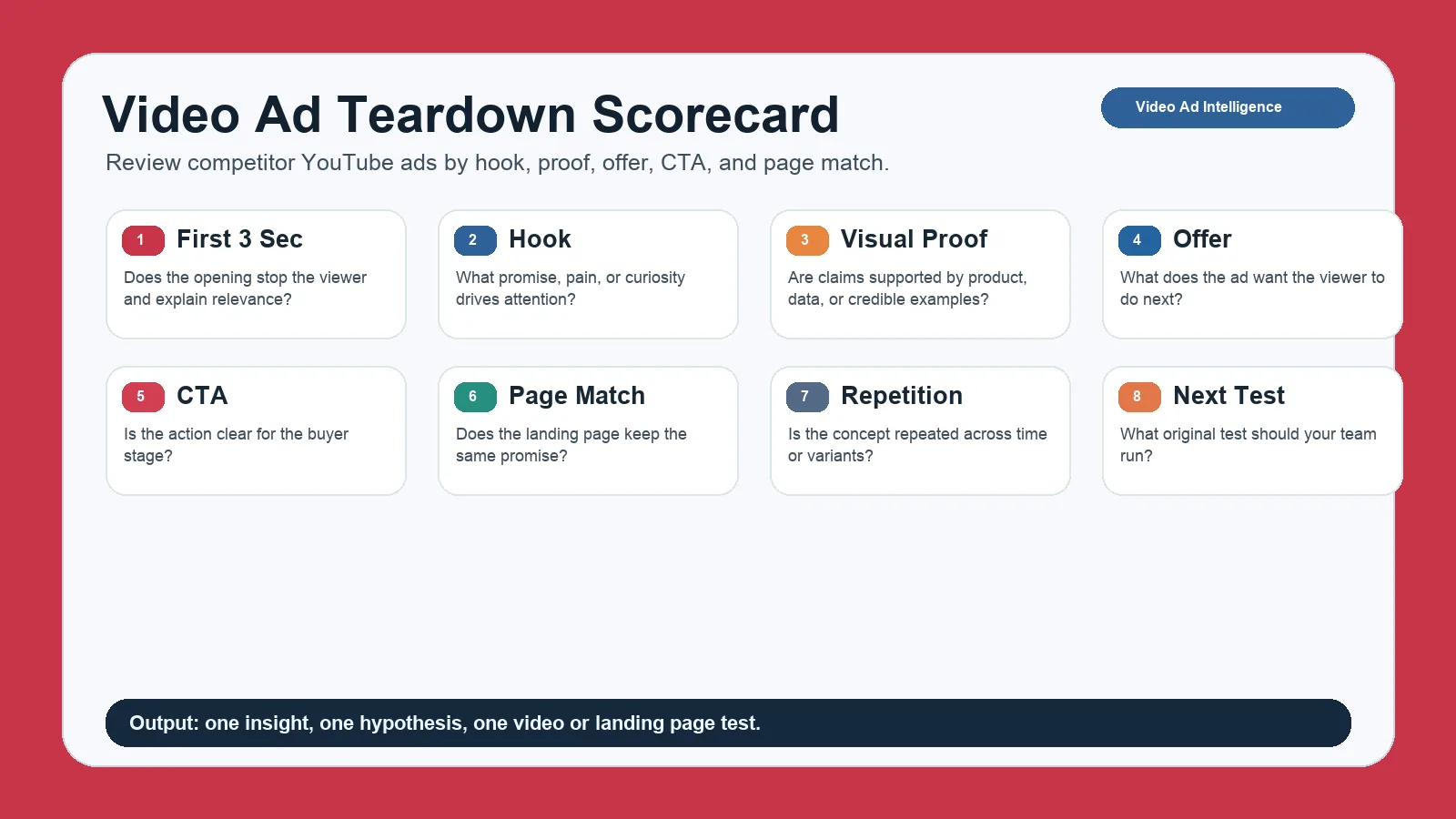
A video teardown scorecard keeps YouTube competitor research focused on hooks, proof, CTA, and repeatable tests.
| Component | Question |
|---|---|
| First three seconds | Does the opening stop the viewer and explain relevance? |
| Hook | What promise, pain, curiosity, or contrast drives attention? |
| Visual proof | Does the ad show product, data, result, testimonial, or example? |
| Offer | What is the advertiser asking the viewer to do? |
| CTA | Is the next action clear and aligned with buyer stage? |
| Landing-page match | Does the destination keep the same promise as the video? |
| Repetition | Is the concept repeated across time, variants, or markets? |
| Next test | What original test should your team run? |
This scorecard prevents shallow analysis. "The ad looks good" is not useful. "The competitor opens with a fast product demo, then supports the claim with a customer metric, then sends viewers to a matching report page" is useful.
How to Spy on YouTube Ads Without Overclaiming
Many teams search for "how to spy on YouTube ads" and expect full visibility. The safer answer is: use public tools and repeated observation to understand visible patterns, but do not pretend you can see private account data.
Use these evidence levels:
| Confidence | Evidence pattern |
|---|---|
| Low | One video ad example with no landing-page context |
| Medium | Multiple examples from the same advertiser, same offer, or same format |
| High | Repeated video concept, consistent landing page, matching search or display signals, and several weeks of visibility |
Google's video campaigns help explains how video campaigns can support goals such as awareness, consideration, and action. That context helps you classify intent, but it still does not reveal competitor targeting or performance.
Paid Video Ad Spy Tool Features
A paid video ad spy tool becomes useful when manual research is too slow.
Look for these capabilities:
| Feature | Why it matters |
|---|---|
| Advertiser search | Track known competitors quickly |
| Video preview and saving | Build a reviewable swipe file |
| Date and country filters | Separate current campaigns from old examples |
| Landing-page capture | Connect video promise to conversion path |
| Similar creative clustering | Identify patterns instead of one-off videos |
| Alerts | Catch new competitor video ads faster |
| Team tagging | Organize examples by hook, offer, proof, format, and priority |
| Export | Move insights into creative briefs and reports |
If a tool only collects videos but does not help you analyze hooks, offers, pages, and repeated patterns, it is not enough for growth work. You need a workflow, not just a database.
For broader options, read best ad spy tools. For recurring competitive evidence, use AdMapix reports.
Analyze the Landing Page, Not Just the Video
Many teams stop at the video. That misses the conversion path.
After you find a competitor YouTube ad, inspect the landing page:
| Page element | Question |
|---|---|
| Headline | Does it repeat the video promise? |
| Above-the-fold proof | Is there evidence before the CTA? |
| CTA | Does it match the ad's buyer stage? |
| Offer | Is the offer specific and low friction? |
| Objection handling | Does the page answer risk, time, cost, and trust questions? |
| Mobile experience | Does the page work after a mobile YouTube click? |
If a competitor video promises "find competitor ads in minutes" but sends users to a generic homepage, that is a gap. If the video and landing page both lead with the same outcome, proof, and CTA, that is a stronger pattern.
Build a Weekly YouTube Ad Tracker
Use a simple tracker. Too many fields will slow the team down.
| Field | Example |
|---|---|
| Date | 2026-04-17 |
| Competitor | Brand A |
| Source | Google Ads Transparency Center |
| Video angle | Product demo with benchmark proof |
| First three seconds | Screen recording plus outcome claim |
| Offer | Free report |
| CTA | Download report |
| Landing page | Dedicated report page |
| Confidence | Medium |
| Next action | Test benchmark-led video intro |
Review the tracker weekly. Look for new angles, repeated offers, retired creatives, and stronger landing-page alignment. The goal is not to collect every YouTube ad. The goal is to identify what changed and what your team should test.
Common Mistakes
| Mistake | Better approach |
|---|---|
| Calling one video a winning ad | Wait for repetition or supporting evidence |
| Ignoring the first three seconds | Score the opening separately |
| Saving videos without landing pages | Capture the full path |
| Copying competitor structure | Extract the pattern and rebuild it with your own proof |
| Assuming visibility equals spend | Use confidence labels |
| Ignoring format and buyer stage | Classify awareness, consideration, or action intent |
| Tracking too many details | Keep a tracker your team will actually maintain |
FAQ
What is a YouTube ads spy tool?
A YouTube ads spy tool helps marketers find, save, and analyze competitor video ads, including hooks, offers, CTAs, landing pages, and repeated creative patterns.
How do I spy on YouTube ads?
Start with the Google Ads Transparency Center, search competitor advertisers, capture video examples and landing pages, then track the same competitors weekly. Paid tools can add filters, alerts, history, and team workflows.
Can I see competitor YouTube ad spend?
Usually no. Public video ad examples do not reveal exact spend, bids, targeting, conversion rate, or ROAS. Treat spend conclusions as directional unless you have verified account-side data.
Can I download competitor YouTube ads?
You may be able to save references, screenshots, notes, or public URLs depending on the source and platform rules. Do not bypass technical restrictions or reuse competitor creative assets.
What should I analyze in YouTube competitor ads?
Analyze the first three seconds, hook, visual proof, product demo, offer, CTA, video length, landing-page match, repetition, and next test.
Are YouTube competitor ads enough for strategy?
No. Use them as one signal. Combine video ad research with search, display, social, landing-page, and reporting data before making major budget or creative decisions.
Conclusion
A YouTube ads spy tool is useful when it helps you turn visible video examples into better creative tests. Study the first three seconds, score the hook, inspect proof and CTA, check the landing page, and track repetition over time.
If you need a recurring view of competitor video ads across channels, start with AdMapix reports. If your team needs continuous ad intelligence, review pricing.
See what competitors are really running
Search 6M+ ad creatives, landing pages, and weekly spend across 200+ countries. No credit card, no commitment.
Related Articles
Cross-Channel Ad Attribution in 2026: A Practical Guide for Performance Teams
A practical cross-channel ad attribution guide for performance teams: how to compare ROAS across platforms when every platform claims credit differently, build incrementality testing into your workflow, and make budget decisions without perfect data.
Ad Budget Optimization Framework: How to Allocate Paid Media Budget in 2026
A practical ad budget optimization framework for 2026: how to split budget across channels, campaigns, and regions using competitive signals, performance data, and marginal ROAS analysis — not gut feel.
AI Ad Creative Tools in 2026: What Actually Works for Paid Media Teams
A practical guide to AI ad creative tools in 2026: what each tool category actually does, how to integrate AI generation with competitive intelligence, and a workflow that produces testable ad variants instead of generic output.