
Facebook Ads Spy Tool: Free Methods vs Paid Platforms (2026)
How to spy on competitors' Facebook and Instagram ads in 2026: the free Meta Ads Library workflow, when it stops being enough, a comparison of paid Facebook ad spy tools with September 2026 pricing, what to capture from every ad, and a decision matrix for choosing.
A Facebook ad spy workflow should connect public discovery, creative tagging, landing-page checks, and tests.
By the AdMapix Research Desk - Updated September 7, 2026
Quick answer. You can spy on any advertiser's active Facebook and Instagram ads for free in the Meta Ads Library. You need a paid Facebook ads spy tool only when you want to search across many advertisers at once, filter by format, market and date, keep a dated history, get alerts, or share a tagged swipe file with a team. Below: the free workflow, the point where it breaks, the paid tools compared with prices checked in September 2026, and what to record from every ad you save.
If you want to skip the reading and search indexed Facebook and Meta-labelled creatives by advertiser, market, format and date right now, the AdMapix Facebook ad spy tool is free to start. The rest of this guide explains when that is the right move and when the free library is enough.
What a Facebook Ads Spy Tool Does
A Facebook ad spy tool is useful when it helps your team move from public ad examples to better creative decisions.
| Job | What it should help with |
|---|---|
| Discovery | Find active competitor ads, creative variants, and public examples across many advertisers |
| Organization | Save ads into swipe files by hook, offer, proof, format, and product |
| Analysis | Compare creative patterns, landing pages, CTAs, and repetition |
| Monitoring | Detect new ads, retired ads, and repeated campaign themes |
| Collaboration | Let media buyers, designers, and copywriters review the same evidence |
| Reporting | Turn findings into briefs, reports, and testing backlogs |
The tool is not valuable because it shows a lot of ads. It is valuable if it reduces the time between observation and action.
Facebook Ads Spy Tool vs Facebook Ads Library
The terms are often used interchangeably, but they describe different levels of workflow.
| Option | Best for | Main limitation |
|---|---|---|
| Meta Ads Library | Free public lookup, quick competitor checks, single-advertiser research | One advertiser at a time, manual saving, manual tagging, no history once an ad stops |
| Facebook ads spy tool | Cross-advertiser search, repeatable monitoring, team review, creative tagging, alerts, exports | Cost and vendor fit must be justified; coverage is an index, not the platform |
| Internal creative library | Organizing examples your team has already approved | Does not automatically discover new competitor ads |
Think of Meta Ads Library as the source, a spy tool as the workflow layer, and your internal library as the decision layer. A mature team usually uses all three: public lookup for discovery, paid or internal tooling for organization, and creative reviews for test selection.
If your team downloads or saves video references, keep asset rights clear. Our guide on downloading videos from Meta Ads Library explains practical workflows and legal considerations. The safer default is to save references and analysis, not to reuse competitor creative.
Free Workflow with Meta Ads Library
Start with Meta's official Ads Library help, which explains the basics of finding public ad examples. If you cannot find the entry point, our Facebook Ads Library location guide has the direct URLs.
Use this free workflow:
- Search by competitor brand or Page.
- Filter by country when relevant.
- Review active ads and creative variants.
- Save screenshots, URLs, dates, ad copy, format, CTA, and landing page.
- Group examples by hook, offer, and product.
- Repeat weekly before treating a pattern as important.
The free workflow is enough when you only need a quick competitive check, a few examples for a creative brief, or a lightweight review of one competitor. For the full set of filters and fields, read the complete Facebook Ads Library guide.
When Free Research Becomes Too Slow
Meta Ads Library is useful, but it is not a full team workflow.
| Pain point | Why it matters |
|---|---|
| One advertiser per search | You cannot ask "who in my category is running UGC video this month" |
| Manual saving | Screenshots and links become scattered |
| Limited organization | Hard to tag examples consistently |
| No custom alerts | New competitor ads may be missed |
| No history after an ad stops | Commercial ads disappear from the library when they stop running, so you cannot compare change over time |
| Landing-page gaps | Ad examples are separated from funnel analysis |
| Team review friction | Creative and media teams may review different evidence |
| Reporting overhead | Weekly competitor updates become manual work |
This is where a paid Facebook ads spy tool can help. The value is not secrecy. The value is speed, repeatability, and team actionability.
Facebook Ad Spy Tools Compared (Prices Checked September 2026)
Every tool below indexes public ads; none of them can show a competitor's private spend, targeting or ROAS. Prices are the vendor's advertised monthly figures at the time of checking and change often; confirm on the vendor page before buying.
| Tool | Entry price | Facebook / Instagram coverage | Best for | Watch out for |
|---|---|---|---|---|
| Meta Ads Library | Free | Official, every active ad, all markets | One-advertiser checks, compliance, verifying what a tool shows you | No cross-advertiser search, no history for stopped commercial ads |
| AdMapix | Starter $19.90/month; free to start | Indexed Facebook and Meta-labelled creatives filterable by advertiser, market, format and date, alongside TikTok and Google records and app rankings | Mobile app and game UA teams, creative researchers who need dated cross-advertiser evidence | Coverage is an index, not the full platform; absence from results does not mean an ad never ran |
| BigSpy | Free plan; Pro $149/month | Multi-platform database including Facebook; free plan advertises a daily query cap | Broad discovery on a budget | Free tier limits; confirm trial and account conditions |
| AdSpy | $149/month | Facebook and Instagram focus with affiliate-oriented fields (ad text, advertiser, URL, comments, affiliate network) | Affiliate and e-commerce media buyers | Facebook-only; verify the structured fields against real advertisers |
| Foreplay | Basic $59/month; Workflow $175/month | Saving, tagging and briefing on top of the Meta library; Workflow tier adds brand tracking | Creative teams who mainly need a swipe file and brief workflow | Basic tier does not include tracking; annual pricing and extra seats differ |
Pricing sources: vendor pricing pages reviewed on 2026-09-05 and 2026-09-07. For a wider comparison that also covers TikTok, YouTube, native and PPC tools, see best ad spy tools.
Paid Facebook Ad Spy Tool Advantages
Paid tools can be useful when your team needs recurring research.
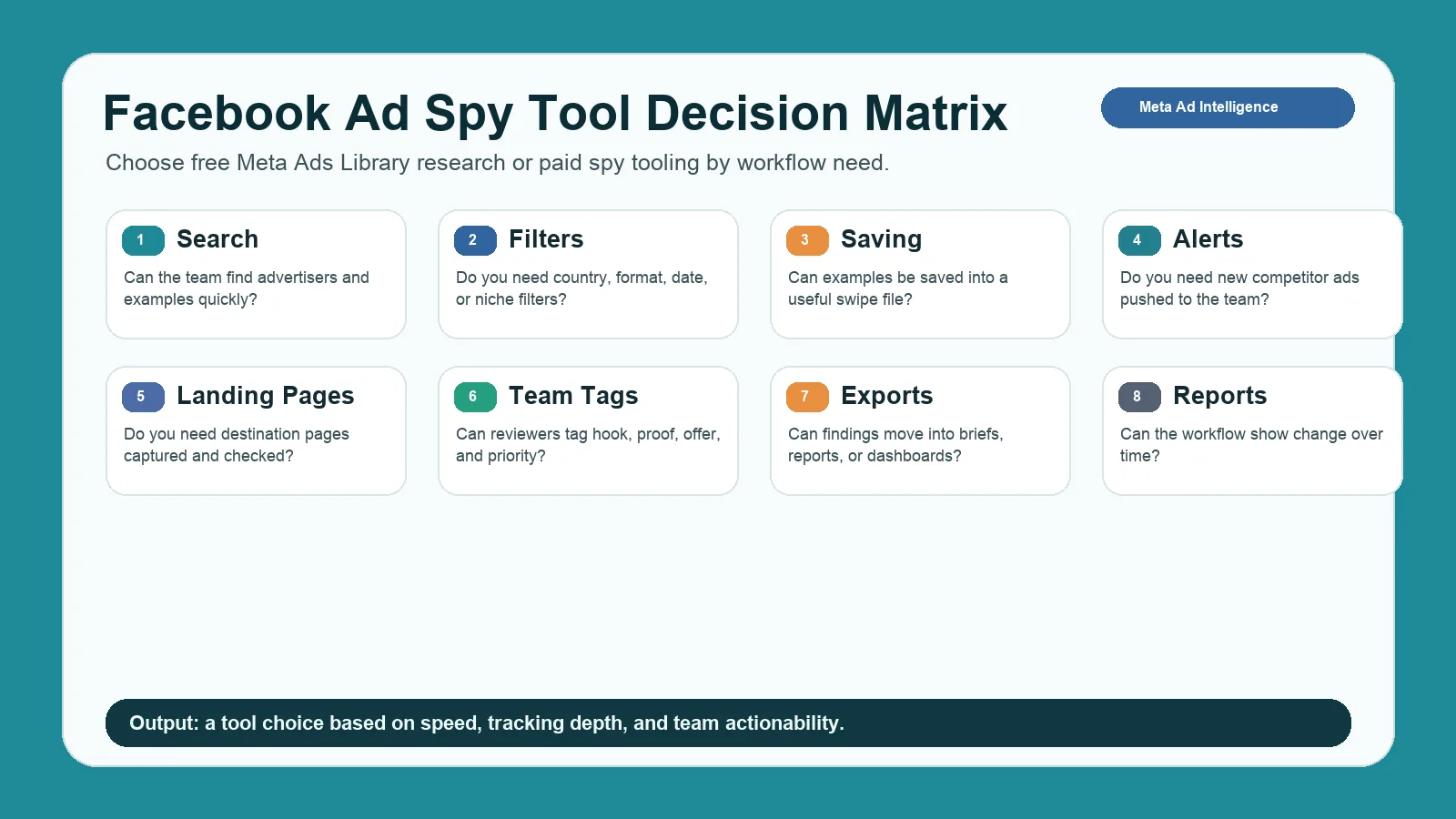
A decision matrix helps teams choose between free Meta Ads Library research and paid spy platforms.
| Feature | Why it helps |
|---|---|
| Cross-advertiser search | Ask category-level questions instead of checking one Page at a time |
| Saved swipe files | Keeps examples organized and searchable |
| Tags and folders | Helps classify hook, offer, format, angle, and funnel |
| Alerts | Shows when competitors launch new ads |
| Dated history | Keeps first-seen and last-seen dates after the ad leaves the official library |
| Landing-page capture | Connects creative promise to conversion path |
| Video saving workflow | Helps review video hooks without losing context |
| Team comments | Speeds up creative and media feedback |
| Exports | Moves findings into briefs, decks, and reports |
| Cross-platform context | Compares Meta ads with TikTok, Google, YouTube, display, or native |
If you only check competitors once a month, a paid tool may be unnecessary. If you run weekly creative reviews, monitor many Pages, or build client reports, a paid workflow can save hours.
Feature Checklist Before You Pay
Before buying a Facebook ad spy tool, score the workflow against the way your team actually works.
| Feature | Ask this before buying |
|---|---|
| Search coverage | Can you find the competitors, Pages, and countries that matter? |
| Creative formats | Does the tool handle video, image, carousel, story, reel, and collection examples? |
| Saving workflow | Can the team save examples without messy screenshots? |
| Tags | Can you tag hook, offer, proof, CTA, funnel, and priority? |
| Landing pages | Does the workflow preserve destination URLs and page snapshots? |
| Alerts | Can the team get notified when a competitor launches new ads? |
| Collaboration | Can creative, media, and strategy owners comment in one place? |
| Reporting | Can you turn findings into weekly reports or client updates? |
| Cross-channel context | Can Meta examples be compared with TikTok, YouTube, Google, display, or native ads? |
| Honesty about estimates | Are impressions, spend or "winning" labels clearly marked as modeled rather than platform-reported? |
This checklist prevents a common buying mistake: paying for a large ad database when the real bottleneck is review, tagging, and action. If the team cannot turn examples into briefs and tests, the tool will not improve performance.
What to Capture from Facebook Competitor Ads
When you save Facebook competitor ads, capture more than the image or video.
| Field | What to record |
|---|---|
| Page or advertiser | Brand, Page, and domain |
| Date | When the ad was observed, and first-seen date if the tool provides one |
| Country | Market context |
| Format | Image, video, carousel, collection, reel, story, or unknown |
| Hook | First line, first frame, or attention angle |
| Offer | Trial, discount, report, demo, product, app install |
| Proof | Testimonial, reviews, metrics, UGC, demo, before-after |
| CTA | Shop now, learn more, sign up, download, book demo |
| Landing page | URL, headline, proof, form, checkout, pricing |
| Repetition | One-off, repeated, variant group, retired |
| Next action | Monitor, test, reject, brief, or investigate |
The landing page is critical. Facebook ad spy work is weak if it only saves creative. Strong research connects the ad promise to the page that receives the click.
Creative Teardown Framework
Use a consistent teardown framework.
| Component | Question |
|---|---|
| Hook | What stops the scroll? |
| Format | Why does the format fit the message? |
| Offer | What is the user being asked to do? |
| Proof | Why should the user believe the claim? |
| Audience clue | Who is this ad likely speaking to? |
| Friction reducer | What objection does the ad reduce? |
| CTA | Is the next step clear? |
| Page match | Does the landing page continue the same promise? |
| Test idea | What original test can your team run? |
This protects your team from copying. You are not looking for a headline to steal. You are looking for a pattern to test with your own proof and positioning.
Free vs Paid Scenarios
Use these scenarios to decide quickly.
| Scenario | Recommended workflow |
|---|---|
| Founder wants to see what three competitors are running | Free Meta Ads Library search |
| Designer needs ten examples for a one-off brief | Free research plus a small swipe file |
| Growth team reviews competitor ads every Friday | Paid tool or structured internal tracker |
| Agency manages many client categories | Paid tool with folders, exports, and reports |
| Media buyer wants alerts on competitor launches | Paid tool with monitoring |
| Mobile app or game team wants creatives next to category rankings | AdMapix or another tool with app context |
| Brand team worries about copying or compliance | Free or paid workflow with review notes and source links |
| Team wants to compare Meta ads with TikTok and Google | Cross-platform ad intelligence workflow |
This is also where creative ads library discipline matters. A tool may find examples, but your library should preserve only the examples that have a clear learning value.
Meta Ad Library Alternative Decision Matrix
Use this decision framework before paying for a tool.
| If your need is... | Free Meta Ads Library may be enough | Paid tool may be better |
|---|---|---|
| One-off competitor check | Yes | Not necessary |
| Monthly creative inspiration | Usually | Maybe |
| Weekly creative review | Limited | Yes |
| Many competitors or clients | Slow | Yes |
| Alerts for new ads | No | Yes |
| Team tagging and exports | Manual | Yes |
| Landing-page tracking | Manual | Yes |
| History after an ad stops | No | Yes |
| Cross-platform reports | No | Yes |
If you need only public discovery, stay free. If you need repeatable monitoring, team review, and reporting, consider a Meta ad library alternative.
Weekly Tracking Workflow
Keep the tracker simple.
| Field | Example |
|---|---|
| Competitor | Brand A |
| Date | 2026-09-07 |
| Source | Meta Ads Library |
| Format | UGC video |
| Hook | Creator opens with problem statement |
| Offer | Free guide |
| Landing page | Dedicated lead-gen page |
| Confidence | Medium |
| Next test | Test UGC intro with stronger proof |
Pair this with a creative ads library, and use AdMapix reports when you need recurring evidence across competitors and channels.
Common Mistakes
| Mistake | Better approach |
|---|---|
| Saving every ad | Save only examples with a clear pattern or test value |
| Copying competitor creative | Extract the idea and rebuild it with your own proof |
| Ignoring landing pages | Review the full click path |
| Calling one ad a winner | Look for repetition and variants |
| Treating a tool's impression estimate as spend | Estimates are modeled; only the advertiser knows spend and ROAS |
| Choosing tools by database size only | Choose by workflow fit and team actionability |
| Forgetting video context | Capture first frame, hook, caption, and CTA |
FAQ
What is a Facebook ads spy tool?
A Facebook ads spy tool helps marketers find, save, organize, and analyze public competitor Meta ads, including creative hooks, offers, CTAs, landing pages, and repeated patterns. Unlike the official library, it searches across many advertisers at once and keeps a dated history.
How do I spy on competitors' Facebook ads for free?
Open the Meta Ads Library, choose the country, search the competitor's Page name, and review the active ads. That covers one advertiser at a time with no saving or alerts. When you need category-wide search or history, move to a spy tool.
Is Meta Ads Library enough?
Meta Ads Library is enough for quick checks and manual research. A paid tool is more useful when you need saved examples, alerts, tagging, landing-page capture, exports, and recurring reports.
What is the best Facebook ad spy tool?
The best Facebook ad spy tool depends on your workflow. Creative teams need swipe files and tagging. Media teams need alerts and monitoring. Agencies need exports and reports. App and game UA teams need creatives next to app rankings. The comparison table above maps each tool to those jobs.
Is an fb ad spy tool different from a Facebook ads spy tool?
Usually no. "fb ad spy tool" is a shorter search phrase for the same workflow: finding public Meta/Facebook ads, organizing examples, and turning patterns into tests.
Can I see competitor Facebook ad spend?
Usually no. Public ad examples do not reveal exact spend, bids, targeting, conversion rate, or ROAS. Treat spend estimates as directional unless verified by account-side data.
Is Facebook ad spying legal?
Studying public ads is a normal competitive research practice. Avoid private data, platform abuse, misleading claims, or unauthorized reuse of competitor creative assets.
Conclusion
A Facebook ads spy tool is valuable when it saves time and improves decisions. Start free with Meta Ads Library. Upgrade only when your team needs cross-advertiser search, repeatable monitoring, better organization, landing-page context, alerts, exports, or cross-channel reporting.
If that describes your team, sign in to AdMapix and run your first Facebook competitor query; the Facebook ad spy tool page explains exactly what the index does and does not cover before you start.
Turn these observations into your next creative study
Open the creative library and select samples for your market, network and research question.
Related Articles

YouTube Ads Spy Tool: How to Find Competitor Video Ads
Find competitor YouTube ads with free and paid workflows. Learn what data is visible, how to analyze video hooks, and how to turn examples into creative tests.
Native Ad Spy Tools 2026: Compare Anstrex, AdPlexity, Adbeat & More
Four native ad spy tools (Anstrex, AdPlexity, Adbeat, SpyOver) plus two social/video complements compared by network coverage, landing-page capture, entry price, and best fit, with prices checked on vendor sites in September 2026. Includes a free research workflow, a creative teardown framework, and compliance guardrails.
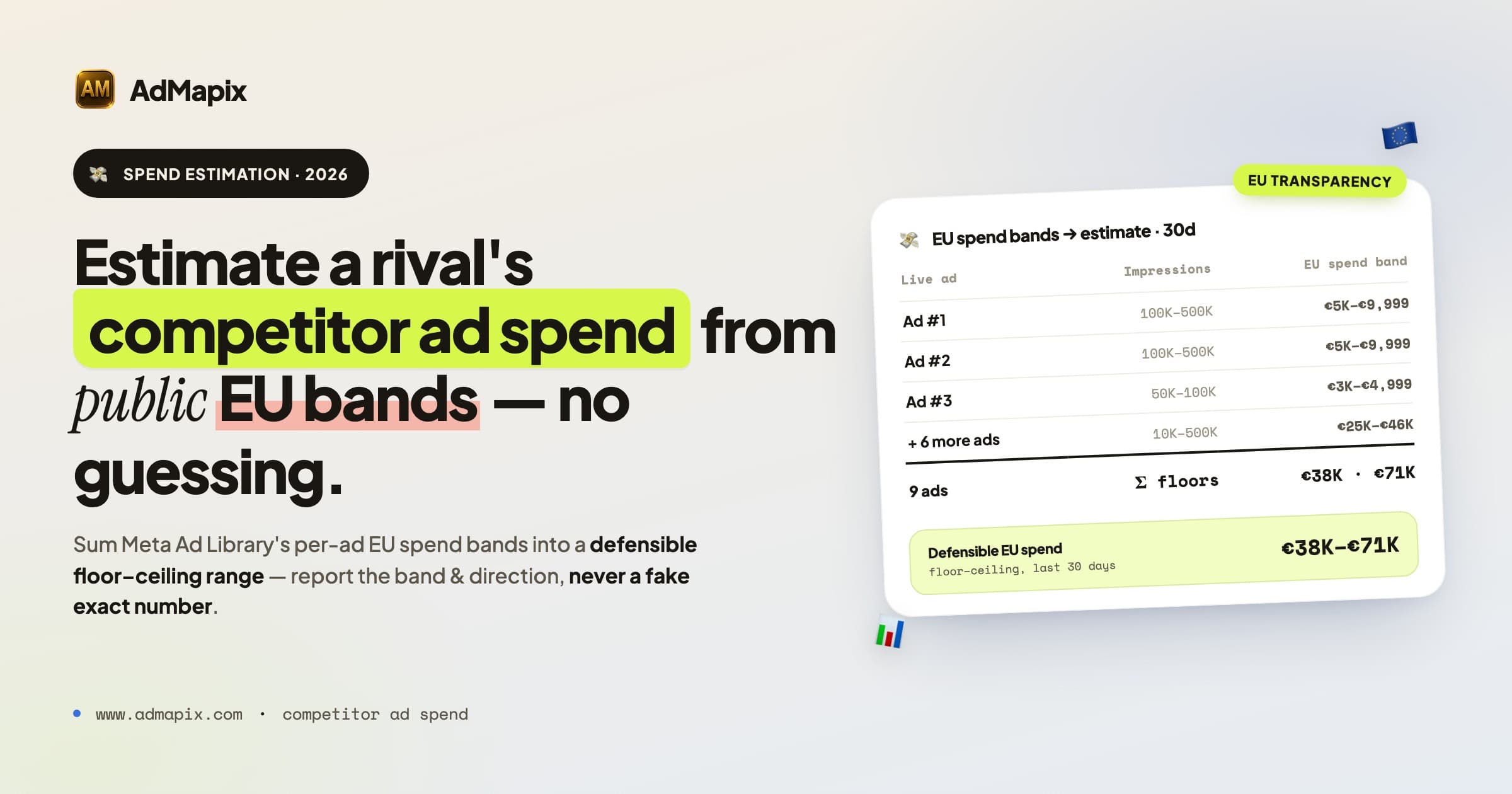
Competitor Ad Spend in 2026: How to Track and Estimate a Rival's Ad Budget
A complete 2026 framework for competitor ad spend: read Meta Ad Library impressions and spend ranges, decode Google Auction Insights, run a weekly ad spend monitoring SOP, score confidence, and turn signals into action.