
Native Ad Spy Tools 2026: Compare Anstrex, AdPlexity, Adbeat & More
Four native ad spy tools (Anstrex, AdPlexity, Adbeat, SpyOver) plus two social/video complements compared by network coverage, landing-page capture, entry price, and best fit, with prices checked on vendor sites in September 2026. Includes a free research workflow, a creative teardown framework, and compliance guardrails.
Reviewed and updated by the AdMapix editorial team on September 7, 2026. Vendor prices and network lists were checked on each vendor's own site during that review.
If you need one answer: the dedicated tools for tracking native ads across Taboola, Outbrain, MGID, Revcontent and their peers are Anstrex Native, AdPlexity Native, Adbeat, and SpyOver. Anstrex Native is the cheapest way in and ships a landing-page ripper. SpyOver is the mid-price option with explicit landing-page downloads. AdPlexity Native is the affiliate and arbitrage favourite. Adbeat is the enterprise-grade choice when you also need display and programmatic coverage. BigSpy and AdMapix are not native ad trackers; they cover the social and video side the native specialists do not.
A native ad spy tool helps you find paid native ad examples across publisher feeds, recommendation widgets, advertorial pages, and content-style placements. The goal is not to copy clickbait. It is to understand which angles, thumbnails, offers, and landing-page paths keep appearing in your market. Native ads sit inside an editorial experience, so context matters: a headline that works in a publisher feed may fail elsewhere, and a curiosity thumbnail can become a compliance risk if it misleads.
This guide compares the real tools first, then covers where to find ads, what to capture, how to score examples, and how to turn findings into original tests. For the wider field beyond native, our best ad spy tools comparison covers social, search, and video tools too.
Native Ad Spy Tools Compared (checked September 2026)
Prices checked September 2026 on each vendor's official site, monthly billing unless noted. Network lists are as documented by the vendor, not tested by us.
| Tool | Native networks covered (per vendor) | Landing-page capture | Entry price | Best for |
|---|---|---|---|---|
| Anstrex Native | 28 networks per vendor FAQ, incl. Taboola, Outbrain, MGID, Revcontent, Yahoo, Content.ad, Dianomi, Plista, ZergNet; 64 to 65 countries | Yes. Rip, edit, and deploy landing pages to AWS or FTP | $79.99/mo per user (Solo); bundles from $139.99/mo | Solo buyers and small affiliate teams wanting the lowest entry price with a ripper |
| AdPlexity Native | Vendor names Outbrain, Taboola, MGID "and many more", plus affiliate networks (ClickBank, BuyGoods, MediaForce) and arbitrage networks (Tonic, Sedo); country count not stated | Partial. Keyword search across landing-page content and a landing-page domains view; full download not stated on pages checked | $249/mo ($208/mo annual) | Affiliate and arbitrage buyers researching offers and landing-page domains |
| Adbeat | 29 native networks listed, incl. Taboola, Outbrain, MGID, Revcontent, Yahoo Gemini Native, Nativo, TripleLift, Sharethrough; plus 145 display networks and exchanges; 35 countries | Listed as a plan feature; per-plan availability not readable on the pricing page. Publisher placement URLs on all plans | $249/mo Standard; $399/mo Advanced; Enterprise by quote; free Basic tier | Brands and agencies needing native plus display in one tool with reports and alerts |
| SpyOver | 11 networks: Outbrain, MGID, Taboola, Yahoo, AdNow, PropellerAds, Revcontent, EngageYa, Adblade, AdsKeeper, Midas; 150 countries | Yes. Search landings by text, URL, title, or outgoing links; one-click and bulk download | $149/mo Professional; $299/mo Corporate; free demo access | Mid-budget buyers wanting the widest country list and explicit landing-page downloads |
| BigSpy | None of Taboola, Outbrain, MGID, or Revcontent listed. Covers Facebook, Instagram, Google/AdMob, YouTube, TikTok, Twitter, Yahoo, Pinterest, Unity | "Landing Page Insights" on Pro; no stated page capture | $0 free plan (Facebook only); $149/mo Pro | Social and app advertisers wanting a broad, cheap creative database; not a native tool |
| AdMapix | Not a native ad tracker. Indexes social and video creatives (Meta, TikTok, YouTube and other channels) beside app rankings and modeled market signals | No. Dated creative records with app context, not page rips | Free to start; $19.90/mo Starter; $49.90/mo Pro; $89.90/mo Enterprise | The social and video side of the same competitors, used alongside a native tool |
Two caveats. None of these tools shows real Taboola or Outbrain spend; the FAQ below explains what they show instead. And vendor network counts drift: Anstrex says 28 in its FAQ and "27+" elsewhere, while its list has 30 names. Confirm on the vendor page before you buy.
Anstrex Native
Anstrex Native is the lowest-priced dedicated native tool here. Its product page lists the major recommendation networks (Taboola, Outbrain, MGID, Revcontent, Yahoo) plus a long tail such as Content.ad, Dianomi, Plista, and ZergNet, across 64 to 65 countries. What sets it apart at this price is the landing-page ripper: save a competitor's page, edit it inline, and deploy to AWS or your own server over FTP.
Limits: no free trial and, per the vendor FAQ, no refunds for dissatisfaction. Pricing is per user. Price: $79.99 per month Solo, $139.99 for Native plus Push, $219.99 for Native plus Push plus Pops, checked September 2026. Our guide to Adbeat alternatives weighs Anstrex's price against Adbeat's display coverage.
AdPlexity Native
AdPlexity Native is built for affiliates and arbitrage buyers. The vendor names Outbrain, Taboola, and MGID as covered networks and adds something the others do not emphasise: detection of affiliate networks (ClickBank, BuyGoods, MediaForce) and search-arbitrage networks (Tonic, Sedo). Keyword search runs across landing-page content as well as ad copy, and a trending view surfaces landing-page domains.
Limits: no full network list or country count on the product page, and no free trial (a demo call instead). Whether complete landing pages can be downloaded was not stated on the pages we checked. Price: $249 per month, or $208 per month on annual billing, checked September 2026.
Adbeat
Adbeat is the broadest tool in the table. It lists 29 native networks by name (including Taboola, Outbrain, MGID, Revcontent, Yahoo Gemini Native, Nativo, TripleLift, and Sharethrough) plus 145 display networks, DSPs, and exchanges, across 35 countries. All plans include publisher placement URLs, keyword search across advertisers, ads, and publishers, and exportable reports. Country filters, alerts, direct-buy placements, and a year of history start on Advanced. Estimated ad spend and three years of history are Enterprise only.
Limits: the highest entry price among the native specialists, with the most useful competitive features one tier up. Price: $249 per month Standard, $399 per month Advanced, Enterprise by quote, with a free Basic tier and a 30-day satisfaction guarantee, checked September 2026. If display matters more than native for you, start with our competitor display ads guide.
SpyOver
SpyOver is a native-only monitoring service with 11 named networks (Outbrain, MGID, Taboola, Yahoo, AdNow, PropellerAds, Revcontent, EngageYa, Adblade, AdsKeeper, Midas) and the widest stated country list of the group at 150. Landing-page handling is explicit: search landings by text, URL, title, or outgoing links, then download ads and landings individually or in bulk.
Limits: fewer networks than Anstrex or Adbeat, so check the list if you buy on a long-tail network. Plans differ mainly by simultaneous sessions (two on Professional, six on Corporate). Price: $149 per month Professional, $299 per month Corporate, with free demo access on a limited database, checked September 2026.
BigSpy
BigSpy is included because it shows up in most "native ad spy tool" searches, not because it is one. Its platform list is Facebook, Instagram, Google and AdMob, YouTube, TikTok, Twitter, Yahoo, Pinterest, and Unity. Taboola, Outbrain, MGID, and Revcontent do not appear on its site. It fits social and app advertisers who want a large, cheap creative database.
Limits: no native coverage and no stated landing-page capture beyond "Landing Page Insights" on Pro. Price: $0 free plan (Facebook only, five queries a day) and $149 per month Pro, taken from the BigSpy homepage plan cards in September 2026 because the vendor's pricing page timed out on every attempt; confirm the Basic and Enterprise tiers there.
AdMapix
AdMapix is not a Taboola or Outbrain tracker, and we would rather say so plainly than have you find out after signing up. It indexes social and video creatives (Meta, TikTok, YouTube, and other channels) beside app store rankings and modeled download and revenue signals. The use case is the other half of a competitor's media mix: when a native tool shows you an advertorial angle, the AdMapix ad spy workspace shows whether the same advertiser runs that angle as a video hook on social, when it started, and how the app trended afterwards.
Limits: no native coverage, no landing-page rips, and modeled metrics are labeled as estimates. Price: free to start, $19.90 per month Starter, $49.90 per month Pro, $89.90 per month Enterprise, checked September 2026.
What a Native Ad Spy Tool Can and Cannot Show
A native ads spy tool shows useful public signals. It cannot show the private settings behind a campaign.
| What you can usually observe | What you must infer |
|---|---|
| Headline, thumbnail, advertiser, and placement context | Whether the creative is profitable |
| Sponsored label or disclosure style | Whether the disclosure meets every legal requirement |
| Advertorial or landing page URL | Conversion rate, funnel economics, or customer quality |
| Repeated creative themes | Exact spend, bid, or network-level budget |
| Angles by vertical or country | Audience targeting and optimization settings |
The strongest research comes from repeated patterns: the same offer, hook, thumbnail style, or advertorial structure across multiple placements or time periods. Treat exact performance claims with caution. Our ad spend tracking guide explains why "estimated spend" columns should be read as ranked signals rather than budgets.
Where Native Ads Appear
Native ads appear where users expect editorial or recommendation content.
| Placement type | What to inspect |
|---|---|
| Publisher recommendation widgets | Headline style, thumbnail, disclosure, destination page |
| In-feed sponsored stories | How the ad blends with article or feed content |
| Content recommendation networks | Repeated topics, verticals, and landing-page types |
| Advertorial pages | Story structure, proof, risk reversal, CTA |
| Mobile app content feeds | First screen, image style, headline length |
| Email newsletter sponsorships | Native-style sponsor copy and destination page |
Google's native ads guide for Ad Manager explains how native assets are assembled to match a publisher environment. The IAB Native Advertising Playbook 2.0 is the industry reference for formats and disclosure expectations.
Free Native Ad Research Workflow
You do not need a paid tool to start. A free workflow can reveal enough patterns for a first testing backlog.
- Choose five to ten relevant publishers or content sites in your category.
- Browse with a clean profile and target geography.
- Capture sponsored units, thumbnails, headlines, labels, and destination URLs.
- Click through to inspect the advertorial or landing page.
- Log the offer, proof, CTA, and whether the page matches the ad promise.
- Revisit the same sources weekly to find repeated or retired angles.
Use this when you are entering a new vertical, checking a small competitor set, or validating whether native advertising is active in your niche at all. Manual research is slow, but you see the native ad beside real editorial content, not as a detached screenshot.
Paid Native Ad Spy Tool Workflow
A paid tool earns its price when you need scale, filtering, historical examples, and faster monitoring. Look for these capabilities:
| Feature | Why it matters |
|---|---|
| Network or publisher coverage | Native ads are fragmented across inventory sources |
| Country and date filters | Angles change by market and time period |
| Landing-page capture | The headline alone rarely explains the campaign |
| Advertiser and domain search | Helps track competitors or affiliate operators |
| Creative history | Shows whether an angle is repeated or short-lived |
| Export or saved lists | Supports team review and creative briefs |
| Similar-ad clustering | Helps identify patterns instead of one-off examples |
A large database is less useful if your team cannot tag, score, and act on the examples. For channel-level tool selection, use how to spy on competitors' ads and platform-by-platform ad spying.
Native Creative Teardown Framework
Do not judge native ad examples by whether they feel clever. Score the components.
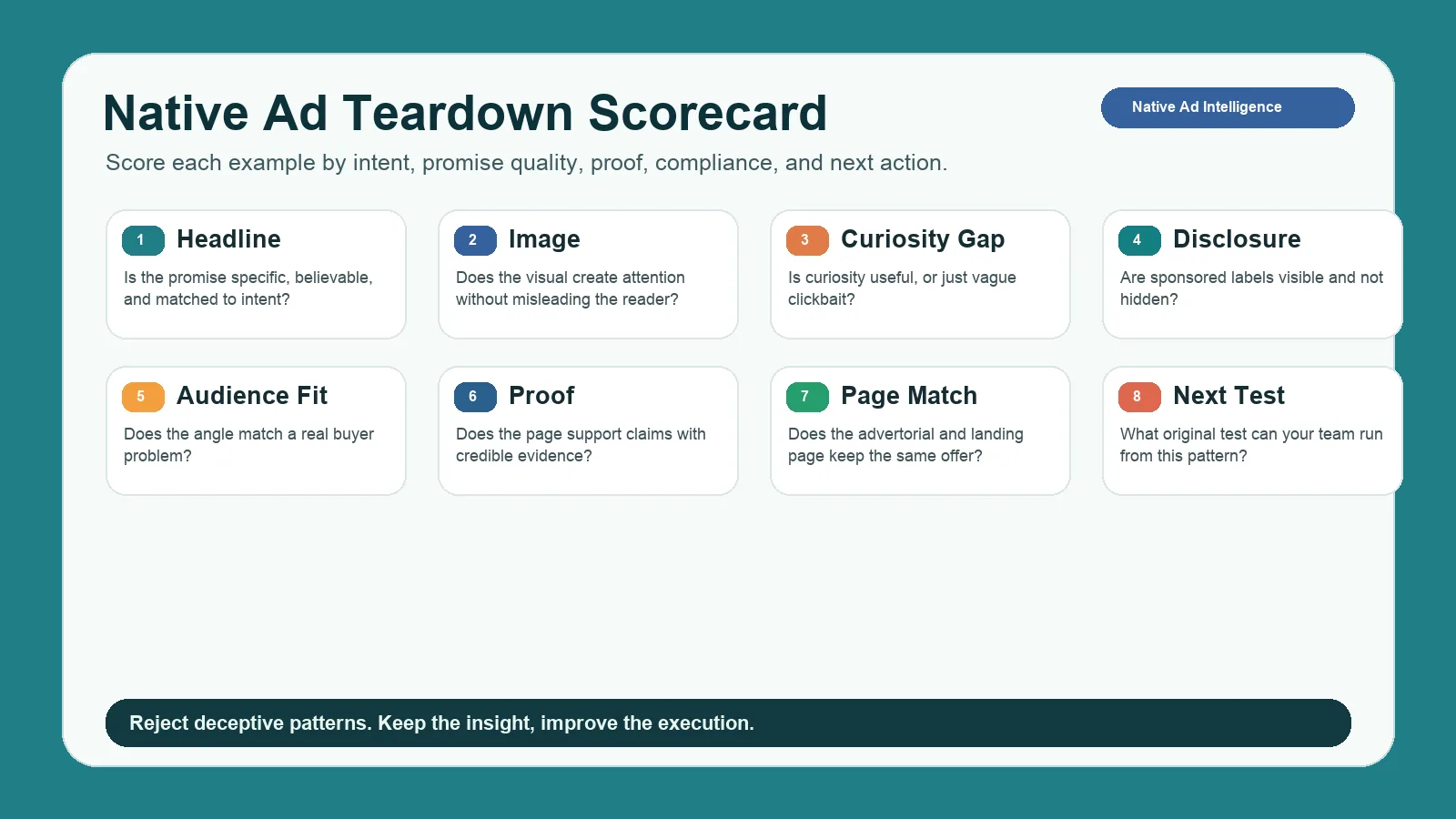
A teardown scorecard separates useful native ad patterns from clickbait and low-quality arbitrage.
| Field | Question |
|---|---|
| Headline | Is the promise specific, believable, and matched to the reader's context? |
| Image | Does the visual create attention without misleading the reader? |
| Curiosity gap | Does the ad create useful curiosity or vague clickbait? |
| Disclosure | Is the sponsored nature clear enough? |
| Audience fit | Does the angle match a real pain, desire, or job-to-be-done? |
| Proof | Does the page support the claim with evidence? |
| Landing-page match | Does the destination keep the same promise as the ad? |
| Risk | Could the ad create legal, brand, or trust problems? |
| Next test | What original test can your team run from this pattern? |
Instead of copying the most aggressive headline, extract the underlying angle and rebuild it with clearer proof, better disclosure, and a more trustworthy page.
How to Analyze Native Ad Examples
When you save native ad examples, capture the full path. The ad unit alone is not enough.
| Component | What to record |
|---|---|
| Placement context | Publisher, page type, location on page, device |
| Sponsored label | Exact disclosure text and visibility |
| Headline | Promise, curiosity gap, specificity |
| Thumbnail | Subject, emotion, product visibility, realism |
| Advertorial | Story angle, proof, objections, CTA |
| Final landing page | Offer, form, pricing, checkout, demo, download |
| Repetition | Seen once, repeated weekly, or across multiple publishers |
| Action | Keep, reject, test, monitor, or research deeper |
The landing page is the most important field. Weak native ads get attention but fail after the click because the page does not support the promise. Strong ones align the advertorial, proof, and final CTA. That is why landing-page capture is a column in the comparison table.
Quality and Compliance Guardrails
Native advertising becomes risky when it hides its commercial nature or exaggerates claims. The U.S. FTC's Native Advertising Guide for Businesses is the reference for disclosure and deception risk. Do not let competitive research push you into misleading design.
| Risk | Safer approach |
|---|---|
| Fake news styling | Use clear sponsor context and accurate presentation |
| Misleading before-after images | Use substantiated visuals and claims |
| Hidden disclosure | Make sponsorship visible and understandable |
| Exaggerated earnings or health claims | Require proof and legal review |
| Aggressive curiosity gap | Keep the promise specific and fulfilled after click |
| Mismatched landing page | Ensure the page delivers the same offer |
A note on landing-page rippers. Anstrex and SpyOver let you download a competitor's page. Use those files to study structure, proof placement, and objection handling. Republishing someone else's copy, images, or testimonials is a copyright and trust problem, not a growth tactic.
How to Turn Native Ad Research into Tests
The output should be a testing backlog, not a folder of screenshots.
| Finding | Hypothesis | Test |
|---|---|---|
| Competitors lead with a problem story | Readers may respond to narrative framing | Test a problem-led advertorial intro |
| Multiple ads use data-backed claims | Proof may reduce skepticism | Add benchmark or case proof above the CTA |
| A thumbnail style repeats across publishers | The visual category may attract attention | Test a compliant image direction with your own assets |
| Advertorials answer objections before the CTA | Buyers need education before conversion | Add objection handling before your demo or trial CTA |
| Competitors use comparison angles | Readers may be evaluating alternatives | Build a comparison-aware landing section |
Assign an owner, channel, asset requirement, and review date to each test. If a finding does not produce an action, it is not yet useful.
How to Choose a Native Ad Spy Tool
Do not pick a tool only because it has many ads. Pick the one that fits your workflow, then check the comparison table for price and network list.
| Use case | What to prioritize | Closest fit |
|---|---|---|
| Creative inspiration on a budget | Search, filters, saved swipe files, similar examples | Anstrex Native |
| Competitor tracking with alerts and reports | Advertiser search, domain tracking, alerts, history | Adbeat Advanced |
| Affiliate or arbitrage research | Network coverage, landing-page capture, geo filters, offer detection | AdPlexity Native, SpyOver |
| Brand-safe growth research | Compliance notes, proof scoring, team review workflow | Adbeat, plus your own scorecard |
| Social and video side of the same competitors | Creative history by advertiser, app context, modeled trends | AdMapix |
If your team works across channels, combine native research with a creative ads library. Native ads should not be isolated from social, search, display, or video learning.
Native Ad Spy Tool vs Creative Ads Library
A native ad spy tool and a creative ads library are related, but they are not the same workflow.
| Workflow | Primary job | Best output |
|---|---|---|
| Native ad spy tool | Find public native ads, placements, advertorials, and landing pages | Competitive evidence and channel-specific patterns |
| Creative ads library | Organize examples across channels for briefing and reuse | Tagged inspiration, creative briefs, and testing ideas |
Use the spy tool to understand native inventory. Use the library to compare native examples with Meta, TikTok, Google, YouTube, display, or your own historical winners. The strongest setup discovers with the spy workflow, then saves only the useful, compliant, high-confidence patterns.
Common Mistakes
| Mistake | Better approach |
|---|---|
| Copying clickbait because it appears often | Extract the angle, then rebuild it with proof and disclosure |
| Ignoring placement context | Record where the ad appeared and what surrounded it |
| Saving the ad but not the landing page | Analyze the complete click path |
| Assuming visibility equals profitability | Look for repetition, but label confidence honestly |
| Buying a social ad tool for native research | Check the vendor's network list for Taboola, Outbrain, MGID, Revcontent before paying |
| Forgetting compliance | Review disclosure, claims, and landing-page accuracy |
FAQ
What is the best native ad spy tool?
There is no single best native ad spy tool, but the shortlist is short. Anstrex Native ($79.99 per month, September 2026) is the cheapest dedicated option and includes a landing-page ripper. SpyOver ($149 per month) covers 150 countries with explicit landing-page downloads. AdPlexity Native ($249 per month) is the affiliate and arbitrage favourite. Adbeat ($249 per month Standard) is the pick when you also need display and programmatic coverage. Match the tool to the use-case table, not to the biggest ad count.
How do you spy on native ads across multiple networks?
Pick a tool whose vendor page names the networks you buy on, then search by advertiser, domain, keyword, and country rather than browsing top ads. Adbeat lists 29 native networks, Anstrex 28, and SpyOver 11, so check the list before subscribing. Save the landing page with every ad, log repetition across publishers and dates, and score each example with the teardown framework above.
Is there a free native ad spy tool?
Not a full one. SpyOver offers free demo access on a limited database, Adbeat has a free Basic tier, and BigSpy's free plan covers Facebook only. None of the dedicated native tools offers a free trial with full data; Anstrex and AdPlexity both say so and offer demo calls instead. The practical free option is the manual workflow above: pick five to ten publishers, browse from the target country, and log every sponsored unit and landing page weekly.
Can a native ad spy tool show Taboola or Outbrain spend?
No. Taboola and Outbrain do not publish advertiser spend, and no spy tool has access to a competitor's account. What you get instead are estimates or proxies: Adbeat shows estimated ad spend on its Enterprise plan, and other tools show ad counts, days running, and publisher counts. Read those as ranked signals of scale, not as budgets. The same limit applies to bids, targeting, and conversion data.
Does AdMapix track Taboola or Outbrain native ads?
No. AdMapix indexes social and video creatives (Meta, TikTok, YouTube, and other channels) alongside app rankings and modeled market signals. Use it beside a native tool to see how the same advertiser runs on social and video, not as a replacement for Anstrex, AdPlexity, Adbeat, or SpyOver.
Conclusion
A native ad spy tool is useful when it helps you understand patterns, not when it tempts you to copy low-quality tactics. Choose from the four dedicated native tools by network list, landing-page capture, and price, then capture the full click path, score the creative, apply the compliance guardrails, and convert the best insight into a test.
When you are ready to see the social and video side of the same competitors, create a free AdMapix account and search their creatives by advertiser, market, and date.
Turn these observations into your next creative study
Open the creative library and select samples for your market, network and research question.
Related Articles
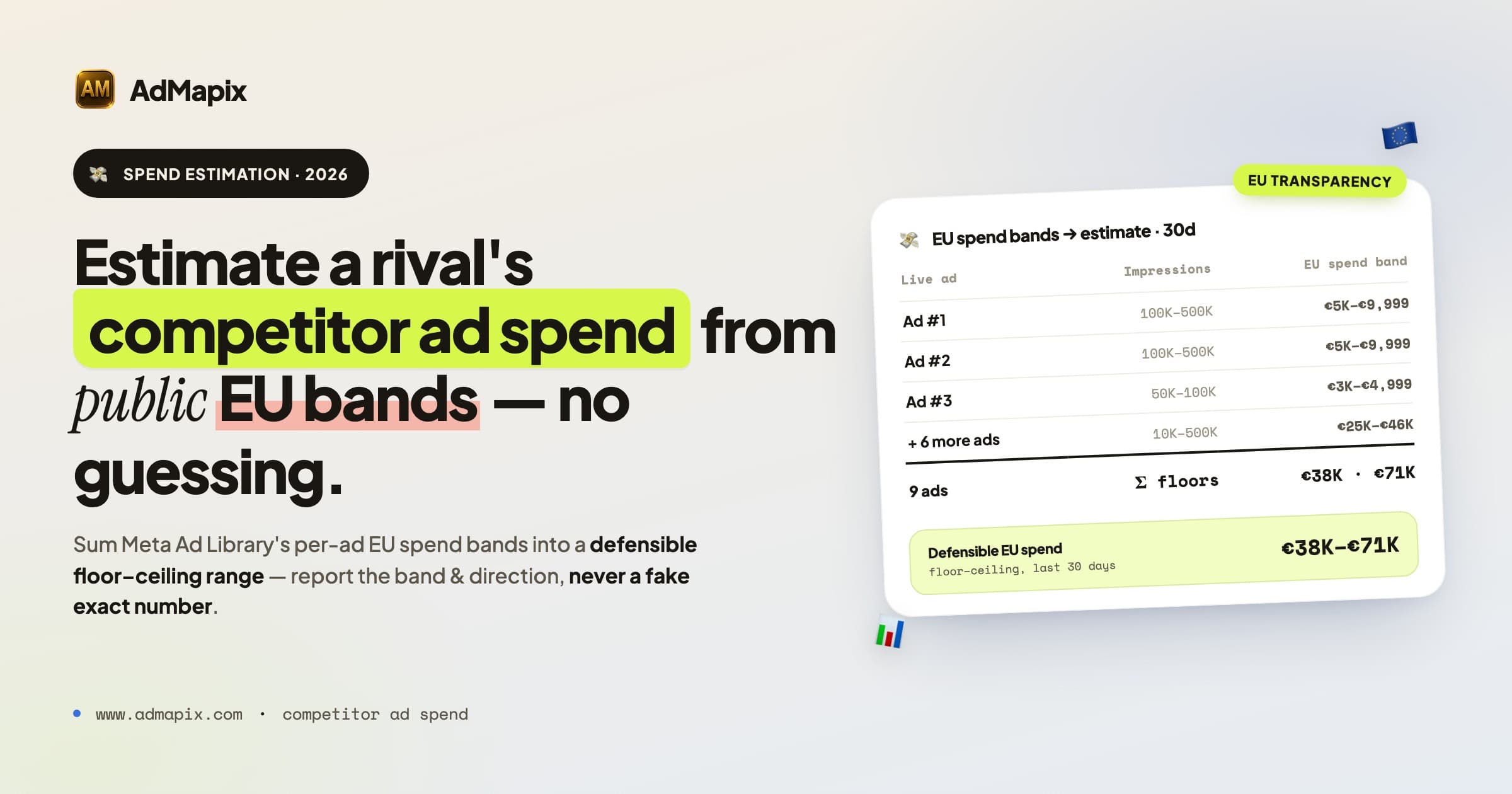
Competitor Ad Spend in 2026: How to Track and Estimate a Rival's Ad Budget
A complete 2026 framework for competitor ad spend: read Meta Ad Library impressions and spend ranges, decode Google Auction Insights, run a weekly ad spend monitoring SOP, score confidence, and turn signals into action.
Competitor Bidding on Brand Keywords in Google Ads: Rules and Response Plan
What to do when competitors bid on your brand keywords in Google Ads: policy limits, legal considerations, defensive campaigns, and monitoring workflows.
Best Ad Intelligence Tools 2026: Compared by Decision, Price and Coverage
Compare the best ad intelligence tools for 2026 by the decision they support, channel coverage, data freshness and entry price (checked September 2026): official libraries, Semrush, Similarweb, Sensor Tower Pathmatics, BigSpy, AdSpy, Minea and AdMapix.