MagicBrief Alternative in 2026: Migration Plan + Foreplay vs Atria vs AdMapix Compared
MagicBrief shuts down July 31, 2026. A complete 2026 migration guide and comparison of MagicBrief alternatives — Foreplay, Atria, Canva Grow, and AdMapix — by what they replace, a migration-risk checklist, and how to rebuild your swipe file and briefs before the deadline.
MagicBrief Alternative in 2026: Migration Plan + Foreplay vs Atria vs AdMapix Compared
By the AdMapix Research Desk — Updated June 21, 2026
Choosing a MagicBrief alternative in 2026 is not a normal buying comparison, because MagicBrief's own site announces that the product shuts down on July 31, 2026 at 8 PM EST. That single fact reorders the entire decision. The first question is no longer "which tool has the biggest ad database" — it is "which of my saved ads, briefs, storyboards, comments, and client folders survive the shutdown, and where do they go." Get that backwards and you can pick a perfectly good replacement while still losing years of accumulated creative evidence on the deadline. This guide treats the move as what it actually is: a migration project with a hard deadline, wrapped around a genuine comparison of the tools you might migrate to.
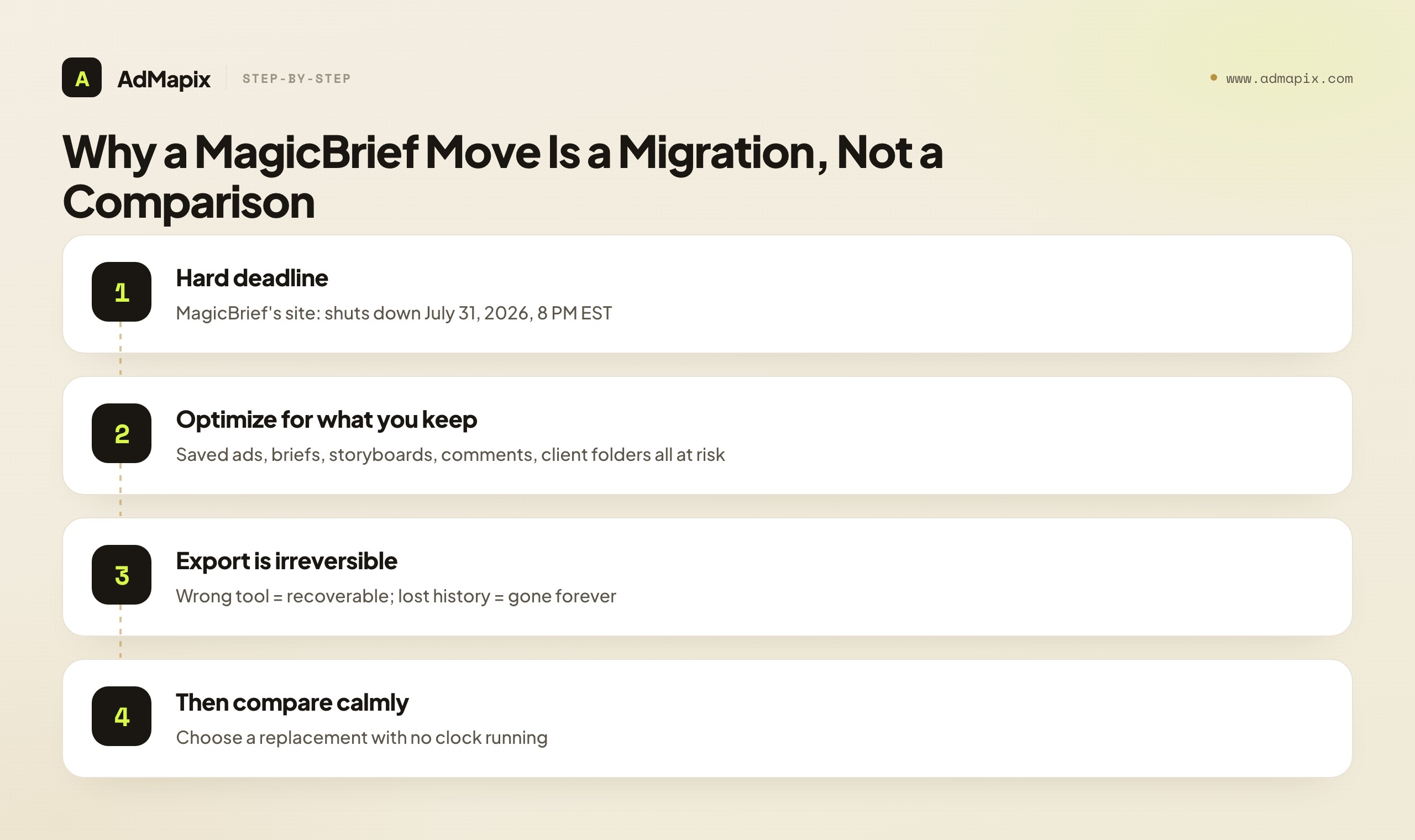
This is the canonical MagicBrief resource, so it covers both questions people are really asking. If you searched "MagicBrief alternative," you want the replacement-and-migration plan. If you searched "MagicBrief vs Foreplay" or "MagicBrief vs Atria," you want the head-to-head — and the honest answer is that MagicBrief did two different jobs that most replacements split, so no single tool is a clean one-to-one swap. We cover the migration-risk checklist (what to export first), the comparison of the leading alternatives — Foreplay, Atria, Canva Grow, and AdMapix — mapped to which half of MagicBrief each one replaces, how to choose by your real bottleneck rather than feature count, and how to rebuild your evidence layer fast before the lights go out. We are honest throughout about where AdMapix fits — the competitor-creative-evidence half — and where it does not — storyboard and brief authoring — because in a migration, recommending the wrong category doesn't just waste money, it can cost you the export window.
TL;DR — Choosing a MagicBrief Alternative
- This is a migration with a hard deadline, not a feature beauty contest. MagicBrief's site states it closes July 31, 2026 at 8 PM EST. Optimize first for what you keep, then for what you adopt.
- Export before you evaluate. Saved ads with source URLs, briefs, storyboards, comments, and client folders are at risk on shutdown. The export is the only irreversible step; tool choice can happen — and even change — afterward.
- MagicBrief bundled two jobs that replacements split: competitor creative discovery and analysis, and brief/storyboard authoring. Decide which half is your bottleneck before you shop.
- Map alternatives to the job they replace. Foreplay = the most direct swipe-file/workflow swap. Atria = AI ad creation and analysis, heavier than a swipe file. Canva Grow = MagicBrief's own suggested path. AdMapix = the cross-network competitor creative evidence layer.
- Public ad data shows what's running, not what's working. Saved competitor ads are testable hypotheses, never proof of ROAS or spend — validate with your own analytics.
- Decide from a real trial. Run one actual client folder end to end through a candidate and measure saved-ad-to-approved-brief time, not database size.
Why This Is a Migration, Not a Comparison
The shutdown date changes the whole shape of the decision. A normal alternative search optimizes for the best tool; a shutdown forces you to optimize for what you keep. MagicBrief's homepage states the product closes on July 31, 2026 at 8 PM EST and points existing users toward next steps, including Canva Grow. Everything that lives only inside MagicBrief — your saved ad library, AI-search history, storyboards, briefs, comment threads, and client folders — is at risk of becoming unreachable on that date.
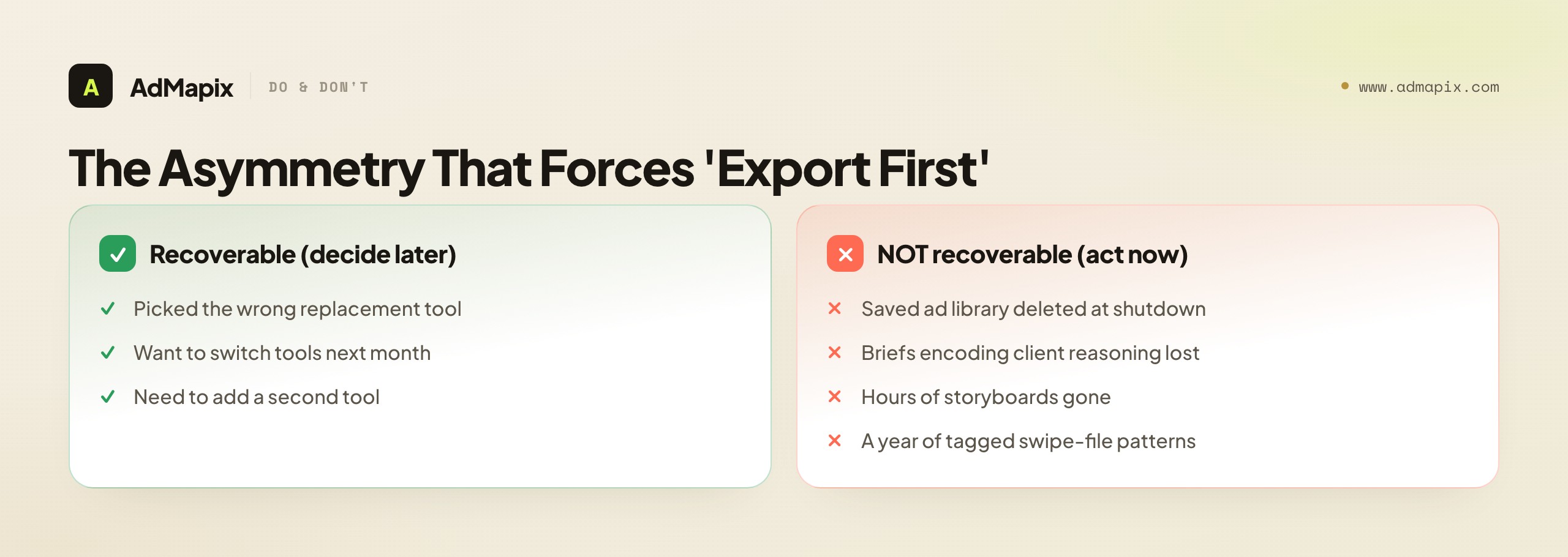
That risk is asymmetric, and that asymmetry is the whole reason to act now. Picking the wrong replacement is recoverable — you can switch tools next month if the first choice disappoints. Losing your creative history is not recoverable. The briefs that encode "this hook worked for that client, here's the reasoning," the storyboards that took hours to build, the tagged swipe file that represents a year of pattern-spotting — none of it comes back after the shutdown. So the correct sequence is forced: export first, evaluate second. Pull saved ads with their source URLs, export or screenshot storyboards and briefs, copy comment history, and document which client owns what. Do that while the product is still live, and the clock stops mattering — you can then choose a replacement calmly, with no deadline pressure distorting the decision.
A second reason this is a migration rather than a comparison: MagicBrief bundled two genuinely different jobs into one product, and almost no replacement does both as cleanly. One job is finding and analyzing competitor creative — the swipe file, the AI search, the discovery feed. The other is authoring — turning saved ads into storyboards and briefs your team and clients act on. When you shop for "a MagicBrief replacement" as if it's one thing, you end up disappointed, because the market split those jobs across different categories of tool. Naming which half is your bottleneck is the move that makes the comparison section below actually useful.
The Migration-Risk Checklist: What to Export First
Start from what breaks at shutdown, then map each item to a replacement responsibility. This table is the order to work in, not just a list — the top rows are the hardest to recreate and the most tied to live work, so they come first.
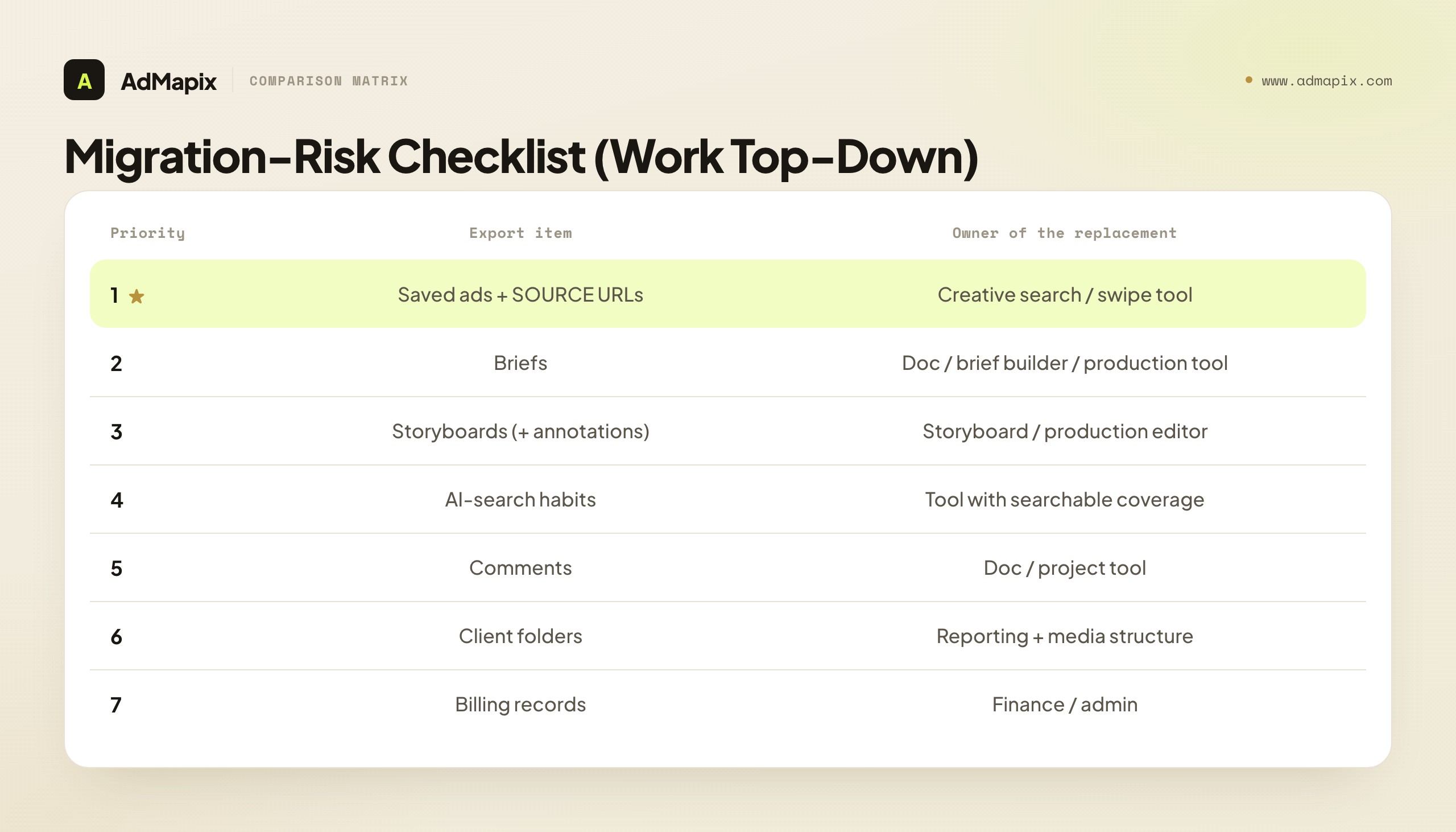
| Priority | Migration item | What to do before July 31, 2026 | Who owns the replacement |
|---|---|---|---|
| 1 | Saved ads + source URLs | Export/screenshot every saved ad with its original link and notes | A creative search/swipe tool that re-finds and re-saves them |
| 2 | Briefs | Export brief text and structure to docs your team controls | A doc, brief builder, or production tool |
| 3 | Storyboards | Export frames and annotations — the hardest to recreate | A dedicated storyboard/production editor |
| 4 | AI-search habits | Write down the queries you actually rerun weekly | A tool with searchable creative coverage |
| 5 | Comments / collaboration | Copy threads tied to specific ads or briefs | A doc or project tool (rarely a 1:1 move) |
| 6 | Client folders | Note which client owns each saved set and report | Reporting + saved-media structure |
| 7 | Billing records | Save invoices; confirm no auto-renew charge after shutdown | Your finance/admin records |
The single most important detail in this entire table: prioritize the source URL over the downloaded file. A downloaded video with no source link is a dead asset — you can look at it, but you can't re-find it, re-verify it, or re-save it into a new tool with its metadata intact. A URL (to the Meta Ad Library, TikTok Creative Center, etc.) lets you re-save the same ad into whatever swipe file you adopt, with its advertiser, dates, and context attached. Files are tombstones; URLs are living references. If you only have time to capture one thing per saved ad, capture the URL.
The practical takeaway from the whole checklist: MagicBrief bundled two jobs that most replacements split, so as you export, mentally sort each item into "competitor discovery/analysis" (saved ads, search habits) or "brief/storyboard authoring" (briefs, storyboards, comments). That sorting is your replacement plan — it tells you which half of the comparison below you most need to get right.
The MagicBrief Alternatives, Mapped to What They Replace
Here is the comparison both "alternative" and "vs" searchers are looking for — but framed the only way that's actually useful during a migration: by which half of MagicBrief each tool replaces. Remember that MagicBrief did two jobs (discovery/analysis and authoring), so read each tool by which job it covers, not by feature count.
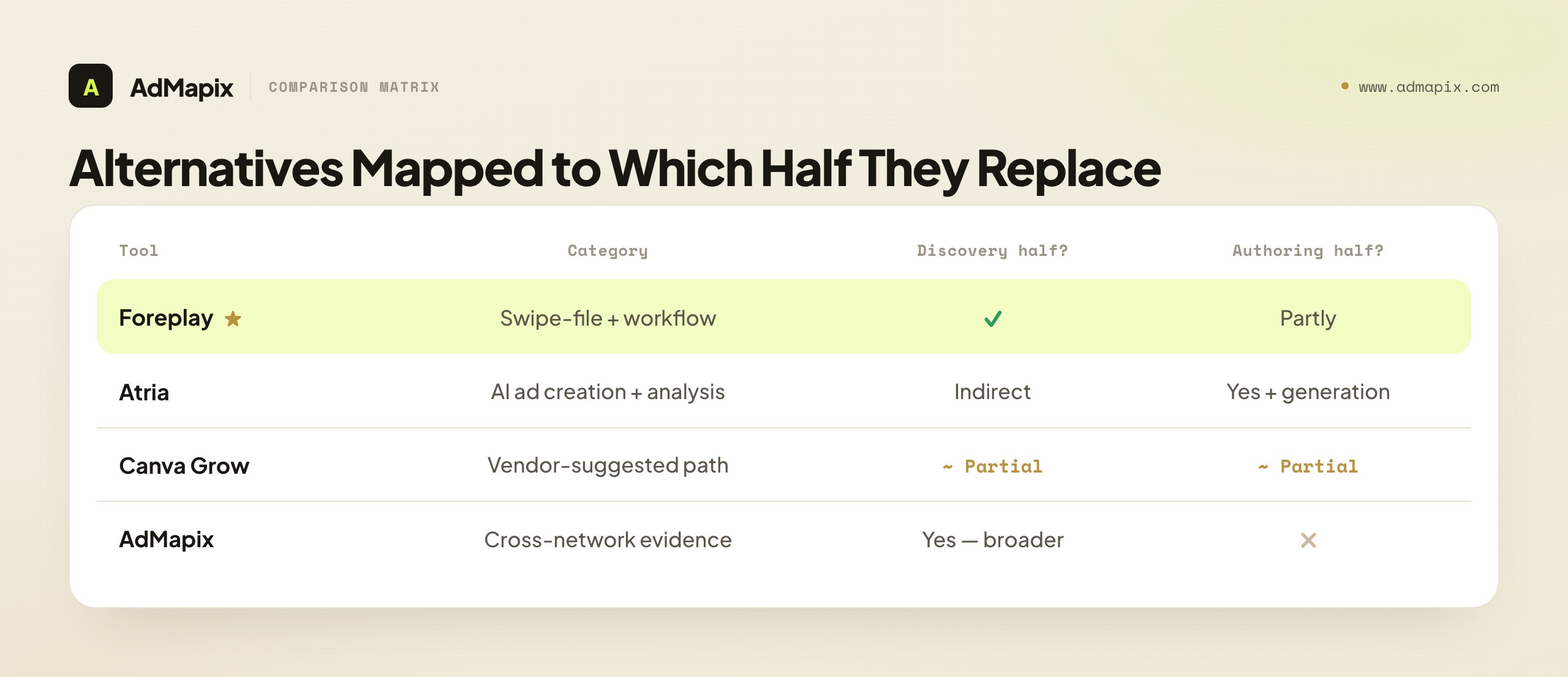
| Tool | Primary category | Replaces the discovery half? | Replaces the authoring half? | Best for |
|---|---|---|---|---|
| Foreplay | Swipe-file + ad workflow | Yes (swipe file, competitor tracking, AI search) | Partly (briefs, reports) | The most direct like-for-like MagicBrief swap |
| Atria | AI ad creation + analysis | Indirect (inspiration feeds ideation) | Yes, and beyond (AI generation, analysis) | Teams whose next bottleneck is producing creative |
| Canva Grow | MagicBrief's own suggested path | Partial | Partial | Existing Canva teams following the official pointer |
| AdMapix | Cross-network creative evidence | Yes — and broader (cross-network search, video analysis) | No (not a storyboard/brief editor) | Teams whose gap is competitor evidence to feed the brief |
Three reads come straight off this table. First, Foreplay is the closest like-for-like swap for teams whose MagicBrief use was the active swipe-file workflow — clip an ad, tag it, board it, search it later, write a brief. Per Foreplay's site, its Chrome extension saves ads from the Meta Ad Library, TikTok Creative Center, TikTok Top Ads, LinkedIn, and more, with tags, status tracking, sharing, landing-page screenshots, and AI search — which maps almost one-to-one onto how MagicBrief teams already work. If your bottleneck is the daily clip-tag-brief loop, Foreplay is the natural first trial.
Second, Atria is a different and heavier category — an AI ad creation and analysis platform spanning insights, inspiration, ideation, ad generation, and reporting. It overlaps MagicBrief's briefing/authoring layer and goes further on generation, but it is not a one-click swipe-file clone. Choose Atria if your post-MagicBrief bottleneck is producing creative — turning ideas into ad variations, analyzing them, repurposing assets — rather than archiving reference ads. If you mainly used MagicBrief as an inspiration library, an AI-generation platform is more tool than that job needs.
Third, AdMapix replaces the competitor-creative-evidence half — cross-network ad search, saved media, video analysis, tagging, and reports — and is not a storyboard or brief editor. It sits beside a workflow tool like Foreplay or a generator like Atria, supplying the evidence that goes into the brief, especially across markets and networks a single swipe file misses. We'll position it honestly in its own section below.
Foreplay: The Most Direct Like-for-Like Swap
For the large share of MagicBrief users whose core use was the swipe file, Foreplay is the closest replacement because it covers the same core jobs and adds an active production layer. The most relevant piece for migrating users is the swipe file itself: Foreplay's Chrome extension clips ads from public sources (Meta Ad Library, TikTok Creative Center and Top Ads, LinkedIn, and more), tags them, tracks status, enables sharing and landing-page screenshots, and offers AI search across the saved set. That is, almost beat for beat, the workflow MagicBrief teams already run.
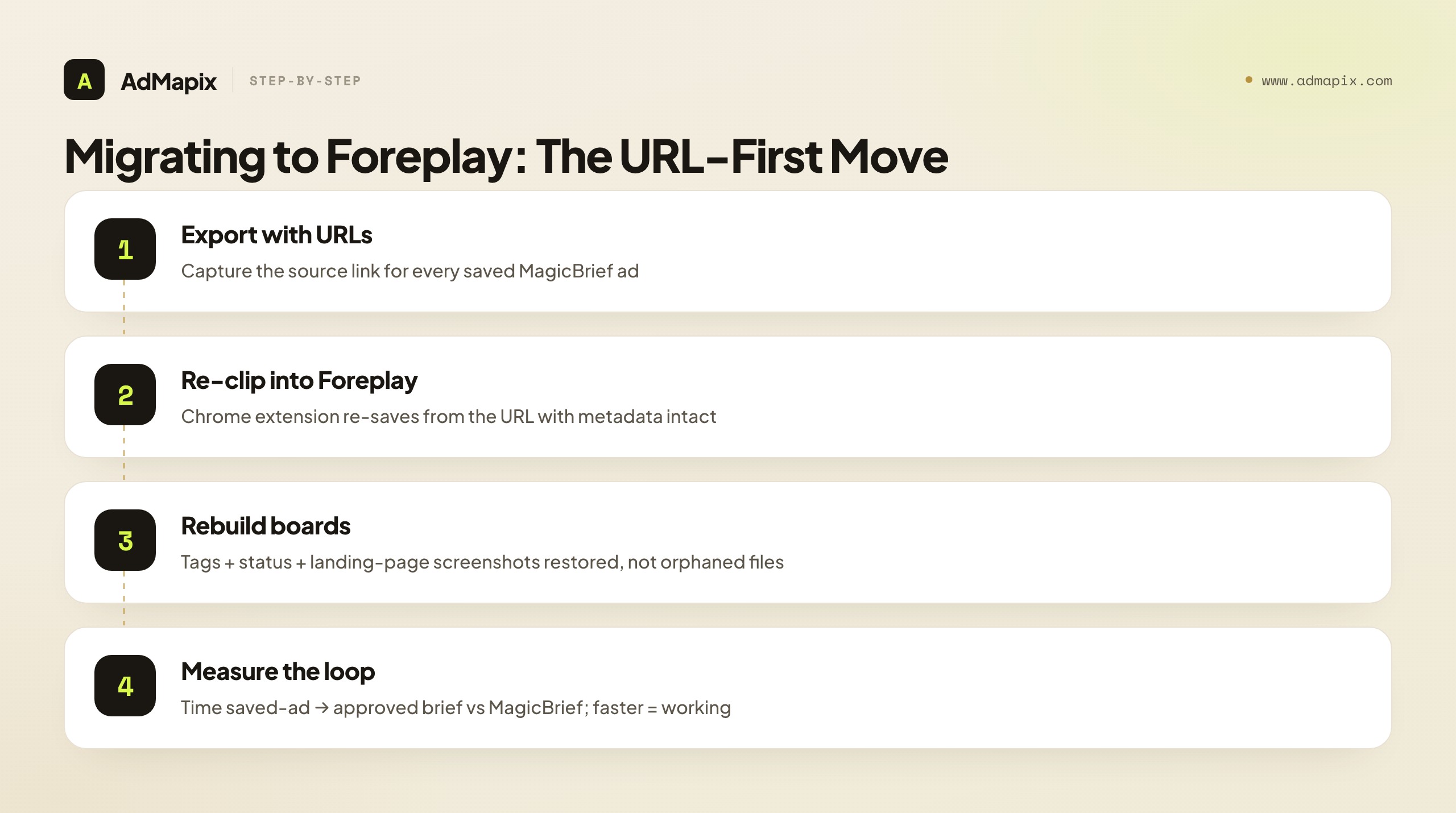
The migration move with Foreplay is concrete. As you export your MagicBrief saved ads with their source URLs (priority 1 on the checklist), you can re-save those same ads into Foreplay's swipe file from the URLs, rebuilding your boards with metadata intact rather than as orphaned files. That URL-first export is exactly why the checklist insists on links over downloads — it's the difference between rebuilding your swipe file in an afternoon and reconstructing it ad-by-ad from screenshots.
Don't buy on the feature list, though. Run one real client or brand folder through Foreplay end to end and measure the single metric that matters in this workflow: time from a saved ad to an approved brief. If that loop is as fast or faster than MagicBrief's was, the migration is working and you can roll it out to the team. If it stalls, the gap tells you what the other tools in this comparison need to cover. One real folder tested properly beats ten demos.
Atria: AI Ad Creation, Not a Swipe-File Clone
Atria answers a different question, and confusing it for a swipe-file replacement is a common migration mistake. Atria positions itself as an AI-powered ad workflow platform spanning insights, inspiration, ideation, ad generation, and reporting — its help center frames the flow as going from ad ideas through performance analysis to asset repurposing. In other words, Atria leans toward producing and analyzing creative, not merely collecting reference ads.
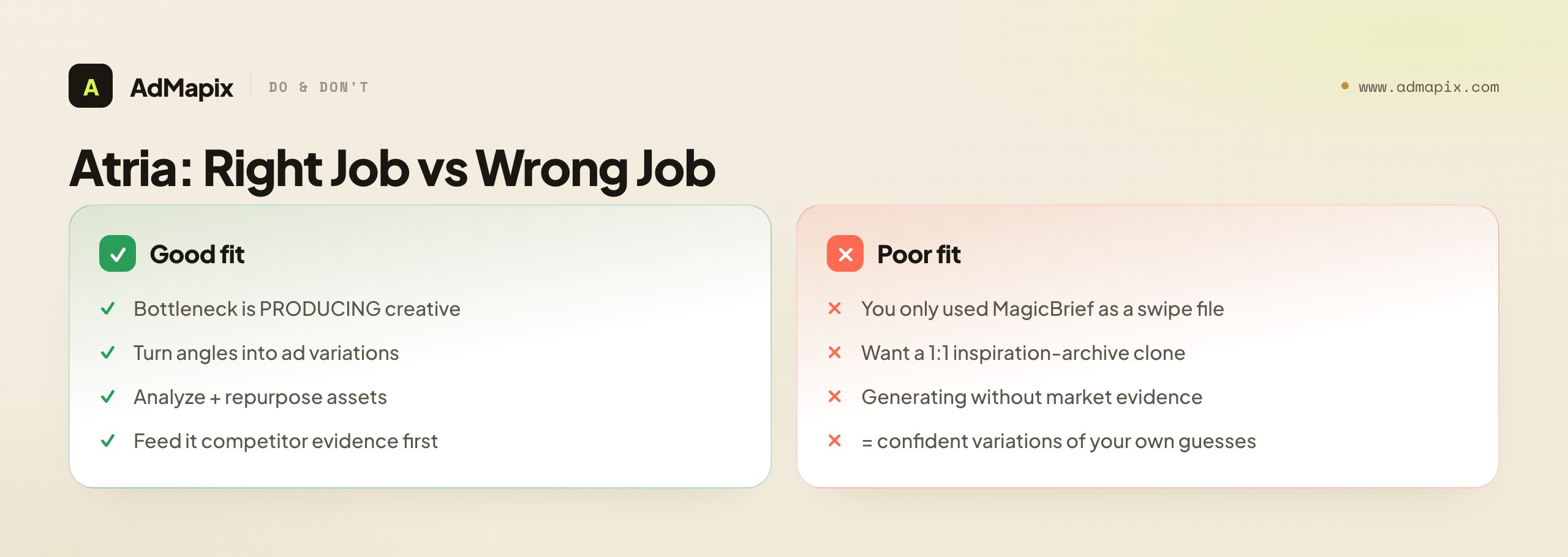
That makes the fit conditional on which MagicBrief job you cared about. Choose Atria if your bottleneck after MagicBrief is creative production — turning competitor-informed angles into ad variations, analyzing how they perform, and repurposing winning assets. That is the workflow Atria advertises, and it goes further than MagicBrief did on the generation side. Be more cautious if you mainly used MagicBrief as an inspiration archive. An AI-generation platform is a heavier tool than a swipe file, and the value of saved-reference browsing may show up differently inside it — you may be buying a production engine to solve a discovery problem.
There's also a sequencing insight that matters here: AI generation is only as good as the evidence you feed it. Generating new ads without first seeing what competitors actually run produces polished variations of your own assumptions — confident, on-brand, and untethered from what's working in the market. So even teams that adopt Atria for production usually want a competitor-evidence layer in front of it, supplying the live, cross-network creative that turns a vague "make better video ads" brief into a specific, testable angle. That front-of-funnel evidence role is a different job from generation, which is exactly why the two-tool pattern (evidence in front, generator behind) is common.
Canva Grow and the "Official Path"
MagicBrief's own shutdown notice points existing users toward Canva Grow, so it deserves an honest mention as the vendor-suggested path. For teams already living inside the Canva ecosystem, following the official pointer can reduce friction — the migration lands somewhere with an existing relationship and design tooling attached. That convenience is real and worth weighing.
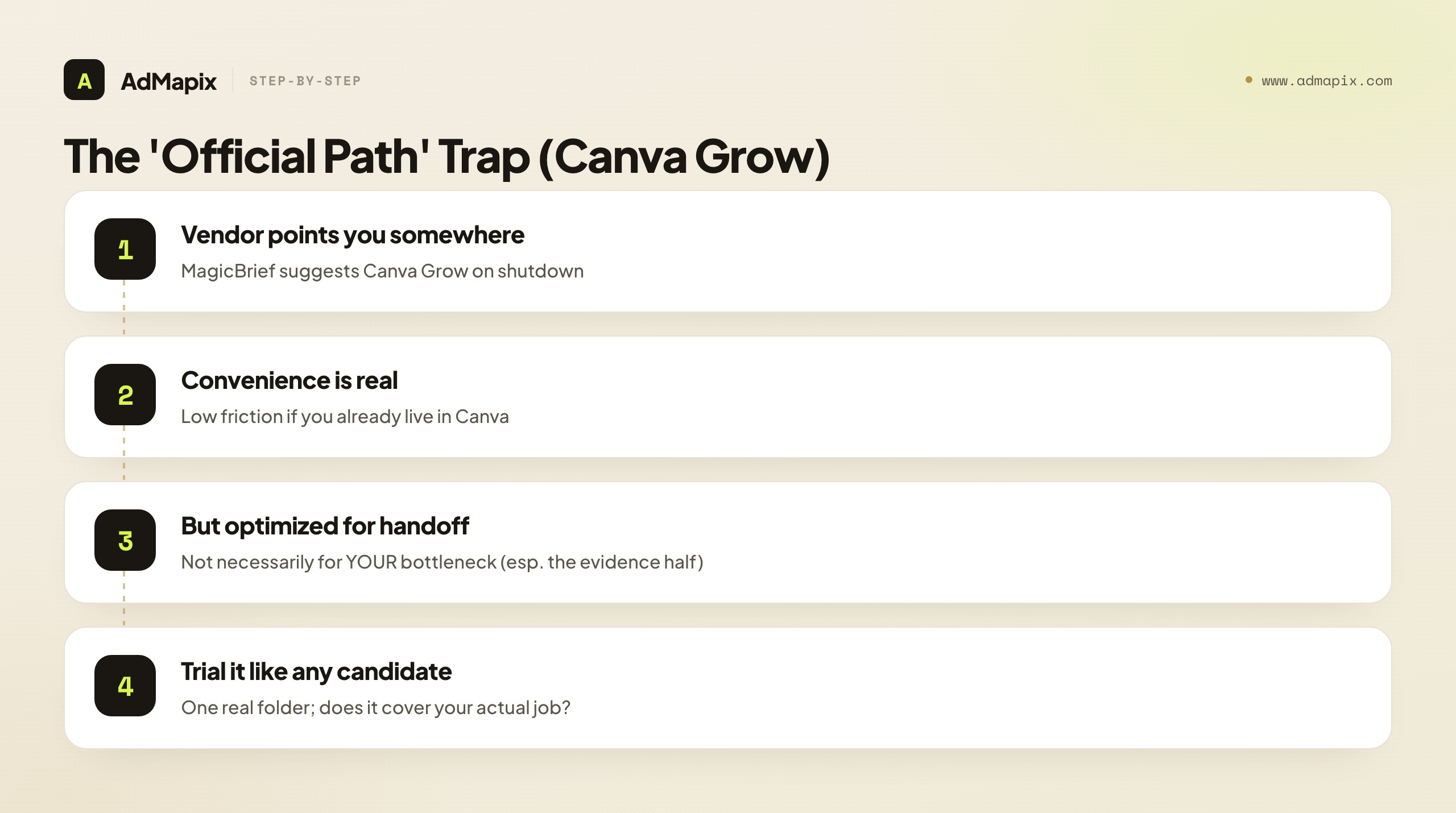
But "official path" and "right path for your bottleneck" are not automatically the same thing, and treating them as identical is a subtle migration trap. The vendor's suggested destination is optimized for a smooth handoff, not necessarily for your specific job — especially the competitor-creative-evidence half that many MagicBrief teams valued most. The disciplined move is to evaluate the suggested path on exactly the same terms as any other candidate: run one real client folder through it, measure saved-ad-to-approved-brief time, and check whether it covers your bottleneck (discovery, authoring, or both) rather than adopting it by default because it's the path of least resistance. The official pointer is a reasonable starting candidate; it is not a reason to skip the trial. Convenience is worth something, but not at the price of landing in a tool that doesn't replace the half of MagicBrief you actually relied on.
How to Choose a Replacement: Decide by Bottleneck, Not Database Size
Choose by the next decision your team has to make, not by database size. A "1.7-billion-creative" database is irrelevant if your real job this week is "write the next test brief from three competitor angles." Work through this in order, and the right tool (or stack) falls out of it.
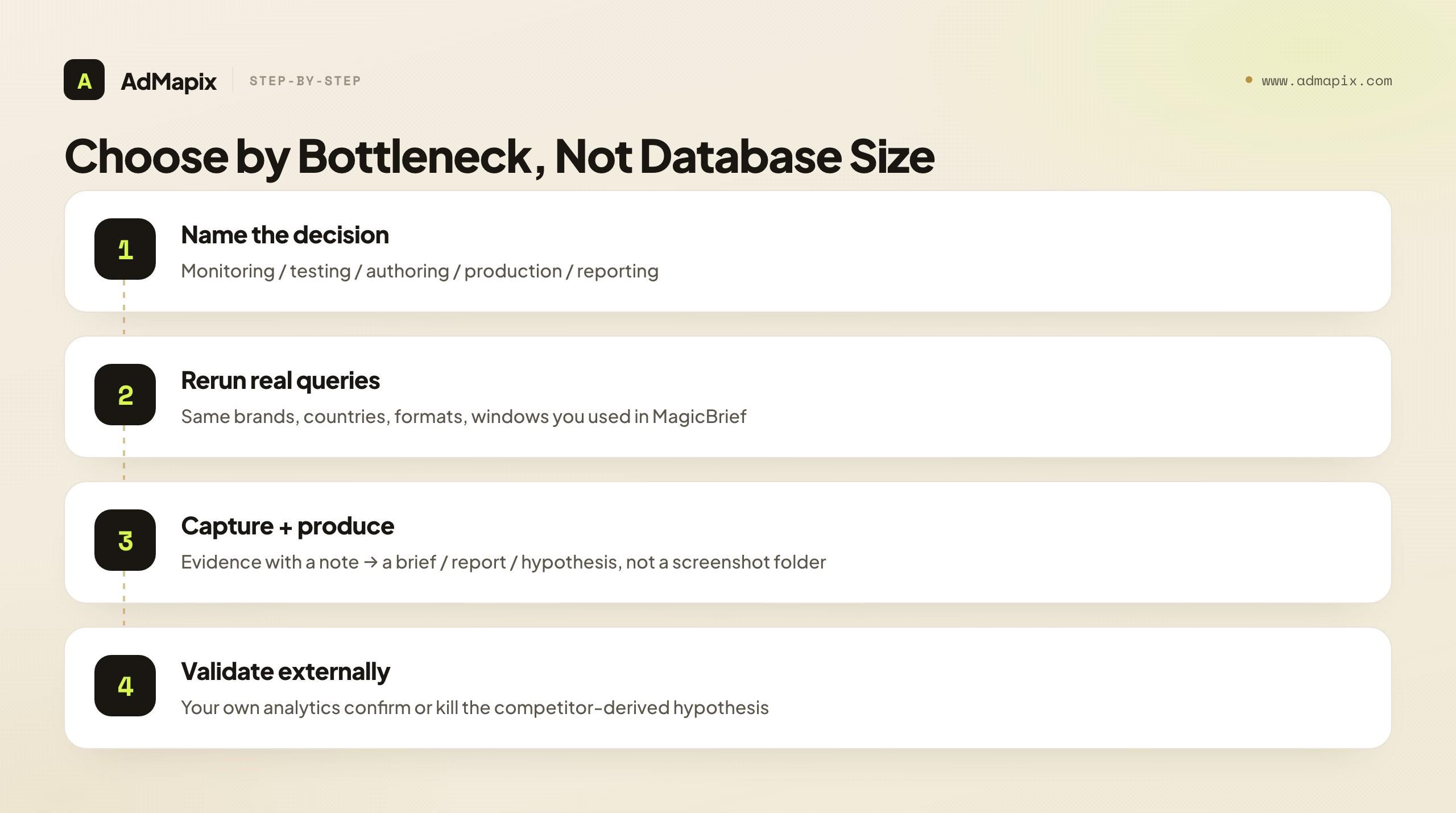
- Name the decision. Competitor monitoring, creative testing, brief authoring, ad production, and client reporting are different jobs that reward different tools. The migration is your chance to buy for the job you actually have, not the one MagicBrief happened to bundle.
- Rerun your real queries. Take the same brands, apps, countries, formats, and time windows you used in MagicBrief and see which replacement returns useful ads. A tool's coverage in your niche beats any headline database number.
- Capture the evidence. Save source ads, media, videos, and a one-line reason each example matters, so research survives a person leaving the team. The note is what keeps a saved ad reusable six months later.
- Produce the output. A good replacement ends in a brief, a report, a test hypothesis, or a migration checklist — not just another folder of screenshots. If the trial doesn't reach a deliverable, the tool isn't covering your bottleneck.
- Validate externally. Competitor ads generate hypotheses; your own campaign analytics and business metrics confirm or kill them. No swipe file, generator, or evidence tool closes that loop — your account data does.
The thread through all five steps: the migration is forcing a decision you might otherwise have avoided — which job do I actually need a tool for? MagicBrief's bundle let teams be vague about that. The shutdown removes the option of vagueness, which, handled well, is a chance to end up with a sharper, better-fit stack than you had before.
What Public Ad Data Can — and Cannot — Prove
Competitor ad libraries show what is running, not what is working. This is the single most common misread in this entire category, so state it plainly to your team and your clients before anyone builds a strategy on a saved ad. The boundary is sharp once you draw it.
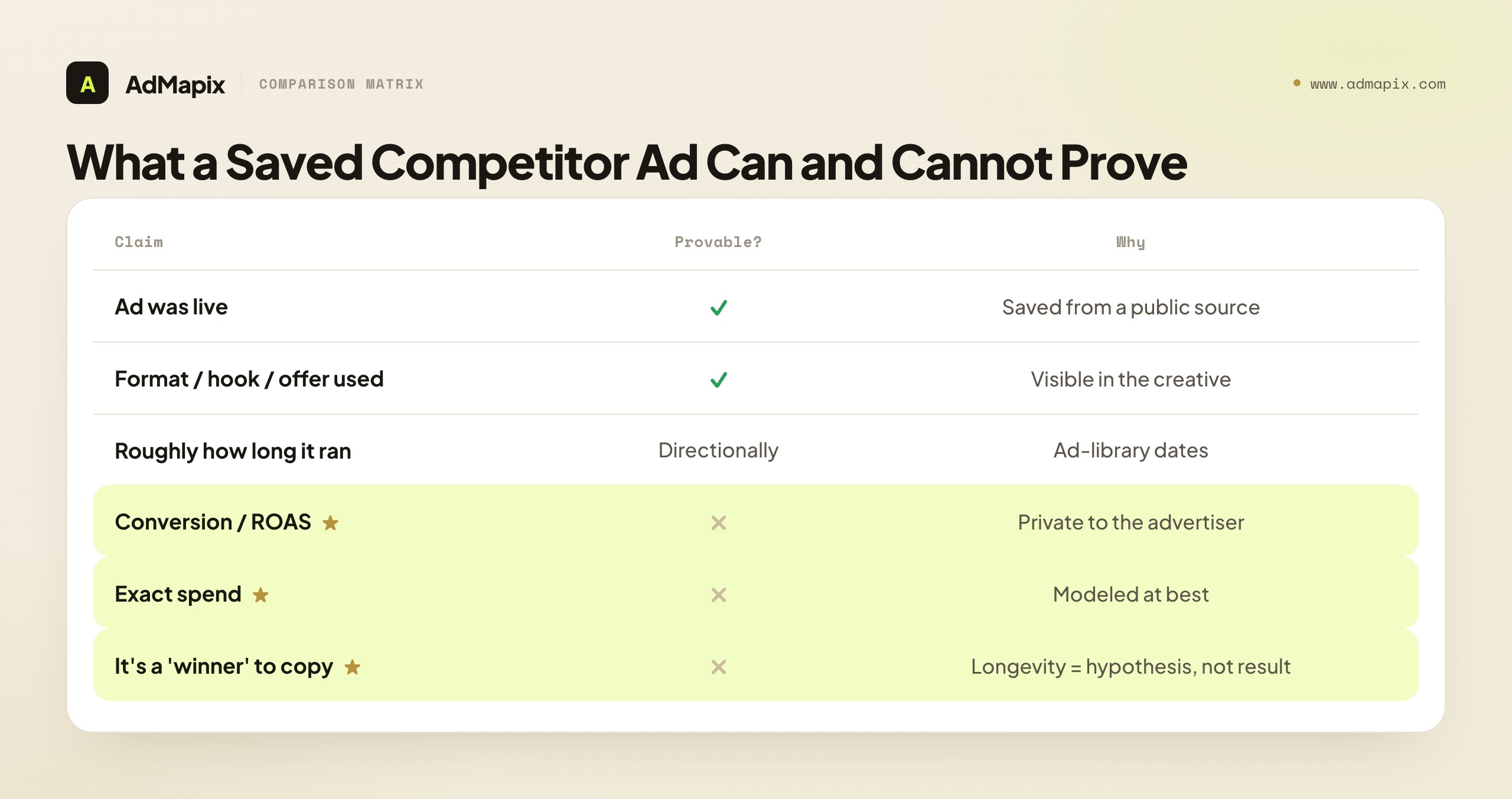
| Claim about a saved competitor ad | Can you prove it? | Why |
|---|---|---|
| The ad was live and observable | Yes | You saw and saved it from a public source |
| It used this format / hook / offer | Yes | Visible in the creative itself |
| It was localized for this market | Yes | Observable in the creative and metadata |
| How long it stayed live | Yes (directionally) | Ad-library dates show run duration |
| Its conversion rate / ROAS | No | Lives in the advertiser's private account |
| Its exact spend | No | Modeled at best; never billing data |
| That it's a "winner" worth copying | No | Longevity is a hypothesis, not a result |
Read this as the boundary of every claim you'll make from a swipe file. Saved competitor ads can prove a brand is using a format, repeating a hook, or localizing for a market, and roughly how long a creative has stayed live. They cannot prove conversion rate, ROAS, spend, or that a creative is a "winner." An ad that has run for months suggests it may be performing — but that is a hypothesis to test, not a result to copy. The discipline: treat every saved ad as an input to a brief, then let your own analytics decide what actually wins. Keep "observed" (it ran) and "performed" (it converted) in separate columns, and you'll never hand a client a claim you can't defend.
A Practical Migration Timeline
A deadline-bound migration goes wrong when it has no schedule — people mean to export "soon" and then it's mid-July and the panic exports begin. Here is a concrete timeline that front-loads the irreversible work and leaves tool selection for the calm middle. Adjust the dates to your own calendar, but keep the order intact no matter what: export before evaluate, always, without exception.
Week 1 — Export everything (the irreversible work). This is the only phase with a true deadline, so do it first and do it completely. Pull every saved ad with its source URL, export briefs as documents your team controls, screenshot or export storyboards with their annotations, copy comment threads tied to live work, document which client owns each set, and save billing records while confirming no auto-renew charge is scheduled past the shutdown. Build a self-contained archive — asset, source, and the note explaining why each mattered — that would still be useful six months from now even if you never picked a replacement. When this phase is done, the clock stops controlling you.
Week 2 — Map your bottleneck and shortlist. With the evidence safe, sort your exported items into the two MagicBrief jobs: discovery/analysis versus authoring. Whichever pile is bigger and more central to your weekly work is your bottleneck, and it points you at the right shortlist — Foreplay for a swipe-file-led workflow, Atria for a production-led one, AdMapix for the cross-network evidence layer, Canva Grow if you're already in that ecosystem. Write down the three to five competitor sets and the weekly decision you most need a tool to support; that's your trial brief.
Week 3 — Trial one real folder, end to end. Don't trial on a toy example or the vendor's demo data. Take one actual client or brand folder and run it through your top candidate completely, from saved ad to finished deliverable, measuring time-to-deliverable (saved-ad-to-approved-brief for a swipe-file tool; evidence-to-report for an evidence tool). If two tools win on different halves of the job, that's your signal to adopt a small stack rather than force one tool to cover everything.
Week 4 — Rebuild and roll out. Re-save your exported evidence into the chosen tool (from URLs, so metadata survives), reconstruct your client-folder structure, and bring the team over with the trialed workflow as the template. By the time the July 31 shutdown arrives, your evidence layer is already rebuilt and your team is already working in the replacement — the deadline passes as a non-event rather than a crisis. That non-event is the entire goal of starting early.
A Worked Migration: Two Teams, Two Right Answers
Frameworks land better with a concrete walk-through, and migration is a case where two teams running the same export end up at different right tools — which is exactly the point.
Team A — a four-person DTC creative team. Their MagicBrief use was almost entirely the swipe file and the brief: clip a competitor ad, tag it, board it by client, write the next test brief. Their week one export pulls 600 saved ads with source URLs, 40 briefs as docs, and the client-folder structure. In week two they map the bottleneck and it's obvious — discovery and briefing, the swipe-file loop — so Foreplay tops the shortlist as the most direct swap. Week three, they re-clip one client's URLs into Foreplay and run a real brief end to end; saved-ad-to-approved-brief time matches MagicBrief, so the migration holds. Week four they rebuild from URLs and roll out. Their one addition: because their briefs sometimes stalled for lack of cross-market competitor examples, they add a cross-network evidence tool in front of Foreplay to feed the brief — the evidence-in-front, production-behind pipeline. The July 31 shutdown passes as a non-event.
Team B — an in-house growth team scaling paid social. Their MagicBrief use leaned on briefs as a starting point for production — they were generating a high volume of variations and MagicBrief's authoring layer was a bottleneck, not the swipe file. Same export discipline in week one. But their week-two bottleneck map points at production, not discovery, so their shortlist leads with Atria for AI ad generation and analysis rather than a like-for-like swipe-file swap. Their week-three trial is different too: they measure idea-to-variation throughput, not saved-ad-to-brief time. And critically, they put a competitor-evidence tool in front of Atria, because generating at volume without market evidence would just multiply their own assumptions. Same shutdown, same export, completely different replacement — because the bottleneck, not the brand they're leaving, decides the destination.
The lesson both teams encode: the migration is a forcing function to finally name, out loud and on paper, which half of MagicBrief you actually depended on. Team A needed the swipe file; Team B needed the production layer; both needed an evidence layer in front. Neither team's answer would have fit the other, and neither would have been discoverable by comparing database sizes or feature lists — only by mapping their own real bottleneck against what each tool actually replaces in practice.
Building a Post-MagicBrief Stack: Evidence in Front, Production Behind
The single most useful mental model for life after MagicBrief is a pipeline, not a product. MagicBrief tried to be one product spanning discovery and authoring; the cleaner post-shutdown setup is usually a short pipeline where each tool does the one job it's best at, and evidence flows from front to back. Understanding this pipeline is what stops you from either over-buying one bloated suite or under-buying and leaving a gap.
The pipeline has three stages. Stage one is evidence — finding and analyzing what competitors actually run, across networks, with source and video attached. This is the front of the funnel, and it's where a cross-network creative-evidence tool earns its place: the brief is only as good as the market reality feeding it, and a single-network swipe file or a blank generation canvas both starve this stage. Stage two is authoring or production — turning that evidence into a brief, a storyboard, or (with an AI generator) into ad variations. This is where Foreplay's briefing layer or Atria's generation engine lives. Stage three is validation — running the resulting ad and letting your own analytics confirm or kill the competitor-derived hypothesis. No tool in stages one or two closes this loop; your campaign data does.
The reason the pipeline order matters is that skipping or weakening the front stage quietly degrades everything downstream. Feed an AI generator no competitor evidence and it produces confident variations of your own assumptions — fluent, on-brand, and disconnected from what's winning in the market. Write a brief with only single-network evidence and you miss the angles migrating from other platforms that are about to reshape your category. The evidence stage is cheap relative to the production and media spend it informs, which makes it the highest-leverage place to invest attention in the whole pipeline. A team that gets stage one right ships briefs grounded in market reality; a team that skimps on it ships polished guesses. This is also why "evidence in front, production behind" beats hunting for a single all-in-one replacement: the all-in-one is rarely best at the evidence stage, which is the stage that determines the quality of everything after it. And it reframes the cost question usefully — instead of paying one suite price to be mediocre at every stage, you pay a right-sized tool per stage and put the most weight on the front, where leverage is highest. For the structured method of turning that front-stage evidence into testable hypotheses, see the competitor ad analysis framework, and for the wider multi-channel workflow it feeds, the competitive analysis in paid advertising guide.
Re-Finding Ads That Lost Their Source URL
The checklist insists on exporting source URLs first, but real migrations are messy — some teams discover, mid-rebuild, that a chunk of their MagicBrief library came down as files or screenshots with no link attached. Don't treat those as lost; there are practical ways to re-anchor an orphaned creative, and knowing them lowers the stakes of an imperfect export.
Re-find by advertiser in the public libraries. If you remember (or the file hints at) which brand ran the ad, search that advertiser directly in the Meta Ad Library or Google Ads Transparency Center. The libraries list a brand's currently-running and recently-run ads, so a known advertiser often gets you back to the live creative — or a close sibling of it — with its metadata and dates intact. Re-save that into your new tool, and the orphaned file becomes an anchored reference again.
Reverse-search the thumbnail or a frame. For a static ad or a video you have a frame of, a reverse-image search can surface the landing page or a press mention that re-identifies the advertiser and offer. It won't always work, but it's a cheap first try for a creative you can't otherwise place, and it sometimes recovers the destination URL you actually needed more than the ad-library link. If the creative carried visible brand marks, on-screen text, or a recognizable product, those are your strongest reverse-search anchors — start there before trying a frame with no identifying detail, since a generic lifestyle shot rarely resolves to a single advertiser while a branded one often does on the first try.
Reconstruct from the note, not the file. This is exactly why the checklist insists on pairing every saved ad with a one-line "why this mattered" note in the first place. Even when the URL is gone, a note like "competitor's time-savings hook, comparison angle, ran Q1" preserves the intelligence — the mechanism and context — which is the part that actually feeds a brief. The file was only ever a pointer to that insight; if you captured the insight itself, a missing link is a minor inconvenience, not a real loss. Teams that wrote good notes can rebuild a usable swipe file even from a thin export, because the reasoning survived even where the assets didn't.
The larger lesson for this migration and the next one: the durable asset was never the file, and not even the URL — it was the reasoning attached to the creative. A migration that preserves notes and context survives an imperfect asset export; one that saved only raw files loses the intelligence the moment a link breaks. Build the habit now — asset, source, and reason, every time — and you make your library resilient to the next tool's shutdown, export limit, or coverage gap, not just this one.
What to Watch For After You Migrate
Migration doesn't end when you've picked a tool — a few failure modes show up in the weeks after the switch, and catching them early prevents a second, messier migration down the line.
Watch for evidence rot. The whole point of rebuilding your swipe file from URLs was to keep saved ads re-findable and explainable. That discipline has to continue: every newly saved ad needs its source link and a one-line "why this matters" note, or your fresh library decays into the same orphaned-screenshot pile you just escaped. The habit that protects you long-term is the same one that made the migration survivable — capture the source and the reason, every time, not just the asset.
Watch for the gap you didn't plan for. If you adopted a single tool for one half of MagicBrief's job, the other half doesn't disappear — it resurfaces a few weeks in as "wait, where do we write the actual brief now?" or "we have briefs but no competitor evidence to ground them." That's not a failure of the migration; it's the predictable consequence of MagicBrief having bundled two jobs. The fix is to recognize the resurfacing gap early and fill it deliberately (usually by adding the second pipeline stage) rather than stretching your one tool to cover a job it wasn't built for.
Watch for trial decay. A tool that won your one-folder trial in week three can disappoint at full team scale in week eight — coverage that looked fine on one brand may be thin across your whole client roster, or an export path that worked for a test may choke on volume. Re-run a lightweight version of your trial check a month in, on a broader slice of your real work, and confirm the tool still earns its place. Migrations reward the teams that keep verifying after the switch, not just before it — the goal is a stack that still fits in month three, not one that merely cleared a one-folder demo in week three.
Watch for the "performance proof" creep. Under deadline pressure and the relief of a finished migration, it's easy to slip back into treating long-running competitor ads as proven winners. Keep the discipline: observed is not performed, saved ads are hypotheses, and your own analytics are the only validation. The migration is a good moment to re-establish that standard across the team, because you're rebuilding the workflow from scratch anyway.
Watch for orphaned client context. MagicBrief organized work by client folder, and that organization carried meaning beyond the assets — which competitor set mapped to which account, which briefs belonged to which engagement, which reports went to whom. If you rebuilt the assets but not the structure, you'll find a few weeks later that a saved ad is technically present but nobody remembers which client it was for or why it was saved. Reconstruct the client-folder mapping deliberately during the rebuild, and tag new evidence by client from day one, so the organizational layer that made your MagicBrief library usable — not just present — survives the move. An archive you can't navigate by client is only marginally better than no archive at all, especially for an agency juggling several accounts where the wrong competitor reference in the wrong client's brief is an actual mistake, not just a tidiness problem.
Budgeting the Replacement: One Tool, a Stack, or Free?
MagicBrief was one subscription covering two jobs, so its replacement is also a budget decision, and the migration is a chance to right-size spend rather than reflexively replace one all-in-one with another. The honest framing is cost per job covered, not cost versus MagicBrief's old price.
Three budget shapes are common, and the right one follows from your bottleneck map. One focused tool fits teams whose MagicBrief use was really just one half — a pure swipe-file team can replace it with one swipe-file tool and stop there; a production-led team can lead with one generation tool. You're not under-buying if the other half genuinely wasn't your bottleneck. A two-tool stack fits teams that used both halves seriously: an evidence tool in front and a workflow or production tool behind. This often costs less than it looks, because each tool is right-sized for its job rather than one bloated suite stretched across both — and it usually covers the two jobs better than MagicBrief did, since each tool is specialized. Free libraries plus a spreadsheet fits teams whose real usage was light: a few competitors checked occasionally, no weekly cadence, no large saved library. If that's you, the Meta Ad Library and Google Ads Transparency Center cover the discovery half for free, and a doc covers the briefs — the shutdown might end your tooling spend rather than redirect it.
The trap to avoid is replacing by price tier instead of by job. Teams that look for "a tool that costs about what MagicBrief did" often end up with a different all-in-one that's mediocre at both halves, when their actual bottleneck was one half they could have covered better and cheaper with a focused tool. Let the bottleneck map from earlier drive the budget: pay for the job (or jobs) you actually have, at the right size, and treat "the answer is partly free" as a legitimate, money-saving outcome rather than a failure to find a paid replacement. A migration forced by someone else's shutdown is an unusually good moment to audit whether you were over-paying for capability you never used — so use it to right-size your stack deliberately, not just to replace one product with the nearest-looking like-for-like equivalent.
When You Might Not Need a Paid Replacement At All
Honest migration advice includes naming the cases where the answer is "you don't need a paid replacement," because the most expensive post-shutdown purchase is the one that solves a problem your usage didn't actually have. The deadline creates pressure to replace, and that pressure can push teams into buying a tool heavier than their real workflow warranted. Here are the situations where the free layer, or a much lighter setup, is genuinely enough.
When your saved library was small and rarely revisited. If your MagicBrief library was a few dozen ads you saved but seldom reopened, the migration is mostly an export-and-archive task, not a tool-replacement one. Export the assets and URLs into a folder you control, and check competitors in the free public libraries when a specific question arises. You don't need a paid swipe-file subscription to occasionally look at a handful of rivals.
When you have few competitors running ads. In a thin category where two or three rivals advertise sporadically, the evidence pool is too shallow to justify a paid tool's weekly workflow. Manual monitoring in the free Meta Ad Library and Google Ads Transparency Center is sufficient until competitor volume grows enough that manual checking becomes the bottleneck — that threshold, not the shutdown date, is when a paid tool earns its place.
When your bottleneck was never really the swipe file. Some teams kept MagicBrief out of habit while their actual constraint lived elsewhere — a weak offer, a leaky landing page, thin production capacity. If competitor evidence wasn't what was holding you back, replacing the evidence tool won't move your numbers. Diagnose the real bottleneck during the migration; you may find the right move is to not replace MagicBrief and instead invest the freed budget where the funnel actually breaks.
When the team won't run a weekly loop. A paid creative-evidence or swipe-file tool only pays back on a cadence. If your team realistically won't touch it more than once a quarter, the subscription runs whether you log in or not, and a disciplined manual check of the free libraries is better value. Fix the capacity question before re-subscribing to a workflow nobody will operate.
The thread: the shutdown forces a migration of your data — that part is non-negotiable and urgent — but it does not automatically force a paid tool purchase. For light usage, a thin category, an under-capacity team, or a bottleneck that was never the swipe file, the free public libraries plus an owned archive are a legitimate destination. Pay for a replacement when your usage genuinely needs one — history, cross-network consolidation, volume, or a weekly cadence — and be willing to conclude that the right post-MagicBrief answer is "export, archive, and use the free layer until a real constraint appears." The shutdown is a deadline for protecting your data, not a deadline for spending money; separating those two is how you migrate calmly instead of panic-buying a tool you'll second-guess in a month.
When to Use AdMapix (Honest Positioning)
Use AdMapix when the half of MagicBrief you most need to replace is competitor creative intelligence — cross-network ad search, saved media, video analysis, tagging, and reports. We'll state plainly what it is and isn't, because in a migration, recommending the wrong category can cost you the export window, not just money.
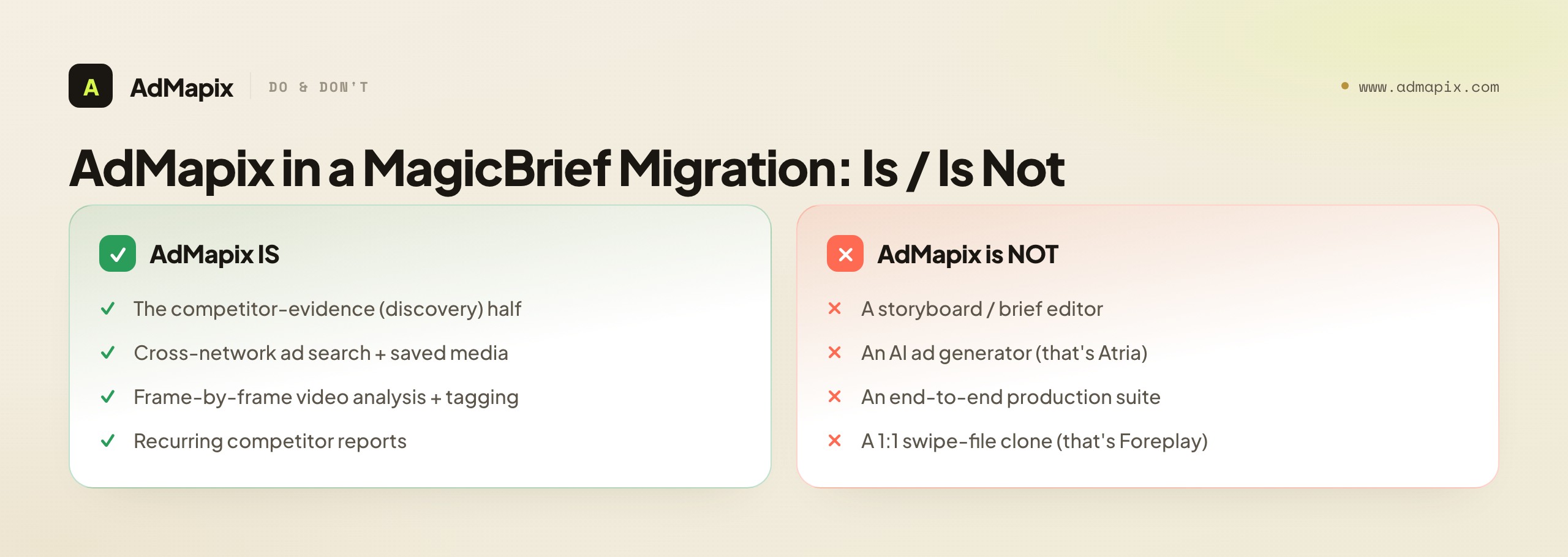
AdMapix is a cross-network ad creative tool for creative strategists, DTC teams, agencies, and performance marketers who research competitor ads, turn patterns into briefs, and deliver recurring reports. It replaces — and broadens — the discovery and analysis half of MagicBrief, with cross-network coverage and frame-by-frame video breakdown that a single-network swipe file often misses.
AdMapix is not an integrated storyboard editor or end-to-end creative-production suite, and it does not generate ads. If your core MagicBrief job was authoring storyboards inside one canvas, you'll still want a dedicated brief/storyboard tool (or Atria for generation) for that half. AdMapix supplies the evidence that goes in the front of the brief; it does not replace the authoring or generation that happens after.
The concrete migration move: take the exact competitor set you reviewed weekly in MagicBrief, rerun it once in Search AdMapix, and save the relevant ads to Media — and you've rebuilt the evidence layer in a single pass, before the shutdown deletes it. From there, use Video Analysis to break down the hooks and structure worth testing, and Reports to turn a recurring competitor set into a deliverable. When the workflow proves itself, compare seats on Pricing or create an account from Login. For the broader tool landscape to evaluate alongside it, see best ad spy tools 2026 and marketing intelligence tools; for the parallel decisions on market and PPC tools, see the Similarweb alternative and Semrush alternative guides.
Common Mistakes in a MagicBrief Migration
The failure modes here are predictable, which makes them preventable — and in a deadline-bound migration, preventing them is worth more than usual.
- Waiting until July to migrate. The export of saved ads, briefs, and client history is the irreversible step. Closer to the deadline you'll get rushed exports and lost context. Export now; choose tools later.
- Exporting files but not source URLs. A downloaded video with no link is a dead asset, much harder to re-save or re-verify in a new tool. Capture the URL for every saved ad first.
- Buying a giant market suite for a creative-only job. If your real need is the next brief, a focused creative-search + media + report workflow is enough — you don't need an enterprise market platform to write a test hypothesis.
- Expecting one tool to replace both halves. Most replacements split competitor discovery from brief/storyboard authoring. Plan a tool for each half rather than hunting for a mythical one-to-one clone.
- Treating saved competitor ads as performance proof. Saved ads are hypotheses, not validated winners. Confirm with your own analytics before you copy anything.
- Adopting the official path by default. Canva Grow is MagicBrief's suggested destination, but evaluate it on the same terms as any candidate — does it cover your bottleneck? — rather than following the pointer blindly.
- Skipping the competitor-evidence layer before generating. If you move to an AI generator like Atria, feeding it competitor evidence first prevents it from producing confident variations of your own assumptions.
FAQ
Is MagicBrief really shutting down?
Yes. MagicBrief's official site states the product shuts down on July 31, 2026 at 8 PM EST and directs existing users toward next steps, including Canva Grow. Because dates and announcements can change, verify the exact date and any wind-down details on magicbrief.com before finalizing your migration timeline — but plan to export your library well ahead of the deadline rather than at the last minute, since the export is the only irreversible step.
What should MagicBrief users do first?
Export before you evaluate anything. Pull saved ads with their source URLs, briefs, storyboards, comment threads, billing records, and a note of which client owns each set into a self-contained archive. The export is irreversible at shutdown; tool selection can happen afterward and can even change. Protect the evidence first, then test replacements calmly with one real workflow and no clock running.
What is the best MagicBrief alternative?
There's no single best one, because MagicBrief did two jobs — competitor creative discovery/analysis and brief/storyboard authoring. The right answer depends on which half is your bottleneck. Foreplay is the most direct swipe-file/workflow swap; Atria fits if your gap is AI ad creation and analysis; Canva Grow is the vendor-suggested path; AdMapix covers the cross-network competitor-evidence layer. Map your bottleneck first, then pick a tool — or a stack — that covers it.
Is Foreplay a good MagicBrief replacement?
For teams whose core MagicBrief use was the active swipe file, yes — it's the most direct swap. Foreplay's Chrome extension saves ads from the Meta Ad Library, TikTok, LinkedIn, and more with tags, status tracking, AI search, and reports, which closely matches how MagicBrief users already work. Test it on one real client folder and measure saved-ad-to-approved-brief time before committing seats; that loop, not the feature list, tells you whether the migration is working.
Is Atria a direct MagicBrief replacement?
Not exactly. Atria is an AI ad creation and workflow platform covering ideation, generation, analysis, and reporting — it overlaps MagicBrief's briefing layer but is a heavier, generation-focused tool, not a one-click swipe-file clone. Choose it if your next bottleneck is producing creative rather than archiving reference ads, and feed it competitor evidence first so it generates from market reality rather than your own assumptions. Trial it on your real brands before committing the team.
Can AdMapix replace MagicBrief?
AdMapix replaces — and broadens — the competitor-creative half: cross-network ad search, saved media, video analysis, tagging, and reports. It does not replace MagicBrief's storyboard editor or brief-authoring canvas, so teams that relied on that production layer will still need a dedicated brief/storyboard tool (or an AI generator like Atria) alongside it. Most migrating teams pair AdMapix's evidence layer with a workflow or production tool rather than expecting one product to cover both halves.
How do I rebuild my saved ad library after migrating?
Rerun your old competitor set in a creative-search tool and re-save the keepers into a media library you control. This is exactly why the checklist prioritizes source URLs: a URL lets you re-save the same ad with its metadata intact, rebuilding boards in an afternoon instead of reconstructing them from orphaned screenshots. In AdMapix, search the same brands in Search AdMapix and save relevant ads to Media; in a swipe-file tool like Foreplay, re-clip from the URLs into your boards.
Will my competitor ads tell me what is actually working?
No. Saved competitor ads show what is running and roughly for how long, not conversion, ROAS, or spend — those are private to the advertiser's account. A long-running creative suggests it may be working, but that's a hypothesis, not a result. Use saved ads to write tests, then let your own campaign analytics decide what wins. Keep "observed" (it ran) and "performed" (it converted) in separate columns in every report.
How do I choose between Foreplay, Atria, and AdMapix?
Map them to MagicBrief's two jobs. If your bottleneck is the daily swipe-file-to-brief loop, lead with Foreplay. If it's producing creative at scale, Atria's AI generation fits. If it's having enough cross-network competitor evidence to reason from before you brief or generate, AdMapix covers that layer. Many teams run a stack — an evidence tool in front, a workflow or generation tool behind — rather than forcing one product to do everything MagicBrief bundled.
What's the single biggest mistake in a MagicBrief migration?
Delaying the export. Everything else in this guide is recoverable — you can switch tools next month if your first pick disappoints. Losing your saved ads, briefs, and storyboards on the July 31, 2026 deadline is not recoverable. Export the evidence first (URLs over files), then choose your replacement calmly with no clock running. The second-biggest mistake is expecting one tool to replace both halves of MagicBrief when the market split those jobs across different categories.
Key Takeaways
- Treat the MagicBrief replacement as a migration with a hard July 31, 2026 deadline, not a feature comparison. Optimize first for what you keep.
- Export saved ads, briefs, storyboards, comments, and client folders first — prioritizing source URLs over files — because the export is the only irreversible step.
- MagicBrief did two jobs: competitor creative discovery/analysis and brief/storyboard authoring. Decide which half is your bottleneck before you shop.
- Map alternatives to the job they replace: Foreplay for the direct swipe-file swap, Atria for AI ad creation, Canva Grow as the vendor path, AdMapix for the cross-network evidence layer.
- Public ad data shows what's running, not what's working — treat saved ads as hypotheses and validate with your own analytics.
- Rebuild the evidence layer fast by rerunning your old competitor set in a creative-search tool and re-saving from the URLs; pair it with a production tool if you need storyboards or generation.
Related Reading
- Best ad spy tools 2026 — the full landscape of creative-intelligence tools to evaluate during migration
- Marketing intelligence tools — the wider competitive-intelligence stack
- Similarweb alternative for ad intelligence — the market-data sibling of this tool decision
- Semrush ad intelligence alternative — the PPC-and-spend sibling of this tool decision
- Competitor ad analysis framework — turning saved competitor evidence into testable hypotheses
- Competitive analysis in paid advertising — the multi-channel workflow your rebuilt evidence layer feeds
Sources
Official source pages were checked as of June 21, 2026. Pricing, product names, availability, platform support, and shutdown details can change, so verify on the source before acting.
- MagicBrief — states the product is shutting down on July 31, 2026 at 8 PM EST and points users to next steps, including Canva Grow.
- MagicBrief features — describes the inspiration library, AI search, theme filters, saving ads, storyboards, briefs, and creative-workflow support.
- Foreplay — positions itself as a complete ad workflow for saving ads, tracking competitors, discovery, creative analytics, production, briefs, and reports.
- Foreplay Swipe File — states the Chrome extension can save ads from Meta Ad Library, TikTok Creative Center, TikTok Top Ads, LinkedIn, and more, with tags, status tracking, sharing, landing-page screenshots, and AI search.
- Atria — AI-powered ad workflow platform for insights, inspiration, ideation, ad generation, and reporting.
- Meta Ad Library — public source for observing live competitor creative across Meta platforms.
AdMapix is our product. Its data scope is cross-network ad creative search, saved media, video analysis, tagging, and reports; it is not a storyboard editor and does not generate ads. We attribute claims about other tools to their official pages above.
See what competitors are really running
Search 6M+ ad creatives, landing pages, and weekly spend across 200+ countries. No credit card, no commitment.
Related Articles
Semrush Ad Intelligence Alternative in 2026: PPC Research or Creative Evidence?
A 2026 decision framework for choosing a Semrush ad intelligence alternative — when PPC keyword and spend research wins, when competitor creative and video evidence wins, how AdClarity fits, a fair-trial method, and how to build a two-layer stack.

Moat Alternative in 2026: Ad Verification vs. Creative Intelligence
A complete 2026 buyer's guide to choosing a Moat alternative — why teams look past Oracle Moat, what Moat actually does (viewability, invalid traffic, brand safety), the critical split between the ad-verification layer and the creative-intelligence layer, a layered comparison across coverage and fit, who should choose which, a practical migration plan, the honest limits of public creative data, and where a creative-research tool like AdMapix fits.
Pathmatics Alternative in 2026: Ad Spend Intelligence vs. Creative Workflow
A complete 2026 buyer's guide to choosing a Pathmatics alternative — why teams look past Pathmatics (now Sensor Tower), what it actually measures, a layered comparison of spend-intelligence suites versus creative-workflow tools across coverage, data type, price, and fit, who should choose which, a practical migration plan, the honest limits of estimated spend, and where a lighter cross-network creative tool like AdMapix fits.