
PPC Management Software for Agencies: How to Build a Lean Stack That Earns Its Seat in 2026
A buyer's framework for PPC management software for agencies. PPC software is not one product but a stack covering five jobs — campaign operations, reporting, quality assurance, creative research, and client communication. This guide shows how to buy by job not by logo, compares the tool categories, covers pricing models, the mistakes that inflate your tool budget, an evaluation scorecard, and where competitive creative research fits.
PPC Management Software for Agencies: How to Build a Lean Stack That Earns Its Seat in 2026
Updated June 21, 2026 — written and reviewed by the AdMapix Research team.
PPC management software for agencies is not one product — it is a stack that covers five distinct jobs: campaign operations, reporting, quality assurance, creative research, and client communication. The single most expensive mistake agencies make is shopping by feature list instead of by job, which leads to a drawer full of overlapping dashboards, a bloated monthly tool bill, and reporting calls that still devolve into arguments about whose number is right. This guide is for agency owners, PPC leads, and account managers who are tired of buying a new platform every quarter and want a framework that keeps the stack small, the handoffs clean, and every tool genuinely earning its seat.
The thesis is simple and we will defend it across the whole article: buy by job, not by logo. When you map every prospective tool to one of the five jobs above, three things happen — your stack shrinks to what it actually needs, the boundaries between tools become legible (so handoffs stop leaking), and any tool that cannot point to a job it owns gets cut. This is the agency-buyer companion to our broader work on competitive context; if you want the underlying method for reading the market your campaigns compete in, see the competitor ad analysis framework and the advertising intelligence guide. Here, the focus is the agency's software stack and how to assemble it deliberately.
TL;DR — The Agency PPC Stack in One Screen
- PPC management software for agencies is five jobs, not one tool. Campaign operations, reporting, quality assurance, creative research, and client communication. No single product does all five well; pretending otherwise is how stacks bloat.
- Buy by job, not by logo. If a tool does not change a budget, bid, creative, targeting decision, landing page, or client recommendation, it does not belong in the weekly review — or, often, in the stack at all.
- Native platforms own execution. Google Ads and Microsoft Ads know your account intimately but are blind to the market. They are the source of truth for what you did and what it did, not for what to do next.
- Reporting tools own the client deck, not the strategy. They format the story beautifully; they do not generate it. Buying a reporting tool to fix a strategy problem is a category error.
- Automation owns hygiene, not insight. Rules and alerts keep the account clean — no broken links, no runaway budgets — but they enforce; they do not create insight.
- Creative-intelligence tools own competitive context. They show what the market is testing and how, which is the one job native platforms structurally cannot do. This is where AdMapix fits.
- AdMapix is the competitive creative-research layer — and nothing else. It tells your account managers what rivals are testing in their creatives. It does not — and cannot — show competitor spend, ROAS, conversion rates, or impression-level targeting, and it does not replace your campaign or reporting tools. We say so plainly.
What Agencies Are Actually Buying Software For
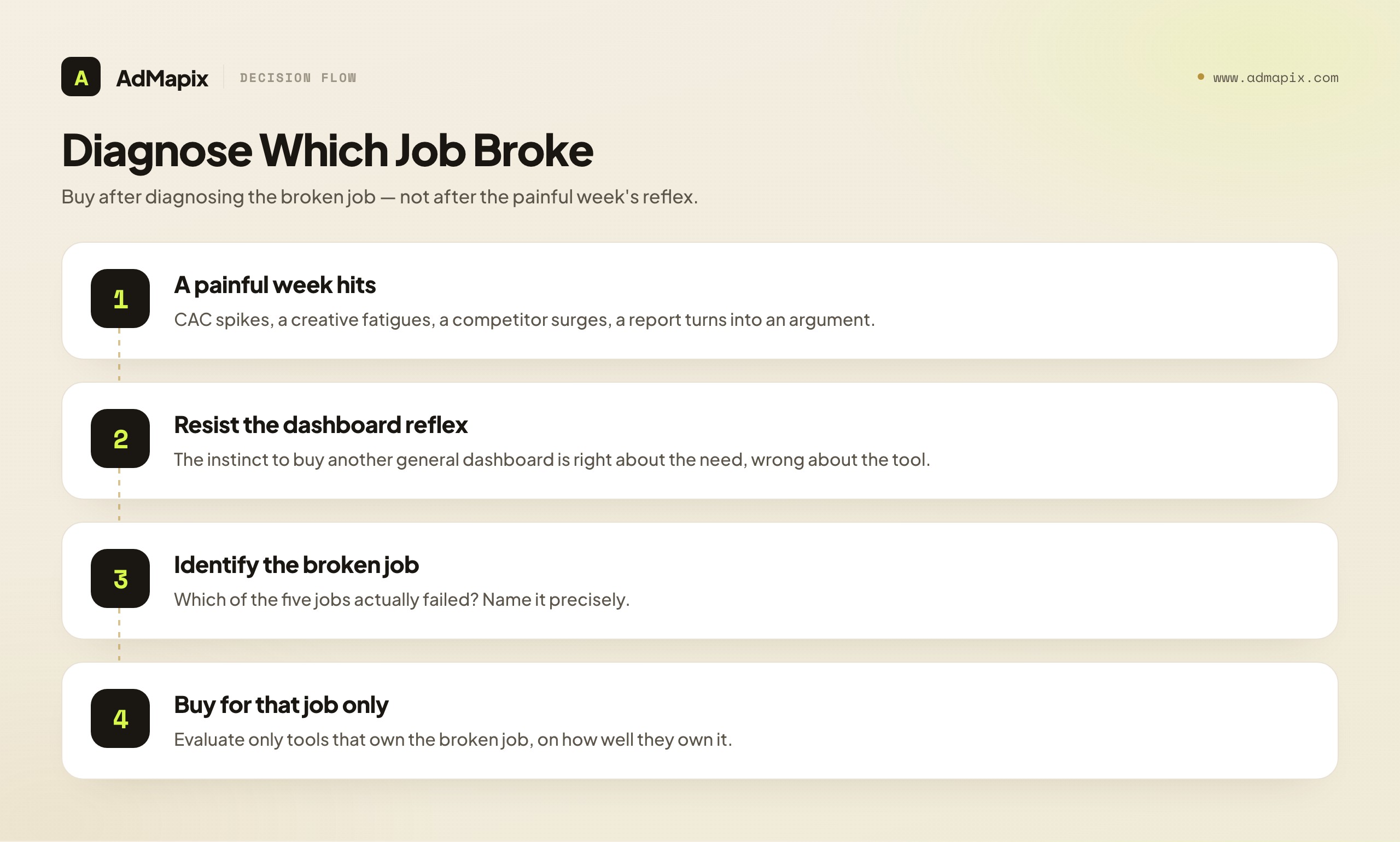
Agencies buy PPC software to remove friction at one of five specific points, and naming the point is what keeps the stack lean. The buying impulse almost always arrives after a painful week: client acquisition cost spikes and nobody knows why; a winning creative fatigues and the replacement underperforms; a client asks, mid-call, why a competitor suddenly looks far more active; or a reporting meeting turns into a debate about whose dashboard is correct. The instinctive response — "we need a better tool" — is usually right about the need and wrong about the tool, because the team buys another general-purpose dashboard instead of fixing the specific job that broke.
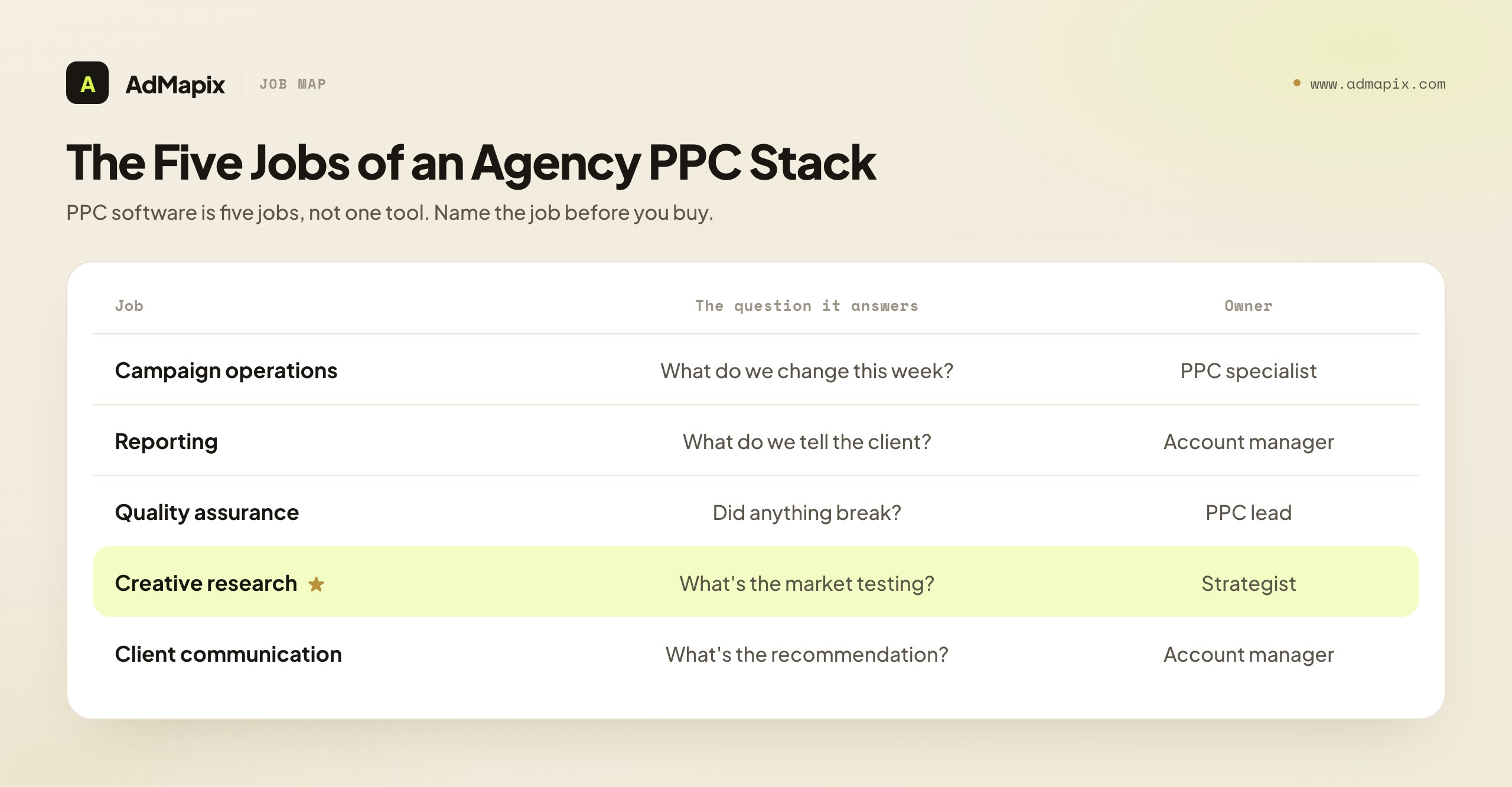
The disciplined response is to diagnose which of the five jobs failed, and buy for that job only. Here is the map.
| Job | The question it answers | Who owns it on the team |
|---|---|---|
| Campaign operations | What changes do we push to the account this week? | PPC manager / specialist |
| Reporting | What do we tell the client happened, and why? | Account manager |
| Quality assurance | Did anything break — broken links, runaway budgets, missing conversions? | PPC lead |
| Creative research | What are competitors testing, and what should we test next? | Strategist / account manager |
| Client communication | What is the recommendation, and what impact do we expect? | Account manager |
The filter that keeps the stack honest is not "which tool has the most charts?" but "which tool changes the next action?" A metric that never moves a budget, a bid, a creative, a targeting decision, a landing page, or a client recommendation belongs in an appendix, not in the weekly review and not on the invoice. Run every existing tool through that filter once a quarter and you will be surprised how many fail it — those are the ones quietly inflating your tool budget while contributing nothing to a decision.
The reason this framing matters specifically for agencies (as opposed to in-house teams) is that agencies operate at multiplied scale and under client scrutiny. An in-house team runs one advertiser; an agency runs many, each with its own goals, reporting cadence, and personalities. A bloated, ambiguous stack that an in-house team can tolerate becomes, at agency scale, a tax paid on every account every month, plus a source of inconsistency that clients notice. Lean-by-job is not a nicety for agencies; it is an operating necessity.
The Five Jobs in Depth
Before comparing tools, it pays to understand each job precisely — what it covers, where it ends, and why it cannot be folded into another. The boundaries are the whole point: a stack works when each job is owned cleanly and the handoffs between them are explicit.
Campaign operations is the execution layer: the actual building, editing, and optimizing of campaigns inside the ad platforms. It answers "what do we change this week?" — budgets, bids, keywords, audiences, creatives, negatives, structure. This job lives closest to the money and is the highest-skill, highest-judgment work an agency does. It is owned by the PPC specialist who has hands on the account. Crucially, campaign operations is where intelligence becomes action; every other job exists to inform or verify this one. A tool serving this job must let a skilled operator make precise changes quickly and safely.
Reporting is the translation layer: turning what happened in the accounts into a coherent story for the client. It answers "what do we tell them, and why?" Its job is not analysis (that is judgment, which lives with people) but presentation and aggregation — pulling numbers from multiple platforms into one consistent, branded, scheduled view so the account manager spends their time on the narrative, not on copy-pasting from five dashboards. Reporting is owned by the account manager. The classic error is expecting a reporting tool to generate strategy; it formats the story, it does not write it.
Quality assurance is the safety layer: the systematic checking that nothing has silently broken. It answers "did anything go wrong?" — broken landing-page links, runaway budgets, disapproved ads, missing conversion tracking, sudden anomalies. QA is unglamorous and easy to skip, which is exactly why it needs to be a named job with an owner (the PPC lead) and ideally automated alerts. At agency scale, a single untracked broken link or a budget that 10x'd overnight can burn a client's money and trust before a human would have caught it. QA is insurance, and the premium is small relative to the loss it prevents.
Creative research is the context layer: understanding what the market — your client's competitors — is doing in their advertising, so your testing is informed rather than blind. It answers "what are competitors testing, and what should we test next?" This is the one job that native ad platforms structurally cannot serve, because a platform only knows the account it is inside; it has no window onto competitors' creatives. Creative research is owned by the strategist or account manager and is the seam where competitive creative-intelligence tools (like AdMapix) fit. Without it, an agency tests in a vacuum, reinventing angles the market has already validated or abandoned.
Client communication is the relationship layer: framing recommendations and expected impact so clients understand, trust, and approve the agency's plan. It answers "what's the recommendation, and what will it do?" It overlaps with reporting but is distinct — reporting says what happened; communication says what should happen next and why. It is owned by the account manager and is, ultimately, what agencies are paid for: not dashboards, but judgment translated into client-ready recommendations. Much of this job lives in process and people, but tooling (proposal templates, recommendation tracking, approval workflows) supports it.
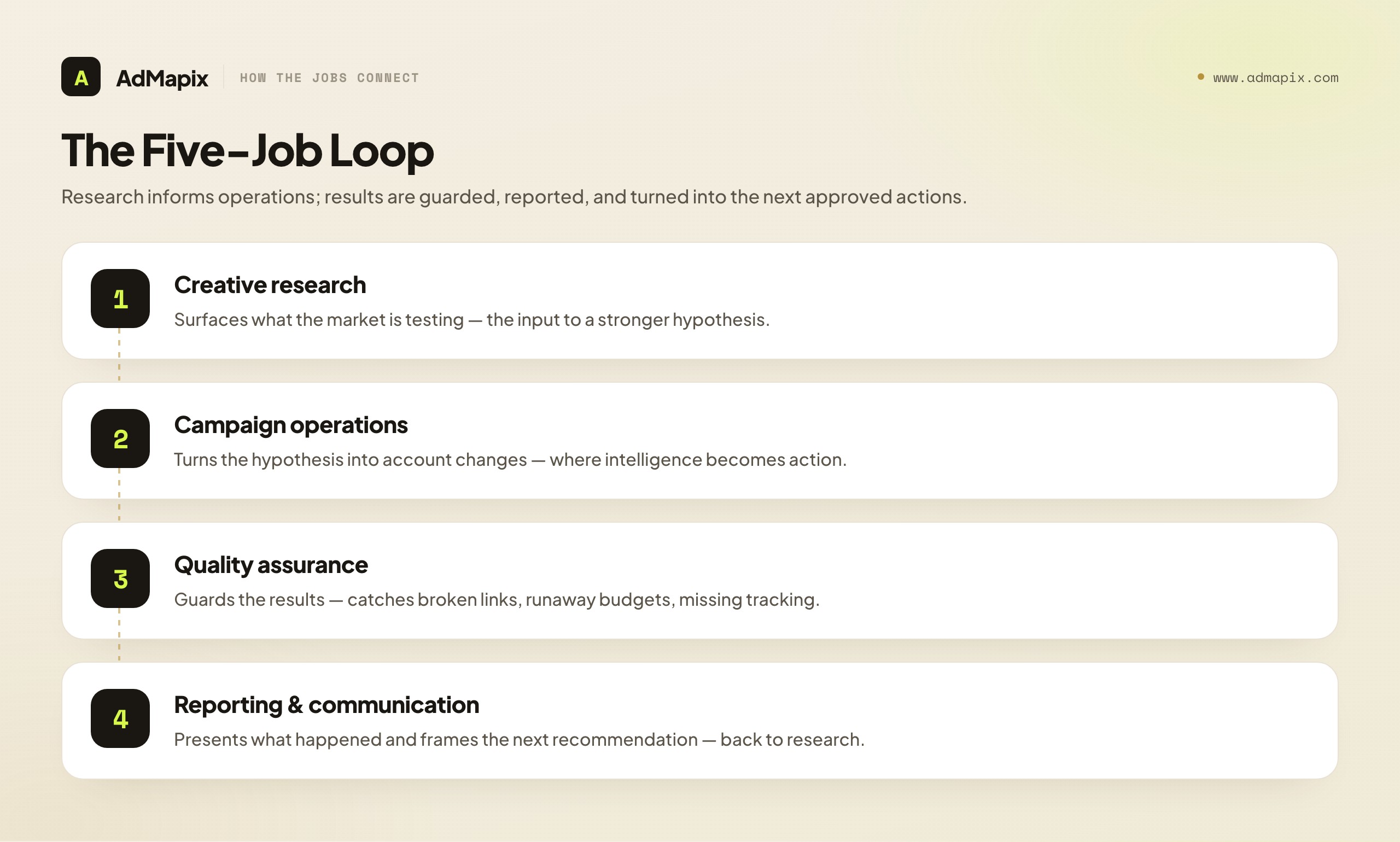
The five jobs form a loop: research informs operations, operations produce results, QA guards the results, reporting presents them, and communication turns them into the next set of approved actions — which sends you back to research. A stack is healthy when each link in that loop has a clear owner and a tool (or deliberate process) that fits the job and stops cleanly at its boundary.
Tool Categories and Where Each One Stops
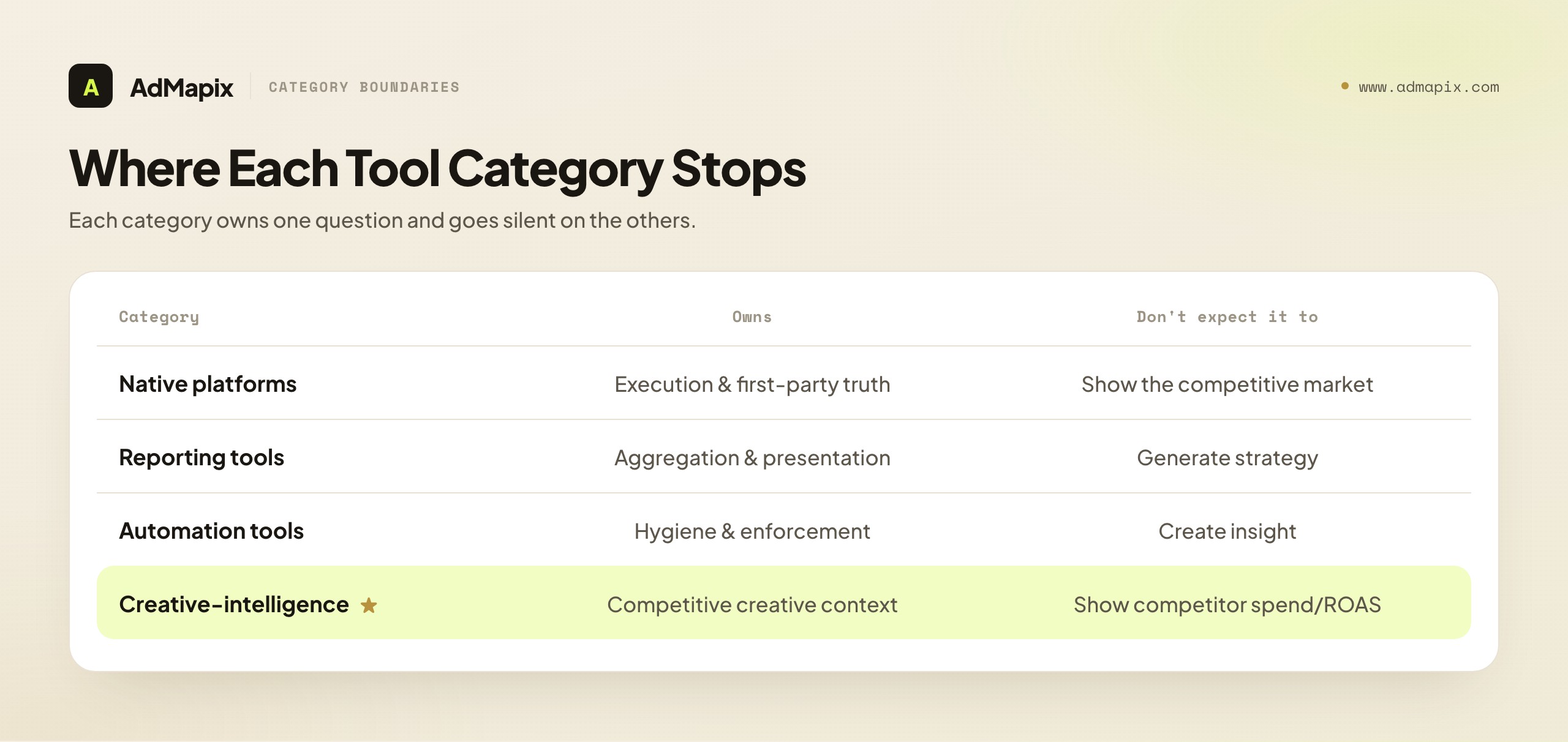
Each tool category answers one question well and goes silent on the others. The agency's skill is not finding a tool that does everything — none does — but connecting the categories in a decision meeting where their outputs combine into a plan. Here is what each category owns and, just as importantly, where it stops.
Native ad platforms (Google Ads, Microsoft Ads, the social platforms' managers). These own execution and first-party truth. They are the only place you actually change the account, and the only authoritative source for what your campaigns did — your impressions, clicks, spend, conversions, quality scores. They know your account in total detail. Where they stop: at the edge of your own account. A native platform has zero visibility into competitors' creatives, the market's testing patterns, or what is working for rivals. It also produces client-facing reporting only grudgingly and inconsistently across platforms. Native platforms are indispensable and irreplaceable for what they do, and useless for the market context that creative research provides.
Reporting and dashboard tools. These own aggregation and presentation. They pull from multiple ad platforms (and often analytics and CRM) into one consistent, branded, scheduled report, saving account managers hours of manual deck-building and giving clients a single coherent view. Where they stop: at presentation. They format and aggregate; they do not analyze, strategize, or tell you what to do. A reporting tool will make your wrong strategy look beautifully consistent. Buy one to save reporting time, never to fix a thinking problem.
Automation and rules tools. These own hygiene and enforcement. They run scheduled rules and alerts — pause an ad if cost-per-conversion exceeds a threshold, flag a broken link, alert on a budget anomaly, enforce naming conventions. They make the account safer and reduce the manual drudgery of routine checks. Where they stop: at judgment. Automation enforces rules a human set; it does not create insight or strategy. An over-automated account can efficiently execute a bad plan. Automation is a force multiplier on good judgment and a hazard layered on bad judgment.
Creative-intelligence tools. These own competitive context. They show what competitors are running in their advertising creatives — the angles, hooks, offers, and formats the market is testing — which is the one thing native platforms cannot see and the input your testing program needs to stop guessing. Where they stop: at the creative-evidence boundary. A creative-intelligence tool shows what rivals are saying in their ads; it cannot show what rivals are spending, what their ROAS is, how their ads are performing, or who exactly they are targeting at the impression level, because that data is not public. This is the category AdMapix belongs to, and we will be precise about its limits below. For how this category compares across vendors, see best ad intelligence tools and best ad spy tools 2026.
| Category | Owns | Stops at | Don't expect it to |
|---|---|---|---|
| Native platforms | Execution & first-party truth | Edge of your own account | Show the competitive market |
| Reporting tools | Aggregation & presentation | Presentation | Generate strategy |
| Automation tools | Hygiene & enforcement | Human-set rules | Create insight |
| Creative-intelligence | Competitive creative context | Public creative evidence | Show competitor spend/ROAS |
The agency that understands where each category stops never asks one tool to do another's job — and that single discipline is what keeps the stack lean and the handoffs clean.
Buy by Job, Not by Logo: The Core Discipline
Now the central discipline, stated as an operating rule you can apply in any buying decision. Before adding any tool to the stack — or keeping any tool already in it — answer one question: which of the five jobs does this tool own, and does it own that job better than what we already have? If you cannot name the job, do not buy. If another tool already owns that job, do not buy the second one too. If the tool spreads thinly across several jobs without owning any, be deeply suspicious; "all-in-one" platforms often own no job well and exist mainly to lock you in.
This rule sounds obvious and is constantly violated, because tool marketing is built to violate it. Vendors lead with feature lists precisely because a long feature list makes a tool look like it does everything, which short-circuits the by-job question. An agency that shops by feature list ends up with three tools that each claim reporting, two that each claim automation, and a creative-research gap nobody filled because no feature list led with it. Shopping by job inverts this: you decide which job you need to strengthen, then evaluate only tools that own that job, on how well they own it.
A practical corollary: prefer best-in-job over all-in-one, unless the integration cost is genuinely prohibitive. A focused tool that owns one job superbly, connected cleanly to the others, almost always beats a sprawling suite that does each job adequately. The suite's appeal is "one login, one invoice"; its hidden cost is mediocrity in every job and switching lock-in. Best-in-job stacks cost slightly more in integration effort and pay it back in capability and flexibility. The exception is the genuinely small agency for whom integration overhead outweighs capability gains — there, a consolidated suite can be the right call, made knowingly rather than by default.
The deepest version of the discipline is to treat your stack like a team, not a toolbox. A team has clearly assigned roles, no two people doing the same job, and clean handoffs between them. A toolbox is just a pile of capabilities. The audit question for a team is "who owns this?" — and a stack that cannot answer that for each of the five jobs has either a gap (a job nobody owns) or redundancy (a job two tools own), and both cost you. Quarterly, run the team audit: name the owner of each of the five jobs, flag the gaps and overlaps, and adjust. That single recurring habit will keep your tool budget lean and your operation coherent better than any individual purchase decision.
Pricing Models and the Real Cost of a Stack
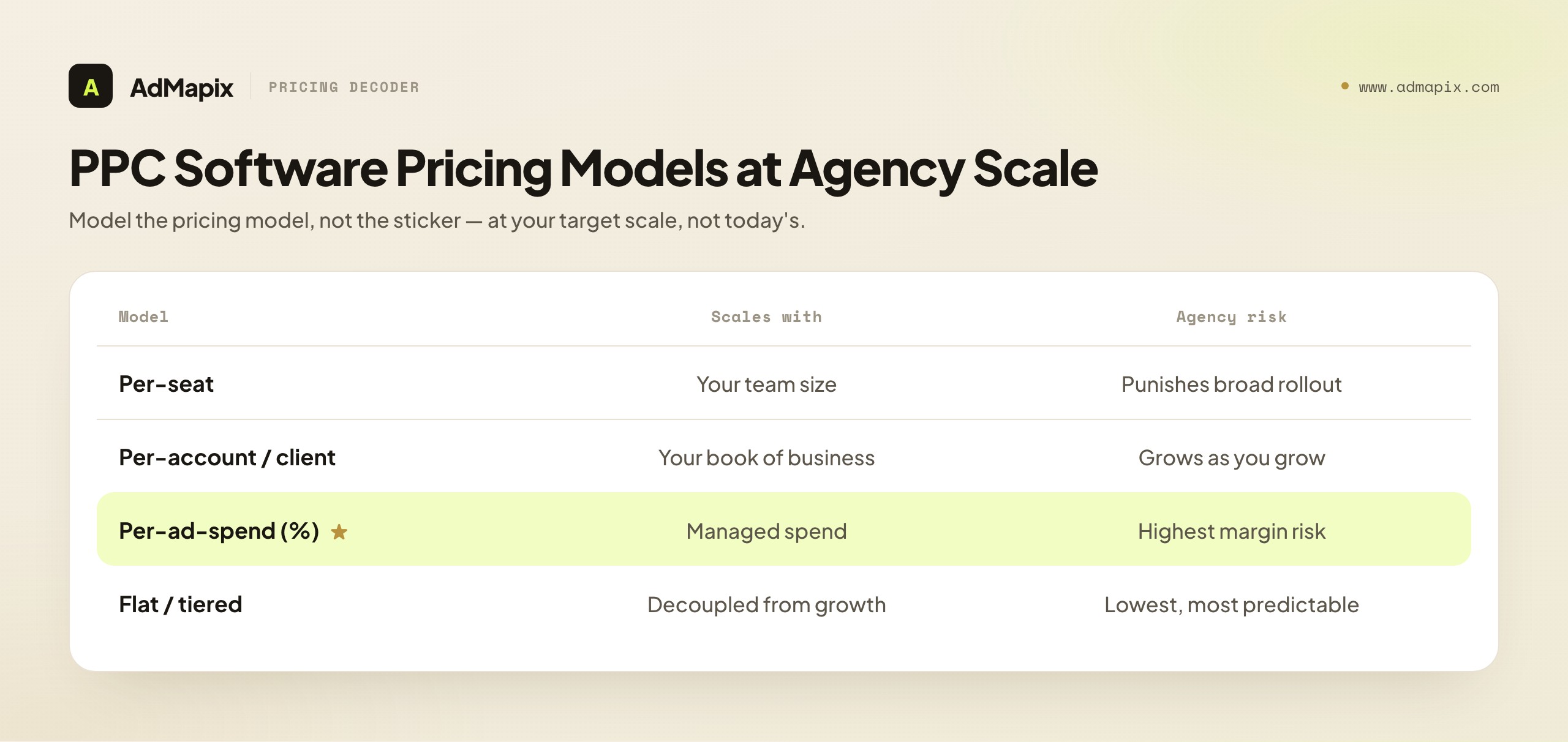
The sticker price of PPC software is rarely its real cost to an agency, and understanding the pricing models — not just the numbers — is essential to a stack that scales profitably. Agency pricing has dynamics that in-house buyers never face, and missing them is how a stack that looked affordable at five clients becomes a margin-killer at fifty.
Per-seat pricing scales with your team. It is predictable and fair for tools used by a few specialists, but it punishes broad rollout — if every account manager needs access, per-seat costs balloon. Watch for tools that should be broadly accessible (reporting clients can view, for instance) but charge per internal seat as if they were specialist tools.
Per-account or per-client pricing scales with your book of business. This is common for reporting and automation tools and is the model agencies must model most carefully, because it grows exactly as you grow. A tool that costs little at ten clients can become your largest software line item at a hundred. Always project the cost at your target client count, not your current one, before committing.
Per-ad-spend (percentage) pricing scales with managed spend and is the most dangerous model for agency margins, because it can take a cut of the very budget your fee is calculated on. A tool charging a percentage of managed spend is a partner in your revenue whether or not it adds proportional value. These can be worth it for genuinely spend-scaling value, but model the take rate against your own margin carefully — a few percent of large managed spend is a lot of money.
Flat / tiered pricing is the most predictable and often the best for agencies, because it decouples cost from your growth. A flat fee (or generous tiers) lets you add clients and spend without the tool's cost tracking your scale. Where available and capable, flat pricing protects margin as you grow.
Beyond the model, three hidden costs inflate the real total. Integration and maintenance — the engineering and ops time to connect tools and keep them connected — is real and recurring; a "cheap" tool that needs constant babysitting is not cheap. Onboarding and training — every tool the team must learn is a tax on productivity, and a stack of ten tools each used at 30% of capability is worse than a stack of four used fully. Switching cost and lock-in — data trapped in a proprietary format, or workflows built around a suite, make leaving expensive, which is precisely why suites design for it; weigh exit cost at entry. The honest total cost of a tool is sticker price plus integration plus training plus the option value you surrender to lock-in. Judge tools on that total, and many "affordable" suites look a lot more expensive while many focused best-in-job tools look like bargains.
A Practical Evaluation Scorecard
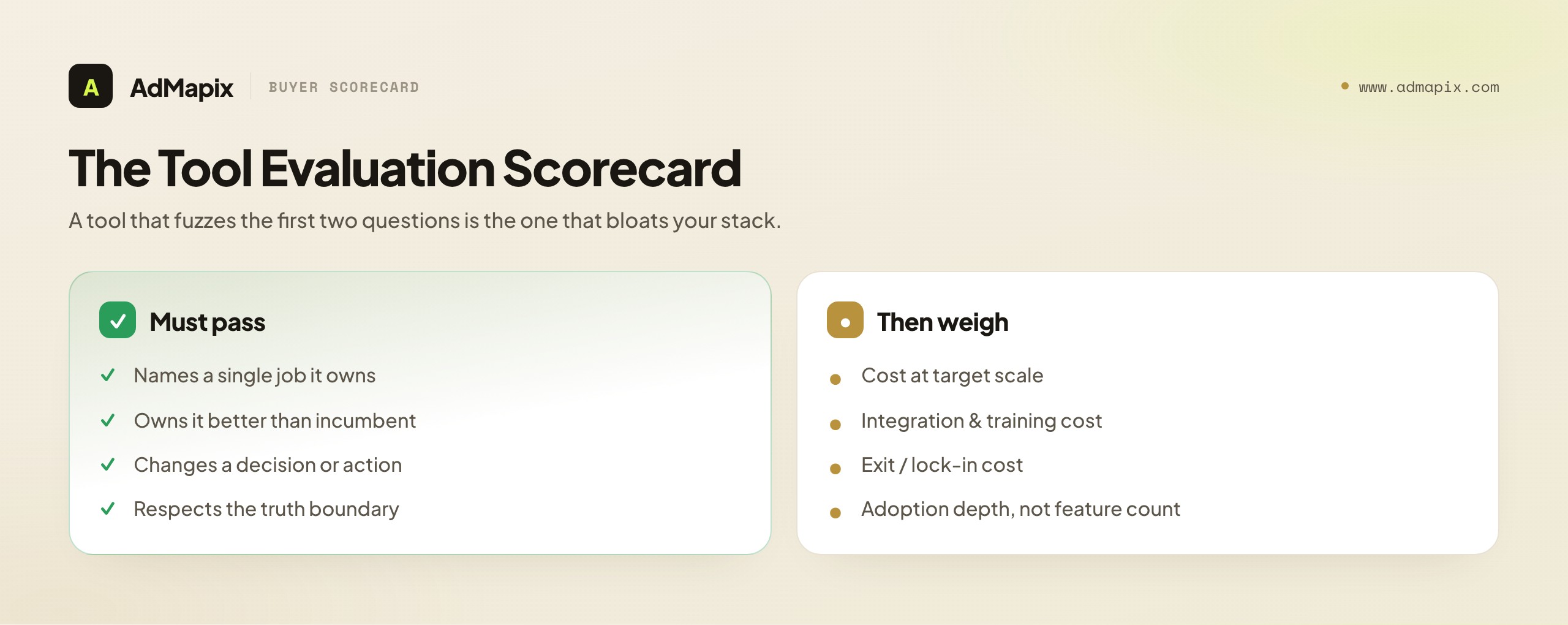
To make "buy by job" operational, here is a scorecard an agency can apply to any prospective PPC tool. Score each dimension honestly; a tool that does not clear the bar on the first two should not advance regardless of how it scores elsewhere.
1. Which job does it own? (Pass/fail.) Name the single job from the five. If you cannot, stop here. A tool that "helps with several things" owns nothing.
2. Does it own that job better than our incumbent? (Pass/fail.) If you already have an owner for that job, the new tool must be clearly better, not marginally different. "Different" is not a reason to switch; "better at the job" is.
3. Does it change a decision or action? Rate how directly the tool's output moves a budget, bid, creative, target, landing page, or client recommendation. Tools whose output never changes an action are decoration.
4. How does it price, and what does it cost at our target scale? Model the cost at your target client and spend count, under its pricing model. Reject tools whose cost outpaces the value as you grow.
5. What is the integration and training cost? Estimate the time to connect it and the time for the team to use it well. A capable tool nobody adopts is wasted money.
6. What is the exit cost? Can you get your data out cleanly? How locked-in does it make you? Prefer tools you could leave.
7. Does it respect the truth boundary? Especially for creative-intelligence and "competitor" tools: does the vendor claim to show data that is not public (competitor spend, ROAS, impression-level targeting)? A vendor overclaiming is a vendor to distrust on everything else.
Run a prospective tool through these seven and the decision usually makes itself. The scorecard's real value is that it forces the by-job discipline at the moment of temptation — when a slick demo is making everything look essential. A tool that passes 1, 2, and 3 and prices sanely at scale is worth adding; one that fuzzes the first two questions is the one that will bloat your stack.
Where Creative Research Fits — and Why It's the Job Agencies Skip
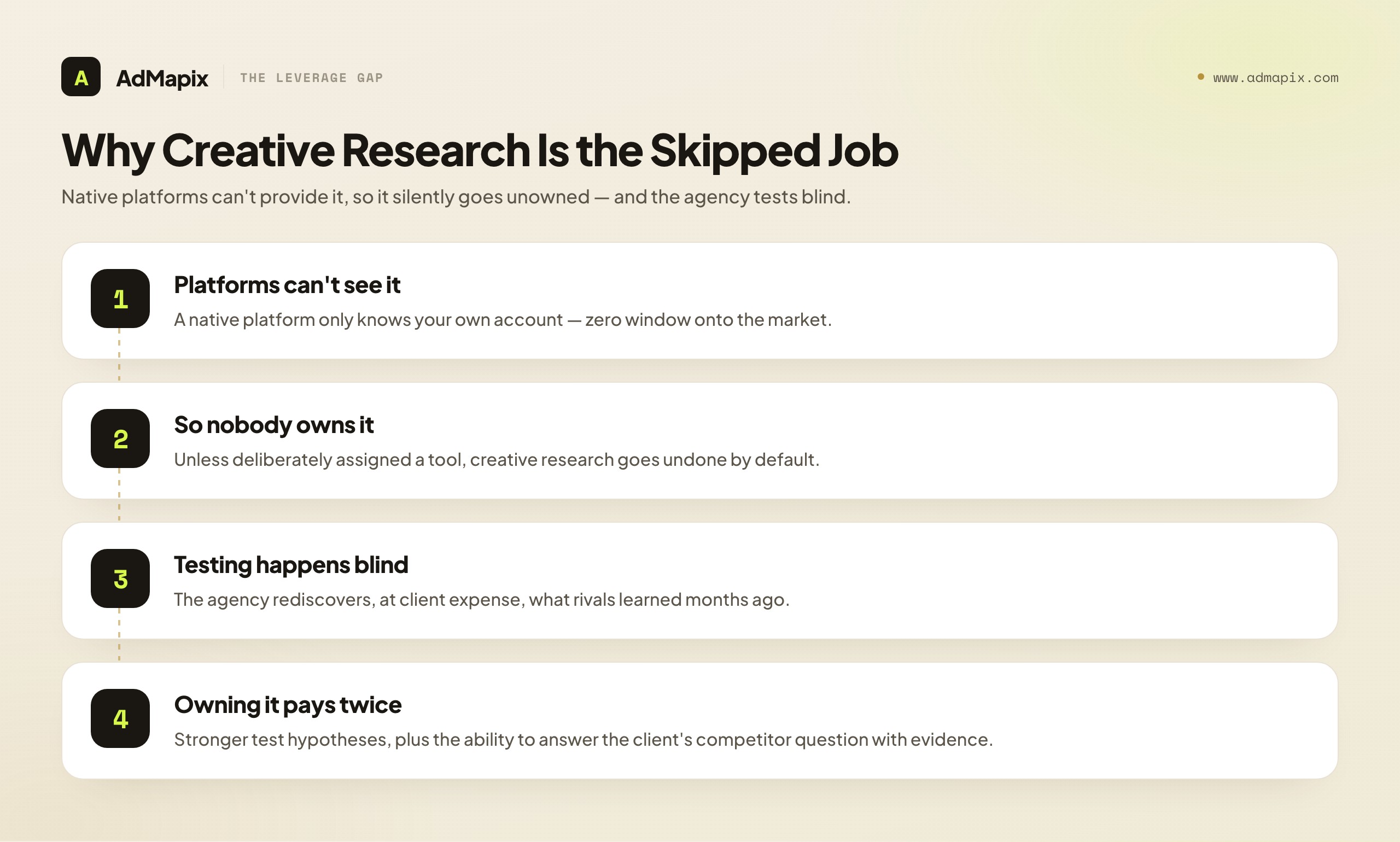
Of the five jobs, creative research is the one agencies most often leave unowned, and it is also the one with the highest leverage, which makes the gap especially costly. The reason it gets skipped is structural: the native platforms — where agencies spend most of their time — give it to you for free in no measure at all, because a platform cannot see outside your account. So unless someone deliberately owns creative research with a tool built for it, the job silently goes undone, and the agency tests creatives in a vacuum.
Testing in a vacuum is expensive. Every creative test an agency runs costs client budget and time. When that testing is informed by what the market is already doing — which angles competitors are leaning into, which hooks recur across a category, which formats rivals are investing production in — the test starts from a stronger hypothesis and wastes less budget on angles the market has already validated or abandoned. When testing is blind, the agency rediscovers, at the client's expense, things a competitor learned months ago. Creative research converts other companies' (visible) experiments into your starting hypotheses, which is among the cheapest sources of testing leverage available.
For an agency specifically, creative research also has a client-facing value beyond the testing leverage: it directly answers the dreaded mid-call question, "why does our competitor suddenly look more active?" An agency that owns creative research can answer that with evidence — "here is what they have started running, here is the angle they are pushing, and here is how we recommend responding" — instead of with a promise to "look into it." That capability turns a moment of client anxiety into a demonstration of the agency's market command. It is, quietly, one of the strongest retention and trust-building levers an agency has, and it is invisible until a client asks the question your competitors' agencies cannot answer.
The output of creative research should feed directly into the operations job via a brief. The loop is: research surfaces what the market is testing → the strategist forms a hypothesis → the brief specifies a test → operations runs it → results feed reporting and the next research cycle. For the discipline of turning research into structured tests, our creative testing framework is the companion piece. Creative research without a test attached is trivia; tied to a testing loop, it is the agency's edge.
Where AdMapix Fits — and Where It Honestly Does Not
We owe you a precise account of where our own tool sits in the agency stack, including what it cannot do, because the integrity of the whole "respect the truth boundary" argument above depends on us holding ourselves to it.
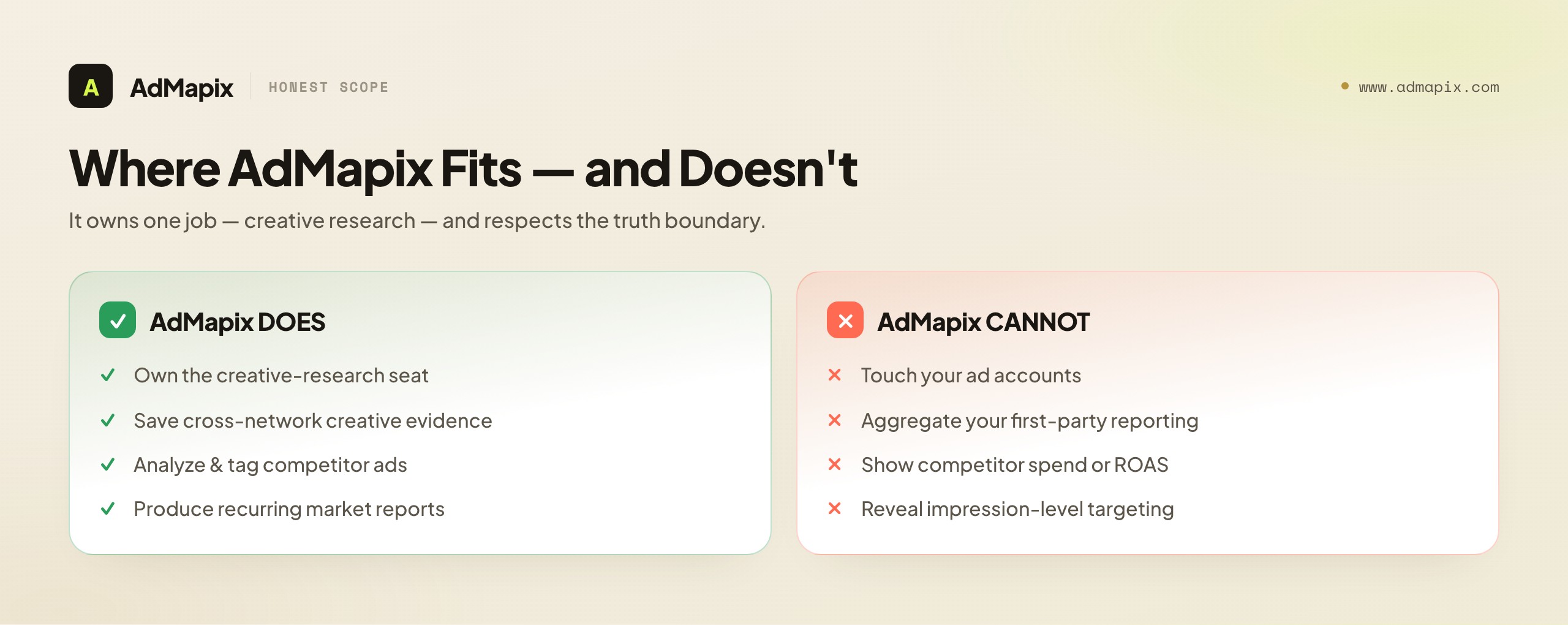
AdMapix is a creative-research layer — and only that. In the five-job framework, it owns exactly one job: creative research, the competitive-context layer. It gives agencies searchable cross-network ad-creative evidence: saved examples of what competitors are running, breakdowns of video creatives, consistent tagging of ads, and recurring reports on what a competitive set is testing. Its job is to tell your strategists and account managers what the market is testing in its creatives so your testing program starts from evidence rather than guesswork — and to let you answer the "why is our competitor more active?" question with proof.
What AdMapix is not, and cannot be: a campaign-operations tool (it does not touch your ad accounts), a reporting tool (it does not aggregate your first-party performance), an automation tool, or — critically — a source of competitor performance data. AdMapix cannot show you a competitor's ad spend, their ROAS, their conversion rates, their impressions, or their impression-level targeting, because none of that is in the public data and no tool can derive what platforms do not publish. AdMapix gives you the creative-evidence layer — what rivals are saying and testing — done at scale and made reportable. The how-it's-performing layer is not publicly knowable, and any vendor in this category claiming to show you competitor spend or ROAS is selling a model dressed as a measurement. We would rather tell you that plainly and own one job well than overclaim and lose your trust on everything.
So the honest placement is: AdMapix slots into the creative-research seat of your stack, sits alongside (never replaces) your native platforms, reporting tools, and automation, and is explicit that the one thing it offers — competitive creative evidence — is real, useful, and bounded. It passes its own scorecard precisely because it owns a single job and respects the truth boundary. That is the standard we hold every tool in this article to, and the standard we hold ourselves to.
Why Agency Stacks Differ From In-House Stacks
It is tempting to think an agency simply needs the same PPC tools as an in-house team, multiplied. It does not, and understanding why the agency operating model changes the stack requirements prevents a whole class of bad purchases — tools that work fine in-house and quietly fail at agency scale.
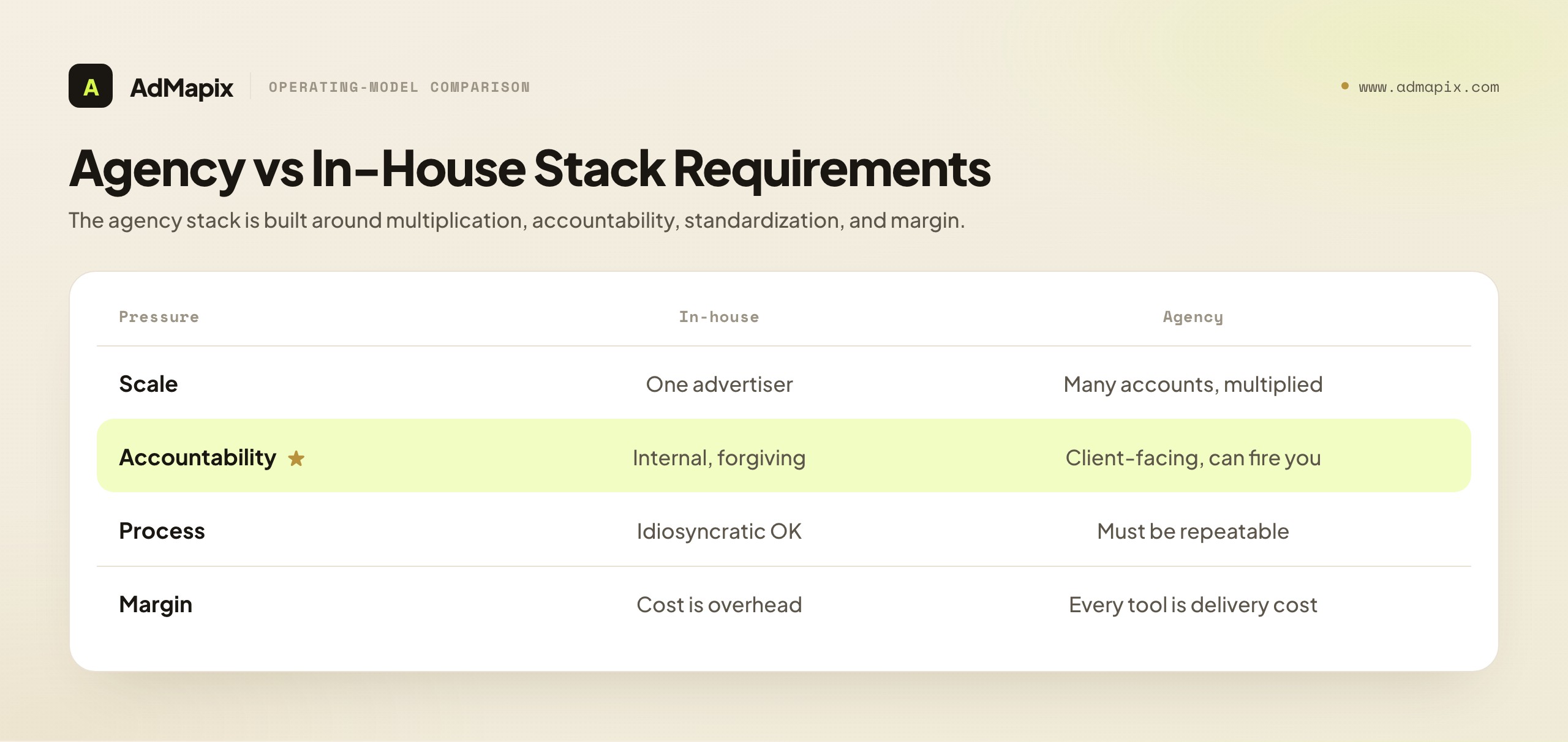
The first difference is multi-account scale. An in-house team operates one advertiser; an agency operates many, often dozens, each in its own platform accounts with its own goals and history. Tools that are perfectly adequate for one account — manual reporting, ad-hoc QA, memory-held competitor knowledge — collapse under multiplication. At one account, manually building a report is an annoyance; at fifty, it is an unsustainable cost that demands a reporting tool with templating and scheduling. The agency stack must be built for scale-multiplied versions of every job, which is exactly why per-account pricing models deserve such careful scrutiny: they grow with the very thing that makes agencies need tools in the first place.
The second difference is client-facing accountability. In-house results are presented internally, with shared context and forgiveness. Agency results are presented to a paying client who can fire you, often with less context and more skepticism. This raises the bar on reporting (it must be clean, consistent, and branded), on communication (recommendations must be clearly justified), and — critically — on creative research, because clients judge an agency partly on whether it seems to know the market. An in-house team can get away with a thin competitive view; an agency that cannot speak to the competitive landscape looks like a vendor rather than a partner. The accountability gradient pushes agencies to own jobs that in-house teams can underinvest in.
The third difference is standardization across accounts. An in-house team can run idiosyncratic, account-specific processes because there is only one account. An agency needs repeatable processes that any account manager can apply to any client, or quality varies by who happens to staff the account and the whole operation becomes fragile. This pushes agencies toward tools that enforce consistency — standardized reporting templates, standardized QA checklists, standardized creative-research outputs — so the agency's quality is a property of the system, not of individual heroics. A tool that helps one expert is less valuable to an agency than a tool that makes every account manager competent at a job.
The fourth difference is margin sensitivity. Agencies live on the spread between what they charge and what delivery costs. Every tool is a delivery cost, so the agency must judge tools on margin impact in a way in-house teams rarely do. A tool that an in-house team can justify on "it helps a bit" must, for an agency, justify itself against its drag on margin across the whole book. This is the deep reason for the by-job discipline and the quarterly audit: at agency scale, tool bloat is not just clutter, it is a direct, recurring tax on the agency's profitability.
Put together, these four differences mean the agency stack is not the in-house stack scaled up; it is a stack built around multiplication, accountability, standardization, and margin. The five jobs are the same, but the requirements within each job are stricter, and the cost of getting the stack wrong is paid on every account, every month. Native platforms like Google Ads and Microsoft Advertising publish extensive operational documentation that any agency stack is built on top of, but the platforms themselves do not solve the multiplication, standardization, or competitive-context problems — which is precisely the gap the rest of the stack exists to fill.
Workflow, Handoffs, and Onboarding: Making the Stack Actually Work
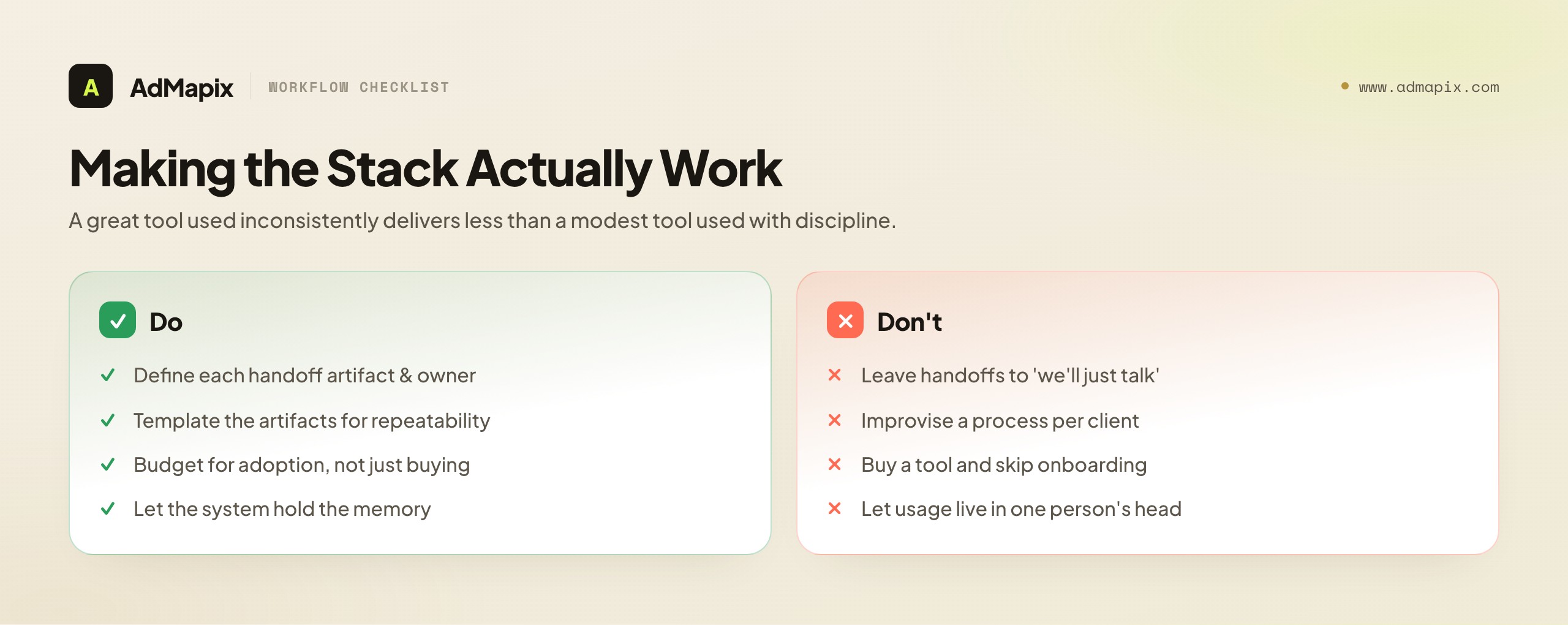
A well-chosen stack still fails if the workflow around it is sloppy. The tools are only as good as the handoffs between the jobs and the team's fluency in using them. Agencies that get the most from their stack invest as much in workflow design as in tool selection — because a great tool used inconsistently delivers less than a modest tool used with discipline.
Design the handoffs explicitly. The five jobs form a loop, and value leaks at every handoff that is left implicit. Creative research must hand a clear, structured brief to operations — not a vague "competitors are doing video, we should too," but a specific hypothesis with the evidence attached. Operations must hand clean, tagged results to reporting — not a tangle that the account manager has to reverse-engineer. Reporting must hand a coherent story to communication, which hands an approved plan back to operations. Each handoff should have a defined artifact (a brief, a results export, a report, an approved recommendation) and a defined owner on each side. Agencies that name these artifacts and owners stop losing value in the gaps; agencies that leave handoffs to "we'll just talk" lose a little at every step until the loop barely turns.
Standardize the artifacts. Because agencies need repeatability, the handoff artifacts should be templated. A standard creative-research brief format, a standard reporting layout, a standard recommendation template — these make the handoffs predictable and the quality consistent across accounts and account managers. Standardization is also what makes onboarding new team members fast: a new hire learns the artifacts and the workflow, not a different improvised process for every client. For the research-to-test handoff specifically, a structured brief tied to a creative testing framework is the artifact that carries competitive evidence into action.
Budget for adoption, not just acquisition. The most common reason a good tool underperforms is that the team never learned to use it well. Acquiring a tool is the easy, visible part; driving deep adoption is the hard, invisible part that determines actual value. Agencies should treat onboarding as a real project for each significant tool: assign an internal champion, run training, document the workflow, and check adoption after a quarter. A tool used at 30% of its capability is mostly wasted spend, and the fix is rarely a different tool — it is deeper adoption of the one you have. This is why "prefer fewer tools used fully" is not just a budget argument but a capability argument: a team can genuinely master four tools and will only ever dabble in ten.
Make the workflow survive staffing changes. Agencies have turnover, and a stack whose effective use lives in one person's head is a fragile stack. The antidote is documented workflow plus standardized artifacts plus tools that hold the institutional memory (the reporting history, the tagged creative-research archive, the QA log). When the system holds the knowledge, a departing account manager takes less of it with them, and a new one ramps faster. The goal is an operation where competence is a property of the documented system and the well-adopted stack, not of any individual — which is, ultimately, what lets an agency scale without quality degrading.
The payoff of this workflow investment is compounding. Tools chosen by job, connected by explicit standardized handoffs, adopted deeply, and resilient to turnover, produce an agency operation that gets more coherent and capable over time rather than more cluttered and fragile. That is the difference between an agency that accumulates tools and an agency that builds a system — and clients can feel which one they are working with.
Common Mistakes That Inflate the Agency Tool Budget
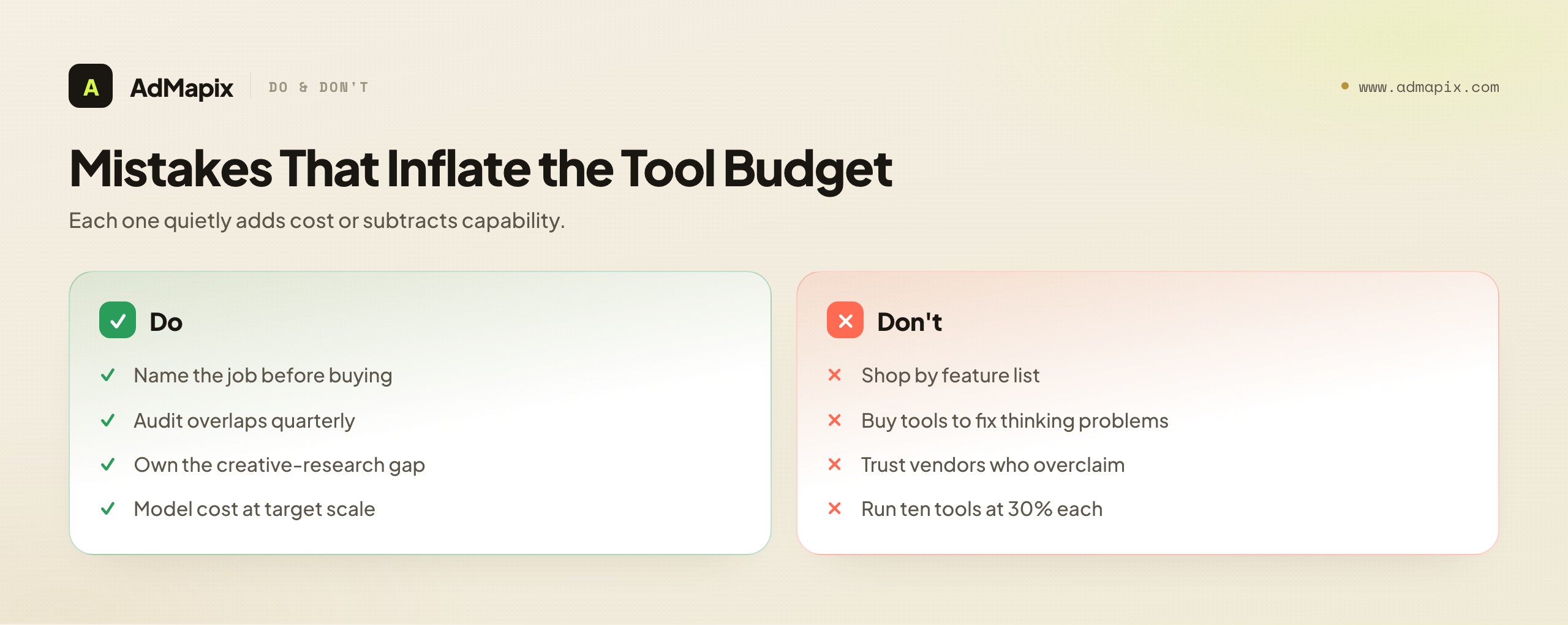
The failure modes are consistent across agencies. Each one quietly adds cost or subtracts capability; together they are why so many agency stacks are simultaneously over-paid-for and under-performing.
Shopping by feature list instead of by job. The root mistake, from which most others flow. Fix: name the job before evaluating any tool.
Buying a tool to fix a thinking problem. Adding a reporting tool because strategy is weak, or automation because judgment is poor. Tools amplify; they do not replace judgment. Fix: diagnose whether the problem is a tool gap or a people/process gap before buying.
Tool overlap nobody audits. Two tools quietly owning the same job because they were bought at different times by different people. Fix: the quarterly team audit — name each job's owner and cut the overlaps.
The unowned creative-research gap. Leaving the one job native platforms can't do unowned, and testing blind as a result. Fix: deliberately own creative research with a fit-for-job tool.
Ignoring the pricing model at scale. Adopting a per-account or per-spend tool that's cheap now and a margin-killer at your target size. Fix: always model cost at target scale, not current scale.
Drowning in dashboards that don't change actions. Accumulating charts that look impressive and move nothing. Fix: the "does it change the next action?" filter, applied ruthlessly.
Trusting vendors who overclaim. Believing a tool that promises competitor spend or ROAS on platforms that don't publish it. Fix: treat overclaiming as disqualifying — if they lie about what's knowable, distrust everything else.
Under-using what you own. Running ten tools at 30% of capability instead of four at full capability. Fix: prefer fewer tools used fully; adoption depth beats tool count.
Putting It Together: Assembling a Lean Agency Stack
Step back and the construction sequence is clear. Start from the five jobs, not from a shopping list. For each job, ask "who owns this, and with what tool?" Your native platforms own operations (and supply first-party truth) — non-negotiable and irreplaceable. Choose one reporting tool to own the client-deck job, judged on time saved and consistency, not on imaginary strategy features. Add automation to own hygiene, scoped to enforcing rules your people set. Deliberately fill the creative-research seat — the one most agencies skip — with a fit-for-job competitive creative-intelligence tool, so your testing is informed and you can answer the competitor-activity question with evidence. And treat client communication as a job owned mostly by people and process, supported by light tooling.
Then maintain the stack like a team, not a toolbox: a quarterly audit naming each job's owner, flagging gaps and overlaps, applying the scorecard to anything new, and cutting anything that fails the "changes the next action" test. Model every per-account and per-spend tool at your target scale, prefer best-in-job over all-in-one unless integration cost genuinely forbids it, and distrust any vendor who claims to show data that isn't public.
Done this way, the stack stays small, every tool earns its seat, the handoffs between jobs are clean, your tool budget tracks value instead of vendor ambition, and — most importantly — your account managers walk into client calls able to say not just what happened, but what the market is doing and what you recommend in response. That last capability, grounded in creative research, is what separates an agency that runs accounts from an agency that commands a category. The tools are in service of that judgment, never a substitute for it.
A closing word on sequencing for an agency building or rebuilding its stack from scratch: do not try to perfect all five jobs at once. Start with the non-negotiables — native platforms for operations and a reporting tool for the client-deck job, because those are table stakes and their absence is felt immediately. Then add QA automation, which is cheap insurance that prevents expensive, trust-eroding mistakes. Then — and this is the step most agencies never reach — deliberately fill the creative-research seat, because it is the highest-leverage and most-skipped job, and the one that most visibly elevates the agency in the client's eyes. Client communication, last, is refined as process and templates mature. Sequencing the build this way means each addition solves a felt pain and earns its keep before the next is added, which is itself an application of the by-job discipline across time rather than at a single point.
And recognize what the lean, by-job stack ultimately buys you: not just lower software costs, but a more capable, more consistent, more defensible agency. Lower costs are the visible benefit; the durable one is an operation where every job has an owner, every handoff has an artifact, every tool earns its seat, and the team can answer any client's hardest question — what happened, why, what the market is doing, and what we recommend — with evidence and confidence. That operation retains clients, commands higher fees, and scales without quality decay. The stack is the means; a category-commanding agency is the end. Build the stack by job, audit it like a team, respect the truth boundary, and the means will reliably serve the end.
FAQ
What is PPC management software for agencies?
It is not a single product but a stack of tools covering five distinct jobs: campaign operations (changing the account), reporting (presenting results), quality assurance (catching what breaks), creative research (understanding the competitive market), and client communication (framing recommendations). No single tool does all five well. The agency skill is assigning each job a clear owner and a fit-for-job tool, with clean handoffs between them — buying by job, not by logo.
How do I choose PPC software for my agency?
Buy by job, not by feature list. For any tool, name which of the five jobs it owns; if you can't, don't buy. If a job already has an owner, don't add a second tool for it. Run prospects through a scorecard: which job, is it better than the incumbent, does it change an action, how does it cost at target scale, what are integration/training/exit costs, and does it respect the truth boundary (no claiming non-public competitor data). Tools that fuzz the job question are the ones that bloat your stack.
Do agencies need separate tools for each job?
Usually yes for the high-leverage jobs, but not always one tool per job. Native platforms own operations and supply truth; you'll want a dedicated reporting tool and an automation layer; creative research needs a fit-for-job tool because native platforms can't do it. Client communication is mostly people and process with light tooling. Prefer best-in-job tools connected cleanly over an all-in-one suite — unless you're a small agency where integration overhead outweighs capability, in which case a consolidated suite chosen knowingly can be right.
Why can't one all-in-one tool do everything?
Because the five jobs require genuinely different capabilities, and tools that spread across all of them tend to do each adequately and none excellently. "All-in-one" appeals through one login and one invoice, but its hidden costs are mediocrity in each job and switching lock-in. A focused tool that owns one job superbly, connected to the others, almost always beats a sprawling suite. The exception is a small agency for whom integration effort genuinely outweighs the capability gains.
What's the most overlooked job in an agency PPC stack?
Creative research — understanding what competitors are testing in their advertising. It's overlooked because native ad platforms can't provide it (a platform only sees your own account), so unless someone deliberately owns it with a fit-for-job tool, the job silently goes undone and the agency tests creatives blind. It's also the highest-leverage job, because it makes every creative test start from a stronger hypothesis and lets you answer the "why is our competitor more active?" client question with evidence.
How should I evaluate PPC software pricing as an agency?
Model the pricing model, not just the sticker price, at your target scale. Per-seat scales with your team; per-account/per-client scales with your book of business; per-ad-spend (percentage) scales with managed spend and is the most dangerous for margin; flat/tiered is the most predictable and often best. Then add the hidden costs — integration and maintenance, onboarding and training, and switching/lock-in cost. The honest total is sticker plus integration plus training plus surrendered option value. Judge tools on that total.
Can PPC software show me my competitors' ad spend?
No tool can show measured competitor ad spend on platforms that don't publish it, which is most of them. Any "competitor spend" figure is a model or estimate, not a measurement, and should never be presented to clients as fact. What competitive creative-intelligence tools can show is the public creative evidence — what competitors are running, the angles, hooks, offers, and formats they're testing. Treat any vendor claiming to show real competitor spend or ROAS as a red flag that undermines trust in everything else they say.
Where does AdMapix fit in an agency's PPC stack?
AdMapix owns one job: creative research, the competitive-context layer. It gives agencies searchable cross-network ad-creative evidence — saved competitor examples, video breakdowns, consistent tagging, and recurring reports on what a competitive set is testing — so your testing starts from evidence and you can answer the competitor-activity question with proof. It does not touch your ad accounts, aggregate your first-party reporting, or — critically — show competitor spend, ROAS, conversion rates, or impression-level targeting, because that data isn't public. It sits alongside, never replaces, your other stack tools.
How often should I audit my agency's tool stack?
Quarterly. Treat the stack like a team: name the owner (tool) of each of the five jobs, flag any job nobody owns (a gap) and any job two tools own (redundancy), apply the evaluation scorecard to anything new, and cut anything that fails the "does it change the next action?" test. A standing quarterly audit keeps the stack lean and the budget tracking value far better than ad-hoc purchase decisions, because tool bloat accumulates silently between deliberate reviews.
What's the difference between reporting tools and creative-research tools?
They own opposite ends of the stack. Reporting tools aggregate and present your own first-party performance into client-ready decks — they answer "what happened in our accounts?" Creative-research tools surface competitors' public creative evidence — they answer "what is the market testing?" Reporting looks inward at your results; creative research looks outward at the competitive landscape. Confusing them leads to a common gap: agencies buy reporting (inward) and never fill the creative-research (outward) seat, leaving them blind to the market their campaigns compete in. The simplest test: if a tool only touches your own accounts' data, it is a reporting or operations tool; if it shows you what other companies are running, it is creative research. An agency needs both, owned separately, because each answers a question the other structurally cannot, and a stack missing either is missing half the picture its clients are paying it to see clearly.
Related Reading
To deepen the competitive-research half of your stack, read the competitor ad analysis framework, the advertising intelligence guide, and our creative testing framework for turning market evidence into structured tests. For evaluating the creative-intelligence category specifically, see best ad intelligence tools and best ad spy tools 2026, and for turning competitive findings into a client-ready deliverable, our competitor ad report template.
Turn these observations into your next creative study
Open the creative library and select samples for your market, network and research question.
Related Articles
Cross-Channel Ad Attribution in 2026: A Practical Guide for Performance Teams
A practical cross-channel ad attribution guide for performance teams: how to compare ROAS across platforms when every platform claims credit differently, build incrementality testing into your workflow, and make budget decisions without perfect data.
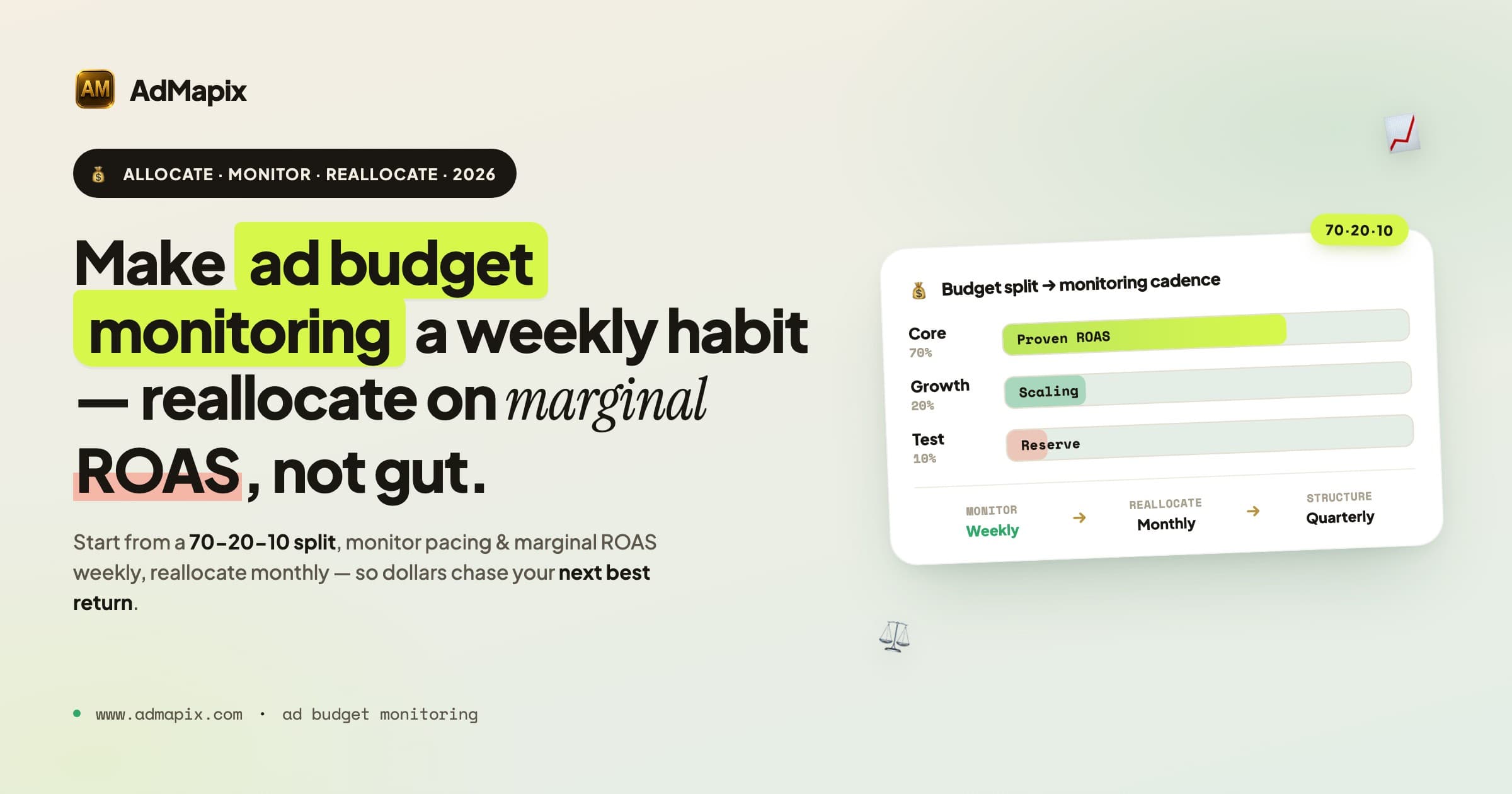
Ad Budget Optimization Framework 2026: Monitoring, Pacing & Reallocation
A 7,500-word 2026 framework for ad budget monitoring, tracking, and optimization: the 70-20-10 split, marginal ROAS, competitor ad budget signals, budget pacing, a weekly tracking dashboard, and a monthly reallocation workflow.
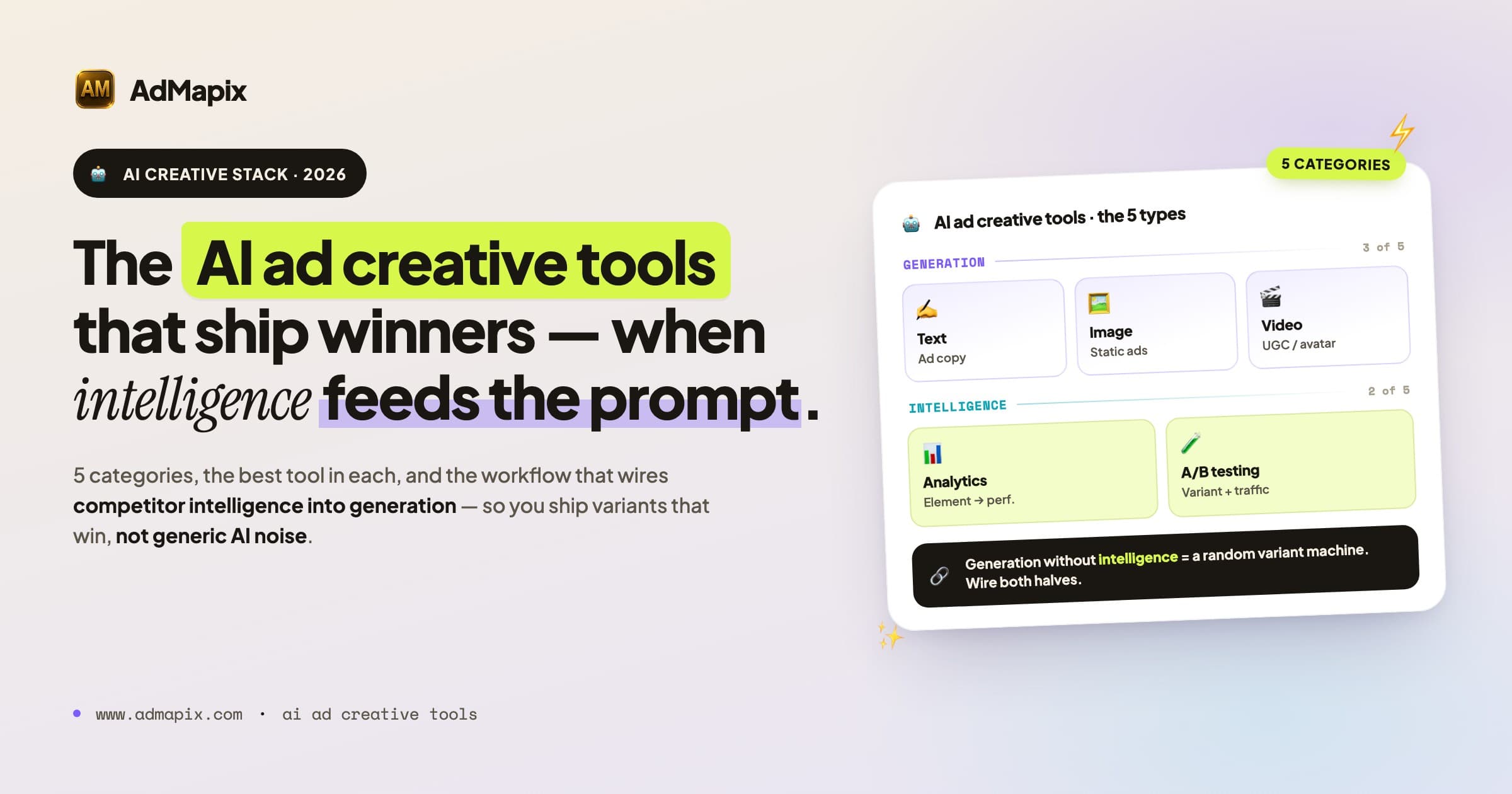
AI Ad Creative Tools in 2026: The 5 Categories, Best Tools & a Workflow That Actually Converts
A practical 2026 guide to AI ad creative tools — the 5 categories (text, image, video, analytics, A/B testing), best tools per category, prompt templates, a competitive-intelligence-fed workflow, AI UGC ads, platform disclosure rules, and how to ship variants that win instead of generic AI noise.