
PowerAdSpy Alternative in 2026: 7 Tools Compared (Coverage, Video & Pricing)
A 2026 guide to choosing a PowerAdSpy alternative — why tier-gated filters send teams looking, a 7-tool comparison with pricing and coverage, the discovery-vs-video-vs-reporting framework, a migration plan, and an honest read on when AdMapix fits.
By the AdMapix Research Team — Updated June 21, 2026
PowerAdSpy Alternative in 2026: 7 Tools Compared (Coverage, Video & Pricing)
If you're looking for a PowerAdSpy alternative, the right choice depends on which part of your workflow is breaking: platform coverage, video analysis, report-ready output, or a pricing tier that includes the filters you actually use. PowerAdSpy is a broad ad-spy tool covering Facebook, Instagram, YouTube, Google, Native, and other networks, but its filters and platform access are split across tiers — so the version you can afford may not include what you searched for. This 2026 guide is for media buyers, agencies, ecommerce marketers, affiliate teams, and creative strategists. It gives you a decision framework, a seven-tool comparison with pricing and coverage, a migration plan, and an honest read on what public ad data can and can't prove — and when AdMapix fits.
The honest framing up front: PowerAdSpy is a broad, capable tool, and most people searching for an alternative don't have a PowerAdSpy quality problem — they have a tier-fit problem. Its filters and platform access are split across pricing tiers, so the plan you can afford may exclude the exact channel or filter your media plan needs. So the real question isn't "what beats PowerAdSpy," it's "which job is failing — discovery, video analysis, reporting, or cost-fit — and what's the right-sized tool for that." This guide answers the second question.
TL;DR — Choosing a PowerAdSpy Alternative
- There's no single best PowerAdSpy alternative — pick by the decision you need to improve this week: discovery, video breakdown, or client reporting.
- Judge tools by workflow output (briefs, tests, reports), not by which claims the largest ad database.
- Match the pricing tier to the exact filters and networks you buy on, because many spy tools gate channels and filters behind higher plans — the core PowerAdSpy frustration.
- The field splits into broad libraries (PowerAdSpy, BigSpy), single-channel specialists (AdSpy for Meta, native/push tools), and cross-network/video/reporting layers (AdMapix).
- AdMapix fits teams that need cross-network creative search, saved media, video analysis, and recurring competitor reports — not teams that only need a one-off Meta lookup.
- Name the failing job first. Discovery, video, reporting, or cost-fit — each points to a completely different alternative.
What You're Actually Trying to Fix
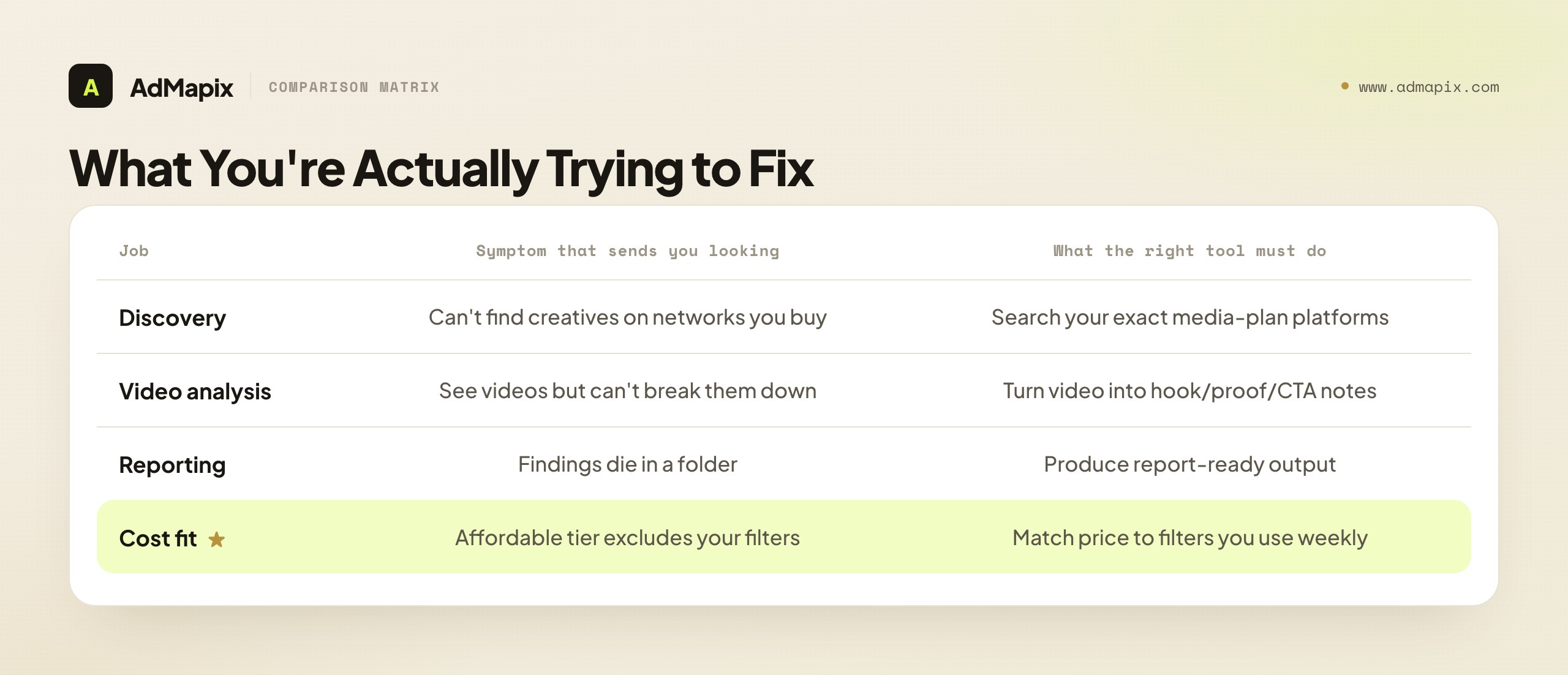
Most people searching for a PowerAdSpy alternative aren't missing ads — they're missing a workflow. The real question is which of four jobs is failing, because each one points to a different tool.
| Job to be done | Symptom that sends you looking | What the right tool must do |
|---|---|---|
| Discovery | You can't find competitor creatives on the networks you buy | Search across the exact platforms in your media plan |
| Video analysis | You can see video ads but not break them down | Turn videos into hook, scene, proof, and CTA notes |
| Reporting | Findings die in a folder and never reach the client | Produce report-ready output, not just saved ads |
| Cost fit | The tier you can afford excludes the filters you need | Match price to the filters and channels you use weekly |
Name the failing job first. Buying before you can state the next action is the most common way teams waste a subscription.
Let's expand each, because the right alternative depends entirely on which job is failing:
Discovery. You buy on TikTok and Google, but the tier you can afford is strongest on Meta — so you can't reliably find competitor creatives where you actually spend. The fix is a tool whose coverage matches your media plan in the plan you'll actually buy, not the marketing page's full list.
Video analysis. You can see competitors' video ads but can't break them down — you have a thumbnail and a play button, not a hook/proof/CTA teardown. For paid social, where the first three seconds decide everything, that's the difference between copying a thumbnail and understanding a structure. The fix is a tool that turns video into structured notes.
Reporting. Your findings die in a saved-ads folder and never reach the client or stakeholder in a usable form. If your deliverable is a recurring competitor report, you need report-ready output, not just a wall of saved creatives. Screenshotting doesn't scale.
Cost fit. This is the signature PowerAdSpy frustration: the filters and platforms you need sit in a higher tier than you can justify, so you pay for a plan that excludes the exact capability you searched for. The fix is a tool whose affordable tier actually includes the channels and filters you use weekly.
Name which of the four is your real driver before you shop. Buying a video tool to solve a coverage gap (or a cheap broad tool to solve a reporting gap) is how teams end up with two subscriptions and the same unmet need.
How to Evaluate a PowerAdSpy Alternative
Evaluate each alternative against the decision it has to improve, then check whether the affordable tier actually delivers it. Database size is a vanity metric; the table below is the working checklist.
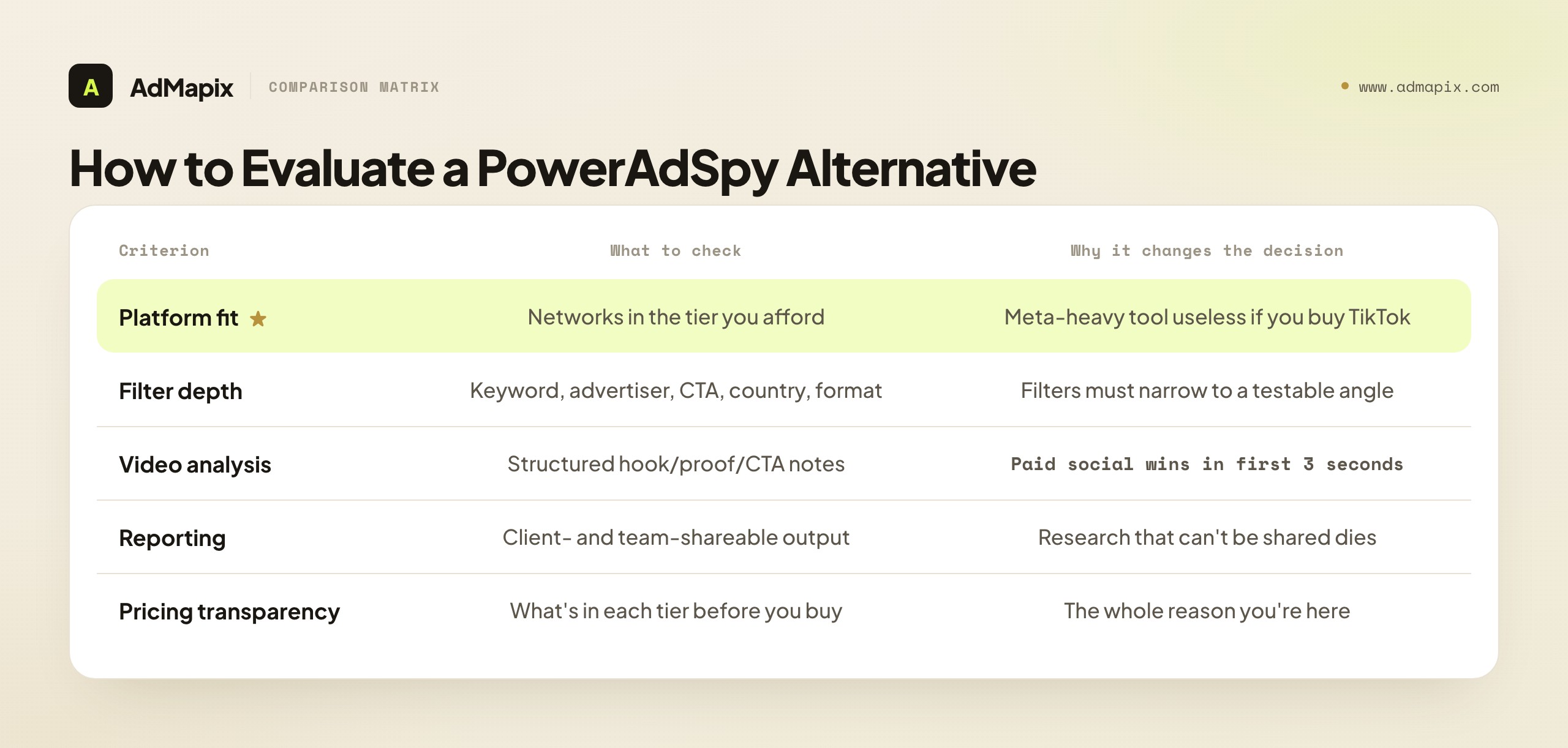
| Criterion | What to check | Why it changes the decision |
|---|---|---|
| Platform fit | Which networks are in the tier you can afford, not the marketing page | A Meta-heavy tool is useless if you buy on TikTok or Google |
| Filter depth | Keyword, advertiser, domain, CTA, country, ad type, format | Filters only matter if they narrow results to a testable angle |
| Video analysis | Whether videos become structured hook/proof/CTA notes | Paid social wins or loses in the first three seconds |
| Reporting | Whether output is client- and team-shareable | Research that can't be shared doesn't survive the next meeting |
| Cross-network reach | Whether several channels sit in one search and one plan | Multi-channel buyers, agencies |
| Saved evidence | Save the source ad, media, and rationale | Anyone building briefs |
| Pricing transparency | What's in each tier before you buy | The whole reason you're here |
The deciding question is never "which tool has the most ads." It's "which tool, in the tier I'll actually buy, closes my specific job — discovery, video, or reporting — and produces something I can act on this week." The tier qualifier is what separates a smart buy from another tier-gated disappointment.
What Public Ad Data Can and Cannot Prove
Before the tool comparison, a grounding caveat that applies to every option here. Ad-spy tools — PowerAdSpy and its alternatives alike — show you what competitors ran, not whether it worked. They reveal the creative, the offer, the format, and rough recency, but not verified spend, true ROAS, conversion rate, or profit. Treat every competitor ad as a hypothesis, not proof.
- What public data can show: the creative itself, the offer, the format, the hook structure, repetition over time, and which market a creative appears localized for.
- What it can't show: real spend, profit, conversion rate, or whether a long-running ad is actually profitable rather than just neglected.
- How to close the gap: validate patterns with your own ad results, store, and CRM data before scaling.
This matters for tool choice because it reframes what you're buying: not a truth machine, but a hypothesis generator. The best alternative is the one that gets you to a testable hypothesis — a brief, an angle, a structure — fastest, in the tier you can afford. A tool with a bigger database but no path from ad to hypothesis is worse than a smaller one that gets you to a brief.
The PowerAdSpy Alternatives, Compared
No single tool is "best" — each fixes a different failing job. Here's the honest positioning of the main options a PowerAdSpy user will weigh. Treat it as a map, not an endorsement; verify current features and pricing (and which tier includes them) on each vendor's page, since plans shift quarterly.
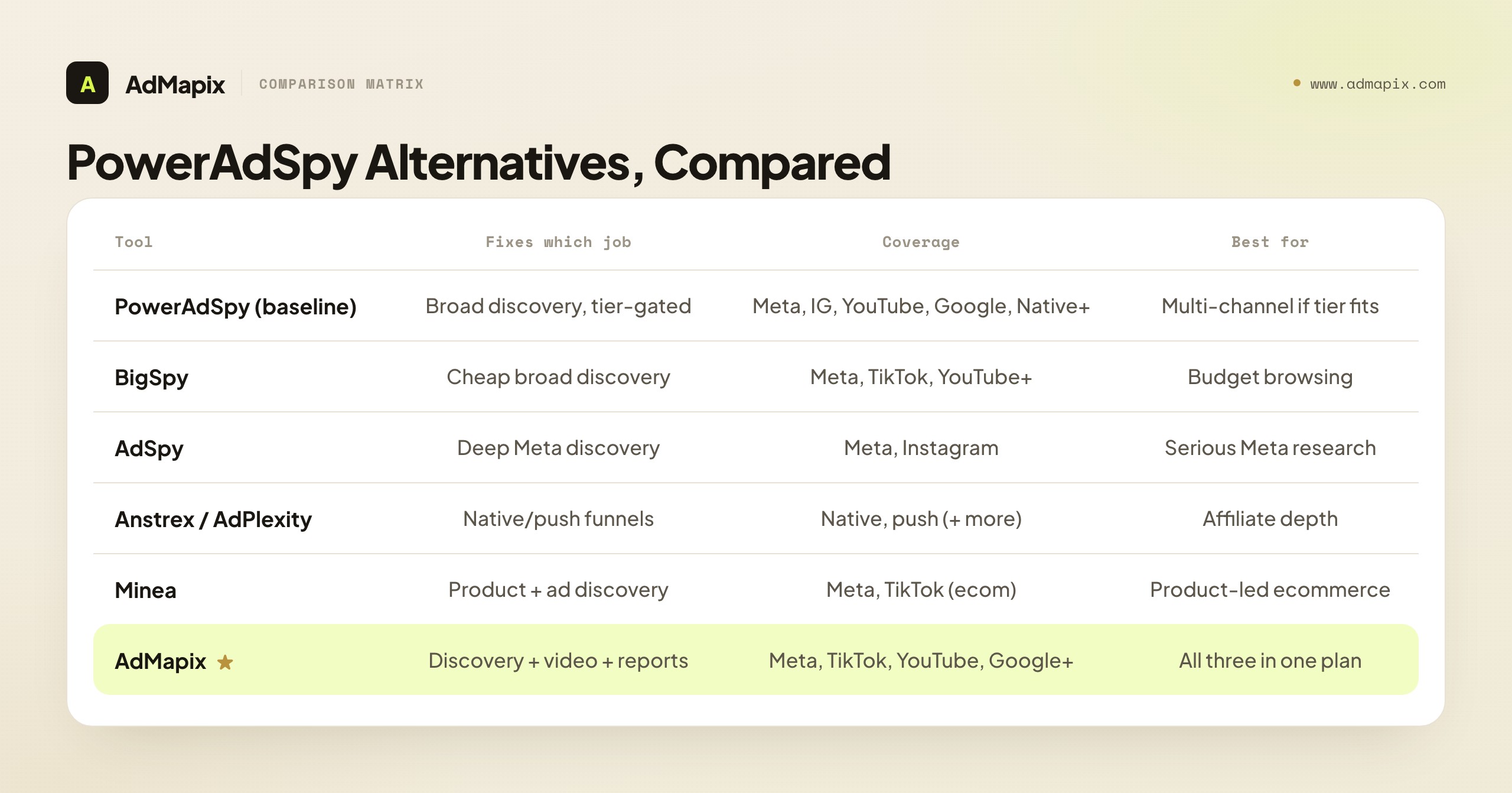
| Tool | Fixes which job | Coverage | Pricing posture | Best for |
|---|---|---|---|---|
| PowerAdSpy (baseline) | Broad discovery, tier-gated | Meta, IG, YouTube, Google, Native+ | Tiered (filters gated) | Multi-channel discovery, if the tier fits |
| BigSpy | Cheap broad discovery | Meta, TikTok, YouTube+ | Lower-cost tiers | Budget cross-channel browsing |
| AdSpy | Deep Meta discovery | Meta, Instagram | Higher flat monthly | Serious Meta/IG research |
| Anstrex | Native/push funnels | Native, push | Flat per product | Affiliate native/push depth |
| AdPlexity | Affiliate, per channel | Native, push, mobile, YouTube | Per-product | Channel-specific affiliate |
| Minea | Product + ad discovery | Meta, TikTok (ecom) | Free tier + paid | Product-led ecommerce |
| AdMapix | Cross-network + video + reports | Meta, TikTok, YouTube, Google+ | Public plans | Discovery + video + reporting in one |
Reading notes. BigSpy is the budget broad alternative — similar multi-platform breadth at a lower price, lighter on video analysis and reporting (our BigSpy alternatives guide covers its trade-offs). AdSpy is the Meta specialist if your discovery job is really Meta-deep. Anstrex and AdPlexity are the affiliate native/push specialists — different lane, relevant if your "coverage gap" is actually native/push (see our Anstrex alternative and AdPlexity alternative guides). Minea suits product-led ecommerce discovery. AdMapix is the cross-network layer that combines discovery, video analysis, and reporting in one plan — the fit when your failing job is video teardowns or reporting, or when tier-gating broke your cost-fit.
For the full field beyond the PowerAdSpy-specific lens, our best ad spy tools 2026 comparison ranks everything, ad spy tools by channel maps tools to channels, and best ad intelligence tools focuses on the creative-intelligence end.
BigSpy — the budget broad alternative
If your job is "broad discovery, but PowerAdSpy's tier for it costs too much," BigSpy is the natural first stop. It offers similar multi-platform breadth — Meta, TikTok, YouTube and more — at a lower price point, which directly addresses the cost-fit frustration. The trade-off is depth: lighter video analysis, thinner reporting, and fewer of the structured filters that turn a search into a testable angle. BigSpy answers "show me lots of ads across channels cheaply" well and "help me turn this into a brief or report" less well. If your failing job is purely cost-fit on broad discovery, BigSpy closes it; if it's video or reporting, you'll hit the same wall lower down.
AdSpy — when your discovery is really Meta-deep
If the networks you actually buy are Meta and Instagram, and your PowerAdSpy frustration is that its Meta depth in your tier is thin, AdSpy is the specialist answer — one of the largest Facebook ad archives with powerful filtering, at a higher flat monthly price. It's Meta-only, so it solves a depth problem on one channel, not a breadth problem across many. If your media plan is Meta-heavy and you want real archive depth and filter power, AdSpy fits; if you buy across TikTok, Google, and YouTube too, it leaves the other channels uncovered.
Anstrex & AdPlexity — if your gap is actually native/push
Sometimes the "coverage gap" that sends people from PowerAdSpy is really a native/push affiliate gap — funnels, prelanders, CPC bids — that a broad social-leaning tool was never going to serve well. If that's you, the affiliate specialists are the right lane: Anstrex for flat-priced native/push depth with landing-page ripping, AdPlexity for a wider affiliate channel family sold per product. Neither is a broad social tool, so they complement rather than replace PowerAdSpy if you straddle affiliate and brand work — but if affiliate funnels are your real job, a broad tool was always the wrong fit.
Minea — product-led ecommerce discovery
If your discovery is really product discovery — finding winning ecommerce products with the ads selling them — Minea is the product-led alternative, with a free tier that makes it easy to trial. It leans toward winning-product sourcing rather than deep creative teardowns or reporting, so it fits when your failing job is "what should I sell" more than "why does this creative work." For the creative-and-reporting side, it pairs with rather than replaces a creative-intelligence tool.
AdMapix — discovery, video, and reporting in one
AdMapix combines the three jobs that PowerAdSpy splits across tiers — cross-network discovery (Meta, TikTok, YouTube, Google and more), hook-by-hook video analysis, and shareable reports — in one plan, without gating the core capabilities behind higher pricing. It's the fit when your failing job is video teardowns or reporting, or when tier-gating broke your cost-fit and you'd rather not pay up for filters you should already have. The honest boundary: it's not a native/push funnel spy and not a product-sourcing catalog — for those, a specialist is more direct. AdMapix earns its place when the job is cross-network creative, understood and reported, in one place. More on exactly where it fits below.
Pricing: Watch the Tier, Not the Sticker
Price is the heart of the PowerAdSpy-alternative decision, because tier-gating is the signature frustration. The useful comparison isn't the headline price — it's what's actually in the tier you'd buy. Here's how the field breaks down.
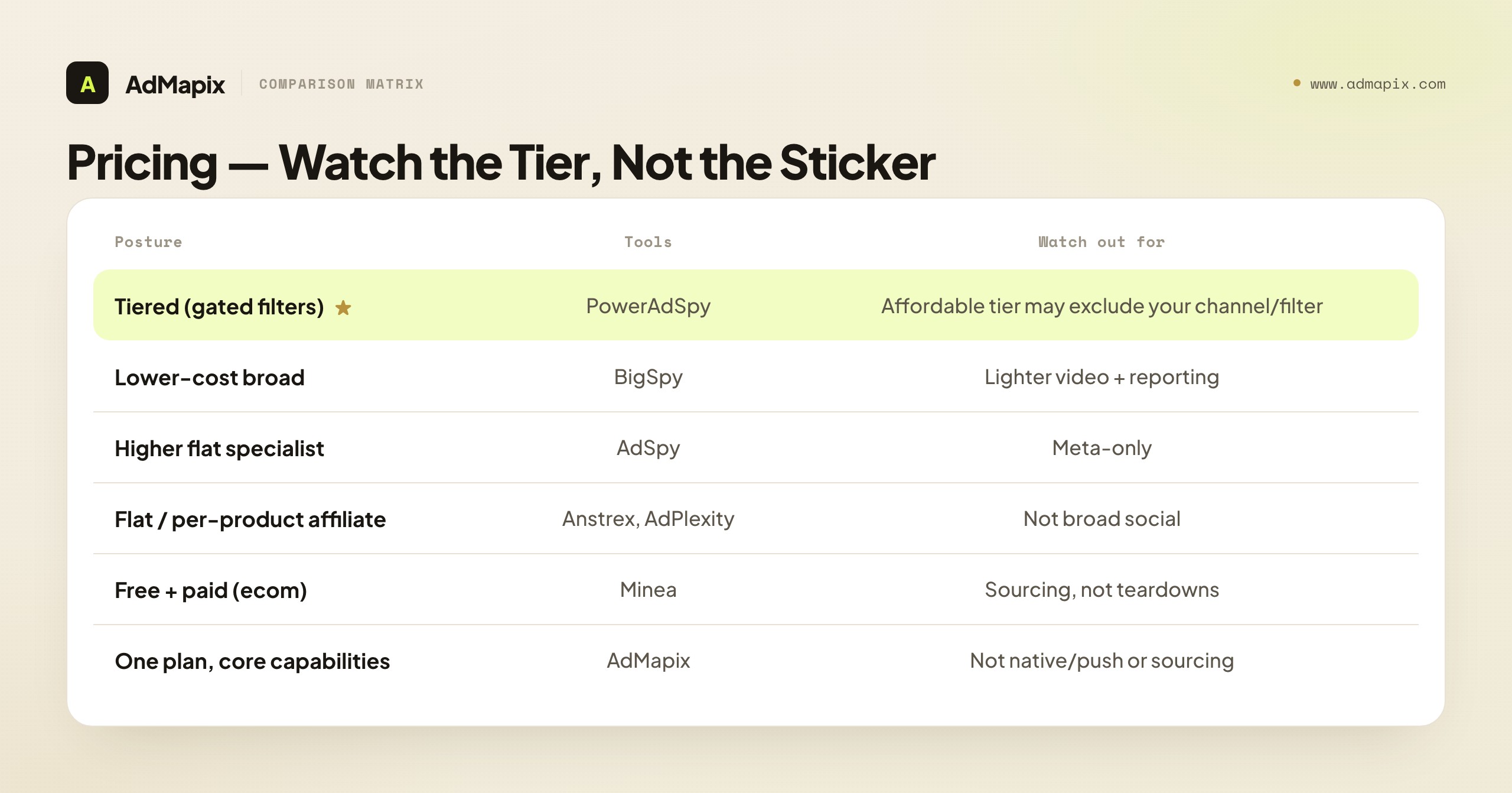
| Pricing posture | Tools | What you get | Watch out for |
|---|---|---|---|
| Tiered (gated filters) | PowerAdSpy | Broad coverage, filters split by plan | The tier you afford may exclude your channel/filter |
| Lower-cost broad | BigSpy | Cheap multi-channel browsing | Lighter video + reporting |
| Higher flat specialist | AdSpy | Deep Meta archive | Meta-only |
| Flat / per-product affiliate | Anstrex, AdPlexity | Native/push depth | Not broad social |
| Free + paid (ecom) | Minea | Product + ad discovery | Sourcing, not teardowns |
| One plan, core capabilities | AdMapix | Discovery + video + reports | Not a native/push or sourcing tool |
The trap specific to this category is buying on the headline price and discovering the filters you need are one tier up. Before you commit to any tool — including a PowerAdSpy alternative — confirm the exact channels and filters you use weekly are in the tier you'll actually pay for, not just somewhere in the product. A cheaper sticker that gates your real workflow behind an upgrade isn't cheaper; it's a slower path to the same bill. Confirm current tier contents on each vendor's page, since plans and gating shift quarterly.
Match the Tool to Your Failing Job
The comparison tells you what each tool does; this 2×2 tells you which one you need, on the two axes that actually decide it — whether your job is broad discovery or deep single-channel, and whether you need raw discovery or video-plus-reporting.
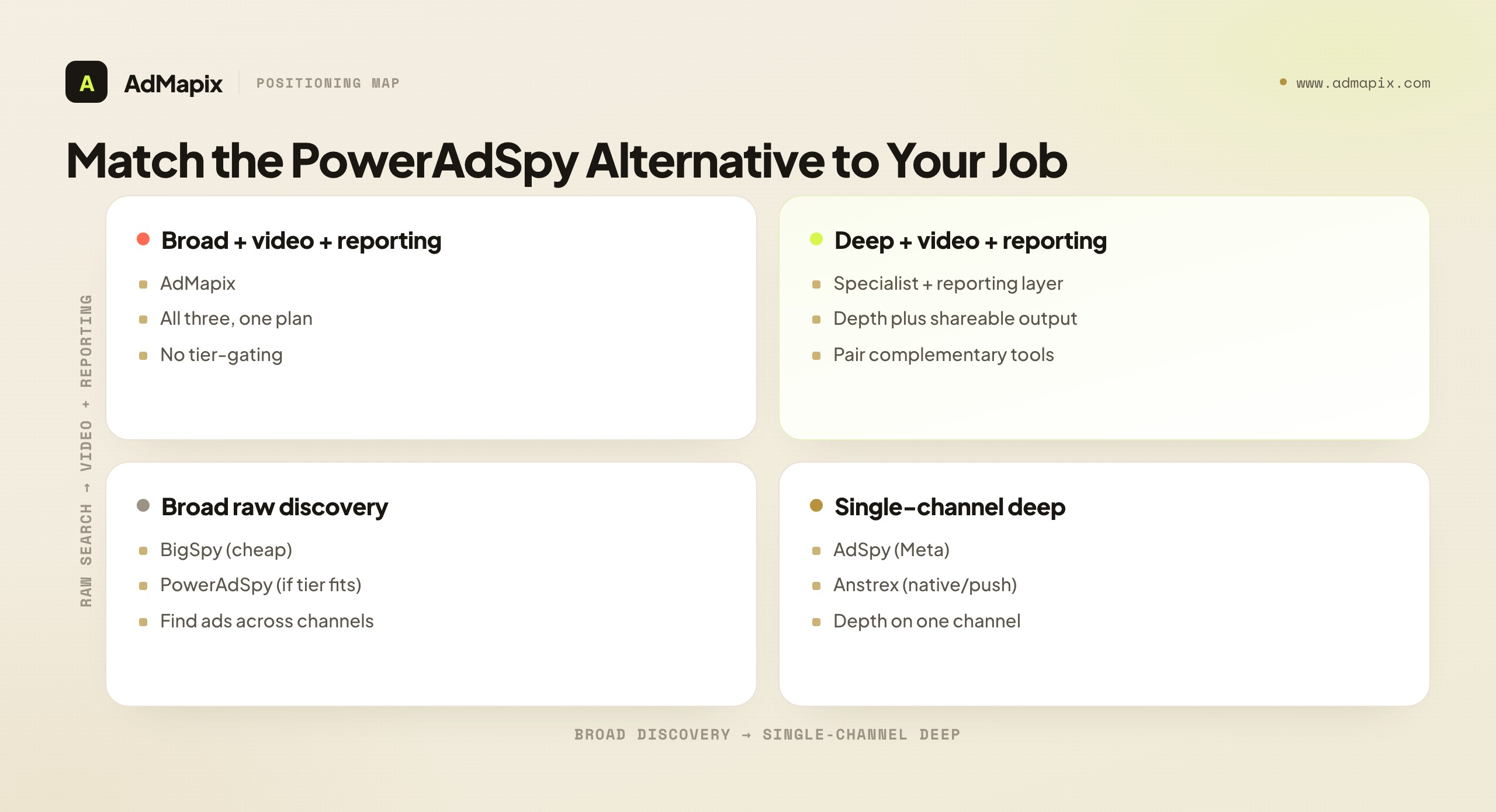
The read: if you're broad discovery and raw search, BigSpy (cheap) or PowerAdSpy (if the tier fits) covers it. If you're single-channel deep and raw search, AdSpy (Meta) or an affiliate specialist (native/push) fits. If you're broad and need video + reporting, a cross-network layer like AdMapix combines all three without tier-gating. And if you're single-channel but need video + reporting, pair a specialist with a reporting layer. Plot yourself honestly on the two axes and the seven-tool list collapses to one or two.
PowerAdSpy vs AdMapix: A Direct Comparison
Since many readers weighing a workflow upgrade are comparing PowerAdSpy to a combined option, here's the honest side-by-side. This isn't "AdMapix wins everything" — they overlap on discovery and differ on the rest.
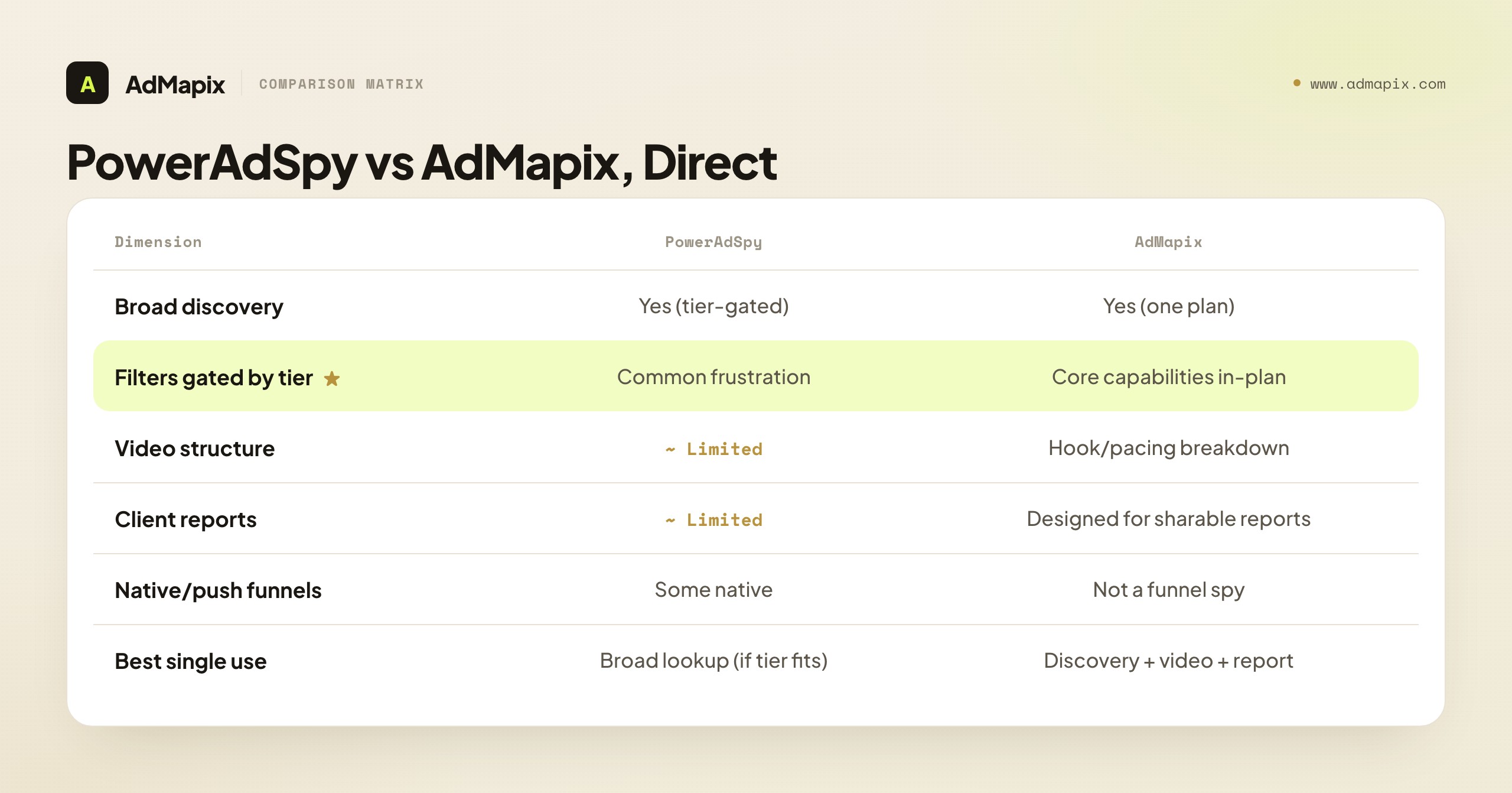
| Dimension | PowerAdSpy | AdMapix |
|---|---|---|
| Broad multi-channel discovery | Yes (tier-gated) | Yes (one plan) |
| Filters gated behind tiers | Common frustration | Core capabilities in-plan |
| Video structure analysis | Limited | Hook/pacing breakdowns |
| Client-ready reports | Limited | Designed for shareable reports |
| Cross-network in one search | Across tiers | One search |
| Native/push funnels | Some native | Not a funnel spy |
| Best single use | Broad lookup (if tier fits) | Discovery + video + report |
The honest takeaway: if your job is a broad ad lookup and PowerAdSpy's affordable tier covers your channels, it's a reasonable tool and switching is unnecessary. AdMapix earns its place when your real, recurring job is video teardowns plus reporting, or when tier-gating means you'd have to pay up for filters that should be standard. That's a workflow-and-cost-fit decision, not a "which is better" one.
The Realistic Setup: One Tool or Two?
As with most "alternative" decisions, the answer is often not a clean replacement — it's a right-sized tool, sometimes paired:
- A broad discovery buyer frustrated by tier-gating might move to a single plan that includes their channels and filters, rather than upgrading PowerAdSpy.
- A Meta-deep team might pair AdSpy (depth) with a cross-network layer for the other channels and reporting.
- An affiliate buyer who mistook a native/push gap for a coverage gap might move to Anstrex/AdPlexity for funnels entirely.
Buy for your sharpest failing job first; add a second tool only when a distinct, separate need is costing real hours. The waste pattern is two broad tools covering the same channels, or upgrading a tier for one missing filter; the leverage pattern is one tool whose plan covers your channels, video, and reporting, or a specialist plus a reporting layer. The test is whether each tool earns its price in the job it does, in the tier you actually buy.
The Right Pick by Team Type
The framework so far is abstract; here's the concrete read by the kind of team actually making this decision, because the failing job shifts with what you do.
Media buyer. Your job is finding and testing creative across the networks you buy. The PowerAdSpy frustration that bites you is usually cost-fit — the channel or filter you need sits a tier up. Your fix is a tool whose base plan covers your actual media-plan channels, not the one with the longest feature list. The mistake is upgrading a tier for one missing filter when a different tool's standard plan includes everything you need at a lower total.
Agency / freelancer. Your bottleneck is rarely finding ads — it's turning research into client-ready, repeatable reports across multiple accounts and channels. PowerAdSpy's reporting limits and tier-gating both bite here: you need video teardowns and shareable output, often across more channels than one tier covers. This is where a single-plan cross-network tool with reporting earns its price directly in billable hours, and where the per-tier upgrade math rarely works for a whole client book.
Ecommerce / DTC marketer. Your creative spans social and video, and the first three seconds decide your tests. Video analysis is often your failing job — you can see competitors' videos but not break them down. A tool that turns video into hook/proof/CTA notes beats a broad library that only plays the clip. If product discovery is also part of the job, a product-led tool may pair in, but the creative teardown is the core need.
Affiliate / performance marketer. If your "coverage gap" is really native and push, a broad social-leaning tool like PowerAdSpy was never the right fit — you need an affiliate specialist (Anstrex, AdPlexity) for funnels, prelanders, and CPC data. Recognizing that your job is affiliate, not broad social, is the whole decision; switching to another broad tool would repeat the mismatch.
A Repeatable Competitor Research Workflow
Whichever tool you land on, the workflow matters more than the tool — a great tool with no process still produces a folder of screenshots. Here's the repeatable loop that turns any of these tools into decisions.
- Name the decision first. Creative brief, product test, competitor monitoring, or client report — different jobs need different evidence. Don't open the tool until you know what choice it's informing.
- Use a fixed competitor set. Search the same 5–10 real competitors or advertisers every week, in the same geo and window, so results are comparable across weeks and tools.
- Save evidence with context. Keep the source ad, the media, the hook, the offer, the geo, and one line on why it matters. Context is what makes evidence reusable months later.
- Run the teardown, not just the screenshot. Capture the video structure — the first-3-second hook, the proof moment, the CTA — not just a thumbnail. The structure is what you can adapt; the thumbnail is just an anecdote.
- Convert each pattern into an action. Every saved item should map to a creative brief, a product test, a landing-page test, or a client note. Research that doesn't produce an action is sightseeing.
- Diff over time. The highest-value output is the change — a competitor's new hook, a new offer, a new channel. A weekly diff against last week is where the actionable intelligence lives.
This loop is tool-agnostic on purpose. The reason to pick one tool over another is how much manual labor it removes from steps 3–6 — and whether the capabilities you need for those steps are in the tier you buy or gated above it. A right-tier tool removes labor from the steps you run; a tier-gated tool charges you more for the steps you need most.
Common Mistakes When Choosing a PowerAdSpy Alternative
- Buying on the marketing page, not the tier. The page lists every feature; your plan may not include them. Always check what's in the tier you'd actually pay for.
- Upgrading a tier for one missing filter. If the upgrade costs more than an alternative whose base plan includes everything, switch instead of upgrading.
- Confusing a native/push gap for a coverage gap. If your real job is affiliate funnels, a broad social tool — even a better one — won't serve it. Name your lane.
- Comparing on database size. The biggest ad count is worthless if it doesn't get you to a brief or report. Compare on output, in your tier.
- Cancelling before validating. Cancel-then-switch leaves a coverage gap with no fallback. Always run parallel first, in the real plan.
- Ignoring the workflow. A tool is only as good as the saved searches, teardowns, and reports you build on it. The best tool with no loop loses to a lesser tool with a disciplined one.
Two Worked Examples: Staying vs Switching
Abstract frameworks are easy to agree with and hard to apply, so here are two composite walkthroughs (anonymized from 2026 accounts) showing the decision in motion — one team that should stay on PowerAdSpy, one that should switch.
Example 1 — the team that should stay. A solo media buyer runs Meta and Instagram campaigns and uses PowerAdSpy's mid-tier, which covers exactly those channels with the filters they search by. Their whole weekly job is finding competitor creatives to test, and their affordable tier delivers it. They considered switching after hitting a paywall on a YouTube filter — but they don't buy YouTube, so that gated filter is irrelevant to their job. Running the framework, their tier covers their actual channels and their job is broad lookup, not video teardowns or reports. The disciplined call was to stay. The lesson: a gated filter you don't use isn't a reason to switch; a gated filter you need is.
Example 2 — the agency that should switch. A performance agency used PowerAdSpy across a client book spanning Meta, TikTok, Google, and YouTube, and owed each client a monthly competitor report. Two failing jobs compounded: the tier covering all four channels was expensive, and even then the reporting was manual — they screenshotted creatives and rebuilt decks by hand, with no real video teardown. Pricing the full-channel tier against an alternative whose standard plan covered the channels, added hook-by-hook video analysis, and exported reports directly, the alternative cost less and removed the manual report assembly. They switched, ran parallel for a month to confirm coverage, and cut both the bill and the hours. The lesson: when tier-gating and reporting fail together, a single-plan tool that includes both often beats upgrading the tier you're frustrated with.
The two examples bookend the whole decision. Most readers sit somewhere between them, and the framework's job is to tell you which way you're trending — toward a tier that already fits, or toward a tool whose standard plan covers the job PowerAdSpy gates. Run your real-tier check honestly and the answer is usually obvious, even when a marketing page lists features your plan won't include.
How to Migrate or Right-Size Without Losing Research
If you decide to switch or right-size, migrate deliberately so you keep the research equity you've built.
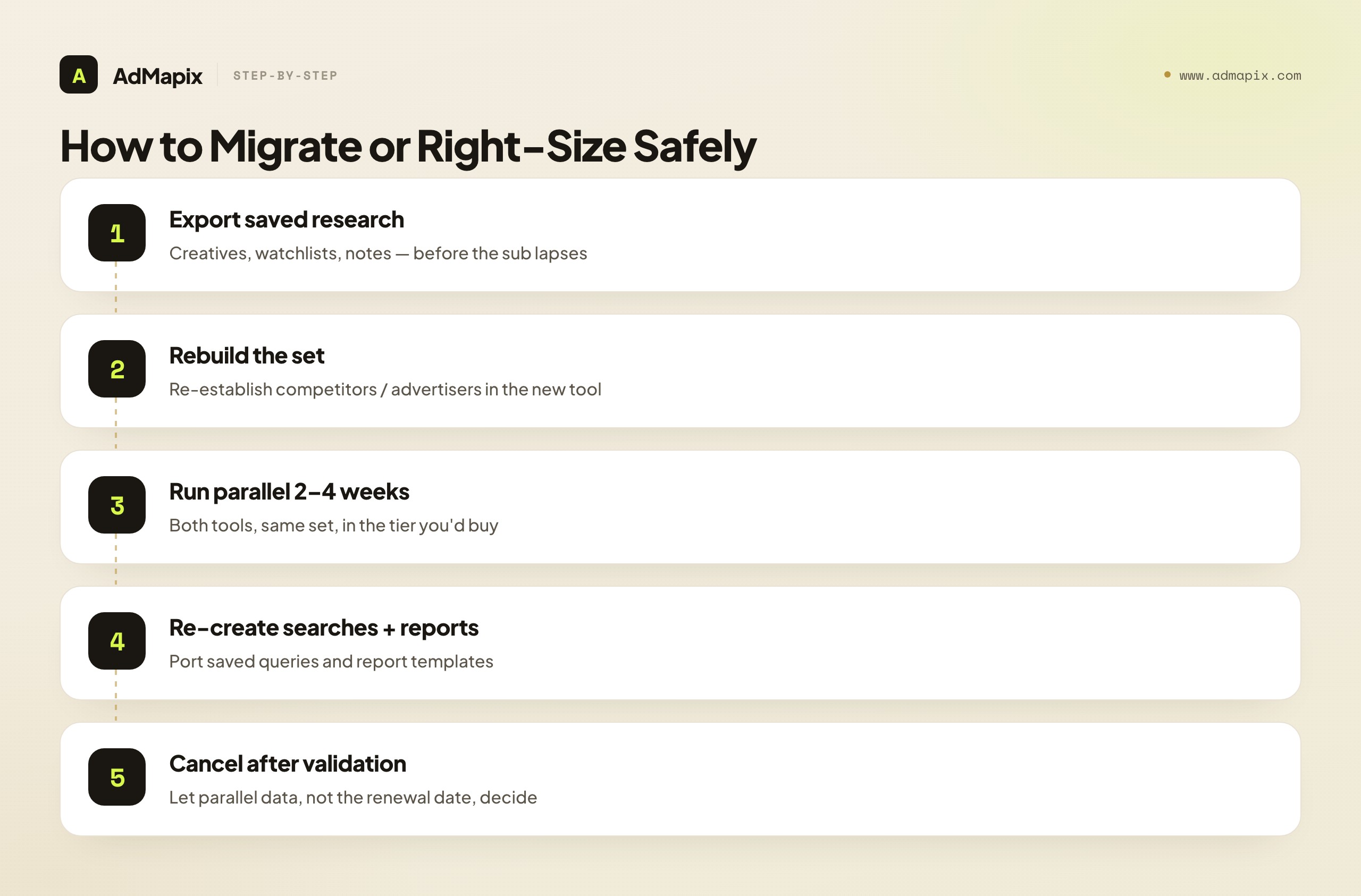
Step 1 — Export your saved research. Pull saved creatives, watchlists, and notes from PowerAdSpy before any subscription lapses. Even a manual export of your tracked advertisers and best ads preserves months of accumulated knowledge.
Step 2 — Rebuild your competitor set. Re-establish your fixed list of competitors and advertisers in the new tool first. This backbone makes weekly research repeatable, and getting it in place early means your cadence resumes immediately.
Step 3 — Run a parallel period. For two to four weeks, run both tools on the same set. This confirms the new tool — in the tier you're buying — covers what you relied on PowerAdSpy for before you cancel, and surfaces any gap while you still have a fallback.
Step 4 — Re-create saved searches and report templates. Port the recurring searches and report structures that made your old workflow fast. The tool is only as good as the saved workflow on top of it.
Step 5 — Cancel only after coverage is validated. Once the parallel period confirms coverage in your tier, cancel. If it reveals the new tool gates something you need behind an upgrade too, you've learned that before committing — let the data, not the renewal date, decide.
The parallel period keeps the move reversible until you're certain, and it's the only reliable way to catch tier-gating before you've paid: the marketing page lists every feature, but only a real trial in your actual plan shows you what you'll have.
When PowerAdSpy Is Still the Right Call
Intellectual honesty requires the reverse case: plenty of teams should keep PowerAdSpy. Keep it if:
- Its affordable tier covers your channels and filters. If the plan you can justify includes the networks and filters you use weekly, there's no tier-gating problem — it's the right broad tool.
- Broad lookup is your whole job. If you just need to find competitor creatives across channels and don't need deep video teardowns or client reports, the breadth is exactly right.
- You don't owe anyone reports. If your deliverable is your own next test, not a stakeholder deck, the reporting limits don't bite.
- You're early and price-sensitive. A broad tool at a tier that fits beats a more capable tool you can't justify yet.
The strongest reason to leave is tier-gating, video, or reporting outgrowing the plan you can afford — not dissatisfaction with the breadth itself. If your tier covers your job, staying is the disciplined call.
How AdMapix Fits (and When It Doesn't)
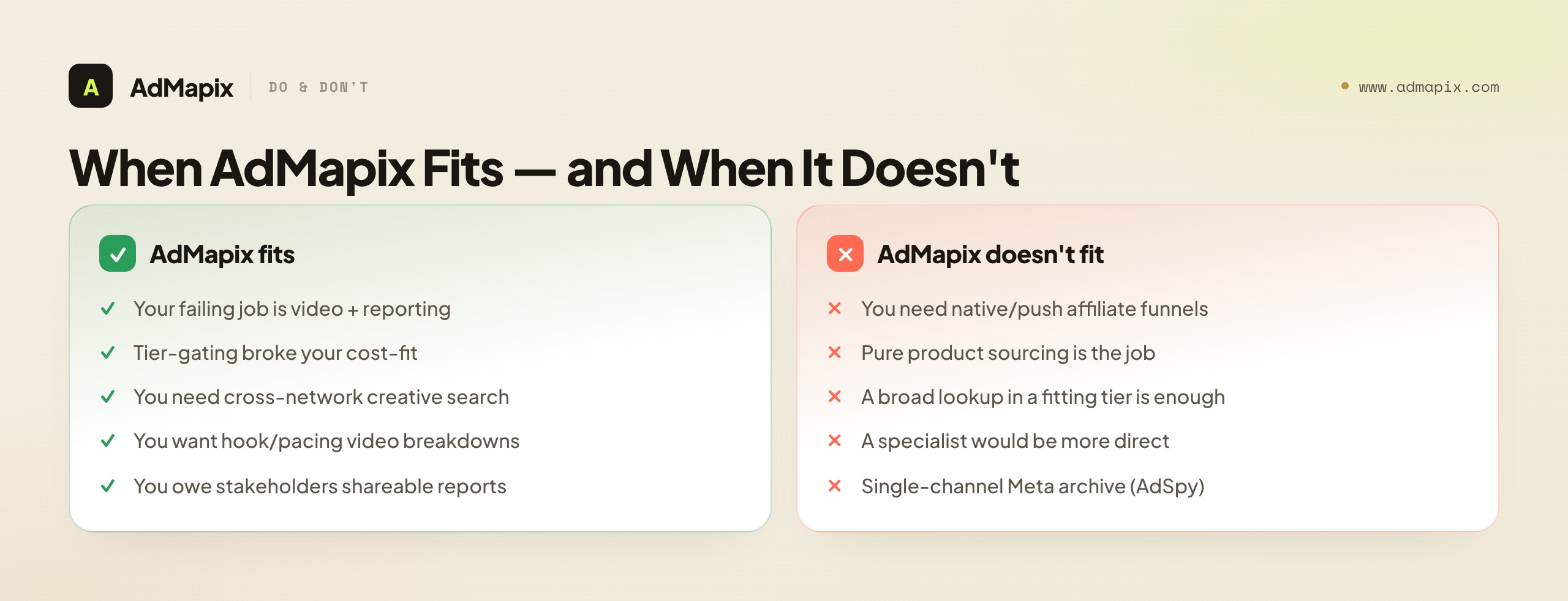
AdMapix fits when your failing job is video teardowns plus reporting, or when tier-gating broke your cost-fit: cross-network creative search (Meta, TikTok, YouTube, Google and more), hook-by-hook video analysis, saved media, and client-ready reports — with the core capabilities in-plan rather than split across tiers. It's best for media buyers and agencies whose week is competitor creative across channels plus reporting. It is not the right pick for native/push affiliate funnels (offers, prelanders, CPC) — that's the Anstrex/AdPlexity lane — or for pure product sourcing (Minea's lane).
In practice the fit looks like this: run your competitor set through Search AdMapix for cross-network creative discovery, store evidence with context in Media, break down winning hooks with Video Analysis, and package findings into a report. The honest boundary: AdMapix doesn't rip prelanders or source products — for those, a specialist is more direct. If your job is "competitor creative across channels, understood and reported, without tier-gating," that's the fit; if it's funnels or sourcing, keep the specialist. Compare seats on pricing when the cross-network video-and-reporting workload starts costing real hours.
For the analysis discipline behind the tool, our competitor ad analysis framework lays out the 5-dimension scoring system, and spy on ads across all platforms maps the cross-network workflow that tier-gated tools can't deliver in one plan.
To make the fit concrete, here are two scenarios where AdMapix is clearly the right move beyond PowerAdSpy — and one where it isn't. Right call #1: an agency owing four clients monthly competitor reports across Meta, TikTok, Google, and YouTube finds PowerAdSpy's all-channel tier expensive and still manual on reporting; a single-plan tool that covers the channels, adds hook-by-hook video teardowns, and exports reports collapses the multi-tool, multi-tier workflow and costs less. Right call #2: a DTC team whose tests are decided in the first three seconds of video needs structured teardowns, not a play button — cross-network video analysis turns competitor videos into briefable structures where a broad library only plays the clip. Not the right call: a solo Meta buyer whose mid-tier PowerAdSpy plan already covers Meta with the filters they use — for them there's no tier-gating problem, switching gains nothing, and AdMapix's cross-network breadth would be coverage they pay for and never use. The discipline cuts both ways: we'd rather a buyer whose tier already fits keep PowerAdSpy than pay us for breadth their job doesn't need.
A Decision SOP: Switch, Right-Size, or Stay
To make this concrete, here's the decision sequence we'd run.
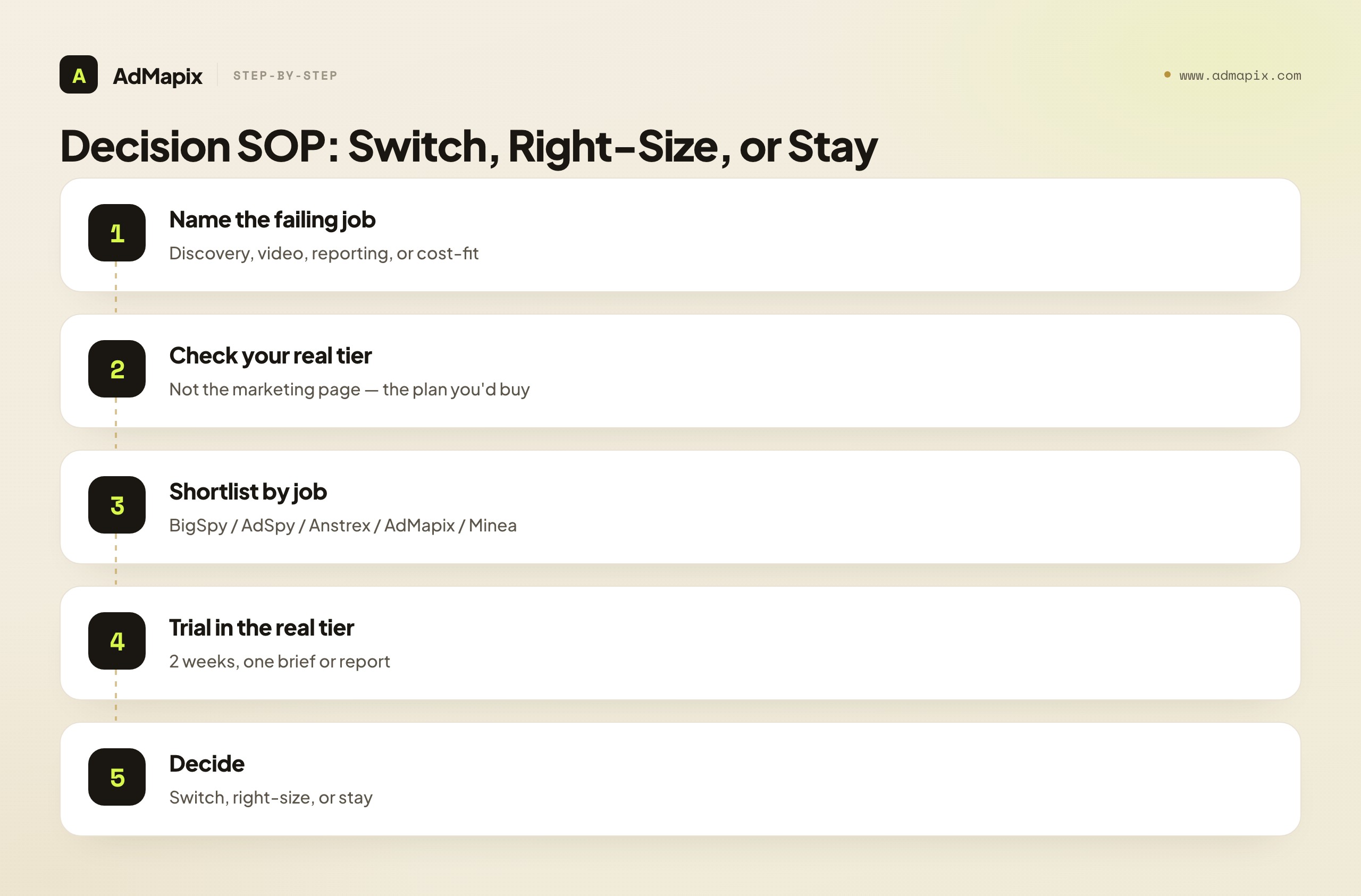
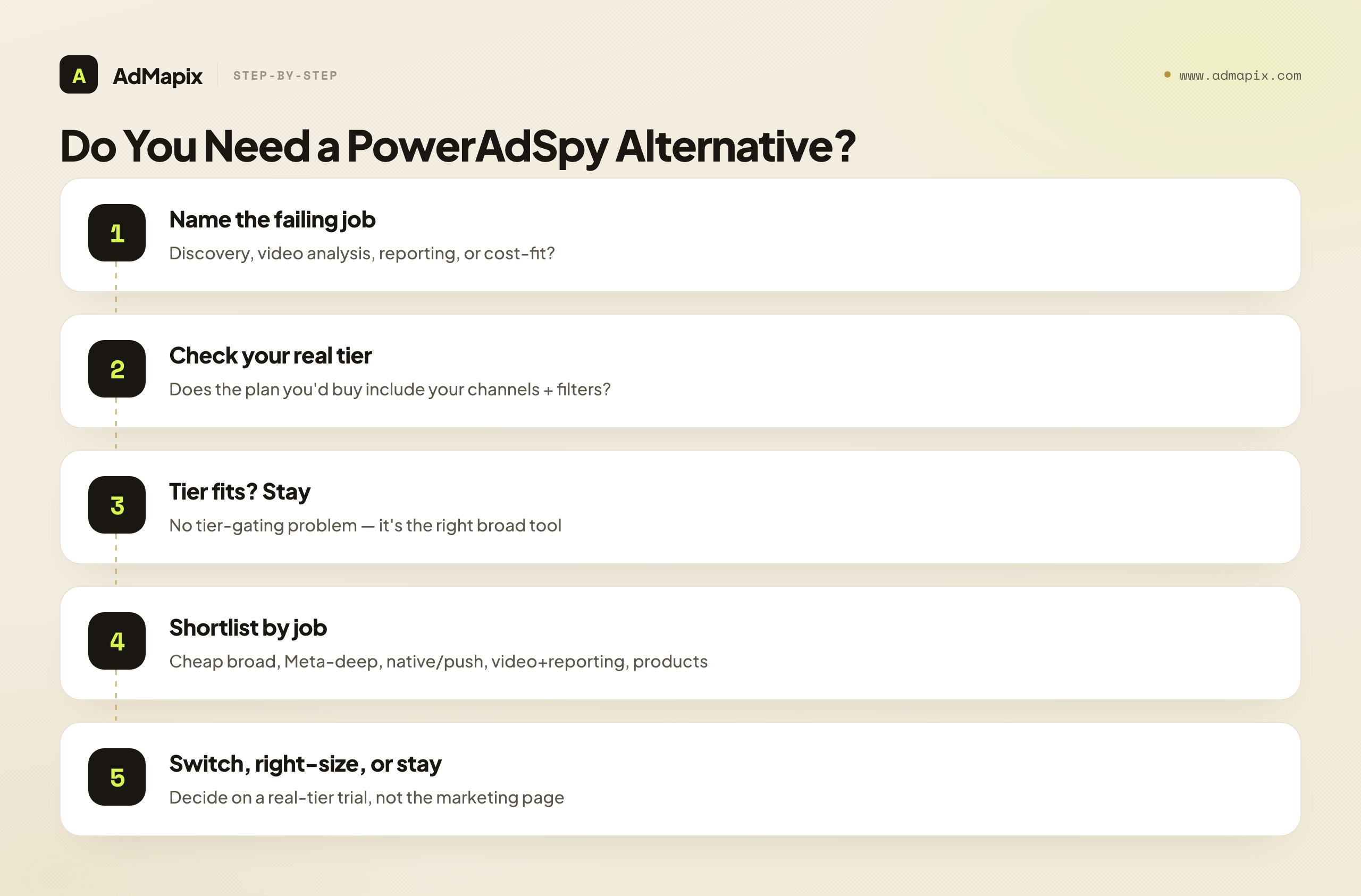
- Name your failing job. Discovery, video analysis, reporting, or cost-fit — the one actually blocking your next decision.
- Check your tier, not the marketing page. Does the plan you'd actually buy include your channels and filters? If yes, no tier problem.
- Shortlist by job, not brand. Cheap broad → BigSpy; Meta-deep → AdSpy; native/push → Anstrex/AdPlexity; video + reporting → AdMapix; products → Minea.
- Trial against a real decision, in the real tier. Run your set through the top candidate's actual plan for two weeks; produce one real brief or report.
- Run parallel before cancelling. Keep PowerAdSpy live during the trial; cancel only after coverage in your tier is confirmed.
- Decide: switch, right-size, or stay. Switch if one in-plan tool covers your job; right-size to a specialist plus a layer if you need depth and reporting; stay if your tier already fits.
The sequence keeps the decision evidence-based rather than driven by feature-list envy or a marketing page that lists features your tier won't include. Your failing job and your real-tier trial decide it — not the size of anyone's ad database.
What Changed in 2026 (and Why It Affects Your Choice)
The ad-intelligence landscape shifted enough in 2026 that the right PowerAdSpy alternative today isn't the one you'd have picked two years ago. Three changes matter for this decision.
Video became the creative center of gravity, raising the cost of "play button" tools. As paid social shifted decisively to video and the first three seconds came to decide most tests, a tool that shows a video but can't break it down stopped being enough. The differentiator moved from "does it have the ad" to "does it turn the ad into a structure you can brief from." That's why video analysis is increasingly the failing job that sends people from broad-but-shallow tools.
Reporting became the agency deliverable. As more teams manage competitor research for clients, the output shifted from "find the ad" to "report the competitive picture, repeatably, across channels." Tools that surface creatives but don't export clean reports leave that work manual — and at agency scale, the report is the product. Tools that combine discovery with reporting in one plan gained ground precisely because they collapse a multi-step, multi-tool workflow.
Tier-gating got more scrutiny as budgets tightened. With marketing budgets under pressure, teams audited what they actually used versus what they paid for — and broad tools that split channels and filters across expensive tiers came under the microscope. The cost-fit job, always present, became the most common explicit reason to look for an alternative, because paying up for one gated filter stopped feeling acceptable when a single-plan tool covered the same job.
The throughline: in 2026, match the tool to your failing job and your real tier matters more than ever, because video and reporting became the deliverables and budget scrutiny made tier-gating a sharper pain. The broad tool is still fine if its affordable tier fits your job; the right alternative for a video- or reporting-driven team increasingly combines those capabilities in one plan.
Red Flags When Evaluating a PowerAdSpy Alternative
A short field guide to the warning signs that a candidate tool will disappoint, so you catch them during the trial rather than after you've paid.
- The same tier-gating under a new name. If a tool's base price covers one set of channels and the rest are an upgrade, you may be walking into the same trap. Confirm what one reasonable plan actually includes.
- Database size as the headline pitch. When a tool leads with "millions of ads" rather than what you can do with them, it's usually compensating for a thin workflow. Output beats archive.
- Thumbnail-only "video analysis." If the video feature is just a playable clip, it's not a teardown. Creative teams need structure, not a player — test exactly this in a trial.
- No saved-evidence or export path. If you can't save creatives with context or export a report, every insight has to be rebuilt manually each week.
- Thin coverage on claimed channels in your tier. A tool that claims five channels but only delivers them in an enterprise tier is single-tier depth dressed as breadth. Verify coverage in the plan you'd actually buy.
- Lane mismatch hidden by marketing. A broad social tool implying it has affiliate-funnel depth, or vice versa. Test against your actual job, not the feature list.
Catch these during a two-week parallel run and you avoid the most common post-purchase regrets in this category. The way to make a trial surface them is to test against a real decision — a creative brief, a video teardown, a client report — in the actual tier you'd buy, timing how long it takes and noting where you had to leave the tool or hit a paywall. A demo on the top tier shows the best case; a real trial in your real plan shows the median case you'll live with.
Channel & Capability Coverage at a Glance
Because tier-gating makes in-plan coverage the crux, here's a snapshot of how many major channels each tool meaningfully covers in one reasonable plan — the single chart that explains most PowerAdSpy switching decisions.
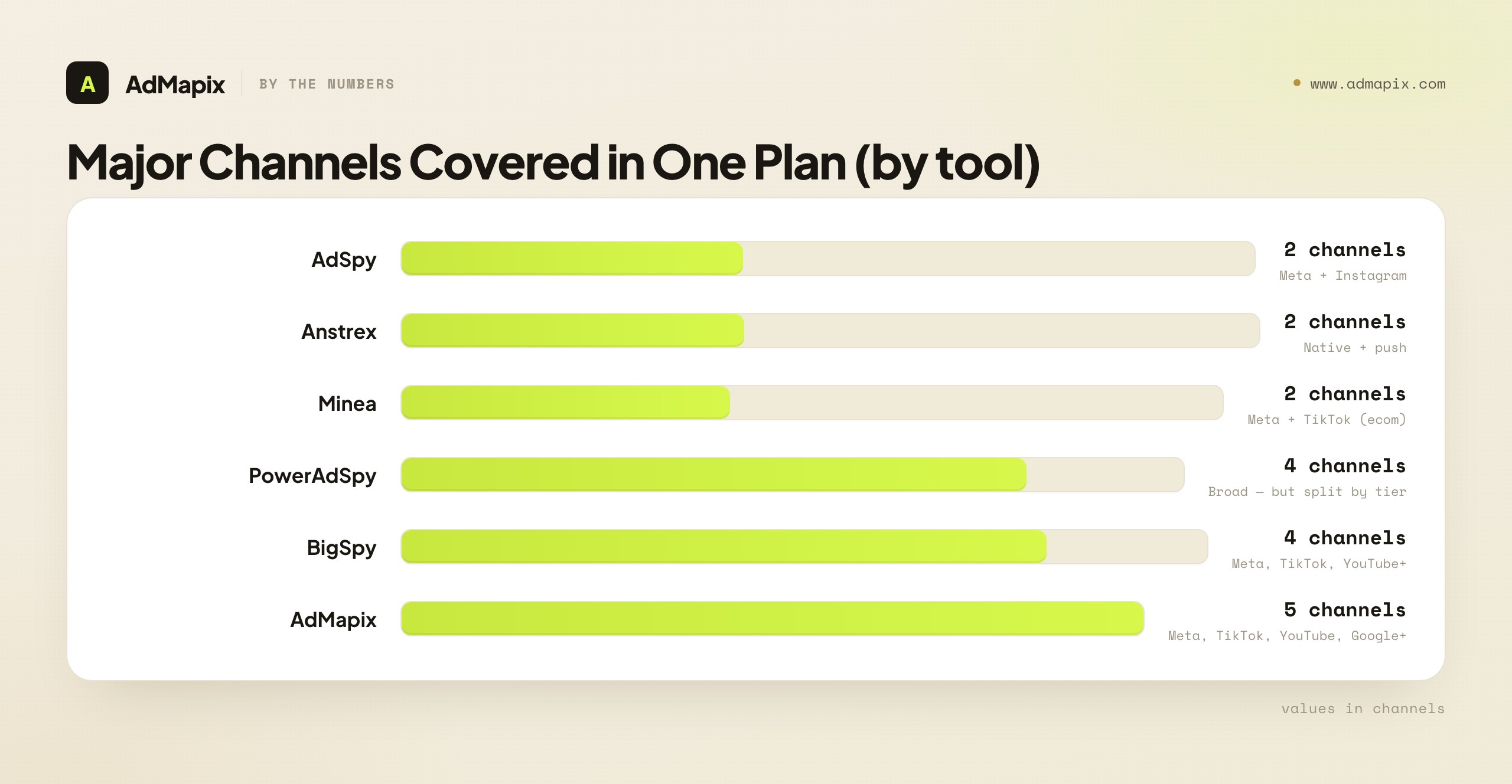
The pattern: single-channel specialists (AdSpy, Anstrex) go deep on one or two; broad tools (PowerAdSpy, BigSpy) and cross-network layers (AdMapix) span more — but the broad tools split capabilities across tiers while a single-plan tool keeps them together. Neither is better in the abstract — depth wins when you buy one channel, in-plan breadth wins when you buy several and need video plus reporting. Your channel mix and your tolerance for tier-gating predict which side you want.
FAQ
What is the best PowerAdSpy alternative in 2026?
There's no single best — it depends on which job PowerAdSpy left unsolved. For cheaper broad discovery, BigSpy. For deep Meta research, AdSpy. For native/push affiliate funnels, Anstrex or AdPlexity. For product-led ecommerce, Minea. For cross-network discovery plus video analysis and reporting in one plan, AdMapix. Define your failing job first — discovery, video, reporting, or cost-fit — and the right tool follows from your job and your tier, not from database size.
Why do people look for a PowerAdSpy alternative?
Usually one of four jobs is failing, not a quality problem. PowerAdSpy is broad but gates filters and platforms across tiers, so the plan you can afford may exclude the channel or filter you need (cost-fit). Others can't break down video ads (video analysis), can't turn findings into client reports (reporting), or can't find creatives on the networks they actually buy in their tier (discovery). Naming which job is failing is the whole decision, because each points to a different alternative.
Is there a cheaper PowerAdSpy alternative?
Yes — BigSpy offers similar multi-platform breadth at a lower price, which directly addresses the cost-fit frustration, though it's lighter on video analysis and reporting. The official free libraries (Meta Ad Library, TikTok Creative Center) cover baseline discovery at no cost. Minea has a free tier for product-led ecommerce. The cheapest right answer depends on your failing job — a cheaper tool that still gates or omits what you need isn't really cheaper.
What's the difference between PowerAdSpy and AdSpy?
Coverage and depth. PowerAdSpy is broad — Meta, Instagram, YouTube, Google, Native and more — but splits capabilities across tiers. AdSpy is a Meta/Instagram specialist with a deep archive and powerful filtering at a higher flat price. If your discovery spans many channels, PowerAdSpy's breadth (in the right tier) fits; if your job is Meta-deep and you want real archive depth, AdSpy's focus does. They solve different shapes of the discovery problem.
Should I replace PowerAdSpy or upgrade the tier?
It depends on what's gated. If a single filter or channel you need sits one tier up and the upgrade is justifiable, upgrading may be simplest. But if the upgrade is expensive relative to the one capability you're missing — or if you also need video analysis and reporting PowerAdSpy is light on — a tool whose standard plan includes all of it often costs less than the upgrade. Compare the upgrade price against an alternative whose base tier covers your whole job.
How does AdMapix compare to PowerAdSpy?
They overlap on broad discovery but differ on the rest. PowerAdSpy is a broad ad-spy tool with capabilities split across tiers. AdMapix combines cross-network discovery, hook-by-hook video analysis, and shareable reports in one plan, without gating the core capabilities — but it isn't a native/push funnel spy or a product catalog. If your job is a broad lookup and your PowerAdSpy tier fits, they're close. If your job is video plus reporting, or tier-gating broke your cost-fit, AdMapix combines what PowerAdSpy splits.
Can a PowerAdSpy alternative analyze video ads?
Some can, some can't — and it's worth checking explicitly. Many broad ad-spy tools show video ads as a playable clip without structured analysis, which isn't a teardown. Tools built for creative intelligence (including AdMapix) turn videos into hook/proof/CTA notes you can brief from. If video analysis is your failing job, test exactly that during a trial — a play button isn't analysis, and for paid social the structure in the first three seconds is the whole point.
Do I need video analysis or are ad examples enough?
It depends on your role. For tracking what's live, an ad example may be enough. For creative strategists who need to understand why a winning video works — the hook in the first two seconds, the proof moment, the pacing — examples aren't a teardown. If your team produces creative briefs from competitor videos, hook-by-hook analysis is the difference between copying a thumbnail and adapting a structure you can build on.
How do I migrate off PowerAdSpy without losing my research?
Migrate in parallel, don't cancel-then-switch. Export your saved creatives, watchlists, and notes first; rebuild your competitor set in the new tool; then run both side by side for two to four weeks on the same set — in the tier you'd actually buy. The parallel period confirms in-plan coverage before you cancel and surfaces any tier-gating while you still have a fallback. Cancel only after coverage is validated; let the parallel data, not the renewal date, decide.
When should I just keep PowerAdSpy?
Keep it when its affordable tier covers the channels and filters you use weekly, when broad lookup is your whole job, when you don't owe anyone reports, and when you're early and price-sensitive and it fits your budget. The strongest reason to leave is tier-gating, video, or reporting outgrowing the plan you can afford — not dissatisfaction with the breadth itself. If your tier covers your job, staying is the disciplined, correct call.
Is BigSpy a good PowerAdSpy alternative?
BigSpy is the natural choice if your failing job is cost-fit on broad discovery — it offers similar multi-platform breadth at a lower price, directly addressing the "the tier I can afford excludes what I need" frustration. The trade-off is depth: lighter video analysis, thinner reporting, and fewer structured filters that turn a search into a testable angle. It's a strong fit when you just need to find ads across channels cheaply, and a weak one when your real job is video teardowns or client reporting — at which point you'd hit the same wall BigSpy shares with budget broad tools. Match it to cost-driven discovery, not to a video or reporting need.
How do I check whether a tool's tier covers my job before buying?
Run a trial in the actual plan you'd pay for, not the top tier the demo shows. List the channels you buy on and the filters you use weekly, then verify each one works in that plan — not just that it appears on the marketing page. Time how long it takes to reach a real output (a brief, a teardown, a report) and note any paywall you hit. The marketing page lists every capability; only a trial in your real tier shows what you'll actually have. This single check prevents the most common PowerAdSpy-alternative regret: buying a plan that gates the exact capability you switched for.
Bottom Line
A PowerAdSpy alternative is worth it when a specific job fails — discovery on the networks you buy, video teardowns, client reporting, or a tier that gates the filters you need. PowerAdSpy is a capable broad tool; switching away while your tier covers your job is a step backward.
Name your failing job, check your real tier rather than the marketing page, shortlist by that job rather than by brand, trial against a real decision in the actual plan, and run parallel before you cancel. For cheaper broad discovery, look at BigSpy; for Meta depth, AdSpy; for native/push, Anstrex or AdPlexity; for products, Minea; and for cross-network discovery plus video and reporting in one plan, AdMapix. If your tier already fits your job, keep PowerAdSpy — the disciplined move is matching the tool to the job and the tier, not chasing the biggest database. And whichever tool you land on, the disciplined weekly loop around it — fixed competitor set, evidence with context, teardowns, and a diff over time — matters more than the tool itself.
Sources
- Meta Ad Library — official free archive of live Meta ads
- TikTok Creative Center — official free TikTok ad and trend discovery
- Google Ads Transparency Center — public cross-format competitor ad research
- PowerAdSpy — multi-platform ad spy across Facebook, Instagram, YouTube, Google, and Native
- BigSpy — broad multi-platform ad library
Turn these observations into your next creative study
Open the creative library and select samples for your market, network and research question.
Related Articles
Dropispy vs Minea in 2026: Dropshipping Ad Spy or Broad Product Research?
A 2026 head-to-head of Dropispy vs Minea — Facebook-first dropshipping ad spy with shop signals versus broad ecommerce product research with daily winning products and multi-channel layers, compared on coverage, pricing, and use-case fit, with a test-before-you-buy method and the honest limits of what ad spy data can prove.
Dropispy Alternative in 2026: The Honest Buyer's Guide to Switching Ad-Spy Tools
A bottom-funnel buyer's guide to choosing a Dropispy alternative in 2026 — what Dropispy is genuinely best at, the exact gaps that push dropshippers and agencies to switch, a five-criterion scoring rubric, head-to-head comparisons with Minea, PiPiAds, and AdMapix, migration SOPs, pricing reality checks, and an honest account of where AdMapix fits and where it does not.
Minea vs PiPiAds in 2026: Ecommerce Product Research or TikTok-First Ad Intelligence?
A 2026 head-to-head of Minea vs PiPiAds — product-first ecommerce research with a winning-products feed and supplier sourcing versus TikTok-first ad intelligence with hook, script, and landing-page breakdowns plus TikTok Shop signals, compared on entry point, coverage, pricing shape, and use-case fit, with a test-before-you-buy method and the honest limits of what public ad data can prove.