
TikTok Ads Downloader: Official Limits and Saving Workflow
Learn what TikTok’s official research tools let you save, how to download eligible files individually in AdMapix, and how to build a traceable swipe file using eight dated US advertising examples.
TikTok Ads Downloader: Official Limits and Saving Workflow
Last updated: 2026-11-02
AdMapix Research — prepared with Codex and checked against the dated source sample. Editorial ownership: Brad at AdMapix. This automated preparation does not imply personal review by Brad.
TikTok does not offer a general self-service download option for other advertisers’ videos in its research tools. As of November 2, 2026, Creative Center’s Top Ads are watermarked and unavailable for download; the Commercial Content Library supports viewing, with no download control found in the supplied dated check. Its API returns video URLs only through approved research access for European advertising, with conflicting official descriptions of the precise country coverage.
For teams searching for a TikTok ads downloader, the practical choices are to preserve official reference links or download individual eligible media files in AdMapix. This guide explains those workflows, the absence of bulk media download in AdMapix, and how to build a useful swipe file. Eight timestamped advertising examples show what to record without mistaking downloaded files for evidence of campaign success.
Quick Answer
The right saving method depends on whether you need an official reference, research data, or an individual media file.
- Creative Center Top Ads: use Link to copy the ad reference and Star to favorite it. TikTok explicitly says these creatives are watermarked and not downloadable.
- Commercial Content Library: view covered advertising and record its disclosures. It does not cover the United States, the market used in this article’s sample.
- Commercial Content API: approved applicants can receive video URLs for permitted research purposes; it is not a general creative-download service.
- AdMapix: open an eligible creative’s detail view and use Download or Copy Link. Downloads work one creative at a time.
- Bulk collection: organize individual references and files in a spreadsheet or use eligible Competitor Watch saved-creative folders. Neither workflow is bulk media download.
What Can You Actually Save from Each TikTok Research Surface?
Official TikTok research tools provide different kinds of access, and a playable video does not automatically come with a file-download permission or control. Creative Center is an inspiration surface, the Commercial Content Library is a transparency repository, and the Commercial Content API is an approved research interface. AdMapix is a separate advertising research product with its own indexed records and eligible media-download controls.
| Surface | Documented or checked saving action | Main limitation | Appropriate output |
|---|---|---|---|
| Creative Center Top Ads | Copy the ad link; favorite the ad | Watermarked creatives are not available for download | Reference link and research notes |
| Commercial Content Library website | View covered ads and inspect disclosures | No download or export control found in the supplied November 2 check; no US coverage | Dated transparency reference |
| Commercial Content API | Approved access can return an ad video URL | Application, research-purpose restrictions, and European coverage | Authorized research dataset |
| AdMapix creative detail | Download eligible CDN-served media or copy its media link | One creative at a time; availability depends on the record | Individual file plus source context |
| AdMapix Competitor Watch | Save a watched app’s creative into a named folder with a note | Available on eligible plans; not bulk media download | Organized ongoing swipe file |
As of November 2, 2026, TikTok’s Top Ads asset authorization documentation explicitly states that creatives “will be watermarked and will not be available for download.” The Top Ads dashboard instructions document Link, Star, playback, and analytics actions instead.
The distinction matters when assigning work. “Save this ad” could mean bookmark an official page, preserve an indexed media link, download a file, or save a record into a research folder. Specify the required output before someone spends time searching for a button that the relevant surface does not provide.
Method 1: Keep a Creative Center Reference with Link and Favorite
The official way to preserve a Top Ads reference is to copy its link and favorite it, rather than download its video. As of November 2, 2026, TikTok’s May 2025 dashboard instructions document both actions. This is a useful workflow when the team needs to revisit an example and its available analytics without maintaining a local media file.
Follow the documented workflow:
- Open Creative Center Top Ads.
- Choose the relevant Region, Industry, Campaign Objective, and Time frame filters. Other documented filters include Likes; desktop also adds Ad language and Ad format.
- Inspect the available examples using hover-to-play or the ad detail experience.
- Use the Link button to copy the ad’s link.
- Use the Star button to favorite the reference.
- Record the date, filters, advertiser information shown, and the specific reason you saved it.
- Use See Analytics when available, keeping any reported metric attached to its original label and context.
TikTok documents sorting by Reach, CTR, and two-second and six-second view rates, with CVR and Likes also available on desktop. Those sorting options belong to Top Ads. They should not be confused with the third-party estimated-impression sorting used for this article’s AdMapix sample.
The same documentation says users who are not logged in see only five ads. A small visible result set therefore does not establish that a category has little advertising activity. First check whether you are looking at a limited signed-out view and whether the filters match your research task.
Top Ads also has a selection boundary. TikTok’s May 2025 Top Ads explanation says featured ads are authorized by advertisers inside Ads Manager. The live Top Ads page warns that the examples “may not reflect all top-performing auction ads.” Treat the collection as an authorized, curated set, not a comprehensive advertiser archive.
A favorite is also not a guarantee of permanent access. As of November 2, 2026, TikTok’s withdrawal documentation says an ad can leave Top Ads after authorization is withdrawn, eligibility changes, or the ad expires. Keep your own descriptive notes alongside the reference so a later reader can understand why it mattered, even if the original page changes.
A useful note is specific: “Opening frame introduces the product before explaining the transfer benefit; inspect the relationship between product recognition and the later message.” A weak note is “good ad.” The former preserves an analytical question; the latter merely creates another bookmark.
For navigation beyond saving, the published TikTok Creative Center walkthrough provides the broader context. The file-saving question is narrower: Top Ads’ documented controls preserve references, not downloadable creative files.
Method 2: Use the Commercial Content Library for Covered Ad References
The Commercial Content Library is useful for viewing covered advertising and recording transparency information, but it is not a source for this article’s US examples. As of November 2, 2026, its country selector covers European markets rather than the United States. The supplied dated interface check found video playback controls but no download control, and charts on the All ads report page without an export button.
For a supported market, the practical workflow is:
- Open the Commercial Content Library and choose the relevant country and advertising dates.
- Search using the advertiser name or a relevant keyword.
- Inspect the matched listing instead of assuming that a familiar name identifies the advertiser you intended.
- Open the ad detail page and record the advertiser, payer information, first and last shown dates, and other available disclosures.
- Preserve the page reference and the date you inspected it.
- Describe any unavailable video or missing field explicitly.
As of November 2, 2026, the library FAQ says no TikTok account is needed. It describes fuzzy keyword matching across the title, advertiser name, “paid by” name, and caption, with up to 5,000 search results. A fuzzy match is a discovery aid; it is not an identity check. Read the record before attaching it to a company or product in your spreadsheet.
The FAQ documents filters including ad type, ad status, age, gender, date, and unique ad reach. It also says disapproved ads cannot be viewed, although their summary and targeting information remain available. An unavailable video therefore needs a narrower explanation than “the downloader failed”: the library may intentionally expose disclosure information without playable creative.
TikTok’s own coverage descriptions disagree. The library FAQ, checked on November 2, lists the EEA, United Kingdom, Turkey, and Switzerland and describes retention for one year after an ad was last shown. A separate TikTok support FAQ lists the EEA, Switzerland, and United Kingdom without Turkey. Preserve that discrepancy instead of silently treating the pages as identical.
The support FAQ describes advertiser identity, who paid, the advertiser’s registered location, first shown, last shown, unique users reached, targeting summary, and location information. These are transparency fields. They should not be blended with an unrelated source’s modeled impressions or treated as an advertiser’s full performance report.
The absence of a download button is an interface observation supplied with this article, not a quotation from TikTok’s FAQ. That distinction keeps the claim appropriately narrow: the checked detail player exposed play, progress, volume, fullscreen, quality, and speed controls, but no download control.
The published TikTok Ad Library guide explains the repository more broadly. For this workflow, the decisive point is geographic: do not spend time trying to reproduce our US-filtered sample in a library that does not offer US coverage.
Method 3: Understand the Commercial Content API Before Applying
TikTok’s Commercial Content API can return ad video URLs to approved applicants, but it is a restricted research route rather than a general-purpose TikTok ads downloader. As of November 2, 2026, the official product page describes applications through a TikTok for Developers account using an official email. The relevant developer terms limit the purposes for which the data is provided.
The documented path is to establish an eligible research need, apply through the Commercial Content API product page, and use the approved access within the applicable terms. TikTok says applicants should hear back within two working days. That is its stated response expectation, not a guarantee made by this article and not evidence that an application has been approved.
Country coverage requires particular care because the official pages conflict. As of November 2, 2026, the product page says that “in this phase” only EU-country data is included. The supported-country documentation, dated September 1, 2026, lists the EU, EEA, United Kingdom, and Switzerland. Both descriptions concern European advertising; neither establishes US coverage for the sample used here.
The September 1, 2026 query-ads documentation identifies a video url field and allows at most ten results per request. Do not confuse that field with download_url: the latter is the advertised app’s store link, not the ad’s video-download link. A field name containing “download” can refer to what the advertisement promotes rather than the creative file itself.
Before building anything around the API, write down the intended research question, countries, permitted uses, and required fields. Then check whether the approved access actually addresses them. An agency wanting a general swipe file of US commercial ads should not assume that an API application is a substitute for a creative-research workflow.
The TikTok developer terms, last modified December 26, 2025 and checked on November 2, 2026, describe the API under Article 39 of the EU Digital Services Act. They define CCL purposes around supervision and research into risks from online advertising. A returned video URL does not remove those restrictions or create a general license to redistribute the creative.
No API request was executed for this article. The explanation above relies on the supplied official documentation, not a completed integration test. Response speed, download reliability, and the behavior of a particular approved account remain untested here.
How We Evaluated the Workflow and Advertising Sample
This guide combines supplied official documentation, a dated AdMapix product-workflow check, and a bounded US TikTok advertising sample. These sources support different conclusions: documentation explains available actions, the workflow check establishes eligible AdMapix save controls, and the advertising records support the visual examples and metadata. None supplies conversion results or a completed downloader benchmark.
The advertising evidence was fetched on 2026-11-02 at 01:59:20 UTC. Its exact measurement window is 2026-10-03 to 2026-11-01. The country filter is United States, the verified source/network is TikTok, and the keyword query is blank. This is a network-filtered sample, not a Samsung or Cricket brand-search result set.
Collection was limited to three requested pages with ten records per page, sorted by estimated impressions in descending order. The frozen result contains 29 advertising records. It is a bounded search sample, not a complete TikTok archive, a complete advertiser fleet, or a census of US advertising.
Those records contain 26 distinct video fingerprints, zero distinct image fingerprints, and zero distinct playable fingerprints. All 29 records have video. A record is an advertising instance; a distinct video fingerprint identifies a separately indexed underlying video file. Those units must remain separate when describing how much creative material was collected.
The supplied total is 4,823,956 modeled impressions for the stated window and sample. Every impression figure in this article is a third-party model estimate. It is not observed delivery, spend, installs, revenue, profit, unique audience, or a lifetime total. Product-level search aggregates are excluded.
The eight illustrations are contact sheets showing selected timestamps. Figures 1 and 6 show frames at 0, 2, and 5 seconds; the others show 0, 2, 5, and 10 seconds. Duration comes from the associated record metadata. We did not watch the complete videos, listen to their audio, test the advertised products, or measure their campaign results.
The public frozen source package makes the batches, request parameters, and checksums available for reproduction. The archived package preserves what this article uses; a later live query can return different results. Its checksums establish package identity, not advertising quality.
Evidence Table: The Records Behind the Eight Examples
The illustrated records provide a practical set of references for saving and labeling ads, with each image tied to its reported product listing. Every row below belongs to the same US TikTok measurement window, 2026-10-03 to 2026-11-01. The impression column is included for traceability, not as a creative-quality score or a recommendation to copy the advertisement.
| Figure | Reported listing and reference | Record ID | Recorded duration | Modeled window impressions | First seen / last seen |
|---|---|---|---|---|---|
| 1 | Cricket Wireless: monthly bill message | 0cf84a0776f0759d33ca0977456af0a5 | 6 seconds | 904,817 | 2026-07-03 / 2026-10-30 |
| 2 | Samsung: Smart Switch | 13fb326cd7d03c6cb0de19e41e77dd5b | 15 seconds | 568,829 | 2026-10-08 / 2026-10-31 |
| 3 | Samsung: Quick Share | 217871373aa3d152d185e1de466dd2f0 | 15 seconds | 323,548 | 2026-10-08 / 2026-10-31 |
| 4 | Samsung: interview preparation | d8827a12b0eedb346ac09fb8ef3f9cec | 15 seconds | 254,518 | 2026-09-30 / 2026-10-29 |
| 5 | Samsung: superfan scenario | 1d931566fea43d9055c84a5680361e1b | 15 seconds | 215,805 | 2026-09-30 / 2026-10-29 |
| 6 | AT&T Business: microphone conversation | a3c4074fe4239f991e9d9b7d475d7821 | 9 seconds | 186,965 | 2026-07-02 / 2026-10-23 |
| 7 | Pure Michigan: autumn scenery | f2fd45da608656a3f43f47344f4ff308 | 15 seconds | 100,907 | 2026-09-23 / 2026-10-12 |
| 8 | Samsung: separate Smart Switch file | 6efec48bf06cb2167d16f10abc8994a4 | 15 seconds | 97,149 | 2026-09-19 / 2026-10-07 |
The listing associations come from the records’ linked product identifiers, not merely from recognizing logos or matching names. These associations identify the reported product relationship; they do not independently identify the ad buyer.
First-seen and last-seen dates are source observations. They are not proof of uninterrupted spending between those dates, and a first-seen date is not necessarily the production or campaign-launch date. Do not divide the impression estimates by the time since first observation.
Method 4: Download One Eligible Creative in AdMapix
AdMapix supports an individual-file workflow through the creative detail view for eligible media served from its media CDN. The supplied product check dated November 2, 2026 confirms a Download button that saves the media file and a Copy Link button that copies its media link. This capability is separate from TikTok’s official Top Ads controls and does not imply that every TikTok ad can be retrieved.
Use the Cricket Wireless record in Figure 1 as a concrete example. Its reported listing is Cricket Wireless, its network is TikTok, its country scope is US, its measurement window is 2026-10-03 to 2026-11-01, and its recorded duration is 6 seconds. The title is “your phone bill with cricket? clear as glass.” Those fields provide a more reliable lookup description than “the green phone ad.”
The practical sequence is:
- Open AdMapix creative search and look for the relevant advertiser or product.
- Check the result’s linked listing, network, country context, duration, and visible creative before selecting it.
- Match the record to the reference you intended. For this example, use the Cricket title, duration, imagery, and record information above.
- Open it in AdMapix → Download / Copy Link.
- Use Download when you need the eligible media file for internal reference. Use Copy Link when a media reference is sufficient.
- Immediately record the source context and local filename in your research sheet.
- Inspect the saved file before describing details beyond the supplied contact sheet.
The live index can change. A historical record in the frozen package is not a promise that the same record will remain discoverable with the same query, position, or media availability. If the live result differs, preserve the difference rather than substituting another advertisement under the original record’s label.
Copy Link in this AdMapix workflow refers to the media link. It should not be labeled as the original TikTok post URL. Similarly, a local filename is your own organizational label, not an advertiser-assigned campaign name. Preserve each field’s meaning so another researcher can tell where a file came from.
For example, a team could name its local file cricket_tiktok_us_6s_bill-reference.mp4. That is a proposed naming convention, not a filename supplied by the advertiser. Put the actual record ID and observation date in adjacent spreadsheet columns rather than expecting a descriptive filename to carry the entire evidence trail.
AdMapix also documents download and link controls for eligible images and playable HTML records. This sample, however, contains video records only. It does not demonstrate image or playable downloads, and the contact sheets are illustrations of videos rather than image-ad records.
The workflow above is based on the supplied product verification. This article does not claim a new browser download test, a measured success rate, or a comparison of file quality against an advertiser’s original master. Those questions require an actual file inspection under the user’s current access conditions.
How to Keep a Swipe File When Bulk Media Download Is Unavailable
AdMapix has no bulk media-download feature as of the supplied November 2, 2026 check, so a practical swipe file combines individual saving with organized metadata. A folder of downloaded videos answers where the files are; a research sheet answers what they are, why they were saved, and which conclusions the evidence supports.
For a workflow that works across plans, maintain a spreadsheet with the following fields:
| Field | What to preserve | Why it matters |
|---|---|---|
| Record reference | AdMapix record link or exact record identifier | Connects the notes to the advertising instance |
| Media reference | Copied media link, when available | Identifies the file source separately from the record |
| Reported advertiser/app | Linked listing name and identifier | Reduces attribution mistakes |
| Network and country | Verified source and query market | Prevents unsupported platform or regional labels |
| Research window | Exact start and end dates | Keeps estimates attached to their scope |
| First and last seen | Dates shown by the source | Preserves observation history without asserting continuous delivery |
| File information | Actual saved filename and recorded duration | Helps match notes to local media |
| Observation | What a frame or inspected file actually shows | Keeps evidence separate from interpretation |
| Hypothesis | What the team proposes to test | Turns a reference into a research decision |
| Inspection status | Contact sheet only or later full-file review | Prevents accidental claims of complete playback |
Organize folders by the question you are researching. “Switching objections,” “task demonstrations,” and “seasonal destination imagery” can be more useful than a single folder called “TikTok winners.” The former labels describe observable creative roles. The latter implies performance knowledge that this sample does not provide.
Where the linked app is available to watch and the account has an eligible plan, Competitor Watch offers Saved creatives. A user can save a watched app’s creative into a named folder with a note. The supplied product check states that those saved creatives remain after the user stops watching that app. This is an ongoing organization feature, not a batch file-export mechanism.
Competitor Watch is available on Pro and Enterprise, not Free or Starter, according to the dated workflow verification. Check current plan terms before choosing a workflow around it. Do not assume that a brand listing in this article can automatically be added as a watched app; inspect the actual product relationship and available controls.
A sensible collection pass therefore has two outputs: a selected set of individually saved references and a sheet explaining the selection. There is no need to download every search result. Save a record when it resolves a concrete question, adds a different structure, or documents a version that the team needs to distinguish.
Figure 1: Cricket Wireless Makes the Bill Concern Visible Immediately
The Cricket Wireless example is useful for studying how a short creative connects a recognizable customer concern with a consistent visual identity. Its contact sheet shows a monthly-bill message in the opening sampled frame and a simple-pricing message at five seconds. It does not establish whether that structure improved comprehension, clicks, or purchases.
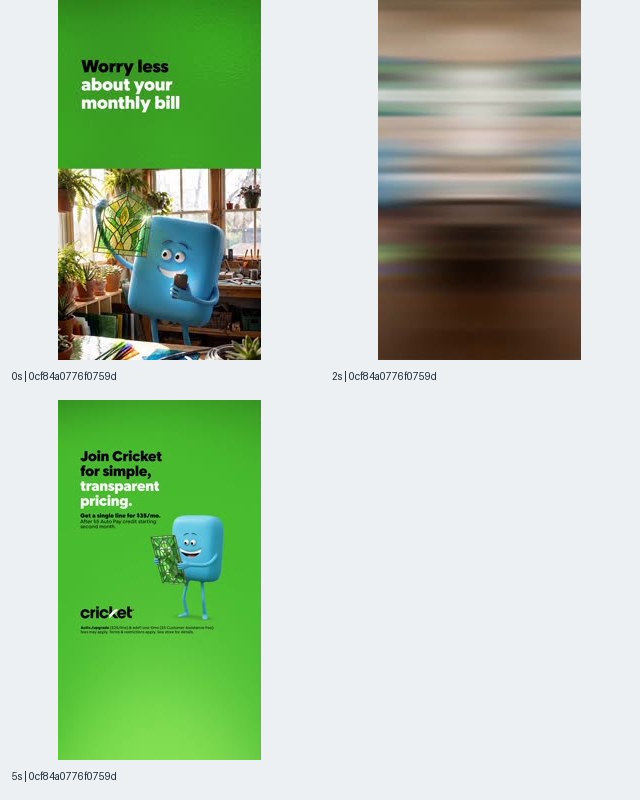
Figure 1. Reported listing: Cricket Wireless. US TikTok sample, 2026-10-03 to 2026-11-01; recorded duration: 6 seconds. Frames shown: 0, 2, and 5 seconds. The five-second frame is a sampled message frame, not a verified ending.
At zero seconds, the visible text says “Worry less about your monthly bill.” The composition combines a green text area with a blue character in a room containing plants and windows. The two-second frame is visibly blurred. At five seconds, the green background carries “Join Cricket for simple, transparent pricing,” alongside the character and Cricket branding.
For the swipe file, tag the opening as a bill-related concern and the later visible message as pricing clarity. These tags describe what is on screen without endorsing the advertised offer. The small offer text is historical advertising content; it should not be copied into a current pricing comparison without checking the present offer and its conditions.
The useful production question is whether the viewer can identify the concern before understanding the character or setting. A hypothesis for an original test could be: stating a familiar billing concern immediately may make the proposition easier to explain. That hypothesis requires your own product evidence and audience testing.
Save the opening text and the five-second message separately in your notes. A filename such as “Cricket pricing” loses the distinction between the emotional promise and the offer explanation. Recording both gives a copywriter a specific structure to investigate while leaving the advertiser’s words, character, and artwork as reference material.
Figure 2: Samsung Uses Characters to Illustrate a Switching Message
Samsung’s Smart Switch example shows how a product benefit can be represented with objects and characters before a later frame names the action. The contact sheet supports an observation about visual metaphor and message placement. It does not demonstrate a successful device transfer or verify the functionality described in the advertisement.
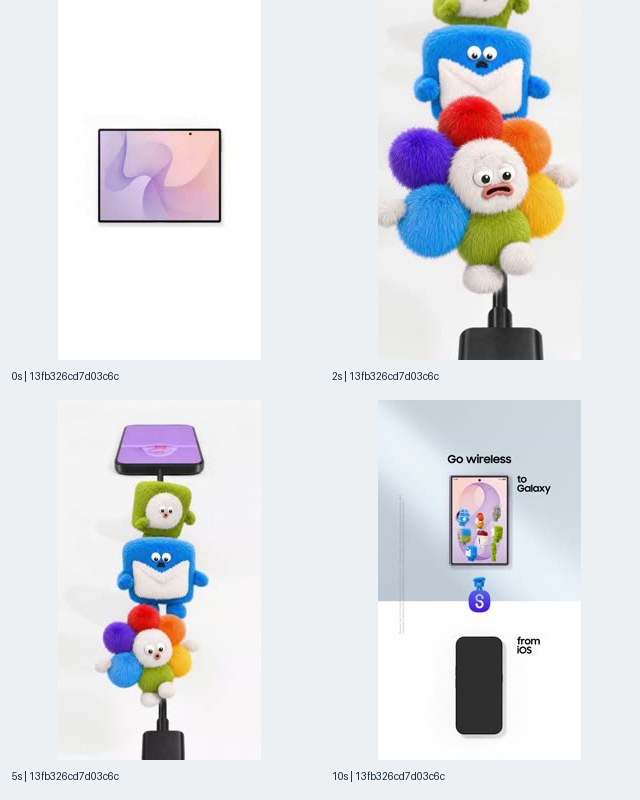
Figure 2. Reported listing: Samsung. Record beginning 13fb326c; recorded duration: 15 seconds. Frames shown: 0, 2, 5, and 10 seconds from the US TikTok sample. The ten-second message does not establish the video’s ending.
The zero-second image places a device against a plain white background. The two-second frame shows a close view of colorful fuzzy characters, including a blue figure with a white envelope-like shape, above a cable connector. At five seconds, a phone and the stacked characters are visible together. At ten seconds, a divided layout reads “Go wireless,” “to Galaxy,” and “from iOS.”
The record’s advertising copy says that Smart Switch moves the user’s belongings to Galaxy without cords. Keep that as an advertiser claim. The illustrations can be described as a representation of moving content, but the contact sheet does not reveal exactly what each character represents or which content categories were successfully transferred.
For a creative team, this is a reference for turning an abstract task into visible objects. Record the white background, object arrangement, and later explicit direction labels. Avoid assigning meanings to every colored character unless a later authorized inspection supplies them.
An original test hypothesis could compare a plain-language transfer explanation with a metaphor built from your own visual assets. The learning question would be whether viewers correctly understand what moves and where it goes. That is more useful than copying the character stack or assuming that the presence of animation explains the record’s estimated impressions.
To inspect related indexed references, search Samsung creatives in AdMapix, then check each result’s network, country, linked listing, and dates. That live query is an exploration starting point; it is not a replay of the article’s blank-keyword frozen sample.
Figure 3: Samsung’s Quick Share Reference Makes Device Relationships Explicit
The Quick Share contact sheet is useful for studying how a layout can explain relationships among devices. Its sampled frames place a phone and laptop in separate areas and add compatibility language. Those words are part of the advertisement, not independently verified product documentation or proof that a transfer worked under particular conditions.
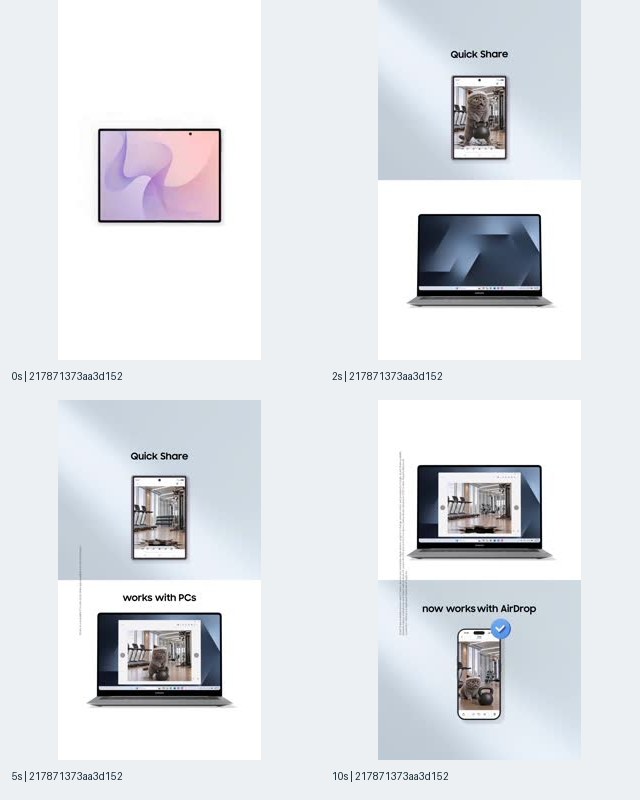
Figure 3. Reported listing: Samsung. Record beginning 21787137; recorded duration: 15 seconds. Frames shown: 0, 2, 5, and 10 seconds. Compatibility statements are quoted as advertising messages, not validated feature claims.
At zero seconds, the frame shows a device with a pastel screen on white. At two seconds, “Quick Share” appears above a phone displaying an image, with a laptop below. At five seconds, “works with PCs” is visible between the device areas. At ten seconds, a laptop occupies the upper area and a phone appears below “now works with AirDrop.”
The useful observation is the arrangement of evidence and language: devices are shown in relation to each other, while short text names the intended relationship. A swipe-file note should preserve both. Saving only the text would lose the layout; saving only the screenshot would make the claimed connection harder to search later.
Do not extend the visible claim into an unsupported compatibility checklist. The sample does not establish device requirements, software versions, transfer limits, or current feature availability. An advertiser’s assertion can motivate further product research, but it cannot replace that research.
There is also a record-count lesson. The frozen sample includes another Samsung record, 7cdf0c961f8e3739dea0d70a5785515f, with the same underlying video fingerprint as this example. Keep both advertising instances if their metadata matters, while recognizing that they point to the same indexed video file. Otherwise, a download queue can become a duplicate-file collection while the team believes it is collecting new concepts.
Figure 4: Samsung Connects a Device Demonstration to Interview Preparation
The interview-preparation example gives a concrete context for a device demonstration before showing the screen more closely. Its frames support a sequence of visible situations: a person working at a table, preparation materials, a device home screen, and a notebook interface. They do not show the complete interaction or verify the product’s ability to prepare someone for an interview.
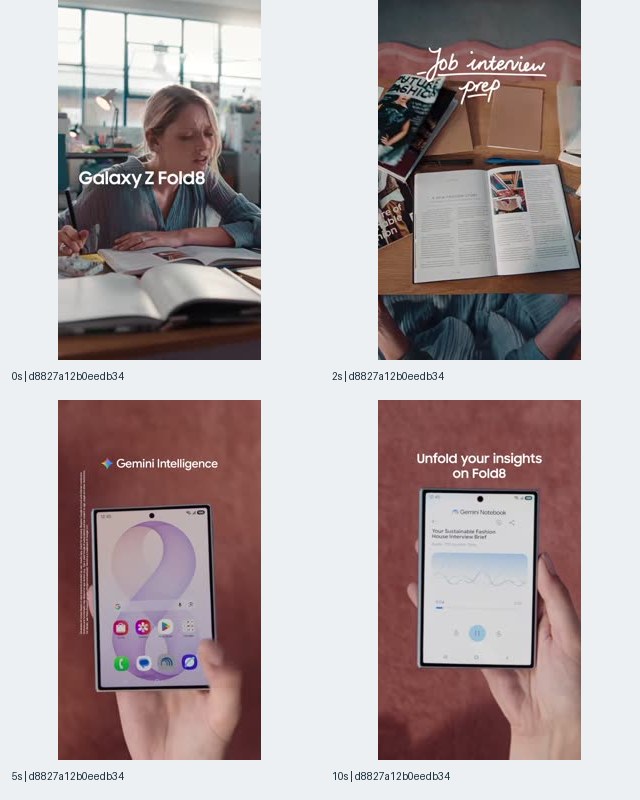
Figure 4. Reported listing: Samsung. Record beginning d8827a12; recorded duration: 15 seconds. Frames shown: 0, 2, 5, and 10 seconds. Product names and feature language describe the advertisement as captured.
At zero seconds, a woman sits at a table with reading materials, and the overlay says “Galaxy Z Fold8.” At two seconds, a top-down view of books and other materials includes “Job interview prep.” At five seconds, the frame shows a device with “Gemini Intelligence” above it. At ten seconds, a notebook interface appears beneath “Unfold your insights on Fold8.”
This is a useful reference for the relationship between task context and screen demonstration. The task is visible in the advertising language before the later interface view. A researcher can record that ordering without inventing the taps, spoken instructions, generated output, or time saved between the sampled frames.
For your own brief, start with an actual task your product can perform and specify what evidence a screen recording must show. If the claimed benefit is preparation, the production brief should distinguish the input, the action performed, and the resulting output. Those are requirements for a future original demonstration, not details proven by these still frames.
A useful hypothesis is that a recognizable task may help viewers interpret a feature demonstration. Test comprehension of the task and the product’s role before attributing any later campaign result to the narrative. In the swipe file, keep “interview preparation” as the scenario tag and “screen interface shown” as the evidence tag; they answer different questions.
Figure 5: Samsung’s Superfan Scenario Places the Product in a Shared Activity
The superfan example is a reference for showing a product within a social situation, rather than beginning with an isolated technical explanation. Its frames show people looking at a large book or scrapbook, using a foldable phone together, and standing outdoors in matching-style shirts. The sample does not verify an itinerary, a completed booking, or attendance at a particular event.
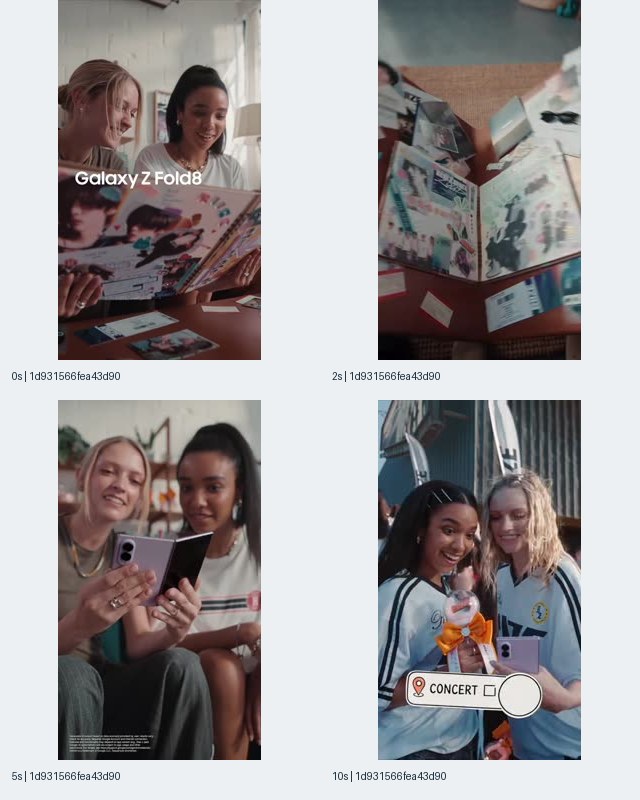
Figure 5. Reported listing: Samsung. Record beginning 1d931566; recorded duration: 15 seconds. Frames shown: 0, 2, 5, and 10 seconds. The record’s copy refers to a superfan day; the images establish only the sampled scenes.
The opening frame places “Galaxy Z Fold8” over two women holding a large illustrated book or scrapbook. At two seconds, the pages fill more of the image. At five seconds, they look at a foldable phone together. At ten seconds, they stand outdoors wearing similar sports-style shirts, with a visible “CONCERT” label near the bottom.
Save this example under shared activity or social context, while keeping the record’s own advertising copy in a separate field. Do not borrow the interview-preparation explanation from Figure 4 merely because both records are linked to Samsung and mention the same device in their copy. Each figure requires its own observation notes.
A production team could use this reference to ask whether the product’s role remains understandable when several people and props occupy the frame. The original test might compare a solitary task demonstration with a shared-use scenario using the team’s own actors, setting, and product. The hypothesis concerns clarity and relevance; the supplied record does not provide an answer.
For a swipe-file handoff, include one sentence describing the exact moment worth revisiting: “At five seconds, the participants’ attention converges on the open phone.” That note is grounded in a visible frame and gives the editor a clear reference point without asserting anything about the dialogue or the unseen sequence.
Figure 6: AT&T Business Shows Why Audio Must Stay an Open Question
The AT&T Business example demonstrates the limits of analyzing a conversation-led creative from still frames. Microphones, seated speakers, and a split-screen arrangement are visible, but the spoken message is not supplied. A useful swipe file can preserve the staging and composition while marking dialogue, tone, and product explanation as unreviewed.
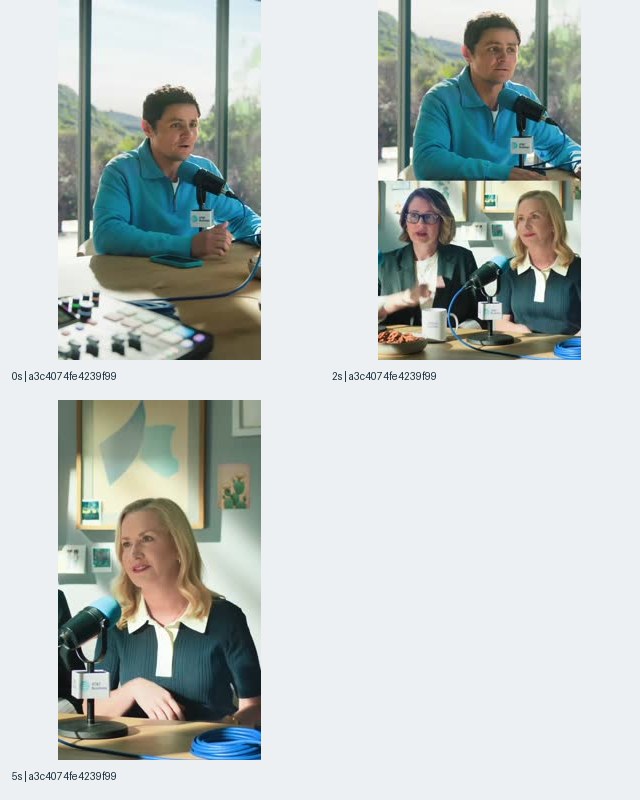
Figure 6. Reported listing: AT&T Business. Record beginning a3c4074f; recorded duration: 9 seconds. Frames shown: 0, 2, and 5 seconds. No transcript or audio observation is supplied.
At zero seconds, a man wearing blue sits at a table with a microphone and audio equipment. At two seconds, the composition divides between him above and two women seated at microphones below. At five seconds, the view focuses on one of the women. The setting can be described as conversation or podcast-style staging; it does not establish that the footage comes from a published podcast.
The record has no supplied advertising title or description. That absence matters. Do not fill it with a plausible business-connectivity message, a celebrity identification, or an imagined customer testimonial. None of those details is necessary to explain the visible structure.
A useful research note would say: “Multiple speakers are shown through a split-screen layout; inspect the authorized file’s audio before classifying the argument.” This preserves a task for a later reviewer rather than converting an information gap into a confident summary.
For original production, the relevant question is how a conversation remains understandable when viewed with limited context. A team could test its own captioning, speaker identification, and visual handoff between participants. The sample supplies a staging reference, not evidence that any particular sound-off strategy is present or effective. Do not describe this nine-second record as a five-second ad simply because five seconds is the last sampled timestamp.
Figure 7: Pure Michigan Uses Scenery as the Visible Subject
The Pure Michigan example is useful for studying a scenic creative whose sampled frames foreground places and outdoor activity. The contact sheet shows a bridge over foliage, a lighthouse, and people beside water at sunset. It does not identify the exact filming locations, establish travel demand, or demonstrate that the ad produced bookings.
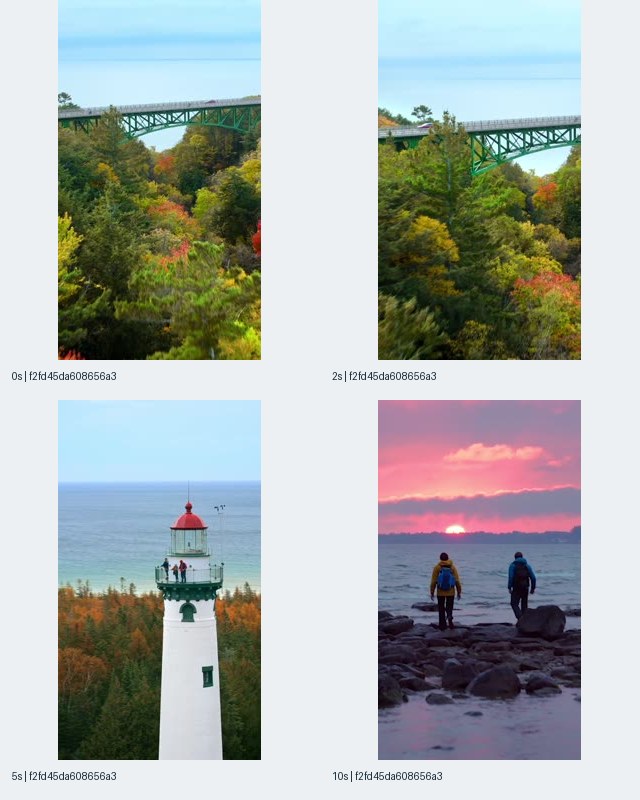
Figure 7. Reported listing: Pure Michigan. Record beginning f2fd45da; recorded duration: 15 seconds. Frames shown: 0, 2, 5, and 10 seconds. The title refers to chasing fall colors; precise locations are not established here.
At zero and two seconds, a green bridge spans a wooded area with autumn colors. The five-second frame shows a white lighthouse with a red roof near a large body of water. At ten seconds, two people stand on a rocky shoreline beneath a pink sunset sky. These descriptions follow the individual frames rather than assuming the full route or story connecting them.
The accompanying advertising copy says, “It’s your season for chasing the fall colors in Pure Michigan.” Keep that seasonal proposition attached to the record. The visible scenery supports a discussion of color, setting, and outdoor activity, but it does not verify the availability or conditions of a current trip.
For the swipe file, tag seasonal setting, scenic imagery, and people in landscape. Avoid naming a bridge or lighthouse from visual resemblance alone. The reported listing establishes the product association; it does not supply a verified location caption for each shot.
An original creative hypothesis might ask whether opening with a recognizable destination detail communicates the offer more clearly than opening with a general landscape. Use your own authorized footage and current destination information. The research output should identify what a future test needs to show, not claim that the sampled scenery explains the record’s modeled impressions.
This record was last seen on 2026-10-12. That is a source observation inside the measurement period, not evidence of why the advertiser changed activity or whether the campaign met its objectives.
Figure 8: A Similar Samsung Sequence Still Needs Its Own File Identity
The second Smart Switch contact sheet shows why visually similar references should remain separately labeled until their file identities are checked. Its frames resemble Figure 2, but the frozen records assign the examples different video fingerprints. That establishes separately indexed files, not the magnitude of their creative differences or the reason either version was used.
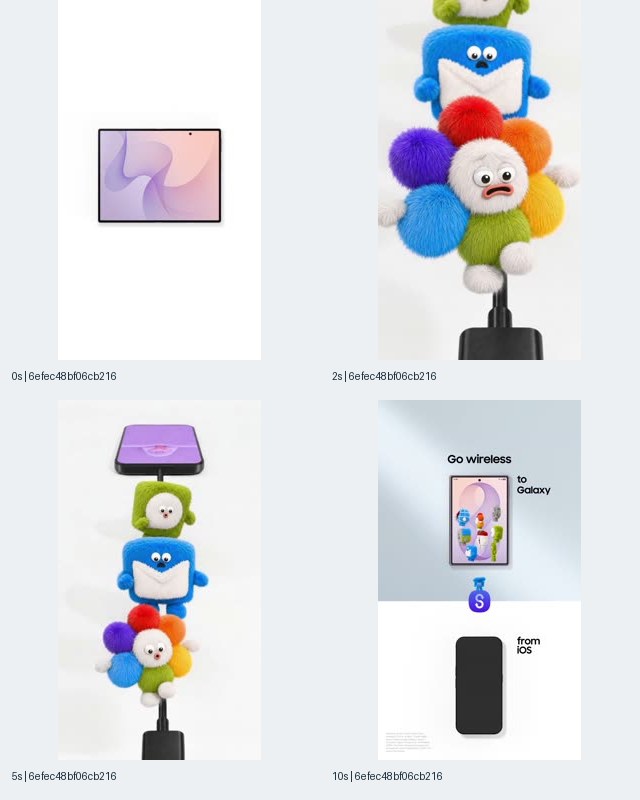
Figure 8. Reported listing: Samsung. Record beginning 6efec48b; recorded duration: 15 seconds. Frames shown: 0, 2, 5, and 10 seconds. Its video fingerprint differs from Figure 2; the contact sheets alone do not explain every file difference.
This example begins with a device against white. The two-second frame shows the fuzzy character group near a cable connector. At five seconds, a phone appears above the characters. The ten-second frame uses the “Go wireless,” “to Galaxy,” and “from iOS” arrangement, with small text visible toward the lower-left area.
Do not automatically merge this file with Figure 2 because the broad sequence and advertising copy look similar. Equally, do not call it an entirely new concept simply because the file fingerprint differs. Technical file identity and creative-concept identity are related but separate classifications.
The source also contains another record, 66bbcf33e96f84e511fb4d23cbab3e1d, sharing this example’s video fingerprint. A well-organized library can therefore retain separate record entries while pointing them to one underlying file reference. A visual-family tag can connect that file to the other Smart Switch version without erasing their distinction.
The practical note is: “Same apparent message family; separately indexed file; inspect the complete authorized files before characterizing the version change.” This avoids inventing a localization, disclaimer, edit-length, or performance explanation. First-seen dates can help locate versions in the index, but they do not prove which one the advertiser produced first or considered a replacement.
What to Look for After Saving: Hook, Length, Format, and Evidence
A downloaded ad becomes useful when its observable structure is recorded separately from its claims and unknowns. The examples above support different questions: Cricket foregrounds a bill concern, Samsung shows devices and task contexts, AT&T Business supplies conversation staging, and Pure Michigan presents scenery. None of those descriptions requires calling the creative a winner.
Use a compact analysis framework:
| Dimension | Question to answer | Example from this sample | Boundary |
|---|---|---|---|
| Opening subject | What is visible immediately? | Cricket’s bill message and character | No measured attention result |
| Product visibility | When is the product identifiable in sampled frames? | Samsung’s opening device imagery | No claim about every intervening frame |
| Message | What does the ad explicitly say? | “Go wireless” | Advertiser claim, not product verification |
| Demonstration | What action or interface is actually shown? | Interview-preparation screen views | No complete interaction observed |
| Social context | Who appears to be using or discussing it? | Two people viewing a phone | No demographic targeting inference |
| Format | How is the frame arranged? | AT&T Business split screen | No placement specification established |
| Duration | What does record metadata report? | Cricket 6 seconds; AT&T Business 9 seconds | Last sampled timestamp is not runtime |
| Missing evidence | What still needs inspection? | Audio, final sequence, fine print | Leave unanswered until checked |
Recorded duration is useful for organizing a library, but the sample does not establish an optimal TikTok ad length. The illustrated examples include six-, nine-, and fifteen-second records. Elsewhere in the frozen sample, Adobe Premiere-linked records have longer metadata durations, including 33, 40, and 43 seconds. Their existence shows that the collected records are not confined to one runtime; it does not establish which length works better.
Likewise, the illustrated frames are vertically arranged, but the contact sheet’s dimensions are not the original video’s technical specifications. Do not infer source resolution, encoding quality, or an official placement requirement from the image used in this article.
When a full authorized file is available, inspect the actual runtime, audio, text legibility, and closing sequence before expanding your notes. If only the contact sheet is available, retain that inspection status. A complete and honest partial observation is more useful than a detailed invented breakdown.
A Practical Workflow from Saved Reference to Original Brief
The strongest outcome of ad saving is an original production decision with a traceable reference and a clear test question. A file library alone cannot decide which idea fits your product. Use the saved evidence to identify a communication problem, then supply your own product facts, footage, copy, and measurement plan.
Start with a narrow question. For example: “How can we explain switching without making the opening feel like a setup tutorial?” This is a proposed research scenario, not a campaign outcome observed in the sample. Figures 2 and 3 offer references for visualizing transfer and device relationships; Figures 4 and 5 offer references for placing a device in a recognizable task or social setting.
Next, select the evidence that addresses the question. Preserve the relevant record information, downloaded filename or media reference, and exact sampled timestamps. Note whether the record supplies advertising copy, because that copy may explain a proposition that the screenshot alone does not establish.
Then write an observation before writing an interpretation. “At ten seconds, the layout labels the destination as Galaxy and the origin as iOS” is an observation. “This removes switching anxiety” is an interpretation. Turn the latter into a hypothesis that can be checked, rather than placing it in the evidence column.
Build the original brief around the following worksheet:
| Brief field | What the team should enter |
|---|---|
| Communication problem | The specific misunderstanding or objection to address |
| Source observation | A frame-level fact, linked to the saved reference |
| Proposed hypothesis | What the new creative may help viewers understand |
| Product evidence | Verified information supporting the proposed message |
| Original execution | New script, visual treatment, actors, and assets |
| Required demonstration | The action or result the production must actually show |
| Comparison | What will remain consistent and what will change |
| Evaluation | How comprehension and later campaign results will be assessed |
| Open questions | Unknowns that must be resolved before production or launch |
For a small team, the researcher and copywriter may be the same person. The separation still matters. Finish the evidence note before drafting the new script, then check whether the script accidentally imports a competitor’s feature claim or assumes a capability your product does not offer.
For an agency, give the client a short explanation of why each reference was selected. “This illustrates a relationship between devices” is a defensible rationale. “This is the winning Samsung formula” is not supported by the sample. The rationale should survive even when the client never opens the media file.
The broader TikTok ads research workflow provides the topic context for organizing discovery and analysis. In this saving workflow, the deliverable is concrete: a source-linked reference, a bounded observation, an original brief, and a question your own testing can answer.
Troubleshooting Missing Buttons, Unavailable Ads, and Ambiguous Files
A failed saving attempt should be diagnosed by surface, record, and expected output before trying a different tool. Many apparent download problems are actually mismatches between what the page provides and what the researcher expects. Top Ads offers reference controls; an AdMapix detail view offers download controls only for eligible media; the Commercial Content Library has its own geographic and visibility boundaries.
If you cannot find Download in Top Ads, return to the documented Link and Star workflow. The absence of a file-download control is consistent with TikTok’s explicit authorization documentation. It is not evidence that you need a hidden setting or an extraction workaround.
If an official library search returns no US example, check the country coverage before changing the keyword repeatedly. Our US sample cannot be reproduced in the Commercial Content Library. If a supported-market result has a summary but no video, remember that TikTok documents this behavior for disapproved ads.
If an AdMapix result lacks the expected eligible-media control, record that limitation for the specific result. Do not assume a universal download capability or invent an alternate route. Check that you opened the intended record and distinguish a missing media file from a missing search result.
If the downloaded file looks like another file already saved, compare the source references and file identities before deleting metadata. The Samsung examples demonstrate both cases: multiple records can share a video fingerprint, and similar-looking sequences can have different fingerprints.
If the filename is unclear, rename your local copy consistently and preserve the original source reference in the spreadsheet. Renaming is organization; it must not turn an unknown advertiser, unreviewed audio track, or approximate visual match into a verified fact.
After any successful save, inspect the actual file for playback, audio, duration, and completeness before using it in a review. These are recommended user checks, not tests completed for this article. A visible contact-sheet image cannot certify the integrity of a downloaded video or establish what happens after the last sampled frame.
Watermarks, Rights, and Third-Party Downloader Claims
A saving feature does not transfer ownership of the advertising creative or grant permission to republish it. Downloaded ads are for internal research and reference, remain the advertiser’s intellectual property, and must not be reused or republished. A watermark-free appearance would not change that boundary, and this article does not establish a right to obtain a clean master from any source.
As of November 2, 2026, TikTok’s Top Ads asset authorization page says the creatives are watermarked for copyright purposes and unavailable for download. The advertiser’s authorization grants a license to TikTok and its affiliates; it is not a reuse license for people browsing Creative Center.
TikTok’s ROW terms, dated December 1, 2025 and checked on November 2, 2026, state that service content “may not be downloaded, copied, reproduced, distributed … without our or, where applicable, our licensors’ prior written consent.” They also distinguish downloading one’s own User Content from downloading other content in the Services.
The US terms, dated July 15, 2026, prohibit users from “scrap[ing], crawl[ing], export[ing] or otherwise extract[ing]” data or content using automated systems or software except as approved in writing. Those quoted restrictions are relevant to claims that a downloader or extension can collect advertising automatically. This guide does not recommend bypassing platform terms, access controls, or DRM.
Third-party downloaders and browser extensions were not tested for this article. We therefore do not name, rank, recommend, or link any, and we do not claim that a tool can remove watermarks. Their current reliability, permissions, costs, and file quality remain unverified here.
For production, take the communication question from a reference and create your own execution. Reusing an advertiser’s footage, soundtrack, character, logo treatment, or script is a separate rights issue from studying how the message is organized. If a project requires the original creative rather than a research reference, obtain the appropriate permission from its rights holder.
Common Mistakes That Make a Saved-Ad Library Misleading
Most research errors happen after the file has been saved, when metadata is dropped or an observation is promoted into a performance claim. A disciplined library preserves distinctions among the source page, advertising record, underlying file, visible message, and proposed lesson. The sample provides concrete reasons to maintain each distinction.
Calling every result a unique creative. This sample has 29 advertising records and 26 distinct video fingerprints. Keep record-level metadata without treating every row as a new video. Conversely, do not merge different files solely because their thumbnails look similar.
Treating the last screenshot as the ending. Figure 6’s last sampled frame is at five seconds, while the record duration is nine seconds. The fifteen-second examples stop sampling at ten seconds. Record those boundaries instead of inventing a closing call to action.
Writing a transcript from a still image. The AT&T Business frames show speakers and microphones, but no supplied dialogue. An audio-dependent argument remains unknown until the file has actually been inspected.
Using estimated impressions as proof of quality. The sample’s impressions are modeled for a defined window. They do not reveal conversions, profit, creative fatigue, or why an advertiser used a particular asset. A high position in this sample is not a universal TikTok ranking.
Treating an old first-seen date as continuous success. Source dates show observations. They do not prove uninterrupted delivery, the advertiser’s budget, or the creative’s profitability. Do not derive daily impressions by dividing the window estimate by the record’s age.
Copying ad claims into a product comparison. Samsung’s compatibility language and Cricket’s offer language are historical advertising statements. They need separate current verification before becoming factual advice about those products.
Confusing a media link with an official post. AdMapix Copy Link copies the eligible media link. Label it accordingly and preserve the record reference separately when available.
Assuming the sample covers the whole market. The collection was bounded by pages, date window, country, network, and sorting. It supports worked examples and a saving workflow, not a complete inventory of TikTok advertising or advertiser activity.
When AdMapix Fits This Saving Workflow
AdMapix fits teams that need to discover indexed creative references, inspect their records, and save eligible media individually with useful context. It is especially relevant when the task is to turn a selected reference into a research note or original brief. It does not replace an advertiser’s private performance reporting, grant creative reuse rights, or provide bulk media download.
Disclosure: AdMapix is our product, so we describe its verified save workflow and its limits explicitly. The product statements here rely on the supplied November 2, 2026 workflow check and current product facts. They are separate from TikTok’s official documentation and from the modeled advertising estimates.
Choose the lightest workflow that produces your required deliverable. If you only need to revisit a Top Ads example, an official link and favorite may be sufficient. If you need an eligible indexed file for internal analysis, use the individual Download action and preserve its source. If you need an ongoing collection, use a spreadsheet or eligible Competitor Watch saved-creative folders.
Consult the live AdMapix pricing page for current commercial terms and plan availability. This evergreen guide does not fix prices, credit allowances, or watching limits in the article, and it does not promise a paid-plan trial.
Ready to organize a real reference? Sign up or log in to AdMapix, inspect the live record, and save the eligible file or link alongside your research notes. Start with the question the creative helps answer; downloading more files is not itself the research outcome.
FAQ
These answers distinguish official reference-saving options from individual file downloads and from untested downloader claims. They apply to the documentation and product checks supplied as of November 2, 2026. Later interface changes should be checked on the linked official pages, while historical sample observations remain attached to the dates stated in this article.
Is there a free TikTok ads downloader?
This article does not verify a free third-party downloader. TikTok’s Commercial Content Library can be viewed without an account, and Top Ads documents reference-saving actions, but neither provides a general official competitor-video download workflow. AdMapix offers individual downloads for eligible media; consult its live pricing and account conditions rather than assuming unrestricted free downloading.
Can I download TikTok Creative Center ads without a watermark?
TikTok explicitly says Top Ads creatives are watermarked and unavailable for download. This article does not verify any watermark-removal method or promise that another source provides a clean master. A file’s watermark status also does not determine reuse rights: the advertising creative remains the advertiser’s intellectual property and must not be reused or republished.
How do I save an ad from TikTok Creative Center?
Use the Top Ads Link button to copy the ad reference and the Star button to favorite it. Save the observation date, filters, and reason for collecting it in your own research notes. These actions preserve a reference rather than a local video file, and TikTok documents circumstances in which an ad can leave Top Ads.
Is TikTok Creative Center the same as the TikTok Ad Library?
No. Top Ads in Creative Center is an advertiser-authorized inspiration collection, while the Commercial Content Library is a transparency repository with defined geographic coverage and disclosures. The library does not cover the US sample analyzed here. Neither should be described as a complete global archive or assumed to provide the same saving controls, metrics, or search behavior.
Should I use a TikTok ads downloader browser extension?
No extension was tested for this article, so we cannot recommend one or verify its current capabilities. Do not assume an extension can lawfully download any visible ad, remove watermarks, or preserve the original file quality. Start with documented reference controls or an eligible individual-media workflow, and keep source information attached to whatever you save.
Can I download TikTok ads in bulk through AdMapix?
No. The supplied November 2, 2026 product check confirms one-creative-at-a-time media download and no bulk media-download feature. You can organize individual files and links in a spreadsheet. Eligible Competitor Watch accounts can save watched-app creatives into named folders with notes, but that organization feature should not be described as bulk media export.
Does the Commercial Content API provide downloadable ad videos?
The API documents an ad video URL field for approved applicants working within its research terms. It is not a general creative-download service, and its official pages disagree about the precise European country coverage. The similarly named download_url field points to an advertised app’s store page, not the advertising video. This article did not execute an API test.
Do downloaded ads reveal which TikTok creatives are profitable?
No. A file can reveal creative content when inspected, while its associated record may supply dates, listing relationships, and modeled estimates. The sample provides no spend, conversion, revenue, or profit evidence. Use references to form original hypotheses, then evaluate those hypotheses with your own properly measured campaigns rather than treating public visibility as proof of profitability.
Key Takeaways
A useful TikTok ad-saving workflow preserves the reference, the file when eligible, and the limits of what was actually inspected. The goal is an evidence-based creative decision that another person can retrace.
- Use Top Ads’ Link and Star controls for official references; its creatives are explicitly watermarked and unavailable for download.
- Keep the Commercial Content Library’s European coverage separate from US advertising research, and treat API access as a restricted research route.
- Download eligible AdMapix media one creative at a time. Organize the collection without implying bulk-download functionality.
- Preserve record identity, file identity, dates, source/network, country, and inspection status together.
- Turn visible structures into original test hypotheses. Contact sheets, longevity, and modeled impressions do not prove campaign performance.
Sources
This article’s claims are grounded in the following dated documentation, supplied observations, and reproducible advertising sample. Official pages establish documented capabilities and restrictions; interface observations establish only what was checked; the advertising package establishes the records and sampled frames used in the examples.
- Frozen advertising source package — fetched 2026-11-02, 01:59:20 UTC. Public sample, requests, batches, and checksums. Scope: US, TikTok network, blank keyword, measurement window 2026-10-03 to 2026-11-01, bounded impression-descending collection of 29 records and 26 distinct video fingerprints. The eight images show selected timestamps only.
- AdMapix methodology — referenced 2026-11-02. Public methodology. Context for interpreting advertising intelligence and distinguishing source observations from estimates. All impression figures in this article are third-party model estimates for the specified sample window.
- AdMapix search and save workflow — product verification supplied for 2026-11-02. Creative search starting point. Supports the described eligible-media Download and Copy Link actions, individual-download limitation, and saved-creative workflow. This article did not perform a new download benchmark; the live search is not the frozen blank-keyword sample.
- TikTok Top Ads authorization — February 2025; checked 2026-11-02. Asset authorization. Documents watermarking, unavailable downloads, and the scope of advertiser authorization.
- TikTok Top Ads documentation — May 2025; checked 2026-11-02. Top Ads overview, dashboard actions, and live Top Ads collection. Support the authorized selection, reference-saving controls, filters, and collection caveat.
- TikTok authorization withdrawal — February 2025; checked 2026-11-02. Withdrawal and removal conditions. Explains why a saved Top Ads reference may later become unavailable.
- TikTok Commercial Content Library — checked 2026-11-02. Library FAQ and support FAQ. Support access, search, retention, and disclosure descriptions. Their country lists disagree about Turkey. The supplied AdMapix editorial check on the same date found no download control in the detail player and no export button on the All ads report page.
- TikTok Commercial Content API — checked 2026-11-02. Product and application page, supported countries, and query-ads documentation. The latter documentation is dated September 1, 2026. The product page and country list disagree on exact coverage; the query documentation distinguishes ad video URLs from app-store links.
- TikTok terms — checked 2026-11-02. Developer terms, modified December 26, 2025; ROW terms, dated December 1, 2025; and US terms, dated July 15, 2026. Support the quoted research-purpose, content-use, and automated-extraction restrictions.
The observations do not establish complete TikTok coverage, current advertiser offers, complete video playback, or campaign performance. Future workflow updates should distinguish changed product controls from the historical evidence preserved in this source package.
Turn these observations into your next creative study
Open the creative library and select samples for your market, network and research question.
Related Articles
Novig Ads and Commercials: What 30 US Records Show
Eight timestamped examples and 30 verified US iOS advertising records reveal Novig’s Notes-style explainers, sports comparisons, offer variants, sampled concentration, and the limits of revenue-ranking evidence.
Courtyard (Courtyard.io) Cards Ads & Revenue Rank 2026
A dated US analysis of Courtyard.io’s revenue ranking, 30 advertising records, eight visual examples, video reuse, and comparison with Rips by Triumph, with clear limits on company revenue and performance claims.
Pangle Ads Examples: What a Dated US Search Sample Shows
Examine eight dated advertising examples from a US-filtered Pangle research sample, distinguish product identity from placement evidence, and turn visible creative patterns into original test briefs.