
TikTok Creative Center: Official URL, Top Ads & Trend Research Guide
Official TikTok Creative Center URL, free tutorial, trending songs and hashtags workflow, all 8 modules, CCL comparison, Research API caveats, and 10 creative research plays.
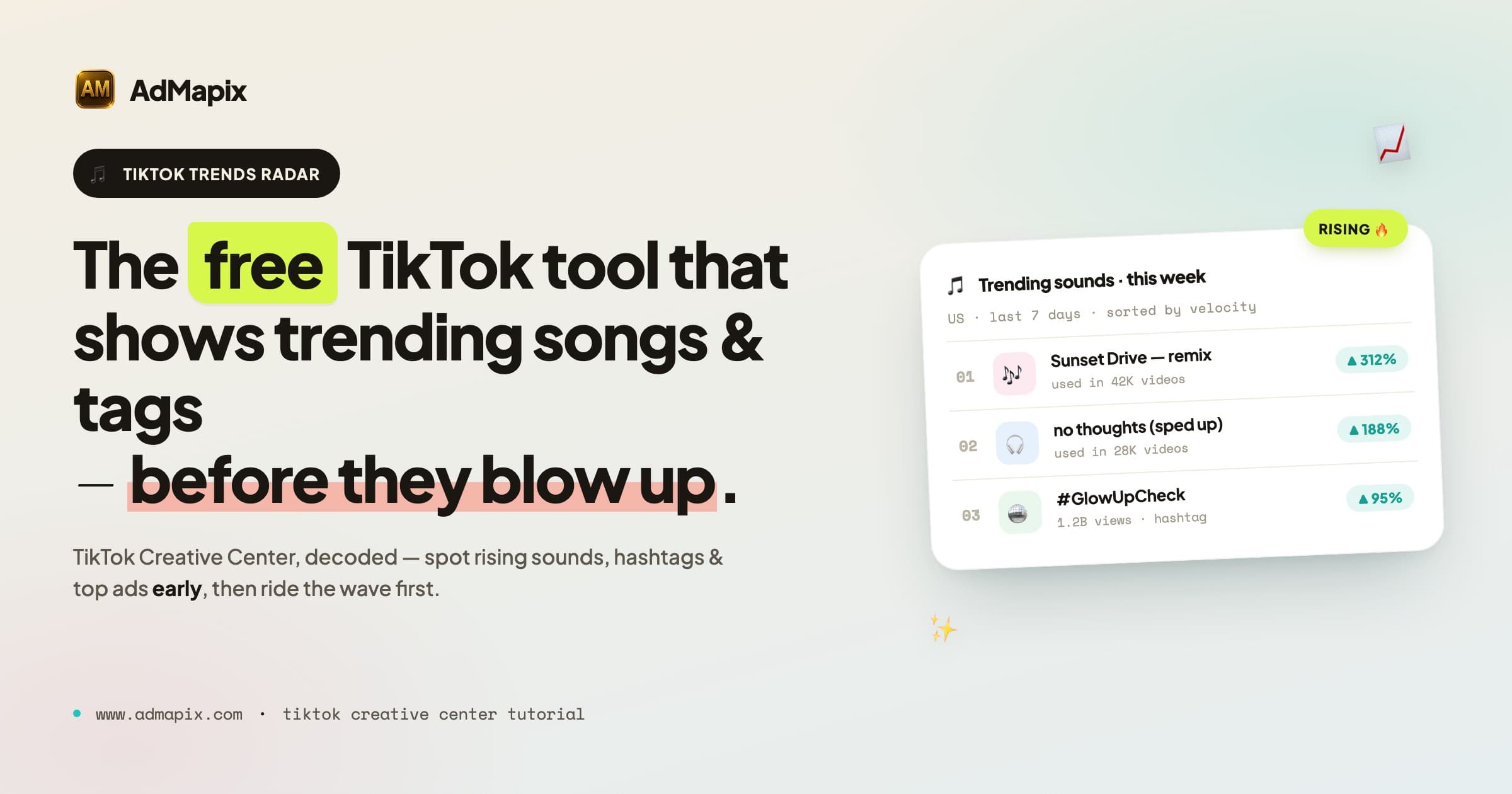
Quick answer (reviewed 2026-07-10): TikTok Creative Center is a free, public trend and creative-research platform. Its Top Ads module is a curated set of advertiser-authorized, high-performing creatives—not a complete archive of every TikTok ad. Basic access is public; fuller data generally requires sign-in.
Evidence boundary: Use TikTok's Creative Center help and Top Ads guide. Metrics apply to selected Top Ads, not every TikTok campaign.
Next step: Compare it with our TikTok ad library explainer, then use AdMapix methodology for indexed-data boundaries.
For the full market baseline behind these numbers — monthly creative volume, vertical shares, and advertiser leaderboards for H1 2026 — see our State of Mobile Advertising H2 2026 report.
Quick FAQ
Does Creative Center contain every TikTok ad?
No. Top Ads is a curated collection of advertiser-authorized creatives; regional transparency records are a separate Commercial Content Library surface.
Can Top Ads be used without signing in?
Limited access is available, but TikTok states that signed-out users see only five Top Ads; fuller data and features generally require sign-in.
<!-- /admapix-p0-low-ctr-refresh-2026-07-10 -->By the AdMapix Editorial Team · Updated April 16, 2026
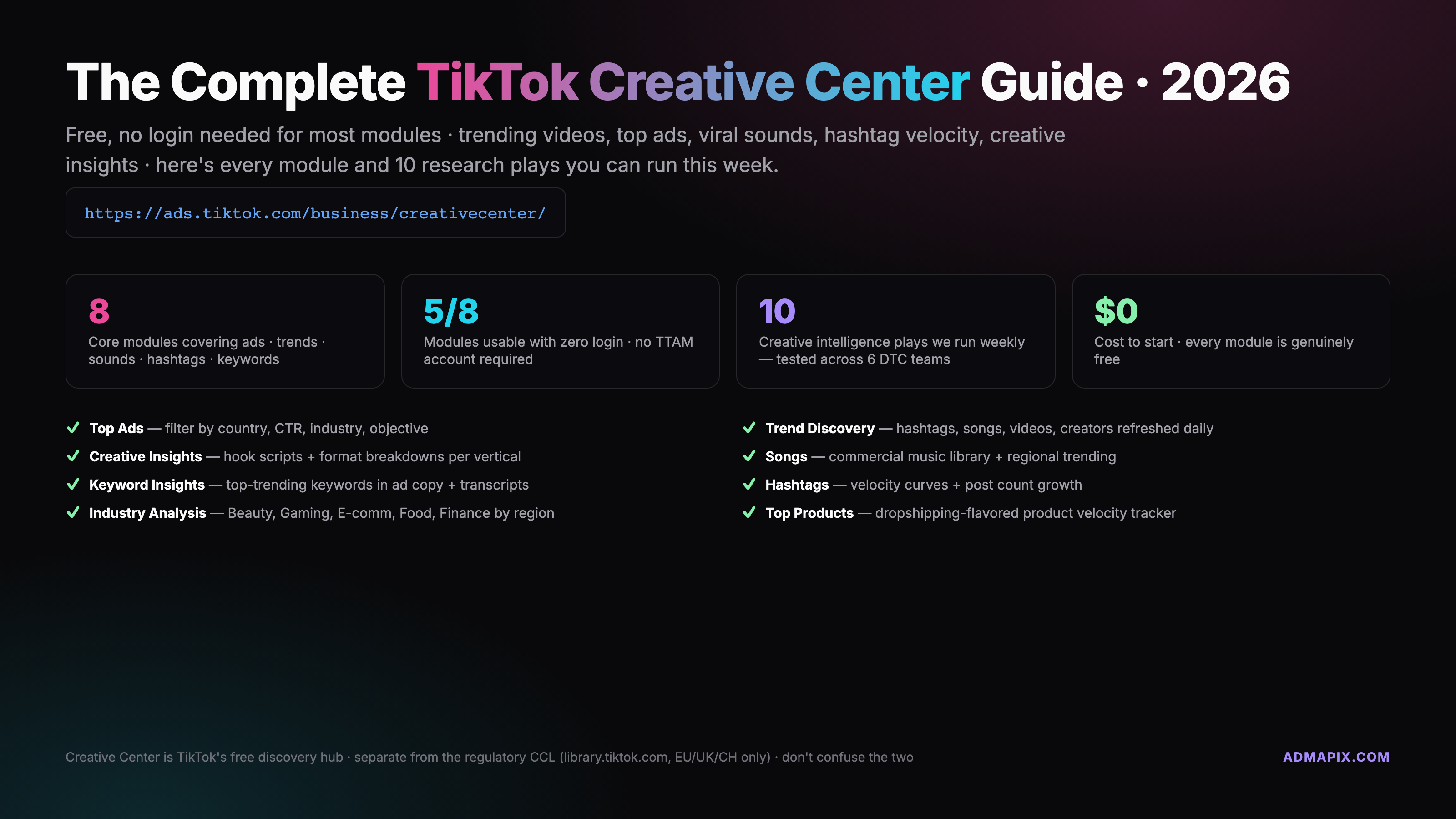
The TikTok Creative Center lives at https://ads.tiktok.com/business/creativecenter/. It's TikTok's free, public hub for ad inspiration — trending videos, top-performing hooks by country and industry, viral sounds, hashtag velocity, and keyword insights, all searchable without an ads account. Here's how to use it in April 2026, what's gated behind login, and how it differs from the Commercial Content Library.
TL;DR
- URL:
https://ads.tiktok.com/business/creativecenter/en/(desktop recommended, no login for browsing) - 8 core modules: Top Ads, Trend Discovery, Creative Insights, Songs (Commercial Music Library), Keyword Insights, Hashtags, Industry reports, Top Products
- What's gated: Symphony AI script generation, saved lists, Commercial Music Library downloads, deeper keyword filters — all require a free TikTok Business Account (TTAM)
- 10 plays tease: hook scouting, sound pre-spotting, hashtag velocity, industry winners, brand-language mining, country-specific trend watch, format strips, week-over-week Top Ads diff, evergreen vs flash trend split, creative vault flow
- CCL caveat: TikTok's Commercial Content Library (CCL) at
library.tiktok.comis a separate product — raw ad transparency for EEA, UK, and Switzerland only as of April 2026. Creative Center is curated; CCL is comprehensive. Use both if you operate in Europe
Trending search note: If you are looking for TikTok Creative Center trending songs or trending hashtags in the United States, open Trend Discovery, switch the region to United States, then compare 7-day and 30-day movement before briefing creative. If your query is about TikTok Research API commercial use, Creative Center is not the API; see the Research API section below.
Jump to internal links: best ad spy tools 2026 · how to spy on competitors' ads · spy on ads across all platforms · Google Ads Transparency Center guide · where is Facebook Ads Library · pricing.
What is the TikTok Creative Center?
The TikTok Creative Center is TikTok's first-party creative research platform — a browser-based toolkit that surfaces top-performing ads, trending videos, viral sounds, and industry insights across every market where TikTok Ads runs. It replaced the older "TikTok For Business Inspiration" library in 2022 and has since grown into the platform's flagship transparency surface for advertisers, creators, and agency strategists who need to understand what's cutting through before they commit media dollars.
We open almost every new account engagement here. When a brand hands us a Q2 creative brief, the first twenty minutes are Creative Center time — filtering Top Ads by the client's industry and region, screenshotting hook patterns, saving a short list of sounds in velocity, and exporting keyword clusters for the copy team. It's free, it's fast, and it's directly sourced from the platform's own performance signal. That combination is rare in ad intelligence.
Three important framings before we go deeper.
First, Creative Center is curated. Unlike a raw transparency library, TikTok decides what makes the Top Ads dashboard — typically ads that meet a minimum spend, performance, and content-guideline bar. That curation is useful (the signal is cleaner) but it's also a bias. We'll show you how to compensate for that bias in the "10 plays" section.
Second, Creative Center is not the Commercial Content Library. We've seen procurement teams conflate the two in RFPs. The Commercial Content Library (CCL) at library.tiktok.com is TikTok's DSA-mandated ad transparency product for the EEA, UK, and Switzerland. Different URL, different scope, different data. Full breakdown below.
Third, most of Creative Center works without a login. The modules that do require authentication use a free TikTok Business Account — not a paid Ads Manager seat. If you see a "sign up" wall, it's a five-minute hurdle, not a budget decision.
Where to find it — 30-second walkthrough
The canonical URL is ads.tiktok.com/business/creativecenter/en/. That opens the Top Ads Spotlight by default with the region set to "Global." From there:
- Click the region flag (top right) to switch markets — US, UK, SEA, LATAM, etc. This changes the data you're looking at, not the interface language.
- Open the left navigation to see the 8 core modules. If you're on a narrow display, click the hamburger icon.
- Bookmark the homepage. You'll return here dozens of times a week once you're using it seriously.
Three additional entry paths, ranked by usefulness for research workflows.
- Direct URL (our default): fastest, bookmark-friendly, no context-switching.
- TikTok Ads Manager → Tools → Creative Library: useful if you're already running campaigns and want to jump from performance data to inspiration without leaving the Ads Manager tab.
- TikTok Business Suite → Insights → Trends: mobile-friendlier entry point for creators who also run paid, though the desktop Creative Center is the fuller toolkit.
Desktop-first rule. We've tested Creative Center on mobile browsers every quarter since 2023. It technically works, but three modules — Creative Insights, Top Products, and the Keyword Insights explorer — lose too many filters on small screens to be useful for real research. Treat Creative Center as a desktop tool. Save the mobile view for spot-checks only.
Cross-border note. From mainland China, ads.tiktok.com/business/creativecenter/ is reachable but latency is inconsistent — Hong Kong and Singapore egress nodes are stable, carrier 4G often isn't. For teams at AdMapix's Shenzhen partners browsing daily, we recommend a dedicated Hong Kong workstation. Mainland TTAM registration is restricted, but Creative Center's read-only browsing works fine without an account. For Symphony AI, saved lists, or CML downloads, a Hong Kong entity with overseas bank account is the standard path, or go through an official TikTok agency partner.
Module walkthrough
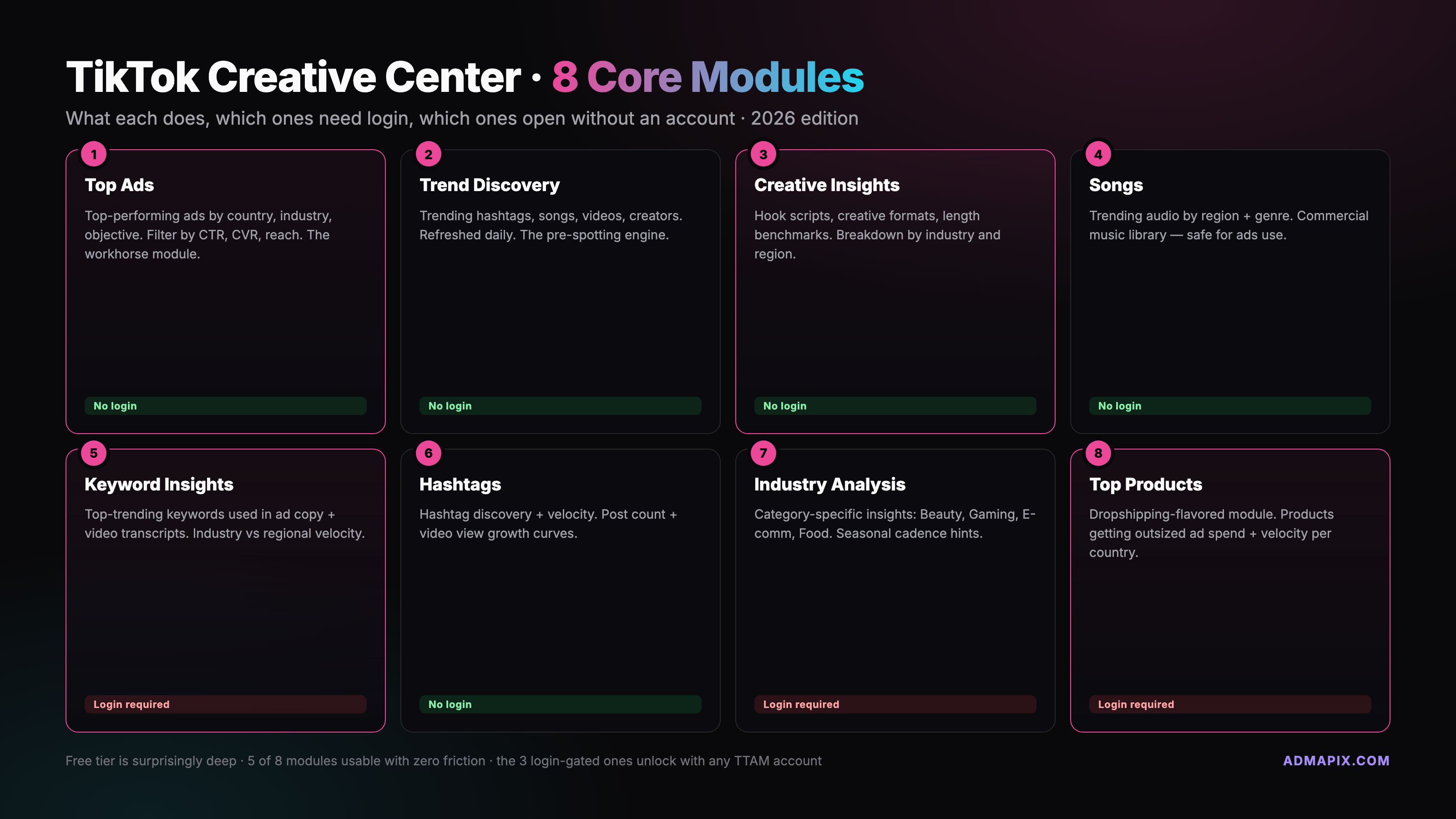
There are eight modules worth knowing by name. We'll walk each one in the order we use them during a typical research session — not in TikTok's left-nav order, because the nav order is a discovery experience, not a workflow.
Top Ads (Spotlight + Top Ads Dashboard)
The flagship. Top Ads shows high-performing paid ads that have run on TikTok, curated by TikTok's internal signal (spend, CTR, completion rate, engagement). You get two sub-views: Spotlight (editorial hero carousel of standout campaigns) and the Top Ads Dashboard (filterable grid — our default).
Filters we use every session: Region (country, not language), Industry (28+ verticals from Beauty to Financial Services), Objective (Traffic, Conversion, App Install, Video Views, Lead Gen), Like rate / 6s view rate / CTR / CVR (sort by any), Duration (< 15s, 15–30s, 30–60s, 60s+), and Time window (last 7 / 30 / 90 / 180 days). Each ad card shows the creative, advertiser name, objective, and summary metrics. Click through for the hook breakdown, engagement curve, and audience notes.
The Top Ads Dashboard is the single most valuable surface in Creative Center. Every play in the "10 Creative Intelligence Plays" section below starts here.
Trend Discovery (Hashtags, Songs, Creators, Videos)
A discovery surface focused on organic + branded breakout content. Four sub-tabs:
- Hashtags — trending tags sorted by posts, views, and 7-day growth rate
- Songs — organic audio trends before they hit the Commercial Music Library
- Creators — rising creators filterable by industry + region
- Videos — high-engagement organic videos tied to the above signals
Trend Discovery is where we go when a brief asks "what's actually viral right now" rather than "what's working in paid." These are adjacent but not identical questions. An advertiser who only watches Top Ads will chase lagging signal — the creative already won. Trend Discovery catches the wave earlier.
Creative Insights
A recommendation engine that analyzes the Top Ads corpus and surfaces creative patterns — hook types ("Bold statement," "Trending sound," "Product close-up"), best-performing video lengths by industry, on-screen text frequency, and pacing benchmarks. Less of a filterable explorer, more of a briefing crutch. Useful when you need to hand a creative lead a one-page "this is what's working" summary.
Songs (Commercial Music Library)
TikTok's licensed catalog for commercial use. Every track here is cleared for paid ad creative — no copyright risk when you run it in an Ads Manager campaign. Filters cover genre, mood, region, and "trending this week" status.
Gotcha we see weekly: organic trending sounds on the Trend Discovery → Songs tab are not necessarily cleared for commercial use. If you're building a paid ad, stay inside the Commercial Music Library. If you're building an organic creator post, use Trend Discovery. Mixing the two has cost brands takedown notices.
Keyword Insights
Search-volume and intent data for keywords in TikTok ad copy and on-screen text. Filters by region, industry, product category, and time window. You get: search volume, CTR lift (keywords that correlate with higher click-through), and an intent cluster (what people searching this keyword actually buy).
Gated layer: saving keyword lists and exporting requires a TikTok Business Account. Browsing and single-keyword lookups are open.
Hashtags (stand-alone module)
Separate from Trend Discovery's hashtag tab and slightly more granular. Shows hashtag performance over time with views, posts, and a 7/30/180-day velocity graph. The stand-alone Hashtags module adds industry-specific leaderboards — e.g., "top beauty hashtags in Germany, last 30 days."
Industry reports
TikTok's internal quarterly and seasonal reports, broken down by vertical. Beauty, Gaming, Auto, Financial Services, Tech & Electronics, E-commerce, and more. Reports include: category growth, top-performing creative formats, audience demographic shifts, and seasonal calendars. Free PDF download on most. We read these once a quarter for every client vertical — not for the surface insight but for the data tables at the back.
Top Products
E-commerce module surfacing trending SKUs and product categories on TikTok Shop. Filters by region, category (home, fashion, beauty, tech accessories, etc.), time window, and growth rate. For dropshipping and affiliate teams, this has replaced a lot of what they used to pay PiPiAds for — though the depth is still thinner (more on that in the third-party tools section).
Login vs no-login — what's gated
A lot of Creative Center works without authentication. Here's the precise line as of April 2026.
Open without login:
- Browsing Top Ads Dashboard (all filters, all regions)
- Trend Discovery across all four tabs
- Creative Insights patterns
- Keyword Insights single-keyword lookups
- Hashtag browse and velocity graphs
- Industry reports (view + PDF download)
- Top Products browse
- Commercial Music Library browse and preview
Requires a free TikTok Business Account (TTAM):
- Saving and organizing lists (keywords, hashtags, ads, sounds)
- Downloading tracks from the Commercial Music Library
- Symphony AI script generator + asset generation tools
- Extended Keyword Insights filters and export
- Bookmark history across sessions
- Personalized "For You" ad recommendations in the dashboard
Requires an active TikTok Ads Manager with spend:
- Ad-level benchmark overlays (your CTR vs industry)
- Reach estimator and CPM bands for specific audiences
- Symphony AI with higher generation quotas
- Some beta features in the Trend Intelligence module
The TTAM account is free to create and takes about five minutes. The spend requirement for the third tier isn't a hard dollar gate — even a $50 test campaign typically unlocks it — but if you've never run TikTok paid, those features are out of reach.
TikTok Research API vs Creative Center: Commercial trend scanning
TikTok Creative Center is the right product for advertiser inspiration: Top Ads, trending songs, hashtags, keyword insights, and industry examples. It is not the TikTok Research API and it is not designed for automated commercial trend scanning.
For commercial trend scanning, use Creative Center manually or through approved TikTok Ads workflows: choose a region, industry, time window, and module, then capture signals in a repeatable brief. For academic or public-interest research, apply for TikTok Research API access and follow its data-use restrictions.
The practical split is simple: Creative Center = manual creative research for advertisers; Research API = approved research access with policy constraints. Do not build a scraper that bulk-harvests Creative Center pages for commercial resale.
Creative Center vs Commercial Content Library — the core distinction
This is the single most confused topic in TikTok ad research, and we get it in client kickoffs every week. Here's the clean distinction.
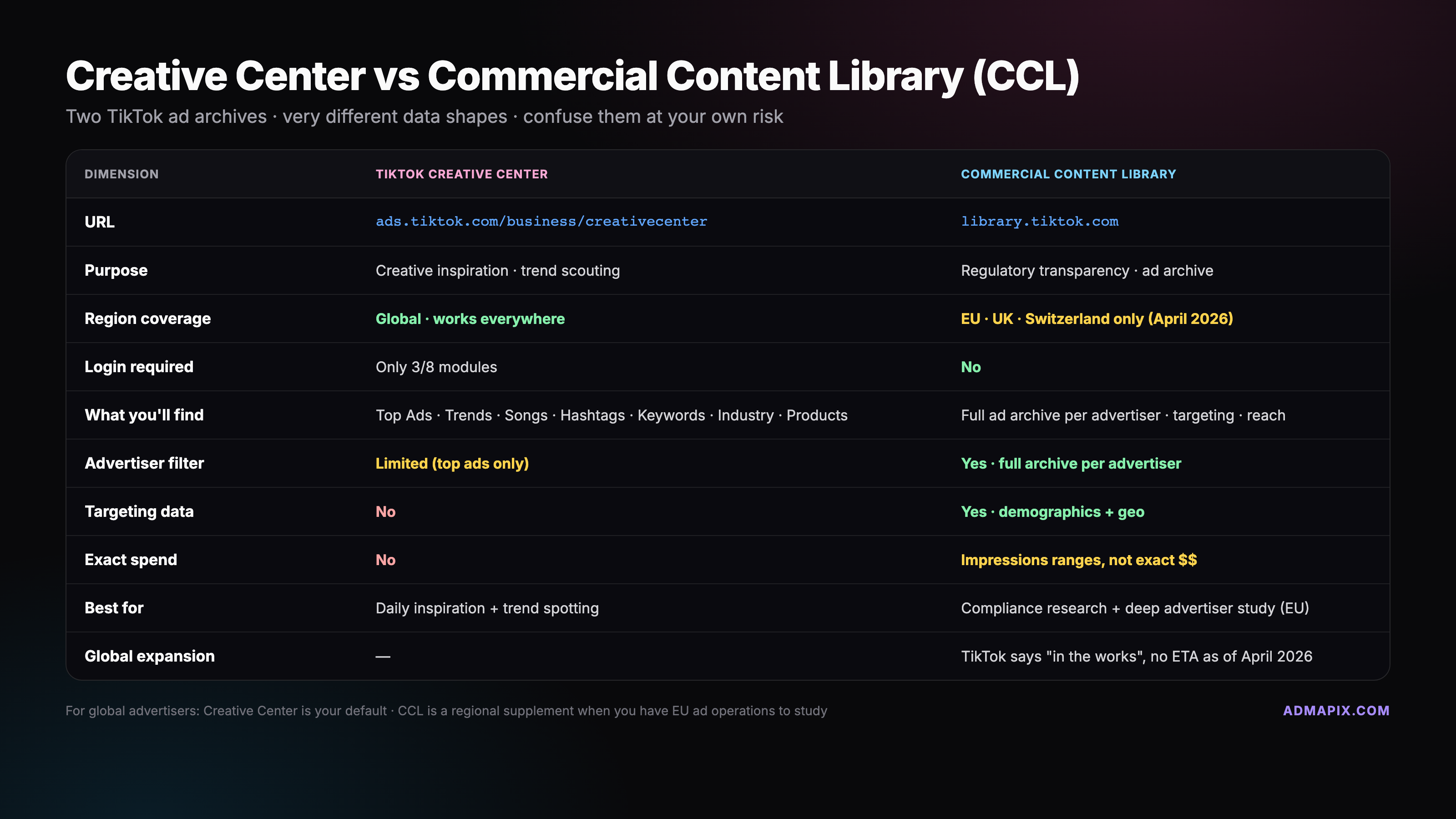
TikTok Creative Center — ads.tiktok.com/business/creativecenter/ — is a curated inspiration and research product. TikTok selects which ads appear based on performance, spend, and content guidelines. The interface is built for advertisers doing creative briefing. Global availability.
TikTok Commercial Content Library (CCL) — library.tiktok.com — is a comprehensive ad transparency product built to meet EU Digital Services Act requirements. Every paid ad served to users in the EEA, UK, and Switzerland appears here, with targeting parameters, reach, and spend bands disclosed. No curation, no performance ranking — raw transparency.
| Dimension | Creative Center | Commercial Content Library |
|---|---|---|
| URL | ads.tiktok.com/business/creativecenter/ | library.tiktok.com |
| Coverage | Global, curated | EEA + UK + Switzerland, comprehensive |
| Ad selection | Top performers only | Every paid ad |
| Metrics shown | CTR, CVR, view rate, engagement | Reach bands, spend bands, targeting parameters |
| Trend modules | Yes (8 modules) | No — ad search only |
| API | No public API | Commercial Content API (see developers.tiktok.com) |
| Who it's for | Advertisers, creators, strategists | Researchers, journalists, civil society, compliance |
| Authentication | Browse open; TTAM for saves | Browse open; API requires research credentials |
Practical implication. If you operate only in Europe, you have both tools available and should use both. Creative Center shows you what's working. CCL lets you audit competitors comprehensively — including their bad ads, their non-top ads, their targeting strategy. If you operate outside Europe, CCL will not help you; Creative Center is your first-party option.
2026 status. TikTok's newsroom announced in early 2026 that a broader Research API and expanded CCL-like transparency is "in the works" globally, but no confirmed ETA. For now, non-EEA advertisers rely on Creative Center plus third-party libraries. (See Day 7 — spy on ads across all platforms for the cross-platform view.)
What's new in 2026
TikTok's transparency and creative surfaces have moved fast in the past twelve months. Four changes are worth knowing, whether you use Creative Center daily or check in quarterly.
1. Research API expansion. In February 2026, TikTok announced an expanded Research API for academic researchers and vetted journalists, including a Playlist Info endpoint and deeper Commercial Content access. This doesn't directly change the Creative Center UI, but it signals where the platform is heading — more programmatic access, fewer manual exports. Full context in TikTok's Newsroom update on the Research API.
2. Shorts-style trend preview cards. The Trend Discovery surface now renders short, auto-playing preview cards — closer to the YouTube Shorts browse experience than the 2024 grid-of-thumbnails layout. Advertisers report this makes trend scanning about twice as fast; we've seen the same in our workflow.
3. Industry specificity. TikTok added sub-verticals in the Industry filter — "skincare" under Beauty, "accessories" under Fashion, "meal kits" under Food & Beverage, "crypto" under Financial Services, and so on. This was the single biggest quality-of-life improvement of 2026 so far. Our breadth-to-depth ratio on every research session jumped.
4. Trend Intelligence (beta). A new layer rolling out in Q1 2026 that stacks creative signal with retail signal — which products are trending and what creative format is winning for them. Still beta, still region-limited (US, UK, DE, JP at rollout), but the early data has been tight. If you have access in Ads Manager, it's worth a look.
One important read on the regulatory side: the April 2026 Darkroom analysis "TikTok's new transparency rules: what advertisers need to know" summarizes the new scraping and automated-access rules that came in alongside the Research API expansion. Short version: scraping Creative Center directly is prohibited, but the curated modules remain fully browsable by humans and the API program is now the sanctioned path for bulk access.
10 creative intelligence plays you can run today
Here's where most Creative Center tutorials stop and ours starts. The modules are just surfaces — the value is in how you compose them into research workflows. Ten plays we use every month, each 8–20 minutes.
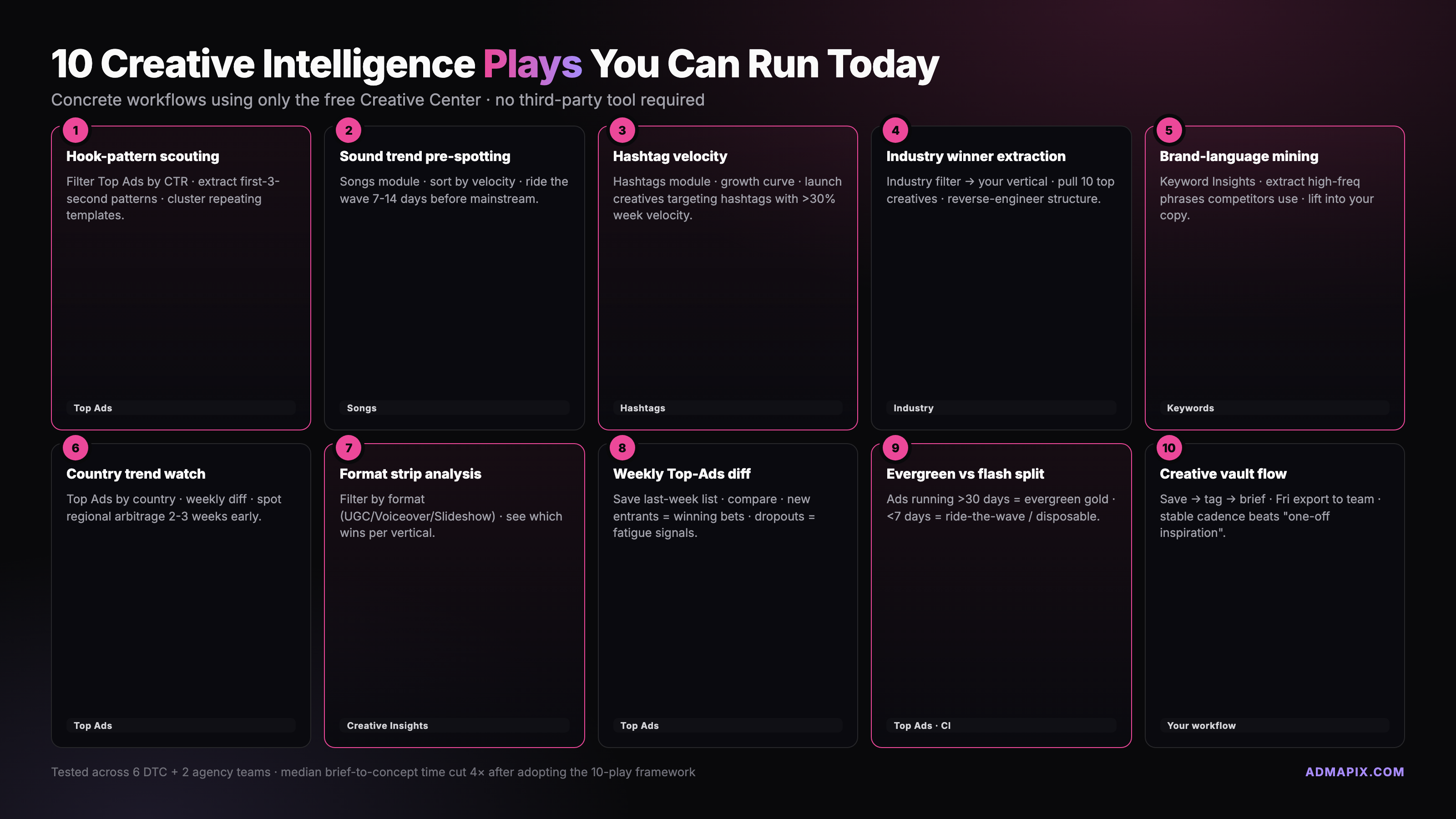
1. Hook-pattern scouting by industry. Open Top Ads Dashboard. Set region to your target market, industry to the client's vertical (use the 2026 sub-vertical filter — skincare, not just beauty), time window to 30 days, sort by 6-second view rate. Screenshot the first three seconds of the top 20 ads. That's your hook library. We do this for every new creative brief. Pattern rate (how often a given hook type appears in the top 20) is a stronger signal than any single ad.
2. Sound trend pre-spotting. Open Trend Discovery → Songs. Sort by 7-day growth rate. Filter to "non-commercial" organic sounds first (these are earlier in the lifecycle). Cross-check the top 15 against Billboard and Spotify's viral charts. Sounds that show up on Trend Discovery but not yet on Billboard typically have a 3–5 day window before they break. Brief organic creators or prep your own UGC in that window. Note the commercial-use caveat — for paid ads you need Commercial Music Library tracks.
3. Hashtag velocity analysis. Hashtags module → filter to your industry → sort by 7-day post growth rate. The "new-to-top-100" list is what we look at — hashtags that have moved from outside the top 100 to inside it this week. That's planning-horizon material. Evergreen top-10 hashtags are too crowded to move on.
4. Industry-specific winner extraction. Pick two adjacent industries (say, skincare and wellness). Run Top Ads Dashboard on each, export the top 20 of each, compare. The creative overlap reveals shared creative territory your brand can own; the creative gaps reveal positioning differentiators. Twenty minutes, one slide, a lot of briefing clarity.
5. Brand-language mining. Keyword Insights → search your competitor's brand name. Look at the associated keywords, the intent cluster, and the CTR-lift column. Those are the phrases your competitor has effectively trained customers to search. Use them in your own copy — not to copy the brand, but to meet the prospect where the competitor has primed them.
6. Country-specific trend watch. For brands localizing creative, run the same Top Ads filter across three markets — say US, UK, and Germany. Screenshot the top 5 in each. The differences tell you what will and won't translate. We've caught multiple brief errors this way — a hook that's top-5 in the US but bottom-quartile in Germany is a clear signal to rework the localized script.
7. Format-by-format creative strips. Top Ads filtered by video duration. Build a strip of winning 15s, 30s, and 60s+ ads for the client industry. Creative leads use these to pitch format commitment up front — "we're making four 15-second hook variants, not one 60-second explainer" — with platform data backing the call.
8. Week-over-week Top Ads diffing. Every Monday, save Top Ads Dashboard for the client's industry + region. Compare this week's top 20 to last week's. New entrants (ads that weren't there last week) are the fresh signal. Long-stayers are the evergreen patterns. This is the highest-leverage recurring Creative Center ritual we run.
9. Evergreen vs flash trend split. Trend Discovery → Hashtags over 180 days. Sort by total posts. The top 20 by total posts are evergreens. Sort again by 7-day growth. The new entries in that list are flash trends. Brief accordingly — evergreens get longer-lead production, flash trends get fast UGC turnarounds.
10. Creative vault flow. This is the meta-play that ties the other nine together. Create a shared Notion (or Airtable) vault. For every research session, drop: the screenshots, the ad URLs, the hashtag list, the sound list, the keyword cluster, and a one-sentence "why this matters" note. Over 8–12 weeks, that vault becomes the single most valuable creative asset on the team — far more useful than any single brief or research deck. The vault turns Creative Center from a tool you open into a muscle you build.
If you want to go deeper on workflows 1, 4, 5, and 8 — the cross-platform variants and automation — see Day 4: how to spy on competitors' ads in 2026.
Use cases — creative briefing, trend pre-spotting, competitor monitoring, sound selection
The plays above are tactical. Here's the strategic framing we pitch to clients.
Creative briefing. Creative Center replaces about 60% of the reference-pull a senior strategist used to do manually. A 25-minute session produces 20 reference ads, 5 hook patterns, 3 format recommendations, 8 keyword clusters, and 10 trending hashtags — briefing-ready input for a creative team meeting. Before 2023, that same output took half a day of manual screenshotting.
Trend pre-spotting. Trend Discovery plus Top Ads together catch both organic signal (what's spreading) and paid signal (what's converting). Running them weekly and logging to a vault gives you 2–4 week lead time on creative concepts versus the "we saw this on FYP and so did everyone else" reactive cycle.
Competitor monitoring. Keyword Insights on the competitor brand name, plus Top Ads filtered by their industry vertical, plus a manual search for their specific ad handle on the Top Ads Dashboard (use the search box). You won't catch every ad — that's what CCL is for in Europe and third-party tools are for globally — but you'll catch the ones actually performing, which is often the more useful set.
Sound selection. Commercial Music Library for paid. Trend Discovery → Songs for organic creator briefs. Treat them as two separate shortlists from the start of any campaign planning cycle.
Other use cases: e-commerce SKU scouting via Top Products, creator partnership research via Trend Discovery → Creators, seasonal campaign timing via Industry reports' calendars.
Free Creative Center vs TikTok Ads Manager (paid)
Creative Center is free forever. Certain adjacent capabilities unlock when you become an actual advertiser on TikTok Ads Manager (TTAM). A quick map of what you gain.
- Benchmark overlays. Your own CTR, CVR, and 6s view rate plotted against industry benchmarks — pulled automatically into ad group reporting.
- Reach estimator and CPM bands. Plan targeting combinations and see reach + CPM ranges before launch.
- Symphony AI with higher quotas. Script generator, asset adaptation, avatar creation — the free tier caps at ~10 generations/day; paid advertisers get 100+.
- Trend Intelligence beta. Cross-signal product + creative insights, as rolled out in Q1 2026.
- Saved-list syncing across Ads Manager and Creative Center. Keyword lists you build in Creative Center flow straight into audience setup.
Is it worth creating a test TTAM account just to unlock these? Usually yes. A $50 learning campaign is a low-cost key. That said, Creative Center's free tier will cover 80%+ of what a research-only workflow needs. Don't let the upsell framing confuse the ask.
If you're evaluating AdMapix alongside TikTok-native tools, our cross-platform NLP layer indexes TikTok Creative Center Top Ads alongside Google, Meta, YouTube, and Reddit — one search across all of them, consistent metadata, exportable. Teams use us as the layer on top of the free first-party tools when they need cross-channel comparison or multi-client dashboards. More on that in the pricing page.
When to supplement with third-party tools
Creative Center is excellent and limited. Here are the four gaps and the tools that fill them.
Gap 1: Global ad transparency. Creative Center is curated, not comprehensive. CCL is comprehensive but EEA-only. Globally, a third-party library surfaces ads that didn't make Top Ads — the long tail, the failures, the tests. Category tools: PiPiAds (TikTok-focused, strongest for dropshipping), BigSpy (broader social). Full breakdown in Day 3: best ad spy tools 2026.
Gap 2: Cross-platform consolidation. Creative Center is TikTok-only. Most modern campaigns run across TikTok, Meta, YouTube, Google, and often Reddit. AdMapix provides cross-platform NLP-powered search that includes TikTok Creative Center Top Ads, unifying the signal into one search surface. If your team manages 3+ platforms, a consolidation layer pays for itself in recovered research hours.
Gap 3: Historical depth. Creative Center's Top Ads default time windows are 7/30/90/180 days. Campaign retrospectives and seasonal planning often need 12-month and multi-year depth. Third-party libraries that snapshot ads continuously are where that data lives. See where is Facebook Ads Library for the Meta sibling pattern, which has the same historical-depth gap.
Gap 4: Download and export. Creative Center doesn't let you download ads or export data in bulk. Manual screenshotting scales poorly. Third-party tools with legitimate licensing allow bulk export and saved libraries that persist across sessions and team members.
Worth cross-referencing: our Google Ads Transparency Center guide covers the Google side of first-party ad transparency — same "free is great, here's where you supplement" framing.
Legal and ethical boundaries
Three rules we follow and advise clients to follow.
1. No scraping. TikTok's Terms of Service explicitly prohibit automated harvesting of Creative Center data. The April 2026 rule updates following the Research API expansion reinforced this — scraping is now also a CCL API ToS violation where CCL applies. If you need bulk data, apply for the Research API or the Commercial Content API (developers.tiktok.com). Don't scrape.
2. Reference use only. Screenshots of Top Ads are fine for internal reference and briefing decks. Re-uploading a competitor's ad creative as your own — whether verbatim or with minor edits — is a copyright violation, a trademark violation, and a fast path to a TikTok strike. Learn from the pattern, don't copy the asset.
3. Commercial Music Library is the only legal download path. Tracks in the Commercial Music Library are licensed for use in TikTok ad creative. Organic trending sounds in Trend Discovery → Songs are not necessarily licensed for commercial use and can lead to ad takedowns or copyright claims. When in doubt, default to the CML.
Two notes. The TikTok Creative Center help center documents usage rights in detail — worth a read for any agency leading on this. And the general principle holds across first-party ad intelligence: Google Transparency Center, Meta Ads Library, and TikTok Creative Center all share the same "browse freely, no automated access, no re-upload" posture. Respect that across the board and you avoid most of the legal surface area.
FAQ
Is TikTok Creative Center free? Yes — fully free to browse for all eight modules. A free TikTok Business Account unlocks saved lists, downloads, and Symphony AI. An active TikTok Ads Manager account with spend unlocks benchmark overlays and Trend Intelligence beta.
Do I need a TikTok account? No, for browsing. You can read Top Ads, Trend Discovery, Creative Insights, Industry reports, and all other modules without logging in. You only need an account (free TTAM) if you want to save lists, download CML tracks, or use Symphony AI.
Does it work in the US now that TikTok is operating there again? Yes. Creative Center has been continuously available in the US throughout the 2024–2026 ownership negotiations and remains fully accessible as of April 2026. US Top Ads and Top Products data are among the deepest regional datasets in the platform.
Can I download ads from Creative Center? No. You can view, preview, and take screenshots for internal reference. Bulk download and automated harvesting are prohibited. If you need bulk data, apply for the Research API or use a third-party licensed library (see Day 3).
Is Creative Center the same as TikTok Ads Library? No. Creative Center is the curated advertiser research product at ads.tiktok.com/business/creativecenter/. The "TikTok Ads Library" phrase often refers to the Commercial Content Library (CCL) at library.tiktok.com, which is a separate EEA/UK/Switzerland-only transparency product. Different scope, different coverage, different use case.
Why do I see different trends on Creative Center than on my personal FYP? Because they're different datasets. FYP is personalized to your individual behavior and account signals. Creative Center surfaces aggregate signal filtered by your region and industry selections. Both are "TikTok trends" but measured differently — FYP measures what TikTok thinks you want, Creative Center measures what's winning in your target market. For advertiser research, Creative Center's regional data is the correct input.---
Creative Center is the most complete first-party creative research surface any major ad platform offers — free, deep, constantly updated. Learn the 8 modules, run the 10 plays weekly, respect the boundaries, and supplement with CCL (if you're in Europe) or a cross-platform layer like AdMapix when you need to go wider than TikTok. That stack puts your research in the top decile of any vertical we've worked in.
Next: how to spy on competitors' ads in 2026 for the cross-platform workflow, best ad spy tools 2026 for paid alternatives, and spy on ads across all platforms for the all-platform view.
Turn these observations into your next creative study
Open the creative library and select samples for your market, network and research question.
Related Articles
Google Ads Transparency Center: Official URL & How to Use It (2026)
Direct URL, 30-second walkthrough, 2026 payer-name and PMax Search Partner updates, Meta Ad Library comparison, and 15 competitive signals you can pull from the free tool.
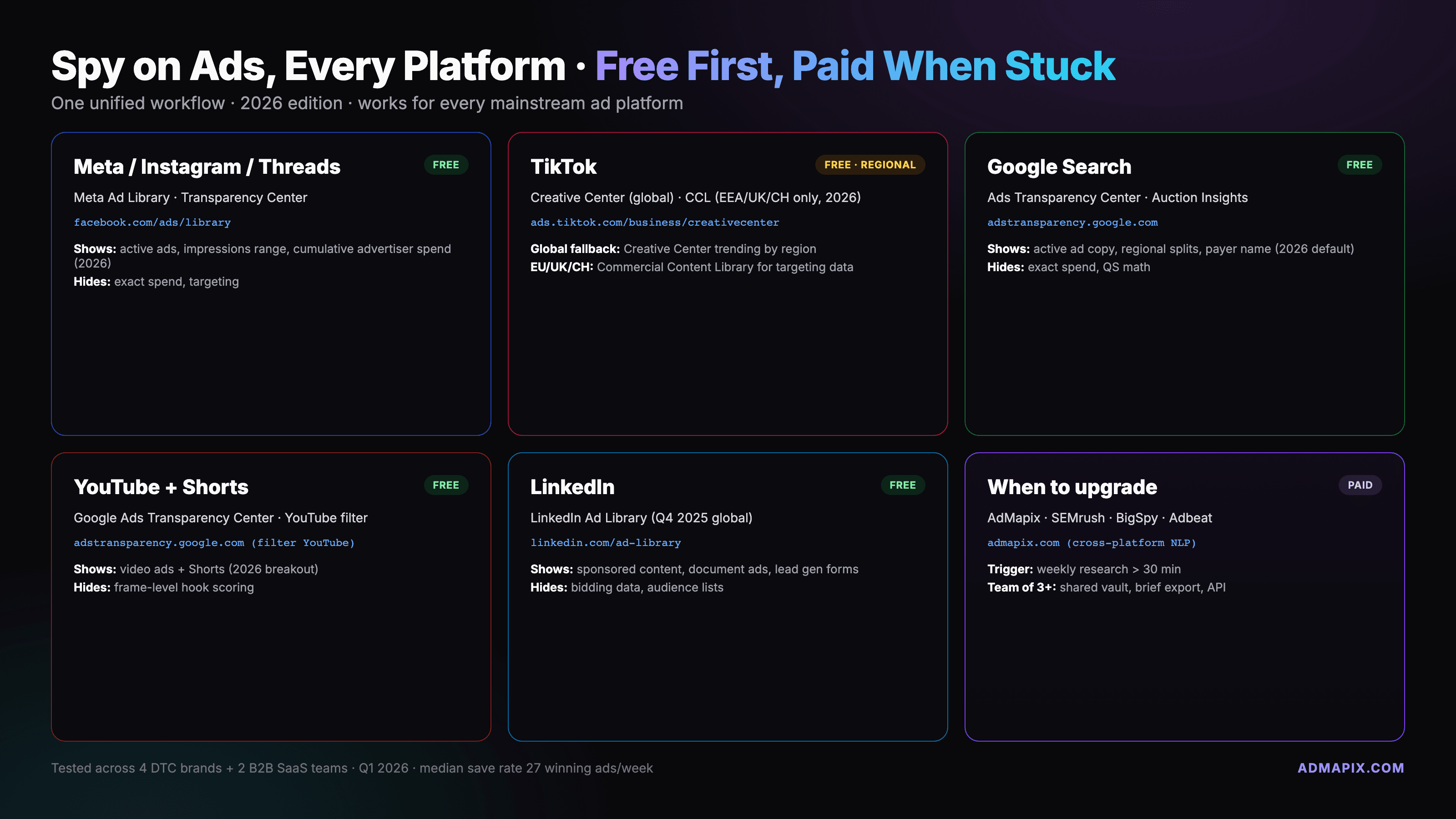
How to Spy on Ads on Any Platform: The 2026 Cross-Platform Playbook
A unified workflow for spying on Facebook, Instagram, TikTok, YouTube, Google, and LinkedIn ads using free official libraries first and paid tools only when you hit the limits.
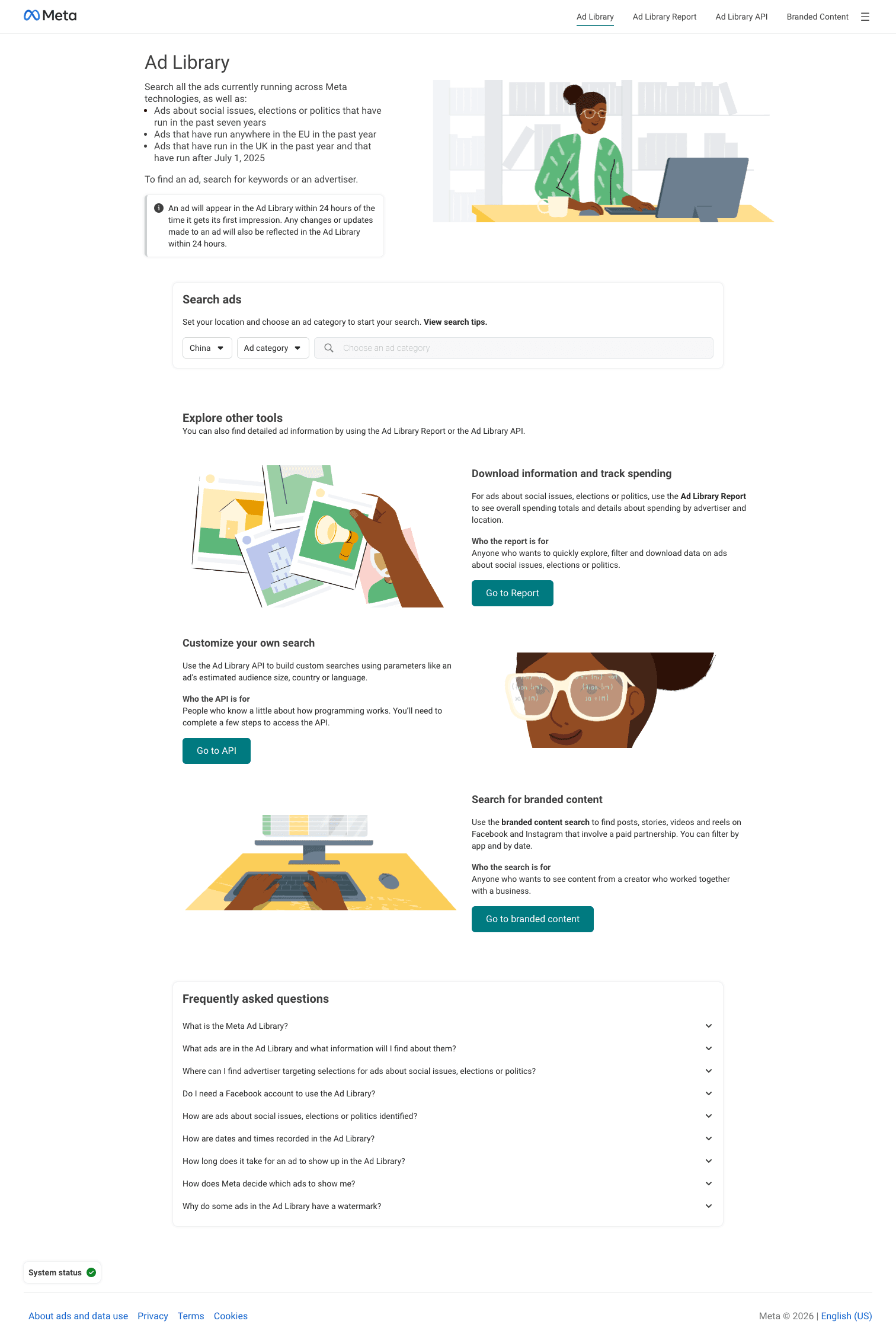
Where Is Facebook Ads Library? Official Meta URL & 3-Step Guide
The Facebook Ad Library lives at facebook.com/ads/library. Free, no login. Here's the exact URL, a 6-step walkthrough, what you can see, and what the 2026 update changed.