Outbrain Ad Spy Tool in 2026: Native Ad Research for the Open Web
How to research Outbrain native ads from public evidence in 2026 — what a spy tool can and cannot prove, how to decode headline-and-thumbnail hooks, advertorial landing paths, retargeting trails, and how to turn patterns into testable native campaigns.
Outbrain Ad Spy Tool in 2026: Native Ad Research for the Open Web
By the AdMapix Research Desk — Updated June 21, 2026
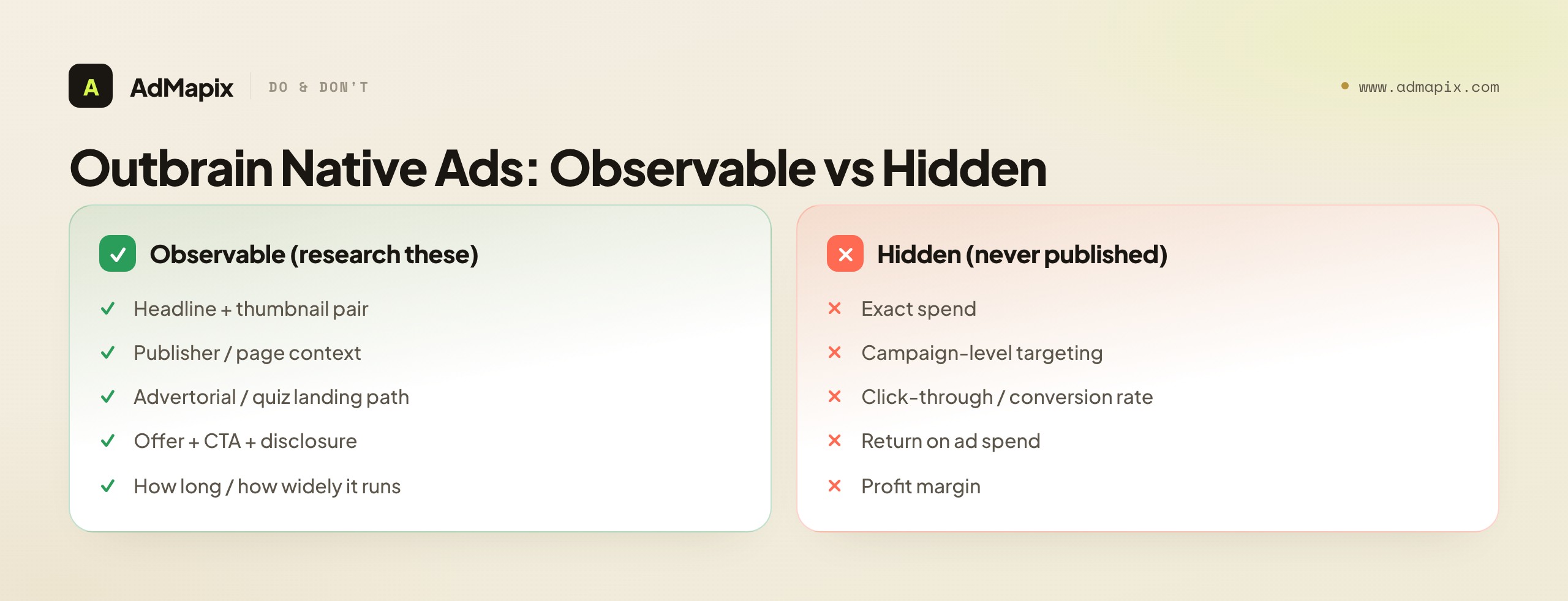
An Outbrain ad spy tool lets you study native ads running across open-web publishers without any access to the advertiser's account. Outbrain native ads are the "recommended for you" content widgets you see at the bottom of news and content sites — the headline-plus-thumbnail tiles that look like editorial links but carry a small "Sponsored" or "Ad by Outbrain" label. Because that placement is the entire pitch, the public evidence is unusually rich: the headline, the thumbnail, the offer, the landing page, and the publisher context where the recommendation appears are all observable to anyone who knows how to look. What is not observable — and this is the honest boundary the whole guide is built around — is spend, targeting, and conversion data, because those live inside the advertiser's account and Outbrain never publishes them.
This guide is for native buyers, affiliate marketers, ecommerce operators, and agencies who want to reverse-engineer what actually works on Outbrain's open-web inventory rather than guess. Native advertising is a fundamentally different discipline from paid social or search — the click is won by a curiosity-gap headline and a thumbnail, not by a video hook or a keyword bid, and the conversion is usually carried by an advertorial or quiz page rather than the ad itself. So researching Outbrain well means studying a specific chain: the headline-thumbnail pair that earns the click, the advertorial path that does the selling, the offer at the end, and the retargeting trail that follows. We will walk through what each link exposes, how to read persistence as a profitability proxy without overclaiming, how to build a repeatable swipe-and-test workflow, and where the public evidence runs out. Throughout, we are blunt about the one thing no Outbrain spy tool can show you: the money. Anyone selling you a "competitor native spend" number is selling a model dressed as a fact.
TL;DR — Researching Outbrain Native Ads
- An Outbrain ad spy tool reveals public native creative — headline, thumbnail, offer, landing path, publisher context — not private spend, targeting, or conversion data. Treat any "competitor spend" figure as a model, never a measurement.
- The winning signal on Outbrain is the headline-plus-thumbnail pair. On a content-recommendation widget there is no banner or autoplay video, so that two-line-and-one-image combination carries the entire curiosity gap that earns the click.
- The landing page does the selling, not the ad. On native, the advertorial, quiz, or listicle after the click usually does more conversion work than the widget — research the whole path, not just the tile.
- Persistence is your strongest profitability proxy. A creative running across multiple publishers for weeks is probably working, because native buyers cut losers fast — but you're inferring profit from longevity, never measuring it.
- Turn every pattern into a test. Research that doesn't become a creative brief or a hypothesis is just browsing. Lift the structure (hook type, advertorial frame, offer) and adapt it, never the exact words.
- AdMapix fits the discovery-to-system step — search native and cross-network creatives, save headlines/thumbnails/landing examples, break down any video behind an offer, tag patterns, and turn findings into reports.
What Outbrain Native Ads Actually Expose
Native ads on Outbrain expose the click mechanics, not the back-end economics — and understanding exactly which is which is the foundation of honest research. Because Outbrain placements sit inside a publisher's content feed, formatted to match the surrounding editorial, they have to win attention with a headline and a thumbnail rather than a banner, an interstitial, or an autoplay video. That constraint makes the creative unusually transparent: the entire "pitch" is two lines of text and one image, followed by a landing page you can open and study yourself. Per Outbrain's own positioning, native advertising is paid placement that matches the look, feel, and function of the media format where it appears — which is precisely why the creative is visible to researchers while the economics are not.
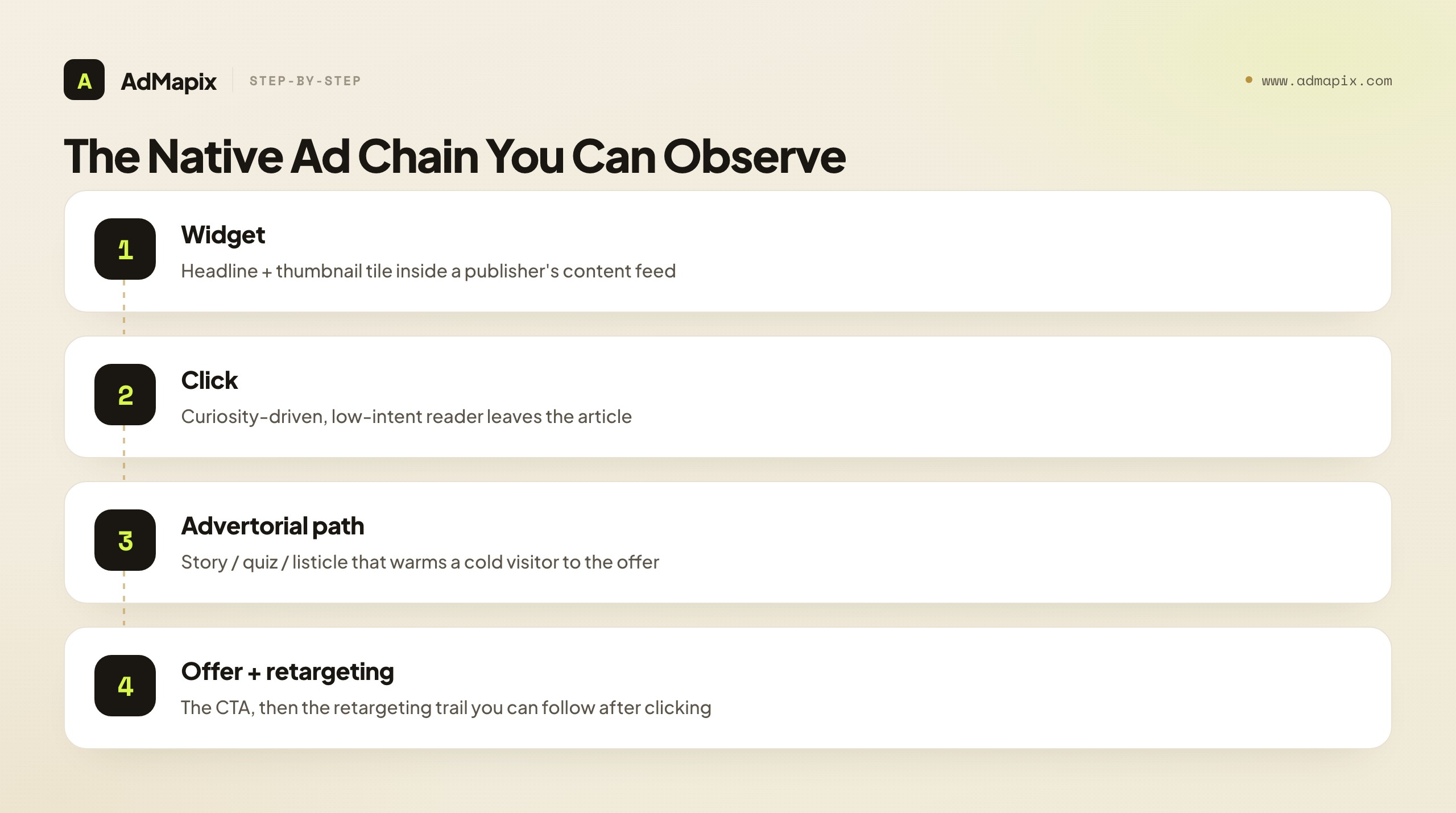
Here is what you can observe from the outside, and it's more than most people realize:
- The headline and exactly how it frames the curiosity gap, the benefit, or the threat — the single most studied element in native research.
- The thumbnail image, and whether it implies a before/after, a surprise, a relatable everyday scene, or a pattern-interrupt that stands out against editorial photos.
- The publisher and page context where the recommendation surfaces, which hints at the audience the advertiser is fishing in.
- The landing experience — advertorial article, quiz funnel, product page, or listicle — and its full structure.
- The disclosure ("Sponsored," "Ad by Outbrain," "Promoted") that confirms the placement is paid rather than editorial.
- The offer and call to action at the end of the path, and how the advertorial bridges from curiosity to that offer.
What you cannot observe is the back end: how much the advertiser is spending, who they are targeting (demographics, interests, device, geo at the campaign level), their click-through or conversion rate, and their return on ad spend. Those numbers are private by design. The discipline that separates rigorous native research from wishful thinking is keeping these two columns — observable creative and unobservable economics — rigidly apart, and never letting an inference about the second masquerade as a fact about the first.
Why Outbrain Differs From Social and Search Spying
Before you apply paid-social or search-spy habits to Outbrain, it's worth naming why native research is a different game — because the wrong mental model leads you to study the wrong things. The differences are structural, not cosmetic.
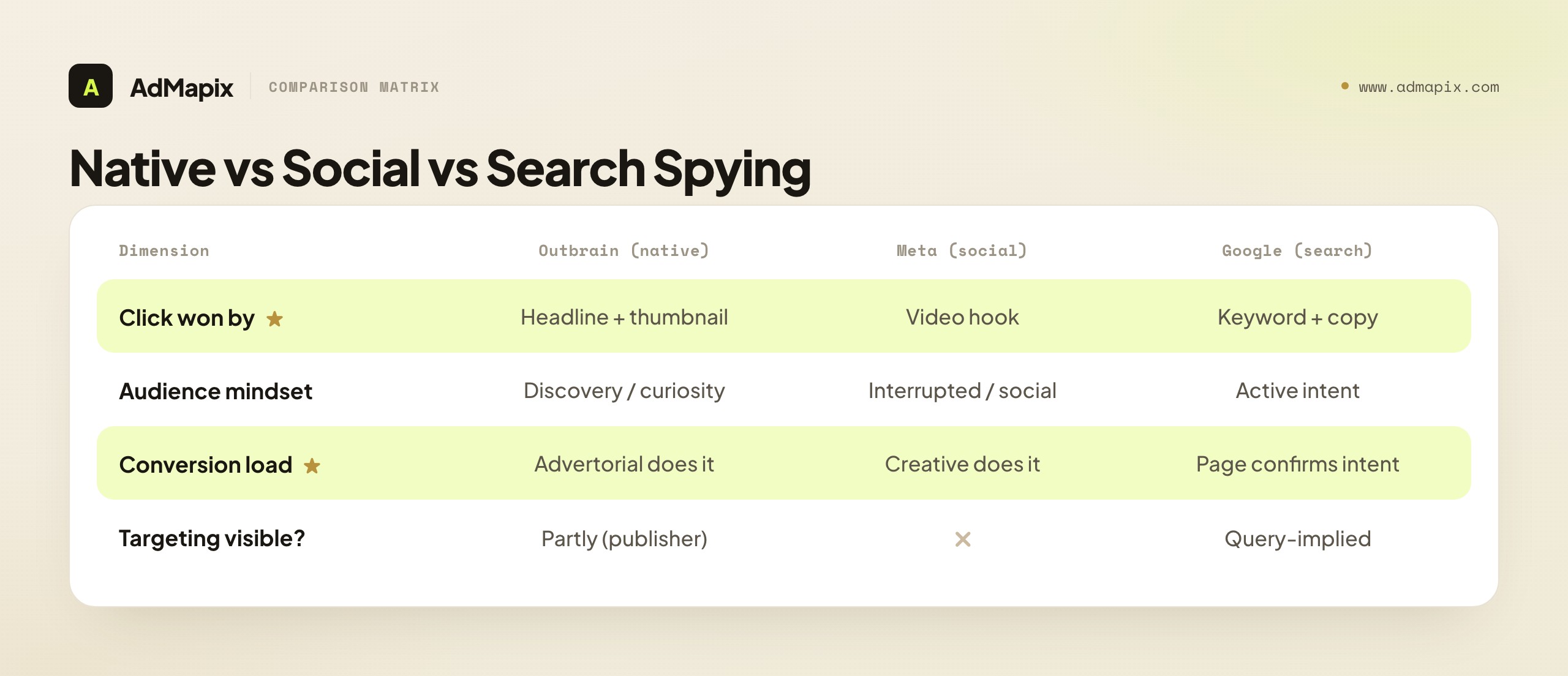
The click is won by text-and-image, not video or keyword. On Meta or TikTok, the first three seconds of a video do the work; on Google Search, the keyword and ad copy match intent. On Outbrain, there is no video to autoplay and no query to match — just a headline and a thumbnail competing against editorial links and other recommendations in the same widget. That means your creative research collapses onto two elements, studied as a pair, because the headline and thumbnail succeed or fail together.
The audience is in discovery mode, not intent mode. A searcher on Google is actively looking; a scroller on Meta is being interrupted in a social feed. An Outbrain reader just finished an article and is browsing recommendations — low intent, high curiosity. That's why curiosity-gap headlines ("This is why doctors won't tell you...") dominate native: the format rewards arousing curiosity in a reader who wasn't shopping, which is a different copywriting job than answering a query or stopping a scroll.
The landing page carries more of the conversion load. Because the ad is just a tile, the advertorial or quiz after the click has to do the heavy persuasion — warming a cold, curiosity-driven visitor into a buyer. On search, the landing page often just needs to confirm intent; on native, it frequently needs to create it. So native research that stops at the widget misses where most of the actual selling happens.
Publisher context is a targeting signal you can partly see. Unlike the opaque interest-targeting of social, the publisher and page where an Outbrain ad appears is observable, and it tells you something about the audience the advertiser wants. A supplement offer running on health-content pages versus general-news pages is showing you its audience hypothesis in a way a social ad never would.
The takeaway: don't port your Meta swipe-file instincts wholesale. Native research weights the headline-thumbnail pair, the advertorial path, and publisher context far more heavily than social research does, and it has no video hook or keyword to anchor on. Adjust what you capture accordingly.
Public Evidence vs. Private Assumptions
The single most common mistake in native ad research is treating "I keep seeing it" as proof of profit. Frequency is a strong hint, not a guarantee — and the gap between the two is where careless researchers embarrass themselves in client decks. The table below is the discipline: for each field you capture, know exactly what it proves and what it does not.
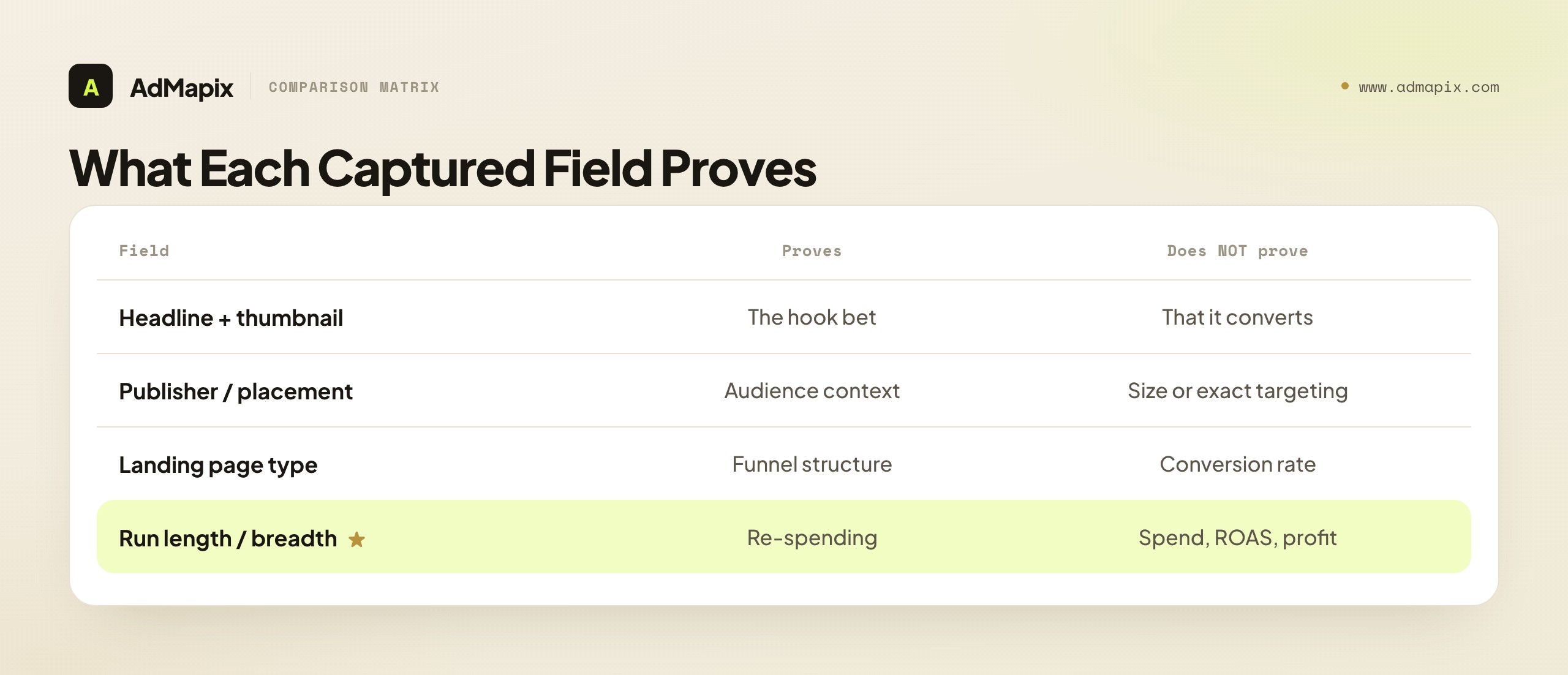
| Field to capture | What it proves | What it does NOT prove |
|---|---|---|
| Headline + thumbnail | The hook and angle the advertiser is betting on | That the hook converts |
| Publisher / placement | Where (which content context) the audience is reached | Audience size, exact targeting, or geo |
| Landing page type | The funnel structure (advertorial, quiz, store) | The funnel's conversion rate |
| Offer + CTA | What the advertiser is asking the visitor to do | The price-point economics or margin |
| Disclosure / sponsor name | That it is a paid native ad, and who runs it | The budget behind it |
| How long / how widely it has run | That the advertiser keeps re-spending on it | Exact spend, ROAS, or profit |
The useful read is this: a creative that runs for weeks across multiple publishers is probably working, because native buyers are notoriously ruthless about cutting losers fast — the channel's economics punish sentimentality. But you are inferring profitability from persistence, not measuring it. There are edge cases where a long-running ad isn't actually profitable (a brand-awareness play, a slow-to-optimize team, a misconfigured campaign), so persistence is a strong Bayesian prior, not a proof. State that caveat explicitly in any report, so a client or teammate calibrates their confidence correctly and doesn't bet a budget on an inference you flagged as probabilistic.
Decoding the Headline-and-Thumbnail Pair
Since the headline-thumbnail pair is where the click is won, it deserves the deepest study — and the skill is decoding why a pair works, not just collecting pairs. The pair operates as a single unit: the thumbnail creates a visual question and the headline answers or sharpens it, or vice versa. Studying them separately misses the interaction that actually earns the click.
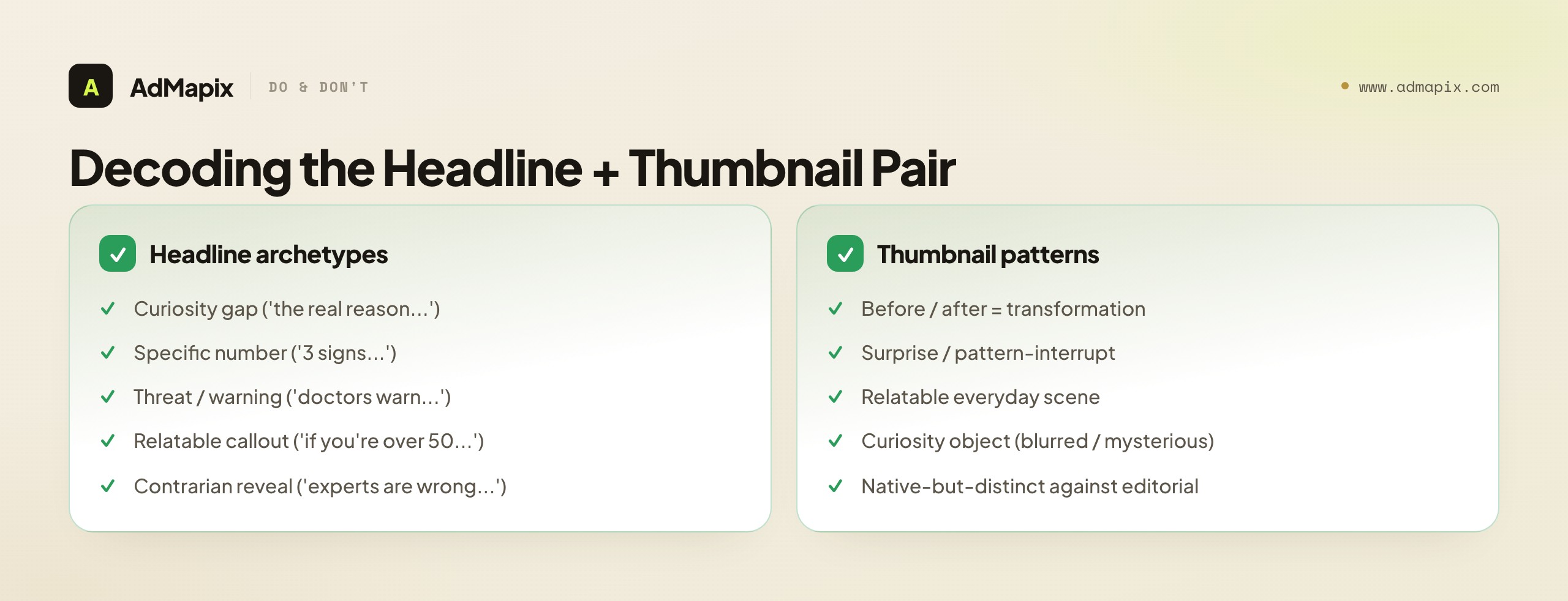
Headline archetypes that recur on native. A handful of structures dominate because they exploit the curiosity-driven, post-article mindset. The curiosity gap ("The real reason your [problem] won't go away") withholds the payoff to force the click. The specific-number hook ("3 signs your...") promises a scannable, finite payoff. The threat or warning ("Doctors are warning about...") triggers loss aversion. The relatable callout ("If you're over 50 and still...") segments the audience in the headline itself. The contrarian reveal ("Why experts are wrong about...") promises insider knowledge. Tag each saved headline by archetype, because the archetype is the portable, testable insight — the exact words are tuned to one audience and offer and won't transfer.
Thumbnail patterns that earn the click. Thumbnails win by contrast with the editorial environment and by implying a story. Before/after implies transformation. Surprise or pattern-interrupt (an unexpected object, an odd juxtaposition) stops the eye against polished editorial photos. Relatable everyday scenes signal "this is for someone like you." Curiosity objects (a blurred or mysterious item) create a visual question the headline resolves. The thumbnail's job is to look clickable and native at once — belonging enough to the feed to be trusted, distinct enough to be noticed.
The pairing logic. The strongest native creatives use the thumbnail and headline to set up and pay off a single curiosity gap together. When you save a pair, write one line on how they interact — "thumbnail shows a surprising object, headline withholds what it is" — because that interaction is the mechanism you'll test, recreated with your own audience-appropriate object and phrasing. A swipe file of pairs tagged by archetype and pairing logic is far more useful than a folder of screenshots, because it's organized by the mechanism you can reuse.
The Advertorial and Landing-Path Layer
On native, the landing page is where the strategy hides — and it's the most under-researched part of the chain, which makes it the highest-leverage place to look. A curiosity-driven click from a content widget lands a cold, skeptical visitor who wasn't shopping; the page has to manufacture the desire the ad only sparked. That's why native advertisers lean so heavily on advertorials, quizzes, and listicles rather than dropping clicks straight onto a product page.
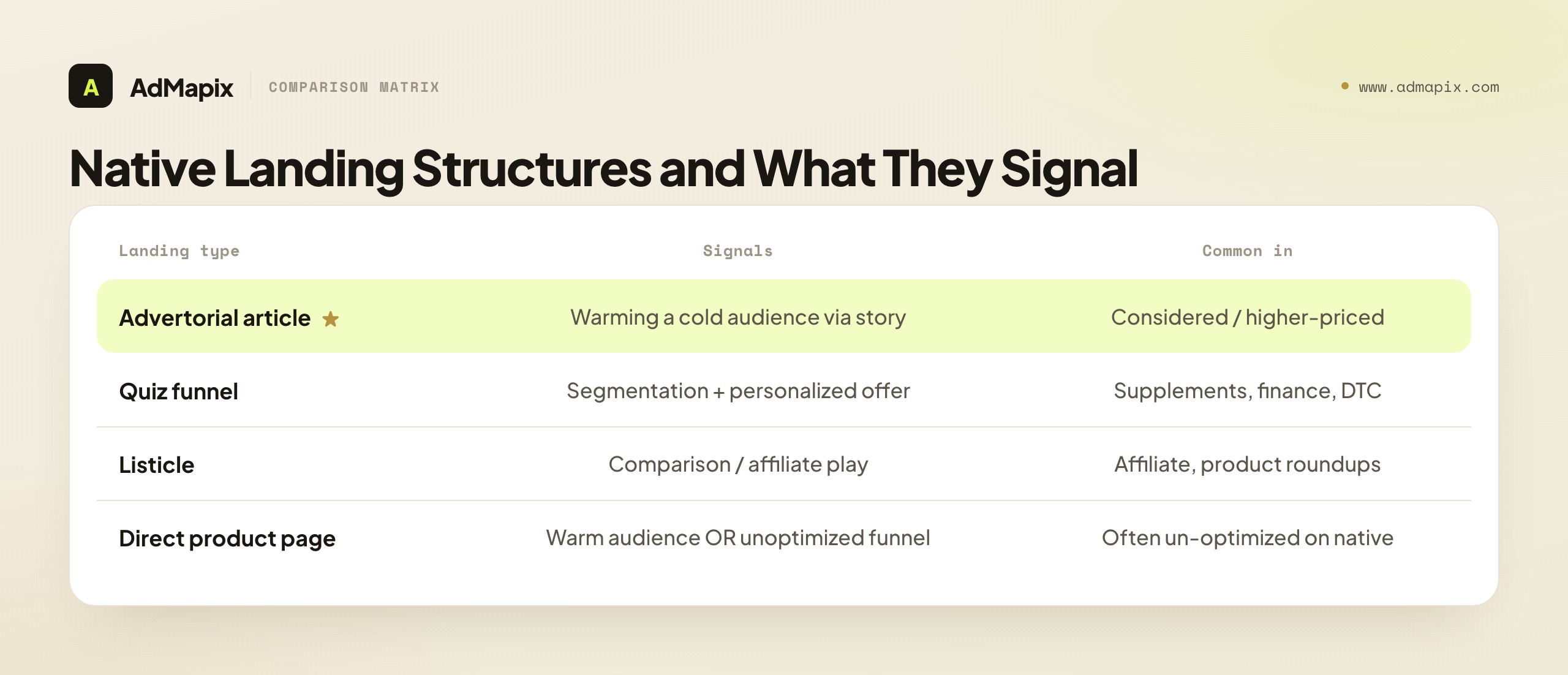
Common native landing structures, and what each signals. The advertorial article (a story-formatted page that reads like editorial before pivoting to the offer) signals an advertiser warming a cold audience through narrative — usually a considered or higher-priced purchase. The quiz funnel ("Answer 5 questions to find your...") signals segmentation and a personalized-offer reveal, common in supplements, finance, and DTC. The listicle ("7 products that...") signals a comparison or affiliate play. The direct product page signals either a warm-ish audience or an advertiser who hasn't optimized the path yet — and on native, that's often a sign of an unoptimized funnel, not a confident one. Reading the landing structure tells you the advertiser's funnel hypothesis, which is strategy you can't get from the widget alone.
What to capture from the path. Save the full path, not just the first page: the advertorial's narrative arc (problem → agitation → mechanism → offer), where and how the offer is introduced, the CTA wording, any urgency or scarcity devices, the price reveal point, and any upsell or order-bump after the click. The advertorial's structure — not its exact prose — is the reusable asset, because that structure is the conversion engine the widget merely feeds.
Why stopping at the widget is the classic mistake. Researchers trained on social tend to screenshot the tile and move on, because on social the creative carries most of the load. On native it's inverted: the tile earns a cheap click and the advertorial does the expensive work of conversion. A swipe file of headlines with no landing-path analysis is half the intelligence, and usually the less valuable half — you've captured what got the click but not what made the money. The advertorial layer is exactly where a serious native researcher out-works a casual one.
Reading the Retargeting Trail
There's a fifth link in the chain that most native research ignores entirely, and it's a genuine edge: the retargeting trail. After you click an Outbrain ad and land on the advertorial, the advertiser frequently drops a pixel and begins retargeting you across other channels — and that trail is observable to you, the researcher who just clicked.
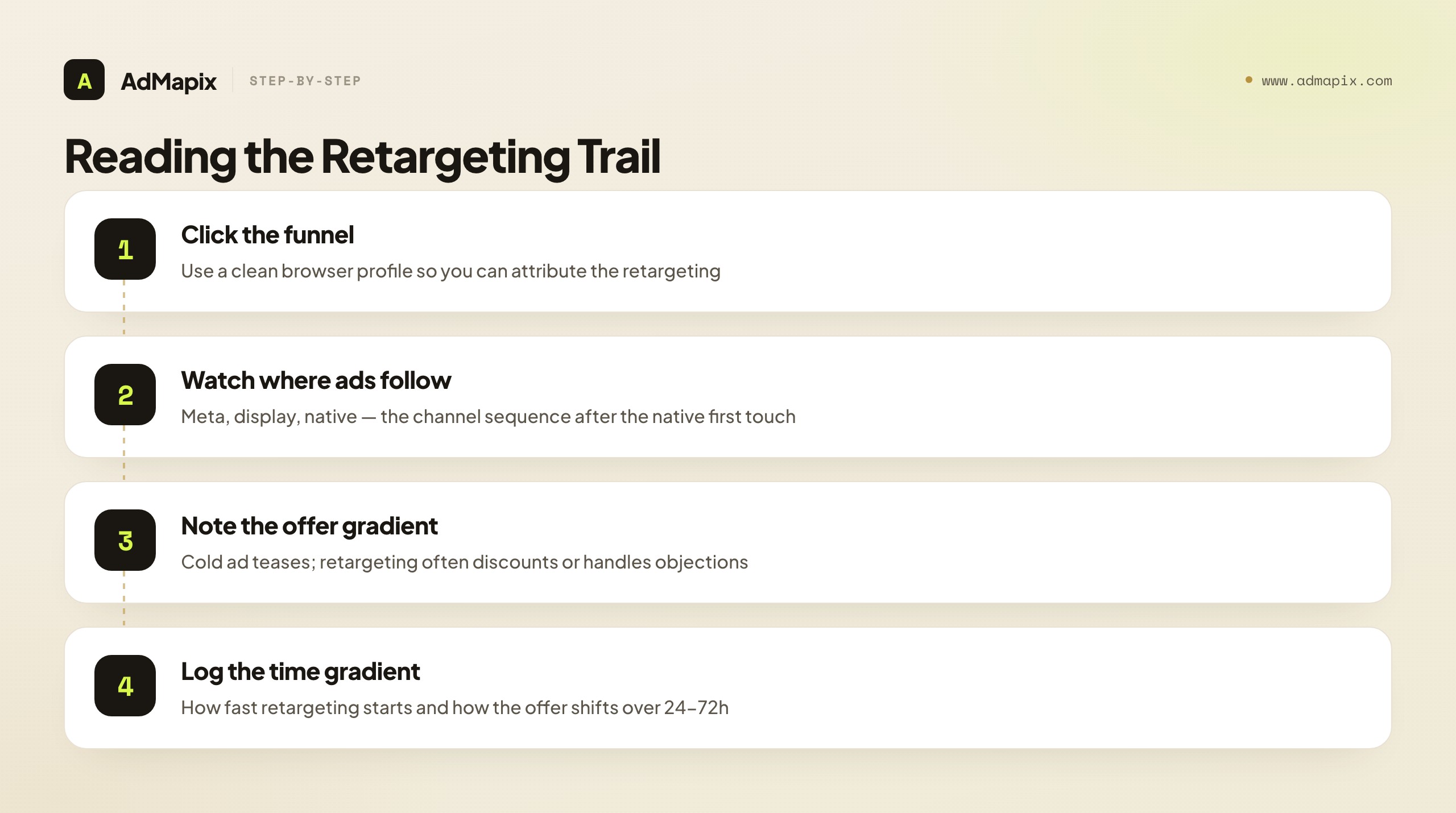
The technique is simple but underused. When you research a native advertiser by clicking through their funnel, you've just entered their retargeting audience. Over the following days, watch where their ads start following you — onto Meta, onto display, back onto native widgets — and what creative and offer they use in the retargeting. This reveals strategy the cold native ad never showed you: the offer gradient (does the cold ad tease and the retargeting ad discount?), the channel sequence (native first touch, Meta retargeting?), and the messaging shift (curiosity cold, objection-handling warm?). A native cold ad shows you the top of their funnel; the retargeting trail shows you how they monetize the click you just gave them.
Two practical notes. First, use a clean or dedicated browser profile for this research so you can attribute the retargeting to the specific advertiser you clicked, rather than muddying it with your normal browsing. Second, log the time gradient — how fast the retargeting starts, how the offer changes over 24-72 hours — because that sequence is the part of their strategy that's hardest to reconstruct any other way. The retargeting trail turns a one-frame look at a cold ad into a multi-frame view of the whole funnel, and almost no casual researcher bothers to follow it.
A Repeatable Outbrain Research Workflow
A good native research process turns scattered screenshots into decisions. The key is running the same loop every time, so your swipe file stays comparable across weeks and the patterns actually surface instead of drowning in one-off captures.
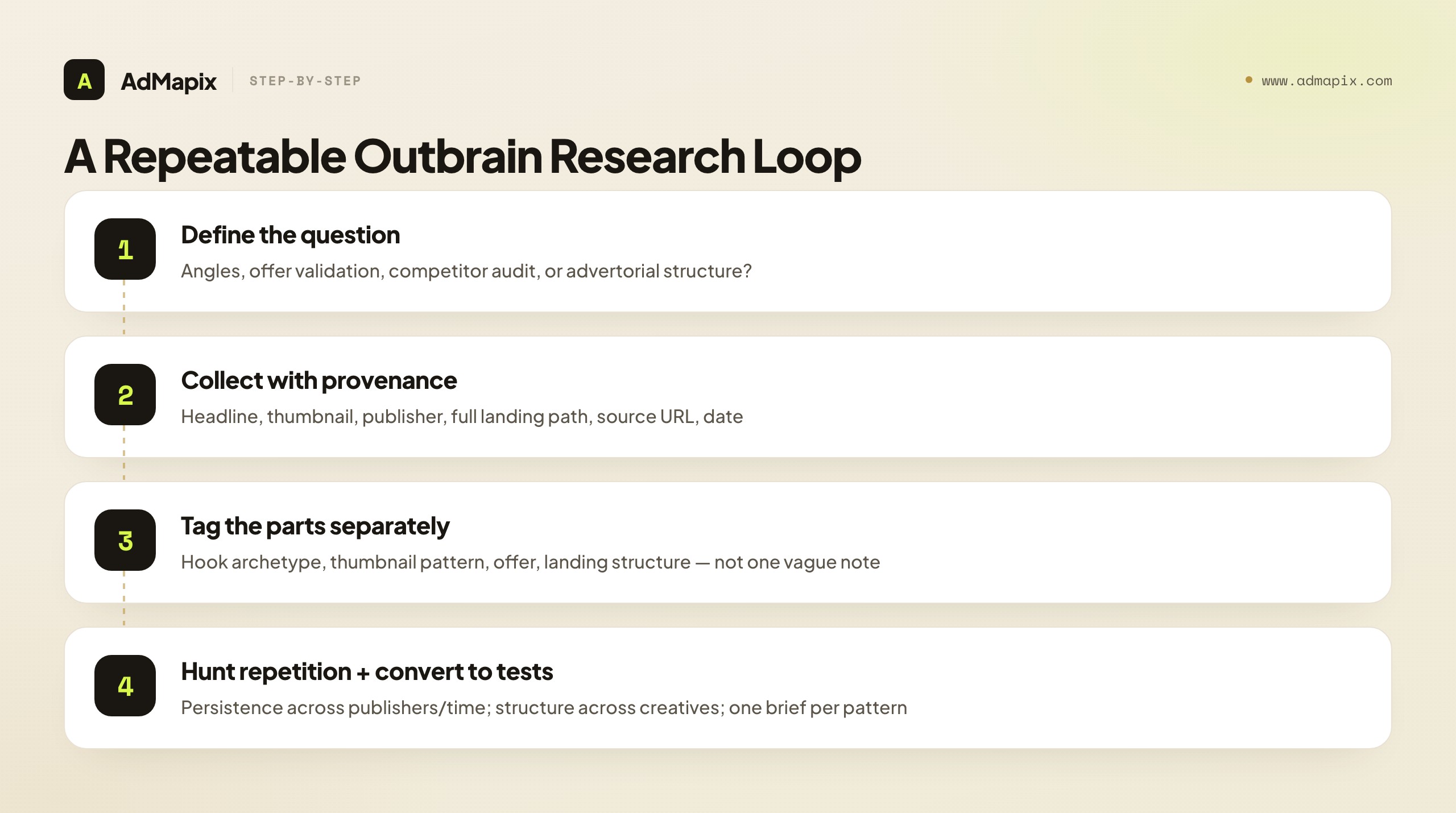
- Define the question first. Are you sourcing new angles, validating an offer, auditing a specific competitor, or finding a fresh advertorial structure? The question decides what you save and what you ignore — undirected collecting produces an unusable pile.
- Collect public examples with full provenance. For each active native creative, capture the headline, the thumbnail, the publisher and page context, and the full landing path. Save the source URL and the capture date. A headline with no publisher, landing page, or date is an idea, not evidence.
- Separate the parts and tag independently. Tag the headline archetype, the thumbnail pattern, the offer type, the landing structure (advertorial/quiz/listicle/store), and the funnel step — as separate fields, never as one vague "good ad" note. The separation is what lets you spot that, say, the same advertorial frame is being reused across five different hooks.
- Hunt for repetition across the right axes. The strongest signals are the same angle re-skinned across thumbnails, the same advertorial frame reused across offers, or the same hook running across multiple publishers for weeks. Repetition across publishers and time is the persistence signal; repetition across creatives is the structure signal.
- Follow the retargeting trail on the ones worth it. For the most promising advertisers, click through and watch the retargeting (clean profile, logged time gradient) to capture the full-funnel strategy, not just the cold ad.
- Convert every pattern to a test. Write one creative brief or hypothesis per pattern: which hook archetype, which thumbnail direction, which advertorial structure, which offer to recreate and adapt for your audience. End the session on briefs, or it was browsing, not research.
What Public Data Can and Cannot Prove
No ad spy tool — for Outbrain, Taboola, Revcontent, or any network — can see the advertiser's account. It can only surface what the platform publicly serves. This is true across the entire ad-transparency landscape: public surfaces like the Google Ads Transparency Center confirm the pattern by letting you find actively-running ads and view the creative while deliberately not publishing spend, conversion, or full targeting. The same boundary applies to native, and it's worth internalizing as a hard rule rather than a soft caveat.
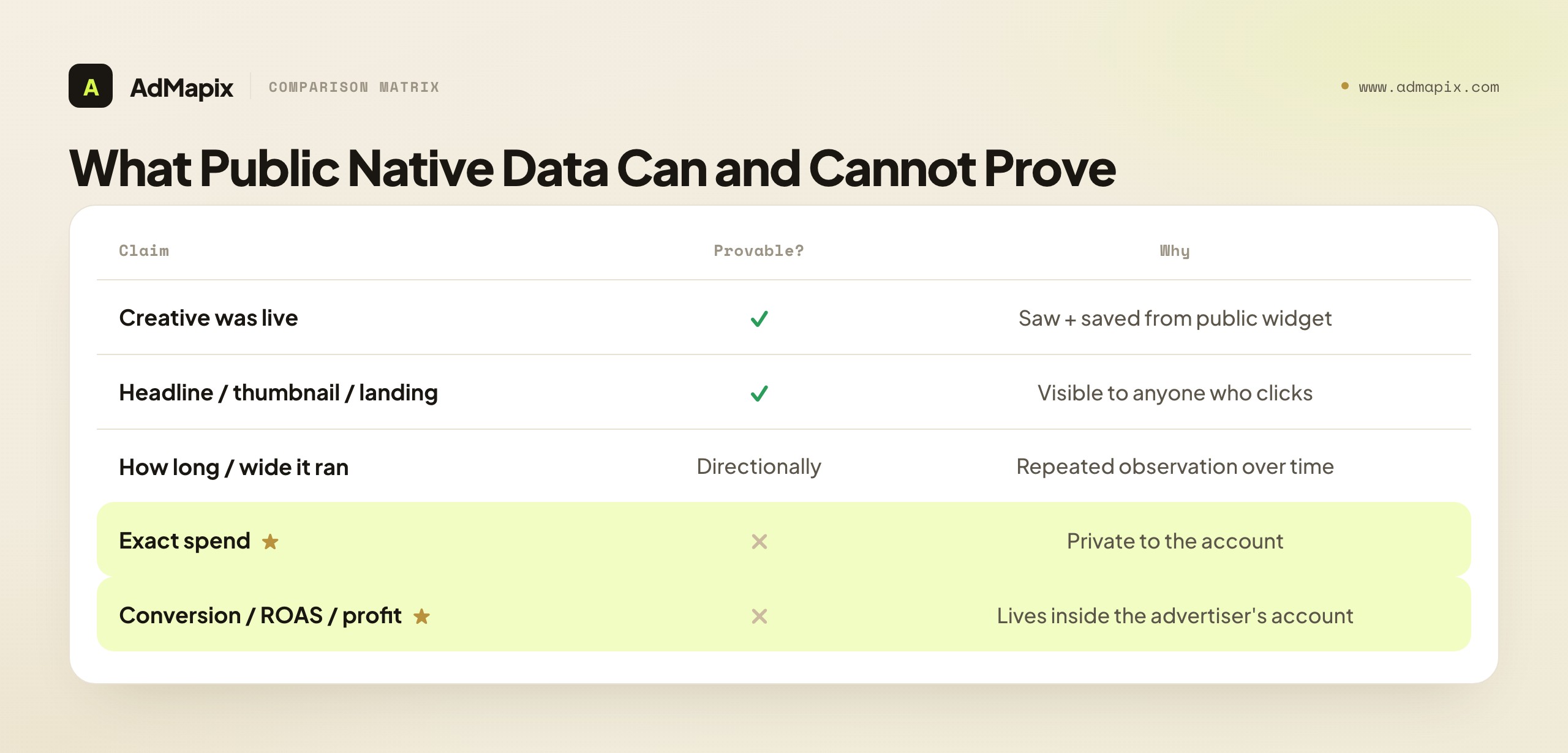
| Claim about a native ad | Provable from public evidence? | Why |
|---|---|---|
| This creative was live and observable | Yes | You saw and saved it from a public widget |
| The headline, thumbnail, offer, and landing path | Yes | All visible to anyone who clicks through |
| Roughly how long / how widely it ran | Directionally | Repeated observation over time and publishers |
| The advertiser's identity | Usually | Disclosure + landing-page branding |
| The exact spend behind it | No | Private to the advertiser's account |
| The targeting parameters | Partly (publisher context only) | Campaign-level targeting is unpublished |
| The conversion rate / ROAS / profit | No | Lives entirely inside the advertiser's account |
Treat any tool or report that claims to show competitor spend or ROAS for native ads as estimated at best, and never put an unverifiable number into a client deliverable as if it were measured. The credible framing in a report is "here is what is observably running, how persistently, and why it likely works" — never "here is what this campaign earned." Keep "observed" (it ran) and "performed" (it converted) in separate columns, exactly as you would for any other channel, and your native research stays defensible when a client pushes back.
Common Mistakes in Outbrain Research
The failure modes here are predictable, which makes them preventable. Each one quietly degrades the quality of your native intelligence.
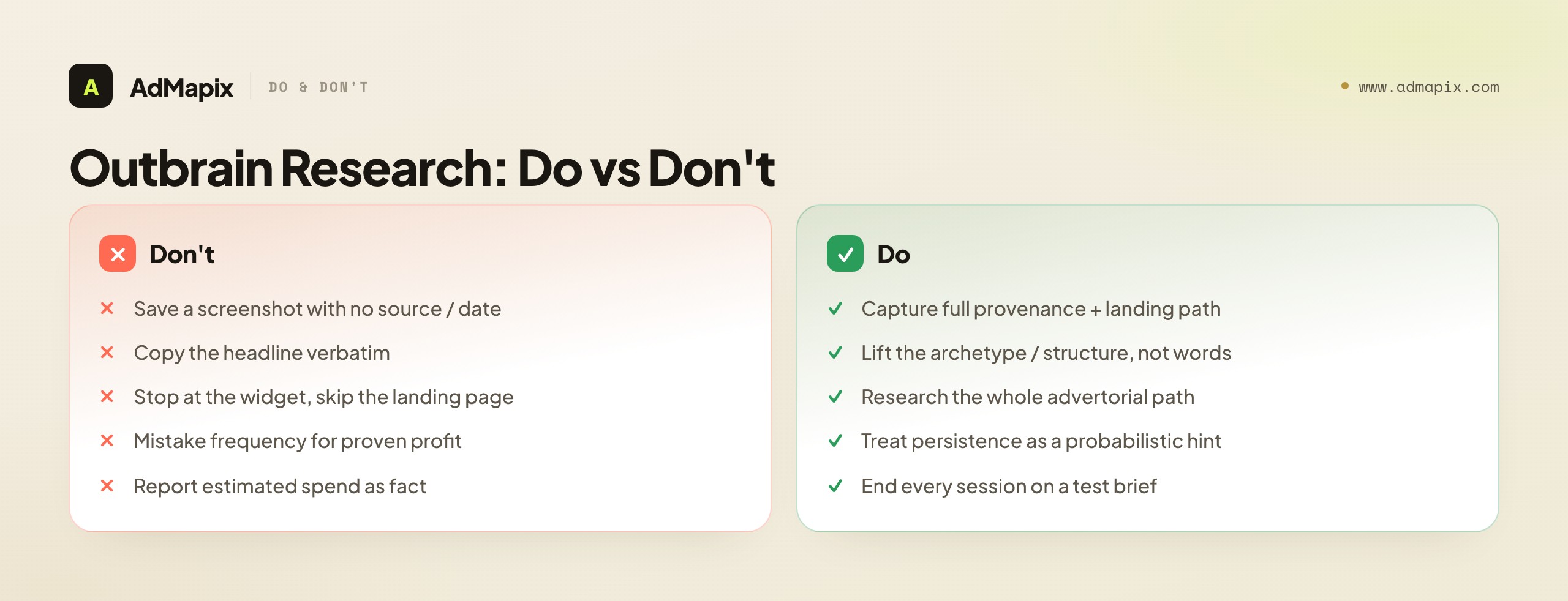
- Saving a screenshot with no source or date. A headline without the publisher, landing page, and capture date is an idea, not evidence — you can't track persistence or re-find it later, which strips the two things that make native research credible.
- Copying the headline verbatim. Outbrain hooks are tuned to a specific audience and offer; lift the structure (the archetype, the curiosity mechanism), not the exact words, or you import a hook your audience doesn't share.
- Ignoring the landing page. On native, the advertorial or quiz usually does more conversion work than the creative — researching only the widget captures the cheap click and misses the expensive conversion engine.
- Mistaking frequency for profit. Long-running ads are a strong hint, not a guarantee. Say so when you report it; persistence implies re-spending, which usually but not always means profit.
- Skipping the retargeting trail. The cold native ad is only the top of the funnel. Not following the retargeting means you research a fraction of the advertiser's actual strategy.
- Reporting estimated spend as fact. No public tool sees native spend. Any number presented as measured competitor spend is a model, and stating it as fact will cost you credibility the moment someone checks.
- Never producing an output. Research that doesn't become a brief, a test, or a report is just browsing. Every session should end in something you'll actually run.
Is There a Public Outbrain Ad Library? The Honest State of Native Transparency
A natural first question is whether Outbrain offers a public ad library the way Meta and Google do — and the honest answer shapes your entire research approach. As of 2026, native networks do not provide a comprehensive, searchable public transparency library comparable to the Meta Ad Library or the Google Ads Transparency Center. There is no single official surface where you can type a competitor's name and see every Outbrain creative they've run with dates and reach. That absence is the defining constraint of native research, and pretending otherwise leads to buying tools that overpromise.
What this means in practice is that native ad research is more manual and observational than social or search research. You don't query a library; you observe the live web. The evidence is real and public — it's served to millions of readers every day — but it's distributed across thousands of publisher pages rather than centralized in a transparency tool. So your "Outbrain ad spy tool" is, in large part, a disciplined observation method: browsing the content sites in your target verticals, noting the recommendation widgets, clicking through, and recording what you find with proper provenance. The discipline compensates for the lack of a library.
The third-party tool landscape, honestly assessed. Several third-party tools market themselves as native ad spy tools for Outbrain, Taboola, and similar networks, typically by crawling publisher pages at scale and building a searchable index of the native creatives they observe. These can genuinely save time on the discovery step — surfacing more creatives, across more publishers, than you'd find browsing manually — and that breadth is their real value. But two honest caveats apply to every one of them. First, coverage is sampled, not complete: no crawler sees every placement on every publisher at every moment, so absence from a tool's index is not proof an advertiser isn't running. Second, any spend or "ROAS" figure such a tool shows is modeled, not measured — it cannot see the advertiser's account any more than you can, so it's inferring from observable signals, and you should treat those numbers as directional estimates, never as facts to quote in a client deck. A third-party native tool is a discovery accelerator and an organizer; it is not a window into private economics, and the ones that imply otherwise are overselling.
The practical synthesis: use third-party native tools and a cross-network creative tool to accelerate and organize discovery, but build your method on direct observation of live placements and landing paths, because that's where the trustworthy, provable evidence actually lives. The lack of an official public library is exactly why the manual chain — widget, advertorial, offer, retargeting — matters so much: it's the evidence you can verify yourself.
Reading Native Ads by Content Vertical
Native ads don't behave uniformly — the winning hooks, landing structures, and offer types vary sharply by content vertical, and reading those differences is a research skill that separates surface-level swiping from real intelligence. The vertical context where an Outbrain ad appears tells you a lot about the play, and the same hook archetype lands differently depending on category.
Health, supplements, and "wellness." This is the archetypal native vertical, and it leans hardest on curiosity-gap and threat headlines ("The one thing your doctor isn't telling you about...") paired with advertorial landing pages that build a long problem-agitation narrative before revealing a supplement or device. The funnel is almost always advertorial-first because the audience is cold and skeptical and the claims need narrative scaffolding. When you research this vertical, study the advertorial structure above all — the mechanism story, the "discovery" framing, the social proof placement — because that's the conversion engine, and the headline is just the doorway.
Finance and investing. Finance native skews toward authority and fear-of-missing-out: contrarian-reveal headlines ("Why the wealthy are quietly moving money into..."), often with a "free report" or quiz funnel rather than a direct sale. The landing path frequently segments by self-reported wealth or age before presenting an offer. Research focus: the segmentation logic in the quiz, and the authority/credibility devices the advertorial uses to overcome the trust barrier inherent in financial offers.
Ecommerce and DTC. Product-native leans on relatable thumbnails (the product in an everyday scene), benefit-or-specific-number headlines, and either a listicle ("7 products flying off shelves") or a more direct advertorial-to-product-page path. The play is usually mid-funnel discovery for a physical product, so the offer (bundle, discount, free shipping) and the price reveal point matter more than in supplements. Research focus: the offer structure and where price is introduced relative to desire-building.
Affiliate and "best of" content. Pure affiliate native uses listicle and comparison landing pages heavily, because the monetization is the outbound click to a merchant, not a direct sale. Headlines promise comparison value ("We tested 12 — here are the 3 worth buying"). Research focus: which comparison frame and which "winner" positioning the affiliate uses, since that's the reusable structure.
The cross-vertical lesson: don't read a native ad in isolation — read it against its vertical's norms. A direct product page in supplements signals an unoptimized funnel; the same direct page in ecommerce might be perfectly normal. An advertorial in finance is table stakes; in DTC it signals a more sophisticated operator. Tag every saved example with its vertical, and benchmark its structure against that vertical's typical play, because the deviation from the norm is often where the interesting strategic signal lives.
A Worked Walkthrough: Researching One Native Advertiser End to End
Frameworks land better with a concrete walkthrough, so here's how a disciplined native researcher works a single Outbrain advertiser from first sighting to a testable brief — the whole chain, applied.
Step 1 — Spot and capture the widget. While browsing health-content pages, you notice the same headline-thumbnail pair appearing across three different publishers over a week: a curiosity-gap headline and a pattern-interrupt thumbnail, labeled "Sponsored." You capture each sighting with the publisher, the page, the source URL, and the date. Three publishers plus a week of persistence is your first signal: this isn't a one-off test, it's something the advertiser keeps funding.
Step 2 — Click through and map the advertorial. You open the landing path in a clean browser profile. It's an advertorial: a problem-agitation story about a common health frustration, a "discovery" narrative introducing a mechanism, social proof midway, and an offer reveal near the end with a quiz-style "see if you qualify" step before the cart. You capture the full structure — the narrative arc, where the offer appears, the CTA wording, any urgency device, and the price reveal point. This is the conversion engine; the widget was just the doorway.
Step 3 — Read it against the vertical. Supplements/health norms say advertorial-first is standard, so this advertiser is running the expected play — but you note the quiz-qualify step before checkout, which is a more sophisticated segmentation device than a plain advertorial. That deviation from the baseline is a strategic signal worth flagging: they're segmenting, not just selling.
Step 4 — Follow the retargeting trail. Over the next three days, you watch where their ads follow your clean profile. They retarget on Meta within about 24 hours with a different creative — an objection-handling angle ("no, it's not another...") and a first-time discount the cold native ad never offered. That's the offer gradient and channel sequence: native cold first touch, Meta retargeting with a discount and objection-handling. You log the time gradient too.
Step 5 — Convert to briefs. You now have a full-funnel picture, and you write specific, adapted briefs: test a curiosity-gap-plus-pattern-interrupt pair for your own audience (your object, your phrasing); test an advertorial with a mid-funnel quiz-qualify step; test a native-cold-to-social-retargeting sequence with an objection-handling warm creative and a first-purchase discount. None of these clones the advertiser's words — each lifts a mechanism you observed and recreates it for your audience and offer.
The walkthrough shows the difference between swiping (screenshotting the widget) and researching (reconstructing the whole funnel and converting it to tests). The widget alone would have given you a hook to copy; the full chain gives you a strategy to adapt — and the strategy is what actually moves your numbers.
When You Don't Need a Paid Native Spy Tool
Honest research advice includes naming when a paid tool isn't your next move, because native's public, observable nature means a lot of valuable research costs nothing but discipline. The most overspent dollar in native research is a tool subscription bought to do what attentive browsing already does.
When your vertical is narrow and you have few competitors. If you're researching a niche with a handful of native advertisers, you can monitor them by browsing the content sites in your vertical and noting the widgets directly. The evidence is public and the volume is manageable, so a manual observational loop plus a spreadsheet captures it without a subscription. The paid tool earns its place when competitor and creative volume exceed what you can track by hand.
When you need a one-time look, not ongoing monitoring. For a single competitive audit or a one-off angle hunt, a focused manual research session — browse, click through, follow a couple of retargeting trails, write briefs — gets you the intelligence without committing to recurring tooling. Tools pay back on cadence; a one-time need usually doesn't justify one.
When your bottleneck is execution, not discovery. If you already have plenty of native angles and your real constraint is producing advertorials and creative fast, a spy tool adds more inputs you won't act on. Diagnose whether you're short on ideas or short on output; only the former is a research-tool problem.
A paid native or cross-network creative tool earns its keep on three things specifically: history (tracking persistence and pattern over time, which scattered screenshots can't), consolidation (one searchable store instead of a desktop of captures), and cross-network visibility (seeing how a native angle also runs on social, where it often migrates). When one of those three is a real constraint, the tool is worth it; when none is, disciplined manual observation of the public web is a legitimate and free research method. Buy for the constraint that's actually blocking you, and be willing to conclude that, for now, attentive browsing plus a spreadsheet is enough.
When to Use AdMapix
AdMapix is most useful after discovery, when you want native ad research to become a searchable, reusable system instead of a folder of screenshots scattered across a desktop. We'll be honest about the fit, because recommending it for the wrong job wastes your money.
AdMapix is a cross-network ad creative tool: use Search to find ad creatives across networks, Media to save the headlines, thumbnails, and landing examples worth keeping, Video Analysis to break down any video creative behind an offer, and Reports to turn a set of native patterns into something a client or teammate can actually read and act on. It's a strong fit for affiliate buyers, ecommerce marketers, and agencies running recurring native and cross-network competitor research who are tired of scattered swipe files and want patterns that persist and compound over time. Pricing compares solo, team, and agency plans, and you can start from Login.
AdMapix is not the right tool if you only need a one-time look at a single ad, or if you expect it to reveal a competitor's exact native spend or ROAS — no public tool can, and AdMapix does not claim to. Its value is consolidation, history, and cross-network search, not access to private account data that doesn't exist outside the advertiser's dashboard. For the broader landscape and workflows it fits into, see best ad spy tools 2026, the competitor ad analysis framework, and spy on ads across all platforms.
FAQ
What is an Outbrain ad spy tool?
It's a research tool or workflow for studying native ads that run through Outbrain on open-web publishers. It surfaces the public creative — headline, thumbnail, offer, publisher context, and landing page — so you can reverse-engineer the angles competitors are betting on. It does not access the advertiser's account, spend, or conversion data, because those are private. In practice, "an Outbrain ad spy tool" often means a disciplined manual workflow plus a cross-network creative tool to store and search what you find.
Can an Outbrain ad spy tool show competitor spend?
No. Spend, targeting, and conversion data live inside the advertiser's Outbrain account and are never published. Any "estimated native spend" figure you see is a model, not a measurement, and the inputs to that model are themselves inferred. Don't present such a number as fact in a client report — the credible move is to report what's observably running and how persistently, and to label any spend estimate clearly as an estimate.
Why are the headline and thumbnail the most important things to study?
Because an Outbrain placement is a content recommendation competing inside an editorial feed, the click is won almost entirely by the headline-and-thumbnail pair. There's no big banner, no autoplay video, and no search query to match — just two lines of text and one image carrying the curiosity gap that earns the click. Study them as a pair, tagged by archetype, because the way the thumbnail and headline set up and pay off a single curiosity gap together is the reusable mechanism.
How do I know if a native ad is actually working?
You can't know for certain from the outside. The best proxy is persistence: a creative running across multiple publishers for weeks suggests the advertiser keeps re-spending on it, because native buyers cut losers quickly. Treat that as a strong probabilistic hint, not proof — there are edge cases (brand plays, slow optimization) where longevity doesn't equal profit. Pair the persistence signal with landing-path quality and a coherent funnel to raise your confidence, but never report it as measured profit.
Why does the landing page matter so much in native research?
Because an Outbrain click is a cold, curiosity-driven visitor who wasn't shopping, the advertorial or quiz after the click usually does more conversion work than the ad tile itself. The landing structure — advertorial, quiz funnel, listicle, or direct product page — reveals the advertiser's funnel hypothesis and where the real persuasion happens. Researching only the widget captures the cheap click and misses the expensive conversion engine, which is often the more valuable half of the intelligence.
What is the retargeting trail, and how do I use it?
When you click through a native ad's funnel, you enter the advertiser's retargeting audience — so over the following days you can observe where their ads follow you (Meta, display, native) and what offer and messaging they use in the retargeting. This reveals the full-funnel strategy the cold ad never showed: the offer gradient, the channel sequence, and the messaging shift from curiosity to objection-handling. Use a clean browser profile so you can attribute the retargeting to the specific advertiser, and log how fast the retargeting starts and how the offer changes.
What should I save from each Outbrain ad example?
Save the source URL, the capture date, the publisher and page context, the headline, the thumbnail, the offer type, and the full landing path — not just the widget. Add a tag for the headline archetype, a tag for the thumbnail pattern, a note on how the pair interacts, and the landing structure. A one-line note on why the pattern might or might not transfer to your audience makes the saved example reusable months later, even if the source URL eventually breaks.
How is spying on Outbrain different from spying on Meta or Google ads?
The click is won by a headline-thumbnail pair rather than a video hook or a keyword, the audience is in low-intent discovery mode rather than intent or social mode, and the landing page (advertorial/quiz) carries far more of the conversion load. Publisher context is also a partly-visible targeting signal you don't get on social. So native research weights the headline-thumbnail pair, the advertorial path, and publisher context much more heavily, and has no video or keyword to anchor on — porting social-spy habits wholesale leads you to study the wrong elements.
Is it legal and ethical to research competitor Outbrain ads?
Studying publicly served native ads — the headline, thumbnail, landing page, and disclosure that any reader can see — is standard competitive research and entirely legitimate. The ethical line is the same as any channel: extract the mechanism and adapt it in your own voice rather than cloning exact copy or creative, don't misrepresent observed creative as proof of a competitor's performance, and don't present inferred spend as measured fact. Research the strategy; don't plagiarize the execution.
Can I research Outbrain ads for free?
Yes — much of native research is manual and free, because the evidence is public. You can browse content sites in the verticals you target, observe the recommendation widgets, click through to study advertorials, and follow retargeting trails, all without a paid tool. A paid cross-network tool like AdMapix earns its place when you need history (patterns over time), consolidation (one searchable store instead of scattered screenshots), and cross-network visibility (how a native angle also runs on social) — not because the underlying evidence is otherwise hidden.
Key Takeaways
- Research Outbrain ads as a headline-plus-thumbnail problem first, because that pair earns the click on a content-recommendation widget where there's no video or keyword to anchor on.
- Study the whole path — the advertorial or quiz after the click usually does more conversion work than the tile, and stopping at the widget captures only half the intelligence.
- Follow the retargeting trail on promising advertisers to see the full-funnel strategy the cold ad never shows.
- Capture source URL, date, publisher, and the full landing path for every example, tagged by archetype — or the evidence is too weak to act on.
- Use long-running, multi-publisher creatives as your priority signals, while stating clearly that persistence implies, but does not prove, profit.
- Never report competitor spend, ROAS, or full targeting as fact — no public tool can see it — and turn every pattern into a single creative brief so the research changes what you actually run.
Related Reading
- Best ad spy tools 2026 — the full landscape of creative-intelligence tools across native and other networks
- Competitor ad analysis framework — the 5-dimension system for turning native evidence into testable hypotheses
- Spy on ads across all platforms — the cross-network workflow that native research feeds into
- Competitor display ads — the adjacent open-web display research discipline
- Competitive analysis in paid advertising — the broader multi-channel competitive method
Sources
Official source pages were checked as of June 21, 2026. Platforms and ad products change, so verify these URLs before building an automated workflow or client report.
- Outbrain for advertisers — Outbrain describes helping advertisers connect with audiences on the open web through direct-response and predictive AI technology.
- Outbrain native advertising — Outbrain defines native advertising as paid ads that match the look, feel, and function of the media format where they appear.
- Google Ads Transparency Center — an example of a public ad-transparency surface that shows active ads and creatives but not spend or full targeting.
- Meta Ad Library — a public ad library illustrating the same boundary: visible creative, unpublished spend and conversion data.
AdMapix is our product. Its data scope is cross-network ad creative search, saved media, video analysis, tagging, and reports; it does not estimate native spend, targeting, or ROAS, which are private to the advertiser's account.
See what competitors are really running
Search 6M+ ad creatives, landing pages, and weekly spend across 200+ countries. No credit card, no commitment.
Related Articles
Ad Hook Examples in 2026: 7 First-3-Second Patterns (with UGC Breakdowns)
A complete 2026 library of ad hook examples organized into seven repeatable patterns — problem, proof, objection, comparison, curiosity, offer, and transformation — with UGC hook breakdowns, platform-by-platform differences for TikTok, Meta, and YouTube, an industry-by-industry hook map, a hook-testing workflow that ships variants, the metrics that actually grade a hook, and a worked teardown that turns a competitor opener into a running test.
Agency Ad Intelligence Tools in 2026: Turning Competitor Research Into Client Reports
A 2026 guide to ad intelligence for agencies — how to standardize competitor research across a client portfolio, the fixed capture field list and weekly workflow that survive staff turnover, how to structure a recurring client report, white-label and deliverable considerations, using competitor research to win new business and prove retainer value, the cross-client pattern advantage only agencies have, team roles and scaling, packaging research as a billable service, and the public-data.
B2B Ad Creative Examples in 2026: Formats, Offers & Proof for LinkedIn and Google
A 2026 teardown library of B2B ad creative examples — how to read each one by buyer role, format, offer, and proof, with role-by-role breakdowns for CFOs, IT/security, RevOps and demand gen, an offer ladder mapped to funnel stage, a proof-type taxonomy, LinkedIn vs Google format comparisons, a worked competitor teardown, and a workflow that turns a folder of screenshots into a brief or test backlog.