
Competitor Display Ads: Examples & Targeting Clues
Find competitor display ad examples, record placement context and develop audience hypotheses without claiming access to private targeting settings.
Reviewed and updated by the AdMapix editorial team on September 5, 2026.
Competitor display ads can reveal creative formats, offers, landing pages and clues about an intended audience. They do not disclose a rival's complete audience configuration. This guide shows how to find visible examples, record their context and turn observations into a targeting hypothesis you can test in your own account.
Can you see a competitor's display targeting?
You can sometimes observe where an ad appeared and what it says. Those observations can support an audience hypothesis, but they do not prove the advertiser's targeting settings, exclusions or remarketing lists. The same creative can reach people through several delivery mechanisms.
| Evidence you have | Reasonable use | What remains unknown |
|---|---|---|
| Ad copy names a role or problem | Tag that role/problem as a possible audience | The actual selected audience or who saw every impression |
| A screenshot includes a publisher page | Record that placement and observation time | Whether it was selected directly, contextual or personalized |
| The landing page offers an industry-specific demo | Identify the use case and conversion ask | Audience rules, conversion rate and remarketing membership |
| Similar variants recur in your sample | Compare repeated messages | Campaign-wide reach, budget or profitability |
If your question is how to advertise to a competitor's potential customers, use these clues to design your own contextual or audience tests. They are not a way to obtain a competitor's private customer list.
Worked example: from a banner to an audience hypothesis
This is an illustrative exercise, not a report about a named advertiser. Suppose a banner says “Cut month-end close time,” links to accounting software and appears beside an accounting article.
| Step | Research note |
|---|---|
| Observe | Save the banner, publisher URL, date, exact wording and destination page |
| Interpret | Finance or accounting teams are a plausible audience; the wording supports that interpretation |
| Consider alternatives | The placement could be contextual, personalized or a broad campaign; one sighting cannot distinguish them |
| Apply to your product | If you solve the same documented problem, brief an original demonstration of your workflow |
| Validate | Compare your own variants under comparable delivery and conversion definitions |
Store the evidence and hypothesis in separate columns. That keeps a useful audience clue from becoming an invented targeting fact.
What Competitor Display Ads Reveal
Competitor display ads are useful because they show how rivals communicate away from the search results page.
| Display signal | What it may reveal |
|---|---|
| Creative format | Whether the competitor favors static banners, responsive display ads, HTML5, or video-like assets |
| Visual system | Colors, layouts, product UI, illustration style, and recurring brand cues |
| Hook | The first idea used to grab attention |
| Offer | Discount, demo, free report, trial, webinar, checklist, benchmark |
| Proof | Rating, customer count, partner logo, certification, data source |
| Audience clue | Role, industry, pain point, company size, or use case |
| Landing page | Whether the display promise continues after the click |
| Repetition | Whether the campaign is a one-off test or a sustained theme |
Display ads are rarely useful in isolation. A single banner may be a test, a retargeting variant, or a leftover creative. Repetition is the signal.
What You Can and Cannot Reliably See
Before you spy on competitor display ads, set expectations correctly.
You can usually collect visible examples, public advertiser pages, screenshots from your own browsing, creative themes, and landing-page paths. You usually cannot see complete impression volume, private audience targeting, exact frequency, full budget, or conversion performance.
| You can record | You should not overclaim |
|---|---|
| Visible creative and format | Full campaign inventory |
| Placement context when available | Exact targeting rules |
| Public ad examples | Complete spend by channel |
| Landing page URL | Conversion rate or ROAS |
| Repeated themes over time | Whether an ad is profitable |
This boundary protects the quality of your analysis. The goal is not to pretend you know everything. The goal is to identify repeatable creative signals and test smarter.
A 6-Step Workflow to Track Competitor Display Ads
Use this workflow when you collect display ads from publisher sites, ad transparency tools, internal team sightings, or monitoring platforms.
- Discover placements and sources.
- Capture the creative with timestamp and context.
- Tag format, hook, offer, proof, audience clue, and landing page.
- Compare the ad to the landing page.
- Track repetition over multiple weeks.
- Choose one creative test for your own backlog.
This is similar to the PPC workflow in Competitor PPC Ads, but display research requires more attention to visuals, formats, and repetition.
How to Find Competitor Display Ad Examples
There is no single complete source for every display ad a competitor runs. Use multiple sources and label each one clearly.
| Source | What it is useful for | Limitation |
|---|---|---|
| Public ad transparency tools | Finding advertiser examples when available | Coverage is incomplete and varies by platform |
| Your own browsing and retargeting exposure | Seeing ads in realistic context | Personalization can bias what you see |
| Publisher or placement screenshots | Capturing page context | Hard to scale manually |
| Competitive monitoring tools | Building repeatable records | Data depends on crawler coverage |
| Team submissions | Collecting field sightings | Needs deduplication and tagging |
The Google Ads Transparency Center is a useful public starting point. For format context, Google's Display Network and creative docs can help you understand what advertisers can run; see Google's Display Network help, responsive display ads help, and image ads help.
When people ask how to spy on competitors Google display ads, the honest answer is: you can collect public and visible examples, but you should not claim complete account visibility. Better research comes from consistent sampling and structured tagging.
Tag the Creative Pattern, Not Just the Screenshot
A screenshot answers "what did the ad look like?" A tag set answers "what is the competitor testing?"
Use this taxonomy:
| Tag | Options to capture |
|---|---|
| Format | Static banner, responsive display, HTML5, video-like, native-style |
| Size | Tall banner, wide banner, square, mobile, multi-size set |
| Hook | Fear, speed, discount, proof, comparison, pain point, curiosity |
| Offer | Demo, trial, report, webinar, benchmark, discount, checklist |
| Proof | Review score, customer count, data source, certification, logo wall |
| Audience clue | Founder, marketer, agency, ecommerce, SaaS, enterprise, local business |
| Landing page | Homepage, product page, report page, pricing page, dedicated campaign page |
| Repetition | First seen, repeated weekly, new variant, retired |
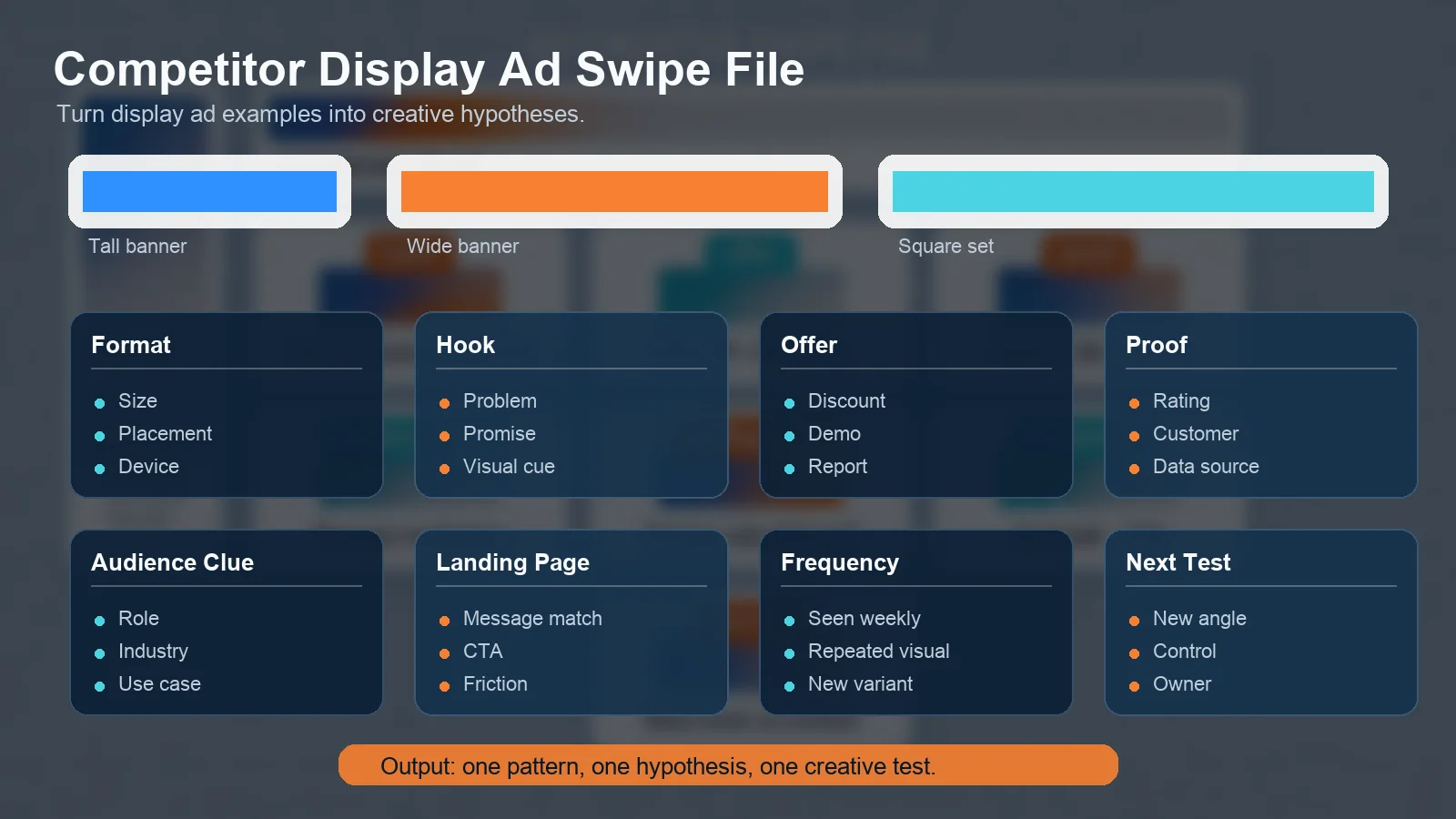
A structured swipe file turns competitor display ad examples into creative hypotheses.
This structure is especially useful when you collect many display ad examples. Instead of debating design taste, you can compare patterns:
| Pattern | What it may suggest |
|---|---|
| Same offer repeated across sizes | The offer is important enough to scale |
| Same visual but different copy | The team is testing message variants |
| Same copy but different visuals | The team is testing visual attention |
| Dedicated landing page | The campaign may be more intentional than a generic retargeting banner |
| Seasonal or event-based creative | The competitor is reacting to market timing |
Compare the Display Ad to the Landing Page
Display ads often fail when the click path changes the promise. If a banner says "Get the 2026 benchmark report" but the landing page is a generic homepage, message match is weak.
Record these fields:
| Field | Why it matters |
|---|---|
| Display hook | Shows what created attention |
| Offer | Shows the reason to click |
| Landing headline | Shows whether the promise continues |
| Above-fold proof | Shows whether the page supports the claim |
| CTA | Shows the expected buyer action |
| Friction | Shows how difficult the next step is |
This is where display research becomes actionable. If competitors are using lower-friction report CTAs and you push every display visitor to a demo, your next test may be a report or benchmark landing page.
How to Spy on Competitors Google Display Ads Without Overclaiming
Google display inventory can include many surfaces and formats. You can study public examples and visible placements, but you should be careful with wording.
Use precise language:
| Weak claim | Better phrasing |
|---|---|
| "We found all competitor display ads" | "We collected visible and public display ad examples." |
| "This is their exact targeting" | "This creative appears to target this audience or use case." |
| "They spend more because we saw more ads" | "They appeared repeatedly in our sample." |
| "This banner is working" | "This banner is repeated, so it may be worth testing the pattern." |
This matters for SEO and decision quality. Helpful content should explain what is observable, what is inferred, and what remains unknown.
Build a Weekly Display Creative Swipe File
Create a simple weekly record. It does not need to be complex.
| Field | Example |
|---|---|
| Week | 2026-W16 |
| Competitor | Competitor A |
| Source | Transparency tool, publisher page, team sighting |
| Creative file | Screenshot or R2 asset link |
| Format | Wide banner |
| Hook | Speed |
| Offer | Free benchmark report |
| Proof | Customer count |
| Landing page | Report page |
| Repetition | Seen 3 weeks |
| Next test | Try benchmark CTA on retargeting |
If you already maintain a creative ads library, add these tags to keep competitor display ads searchable. If you do not, start with 20 high-value competitors and review once per week.
Turn Display Ad Research into Creative Tests
The output should be a test backlog.
| Finding | Hypothesis | Test |
|---|---|---|
| Competitors repeat benchmark-report banners | Buyers respond to data-led offers | Test benchmark CTA against demo CTA |
| Many ads use product UI screenshots | UI proof may reduce uncertainty | Test UI-led banner creative |
| Competitor uses industry-specific copy | Audience specificity may improve quality | Build vertical-specific display variants |
| Same offer runs across multiple sizes | Multi-size consistency may increase recall | Build a full size set for one campaign |
Do not copy the competitor's visual design. Copying creates weak differentiation. Instead, translate the repeated pattern into your own positioning and proof.
Common Mistakes
| Mistake | Better approach |
|---|---|
| Saving screenshots without tags | Tag format, hook, offer, proof, audience, and landing page |
| Judging design taste only | Focus on repeatable campaign patterns |
| Assuming visibility equals budget | Treat frequency as a sampling clue, not spend proof |
| Ignoring the landing page | Review the full creative-to-page path |
| Tracking every possible competitor | Start with the competitors that actually affect your pipeline |
| Mixing search and display insights | Separate intent capture from attention creation |
If your goal is broader campaign monitoring, use ad tracking for competitive research. If your concern is budget estimation, read ad spend tracking.
FAQ
What are competitor display ads?
Competitor display ads are visual ads from rival companies that appear across websites, apps, display networks, retargeting environments, or public ad transparency sources.
How do I track competitors display ads?
Track competitors display ads by collecting visible examples, recording source and placement context, tagging the creative pattern, matching the landing page, and reviewing repetition weekly.
Can I see all Google display ads from a competitor?
Usually no. You can find public and visible examples, but you should not assume complete visibility into every Google display campaign, placement, audience, or creative variant.
What should I record in display ad examples?
Record format, size, hook, offer, proof, audience clue, landing page, CTA, date first seen, date last seen, and next test.
How often should I review display ad creatives?
Weekly review is useful in active categories. Monthly review may be enough in slower markets. The key is consistent tagging and repeated comparison.
Should I copy competitor display ads?
No. Use competitor display ad examples to identify patterns and hypotheses, then create your own differentiated creative.
Conclusion
Competitor display ads can reveal how rivals create attention before the search click. The value is not the screenshot itself. The value is the pattern behind the screenshot: format, hook, offer, proof, audience, landing page, and repetition.
If you need recurring display creative evidence, start with AdMapix reports. If your team needs continuous competitor creative tracking, review pricing and build a weekly swipe-file workflow.
Turn these observations into your next creative study
Open the creative library and select samples for your market, network and research question.
Related Articles
Competitor PPC Ads in 2026: How to Research Keywords, Copy, Landing Pages, and Ad Rank
A 2026 guide to researching competitor PPC ads — what paid search ads can and cannot prove, a five-step weekly workflow, how to find rivals' search ads, infer keyword intent, score ad copy, analyze landing pages and ad-rank signals, and turn every finding into a testable campaign decision.
Google Ads Competitor Analysis: 6 Ways to Find What Rivals Run
Google Ads competitor analysis guide: use Transparency Center, SERP checks, PPC data, and ad intelligence workflows to understand rival campaigns.

Ad Tracking for Competitive Research: What to Track Weekly
Ad tracking workflow for competitive research: what to monitor weekly, which changes matter, and how to turn signals into campaign decisions.