
Competitor PPC Ads in 2026: How to Research Keywords, Copy, Landing Pages, and Ad Rank
A 2026 guide to researching competitor PPC ads — what paid search ads can and cannot prove, a five-step weekly workflow, how to find rivals' search ads, infer keyword intent, score ad copy, analyze landing pages and ad-rank signals, and turn every finding into a testable campaign decision.
By the AdMapix Research Team — Updated June 21, 2026
Competitor PPC Ads in 2026: How to Research Keywords, Copy, Landing Pages, and Ad Rank
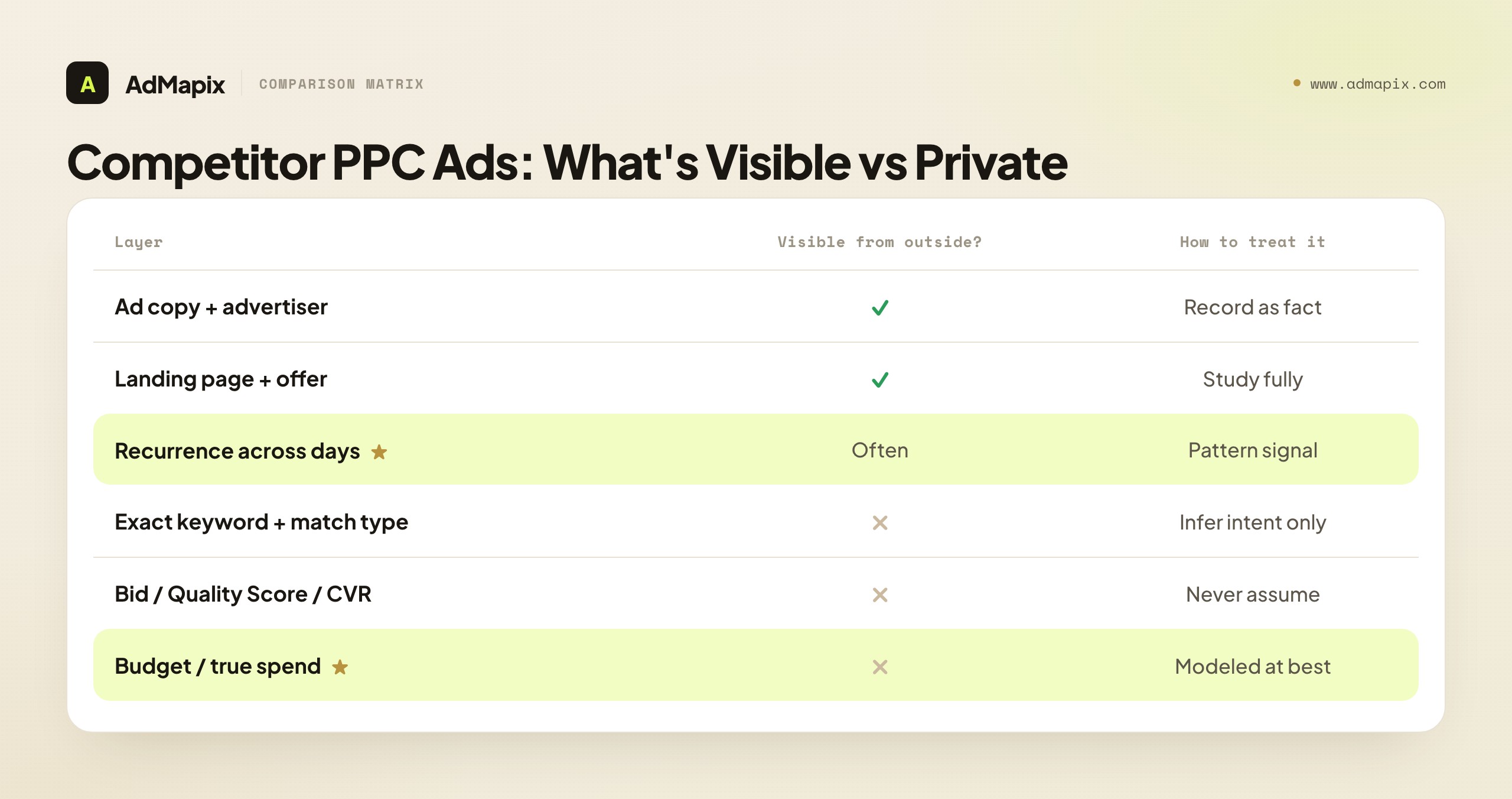
Competitor PPC ads tell you a great deal about how rivals position their offers, which search intents they pay for, and how aggressively they are testing paid traffic. They cannot tell you everything. From the outside you will never see a competitor's exact keyword list, private bid strategy, Quality Score, conversion rate, or budget — and any tool that claims to hand you those numbers is selling a model, not a meter. The skill that separates useful competitor PPC research from screenshot-hoarding is knowing precisely where the line sits between what paid search ads prove and what they only hint at, then turning the visible evidence into a campaign test you can actually run.
This 2026 guide is for PPC managers, paid-search specialists, growth marketers, and agencies who want a repeatable system for researching competitor paid search. It covers what competitor PPC ads can and cannot reveal, how to find rivals' search ads reliably, how to infer keyword intent from a visible ad, how to score competitor ad copy, how to analyze landing pages for message match, what "competitor ad rank" actually means, and — the part most guides skip — how to convert all of it into a prioritized testing backlog instead of a slide deck nobody reopens.
TL;DR — Researching Competitor PPC Ads in One Screen
- Competitor PPC ads are evidence, not instructions. Capture what is visible (query, advertiser, copy, landing page, recurrence), infer the intent behind it, and resist the urge to copy.
- You can observe the ad and the landing page; you must infer the keyword, bid, and economics. Treat keyword mapping as a hypothesis, never as a known fact.
- Find rivals' search ads with a controlled query set across category, problem, comparison, and brand-adjacent groups — checked from a clean, logged-out browser in the right location, not your personalized daily session.
- Score ad copy by component — promise, proof, risk reversal, CTA, differentiator — to find where your message is weaker than the market, not to crown a winner.
- The landing page is where the research pays off. Message match between ad and page is the most common quick win, and it is fully visible.
- "Competitor ad rank" is context, not a metric. Repeated top placement is a clue about auction participation, not proof of bid, Quality Score, or profit.
- Every finding must become one test in a backlog with an owner and a review date. Research that does not change a campaign was a waste of an afternoon.
What Competitor PPC Ads Can and Cannot Tell You
Competitor PPC ads are paid search ads or paid placements that appear when users search commercial, comparison, brand, or problem-aware queries. The research value comes from patterns, not one-off screenshots — and the first discipline is separating what you can see from what you are guessing.
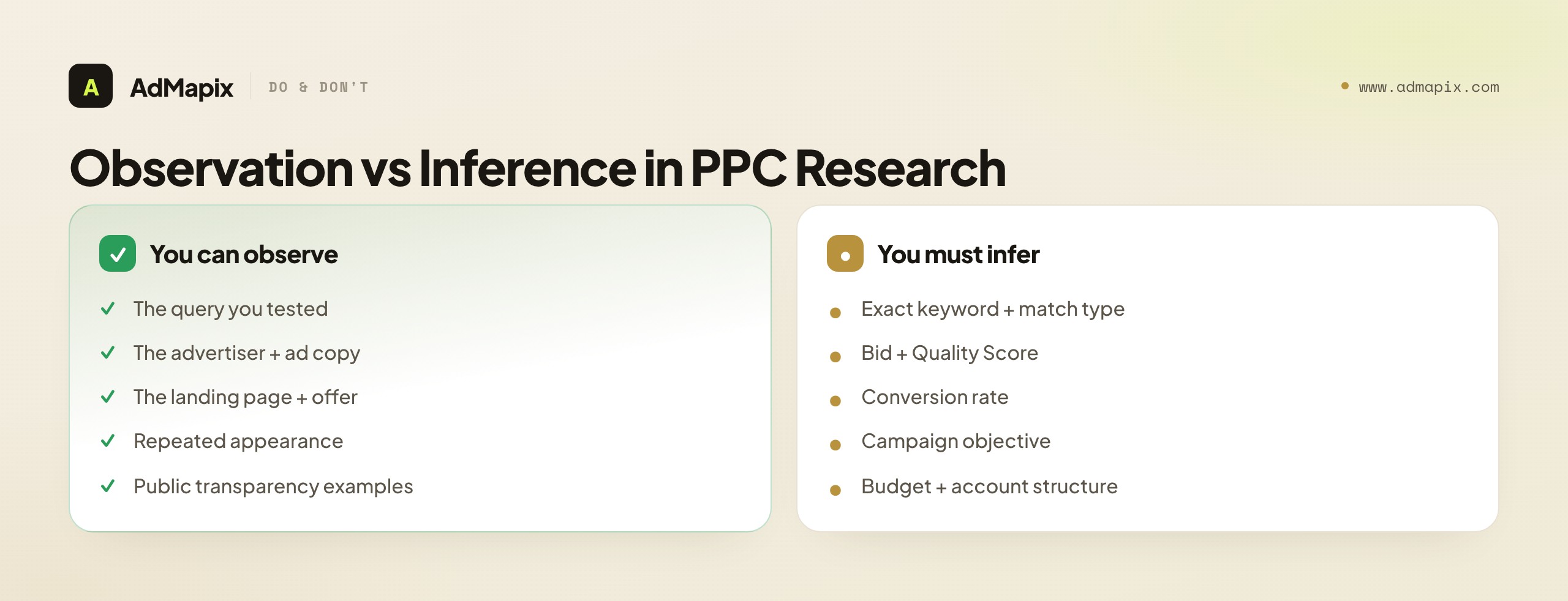
| What you can observe | What you must infer |
|---|---|
| The search query you tested | The exact keyword or match type that triggered the ad |
| The visible advertiser and ad copy | The bid, Quality Score, or conversion rate behind it |
| The landing page URL and the offer on it | The campaign objective and the funnel economics |
| Repeated appearance across queries and days | Whether the competitor is scaling, testing, or retargeting |
| Public ad examples in transparency tools | The full account structure or private audience lists |
That distinction matters because weak competitor research almost always degrades into copying. A team screenshots a rival's clever headline, pastes a near-identical version into their own account, and wonders why it underperforms — because they copied the visible half (the words) and missed the invisible half (the offer, the audience, the Quality Score, the landing-page economics that made the words work). Strong competitor PPC research does the opposite: it turns public evidence into hypotheses. A message angle to test. A negative keyword to add. A landing-page gap to fix. A market claim to monitor. The ad is the start of an investigation, not the end of one.
There is a deeper reason this matters in paid search specifically. Unlike social ads, where the creative is the whole product, a PPC ad is a tiny window — three lines of text — onto a much larger machine: an account structure, a bidding strategy, a Quality Score history, and a landing-page funnel you cannot see. Reading too much into the three visible lines is the cardinal error of PPC competitor research. The text tells you the promise a competitor is making; everything that determines whether the promise is profitable lives behind the click.
For a broader account-level workflow that sits above this article, start with our Google Ads competitor analysis guide. This guide is the narrow, tactical layer: how to break down competitor PPC ads at the keyword-intent, copy, landing-page, and ad-rank-signal level, and how to make each breakdown produce a decision.
Why Researching Competitor PPC Ads Is Different From Social Ads
It is tempting to treat all competitor-ad research as one discipline, but paid search behaves differently enough from social that copying a social-spying playbook onto PPC produces wrong conclusions. Three differences change how you read the evidence.
Intent is the unit, not the creative. On social, a user is scrolling and a creative interrupts them — the ad creates demand. On search, the user typed a query that already expresses demand, and the ad answers it. That flips the analysis. On social you study the hook that stops the scroll; on search you study how well the ad and landing page answer the intent the searcher arrived with. A "great" PPC ad is not the most attention-grabbing one — it is the one most tightly matched to the query's intent. This is why intent classification (covered below) is the spine of PPC research and barely matters in social spying.
The ad is text, and the machine is mostly hidden. A social ad is the whole creative — what you see is most of what the competitor made. A search ad is three lines of text sitting on top of a large, invisible apparatus: match types, negative keywords, bidding strategy, Quality Score history, and an account structure. The visible-to-hidden ratio is far worse on search, so the temptation to over-read the visible part is far stronger. Discipline here means constantly reminding yourself that the three lines are the output of a system you cannot see.
Position is auctioned per query, in real time, per user. A social ad either runs or it does not. A search ad's position is recomputed in a live auction every time anyone searches, weighted by the searcher's context. So "this competitor is always at the top" is a much noisier signal than it feels — it varies by location, device, time, and the searcher's own history. You are sampling a distribution, not reading a fixed ranking, which is exactly why a single search from your own browser is the weakest evidence you can collect.
These differences are why the rest of this guide leans so heavily on intent, message match, and controlled sampling rather than on "find the winning creative." In search, the winning move is rarely a clever line; it is a tighter answer to a specific intent, delivered on a faster, better-matched page. That is the thing worth researching.
The 5-Step Competitor PPC Research Workflow
The single biggest upgrade most teams can make is to run the same workflow every week, so evidence becomes comparable over time instead of a pile of unrelated screenshots. Here is the loop, and the rest of this guide is essentially a deep dive into each step.
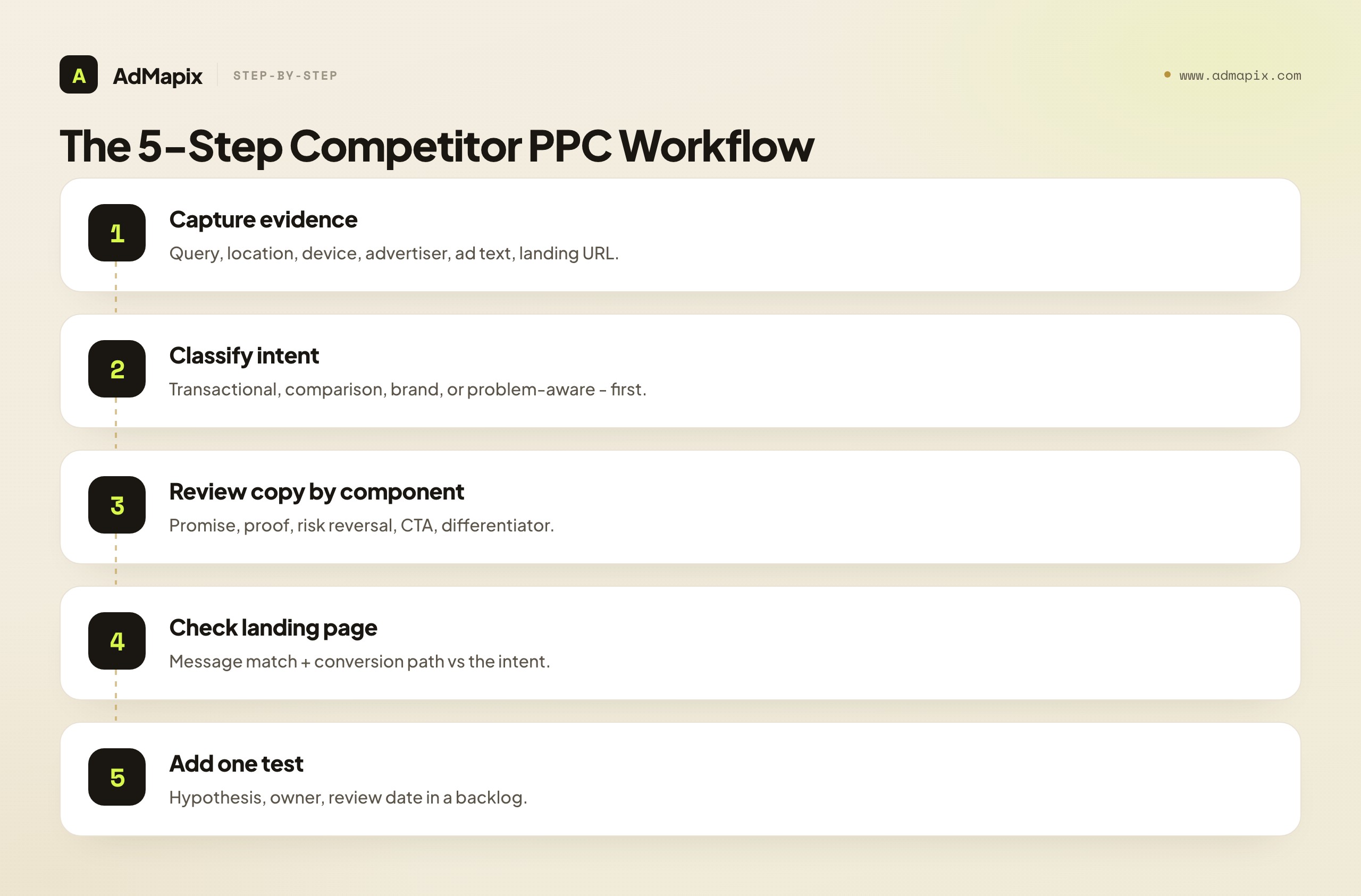
- Capture the search-result evidence — the query, the location, the device, the advertiser, the exact ad text, and the landing URL. Provenance first; analysis second.
- Classify the likely keyword intent behind the query — transactional, comparison, brand, or problem-aware — before you judge the ad.
- Review the ad copy by component — promise, proof, risk reversal, CTA, differentiator — and score each.
- Check the landing page for message match and a coherent conversion path against the inferred intent.
- Add one insight to a testing backlog with a hypothesis, an owner, and a review date.
The reason the order matters: most teams jump straight to step 3 ("is this a good ad?") and skip steps 1 and 2. But an ad can only be "good" relative to an intent. A headline that is excellent for a problem-aware searcher can be weak for a comparison searcher who wants pricing and proof. Classify the intent first, and the copy review becomes objective instead of a matter of taste.
This tactical loop pairs with two broader processes. Above it sits the competitor ads guide — the umbrella view of finding, analyzing, and tracking rival campaigns across all formats. Beside it sits how to check competitors' Google Ads, which goes deeper on the account-side tools. The difference in framing is simple: the umbrella guide asks "what is visible in the market?" while this article asks "what should we change in our own campaign as a result?"
How to Find Search Ads of Competitors
The simplest reliable way to find search ads of competitors is to start with a controlled query list rather than typing whatever comes to mind. An ad-hoc search from your daily browser is the least trustworthy evidence you can collect, because personalization, location, device, login state, and even the time of day all change what the auction serves you.
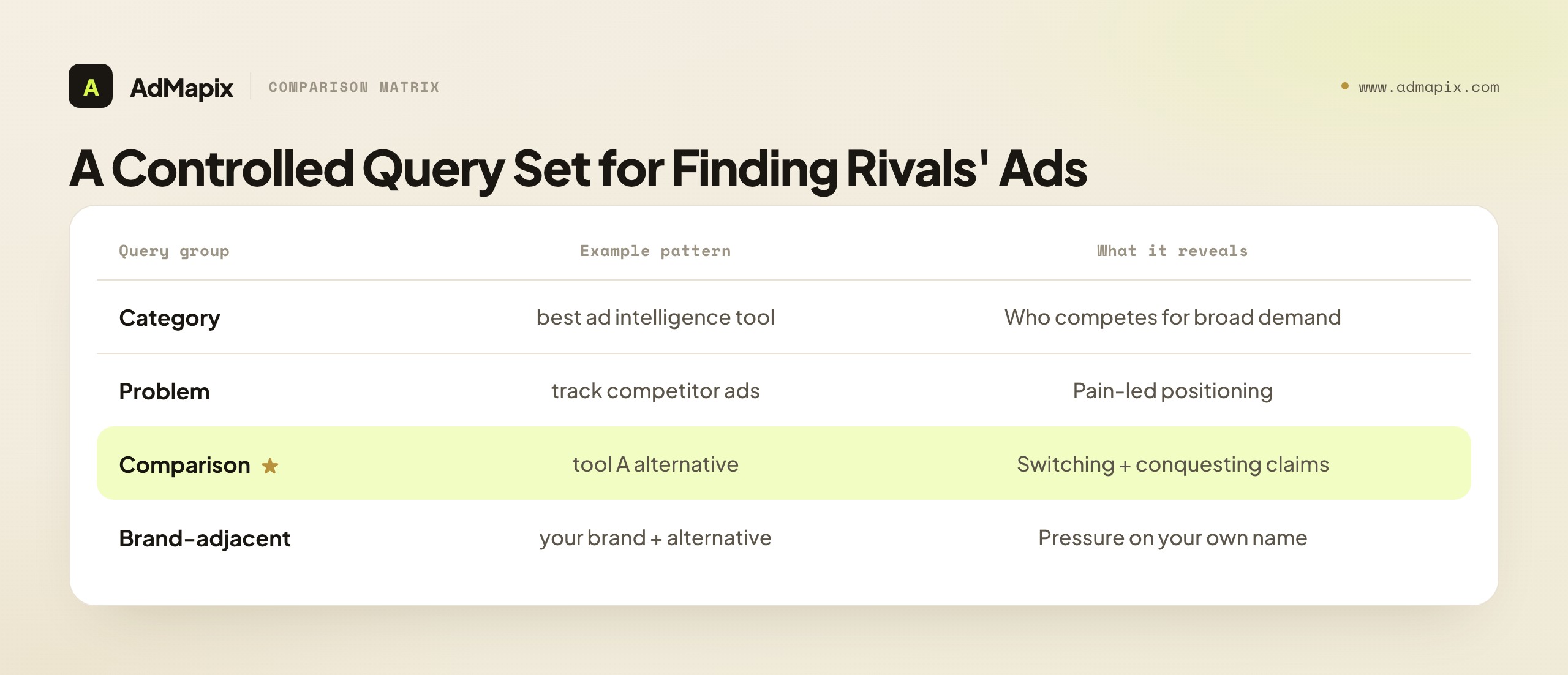
Build a query set across four groups, and keep it small and high-value at first — twenty terms you can actually review weekly beats two hundred you scan once.
| Query group | Example pattern | Why it matters |
|---|---|---|
| Category | "best ad intelligence tool" | Shows who competes for broad commercial demand and how crowded the head term is. |
| Problem | "track competitor ads" | Reveals pain-led positioning and educational hooks aimed at problem-aware buyers. |
| Comparison | "tool A alternative" | Shows substitution messaging, switching claims, and who is conquesting whom. |
| Brand-adjacent | "your brand + alternative" | Shows conquesting pressure on your own name and how rivals frame the switch. |
Then check each query under controlled conditions: a clean browser profile, a logged-out session, and the relevant target location (use the right geo, because a query in New York and the same query in London can return entirely different advertisers). Do not rely on a single search from your signed-in daily browser — it is personalized, it is in your location, and it is a sample size of one in an auction that re-runs constantly.
The most reliable public source is the Google Ads Transparency Center, which shows verified advertisers' ads by region — a genuine first-party surface for confirming what a named competitor is running right now. Pair it with your own Auction Insights data (available when you are eligible on a given keyword), which is the only place you will ever see your specific overlap with named competitors. Google's Auction Insights help page explains what those account-side overlap metrics mean and, crucially, what they do not — they show impression share and overlap rate, not a competitor's budget or bid.
For recurring evidence collection across many queries and competitors, manual screenshotting stops scaling fast. A standing record — whether an AdMapix report or a disciplined spreadsheet — turns scattered captures into a weekly time series you can actually compare. The format matters less than the consistency: the same fields, captured the same way, every week.
Because position is auctioned per user, a single check is unreliable. Build a small sampling protocol so your evidence is repeatable: pick two or three target locations that matter for your business, check both desktop and mobile (mobile SERPs often show fewer ad slots, which changes who is visible), and run each query at roughly the same time of week so you are not comparing a Monday-morning auction to a Saturday-night one. You do not need statistical rigor — you need consistency, so that a change you see next week is a real change in the market and not just a different slice of the same auction. Three controlled checks beat thirty random ones, because the three are comparable and the thirty are noise.
It also helps to record what you searched with, not just what you searched for. Note the device, the location, whether you were logged out, and the date — the same provenance discipline that makes any competitor evidence auditable later. A screenshot with no capture conditions attached is a screenshot you cannot trust in three weeks, because you will not know whether a difference is a market shift or just a different device.
A note on what not to use: avoid drawing conclusions from "estimated spend" figures on third-party tools as if they were facts. For Google Search, no public tool sees a competitor's actual spend — every number is modeled from impression share and assumptions. They are directional at best, and treating them as a budget readout is one of the fastest ways to make a bad strategic call. If competitor spend is genuinely your question, our guide to ad spend tracking explains how to read those estimates honestly.
How to Infer Keyword Intent from Visible PPC Ads
You usually cannot know the exact keyword that triggered a competitor's ad — match types, search-term variations, and broad-match expansion all sit behind the curtain. What you can do, reliably, is classify the intent behind the query you searched, and then compare the competitor's message against that intent. This is the step that converts a screenshot into an insight.
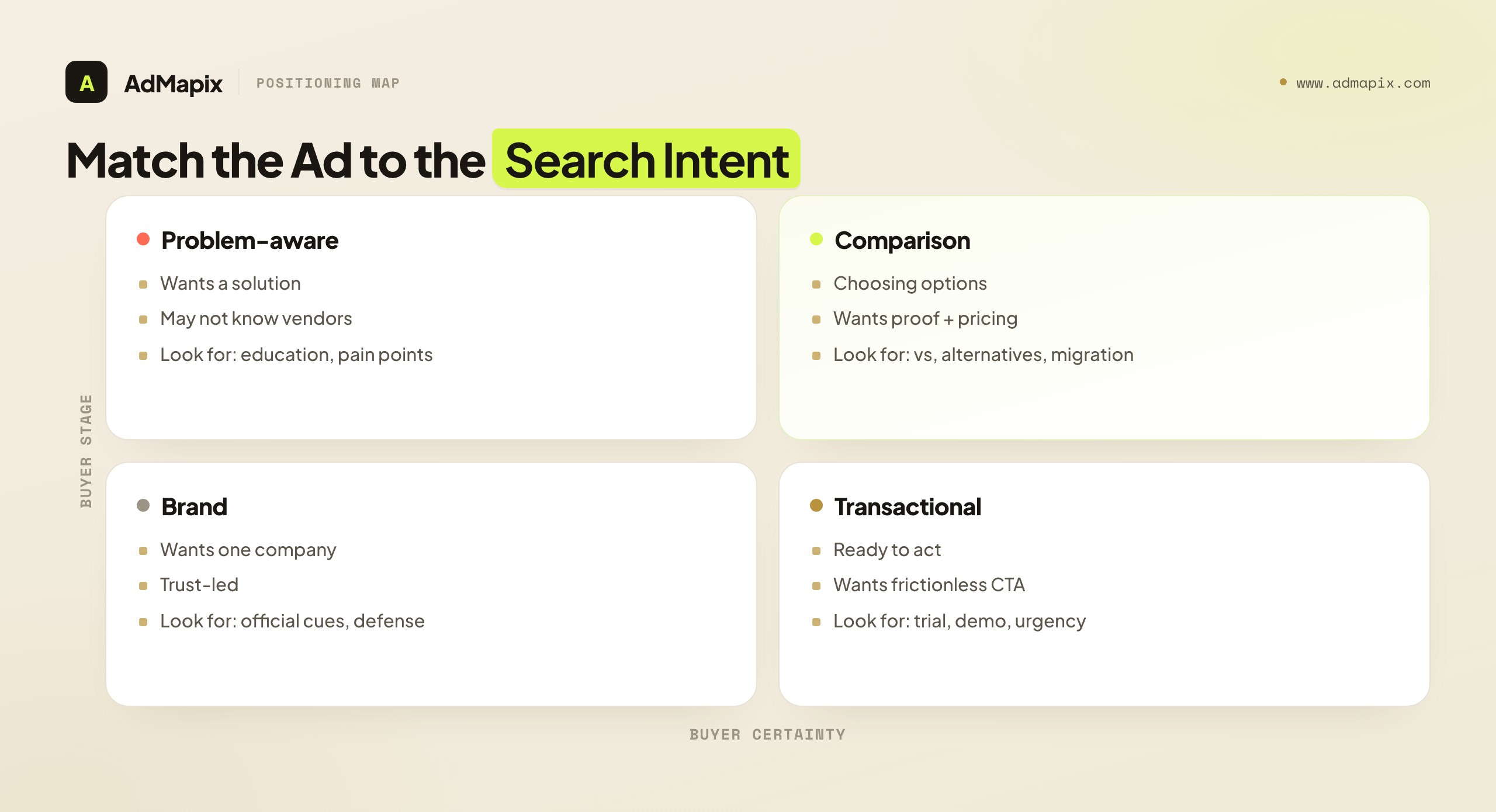
| Intent type | What the searcher likely wants | What to inspect in the competitor ad |
|---|---|---|
| Transactional | Ready to buy, trial, or demo now | Pricing, trial, demo, proof, urgency, a frictionless CTA |
| Comparison | Choosing between named options | "Alternatives," "vs" language, migration and switching claims |
| Brand | Looking for a specific company | Official cues, trust signals, brand-defense messaging |
| Problem-aware | Wants a solution, may not know vendors | Educational framing, pain points, workflow promises |
When you research competitor ads, record the intent first and the ad text second. This ordering prevents the most common analytical mistake in PPC research: treating every ad as if it targets the same buyer stage. A single competitor will (and should) run very different messages across these four intents, and judging a transactional ad by problem-aware standards — or vice versa — produces nonsense conclusions.
Take a concrete example. A competitor ad that reads "See competitor ads in minutes" is strong for a problem-aware query, where the searcher is feeling the pain of slow manual research and wants relief. The same ad is probably too generic for a comparison query like "tool A alternative," where the searcher already understands the category and wants pricing, feature depth, or specific proof that one option beats another. If you only logged the ad text and not the intent, you would mis-grade it. Log the intent, and the grade becomes obvious.
There is a second-order benefit to intent-first logging: it reveals gaps in a competitor's coverage. If a rival shows up strongly on category and problem queries but is absent on comparison queries, that absence is a signal — either they are not defending the comparison stage, or they cannot win it economically. Either way, an intent map of a competitor's visible ads is often more strategically useful than any single ad, because it shows you the shape of their whole paid-search bet.
To make this concrete, run a simple intent-coverage exercise across your controlled query set. For each competitor, mark which of the four intents they appear on and how consistently. The pattern that emerges is usually one of three: a full-funnel competitor present across all four intents (a serious, well-resourced paid-search operation you compete with on quality, not gaps); a bottom-funnel competitor concentrated on transactional and comparison terms (efficient, conversion-focused, often leaving the top of the funnel to you); or a top-funnel competitor heavy on problem-aware and category terms but thin on comparison and transactional (building awareness but possibly failing to capture the high-intent demand they create). Each shape implies a different opening. Against a bottom-funnel competitor, the gap is the problem-aware audience they ignore. Against a top-funnel competitor, the gap is the comparison searcher they educate but do not convert — you can intercept that searcher with a sharper comparison ad and a tighter page. The intent map turns "what are they doing" into "where is the door open," which is the only version of the question that changes your campaign.
How to Review Competitor Ad Copy
Do not just ask whether a competitor's ad is "good" — that question has no objective answer. Break the ad into components and grade each one against the inferred intent. This turns a matter of taste into a repeatable scorecard your whole team will grade the same way.
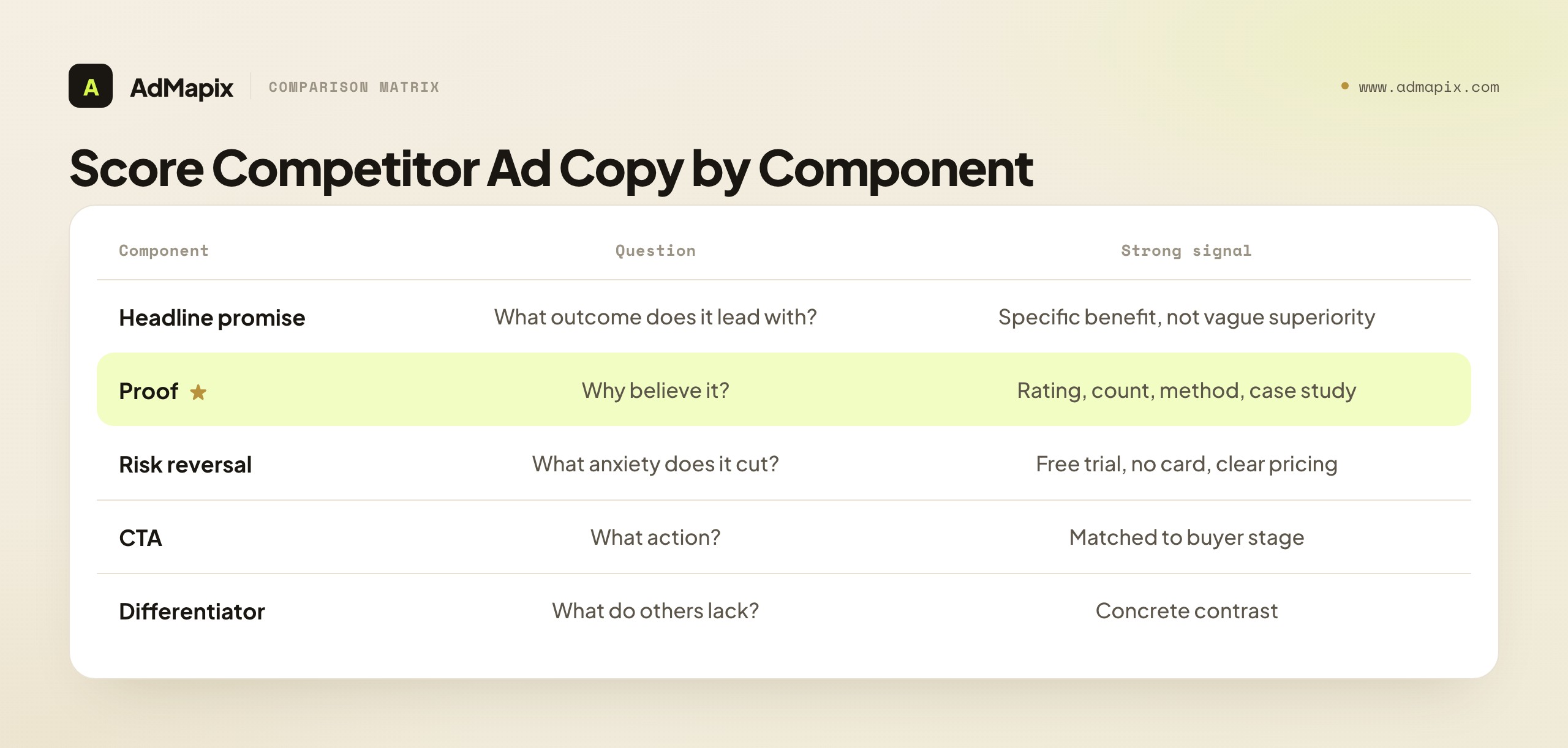
| Component | Question to ask | Strong signal |
|---|---|---|
| Headline promise | What outcome does the ad lead with? | A specific benefit, not vague superiority ("launch in minutes," not "the best tool") |
| Proof | Why should the searcher believe it? | A rating, customer count, named method, public data, or case study |
| Risk reversal | What anxiety does it reduce? | Free trial, no credit card, transparent pricing, easy setup |
| CTA | What action does it push? | Demo, report, comparison, audit, or trial — matched to buyer stage |
| Differentiator | What does it claim others lack? | A clear, concrete contrast against alternatives |
Use a 1-to-5 scale for each component. The point is emphatically not to crown a winning competitor — it is to find where your own campaign has a weaker message than the market expects. The scorecard is a mirror, not a leaderboard.
The payoff comes when you aggregate. If competitors repeatedly lead with speed and your ads lead with feature breadth, your next test is obvious: a speed-focused ad group to see whether the market actually values fast setup over depth. If competitors lead with cheap pricing and you have no intention of competing on price, the scorecard tells you where you need a stronger non-price differentiator — data freshness, workflow automation, decision quality — so you are not silently losing the comparison on the one axis you refuse to play.
A subtle trap to avoid: do not reward a competitor's ad for being clever if it is clever in the wrong direction for the intent. A witty headline that wins a creativity contest but fails to make a specific, believable promise to a transactional searcher is a weak ad, however much you admire the wordplay. Grade against the searcher's job, not against your own taste in copy.
One more layer worth scoring: ad assets and extensions. Sitelinks, callouts, structured snippets, and promotion assets are visible, and a competitor running a rich set of them signals a mature, well-resourced campaign. You cannot see whether the assets convert, but you can see whether a rival is investing in the full surface area of the ad — and if your ads are bare by comparison, that is a free, low-risk test to run regardless of what the copy says.
How to Analyze Competitor Landing Pages
The landing page is where competitor PPC ad research stops being interesting and starts being useful. The ad tells you the promise; the landing page tells you how much support the competitor actually gives that promise — and, more often than not, where the gap is between their promise-to-page match and yours. Best of all, the landing page is entirely public. You can study it as long as you like.
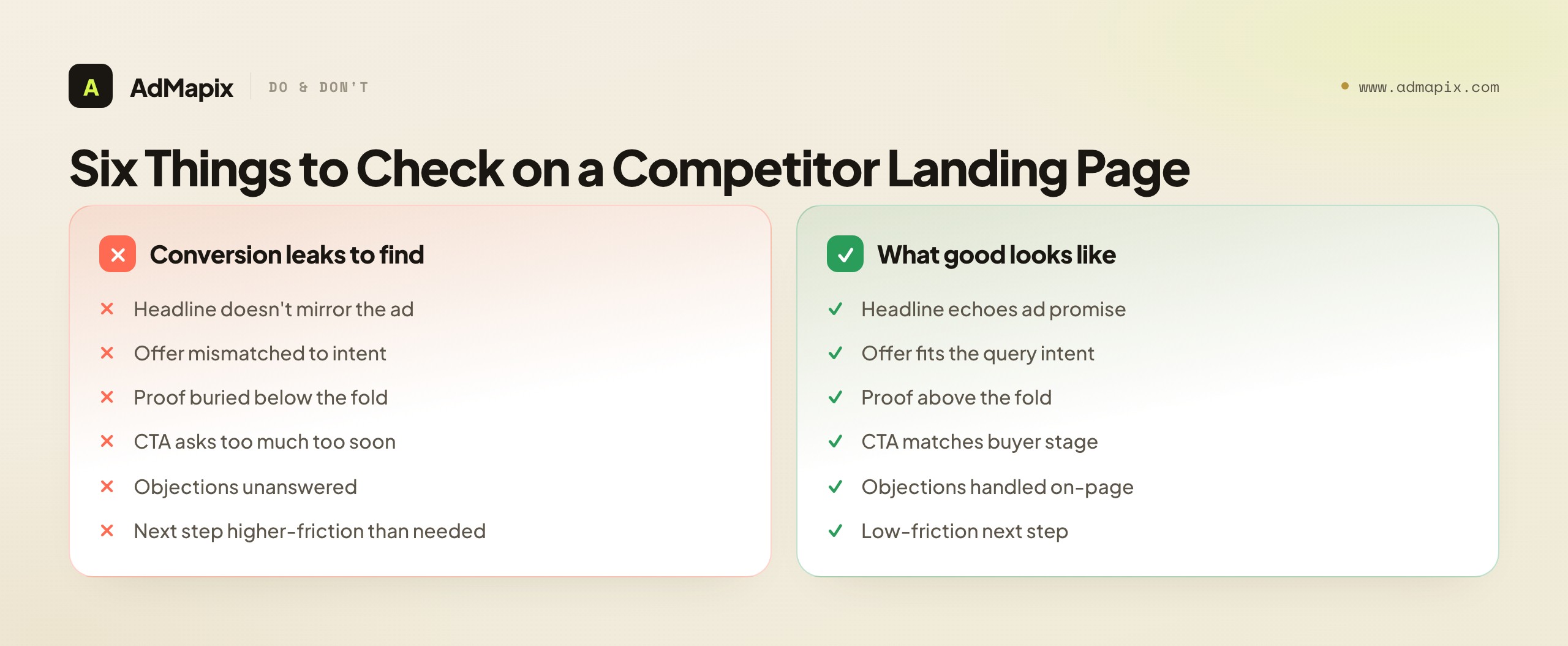
Look for six things on every competitor landing page you review:
- Headline mirror — does the landing-page headline echo the ad promise, or does the click feel like a bait-and-switch? A break here is the single most common conversion leak, and it is visible.
- Offer-to-intent fit — is the offer consistent with the query intent you classified? A demo-only page served to a transactional "buy now" searcher is a mismatch.
- Proof above the fold — does credibility (ratings, logos, numbers, case studies) appear before the searcher has to scroll, or is it buried?
- CTA-to-stage match — does the call to action fit the buyer stage? A "request a quote" CTA on a problem-aware page asks for too much too soon.
- Objection handling — does the page answer the obvious objections (price, switching cost, setup effort) the intent implies?
- Friction of the next step — is the competitor's next step lower-friction than yours? "See a sample report" beats "book a 30-minute call" for an early-stage searcher, and that difference is a testable hypothesis.
Here is a practical teardown format that keeps every review tied to a hypothesis your team can act on rather than an opinion they will forget:
| Field | Example note |
|---|---|
| Query | "competitor ppc ads" |
| Likely intent | Wants methods or tools for paid-search competitor research |
| Competitor promise | "Find competitor ads and keywords fast" |
| Proof | Customer count, an example report, a public data source |
| Landing-page match | Headline repeats the paid-search research promise; proof above the fold |
| Gap to test | Add a landing-page section showing the keyword-copy-page workflow visually |
Two landing-page factors are easy to skip and disproportionately important. First, check the mobile experience separately. A large share of paid-search clicks are on mobile, and a competitor whose desktop page is mediocre but whose mobile page is fast and frictionless is winning where the volume actually is. Open every competitor landing page on a phone, not just a desktop tab. Second, note page speed. Landing-page experience is an explicit input to Google's Ad Rank, so a fast competitor page is not just better for conversion — it directly helps their auction position at the same bid. A slow page is a competitor weakness you can exploit by being faster; a fast one is a bar you have to clear. You cannot measure their exact load time precisely, but you can feel the difference, and a stopwatch on your own page versus theirs is a fair, free comparison.
This is where many teams find their fastest wins. They do not need more competitor screenshots; they need a better message match between their own ad and landing page — and the only way to see that clearly is to study a competitor who is doing it better and copy the structure of their match, not the words on their page. The competitor analysis for display creative follows a related logic; if your rivals lean on the display layer too, competitor display ads covers how to track creatives across the web where the funnel starts before the search.
What "Competitor Ad Rank" Actually Means
"Competitor ad rank" is a phrase marketers use loosely, and the looseness causes bad decisions. In Google Ads, Ad Rank is an auction concept that determines whether your ad shows and where it appears. Google explains that Ad Rank depends on your bid, the quality of your ad and landing page, the Ad Rank thresholds, the competitiveness of the auction, the searcher's context (location, device, time, intent), and the expected impact of your ad assets and formats — see Google's Ad Rank documentation.
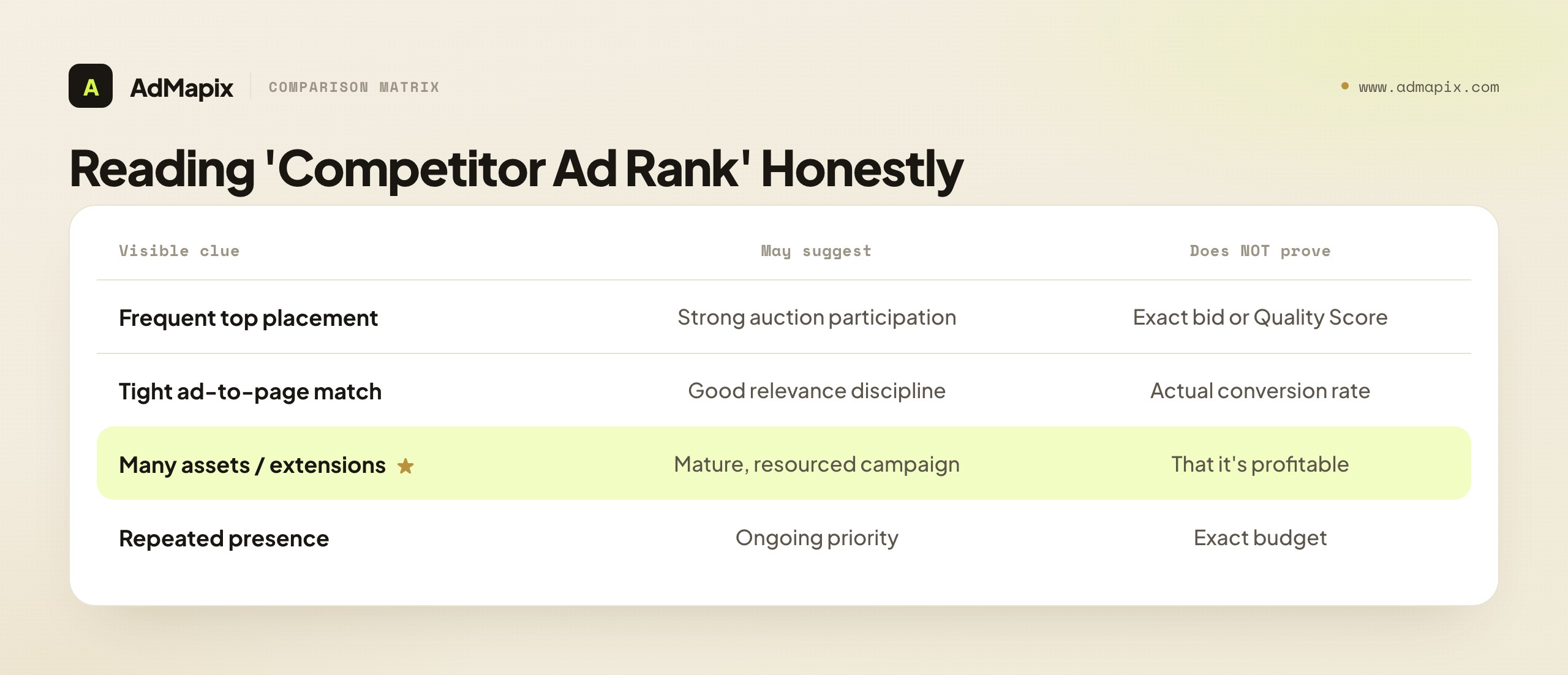
The critical takeaway for competitor research: you cannot see a competitor's Ad Rank from the outside. It is computed inside Google's auction from inputs (their bid, their Quality Score) that are private. What you can observe are clues — and the discipline is treating them as clues, not as a fabricated metric.
| Visible clue | What it may suggest | What it does not prove |
|---|---|---|
| Frequent top placement on a term | Strong auction participation | Their exact bid or Quality Score |
| Tight ad-to-page message match | Good relevance discipline | Their actual conversion rate |
| Many assets and extensions | A mature, resourced campaign | That the campaign is profitable |
| Repeated presence across days | An ongoing strategic priority | Their exact budget |
Use competitor ad rank as context, never as a number to chase. If a rival consistently appears above you on important terms, the productive response is not "they must be bidding more, so we'll bid more." It is to audit your own side of the auction first: is your ad relevance strong, is your landing page fast and matched, are your assets complete, are you constrained by budget at the times that matter? Quality Score and relevance can lift your position without raising your bid, and chasing position by bid alone is how PPC budgets quietly bleed. Position is an output of the auction; fix your inputs before you assume a rival simply outspends you.
This is also why the account-side view is irreplaceable. Auction Insights is the one place you see real overlap with named competitors, and pairing it with the public Transparency Center is the strongest honest picture you can assemble. Our deep dive on Auction Insights vs the Transparency Center explains exactly which question each tool answers and where each one is blind.
How to Read Competitor Bidding Patterns Honestly
You cannot see a competitor's bids. But you can often read the shape of their bidding strategy from where and when they show up — and reading that shape honestly is more useful than any fabricated spend estimate. The trick is to separate three distinct bidding behaviors that look similar from the outside but mean very different things.
Brand defense — a competitor appearing on their own brand terms. This is cheap, high-Quality-Score, and almost universal; nearly every mature advertiser bids on its own name to control the message and crowd out conquesters. Seeing a competitor defend their brand tells you almost nothing strategic — it is table stakes. The signal here is the absence of brand defense, which is rare and usually means an under-managed account you may be able to conquest.
Conquesting — a competitor appearing on your brand terms or a rival's. This is aggressive, often expensive (low Quality Score on someone else's brand drives up cost), and a deliberate strategic choice. If you see a competitor consistently conquesting your brand, that is a direct signal worth a specific response — and it has its own playbook, distinct from category acquisition. The brand-defense side of this is covered in depth in our competitor brand keywords on Google Ads guide.
Category acquisition — a competitor appearing on non-brand category, problem, and comparison terms. This is where the real budget and the real strategy live, because category terms are expensive, competitive, and demand-generating. The intensity and breadth of a competitor's category presence — how many category terms they cover, how consistently they hold position — is the closest public read you get on how seriously they are investing in paid search growth.
| Bidding behavior | What it looks like | What it means | How to respond |
|---|---|---|---|
| Brand defense | On their own name | Table stakes, cheap | Note absence as opportunity |
| Conquesting | On your / a rival's brand | Aggressive, deliberate | Brand-defense playbook |
| Category acquisition | On non-brand category terms | Where real budget lives | Compete on relevance + offer |
The discipline is to label every competitor appearance with which of these three it represents before drawing any conclusion. A team that lumps all three together will look at a competitor's "heavy paid-search presence" and panic, when half of it is cheap brand defense and tells them nothing. A team that separates them sees the real picture: how much the competitor defends, how aggressively they conquest, and how seriously they invest in category growth — three separate questions with three separate responses.
One honest caveat: even this read is inference. A competitor on your brand term might be conquesting deliberately, or might be a broad-match accident spilling onto your name. The shape is a strong hypothesis, not a confirmed strategy — confirm the pattern over several weeks of tracking before you respond, because a one-time appearance can be auction noise.
Turn Competitor PPC Research into Tests
The output of competitor PPC ad research should be a backlog, not a slide deck. A beautiful competitive analysis that does not change a single campaign was an expensive way to feel productive. Every research cycle should end with one or more entries in a testing backlog that has a hypothesis, an owner, and a review date.
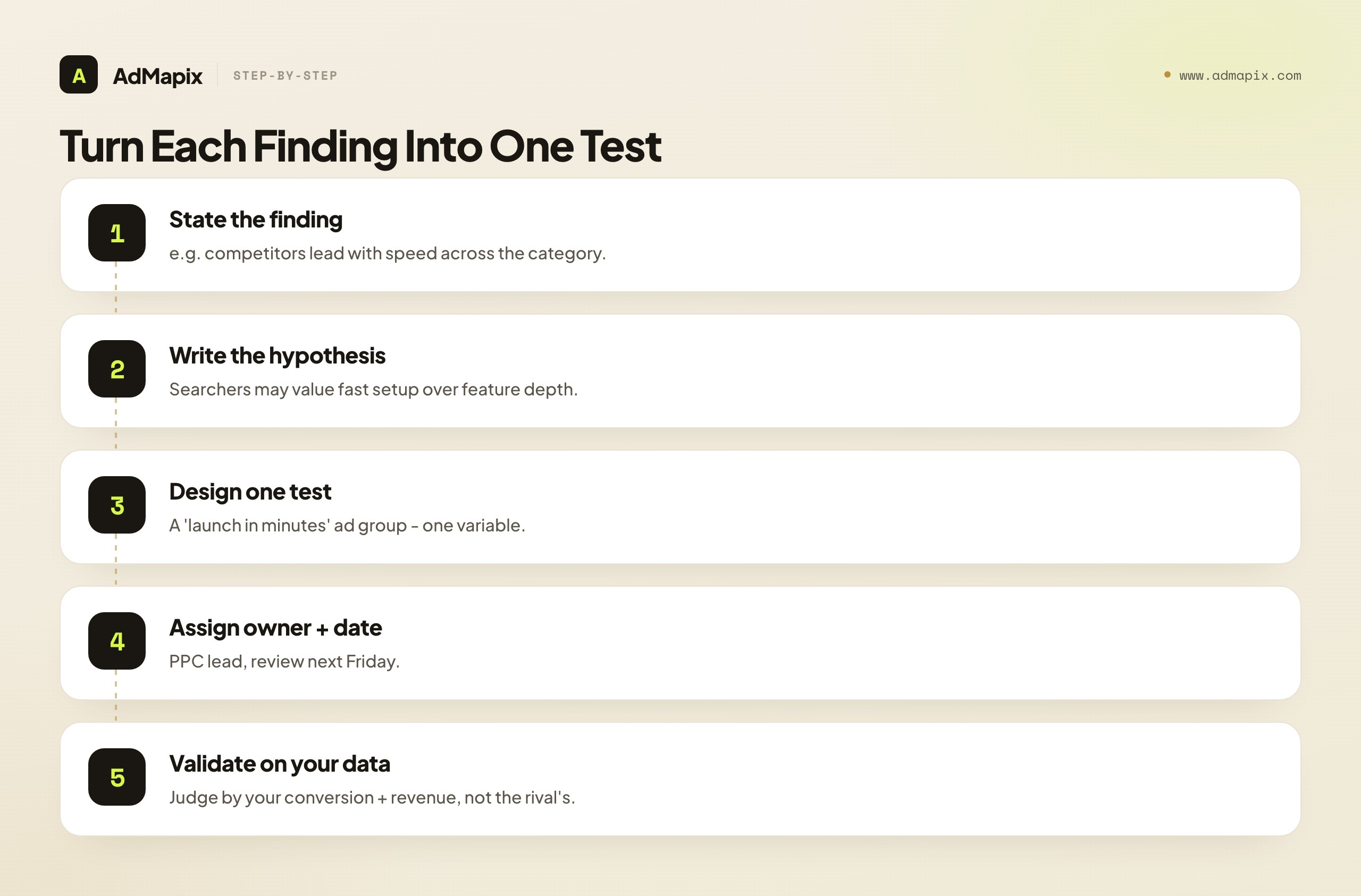
| Finding | Hypothesis | Test | Owner | Review date |
|---|---|---|---|---|
| Competitors lead with speed | Searchers value fast setup more than feature depth | Test a "launch in minutes" headline ad group | PPC lead | Next Friday |
| A rival's landing page has stronger proof | Proof above the fold may lift conversion rate | Add a customer-proof block above the fold | Web lead | 2 weeks |
| A rival appears on comparison queries we ignore | We are missing high-intent comparison demand | Build a comparison ad group | Growth lead | Next sprint |
| A competitor emphasizes a free report CTA | A lower-friction CTA may increase qualified leads | Test a "free report" CTA vs the demo CTA | Demand gen | Next month |
Prioritize tests that are easy to run and clearly connected to the inferred intent. Do not rewrite an entire campaign because one competitor wrote a clever headline — that is overreacting to a sample of one. The strongest signals to act on are patterns: an angle three competitors repeat, a CTA the whole category has shifted to, a proof type that has become table stakes. A pattern across rivals is a market expectation; a single ad is an anecdote.
To prioritize the backlog, score each candidate test on two axes: how easy it is to run and how connected it is to a clear intent signal. A headline test in an existing ad group is cheap and fast; a full landing-page rebuild is expensive and slow. A test backed by a pattern three competitors repeat is high-confidence; a test backed by one clever ad is a guess. Run the easy, high-confidence tests first — they are where competitor research pays back fastest — and queue the expensive ones behind real evidence. The most common backlog failure is the opposite: a team gets excited about a competitor's slick landing page and commits a month to rebuilding their own before testing whether the single change that mattered (the offer, the proof block, the CTA) moves the number on its own. Isolate the variable, run the cheap version first, and let the result decide whether the expensive version is worth it.
And hold the honest line at the test boundary: a competitor's repeated, public message is a strong hypothesis, validated against your own conversion and revenue data — never a result you copy on faith. The competitor told you what is possible in the auction; only your own test tells you what is profitable for you. If a rival's "winning" angle tanks your conversion rate, the test did its job by saving you a quarter of wasted spend.
A Weekly Competitor PPC Tracking System
Competitive PPC research compounds when you repeat it on a cadence. A one-time scrape tells you what the market looked like on a single Tuesday; a weekly tracker tells you whether the market is moving — and the direction of movement is usually more valuable than any static snapshot. This is the discipline that turns competitor PPC research from a project into a capability.
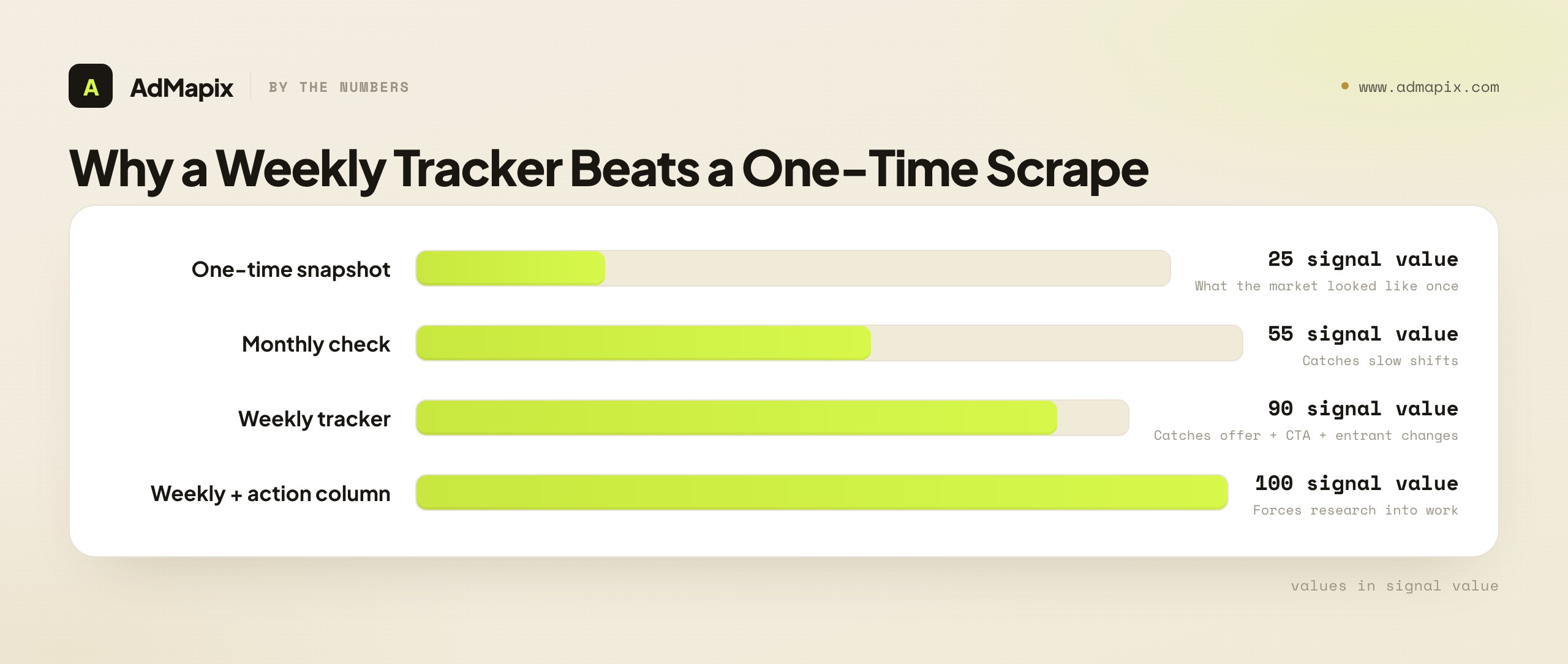
Track these fields every week, for your controlled query set:
| Field | Why it matters |
|---|---|
| Query | Keeps every piece of evidence tied to a specific intent |
| Advertiser | Shows which competitors appear repeatedly versus who is testing |
| Headline | Captures message changes week over week |
| Landing page URL | Reveals funnel or offer changes behind the click |
| Offer | Detects pricing, trial, demo, or report shifts |
| Proof cue | Shows whether competitors are adding or removing credibility |
| CTA | Tracks buyer-stage and friction changes |
| Action taken | Forces the research to influence actual work |
The last field — action taken — is the one that separates a tracking system from a graveyard of screenshots. If a week of tracking produces no action, either nothing changed (a valid, recordable finding) or your query set is too broad to surface signal. Either way, the empty "action" column is feedback.
A weekly cadence also lets you catch the changes that single snapshots miss: a competitor quietly testing a new offer, a rival shifting from a demo CTA to a report CTA across their account, a new entrant appearing on your comparison terms. None of these are visible in a one-time look; all of them are visible in a time series. Pairing search tracking with creative tracking gives you both the what they say and the how they say it sides of a competitor's strategy.
Tracking is also where you connect search to the rest of the funnel. If your competitors run heavy retargeting and display alongside search, the search ad is only the bottom of a longer journey. Teams that track how to track competitor Facebook ad spend alongside their search tracker get a fuller picture of where a rival is actually investing attention, and the case study of pulling 10 winning Facebook ads in 2 hours shows how fast structured tracking can move when the system is already in place.
Common Mistakes When Researching Competitor PPC Ads
Most wasted competitor-PPC-research hours trace back to a short list of repeatable errors. Naming them is the cheapest way to avoid them.
| Mistake | Better approach |
|---|---|
| Copying competitor copy verbatim | Translate the insight into your own differentiated message and offer |
| Assuming the visible query equals the exact keyword | Treat keyword mapping as an inference, not a known fact |
| Ignoring the landing page | Review the full click path, not only the three lines of ad text |
| Over-focusing on rank | Fix your own relevance and conversion before chasing auction position |
| Mixing brand and non-brand intent | Separate brand defense from category acquisition in your analysis |
| Tracking too many queries | Start with 20 high-value terms; expand only when the system is working |
| Trusting "estimated spend" as fact | Read modeled spend as directional context, never as a budget readout |
| Reacting to a single ad | Act on patterns across rivals, not on one competitor's clever headline |
Two of these deserve emphasis because they are the most expensive. Mixing brand and non-brand intent quietly corrupts every conclusion: a competitor defending their own brand term is doing something completely different from a competitor acquiring category demand, and blending the two produces strategy that fits neither. If competitors are bidding on your brand specifically, that is its own playbook — see our brand-keyword bidding response plan and the broader competitor brand keywords on Google Ads guide, which is the canonical resource for the brand-defense side of paid search.
Over-focusing on rank is the other budget-killer. Position feels like the scoreboard, so teams chase it by raising bids — and watch their cost-per-conversion climb while the underlying relevance problem goes unfixed. Rank is downstream of Quality Score and message match, both of which you control without spending more. Chase the inputs, not the output.
How This Fits Your Broader Competitor Research
Competitor PPC ad research is one layer of a larger competitive-intelligence practice, and it is most powerful when it connects to the others rather than living in isolation.
Above this tactical layer sits the account-level view: how to check competitors' Google Ads and the Google Ads competitor analysis guide cover the structural and tooling side — Auction Insights, Transparency Center, and how to read a competitor's whole paid-search footprint. The umbrella over all formats is the competitor ads guide, which frames finding, analyzing, and tracking rivals across search, social, display, and video.
Beside this search-focused layer sit the format-specific guides. Competitor display ads covers the attention-and-retargeting layer that often precedes a search. Google Search ads spy tools covers the tooling for collecting search-ad evidence at scale. And for the social side of the funnel, tracking competitor Facebook ad spend shows where rivals invest attention before demand becomes an explicit search.
The honest framing across all of them is the same one this guide opened with: public ad data is strong evidence of structure and message and weak-to-zero evidence of performance. Every layer of competitor research earns its value the same way — by converting visible evidence into a testable hypothesis, validated against your own data, never copied on faith.
The payoff of treating PPC research this way compounds quietly. After a quarter of weekly tracking, you hold something no single scrape can give you: a longitudinal map of how each competitor's intent coverage, offers, and CTAs have shifted, a team trained to label inference as inference, and a backlog of tested — not assumed — campaign changes. That is the difference between a folder of competitor screenshots and a genuine competitive-intelligence capability. The screenshots tell you what one rival did once; the capability tells you where the auction is moving and what to do about it.
FAQ
What are competitor PPC ads?
Competitor PPC ads are paid search or paid-placement ads from rival companies that appear around the same commercial, comparison, problem-aware, or brand-adjacent queries you care about. They are visible evidence of how a competitor positions an offer for a given search intent — but they reveal the message, not the bid, budget, or conversion rate behind it.
How can I find search ads of competitors?
Build a controlled query list across category, problem, comparison, and brand-adjacent groups, then check each query from a clean, logged-out browser in the relevant target location. Use the Google Ads Transparency Center for verified public examples, your own Auction Insights for real overlap with named competitors, and a weekly tracking record so you capture repeated appearances over time rather than a single snapshot.
Can I see competitor keywords exactly?
Usually not. Match types, search-term variations, and broad-match expansion all sit behind the curtain, so the exact keyword that triggered an ad is private. You can reliably infer the intent behind the query you searched — transactional, comparison, brand, or problem-aware — and compare the competitor's message to that intent. Treat keyword mapping as a hypothesis, never as a known fact.
What does "competitor ad rank" mean?
In Google Ads, Ad Rank is an auction value computed from a competitor's bid, ad and landing-page quality, the Ad Rank thresholds, auction competitiveness, the searcher's context, and expected asset impact. You cannot see a competitor's Ad Rank from outside their account. Repeated top placement, tight message match, and rich assets are clues about strong auction participation — not proof of their bid, Quality Score, conversion rate, or budget.
How do I infer keyword intent from a visible PPC ad?
Classify the query you searched into one of four intents — transactional, comparison, brand, or problem-aware — before you judge the ad, then check whether the competitor's promise, proof, and CTA fit that intent. Logging intent first prevents the common mistake of grading a problem-aware ad by transactional standards. An intent map of a competitor's visible ads also reveals coverage gaps worth exploiting.
How should I review competitor ad copy without copying it?
Break each ad into five components — headline promise, proof, risk reversal, CTA, and differentiator — and score each from 1 to 5 against the inferred intent. The goal is to find where your message is weaker than the market, not to copy a rival's words. Then translate the insight into your own differentiated message and offer, and test it against your own conversion data.
Why is the landing page the most important part of competitor PPC research?
Because the ad is only the promise, and the landing page shows how much the competitor supports that promise — and it is entirely public. Message match between ad and page is the most common conversion leak and the fastest quick win. Studying a competitor whose ad-to-page match is tighter than yours, and copying the structure of their match rather than their words, is where most teams find their highest-leverage test.
How often should I research competitor PPC ads?
For active, competitive PPC categories, weekly tracking of a controlled query set is practical and revealing — it catches offer shifts, new entrants, and CTA changes that single snapshots miss. For slower markets, monthly checks may suffice. Consistency matters far more than volume: the same fields, captured the same way, every cycle.
Should I copy competitor PPC ads?
No. Copying creates weak differentiation, transfers a message stripped of the offer and economics that made it work, and can create legal or brand risk on protected terms or claims. Use competitor research to identify market expectations, then write a sharper, differentiated version of your own positioning and validate it with a test.
What tools do I actually need to research competitor PPC ads?
The honest minimum is free: the Google Ads Transparency Center for public examples and your own Auction Insights for real overlap data. A tracking record — a spreadsheet or a tool like AdMapix reports — turns scattered captures into a comparable weekly time series. Paid tools add scale and recurring collection, but no tool, paid or free, can show a competitor's true spend, bid, or conversion rate on Google Search — those numbers are private and always modeled.
Key Takeaways
- Separate observation from inference. You can see the ad, the landing page, and recurrence; you must infer the keyword, bid, and economics. Confusing the two is the root of every bad PPC-research decision.
- Classify intent before you judge copy. An ad is only "good" relative to the searcher's stage — transactional, comparison, brand, or problem-aware.
- The landing page is the quick win. Message match between ad and page is fully visible and the most common conversion leak in the category.
- Ad rank is context, not a metric. Repeated top placement is a clue about auction participation; fix your own relevance and conversion before chasing position by bid.
- Every finding becomes one test. A backlog with an owner and a review date beats a slide deck — and a competitor pattern is a hypothesis to validate against your own data, never a result to copy.
Related Reading
- Ad Budget Optimization Framework — using marginal ROAS, pacing, and competitor signals to decide where PPC budget should move.
- Retargeting Ads Strategy 2026 — sequencing lower-funnel paid traffic after a competitor or brand query.
- Competitive analysis in paid advertising — the broader multi-channel workflow PPC research fits inside.
- Google Ads Transparency Center guide — the public Google evidence layer for competitor search ads.
Authoritative Sources
- Google Ads Transparency Center — verified first-party surface for viewing live Google Search, Display, and YouTube ads by advertiser and region.
- Google Ads Help — About Auction Insights — explains impression share, overlap rate, and other account-side competitive metrics, and their limits.
- Google Ads Help — About Ad Rank — the official definition of how Ad Rank determines ad eligibility and position.
- Google Ads Help — About Quality Score — how expected CTR, ad relevance, and landing-page experience shape position without raising bids.
Sources verified as of June 21, 2026. Google Ads auction mechanics and help-center articles change periodically; confirm the current documentation before quoting specifics in a client report. For recurring evidence collection, see AdMapix reports and pricing.
Turn these observations into your next creative study
Open the creative library and select samples for your market, network and research question.
Related Articles
Google Ads Competitor Analysis: 6 Ways to Find What Rivals Run
Google Ads competitor analysis guide: use Transparency Center, SERP checks, PPC data, and ad intelligence workflows to understand rival campaigns.

Ad Tracking for Competitive Research: What to Track Weekly
Ad tracking workflow for competitive research: what to monitor weekly, which changes matter, and how to turn signals into campaign decisions.

Creative Ads Library: Where to Find Winning Ad Creative Examples
A practical guide to creative ads libraries: where to find ad examples, how to filter them, and how to build your own swipe file.