Mobile App Ad Spy Tools in 2026: How to Research Competitor App Ads Across Networks
The 2026 guide to mobile app ad spy tools: which networks have no public ad library and how to research them, what a spy tool can and can't prove, a 5-step workflow, creative teardown framework, tool comparison, and a weekly research loop for UA and ASO teams.
By the AdMapix Research Desk — Updated June 21, 2026
Mobile App Ad Spy Tools in 2026: How to Research Competitor App Ads Across Networks
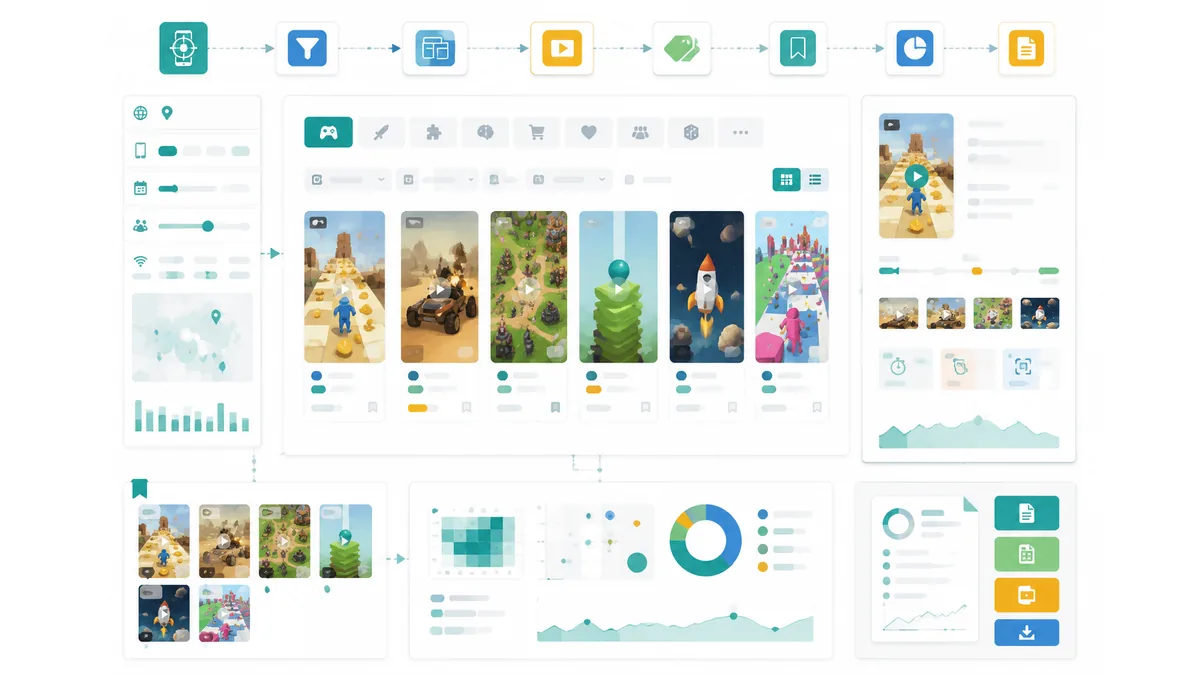
A mobile app ad spy tool is most useful when it turns scattered competitor ads into searchable, dated evidence you can act on: the app category, the network the ad ran on, the opening hook, the format, the video structure, the offer, and the store or landing-page signal. The hard part of mobile app ad research isn't a lack of ads to study — it's that the networks where app ads actually run (Unity, AppLovin, ironSource, Mintegral, Moloco, Google, Meta, TikTok) mostly have no public ad library the way Facebook does. So "spying" on app ads is a fundamentally different job than searching one transparency database, and most teams approach it backwards.
This guide is for app growth teams, founders, ASO and UA managers, agencies, and creative strategists who keep saving screenshots and never get a testable angle out of them. By the end you'll know which networks you can research and how, what a spy tool can prove and what it can't (spend and ROAS are off-limits), a repeatable five-step workflow, a creative-teardown framework, an honest tool comparison, and a weekly loop that turns "interesting ad" into "next creative test" without guessing.
The core principle, up front: a mobile app ad spy tool shows you what competitors are running, never how much they spend or how well it converts. The value is in the creative structure you capture and turn into hypotheses — then your own campaign data, not the spy tool, decides what's a winner.
For adjacent playbooks, see best ad spy tools 2026 for the full tool landscape, spy on ads across all platforms for the cross-network method, and our mobile game ad spy deep dive if your vertical is specifically games.
TL;DR — Mobile App Ad Spy Tools in 2026
- Most app ad networks have no public library. Unlike Facebook's Ad Library, Unity / AppLovin / ironSource / Mintegral / Moloco expose no public archive — so app ad research means cross-network creative intelligence, not searching one database.
- A spy tool shows the creative surface, not the media plan. You can see formats, hooks, offers, and video structure; you cannot see spend, impressions, install volume, or ROAS. Treat the visible as a hypothesis and the hidden as off-limits.
- The value is in structured, dated evidence. Capture app category, network, hook, format, pacing, offer, and store signal — each with a source URL and date — or your screenshots decay into trivia within weeks.
- Longevity is a soft signal, not proof. A long-running ad suggests it works, but it's weaker for apps than for Facebook, and no library reliably timestamps every variant.
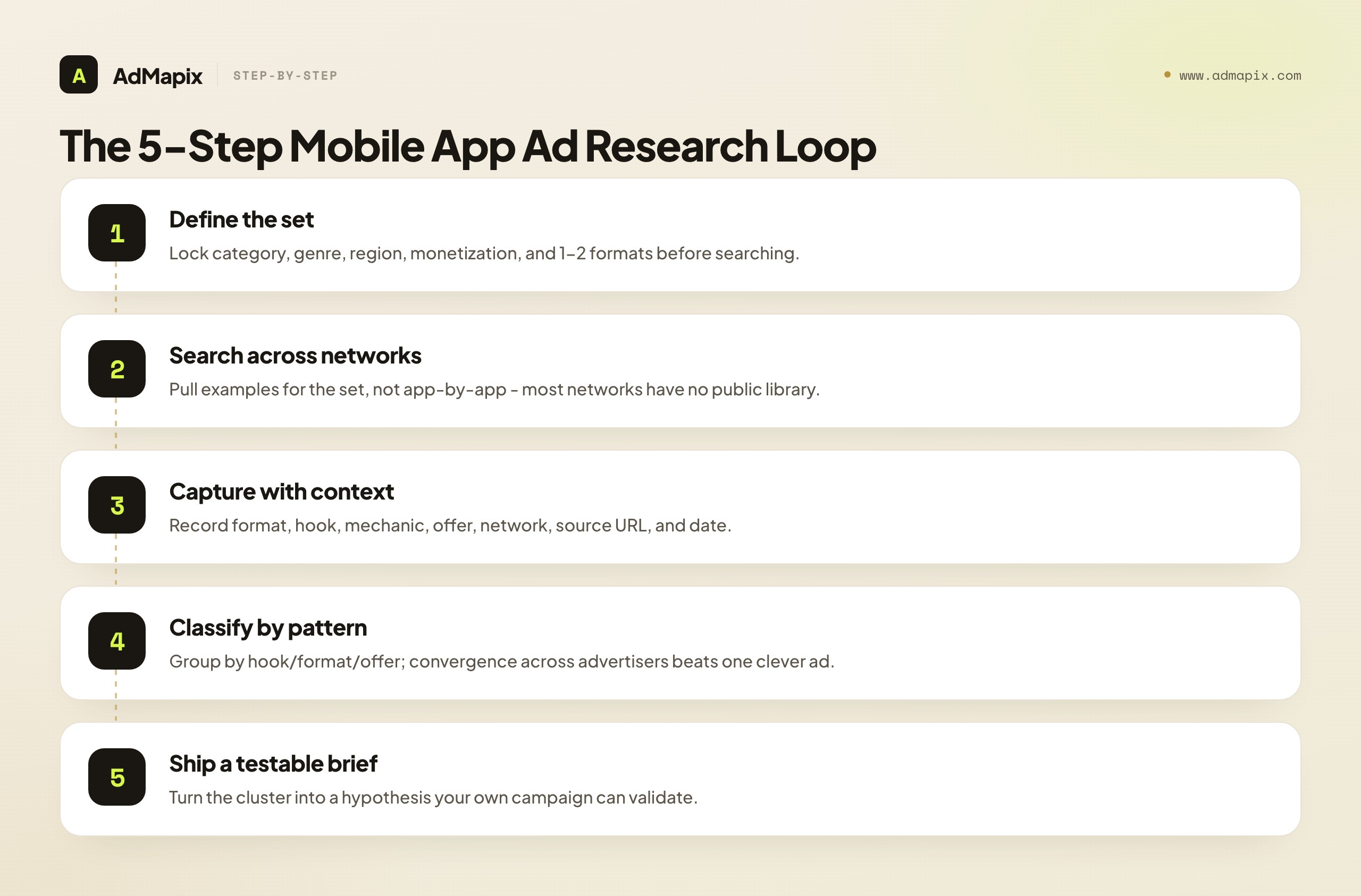
- The workflow is a 5-step loop: define the set, search across networks, capture with context, classify by pattern, ship a testable brief. Patterns that repeat across advertisers beat any single clever ad.
- Match the research to your vertical. A puzzle game's rewarded-video ads and a fintech app's UGC testimonials aren't comparable — never mix incompatible categories in one sweep.
The Real Problem: Most App Networks Have No Public Library
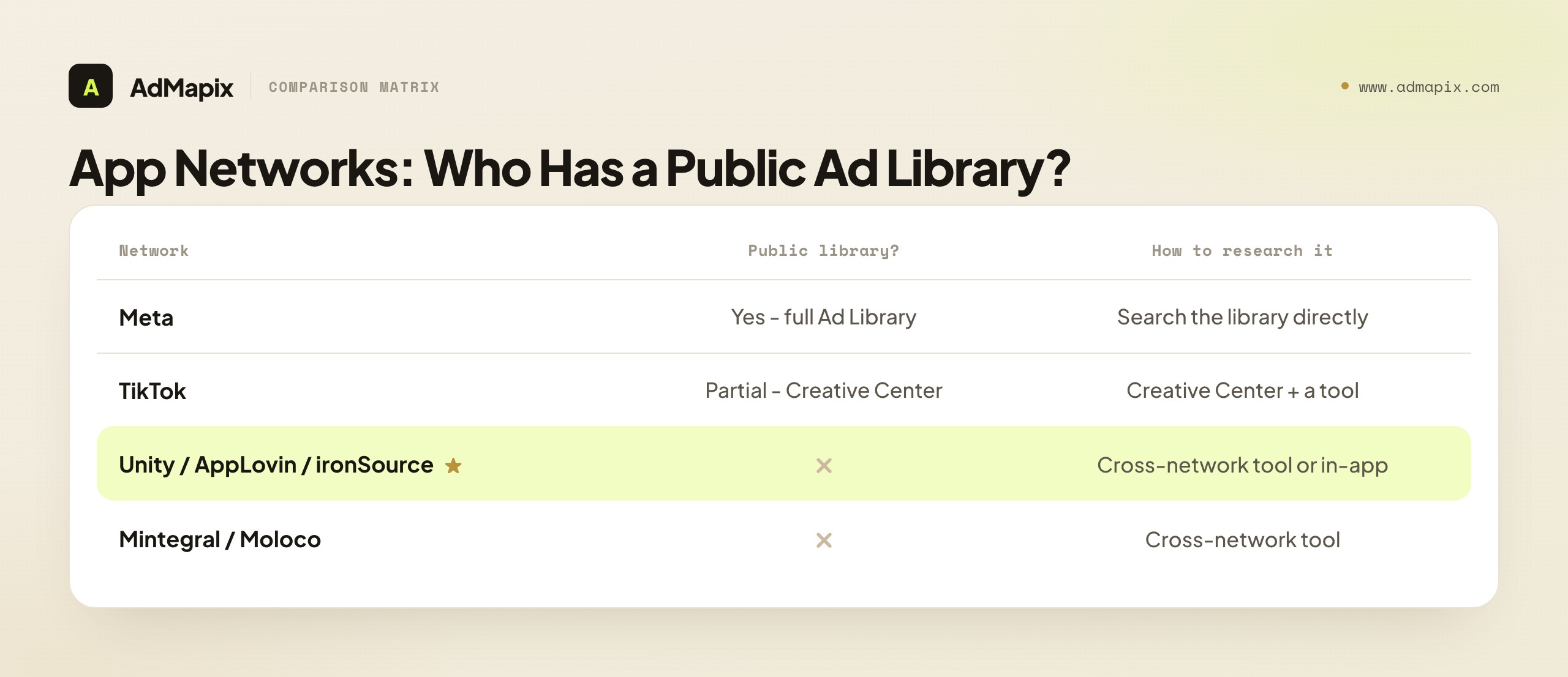
This is the fact that reframes everything, and the one most "ad spy" articles gloss over. Facebook spoiled marketers with its public Ad Library — a free, searchable archive of every active ad. But mobile app advertising mostly happens on networks that expose no such thing.
| Network / surface | Public ad library? | How you actually research it |
|---|---|---|
| Meta (Facebook/Instagram) | Yes — full Ad Library | Search the library directly |
| TikTok | Partial — Creative Center top ads | Creative Center + a TikTok-aware tool |
| Google (App campaigns) | Transparency Center (limited app coverage) | Transparency Center + cross-network tools |
| Unity Ads | No public library | Third-party ad intelligence / in-app observation |
| AppLovin / AXON | No public library | Third-party ad intelligence |
| ironSource | No public library | Third-party ad intelligence |
| Mintegral | No public library | Third-party ad intelligence |
| Moloco | No public library | Third-party ad intelligence |
Read that table carefully: the networks driving the most app and game installs — Unity, AppLovin, ironSource, Mintegral — are exactly the ones with no public archive. That's why "just check the ad library" is useless advice for app UA. Researching these networks requires one of two things: a third-party ad-intelligence tool that has built its own cross-network creative database, or manual in-app observation (seeing competitor ads while actually using apps in your category). A mobile app ad spy tool is, in practice, the consolidation layer that fills the gap these networks leave open.
This is also why the honest framing matters so much here. On Facebook you can at least see impression ranges and longevity. On Unity or AppLovin you often see only the creative itself — no date, no reach, no nothing. The discipline of capturing context yourself, and never inferring spend, is even more important when the platform gives you less.
What a Mobile App Ad Spy Tool Actually Shows You
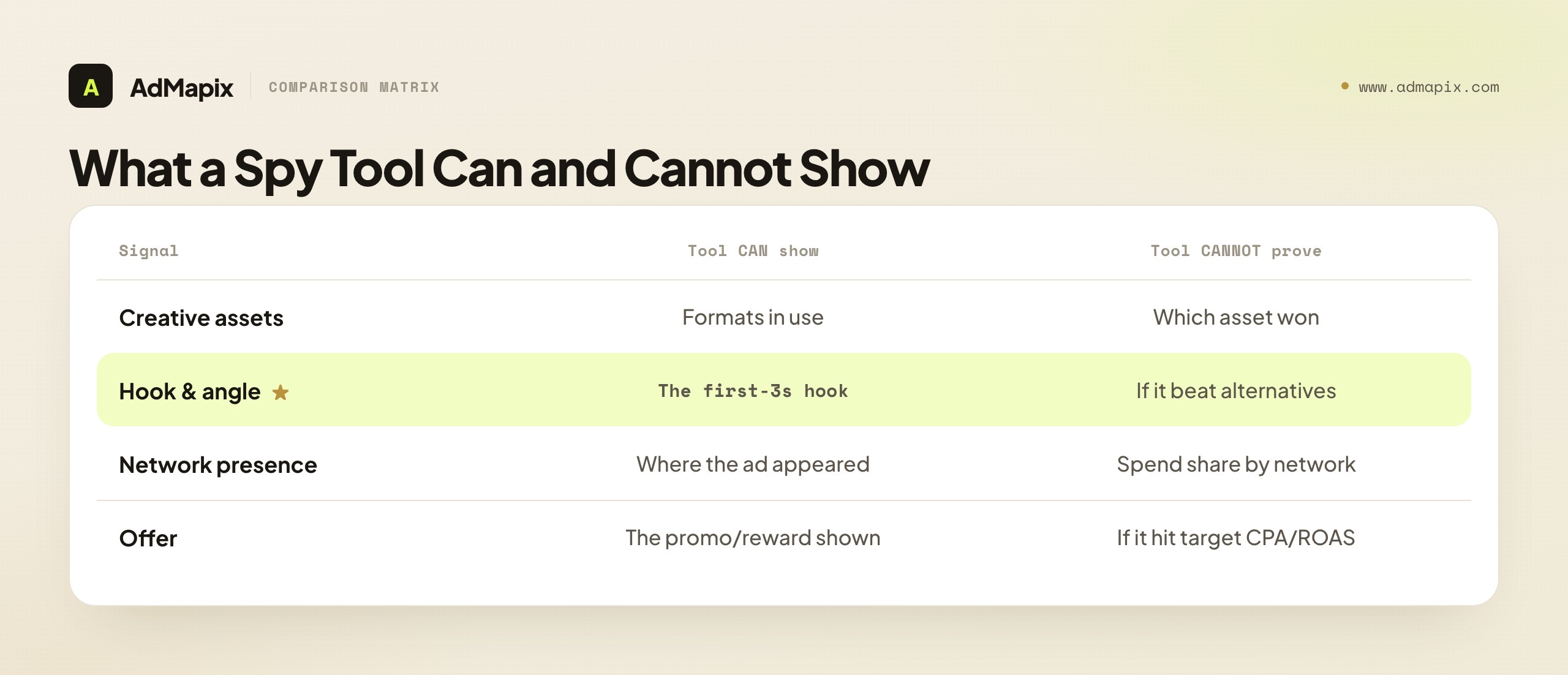
A mobile app ad spy tool shows the creative surface of a competitor's marketing: the ad assets that are running and the formats and angles they chose, observed across ad networks and placements. That's genuinely valuable, because creative is the lever app teams can copy and improve fastest — and on broad-targeting AI networks (AppLovin AXON, Google App campaigns, Meta Advantage+), the creative is the targeting. A spy tool does not, however, give you a competitor's media plan.
| Signal | What a spy tool can show | What it cannot prove |
|---|---|---|
| Creative assets | Video, playable, static, carousel formats in use | Which asset is the "winner" |
| Hook & angle | The first-3-second hook, the promise, the mechanic shown | Whether that hook beat alternatives in testing |
| Network presence | That an ad appeared on a given network/placement | Spend share or budget by network |
| Localization | Language, casting, and copy variants by region | Which markets are profitable |
| Offer | The promo, trial, or reward shown in the ad | Whether the offer hit a target CPA or ROAS |
| Cadence | That new creatives appeared over time | The volume or budget behind the refresh |
Treat everything in the left column as a hypothesis source and everything in the right column as off-limits unless you have first-party data. This distinction is what separates a useful workflow from cargo-cult copying — and it's the single most violated rule in app competitor research. Seeing an ad proves activity, never performance.
The Five-Step Mobile App Ad Research Workflow
The fastest way to get value is a fixed loop: define the set, capture evidence consistently, classify by pattern, and ship a brief. Skipping the "capture consistently" step is where most teams lose the thread — research becomes a pile of context-free screenshots nobody can act on.
Step 1: Define the competitor set
Lock the same app category, genre, region, monetization model, and one or two creative formats before you search. A puzzle game's rewarded-video ads and a fintech app's UGC testimonials are not comparable, so don't mix them in one sweep. Separate three groups:
- Direct competitors — apps users choose instead of yours.
- Category leaders — the biggest spenders in your vertical, whose creative is most refined.
- Adjacent inspiration — apps outside your category with formats worth adapting (a hyper-casual hook can lift a utility app's CTR).
Step 2: Search across networks, not app-by-app
Pull examples for the set rather than browsing one advertiser at a time. The goal is breadth across networks and placements so you see formats and patterns, not just one app's library. Because most app networks have no public archive, this is where a cross-network ad-intelligence tool earns its place — it has already aggregated creatives from Unity, AppLovin, TikTok, Meta, and more into one searchable surface.
Step 3: Capture evidence with context
For every saved creative, record the format, opening hook, mechanic or proof shown, app category, store/landing signal, network, source URL, and date. A screenshot without a date and source decays into trivia within weeks. This is non-negotiable on app networks specifically, because most of them give you nothing automatically — no impression range, no start date. If you don't capture context, no one will.
Step 4: Classify by pattern
Group examples by hook type (fail-bait, before/after, satisfying loop, social proof), format, reward frame, pacing, and offer. Patterns that repeat across multiple advertisers are far stronger test candidates than a single clever ad. If five competitors in your category all open on a loss state, that convergence is a signal; one brand doing something unusual is an anecdote.
Step 5: Ship a testable output
Turn the cluster into a creative brief, a video-analysis note, a playable concept, or a test-backlog item with a clear hypothesis — for example, "open on the loss state in the first 2 seconds for puzzle UA." Research that never becomes a brief or test produces zero growth. The output, not the screenshot folder, is the deliverable.
A Framework for Reading One Creative
When you analyze a single ad, score it on a fixed set of dimensions so the read is repeatable rather than vibes-based. The point is to extract a hypothesis, not pass a verdict.
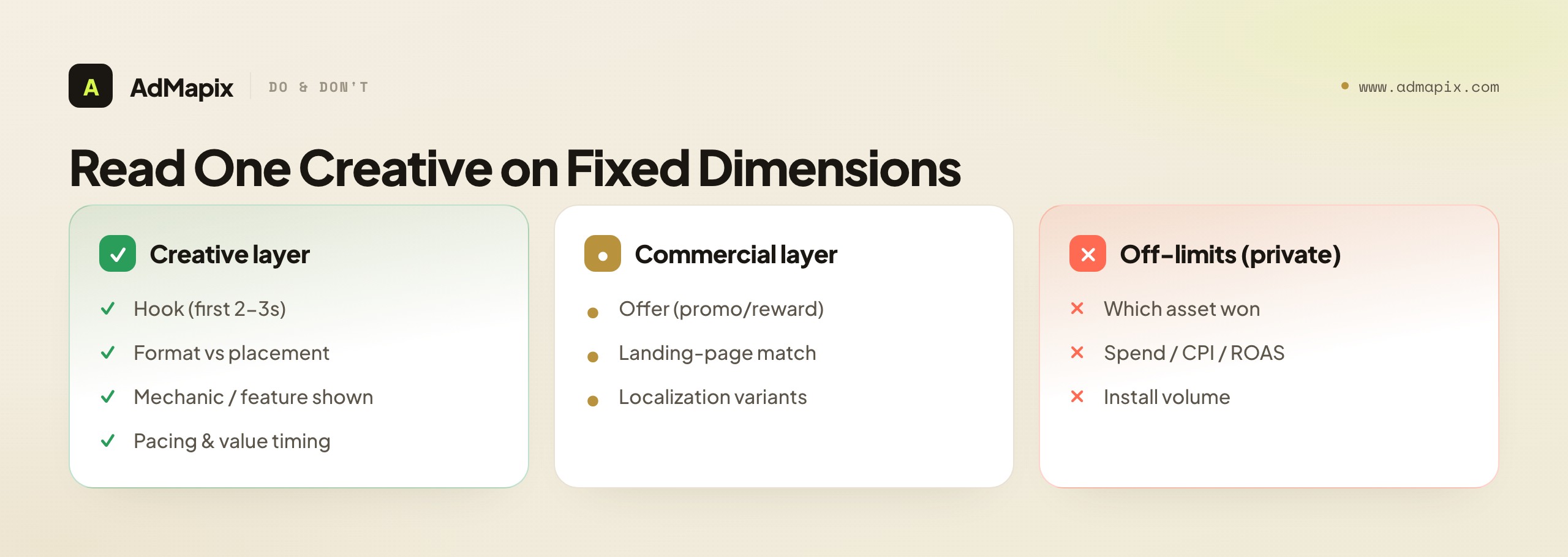
| Dimension | What to check | Strong signal | What to do next |
|---|---|---|---|
| Hook | First 2–3 seconds | Tension, surprise, or a clear loss state | Storyboard a variant on your own product |
| Format | Video / playable / static | Matches the network where it ran | Match production to placement |
| Mechanic | What gameplay or feature is shown | The actual core loop, not a fake one | Decide whether your real loop can carry it |
| Offer | Promo, reward, trial | Specific and time-bound | Test offer framing, not just creative |
| Pacing | Cut speed, value delivery timing | Front-loaded value, fast cuts | Match editing rhythm to the network norm |
| Landing match | Store page or LP consistency | Ad promise matches the destination | Flag mismatches as a conversion risk |
The discipline is to run every saved ad through the same grid. Over a few weeks you'll have a structured library where you can query "every fail-state hook in puzzle UA" or "every UGC testimonial for fintech" — which is exactly what turns research into a repeatable creative pipeline instead of a one-time inspiration hunt.
Researching Networks With No Public Library
Because Unity, AppLovin, ironSource, Mintegral, and Moloco expose no public archive, you need methods beyond "search the library." Here are the three that actually work, in order of scalability.
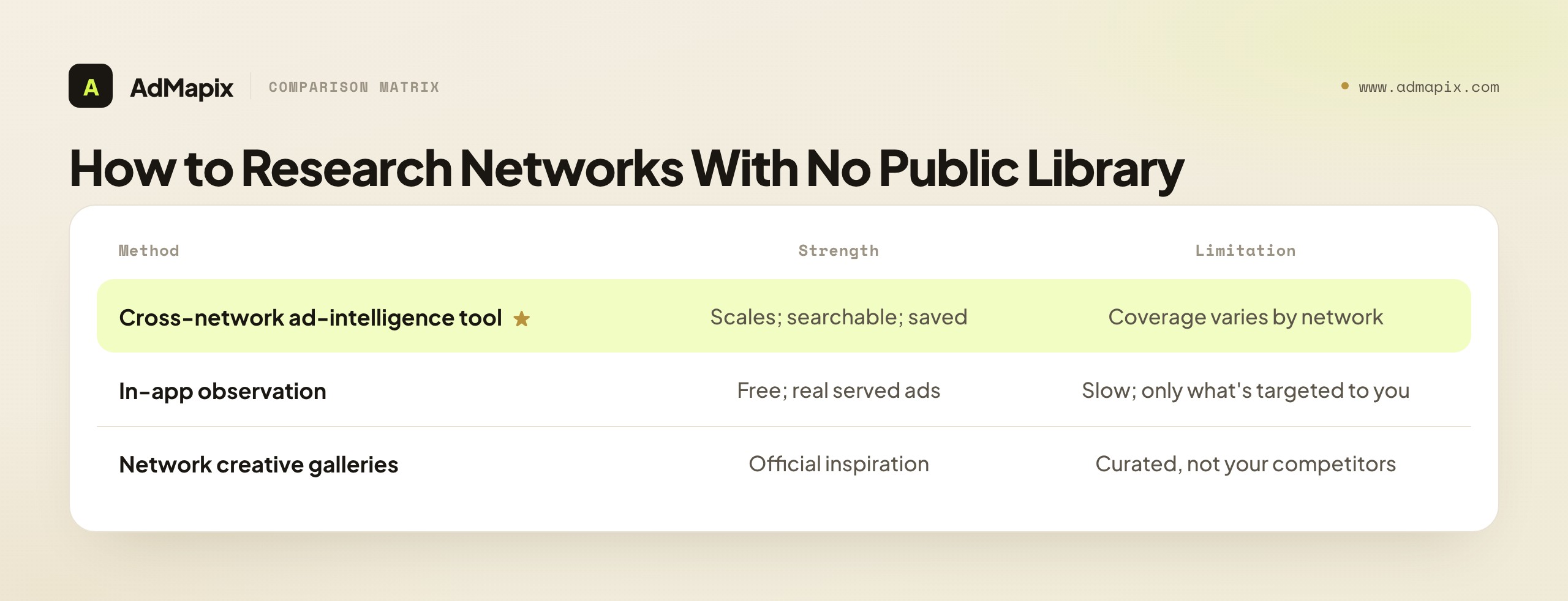
| Method | How it works | Strength | Limitation |
|---|---|---|---|
| Cross-network ad-intelligence tool | A vendor aggregates creatives from many networks into one searchable database | Scales; searchable; saved evidence | Coverage varies by network and region |
| In-app observation | Use apps in your category and screenshot the competitor ads served to you | Free; shows real served creatives | Slow, unsystematic, you only see what's targeted to you |
| Network creative galleries | Some networks publish curated "top creative" showcases | Official, free inspiration | Curated, not comprehensive; not your competitors specifically |
In-app observation deserves a note because it's the free fallback every UA manager should use occasionally: install a handful of competing and adjacent apps, use them, and screenshot the ads served in the rewarded and interstitial slots. You'll see real creatives running on the exact networks (Unity, AppLovin) that no library covers. The catch is that you only see what the network targets to you, so it's a sample, not a census — and it's far too slow to be your primary method. Use it to spot-check what a tool shows you, not to replace systematic research.
The scalable answer for any team researching app networks regularly is a tool that has done the aggregation work. That's the structural reason ad-intelligence platforms exist for app UA: they turn networks with no public library into a searchable creative surface.
Why Creative Is the Targeting in 2026
To understand why app ad spying is worth the effort, you have to understand what changed in how app ads are bought. A decade ago, UA managers won by out-targeting competitors — better audience segments, smarter lookalikes, sharper exclusions. That lever is mostly gone. Today the dominant app networks — AppLovin AXON, Google App campaigns, Meta Advantage+ App campaigns, Moloco's ML engine — run on broad-targeting AI that finds your users from your creative and conversion signals. You no longer pick the audience; you feed the algorithm creative, and it finds the people that creative converts.
The consequence is profound for competitor research: creative is now the primary lever of differentiation, and creative is the one thing a spy tool can actually see. When everyone's targeting is "let the AI decide," the difference between a winning and losing campaign is overwhelmingly the ad itself — the hook, the format, the offer, the pacing. Industry estimates consistently put the majority of app UA performance variance on the creative, not the bid or the audience setup. That means studying competitor creative isn't a nice-to-have; it's research into the single biggest determinant of UA success.
This also explains why "I can't see their targeting" matters far less than it used to. There's little targeting to see — the algorithm handles it. What's worth seeing is the creative, and that's exactly what's visible. A team that systematically studies the creative market is researching the part of UA that actually decides outcomes, while a team obsessing over invisible audience settings is chasing a lever that barely exists anymore.
| Era | The winning lever | What competitor research targeted |
|---|---|---|
| ~2015–2019 | Audience targeting + bid tuning | Targeting setups, audience overlap |
| 2026 (AI networks) | Creative + offer + conversion signals | Competitor creative structure and angles |
The practical takeaway: don't lament that a spy tool can't reveal spend or targeting. In 2026, the creative it does reveal is the more valuable intelligence — because creative is where campaigns are now won and lost.
Playable Ads: The Format Worth Studying Closely
For app and game UA, the playable ad — a short interactive demo a user can tap before installing — is one of the highest-performing and most-studied formats, and it deserves its own research lens. Unlike a video, a playable's effectiveness lives in its interaction design, which a screenshot can't capture. When you study a competitor's playable, work through these layers:
- The first interaction. What does the playable ask the user to do in the first two seconds — tap, swipe, drag? The best playables get a finger on the screen immediately, because a user who interacts is far more likely to install than one who passively watches.
- The tutorial framing. Does it teach the real core loop, or a simplified (sometimes fake) version? "Fake" playables that show a mechanic the app doesn't have win installs but tank retention — a pattern worth noting as a what-not-to-do as much as a what-works. (See fake mobile game ads for why deceptive mechanics are a long-term loss.)
- The friction-to-reward ratio. How many taps until the user gets a satisfying payoff? Winning playables front-load the dopamine — a near-win, a satisfying merge, a level clear — within the first few seconds.
- The end card and CTA. Where does the playable hand off to the store, and what does the end card promise? The transition from "I'm playing" to "install" is where many playables leak.
The hard part is that playables are even harder to "save" than videos — they're interactive HTML5, not a file you can right-click. This is where a tool that captures and lets you replay competitor playables is genuinely differentiated, because in-app observation of a playable is fleeting (you see it once, in one app, and it's gone). When you do study one, record the interaction flow in writing — first action, tutorial type, reward timing, end-card promise — so the analysis survives even though the playable itself doesn't.
For most app categories that run playables (casual and hybrid-casual games, some utilities and ecommerce), the playable is where the biggest creative wins hide, precisely because it's the hardest format to research casually. The teams that study competitor playables systematically have an edge over those who only watch videos.
In-App Observation: A Field SOP
When a tool's coverage is thin for a specific network or region, in-app observation is the free fallback — and done deliberately, it's more useful than most UA managers realize. Here's a repeatable SOP that turns "I saw a competitor ad once" into systematic field research.
- Build an observation device. Use a secondary phone (or a clean profile) with a fresh advertising ID, and install 8–12 apps spanning your direct competitors, category leaders, and a couple of adjacent categories. A fresh ad ID matters: the networks haven't profiled it yet, so early on you'll see broader, less-personalized creative.
- Trigger the rewarded and interstitial slots. Play the apps to the point where they serve ads — finish a level, hit a paywall, exhaust free lives. Rewarded video and interstitials on Unity, AppLovin, and ironSource are exactly the placements no public library covers, so this is where you see what tools may miss.
- Capture immediately and with context. Screen-record (so you keep motion and sound) the moment an ad serves, then log the app it appeared in, the advertiser, the format, the hook, and the date. The ad is gone the moment you tap past it, so capture in the moment — there's no "go back."
- Rotate and repeat. Use the device a few times a week. Over a month the served creative shifts as the networks learn the device, and you'll accumulate a sample of real, in-the-wild creatives on the no-library networks.
The honest limits: you only see what's targeted to your device, so it's a biased sample, not a census; it's slow; and you can't search it. Use in-app observation to spot-check and supplement a tool — confirming the tool's coverage is real, catching network-specific creative a tool may under-index, and getting a feel for what's actually serving in your category. It's a complement to systematic research, never a replacement for it. But every UA manager should run an observation device occasionally; it keeps you honest about what's really running on the networks no library will ever show you.
What Public Data Can and Cannot Prove
Visible creative is evidence of activity, never evidence of performance. A spy tool can confirm that an ad exists and ran somewhere; it cannot confirm spend, impressions, install volume, retention, or ROAS, because those figures live inside the advertiser's own dashboards.
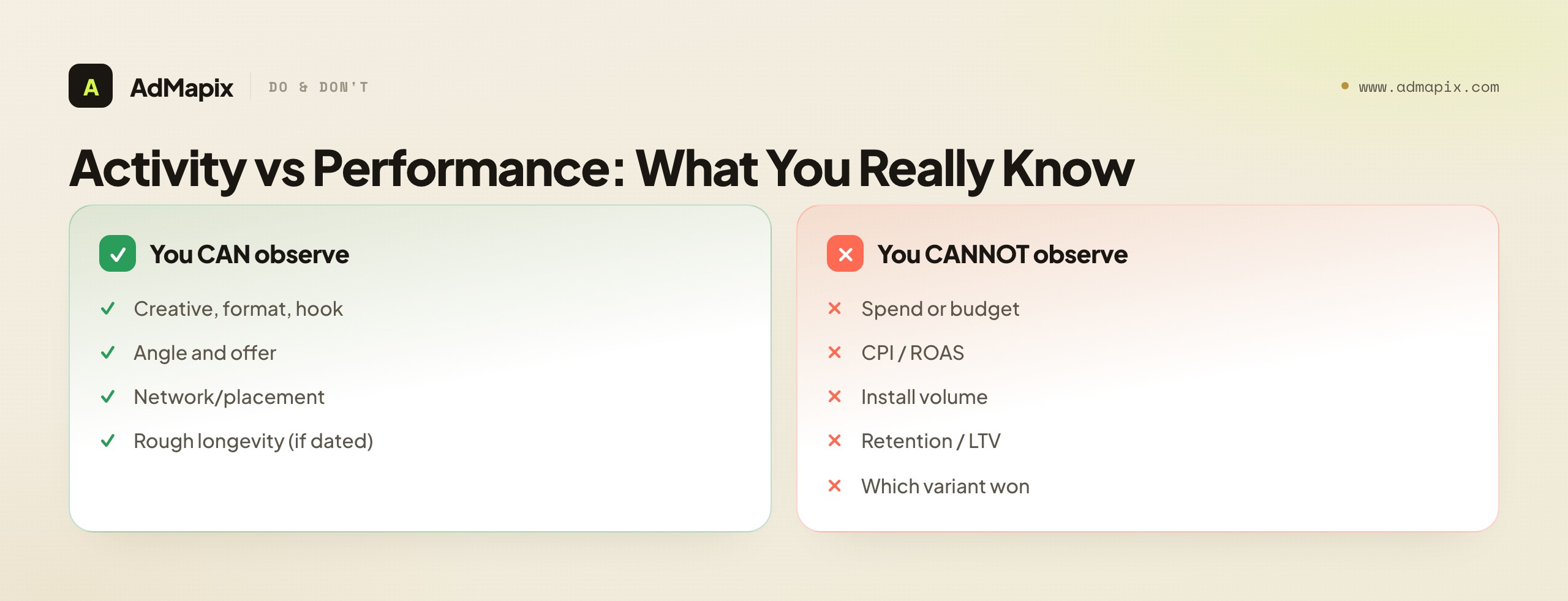
| You CAN observe | You CANNOT observe |
|---|---|
| The creative, format, and hook | Exact ad spend or budget |
| The angle and offer shown | Conversion rate, CPI, or ROAS |
| The network/placement it appeared on | Install volume or impressions |
| Rough longevity (where dated) | Retention or LTV of acquired users |
| Localization and variant spread | Which variant actually won |
Long-running ads are a softer signal worth noting, but even "it's been live a while" is not proof of profitability — and for app networks it's a weaker signal than for Facebook, because libraries rarely timestamp every variant and rewarded placements can run neglected creative for a long time. The honest move is to label every spy-tool finding as a hypothesis and reserve words like "winner," "scaling," or "profitable" for things your own test data shows. The competitor's ad generates the idea; only your campaign confirms it. For the deeper version of this discipline, see paid ads competitor research.
Mobile App Ad Spy Tools, Compared
Tools in this space split by what they're built around. There's no universal best — the right one depends on your networks, vertical, and whether you need analysis and reporting or just discovery.
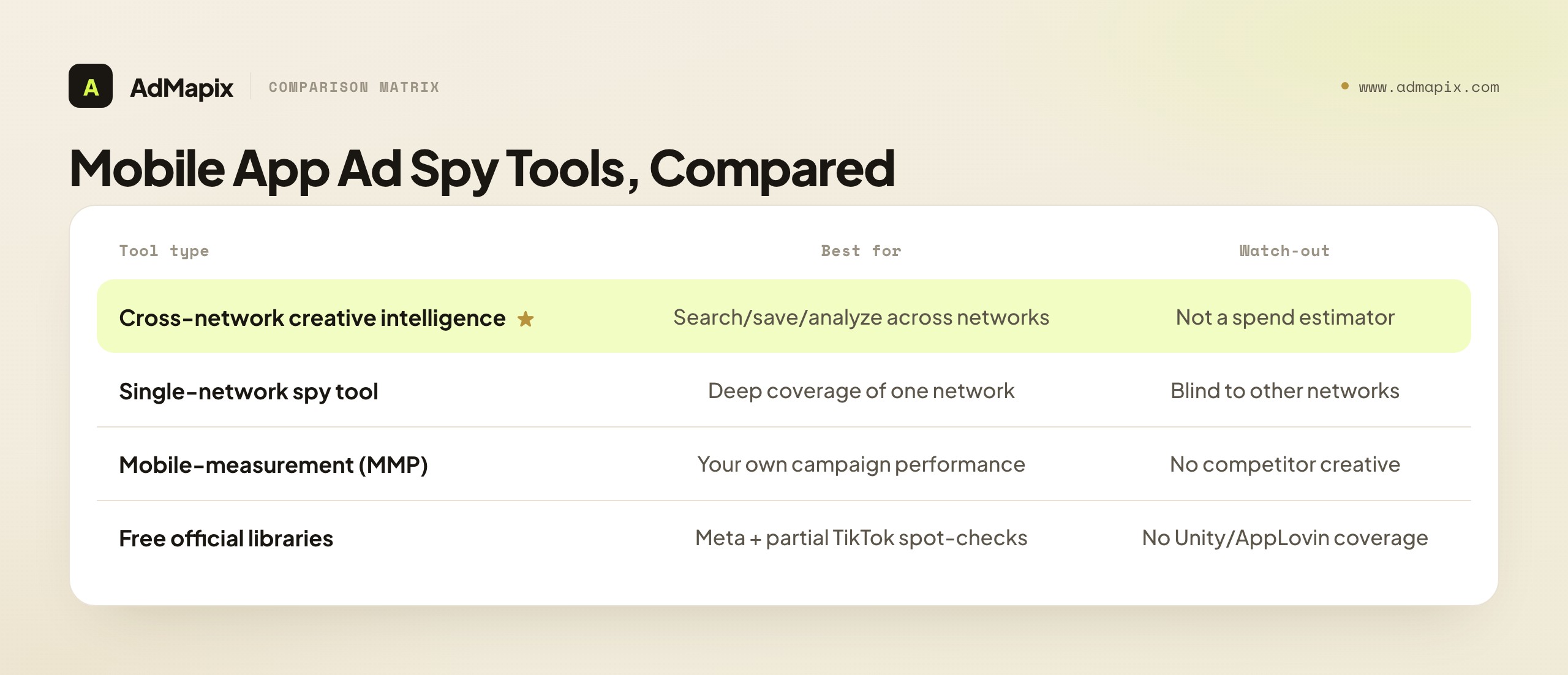
| Tool type | Best for | Watch-out |
|---|---|---|
| Cross-network creative intelligence (e.g., AdMapix) | Searching, saving, analyzing & reporting app ads across many networks | Not a spend estimator — by design |
| Single-network spy tools | Deep coverage of one network (e.g., a TikTok-first tool) | Blind to the other networks your competitors use |
| Mobile-measurement / UA platforms | First-party performance data on your own campaigns | Don't show competitor creative |
| Free official surfaces (Meta Library, TikTok Creative Center) | Spot-checks on the two networks that expose ads | No coverage of Unity/AppLovin/ironSource |
The decision framework: if your competitors advertise across several networks (almost all app advertisers do), a single-network tool leaves blind spots, and the free libraries cover only Meta and partial TikTok. A cross-network tool is the only option that sees the whole creative picture — but judge any tool on its coverage of your specific networks and region in a trial, because aggregation depth varies enormously. For the full landscape, see best ad spy tools 2026 and marketing intelligence tools.
A Worked Example: From Screenshot Folder to Test Backlog
Here's the whole workflow on a real decision. A puzzle-game UA manager has plateaued: her creatives are fatiguing and CPI is climbing, and her "research" is a Slack channel full of competitor ad screenshots nobody acts on.
Define + search. She locks the set: puzzle games, US market, hybrid-casual monetization, video + playable formats. Instead of browsing one rival at a time, she pulls examples across networks for the whole set, so she's looking at formats, not advertisers.
Capture + classify. For each of ~25 saved creatives she logs format, hook, mechanic, offer, network, and date. Clustering by hook type, a pattern jumps out: seven of her top competitors open on a loss state — the player about to fail a level — in the first two seconds, then cut to the "satisfying" solve. Her own ads open on polished gameplay and a logo. That convergence across seven advertisers is a strong signal, not an anecdote.
Ship the brief. She writes a test: "Open on the loss state (almost-failed level) in seconds 0–2, cut to the satisfying solve by second 4, no logo until the end." She storyboards three variants on her own levels — adapting the structure, not copying the footage — and ships them against her control.
Validate. Two of the three loss-state variants beat her control on CPI and hook rate. She scales them and adds "loss-state opening" to her permanent creative-testing rotation. The competitor ads didn't tell her what to copy — they revealed a proven structure her category had converged on, and her own test confirmed it worked for her game.
The lesson: the screenshot folder was worthless until it became a classified pattern and then a briefed test. The spy tool found the convergence; her data confirmed the win.
A Repeatable Weekly Research Loop
Competitor app ad research compounds as a habit, not a one-time sweep. Here's a lightweight weekly loop that takes under an hour and builds a real asset over time.
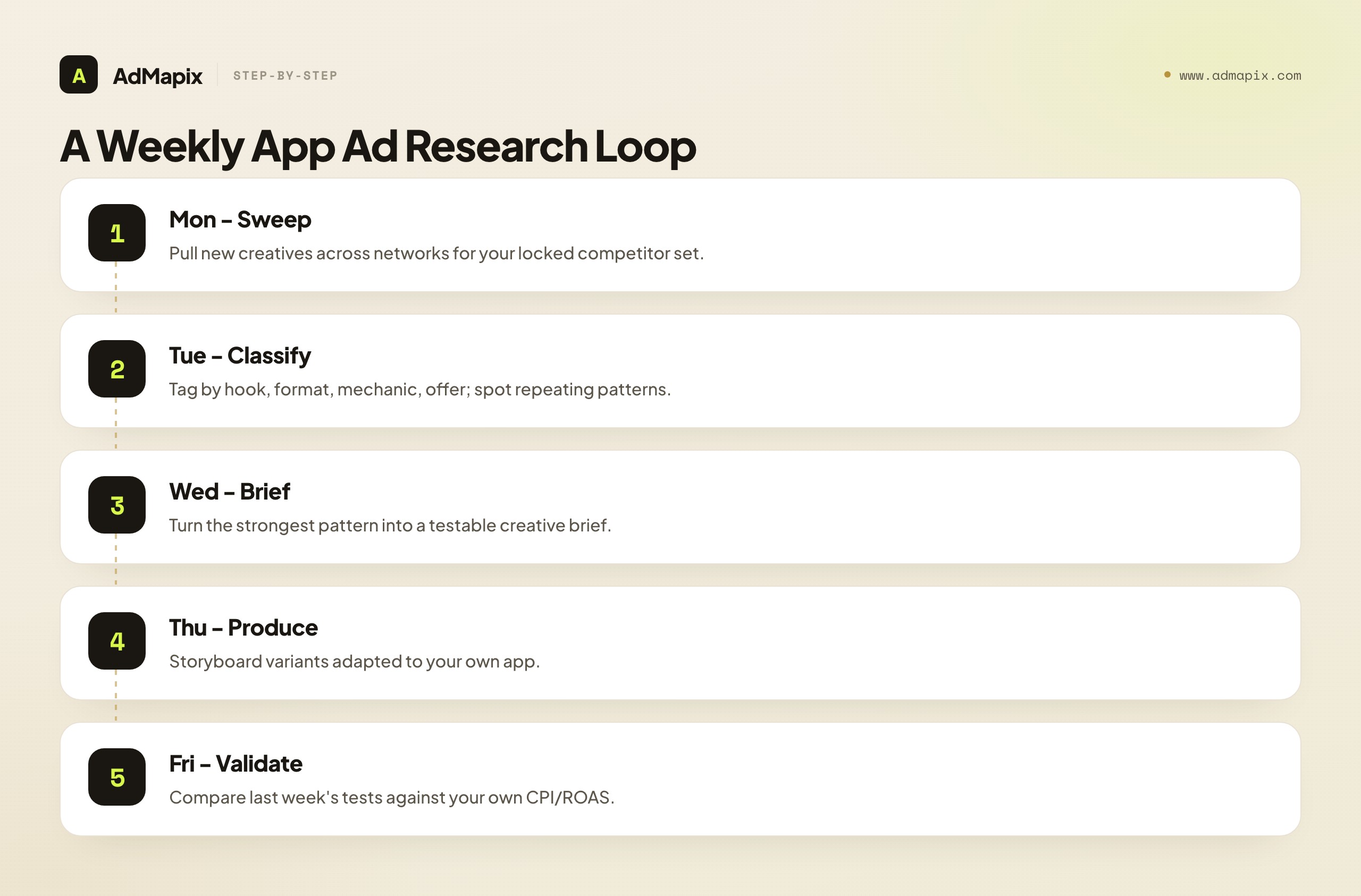
| Day / step | Action | Output |
|---|---|---|
| Monday — sweep | Pull new creatives across networks for your locked competitor set | Fresh examples with context |
| Tuesday — classify | Tag by hook, format, mechanic, offer; spot repeating patterns | Updated pattern library |
| Wednesday — brief | Turn the strongest pattern into a testable creative brief | A ready-to-produce concept |
| Thursday — produce | Storyboard/produce variants adapted to your own app | Test-ready creatives |
| Friday — validate | Compare last week's tests against your own CPI/ROAS | Promote, kill, or iterate |
Three rules keep it honest: capture context every time (app networks give you nothing automatically); log the pattern, not just the ad (a tagged convergence is reusable, a screenshot isn't); and always end on your own data (the spy tool generates hypotheses; your CPI confirms them). A team running this loop for a quarter builds a searchable history of what ran in their category and what converted — an asset no single insight matches. For the cross-platform version, see how to spy on competitors' ads in 2026.
How Research Differs by App Category
The workflow is universal, but the emphasis shifts by vertical, because what a creative must prove differs between a game and a subscription utility. Pointing your research at the wrong dimension wastes cycles.
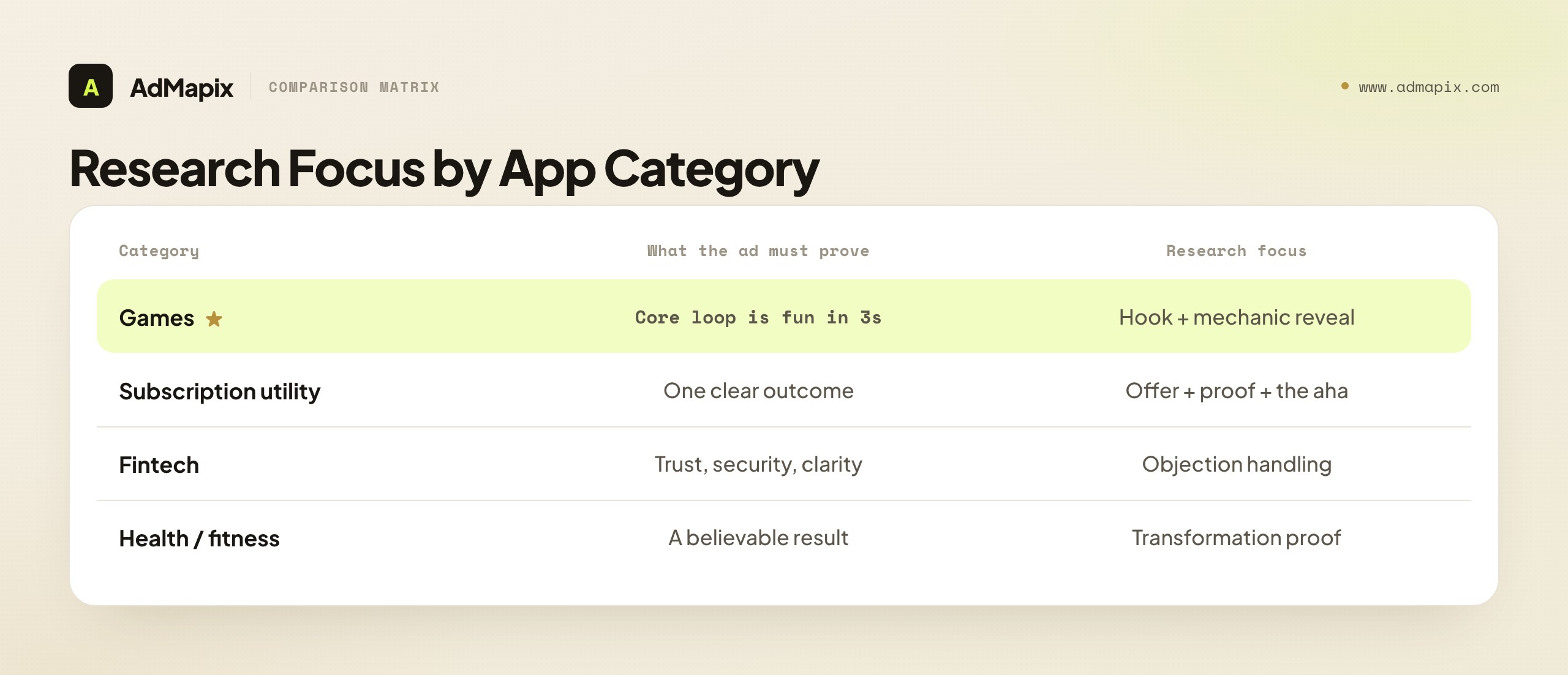
| App category | What the ad must prove | Dominant format | Research focus |
|---|---|---|---|
| Games (casual/mid-core) | The core loop is fun in 3 seconds | Video + playable | Hook + mechanic reveal; see our mobile game ad spy guide |
| Subscription utilities | One clear outcome / transformation | UGC video + value framing | Offer + proof + the "aha" |
| Fintech | Trust, security, clarity | UGC testimonial + demo | Objection handling, proof type |
| Ecommerce / shopping | The product in use, the deal | UGC + product demo | Offer framing + social proof |
| Health / fitness | A believable, specific result | Before/after video | Transformation proof, method |
| Social / dating | Real people, real activity | UGC + lifestyle | Authenticity, social proof |
Two rules cut across categories. First, games live on the hook and the mechanic reveal — the first seconds and whether the real loop can carry the promise — which is why games deserve their own dedicated research approach. Second, utility and subscription apps live on the offer and the proof — a single clear outcome and a believable reason to trust it. Match your research focus to your category's deciding dimension, and don't copy a casual-game fail-bait hook into a fintech app where trust, not tension, drives the install.
Network-Specific Creative Norms
A creative that wins on TikTok can flop on AppLovin, because each network has placement norms its audience expects. When you study a competitor ad, note which network it ran on and read it against that network's conventions — copying a format across networks without adapting it is a common, expensive mistake.
| Network / surface | Dominant creative norm | What to study | Adaptation note |
|---|---|---|---|
| Meta (Feed/Reels) | UGC-style, sound-on, native to the feed | Hook in 0–2s, creator authenticity | Polished "TV ad" creative underperforms here |
| TikTok | Fast, sound-first, trend-aware, raw | The trend or sound being borrowed | Over-produced ads read as ads and get skipped |
| Unity / AppLovin (rewarded) | Gameplay-forward, fast value, playable-friendly | Mechanic reveal, near-win, reward framing | The user opted in for a reward — earn the install fast |
| ironSource (interstitial) | High-impact, immediate hook | First-frame stop power | The user wants to dismiss it — hook instantly |
| Google App campaigns | Asset-driven, the network assembles combos | Individual asset strength (text/image/video) | You supply assets; the system mixes them |
| Mintegral / Moloco | Performance-tuned, often playable + video | Format mix, ML-friendly variants | Volume and variant breadth matter |
The pattern: rewarded and interstitial placements (Unity, AppLovin, ironSource) reward gameplay-forward, fast-value creative, because the user is mid-session and either opted in for a reward or wants to dismiss the ad. Feed placements (Meta, TikTok) reward native, UGC-style, sound-first creative, because the user is scrolling and the ad has to not feel like an ad. When you find a winning competitor creative, the first question is "which network?" — because the answer determines whether the pattern transfers to your placements or needs reworking. A fail-state gameplay hook from an AppLovin rewarded slot may need a completely different opening to survive a TikTok feed.
This is also a reason cross-network research beats single-network research: seeing how the same competitor adapts one core idea across networks — a polished version for Meta, a raw cut for TikTok, a gameplay-forward edit for AppLovin — teaches you how to localize your own winning concept across placements, instead of running one creative everywhere and wondering why it only works in one slot.
Turning Research Into a Creative Production Pipeline
The final step most teams skip is connecting research to production — building a repeatable bridge from "we found a pattern" to "we shipped and tested a variant." Without it, even great research dead-ends in a document. Here's how the strongest app teams close the loop.
Maintain a living pattern library, not a one-time report. Every weekly sweep adds tagged creatives to a searchable library organized by hook type, format, and category. Over a quarter this becomes the single most valuable creative asset the team owns — a queryable record of what's converged in your category, far more useful than any one-off competitor audit. When a new creative cycle starts, the brief comes from the library, not from a blank page.
Translate patterns into a standing test backlog. Each strong, repeated pattern becomes a backlog item with a written hypothesis, a target metric, and a kill condition — before production. "Loss-state opening lifts hook rate for puzzle UA" is a backlog item; "competitors are doing loss-state stuff" is not. This keeps production pointed at evidence-backed bets instead of whatever the team finds visually exciting that week.
Brief the structure, not the asset. Production should adapt the competitor's structure (hook type, pacing, offer frame) to your own product and footage — never reuse the competitor's clip, which is both a legal risk and a creative dead end. The reusable intelligence is "open on tension, reveal the loop by second 4, reward frame at the end," applied to your app's real mechanic.
Close the loop with first-party data. The pipeline only works if shipped tests feed results back: which adapted patterns beat your control on CPI and ROAS, which didn't, and what that teaches you about the next brief. The spy tool generates the hypothesis; your campaign data is the only judge of the win — and that judgment, logged over time, makes each subsequent research cycle sharper. For the broader competitor-to-test discipline, see paid ads competitor research.
This production bridge is what separates teams that research competitors from teams that out-execute them. Anyone can collect screenshots; the edge comes from a standing pipeline that turns convergent patterns into shipped, validated creative faster than the competition.
Small teams and solo developers often assume this pipeline requires an agency-sized roster — it doesn't. The minimum viable version is one person spending an hour a week: a 30-minute sweep, 15 minutes of tagging, and 15 minutes turning the strongest pattern into a one-paragraph brief. Production can be a single adapted variant shot on a phone or assembled from existing app footage. The discipline matters far more than the headcount — a solo developer who runs this loop consistently for three months will out-iterate a funded competitor whose "research" is an occasional screenshot binge. What scales the pipeline up is not complexity but consistency: the same loop, run every week, compounding into a pattern library and a test history that gets sharper each cycle. Start small, never skip a week, and let the library do the heavy lifting over time. The teams that win at app UA in 2026 aren't the ones with the most creatives or the biggest budgets — they're the ones who turn competitor creative into validated tests fastest, and that's a habit, not a budget line. A useful way to enforce the habit is to put the weekly sweep on the calendar like any other standing meeting, with a named owner and a single deliverable — one new briefed test per week. That cadence is modest enough that even a one-person team can sustain it indefinitely, and over a year it produces fifty evidence-backed creative tests, which is more disciplined iteration than most well-funded competitors manage. Consistency, not capacity, is the moat.
How to Know Your Research Is Working
Competitor ad research can quietly become busywork — a weekly ritual that feels productive but never moves a metric. Guard against that by measuring the research itself, not just the campaigns it feeds. A research practice is working when it produces these outputs on a predictable cadence, and drifting when it doesn't.
| Signal your research is working | Signal it's drifting into busywork |
|---|---|
| Every sweep ends with at least one briefed test | Sweeps end with a fuller folder and no brief |
| Your test backlog is fed by convergent patterns | Tests come from whatever looked exciting that week |
| Win rate of competitor-informed tests beats baseline | No measurable lift from "research-driven" creative |
| The pattern library answers real briefing questions | The library is a graveyard nobody queries |
| You catch rising angles before they saturate | You arrive at every angle late, after it's everywhere |
The single most important metric is the win rate of research-informed tests versus your blind tests. If creatives briefed from convergent competitor patterns beat the ones you ship on intuition, the research is paying for itself; if they don't, something in the chain is broken — usually either the patterns aren't truly convergent (you're acting on anecdotes) or the briefs copy the surface instead of adapting the structure to your own product. Track that comparison over a quarter and you'll know with evidence, not faith, whether the practice deserves the hour a week.
A second, softer signal is time-to-brief. When you start, turning a sweep into a testable brief might take an afternoon of staring at screenshots. With a maturing pattern library and a tagging discipline, it should drop to minutes — because the brief increasingly writes itself from the tagged convergences you've already logged. If time-to-brief is rising instead of falling, your capture discipline has slipped: the evidence is going in untagged, so every brief restarts from scratch. The whole point of the system is that it gets faster and sharper the longer you run it; if it's getting slower, fix the capture step before adding more research volume.
Common Mistakes
- Copying creative without the context. A fail-bait hook that wins in casual puzzle UA can flop in fintech. Match the genre and region, not just the format.
- Treating visible ads as performance proof. Seeing an ad doesn't tell you spend, install volume, or ROAS. Don't budget against assumptions.
- Assuming "no library" means "can't research." Unity and AppLovin have no public archive, but cross-network tools and in-app observation still surface their creative. The library isn't the only road.
- Ignoring video structure. For mobile UA the first seconds, the mechanic reveal, the pacing, and the reward frame carry the result — not the static thumbnail.
- Saving screenshots without metadata. No URL, no date, no app, no reason-for-saving means the evidence is unusable in a month — and on app networks, nothing fills that gap automatically.
- Stopping at research. A folder of inspiration that never becomes a brief or test item produces zero growth.
- Mixing incompatible categories in one sweep. Comparing a puzzle game's rewarded video to a fintech UGC testimonial produces noise, not patterns.
How AdMapix Fits Mobile App Ad Research
AdMapix is a fit when competitor creative research becomes a recurring job rather than a one-off look — and especially when your competitors advertise on networks with no public library. It does cross-network ad creative search, keeps saved examples searchable as Media, breaks down ads in Video Analysis, supports tagging so you can build pattern libraries, and rolls findings into Reports. Start a sweep in Search, save the strongest examples, then summarize patterns in a report your team can act on; compare workflow access on Pricing, and create an account from Login when the work starts replacing manual screenshots.
It's the right tool for app growth, UA, ASO, and creative teams that need structured, dated creative evidence across networks. It is not the right tool if you're hoping to read competitor spend, budgets, or exact ROAS — those numbers aren't in any public app ad data, and AdMapix doesn't invent them. We're honest about that boundary because a tool that pretended to know competitor spend would be lying to you.
FAQ
What is a mobile app ad spy tool?
A mobile app ad spy tool is software that surfaces the ad creatives competitors are running across ad networks, so you can study their formats, hooks, offers, and video structure. It exposes the creative surface of a campaign — not the underlying media plan, spend, or performance results. Its main job is to make competitor creative searchable and savable across networks that mostly have no public ad library of their own.
How do I spy on app ads if the network has no public library?
Most app networks — Unity, AppLovin, ironSource, Mintegral, Moloco — have no public archive, so you can't "just search the library." Two methods work: a cross-network ad-intelligence tool that has aggregated creatives from those networks into one searchable database, and in-app observation (use apps in your category and screenshot the competitor ads served to you in rewarded/interstitial slots). The tool scales; in-app observation is a free spot-check but slow and only shows what's targeted to you.
Can I tell how much a competitor spends from a spy tool?
No. Spend, budget allocation, install volume, and ROAS live inside the advertiser's own dashboards and ad accounts. A spy tool can show that an ad ran and roughly how long it's been live (where dated), but treat any spend or performance claim as an estimate at best, not a fact — and for app networks even longevity is a weaker signal than on Facebook.
Is seeing a competitor's ad enough to copy it?
No. A visible ad is a hypothesis, not a proven winner. Use it to design a test that fits your own app category, region, monetization model, and core loop, then let your campaign data decide whether the angle works. Copying the footage is also a legal risk; the durable play is adapting the structure to your own product.
What should I save for each creative?
Save the asset, the format, the opening hook, the mechanic or proof shown, the app category, the network, the store or landing-page signal, the source URL, and the date. Metadata is what turns a screenshot into reusable evidence and lets you find patterns later — and it matters even more on app networks, which give you almost no context automatically.
Which networks should I research for mobile app UA?
It depends on where your competitors and your audience are, but for most app advertisers the set is Meta, TikTok, Google App campaigns, and the major in-app networks — Unity, AppLovin, ironSource, Mintegral, and Moloco. Meta has a full public library and TikTok a partial one; the in-app networks have none, which is exactly why a cross-network tool or in-app observation is necessary to see the full picture.
How is a mobile app ad spy tool different from a mobile-measurement partner (MMP)?
They solve opposite problems. An MMP (like Adjust or AppsFlyer) measures your own campaign performance — installs, attribution, retention, ROAS — using your first-party data. A spy tool shows competitor creative you can't otherwise see. You need both: the spy tool generates creative hypotheses, and your MMP/analytics confirms which ones actually work for your app.
How often should I research competitor app ads?
A weekly 30–60 minute loop is the sweet spot for most app teams: sweep new creatives, classify patterns, brief a test, and validate last week's results. High-spend UA teams and agencies may go twice weekly; pre-launch founders might do a focused one-time dive on 3–5 top competitors. Match the cadence to how fast you ship new creative.
Can a spy tool show me competitor playables?
Many cross-network tools surface playable ad concepts alongside video and static, since playables are a major app/game format. You can study the interaction, the tutorial framing, and the call-to-action, then adapt the concept. As with video, you can see the creative but not its performance — whether the playable actually beat the competitor's other formats is invisible.
Does AdMapix estimate competitor app spend?
No, and that's deliberate. Competitor spend, budgets, and ROAS aren't present in any public app ad data, so any tool claiming exact figures is guessing. AdMapix focuses on what's real and useful — searchable, dated competitor creative across networks, with video analysis and reporting — and leaves spend to the honest answer: it's private.
Related Reading
- Best ad spy tools 2026 — the full tool landscape
- Spy on ads across all platforms — the cross-network method
- Mobile game ad spy tool — the games-specific deep dive
- Paid ads competitor research — the broader competitor workflow
- How to spy on competitors' ads in 2026 — the cross-platform SOP
- Paid user acquisition — the UA strategy your research feeds
Sources
Official sources checked as of June 21, 2026. Mobile UA products, AI optimization language, creative guidance, and network documentation change often, so verify the current source path before building a recurring workflow.
- Mintegral — describes AI-powered marketing solutions for advertising, monetization, and growth.
- Moloco Ads — positioned as a machine-learning performance ads solution for mobile app marketers.
- Unity user acquisition — focused on reaching high-quality users for mobile app and game growth.
- AppLovin — describes its AXON-powered marketing platform for app growth.
- Meta Ad Library — the one major app-advertising network with a full public ad archive.
Bottom Line
A mobile app ad spy tool earns its place by solving a problem the open web doesn't: most app ad networks — Unity, AppLovin, ironSource, Mintegral, Moloco — have no public library, so competitor creative is invisible without one. Use it to find testable creative angles across those networks, capture every example with format, hook, category, network, and date, group by patterns that repeat across advertisers, and ship a brief — then let your own CPI and ROAS decide what's a winner.
What it can't do is show you spend, budgets, or performance; those are private, and any tool claiming otherwise is guessing. Research to understand, classify to find convergence, brief to test, and validate with your own data. That's how competitor app ad research becomes a creative pipeline instead of a screenshot graveyard — and on networks that will never show you a public library, the discipline of capturing, classifying, and acting on creative is the only durable edge available.
When manual screenshotting across networks stops scaling, start with AdMapix Search, save the strongest creatives to Media, and break them down in Video Analysis — built for exactly this job.
See what competitors are really running
Search 6M+ ad creatives, landing pages, and weekly spend across 200+ countries. No credit card, no commitment.
Related Articles
Ad Hook Examples in 2026: 7 First-3-Second Patterns (with UGC Breakdowns)
A complete 2026 library of ad hook examples organized into seven repeatable patterns — problem, proof, objection, comparison, curiosity, offer, and transformation — with UGC hook breakdowns, platform-by-platform differences for TikTok, Meta, and YouTube, an industry-by-industry hook map, a hook-testing workflow that ships variants, the metrics that actually grade a hook, and a worked teardown that turns a competitor opener into a running test.
Outbrain Ad Spy Tool in 2026: Native Ad Research for the Open Web
How to research Outbrain native ads from public evidence in 2026 — what a spy tool can and cannot prove, how to decode headline-and-thumbnail hooks, advertorial landing paths, retargeting trails, and how to turn patterns into testable native campaigns.
Agency Ad Intelligence Tools in 2026: Turning Competitor Research Into Client Reports
A 2026 guide to ad intelligence for agencies — how to standardize competitor research across a client portfolio, the fixed capture field list and weekly workflow that survive staff turnover, how to structure a recurring client report, white-label and deliverable considerations, using competitor research to win new business and prove retainer value, the cross-client pattern advantage only agencies have, team roles and scaling, packaging research as a billable service, and the public-data.