
App Store Competitor Keyword Ads in 2026: How to Research, Structure, and Bid Them
A complete 2026 guide to App Store competitor keyword ads — what they are, why Apple treats competitor terms as their own campaign, how to decide which rival names are worth bidding on, how to structure an exact-match competitor campaign with CPT and rank discipline, how to build a switcher-focused custom product page, the unit economics and stop-loss rules that keep it profitable, the search evidence to capture first, the honest limits of public data, and where AdMapix fits.
App Store Competitor Keyword Ads in 2026: How to Research, Structure, and Bid Them
By the AdMapix Research Team — Updated June 21, 2026
App Store competitor keyword ads are paid Search Results placements that show your app when someone searches a rival app's brand name on the App Store. Apple treats this as a distinct campaign type and recommends running it in a dedicated competitor campaign with exact-match keywords — because brand-name queries behave very differently from category or discovery terms, and mixing them together hides the economics that decide whether the tactic pays. Bidding on a competitor's name is one of the highest-intent, highest-cost, and most easily mismanaged plays in Apple Search Ads: done with discipline, it intercepts buyers at the exact moment they are choosing a rival; done carelessly, it burns budget on taps from loyal users who were never going to switch. This guide is the complete 2026 playbook for doing it with discipline.
This guide is for ASO managers, app growth leads, and agencies who already run Apple Ads Advanced and want to bid on competitor names without wasting spend on terms that never convert. We will cover why competitor terms deserve their own campaign, how to decide which rival names are actually worth bidding on, how to structure and bid an exact-match competitor campaign with CPT and rank discipline, how to build a custom product page that gives switchers a reason to switch, the unit economics and stop-loss rules that keep the campaign honest, the search evidence to capture before you set a single bid, and the limits of what public data can tell you. The throughline, returned to throughout this guide: competitor keyword ads are a precision instrument, and the difference between profit and waste is structure and discipline, not aggression alone.
TL;DR — App Store Competitor Keyword Ads in One Screen
- Competitor keyword ads place your app on a rival's branded App Store search results page. Apple lists "competitor" as one of its four recommended campaign themes, alongside brand, category, and discovery.
- Isolate them in a dedicated competitor campaign with exact match, so high-intent brand queries are not diluted by broad or category traffic and their economics stay visible.
- Expect a higher max CPT and a lower tap-through rate than your brand campaign, because you are interrupting demand for someone else's product, not capturing your own.
- Only bid on rival names where you are a genuine substitute with a concrete switching reason — price, a missing feature, a platform or regional edge. Bidding a leader's name with no switch angle just pays for loyal users' taps.
- Point the ad at a custom product page built for switchers, not your default screenshots — the first screen must answer "why switch."
- Govern it with a budget ceiling and a CPA stop-loss, reviewed weekly, because competitor TTR and CPA drift as rivals adjust their own bids.
- Capture the search-result evidence first (who already bids, what angle they lead with); AdMapix stores that creative evidence and turns it into a recurring brief, while you run the bidding inside Apple Ads.
Why Competitor Terms Are Their Own Campaign
Competitor terms belong in a separate campaign because their intent, conversion rate, and acceptable CPT are all fundamentally different from your brand and category terms. A user typing a rival's exact app name has already decided what they want — and it is not your app. Your job is to interrupt that decision at the moment of highest intent, which requires aggressive bidding, but also produces lower install rates and higher cost per acquisition than defending your own brand name. Mixing competitor keywords into a category or discovery campaign hides those economics: a strong category term can mask a competitor term that is quietly draining spend, and you will never see the leak until you have wasted real budget on it.

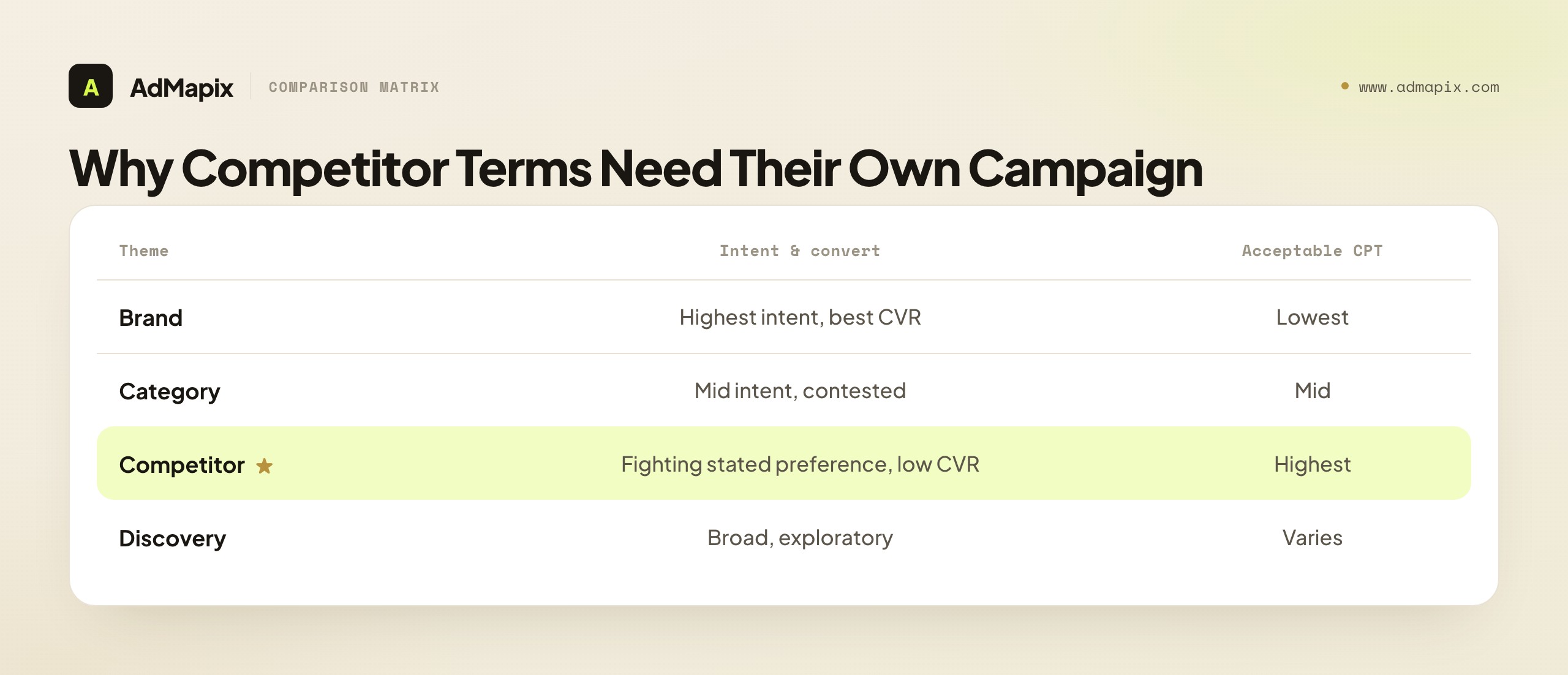
Apple's own campaign-structure guidance recommends four themes: brand, category, competitor, and discovery. Competitor campaigns specifically target apps similar to yours, and Apple suggests exact match with a higher max CPT for them. Keeping them isolated lets you set a distinct budget cap, read clean per-keyword metrics, and pause the whole theme if the math stops working — none of which is possible when competitor terms are buried inside a campaign optimizing for something else.
The deeper reason is that the four themes occupy different points on a single spectrum of intent and cost. Your brand terms are the cheapest and highest-converting (people searching for you are ready to install you). Category terms are mid-intent, more contested, and more expensive. Competitor terms are the most expensive per result and the lowest-converting of the intentional themes, because you are fighting the searcher's stated preference. Discovery is the broadest and most exploratory. Each theme has its own acceptable CPT, its own expected conversion rate, and its own success metric — and the only way to manage four different economic profiles is four different campaigns. Folding competitor terms into another theme is not just untidy; it makes the single most expensive theme invisible, which is exactly the theme you most need to watch.
There is also a reporting-clarity argument that compounds over time. When competitor terms sit in their own campaign, every report Apple gives you — impression share, CPT, CPA, install volume — reads cleanly as "how is our competitor-interception motion performing." You can answer "are competitor terms worth it for us" with a glance, defend the spend (or the decision to cut it) to a stakeholder, and compare the theme's CPA against your other channels honestly. When competitor terms are blended into a category campaign, none of that is possible: the category term's healthier numbers average with the competitor term's worse ones, and the blended figure tells you nothing actionable about either. You end up unable to answer the most basic question — "is bidding on rival names actually working for us" — because the structure destroyed the very metric that would answer it. Clean structure is not bureaucracy; it is the precondition for ever knowing whether the most expensive thing you do in Apple Search Ads is paying off. The five extra minutes it takes to spin up a dedicated campaign pay for themselves the first time you can answer "are competitor terms worth it" with a number instead of a shrug.
Which Competitor Terms Are Worth Bidding On
The single most important decision in this entire tactic comes before any bid: which rival names are worth your money. Bid on competitor terms where a switcher would realistically choose you, and skip terms where you offer no clear reason to switch. Not every rival's name deserves a bid, and the discipline of saying no to most of them is what separates a profitable competitor campaign from an expensive vanity exercise.

The strongest candidates are direct substitutes in the same category, where your app has a concrete advantage — price, a missing feature, a different platform focus, a regional strength — that a switching user actually cares about and can grasp on a results page. Bidding on a category leader's name when you are a niche product usually produces taps and few installs, because the searcher is loyal, or your value proposition simply does not register in the split second they scan the results. You pay for the tap and get nothing for it.
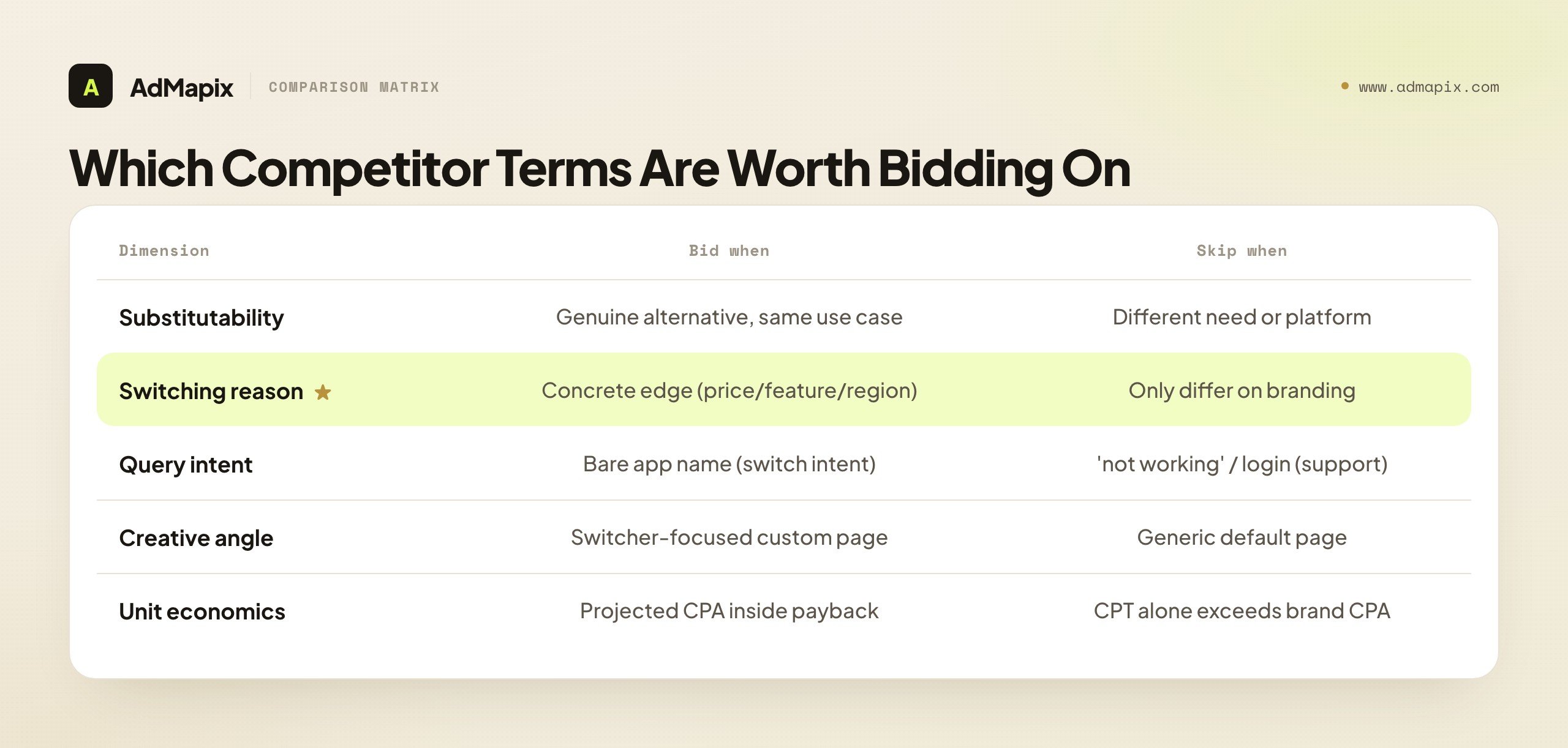
Use this framework to score every competitor term before you add it:
| Dimension | Bid on it when | Skip it when |
|---|---|---|
| Substitutability | Your app is a genuine alternative in the same use case | You serve a different need or platform |
| Switching reason | You have a concrete edge (price, feature, region) | You only differ on branding |
| Query intent | The query is the bare app name (high switch intent) | The query is "<app> not working" or support intent |
| Creative angle | Your custom product page speaks to switchers | You only have a generic default page |
| Unit economics | Projected CPA stays inside your payback target | CPT alone already exceeds your brand CPA |
Score each term across all five dimensions, and a clear shortlist emerges: the rival names where you are a real substitute, with a real switching reason, on high-intent bare-name queries, backed by a switcher-focused page, that pencil out economically. That shortlist — usually far shorter than "every competitor we can think of" — is your competitor campaign. Everything else is a tap you will pay for and an install you will not get. The query-intent row deserves particular care: a search for "RivalApp not working" or "RivalApp login" is support intent, not switch intent, and bidding on it wastes money on frustrated existing users of the rival who are trying to fix a problem, not shop for an alternative.
The hardest discipline here is bidding on the right competitor rather than the biggest one. There is a strong pull toward bidding on the category leader's name — it has the most search volume, so it feels like the biggest opportunity. But volume without substitutability is a trap: the leader's searchers are usually the most loyal (they searched the leader by name for a reason), and if your only differentiation is "we exist too," you pay premium CPTs for taps that bounce. The more profitable move is often to bid on mid-tier rivals where your specific edge is sharpest and the searcher is more genuinely shopping — someone searching a smaller, newer app may be less locked in and more open to a better alternative than someone searching the entrenched leader. Volume is seductive; fit is profitable. Rank your candidate terms by strength of switching reason for that specific rival's users, not by raw search volume, and you will spend on the terms that actually convert rather than the ones that merely look big. The biggest name on your list is frequently the worst term to bid, precisely because everyone makes the volume mistake and bids it up while its loyal searchers refuse to switch.
How to Structure the Competitor Campaign
Structure competitor ads as one campaign per theme, with exact-match keywords, a hard budget cap, and a custom product page aimed at switchers. The structure is not cosmetic — it is what keeps each keyword's economics visible and controllable, which is the entire point of isolating competitor terms in the first place.

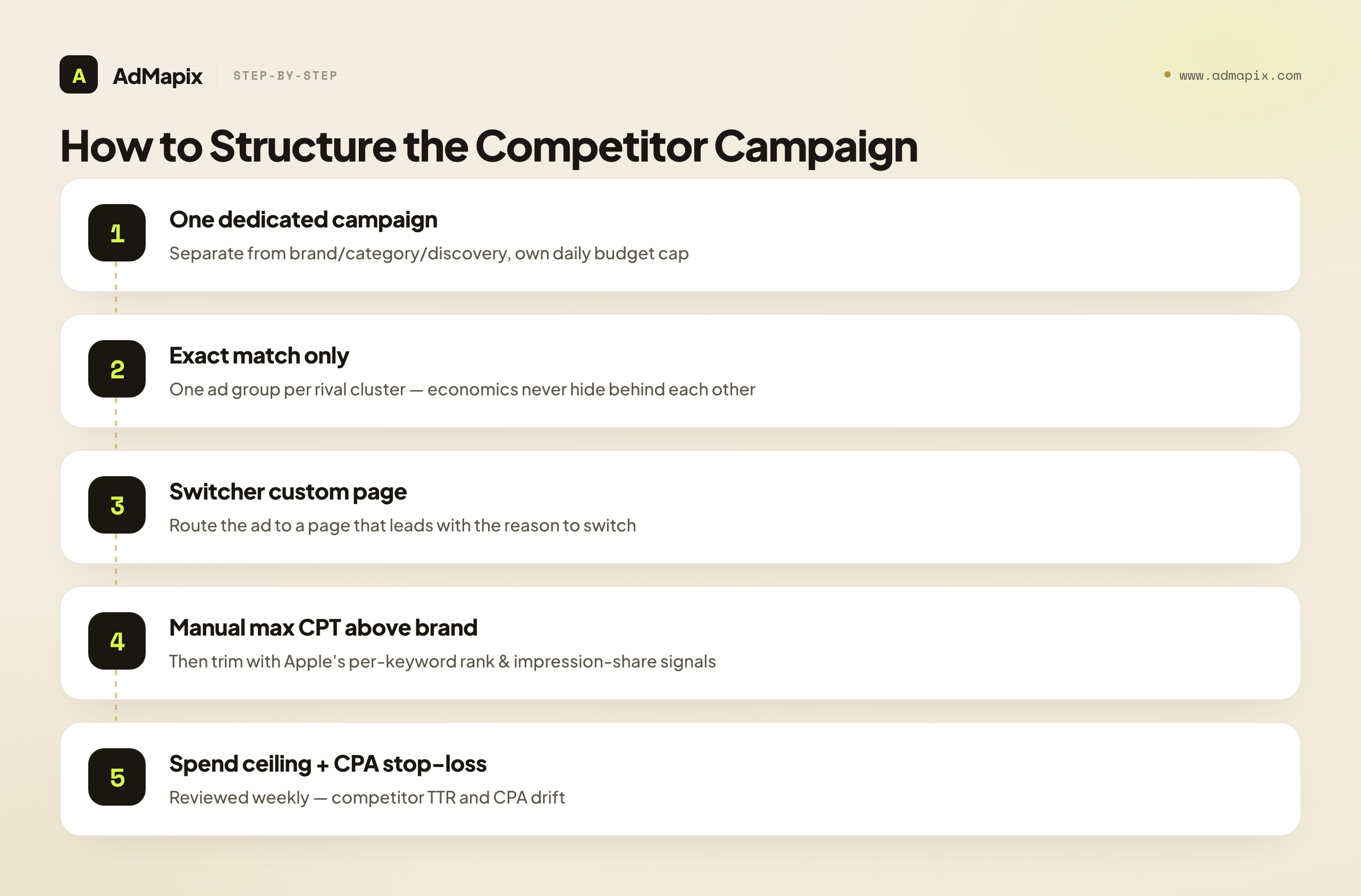
A workable starting structure:
- One competitor campaign, separate from brand, category, and discovery, with its own daily budget cap. This is non-negotiable — it is what makes the theme's economics readable and pausable.
- Exact match only, with one ad group per closely related set of rival names, so a single keyword's economics never hide behind another. Granular ad groups are what let you cut a losing term without touching a winning one.
- A custom product page for switchers — Search Results ads can point to a custom page, so lead with the reason to switch rather than your default screenshots. (More on this below; it is the highest-leverage element.)
- Manual max CPT set above your brand campaign, then trimmed using Apple's per-keyword rank and impression-share signals. Manual bidding gives you the control that automation surrenders.
- A spend ceiling and a CPA stop-loss, reviewed weekly, because competitor TTR and CPA drift as rivals adjust their own bids. The campaign that was profitable last month can quietly turn unprofitable when a rival raises their own defense.
A note on the tier: Apple Ads Advanced is the level that allows keyword choice, max-tap bids, campaign-level spend control, and detailed reports; Apple Ads Basic has no keyword or audience controls, so competitor keyword targeting is only possible on Advanced. Per Apple's solution comparison, this is a hard requirement — if you are on Basic, the tactic in this guide is simply not available to you, and the first step is to move to Advanced.
A word on negative keywords, which round out clean structure. Even within an exact-match competitor campaign, you can use negative keywords to exclude the support-intent variants ("login," "not working," "cancel," "refund") that creep in around a rival's brand name, ensuring your spend stays on genuine switch intent. Negatives are the quiet complement to exact match: exact match concentrates your bid on the bare name, and negatives shave off the adjacent low-intent queries that would otherwise waste budget. Build a small negative list per competitor cluster from the support-intent variants you can anticipate, and refine it as your search-term report reveals which non-converting queries are slipping through. It is a small amount of upkeep that meaningfully tightens the campaign's economics — and another reason competitor terms belong in their own structure where you can manage their negatives independently of your other themes.
The granularity principle runs through all five points: the more finely you separate competitor terms — own campaign, exact match, one ad group per rival cluster — the more precisely you can see and control each term's economics. Coarse structure hides leaks; fine structure exposes them. Since competitor terms are your most expensive and lowest-converting intentional theme, they are exactly the terms that most reward fine-grained control and most punish coarse mixing.
Bidding and CPT Discipline
Bidding a competitor campaign well is a balance: aggressive enough to win the high-intent placement, disciplined enough not to overpay for taps that do not convert. Apple's Search Results ads can use manual bidding or conversion-maximizing bidding; for competitor terms, manual bidding gives you the control to set a higher max CPT per keyword without letting automation chase volume into unprofitable territory.

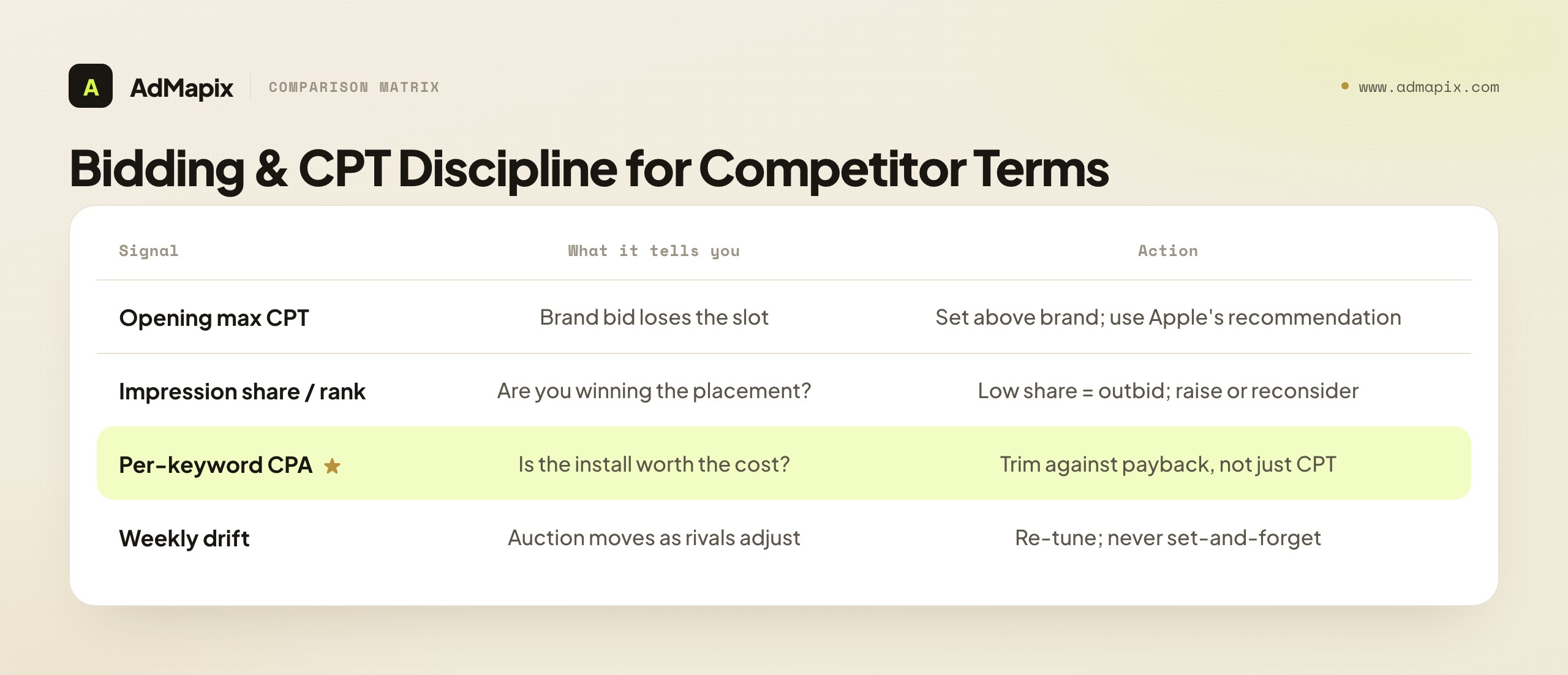
Apple's manual bidding guidance explains that effective manual bids increase the likelihood of appearing in search results, and that bid recommendations surface signals like impression share, rank, popularity, installs, spend, CPA, CPT, impressions, and tap-through rate — so you can tune each keyword against its own performance. Here is how to read and use those signals on a competitor term specifically:
- Set the opening max CPT above your brand campaign's, because competitor terms are more contested and lower-converting; a brand-level bid will simply lose the slot. Apple's recommendation gives you a starting ceiling informed by the live auction.
- Watch impression share and rank to know whether your bid is actually winning the placement. Low impression share on a competitor term you care about means you are being outbid — raise the bid or reconsider whether the term is worth the fight.
- Trim against per-keyword CPA, not just CPT. A high CPT is acceptable if the install converts to a valuable user; the number that matters is cost per acquisition against your payback target, which only your own account reveals.
- Re-tune weekly, because the competitive auction moves. A rival raising their own brand-defense bid changes your cost to intercept overnight, and a static bid set last month may now be either overpaying or losing.
The discipline that keeps this profitable is treating max CPT as a ceiling you set deliberately and a number you revisit, never a "set high and forget" lever. Aggression wins the slot; discipline keeps the slot worth winning. The competitor campaign that fails almost always fails the same way: an aggressive opening bid that nobody revisited, quietly bleeding budget into taps that never converted because the switching angle was weak or the term was wrong in the first place.
A practical sequencing tip for the opening weeks: start slightly more conservative than the auction allows, then raise. It is tempting to open at the maximum recommended bid to "win the slot fast," but on an unproven competitor term that front-loads risk — you pay top dollar before you know whether the term converts for you at all. The lower-risk path is to open at a bid that wins some impression share, watch the early CPA, and raise the bid only once the term shows it can convert profitably. If the early CPA is already ugly at a modest bid, raising it only buys you more expensive failure. This "prove it converts, then scale the bid" sequence treats every new competitor term as a hypothesis to validate cheaply before committing premium spend — the same test-before-scale discipline that governs the whole tactic, applied at the bid level. The exception is a term you have strong prior evidence for (a clean substitute, a proven switcher page, a non-defending rival); there you can open more aggressively. But absent that evidence, prove before you pay up.
Build a Custom Product Page for Switchers
The highest-leverage element in a competitor campaign is not the bid — it is the page the ad points to. Search Results ads can route to a custom product page, and pointing a competitor ad at your default page is one of the most common and costly mistakes in the entire tactic. A switcher needs a reason to switch on the very first screen, and your default onboarding screenshots almost never provide one.

Think about the moment precisely. Someone searched a rival's exact name; they have a specific product in mind; your ad interrupts that intent. In the two seconds they spend on your product page, they are asking one question: "is there a reason to choose this instead?" A generic page showing your features in the abstract does not answer it. A switcher-focused page does — by leading with the concrete edge that earned the bid in the first place.
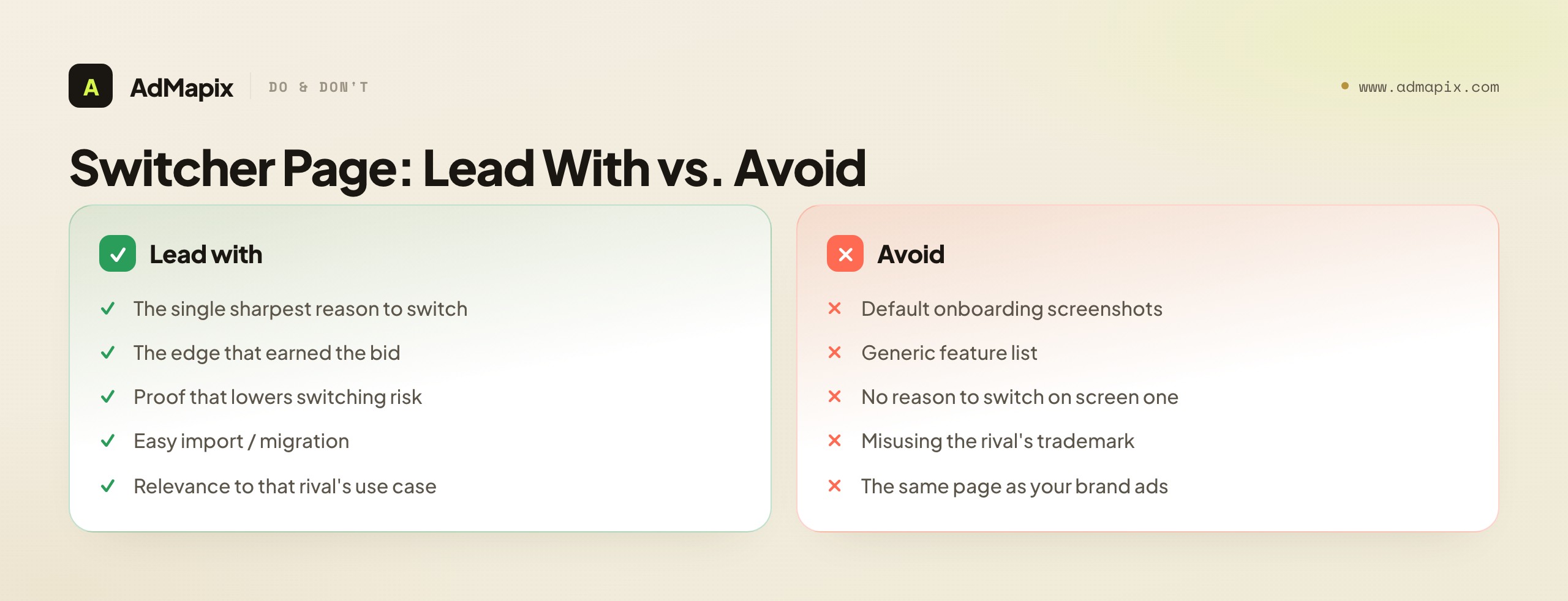
What a switcher page should lead with:
- The single sharpest reason to switch, stated in the first screenshot or the app subtitle — the price advantage, the feature the rival lacks, the platform or regional strength. The reason you bid on this term is the reason the page should headline.
- Proof that lowers switching risk — a rating, a customer count, a migration or import feature that makes leaving the rival painless. Switching cost is the switcher's biggest objection; defuse it early.
- Relevance to the specific rival, where appropriate and within Apple's policies — speak to the use case that rival's users have, without misusing the rival's trademark in misleading ways.
The economics make this worth the effort: a switcher page can dramatically lift the conversion rate of competitor-term taps, which is the lever that most improves a competitor campaign's CPA. You are already paying a premium CPT to win the slot; squandering it on a default page that gives no reason to switch is paying for the hard part and skipping the easy win. Match a custom page to each major competitor cluster, lead with the relevant switching reason, and the same bid suddenly produces far more installs per dollar.
It is worth being precise about why the page matters more on competitor terms than on any other theme. On a brand term, the searcher already wants you, so even a mediocre page converts — they were going to install. On a category term, the searcher is shopping with an open mind, so a decent page does fine. But on a competitor term, the searcher arrived wanting someone else, and your page has the hardest job in your entire account: to reverse a decision in two seconds. That is the page that most needs to be sharp, and yet it is the one teams most often leave as the default, because they put all their energy into the bid and none into the destination. Flip that priority. On competitor terms, the page is doing more persuasive work than the bid is doing acquisition work — the bid only buys you the chance to make the argument; the page makes it. A team that obsesses over its competitor CPT while pointing the ad at generic screenshots has optimized the cheap lever and ignored the expensive one. The order of leverage on a competitor term is: term selection first, switcher page second, bid third — and most teams run it exactly backwards.
Unit Economics and Stop-Loss Rules
A competitor campaign lives or dies on unit economics, and because its costs are higher and its conversion lower than your other themes, it needs explicit financial guardrails that the other themes can survive without. Run it without a stop-loss and it is the theme most likely to quietly lose money.

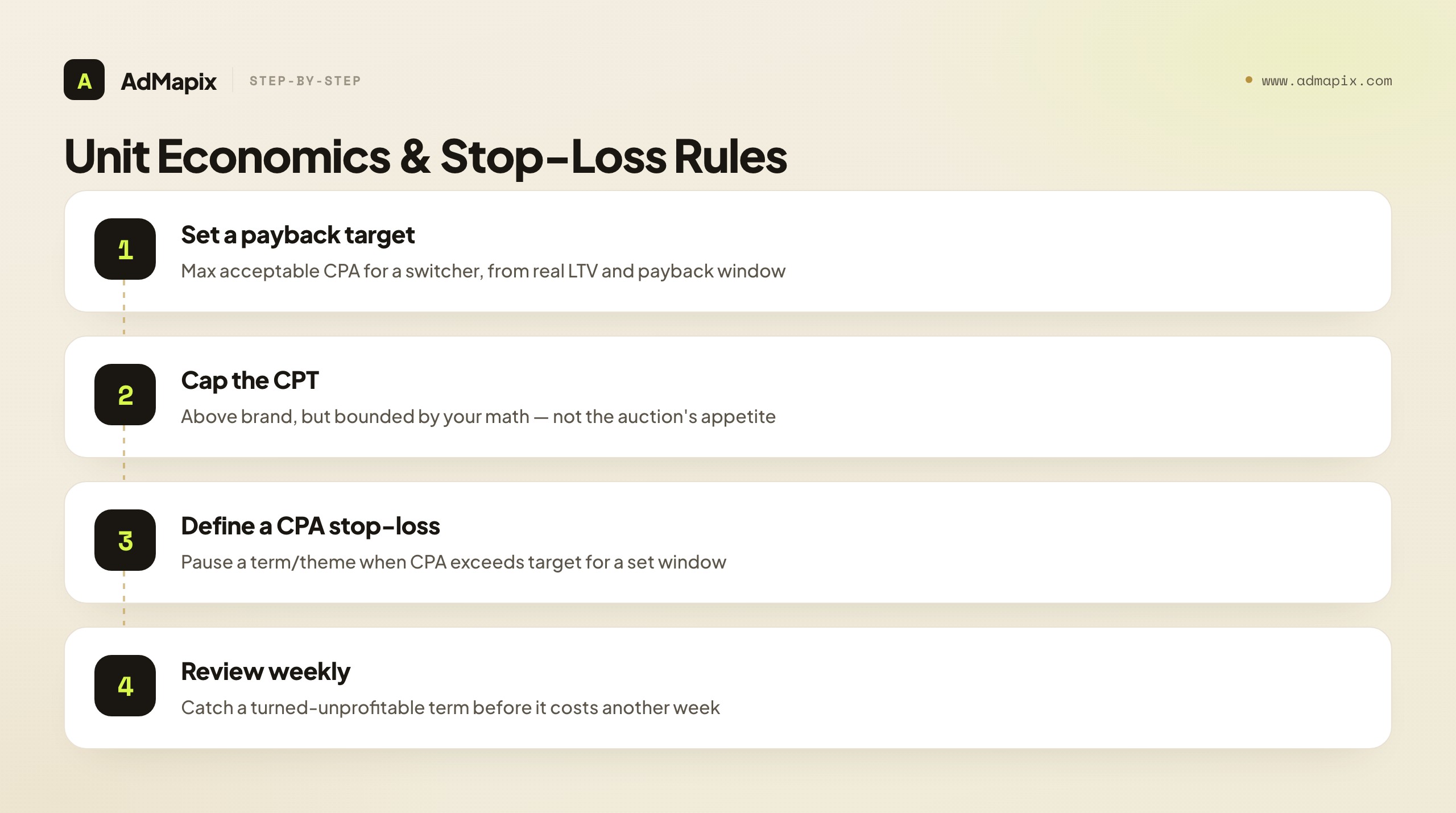
The governing numbers:
- A payback target you set in advance. Decide the maximum CPA you will accept for a switcher acquired off a competitor term, derived from that user's expected value and your payback window. Competitor-acquired users are not automatically worth less, but you are paying more to get them, so the target has to hold against real LTV, not hope.
- A CPT ceiling per keyword, above your brand CPT but bounded — informed by Apple's recommendation but capped by your own math, not by the auction's appetite.
- A CPA stop-loss, the point at which a keyword (or the whole theme) is paused. If a competitor term's CPA exceeds your target for a defined window, you stop, rather than hoping it recovers. This is the single most important rule, because competitor terms degrade silently as rivals adjust.
- A weekly review cadence. Competitor TTR and CPA drift week to week as the auction shifts; a competitor campaign is not a set-and-forget asset, and the review is where you catch a term that has turned unprofitable before it costs you another week of budget.
The honest framing: a competitor campaign is the highest-variance theme you run. When it works — a real substitute, a sharp switching reason, a switcher page, a disciplined bid — it intercepts buyers at peak intent and can be a strong acquisition channel. When it does not, it is the fastest way to waste spend in Apple Search Ads. The guardrails above are what keep you on the right side of that line: explicit targets, a hard stop-loss, and a weekly look. Treat them as non-negotiable, and the variance becomes manageable; skip them, and the competitor campaign becomes the leak that funds your rivals' awareness at your expense.
One subtle economic point deserves a mention: the retaliation dynamic. When you start bidding on a rival's name, you raise the cost of their own brand-defense — and a sophisticated competitor may notice and retaliate by bidding on your name in return. That tit-for-tat can escalate CPTs on both sides until the only winner is Apple. So factor a competitor's likely response into your decision: bidding a rival who is unlikely or unable to retaliate is cheaper and safer than starting a war with a well-funded competitor who will happily bid your brand term right back and out-spend you on the defense. This does not mean avoid competitor terms — it means choose your battles, prefer targets who will not or cannot retaliate effectively, and have a plan (and a stop-loss) for the case where a rival does counter-attack your brand term. The competitor campaign that quietly intercepts a non-retaliating rival is a clean win; the one that ignites a mutual bidding war can cost both sides more than either gains, which is another reason term selection — choosing who to attack — is the highest-leverage decision in the whole tactic.
Capture the Search Evidence First
Before you set a single bid, capture the actual search-result evidence — because it informs both which terms to bid and how to position your switcher page. Searching a competitor's name on the App Store shows you who already bids on it and what creative angle they lead with, and that intelligence shapes a smarter campaign than guessing from a spreadsheet.

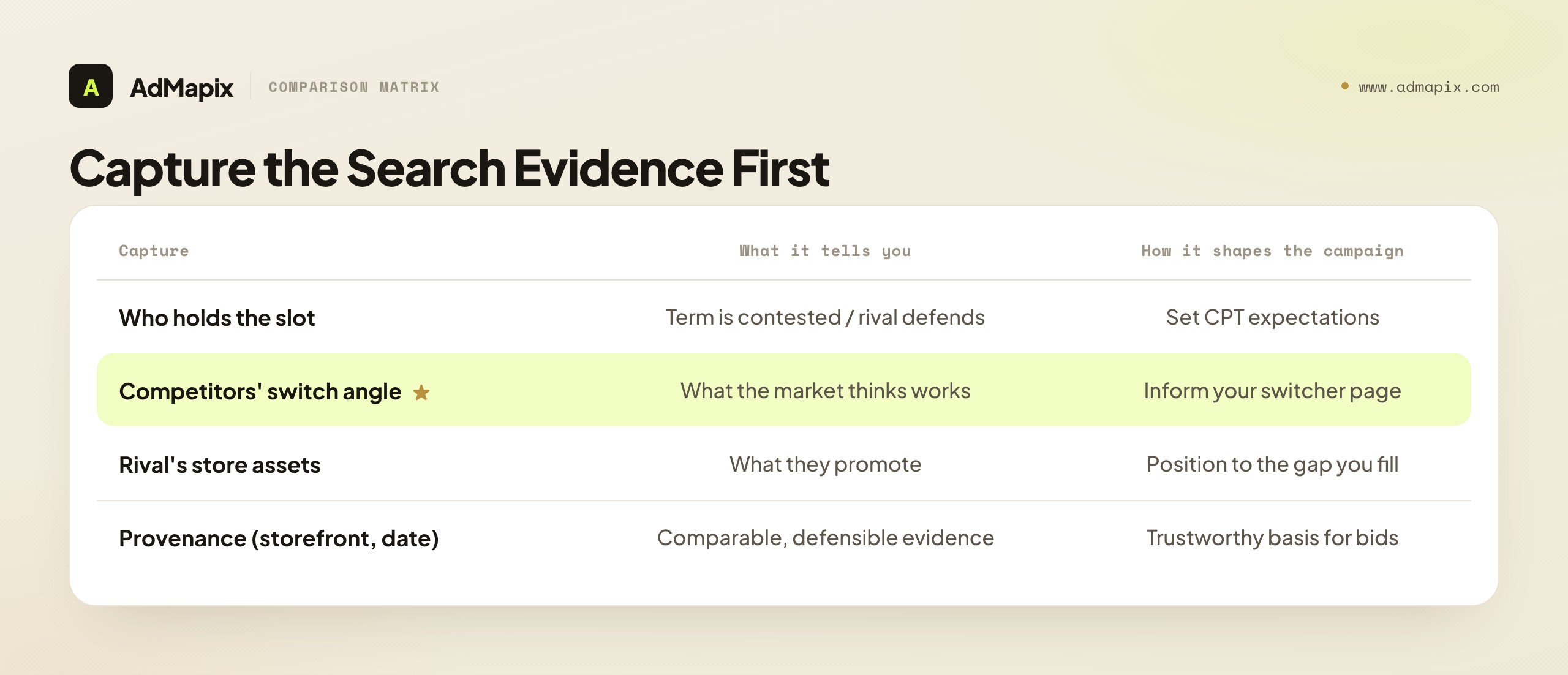
What to capture, for each competitor term you are considering:
- Who currently holds the ad slot on that rival's name. If several apps already bid it, the term is contested and likely expensive — factor that into your CPT expectations. If the rival defends their own name, expect to pay a premium to intercept.
- The creative angle competitors lead with when they intercept that rival — the switching reason they emphasize. This tells you what angles the market believes work, which informs (but does not dictate) your own switcher page.
- The rival's own store assets — what they promote, so your switcher page can speak to the gap between what they offer and what you do.
- Provenance: the storefront, the date, and a screenshot, so the evidence is comparable and defensible when you build the campaign and the page.
This evidence is the bridge between the ASA research covered elsewhere and the campaign execution covered here. You research the slot to decide which terms to bid and how to position; you execute the campaign to actually intercept. Capture the evidence first, and your bids and your switcher pages are grounded in what the market is actually doing rather than in assumption. (For the deeper observation-and-tracking method behind this capture step, see the Apple Search Ads spy-tool workflow linked in Related Reading; this guide picks up where that research ends — at building and bidding the campaign.)
There is a particularly valuable signal in how many apps already intercept a given rival's name. A rival's term with no interceptors is an open lane — you may win the slot cheaply and own the switcher conversation unopposed. A term with several interceptors is a crowded, expensive auction where you will pay a premium and split the switcher's attention with other alternatives. And the angle those interceptors lead with is free positioning research: if three apps all intercept RivalApp with a "free vs. paid" message, the market has effectively voted that price is the wedge against RivalApp — which both validates that angle and warns you that you will need a sharper version of it to stand out, not a copy. Reading the competitive density and the dominant angle on a term before you bid lets you walk in with realistic cost expectations and a differentiated switcher page, instead of discovering the crowd and the consensus angle only after you have spent. This pre-bid reconnaissance is cheap, fast, and routinely skipped — which is exactly why doing it is an edge.
What Public Data Can and Cannot Prove
Search-result observation can prove that an ad ran; it cannot prove spend, ROAS, or account structure. This limit governs every conclusion you draw from the evidence-capture step, so it is worth stating plainly before you let observation shape a bid.
When you search a competitor's name on the App Store and see who is bidding, you have real evidence of which apps consider that term worth attacking and what creative angle they lead with. What you do not have is their max CPT, their daily budget, their install rate, or whether the placement is profitable for them. A rival defending their own name persistently proves they value the term — it does not prove the defense is cheap or that intercepting them will be. Treat the search result as a directional signal and a creative reference, not as a readout of a rival's media plan.
The discipline that follows: pair every observation with your own account data — your actual CPT, TTR, and CPA on that keyword — before you draw any conclusion about whether the term works for you. The search result tells you the term is contested and what angles the market uses; only your own campaign data tells you whether you can win it profitably. Never present a competitor's ad-slot presence as a spend figure, and never assume their economics are yours. The honest method is: observe to inform, test to decide, and let your own numbers — not a rival's visible placement — govern whether a competitor term earns its place in your budget.
A Worked Example: Launching One Competitor Term
Principles land harder applied, so here is a composite walkthrough of taking a single competitor term from candidate to live, disciplined campaign. You market a paid productivity app and are considering bidding on "RivalApp," a popular competitor.

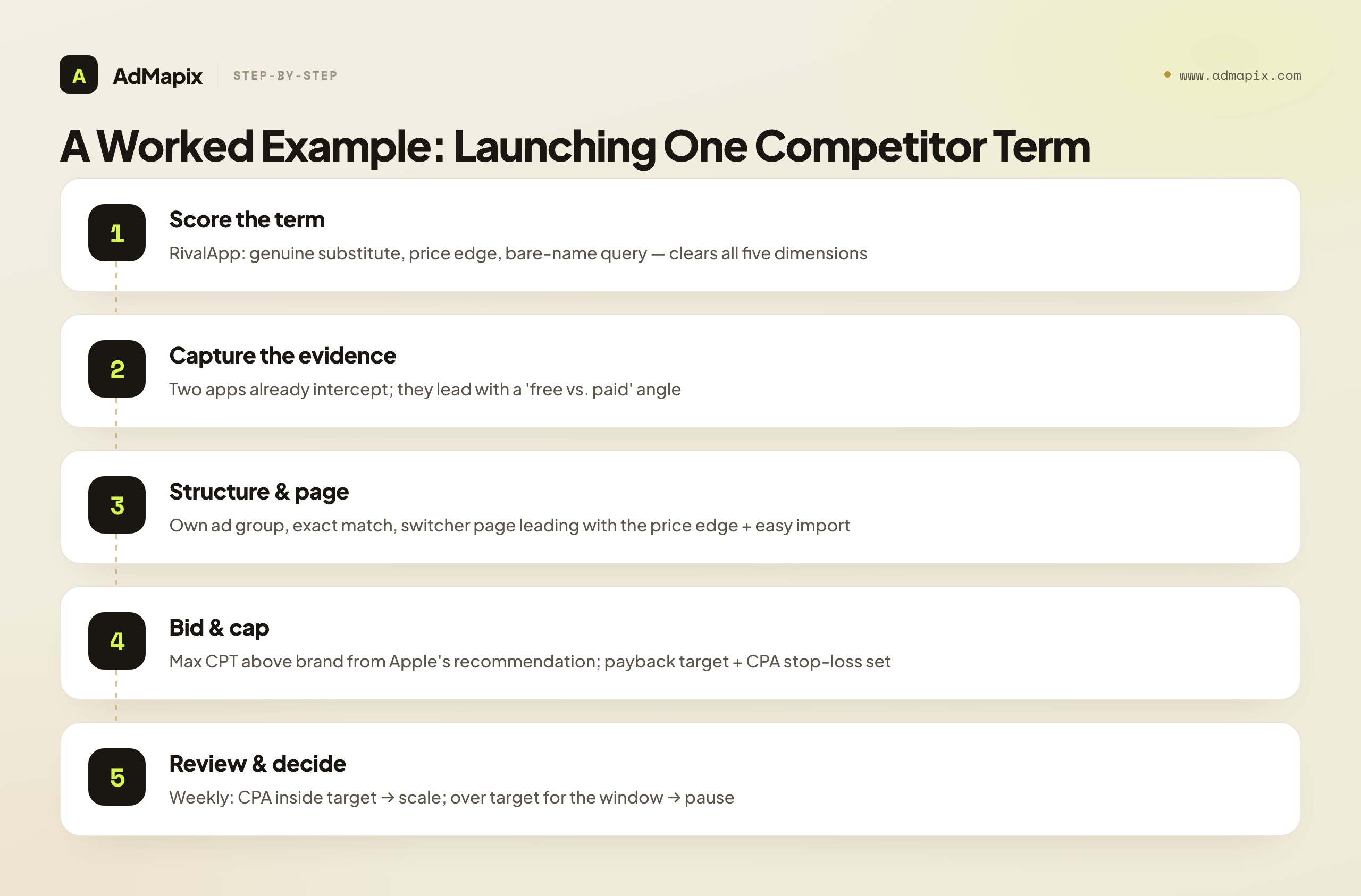
Score the term. You run RivalApp through the five-dimension framework. Substitutability: yes — it solves the same use case as your app. Switching reason: yes — RivalApp is subscription-only and pricey, while you offer a one-time-purchase tier, a concrete edge a switcher cares about. Query intent: you will target the bare name "RivalApp," not support queries. Creative angle: you can build a switcher page leading with the price difference. Unit economics: your projected CPA on the term stays inside your payback target. It clears all five — RivalApp earns a bid. (A different rival, the category's free leader, fails the switching-reason test, so you skip it: you cannot out-free a free app.)
Capture the evidence. Before bidding, you search "RivalApp" on the US App Store across a few days. Two other apps already intercept the term, and both lead with a "free vs. paid" angle — useful intelligence: the market believes price is the wedge against RivalApp, which corroborates your own switching reason. You note that RivalApp does not appear to heavily defend its own name, suggesting the slot may be winnable without an extreme bid. You log the storefront, date, and screenshots.
Structure and build the page. You create a dedicated competitor campaign (separate from your brand, category, and discovery campaigns) with its own daily budget cap, put "RivalApp" in its own exact-match ad group, and build a custom product page whose first screenshot leads with "Own it once — no subscription" and surfaces an easy import from RivalApp to lower switching cost. The page speaks directly to the switcher's moment of decision.
Bid and cap. You set a manual max CPT above your brand campaign's, anchored to Apple's per-keyword recommendation, and you set the guardrails: a payback target (max acceptable CPA), and a CPA stop-loss that pauses the term if it exceeds target for two weeks. Aggressive enough to win the slot, capped enough to stay honest.
Review and decide. Each week you check impression share (are you winning the slot), CPT, and — most importantly — CPA against your target. In week one, CPA lands just inside target with healthy install volume; you hold and consider scaling. Had it blown past target, the stop-loss would have paused it rather than letting it bleed. Either outcome is a clean decision driven by your own account data, not by a fabricated read of RivalApp's spend. That is the whole tactic, executed with discipline: a scored term, evidence-informed positioning, a switcher page, an aggressive-but-capped bid, and a weekly CPA check that governs scale-or-pause. Notice that the only number that decided anything was your own CPA — not a single guess about what RivalApp spends.
Common Mistakes With Competitor Keyword Ads
The failure modes here are predictable and expensive. Naming them is the cheapest insurance against turning a precision tactic into a budget leak.

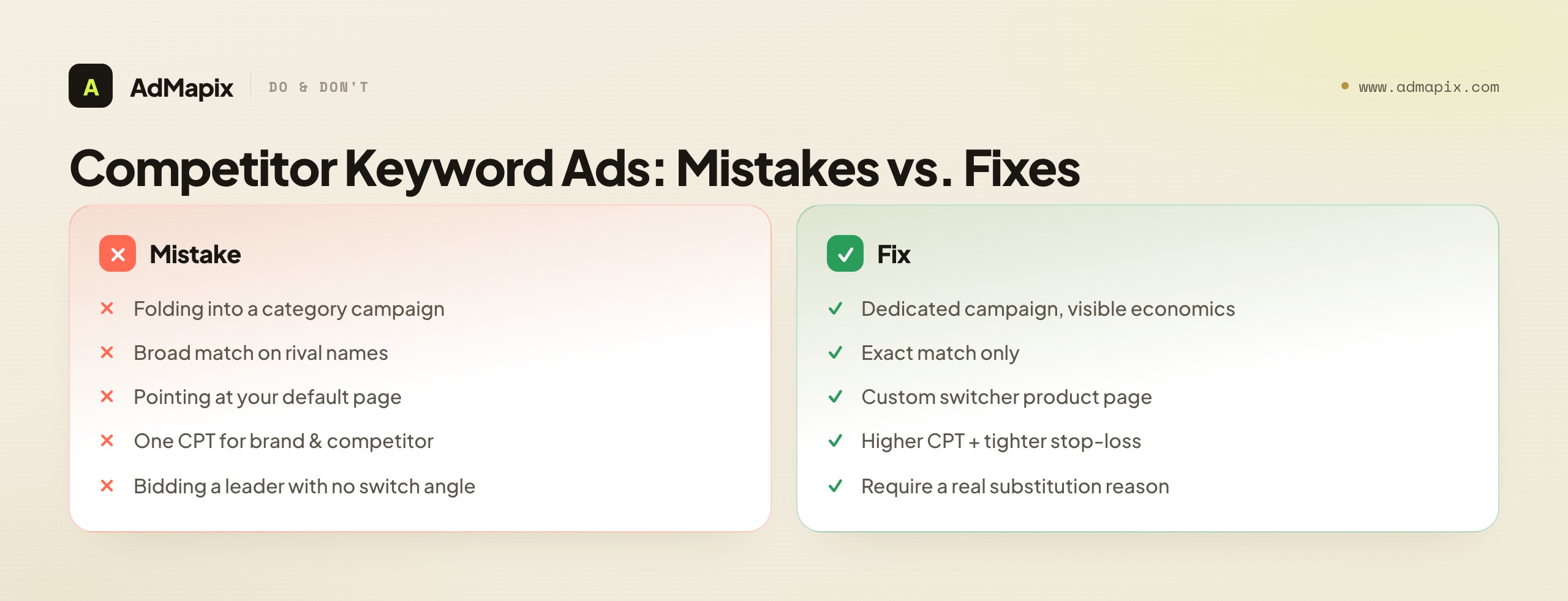
- Folding competitor terms into a category campaign. It hides the per-keyword economics and lets a losing competitor term ride on a winning category term's budget — the single most common way the leak goes unnoticed.
- Using broad match on rival names. Broad match drags in unrelated queries and inflates spend; competitor intent lives in exact match. Broad match on a rival name is paying for searches that have nothing to do with switching.
- Pointing competitor ads at your default product page. A switcher needs a reason to switch on the first screen, not your generic onboarding shots. This squanders the premium CPT you paid to win the slot.
- Setting one CPT for brand and competitor terms. Competitor terms need a higher ceiling and a tighter stop-loss because their TTR and CPA are worse. A shared bid either loses competitor slots or overpays for brand ones.
- Bidding on a leader's name with no switch angle. You pay for taps from loyal users who were never going to convert. Substitutability and a real switching reason are prerequisites, not nice-to-haves.
- Bidding on support-intent queries. "<Rival> not working" or "<rival> login" is a frustrated existing user, not a switcher — paying to reach them wastes budget on the wrong intent.
- Reading a search result as a spend report. Seeing a rival's ad proves it ran, not that it is profitable or how much they pay.
- Running it set-and-forget. Competitor TTR and CPA drift; without a weekly review and a stop-loss, a once-profitable term turns into a silent loss.
When to Use AdMapix
AdMapix is for the research and evidence layer around competitor keyword ads, not the bidding itself — you still run the campaign inside Apple Ads. It fits ASO and growth teams who want to see what creative angles rivals use across networks, save that evidence, and turn it into a repeatable competitor brief that grounds their bids and their switcher pages in real data.

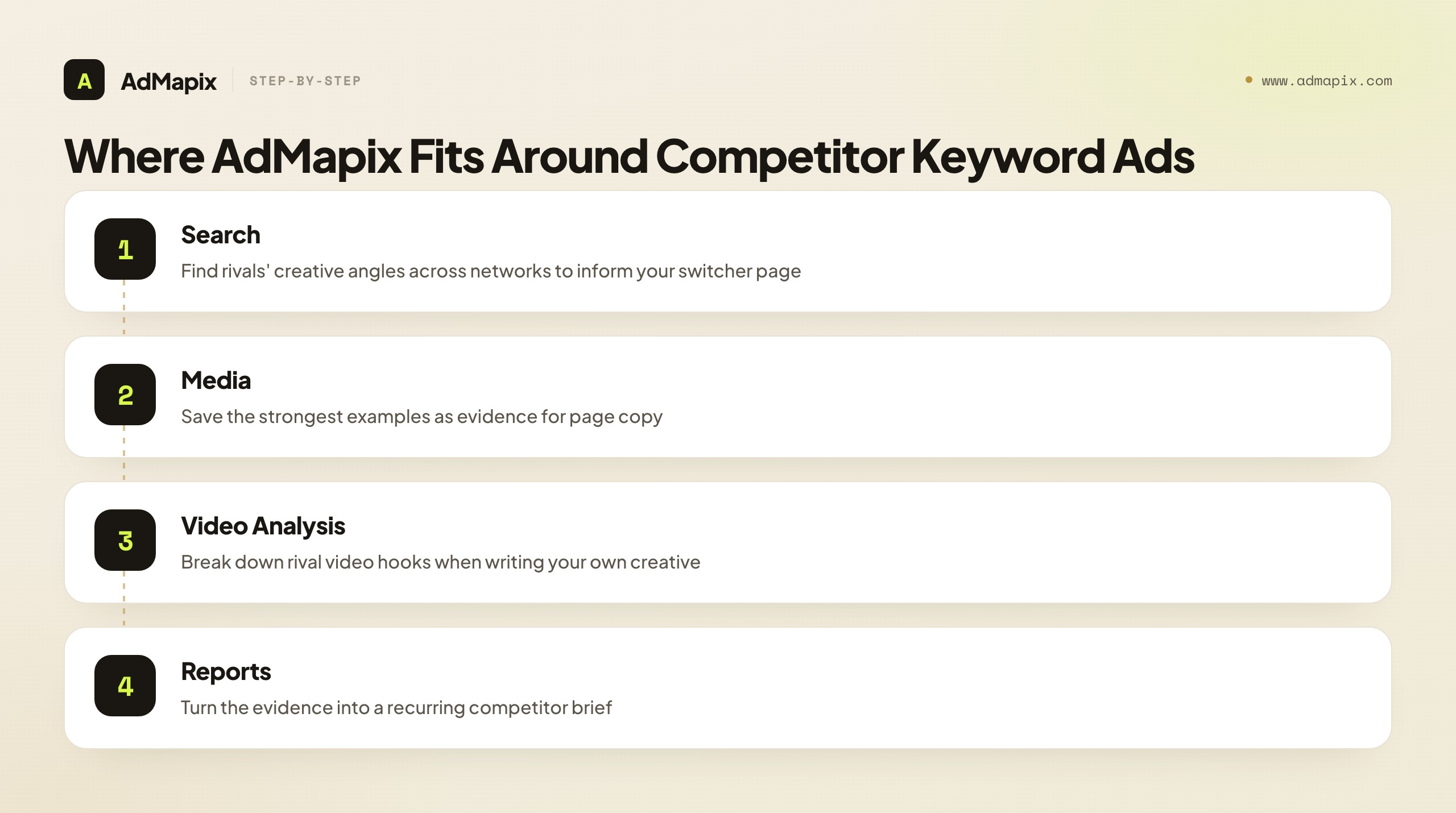
Use Search AdMapix to find a competitor's active ad creatives across networks and read the angles they lead with — useful because your App Store rivals usually run creative on other platforms too, and those angles inform your switcher page. Save the strongest examples to Media so your switcher product-page copy is grounded in real evidence rather than guesswork. Use Video Analysis to break down the hooks in a rival's video ads when you are writing your own creative. Roll the findings into Reports when the same competitor set needs a weekly review, and compare workflow access on Pricing. Create an account from Login when scattered screenshots and notes start slowing the team down.
It is explicitly not an Apple Ads bid manager, and it does not report a competitor's hidden spend or budget — no tool can, because Apple does not publish it. AdMapix organizes the creative and competitive evidence that informs your campaign; the bidding, structure, and stop-loss discipline all live in your own Apple Ads account. The honest division of labor: AdMapix for the research and evidence that shapes which terms to bid and how to position the switcher page, your Apple Ads Advanced account for the execution and the only performance numbers that actually decide whether a competitor term pays.
Putting It Together: Precision Over Aggression
The whole tactic reduces to a single principle: competitor keyword ads reward precision, not aggression. The aggressive part — bidding above your brand CPT to win a rival's branded slot — is easy and is where careless teams stop, which is exactly why so many competitor campaigns quietly lose money. The precision that makes it profitable is everything around the bid: choosing only the rival names where you are a genuine substitute with a real switching reason, isolating them in a dedicated exact-match campaign so their economics stay visible, pointing each ad at a switcher-focused custom page, and governing the whole thing with a payback target, a CPA stop-loss, and a weekly review.
Capture the search evidence first to inform which terms to bid and how to position; structure granularly so leaks are visible; bid aggressively but cap deliberately; build pages that give switchers a reason to switch; and let your own account's CPA — never a rival's visible ad slot — decide what stays in the budget. Do that, and competitor keyword ads become a sharp instrument for intercepting buyers at peak intent. Skip the discipline, and they become the fastest leak in your Apple Search Ads account, quietly funding your rivals' brand awareness on your dime. The tactic is not hard to run; it is hard to run profitably — and the difference is entirely in the structure and the discipline this guide is built around.
If you take one ordering away, make it this: term selection, then switcher page, then bid — in that priority. Most teams run it backwards, pouring energy into an aggressive bid while bidding the wrong terms and pointing the ads at a default page. Reverse the order. Spend the most thought on which rival names to attack (the decision that determines whether the term can ever convert), then on the page that gives switchers a reason (the lever that most moves CPA), and only then on the bid (the cheapest lever to adjust, and the one to set with a cap and a stop-loss). Get the order right, and the competitor campaign becomes one of the most precise acquisition channels Apple Search Ads offers — buyers caught at the exact moment of choosing, redirected by a sharp reason to switch, at a cost you govern. Get the order wrong, and no amount of bidding aggression saves it. Precision over aggression, in that sequence, is the whole tactic.
FAQ
Is bidding on a competitor's app name allowed on the App Store?
Yes. Apple's own campaign-structure guidance lists competitor campaigns as a recommended theme that targets apps similar to yours, and Apple Ads Advanced lets you choose the exact keywords. You cannot misuse a rival's trademark inside your ad text in misleading ways, but bidding on the search term itself is a standard, supported tactic that Apple explicitly recommends as one of its four campaign themes.
Should I use exact match or broad match for competitor keywords?
Use exact match. Competitor intent is concentrated in the bare app name, and exact match keeps your spend on those high-intent queries. Broad match pulls in loosely related searches that rarely convert, inflating cost and muddying the per-keyword metrics you need to judge whether a term works. The whole point of a competitor campaign is clean, controllable economics, and broad match defeats it.
Why is my competitor campaign's cost per install higher than my brand campaign?
Because you are interrupting demand for someone else's product. A user searching a rival's name has already chosen, so your tap-through and install rates are lower and your acceptable max CPT is higher. That is expected and normal; the discipline is a higher CPT ceiling paired with a spend cap and a CPA stop-loss, not a single shared bid across brand and competitor terms.
Which competitor names should I bid on?
Only rival names where you are a genuine substitute with a concrete switching reason — price, a feature they lack, a platform or regional edge — on high-intent bare-name queries. Score each term on substitutability, switching reason, query intent, creative angle, and unit economics; bid only the terms that clear all five. Bidding a category leader's name with no switch angle just pays for loyal users' taps.
Where should a competitor keyword ad send people?
To a custom product page built for switchers, not your default screenshots. Search Results ads can route to a custom page, and the first screen must answer "why switch" — leading with the concrete edge that earned the bid, plus proof that lowers switching risk like a rating or an easy import feature. A switcher page is the highest-leverage lever for improving a competitor campaign's CPA.
Do I need Apple Ads Advanced for competitor keyword ads?
Yes. Apple Ads Advanced supports keyword choice, max-tap bids, campaign-level spend control, and detailed reports. Apple Ads Basic has no keyword or audience settings, so you cannot target specific competitor names on it. If you are on Basic, moving to Advanced is the prerequisite for running this tactic at all.
Can I see how much a competitor spends on App Store ads?
No. Searching a rival's name shows you that an ad ran and what creative angle it uses, but it does not reveal their max CPT, budget, install rate, or ROAS. Use the search result as a creative and intent signal, then validate whether a term works for you against your own account's CPT, TTR, and CPA data — the only numbers that actually decide your campaign.
How do I keep a competitor campaign from losing money?
Govern it with explicit guardrails: a payback target (max acceptable CPA) set in advance, a CPT ceiling above your brand bid but capped by your own math, a CPA stop-loss that pauses a term when it exceeds target for a defined window, and a weekly review. Competitor TTR and CPA drift as rivals adjust their bids, so the campaign is never set-and-forget — the stop-loss and the weekly look are what catch a turned-unprofitable term before it costs another week of budget.
How is this different from "spying" on Apple Search Ads?
Spying is the research half — observing which apps hold the ad slot on which keywords to build a keyword map. This guide is the execution half — actually building and bidding a competitor campaign once you have decided which rival names to target. You research the slots to inform your decisions; you run the campaign to intercept. The evidence-capture step here is the bridge between the two: observe to inform, then execute to act.
Where does AdMapix fit with competitor keyword ads?
AdMapix is the research and evidence layer, not the bid manager. Use it to find and save the creative angles rivals lead with across networks, break down their video hooks, and turn the evidence into a recurring brief that grounds your switcher pages and term selection. The bidding, structure, and stop-loss discipline all live in your own Apple Ads Advanced account; AdMapix does not bid for you, and it does not expose a competitor's private spend.
Key Takeaways
- Run competitor keyword ads in a dedicated campaign with exact match so their economics never hide behind category traffic.
- Bid only on rival names where you are a real substitute with a concrete switching reason; score each term on five dimensions before adding it.
- Set a higher max CPT than your brand campaign, plus a budget ceiling and a CPA stop-loss, and tune each keyword with Apple's per-keyword rank and impression-share signals.
- Point competitor ads at a custom product page built for switchers that answers "why switch" on the first screen — the highest-leverage lever for CPA.
- Capture search-result evidence to inform terms and positioning, but validate spend and profitability only against your own account data; use AdMapix for the evidence, your Apple Ads account for the execution.
Related Reading
- Apple Search Ads Spy Tool in 2026: What You Can Actually See, Track, and Reverse-Engineer — the research-and-observation half that informs which competitor terms to bid.
- App Store Keyword Research — the keyword foundation that feeds your competitor and category campaigns.
- App Store Creative Optimization — optimizing the custom product pages your competitor ads point to.
- Ad Spy Tools by Channel: Meta, TikTok, Google, YouTube, Native — how competitive research differs across platforms, including app channels.
- How to Spy on Competitors' Ads in 2026 (30-Min/Week Workflow) — the cross-channel weekly workflow this tactic plugs into.
Sources
Official sources checked as of June 21, 2026. Apple Ads placements, campaign settings, and best-practice pages can change, so verify the current official path before relying on any workflow.
- Apple Ads on the App Store — Search Results ads can reach people right after they search and support manual or conversion-maximizing bidding with chosen or suggested keywords.
- Apple Ads campaign structure — Apple recommends brand, category, competitor, and discovery campaign types; competitor campaigns target apps similar to yours and use exact match with higher max CPT bids.
- Apple Ads manual bidding — effective manual bids help you stay competitive in App Store search; bid recommendations draw on impression share, rank, popularity, installs, spend, CPA, CPT, impressions, and TTR.
- Apple Ads solution comparison — Apple Ads Advanced supports keyword choice, max-tap bids, campaign-level spend control, detailed reports, and Campaign Management API access; Basic has no keyword or audience settings.
Turn these observations into your next creative study
Open the creative library and select samples for your market, network and research question.
Related Articles
Twitter Ads Library in 2026: Where X Ads Live Now and What You Can Actually See
A complete 2026 guide to the Twitter Ads Library — why there is no product by that name, how the X Ads Repository works as a DSA transparency tool, exactly what it shows and hides, why access is EU-scoped, how to read funding-entity and reach data, how to research X competitors inside and outside the EU, how it compares to other ad libraries, the honest limits of public ad data, and where a cross-network creative tool like AdMapix fits.
Apple Search Ads Spy Tool in 2026: What You Can Actually See, Track, and Reverse-Engineer
A complete 2026 guide to Apple Search Ads competitive research — why no spy tool can pull a rival's private bids or spend, what the live App Store ad slot actually proves, how ASA's structure (Basic vs Advanced, the four campaign types) shapes what you can observe, a repeatable keyword-tracking workflow, how to read bid and rank signals from your own account, how to turn observations into a keyword map and a bid-test plan, the honest limits, and where AdMapix fits.
Snapchat Ad Spy Tool in 2026: How to Research Competitor Snap Ads Without a Library
The 2026 guide to researching competitor Snapchat ads: why there's no commercial ad library, the four official Snap surfaces, what public data can and can't prove, reading vertical creative by format, a workflow, and turning Snap Ad patterns into testable briefs.