
App Store Keyword Research: A Practical Workflow for ASO Teams
A practical app store keyword research workflow for ASO teams: find app store keywords, map intent, monitor rankings, and connect ASO with paid UA.
App store keyword research works best when keyword discovery, store metadata, creative assets, experiments, and ranking checks share one operating system.
App Store Keyword Research: A Practical Workflow for ASO Teams
App store keyword research is the process of finding the terms people use inside the App Store and Google Play, then turning those terms into better metadata, screenshots, experiments, and measurement. It is not just exporting a keyword list from app store optimization tools.
For ASO teams, the useful output is a decision map:
| Decision | What keyword research should answer |
|---|---|
| Metadata | Which terms should appear in the app name, subtitle, keyword field, short description, or long description? |
| Creative | Which app store keywords deserve screenshot or preview coverage? |
| Ranking | Which app store rankings are worth tracking by market? |
| Localization | Which terms change by country, language, or category? |
| Paid UA | Which search intents should be tested with ads, custom pages, or landing pages? |
| Web SEO | Which store-aware terms deserve a supporting Google-search page? |
This guide covers a workflow for app store keyword research, app store keywords, app store rankings, app store optimization tools, and app SEO. If you are building the wider discovery system, start with the app SEO guide and the paid user acquisition guide, then use this article as the ASO keyword layer.
What Makes App Store Keyword Research Different
App store keyword research is narrower than general SEO keyword research because the searcher is already inside or close to an install environment. A query like "photo editor" may represent broad research on Google, but inside the store it often means "show me apps I can install now."
That changes the workflow in four ways:
| Difference | Practical impact |
|---|---|
| Store search is install-led | Prioritize conversion and relevance, not only search volume |
| Metadata is constrained | You cannot write a 2,000-word store page to cover every term |
| Visual assets matter | Screenshots, previews, and icons help convert keyword intent |
| Rankings are market-specific | App store rankings can move by country, language, and category |
Apple's product page guidance says metadata, screenshots, previews, ratings, reviews, categories, and localization all influence how users discover and evaluate an app. Apple also notes that the keyword field is limited to 100 characters and should avoid irrelevant terms, competitor app names, and duplicated words. Google's store listing experiments page emphasizes testing store text and graphics, then reading install and retention signals.
The main implication is simple: app store keyword research should not stop at keyword volume. It should decide what to write, what to show, what to test, and what to track.
Step 1: Build Keyword Sources
Start with multiple sources because no single tool sees the full demand picture.
| Source | What it gives you | Risk if used alone |
|---|---|---|
| Store search suggestions | Real query language | Can over-index on obvious head terms |
| Competitor metadata | Category vocabulary and positioning | Can copy weak competitor assumptions |
| Reviews | User pain points and feature language | Can be noisy or emotionally skewed |
| Paid search and paid social terms | Conversion language from acquisition | May reflect ad targeting, not store search |
| Search Console and SEO tools | Web demand around the app category | May not match in-store search behavior |
| App store optimization tools | Volume estimates, difficulty, ranking history | Data is modeled and should be validated |
For each keyword, capture more than the phrase:
| Field | Example |
|---|---|
| Keyword | "app store keyword research" |
| Intent | Learn ASO keyword workflow |
| Surface | App Store, Google Play, Google Search, or paid UA |
| Market | US, UK, JP, DE, BR, and so on |
| Page or asset owner | Store metadata, screenshot, blog guide, landing page |
| Current rank | Not ranked, top 50, top 20, top 10 |
| Difficulty | Low, medium, high |
| Evidence | Suggestion, tool estimate, competitor, review, ad test |
This prevents a common mistake: treating every keyword as equal. "App store keywords" may deserve an ASO guide. "Best calorie counter app for athletes" may deserve a use-case landing page plus store screenshots. "Competitor alternative" may need a comparison page and a tailored paid landing page. The same page-quality logic still applies to supporting web content: Google's SEO starter guide recommends useful, organized, unique, and people-first content.
Step 2: Separate Store Intent from Web Intent
The same phrase can have different intent depending on where it is searched.
| Query | Likely store intent | Likely Google intent | Recommended owner |
|---|---|---|---|
| app store keyword research | Learn process or evaluate tools | Learn ASO workflow | This ASO guide |
| app store keywords | Understand keyword field and ranking logic | Learn Apple/ASO mechanics | ASO support page or section |
| app store rankings | Check rank movement or learn ranking factors | Learn tracking and benchmark methods | Ranking workflow section |
| app store optimization tools | Compare tool options | Compare tool categories and workflows | Tool selection page or section |
| app seo | Connect web search with app discovery | Broader SEO/ASO strategy | App SEO pillar |
The goal is not to force every keyword into one article. The goal is to decide whether the searcher wants:
| Intent | Best content or asset |
|---|---|
| Learn | Guide, glossary, checklist, workflow |
| Compare | Tool comparison, alternative page, category report |
| Install | Store metadata, screenshots, app preview, product page |
| Troubleshoot | FAQ, support page, review-response insight |
| Validate | Report, benchmark, competitor analysis |
For AdMapix, this article owns "app store keyword research." The app SEO guide owns the broader "app seo" intent. Paid campaign planning belongs in paid user acquisition. That separation reduces keyword cannibalization.
Step 3: Cluster App Store Keywords by Job
Do not cluster only by lexical similarity. Cluster by the job the user is trying to do.
| Cluster | Example keywords | Asset decision |
|---|---|---|
| Category | "habit tracker app", "budget planner app" | App name, subtitle, first screenshots, category landing page |
| Feature | "receipt scanner", "sleep sounds", "AI photo enhancer" | Screenshot sequence, app preview, feature page |
| Use case | "budget app for couples", "language app for travel" | Use-case copy, custom page, localized store assets |
| Problem | "stop overspending", "learn vocabulary faster" | Blog guide, benefit-led screenshot, onboarding copy |
| Competitor | "app name alternative" | Comparison page, paid landing page, review mining |
| Locale | Local terms and market-specific expressions | Localized metadata, screenshots, and experiments |
Keyword clustering is where ASO and creative strategy meet. If a high-value keyword is feature-led, users should see that feature before they scroll. If the keyword is use-case-led, the first screenshot should show the use case. If the keyword is problem-led, the copy should state the outcome in plain language.
This is also where app store optimization tools can help, but the tool should not make the strategic decision for you. Use tools to collect and monitor; use the cluster map to decide what to change.
Step 4: Map Keywords to Store Metadata
Metadata rules differ by platform, so avoid one generic checklist.
| Area | Apple App Store | Google Play |
|---|---|---|
| Name or title | Strong discovery field with character limits | Strong discovery field with character limits |
| Subtitle or short description | Concise value and use-case language | Short description influences user scanning and store listing experiments |
| Keyword field | Apple provides a dedicated keyword field with a 100-character total limit | Google Play does not use the same hidden keyword field model |
| Long description | Should explain value clearly; do not stuff keywords | Important for relevance and conversion, but still needs readable copy |
| Screenshots and previews | Critical for conversion and search-result scanning | Critical for conversion and experiment learning |
| Localization | Metadata, keywords, screenshots, and previews should reflect each market | Listing text and graphics can be localized and tested |
Apple warns against unnecessary keyword stuffing and irrelevant keyword use in its App Store product page documentation. That matters because a keyword field is not a dumping ground. It is a constrained selection problem.
Use this sequence:
| Priority | How to choose |
|---|---|
| 1. Relevance | Does the keyword accurately describe the app or a core feature? |
| 2. Intent strength | Does the query imply someone could install or evaluate soon? |
| 3. Competitive gap | Can the app realistically move into useful app store rankings? |
| 4. Asset support | Can the screenshots and copy prove the promise? |
| 5. Market fit | Does this wording fit the country and language? |
If a keyword fails relevance, do not use it. If it passes relevance but cannot be supported visually, decide whether to update the product story before chasing rankings.
Step 5: Monitor App Store Rankings Without Overreacting
App store rankings are useful, but they are not the whole ASO scorecard.
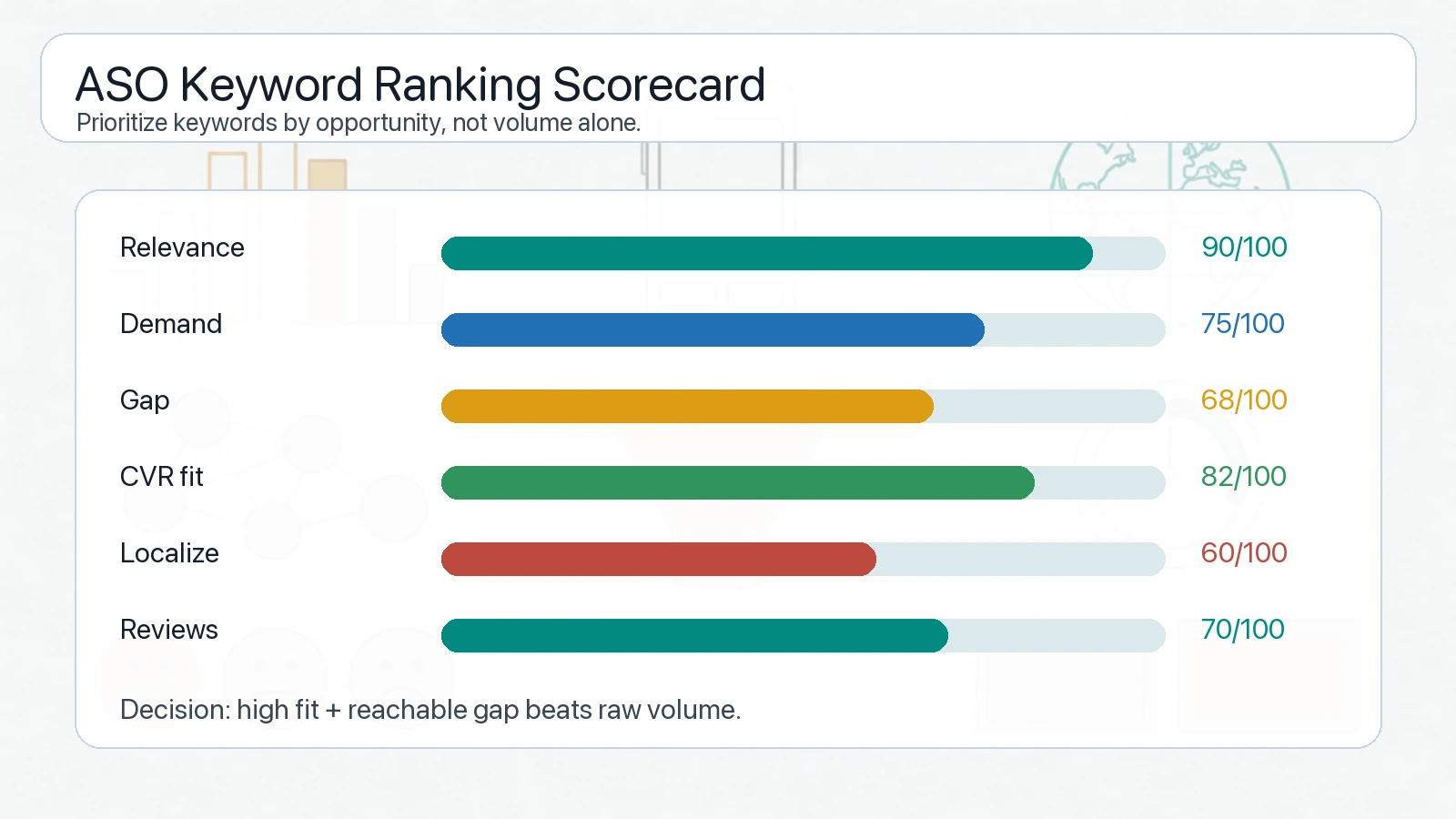
A useful app store keyword scorecard combines rankings with conversion, localization, reviews, and quality signals.
Track rankings by market and cluster:
| Metric | Why it matters |
|---|---|
| Current keyword rank | Shows visibility for each target term |
| Rank movement | Shows whether metadata or asset changes are helping |
| Impression trend | Shows whether the keyword has reachable demand |
| Store conversion rate | Shows whether the traffic is qualified |
| Activation or retention | Shows whether installs from the intent are valuable |
| Rating and review language | Shows whether expectations match the product |
Do not react to every daily movement. App store rankings can shift because of competition, seasonality, ratings, store tests, ad campaigns, or market-level changes. Review patterns weekly for active tests and monthly for strategic decisions.
A better question is not "did we rank higher today?" It is "did this keyword cluster produce more qualified discovery after the metadata and creative changes?"
Step 6: Use App Store Optimization Tools as Workflow Tools
App store optimization tools are useful when they improve decisions, not when they create bigger exports.
Evaluate tools by workflow:
| Tool capability | What to check |
|---|---|
| Keyword discovery | Does it find long-tail, competitor, and localized terms? |
| Ranking tracking | Can it monitor app store rankings by country and device? |
| Competitor analysis | Can it compare metadata, screenshots, ratings, and category moves? |
| Review mining | Can it surface repeated user language and unmet expectations? |
| Localization support | Can it separate keywords by language and market? |
| Reporting | Can it explain what changed and why it matters? |
| Export and collaboration | Can SEO, ASO, creative, and UA teams work from the same map? |
The minimum viable stack can be simple:
| Layer | Lightweight setup |
|---|---|
| Discovery | Store suggestions, competitor pages, review mining, one ASO tool |
| Prioritization | Shared keyword map with intent, market, and asset owner |
| Tracking | Weekly rank and conversion snapshot |
| Creative testing | Apple product page optimization or Google Play store listing experiments |
| Feedback | Monthly review of rankings, conversion, retention, and reviews |
If your team also buys paid app campaigns, connect ASO tools with creative intelligence. Use AdMapix reports to study competitor messaging and creative patterns, then translate proven angles into store screenshots, custom pages, and landing pages. For budget decisions, review pricing.
Step 7: Connect App Store Keyword Research to Paid UA
Paid user acquisition can validate keyword intent faster than organic ranking alone.
Use this feedback loop:
| Step | Output |
|---|---|
| Pick one keyword cluster | Example: "AI photo enhancer" |
| Build a message hypothesis | Speed, quality, privacy, style, or one-tap workflow |
| Test creatives and landing pages | Paid social, search, custom page, or web landing page |
| Measure downstream quality | Install conversion, activation, retention, trial start |
| Update store assets | Screenshots, subtitle, description, localization |
| Track ranking and conversion | Monitor app store rankings and store conversion after changes |
This keeps ASO from becoming a purely semantic exercise. A keyword is valuable only if the user expectation can be met by the product and converted by the store page.
For growth teams, the strongest workflow connects:
| System | Role |
|---|---|
| App store keyword research | Finds install-intent language |
| App SEO | Captures broader search demand around the app category |
| Paid UA | Tests angles and accelerates learning |
| Creative intelligence | Shows what competitors are emphasizing |
| Store experiments | Validates text and graphics on the store page |
That is why keyword research should be shared across ASO, SEO, product marketing, and creative teams.
App Store Keyword Research Checklist
Use this checklist before changing metadata:
| Check | Pass condition |
|---|---|
| Search intent | Each keyword has a clear install, compare, learn, or problem intent |
| Platform fit | Apple and Google Play fields are mapped separately |
| Relevance | No irrelevant, trademarked, or competitor terms are used improperly |
| Asset support | Important keyword promises are visible in screenshots or previews |
| Localization | Priority markets have separate keyword and creative checks |
| Ranking baseline | Current app store rankings are recorded before changes |
| Conversion baseline | Store conversion and quality metrics are recorded before changes |
| Internal links | Supporting SEO pages link to the correct ASO or app SEO page |
| Review loop | Results are reviewed after enough impressions and conversions |
If you cannot measure the baseline, delay the change or mark it as exploratory. ASO changes are hard to interpret when several fields, screenshots, paid campaigns, and localization updates happen at the same time.
FAQ
What is app store keyword research?
App store keyword research is the process of finding and prioritizing the search terms users type inside app stores, then mapping those terms to metadata, creative assets, localization, experiments, and ranking tracking.
Are app store keywords the same as SEO keywords?
No. App store keywords are closer to install and store evaluation intent. SEO keywords often include broader education, comparison, and problem-aware searches. The two should share insights, but they should not use one identical keyword map.
How should I track app store rankings?
Track app store rankings by keyword, country, device, and cluster. Review rank movement alongside impressions, conversion, activation, retention, and review language so you do not optimize for visibility that does not produce useful users.
Which app store optimization tools are most important?
The most important app store optimization tools are the ones that help your workflow: keyword discovery, ranking tracking, competitor metadata, review mining, localization, reporting, and collaboration. Database size alone is not enough.
How does app store keyword research support app SEO?
App store keyword research shows install-intent language. App SEO uses that language to build web pages, guides, reports, and comparison pages that capture broader search demand before users reach the store.
Conclusion
Good app store keyword research turns a keyword list into an operating system. It tells the ASO team what to write, the creative team what to show, the growth team what to test, and the SEO team which pages should support app discovery.
Start with the core keyword map, separate store intent from web intent, cluster by user job, map terms to platform-specific metadata, and track app store rankings with conversion quality. Then connect the workflow to app SEO, paid user acquisition, and competitive ad intelligence reports so keyword work compounds instead of staying inside a spreadsheet.
Turn these observations into your next creative study
Open the creative library and select samples for your market, network and research question.
Related Articles
App SEO: How to Rank App Pages and Support ASO in 2026
App SEO guide for ranking app landing pages, supporting ASO, mapping app store keywords, and connecting SEO with paid user acquisition.
Paid User Acquisition: Strategy, Channels, and Creative Testing
A practical paid user acquisition guide for app teams: channel strategy, creative testing, budget guardrails, measurement, and competitor research workflows.
Mobile Game User Acquisition in 2026: The Complete UA, Creative & Marketing Playbook
A 7,000-word 2026 mobile game user acquisition playbook: UA channels, creative testing, CPI/ROAS math, competitor ad research, soft launch, and a 30/60/90-day scaling system for indie and mobile teams.