
Apple Search Ads Spy Tool in 2026: What You Can Actually See, Track, and Reverse-Engineer
A complete 2026 guide to Apple Search Ads competitive research — why no spy tool can pull a rival's private bids or spend, what the live App Store ad slot actually proves, how ASA's structure (Basic vs Advanced, the four campaign types) shapes what you can observe, a repeatable keyword-tracking workflow, how to read bid and rank signals from your own account, how to turn observations into a keyword map and a bid-test plan, the honest limits, and where AdMapix fits.
Apple Search Ads Spy Tool in 2026: What You Can Actually See, Track, and Reverse-Engineer
By the AdMapix Research Team — Updated June 21, 2026
No Apple Search Ads spy tool can pull a competitor's private campaign data, bids, or spend — because Apple does not publish any of it. There is no Apple Search Ads ad library, no transparency repository, no spend disclosure. What you can do is observe live App Store search results, record which apps occupy the ad slot for which keywords, watch how those slots shift over time, and read bid-competitiveness signals from your own Apple Ads account. Done systematically, that turns into genuine competitive intelligence: a keyword map of who defends what, and a ranked bid-test plan. This guide gives you the realistic method — both the "spy" half (reading the live ad slot) and the "competitor analysis" half (structuring it into a keyword map and bid tests) — instead of a tool that promises numbers Apple never exposes.
This guide is for app marketers, ASO leads, mobile UA managers, app founders, and agency analysts who want a method grounded in what is actually observable. We will cover exactly what an ASA spy tool can and cannot prove, how Apple Search Ads is structured (Basic vs Advanced, and the four campaign types) and why that shapes what you can see, a repeatable keyword-tracking workflow on real devices, how to read bid and rank signals from your own account, how to turn scattered observations into a keyword map and a bid-test plan, the common mistakes that produce wrong conclusions, and where a tool like AdMapix fits for organizing the evidence. The honest framing throughout: you are reverse-engineering strategy from public placements and your own account data, not extracting a rival's private numbers.
TL;DR — Apple Search Ads Spying in One Screen
- No tool reveals a competitor's bids, budget, spend, or ROAS — Apple publishes none of it. Any tool claiming exact spend is guessing or fabricating.
- The only public signal is the live App Store ad slot: which app shows in the Search Results ad placement for a given keyword, country, and moment.
- One screenshot is an anecdote; a keyword checked over weeks is evidence. Results vary by country, device, and session, so cadence is everything.
- ASA's structure shapes what you can observe. Only Apple Ads Advanced advertisers target keywords, so an app on a niche term is almost certainly running Advanced — and Apple's four campaign types (brand, category, competitor, discovery) tell you why a rival appears where.
- A rival on your brand or app-name keyword is a competitor campaign aimed at you — Apple recommends exactly that, with exact match and aggressive max-CPT bids.
- Your own Apple Ads account is the second source: impression share, rank, and bid recommendations reveal how contested a keyword is, even though they never name a competitor.
- The output is a keyword map and a ranked bid-test plan, not a screenshot folder. AdMapix organizes the creative evidence and reports; it does not bypass Apple's data limits.
Why There Is No Apple Search Ads Ad Library
Before the method, it helps to understand why the realistic approach to ASA spying looks so different from, say, Facebook ad research — because the difference is structural, not a gap you can tool your way around. Many platforms now publish ad libraries or transparency repositories, largely driven by regulation like the EU Digital Services Act, which forces large platforms to disclose who is advertising and how. App Store search ads do not sit inside that kind of disclosure regime, and Apple has not built a public ad library for Apple Search Ads.

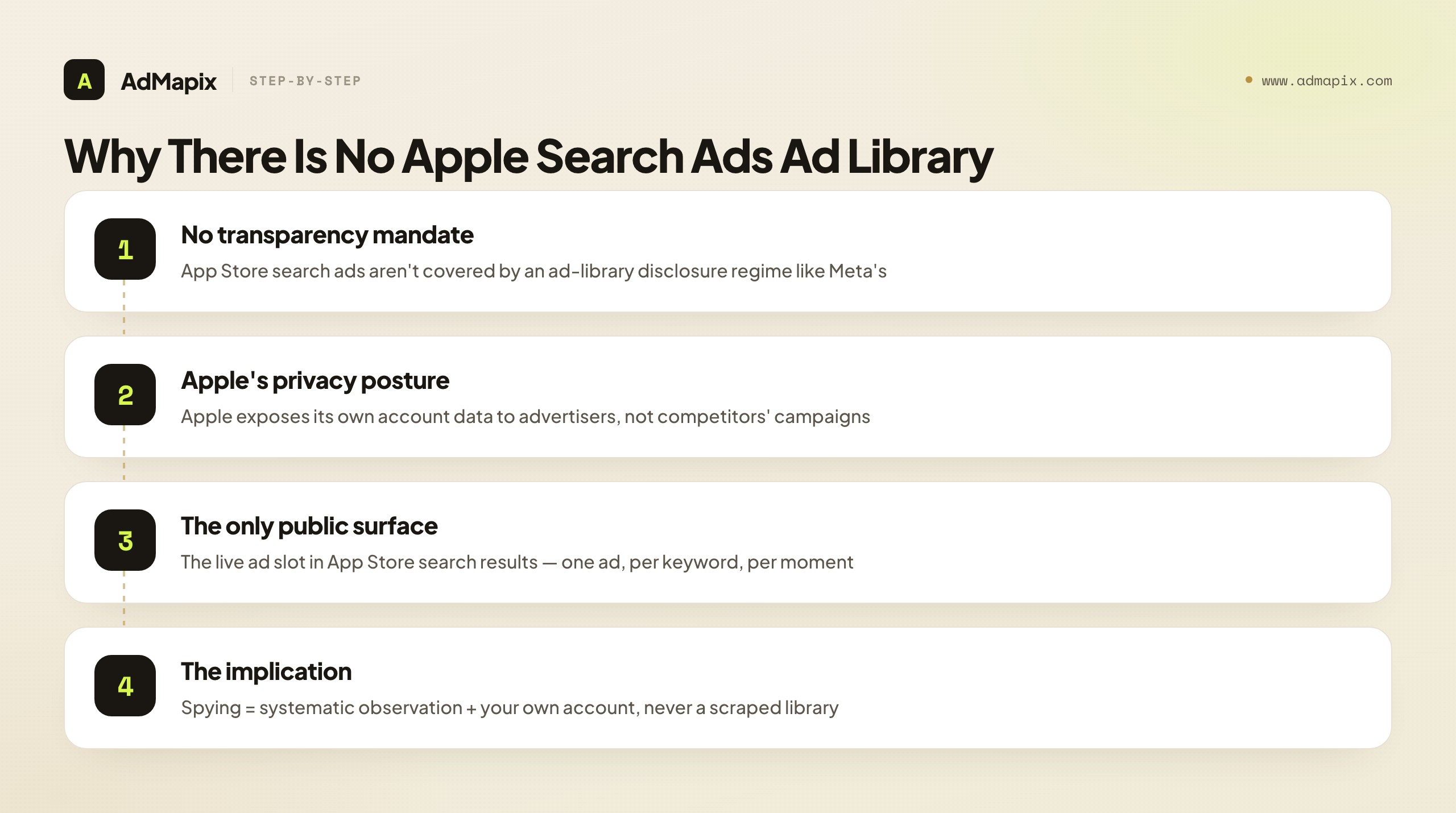
The reasons are consistent with Apple's broader posture. Apple positions itself around user privacy and a tightly controlled advertising product, and it exposes rich data to advertisers about their own campaigns — keyword performance, bid recommendations, impression share, installs — while exposing essentially nothing about competitors' campaigns. There is no equivalent of "search any advertiser and browse their ads." The only public surface is the ad slot itself: one ad placement at the top of a live App Store search result, for a given keyword, country, and moment.
This structural reality is exactly why "Apple Search Ads spy tool" is a slightly misleading phrase. There is no library to scrape, so a legitimate tool cannot hand you a competitor's campaign — it can only help you organize what you observe. The honest method, therefore, is not "find a tool that unlocks Apple's data" (none exists) but "systematically observe the one public surface and triangulate with your own account." Internalize that, and you stop hunting for a nonexistent library and start doing the observation-and-inference work that actually produces ASA competitive intelligence. The absence of a library is not a problem to solve with a better tool; it is the defining constraint that shapes the entire method below.
It is worth contrasting this with platforms that do have libraries, because the contrast clarifies what ASA research can and cannot be. On Meta, you can browse a competitor's entire active creative set, see EU spend bands, and study their messaging at leisure — the library hands you a broad view. On Apple Search Ads, you get a single ad slot per keyword per moment, and you must assemble the picture yourself through repeated, structured observation. That makes ASA research more effortful but, in one respect, more honest: because there is no library tempting you to mistake breadth of access for depth of understanding, every ASA insight you produce is something you actively constructed from observation and your own account, with the limits baked in. You are never lulled into thinking you can see a rival's whole strategy, because you plainly cannot — and that built-in humility tends to produce more careful, better-graded competitive reads than platforms where abundant data invites over-confident conclusions. The lack of a library is a constraint, but it is also a discipline.
What an Apple Search Ads Spy Tool Can and Cannot Prove
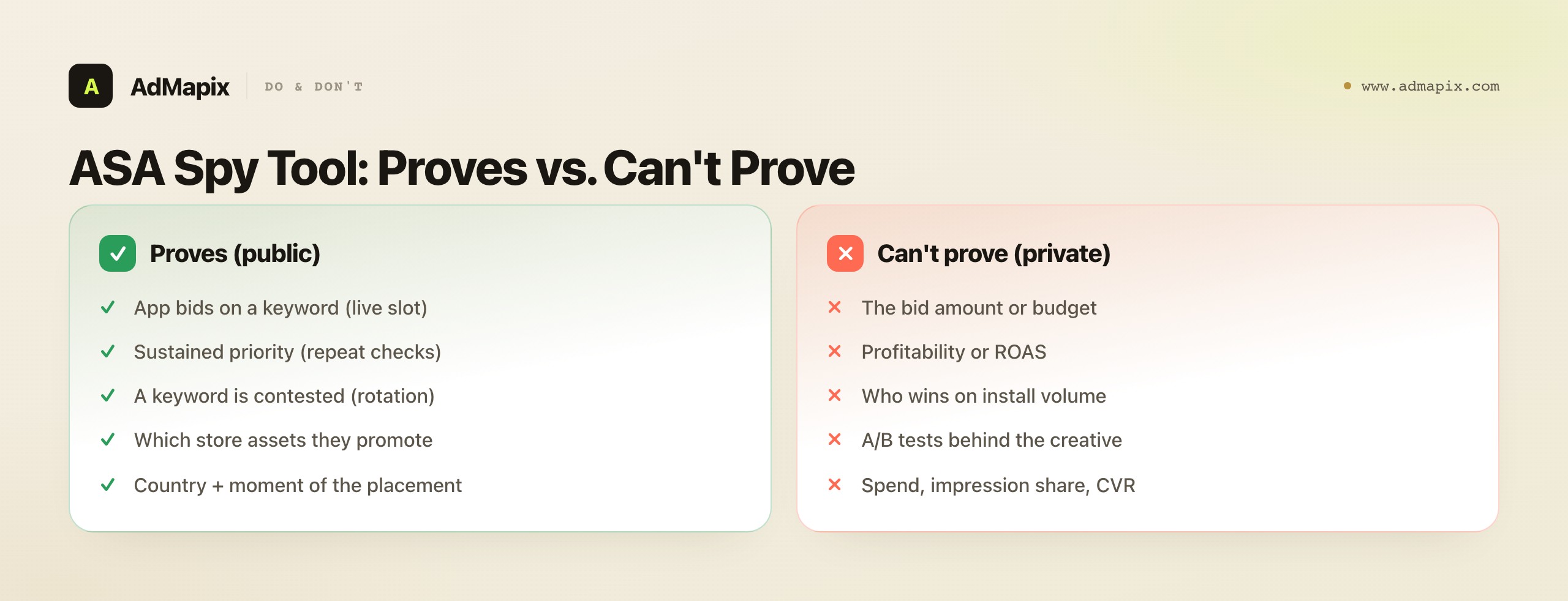
The single source of truth is a live App Store search result, so any "spy tool" can only confirm what is visible in that slot at the moment you look. Apple Search Ads places one ad at the top of search results; if a competitor's app sits in that slot for a keyword, you have proof they are bidding on it. Everything beyond that placement is inference — and being precise about the line is what separates real competitive intelligence from fabricated spend numbers.

| Signal | Public? | What it proves | What it cannot prove |
|---|---|---|---|
| App in the Search Results ad slot | Yes (live search) | The app bids on that keyword in that country | The bid amount or budget |
| Same app holding a keyword over weeks | Yes (repeat checks) | Sustained priority on that keyword | Profitability or ROAS |
| Ad slot rotating between competitors | Yes (repeat checks) | Contested keyword, likely high CPT | Who is winning on volume |
| Creative shown in the ad (icon, screenshots) | Yes | Which store assets they promote | A/B test results behind it |
| Spend, impression share, conversion rate | No | Nothing (not exposed) | These are private to the account |
Because results vary by country, device, and search session, one screenshot is an anecdote. A keyword you check daily for two weeks is evidence. The discipline of the whole method follows from this table: collect what the left column proves, label everything in the "cannot prove" column as the inference it is, and never let a placement harden into a fabricated spend figure. A spy tool that respects this line is a keyword-evidence tracker; one that crosses it is selling you a guess dressed as data.
It is worth being concrete about the most tempting over-read, because it trips up even experienced marketers: inferring spend from persistence. When you watch a competitor hold a keyword for three straight weeks, the instinct is to conclude "they must be spending a lot on this term." Resist it. A sustained hold proves priority — they consider the keyword important enough to keep bidding — but it does not prove a budget figure, because the cost to hold a slot depends entirely on the competitive auction, which you cannot see. A keyword with few rival bidders might be held cheaply for weeks; a fiercely contested one might cost a fortune for the same visible result. The placement looks identical from the outside, but the economics behind it are completely different. So "they held this keyword for three weeks" is solid evidence of priority and a real competitive signal; "they spent heavily to do so" is a guess that may be entirely wrong. Keep priority and spend separate in your notes, and you will avoid the single most common error in ASA competitive reads — and the one that most undermines a report's credibility when someone with auction knowledge checks it.
How Apple Search Ads Is Structured (and Why It Shapes What You See)
What appears in the ad slot is governed by Apple's own ad product, so knowing its structure tells you what is even possible to observe — and how to interpret what you find. The single most useful structural fact is the Basic-versus-Advanced split.

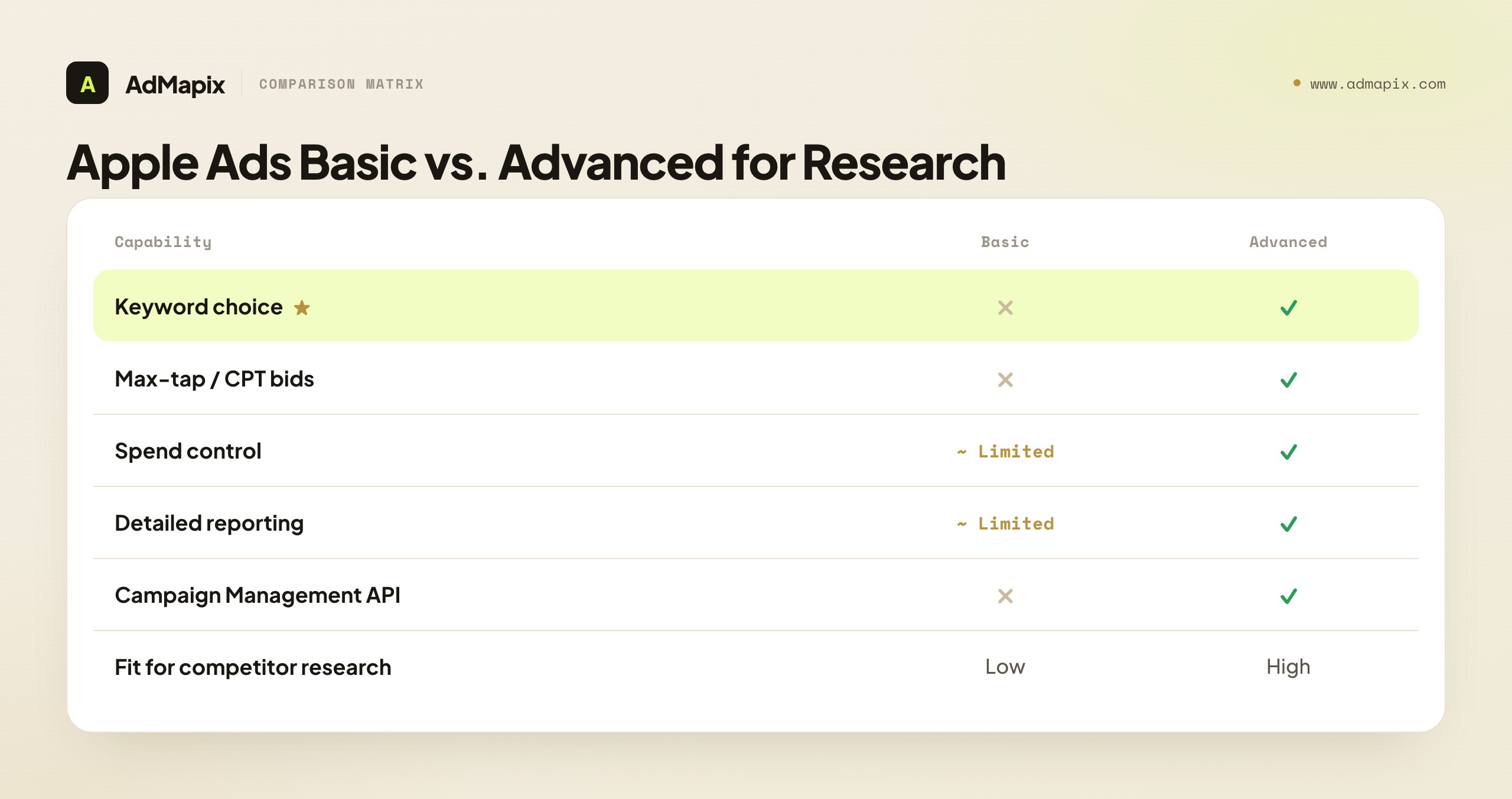
According to Apple's solution comparison, Apple Ads Advanced supports keyword choice, max-tap bids, campaign-level spend control, detailed reports, and Campaign Management API access, while Apple Ads Basic has no keyword or audience settings at all. That single distinction carries a powerful inference: only Advanced advertisers can target specific keywords, so an app you find occupying a niche or competitor keyword is almost certainly running an Advanced campaign with deliberate keyword targeting. A broad, automated Basic campaign would not let them choose that term. So the very presence of a competitor on a specific keyword tells you they are sophisticated enough to run Advanced — useful context before you assume anything about their strategy.
| Capability | Apple Ads Basic | Apple Ads Advanced |
|---|---|---|
| Keyword choice | Not available | Available (chosen or suggested) |
| Max-tap / CPT bids | Not available | Available (manual or conversion-maximizing) |
| Campaign-level spend control | Limited | Available |
| Detailed reporting | Limited | Available |
| Campaign Management API | Not available | Available |
| Fit for competitor research | Low | High |
The practical takeaway cuts both ways. To do serious competitor analysis yourself, you need Advanced — both for the keyword controls and for the reporting that turns observation into measurable bid tests. And to interpret what you observe, remember that a rival on a chosen keyword is running Advanced, which means a deliberate, manageable, reportable campaign — not an accident.
This Basic-versus-Advanced distinction also quietly tells you something about a competitor's sophistication, which is useful context for how seriously to take them. An app that shows up only on broad, automated placements may be running Basic — a set-and-forget product with no keyword control, often a smaller or less mature advertiser. An app that surgically targets your brand term, defends specific category keywords, and rotates across a considered keyword set is unmistakably running Advanced with a real ASA strategy and, usually, a real budget and an operator behind it. So the granularity of a competitor's keyword presence is itself a maturity signal: the more precisely targeted their ad-slot appearances, the more sophisticated and committed their ASA program likely is. A scrappy app you can out-maneuver looks different in the data from a well-run program you will have to out-bid or out-position — and you can begin to tell them apart from the precision of where they appear, before you have spent a dollar contesting them.
The Four Campaign Types: Why a Rival Appears Where
Apple's campaign structure guidance recommends four campaign types, and learning them is the key to interpreting every observation — because each type explains why a competitor shows up on a given keyword. When you see a rival in an ad slot, the first question is always "which of the four campaign types is this," and the answer reframes the threat.

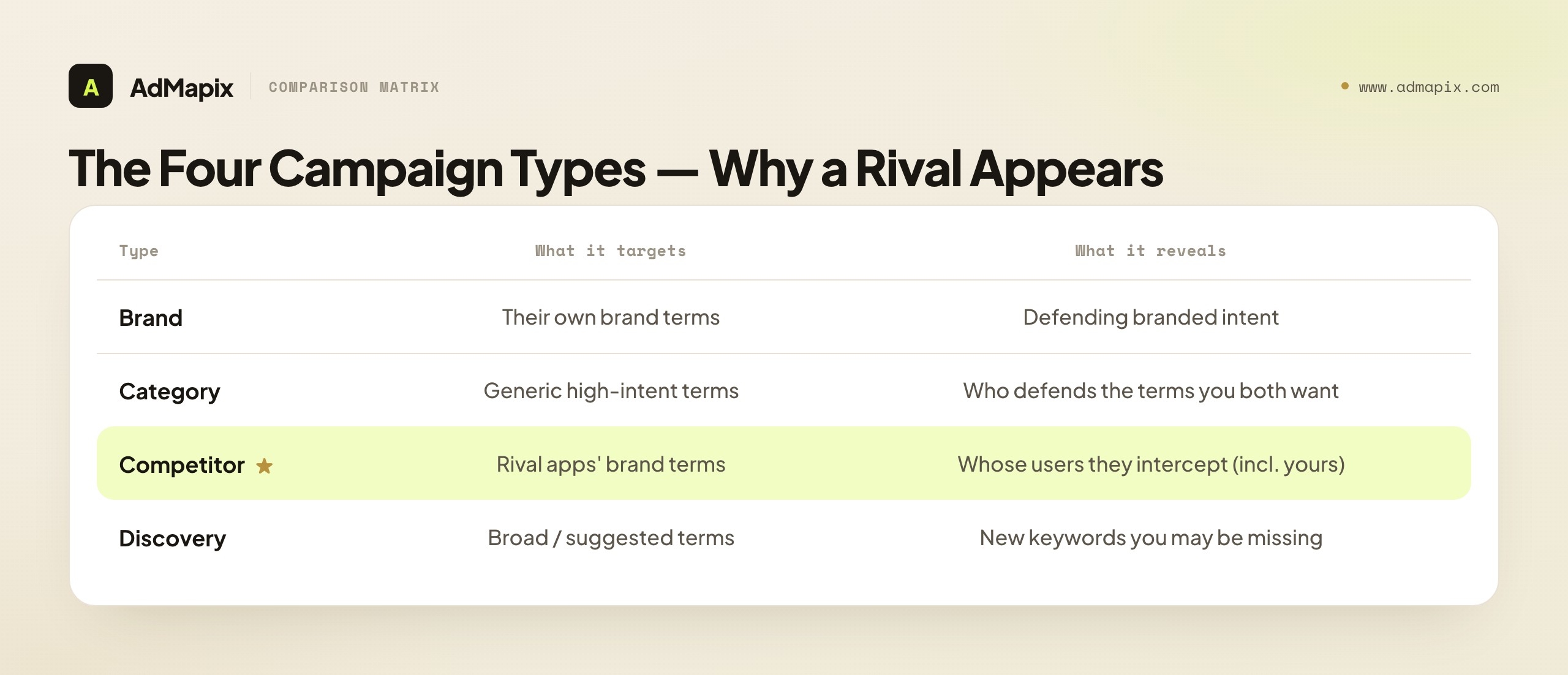
| Campaign type | What it targets | The competitor question it answers |
|---|---|---|
| Brand | The advertiser's own app and brand terms | Defending their branded intent — and is anyone poaching it? |
| Category | Generic category and feature terms | Who is defending the high-intent category keywords you both want? |
| Competitor | Apps similar to theirs (rival brand terms) | Whose users are they intercepting, and how hard do they fight? |
| Discovery | Broad and suggested terms for new keywords | What new keywords are surfacing that you are missing? |
The most useful pattern to track is the competitor campaign. Apple's guidance notes that competitor campaigns focus on apps similar to yours and typically use exact match with aggressive max-CPT bids. So when a rival appears on your brand or app-name keyword, you are not looking at a coincidence — you are looking at a deliberate competitor campaign aimed directly at you, run with exact match and a willingness to pay to intercept your branded intent. That is both a threat to address (they are siphoning your highest-intent searchers) and an intelligence signal (they consider you worth attacking). Conversely, when you appear on a rival's brand term, you are running the same play against them — and you should expect them to bid hard to defend, because brand-term defense is usually a contest of willingness to pay, not a cheap win. Reading every ad-slot observation through the four-campaign-type lens is what turns "an app showed up" into "here is exactly what strategy I am looking at."
The four-type lens also tells you how worried to be about a given observation, which is just as important as identifying it. A rival on a broad discovery term is the least alarming — they are casting wide, and so is everyone else. A rival defending their own brand term is expected and tells you little. A rival contesting a high-intent category term you both want is a genuine competition for the same buyers, worth a real response. And a rival on your specific brand or app-name term is the most pointed — it is a direct, deliberate intercept of people already looking for you, which is the highest-value traffic in the App Store and the costliest to lose. So the same raw fact — "a competitor appeared in an ad slot" — carries wildly different weight depending on which campaign type it represents, and a researcher who does not classify by type will either over-react to harmless discovery overlap or under-react to a brand-term intercept that is quietly draining their best traffic. Classify first, then calibrate your concern to the type; that sequencing is what keeps your attention and your budget pointed at the threats that actually matter. Skip the classification step and every ad-slot appearance looks equally urgent, which is how teams burn budget chasing harmless overlap while a quiet brand-term intercept drains their best traffic unnoticed.
Reading Bid and Rank Signals From Your Own Account
The second source of competitive signal — the one most "spy tool" discussions ignore — is your own Apple Ads Advanced account. It never names a competitor, but it tells you how contested a keyword is and roughly what it costs to compete, which is the closest thing to a competitive bid signal Apple provides.

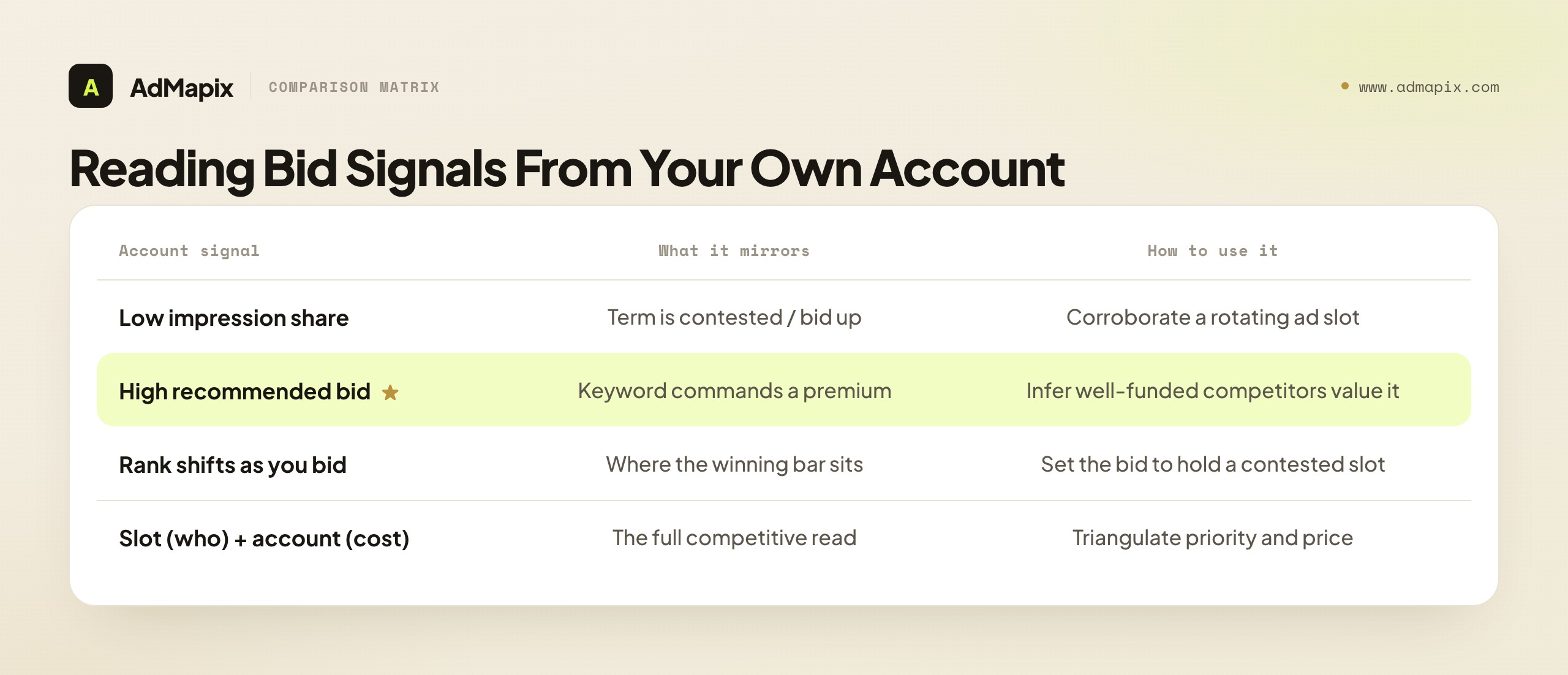
Apple's manual bidding guidance explains that effective manual bids increase the likelihood of showing in search results, and that Apple's bid recommendations factor in impression share, rank, popularity, installs, spend, CPA, CPT, impressions, and tap-through rate. You cannot see any of those numbers for a competitor — but you can read them for yourself on a shared keyword, and your own numbers are a mirror of the competitive pressure on that term:
- Low impression share on a keyword despite a reasonable bid → the term is contested or expensive; competitors are bidding it up. This corroborates an ad-slot observation that the keyword rotates among rivals.
- A high recommended bid to be competitive on a term → the keyword commands a premium, which implies well-funded competitors value it. The recommendation is Apple's read of the auction, and it moves with competitive intensity.
- Your rank or tap-through shifting as you adjust bids → tells you where the bar sits to win or hold the slot you saw a competitor occupy.
The technique is to pair the two sources. The live ad slot tells you who is bidding on a keyword; your own account's impression share and bid recommendation tell you how contested and expensive that keyword is. Neither alone is complete; together they triangulate a competitor's keyword priorities and the cost of contesting them. This is the closest you get to "competitive bid data" on Apple Search Ads — not a number scraped from a rival's account, but an inference triangulated from a public placement and your own account's auction signals. It is also why serious ASA competitor analysis requires a running Advanced account: without it, you have only the ad slot, missing half the picture.
A worked illustration makes the triangulation concrete. Suppose you observe a competitor holding the keyword "budget tracker" on most of your daily checks. That is the who. Now you look at your own account on that same keyword: your impression share is low despite a bid you thought was healthy, and Apple's recommended bid to be competitive has climbed well above your current one. That is the how contested and expensive. Put together, the read is rich: the keyword is valuable enough that a competitor defends it persistently, and the auction is hot enough that winning a meaningful share would cost you materially more than you currently bid. Neither fact alone would tell you that — the ad slot alone might suggest an easy keyword to contest, while the account signal alone would not tell you who you are fighting. The pairing tells you both the target's priority and your cost to challenge it, which is exactly the input a bid-test decision needs. This is also why two competitors can look identical in the ad slot but feel completely different to contest: the one on a low-competition keyword is cheap to displace, the one on a high-recommended-bid keyword is not, and only your account's auction signal reveals the difference.
A Repeatable Keyword-Tracking Workflow
The workflow that works treats spying as keyword-evidence collection, not data extraction. Run it on a fixed cadence so changes actually mean something — a delta from last week, not a one-off snapshot.

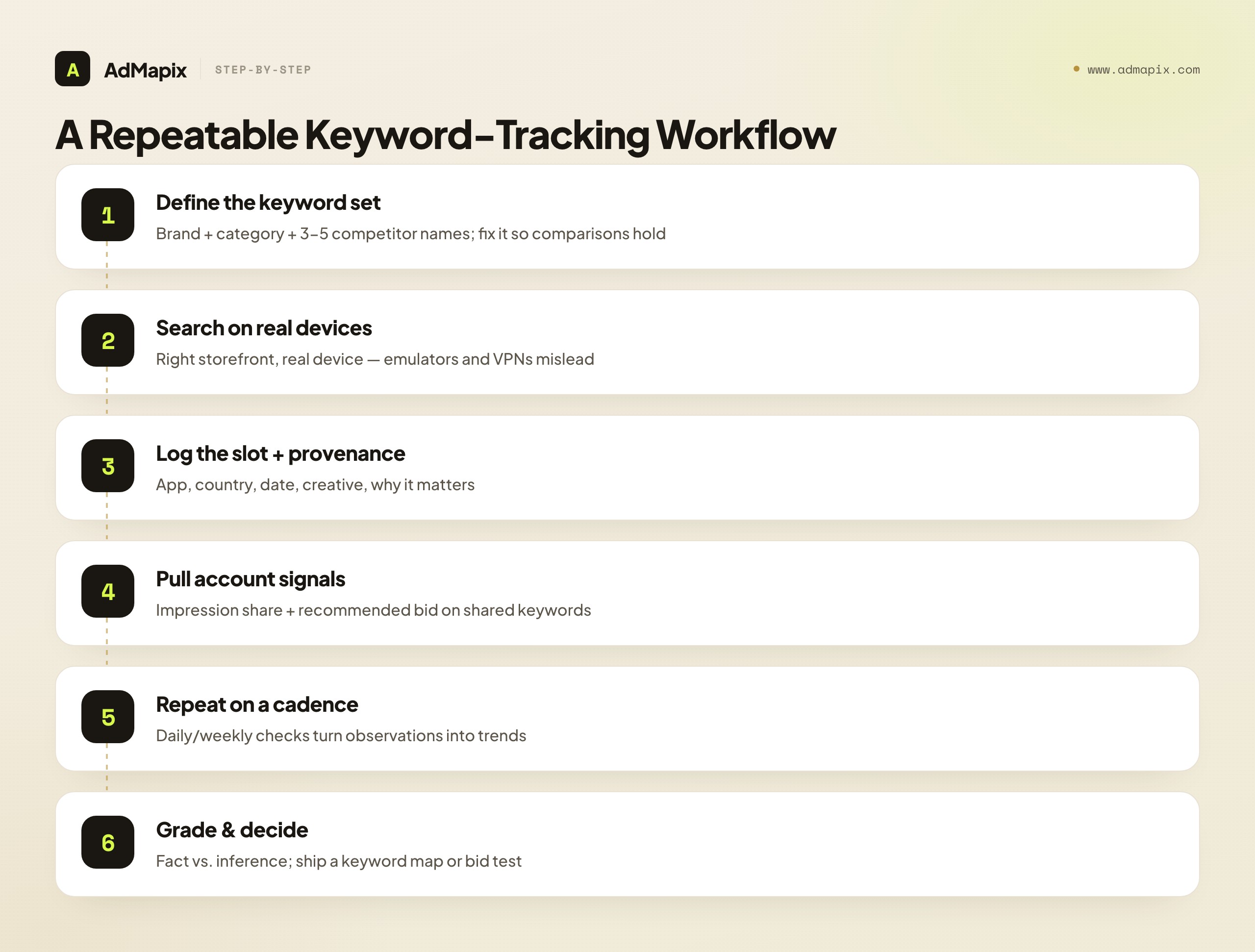
- Define your keyword set. List your brand terms, your top category and feature terms, and the names of three to five direct competitors. These are the keywords you will check every cycle — a fixed set so comparisons hold.
- Search on real devices. Apple Search Ads results depend on country and device. Use a real device set to the target App Store storefront; emulated or VPN results can mislead you about who actually holds a slot in a given market.
- Log the ad slot per keyword. For each keyword, record the app in the ad slot, the country, the date, the icon and creative shown, and a one-line note on why it matters. Provenance is what makes the observation defensible later.
- Pull your own account signals. For shared keywords, note your impression share and Apple's recommended bid — the contest-and-cost mirror that complements the slot observation.
- Repeat on a cadence. Daily or weekly checks turn single observations into a trend: who entered a keyword, who dropped, which terms are contested, where the slot rotates.
- Separate observation from inference. Write down what you saw versus what you suspect. "App X held our brand term for 9 of 10 days" is observation; "they are spending heavily" is inference. Grade every line.
- Turn it into a decision. Build a keyword map, a competitor brief, or a bid test from the pattern — never from a single screenshot.
The discipline lives in steps three through seven: consistent logging with provenance, the account-signal pairing, honest grading, and a decision every cycle. Run it for a few weeks and you have a longitudinal map of your category's ASA contest that no single search could produce.
Tracking Across Storefronts and Over Time
The two dimensions that turn a flat keyword check into real intelligence are geography and time — and both are unique to how App Store search ads work. A competitor's ad-slot presence is not a single global fact; it is a different fact in every storefront and at every moment, and the variation itself is the signal.

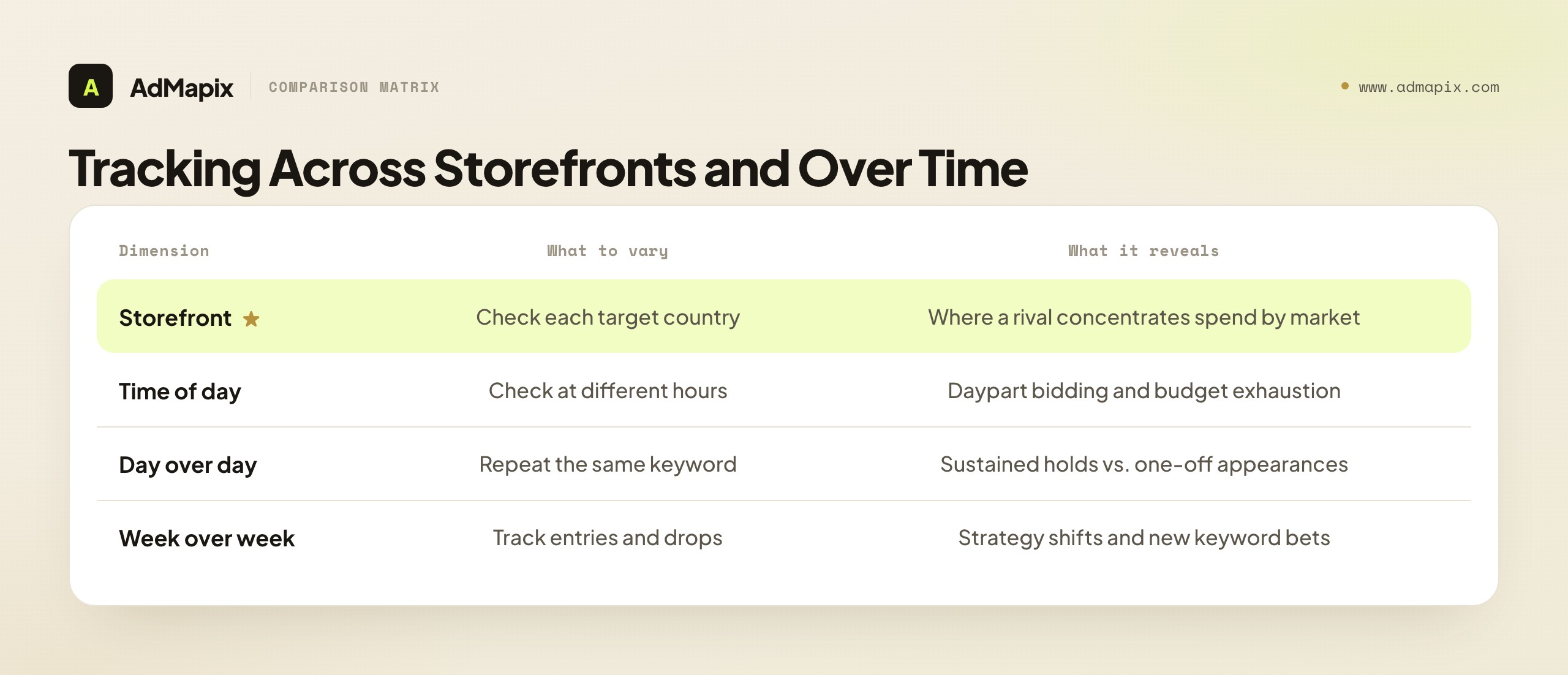
Storefront variation. Apple Search Ads run per-country, and a competitor who dominates a keyword in the US App Store may be entirely absent in Germany, Japan, or Brazil. Checking the same keyword across your target storefronts reveals where a rival concentrates their spend — which markets they prioritize, which they ignore, and where the contest is soft enough to enter cheaply. This geographic map is genuinely strategic: a rival's storefront footprint tells you their international priorities more directly than almost any other public signal. Always record the storefront with every observation, and treat "owns the keyword" as a per-country claim, never a global one.
Time variation within a day. Ad slots can shift by time of day, and that variation hints at how competitors manage budget and dayparting. A rival who holds a keyword every morning but disappears every evening may be exhausting a daily budget, dayparting deliberately, or competing against someone who outbids them at peak. You cannot know which from the outside, but checking a contested keyword at different hours adds texture a single midday check would miss — and a competitor who consistently vanishes at a certain hour is showing you a budget or strategy boundary worth probing with your own bids.
Variation over days and weeks. This is where the trend lives. Day-over-day repetition separates a sustained hold from a one-off appearance; week-over-week tracking catches entries, drops, and strategy shifts — a rival suddenly appearing on a new cluster of keywords is making a new bet you can see forming. The longitudinal view across both geography and time is the single most valuable thing systematic ASA observation produces, because it converts scattered placements into a moving picture of a competitor's keyword strategy that no snapshot, and no fabricated "spend tool," could ever give you.
The practical upshot: build storefront and timestamp into your logging from day one. A keyword observation without a storefront and a precise date is barely usable; the same observation with both becomes a data point in a geographic-and-temporal map that compounds into the richest ASA competitive read available from public signals. Retrofitting storefront and time onto old, unlabeled screenshots is impossible, so the discipline has to start with your very first observation, not be added once you wish you had it.
Turning Observations Into a Keyword Map and a Bid-Test Plan
Research that stays a folder of screenshots changes nothing. The point of all this observation is two concrete deliverables: a keyword map (who defends what) and a ranked bid-test plan (what you will contest, and how). This is the "competitor analysis" half of the job, and it is where the spying pays off.

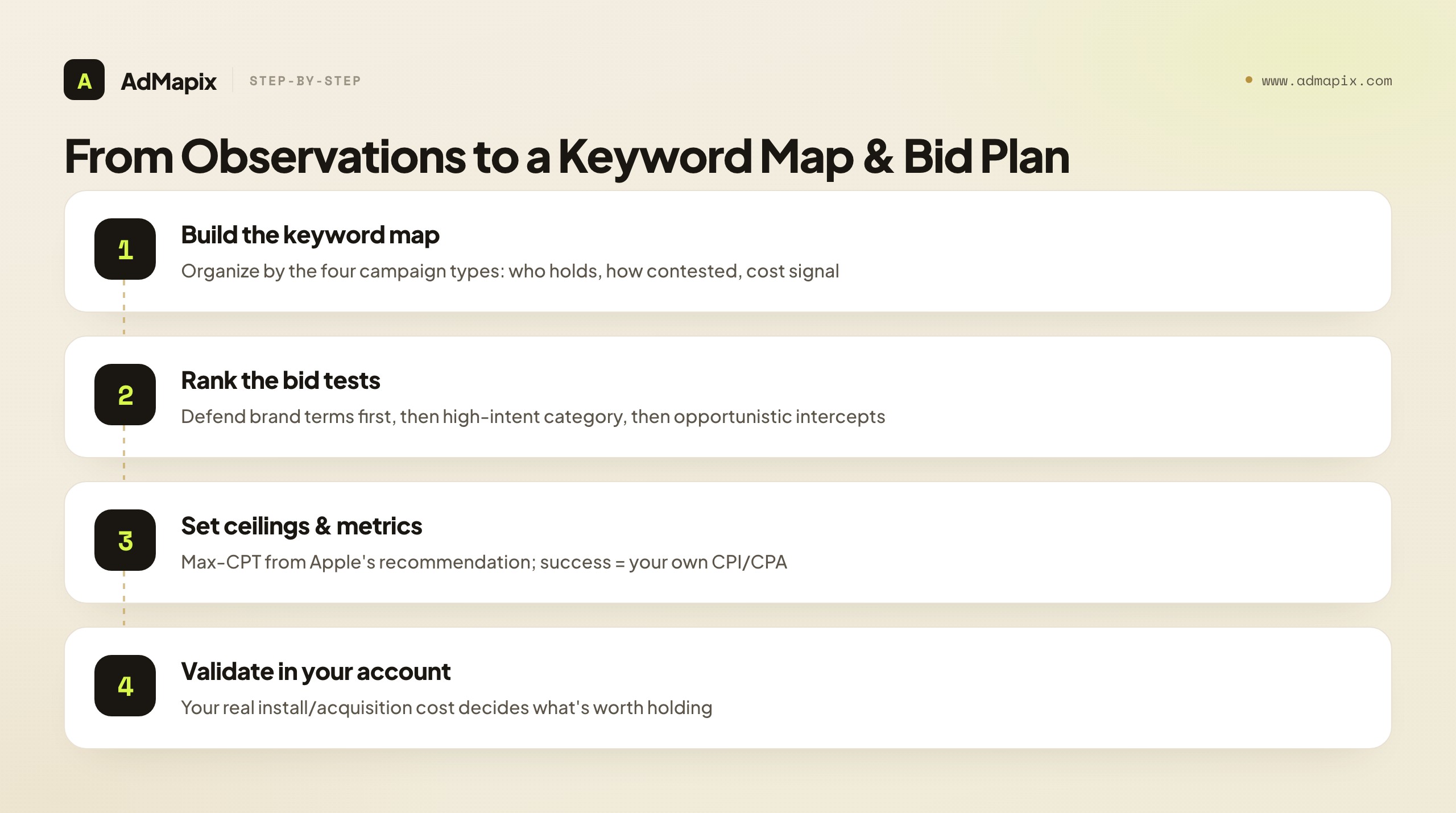
Build the keyword map. Organize your tracked keywords by Apple's four campaign types, because that mirrors how your competitors are likely organized too. For each keyword, record who holds the slot, how contested it is (from rotation observations and your impression share), and the cost signal (from your recommended bid). The map shows you at a glance: which of your brand terms rivals are attacking, which category terms are most contested, which competitor brand terms you could intercept, and which discovery terms competitors surface on that you are missing entirely.
A practical structure for the map is a simple table with one row per keyword and columns for: campaign type, the app(s) holding the slot, contest level (how often it rotates), your current impression share, Apple's recommended bid, your current bid, and a priority flag. Sorted by priority, this table is your bid-test plan in waiting — the high-priority rows are the tests to run, and the supporting columns already hold the inputs (recommended bid for your ceiling, impression share for your gap, campaign type for your concern level). Maintained weekly, with new observations layered in, the map becomes a living document of your category's ASA contest rather than a one-time snapshot. The discovery-term column deserves special attention as a source of offensive opportunity: when you spot competitors consistently appearing on a keyword you do not target at all, you have found a term the market values that you are simply absent from — often the cheapest, highest-upside addition to your own campaigns, discovered purely by watching where rivals show up.
Rank the bid-test plan. Not every contested keyword is worth fighting for. Prioritize tests by a simple logic: defend your own brand terms first (a rival intercepting your branded intent is the highest-value, highest-intent leak to plug), then contest category terms where your impression share is low but the intent is high, then opportunistically test competitor-brand interception where the intent fits your app and the defense looks soft. For each test, set a max-CPT ceiling informed by Apple's bid recommendation, a clear success metric (cost per install or cost per acquisition you own in your account), and a decision date.
Validate against the only data you fully own. Every inference from the ad slot and bid recommendations is a hypothesis until your own campaign data confirms it. Run the bid test, measure the install and acquisition cost in your own account, and let those numbers — the only performance data you fully control — decide whether a contested keyword is worth holding. The competitor observations tell you what is possible in the auction; your own results tell you what is profitable for you. That loop — observe, hypothesize, test, measure in your own account — is the entire honest method, and it is far more reliable than any tool claiming to read a rival's private bids.
A word on prioritization discipline, because the keyword map will surface more contested terms than you can or should fight for. The instinct to contest every keyword a rival touches is a budget trap — you end up spreading spend thin across many terms, winning none decisively, and bleeding to competitors who concentrated. The better logic is ruthless triage by value-to-you, not by how aggressively a rival defends. Your own brand terms are almost always the highest-value defense because they capture people already looking for you at the lowest acquisition cost; losing them is the most expensive leak. High-intent category terms come next, but only where your impression share is low enough that gaining share is meaningful and your app genuinely fits the search intent. Competitor-brand interception is last and most situational — it only pays when the rival's users plausibly want what you offer and the defense is soft enough that you are not simply funding a bidding war you will lose. The keyword map shows you everything; the discipline is choosing the few fights where winning actually improves your economics, and deliberately ceding the rest. A focused bid-test plan against three high-value keywords beats a scattered one against fifteen, every time.
Common Mistakes With Apple Search Ads Spying
The failure modes here are predictable, which makes them avoidable. Naming them is the cheapest insurance against a wrong conclusion.

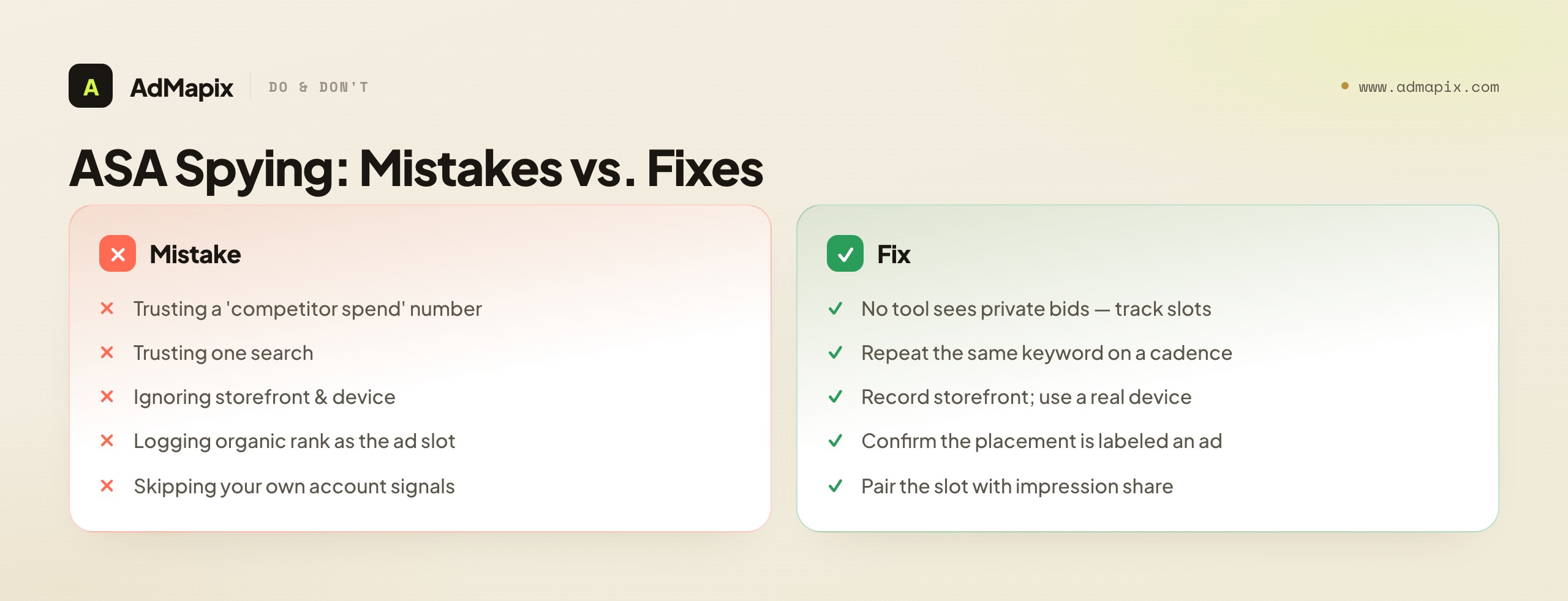
- Believing a tool can show competitor spend or bids. Apple publishes none of it; any tool claiming exact spend is guessing or fabricating. Treat such claims as a credibility red flag.
- Trusting one search. Ad slots rotate by session, country, and time of day. One check is noise; a tracked keyword over time is signal.
- Ignoring storefront and device. A keyword owned in the US App Store may be empty in another country. Always record the storefront, and search on a real device set to it.
- Confusing organic rank with the ad slot. The Search Results ad is a paid placement above organic; do not log an organic top result as an ad buy. Confirm it is labeled as an ad.
- Skipping your own account signals. The ad slot is only half the picture; impression share and bid recommendations on shared keywords are the contest-and-cost mirror that completes it.
- Keeping evidence in scattered screenshots. Without dated, tagged records you cannot prove a trend or hand it to a teammate. Provenance turns a clip into evidence.
- Stopping at observation. Research that never becomes a keyword map or a bid test is a screenshot folder, not competitor analysis.
- Researching from your own logged-in device's biased results. Your App Store search results can be shaped by your own history and account; for a cleaner read of what competitors broadly run, be aware your personalized results are one view, not the definitive one, and corroborate contested findings across checks.
- Treating a competitor's absence as proof they don't bid. You only see the slot at the moment you check; a rival could bid the keyword at other times, in other storefronts, or have exhausted a budget. Absence in one check is weak evidence — confirm across cadence and geography before concluding a keyword is uncontested.
A Worked Example: Reading One Competitor's ASA Strategy
Principles land harder applied, so here is a composite walkthrough. You market a productivity app and track a direct rival, "Rival App," across a two-week cycle.
Week one observations. You search your keyword set on a real US-storefront device daily. Rival App appears in the ad slot on your own brand term, "YourApp," on eight of ten checks — a clear competitor campaign aimed at you. They also hold two high-intent category terms ("task manager," "team to-do") most days, and they rotate with a third competitor on a contested feature term. On your own brand term, you pull your account: your impression share there has dropped, and Apple's recommended bid to stay competitive has risen — corroborating that Rival App is bidding your brand term up.
The interpretation, by campaign type. You read each observation through the four types. Rival App on "YourApp" is a competitor campaign intercepting your branded intent — your highest-priority threat. Their hold on category terms is a category campaign defending high-intent generic searches. The rotation on the feature term is a contested category keyword where willingness-to-pay decides the slot. None of this required a private number; the campaign-type lens turned raw observations into a strategy read.
The keyword map and plan. You build the map: your brand term (under attack, defend first), two category terms (contested, Rival App leads, your impression share is low), one feature term (rotating, opportunistic). The ranked bid-test plan writes itself: (1) raise your bid to defend "YourApp" against the intercept, measured by recapture of branded install volume; (2) test a higher bid on one category term where intent is strong and your share is low; (3) deprioritize the feature term until the first two resolve. Each test has a max-CPT ceiling from Apple's recommendation, a success metric you own, and a decision date.
The honest close. You label everything: fact (Rival App held your brand term 8/10 days; your impression share dropped; recommended bid rose), inference (they are running an aggressive competitor campaign against you), hypothesis (raising your brand-term bid will recapture branded installs profitably). You validate the hypothesis in your own account, where the real cost-per-install lives — not in a fabricated read of Rival App's budget. That brief, built entirely from public ad slots and your own account signals, is genuine ASA competitive intelligence.
Notice what made this read strong: not a single piece of private data, but the layering of public observation, account signal, and campaign-type interpretation. The ad slot alone would have told you "Rival App appears on your brand term sometimes" — interesting but thin. Your account signal alone would have told you "this keyword got more expensive" — without knowing why. The campaign-type lens alone would have been theory with no evidence. Layered together, they produced a specific, defensible, actionable conclusion: a named competitor is running a brand-intercept campaign against you, it is measurably raising your cost to defend, and here is the prioritized test to respond. That layering is the whole craft. Anyone can take one screenshot; the analyst who systematically combines the live slot, their own account, the campaign-type framework, and honest grading extracts far more signal from the same public surface than the person waiting for a magic tool to hand them a competitor's bids. The tool that hands you bids does not exist; the method that out-reads it does.
When to Use AdMapix
AdMapix is for the part of the job that starts after you have observed the live ad slot: organizing creative evidence, tagging patterns across competitors, and producing reports your team can reuse. It does not access Apple's private data — nothing can — but it solves the "scattered screenshots" problem that quietly kills most ASA competitor tracking.

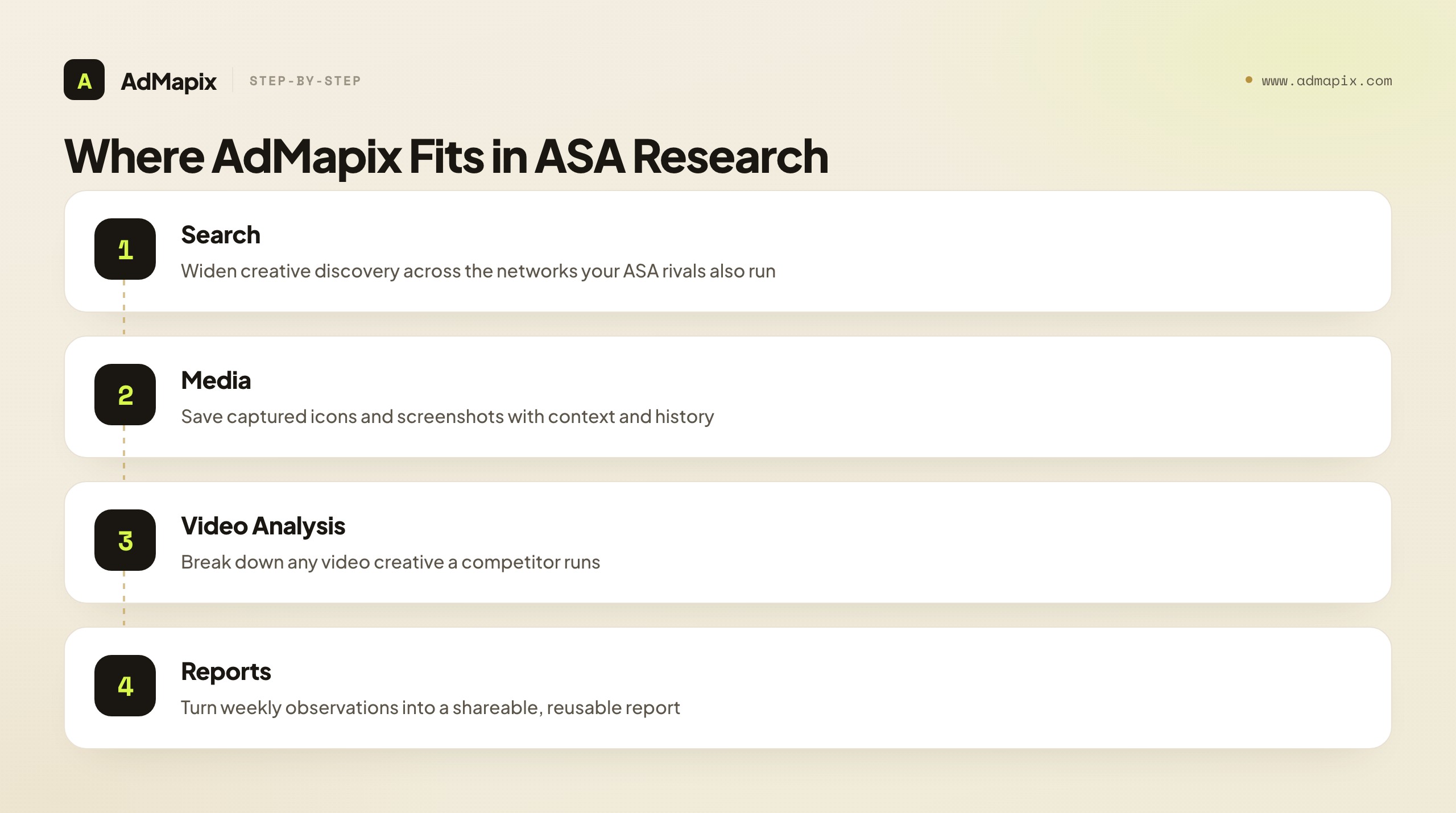
Use Search AdMapix to widen creative discovery across networks (useful because your ASA competitors usually run creative on other platforms too), Media to save the icons and screenshots you capture with context and history, Video Analysis to break down any video creative a competitor runs, and Reports to turn weekly observations into a shareable document. Compare workflow access on Pricing, and create an account from Login once the workflow starts replacing manual screenshots and scattered notes.
It is the right fit for app teams and agencies running competitor tracking on a cadence who are tired of scattered screenshots. It is not the right fit if you expect it to read a competitor's private Apple Ads account, surface exact bids, or replace your own live App Store searches — AdMapix organizes the evidence you gather; it does not bypass Apple's data limits, and it does not pretend to. The live ad slot and your own account remain the sources of truth; AdMapix is the layer that keeps the evidence from rotting in a screenshot folder and turns recurring observation into a reusable report.
Putting It Together: Reverse-Engineer Honestly
The whole method reduces to one honest premise: Apple Search Ads has no ad library, so you reverse-engineer competitor strategy from two things you can actually see — the live App Store ad slot, and your own account's bid and rank signals — never from a rival's private numbers. The live slot tells you who bids on which keywords; your account tells you how contested and expensive those keywords are; Apple's four campaign types tell you why a rival appears where; and your own test results tell you what is actually profitable to contest.
Run the keyword-tracking workflow on a cadence, pair the ad slot with your account signals, interpret through the campaign-type lens, and turn the pattern into a keyword map and a ranked bid-test plan validated against your own data. Grade every claim — fact, inference, hypothesis — and never present a placement as a spend figure. Do that, and you build real, defensible ASA competitive intelligence: a map of who defends what and a plan for what to contest, assembled entirely from public observation and the one account you fully control. That is far more valuable than any tool's fabricated read of a competitor's bids — and it is the only honest way to "spy" on a platform that publishes nothing.
The reframe worth carrying away is that the absence of an Apple Search Ads ad library is not the dead end it first appears to be. It rules out lazy, browse-everything research, but it rewards disciplined research handsomely — because most of your competitors are also without a library, which means the team that builds a systematic observation habit, pairs it with account signals, and triages ruthlessly into a focused bid-test plan will simply understand the ASA contest better than rivals who keep searching for a tool that does the thinking for them. There is no shortcut, and that is precisely the opportunity: in a no-library world, the edge goes to whoever does the honest, structured work, not to whoever buys the flashiest dashboard. Build the habit, and the platform's opacity becomes your advantage rather than your obstacle.
FAQ
Can an Apple Search Ads spy tool show a competitor's bids or budget?
No. Apple does not publish bids, budgets, spend, impression share, or conversion rates for any advertiser. The only public signal is which app occupies the Search Results ad slot for a keyword at the moment you search. Any tool claiming exact competitor spend is estimating or inventing it — treat that claim as a credibility red flag.
How do I actually "spy" on Apple Search Ads then?
Search your target keywords on a real device set to the right App Store storefront, and record which app appears in the top ad slot, plus the country and date. Repeat the check daily or weekly, and pair it with your own account's impression share and bid recommendations on shared keywords. A keyword held consistently over time, corroborated by your account signals, is real evidence of a competitor's keyword strategy.
Why does the same keyword show different ads?
Apple Search Ads results vary by country storefront, device, and search session, and the ad slot rotates among competing bidders. That is why one screenshot is unreliable. Tracking the same keyword repeatedly is what reveals who is sustaining a bid versus who appeared once, and rotation itself is a signal that a keyword is contested and likely expensive.
How can I tell a competitor is targeting my app?
Search your own brand or app name in the App Store. If a rival app appears in the ad slot above your organic listing, they are running a competitor campaign on your term — which Apple recommends doing with exact match and aggressive max-CPT bids. That is a direct intercept of your branded intent, and usually your highest-priority keyword to defend.
What are the four Apple Search Ads campaign types, and why do they matter for spying?
Apple recommends brand, category, competitor, and discovery campaigns. They matter because each explains why a rival appears on a keyword: brand defends their own terms, category contests generic high-intent terms, competitor intercepts rival apps' terms, and discovery surfaces new keywords. Reading each ad-slot observation through this lens turns "an app showed up" into a specific strategy read.
Do I need an Apple Ads account to do competitor analysis?
For serious analysis, yes — an Apple Ads Advanced account. Advanced exposes keyword choice, bid controls, detailed reporting, and the bid recommendations and impression-share signals that tell you how contested a keyword is. Basic has no keyword settings and cannot do the job. Without a running Advanced account, you have only the live ad slot and are missing the account-signal half of the picture.
How do I read bid signals without seeing competitor bids?
You read them from your own account on shared keywords. Low impression share despite a reasonable bid means the term is contested and bid up; a high recommended bid to compete means the keyword commands a premium; shifts in your rank as you adjust bids show where the winning bar sits. None of these names a competitor, but together they mirror the competitive pressure on a keyword.
What should the output of Apple Search Ads competitor research be?
A keyword map and a ranked bid-test plan — not a screenshot folder. The map organizes tracked keywords by Apple's four campaign types, showing who holds each slot, how contested it is, and the cost signal. The plan ranks which keywords to contest (defend brand terms first), with a max-CPT ceiling, a success metric you own, and a decision date for each test.
How is App Store organic rank different from the ad slot?
The Search Results ad is a paid placement that appears at the top of App Store search, labeled as an ad, above the organic results. Organic rank is earned, not bought. A common mistake is logging an organic top result as an ad buy — always confirm the placement is labeled as an ad before recording it as evidence of a competitor bidding on a keyword.
Where does AdMapix fit in this workflow?
AdMapix fits after you have observed the live ad slot. It stores the creative evidence you capture, lets you tag patterns across competitors, supports video creative breakdowns, and turns recurring observations into reports. It does not access private Apple Ads data, surface exact bids, or replace your live App Store searches — it organizes the evidence you gather so it compounds instead of scattering.
Key Takeaways
- Treat Apple Search Ads spying as keyword-evidence tracking; private bids, budgets, and ROAS are not public, and any tool claiming them is fabricating.
- The only reliable public signal is the live App Store ad slot, so check on real devices and log country plus date every time — cadence turns anecdotes into evidence.
- Pair the ad slot with your own account's impression share and bid recommendations, and interpret every observation through Apple's four campaign types.
- Watch for rivals on your brand and app-name keywords — that is a competitor campaign aimed directly at you, and usually your highest-priority defense.
- Turn observations into a keyword map and a ranked bid-test plan validated against your own account data; use AdMapix to store, tag, and report the evidence, not to extract data Apple never exposes.
Related Reading
- Ad Spy Tools by Channel: Meta, TikTok, Google, YouTube, Native — how competitive research differs across platforms, including app and search channels.
- App Store Keyword Research — the ASO keyword foundation that feeds your ASA keyword map.
- App Store Creative Optimization — optimizing the store assets that your ASA ads promote.
- How to Spy on Competitors' Ads in 2026 (30-Min/Week Workflow) — the cross-channel weekly workflow this ASA method plugs into.
- Best Ad Spy Tools 2026 — a broader roundup of competitive-research tools across channels.
Sources
Official sources checked as of June 21, 2026. Apple Ads placements, settings, and best-practice pages can change, so verify the current path before relying on a workflow.
- Apple Ads on the App Store — Search Results ads reach people right after they search, using manual or conversion-maximizing bidding with chosen or suggested keywords.
- Apple Ads solution comparison — Apple Ads Advanced supports keyword choice, max-tap bids, spend control, detailed reports, and the Campaign Management API; Basic has no keyword or audience settings.
- Apple Ads campaign structure — Apple recommends brand, category, competitor, and discovery campaign types; competitor campaigns use exact match with aggressive max-CPT bids.
- Apple Ads manual bidding — effective manual bids increase the likelihood of appearing in search results; recommendations factor in impression share, rank, popularity, installs, spend, CPA, CPT, impressions, and tap-through rate.
Turn these observations into your next creative study
Open the creative library and select samples for your market, network and research question.
Related Articles
Snapchat Ad Spy Tool in 2026: How to Research Competitor Snap Ads Without a Library
The 2026 guide to researching competitor Snapchat ads: why there's no commercial ad library, the four official Snap surfaces, what public data can and can't prove, reading vertical creative by format, a workflow, and turning Snap Ad patterns into testable briefs.
Reddit Ads Library in 2026: The Ads Inspiration Library, Reddit Ad Examples, and Competitor Research
A complete 2026 guide to the Reddit Ads Library — why the closest official surface is Reddit's Ads Inspiration Library rather than a Meta-style transparency database, exactly what it shows and hides, how to find and read Reddit ad examples, how to judge community fit, a full competitor-analysis workflow, how it compares to other ad libraries, the honest limits of public ad data, and where a cross-network creative-intelligence layer like AdMapix fits.
LinkedIn Ads Competitor Analysis: A Complete B2B Workflow for Reading, Tagging, and Out-Positioning Rival Campaigns
A flagship 2026 guide to LinkedIn ads competitor analysis for B2B teams. How to use the LinkedIn Ad Library, read competitor ads as messaging and offer hypotheses, tag every creative on six dimensions, run offer and format analysis, build recurring competitor reports, and turn it all into briefs and tests — with an honest account of what LinkedIn's public data can and cannot prove, and where AdMapix fits as a creative-evidence layer.