
WhatRunsWhere Alternative in 2026: Legacy Media-Buying Intelligence or Modern Creative Research?
A complete 2026 buyer's guide to choosing a WhatRunsWhere alternative — why teams look past this legacy media-buying tool, what it actually does (display, native, and mobile placements and publisher paths), the three layers of competitive intelligence, the legacy-access risk to check first, how to evaluate alternatives, who should choose which, a migration plan, the honest limits of public ad data, and where a modern cross-network creative tool like AdMapix fits.

WhatRunsWhere Alternative in 2026: Legacy Media-Buying Intelligence or Modern Creative Research?
By the AdMapix Research Team — Updated June 21, 2026
If you are looking for a WhatRunsWhere alternative, the first question is not "which tool is biggest" but "which job am I actually doing." WhatRunsWhere is a legacy media-intelligence product built around display, native, and mobile ad placements and the media-buying paths behind them — who runs ads where, through which publishers and networks. That is a fundamentally different job from modern creative research, where you search competitor ads, save the strongest examples, break down video hooks, and turn patterns into a brief. Most people searching for a "WhatRunsWhere alternative" are really discovering one of two things: either they need its original placement-intelligence job from a more current tool, or they adopted it as a stand-in for competitor creative research it was never built to do. This guide separates those two needs so you replace the layer you are actually short on — not the most-marketed dashboard.

This guide is for media buyers, affiliate and performance marketers, agencies, ecommerce teams, and creative strategists who need to pick the right layer instead of the most-recognized name. We will define exactly what WhatRunsWhere does, why teams look for alternatives, the legacy-access risk that makes this comparison different from the others, the three layers of competitive intelligence and how to tell which you need, how to evaluate candidates, who should choose what, how to run a fair migration test, and the honest limits of public ad data. The aim is a confident, layer-matched choice — not a feature-list bake-off between tools that solve different problems.
<!-- admapix-data:v1 -->Judge Alternatives by Which Creative Types They Cover (AdMapix Data)
"How many ads can it search" is the wrong question when comparing ad intelligence tools. What actually caps your research is which creative types are covered. AdMapix indexes five parallel types; here is what was active in each over the last 30 days:
| Creative type | Active in the last 30 days | Newly discovered |
|---|---|---|
| Creative combinations | 60.9M | 43.2M |
| Image / video | 24.2M | 14.7M |
| Playable ads | 307.1K | 106.8K |
| Landing pages | 101.7K | 73.3K |
| Document creatives | 27.5M | 15.1M |
⚠️ These five must not be summed. One ad can be indexed simultaneously as a creative combination, an image/video, and a landing page — adding them double-counts. Reported separately, each figure is directly verifiable.
Use the table as a checklist. If your category converts on playables (games) or landing pages (SaaS, e-commerce), a tool that only indexes image/video will miss the exact layer you need, no matter how large its headline "total ads" number is.
Source: the AdMapix creative index, 2026-08-09 to 2026-09-08. All figures are counts of creatives active within that window, not lifetime totals. Create a free AdMapix account to inspect currently indexed records →
<!-- /admapix-data -->TL;DR — Choosing a WhatRunsWhere Alternative in One Screen
- WhatRunsWhere is a legacy media-buying / placement-intelligence tool: display, native, and mobile placements, plus the publishers and networks that carry them. It answers "who runs ads where," not "why this creative works."
- The best alternative depends on the layer you need: media-buying placement intelligence, competitor creative research, or spend/measurement — three different jobs.
- Verify live access first. As an older, self-hosted-style product, WhatRunsWhere's current access, coverage, and pricing are the first thing to confirm — before any feature comparison.
- If your next decision is which concept, hook, or video pattern to test, choose a creative-research tool over a placement-spend tool. That is the gap most "WhatRunsWhere refugees" actually have.
- Public ad data is observational and often modeled. It shows observed creatives and placements and rough relative activity, never reliable real spend, exact impressions, or campaign outcomes.
- AdMapix fits the creative-research layer: cross-network ad creative search, saved media, video analysis, tagging, and recurring competitor reports. It is not a publisher-network media-buying tool or a spend-measurement suite.
- Run a one-competitor, one-market test and judge candidates on live access, job match, and time-to-decision — not feature count.
Why Teams Look for a WhatRunsWhere Alternative
WhatRunsWhere built a real reputation in the media-buying world, so the search for an alternative is rarely about the original idea being wrong. It is usually about a mismatch — between the tool's age and a buyer's expectations of a modern product, or between its placement-intelligence job and what the buyer's decision actually needs. The reasons cluster into a recognizable list.

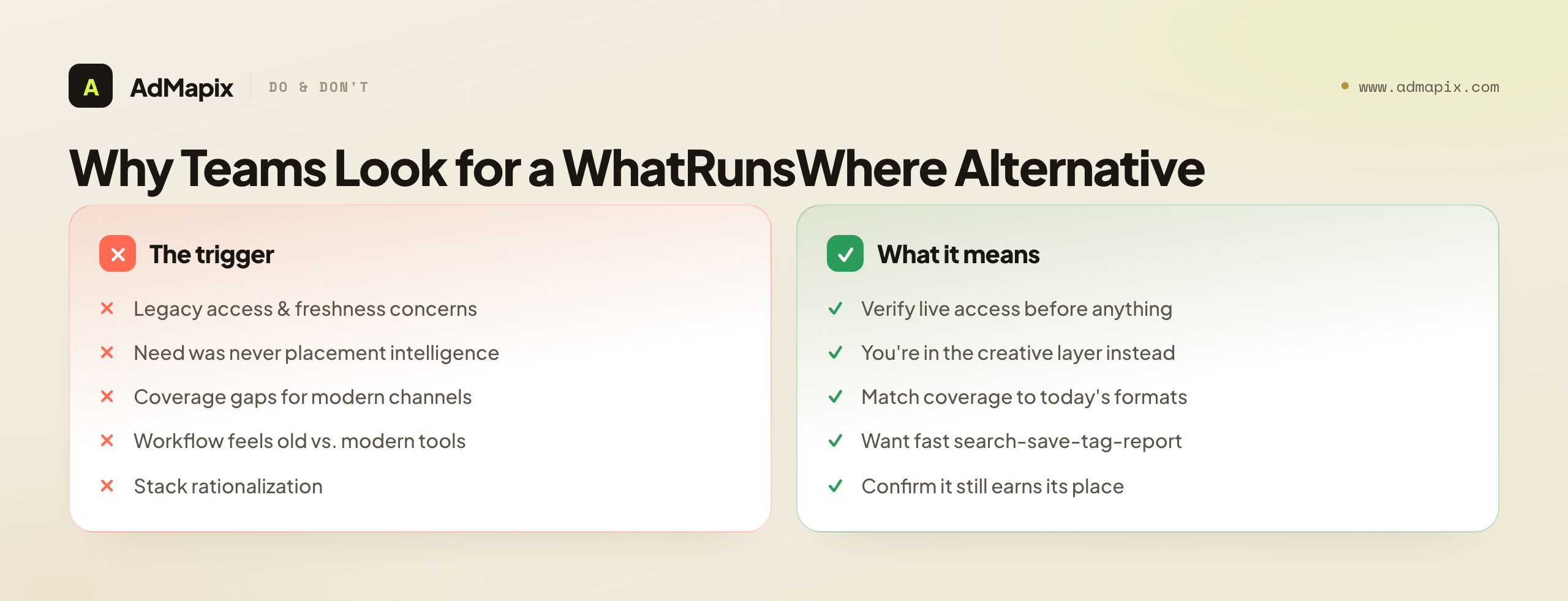
Legacy access and freshness concerns. WhatRunsWhere is an older product, and older tools raise reasonable questions about whether access is current, whether the ad index is fresh, and whether coverage still matches today's networks and formats. A famous brand with a live social page is not the same as a maintained, fully indexed, buyable product — and that uncertainty alone sends teams shopping.
The need was never placement intelligence. A large share of searchers adopted WhatRunsWhere hoping it would surface competitor creatives to learn from, then found a tool built around placements and media-buying paths. They are really in the creative-research layer, and a more current placement tool will not help them.
Coverage gaps for modern channels. A tool rooted in display and native placements may be thin on the short-video, social, and app-install creative where many competitors now live. Teams whose battleground moved to those formats look for coverage that matches.
Workflow age. Modern creative teams expect a fast, searchable, save-and-tag-and-report workflow. An older media-intelligence product designed for a different era of media buying can feel heavy or static against that expectation, even where its underlying data is useful.
Stack rationalization. Teams consolidating their tooling re-examine every legacy contract, WhatRunsWhere included, to confirm it still earns its place against newer, purpose-built options.
The pattern: some of these reasons keep you in the placement-intelligence layer (find a more current tool that does that job), but several reveal that you were never really in that layer at all — your real need is creative research, and you reached for a media-buying tool by reputation. Telling which is which is the first job of this guide.
The legacy-access reason deserves extra weight, because it makes this comparison genuinely different from a typical "alternative" decision. When you evaluate a modern SaaS competitor, you can assume the product is reachable, maintained, and current — the question is purely fit. With a legacy tool, that assumption breaks: the product may be in maintenance mode, the index may be stale, the buying path may be unclear, and the support may be thin. So the very first thing you check is not features but existence in a usable, current form. This is unusual enough that many buyers skip it, default to comparing feature lists they read in an old roundup, and only discover the access problem weeks in. Treat the legacy-access question as the gate it is, and you will either confirm the tool is a live option or eliminate it fast — both outcomes save time you would otherwise waste evaluating a product you cannot actually deploy.
What WhatRunsWhere Is, and What That Means for Replacement
WhatRunsWhere is a media-intelligence platform focused on where ads run: display banners, native placements, and the publishers and ad networks that carry them. That framing matters because it tells you exactly what a true replacement has to cover and what it does not. A placement-and-media-path tool answers "who is buying which inventory, on which sites, through which networks" — it does not answer "why this creative works" or "which hook should we test."

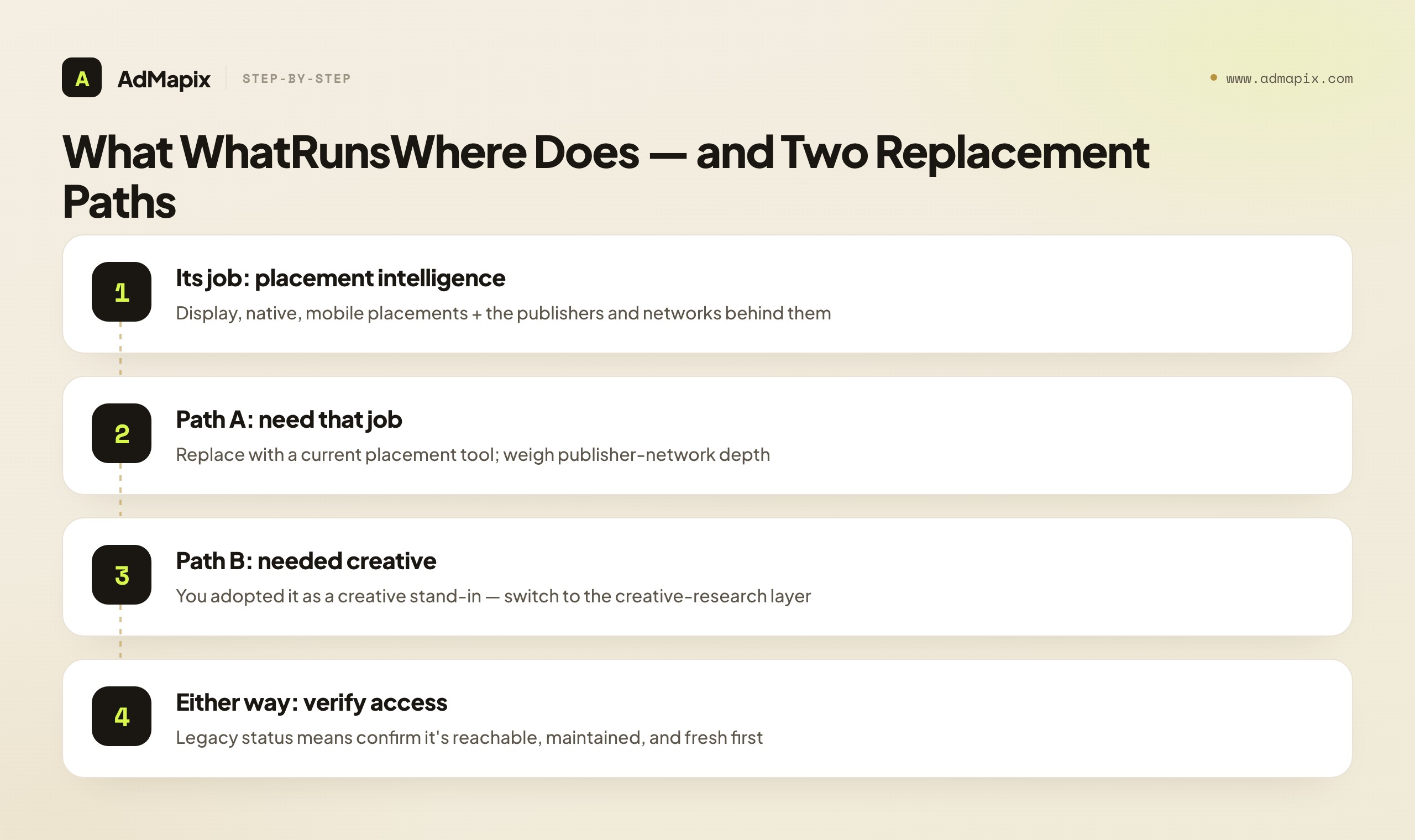
Because it is an older, self-hosted-style product rather than a frequently updated SaaS dashboard, the practical replacement question splits cleanly into two:
- Do you need its original job? Media-buying paths and publisher intelligence — knowing which sites and networks a competitor's ads appear on, useful for media buyers and affiliates planning where to place their own inventory. If so, your alternative is a current tool that does that job well, and you should weigh placement coverage and publisher-network depth heavily.
- Or did you adopt it as a creative-research stand-in? Many teams reached for WhatRunsWhere hoping to study competitor creatives and discovered a placement tool instead. If that is you, no placement tool — current or legacy — is your answer; you need the creative-research layer, which is a different category entirely.
Naming which group you are in resolves most of the decision. The original-job group shops within media-buying intelligence; the creative-research group has been shopping the wrong shelf and needs to switch aisles. Everything below helps you place yourself and choose accordingly.
A quick test to place yourself: ask what you would do with a perfect competitor map. If your answer is "go buy similar inventory on the same publishers and networks," you are in the placement group and the original job is your job — find a current, maintained tool that does it. If your answer is "study their hooks and offers and brief a test," then a placement map is not what you need at all; you need the actual creatives, broken down and turned into a brief, which is the creative-research layer. A surprising number of people who think they want a placement map actually want the second thing — they just inherited the assumption that competitor research means knowing where rivals advertise, when on modern platforms it more often means knowing what rivals are saying and showing. Running this one test before you shop saves you from replacing a placement tool with another placement tool when your real gap was creative all along.
The Three Layers of Competitive Intelligence
The single most useful move is to name the layer your next decision lives in, because "competitive intelligence" is not one job — it is at least three, and tools are built for different ones. Conflating them is the root of nearly every mismatched purchase.

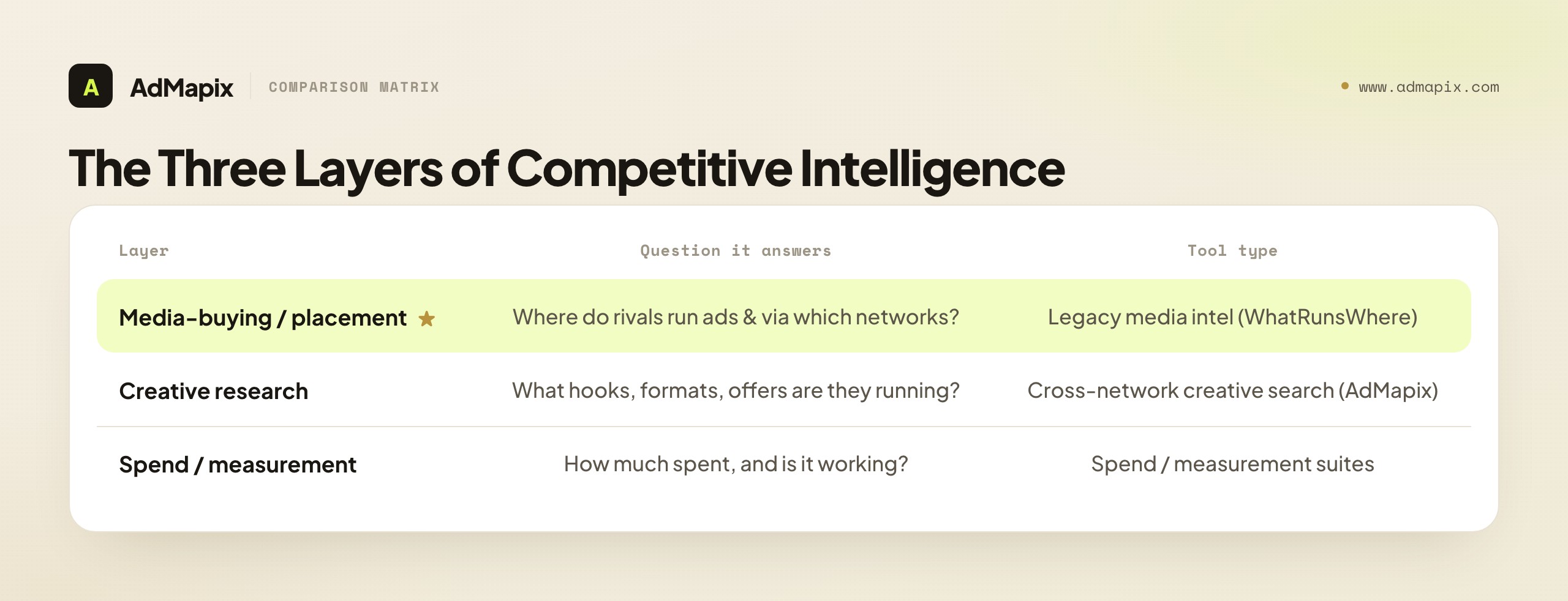
| Layer | The question it answers | What good output looks like | Tool type |
|---|---|---|---|
| Media-buying / placement intelligence | Where do competitors run ads, and through which networks? | Publisher and network map, placement list | Legacy media intelligence (WhatRunsWhere's original job) |
| Creative research | What hooks, formats, and offers are competitors running? | Saved ad examples, hook patterns, creative brief | Cross-network ad creative search (AdMapix) |
| Spend / measurement | How much is being spent, and is it driving outcomes? | Spend estimates, viewability, brand-safety checks | Enterprise spend / measurement suites |
The practical takeaway: a placement tool will not explain a video hook, a creative tool will not verify ad spend or viewability, and a spend suite will not hand you a publisher map. Each layer answers a question the others cannot. Choose the alternative that matches the layer you are short on, then add a second tool only if a second layer is genuinely missing — not because a vendor's marketing implied one tool does everything.
WhatRunsWhere sits squarely in the first layer. So the honest framing of "WhatRunsWhere alternative" is: if your decision is genuinely placement-and-publisher intelligence, you want a current tool in that first layer; if it is creative or spend, you have been in the wrong layer and the alternative is a different category. Most of the confusion in this space comes from tools across all three layers marketing themselves as "ad intelligence," which makes them look interchangeable when they are not.
It is worth naming how the three layers relate, because they are complementary, not competing — which is precisely why "which is best" is the wrong question. Placement intelligence tells you where competitive activity is happening and through which channels; spend intelligence tells you how much is behind it and roughly where the budget concentrates; creative intelligence tells you what the ads actually say and show, and what you should make in response. A complete competitive picture uses all three, each answering a question the others structurally cannot. The mistake is not "picking the wrong one" so much as expecting any single one to answer all three questions. WhatRunsWhere answers the where; it was never built to answer the what or the how much. So when its data leaves you still not knowing which hook to test, that is not a failure of the tool — it is a sign you are asking a creative-layer question of a placement-layer tool, and the fix is to add the missing layer, not to find a better version of the one you already have.
WhatRunsWhere and the Media-Buying Era It Came From
To choose its alternative well, it helps to understand the era WhatRunsWhere came from, because that era shaped what the tool does and why the modern gap exists. WhatRunsWhere rose to prominence in a period when display and native media buying — especially in affiliate and performance marketing — was won largely on placement and distribution. The winning move was to discover where a profitable campaign was running, identify the publishers and networks carrying it, and buy similar inventory to ride the same traffic. In that world, a tool that mapped placements and media-buying paths was a genuine edge, and WhatRunsWhere delivered exactly that.
The advertising landscape has shifted under that model in two important ways. First, a large share of competitive activity moved to platforms and formats — short video, social feeds, app-install creative — where the decisive variable is the creative itself, not the placement. On a self-serve auction platform, you do not "buy where the competitor bought"; you compete on the angle, the hook, and the offer. Placement intelligence simply matters less when the platform's algorithm, not a publisher relationship, decides distribution. Second, expectations of tooling modernized: teams now want fast, searchable, save-tag-and-report workflows, video breakdowns, and current indexes, which an older media-intelligence product was not built around.
This history explains the strange shape of the "WhatRunsWhere alternative" search. Some searchers genuinely still do placement-led media buying and want a current tool for that original job. But many more absorbed the brand's reputation as "the competitor-ad tool," reached for it expecting modern creative research, and found a placement-era product instead. Understanding the era it came from is how you tell which group you are in — and therefore whether your alternative is a newer placement tool or a different layer entirely. The tool is not outdated for its original job; the question is whether its original job is still your job.
The Legacy-Access Risk: Verify Before You Shortlist
This comparison differs from most "alternative" decisions in one important way: WhatRunsWhere is a legacy product, and legacy status introduces a risk you must check before any feature comparison. A tool's reputation can outlive its maintenance.

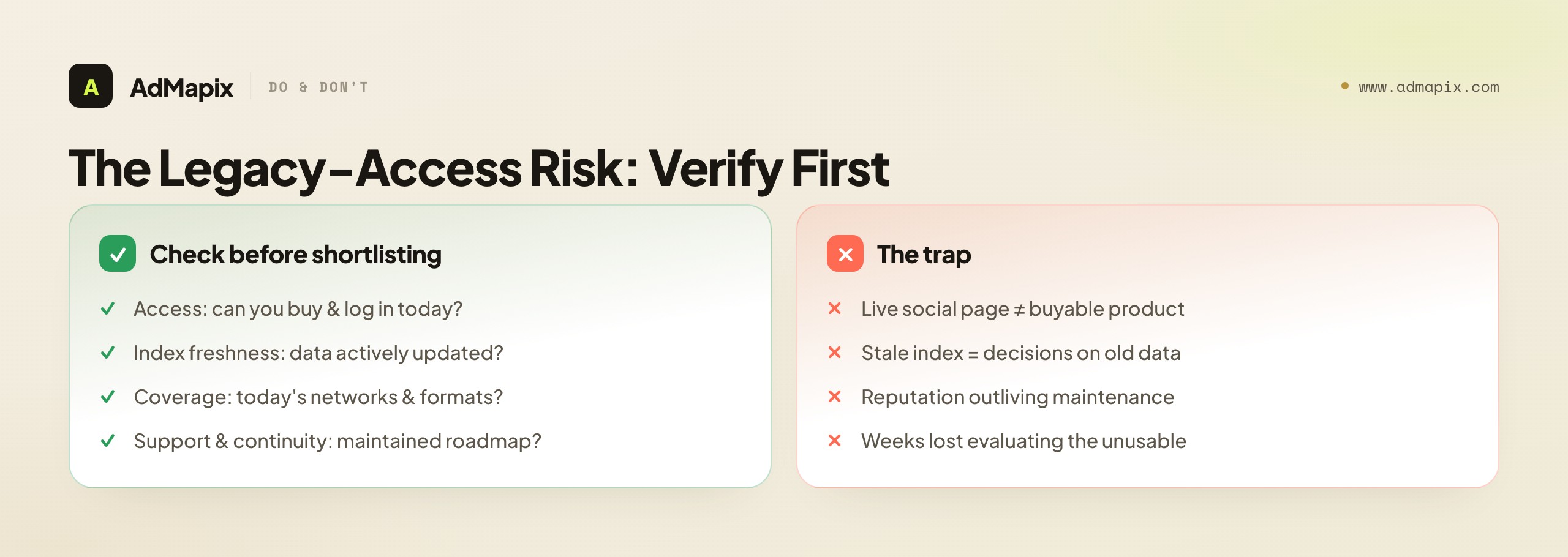
The specific risks with an older media-intelligence product are concrete:
- Access uncertainty. Can you actually sign up, log in, and buy the product today, through a maintained sales and support path? A live website or social page does not guarantee a buyable, supported product behind it.
- Index freshness. Is the ad and placement index being actively updated, or are you looking at a database that has gone stale? Stale placement data leads to decisions based on where competitors ran ads a year ago, not now.
- Coverage currency. Does the coverage still include the networks, publishers, and formats that matter today, or is it anchored to an older media landscape? A tool strong on a previous era's display ecosystem may have gaps where competition has since moved.
- Support and continuity. Is there a maintained support and account team, and a credible roadmap, or is the product in maintenance-only mode? Buying into a tool with no continuity is a stack risk.
The discipline is simple and non-negotiable: verify live access and freshness first, feature comparison second. A famous brand you cannot reliably buy, log into, or trust the data of is not a real option, no matter how strong its historical reputation. This is exactly why the evaluation framework below leads with "live access" rather than feature counts — for a legacy tool, that is the gating question, and skipping it is how teams waste weeks evaluating a product they cannot actually deploy. The same caution applies to any legacy alternative you consider: lead with "is this real and current," then compare.
How to Evaluate a WhatRunsWhere Alternative
Evaluate alternatives against the layer you need, not the longest feature list — and, given the legacy context, lead with access. The criteria below are ordered the way a buyer should actually weigh them.

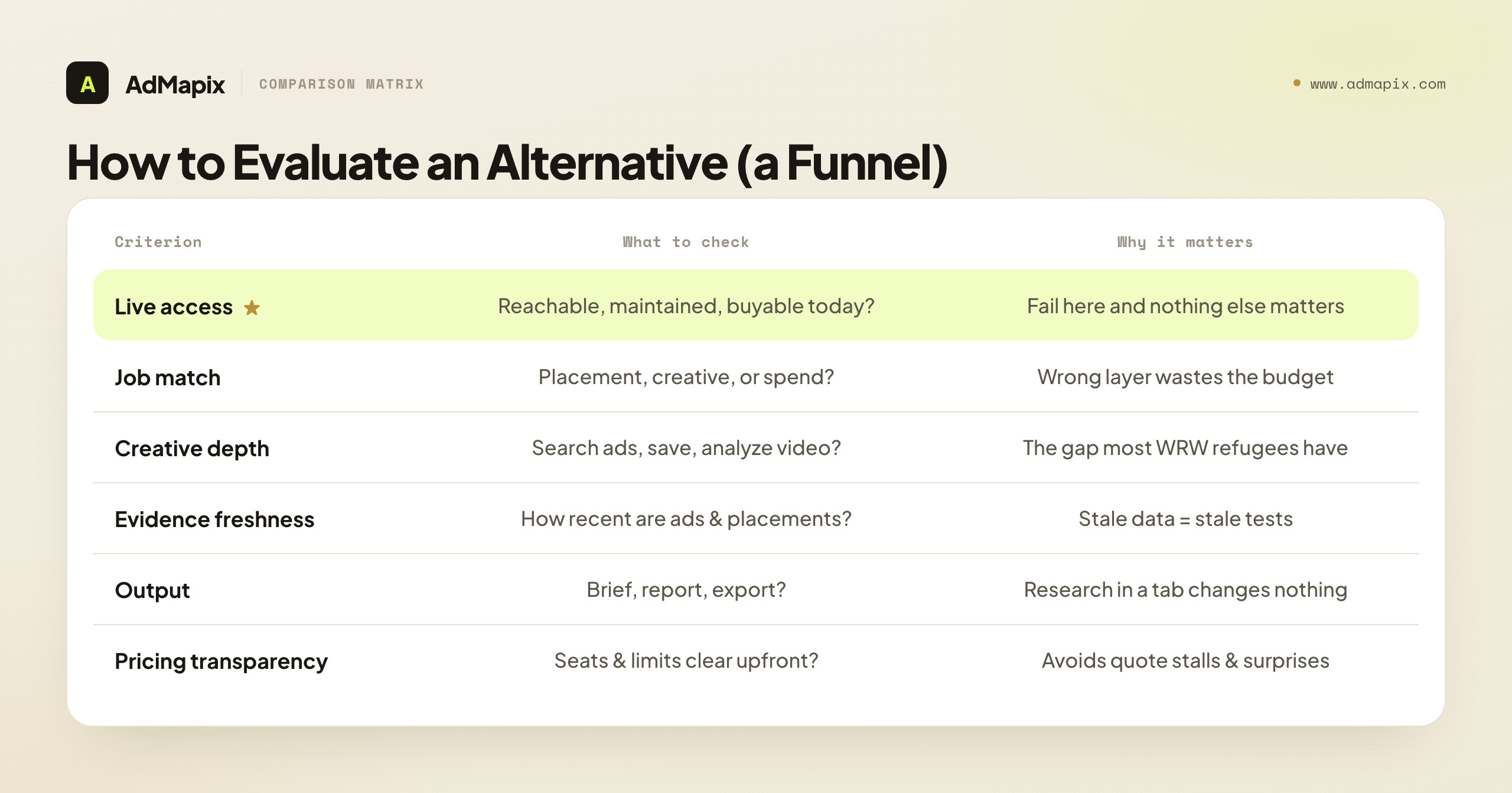
| Criterion | What to check | Why it matters |
|---|---|---|
| Live access | Is the product reachable, maintained, and buyable today? | A famous brand with unstable access is not a real option |
| Job match | Does it cover placement, creative, or spend? | The wrong layer wastes the budget entirely |
| Creative depth | Can you search ads, save examples, and analyze video? | This is the gap most WhatRunsWhere refugees actually have |
| Evidence freshness | How recent are the indexed ads and placements? | Stale creatives and placements lead to stale tests |
| Output | Does it produce a brief, report, or export your team can act on? | Research that stays in a tab changes nothing |
| Pricing transparency | Are seats and limits clear before you commit? | Avoids enterprise-quote stalls and surprises |
Read top to bottom, this list is a funnel. If a candidate fails live access, nothing below it matters — stop. If it passes access but fails job match (it is the wrong layer), stop. Only candidates that clear access and match your layer are worth weighing on creative depth, freshness, output, and price. Most wasted evaluation time comes from comparing tools deep in the list — feature by feature — that should have been eliminated at the top on access or layer. Run the funnel in order and the shortlist gets short fast.
The "creative depth" row is the one to watch most closely if you have realized your real gap is creative, because it is where placement-era tools and modern creative tools diverge most sharply. Creative depth is not just "does it show ads" — many tools show ads as thumbnails. It is whether you can search ads across networks by keyword or competitor, save the strongest as durable, taggable evidence, break down video to extract the hook and structure a thumbnail hides, and report the patterns to a team or client. A tool that only displays static ad images, with no search, no video analysis, and no report-ready output, is a creative gallery, not a creative-research workflow — and the difference is the difference between admiring competitor ads and actually turning them into your next test. When you score creative depth, score the full workflow, not the presence of images, because the workflow is what converts research into shipped creative.
Who Should Choose What
Match the recommendation to the team and the decision in front of them, not to a generic "best tool" ranking.

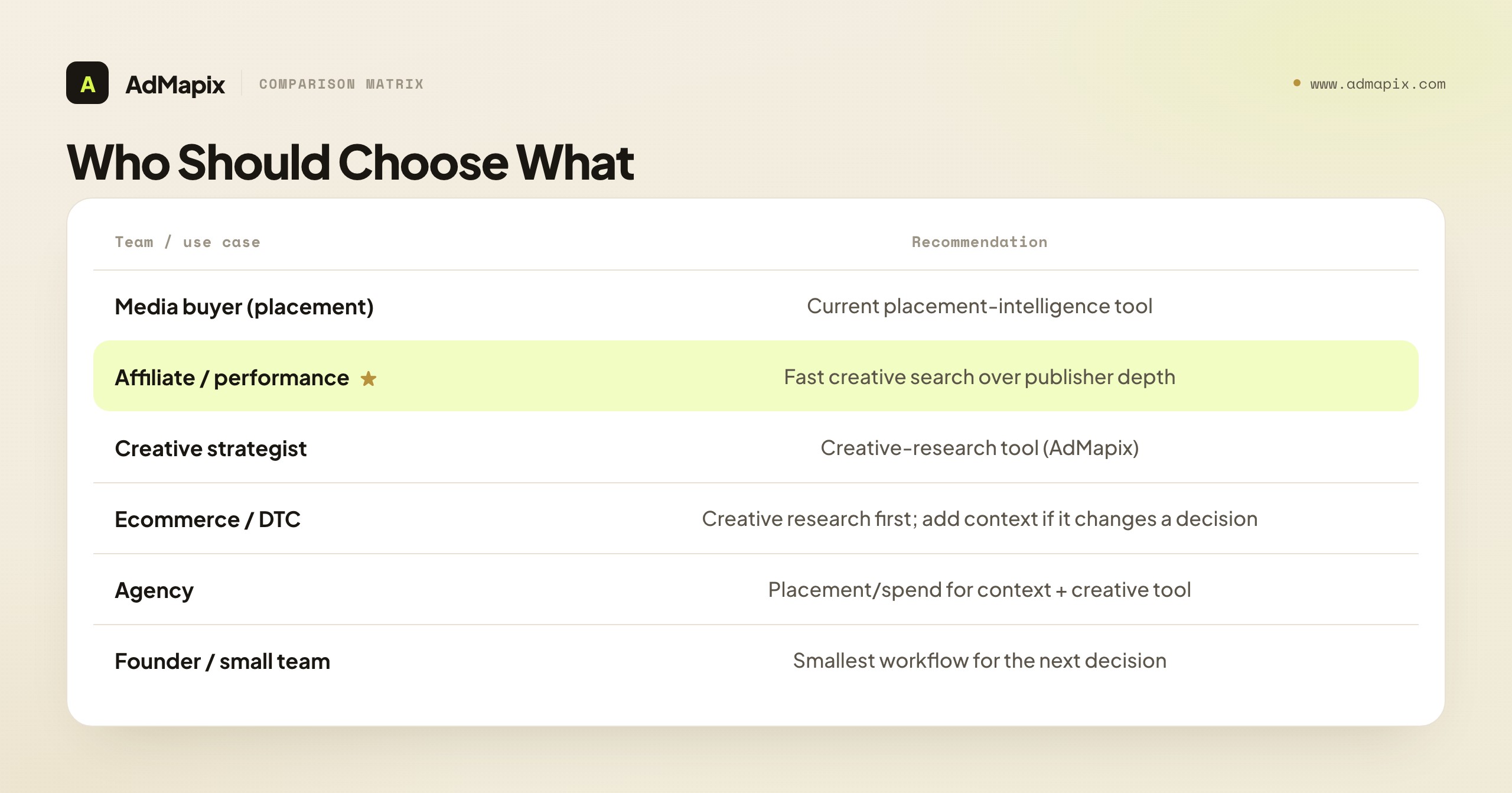
| Team or use case | Practical recommendation |
|---|---|
| Media buyer (placement focus) | A current media-buying / placement-intelligence tool when the decision is where to place inventory and which publishers competitors use. |
| Affiliate / performance marketer | Prioritize fast creative search and saved examples over publisher-network depth — speed to a tested angle wins. |
| Creative strategist | A creative-research tool like AdMapix when the next decision is which concept, hook, or video pattern to test. |
| Ecommerce / DTC team | Creative research first for the test backlog; add placement or spend context only if it changes a decision. |
| Agency | Pair a placement or spend tool for strategy context with a creative tool for client-ready ad evidence and reports. |
| Enterprise media team | A spend / measurement suite for budget allocation and benchmarking; add creative research separately. |
| Founder / small team | The smallest workflow that answers the next decision, not the broadest dashboard. |
The affiliate and performance-marketer row deserves a note, because this audience is where WhatRunsWhere historically had strong appeal. The old affiliate playbook leaned heavily on placement intelligence — find where a winning campaign runs, then buy similar inventory. That still has value, but the modern affiliate edge has shifted toward creative: the angle, the hook, the offer framing usually matter more to a campaign's success than the specific publisher. So even many placement-oriented affiliates find their real gap is creative research, not a better placement map. Test which actually moves your results before assuming the old playbook's tool is the one to replace like-for-like.
The agency row is the other one worth expanding, because agencies feel the multi-layer reality most acutely. An agency often serves clients who buy media in different ways — one client runs placement-led native, another runs algorithmic social, a third needs spend benchmarking for board reviews. That means an agency rarely lives in a single layer; it needs placement intelligence for the clients who buy on placements, creative research for the test backlogs across all of them, and sometimes spend or measurement for the reporting. The mature agency answer is not one tool but a deliberate stack, with the cost spread across enough clients that the multi-layer investment is trivial per account. The agency that tries to force one famous legacy tool to serve every client's different buying model ends up doing each job poorly — which is exactly the trap a clear layer-and-buying-model map helps it avoid.
A Practical Migration Plan
Whether you are replacing WhatRunsWhere within the placement layer or switching to creative research, a disciplined test beats a feature-list comparison. Here is a migration plan that surfaces real fit fast.

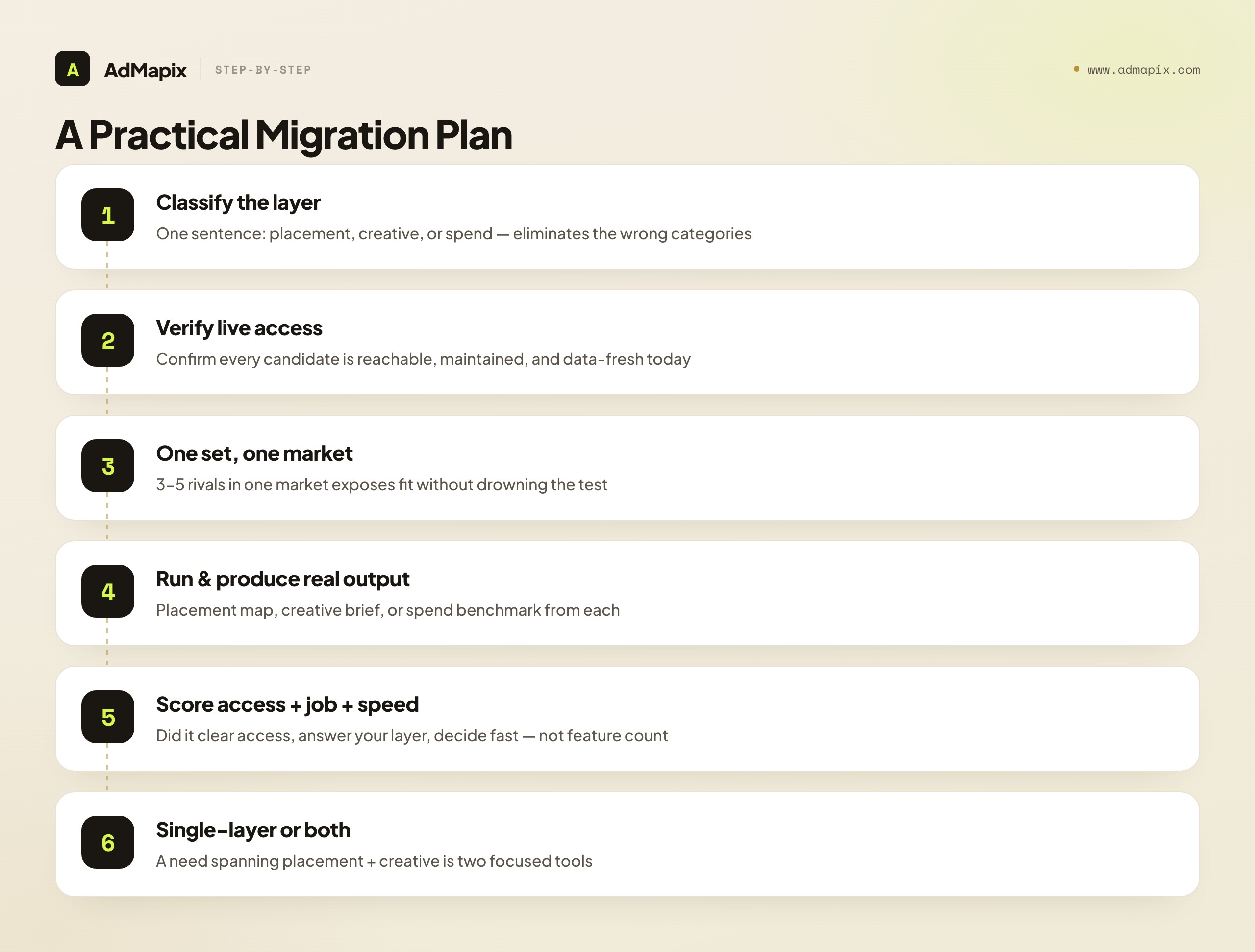
- Classify your layer in one sentence. "Find which publishers and networks our rivals buy" is placement; "decide which two competitor hooks to test weekly" is creative; "estimate competitor budget" is spend. This sentence eliminates the wrong layers instantly.
- Verify live access on every candidate. Before anything else, confirm each tool — including WhatRunsWhere itself if you are reconsidering it — is reachable, maintained, and buyable today, with fresh data. Legacy tools fail here often; catch it early.
- Pick one competitor set and one market. Three to five rivals in one market is enough to expose fit without drowning the test in breadth.
- Run the same set through each candidate. Produce the actual output your decision needs from each — a placement map, a creative brief, or a spend benchmark — using the identical brands and dates.
- Score on access, job match, and time-to-decision. Not feature count. Did it clear the access gate, did it answer your layer's question, and did it get you to a defensible decision fast?
- Check evidence freshness and export. Confirm how recent the indexed ads or placements are and how cleanly you can export or report — stale data or a clumsy export quietly kills value by week three.
- Decide single-layer or both. If your real need spans placement and creative, the honest answer is often two focused tools, one per layer, not one legacy product stretched to do both.
The discipline that makes this work is steps one and two. Classifying the layer eliminates the wrong category, and verifying access eliminates tools you cannot actually deploy — together they cut a sprawling "alternative" list down to a handful of real options before you compare a single feature.
A Worked Example: Two Teams, Two Right Answers
Abstract frameworks land harder with a concrete case, so here are two teams who both searched "WhatRunsWhere alternative" and arrived — correctly — at opposite destinations.
Team A: a performance-media buyer running native and display campaigns. Their named decision is "find which publishers and networks our three biggest rivals are buying, so we can plan our own inventory." They classify the layer immediately: this is placement intelligence — WhatRunsWhere's original job. Their first move is the access check: they confirm which current tools genuinely cover today's native and display ecosystem with a fresh, maintained index, eliminating any that are stale or unbuyable. Then they run three rivals through the survivors and judge on placement coverage and publisher-network depth. Their right answer is a current placement-intelligence tool; the creative-research tools they glanced at could not produce a publisher map and were correctly set aside. For them, "WhatRunsWhere alternative" really does mean "a maintained tool that does WhatRunsWhere's job."
Team B: a DTC growth team buying on self-serve social and video platforms. Their named decision is "decide which two competitor hooks to test each week." They classify the layer too — and realize, with some surprise, that it is creative, not placement. On the platforms they buy, there is no "publisher to copy"; the algorithm distributes, and the win is the creative angle. WhatRunsWhere's placement maps, however fresh, would not tell them a single thing about which hook to test. So they shop the creative-research layer instead, run three rivals in one market through a couple of creative tools, and pick the one that turns competitor ads into a weekly brief fastest. Their right answer is a modern creative tool; the placement intelligence they came in assuming they needed turned out to be irrelevant to how they actually buy.
The lesson is the entire guide in miniature: the same search term, two completely different correct outcomes, because the decisions lived in different layers — and, just as importantly, because the way each team buys media determined which layer mattered. Team A buys placement, so placement intelligence is their edge. Team B buys on algorithmic platforms, so creative is their edge. Classifying the layer — and being honest about how you actually buy — is what saved each from the other's error. Write your decision sentence down, note how your media is actually distributed, and let those two facts pick your layer before you compare a single tool. Those two sentences will out-perform any feature comparison, because they target the structural question every "WhatRunsWhere alternative" search is really asking but rarely states aloud.
Building a Multi-Layer Stack Without Overpaying
For agencies and full-stack teams, the honest answer is often not "replace WhatRunsWhere" but "assemble a deliberate stack across the layers you genuinely use" — placement intelligence where you buy on placements, creative research for the test backlog, spend or measurement where budget and compliance demand it. Done well, this is cheaper and far more effective than forcing one legacy product to span jobs it was never built for.
Start by mapping your recurring decisions to layers and to how you buy. List what your team decides on a cadence — "where do we place native inventory," "which hook do we test," "are we out-invested in a channel" — and tag each with its layer. Then overlay how your media is actually distributed: the more you buy on self-serve algorithmic platforms, the more weight shifts to the creative layer; the more you buy placement-led native and display, the more the placement layer earns its keep. This overlay is what stops you from buying a placement tool for a creative job, or vice versa, just because the brand was famous.
Then size each layer to real usage and connect them at the workflow level. Placement intelligence is often a smaller, periodic need for the media-buying team; creative research is a larger, weekly need for strategists and UA; spend or measurement is a focused need for planners and compliance. You do not need the tools to integrate technically — you need a habit that hands off: placement and spend set the strategic context (where and how much), and creative research decides what to put in front of the audience (what to make and test). A team that maps decisions to layers, weights by how it actually buys, and provisions each layer for the people who use it weekly gets the full value of a multi-layer stack at a fraction of the cost of one bloated legacy contract — and never again confuses a placement map for a creative brief.
The sequencing of which layer to invest in first follows the same buying-model logic. If most of your media now runs on algorithmic, self-serve platforms, invest in the creative layer first and most heavily — it is where your edge lives and where your weekly work happens — and add placement or spend only where a specific client or channel demands it. If you still buy placement-led, invest in a current placement tool first and add creative research as the test backlog grows. There is no universal "start here"; there is only "start where your buying model says your edge is." Get that sequence right and each marginal tool dollar goes to the layer that actually moves your results, instead of to the most famous name in a category you may have already outgrown.
What Public Ad Data Can and Cannot Prove
Public and third-party ad intelligence shows you observed creatives, observed placements, and rough relative activity. It does not reliably show real ad spend, exact impressions, audience targeting, or campaign outcomes. Most platforms infer or model those numbers, so treat them as directional, not as audited fact.

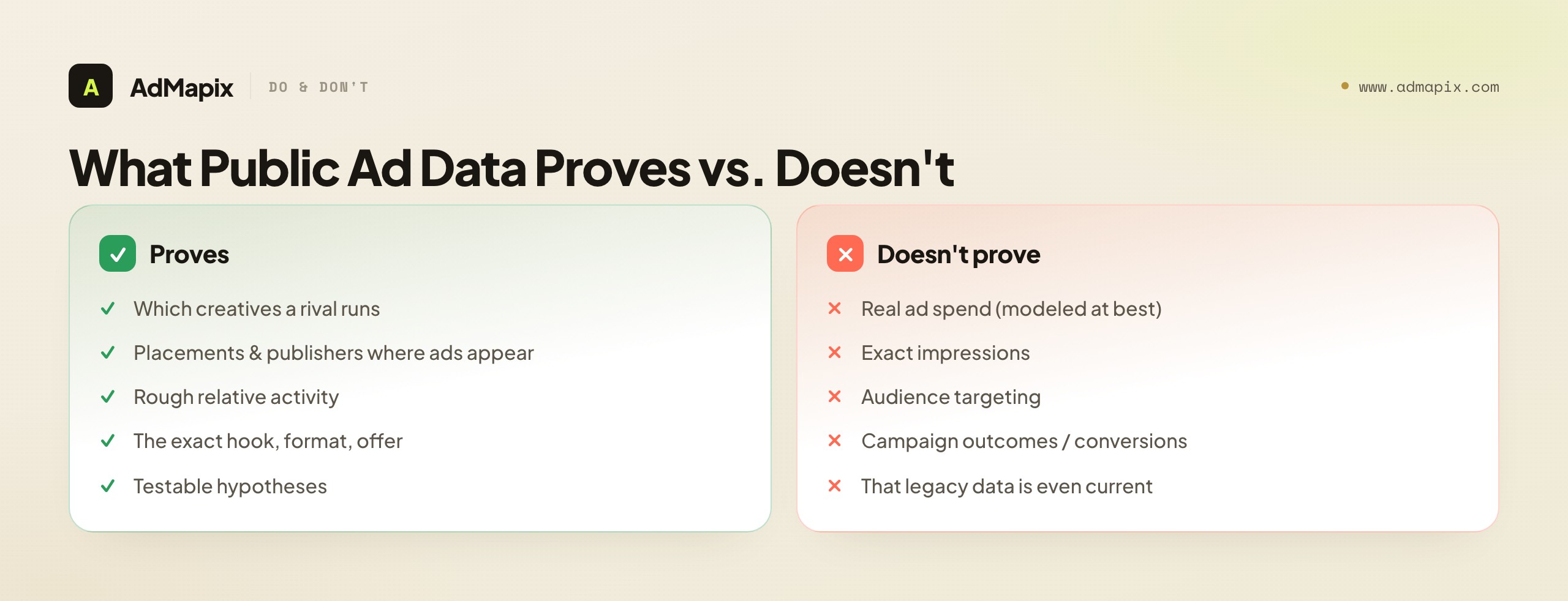
What it proves. You can observe which creatives a competitor is running, the placements and publishers where ads appear, and a rough sense of relative activity. For the creative layer specifically, you can see the actual hook, format, and offer a brand committed to — concrete evidence of what ran. These are real, useful facts you can build hypotheses on.
What it cannot prove. It cannot reliably show real ad spend, exact impressions, audience targeting, or whether a campaign actually drove outcomes. Placement presence tells you where an ad appeared, not how it performed there; a repeated creative tells you a brand kept running it, not that it converted. Where a tool shows spend or impressions, those are almost always modeled estimates — directional, not exact.
For a legacy tool specifically, there is one more limit: coverage and access can be stale. A working social page does not guarantee a maintained, fully indexed product, so the data you do see may be older or thinner than the brand's reputation implies. That is exactly why this guide leads with "verify live access" rather than feature counts. The honest read across all of it: treat observed creatives and placements as testable signals, label any spend or impression number as a modeled estimate, and confirm a legacy tool's data is current before you trust it in a report.
This last point is worth dwelling on because stale data is uniquely dangerous — more dangerous than no data, in some ways. If a tool clearly has no information on a competitor, you know to look elsewhere. But if a legacy tool confidently shows you placements and creatives that are months or years out of date, you can build an entire strategy on a competitor's past behavior while believing it is current. You buy inventory where they used to run, you test angles they have already abandoned, you brief a plan against a rival who has since repositioned. The tool's confident presentation hides the staleness, and the cost is a strategy aimed at a moving target you are seeing in the rearview mirror. The defense is to spot-check freshness directly: pick a competitor you already know is active right now, and confirm the tool reflects what they are currently doing, not a snapshot from an earlier era. If the tool cannot pass that check, its data is a history lesson, not a competitive signal — and history is a poor basis for next week's test.
Common Mistakes When Choosing a WhatRunsWhere Alternative
The failure modes here are predictable, which makes them avoidable. Naming them is the cheapest insurance against a wasted purchase.

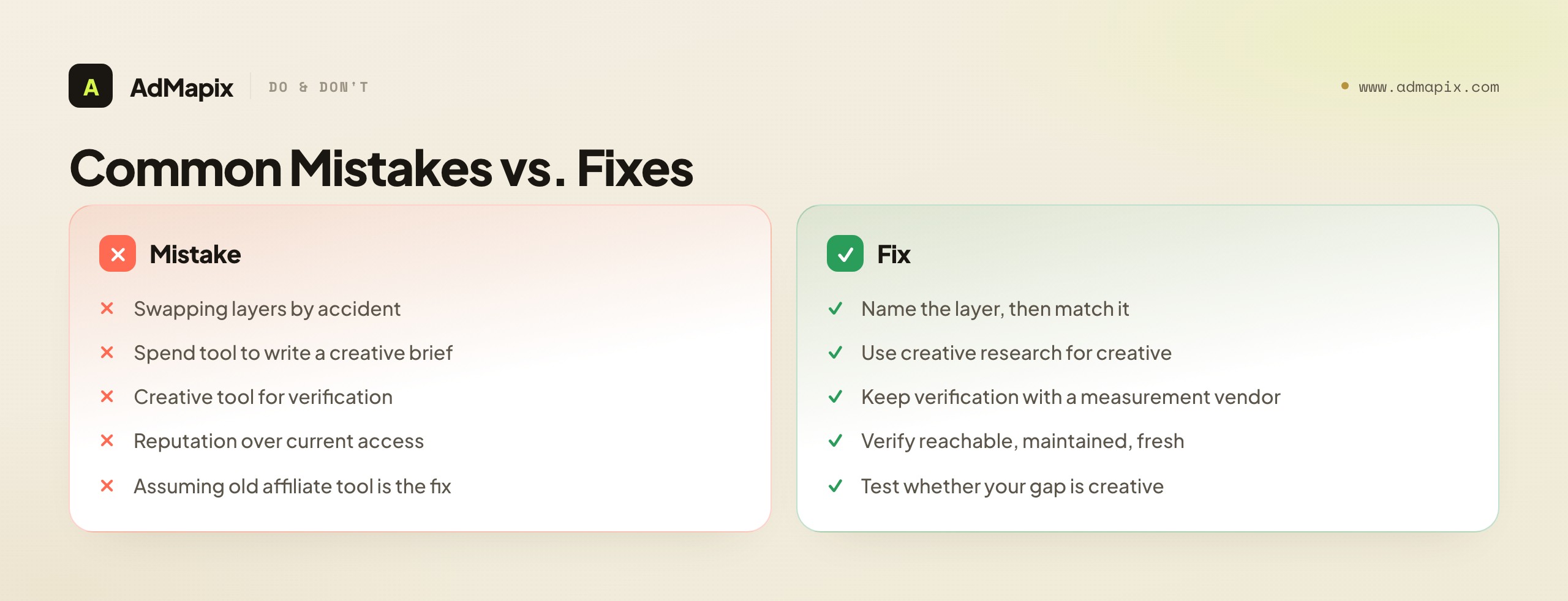
- Replacing a placement tool with a spend tool, or a creative tool with a placement tool. They answer different questions; switching layers by accident leaves your real gap wide open.
- Using a spend tool to write a creative brief. Spend context can rank priorities, but it does not explain a hook or a video's structure.
- Using a creative tool for verification. Creative research does not replace viewability, invalid-traffic, or brand-safety measurement.
- Trusting a legacy brand's reputation over its current access. Verify the product is reachable, maintained, and data-fresh before shortlisting — reputation is not availability.
- Assuming the old affiliate playbook's tool is the right replacement. Many placement-oriented affiliates actually have a creative gap; test which moves your results before replacing like-for-like.
- Comparing on feature count. Workflow fit, live access, and time-to-decision beat long feature lists every time.
- Forcing one tool to span two layers. A real need spanning placement and creative is usually two focused tools, not one stretched thin.
When to Use AdMapix
Use AdMapix when the layer you are missing is competitor creative research: searching ads across networks, saving the strongest examples, analyzing what makes a video work, and turning patterns into a report. AdMapix is built for media buyers, affiliates, agencies, ecommerce teams, and creative strategists who need creative evidence before the next test — fast, weekly, and at a price that scales to the whole team.

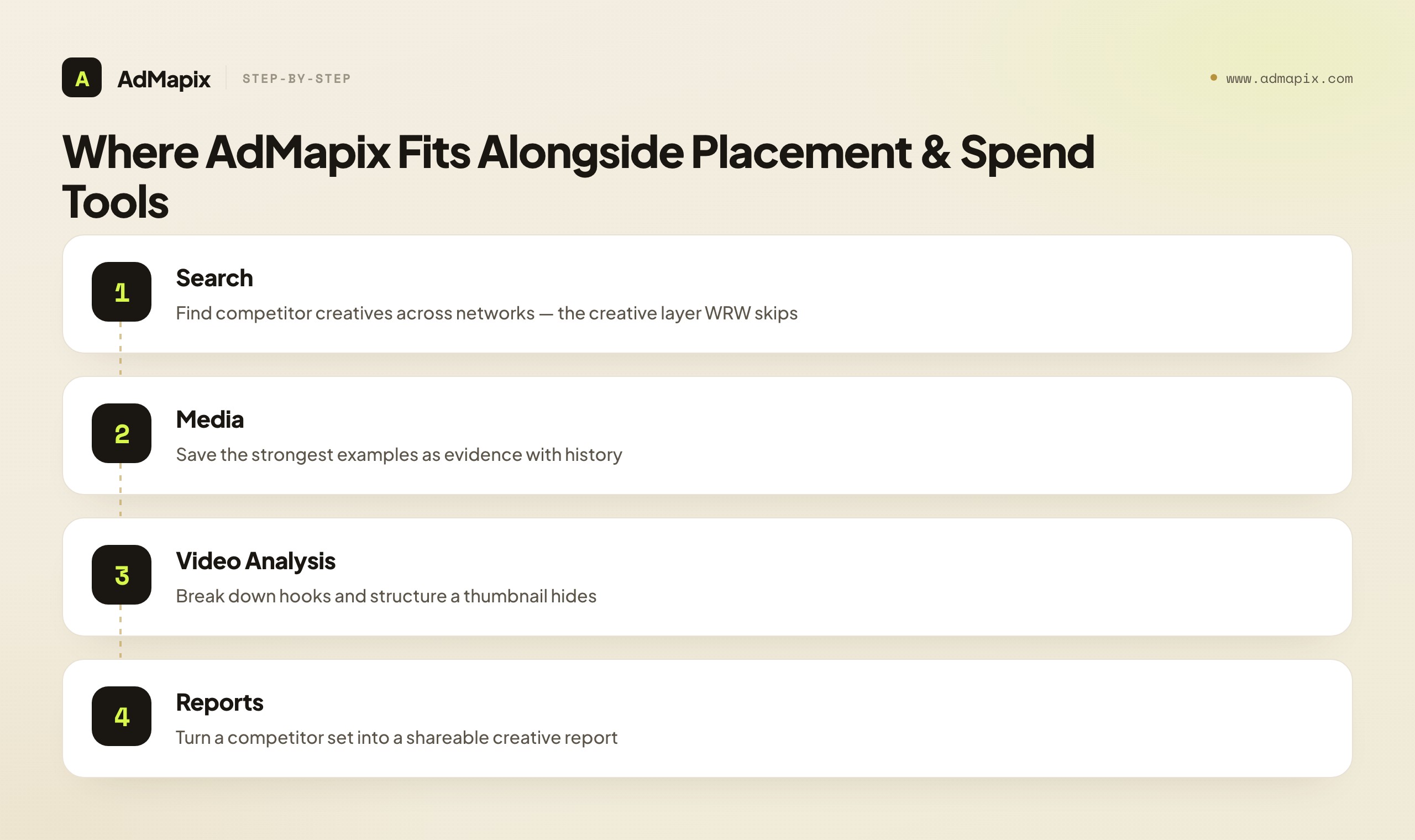
Start with Search AdMapix to find competitor ads across networks, keep the strongest examples in Media, break down winning videos in Video Analysis, and package findings in Reports. If one competitor set needs weekly review, run it once in Search and save the standouts so each review starts from evidence. When it saves briefing time, create an account from Login or compare seats on Pricing.
It is explicitly not the right tool if your actual need is publisher-network media-buying intelligence (WhatRunsWhere's original placement layer), enterprise spend modeling, or viewability and brand-safety verification — AdMapix does not map publisher placements, estimate spend, or measure your media. The honest positioning is that AdMapix is the modern creative-research answer for the many "WhatRunsWhere alternative" searchers whose real gap is creative evidence, not placement maps — and it pairs cleanly with a placement or spend tool for the teams that genuinely need those other layers too. As a current, actively maintained product, it also sidesteps the legacy-access risk that prompts much of the search in the first place.
To be concrete about the fit: if you came to "WhatRunsWhere alternative" because your media now runs mostly on self-serve social and video platforms — where the creative, not the placement, decides the outcome — then the creative-research layer is almost certainly your real destination, and a modern, maintained tool in that layer is what you actually want. If, instead, you still buy placement-led native and display and genuinely need a current publisher map, AdMapix is not that tool, and you should shop the placement layer directly — then add AdMapix for the creative side once your test backlog needs feeding. Either way, the value of saying this plainly is that you stop evaluating a creative tool against placement criteria it will never meet, or a placement tool against creative criteria it cannot satisfy. Match the tool to the layer, confirm it is current, and the choice stops being a guess.
Putting It Together: Match the Layer, Verify It's Real
The whole decision reduces to two moves. First, name the layer your next decision lives in — media-buying placement intelligence, creative research, or spend/measurement — because those are three different jobs and WhatRunsWhere only ever did the first. Second, given the legacy context, verify that whatever you shortlist is real and current: reachable, maintained, fresh, and buyable today. Most "WhatRunsWhere alternative" searches resolve the moment you make those two moves, because they reveal that either you need a current tool in the placement layer, or — far more often — your real gap is creative research and you reached for a media-buying tool by reputation.
If your gap is creative evidence, the answer is not a newer placement tool; it is a modern creative-research layer judged on live access, evidence freshness, and time-to-decision. If your gap really is placement intelligence, verify a current tool covers today's networks and is genuinely maintained. And if your need spans both, accept that two focused tools beat one legacy product stretched to do everything. Run the one-competitor, one-market test, lead with access and layer, treat any spend or impression figure as a modeled estimate, and you will replace exactly the capability your next decision requires — instead of buying a famous name that may no longer match the job or the era.
FAQ
What is the best WhatRunsWhere alternative?
There is no single best alternative — it depends on the layer you need. For media-buying and placement intelligence, look at current tools built for publisher and placement data, and verify they cover today's networks. For competitor creative research — ad search, saved media, and video analysis — a modern tool like AdMapix is the better fit. Name the recurring decision first, then the shortlist follows.
Is WhatRunsWhere still available?
WhatRunsWhere has been positioned as a legacy media-intelligence product, and access for older, self-hosted-style tools can be inconsistent. Before shortlisting it — or any legacy tool — confirm the product is reachable, maintained, data-fresh, and buyable today rather than relying on its brand history or social pages. Verifying live access is the first step, ahead of any feature comparison.
Can AdMapix fully replace WhatRunsWhere?
AdMapix replaces the creative-research layer: cross-network ad search, saved media, video analysis, tagging, and reports. It does not replace publisher-network media-buying intelligence (WhatRunsWhere's original placement job) or enterprise spend and viewability measurement. So use AdMapix for the creative evidence most searchers actually need, and pair it with a placement or spend tool if you genuinely need those other layers.
Why do teams look for a WhatRunsWhere alternative?
Common reasons: legacy access and data-freshness concerns, the realization that the need was never placement intelligence but creative research, coverage gaps for modern short-video and social formats, an older workflow that feels heavy against modern expectations, and stack rationalization. Several of these reveal that the buyer was never in the placement layer at all — their real gap is creative research.
What does WhatRunsWhere actually do?
WhatRunsWhere is a media-intelligence platform focused on where ads run — display, native, and mobile placements, and the publishers and ad networks that carry them. It answers "who runs ads where, through which networks," which is media-buying and placement intelligence. It is not a competitor creative-research tool or a spend-and-viewability measurement suite, which are different layers.
Should affiliates choose a placement tool or a creative tool?
Test which moves your results first. The old affiliate playbook leaned on placement intelligence — find where a winner runs, buy similar inventory — and that still has value. But the modern affiliate edge has shifted toward creative: the angle, hook, and offer often matter more than the specific publisher. Many placement-oriented affiliates discover their real gap is creative research, so do not assume a like-for-like placement replacement is the right move.
When should I use two tools instead of one?
Use two tools only when you genuinely need two layers. A common pairing is a placement or spend tool for strategic context plus a creative-research tool like AdMapix for the evidence that turns observations into testable hooks and a brief. Forcing one legacy product to span placement and creative usually does both jobs poorly; two focused tools do each well.
How should I test alternatives quickly?
Pick one competitor set, one market, and one weekly decision. First verify each candidate's live access; then run the same brands and dates through each, producing the real output your decision needs — a placement map, a creative brief, or a spend benchmark. Compare evidence quality, freshness, export, and whether your next action is clearer. The tool that clears access and gets you to a decision fastest wins.
Does public ad data show a competitor's real spend?
No, not reliably. Public and third-party ad intelligence shows observed creatives and placements and rough relative activity. Where it shows spend or impressions, those are almost always modeled estimates — useful for direction, never audited fact. Treat them as directional, label them as estimates in any report, and never present a modeled number as a competitor's real budget.
Is AdMapix affected by the legacy-access risk that prompts WhatRunsWhere searches?
No. The legacy-access risk — uncertain availability, stale indexes, maintenance-only status — applies to older products whose reputation may outlive their upkeep. AdMapix is a current, actively maintained creative-research tool, so the "is this even reachable and fresh today" question that drives much of the WhatRunsWhere search does not apply. Still, verify any tool's current coverage for your specific networks before committing.
Key Takeaways
- Name the layer first: media-buying placement intelligence, creative research, and spend measurement are three different jobs, and WhatRunsWhere only does the first.
- Treat WhatRunsWhere as a legacy reference and verify live access, data freshness, and coverage before shortlisting it — reputation is not availability.
- If your real gap is creative evidence, choose a modern creative-research tool, not a placement or spend tool — and test whether even placement-oriented affiliates actually have a creative gap.
- Evaluate candidates as a funnel: live access, then job match, then creative depth, freshness, output, and price.
- Use AdMapix for cross-network ad search, saved media, video analysis, and reports; pair it with a placement or spend tool only if you genuinely need those layers.
Related Reading
- Best Ad Spy Tools 2026 — a broader roundup of creative and media-intelligence tools across categories.
- Best Ad Intelligence Tools — how the placement, spend, and creative layers map across the market.
- Pathmatics Alternative in 2026: Ad Spend Intelligence vs. Creative Workflow — the parallel framework for the spend-intelligence layer.
- Moat Alternative in 2026: Ad Verification vs. Creative Intelligence — the parallel framework for the measurement and verification layer.
- Ad Spy Tools by Channel: Meta, TikTok, Google, YouTube, Native — how coverage differs across networks when comparing creative tools.
Sources
Official and public source pages were checked as of June 21, 2026. Product naming, access, pricing, and coverage for legacy advertising tools can change quickly — verify current details before committing.
- WhatRunsWhere Facebook page — public brand presence for the legacy media-intelligence product.
- OMR WhatRunsWhere alternatives — lists WhatRunsWhere as a media-intelligence platform for competitor advertising research.
- SocialPeta WhatRunsWhere comparison — describes WhatRunsWhere as a competitor ad-tracking and advertising-intelligence tool.
Turn these observations into your next creative study
Open the creative library and select samples for your market, network and research question.
Related Articles
Pathmatics Alternative in 2026: Ad Spend Intelligence vs. Creative Workflow
A complete 2026 buyer's guide to choosing a Pathmatics alternative — why teams look past Pathmatics (now Sensor Tower), what it actually measures, a layered comparison of spend-intelligence suites versus creative-workflow tools across coverage, data type, price, and fit, who should choose which, a practical migration plan, the honest limits of estimated spend, and where a lighter cross-network creative tool like AdMapix fits.
Semrush Ad Intelligence Alternative in 2026: PPC Research or Creative Evidence?
A 2026 decision framework for choosing a Semrush ad intelligence alternative — when PPC keyword and spend research wins, when competitor creative and video evidence wins, how AdClarity fits, a fair-trial method, and how to build a two-layer stack.
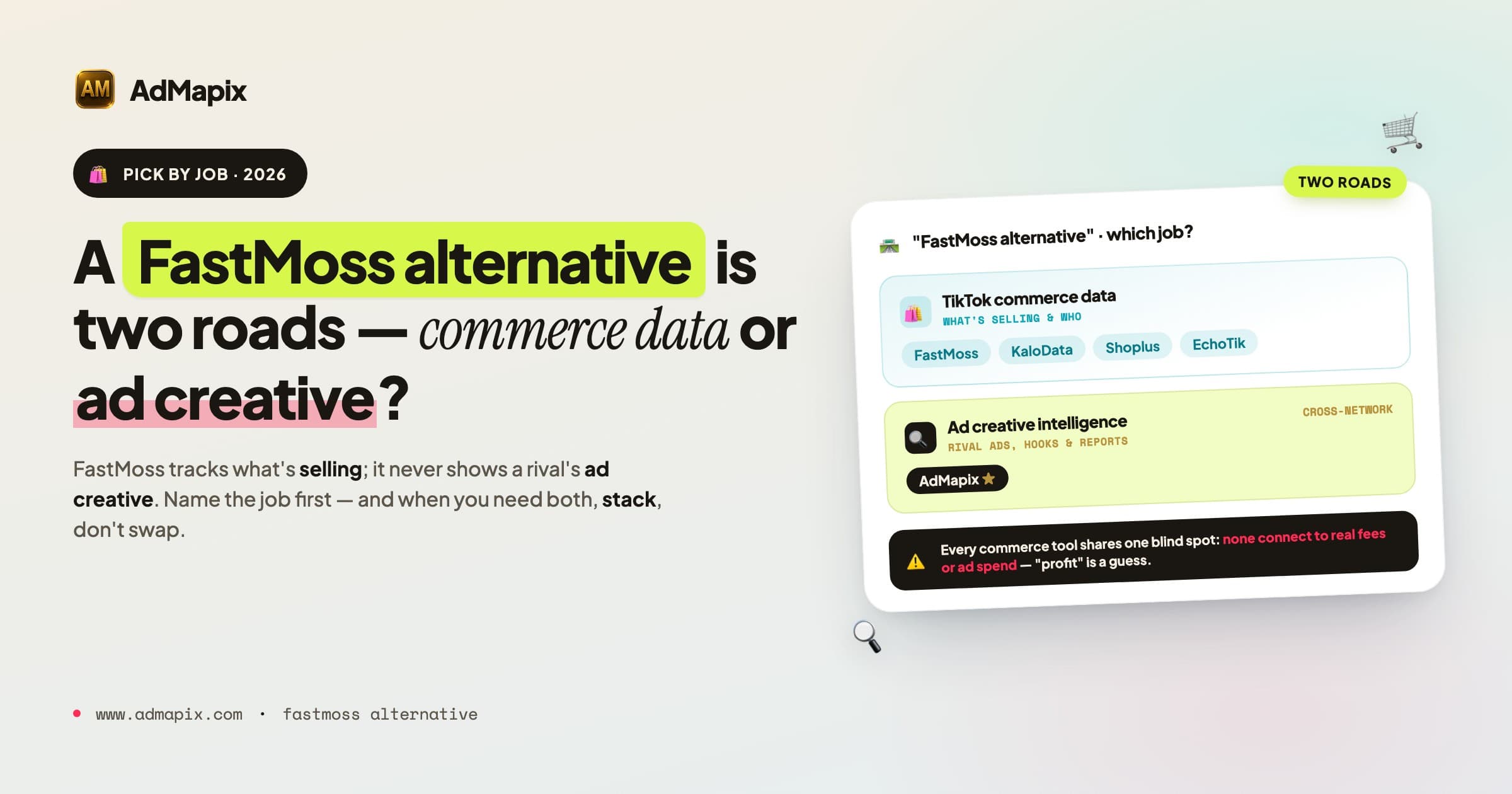
Best FastMoss Alternatives in 2026: KaloData, Shoplus, EchoTik & AdMapix Compared
A decision-first guide to the best FastMoss alternatives in 2026: compare TikTok Shop commerce data tools (KaloData, Shoplus, EchoTik) against ad creative intelligence tools, with full comparison tables, role-based picks, a migration checklist, and an honest FAQ.