
Playable Ads: Examples, Development Workflow, and When to Use Them
A practical guide to playable ads for app marketers: examples, playable ads development workflow, technical QA, testing, and competitor research.
Playable ads work when the user can understand the core interaction quickly, try it safely, and leave with a realistic reason to install.
Playable Ads: Examples, Development Workflow, and When to Use Them
Playable ads are interactive ads that let users try a small part of an app or game before installing. For mobile game marketers, this usually means a short, simplified gameplay demo. For a non-game playable app campaign, it can mean a calculator, quiz, product configurator, design tool, mini workflow, or guided product interaction.
The promise is clear: instead of telling users what the app does, playable advertising lets them experience the value. But playable ads are not automatically better than video or static ads. They need a strong use case, a disciplined playable ads development workflow, and a measurement plan that does not confuse engagement with real user quality.
Use this guide if you need to decide:
| Question | What this article covers |
|---|---|
| What is a playable ad? | Definition, structure, and common formats |
| When should we use playable advertising? | Fit by app type, funnel stage, and campaign goal |
| How does playable ads development work? | Brief, prototype, build, QA, measurement, launch |
| What makes interactive game ads effective? | Mechanics, difficulty, tutorial, CTA, and expectation match |
| How do we research competitors? | Creative intelligence, channel checks, and test planning |
If you are building a broader mobile game growth system, read the mobile game marketing strategy, mobile game ads guide, and in-game advertising guide alongside this article.
What Playable Ads Are
A playable ad is a rich media ad that invites the user to interact before clicking through to the app store or landing page. The interaction is usually short, guided, and focused on one core promise.
The simplest structure is:
| Stage | Purpose |
|---|---|
| Hook | Show a clear problem, reward, or challenge |
| First interaction | Let the user tap, drag, aim, choose, match, swipe, or customize |
| Feedback | Reward the action quickly so the user understands the loop |
| CTA | Offer a relevant app store or landing page action |
| Measurement | Track interaction depth, click-through, install, and downstream quality |
Playable ads are common in mobile games because gameplay is naturally interactive. But the format can also work for other categories when the app has a simple, valuable interaction. A photo editing app can let users preview a transformation. A fitness app can show a quick routine builder. A finance app can demonstrate a savings calculator. A learning app can offer one quiz question.
The key is not whether the product is a game. The key is whether a short interaction can prove the product promise better than a video.
Playable Ads vs Video Ads vs Interactive End Cards
Playable ads are often confused with video ads that end with a rich media card. They are related, but the strategy is different.
| Format | Best for | Weakness |
|---|---|---|
| Short video ad | Communicating a concept quickly | User is passive |
| Static or animated end card | Reinforcing CTA and offer | Limited proof of product experience |
| Interactive end card | Adding one action after video | Often too late in the ad to change intent |
| Playable ad | Letting users try the core loop | More expensive to build and QA |
| Playable app demo | Showing a simplified app workflow | Can mislead if it over-promises the real app |
Playable advertising is strongest when the interaction itself filters users. If someone enjoys the mini loop, they are more likely to understand the app. If they do not, you may avoid paying for a low-intent install.
That filtering effect is useful, but only if the playable is honest. A misleading playable app demo can generate clicks while hurting onboarding, retention, reviews, and platform trust.
For a focused decision on which format to prototype and how to compare outcomes, use the playable ads vs video ads comparison. Treat the format choice as a test hypothesis, then measure results in your own campaign.
When Playable Advertising Works
Playable ads tend to work best when the product has a fast, intuitive loop.
| Good fit | Why it works |
|---|---|
| Puzzle, merge, runner, match, word, casino, or casual games | The core mechanic can be shown in seconds |
| Apps with a visible transformation | Before/after interaction proves the value |
| Tools with a simple input-output moment | Users can try a calculator, generator, or builder |
| Educational apps | A quiz or lesson preview can demonstrate learning style |
| Shopping or design apps | Users can configure, compare, or customize |
They are weaker when:
| Poor fit | Reason |
|---|---|
| The value requires long setup | A 15-second demo cannot prove the product |
| The app is mostly social or network-based | The value depends on other users |
| The interaction is hard to simplify | The demo becomes confusing |
| The team cannot QA across networks | Technical failures kill performance |
| The creative overstates gameplay or utility | Installs may rise while retention falls |
Playable ads should be used when the demo improves qualification, not just when a team wants a flashy format.
Examples of Playable Ad Angles
Think in terms of creative angles, not only ad format.
| Angle | Example interaction | Best category |
|---|---|---|
| Solve the first move | User completes one puzzle step | Puzzle and strategy games |
| Rescue or fix | User saves a character or repairs a scene | Casual and simulation games |
| Before and after | User applies an effect or optimization | Photo, video, productivity, AI tools |
| Choose your path | User selects a style, class, or goal | RPG, fitness, learning, shopping |
| Mini challenge | User completes a timed action | Runner, sports, arcade, training apps |
| Calculator | User enters a goal and sees an outcome | Finance, health, business tools |
| Creator preview | User customizes a small asset | Design, avatar, home, fashion apps |
For interactive game ads, the best examples usually make the tutorial nearly invisible. The first action should be obvious from the layout. If users need to read three instructions before interacting, the playable is probably too complex.
For a non-game playable app ad, the example should show the product's unique value. A generic tap-to-reveal card is not enough unless the reveal proves something users care about.
Playable Ads Development Workflow
Playable ads development should be treated like product prototyping, not like exporting a banner.
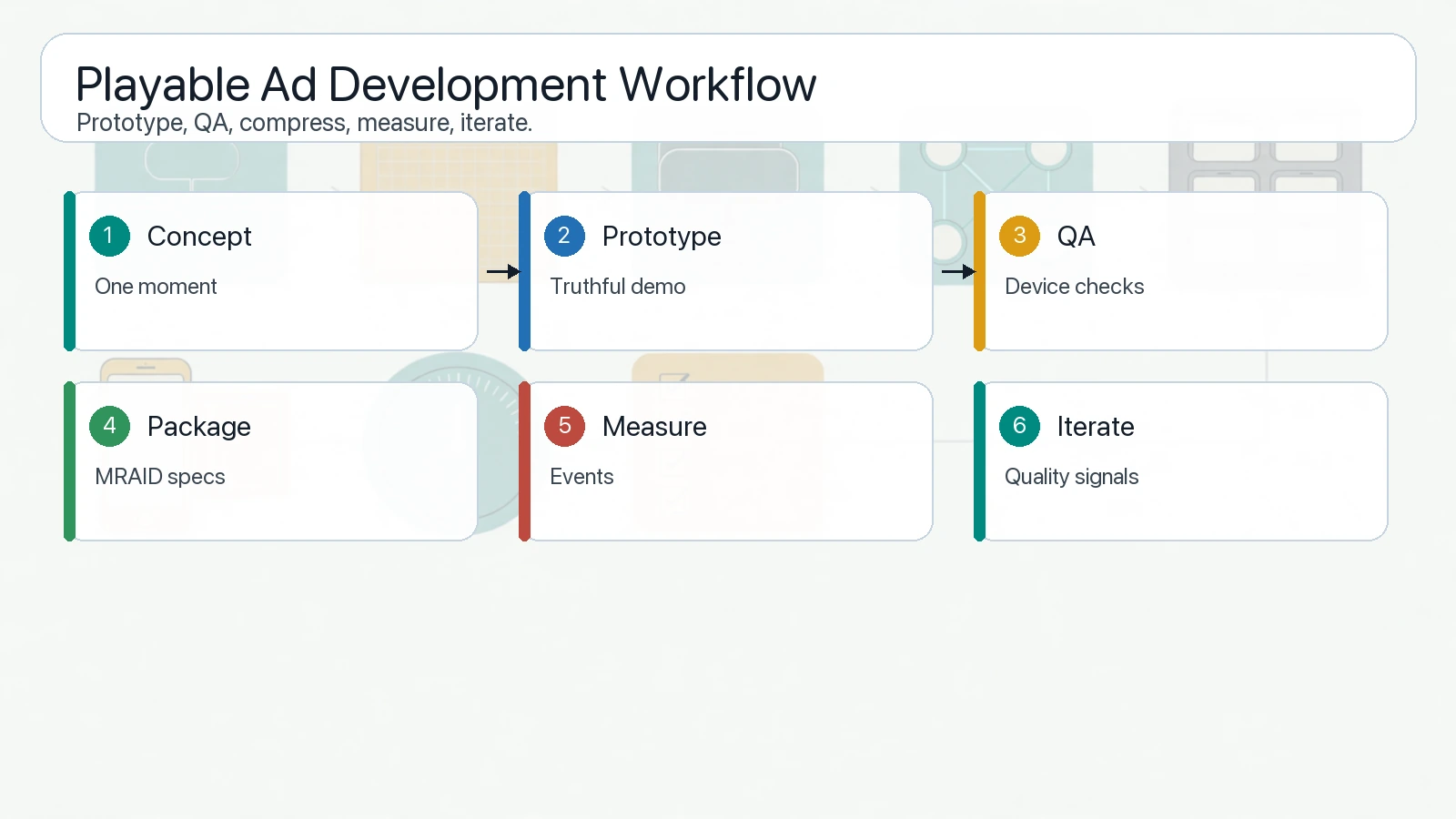
A playable ads development workflow needs concept validation, prototype control, technical QA, compression, MRAID readiness, and launch measurement.
Use this workflow:
| Step | Output | Owner |
|---|---|---|
| 1. Research competitors | Angle library and format notes | UA, creative strategist |
| 2. Define the promise | One sentence the playable must prove | Product marketing |
| 3. Choose interaction | Tap, drag, match, aim, choose, customize | Creative, game designer |
| 4. Build storyboard | Hook, action, feedback, CTA | Creative |
| 5. Prototype | HTML5/MRAID demo or network-specific build | Developer |
| 6. Compress assets | Single lightweight package or inline file where required | Developer |
| 7. QA | Orientation, close button, no auto audio, no auto redirect, app store CTA | Ad ops |
| 8. Launch test | Small-budget creative test by channel and market | UA |
| 9. Read quality | Engagement, click, install, activation, retention | Growth analytics |
| 10. Iterate | New mechanic, CTA, difficulty, or visual theme | Creative and UA |
Before building, write a creative brief that answers:
| Brief field | Example |
|---|---|
| Target user | Casual puzzle player who likes one-step problem solving |
| Core promise | The game is easy to understand but satisfying to master |
| First interaction | Drag one block to complete a match |
| Success feedback | Immediate animation and visible reward |
| CTA moment | After one successful action, not before interaction |
| What not to imply | Do not show mechanics that are not in the app |
| Measurement goal | Higher trial quality, not only higher CTR |
This brief prevents a common playable app mistake: building a fun mini game that has little relationship to the real product.
Technical QA and Platform Constraints
Playable ads are more technical than static creatives, so QA matters.
Unity's playable asset specifications say playable creatives for Unity Ads User Acquisition must be contained in a single HTML index file, inlined and minified, under 5 MB, and compliant with MRAID 3.0. Unity also calls out practical constraints such as not blocking the close button, supporting portrait and landscape orientations, avoiding automatic app-store redirects, and waiting for viewability before starting playable content.
AppLovin's playable guidelines similarly require a single inline HTML file with no external references, MRAID support, portrait and landscape support, app-store redirects through mraid.open(), no auto-clicking, and no audio before the first user interaction.
IAB's MRAID documentation explains why this matters: MRAID gives rich media ads a common API to communicate with mobile apps and compliant SDKs. Without that standardization, the same interactive creative would need different implementations across systems.
Use this QA checklist before upload:
| Check | Pass condition |
|---|---|
| Package | Network-specific file format and size limit met |
| Orientation | Works in portrait and landscape if required |
| Close behavior | Native close button is not blocked or replaced incorrectly |
| Audio | No sound before user interaction |
| CTA | Store click uses the required method for the network |
| MRAID readiness | Creative waits for ready/viewable state where required |
| Offline behavior | No unexpected external requests unless allowed |
| Performance | Fast load, no frozen first screen, no memory spike |
| Policy | No misleading gameplay, prohibited content, or fake system UI |
| Tracking | Interaction events and click events match the measurement plan |
Google Ads API references are also relevant when teams manage app ad assets programmatically. The AppAdInfo reference includes HTML5 media bundle assets as assets that may be used with app ads, and Google's asset documentation explains that AppAd can use TextAsset, ImageAsset, VideoAsset, and MediaBundleAsset. Always confirm the current campaign, account, and policy requirements before assuming a playable package is eligible.
How to Measure Playable Ads
Do not judge playable ads only by click-through rate. A playable can increase clicks by being entertaining while attracting users who do not retain.
Measure at three levels:
| Level | Metrics | Interpretation |
|---|---|---|
| In-ad engagement | Start rate, first interaction, completion, CTA tap | Shows whether the demo is understandable |
| Acquisition | CTR, install rate, CPI, IPM, CVR | Shows whether the creative can buy users efficiently |
| Product quality | Activation, tutorial completion, day 1 retention, purchase, trial start | Shows whether the playable set the right expectation |
The most useful metric is often the gap between engagement and quality.
| Pattern | Diagnosis |
|---|---|
| High engagement, low install | Demo is fun but CTA or app promise is weak |
| High install, low retention | Playable over-promises or attracts the wrong users |
| Low engagement, high quality | Demo may be too hard but qualified users like the app |
| Balanced engagement and retention | Strong candidate for scale |
For playable advertising, a lower CTR can be acceptable if downstream quality improves. The goal is not maximum tapping. The goal is better-matched users.
Competitor Research for Playable Ads
Before briefing a new playable, study what competitors are already testing.
Use AdMapix reports to look for:
| Research area | What to capture |
|---|---|
| Hook | Problem, reward, challenge, urgency, humor, or curiosity |
| Mechanic | Tap, drag, merge, aim, choose, customize, calculate |
| Tutorial | Whether instructions are visual, verbal, or implicit |
| Difficulty | Too easy, balanced, or failure-driven |
| CTA timing | Before play, after first success, after failure, or always visible |
| Visual style | Real app UI, simplified UI, character scene, puzzle board, product mockup |
| Claim realism | Whether the playable matches real app gameplay or app utility |
| Localization | Whether markets receive different mechanics or assets |
Competitor research should not lead to copying. It should reveal patterns worth testing and mistakes to avoid. If all competitors use the same misleading mini game, a more honest playable app demo can become a differentiation angle.
For broader mobile ad format planning, pair this research with the mobile game ads guide. For category and growth strategy, use the mobile game marketing strategy. For monetization context, read in-game advertising.
When Not to Use Playable Ads
Playable ads are not always worth the production cost.
Avoid them when:
| Situation | Better option |
|---|---|
| You have not validated the core message | Test short videos and static concepts first |
| The app has no short interaction | Use demo video, tutorial clip, or landing page |
| You cannot maintain technical QA | Use simpler creative formats |
| You need to localize many markets fast | Start with modular video and image variants |
| The campaign needs broad awareness | Use video, creator content, or high-reach formats |
| The product experience is still changing | Wait until the loop is stable |
Playable ads make sense after you know which promise matters. They are expensive if used to discover the basic positioning from scratch.
FAQ
What is a playable ad?
A playable ad is an interactive ad that lets users try a small, simplified experience before clicking through to an app store or landing page. It is common in mobile games but can also work for a playable app demo when the product has a clear interaction.
Are playable ads only for games?
No. Interactive game ads are the most common use case, but playable advertising can also work for apps with calculators, builders, quizzes, filters, configurators, or other short product interactions.
What is playable ads development?
Playable ads development is the process of briefing, prototyping, building, compressing, QA testing, and launching an interactive ad unit. It often involves HTML5, JavaScript, MRAID behavior, network-specific package rules, and event measurement.
How long should a playable ad be?
The first meaningful interaction should happen within a few seconds. The full demo should be short enough to prove one core promise without requiring a long tutorial. Exact length depends on the network, placement, and campaign goal.
How do you measure playable ads?
Measure in-ad engagement, acquisition metrics, and downstream user quality together. Track interaction start, completion, CTA taps, installs, activation, retention, and revenue or trial events where relevant.
Conclusion
Playable ads can be powerful when they give users a truthful, fast preview of the app experience. They are especially useful for mobile games and any playable app concept where one interaction can prove the value.
The right workflow is not "build an interactive ad and hope it performs." Start with competitor research, define the promise, prototype one clear interaction, meet network and MRAID requirements, compress and QA the creative, then judge the test by downstream quality.
Use AdMapix reports to inspect competitor mobile game ads, interactive game ads, and playable advertising angles before briefing your next build. If the format fits your goals and production budget, review pricing and turn the best competitor patterns into a structured creative testing plan.
Turn these observations into your next creative study
Open the creative library and select samples for your market, network and research question.
Related Articles
Competitor Ads: How to Find, Analyze, and Track Rival Campaigns
A practical guide to finding competitor ads across search, display, social, video, native, and landing pages, then turning visible patterns into campaign tests.
Competitor Display Ads: Examples & Targeting Clues
Find competitor display ad examples, record placement context and develop audience hypotheses without claiming access to private targeting settings.
Competitor PPC Ads in 2026: How to Research Keywords, Copy, Landing Pages, and Ad Rank
A 2026 guide to researching competitor PPC ads — what paid search ads can and cannot prove, a five-step weekly workflow, how to find rivals' search ads, infer keyword intent, score ad copy, analyze landing pages and ad-rank signals, and turn every finding into a testable campaign decision.