
LinkedIn Ads Library in 2026: How to Find Competitor Ads and What It Shows
A complete 2026 guide to the LinkedIn Ads Library — how to access it from a company Page or by advertiser name, exactly which fields it shows and hides, how to read run-window longevity as a soft signal, the EU targeting disclosure, how it compares to Meta and Google ad libraries, the third-party tools that fill its gaps, the honest limits of public ad data, and where a cross-network creative-intelligence layer like AdMapix fits.
LinkedIn Ads Library in 2026: How to Find Competitor Ads and What It Shows
By the AdMapix Research Team — Updated June 21, 2026
The LinkedIn Ads Library is LinkedIn's free, public ad-transparency database — the official surface where anyone, with or without a LinkedIn account, can search every ad an advertiser has served on the platform in roughly the last year, read the exact copy and creative, and see the approximate date range each ad was active. If you have ever wondered "does LinkedIn even have an ad library?" the answer is yes, it has since 2024, and most B2B marketers still have not opened it. This guide is the complete 2026 reference for that tool: how to reach it, exactly which fields it exposes and which it deliberately hides, how to read what little signal it does give you, how it stacks up against Meta's and Google's libraries, which third-party tools fill the gaps, and the honest line between what public ad data can and cannot prove.
This is written for B2B marketers, paid-social and demand-gen teams, agencies, founders, and competitive-intelligence analysts who want to study competitor messaging on LinkedIn and decide what to test next — without pretending a public ad reveals a private performance report. The LinkedIn Ads Library is the most opaque of the major transparency tools, which is exactly why knowing precisely what it shows, what it withholds, and how to supplement it is the difference between a useful research habit and a folder of screenshots nobody reopens. If you came here for the deeper methodology of decoding rivals — targeting inference, ABM teardowns, cross-network workflows — that lives in our companion guide on LinkedIn Ads competitor research; this article is about the tool itself.
TL;DR — The LinkedIn Ads Library in One Screen
- The LinkedIn Ads Library is free, login-optional, and reachable two ways: from any company Page's "Ads" tab, or by searching an advertiser's name at the Ad Library directly. Both routes hit the same database.
- It shows what ran, not how it ran. You get the creative, the full ad copy, the advertiser, and an approximate run window. You do not get spend, impressions, clicks, CTR, conversions, or precise targeting.
- Run-window longevity is the only built-in performance proxy. An ad live for months across variants is a stronger "this is working" signal than one that ran a week — but it is an inference, never a measured result.
- EU-served ads carry one extra signal: a coarse targeting-category disclosure required by the EU Digital Services Act, which confirms broad parameter types (not the exact setup).
- It is the most opaque major library. Meta exposes impressions ranges on every ad plus EU spend bands; Google shows format, region, and date; LinkedIn shows creative, copy, and dates — and little else.
- Third-party tools fill the gaps the official library leaves: history after an ad stops, cross-network consolidation, video breakdown, and saved evidence. The library is the free first look; a tool like AdMapix is the recurring research layer.
- Public ad data proves exposure, never outcome. Treat the library as a message-and-format inventory, form hypotheses from longevity and repetition, and validate every one against your own first-party data before spending.
Does LinkedIn Have an Ads Library? A Short History
For years the honest answer was "not really." While Meta launched its Ad Library in 2018 and Google rolled out its Transparency Center, LinkedIn lagged — B2B advertisers operated with far less public scrutiny than their consumer-facing peers, and competitive research on LinkedIn meant manually scrolling feeds hoping an ad surfaced. That changed in 2024, when LinkedIn launched its Ad Library to comply with the same wave of regulation — chiefly the EU Digital Services Act's transparency requirements for very large online platforms — that had already reshaped how Meta and Google disclose ads.
The result is a genuine, if minimal, transparency surface. LinkedIn now publishes the creative and text of ads served to members at least once in roughly the last twelve months, searchable by anyone, free, and without a login. For a platform whose ads routinely cost $5–$15 per click and whose advertisers had historically enjoyed near-total privacy, that is a meaningful shift — even if LinkedIn's library remains the thinnest of the three in terms of data exposed.
The practical reading for 2026: the LinkedIn Ads Library is now a permanent, reliable fixture you can build a research habit around, not an experiment that might disappear. It is also still young enough that most of your competitors are not using it to watch you — which, as with any underused intelligence source, is precisely where the edge lives.
What the LinkedIn Ads Library Actually Shows
The Ads Library is a record of what ran, not how well it ran. LinkedIn publishes the creative and text of ads served to members at least once in the last 12 months, so you can study an advertiser's positioning, offers, and formats — but the database deliberately stops short of performance data. That boundary is the entire reason a separate research layer exists, and understanding it precisely is the most important thing in this guide.

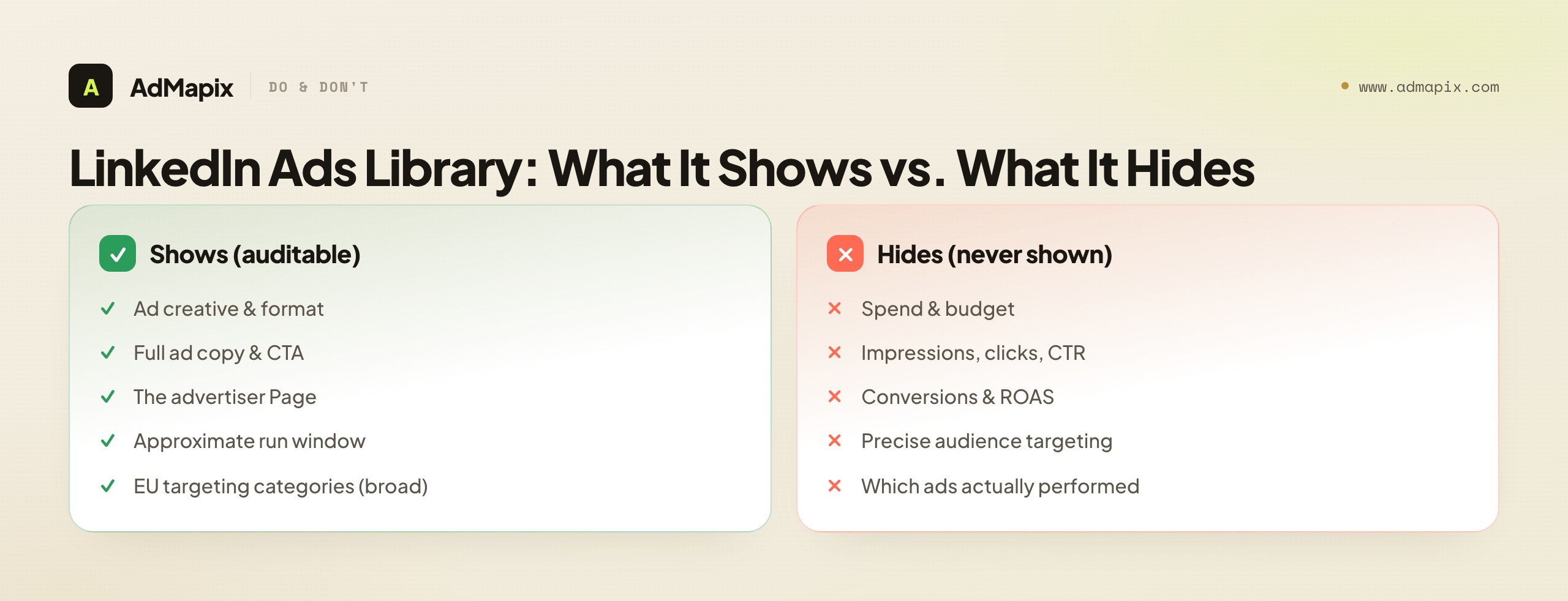
Here is what is in scope and what is not:
| Data point | In the LinkedIn Ads Library | Not in the LinkedIn Ads Library |
|---|---|---|
| Ad creative (image, video, document, carousel) | Yes | — |
| Ad copy / headline / CTA label | Yes | — |
| Advertiser (the paying LinkedIn Page) | Yes | — |
| Approximate date range the ad ran | Yes | — |
| Ad format type | Yes | — |
| EU targeting categories (broad) | Yes, for EU-served ads | — |
| Total spend or budget | — | Not shown |
| Impressions, clicks, CTR, conversions | — | Not shown |
| Precise audience targeting and exclusions | — | Not shown |
| Which ads actually performed | — | Not shown |
| A/B test structure or campaign organization | — | Not shown |
The practical takeaway: treat the library as a message and format inventory, then form hypotheses about what worked from longevity and repetition, not from numbers the library never provides. Every field in the left column is a verifiable, auditable fact you can put in a brief. Every field in the right column is something you must either infer (and label as an inference) or get from a source other than the library — your own account, a third-party tool, or not at all.
The Five Things You Can Read on Every Ad Card
When you open an advertiser's ads, each card and its detail view give you a consistent set of readable elements. Knowing exactly what each one is — and what it implies — turns a glance into intelligence.
1. The creative. The actual image, video, document (PDF carousel), or multi-card carousel that members saw. This is the richest element: it carries the visual hook, the proof moment, the brand system, and — in video — the pacing and the first-three-seconds choice that decides whether anyone watched. For document and carousel ads, click through every card; the strategy often lives on card three, not the cover.
2. The ad copy. The full introductory text, the headline, and the CTA button label ("Download," "Register," "Request demo," "Learn more"). The copy is where targeting leaks — the role words, the jargon, the pain framing — and where the offer is named. Read it as carefully as the visual; on LinkedIn the words frequently carry more strategy than the image.
3. The advertiser. The LinkedIn Page paying for the ad, which confirms the real entity behind a creative and lets you distinguish a brand's own ads from a partner's or reseller's. Always verify you are looking at the Page you think you are — similarly named companies and regional subsidiaries are a common trap.
4. The run window. The approximate date range the ad was active. This is the single most underused element on the card, because it is the only built-in performance proxy the library offers. An ad that has run continuously for months is telling you something a one-week ad is not.
5. The format type. Whether it is Single Image, Carousel, Video, Document, Text, or a Conversation/Message format. Format maps to funnel stage and audience intent, so the format mix across an advertiser's library is itself a strategy readout.
The discipline that makes these five compound: capture all of them together, every time, with the source URL. A creative with no advertiser, no date, and no format tag is a clip; the same creative with its full context is evidence that survives into next month's report.
A sixth element worth noting, even though it is not always present, is the EU targeting disclosure described later in this guide — for ads served to EU audiences, a coarse list of the parameter categories the advertiser used. It is the one structured hint of who an ad was for that the Library ever exposes, so when it is available, capture it alongside the other five. Treat the five-plus-one as a single capture unit: read together, they let you reconstruct not just what a competitor said but, with the disclosure and the copy combined, a credible hypothesis about whom they said it to. That reconstruction — message plus inferred audience plus format plus longevity — is the whole value of a single library pass, and it is far more than the flat "here is an ad" the card appears to offer at first glance.
How to Find a Competitor's LinkedIn Ads
The fastest route is the company Page itself. Open any advertiser's LinkedIn company Page, click the "Ads" tab, and you will see the ads that Page has run in the past year. You can also reach the same data by searching the advertiser's name inside the Ad Library directly. Two entry points, one underlying database — use whichever is faster for the advertiser in front of you.

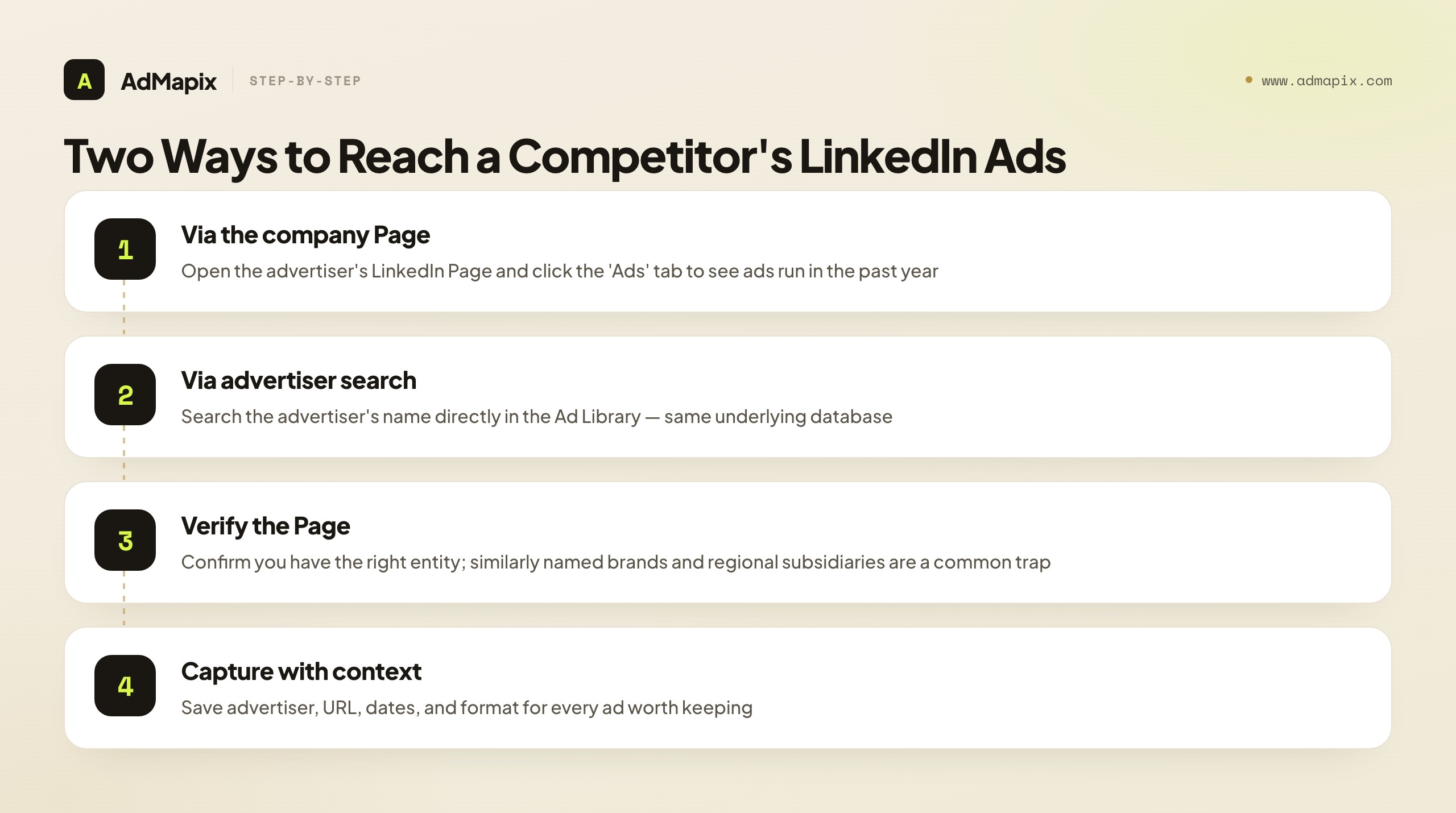
A workflow that produces something reusable rather than a screenshot pile:
- Pick one competitor set, not one competitor. Choose three to five advertisers in the same category so patterns stand out instead of one-off ads. A single advertiser's ads look like noise; a category of advertisers reveals the shared playbook and the open gaps.
- Read the run window, not just the creative. An ad that has been live for months is a stronger signal of a working angle than one that ran for a week — longevity is the closest thing to a performance proxy the library offers.
- Group ads by message, not by format. Cluster them by promise (ROI, speed, compliance, headcount savings), audience (IT, finance, RevOps), offer (demo, report, webinar), and CTA. The clusters are your competitive map.
- Capture source context with every ad. Save the advertiser, the LinkedIn ad URL, the approximate dates, the format, and one sentence on why the ad matters. Context is what makes an example usable in a brief three weeks later.
- Convert clusters into a test or a brief. End every session with a hypothesis: a hook to test, a positioning gap to exploit, or a recurring report to update. Research that never becomes a test idea is just a folder.
The deeper craft of turning these clusters into targeting inferences, ABM reads, and cross-network tests is its own discipline — covered in full in our LinkedIn Ads competitor research playbook. This guide stays focused on getting the most out of the library tool itself.
One practical habit that saves real time: search by the advertiser's exact Page rather than by brand name wherever you can. Brand-name search in the Ad Library is fuzzy — a search for a common company name can surface regional subsidiaries, resellers, look-alike brands, and defunct entities, and a few minutes of reading the wrong advertiser's ads is a few minutes wasted. Navigating from the verified company Page's "Ads" tab guarantees you are looking at the entity you intend to study. When you must use name search, double-check the advertiser on each ad before you save it, because the Library will happily mix several same-named Pages into one result set. Provenance discipline starts at the moment of discovery, not at the moment of saving.
A second habit: do your LinkedIn research in an incognito or logged-out window. The Ad Library is public and login-optional, but browsing it while signed in to your own LinkedIn account risks LinkedIn personalizing what you see and risks leaving a footprint that, in competitive situations, you would rather not leave. A clean session gives you a neutral view of an advertiser's ads and keeps your research quiet. Neither habit is strictly required, but together they turn a casual look into a reliable, repeatable process — and reliability is what separates a research practice you can defend in a brief from a folder of screenshots you half-remember collecting.
Reading the Library by Ad Format
The format mix in an advertiser's library is one of the richest reads available, because on LinkedIn each format maps cleanly to a funnel stage and an audience size. When you open a competitor's ads, do not just read the creatives one by one — step back and read the distribution of formats, because that distribution is a strategy readout in itself.

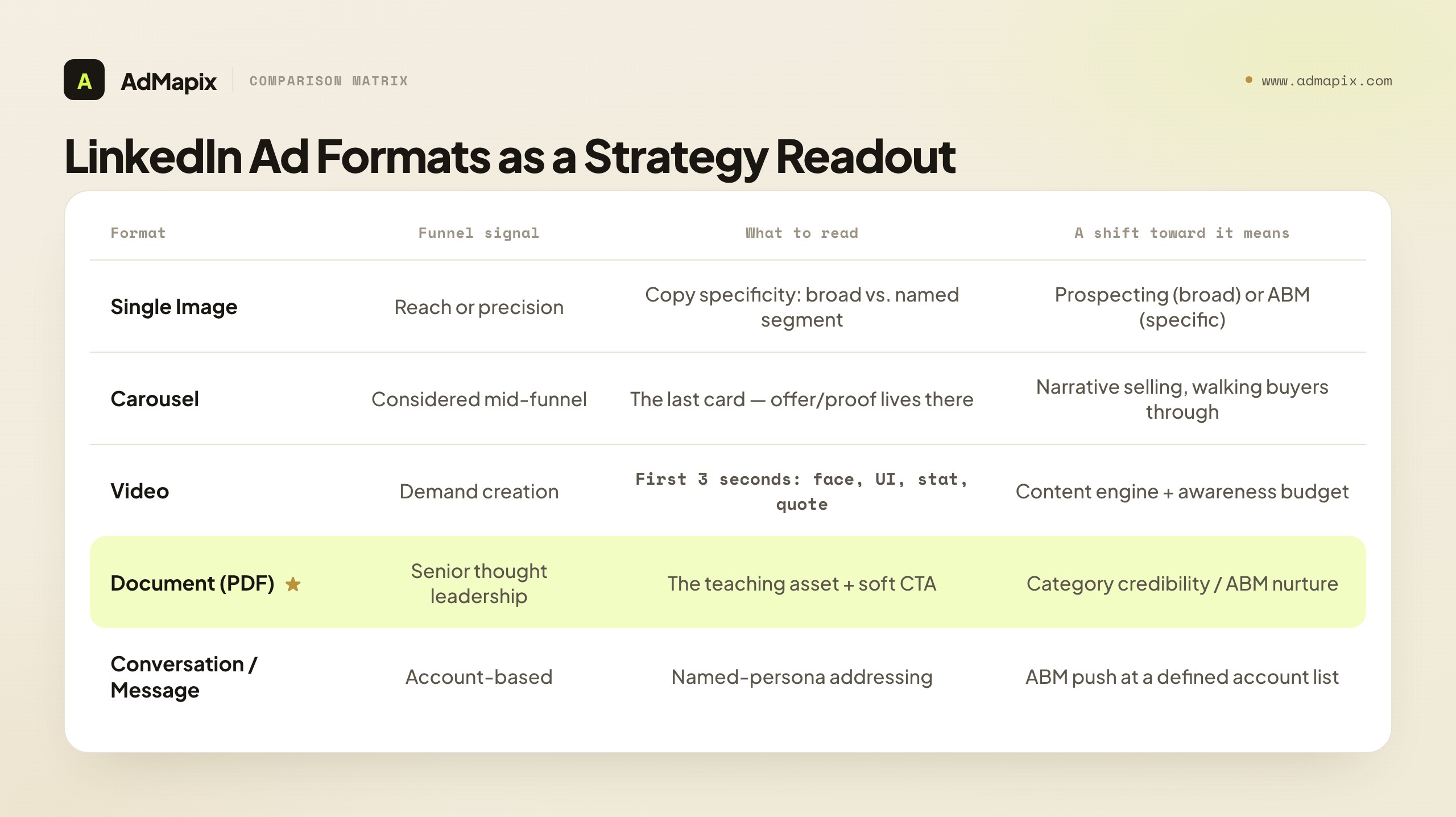
Single Image ads. The workhorse format. Broad copy on a Single Image signals top-of-funnel reach; hyper-specific copy ("for RevOps leaders at Series B SaaS companies") on the same cheap format signals tight, ABM-adjacent targeting. When you see an advertiser leaning heavily on Single Image, read the copy specificity to tell prospecting from precision targeting.
Carousel ads. Multi-card storytelling, often used to walk a buyer through a problem, a solution, and a proof point across cards. An advertiser running carousels is usually investing in a more considered, mid-funnel narrative. Always click through every card — the offer or the proof frequently lives on the last one, and a reader who stops at the cover misses the strategy.
Video ads. Brand-awareness and demand-creation signal. Video is expensive to produce, so a library full of fresh video tells you the advertiser has a content engine and a budget to feed it. Read the first three seconds: that choice — founder face, product UI, bold stat, customer quote — encodes the audience they are after.
Document (PDF) ads. The clearest thought-leadership signal on LinkedIn. A document ad — a downloadable benchmark, framework, or report packaged as an in-feed PDF carousel — targets senior, considered buyers who consume long-form content, and very often signals an account-based nurture motion. When an advertiser leans into document ads, they are building category credibility and a remarketing pool, not chasing this-week demos.
Text ads and Conversation/Message formats. Text ads are cheap, small-audience plays. Conversation and Message ads are inherently account-based — small, high-intent, expensive audiences — so their presence in a library is a strong ABM tell even though the library cannot show you the matched list behind them.
The move that turns format-reading into intelligence: tally the format mix across an advertiser's whole library and watch how it shifts over weeks. A competitor moving from document ads toward Single Image problem-callouts is moving down-funnel — harvesting the demand they spent the previous quarter creating. A competitor adding founder videos to a feature-heavy library is repositioning from product to narrative. The format mix is a free, weekly strategy readout, and the library is the only place you can see it.
Reading the Run Window: The Library's One Performance Proxy
Because the library gives you no impressions, no spend, and no conversion data, the run window is doing a lot of quiet work, and most people skip right past it. Here is how to squeeze real signal out of a date range.
The core logic is simple and reliable: advertisers do not keep paying to run ads that lose money. LinkedIn is expensive, B2B budgets are scrutinized, and creative fatigue is real — so an ad that has been live continuously for three, four, or six months is, with high probability, an ad that is earning its keep. That longevity is the closest thing to a "this works" stamp the library will ever give you.

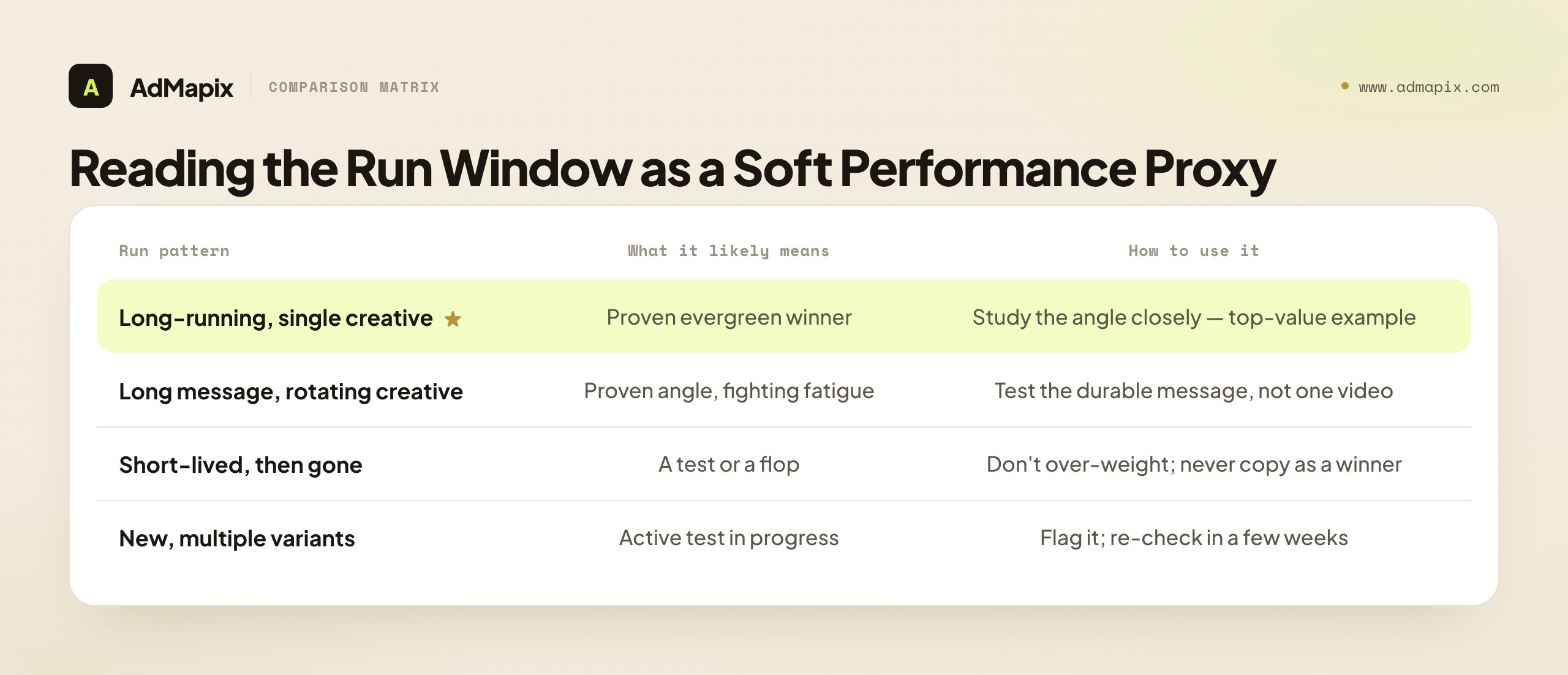
How to read it in practice:
- Long-running, single creative → a proven evergreen. Study its angle closely; it has survived where others were cut. This is your highest-value example in any advertiser's library.
- Long-running message, rotating creative → a proven angle the advertiser keeps refreshing to fight fatigue. The durable element is the message, not any single video; that message is what you test.
- Short-lived, then gone → a test or a flop. The advertiser tried it and stopped. Do not over-weight it, and never copy it assuming it worked.
- Recently launched, multiple variants at once → an active test in progress. Worth flagging and re-checking in a few weeks to see which variant survives.
The honest caveat: longevity is a soft signal, not proof. An ad could run for months because it converts, or because a junior media buyer forgot to turn it off, or because the brand is funding awareness with no conversion mandate. You cannot distinguish these from the outside. So weight longevity as a strong lead, write it into your brief as an inference ("likely a winner, based on a 5-month run"), and confirm it against your own test before betting budget. The run window points you at the right ads to study; it does not certify them.
The EU Targeting Disclosure: The One Structured Targeting Signal
There is a single piece of structured targeting data the LinkedIn Ads Library does expose, and almost nobody uses it: the EU Digital Services Act targeting disclosure. For ads served to users in the EU, platforms must disclose the broad categories of parameters used to target them. LinkedIn surfaces this on qualifying ad cards.
It will not tell you "VP of Finance at companies with 500–1,000 employees in Germany." But it may confirm that the advertiser used a "job" parameter, a "company" parameter, and a "location" parameter — which is enough to validate the targeting you inferred from the copy. When your read of an ad's language says "this looks aimed at senior finance roles at mid-market companies," and the EU disclosure confirms job and company parameters were in play, your confidence should rise sharply.
Two boundaries to keep straight. First, it is EU-scoped: ads that never served to EU audiences carry no disclosure, so always check whether the ad you are looking at qualifies. Second, it is coarse by design — categories of parameters, not the actual audience definition. Treat it as a confirmation layer on top of copy-based inference, never as a substitute for it. Used that way, it is a free reliability boost on a tool that otherwise gives you almost nothing structured about who an ad was for.
What Public Ad Data Can and Cannot Prove
This is the section to read twice, because the most common failure with any ad library is confidently reading numbers off an ad that the ad never contained. Public ad libraries prove exposure, never outcome. The LinkedIn Ads Library can confirm that a competitor ran a specific message, in a specific format, over a specific window. It cannot tell you whether that ad converted, how much was spent behind it, or who exactly saw it. Anyone presenting library findings as performance proof is overstating the evidence.

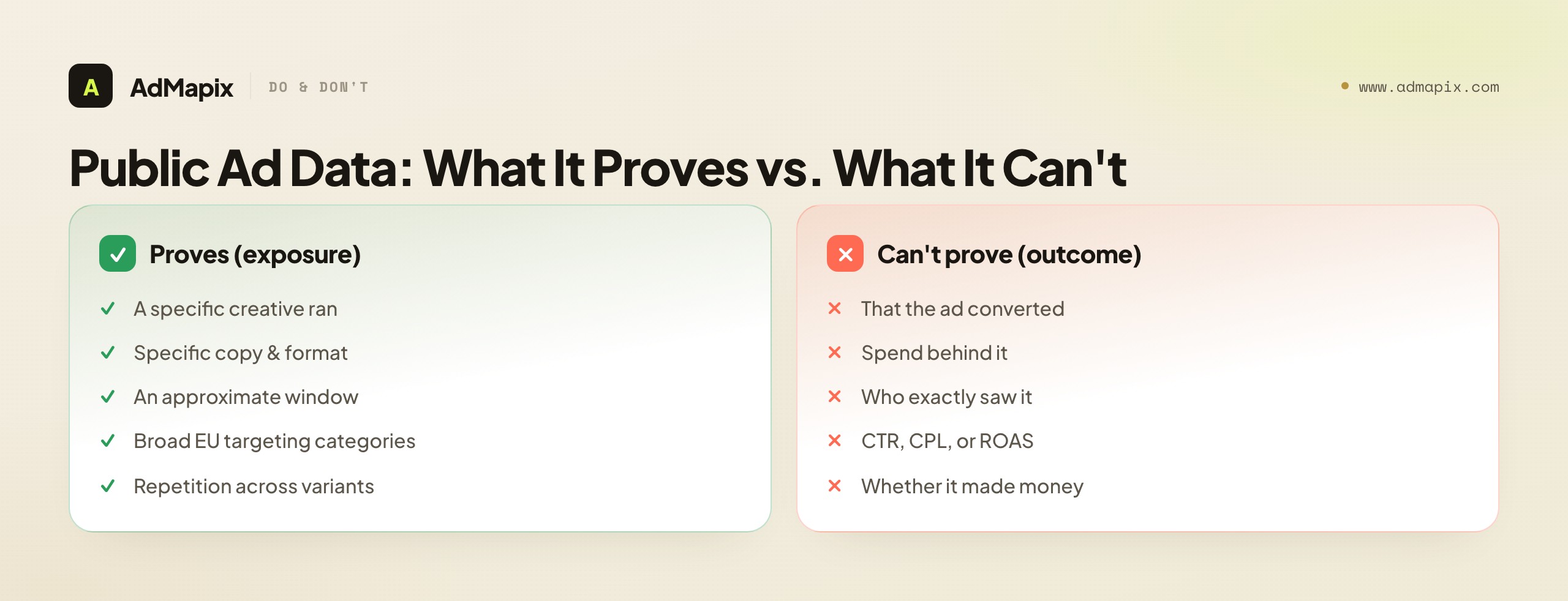
What it proves. That an advertiser ran a specific creative and copy, in a specific format, over an approximate window, and — for EU-served ads — that broad targeting categories were in play. These are auditable facts you can build a brief on.
What it cannot prove. Spend, budget, impressions, reach, clicks, CTR, conversions, cost-per-lead, ROAS, the precise audience, the bid, or whether the campaign made money. None of that is exposed, and no honest tool claims otherwise. The moment you write "they must be crushing it with this" in a brief, you have left observation for assumption — which is fine, as long as you label it as an assumption.
Use longevity and repetition as soft signals — an angle that runs for months across multiple variants is more likely to be working than an angle that appears once — but mark them as inferences, not measured results. Then pair the library with first-party signals you actually control (your own landing-page tests, your CRM, your win/loss notes) before betting budget on a competitor-inspired angle. The library is where research starts, not where it ends.
How the LinkedIn Ads Library Compares to Meta and Google
A B2B buyer's journey is rarely single-channel, and a competitor researching honestly should know how LinkedIn's library stacks up against the other two majors — because the differences tell you which channel to lean on for which question.

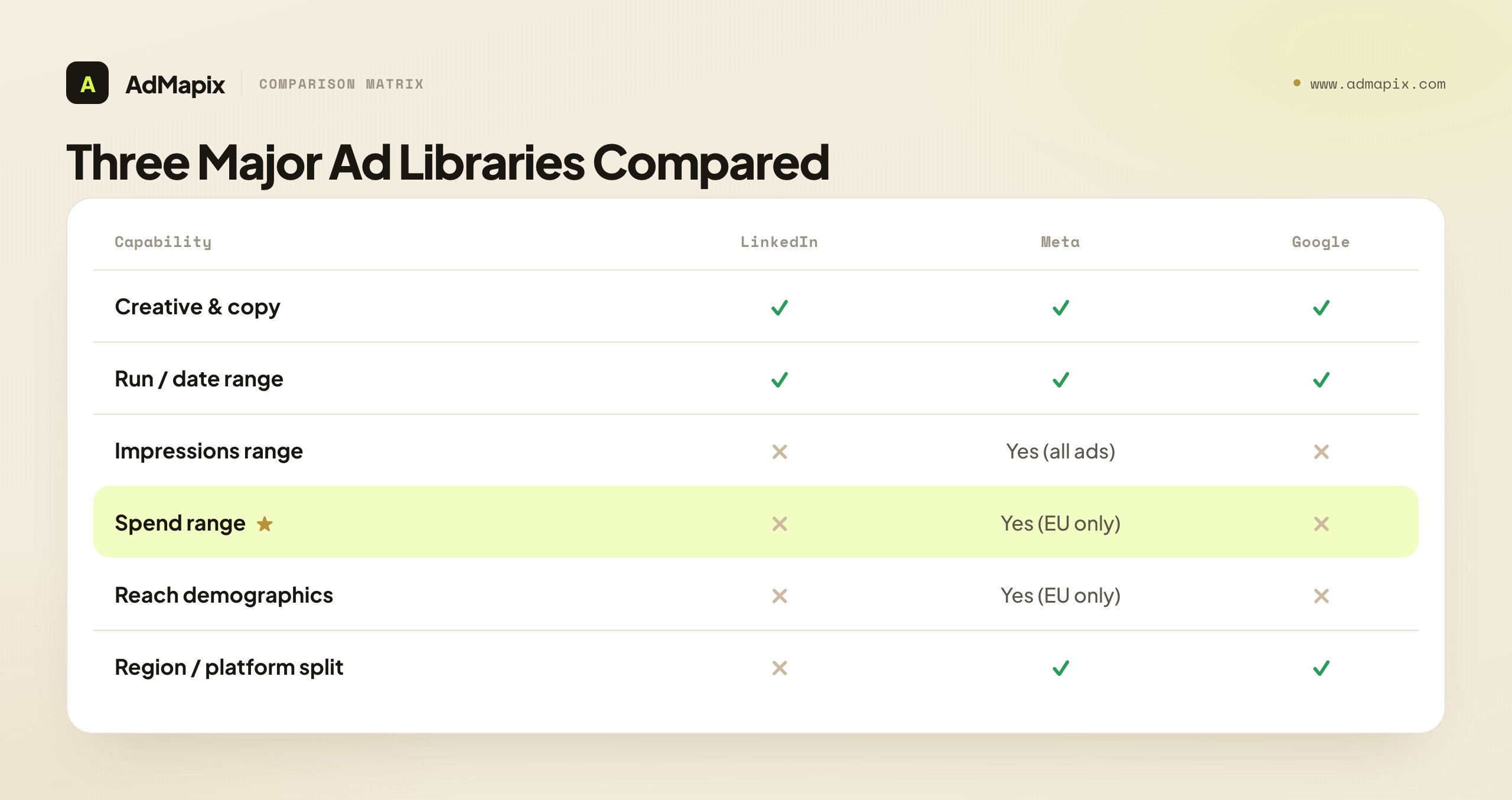
| Capability | LinkedIn Ads Library | Meta Ad Library | Google Ads Transparency Center |
|---|---|---|---|
| Active creative & copy | Yes | Yes | Yes |
| Run / date range | Yes (approx.) | Yes | Yes |
| Format type | Yes | Yes | Yes |
| Impressions range | No | Yes (all ads) | No |
| Spend range | No | Yes (EU only) | No |
| Reach demographics | No | Yes (EU only) | No |
| Region / platform breakdown | No | Yes | Yes |
| Targeting disclosure | Broad (EU only) | Broad (EU only) | Limited |
| Login required | No | No | No |
The summary is stark: LinkedIn's library is the most opaque of the three. Meta hands you impressions ranges on every ad worldwide and, for EU delivery, spend bands and reach demographics — a genuine spend proxy LinkedIn never gives. Google shows you format, region, and date served. LinkedIn shows the creative, the copy, the dates, and the EU targeting categories — and stops.
This is not a reason to skip LinkedIn; it is a reason to use each library for what it does best. Lean on Meta's library when you need a spend-magnitude read, on Google's when you need to see where and when ads served, and on LinkedIn's when you need to study senior-buyer B2B messaging that simply does not exist on the other platforms. The B2B angles, the document-ad thought leadership, the ABM-flavored copy aimed at directors and VPs — those live on LinkedIn and nowhere else, which is why the thin library is still indispensable for B2B teams.
Third-Party Tools That Fill the Library's Gaps
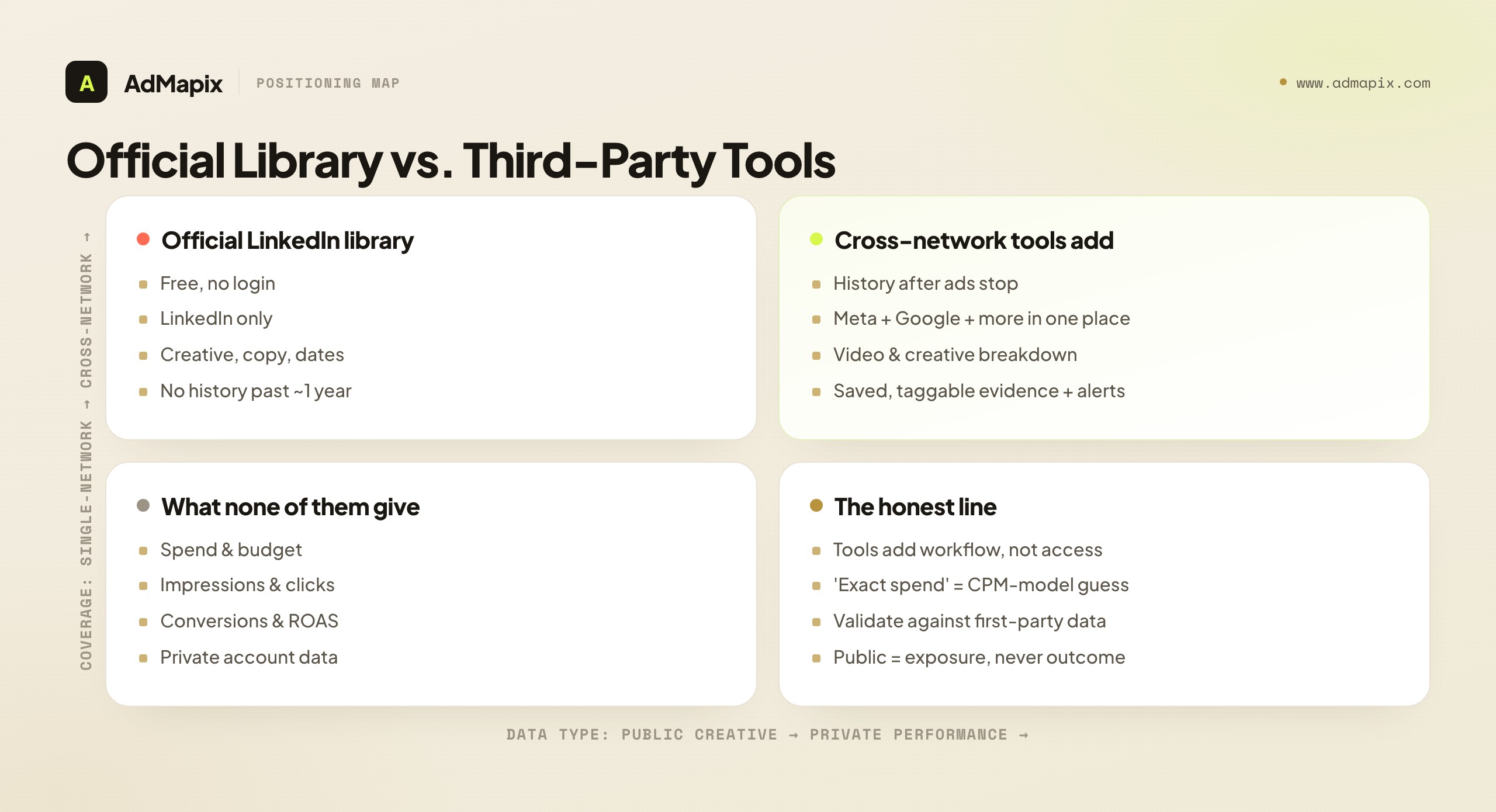
The official library leaves real holes — no history once an ad stops, no cross-network view, no video breakdown, no saved evidence, no alerting. A category of third-party tools exists to fill exactly those gaps, and knowing what each adds (and what none of them can do) keeps your expectations honest.

What third-party tools genuinely add:
- History. The official library only shows ads served in roughly the last year and keeps no public archive of dead ones. Third-party tools snapshot creatives over time, so you can see what an advertiser ran six, twelve, or eighteen months ago — and watch how their messaging evolved.
- Cross-network consolidation. LinkedIn's library is LinkedIn-only. A B2B advertiser usually runs a coordinated motion across LinkedIn, Meta, and Google; a cross-network tool puts all of it in one searchable workspace instead of three tabs.
- Video and creative breakdown. On shoppable and motion creative, the hook, pacing, and proof moment carry the strategy — and a static thumbnail can't show any of that. Tools that analyze the video surface what a screenshot hides.
- Saved evidence and tagging. A research library that you can search, tag by message or offer, and turn into a shareable report compounds in value; a folder of screenshots rots.
- Alerting. Tools can notify you the moment a tracked advertiser launches a new ad — something the official library, which you must check manually, never will.
What no third-party tool can do: unlock the private data. None of them can see spend, bids, impressions, conversions, or ROAS for LinkedIn ads, because that data lives in accounts no one outside the advertiser can reach. Any tool claiming to reveal a competitor's exact LinkedIn ad spend is selling a CPM-model guess dressed up as a fact. The structural value of a third-party layer is history, consolidation, breakdown, and workflow — not magical access to private numbers.
Common Mistakes With the LinkedIn Ads Library
Most wasted research traces back to a handful of repeatable errors. Naming them is the cheapest way to avoid them.

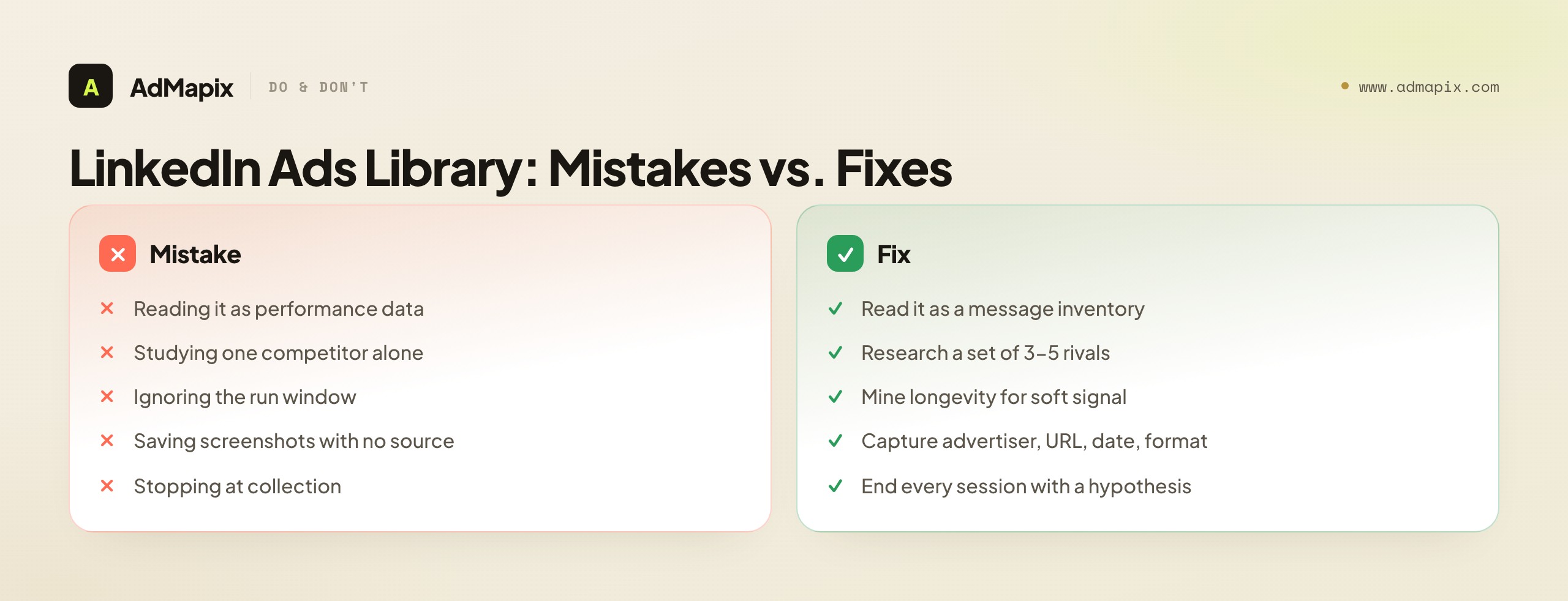
- Treating the library as performance data. Visible and long-running does not equal high-converting. The library shows exposure, not results. Read it as a message inventory and label every performance claim as an inference.
- Studying one competitor in isolation. A single advertiser's ads look like noise; a category of three to five advertisers reveals the shared playbook and the open gaps. Always research a set.
- Ignoring the run window. Skipping the date range throws away the one longevity signal the library gives you for free. The run window is where the soft performance proxy lives.
- Saving screenshots without source context. An image with no advertiser, URL, format, or date is almost useless in a later brief or report. Capture the context every time.
- Stopping at collection. Research that never becomes a test idea, positioning note, or client-ready report is just a folder. Every session should end with a hypothesis.
- Assuming the library is a full archive. It only reflects roughly the last year of activity, so it is recent-activity, not deep-history. For older creative you need a third-party tool that snapshots over time.
- Ignoring the EU targeting disclosure. It is the one structured targeting signal on offer, and skipping it means leaving free confirmation of your copy-based inferences on the table.
A Repeatable Weekly Research Loop
A one-time look at the library is competitive guessing. A standing loop is competitive intelligence. Here is a concrete weekly rhythm a B2B team can run in well under an hour, using the library as the front door.

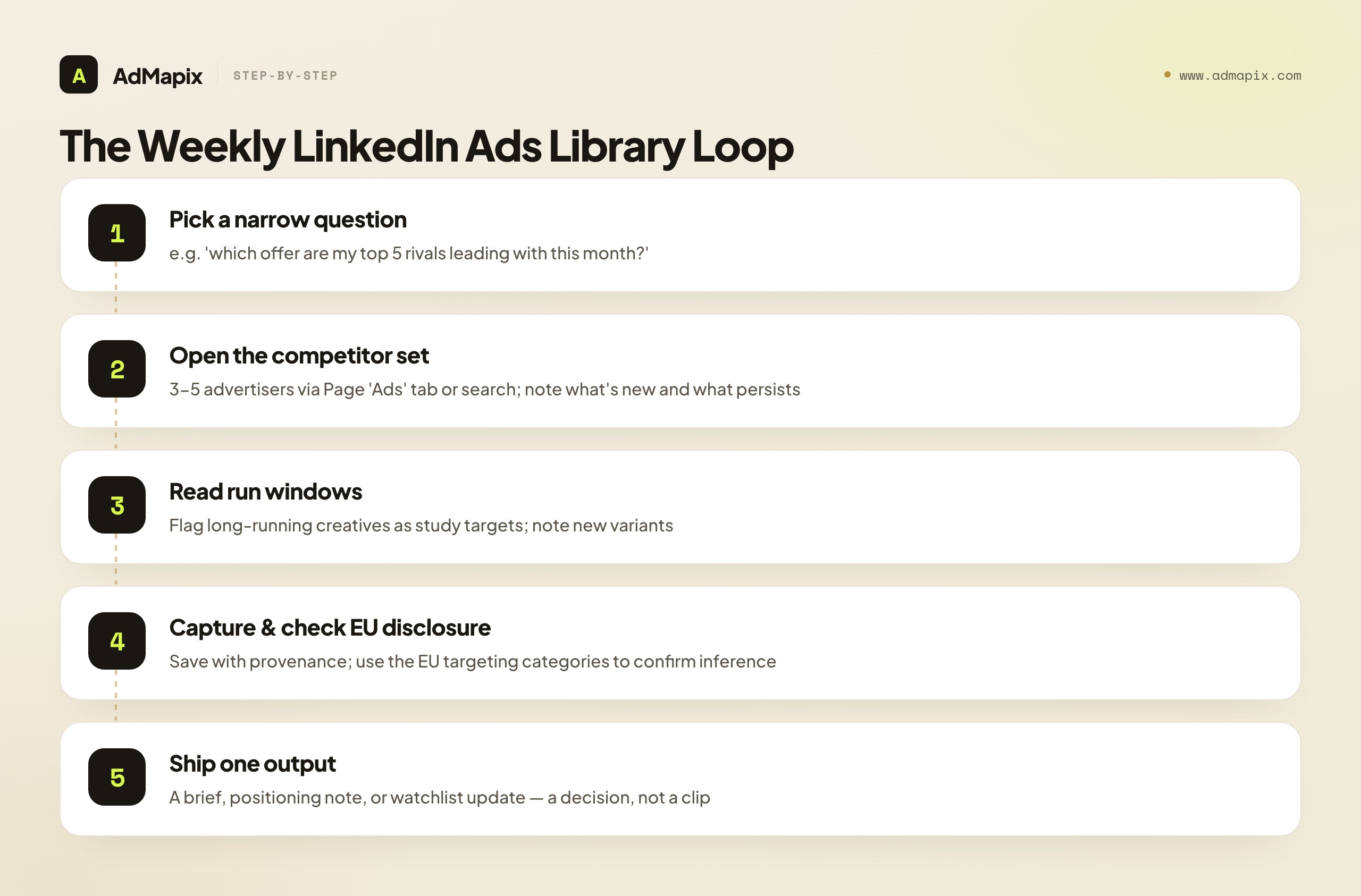
- Pick one narrow question. Not "what are competitors doing on LinkedIn," but "which offer — demo, report, or webinar — are my top five rivals leading with this month?" A question you can answer in a session is a question worth asking.
- Open the library for your competitor set. Three to five advertisers, via the Page "Ads" tab or advertiser search. Note what is new, what changed format, and which messages persist.
- Read the run windows. Flag the long-running creatives — those are your highest-value study targets — and note any new variants that just launched.
- Capture with provenance. Save advertiser, URL, dates, format, and a one-line "why it matters" for each ad worth keeping. Tag by message, offer, and audience.
- Check the EU disclosure where present. Use it to confirm or revise the targeting you inferred from the copy.
- Ship one output. End with a creative brief, a positioning note, or a watchlist update — a decision, not a clip. If the session does not change a test plan, tighten the question next time.
Run that loop weekly and three things compound: you build a longitudinal read of how a category's messaging shifts (something no single look gives you), you train yourself to separate facts from inferences, and you keep a steady stream of testable hypotheses flowing into your own LinkedIn campaigns. The library is free; the discipline is what turns it into an edge.
A Worked Walkthrough: Reading One Advertiser's Library
Principles land harder when you watch them applied, so here is a composite walkthrough of opening one competitor's LinkedIn Ads Library and reading it end to end. The competitor is a mid-market B2B SaaS — call it "Rival Co" — and you are studying them because they share your buyer (operations and RevOps leaders) even where the product overlaps yours only partially.
Step one: get to the right ads. You open Rival Co's LinkedIn company Page, click the "Ads" tab, and confirm the advertiser name matches the entity you intend to study — not a regional subsidiary or a similarly named brand. Fourteen ads are live. Already you have a first, crude read: fourteen active creatives is a real, funded presence, not a token campaign.
Step two: read the format mix. Four are Document (PDF) carousels, four are Single Image, three are Video, and three are Conversation ads. That distribution alone tells a coherent story before you have read a single word: the Documents are a top-of-funnel thought-leadership play, the Single Images are mid-funnel demand harvesting, and the Conversation ads are an account-based push at a defined list. Rival Co is running a coordinated three-layer funnel on LinkedIn — a sign of a marketing team that understands the channel and has the budget to run it properly.
Step three: read the copy and cluster by message. You read each ad's copy and cluster by promise rather than by format. The Documents all teach variations of "how to cut manual ops work." The Single Images open with a pain callout ("Still stitching tools together by hand?"). The Conversation ads address "RevOps leaders at Series B–C companies" by name. The clusters draw your competitive map: their positioning leads with efficiency and manual-work elimination, their offer is a benchmark report at the top and a demo at the bottom, and their named-segment language tells you the ABM layer is aimed at a specific company stage.
Step four: read the run windows. This is where the library's one performance proxy earns its keep. Two of the Document ads have been live for over four months; the rest of the creatives are weeks old. That longevity gap is your single most valuable read: those two long-running Documents are, with high probability, proven evergreen winners, while the fresher Single Images are an active test in progress. You flag the two Documents as your highest-priority study targets and note the Single Image variants to re-check in a few weeks.
Step five: check the EU disclosure. Several of the ads served in the EU, so you open their targeting-category disclosure. It confirms job and company parameters were in play — which validates the seniority-and-stage targeting you inferred from the copy. Your confidence in the read rises from "probable" to "well-supported."
Step six: ship one output. You do not stop at a folder. You write a one-paragraph brief: "Rival Co runs a coordinated efficiency-led funnel at RevOps leaders in Series B–C companies; their two evergreen winners are benchmark-report Document ads running 4+ months; their mid-funnel pain-callout Single Images are mid-test. Hypothesis to test: an efficiency-led benchmark asset, aimed at our own ICP, against our current top-of-funnel creative." That brief — built entirely from a free, public library, with every inference honestly labeled — is the difference between research and a screenshot pile. None of it required a number the library hides.
When to Use AdMapix
Use AdMapix when the LinkedIn Ads Library is your starting point but a single network and a screenshot folder are not enough for weekly creative work. AdMapix is a cross-network ad creative search and intelligence layer: it lets you search competitor ad creatives across networks, save the strongest examples as media, run video analysis on motion ads, tag recurring patterns, and turn the result into a shareable report. The LinkedIn library answers "what is this one company running on LinkedIn right now"; AdMapix answers "what is this whole category running across networks, and what should we test."

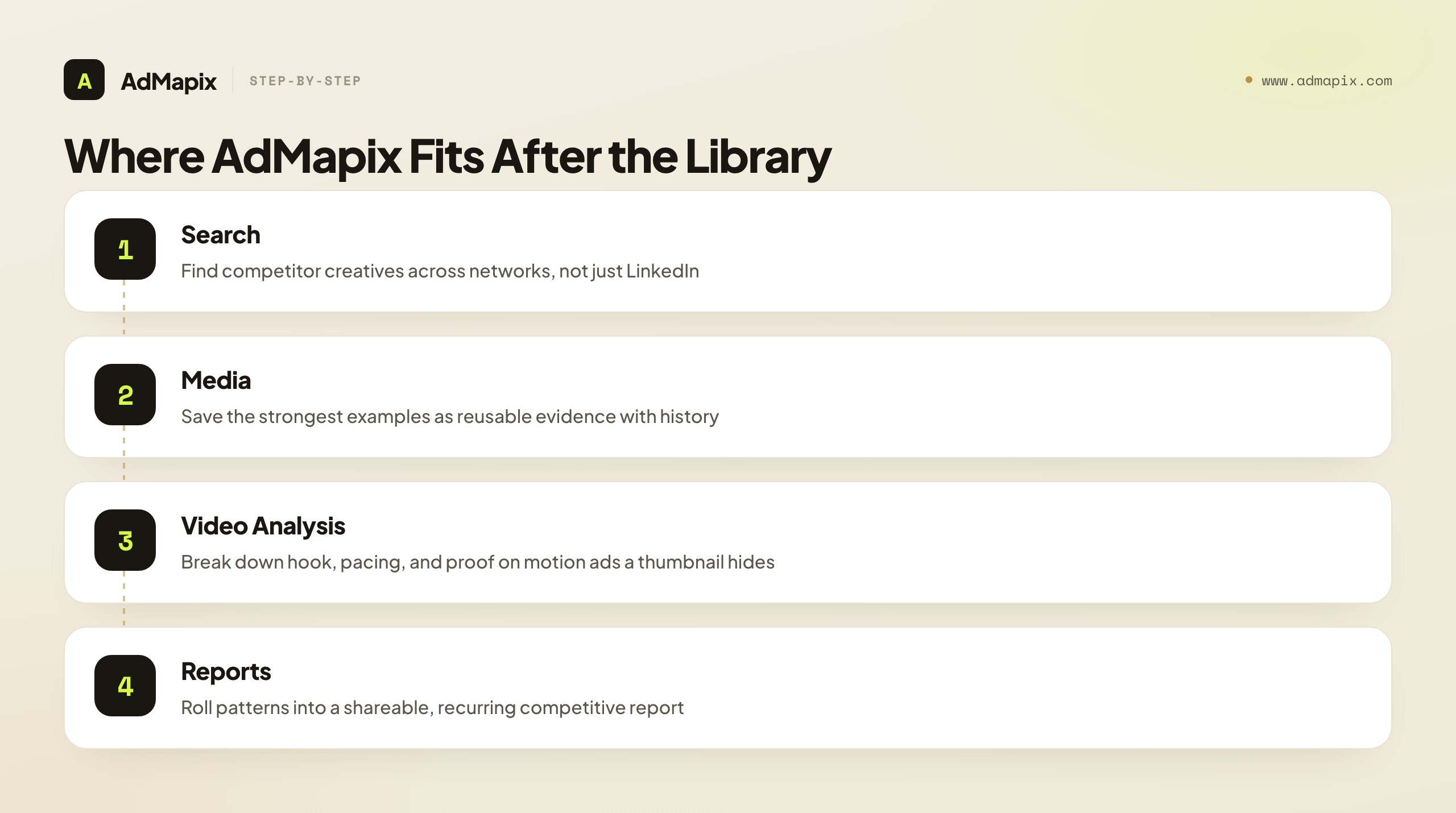
This is for B2B teams and agencies who track competitors on an ongoing cadence and need evidence that lives somewhere reusable. It directly fills the four gaps the official library leaves: history (so dead ads do not vanish from your record), cross-network consolidation (LinkedIn alongside Meta, Google, TikTok, YouTube, and more in one workspace), video and creative breakdown (so the hook and proof moment of a motion ad are captured, not just a thumbnail), and saved, taggable, reportable evidence (so research compounds instead of rotting). The cross-network angle matters because B2B advertisers rarely run LinkedIn in isolation, and seeing the coordinated motion across networks tells you more than any single-platform wall of ads.
It is not the right tool if you just want to glance at one advertiser's LinkedIn ads once — for that, the free Ads Library is exactly right and AdMapix is overkill. And it does not claim to reveal private spend, impressions, or performance that no public tool can honestly show. A repeatable loop looks like this: run the competitor set in Search AdMapix, store the strongest creatives in Media, break down the video ads in Video Analysis, and roll the findings into Reports. When that loop saves real briefing time each week, create an account from Login or compare seats on Pricing.
Putting It Together: The Library as a Front Door
The whole guide reduces to a simple frame: the LinkedIn Ads Library is the free front door to B2B competitive creative research, and it does one job exceptionally well — it confirms, with certainty, what messaging and formats a competitor has put in market on LinkedIn over the last year. That single capability is genuinely valuable, because for B2B, LinkedIn carries angles that exist nowhere else.
What it does not do — spend, performance, deep history, cross-network — is not a flaw to complain about; it is a boundary to plan around. Read the library as a message-and-format inventory, mine the run window for soft signal, check the EU disclosure for targeting confirmation, and label every performance claim as the inference it is. When you need history, consolidation, video breakdown, or a reportable evidence trail, layer a cross-network tool on top. And whatever the library suggests, validate it against your own first-party data before it touches a budget line.
Do that consistently and the library stops being a thing you open once and forget. It becomes the reliable first step in a weekly loop that turns a free transparency surface into a steady stream of honest, testable competitive hypotheses — which, on the most expensive ad platform in the world, is an edge worth building.
FAQ
What is the LinkedIn Ads Library?
The LinkedIn Ads Library is LinkedIn's free, public database of ads that have run on the platform. It shows the creative, copy, advertiser, format, and approximate run dates for ads served to members at least once in roughly the past year. It was launched in 2024 in line with transparency regulation and is built to show messaging and format — not spend, impressions, or performance.
How do I find a specific company's LinkedIn ads?
Open the company's LinkedIn Page and click the "Ads" tab to see what it has run in the last year, or search the advertiser's name directly in the Ad Library. Both routes return the same ads. From there, filter to the messages and formats that matter, and save the source URL, format, and dates for each one so the example survives into a later brief.
Is the LinkedIn Ads Library free, and do I need an account?
Yes, it is free, and no, you do not need a LinkedIn account to view it. It is a public transparency surface reachable from any company Page's "Ads" tab or by searching the advertiser name in the Ad Library. Anyone can search it, which is part of what makes it a legitimate competitive-research tool rather than a private feature.
Does the LinkedIn Ads Library show spend or targeting?
No spend, and only a coarse targeting hint. It does not show spend, budget, impressions, clicks, conversions, or precise audience targeting. For ads served in the EU, it does surface a broad targeting-category disclosure (required by the EU Digital Services Act) that confirms parameter types like job, company, or location — but not the actual audience definition. Treat ad longevity as a soft signal, not as measured results.
How far back does the LinkedIn Ads Library go?
It includes ads served to members at least once in roughly the last year. Ads that stopped running more than about a year ago generally drop out, so the library reflects recent activity rather than a full historical archive. If you need older creative or a long-term view of how an advertiser's messaging evolved, you need a third-party tool that snapshots ads over time. Verify the current window on LinkedIn's help pages before relying on it.
How is the LinkedIn Ads Library different from the Meta Ad Library?
LinkedIn's library is more opaque. Both show creative, copy, and run dates without a login, but Meta's Ad Library adds an impressions range on every ad worldwide and, for EU-served ads, spend bands and reach demographics — a genuine spend proxy LinkedIn does not provide. LinkedIn's value is the B2B messaging and senior-buyer angles that simply do not exist on Meta, so the two are complements, not substitutes.
Can I see how much a competitor spent on a LinkedIn ad?
No. Neither the LinkedIn Ads Library nor any honest third-party tool can show a competitor's actual LinkedIn ad spend, because that data lives in an account you cannot access. The closest you get is the run window as a soft longevity proxy — a long-running ad is probably funded because it works — but that is an inference, not a spend figure. Any tool promising exact LinkedIn spend is selling a CPM-model guess.
Is the LinkedIn Ads Library enough for competitor analysis?
It is enough to map a competitor's messaging, offers, and formats on LinkedIn — which is a real, useful job. It is not enough for performance proof, cross-network coverage, deep history, or a repeatable reporting workflow. For ongoing competitive intelligence across multiple advertisers and networks, pair it with a tool that saves evidence and analyzes patterns, and lean on a dedicated methodology like our LinkedIn Ads competitor research guide for the deeper teardown work.
What can I actually learn from a competitor's LinkedIn ad?
The message (what promise and pain they lead with), the offer (demo, report, webinar, consultation), the format (which maps to funnel stage), the run window (longevity as a soft signal of what works), and — for EU ads — the broad targeting categories. Together these reconstruct an advertiser's positioning and funnel posture on LinkedIn, even though the library hides who exactly saw the ad and how it performed.
Where does AdMapix fit alongside the LinkedIn Ads Library?
AdMapix fits after discovery. Once the LinkedIn library shows you which competitors and angles to study, AdMapix lets you search creatives across networks, save examples as media, run video analysis, tag patterns, and produce recurring reports — filling the library's gaps in history, cross-network coverage, video breakdown, and reusable evidence. The library is the free first look; AdMapix is the layer that turns those looks into reusable competitive research. It does not, and does not claim to, reveal private spend or performance.
Key Takeaways
- Reach the LinkedIn Ads Library from a company Page's "Ads" tab or by searching the advertiser name; both show ads run in the past year, free and without a login.
- Read it as a message-and-format inventory — it shows creative, copy, advertiser, format, and run dates, never spend, impressions, or precise targeting.
- The run window is the library's one built-in performance proxy; use longevity and repetition as soft signals, but never present them as measured results.
- For EU-served ads, the broad targeting-category disclosure is free confirmation of the targeting you inferred from the copy — don't skip it.
- It is the most opaque of the three major libraries, so pair it with Meta's and Google's surfaces, and with a cross-network tool like AdMapix when you need history, video breakdown, and a reusable evidence trail.
Related Reading
- LinkedIn Ads Competitor Research in 2026: The Complete B2B Intelligence Playbook — the deeper methodology for decoding rivals once the library shows you who to study.
- Competitor Ad Analysis in 2026: The 5-Dimension Framework, Templates & SOP — a general structure for turning rival ads into testable briefs.
- How to Spy on Competitors' Ads in 2026 (30-Min/Week Workflow) — the cross-channel weekly workflow the library plugs into.
- Ad Spy Tools by Channel: Meta, TikTok, Google, YouTube, Native — how the transparency surfaces and tools compare across platforms.
- Facebook Ads Library 2026: Official URL, Filters & Competitor Ads Guide — the equivalent deep dive for Meta's far more data-rich library.
Sources
Official sources checked as of June 21, 2026. Platform transparency products, access paths, and the available date range can change, so verify the current details before building a workflow.
- LinkedIn Ad Library help — LinkedIn describes the Ad Library as a publicly available database with information about ads that have run on LinkedIn.
- LinkedIn Marketing Solutions Ad Library help — LinkedIn Marketing Solutions help confirms the Ad Library is publicly available and shows ads that have run on LinkedIn.
- LinkedIn engineering: enhancing transparency with the Ad Library — LinkedIn's engineering blog states the Ad Library is available to the public and includes ads served at least once in the last year.
- LinkedIn Marketing Solutions: ad formats — the official reference for the LinkedIn ad formats you will see in the library.
- EU Digital Services Act overview — the regulation behind LinkedIn's ad transparency and the EU targeting disclosure.
Turn these observations into your next creative study
Open the creative library and select samples for your market, network and research question.
Related Articles
LinkedIn Ad Library API: What Actually Exists, What Doesn't, and the Workflow That Works in 2026
A developer-grade, honest explainer of the LinkedIn Ad Library API question. There is no public Ad Library API; LinkedIn runs a browse-only transparency website and a separate Advertising API for managing your own accounts. This guide untangles the two, explains what each returns, covers access, the legal and technical reality of scraping, the EU DSA context, and the manual-plus-tooling workflow CI teams actually use.
Paid Social Intelligence Tools (2026): Build a Five-Layer Stack That Improves Decisions
A practical 2026 guide to paid social intelligence tools — the five-layer stack (official libraries, search, creative, reporting, decision) that turns competitor ads into briefs, tests, and budget moves; what public ad data can and cannot prove; how to judge each tool by the decision it improves this week; and a repeatable weekly workflow across Meta, TikTok, and Google.
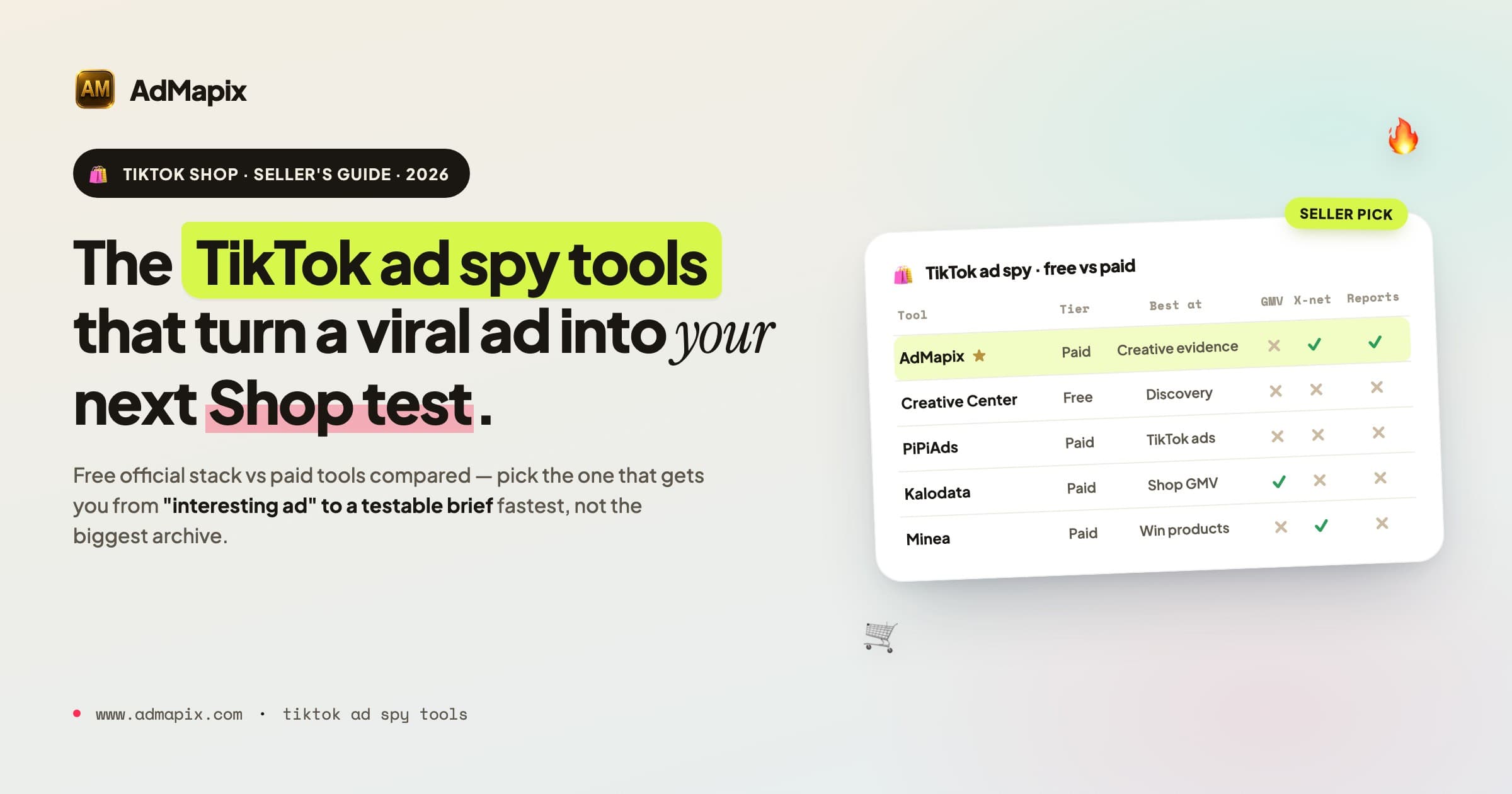
TikTok Ad Spy Tools for TikTok Shop in 2026: Free & Paid Compared (Seller's Guide)
A 2026 seller's guide to TikTok ad spy tools for TikTok Shop — free official sources, paid tools compared (PiPiAds, Minea, Kalodata, FastMoss, AdMapix), a shoppable-video teardown framework, a repeatable research SOP, and what public ad data can and cannot prove.