
Meta Ads API Alternative in 2026: Ad Library API, Marketing API, or a Creative Layer?
A 2026 guide to choosing a Meta ads API alternative — what the Ad Library API, Marketing API, and Graph Ads Archive each actually expose and where they stop, how a creative-intelligence layer fills the saved-media, video-breakdown, and reporting gap, exactly what public Meta data can and cannot prove (creative yes; spend, targeting, and ROAS no), and a decision framework matched to the job you are doing.
By the AdMapix Research Team — Updated June 21, 2026
Meta Ads API Alternative in 2026: Ad Library API, Marketing API, or a Creative Layer?
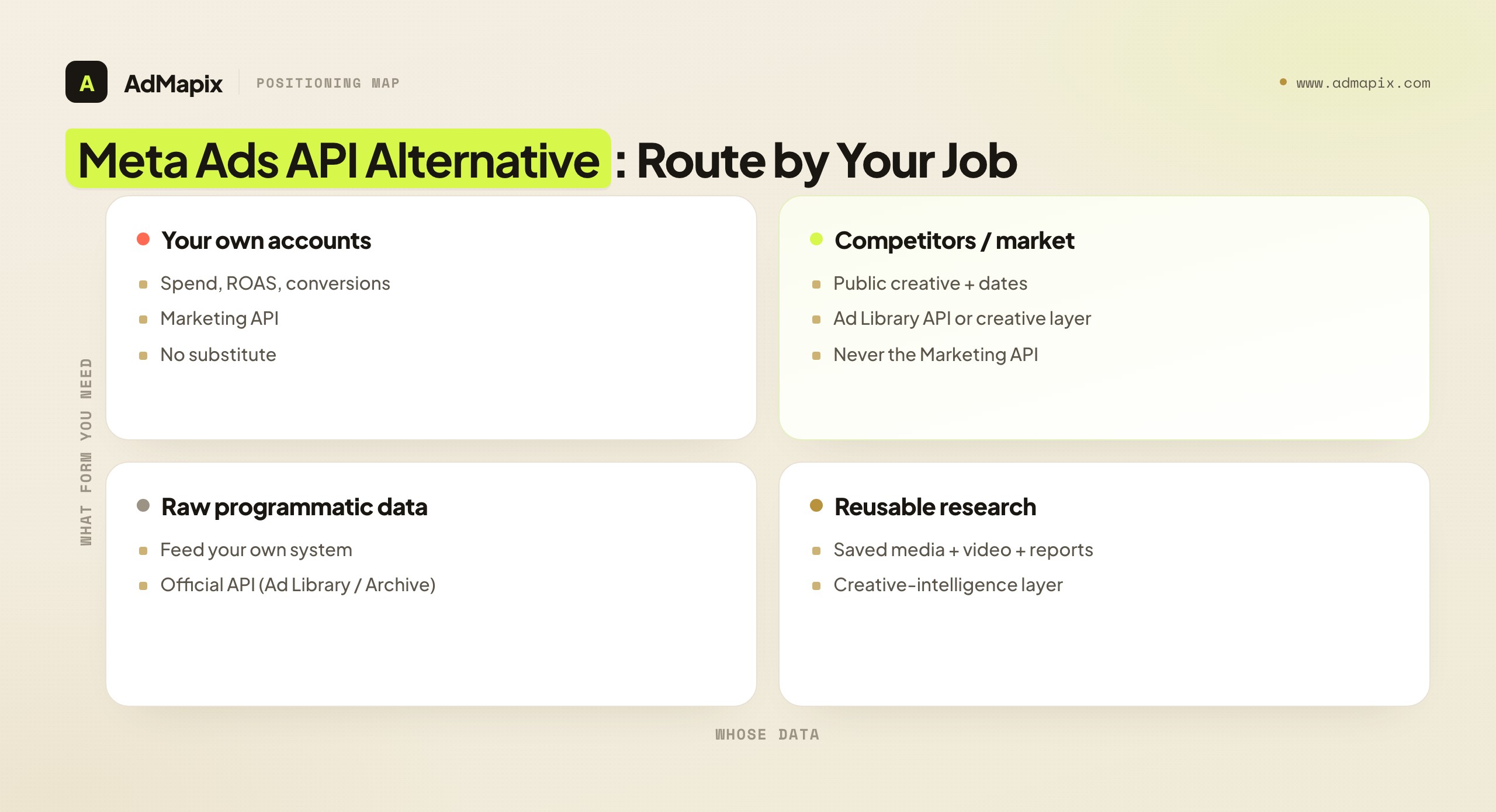
There is no single "Meta ads API alternative," because the right choice depends entirely on what you are trying to do. Meta splits its ad data across three official APIs — the Ad Library API, the Marketing API, and the Graph Ads Archive — each with a deliberately narrow scope, and none of them hands you saved creative, video breakdowns, or cross-platform reports. So when someone searches for a "Meta ads API alternative," they are usually feeling one of two very different gaps: either an official API does not expose the data they assumed it would, or it exposes the data but not in a form their team can actually research, save, and report from. This 2026 guide is for developers, growth teams, agencies, and competitive-intelligence analysts. It compares the three official options against a creative-intelligence layer like AdMapix, shows where each one stops, and — most importantly — keeps you honest about what public Meta ad data can and cannot prove. Scopes, rate limits, and review requirements change often, so treat the framework below as the decision logic and verify the current API terms with Meta's developer documentation before you build.
Evaluate API Collection Scope and Update Needs (AdMapix Data)
Start by checking required regions, ad types, fields and access eligibility. The cross-network sample below comes from a different data source and cannot establish the Meta API’s coverage or throughput limit: over the last 30 days the AdMapix index tracked 24.2M active image/video creatives across the indexed ad networks, 14.7M of them newly discovered inside that window.
Newly discovered creatives are 61% of the active sample. Collection coverage affects that ratio; it is not a replacement rate and does not prove polling is infeasible. Test query time, pagination completeness, rate limits and update delay using your own advertiser watchlist.
Evaluate fields, coverage, access conditions, rate limits and measured delay together.
Source: the AdMapix creative index, 2026-08-09 to 2026-09-08. All figures are counts of creatives active within that window, not lifetime totals. Create a free AdMapix account to inspect currently indexed records →
<!-- /admapix-data -->TL;DR — Choosing a Meta Ads API Alternative
- There is no single alternative — the right choice depends on the job. The Ad Library API is for public ad-transparency research, the Marketing API is for your own ad accounts, and the Graph Ads Archive is for archived-ad lookups.
- None of the official APIs return saved media, video analysis, tagging, or ready-made reports. That gap — turning public creative into reusable research — is where a creative-intelligence layer fits.
- Public APIs and libraries can prove creative, format, advertiser, and dates; they cannot prove spend, targeting, ROAS, or conversion rate. This is the single most important line in the whole decision.
- Competitor data and your own data come from different places. The Marketing API only touches accounts you control; it is not a competitor-research tool, and assuming otherwise is the most common mistake.
- A creative-intelligence layer such as AdMapix fits teams that need searchable creative evidence, video breakdowns, and recurring competitor reports across networks — not just Meta — and often runs alongside an official API rather than replacing it.
- Choose by the job, not the brand name. Researching the market points one way, automating your own campaigns points another, and building archive retrieval points to a third — and some teams need an official API and a creative layer together.
What Each Meta API Actually Does
The first source of confusion is treating "the Meta ads API" as one thing. It is not — it is three distinct APIs with three distinct purposes, three distinct access models, and three distinct sets of limits. Getting these straight is most of the decision, because a huge share of "I need an alternative" frustration is really "I was using the wrong one of the three for my job."
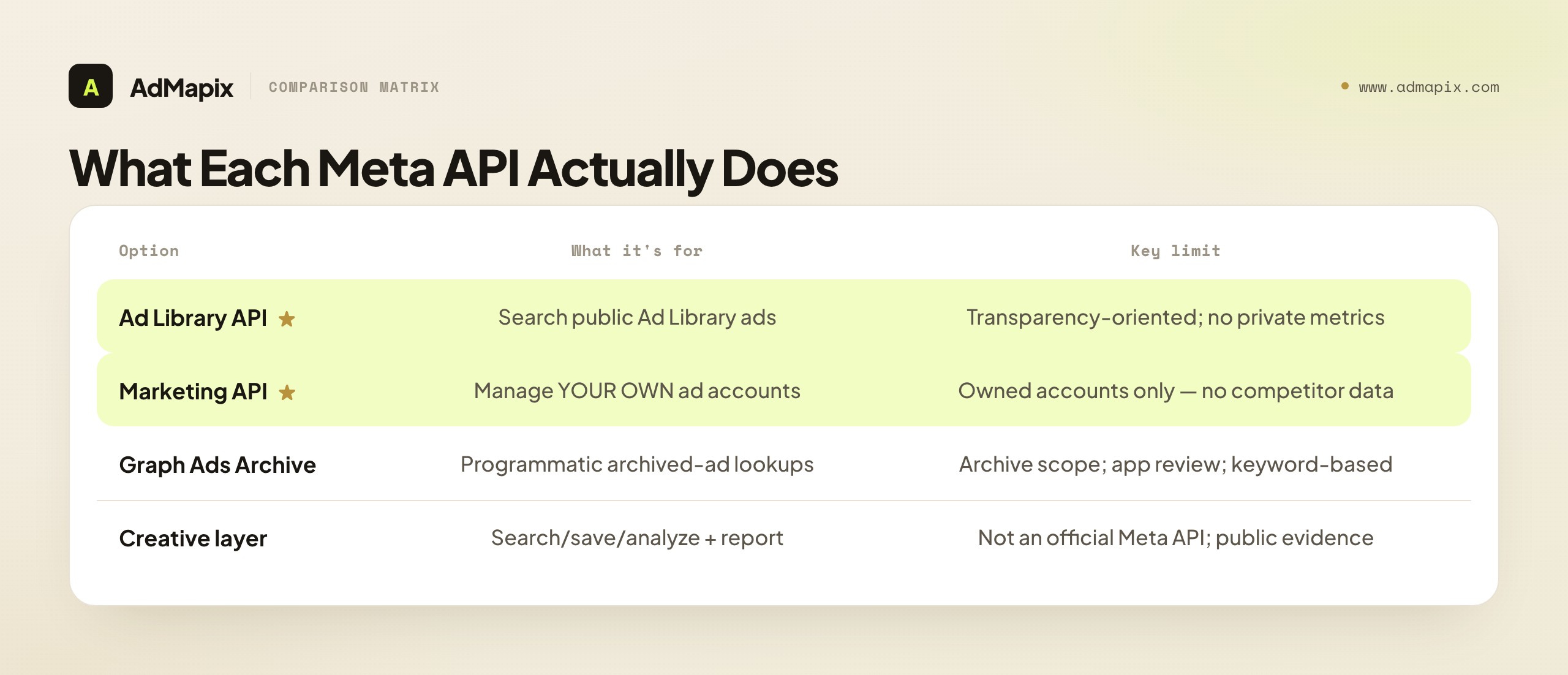
| Option | What it is for | Access | Key limits | Best for |
|---|---|---|---|---|
| Ad Library API | Search public ads in the Meta Ad Library | Public; verification and app review for political and issue scopes | Transparency-oriented; no private metrics; coverage rules vary by region | Election, political, and issue-ad transparency research |
| Marketing API | Manage and report on your own ad accounts | OAuth on accounts you control | Owned accounts only — no competitor data; rate and policy limits | Automating campaigns and pulling your own insights |
| Graph Ads Archive | Programmatic keyword lookups of archived ads | App review | Archive scope and rate limits; keyword-based | Building archived-ad retrieval into a tool |
| Creative-intelligence layer | Search, save, and analyze creatives and build reports across networks | Account | Not an official Meta API; built on public evidence | Creative research, video breakdowns, recurring multi-network reports |
The three official APIs answer one question: "what does Meta expose programmatically?" A creative-intelligence layer answers a different question: "how do I turn public creative into reusable research?" That is why teams so often use an official API and a creative layer together rather than choosing between them — they are not competing for the same job.
Let me draw out each official API, because the distinctions are exactly where people go wrong. The Ad Library API is built for transparency research. It lets you query the public Meta Ad Library programmatically, and its richest, most reliably available data is around political, electoral, and social-issue ads, where transparency regulation requires more disclosure. For those categories you can often get more detail; for general commercial ads, the data is more limited and the coverage rules vary by region. The critical thing to understand is that it is a transparency tool, not a competitive-spend tool — it was built so researchers and journalists could study political advertising, and its shape reflects that origin.
The Marketing API is the one most often misunderstood in competitive-research contexts, because it sounds like it should give you ad data and it does — but only for accounts you own or have been granted access to. It is built for advertisers and the tools that serve them to manage campaigns and pull insights from their own ad accounts: spend, ROAS, conversions, the full first-party picture. It is the richest source of ad data Meta offers, and it is completely useless for competitor research, because you cannot point it at an account you do not control. If you are trying to understand a competitor and you reach for the Marketing API, you have picked the wrong tool — not because it is weak, but because it was never built to look outward.
The Graph Ads Archive is the programmatic path to keyword lookups of archived ads, behind app review, and it is useful when you are building archived-ad retrieval into a product. Its scope is the archive and its access is keyword-based, with the rate and review constraints you would expect from a Meta API. It is a builder's tool — the right choice when you need to programmatically pull archived ads into something you are creating, and overkill when you just need to browse or research.
The deeper reason these three exist as separate APIs, rather than one unified "Meta ads API," is that they were built to serve three audiences with conflicting needs, and Meta deliberately kept them apart. The Marketing API serves advertisers and the platforms that automate their campaigns — its design assumes you are inside an account you control, so it is rich with private performance data and gated by account-level OAuth. The Ad Library API serves the public-interest audience — researchers, journalists, regulators studying political and issue advertising — so it is public-facing, transparency-shaped, and deliberately stingy with anything that looks like private competitive metrics. The Graph Ads Archive serves developers who need programmatic archive access. These are not three flavors of the same thing; they are three answers to three different questions, and the boundaries between them are intentional. Understanding that intent is what stops you from expecting one to do another's job — the Marketing API will never expose competitor metrics no matter how you query it, because exposing them would violate the privacy contract it is built on, not because of a limit you can engineer around.
A concrete way to feel the difference: imagine three people each say "I need the Meta ads API." The first is an in-house growth engineer automating bid adjustments and pulling daily ROAS for their brand's accounts — they need the Marketing API, and any other tool is useless to them. The second is a journalist mapping how a political campaign advertised across regions before an election — they need the Ad Library API, and the Marketing API would refuse them because they do not own those accounts. The third is a startup building a product that surfaces archived ads to users — they need the Graph Ads Archive and its app-review path. Same sentence, three completely different correct answers. The sentence "I need the Meta ads API" contains almost no information; the job behind it contains all of it. This is why every routing decision in this guide begins with naming the job, not the API.
What Public Data Can and Cannot Prove
This is the single most important section in the guide, and the one most likely to save you from shipping a misleading report or building a feature on a false premise. Before you build anything or brief anyone, you have to separate observable facts from assumptions — because the line between them is exactly the line between credible competitive research and confident guesswork.
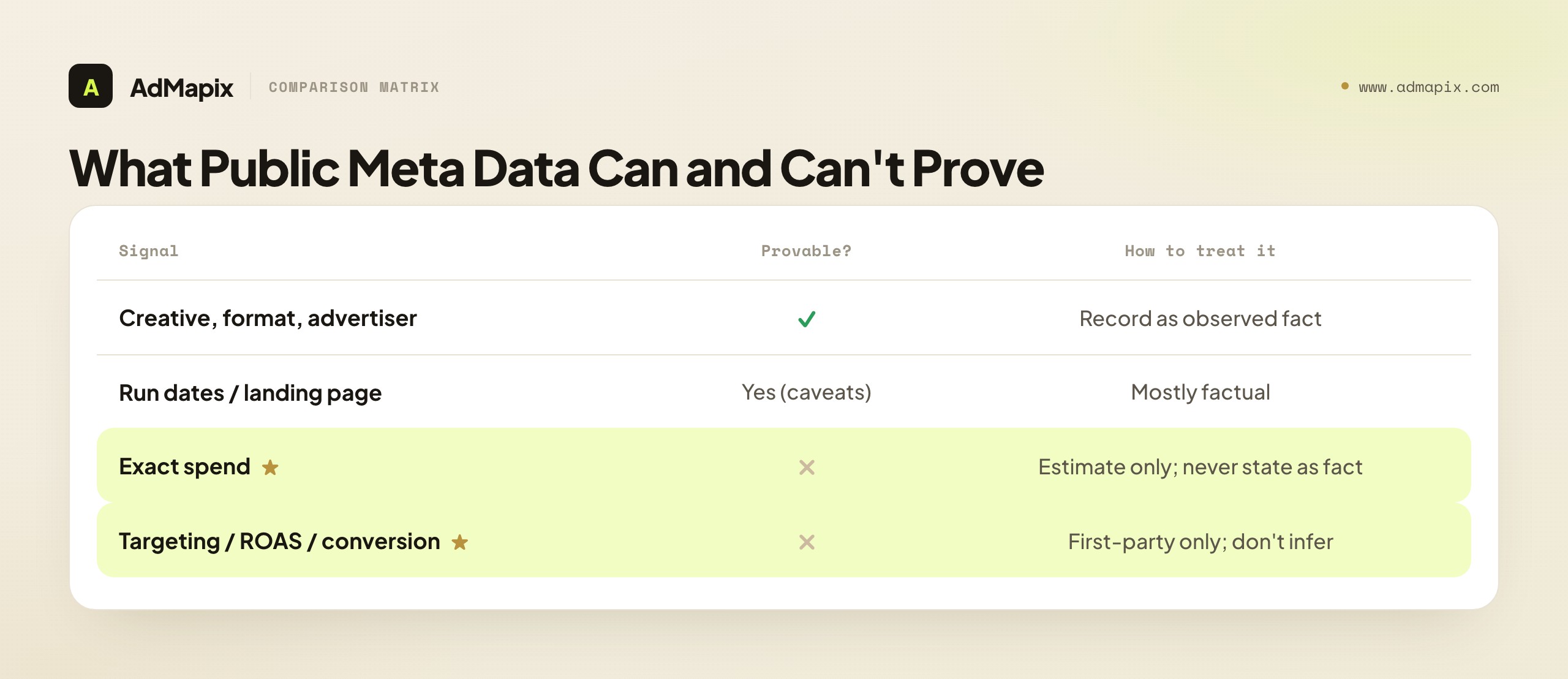
| Signal | Provable from public Meta data? | How to treat it |
|---|---|---|
| Creative (image, video, copy) | Yes | Record as observed fact |
| Format and placement type | Yes | Record as observed fact |
| Advertiser or page | Yes | Record as observed fact |
| Run dates / how long it appears live | Yes (with caveats) | Mostly factual; treat duration as approximate |
| Landing destination | Yes | Record as observed fact |
| Exact spend | No | Requires owned-account or modeled estimate; never state as fact |
| Targeting and audiences | No | Not in public data; do not infer as fact |
| ROAS / GMV / conversion rate | No | First-party only; never claim from public data |
Here is the clean version of the rule. Provable from public sources: the creative itself — image, video, copy — plus the format, the advertiser or page, the run dates, the landing destination, and which API scope returned it. These are things Meta actually exposes, and you can state them as fact in a report. Not provable from public sources: exact spend, targeting and audiences, ROAS, GMV, or conversion rate. None of these live in the public data. Any claim about them needs owned-account data — which only the Marketing API gives you, and only for your own accounts — or first-party analytics. If a "competitor spend" number appears in a report sourced only to public data, it is either a modeled estimate (which should be labeled as such) or a guess (which should not be in the report at all).
State this caveat explicitly in anything you ship. It is not a disclaimer to bury — it is the credibility line. A report that says "here is the creative, format, advertiser, and run dates we observed, and here is what we cannot determine from public data" is trustworthy precisely because it is honest about its limits. A report that quietly presents an estimated spend figure as if it were a fact invites the one question that destroys it: "where did that number come from?" The teams whose competitive research gets believed are the ones who are loudest about the boundary between what they observed and what they inferred. Knowing this boundary is also what tells you which tool you actually need: if your decision genuinely depends on a competitor's exact spend or ROAS, no public API and no creative layer can give it to you, and you should stop looking for a tool and start adjusting the decision to use the evidence that actually exists.
It is worth dwelling on why people expect public data to prove more than it can, because the expectation is so common it is worth disarming directly. The Meta Ad Library shows you a competitor's ads in detail — the creative, the copy, sometimes how long they appear to have run — and that richness creates an illusion of completeness. If you can see this much, surely the spend is in there somewhere too? But it is not, and the reason is structural: spend, targeting, and conversion data are the advertiser's private business and Meta's first-party data, exposed only to the account owner through the Marketing API. The Ad Library was built for transparency about what is being said, not transparency about how much is being spent or to whom it is shown. Those are different kinds of transparency, and only the first is public. The moment you internalize that the public data is "what" and never "how much" or "to whom," the temptation to infer spend from visible ads evaporates, and your research gets more honest and more useful at the same time.
There is also a specific, seductive trap around ad duration. Because the Ad Library sometimes shows how long an ad has been running, it is tempting to reason "this ad has been live for months, so it must be working, so the competitor must be spending meaningfully on it." Each step in that chain is shakier than it looks. Apparent run time can be imprecise; "running" does not mean "running with significant budget"; and "working" is a performance claim that public data cannot support. Duration is a faint, qualified hint about what might be worth a closer look — never evidence of spend or success. Treating a long-running ad as proof of a competitor's investment is the same error as treating a visible ad as proof of profit: it confuses observable persistence with unobservable performance. Use duration to prioritize what to study, never to conclude what is true about a competitor's budget or results.
The practical upshot is a simple two-column habit you should build into every piece of Meta ad research. In one column, list what you actually observed: the creative, the format, the advertiser, the dates, the destination — sourced and dated. In the other column, list what you are tempted to infer but cannot prove: the spend, the targeting, the ROAS, the strategy. Keep the columns separate in your notes and in your reports. Everything in the first column is fact you can defend; everything in the second is hypothesis at best and guess at worst, and it must be labeled as such or left out. This single habit is the difference between research that holds up under scrutiny and research that collapses the moment a skeptical stakeholder asks for a source. The tools change; the discipline of separating observed from inferred is what makes any of them trustworthy.
The Gap None of the Official APIs Fill
The official APIs are good at what they are built for, but they all stop at the same place: they return data, not research. None of the three hands you saved media you can search later, a breakdown of a video's structure, a way to tag and organize what you find, or a report you can share with a teammate or client. They are plumbing, not a workbench.
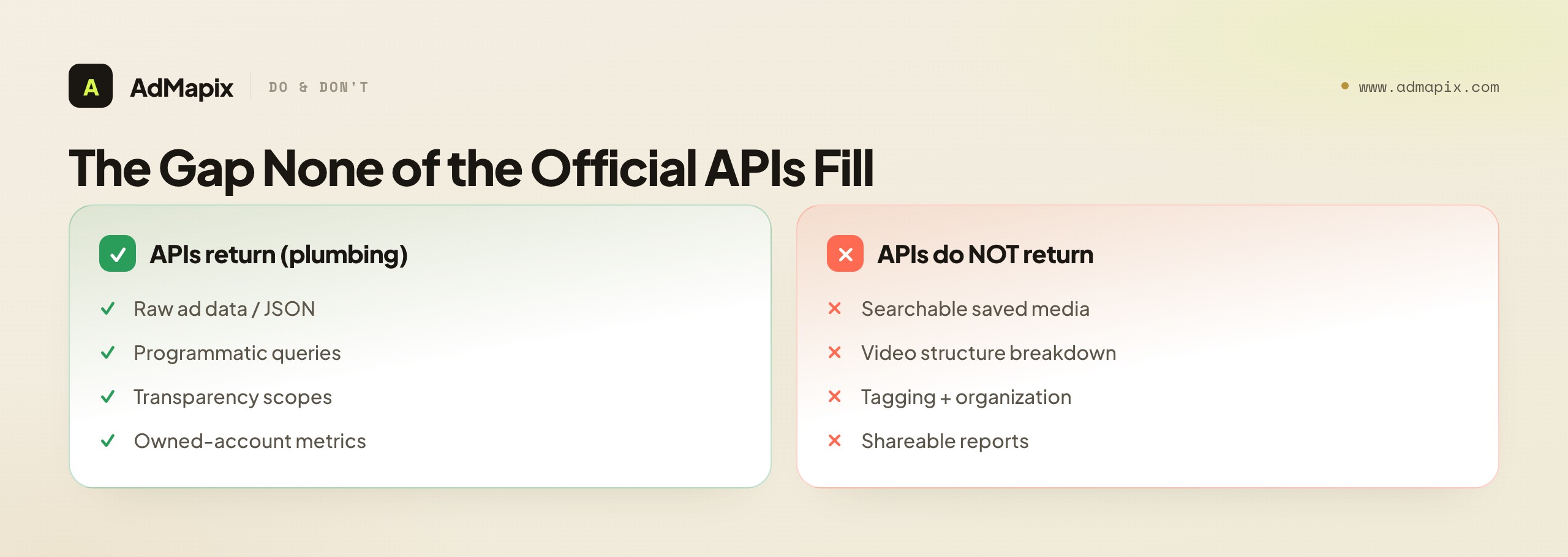
This is a real gap, not a complaint, and it is worth being precise about what it is. When you query the Ad Library API, you get back data about ads — but you do not get a durable, searchable archive of the creatives themselves, organized for your team's research. When you find a competitor's video ad, the API can tell you it exists, but it does not break down the hook, the first three seconds, the proof, or the CTA — the structural analysis that turns "they ran a video" into "here is why their video works and what we should test." And none of the APIs produces a report; they produce JSON. Turning that JSON into something a growth team or a client can act on is a separate, often substantial, engineering and workflow job that the API leaves entirely to you.
This is exactly where a creative-intelligence layer fits — not as a replacement for an official API, but as the workbench on top of the plumbing. A layer like AdMapix is built for teams that need to search ad creatives across networks with Search, save the media in Media, break down video structure and hooks with Video Analysis — the first three seconds, the proof, the CTA that raw API data cannot show — tag what they find, and turn it into a Report. The clearest way to see the division of labor: an official API answers "what does Meta expose programmatically about this ad?", and a creative-intelligence layer answers "how do I turn that, and creatives from other networks, into reusable, shareable research?" Those are different jobs, which is why a developer might integrate the Ad Library API for raw transparency data and a team might use a creative layer for the research-and-reporting workflow, with no contradiction.
It is honestly not the right tool if all you need is to programmatically pull raw ad data into your own system — an official API is the correct, direct path for that, and a creative layer would be an unnecessary abstraction. A creative-intelligence layer earns its place specifically when observed creatives have to become structured, searchable, shareable evidence with video analysis, across more networks than Meta alone, for a recurring workflow. Compare access on Pricing once the workflow repeats, or log in to run your first cross-network search. Name the gap first: raw programmatic data points to an official API, reusable cross-network creative research points to a layer like AdMapix, and plenty of teams run both.
To see exactly how large this gap is, consider what it would take to close it yourself starting from the raw Ad Library API. You would need a storage layer to keep the creatives durably, because the API returns references that you cannot rely on indefinitely. You would need a search layer so your team can find a saved creative by advertiser, format, or keyword weeks later. You would need video processing to break down the structure of video ads — and "break down the structure" is itself a meaningful AI and tooling problem, not a database query. You would need a tagging and organization system so findings do not drown in volume. You would need a reporting layer to turn all of it into something a client can read. And you would need to maintain every piece of that as the underlying API and its terms change. That is not a weekend script; it is a product. The official API gives you the first brick — the raw data — and leaves the entire building to you. Recognizing that the "gap" is actually a substantial product is what makes the build-versus-buy decision honest rather than a vague preference.
This also reframes what you are really comparing when you weigh "a Meta API" against "a creative layer." They are not two tools doing the same job at different price points; they sit at different layers of the stack. The API is infrastructure — necessary, canonical, and the right thing to build on when you are building. The creative layer is an application on top of infrastructure — the assembled workbench you would otherwise have to build. So the comparison is never "which is better"; it is "do I want to build the workbench or adopt one," and that answer depends on whether your needs are standard enough that an existing layer meets them, or specific enough that only your own build will. Most teams whose job is creative research, not infrastructure engineering, find that an existing layer meets their needs and frees them to do the research instead of maintaining the plumbing. Teams with genuinely unusual requirements, or who are building a product where this is the core, are the ones for whom the build is worth it.
How to Choose: Match the API to the Job
Because there is no single alternative, the decision is really a routing problem: figure out which job you are doing, and the right tool follows almost mechanically. Here is the routing logic.
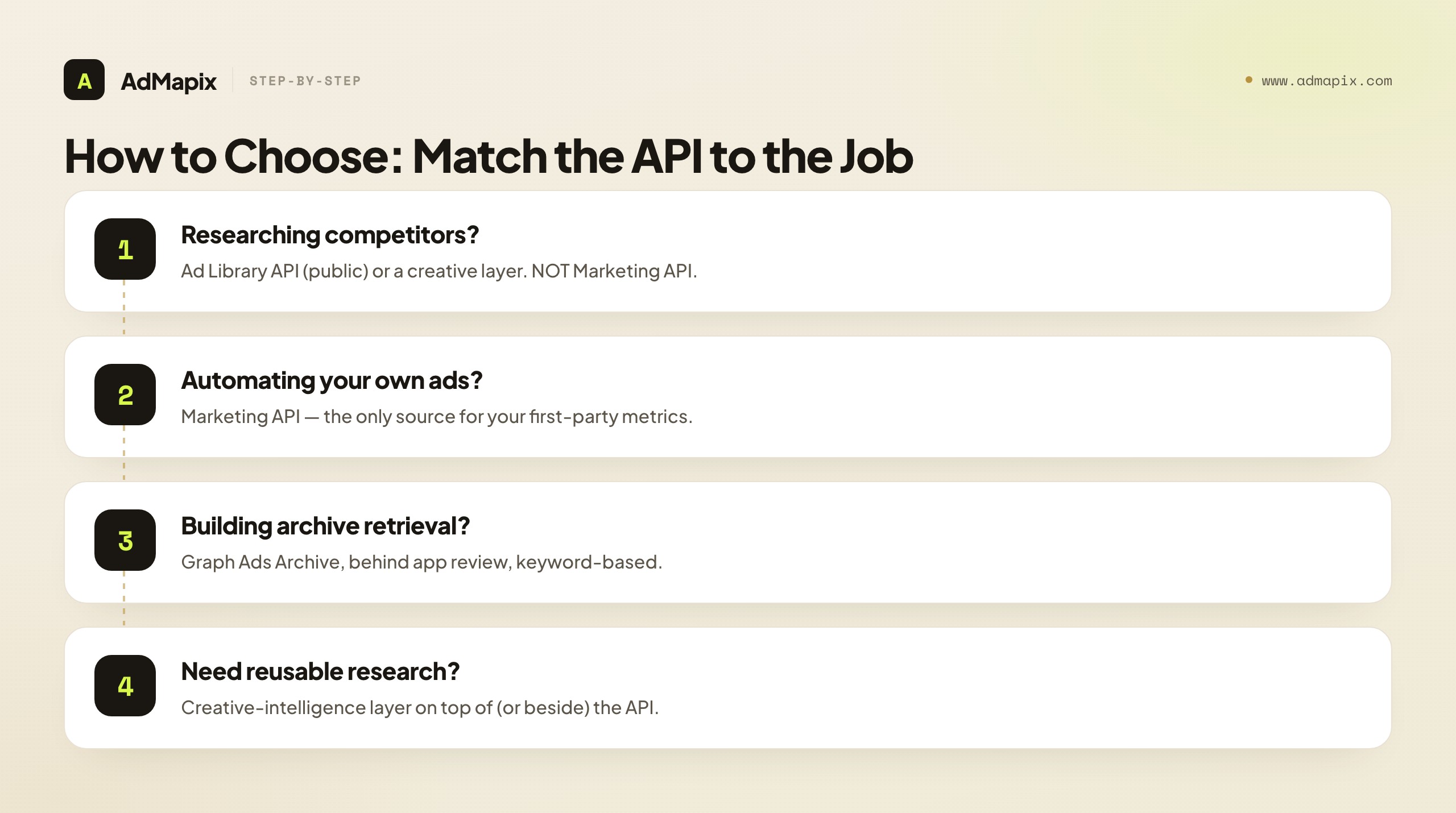
If you are researching competitors or the market, start with the Ad Library API for the public transparency data it exposes — strongest for political and issue ads, more limited for general commercial ads — or a creative-intelligence layer if you need the creatives saved, the video structure analyzed, and the findings turned into research rather than raw responses. What you must not do is reach for the Marketing API, because it cannot see accounts you do not own. Competitor research lives in public data and creative layers, never in the owned-account API.
If you are automating your own campaigns and reporting, the Marketing API is the answer, full stop. It is the richest source of ad data Meta offers — your spend, your ROAS, your conversions — and it is built precisely for managing and reporting on accounts you control. No creative layer or public API replaces it for first-party campaign automation, because they cannot reach into your account's private performance data the way the Marketing API can.
If you are building archived-ad retrieval into a tool, the Graph Ads Archive is the programmatic path, behind app review, for keyword lookups of archived ads. This is a builder's choice — the right one when you need archived ads flowing programmatically into a product you are creating, and the wrong one when you just need to browse or research, where the Ad Library UI or a creative layer is far less friction.
The mistake to avoid in all three cases is the same: choosing by brand familiarity ("I'll use the Meta API") rather than by job ("I'm doing competitor research, so I need public data or a creative layer, not the owned-account API"). The word "Meta API" hides three different tools, and the job — not the brand — is what picks the right one. Write down the job in one sentence before you choose, and the routing usually resolves itself.
A frequent real-world wrinkle is that teams have more than one job, and they try to force one tool to serve all of them. A growth team, for instance, often needs to automate and report on its own campaigns (Marketing API), research what competitors are running (public data or a creative layer), and occasionally pull archived ads for a specific lookup (Graph Ads Archive). The instinct is to pick "the Meta API" and feel frustrated when it does not cover all three — but no single tool was ever going to, because the three jobs are deliberately served by three different APIs plus, often, a layer. The mature stack acknowledges this: the Marketing API for owned-account work, public data or a creative layer for competitor research, and the right archive tool when needed. Trying to collapse a multi-job reality into one tool is the root of most "I need a Meta ads API alternative" searches — the honest fix is usually not a different single tool but the right combination, each piece doing the job it was built for.
It also helps to recognize which job is most often mis-routed, because catching it saves the most pain: competitor research sent to the Marketing API. This happens because the Marketing API is the richest, most capable Meta ad API, so it feels like the natural place to look for ad data of any kind. But its richness is entirely about your own accounts, and it is structurally blind to anyone else's. An engineer who spends a week wiring up the Marketing API expecting to surface competitor spend will hit a wall that no amount of cleverness gets past, because the data simply is not exposed to non-owners by design. If you catch yourself reaching for the Marketing API and the data you want is about someone else, stop immediately — you are in the wrong API, and the right answer is public data or a creative layer. That single correction prevents the most expensive dead-end in the whole space.
A Workflow That Works With Any of These Tools
Whichever path you choose, the workflow that produces credible, reusable research is the same. Name the question first, separate fact from inference, and turn findings into a decision — a tool only helps if you are disciplined about what you are asking and what the answer is allowed to claim.
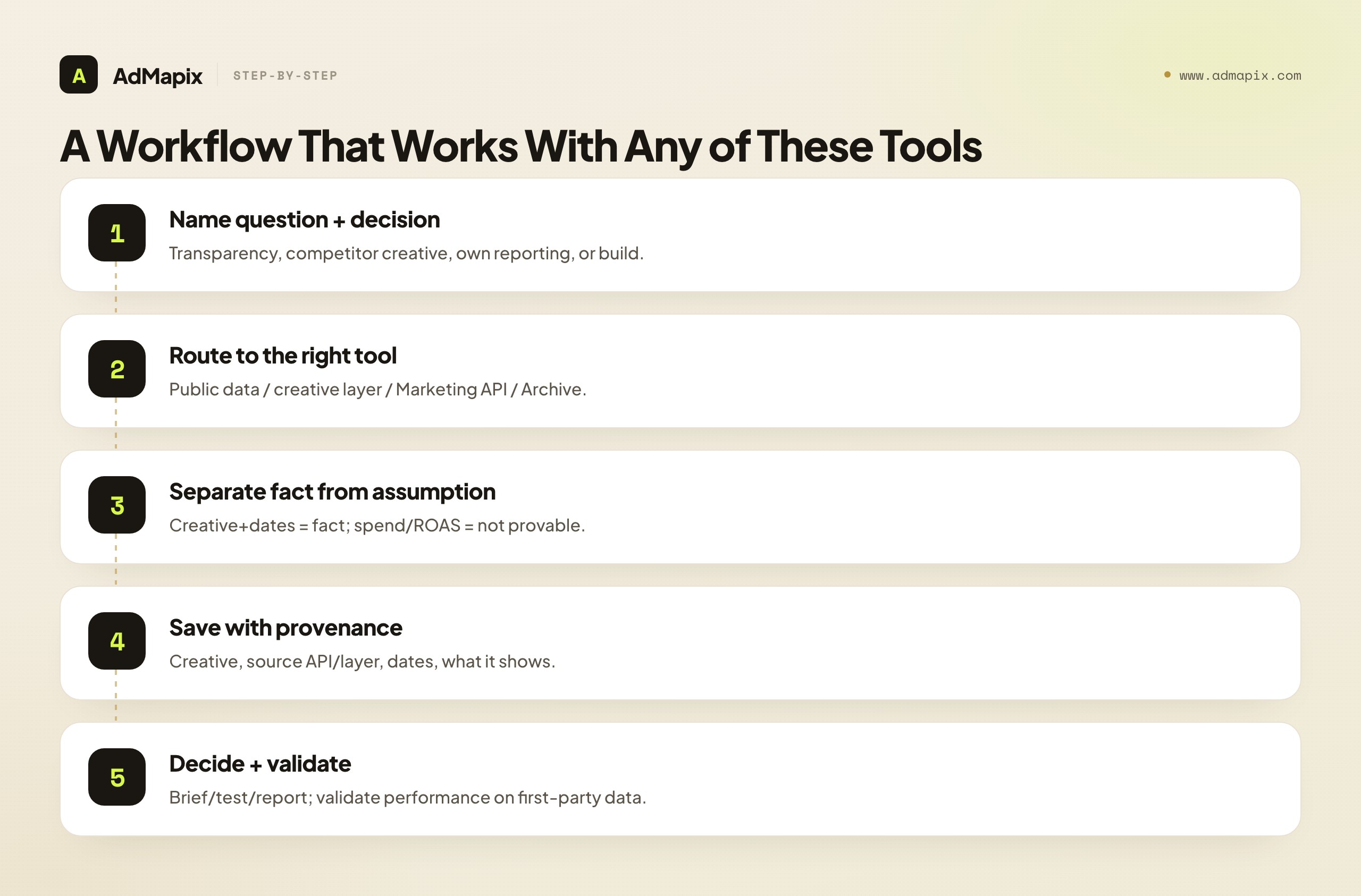
- Name the question and the decision it informs. Transparency research, competitor creative analysis, own-account reporting, or product integration are different jobs that need different tools. Write down which one you are doing before you pick an API.
- Route to the right tool. Competitor or market research goes to public data or a creative layer; own-account automation goes to the Marketing API; programmatic archive retrieval goes to the Graph Ads Archive.
- Separate observable facts from assumptions. Record the creative, format, advertiser, dates, and destination as fact. Mark spend, targeting, and ROAS as not determinable from public data — never as inferred fact.
- Save evidence with provenance. Keep the creative, the source API or layer, the dates, and a note on what it shows. Provenance is what makes the evidence defensible and comparable later.
- Turn it into a decision and validate. Every finding should become a brief, a test, a report, or a product feature — and any performance claim must be validated against first-party data, never against public observation alone.
The discipline is in steps 3 through 5. Anyone can pull data from an API; the teams whose research is trusted are the ones who are rigorous about the fact-versus-inference line, save with provenance, and force findings into decisions that respect what the data can and cannot prove. Do that with any of these tools and the research is credible; skip it and even the best API produces confident-sounding reports that fall apart under one good question.
Provenance — step 4 — matters more in API-sourced research than almost anywhere, because the source determines what the data is allowed to claim. A creative saved with "Ad Library API, political scope, run dates observed" carries a very different evidentiary weight than the same creative saved with no source at all. When a stakeholder later asks "how do we know this," provenance is the answer, and its absence is the difference between research and rumor. Step 5 — validation — is the other half: public data generates hypotheses about what a competitor is doing, but only first-party data confirms what worked, and only for your own campaigns. The tool shows what is observable; your own analytics decide what is true about performance.
Step 2 — routing — deserves one more practical note, because the routing is not always to a single tool. For a competitor creative study, the strongest workflow often uses public data and a creative layer in sequence: the public source establishes the ground-truth facts (this advertiser ran this creative on these dates), and the creative layer turns those facts into reusable research (saved, tagged, video broken down, ready to report and to compare against the same advertiser's creatives on other networks). The two are not redundant; they are consecutive stages of one pipeline — raw evidence, then research artifact. Recognizing that some jobs route to a combination rather than a single tool is what keeps you from the false choice of "API or layer" when the right answer is "API for the raw facts, layer for the research."
There is a discipline in step 1 that quietly determines the quality of everything downstream: naming the decision, not just the question. "What are my competitors running on Meta" is a question; "should we test a video-led angle next quarter, and what does competitor creative suggest about that" is a decision. The first invites endless browsing with no endpoint; the second tells you exactly when you have gathered enough evidence to act. API access makes it dangerously easy to pull data forever, because there is always one more query to run, and a named decision is the forcing function that ends the gathering and starts the deciding. Before you write a single query, write the decision the research will inform — and let that decision tell you when you are done. Research without a decision attached is just data accumulation, and the API will happily let you accumulate data until the project quietly dies of its own weight.
Common Mistakes When Choosing a Meta Ads API Alternative
Most regret in this decision traces back to a few avoidable errors.
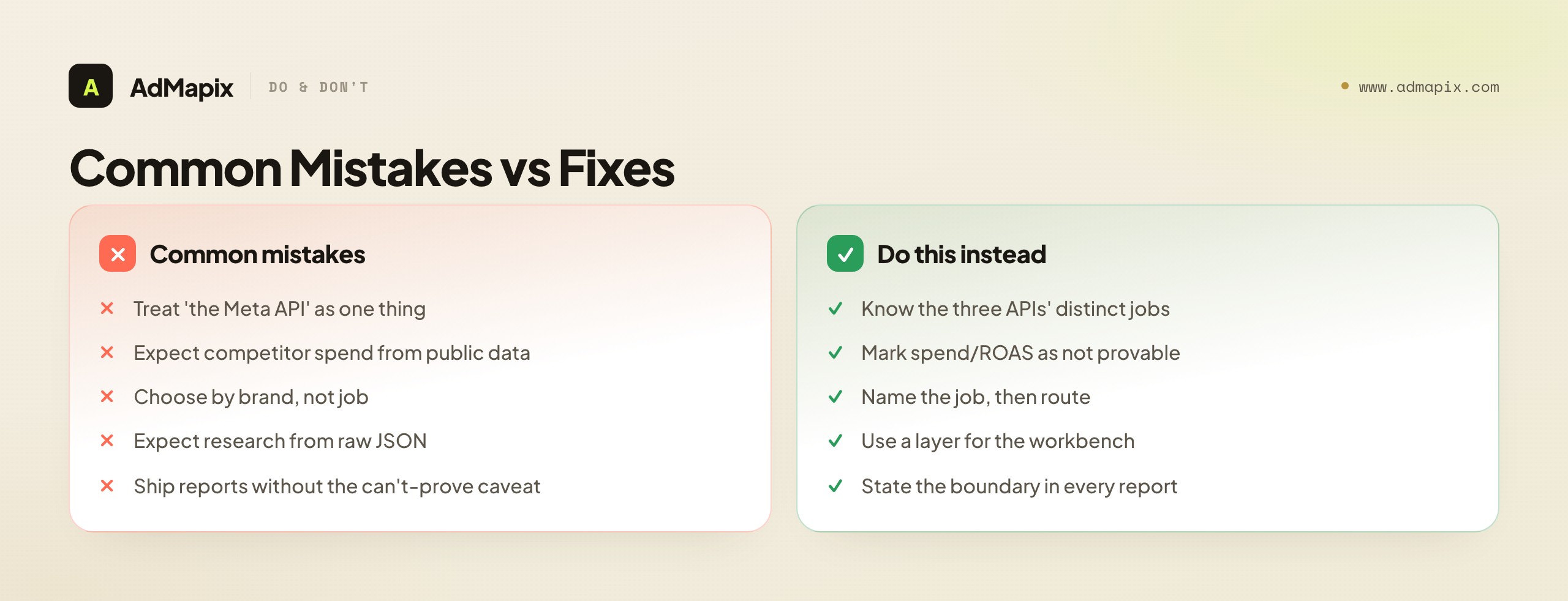
- Treating "the Meta API" as one thing. It is three APIs with three jobs. Most "I need an alternative" frustration is really "I used the wrong one of the three" — usually reaching for the owned-account Marketing API to do competitor research it cannot do.
- Expecting competitor spend or ROAS from public data. Public Meta data proves creative, format, advertiser, and dates — never spend, targeting, or ROAS. Any such number from public sources is an estimate or a guess, and presenting it as fact destroys a report's credibility.
- Choosing by brand instead of job. "I'll use the Meta API" is not a decision; "I'm doing competitor creative research, so I need public data or a creative layer" is. Name the job first.
- Expecting research from raw data. The official APIs return JSON, not saved media, video breakdowns, or reports. If you need a research workbench, that is a creative-intelligence layer's job, not an API's.
- Underestimating the engineering to turn API data into a workflow. Building search, storage, video analysis, tagging, and reporting on top of raw API responses is a substantial project. Sometimes a creative layer is cheaper than rebuilding one.
- Ignoring scope and review requirements. Political and issue scopes, app review, and rate limits are real constraints that can block a build. Verify current terms with Meta's documentation before committing an architecture to them.
- Shipping reports without the can't-prove caveat. A report that does not state what public data cannot determine invites the one question that undermines it. State the boundary explicitly.
The two costliest errors are the second and the last: expecting public data to prove spend or ROAS, and shipping reports without the honesty caveat. They share a root — confusing what is observable with what is true about performance. The discipline that prevents both is the same: know exactly what each source can prove, mark inference as inference, and make the can't-prove boundary a visible part of every report. Hold that line and your Meta ad research is credible regardless of which API or layer you use; drop it and you ship guesswork dressed as data.
A Decision Framework You Can Run in Ten Minutes
If you want to skip the deliberation and just get to an answer, here is a short framework that resolves most Meta-ads-API-alternative decisions without a spreadsheet. Run it before you build or buy anything, because it tells you which of four very different tools you actually need.
First, answer the ownership question. Is the data you need about your own ad accounts or about someone else's? If it is your own — spend, ROAS, conversions, campaign management — the Marketing API is the answer and you can stop here, because nothing else reaches your first-party performance data. If it is someone else's, the Marketing API is off the table entirely, and you are choosing among public data and creative layers. This single question eliminates the most common mismatch in the whole space.
Second, answer the form question. Do you need raw programmatic data to feed into your own system, or do you need reusable research — saved creatives, video breakdowns, reports — that a team can act on? Raw programmatic data points to an official API (Ad Library API for transparency research, Graph Ads Archive for archived-ad retrieval). Reusable research points to a creative-intelligence layer. When the ownership answer is "someone else's" and the form answer is "reusable research," you have your tool; when it is "someone else's" and "raw data," you have an official public API.
Third, answer the scope question. Are you researching political and issue ads, where the Ad Library API is richest, or general commercial ads, where public data is thinner? If you need depth on commercial creative competitor research, the Ad Library API alone will likely underwhelm, and a creative layer that aggregates public creative evidence across networks is the better fit. Match the tool to the ad category you actually care about, because the public-data richness varies sharply by category.
Fourth, answer the build-versus-buy question. If you need a research workbench — search, storage, video analysis, tagging, reporting — you can either build it on top of a raw API or adopt a creative layer that already has it. The honest calculation is engineering cost and maintenance versus subscription: building it is right when you have specific needs no layer meets and the team to maintain it; buying it is right when you want the workflow now and your needs match what a layer already does. Run those four questions and you will know which of the four tools — or which combination — fits your job, in about ten minutes.
The build-versus-buy question hides a cost that teams routinely underestimate: maintenance, not initial build. It is tempting to scope the build as "we'll wire up the Ad Library API and store the results," which sounds like a contained project. But the real cost is everything that comes after the first version ships. APIs change their scopes and terms; rate limits get adjusted; the video-analysis component needs retraining or retuning as ad formats evolve; the storage and search layers need to scale as your archive grows; and someone has to own all of it indefinitely. A creative layer absorbs that maintenance burden as part of its subscription — keeping up with API changes, scaling the infrastructure, improving the analysis — which is a real and recurring value that the initial-build estimate ignores. So the honest build-versus-buy comparison is not "one-time build cost versus annual subscription"; it is "ongoing engineering and maintenance cost versus subscription," and on that basis the buy decision is right for far more teams than the naive comparison suggests. Build when this is your product or your needs are genuinely unmet by any layer; buy when creative research is your job and infrastructure maintenance is a distraction from it.
There is a sequencing wrinkle worth flagging in the framework: you can change your answer over time, and many teams should. A small team might start with the free public Ad Library UI for occasional competitor checks, graduate to the Ad Library API when they want to pull data programmatically, and adopt a creative layer once the research becomes a recurring, multi-person, cross-network workflow that the raw data cannot support. The right answer at one stage is the wrong answer at another, and that is fine — the framework is meant to be re-run as your needs grow, not answered once and frozen. The signal that you have outgrown your current tier is usually the same in every case: you find yourself doing by hand, repeatedly, the work that the next tier would automate — stitching screenshots into reports, rebuilding context you already gathered, or hunting across networks one platform at a time. When manual stitching becomes a weekly tax, you have outgrown your current tool, and it is time to re-run the framework.
When an Official Meta API Is Exactly Right
It is worth saying plainly, because a guide framed around "alternatives" can imply the official APIs are always insufficient: often, an official Meta API is exactly the right and only tool, and reaching for anything else would be a mistake. If your job is managing and reporting on your own ad accounts, the Marketing API is not just adequate — it is the authoritative source, and no creative layer or public API substitutes for it. If you are a researcher or journalist studying political and issue advertising, the Ad Library API is purpose-built for your job and is the canonical source. If you are a developer who needs archived ads flowing programmatically into a product, the Graph Ads Archive is the direct path.
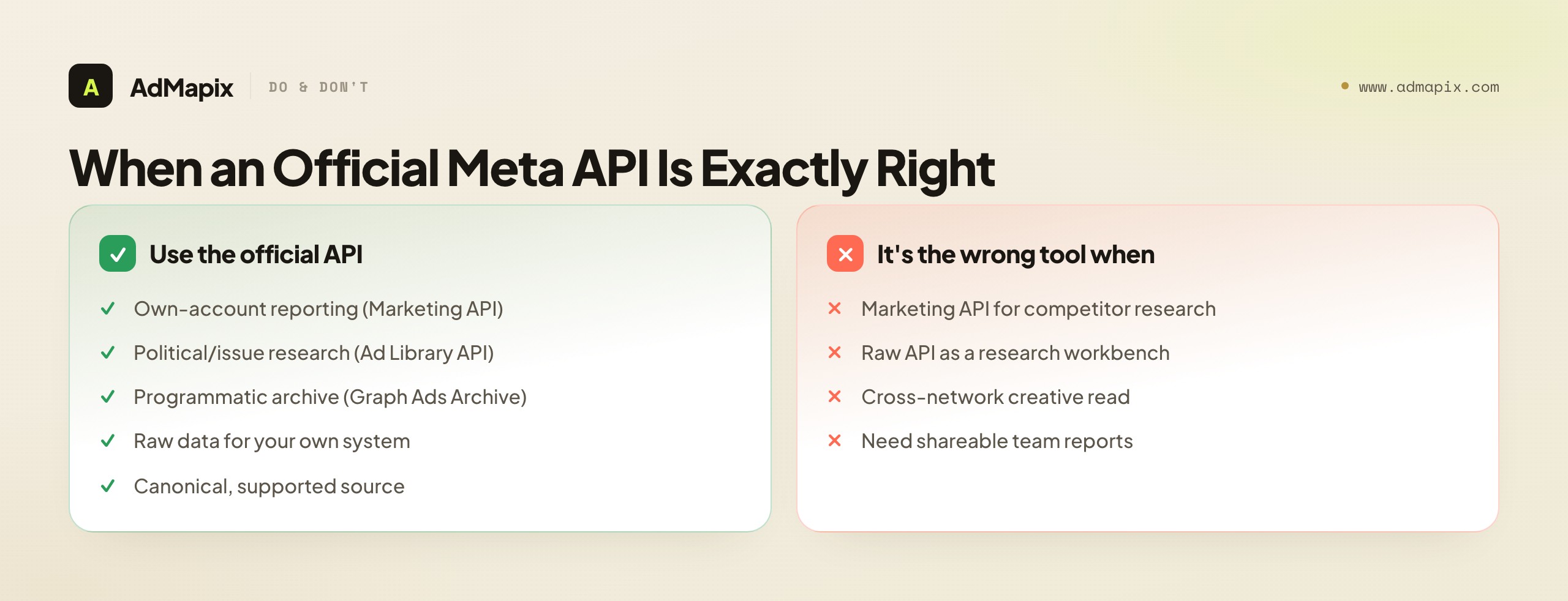
The point of comparing alternatives is not to talk you off the official APIs — it is to make sure you are using the right official API for your job, and to be clear about the specific gap a creative layer fills when raw data is not enough. An official API is the wrong tool only in two situations: when you reach for the owned-account Marketing API to do competitor research it structurally cannot do, and when you need a research-and-reporting workbench and try to make a raw-data API serve as one. Outside those two mismatches, the official APIs are frequently the correct and complete answer, and the disciplined move is to use them directly rather than wrapping a layer around a job they already do well.
There is also a longevity argument for building on official APIs where they fit: they are the canonical, supported interfaces, and a system built directly on the Marketing API for your own reporting, or on the Ad Library API for transparency research, rests on infrastructure Meta maintains. The trade-off is that you inherit their constraints — scopes, review, rate limits, and the can't-prove boundary that no API escapes — and you own the engineering to turn raw responses into research. Whether that trade is worth it depends on the build-versus-buy answer above: for raw data feeding your own system, building on the official API is usually right; for a team that needs the research workflow now, a creative layer that already provides it is usually the faster path. Neither is universally correct, which is exactly why the job, not the brand, has to drive the choice.
One final note on using the official APIs well: respect their boundaries as design, not as obstacles to route around. It is tempting, when an API does not return what you want, to treat the limit as a bug and look for a workaround — a way to infer the missing spend, a clever join to surface targeting. But the limits in Meta's APIs are mostly deliberate privacy and policy boundaries, and the disciplined response to "the API won't tell me a competitor's spend" is not "how do I get it anyway" but "that data is not knowable from public sources, so my decision has to work without it." Teams that accept the boundaries build honest research on solid ground; teams that fight them end up with brittle inferences that break under scrutiny and, sometimes, with policy problems they did not anticipate. The official APIs tell you what is knowable; the skill is building decisions that only depend on what is actually knowable, and being explicit about the rest.
When a Creative-Intelligence Layer Helps
Once the missing piece is reusable cross-network creative research — not raw Meta data or owned-account reporting — a gap opens that none of the official APIs is built to close: turning observed creatives across Meta and other networks into searchable, saved, reportable evidence with the video structure broken down.
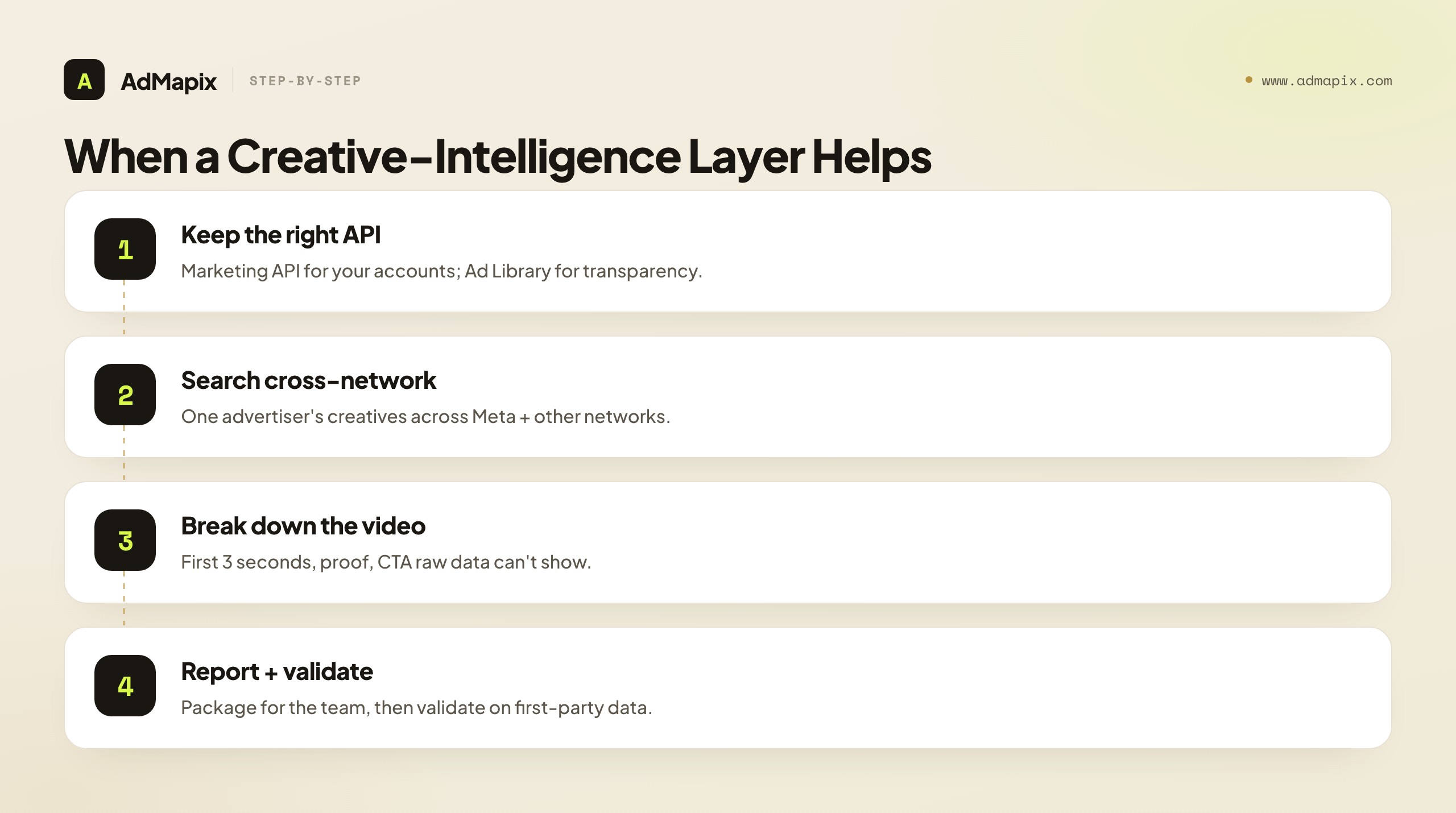
The reason this is a genuinely separate layer rather than something an API should return is that the job is different in kind. An official API is organized around exposing data — it is plumbing, optimized to return structured responses about ads. A creative-intelligence layer is organized around the creative as a reusable research artifact — something you search across networks, save with provenance, dissect for structure, tag, and package into a report a teammate or client can act on without re-running queries. That last property, shareability, is where raw APIs are weakest by design: they are built for programs to consume, not for teams to research from. The moment your creative research has to survive a meeting, persuade a client, or onboard a new analyst, the constraint stops being "can I query the data" and becomes "can I turn what I found across networks into evidence someone else trusts." That is the constraint a creative layer exists to relieve, and no official API was built to relieve it — not because the APIs are deficient, but because it was never their job.
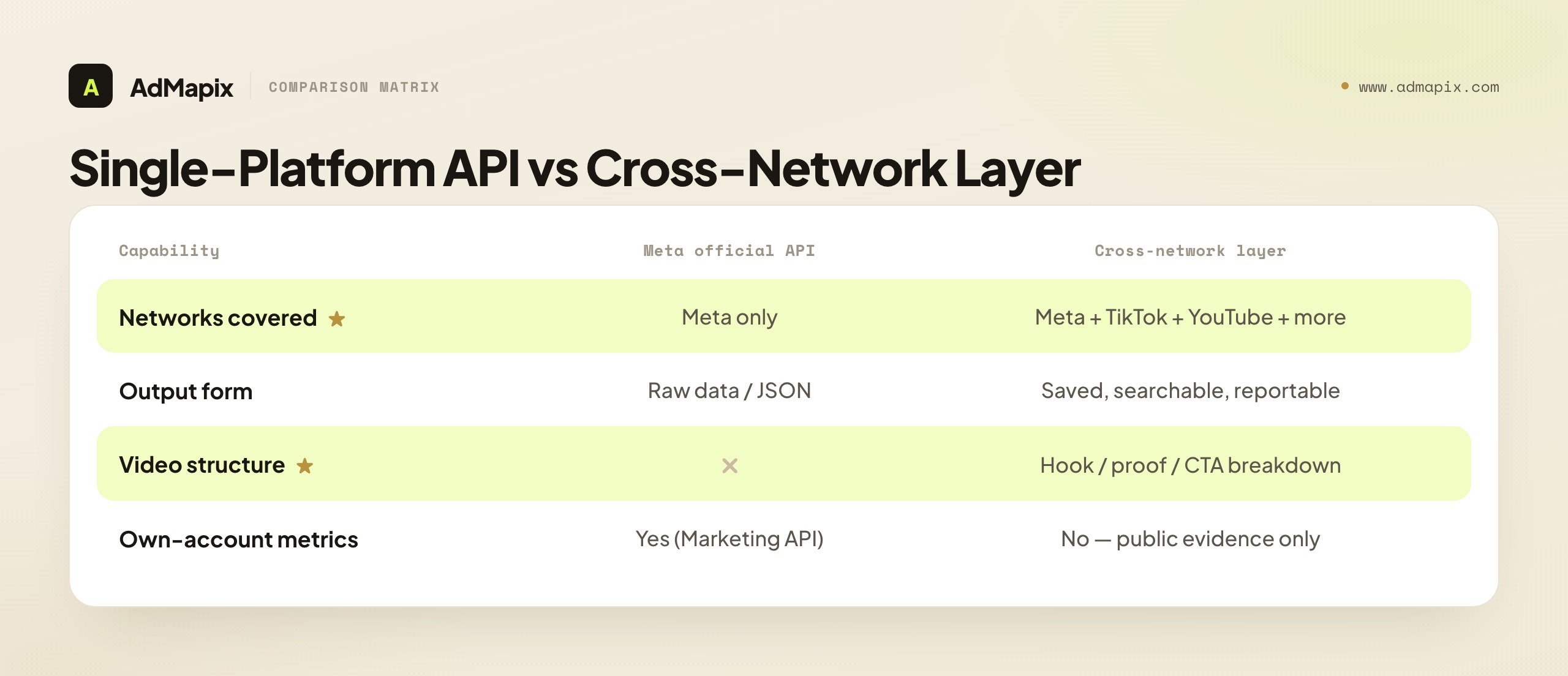
The cross-network point is the other half of why a creative layer complements rather than competes with Meta's APIs. Meta's APIs, by definition, only return Meta data. But a competitor running on Meta is usually also running on TikTok, YouTube, and other networks, and the most useful creative research follows an advertiser across surfaces rather than stopping at one platform's boundary. A Meta-only API cannot do that; a cross-network creative layer is built for exactly it — searching one advertiser's creatives across networks, breaking down the video structure on each, and reporting the whole picture. For a team whose competitors do not confine themselves to Meta, that cross-network reach is the difference between a partial and a complete creative read, and it is precisely the reach a single-platform API is structurally unable to provide.
The video-analysis capability deserves its own emphasis, because it is where the gap between raw data and research is widest, and where teams most often underestimate what they would have to build. Raw API data about a video ad tells you the video exists and gives you a reference to it. It does not tell you how the video is constructed — and on modern paid surfaces, construction is everything. The first three seconds decide whether anyone watches; the proof element decides whether they believe; the pacing and on-screen text decide whether they stay; the CTA decides whether they act. Reading that structure is a distinct analytical skill, and turning it into a repeatable, tooling-supported breakdown is a real engineering and AI problem, not a field in an API response. A creative-intelligence layer that does this breakdown is doing analysis the API was never going to do — converting "they ran a video" into "here is the anatomy of their video and the specific structural choice we should test against it." For a team that competes on creative, that anatomy is the most actionable output in the whole research process, and no official API produces it.
It is also worth being honest about what the cross-network layer does not solve, so the complement is clear-eyed. It does not give you your own account's spend and ROAS — that is the Marketing API's job and nothing replaces it. It does not make a competitor's private metrics visible — the can't-prove boundary applies to a creative layer exactly as it applies to a public API, because both are built on public evidence. And it is not the canonical source for raw transparency data the way the Ad Library API is. What it adds is the layer above all of those: the research workbench that turns public creative — from Meta and beyond — into saved, analyzed, shareable evidence. That is a genuine and distinct value, but it is a complement to the official APIs, not a substitute for the jobs they uniquely do. The honest stack uses each tool for the job it alone can do: the Marketing API for your own performance data, the Ad Library API for canonical Meta transparency data, and a creative layer for the cross-network research-and-reporting work that sits on top.
For the deeper Meta-specific picture beyond this routing decision, our Meta Ad Library API for developers guide goes into the Ad Library API's scopes and access in detail, and the Facebook Ads Library complete guide covers the library itself for non-developers. For the honest limits on inferring competitor spend, tracking competitor Facebook ad spend goes deeper on what is and is not knowable, and Facebook ad spy tools compares the broader tooling field.
FAQ
What is the best Meta ads API alternative?
There is no single best one — it depends on the job. The Ad Library API is for public ad-transparency research, the Marketing API is for your own ad accounts, and the Graph Ads Archive is for archived-ad lookups. If you need saved creatives, video breakdowns, and shareable reports across networks, a creative-intelligence layer such as AdMapix fills a different gap none of the official APIs cover. Name the job first, then route to the right tool — and some teams use an official API and a creative layer together.
Can I get competitor ad data from the Meta Marketing API?
No. The Marketing API only works with ad accounts you own or have been granted access to — it is built for managing and reporting on your own campaigns, not for looking at competitors. Reaching for it to do competitor research is the single most common mistake in this space. Competitor research lives in public data (the Ad Library API) or in a creative-intelligence layer that aggregates public creative evidence, never in the owned-account Marketing API.
Does the Meta Ad Library API show competitor spend?
No. Public Meta data can prove the creative, format, advertiser or page, run dates, and landing destination, but it cannot prove exact spend, targeting, audiences, ROAS, or conversion rate. The Ad Library API is richest for political and issue ads due to transparency rules; even there, it does not expose a competitor's real budget. Any "competitor spend" number from public data is a modeled estimate or a guess, and should be labeled as such rather than presented as fact.
What is the difference between the Ad Library API and the Graph Ads Archive?
The Ad Library API is built for searching public ads in the Meta Ad Library, strongest for transparency-oriented categories like political and issue ads. The Graph Ads Archive is a programmatic path, behind app review, for keyword lookups of archived ads — a builder's tool for pulling archived ads into a product you are creating. The Ad Library API suits research and browsing; the Graph Ads Archive suits programmatic archive retrieval inside a tool. Verify current scopes and review requirements with Meta's documentation.
What can public Meta ad data actually prove?
It can prove observable facts: the creative (image, video, copy), the format, the advertiser or page, the run dates, and the landing destination. It cannot prove exact spend, targeting and audiences, ROAS, GMV, or conversion rate — those require owned-account data or first-party analytics. The discipline is to record the observable facts as fact, mark the rest as not determinable from public data, and state that boundary explicitly in any report you ship.
Do I need a creative layer if I already use a Meta API?
Often, yes — they do different jobs. An official API returns raw data; it does not save media in a searchable archive, break down video structure, tag findings, or produce reports. If your team needs that research-and-reporting workflow, a creative-intelligence layer provides it on top of (or alongside) the API, frequently across more networks than Meta alone. If all you need is raw programmatic data feeding your own system, the API alone is the right and direct choice and a layer would be unnecessary.
Why would I build on an official API instead of using a layer?
Build directly on an official API when you need raw programmatic data for your own system, have specific needs no creative layer meets, and have the engineering to turn responses into whatever you are creating — for example, integrating the Ad Library API for transparency data or the Marketing API for your own reporting. Adopt a creative layer when you want the research-and-reporting workflow now and your needs match what it already provides. The honest calculation is engineering and maintenance cost versus subscription, decided by your specific job.
Is the Meta Ad Library API free to use?
Access to the Ad Library API is public, though political and issue-ad scopes require identity verification and app review, and all use is subject to Meta's rate limits and policies. "Public access" is not the same as "unlimited" — the scopes, review steps, and rate limits are real constraints that can shape what you can build. Verify the current access terms, verification requirements, and limits in Meta's developer documentation before committing an architecture, since these change.
How do I keep a competitive report credible when public data is limited?
Separate observable facts from assumptions and state the boundary explicitly. Record the creative, format, advertiser, and dates as fact; mark spend, targeting, and ROAS as not determinable from public data; and label any estimate as an estimate. A report that is honest about what it cannot prove is more credible, not less, because it survives the question "how do we know this." Provenance — noting which API or source returned each piece of evidence — is what makes the report defensible.
Can a creative layer replace Meta's official APIs entirely?
Not entirely, and it is not meant to. A creative-intelligence layer covers the research-and-reporting job — searchable creatives, video analysis, tagging, cross-network reports — that the official APIs do not. But it does not replace the Marketing API for managing and reporting on your own accounts, and it is not the canonical source for raw transparency data the way the Ad Library API is. The realistic picture is complementary: use the right official API for raw data and owned-account reporting, and a creative layer for reusable cross-network creative research.
Key Takeaways
- There is no single Meta ads API alternative — route by the job. Own-account reporting goes to the Marketing API, public transparency research to the Ad Library API, archived-ad retrieval to the Graph Ads Archive, and reusable cross-network creative research to a creative-intelligence layer.
- The Marketing API cannot see competitors. It only touches accounts you own. Competitor research lives in public data or a creative layer — never in the owned-account API.
- Public Meta data proves creative, format, advertiser, and dates — not spend, targeting, or ROAS. Mark the unprovable as unprovable, and make that boundary visible in every report.
- The official APIs return data, not research. Saved media, video breakdowns, tagging, and reports are a creative-intelligence layer's job — which runs alongside an API, not as a replacement for it.
- Choose by job, not brand, and verify current terms with Meta. Scopes, review, and rate limits change; confirm them in Meta's developer documentation before committing an architecture.
Sources
- Meta Ad Library — the public, searchable archive of ads running across Meta technologies (as checked June 2026).
- Meta Ad Library API — programmatic search of public Ad Library ads, with verification and app review for political and issue scopes; verify current access terms before building.
- Meta Marketing API — manage and report on ad accounts you own or are granted access to; not a competitor-research tool.
- Meta for Developers documentation — current scopes, app review, and rate-limit details for Meta's APIs; confirm before committing an architecture.
API scopes, access requirements, and rate limits change often, so confirm current details in Meta's official developer documentation before building. All links checked as of June 21, 2026. Disclosure: AdMapix is our own product, and its data scope covers cross-network ad creative search, saved media, video analysis, tagging, and reports built on public evidence — it is not an official Meta API, and is separated from claims sourced to Meta's own documentation.
Turn these observations into your next creative study
Open the creative library and select samples for your market, network and research question.
Related Articles
AI Creative Brief Template in 2026: Turn Competitor Evidence Into Testable Ads
A complete 2026 guide to the AI creative brief template — the nine fill-in fields that feed a model evidence instead of vibes, why the hook pattern is the highest-leverage input, how to gather example ads responsibly, the do-not-say list that keeps output honest, a prompt structure that uses the brief, how to rank output into a test backlog, a fully filled worked example, the limits of AI and public data, and where AdMapix fits.
Ad Intelligence API: What Developers Need Beyond a Raw Ads-Library Endpoint in 2026
A developer-focused guide to ad intelligence APIs: what fields make a creative record queryable, why official ads-library endpoints stop short, the buy-vs-build tradeoff for a cross-network layer, and how to design a pipeline that survives schema and rate-limit changes.
Ad Hook Examples in 2026: 7 First-3-Second Patterns (with UGC Breakdowns)
A complete 2026 library of ad hook examples organized into seven repeatable patterns — problem, proof, objection, comparison, curiosity, offer, and transformation — with UGC hook breakdowns, platform-by-platform differences for TikTok, Meta, and YouTube, an industry-by-industry hook map, a hook-testing workflow that ships variants, the metrics that actually grade a hook, and a worked teardown that turns a competitor opener into a running test.