
Ad Creative Database in 2026: How to Build a Searchable Library for Hooks, Offers, and Proof
A complete 2026 guide to building an ad creative database — why a screenshot folder stops working, the core schema that makes ads queryable, a controlled tagging vocabulary, where to source ads, how to query patterns instead of single ads, the workflow that turns saved ads into briefs, the honest limits of public data, a worked example, and where a cross-network tool like AdMapix fits.
Ad Creative Database in 2026: How to Build a Searchable Library for Hooks, Offers, and Proof
By the AdMapix Research Team — Updated June 21, 2026
An ad creative database is a structured, searchable record of ads broken into the parts that actually drive a brief — hook, offer, proof, format, advertiser, source URL, capture date, and the next test it suggests. The difference between a database and a screenshot folder is one thing: retrieval. Six months from now, can someone on your team find every ad that opened with a price-anchor hook in the US fitness category, paired with a free-shipping offer, that you tagged "worth testing"? In a folder of dated PNGs, that is a twenty-minute scavenger hunt nobody runs — so teams re-research from scratch instead, throwing away every hour they ever spent "saving inspiration." In a real database, it is a filter that returns an answer in seconds. This guide shows you how to build the second thing.
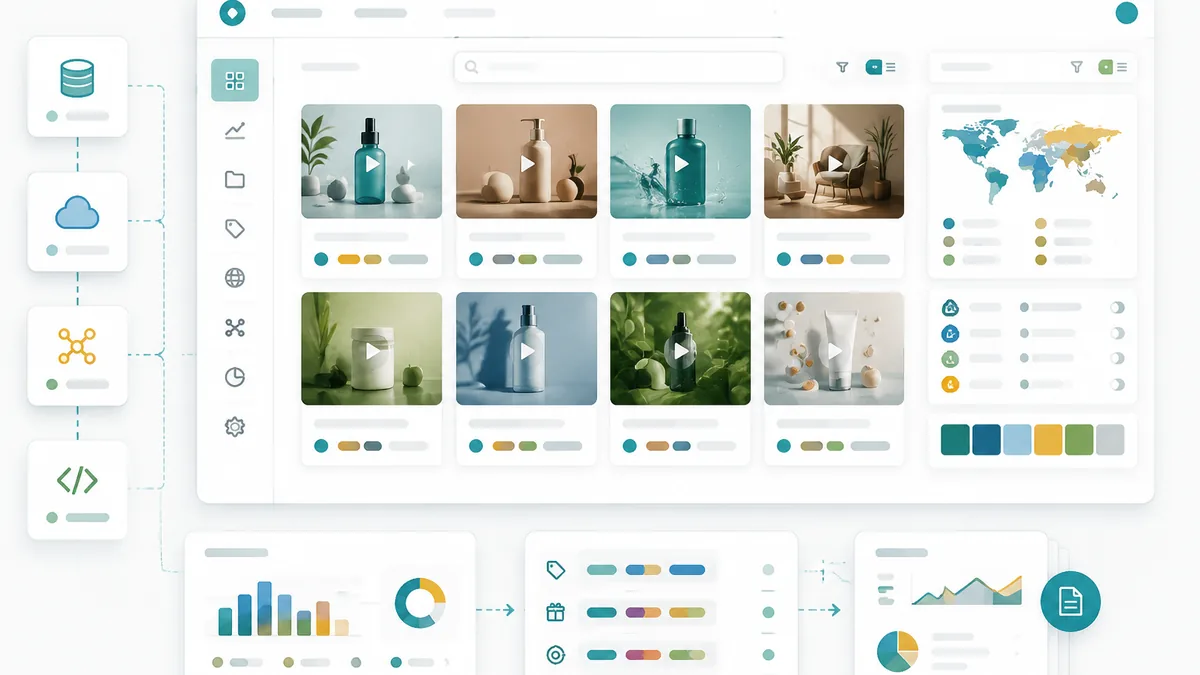
This guide is for creative strategists, paid-social and UA managers, ecommerce and SaaS marketers, and agencies who keep "saving inspiration" but can never find it again. We will cover why a folder of screenshots inevitably stops working, the core schema that makes ads queryable, the controlled tagging vocabulary that keeps retrieval honest, where to source ads you can re-verify, how to query patterns instead of hunting single ads, the workflow that converts saved ads into briefs, the honest limits of what public data proves, a worked example, and where a cross-network tool like AdMapix fits once a shared drive stops scaling. The throughline: a creative database is only as valuable as it is queryable, and queryability is something you build at capture time, not bolt on later.
TL;DR — Building an Ad Creative Database in One Screen
- A creative database is only useful if it is searchable by hook, offer, proof, format, advertiser, source, and date — not just by date saved. Retrieval is the whole point.
- The hardest field is not the asset; it is the structured tags, because that is what lets you query patterns across hundreds of ads later. Never merge hook, offer, and proof into one "why it's good" note.
- Build for retrieval before you save a single ad: decide the schema and a controlled tag vocabulary up front, because inconsistent tagging quietly kills the whole thing.
- Source from official transparency tools so every ad is verifiable and re-checkable — and always store the source URL and capture date as provenance.
- Public ad libraries prove existence, not performance. They confirm an ad ran and show the creative; they cannot prove spend, targeting, ROAS, or conversion. Label any performance read as inferred.
- Close the loop: every saved ad should end as a test, a brief, a report, or an archive. A database nothing leaves is just an archive.
- AdMapix fits when a shared drive stops scaling — cross-network search, saved media, video breakdowns, tagging, and recurring reports built in, for teams researching the same competitors repeatedly.
Why a Folder of Screenshots Stops Working
A shared drive of screenshots fails for one structural reason: it has exactly one index — the filename, sorted by date. You can scroll it, but you cannot ask it a question. The moment your collection passes a few hundred ads, "find the high-performing angle we liked in Q1" becomes a scavenger hunt, and most teams quietly give up and re-research from scratch, which means every screenshot they ever saved produced zero compounding value.

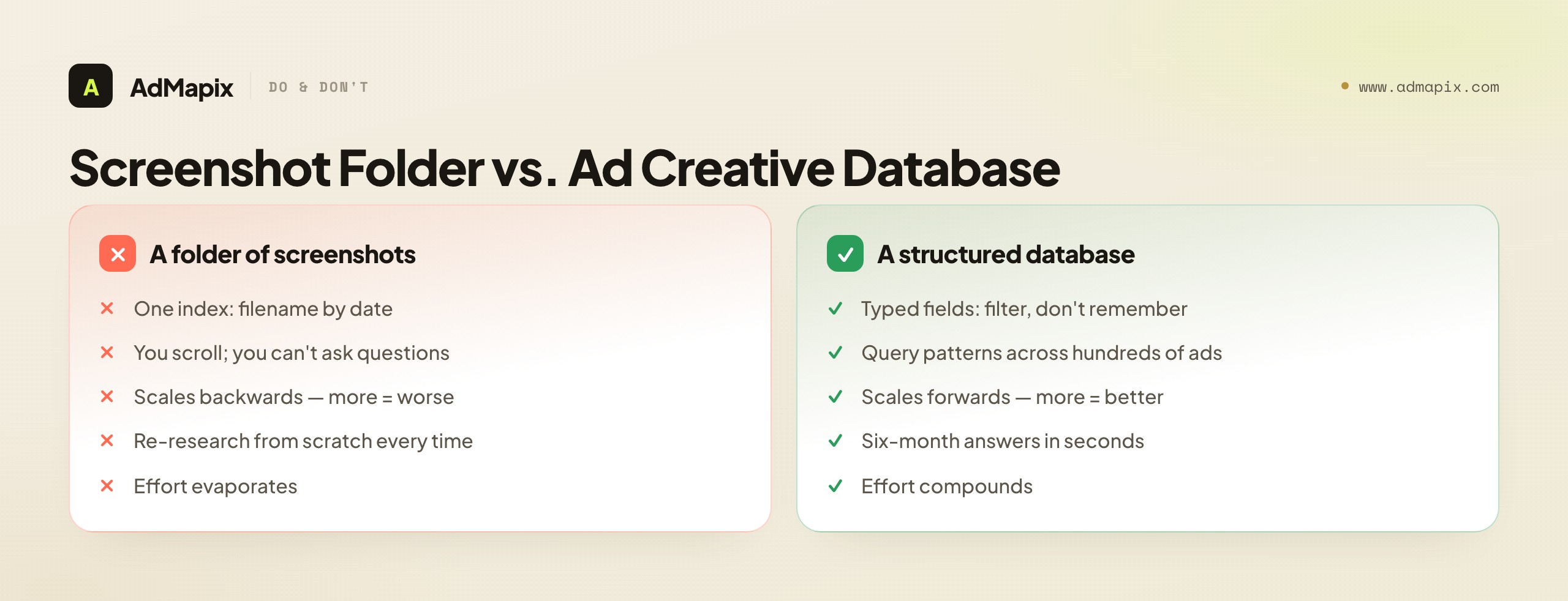
A real database flips this. Each ad becomes a row with typed fields, so retrieval is a filter, not a memory test. The cost is discipline at capture time: you have to decompose every ad into its parts rather than dumping a PNG. That up-front tax is the entire point — the structure you add when you save is the structure you query later. A screenshot answers "what did this one ad look like." A database row answers "which patterns repeat across the hundred ads in this category," and that second question is the one that actually shapes a creative strategy.
The deeper failure of the folder is that it scales backwards: the more you save, the less useful it becomes, because each new screenshot adds to the haystack without adding a way to search it. A database scales forwards: every well-tagged row makes the whole collection more queryable, because it adds another data point to the patterns you can detect. This inversion is why teams that "save everything" in a drive end up with a liability they avoid opening, while teams that capture into a schema end up with an asset that gets more valuable every week. The difference is not effort — both teams spend time saving ads. The difference is whether that time compounds or evaporates, and that is decided entirely by whether you captured structure or just pixels.
There is a psychological trap worth naming here, because it is why so many teams stay stuck in the folder. Saving a screenshot feels productive — you found a good ad, you grabbed it, you can see your collection growing. The dopamine of accumulation masks the fact that the collection is not getting more useful, only bigger. Capturing into a schema feels slower and less satisfying in the moment, because decomposing an ad into typed fields is more work than a screenshot, and the payoff is invisible until weeks later when a query returns in seconds. So the folder wins on immediate gratification and loses on every actual outcome, which is exactly the kind of trap teams fall into without noticing. The fix is to anchor on the query, not the save, as your measure of progress: a good week is not "we saved fifty ads," it is "we ran a query that changed a creative decision." Reframe success around what leaves the database, not what enters it, and the discipline of structured capture stops feeling like overhead and starts feeling like the obvious price of the only outcome that matters.
The Core Schema
A good ad creative database separates the asset from the intelligence about it, and treats tags as first-class columns rather than a free-text "notes" field. Define each field once and apply it consistently; inconsistent tagging is what silently kills retrieval, because a filter only finds rows that used the exact tag you are filtering for.

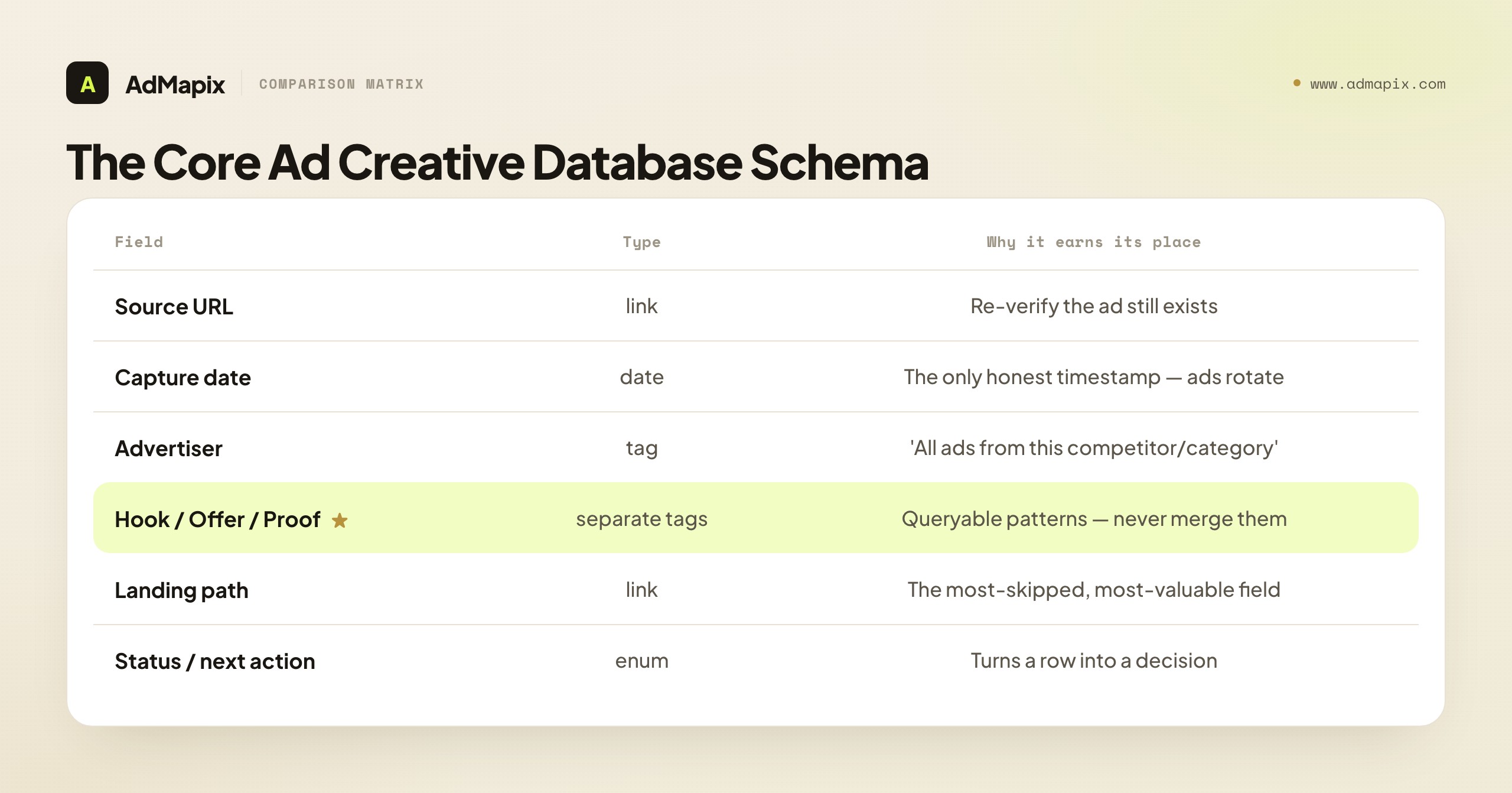
| Field | Type | Why it earns its place |
|---|---|---|
| Source URL | link | Lets a teammate re-verify the ad still exists or capture its current state |
| Capture date | date | Public ads rotate; the date is the only honest timestamp you have |
| Advertiser | tag | Enables "all ads from this competitor" and "all ads in this category" |
| Platform / placement | tag | Format rules differ by network; a TikTok hook is not a Search headline |
| Format | enum | Single image, video, carousel, document, playable — drives production direction |
| Hook | short text + tag | The first 1-3 seconds or the headline; the single most reusable element |
| Offer | short text + tag | Discount, bundle, free trial, lead magnet — what the ad actually promises |
| Proof | tag | Reviews, UGC, stats, before/after, authority — separated so you can query it |
| CTA | enum | Reveals the conversion ask and funnel stage |
| Landing path | link/note | Where the ad sent traffic; often the most-skipped, most-valuable field |
| Status / next action | enum | Test, brief, monitor, archive — turns the row into a decision |
The one rule that matters most: never merge hook, offer, and proof into a single "why it's good" sentence. If they live in separate columns, you can later ask "which proof types pair with discount offers in this category?" — a question a summary blob can never answer. The whole power of the database is in the joins between fields, and joins require the fields to be separate in the first place.
Two fields are routinely under-valued and deserve a defense. The landing path is the most-skipped field and often the most valuable, because the ad is only half the funnel — the page it sends to is where the strategy completes, and a hook paired with a frictionless page is a completely different ad from the same hook paired with a leaky one. The status / next action field is what separates a database from an archive: a row with no status is inert, while a row marked "test" or "brief" is a decision waiting to happen. Make both mandatory, and your database stays a tool rather than decaying into a museum.
A note on keeping the schema lean: every field you add is a field someone has to fill in on every capture, so there is a real tension between richness and maintainability. The eleven fields above are a deliberate balance — rich enough to query meaningfully, lean enough that capturing a row stays fast. Resist the urge to add a dozen more "nice to have" fields, because a schema so heavy that capture becomes a chore is a schema people stop filling in completely, which silently corrupts your queries with half-empty rows. The right move is to make the high-value fields (hook, offer, proof, source, status) mandatory and a few others optional, so a rushed capture still produces a queryable row even if the optional fields are skipped. A lean, fully-populated schema beats a rich, half-populated one every time, because a query can only join the fields that actually got filled in. Start with the eleven, run the database for a quarter, and only then add a field if a query you genuinely need keeps failing for lack of it — let real query demand, not anticipated completeness, drive any schema expansion.
A Controlled Tagging Vocabulary
The single biggest determinant of whether your database is queryable in a year is not the schema — it is tag consistency. "UGC," "ugc," and "user content" are three different filters that fragment the same concept across three buckets, so a query for any one of them misses two-thirds of the relevant ads. A controlled vocabulary — an agreed-upon, finite list of allowed tags per field — is the unglamorous discipline that makes everything else work.

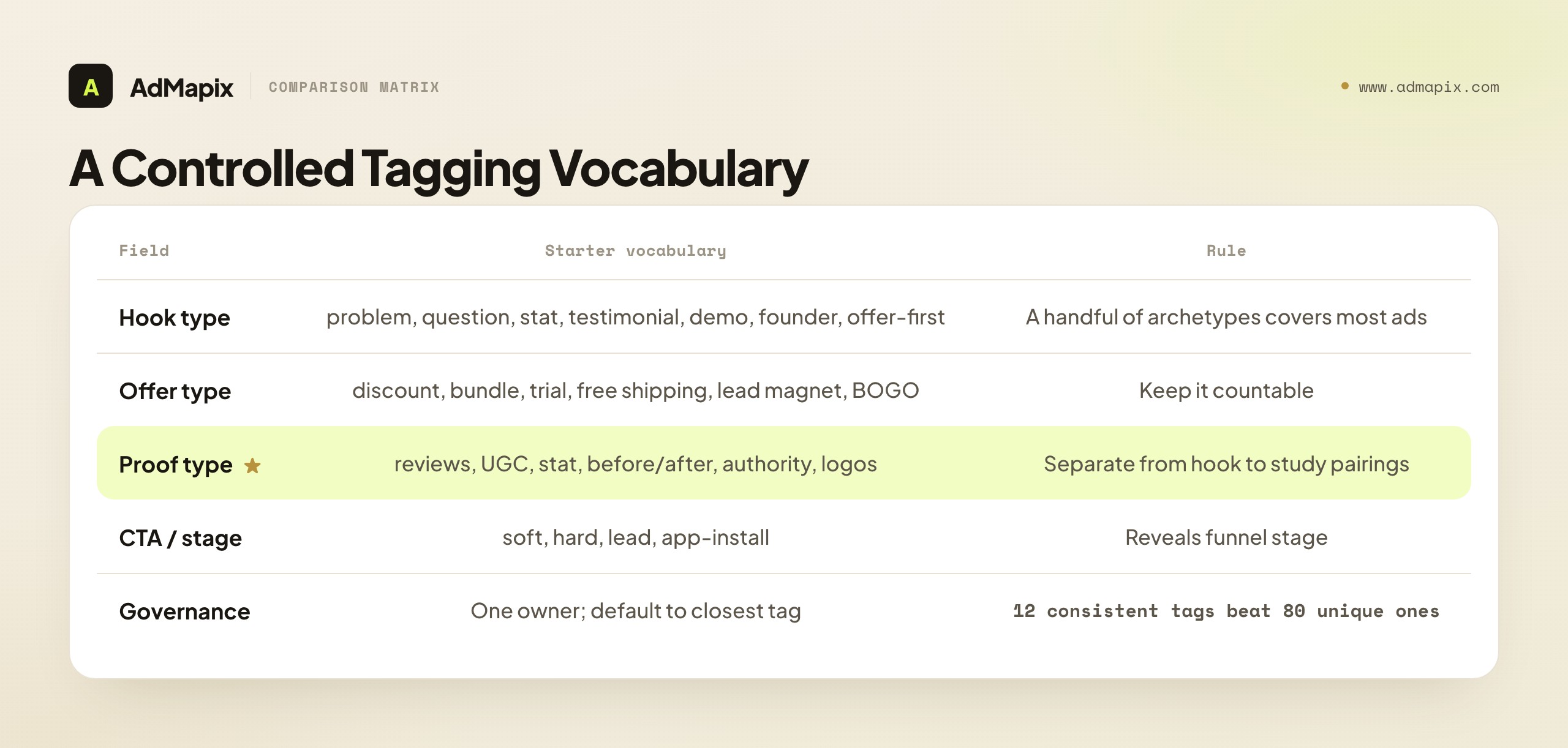
Define a starter vocabulary for each taggable field, and resist letting it sprawl:
- Hook types: problem-callout, question, stat/shock, testimonial, demo, founder/origin, offer-first, curiosity. A handful of archetypes covers the vast majority of ads; new tags should be rare and deliberate.
- Offer types: discount, bundle, free trial, free shipping, lead magnet, BOGO, limited-time, no-offer (brand). The offer is what the ad actually promises, and a tight list keeps it countable.
- Proof types: reviews/ratings, UGC, hard stat, before/after, authority/expert, customer logos, demonstration, social count. Proof is the trust mechanism, and separating it from hook lets you study which proof pairs with which angle.
- CTA / funnel stage: soft (learn more), hard (buy/start), lead (sign up/download), app-install. The CTA reveals the funnel stage the ad targets.
The governance rule that keeps a vocabulary controlled: one person owns the tag list, and adding a new tag is a deliberate decision, not something anyone does mid-capture because the existing tags felt slightly off. When the urge to add a tag strikes, the default answer is "use the closest existing tag" — because a slightly imperfect but consistent tag is infinitely more queryable than a perfectly precise but unique one that no future query will ever match. A database with twelve hook tags everyone uses consistently is dramatically more useful than one with eighty tags used once each. Precision is the enemy of retrieval here; consistency is the friend. Write the vocabulary down, keep it short, and review it quarterly rather than expanding it ad hoc.
It is worth understanding why a tag fragments value so badly, because it makes the discipline feel less arbitrary. A query is a set operation: "show me all rows where hook = problem-callout" returns exactly the rows tagged with that exact string. If half your problem-callout ads are tagged "problem-callout" and half are tagged "pain-point" because two people had slightly different words for the same idea, your query returns half the relevant ads and you draw a conclusion from incomplete data — worse than no conclusion, because it feels complete. The insidious part is that nothing flags the error: the query runs, returns rows, and looks authoritative, while quietly missing everything tagged with the synonym. This is why a controlled vocabulary is not bureaucratic fussiness but the literal precondition for trustworthy queries. The tags are the index; an inconsistent index returns wrong answers confidently. Treat the vocabulary as the foundation it is, and every query you run rests on solid ground; let it drift, and every query becomes a quiet lie of omission.
A pragmatic tip for building the starter vocabulary: derive it from your first fifty ads rather than inventing it in the abstract. Capture fifty ads loosely, look at the hooks/offers/proof that actually showed up, and cluster them into the eight-or-so archetypes that cover the bulk. A vocabulary grounded in your real category's ads fits better and sprawls less than one invented from a generic list, because it reflects what your competitors actually do rather than what a textbook says they might. Then lock it, and from ad fifty-one onward, everyone uses the locked list.
Where to Source Ads You Can Re-Verify
Most ads in your database should come from official transparency tools and public ad libraries, because those are verifiable and re-checkable — a source URL that resolves to an official library is evidence, while a screenshot from an unknown origin is just an image. Pick sources deliberately based on the networks you actually buy on.

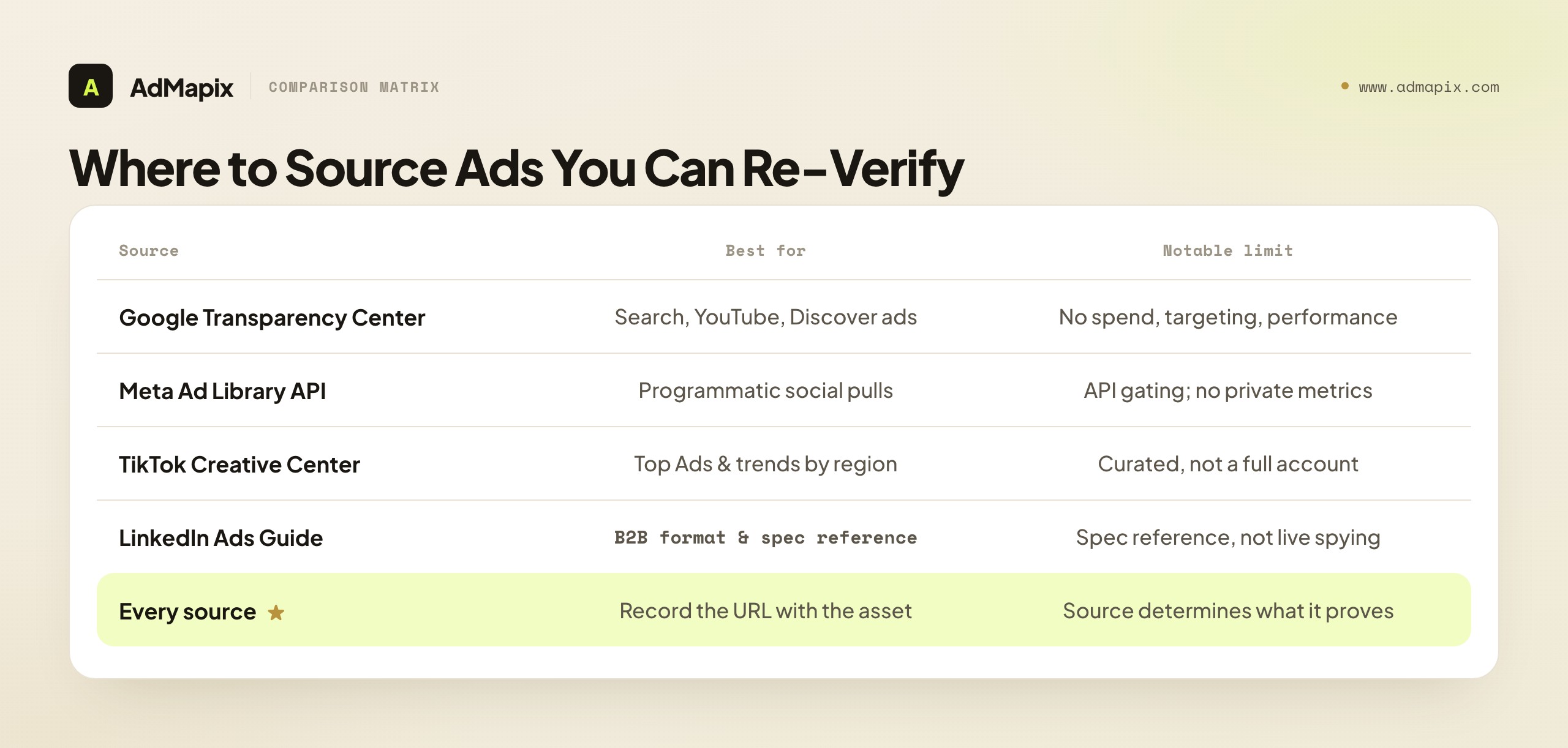
| Source | Best for | What you can confirm | Notable limit |
|---|---|---|---|
| Google Ads Transparency Center | Active ads across Search, YouTube, and Discover | The ad ran, its creative, and the advertiser | No spend, targeting, or performance |
| Meta Ad Library API | Programmatic pulls for social and issue/political ads | Active ads, creative, and broad run timing | API scope and policy gating; no private metrics |
| TikTok Creative Center | Top Ads, trends, and creative tools by region | Trending formats and example creatives | Curated/aggregated view, not a competitor's full account |
| LinkedIn Ads Guide | Format definitions and spec context for B2B | Available formats: single image, video, carousel, document, lead gen | A spec reference, not a live ad-spying surface |
The sourcing discipline is to record where every ad came from alongside the asset, because the source determines what the ad can prove. An ad from a transparency library proves it ran; an ad screenshotted from a feed proves only that you saw it once. When you capture, treat the source URL as non-negotiable — it is what lets a teammate re-verify the ad, what lets you check whether it is still running months later, and what makes the entry defensible in a client report. An ad with no source is an opinion; an ad with a resolving source URL is evidence, and a database is only as trustworthy as the provenance behind its rows.
A practical sourcing strategy is to anchor on the official transparency tool for each network you actually buy on, and treat everything else as supplementary. The official libraries are the gold standard because their URLs resolve, their data is verifiable, and they survive scrutiny — exactly what you need for a database you will build briefs and reports on. In-feed screenshots, third-party roundups, and inspiration sites have their place for spotting an angle, but they should be the exception in a database, not the rule, because their provenance is weaker and harder to re-verify. The cleanest databases lead with transparency-tool sources and clearly flag the rare entry that came from elsewhere, so the trust level of each row is visible at a glance. When a stakeholder questions a finding, "here is the Google Transparency Center URL" ends the conversation; "I screenshotted it from somewhere a few months ago" does not. Build your sourcing around the surfaces you can stand behind, and your whole database inherits their credibility.
What Public Data Can and Cannot Prove
Public ad libraries are evidence of existence, not of performance — and building this distinction into the database is what keeps it honest and a client report defensible. This is the section to internalize before you ever label a row "top performer."

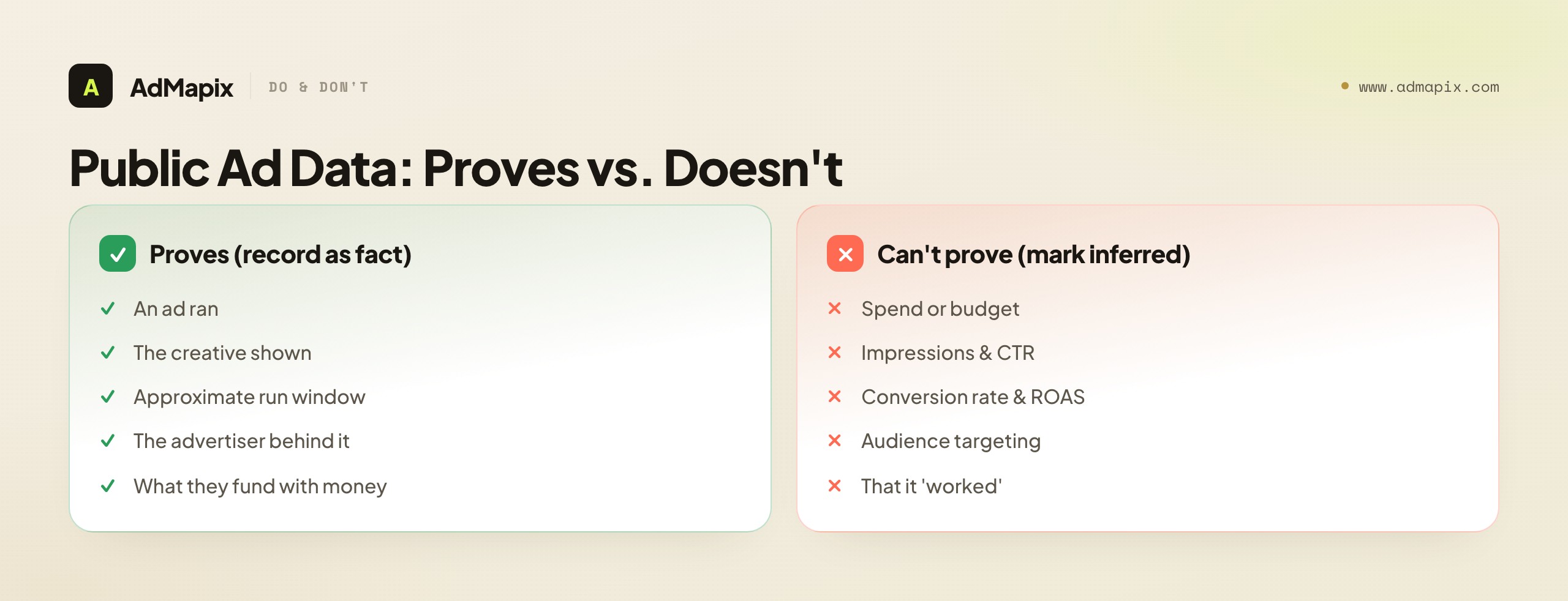
What they prove. Public libraries confirm an ad ran, show you the creative, and give an approximate run window and the advertiser behind it. That is genuinely useful — it tells you what angles a competitor is willing to put money behind, which is real, auditable signal you can build a brief on.
What they cannot prove. Whether the ad worked. Spend, impressions, click-through rate, conversion rate, ROAS, audience targeting, and account settings are all private. So a field labeled "top performer" in your database, sourced from a public library, is a guess dressed as a fact — and the moment you present it as a fact in a report, your credibility is one fact-check away from collapsing.
How to keep the database honest. Record what the source proves in your factual fields, and put any performance assumption in a clearly separate, optional field marked as inferred. A long run time, for instance, suggests an ad is working — advertisers rarely fund losers — but "suggests" is an inference, not a measurement, and it belongs in an inferred field, never in the factual ones. This separation is not pedantry; it is what lets you build briefs on solid ground and hand a client a report that survives scrutiny. The cleanest databases grade every entry the way a careful analyst grades a claim: fact (it ran, here is the creative), inference (it probably works, here's why), hypothesis (worth testing for us). Keep those three in distinct fields and your database is an asset; blur them and it becomes a liability the first time someone checks a "fact" that was always a guess.
The honesty discipline pays off most acutely in the one situation where databases get tested hardest: the client or stakeholder report. When you present a finding and someone asks "how do you know that," a graded database lets you answer cleanly — "the ad ran from March to June, per this Transparency Center URL (fact); its long run and high frequency suggest it performs (inference); so we recommend testing an adapted version (hypothesis)." Every claim is traceable to its evidence grade and its source. A blurred database, by contrast, leaves you defending "top performer" labels you cannot substantiate, and the moment one is challenged, every other finding in the report becomes suspect by association. Credibility in competitive intelligence is binary and fragile: it survives intact as long as every claim holds up, and collapses entirely the first time one does not. The fact/inference/hypothesis grading is the cheap insurance that keeps it intact — it costs a few extra seconds per capture and saves the entire report's credibility the day someone audits it. Treat the inferred field as a discipline, not an inconvenience, and your database becomes the rare competitive artifact that gets more trusted under scrutiny rather than less.
From Saved Ad to Brief: The Workflow
A database is worthless if nothing leaves it; the workflow exists to convert rows into decisions. Run this loop on a weekly or monthly cadence, depending on how fast your category moves.

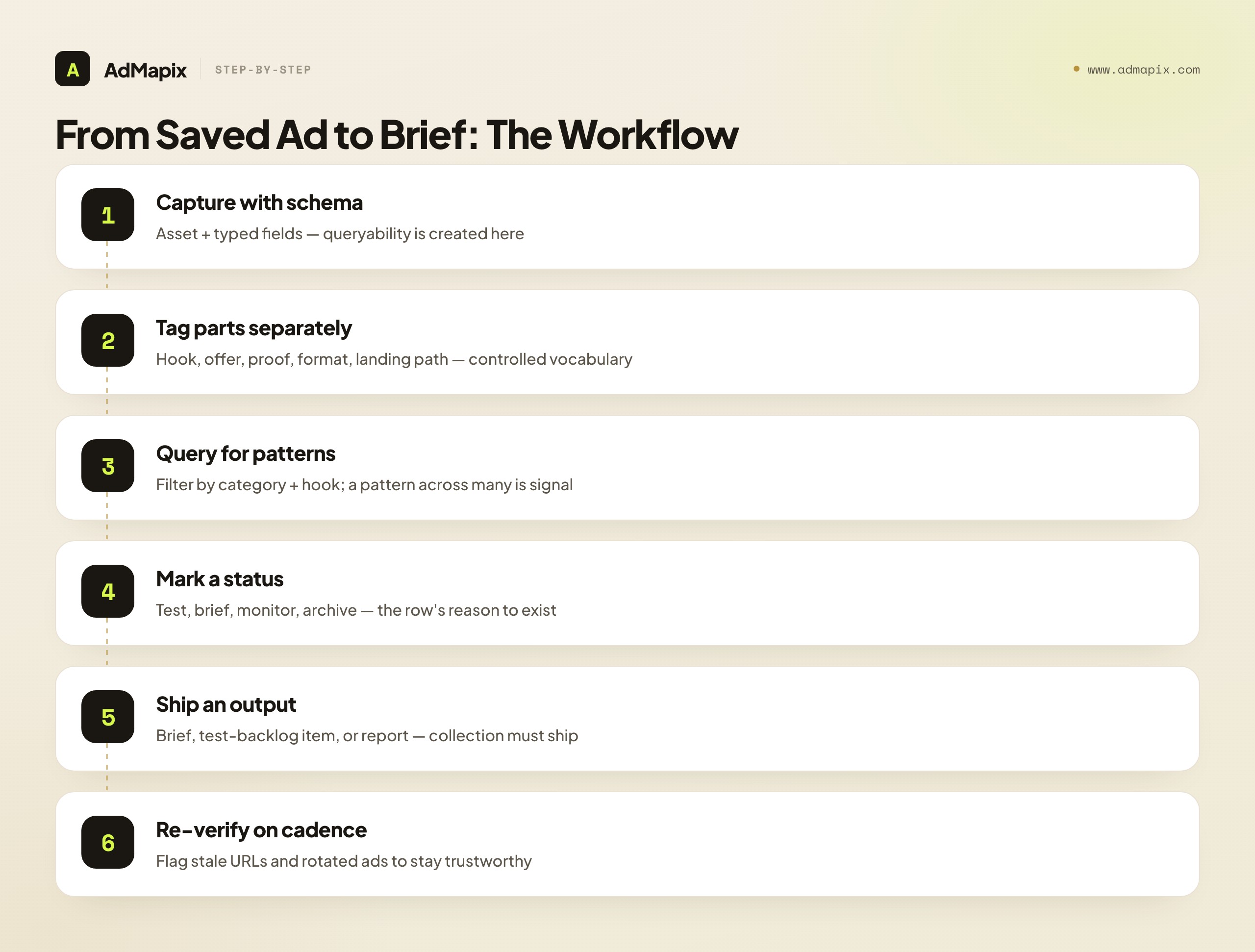
- Capture with the full schema — asset plus typed fields, not just a screenshot. The capture step is where queryability is created or lost.
- Tag the parts separately — hook, offer, proof, format, landing path, market, and language, using the controlled vocabulary. Separate tags are what make pattern queries possible.
- Query for patterns, not single ads. Filter by category and hook type to see which angles repeat across advertisers. A single ad is an anecdote; a pattern across many is a signal.
- Mark a status on each row — test, brief, monitor, or archive. An ad that does not earn a status should not influence a brief; the status is the row's reason to exist.
- Convert the winning pattern into a concrete output — a creative brief, a test-backlog item, or a competitor report. Research that does not ship is just collection.
- Re-verify on cadence. Stale source URLs and rotated ads should be flagged so the database stays trustworthy; provenance decays, and a database full of dead links is a database no one trusts.
The payoff is compounding. A six-month-old, well-tagged database answers "what's the dominant offer structure in our category right now?" in seconds — which is exactly the question that shapes next quarter's creative, and exactly the question a screenshot folder can never answer. Every cycle through the loop makes the next cycle faster, because the patterns get richer as the dataset grows. That compounding is the entire return on the discipline the database demands.
Querying for Patterns: The Real Payoff
The reason to endure the capture discipline is the queries it unlocks — and those queries, not the saved ads themselves, are where a creative database earns its keep. A row is just a record; a query across rows is intelligence. Here are the kinds of questions a well-built database answers that a folder never can.

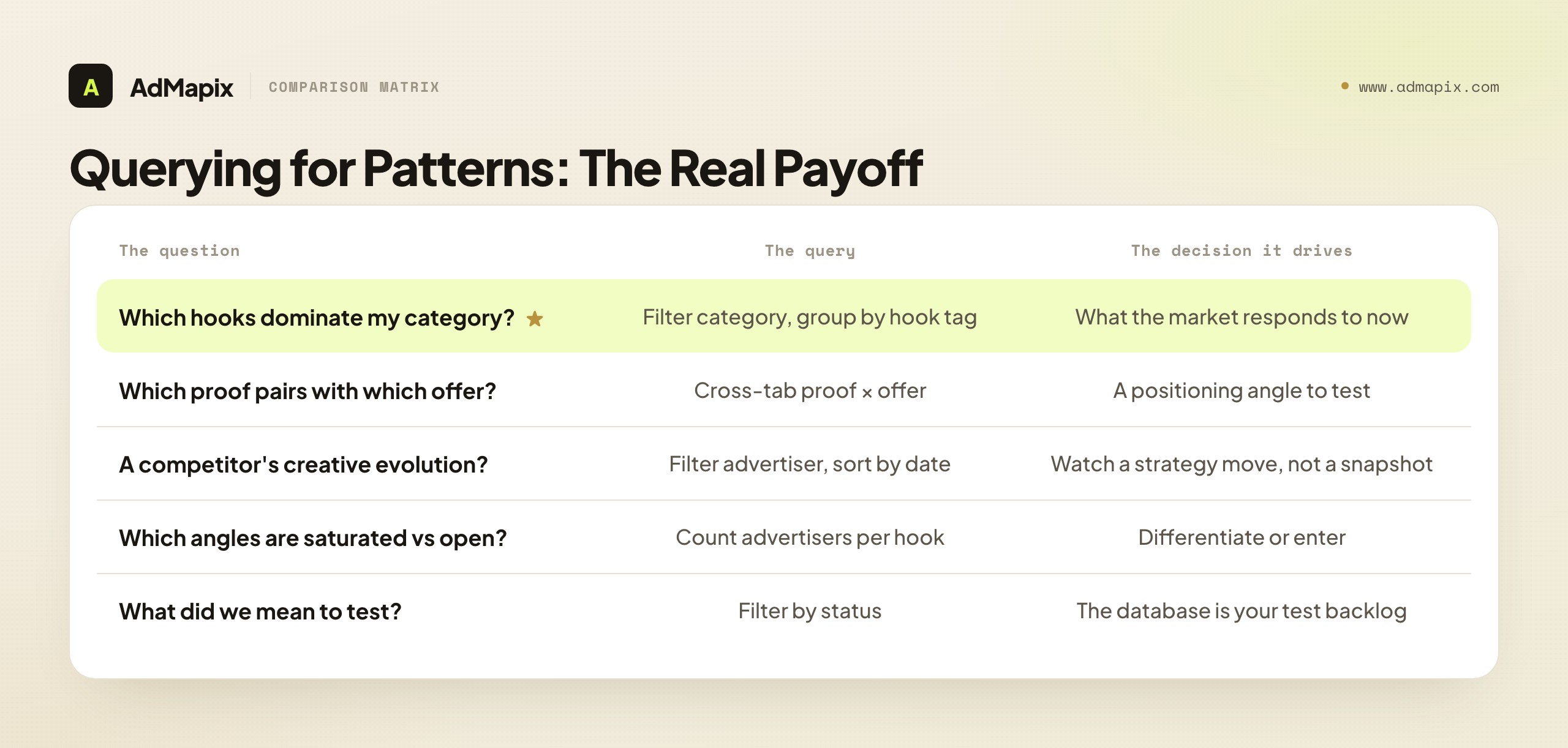
- "Which hook types dominate my category right now?" Filter by category, group by hook tag, count. The dominant hook is what the market currently responds to, and a shift in it is an early signal of a category-wide change you can ride.
- "Which proof type pairs with which offer?" Cross-tabulate proof against offer within a category. Discover, for example, that discount offers in your space almost always pair with urgency proof, while trial offers pair with authority proof — a positioning insight you can test.
- "What is a specific competitor's creative evolution?" Filter by advertiser, sort by capture date. Watch their hooks, offers, and proof shift over months, and you see a strategy moving, not a snapshot.
- "Which angles are saturated versus open?" A hook that appears across many advertisers is saturated (hard to stand out); one that appears rarely but persistently is an opening. The database surfaces both.
- "What did we mark 'worth testing' but never tested?" Filter by status. The database doubles as a test backlog, surfacing the ideas you captured and forgot.
Each of these is a filter-and-group operation that takes seconds in a structured database and is impossible in a folder. And each produces a decision — what to test, how to position, which competitor to watch, which angle to avoid because it is saturated. The queries are the product; the saved ads are just the raw material. A team that captures diligently but never queries has built a warehouse and never shipped anything from it. The discipline of capture only pays off when you turn the crank on the queries — so schedule the query session as deliberately as the capture session, because the query is where collection becomes strategy.
The most powerful queries are the ones that change over time, which is why the capture date is load-bearing. A single snapshot tells you what a category looks like now; a time series tells you where it is moving, which is far more actionable. When you can ask "how has the dominant hook in my category shifted over the last six months," you catch a trend forming rather than reacting to one that has already saturated. A competitor who is quietly migrating from discount offers to bundle offers across their recent ads is telegraphing a margin or positioning shift you can anticipate. An angle that was rare three months ago and is now appearing across five advertisers is a wave you can still catch the front of. None of these temporal reads is possible without consistent capture dates on every row — which is exactly why the date field, boring as it seems, is one of the most valuable in the schema. A database without reliable dates can answer "what is happening"; a database with them can answer "what is changing," and "what is changing" is the question that lets you act early instead of late. Build the time series by capturing on a steady cadence, and your database stops being a snapshot and becomes a moving picture of your category.
Common Mistakes
The failure modes are predictable, and every one of them traces back to breaking the queryability the database exists to provide.

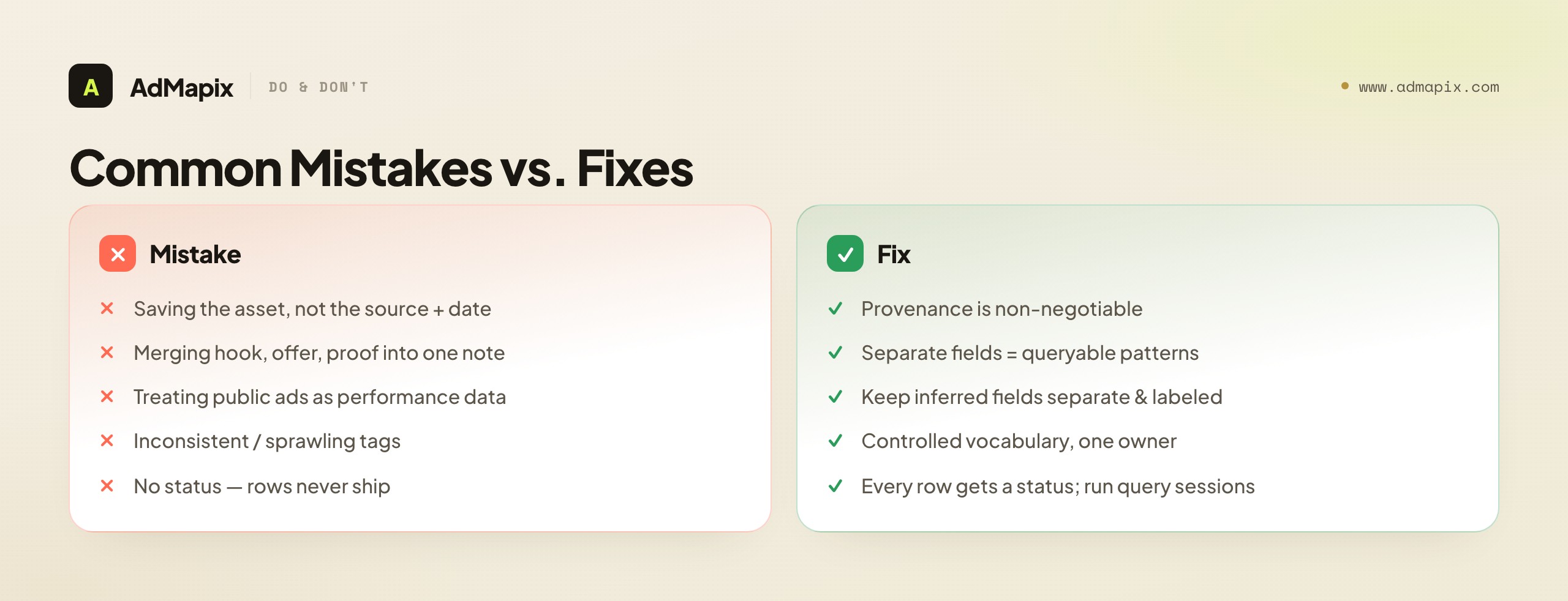
- Saving the asset but not the source URL and date. A screenshot with no provenance is an opinion, not evidence, and cannot be re-verified. Provenance is non-negotiable.
- Collapsing hook, offer, and proof into one note. This destroys your ability to query patterns later — the entire reason to build a database. Keep them in separate fields, always.
- Treating public ads as performance data. "They ran it a lot" is not "it converted." Never report inferred metrics as facts; keep inferred fields separate.
- Inconsistent tags. "UGC," "ugc," and "user content" are three different filters; agree on a controlled vocabulary up front and govern it.
- Letting the tag vocabulary sprawl. Eighty tags used once each are worse than twelve used consistently. Default to the closest existing tag.
- Copying instead of adapting. A hook that works for one audience and offer can fall flat when transplanted; record why the pattern might not transfer.
- No exit. If rows never become briefs, tests, or reports, you built an archive, not a tool. Every row needs a status, and the loop needs a query session.
A Worked Example: Building One Category's Database
Principles land harder applied, so here is a composite walkthrough of standing up a database for one category — DTC skincare — from zero.

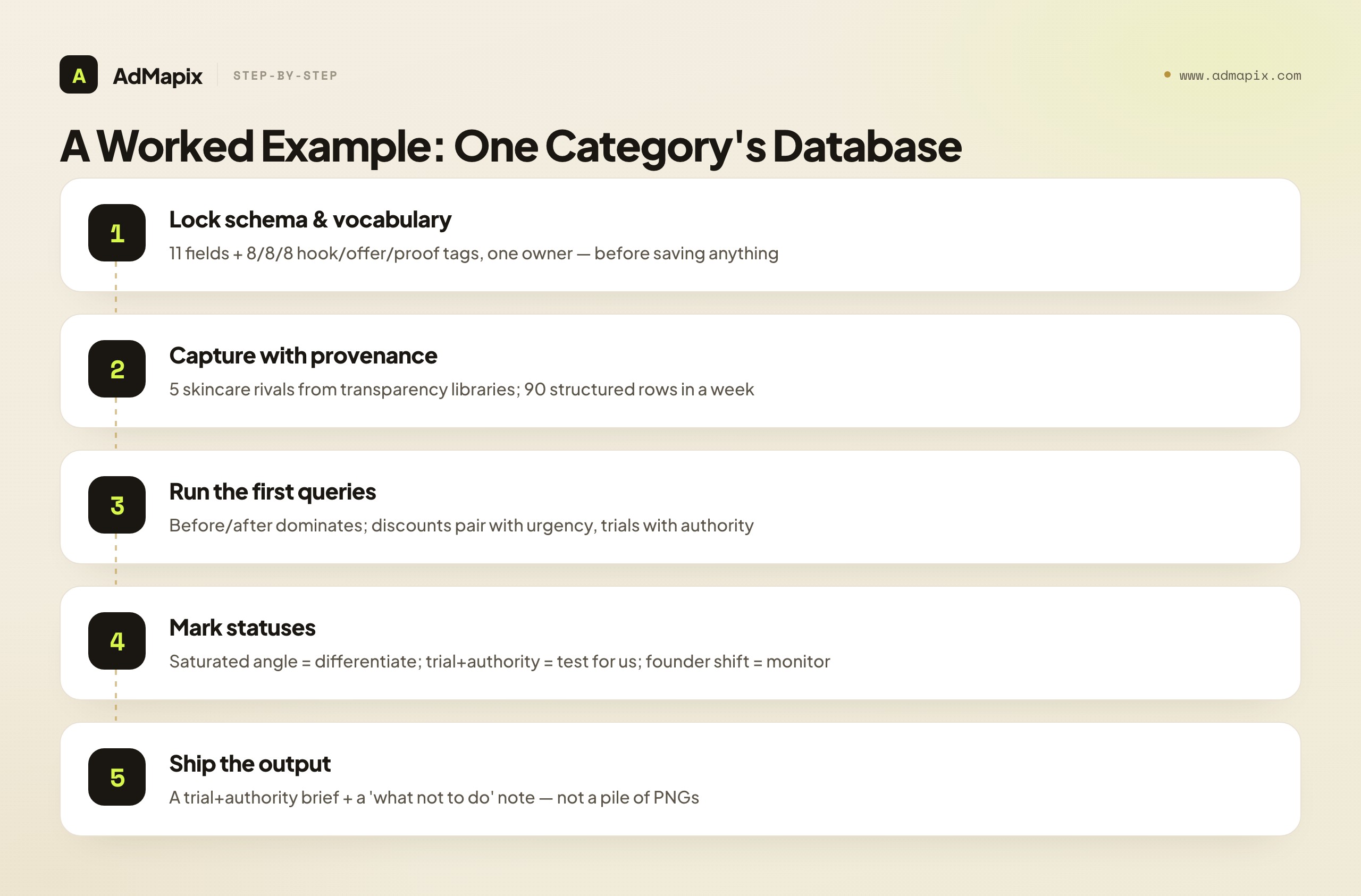
Set the schema and vocabulary first. Before saving a single ad, you lock the schema (the eleven fields above) and a starter vocabulary: eight hook types, eight offer types, eight proof types, four CTA tags. One person owns the list. This five-minute decision is what makes every later query possible.
Capture a competitor set with provenance. You pull ads for five skincare competitors from the relevant transparency libraries, capturing each as a full row — source URL, capture date, advertiser, format, and separated hook/offer/proof/CTA tags, plus the landing path. After a week you have ninety rows, each one a structured record rather than a PNG.
Run the first queries. Now the payoff. You group by hook tag and find that "before/after demonstration" dominates the category — six of your five competitors lean on it heavily. You cross-tabulate offer against proof and discover that the discount offers almost all pair with urgency ("48 hours only"), while the trial-size offers pair with authority ("dermatologist-developed"). You filter by advertiser and watch one rival shift from problem-callout hooks to founder-origin hooks over the quarter — a repositioning you can see forming.
Convert patterns to decisions. You mark statuses: the before/after demonstration angle is "saturated — differentiate, don't copy"; the trial-size-plus-authority pairing is "test for us" because your product has a real authority claim; the founder-origin shift is "monitor." Each status is a decision the row earned.
Ship the output. You convert the "test for us" pattern into a concrete brief — a trial-size offer led with your authority claim, tested against your current discount-led control — and the saturation finding into a "what not to do" note for the creative team. The database has now produced exactly what a folder never could: not a pile of skincare ads, but a positioning read and a test, built from queryable structure. And every ad you add next week makes the next query sharper, because the same ninety rows that answered this week's question will answer next month's "what changed" the moment you add the next ninety.
Database vs. Swipe File vs. Spreadsheet: Choosing Your Foundation
Before you build, it helps to be clear about what you are building, because "ad creative database" gets confused with two adjacent things — a swipe file and a plain spreadsheet — and the confusion leads to building the wrong tool. Each has a place; the trick is matching the tool to the job.
A swipe file is an inspiration board — a visual scroll of ads you found striking. Its job is to spark ideas, and it is browsed, not queried. A swipe file is genuinely useful for a quick hit of creative inspiration, but it answers "show me something cool" rather than "what dominates my category." If your only need is occasional inspiration, a swipe file is fine and you do not need the discipline of a database. The moment you want to analyze rather than browse, the swipe file fails — it has no structure to query.
A plain spreadsheet is where most real databases start, and it is the right place to learn the discipline. Columns for the schema fields, one row per ad, a controlled vocabulary in a separate tab — a spreadsheet does everything this guide describes, for free, for a single user. Its limits show up at scale: it has no native cross-network sourcing (you paste links by hand), no video breakdown (a cell cannot hold a hook teardown), and it gets unwieldy when several people edit it and tag inconsistently. But for one person learning to capture structure, a spreadsheet is the correct first tool, and you should not over-buy before you have proven the habit in one.
A purpose-built database tool automates the parts a spreadsheet does poorly: it sources across networks, breaks down video, enforces a tag vocabulary, and generates reports. You graduate to it when the spreadsheet's upkeep exceeds its value — typically at team scale or when video research and cross-network sourcing become central.
The decision rule is simple: swipe file for inspiration, spreadsheet to learn the discipline and run it solo, purpose-built tool when the discipline outgrows the spreadsheet. The mistake is jumping to an expensive tool before you have proven you will maintain the discipline — the tool does not create the discipline, it scales it. Prove the habit in a spreadsheet first; the structure you learn there is exactly the structure a tool automates, and you will use the tool far better for having done the manual version.
Scaling From Solo to Team
A creative database that works for one person often breaks the moment a second person touches it — and the break is almost always tag drift. Solo, you tag consistently because there is only one brain enforcing the vocabulary. With two or more contributors, "UGC" and "user content" creep in, the controlled vocabulary erodes, and within months the queries that made the database valuable start returning incomplete results. Scaling the database is really about scaling the discipline, not the storage.
The practices that keep a multi-person database queryable:
- One vocabulary owner. A single person owns the tag list and is the only one who adds to it. Everyone else uses the existing tags or requests a new one — they do not invent tags mid-capture. This is the single highest-leverage rule for team scale.
- A captured-onboarding standard. Write down exactly what a complete row looks like — which fields are mandatory, which tags are allowed — so a new contributor captures the same way as a veteran from day one. An undocumented standard is a standard that erodes.
- A periodic tag audit. Once a quarter, someone reviews the tags in use, merges accidental duplicates ("UGC" and "ugc"), and prunes tags used only once or twice. This is the maintenance that keeps queries returning complete results as the dataset grows.
- Clear ownership of the query session. Capturing is everyone's job; querying and shipping the output is someone's specific job. A database where everyone saves and nobody queries is the team-scale version of the screenshot folder — full and unused.
The deeper point is that a creative database is a shared asset, and shared assets degrade without governance. The governance is light — one owner, a written standard, a quarterly audit, a named query owner — but it is not optional, because the failure is silent: nobody notices the database getting less queryable until a query that should return forty ads returns twelve, and trust quietly collapses. Build the governance in from the second contributor, and the database compounds in value as the team grows. Skip it, and the database becomes the very thing you built it to escape — a pile nobody trusts or opens. At team scale, a purpose-built tool that enforces the vocabulary and standardizes capture is often what makes the governance sustainable, because it removes the reliance on every contributor's individual discipline.
When to Use AdMapix
AdMapix fits the moment a shared drive and spreadsheet stop scaling — typically when more than one person needs to search the same creative evidence, when patterns must hold up across networks, or when the manual schema becomes more upkeep than the team can sustain. It is, in effect, an ad creative database with the cross-network sourcing, video breakdown, tagging, and reporting built in, so you spend your time on the queries and decisions rather than on maintaining a spreadsheet.

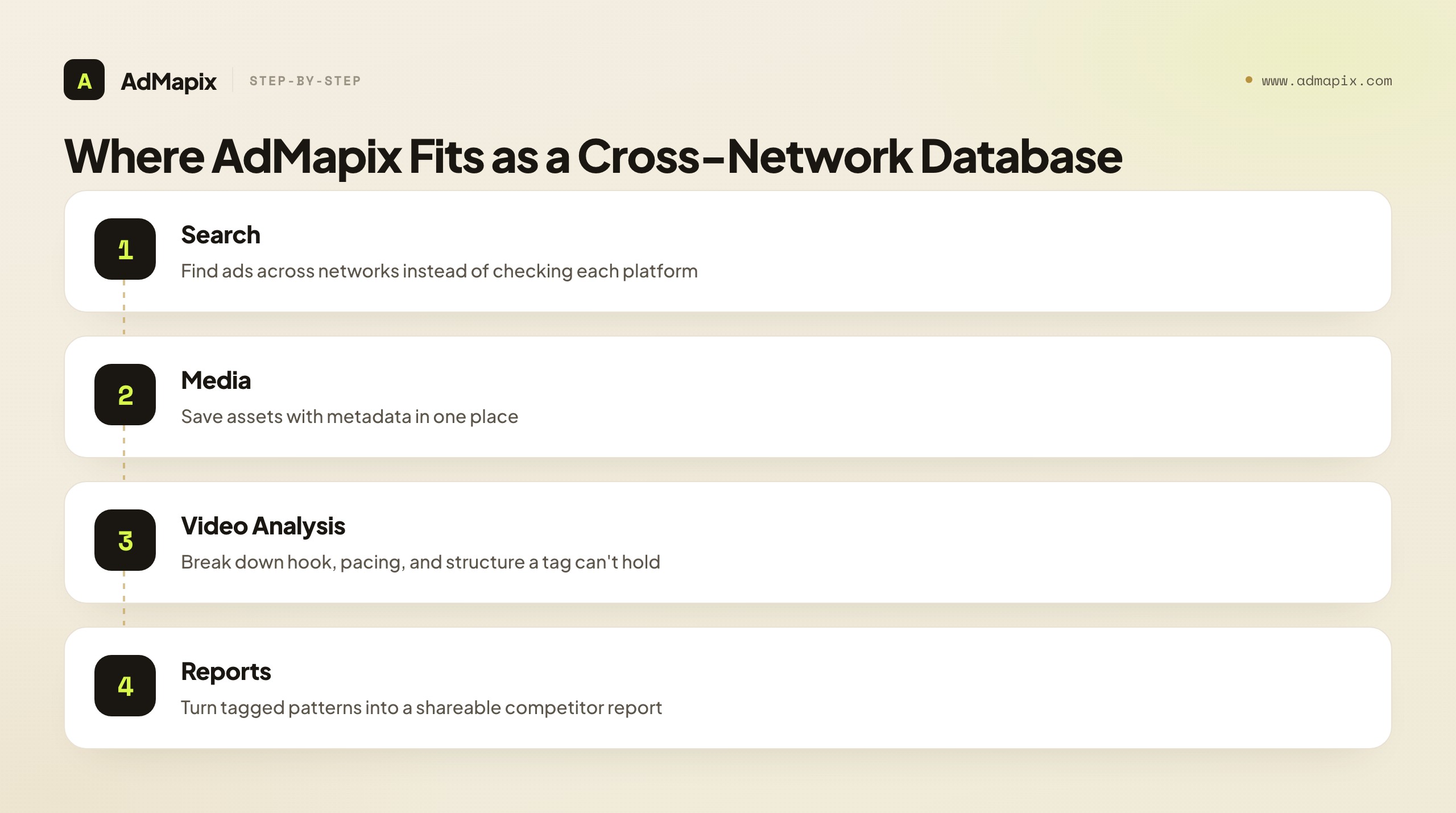
Use Search AdMapix to find ads across networks instead of checking each platform separately — the cross-network sourcing a manual database does poorly. Use Media to save assets with their metadata in one place, Video Analysis to break down a video's hook, pacing, and structure (the part a static thumbnail and a manual tag cannot capture), and Reports to turn tagged patterns into a shareable competitor report. Compare solo, team, and agency plans on Pricing, or jump straight in from Login.
It is a good fit for creative strategists, paid-social and UA teams, and agencies who research the same competitors repeatedly and want tagging plus reporting built in rather than hand-maintained. It is not the right fit if you only need to glance at one advertiser once — a public transparency tool covers that for free — or if your real requirement is private performance metrics, which no public-source tool can provide, because that data does not exist outside the advertiser's account. The honest framing: AdMapix automates the sourcing, structure, and reporting of a creative database; it does not invent private data, and the judgment about what to save and what to test still lives with you. It removes the spreadsheet upkeep so the compounding asset is one you actually maintain instead of abandon.
Putting It Together: Build for the Query, Not the Save
The whole guide reduces to one principle: a creative database is built for the query, not the save. The instinct is to optimize the saving — grab the screenshot, dump it in the drive, move on — but saving is the part that does not compound. The query is what compounds, and the query is only possible if you captured structure: separate hook, offer, and proof fields; a controlled tag vocabulary; a source URL and date on every row; a status that turns each entry into a decision. Get the capture-time discipline right, and six months later you can answer the questions that actually shape creative strategy — which hooks dominate, which proof pairs with which offer, which angles are saturated, what you meant to test and forgot — in seconds.
Set the schema and vocabulary before the first ad. Source from verifiable transparency tools and store the provenance. Separate what the source proves from what you infer. Run a weekly query session as deliberately as the capture session, and ship a brief, test, or report every cycle so the database keeps producing decisions. Do that, and you build the one thing a folder of screenshots never becomes: a compounding asset that gets more valuable every week, and answers the questions a pile of PNGs cannot. The structure you add when you save is the structure you query later — so build for the query, and the saving takes care of itself. Start lean in a spreadsheet, prove the habit, and graduate to a purpose-built tool only when the discipline has outgrown the sheet — the tool scales the discipline; it does not replace it.
FAQ
What is an ad creative database?
It is a structured, searchable record of ads, where each ad is decomposed into typed fields — hook, offer, proof, format, advertiser, source URL, and capture date — so you can query patterns across many ads. The defining trait is retrieval: a true database answers questions a dated folder of screenshots cannot, like "which proof type pairs with discount offers in this category."
What should I capture for each ad?
Save the asset plus the source URL, capture date, platform, advertiser, and format, and the hook, offer, proof, and CTA as separate tags. Add the landing path and a status (test, brief, monitor, archive). Keeping hook, offer, and proof in distinct fields is what makes later pattern queries possible — the single most important capture rule.
How is an ad creative database different from a swipe file?
A swipe file is for inspiration and is usually browsed; a database is for retrieval and is queried. The difference is structure: a database has consistent, typed fields so you can filter by hook type, offer, or category, while a swipe file is mostly a scroll. A swipe file answers "show me cool ads"; a database answers "which pattern dominates my category."
Can a public ad library show how well an ad performed?
No. Public libraries confirm that an ad ran and show its creative and approximate timing, but spend, impressions, CTR, conversion rate, ROAS, and targeting are private. Treat any performance read as an inference and label it as one in a clearly separate field, especially in client-facing reports — a long run time suggests an ad works, but it does not prove it.
Why does tag consistency matter so much?
Because a filter only finds rows that used the exact tag you are filtering for. "UGC," "ugc," and "user content" fragment one concept across three buckets, so a query for any one misses the others. A controlled vocabulary — a short, agreed list of allowed tags, owned by one person — is what keeps the database queryable as it grows. Twelve consistent tags beat eighty inconsistent ones every time.
How often should I update an ad creative database?
Run a capture-and-review loop weekly or monthly depending on how fast your category moves. On each cycle, add new ads, re-verify source URLs (public ads rotate), run a query session to surface patterns, and convert the strongest into briefs or reports so the database keeps producing decisions rather than just accumulating rows.
What is the biggest mistake people make?
Collapsing hook, offer, and proof into a single "why it's good" note. It feels efficient at capture time, but it destroys the ability to query patterns later — which is the entire reason to build a database instead of a folder. The second biggest is saving assets with no source URL or date, which turns evidence back into opinion.
How do I keep an ad creative database honest for client reports?
Separate factual fields (the ad ran, here is the creative, here is the run window) from inferred fields (this probably performs, here's why), and never present an inference as a fact. Source from verifiable transparency tools so every claim has a resolving URL behind it. A report built on graded, sourced rows survives scrutiny; one built on guesses dressed as facts collapses the first time someone checks.
Do I need a tool, or can I use a spreadsheet?
A spreadsheet works well to start and is the right way to learn the discipline. You outgrow it when more than one person needs to search the same evidence, when sourcing across networks becomes tedious, when video ads need breakdowns a cell cannot hold, or when the upkeep exceeds the team's capacity. At that point a purpose-built tool like AdMapix automates the sourcing, structure, video analysis, and reporting so the asset gets maintained instead of abandoned.
Where does AdMapix fit in this workflow?
AdMapix covers the steps a drive and spreadsheet do poorly at scale: cross-network search, saving media with metadata, video breakdowns, consistent tagging, and recurring reports. It sits after discovery — you still decide what is worth saving and what to test next — and it does not expose private performance metrics, because no public-source tool can. It is the database with the sourcing and reporting built in.
Key Takeaways
- Build for retrieval: choose your schema and tag vocabulary before you save a single ad, because queryability is created at capture time, not added later.
- Always store the source URL and capture date — without provenance, an ad is an opinion, not evidence.
- Keep hook, offer, and proof in separate fields so you can query patterns, not just browse ads; the joins between fields are the whole value.
- Separate what the source proves from what you infer, and never report inferred metrics as facts — that is what keeps a client report defensible.
- Close the loop with a deliberate query session: every saved ad should end as a test, a brief, a report, or an archive, and the query is where collection becomes strategy.
Related Reading
- Competitor Ad Analysis in 2026: The 5-Dimension Framework, Templates & SOP — the analysis framework the database feeds.
- Ad Spy Tools by Channel: Meta, TikTok, Google, YouTube, Native — how the sourcing libraries compare across networks.
- Facebook Ads Library 2026: Official URL, Filters & Competitor Ads Guide — a deep dive on one of the key sourcing libraries.
- How to Spy on Competitors' Ads in 2026 (30-Min/Week Workflow) — the weekly research loop that feeds the database.
- Best Ad Spy Tools 2026 — a broader roundup of tools that can source and organize creative.
Sources
Sources checked as of June 21, 2026. Platform tools, APIs, and ad products change, so re-verify source URLs before building an automated pipeline or client report. AdMapix data reflects only ads in its own index, clearly scoped, and never private performance metrics.
- Google Ads Transparency Center — find active ads published through Google across Search, YouTube, and Discover.
- Meta Ad Library API — programmatic, customized searches of the Ad Library for social and ad-transparency use cases.
- TikTok Creative Center — Top Ads, trends, creative tools, automation, and API resources.
- LinkedIn Ads Guide — official documentation of ad formats including single image, video, carousel, document, and lead gen forms.
Turn these observations into your next creative study
Open the creative library and select samples for your market, network and research question.
Related Articles
Outbrain Ad Spy Tool in 2026: Native Ad Research for the Open Web
How to research Outbrain native ads from public evidence in 2026 — what a spy tool can and cannot prove, how to decode headline-and-thumbnail hooks, advertorial landing paths, retargeting trails, and how to turn patterns into testable native campaigns.
Ad Creative Fatigue Analysis in 2026: Signals, Thresholds & Refresh Decisions
A 2026 guide to diagnosing ad creative fatigue — what fatigue looks like in the data, how to read cost-per-result, frequency, CTR, and retention signals together, how to tell fatigue apart from funnel, tracking, auction, and seasonal causes, how fatigue speed differs by channel and funnel stage, how to set a refresh threshold, when to refresh versus rebuild, how to run a creative pipeline that stays ahead of fatigue, and where competitor research informs the next variant.
Creative Testing Framework in 2026: Isolate, Prioritize & Scale Winning Ads
A 2026 creative testing framework — why confounded variables ruin most tests, how to isolate one variable per experiment, how to prioritize the backlog by impact and falsifiability, the test record that makes results reusable, how to read statistical significance and sample size without fooling yourself, the win/loss/flat decision rules, the testing-velocity question, how to scale winners and diversify the portfolio, and how competitor evidence feeds the hypothesis stage.