PowerAdSpy vs BigSpy in 2026: Filters, Coverage, Pricing, and Which Ad Spy Tool Fits Your Team
A 2026 head-to-head of PowerAdSpy vs BigSpy — how they differ on platform coverage, filter depth, data freshness, pricing tiers, and use-case fit, with a buy-without-guessing test, what public ad data can and cannot prove, and where a cross-network creative-intelligence layer fits.
By the AdMapix Research Team — Updated June 21, 2026
PowerAdSpy vs BigSpy in 2026: Filters, Coverage, Pricing, and Which Ad Spy Tool Fits Your Team
PowerAdSpy vs BigSpy is a choice between two philosophies of ad spying, not two databases of different sizes. Pick BigSpy when your main job is fast, broad creative discovery on a low-friction budget — a wide net, a free entry path, and a flat learning curve. Pick PowerAdSpy when its granular paid-social filters (CTA, domain, ad type, age, gender, ecommerce signals) map directly to the way your media buyers actually make campaign decisions. This 2026 comparison is for media buyers, ecommerce and app marketers, agencies, and founders deciding between two general-purpose ad spy tools before they pay for either. Below you get a decision framework, a feature-by-feature breakdown, the current pricing shapes (checked June 2026), a buy-without-guessing test, the honest limits of what either tool can prove, and the gap both leave once research has to become a repeatable report.
TL;DR — PowerAdSpy vs BigSpy in One Screen
- BigSpy is the better starting point for broad, low-cost creative discovery and trend scanning, with a free entry tier and a visible Free / Pro / VIP ladder — the cheapest functional way to browse a lot of hooks fast.
- PowerAdSpy is the better fit when CTA, domain, ad-type, age, gender, and ecommerce filters drive your campaign decisions, sold across a wider Basic-to-Palladium tier range that rewards filter-heavy paid-social workflows.
- Neither tool should be judged on ad-count claims alone. The real test is whether a search becomes a brief, a test, or a client report — time-to-output beats database size every time.
- Both show what competitors ran, never what worked. No public tool exposes a rival's spend, ROAS, or profit; treat every ad as a hypothesis to validate with your own data.
- The honest decision rule: run the same three to five competitors through both, same countries and date window, and keep the one that reaches a usable output faster — not the one with the bigger headline number.
- A cross-network creative-intelligence layer (such as AdMapix) is the piece to add when discovery has to become saved evidence, video analysis, and recurring reports — not a replacement for either tool's strongest workflow.
What You Are Actually Deciding Between
The choice is not "which database is bigger" — it is which tool shortens your next weekly decision. BigSpy and PowerAdSpy are both general-purpose ad spy tools: services that index ads competitors run across networks so you can study creatives, hooks, and offers. Where they diverge is philosophy. BigSpy optimizes for reach and ease — a huge, cheap, multi-platform net you can cast quickly. PowerAdSpy optimizes for filter depth and paid-social precision — a narrower, more surgical instrument for buyers who already know exactly which competitor attribute they are hunting.
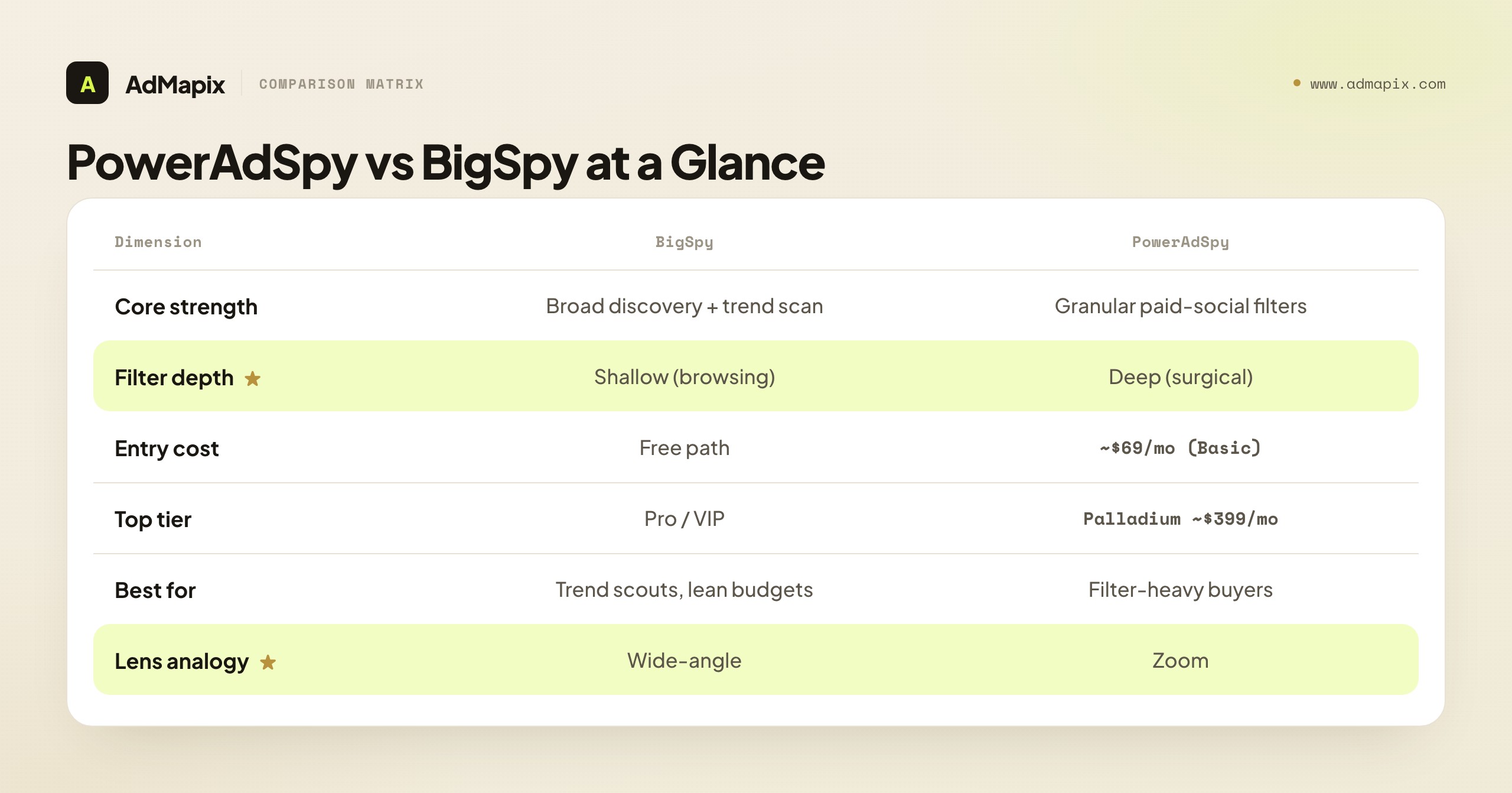
| Dimension | BigSpy | PowerAdSpy |
|---|---|---|
| Core strength | Broad multi-platform creative discovery and trend scanning | Granular paid-social filters and analytics |
| Coverage claim | Markets itself as a free ad spy tool with multi-platform coverage, 1B+ creatives, 71 countries, 23 languages (per its site) | Social ad analytics with keyword/domain search, video and image ads, geo-targeting, CTA sorting, and Shopify ad research |
| Pricing shape | Free entry path plus Pro and VIP blocks | Monthly tiers from Basic ( |
| Filter depth | Shallower; built for fast browsing, not surgical slicing | Deep; CTA, domain, ad type, age, gender, ecommerce filters |
| Best entry move | Test the free path against your real competitors first | Trial the lowest tier whose filters match your decisions |
| Where it falls short | Filter precision is shallower; raw discovery, not deep paid-media slicing | Lower tiers gate platform access; pay only if the filters earn it |
Claims and prices above are pulled from each vendor's own pages as checked in June 2026. Verify the exact plan before you buy — names, limits, and prices change frequently in this category, and a feature that was on a lower tier last quarter can move up a tier without notice. This is not a knock on either tool; it is the nature of a fast-moving software category, and it is exactly why a hands-on test on your own competitors beats trusting any static comparison table, including this one.
The single most useful way to hold this comparison in your head: BigSpy is a wide-angle lens, PowerAdSpy is a zoom. A wide-angle lens shows you the whole landscape cheaply and fast, which is exactly what you want when you are scanning a category for what is trending. A zoom isolates one subject in detail, which is what you want when you already know you are hunting "competitors running carousel ads with a 'shop now' CTA to a Shopify store in the US." Neither lens is better; they answer different questions, and the mistake is buying the zoom when your job is landscape, or the wide-angle when your job is a portrait.
It helps to be honest about what both tools are and are not, before the feature-by-feature breakdown. Both are general-purpose ad spy tools, meaning they index ads competitors have run so you can study the creative, the hook, and the offer. Neither is a full ad-intelligence suite with spend modeling, audience analysis, or cross-network reporting baked in — they are discovery instruments, and they should be judged as such. If your mental model is "I'll buy one of these and have a complete competitive-intelligence system," you will be disappointed by either, because that is not what either is for. The realistic expectation is: one of these becomes your discovery engine, and the rest of your competitive workflow — analysis, reporting, validation — happens elsewhere. Holding that expectation makes the choice between them clearer, because you are no longer asking "which is the complete tool" (neither is) but "which discovers the right ads for my job faster."
There is also a quiet difference in who each tool is designed for. BigSpy's free-first, browse-first design signals that it is courting the high-volume, price-sensitive end of the market — dropshippers, early DTC brands, solo marketers testing many angles cheaply. PowerAdSpy's filter-first, tiered design signals that it is courting the more deliberate paid-social buyer who already knows their workflow and will pay for precision. Neither audience is "better," but recognizing which one you belong to is often the fastest route to the right pick. If the phrase "I just want to see what's out there cheaply" describes you, that is BigSpy's audience. If "I need to slice competitor ads by these specific attributes every week" describes you, that is PowerAdSpy's.
Platform Coverage: Where Each Tool Actually Sees
Coverage is the first thing buyers check and the easiest to misread, because a big number on a homepage tells you the size of the index, not whether your channel is well covered.
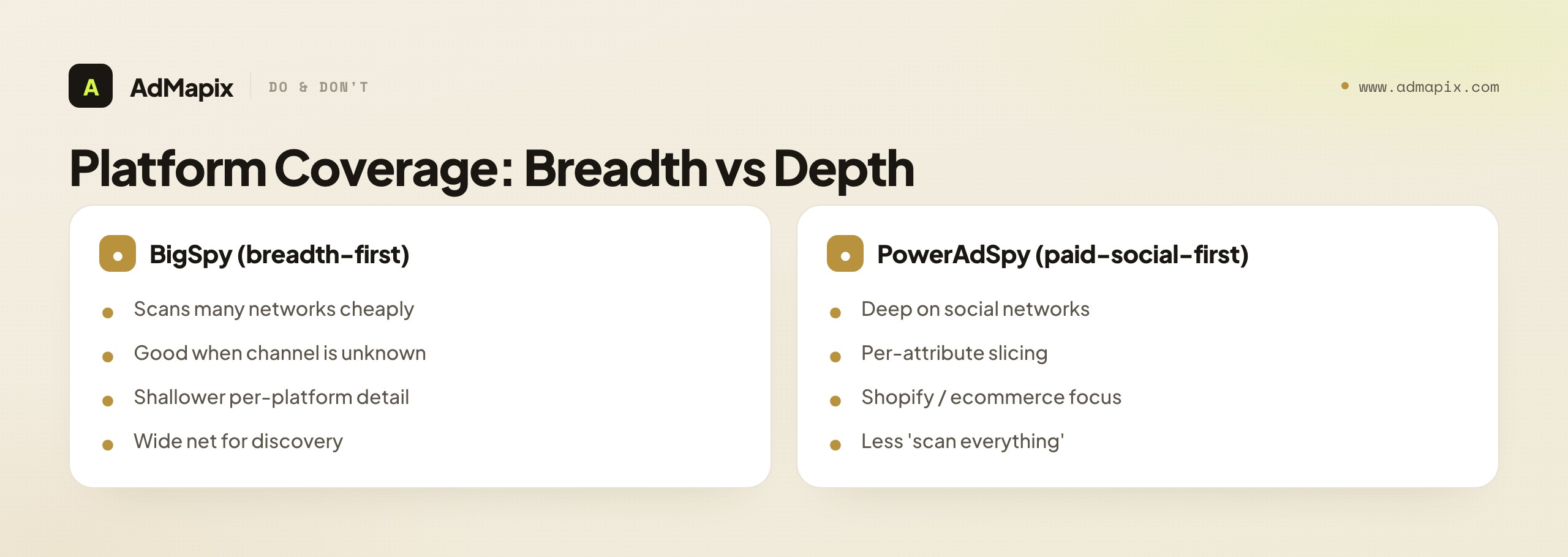
BigSpy leans breadth-first. It markets multi-platform coverage spanning Meta (Facebook and Instagram), TikTok, YouTube, and a set of additional surfaces — and its pitch is that you can scan many networks from one dashboard cheaply. For a team that does not yet know which channel a competitor favors, that breadth is genuinely useful: you cast a wide net and see where a brand is actually active. The trade-off is that breadth-first indexes are often shallower per platform — you see that a competitor runs on a network without the granular per-platform attributes a specialist tool surfaces.
PowerAdSpy leans paid-social-first. Its strength is depth on the social networks where its filters bite — keyword and domain search, video and image ads, geo-targeting, CTA sorting, and Shopify-oriented ecommerce research. If your competitors live on paid social and you need to slice their creative by attribute, PowerAdSpy's per-platform depth is the point. The trade-off is the inverse of BigSpy's: less of a "scan everything everywhere" net, more of a "go deep where the buyers are" instrument.
The practical coverage test is not "who claims more." It is: load the same five competitors into both, in the same countries, and see which tool actually returns fresh, relevant ads for the channels you care about. A tool with a billion creatives that is thin in your exact niche is worse than a smaller index that is dense where you operate. Coverage is local, not global — your niche's coverage is the only number that matters, and no homepage stat will tell you what it is. You have to look.
A few coverage nuances are worth checking specifically. Country and language depth varies by tool and by region — a tool strong in US/UK English ads can be sparse in, say, Southeast Asian or Latin American markets, so if you sell internationally, test your actual target geos, not just your home country. Format coverage matters too: if your competitors run heavily on a specific format (short-form video, carousels, collection ads), confirm the tool indexes that format well rather than treating it as an afterthought. And the paid-versus-organic line is worth probing — some indexes blur boosted organic posts and paid ads together, which can inflate counts and mislead you about how much a competitor is actually spending to push a creative. None of these show up in a homepage number; all of them show up the moment you run your real competitors through both tools. The afternoon you spend doing that is the most reliable coverage research you can do, and it beats any review, including this one.
Filter Depth: The Real Dividing Line
If platform coverage is where buyers start, filter depth is where they decide — and it is the clearest difference between these two tools.
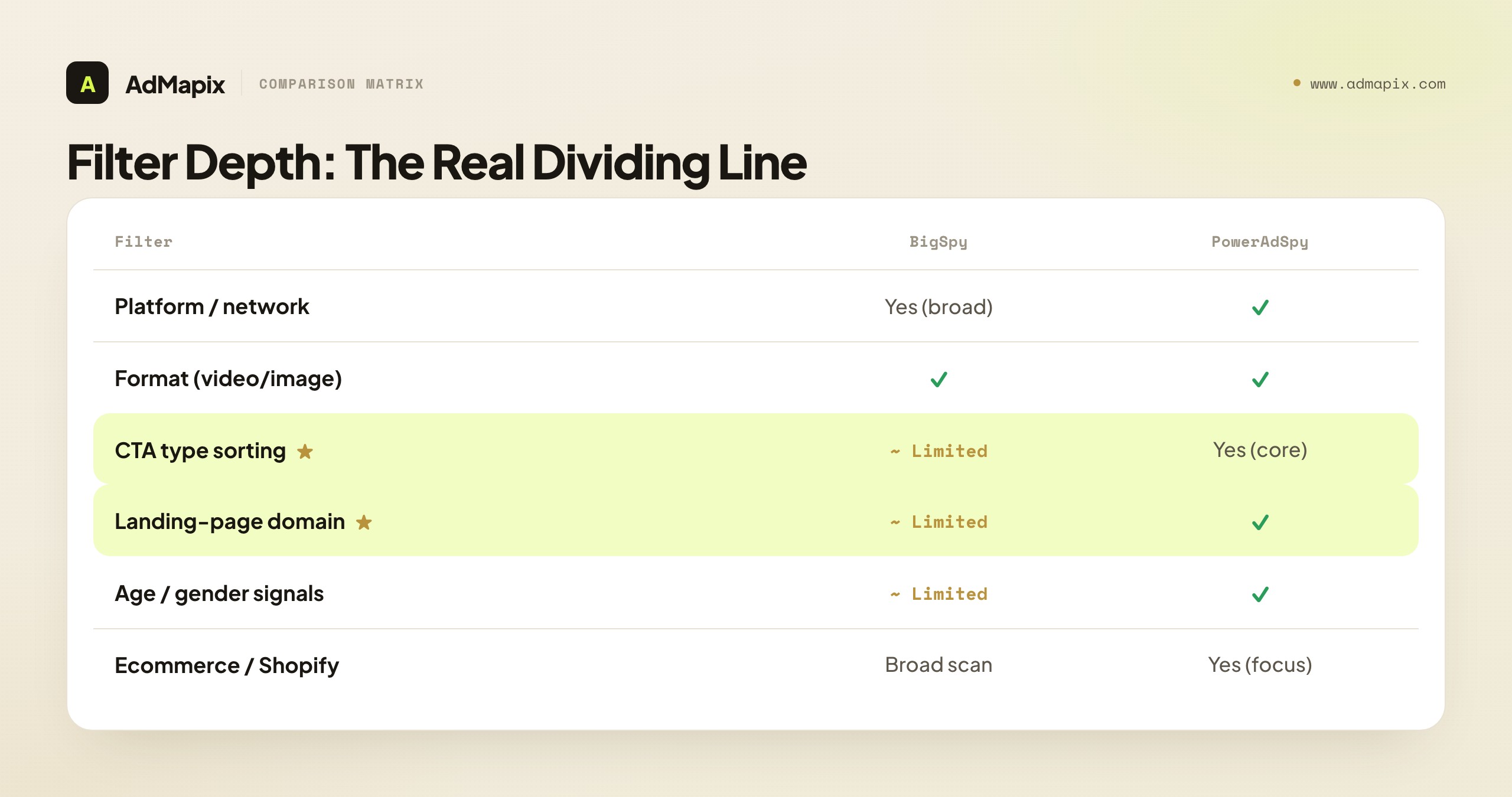
PowerAdSpy is built around filters. Its value proposition is that a media buyer can narrow a result set by the attributes that drive a campaign call: call-to-action type, landing-page domain, ad format (video vs image), audience age and gender signals, geo-targeting, and ecommerce/Shopify signals. For a buyer whose decisions are filter-shaped — "show me every competitor running a video ad with a 'learn more' CTA to a Shopify store in the UK in the last 30 days" — that depth is the entire reason to pay. The filters are not decoration; they are how the tool turns a giant index into the five ads that actually inform your next test.
BigSpy is built around browsing. Its filters exist, but they are shallower and oriented toward fast scanning rather than surgical slicing. You can filter by platform, format, and broad parameters, but you will not get the same granular attribute control. For trend scanning and broad discovery, that is fine — often better, because heavy filtering on a discovery task just hides things you wanted to stumble onto. For decision-grade slicing, it is a ceiling you will hit.
| Filter capability | BigSpy | PowerAdSpy |
|---|---|---|
| Platform / network | Yes (broad) | Yes |
| Format (video / image) | Yes | Yes |
| CTA type sorting | Limited | Yes (a core feature) |
| Landing-page domain search | Limited | Yes |
| Age / gender signals | Limited | Yes |
| Geo-targeting | Yes (country-level) | Yes |
| Ecommerce / Shopify signals | Broad scan | Yes (a focus area) |
There is a subtle cost to filter depth that buyers underestimate: filters only help if you know what you are looking for. A deep filter set is powerful for a buyer with a precise, stable question and a liability for a buyer who is still exploring, because heavy filtering on an exploratory task hides exactly the unexpected ads that would have taught you something. This is why the same PowerAdSpy filter that feels like a superpower to an experienced buyer can feel like overhead to a beginner who does not yet know which CTA or format to filter for. Filter depth rewards expertise; breadth rewards exploration. If you are early in learning a category, BigSpy's lighter touch may genuinely serve you better until you know what to filter for — at which point PowerAdSpy's depth starts to pay.
The honest read: if you cannot name three specific filters you would use weekly, you do not need PowerAdSpy's depth, and BigSpy's browsing will serve you for less money. If you can name them — and they map to real decisions — PowerAdSpy's filters are the feature you are actually buying, and judging the two tools on database size instead of filter fit would be the wrong comparison entirely. The cleanest self-test: open a blank document and write down the exact filter query you would run every Monday morning. If you can write it confidently and it uses attributes BigSpy cannot slice, you have just justified PowerAdSpy. If you stall, you are a discovery user, and BigSpy is your tool.
Data Freshness and the Longevity Trap
Two freshness questions matter more than total ad count, and both tools must be tested on them rather than trusted on a claim.
The first is recency: how quickly does a new competitor ad show up in the index? A tool that surfaces an ad two days after it goes live is far more useful for trend-chasing than one that lags by weeks. You test this by checking a competitor you know is running something new and seeing whether each tool has it. There is no homepage stat for this — only the test.
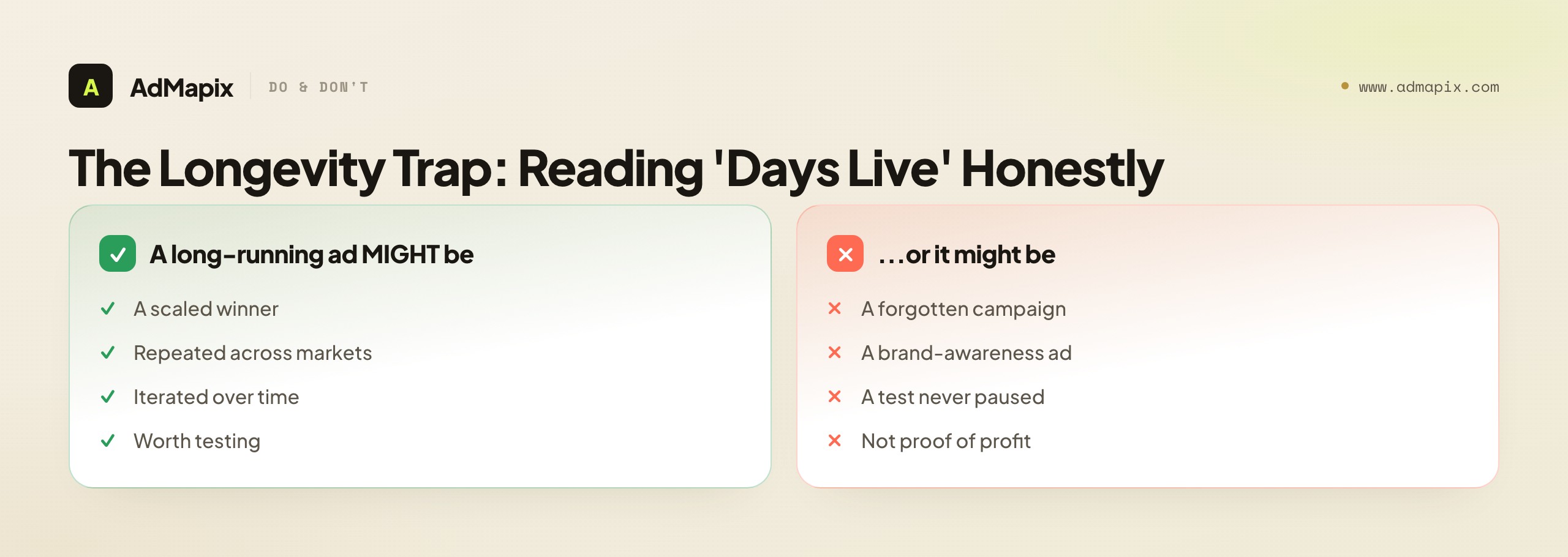
The second is the longevity trap. Both tools show roughly how long an ad has been live, and it is tempting to read a long-running ad as a proven winner. Resist this. Longevity is a hint about staying power, not proof of profit. Brands run losing ads, test ads, brand-awareness ads, and forgotten ads that never got paused. A creative that has been live for ninety days might be a scaled winner — or it might be a neglected campaign nobody turned off. The only honest way to read longevity is as one signal among several: an ad that is long-running and repeated across markets and iterated over time is a strong hypothesis; an ad that is merely old is not.
For the PowerAdSpy-vs-BigSpy decision specifically, freshness should weigh more heavily for fast-moving channels and less for slow ones. If your competitors run on TikTok or short-form video, where creative fatigues in days, recency is critical and you should test both tools hard on how quickly they index new ads — a tool that lags by a week is nearly useless for a channel that turns over that fast. If your competitors run on slower channels where a creative can stay relevant for months, freshness matters less and you can weight coverage and filters more. Neither tool publishes a reliable refresh-rate number, so the only way to know is the test: pick a competitor you know launched something this week, and see which tool has it. Whichever indexes the new ad faster is the better fit for a fast channel, regardless of total database size.
This is where both tools share a hard limit, and it is worth stating plainly before any pricing discussion: neither PowerAdSpy nor BigSpy can show you spend, ROAS, conversion rate, or profit. They show what a competitor ran. They cannot show what worked. Every number that implies performance — including "this ad has been running for X days" — is a clue about behavior, never a verdict on results. The team that internalizes this saves itself from the single most expensive ad-spy mistake: scaling a competitor's "winner" that was never winning.
A Concrete Workflow in Each Tool
Abstract feature tables only get you so far; the difference between PowerAdSpy and BigSpy is clearest when you watch the same task run through each. Take a realistic job: "find three competitor video-ad angles worth testing for our skincare brand in the US this month."
In BigSpy, the natural flow is broad-then-narrow. You search the category or a competitor name, filter to video and to the US, and start scrolling. Because the net is wide, you see a lot — competitor ads, adjacent-brand ads, and trending creatives you were not specifically looking for. That serendipity is the point: you stumble onto an angle a tighter tool would have filtered out. You save the three that catch your eye, note the hook and offer, and you have your shortlist in fifteen minutes. The weakness shows up when you want to be precise — "only video ads with a 'shop now' CTA routing to a Shopify store" — because BigSpy's shallower filters cannot slice that finely, so you do some of the narrowing by eye.
In PowerAdSpy, the natural flow is narrow-from-the-start. You set the filters first — video format, US geo, the CTA type you care about, an ecommerce/Shopify signal — and the tool returns a tighter, more decision-ready set. You spend less time scrolling past irrelevant results and more time on ads that already match the precise pattern you are testing. The weakness is the inverse of BigSpy's: because you filtered hard, you only see what you asked for, so the serendipitous "I didn't know competitors were trying that" discovery is less likely. You traded breadth for precision, which is the right trade if you already know what you are hunting and the wrong one if you are still exploring.
The lesson is not that one flow is better. It is that BigSpy rewards exploration and PowerAdSpy rewards precision, and the same skincare task feels different in each because the tools are built for different stages of research. Early in a campaign, when you do not yet know what works in a category, BigSpy's exploration fits. Later, when you know your winning pattern and want more of it, PowerAdSpy's precision fits. Some teams genuinely use both for exactly this reason — BigSpy to explore, PowerAdSpy to refine — though most settle into whichever stage dominates their week.
Use-Case Deep Dives: Ecommerce, App, and Agency
The three teams most likely to be choosing between these tools each have a different bottleneck, and the right pick changes accordingly.
Ecommerce and Shopify teams care about product-market signal, not just creative volume. PowerAdSpy's Shopify-oriented research and domain/CTA filters are built for exactly this: finding which competitor stores are running which offers, with which calls to action, in which markets. The filter depth lets an ecommerce buyer answer "which competitors are pushing a bundle offer with a 'shop now' CTA in the UK" without scrolling past a hundred irrelevant ads. BigSpy can scan the same stores more cheaply and will surface a broader picture, but the ecommerce-specific slicing is where PowerAdSpy's price can justify itself — if the team actually uses those filters weekly. The honest test, again, is to run the same five stores through both and see which gets you to a usable offer shortlist faster.
App and performance teams care about speed from search to brief and about creative angles that travel across networks. Here neither tool is purpose-built for app UA the way a dedicated mobile-ad tool would be, so the decision often comes down to coverage in your specific app category and how fast each gets you to a testable creative brief. Run identical app competitors and date windows through both, and score the time-to-brief — the tool that produces a hand-off-ready angle fastest wins, regardless of which has the bigger total index.
Agencies shipping client reports have a bottleneck neither tool fully solves: turning discovery into a polished, shareable deliverable. Both PowerAdSpy and BigSpy are discovery instruments; both leave the agency to assemble the report manually. An agency's best stack is therefore usually one discovery tool — whichever fits its buyers' style — plus a reporting layer that turns saved creatives into video notes and a client-ready document. The discovery tool finds the evidence; the reporting layer makes it travel. Choosing PowerAdSpy vs BigSpy for an agency is really choosing the front of that pipeline, and the report-generation gap at the back is a separate decision.
Solo dropshippers and lean founders have the opposite bottleneck from agencies: not reporting, but cost and speed. For a one-person operation testing many product-creative angles a week on a tight budget, BigSpy's free entry path and broad scanning are usually the right starting point — the priority is seeing a lot cheaply, not slicing finely. The moment a solo operator's workflow stabilizes around a repeatable, filter-shaped question ("competitor video ads with this CTA to a Shopify store in these markets"), PowerAdSpy's filters start to earn their higher price. But that is a graduation, not a starting point. The common mistake at this stage is buying the more expensive, filter-heavy tool before the workflow that justifies it exists — paying for precision you cannot yet use. Start cheap and broad; upgrade to filter depth only once you can name exactly which filters you would run every week.
The pattern across all four roles is the same, and it is worth stating plainly because it is the through-line of this whole comparison: the right tool is set by your bottleneck, not by which database is bigger. An ecommerce team's bottleneck is offer-and-store slicing (PowerAdSpy leans in); an app team's is time-to-brief (test both); an agency's is the reporting handoff (a layer beyond either); a solo founder's is cost and exploration speed (BigSpy leans in). Diagnose your bottleneck honestly before you read another feature table, and the PowerAdSpy-versus-BigSpy question mostly answers itself — because the question was never "which tool is better" but "which tool removes my specific bottleneck," and those are very different questions with very different answers depending on who is asking.
Pricing: Reading the Two Ladders Honestly
Price is where the two tools feel most different, and where headline numbers mislead most.
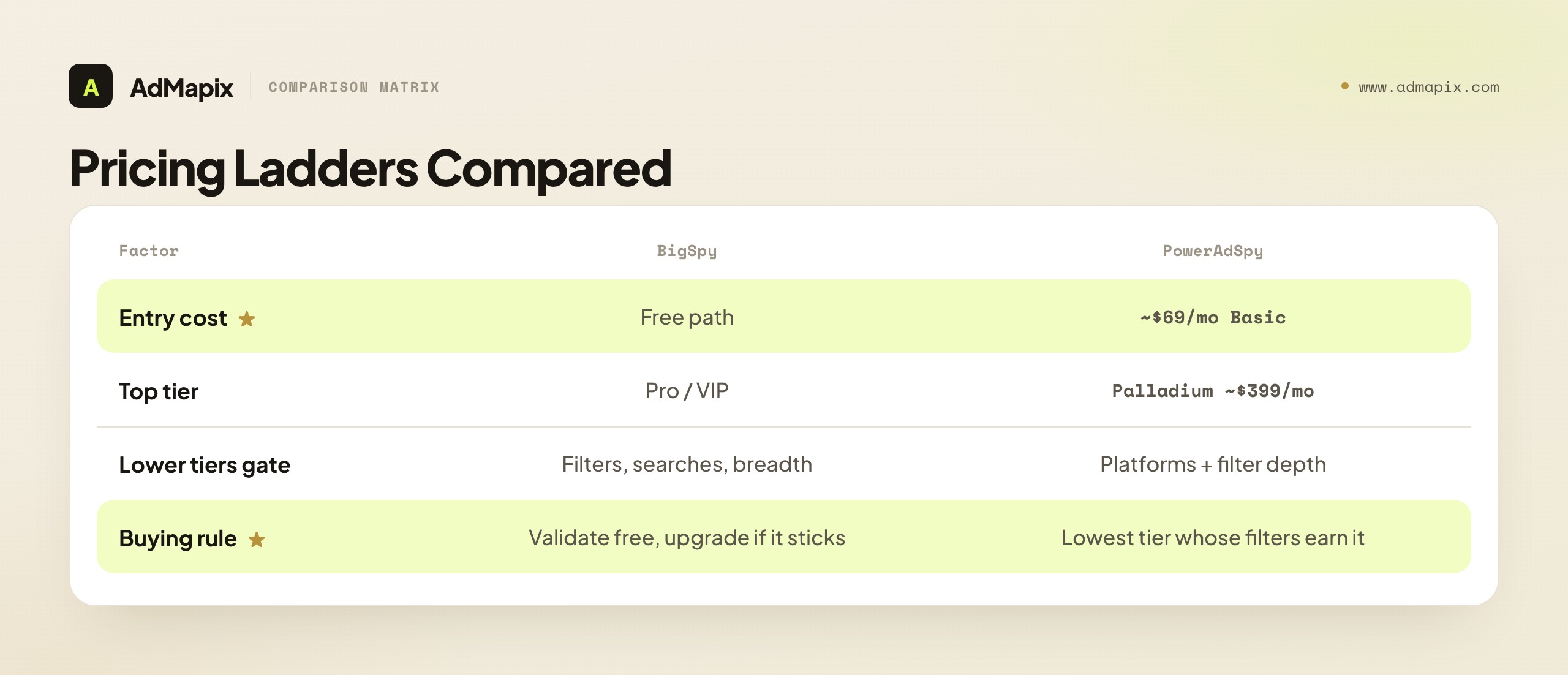
BigSpy's ladder starts at free. It offers a genuine free entry path plus paid Pro and VIP blocks, which makes its starting cost the lowest in this comparison — you can validate result quality against your real competitors before spending anything. The catch with any free or low tier is gating: the cheapest access usually limits filters, daily searches, or platform breadth. The free tier is a real validation tool, not a real workflow, so plan to upgrade if BigSpy earns a permanent place in your stack.
PowerAdSpy's ladder runs higher and wider. It lists monthly tiers from a Basic plan (around $69/month) up to a Palladium plan (around $399/month), with annual options and short paid trials. The wider range reflects its filter-and-depth positioning: lower tiers gate platforms and filters, and the upper tiers unlock the full surgical instrument. The buying rule for PowerAdSpy is strict — pay only for the lowest tier whose filters and platforms map to decisions you actually make. Buying Palladium for filters you will never touch is the most common way teams overpay in this category.
| Pricing factor | BigSpy | PowerAdSpy |
|---|---|---|
| Entry cost | Free path available | Paid from ~$69/mo (Basic) |
| Top tier | Pro / VIP blocks | Palladium ~$399/mo |
| What lower tiers gate | Filters, searches, platform breadth | Platforms and filter depth |
| Annual discount | Typically yes | Yes |
| Buying rule | Validate free first, upgrade if it sticks | Buy the lowest tier whose filters earn it |
The honest framing on cost: BigSpy wins the starting-price comparison decisively, but starting price is not total cost. If PowerAdSpy's filters save a buyer two hours a week of manual slicing, the higher price can be cheaper per decision than BigSpy's free tier that leaves the buyer scrolling. Compare cost per useful output, not cost per month — a tool that is free but never produces a brief is infinitely expensive per brief. Always verify the exact current tier and price on each vendor's own pricing page before buying; numbers in this category drift.
One more pricing nuance that catches teams out: annual commitments and tier-gating. Both tools offer annual discounts, which look attractive until you realize you committed to a tier before validating that the tool fits your weekly workflow. The safer sequence is to validate on a monthly plan (or BigSpy's free tier) for at least a few weeks, confirm the tool produces outputs you actually use, and only then switch to annual for the discount. Committing annually on day one trades a small saving for a large risk — being locked into a tool whose filters or coverage turn out not to fit your niche. Treat the first month as paid validation, not as the start of a year-long contract, and you remove most of the regret from this decision. The teams that overpay in this category almost always did so by committing to a high annual tier before running the simple side-by-side test that would have told them what they actually needed.
How to Compare Them Without Guessing
Run the same competitors through both tools before you trust either one. A feature list tells you what a tool can do; a side-by-side run on your real brands tells you what it does for you. This five-step test takes an afternoon and is worth more than any review, including this one.
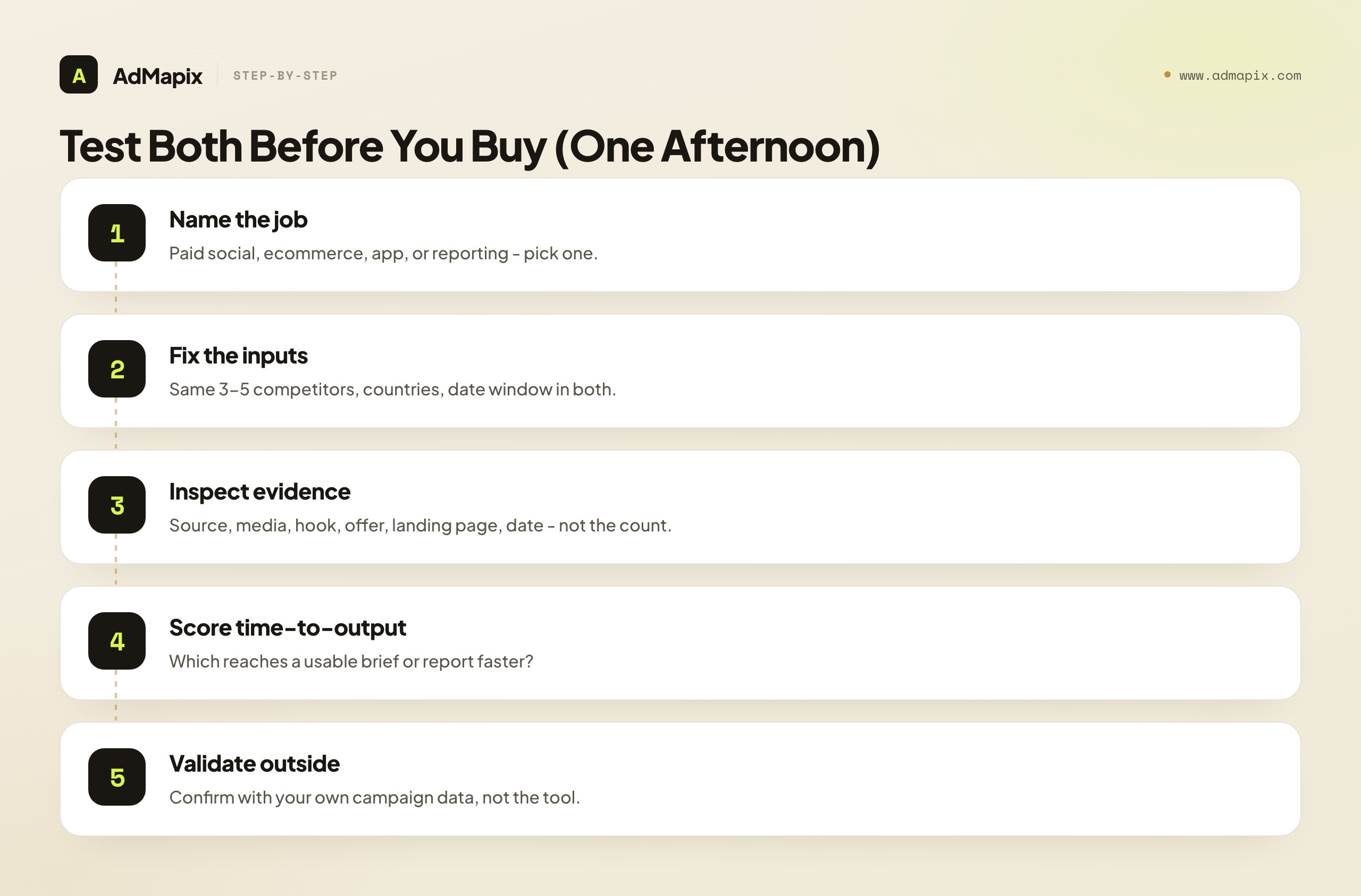
- Name the research job. Paid social, ecommerce offers, app creatives, and agency reporting are different jobs that reward different tools. Write down the one you actually do most weeks before you open either tool.
- Fix the inputs. Use the same three to five competitor brands, the same countries, and the same date window in both tools — otherwise the comparison is noise, and you will reward whichever tool you happened to search more carefully.
- Inspect the evidence, not the count. For each result, check the source ad, the media, the hook, the offer, the landing page, the country, and the date. A high ad count full of stale or irrelevant examples is worse than fewer fresh, on-target ones.
- Score time-to-output. The winner is whichever tool gets you from search to a usable brief, offer test, or report faster. Put a stopwatch on it; the feeling of "this one is nicer" is less reliable than the minutes.
- Validate outside the spy tool. Competitor evidence is a hypothesis; your own campaign data and analytics confirm whether it actually works. Neither tool closes that loop — only your test does.
The reason this test beats any spec sheet: the two tools are optimized for different jobs, so the "winner" depends entirely on your job. A trend-scanner will rightly prefer BigSpy; a filter-heavy buyer will rightly prefer PowerAdSpy; and the only way to know which one you are is to run your real brands through both and watch which produces an output you would actually hand to a colleague.
Which One Fits Your Team
Match the tool to the role, not the marketing copy. Budget-sensitive teams and filter-heavy buyers should not start in the same place, and an agency that ships client reports has a different bottleneck than a solo founder validating a niche.
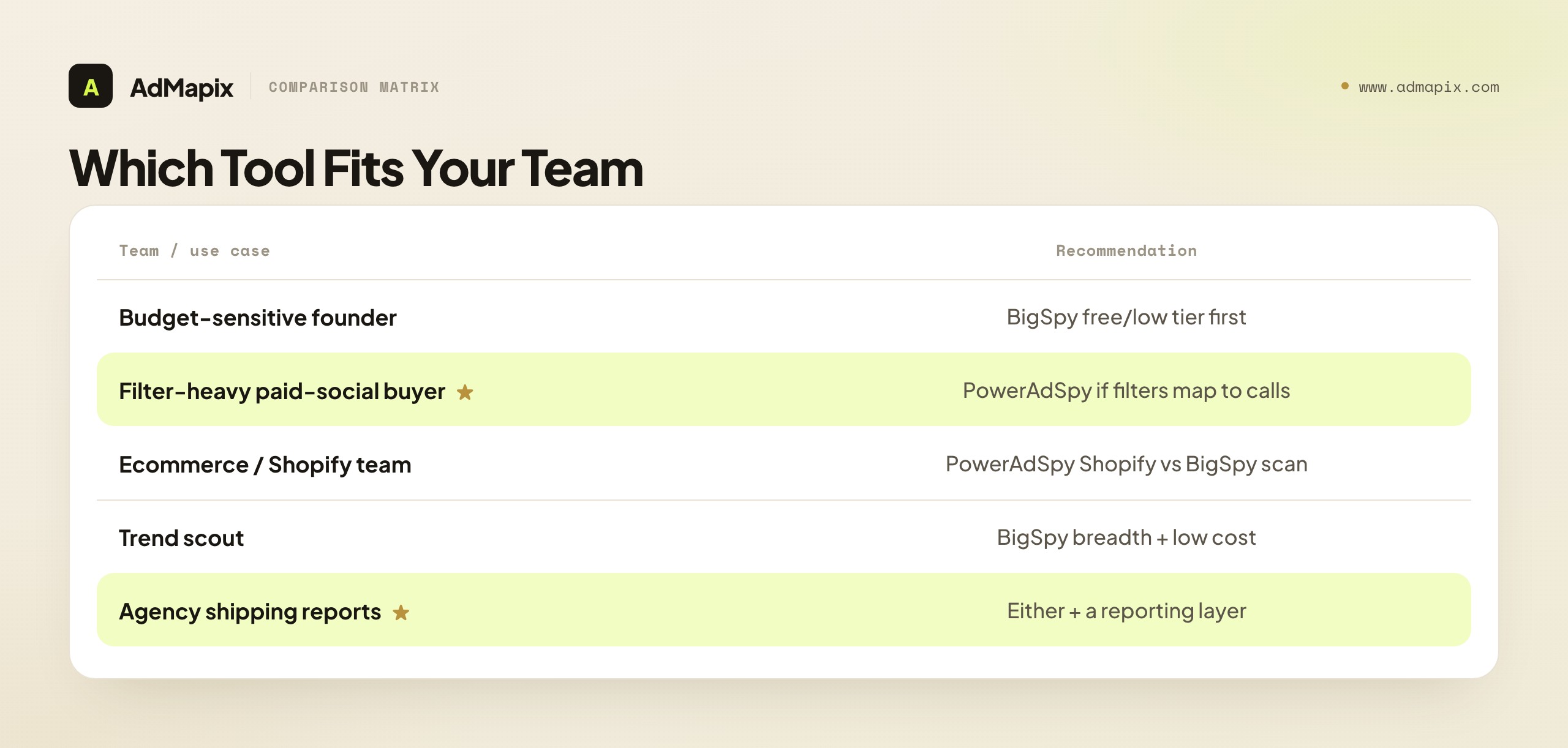
| Team or use case | Practical recommendation |
|---|---|
| Budget-sensitive marketer or founder | Start on BigSpy's free or lower tier; test result quality against real competitors before paying anything. |
| Filter-heavy paid-social buyer | Trial PowerAdSpy if CTA, domain, ad-type, age, gender, and ecommerce filters map to real campaign calls. |
| Ecommerce / Shopify team | Compare PowerAdSpy's Shopify ad research against BigSpy's broader scan on the same stores, same window. |
| App or performance team | Run identical brands and windows through both and score speed from search to brief. |
| Agency shipping client reports | Either tool for discovery, plus a reporting layer that turns saved creatives into video notes and a shareable report. |
| Trend scout watching a category | BigSpy's breadth and low cost suit broad scanning better than PowerAdSpy's surgical filters. |
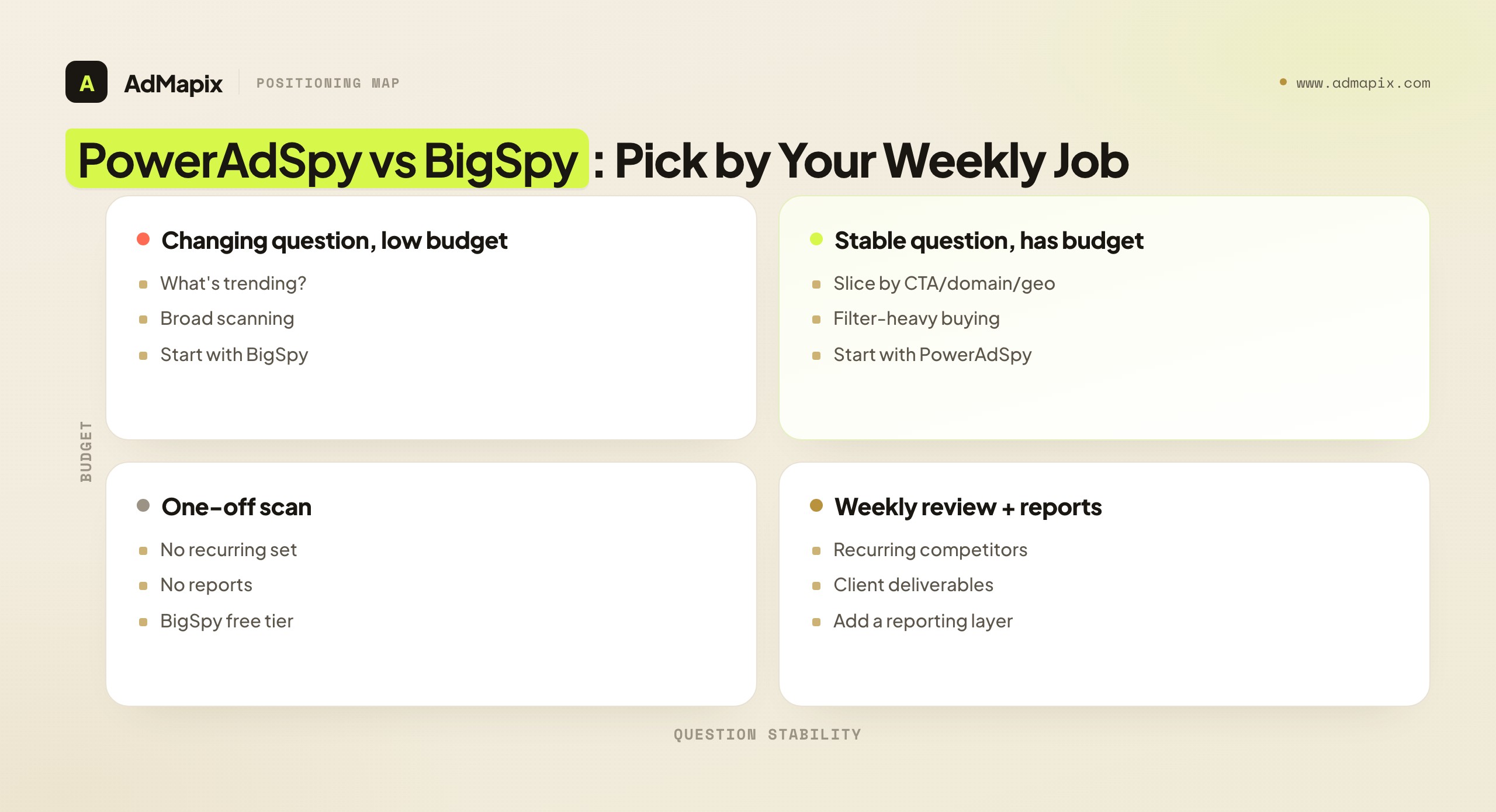
A useful way to self-diagnose: if your weekly question changes constantly ("what's trending in this category, who's new, what formats are popping"), you are a discovery user and BigSpy's wide, cheap net fits. If your weekly question is stable and specific ("show me competitor X's video ads with a checkout CTA in these three countries"), you are a precision user and PowerAdSpy's filters fit. Most teams are mostly one or the other, and knowing which you are settles the decision faster than any feature table.
It is also worth noting how this decision changes as a team grows. A solo founder or a one-person marketing team almost always starts as a discovery user — they are exploring, validating, and cost-sensitive, which points to BigSpy's free tier. As the team adds a dedicated paid-social buyer with a stable, repeatable workflow, the center of gravity shifts toward precision, and PowerAdSpy's filters start to earn their keep. And as the team adds reporting obligations — to a manager, a client, or a board — the gap that neither tool fills (turning discovery into a repeatable, shareable report) becomes the next thing to solve. The right answer is rarely permanent: it tracks where your team is in its growth, and revisiting the PowerAdSpy-vs-BigSpy question once a year as the team matures is more sensible than treating the first pick as final.
What Public Ad Data Can and Cannot Prove
Both tools show what competitors ran, not what worked. This is the single most misread point in all of ad-spy research, and it applies identically to PowerAdSpy, BigSpy, and every other tool in the category.
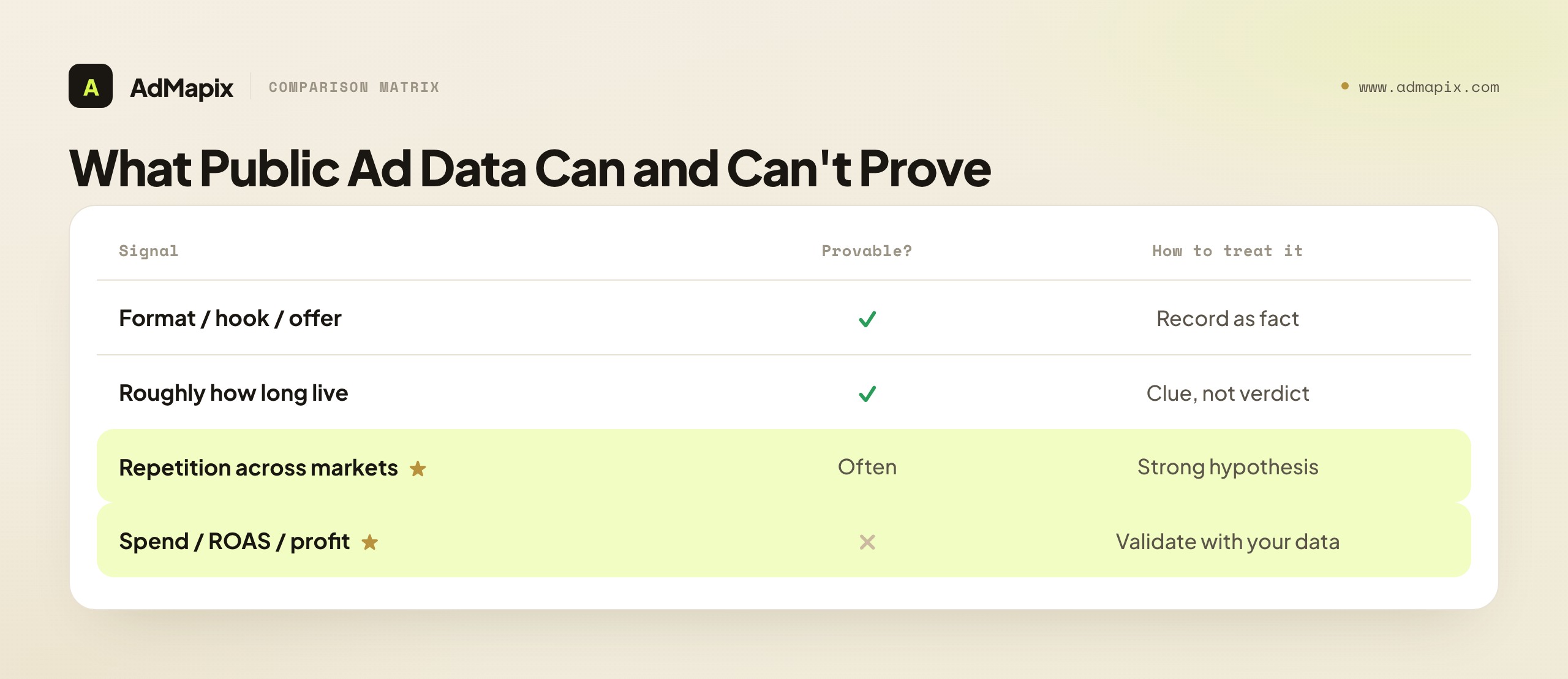
- What it can prove: which formats, hooks, offers, and angles a competitor is putting in market, and roughly how long an ad has been live. These are real, auditable facts you can build a brief on.
- What it cannot prove: spend, profit, ROAS, conversion rate, or that a long-running ad is actually profitable. Brands run losing ads, test ads, and brand ads too — visibility is not performance.
- It is a clue, not a verdict. A creative that repeats across markets and iterates over time is a strong signal worth testing — but the proof comes from your test, not the spy tool.
The honest workflow that follows from this: treat the creative, offer, format, and repetition as facts; treat "this is making them money" as a hypothesis; and validate every inference against your own store, your own margin, and your own analytics before you scale anything. Tool choice does not change this rule. PowerAdSpy's deeper filters and BigSpy's broader net both produce evidence of behavior, never evidence of profit. The team that remembers this researches well regardless of which tool it picks; the team that forgets it scales competitors' losers no matter how much it paid for filters.
Why the Landing Page Matters More Than Either Tool's Filters
Both PowerAdSpy and BigSpy surface the landing-page URL behind a competitor ad, and that link is often more valuable than any filter either tool offers — yet it is the thing buyers skip most. The creative tells you the promise; the landing page tells you how the competitor delivers it, and the delivery is usually where the real strategy lives.
When you open a competitor's landing page from either tool, study five things. First, the offer — is it a discount, a bundle, a free trial, a lead magnet? The offer often explains an ad's staying power better than the creative does. Second, the prelander or advertorial, if there is one — many ecommerce and affiliate competitors route the click through a content-style bridge page before the product, and that bridge is doing heavy persuasion work invisible from the ad alone. Third, the message match — does the landing-page headline echo the ad's promise, or does the click feel like a switch? Fourth, the proof — what credibility (reviews, ratings, guarantees) does the page lead with? Fifth, the funnel friction — how many steps from click to checkout, and is it lower-friction than yours?
This matters for the PowerAdSpy-vs-BigSpy decision in a specific way: neither tool's filter depth helps if you stop at the creative. A buyer using BigSpy's cheaper, shallower tool but who religiously studies every landing page will out-research a buyer using PowerAdSpy's expensive filters who never clicks through. The filters help you find the right ads faster; the landing-page study is where finding becomes understanding. If you are weighing the two tools, weight "how easily can I get to and study the landing page" as heavily as "how granular are the filters" — because the landing page is where most of the transferable strategy actually sits, and both tools give you the URL.
Common Mistakes When Choosing Between PowerAdSpy and BigSpy
Most regret in this decision traces back to a handful of avoidable errors.
- Buying before naming the channel. Paid social, ecommerce, app, and YouTube research need different databases and outputs; pick the tool for the job you actually run, not the one with the prettiest demo.
- Treating a long-running ad as profit proof. Longevity is a hint about staying power, not a guarantee of returns. An old ad can be a scaled winner or a forgotten loser.
- Ignoring the landing page. The offer, the prelander, and the post-click funnel often explain why an ad works more than the creative does — and both tools surface the landing URL, so there is no excuse to skip it.
- Paying for a high PowerAdSpy tier you won't use. The upper tiers only pay off if the extra filters and platforms feed real decisions. Buy the lowest tier whose filters earn their keep.
- Mistaking BigSpy's free tier for a workflow. The free tier is a validation tool. If BigSpy sticks, plan to upgrade — the free limits are designed to be outgrown.
- Skipping the handoff. Research that never becomes a brief, test, or report is just a screenshot folder. Both tools are discovery instruments; neither closes the loop to a decision on its own.
- Comparing on ad-count claims. A billion creatives means nothing if your niche is thin. Test coverage locally, on your real competitors, not on a homepage number.
When a Cross-Network Reporting Layer Helps
Once the same competitors need weekly review, a gap opens that neither PowerAdSpy nor BigSpy is built to close: turning scattered discovery into saved, searchable, reportable evidence across networks.
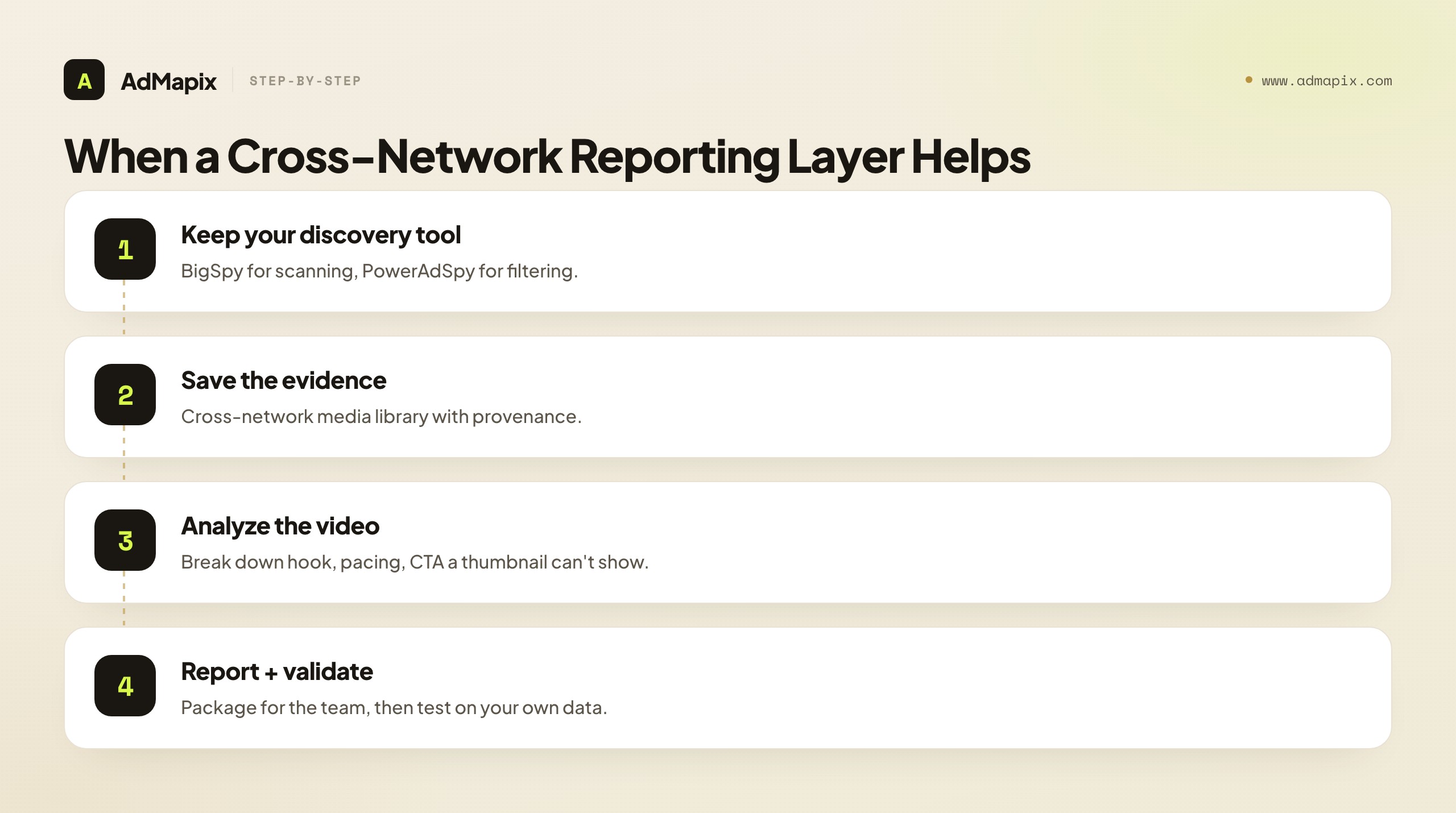
This is where a cross-network creative-intelligence layer like AdMapix fits — not as a replacement for either tool's strongest workflow, but as the piece that makes discovery repeatable. It is built for cross-network ad creative discovery with Search, a saved library of competitor examples in Media, structured Video Analysis to break down hooks and pacing that a static thumbnail cannot show, and Reports that package findings for clients or stakeholders. A practical stack is to keep BigSpy or PowerAdSpy for its strongest workflow — BigSpy for cheap broad scanning, PowerAdSpy for filter-heavy slicing — and layer AdMapix where weekly review and reporting live. Compare access on Pricing once the workflow repeats.
It is honestly not for you if you only need a quick one-off creative scan, have no recurring competitor set, and never produce briefs or reports — in that case BigSpy's free tier alone is enough, and adding anything is overkill. AdMapix earns its place specifically when the same competitors need reviewing every week and the findings have to travel to a team. If that is your situation, run them once in Search, keep the evidence in Media, and create an account from Login.
The broader point about a reporting layer is that it changes what a spy tool is for. PowerAdSpy and BigSpy answer "what are competitors running?" A reporting layer answers "what did we learn, and what are we doing about it?" Those are different questions, and a team that only ever answers the first one accumulates screenshots; a team that answers the second builds a competitive-intelligence habit that compounds. The discovery tool is the front of that pipeline and the reporting layer is the back, and choosing PowerAdSpy vs BigSpy settles only the front. If your competitor research keeps stalling at "we found some interesting ads" and never reaches "so we tested X and it worked," the missing piece is almost never a deeper database — it is the back of the pipeline, where evidence becomes a decision.
For the broader landscape beyond these two tools, our guide to the best ad spy tools of 2026 compares the whole field by price, coverage, and use case. If you have decided BigSpy is not deep enough, the BigSpy alternatives guide covers the migration paths, and the three-way AdSpy vs BigSpy vs AdMapix breakdown adds a Meta-depth specialist to the comparison. If PowerAdSpy is the one you are unsure about, PowerAdSpy alternatives covers what else fits its filter-heavy niche.
FAQ
Is BigSpy better than PowerAdSpy?
Neither is universally better — they are optimized for different jobs. BigSpy wins for broad, low-friction creative discovery and budget-sensitive scanning, with a free entry tier. PowerAdSpy wins when its CTA, domain, ad-type, age, gender, and ecommerce filters match your exact paid-social workflow. Decide by the job you do most weeks, not by the brand or the headline ad count.
Which one is cheaper, PowerAdSpy or BigSpy?
BigSpy is cheaper to start: it offers a free entry path and a visible Free / Pro / VIP ladder, so its starting cost is the lowest. PowerAdSpy lists paid monthly tiers from a Basic plan (around $69/month) up to Palladium (around $399/month), checked June 2026. Compare the specific tier you actually need, not the headline price, and weigh cost per useful output rather than cost per month.
Can PowerAdSpy or BigSpy show competitor ad spend or ROAS?
No. Both surface the creatives competitors ran — formats, hooks, offers, and roughly how long an ad has been live — not their spend, profit, conversion rate, or return. A long-running ad suggests staying power but never proves it pays. Treat all of it as a hypothesis and validate with your own campaign results before scaling.
What is the main difference between PowerAdSpy and BigSpy?
Filter depth versus breadth. PowerAdSpy is a precision instrument built around granular paid-social filters (CTA, domain, ad type, age, gender, ecommerce signals) for buyers who slice their results by attribute. BigSpy is a wide, cheap, multi-platform net built for fast discovery and trend scanning. PowerAdSpy is a zoom lens; BigSpy is a wide-angle lens.
Which is better for ecommerce or Shopify ad research?
PowerAdSpy markets Shopify-oriented ecommerce ad research and CTA/domain filters that suit store-level competitor analysis, so it is often the better fit for filter-heavy ecommerce work. But test it against BigSpy's broader scan on the same stores and date window — if BigSpy returns fresh, relevant ads for your exact niche, its lower cost may win. Coverage is local, so check yours.
How do I test both tools before buying?
Run the same three to five competitors, the same countries, and the same date range in each. Then score result freshness, relevance, saved-evidence quality, and how fast you reach a usable brief. Time-to-output beats raw ad counts — the tool that gets you to a hand-off-ready output fastest is the one to keep, regardless of which has the bigger database.
Is BigSpy's free tier enough on its own?
For a quick one-off scan with no recurring competitor set and no briefs or reports to produce, yes — BigSpy's free tier alone can be enough. It is a genuine validation tool. But the free limits on filters, searches, and platform breadth are designed to be outgrown, so if BigSpy becomes part of your weekly workflow, plan to upgrade.
Does a higher PowerAdSpy tier guarantee better research?
No. Higher tiers unlock more platforms and filters, but they only improve your research if those extra filters feed decisions you actually make. Buying Palladium for filters you never touch is the most common way teams overpay in this category. Buy the lowest tier whose filters and platforms map to real campaign calls.
Where does a tool like AdMapix fit alongside PowerAdSpy or BigSpy?
A cross-network layer like AdMapix fits when research has to become repeatable evidence: cross-network creative search, a saved media library, video analysis of hooks and pacing, and client-ready reports. Keep BigSpy or PowerAdSpy for discovery, and add a reporting layer for weekly competitor review. It is not needed for one-off scans, and it does not claim to reveal the spend or ROAS that no public tool can show.
Should I run both PowerAdSpy and BigSpy at once?
Usually not, at least not at first. Most teams are predominantly either discovery users (BigSpy) or precision users (PowerAdSpy), and running both doubles cost for overlapping value. Pick the one that fits your dominant weekly job, validate it on real competitors, and only add the second if a specific recurring gap justifies it.
Key Takeaways
- Start with BigSpy for broad, low-cost discovery; reach for PowerAdSpy when filter depth drives decisions. It is a wide-angle-versus-zoom choice, not a bigger-database choice.
- Compare both by running identical competitors, countries, and date windows — never by ad-count claims. Coverage is local, so test it on your real niche.
- Public ad data shows what ran, not what was profitable. Validate every competitor signal with your own tests before scaling.
- Buy the lowest PowerAdSpy tier whose filters earn their keep, and treat BigSpy's free tier as validation, not a workflow. Compare cost per useful output, not per month.
- Add a cross-network reporting layer when discovery has to become saved evidence, video analysis, and recurring reports — the gap both tools leave once research turns into a weekly deliverable.
Authoritative Sources
- PowerAdSpy features — social ad analytics, keyword/domain search, video and image ads, geo-targeting, CTA sorting, and Shopify ad research (as checked June 2026).
- PowerAdSpy pricing — monthly tiers from Basic (
$69/month) up to Palladium ($399/month), plus annual pricing and short paid trials (as checked June 2026). - BigSpy — describes itself as a free ad spy tool with multi-platform coverage, a billion-plus creatives, 71 countries, 23 languages, and a visible Free / Pro / VIP pricing ladder (as checked June 2026).
Sources verified as of June 21, 2026. Ad spy tools change tier names, limits, and prices often; confirm the current plan on each vendor's own pricing page before buying. Disclosure: AdMapix is our product. We separate its capabilities (cross-network creative search, saved media, video analysis, tagging, and reports) from claims sourced to each vendor's own pages.
See what competitors are really running
Search 6M+ ad creatives, landing pages, and weekly spend across 200+ countries. No credit card, no commitment.
Related Articles
Semrush Ad Intelligence Alternative in 2026: PPC Research or Creative Evidence?
A 2026 decision framework for choosing a Semrush ad intelligence alternative — when PPC keyword and spend research wins, when competitor creative and video evidence wins, how AdClarity fits, a fair-trial method, and how to build a two-layer stack.
Moat Alternative in 2026: Ad Verification vs. Creative Intelligence
A complete 2026 buyer's guide to choosing a Moat alternative — why teams look past Oracle Moat, what Moat actually does (viewability, invalid traffic, brand safety), the critical split between the ad-verification layer and the creative-intelligence layer, a layered comparison across coverage and fit, who should choose which, a practical migration plan, the honest limits of public creative data, and where a creative-research tool like AdMapix fits.
Pathmatics Alternative in 2026: Ad Spend Intelligence vs. Creative Workflow
A complete 2026 buyer's guide to choosing a Pathmatics alternative — why teams look past Pathmatics (now Sensor Tower), what it actually measures, a layered comparison of spend-intelligence suites versus creative-workflow tools across coverage, data type, price, and fit, who should choose which, a practical migration plan, the honest limits of estimated spend, and where a lighter cross-network creative tool like AdMapix fits.