AdPlexity Native Alternative in 2026: How to Compare Native Ad Spy Workflows
A 2026 decision guide to replacing or supplementing AdPlexity Native — the four jobs a real native ad spy alternative must cover, the criteria that actually separate tools (coverage depth, advertorial and prelander teardown, offer context, reporting friction), a workflow that fits any native tool, the honest limits of native ad data, and where a like-for-like native specialist versus a cross-network creative layer each fit.
By the AdMapix Research Team — Updated June 21, 2026
AdPlexity Native Alternative in 2026: How to Compare Native Ad Spy Workflows
You look for an AdPlexity Native alternative when native ads are no longer the only research job, when product-specific pricing feels heavy for how often you use the native module, or when native findings have to connect with paid-social videos, app creatives, and client-ready reports. AdPlexity Native is a specialist native ad-intelligence product inside the wider AdPlexity suite, and it is genuinely strong at what it does — so the honest question is rarely "what beats it" but "which specific native job is it not doing for me, and what is the right-sized tool for that." This 2026 guide is for native ad buyers, affiliate marketers, content-arbitrage teams, performance agencies, and creative strategists. After reading it you can decide whether to keep a native specialist, swap it for a like-for-like alternative, or pair it with a broader cross-network tool — based on the next weekly decision you have to make, not on which product has the longest feature list. Pricing, product names, and limits change often, so treat the framework below as the decision logic and verify the exact plan before you buy.
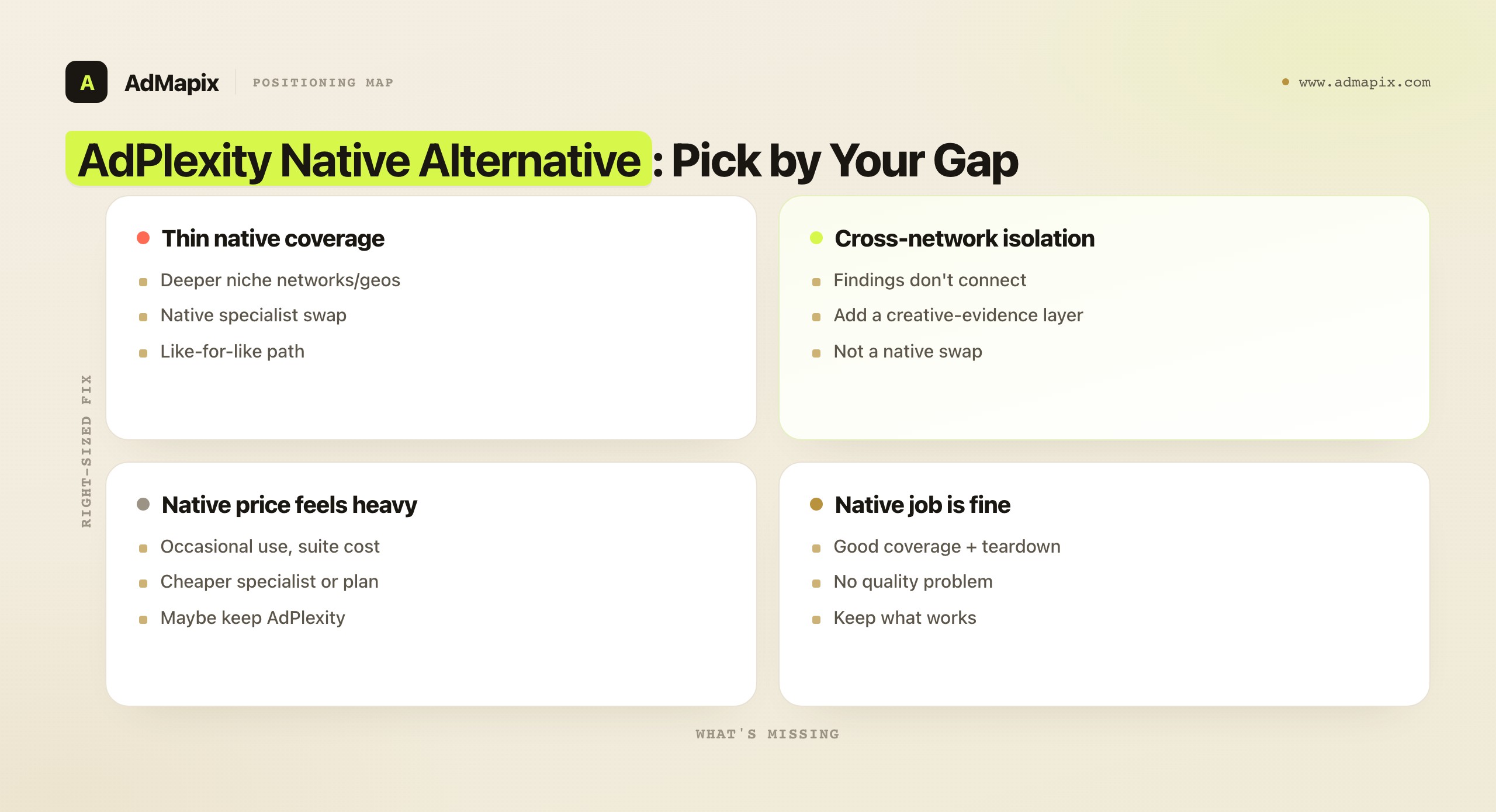
TL;DR — Choosing an AdPlexity Native Alternative
- The best AdPlexity Native alternative depends on your missing layer. Deeper or cheaper native coverage points one way; a cross-network creative-evidence and reporting workflow points somewhere completely different.
- For native-only research, a native specialist is the most direct like-for-like swap — the kind of tool that covers native networks, an advertorial and landing-page teardown, and competitor alerts, the way AdPlexity Native does.
- For teams whose native findings have to feed paid-social, app, and ecommerce decisions, a cross-network layer such as AdMapix solves the second job — not a like-for-like native spy replacement.
- A real alternative must cover the four native jobs — network and geo coverage in your niche, advertorial and prelander teardown, offer and advertiser context, and a path to a brief or report — or it is not a replacement, just a lookalike.
- Native ad data proves what is running, not what is profitable. Treat every offer and funnel as a hypothesis to validate with your own traffic and conversion data.
- Judge any alternative by one question: does it improve your next weekly native decision — not which product has the longest feature list or the largest database.
What Native Researchers Actually Need
Most teams searching for an AdPlexity Native alternative are not chasing a bigger screenshot folder. Native research is specific, and its value lives in seeing the full path from ad to advertorial to offer, not just the thumbnail. AdPlexity Native is a specialist native ad-intelligence product inside the wider AdPlexity suite — which sells separate products for native, desktop, mobile, push, and YouTube — and a real alternative has to cover the same core native jobs or it is not really a replacement.
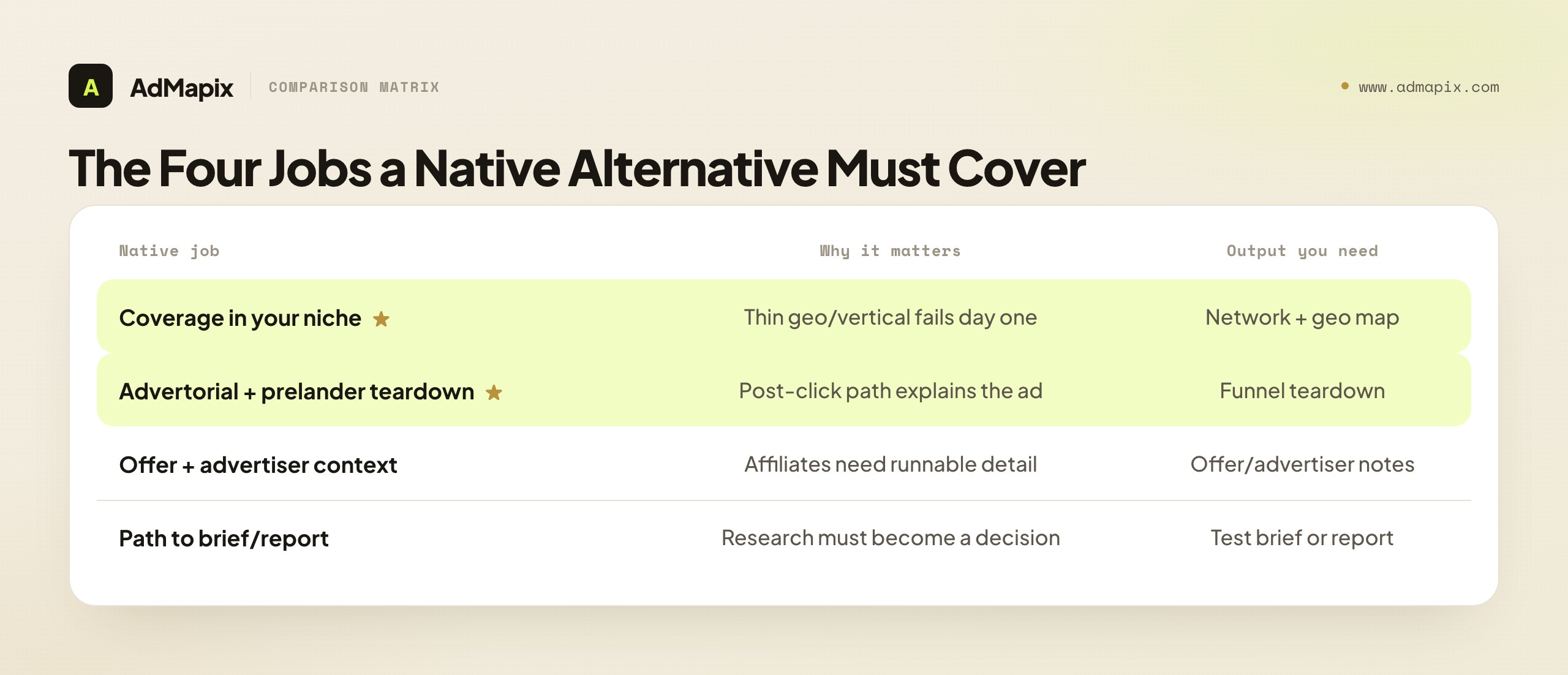
There are four jobs a native researcher actually needs done, and they are worth stating precisely because the tool that does three of them well and the fourth badly is the tool you will quietly resent six weeks in.
| Question the team needs answered | Why it matters | Output you should get |
|---|---|---|
| Which native networks and countries return ads in my niche? | Coverage gaps make a tool useless for a specific vertical | A network and geo map for your niche |
| Can I inspect the advertorial, prelander, and redirect chain? | The post-click path usually explains why a native ad works | A landing-page and funnel teardown |
| Who is the advertiser and what offer is behind it? | Affiliates need offer, tracking domain, and network context | Offer and advertiser notes |
| How do I turn this into a brief or report? | Research only pays off when it becomes a decision | A test brief or client report |
The order matters. Coverage in your specific niche is the gating job — a tool thin in your geo or vertical fails on day one no matter how good its other features are. The advertorial and prelander teardown is the job that separates native research from generic ad spy, because a native creative almost never makes sense without the funnel behind it: the "recommended for you" thumbnail is bait, and the advertorial is where the actual selling happens. Offer and advertiser context is what turns "interesting ad" into "a campaign I could run," and the path to a brief or report is what turns a research session into a decision rather than a folder of saves. Any alternative you consider should be scored against all four, weighted by which one is your real bottleneck.
It helps to understand why native is structurally different from other ad channels, because that difference is what makes the four jobs non-negotiable. In paid social, the creative carries most of the persuasion — the video or image is the pitch, and you can often judge an ad from the creative alone. Native inverts this. The native ad unit is deliberately small and editorial-looking; its entire purpose is to not look like an ad, so it can earn a click from someone reading an article. That means the creative itself is intentionally low-information. The persuasion is deferred to the advertorial — the long-form "story" page the click leads to — and then to the prelander that warms the visitor before the offer. A native ad spy tool that only shows the ad unit is showing you the part of the funnel that was designed to reveal the least. This is why "can I see the post-click path" is not a nice-to-have in native; it is the difference between seeing the bait and seeing the mechanism. Any alternative that cannot follow the click is, by the nature of the channel, only doing a fraction of the job.
There is also a reason native research rewards specialist depth more than some other channels do, and it is worth naming because it shapes whether a like-for-like swap or a generalist tool is right for you. Native networks are fragmented — there are many of them, each with its own inventory, its own advertiser base, and its own quirks of geo and vertical coverage. A tool's value in native is therefore highly local: it is excellent if it happens to be deep in the three networks and two countries you run, and nearly useless if it is thin there, regardless of its global ad count. This locality is why database-size claims mislead so badly in native specifically, and why the coverage test against your own niche matters more here than in a channel with a few dominant platforms. When you weigh an alternative, you are not really asking "is this a good native tool" — you are asking "is this a good native tool for my exact networks and geos," and those can be very different answers.
Comparison Criteria That Actually Separate Tools
The criteria that separate a real AdPlexity Native alternative from a lookalike are coverage depth, landing-page access, offer context, cross-network creative context, and reporting friction. Database size is the least useful number, because a million ads in networks you never run on is noise — and the headline "biggest database" claim is exactly the kind of marketing metric that sounds decisive and decides nothing.
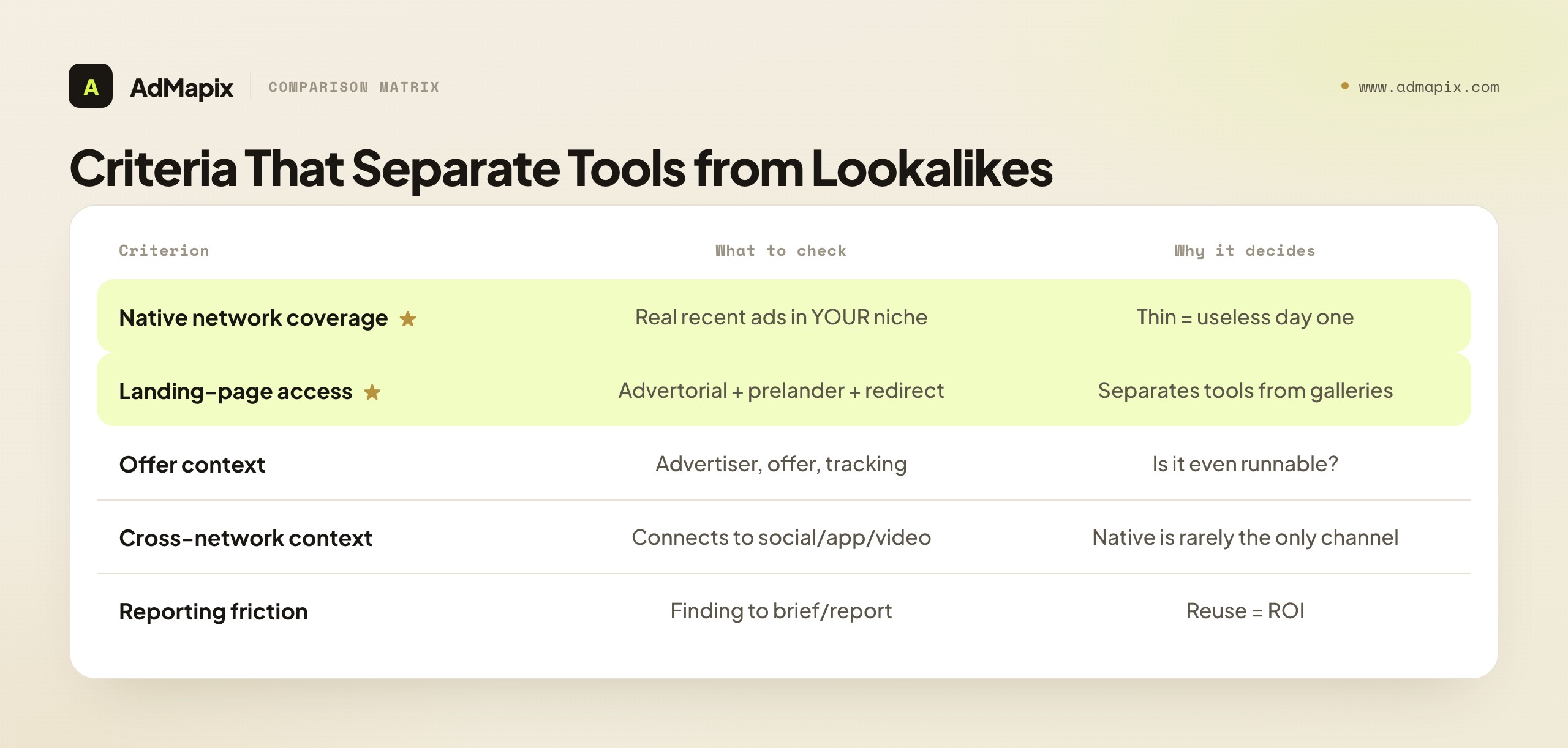
| Criterion | What to check | Why it decides the choice |
|---|---|---|
| Native network coverage | Which native networks, countries, and verticals actually return ads for your niche | A tool thin in your geo or vertical fails on day one |
| Landing-page access | Whether you can inspect advertorials, prelanders, and redirect chains | Native creatives rarely make sense without the funnel behind them |
| Offer context | Advertiser, offer, tracking domain, and network context | Affiliates need to know what they would actually be running |
| Cross-network creative context | Whether native findings connect to paid-social, app, or video creative | Native is rarely the only channel a modern team works |
| Reporting friction | How hard it is to turn a finding into a brief or shareable report | Research that cannot be reused does not pay off |
Walk through how to actually use these criteria, because a table is only useful if you run it against your own situation. Start with native network coverage and make it concrete: do not ask "how many networks does it claim," ask "does it return real, recent ads for the three native networks and two countries I actually run on." Run that test in a trial before anything else, because it is the one criterion that can disqualify a tool outright. A tool can be excellent on every other axis and still be useless to you if it is thin in your vertical — and no amount of feature depth compensates for not having the ads you need to see.
Landing-page access is the criterion that most separates a serious native tool from a generic ad gallery. The reason is structural: in native, the creative is deliberately understated — it has to blend into editorial content to earn the click — so the persuasion happens after the click, in the advertorial and prelander. A tool that shows you the thumbnail but cannot reveal the advertorial, the prelander, and the redirect chain is showing you the least informative part of the funnel. When you evaluate an alternative, the single sharpest question is "can I see the full post-click path," because that path is where the actual reason a native ad works becomes visible.
Offer context, cross-network context, and reporting friction are the criteria that decide fit rather than viability. Offer context matters most to affiliates who need to know the advertiser, offer, and tracking setup before they can judge whether a campaign is even runnable for them. Cross-network context matters to teams whose native work has to connect with paid-social and app creative — increasingly common, since few modern teams live in native alone. Reporting friction matters to anyone whose research has to survive a meeting or reach a client. Score each alternative on all five, weight by your real bottleneck, and the right-sized choice usually becomes obvious — far more reliably than by comparing database-size claims.
A practical way to apply this is to give each criterion a weight before you trial anything, based on which job is actually failing you today. If your current pain is "I can't find ads in my vertical," weight coverage at the top and treat everything else as secondary — a tool that fixes coverage and is merely adequate elsewhere beats one that is brilliant elsewhere and still thin in your niche. If your pain is "I see the ads but can't understand why they work," weight teardown highest, because that is the criterion that converts a visible ad into a usable insight. If your pain is "my team can't reuse what I find," weight reporting friction highest, and seriously consider that the fix may not be a native tool at all but a cross-network layer. The discipline of weighting before trialling stops you from being seduced by a tool's most-demoed feature, which is rarely the feature that solves your actual bottleneck. Vendors lead with what is impressive; you should buy on what is missing.
One more note on the cross-network criterion, because it is the one buyers most often discover too late. A native specialist treats native as the world. That is correct for a pure native affiliate, but most teams that think they are pure-native are actually running native alongside Meta, TikTok, or app-install creative, and the value of their research multiplies when those views connect. The question to ask honestly in a trial is not "does this tool do native well" but "when I find a winning native angle, can I see whether the same advertiser is running a related angle on paid social, and can I package both into one view for my team." If the answer is no and that connection matters to your work, you have learned something important: your gap is not native depth, and a like-for-like native swap will leave it unsolved. Catching this in a trial, before you commit, is worth more than any feature on the comparison grid.
The Like-for-Like Path: A Native Specialist
If your missing layer is simply deeper, cheaper, or different native coverage — and native really is the job — then the right alternative is another native specialist, not a broad platform. A native specialist is a tool built around the same four native jobs AdPlexity Native does: native-network coverage across countries and verticals, an advertorial and landing-page teardown (often including a ripper to download and study prelanders), offer and advertiser context, and competitor alerts to catch new angles early. The reason to stay in the specialist lane is that native research rewards depth on a narrow surface, and a generalist platform spreading its attention across many channels rarely matches a native specialist on the post-click teardown that defines the job.
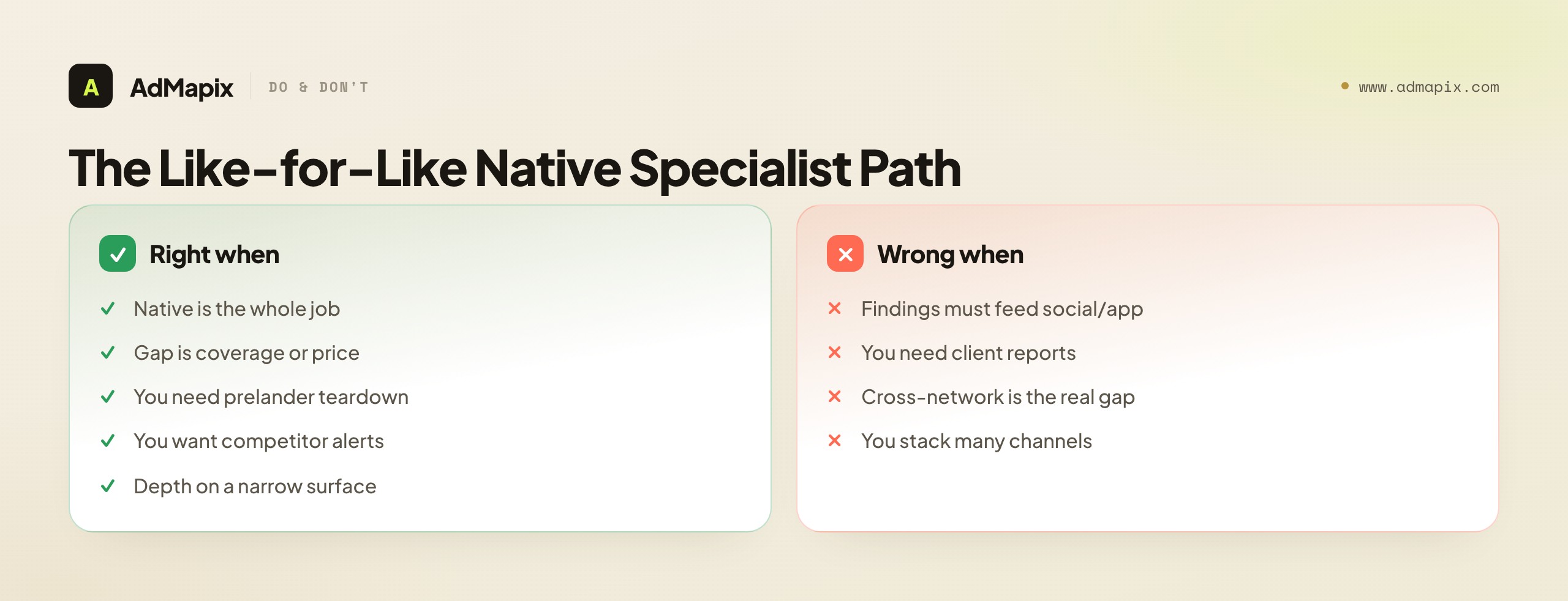
The honest way to choose between native specialists is to run them against the four jobs with your own niche. Coverage: do they return recent ads for your networks and geos? Teardown: can you actually inspect the advertorial and prelander, and ideally rip and study the funnel? Offer context: do they surface the advertiser and offer detail an affiliate needs? Alerts: can you track competitors so you catch fresh angles before they saturate? A specialist that wins on coverage and teardown for your vertical is the right like-for-like swap, even if it loses on some feature you will never use. The mistake is choosing the specialist with the longest feature list rather than the one that is deepest where you actually work.
A native specialist is the right answer when native is genuinely your whole job and the gap you feel is within native — a different network mix, a better ripper, a price that fits how often you use it. It is the wrong answer when the real gap is that your native findings have to connect to paid-social videos, app creatives, or client reports, because no native specialist is built to be the system of record for cross-network creative evidence. Naming the gap correctly is what keeps you from swapping one native specialist for another and discovering the actual problem was never native depth at all.
There is a practical hazard in the like-for-like swap that deserves a warning: two native specialists can look nearly identical on a feature list and differ enormously in the one place that matters — coverage of your exact networks and geos. Because native is fragmented and value is local, a specialist that is a perfect like-for-like on paper can return half the relevant ads in your vertical that your current tool does, simply because its inventory is concentrated in different networks. This is invisible on a comparison page and obvious within ten minutes of a trial. So the entire like-for-like decision should hinge on a side-by-side coverage trial, not on matching feature checkboxes. Run the same niche searches in both tools, count the recent, relevant ads each returns, and check whether the post-click teardown works on those ads. The specialist that wins that concrete test is the right swap, even if it loses on some secondary feature; the one that loses it is the wrong swap, no matter how good its feature list reads.
It is also worth being clear about what "a better ripper" actually buys you, because the prelander teardown is the feature most likely to vary in quality between specialists. A ripper that produces a clean, editable copy of an advertorial or prelander saves hours of rebuilding and lets you study the funnel's structure — the headline, the story arc, the proof elements, the transition to the offer — in a form you can adapt for your own traffic and compliance needs. A ripper that produces a broken or unusable copy gives you a screenshot's worth of value with a download's worth of friction. When teardown quality is your reason for switching, test the ripper on a real, complex advertorial in your niche during the trial, not on a simple demo page — the difference between specialists shows up on the messy real pages, not the clean examples vendors showcase.
When the Gap Is Cross-Network, Not Native Depth
Many teams who think they need an AdPlexity Native alternative actually have a different problem: their native research is fine, but it dies in isolation. The native finding never connects to the paid-social video the brand is also running, the app creative the product team is testing, or the client report that has to tie it all together. When that is the real gap, swapping native specialists solves nothing, because the missing layer is not native depth — it is cross-network creative evidence and reporting.
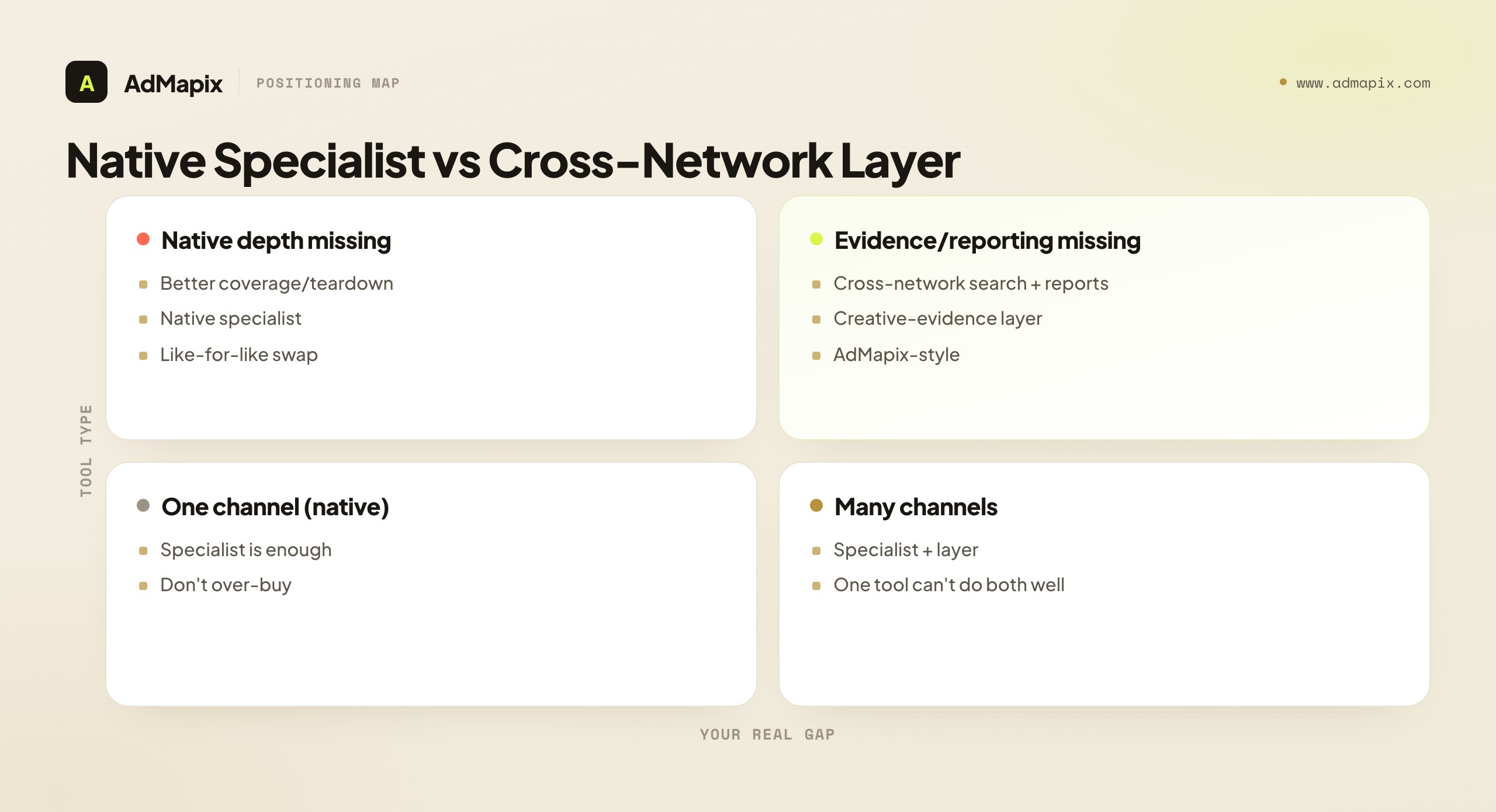
This is where a cross-network creative-evidence layer like AdMapix fits — not as a like-for-like native spy replacement, but as the second job a native specialist was never built to do. It is built for teams that need to search ad creatives across networks with Search, save the media in Media, break down video structure and hooks with Video Analysis — the first three seconds, the proof, the CTA that a static native thumbnail cannot show — tag what they find, and turn it into a Report. The clearest way to see where it sits: a native specialist answers "which native funnel should I study and test?", and a cross-network layer answers "how does this fit with everything else we are seeing across networks, and what do we tell the team or client?" Those are two different jobs, and a team that works across channels usually needs both.
A practical stack, then, is not "replace AdPlexity Native" but "keep a native specialist for the native job and add a cross-network layer for the reporting-and-evidence job." Keep the specialist for advertorial teardown and offer context; add the cross-network layer where native findings join paid-social and app creative and become a shareable report. Compare access on Pricing once the workflow repeats, or log in to run your first cross-network search. It is honestly not the right tool if all you need is deeper native-network coverage and a prelander ripper — a native specialist covers that better — so name the gap before you buy: native depth points to a specialist, cross-network evidence-and-reporting points to a layer like AdMapix, and many teams that work across channels end up wanting one of each.
The clearest signal that your gap is cross-network rather than native is a specific recurring frustration: you keep finding good native angles, but they never go anywhere. The native finding sits in a folder, the paid-social finding sits in a different folder, and when it is time to brief production or update a client, you are stitching screenshots together by hand and losing the context of why each one mattered. That stitching tax is the symptom of a missing cross-network layer, and it is invisible if you only look at native tools, because no native tool can fix a problem that lives in the gaps between channels. If you recognize that frustration, a better native specialist will not relieve it — it will just give you a fuller folder of native screenshots to stitch. The relief comes from a layer whose whole job is to hold native, social, and app evidence in one searchable place and turn it into a report, which is a different job from native research and is why it is a different tool.
To make this concrete: imagine you find a native advertorial pushing a supplement offer, and you suspect the same advertiser is running video creative on paid social. With a native specialist alone, you confirm the native side and then go hunting separately for the social side, in a different tool or by hand, and you keep the two findings in two places. With a cross-network layer, you search the advertiser across networks, see the native and the paid-social creative side by side, break down the video's hook and structure, and save both into one tagged, reportable view. The native specialist did its job — it found and tore down the native funnel — but the cross-network layer did the job the specialist was never built for: connecting the native evidence to everything else and making it shareable. That is the division of labor, and it is why "add a layer" so often beats "swap specialists" for teams whose work spans channels.
A Workflow That Works With Any Native Tool
The fastest path from a native ad to a decision is the same regardless of which tool you end up choosing. Name the decision first, then collect evidence against it — a tool only helps if you can state the next action it should inform.
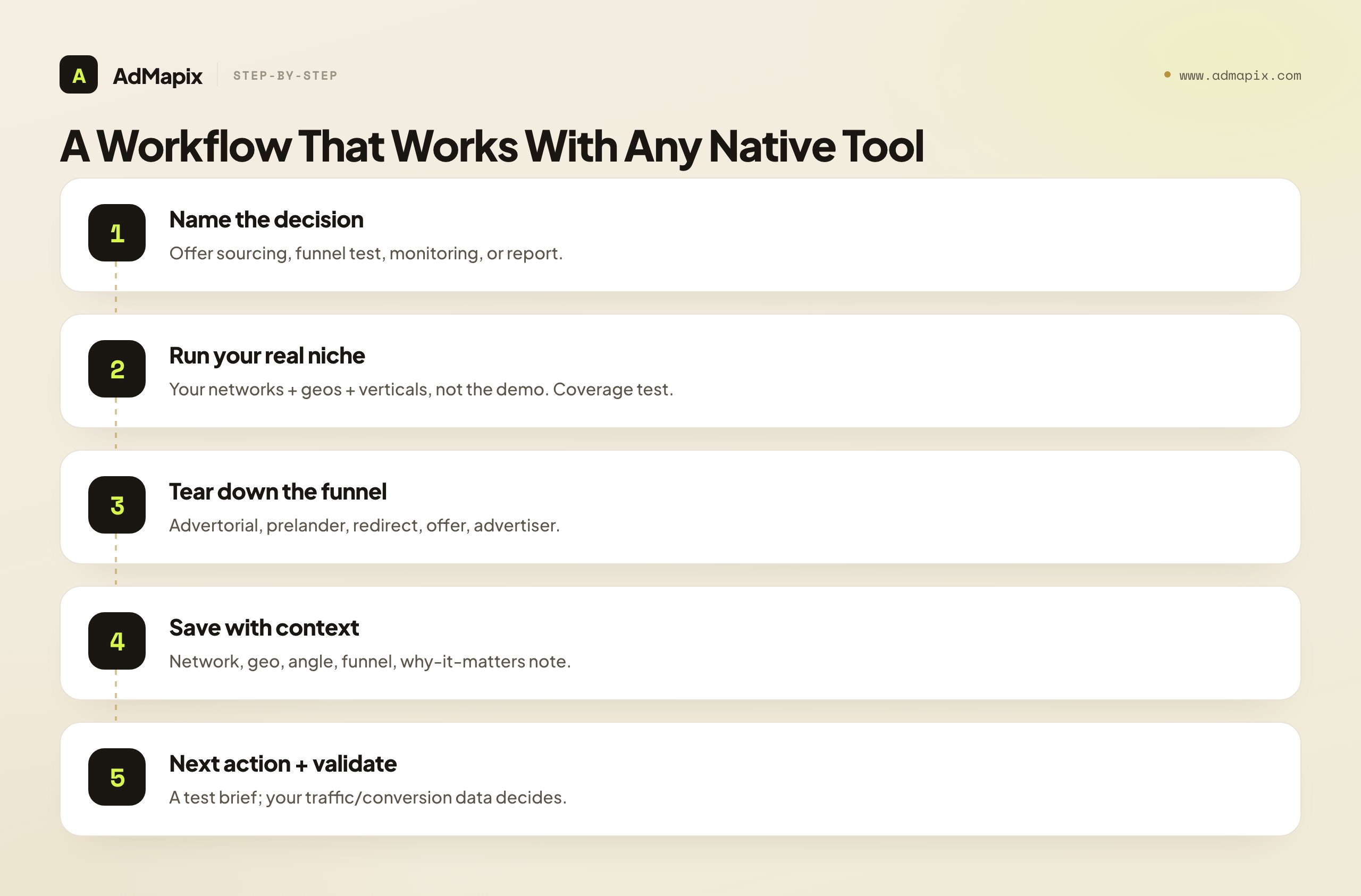
- Name the decision. Offer sourcing, funnel testing, competitor monitoring, or client reporting are different jobs that need different searches. Write down which one you are doing before you open any tool.
- Run your real niche, not a demo. Search the native networks and countries you actually run on, for the verticals you actually work — not the tool's showcase examples. This is also your coverage test.
- Tear down the full funnel. For each promising ad, capture the advertorial, the prelander, the redirect chain, the offer, and the advertiser. The post-click path, not the thumbnail, is where the insight lives.
- Save evidence with context. Keep the network, the geo, the angle, the funnel, and a one-line note on why it matters. Provenance is what makes the evidence comparable next week.
- Write the next action and validate externally. Every saved funnel should become a test brief, not a screenshot — and your own traffic and conversion data, not the tool, decide whether it actually works.
The discipline is in steps 3 through 5. Anyone can search and browse native ads; the affiliates and teams who win are the ones who tear down the full funnel, save with context, force each finding to produce a next action, and validate against their own performance before scaling. Do that with any native tool and the research compounds; skip it and even the best native database produces a folder of thumbnails nobody reopens.
Provenance — step 4 — matters more than it looks, and it is the step most people skip. A ripped native funnel with no note on the network, geo, and angle is just a folder of HTML you will not remember the point of in three weeks. The one-line note that captures where the evidence came from and why it mattered is what turns a pile of saves into a dataset you can sort, compare, and act on. It costs about ten seconds per save and rescues the entire month of research. Step 5 — the next action plus external validation — is where the workflow earns its keep, because nothing in any native tool proves a funnel converts for your traffic. The tool shows the funnel is running; your own numbers decide whether it works. Teams that respect that boundary test fast and scale winners; teams that skip it scale funnels that were never profitable and blame the tool.
The teardown discipline in step 3 deserves a closer look, because it is where native research most often goes shallow. The temptation is to glance at the advertorial, recognize the angle, and move on — "ah, it's a curiosity-gap health story, got it." But the angle is the least transferable part; the structure is what converts. When you tear down a native funnel properly, you are noting the specific sequence: what the headline promises, how the opening paragraph hooks, where the proof elements land, how the story transitions from problem to product, what objection it preempts before the call to action, and what the offer page does to close. That structural map is what you actually adapt for your own traffic, and it is invisible if you only capture the angle. A folder of "health curiosity-gap" labels teaches you nothing you did not already know; a folder of structural teardowns teaches you how winning native funnels are built, which compounds into better funnels of your own. The tool that lets you do this teardown well is doing the defining native job; the one that lets you only screenshot the thumbnail is not.
There is a cadence to this workflow that distinguishes native from slower-moving research, and it is worth building into your habit. Native angles saturate quickly — a fresh advertorial that is converting today may be crowded within weeks as other affiliates spot it and pile in. That means the workflow rewards frequency: a short, disciplined session several times a week beats an occasional deep dive, because the value is in catching angles while they are still early. The teams that win at native treat the tool like a daily surveillance feed for their niche — quick passes to spot what is new, with deeper teardowns reserved for the handful of angles that look genuinely early and promising. This is also why competitor alerts are worth more in native than the feature gets credit for: an alert that catches a rival's fresh angle the day it launches is worth more than a database that shows you what everyone has already been running for a month, because by then the easy margin is usually gone.
What Native Ad Data Can and Cannot Prove
Native ad spy proves what is running, not what is winning — and this is the single most misread point in native and affiliate research. When you see a competitor's native ad and its funnel in any tool, you are seeing that the ad exists and, sometimes, how long it appears to have been live. You are not seeing the competitor's true spend, return on ad spend, conversion rate, or whether the campaign is profitable.
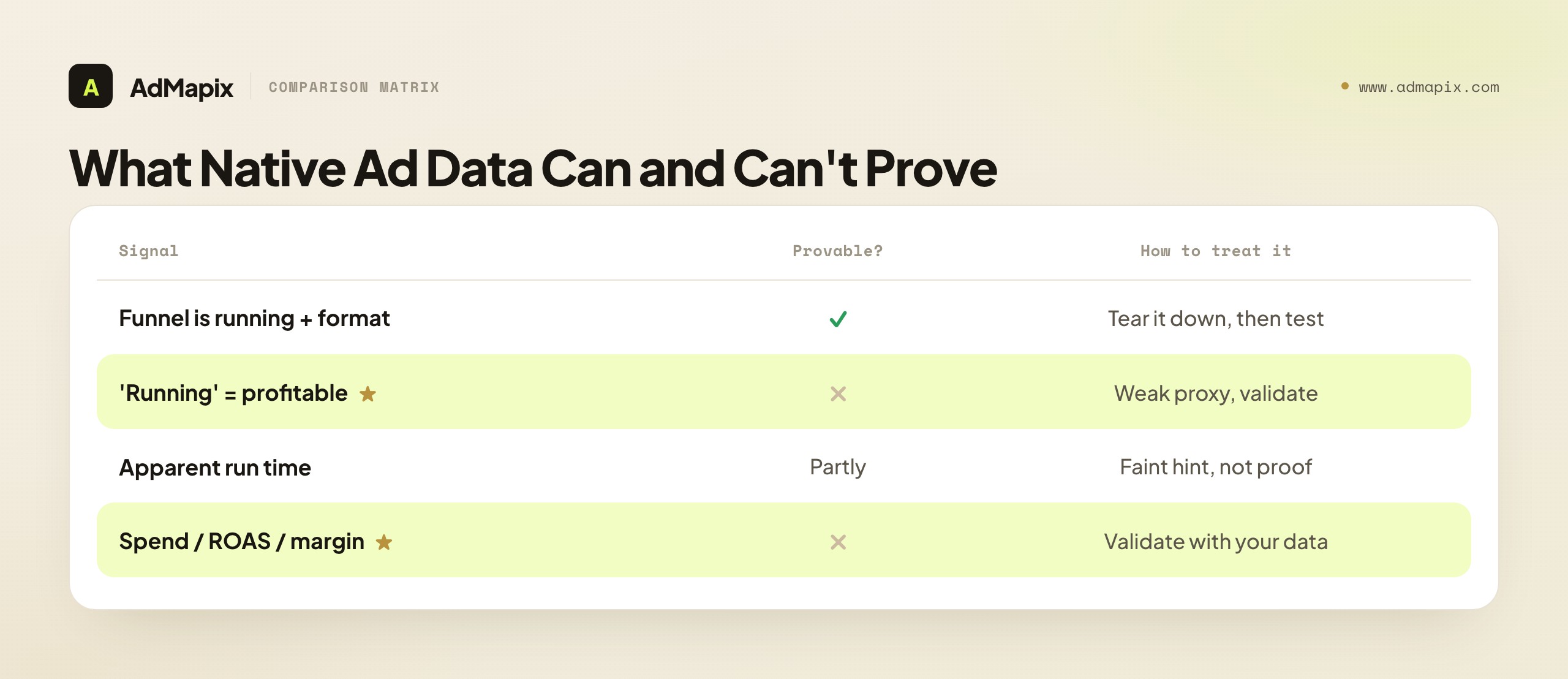
A native offer that is running, and even widely visible across networks, can be a money loser, and a quiet offer can be a quiet winner. "It is running" is a weak proxy for "it is profitable": affiliates frequently test offers at a loss to gather data, and a funnel can stay live for reasons that have nothing to do with positive ROI. There is a specific native trap inside this — the longevity heuristic. A common belief is "if a native funnel has been running a long time, it must be working," and the logic is reasonable, but the data is unreliable: tools often cannot tell you with precision how long a funnel has truly run, whether it was paused and restarted, or whether it is running on a trickle of budget. Use apparent run time as a faint hint about where to look, never as proof.
So treat everything native ad data surfaces as a hypothesis. "This advertorial angle keeps appearing across three native networks" is a testable idea, not proof it converts. "This funnel has apparently been live a while" is a slightly-stronger-than-engagement hint, not a guarantee of margin. Validate every signal against your own traffic, conversion, and post-click data before you commit budget. The tool is strongest as an idea generator and a funnel-teardown workbench, and weakest as a profit predictor — and the affiliate who remembers this tests fast and reads funnels well, while the one who reads "running" or "long-running" as proof of profit burns budget on a funnel that loses money on their own traffic and economics.
A specific saturation caution: the native offers and advertorial angles that are loudly visible across many networks are often already crowded by the time you see them everywhere. The early affiliates with traffic edges and compliance know-how have moved, and the easy margin is frequently gone. The discipline is to weight earlier, quieter signals and to move on small tests fast, rather than copying the obvious winner everyone else is also seeing — which is also why competitor alerts that catch a fresh angle early are worth more than a database that shows you what is already saturated.
This connects back to how you should weigh coverage when choosing an alternative. The naive read is "more ads is better," but the saturation dynamic flips that: what you actually want is timely coverage of your networks — the ability to see fresh angles early in the niches you run — not the largest possible archive of ads that everyone has already seen. A tool that surfaces a new angle in your vertical the week it launches is more valuable than one with ten times the historical ads but a slower or thinner read of your specific networks. So when you run your coverage test in a trial, do not just check whether the tool has ads in your niche; check whether it has recent ads, and whether it can alert you to new ones. Freshness in your niche beats raw volume across niches you never touch — another reason database-size claims are close to meaningless for the native job specifically.
One more honest caveat about native ad data, distinct from profitability: visibility in a spy tool is not the same as visibility in the market. A native funnel you can see in a tool was scraped from some inventory at some time, but you cannot assume it represents the full picture of what a competitor is running — there may be funnels the tool did not catch, geos it did not sample, or variants it never saw. This matters because it tempers any conclusion of the form "this competitor is only running one angle." The honest framing is "this is what the tool observed," not "this is everything the competitor does." Treating observed coverage as complete coverage leads to overconfident reads of a competitor's strategy, when in reality you are seeing a sample. Hold your conclusions as provisional, sized to the sample you actually have, and you will avoid the trap of building a plan on the assumption that what you can see is all there is.
Common Mistakes When Choosing an AdPlexity Native Alternative
Most regret in this decision traces back to a few avoidable errors.
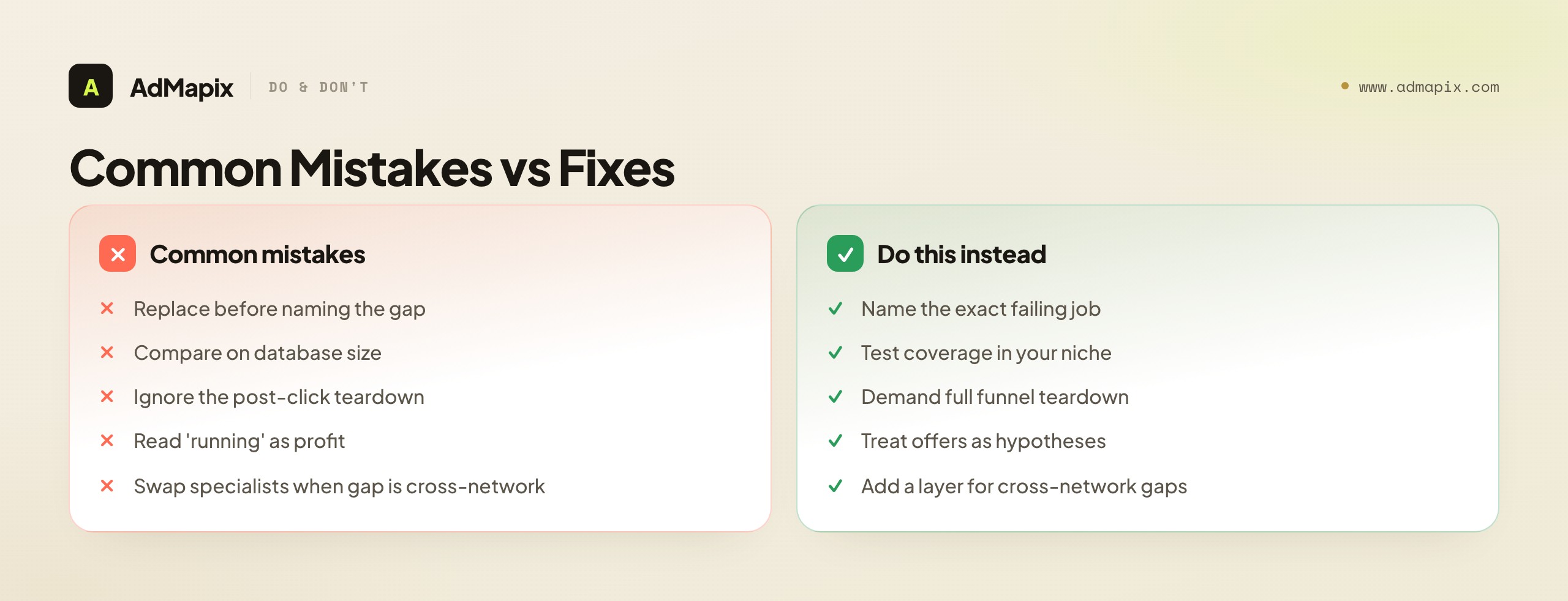
- Replacing the tool before naming the gap. A tool cannot be replaced well if you cannot state which of its jobs is failing you. Decide whether your gap is native depth, native price, or cross-network reporting first, then choose the right-sized alternative.
- Comparing on database size. A million native ads in networks you never run on is noise. The only coverage that matters is whether the tool returns recent ads for your specific networks, geos, and verticals.
- Ignoring the post-click teardown. A native tool that shows the thumbnail but cannot reveal the advertorial, prelander, and redirect chain shows you the least informative part of the funnel. Landing-page access is the criterion that most separates serious tools from galleries.
- Treating "running" as proof of profit. A live native offer is a hypothesis, not a winner; your own traffic and conversion data validate it. Visibility and longevity are weak proxies.
- Swapping a native specialist for another when the gap is cross-network. If your real problem is that native findings do not connect to paid-social and reports, a different native tool solves nothing — you needed a cross-network layer, not deeper native depth.
- Chasing saturated offers late. By the time a native angle is loudly visible everywhere, the early margin is often gone. Weight earlier, quieter signals and move fast on small tests.
- Letting findings die in a browser tab. If research cannot be saved with context and turned into a brief, it will not survive the next meeting. Save with provenance, or the research evaporates.
The two costliest errors are the first and the fifth: replacing before naming the gap, and swapping specialists when the gap was cross-network. They share a root — choosing a new tool against a vague sense of dissatisfaction rather than a named, specific job that is failing. The discipline that prevents both is the same: write down the exact native job that is not getting done, decide whether the fix is native depth or a cross-network layer, then choose the right-sized tool for that job. Do that and the alternative you pick actually closes your gap; skip it and you swap tools and feel the same frustration three months later.
A Decision Framework You Can Run in Ten Minutes
If you want to skip the deliberation and just get to an answer, here is a short, honest framework that resolves most AdPlexity-Native-alternative decisions without a spreadsheet. Run it before you start any trial, because it tells you which kind of tool to trial in the first place.
First, name the gap precisely. Are you frustrated by native coverage (thin in your networks or geos), by native price (paying suite-level cost for one module you use occasionally), or by isolation (native findings that never connect to paid-social, app, or reports)? Coverage and price gaps point to a native specialist; an isolation gap points to a cross-network layer. This single question resolves most cases, because it separates "I need a better native tool" from "I need a different kind of tool."
Second, run the coverage test before anything else. Whatever candidate you are considering, trial it and search your real native networks, countries, and verticals. If it does not return recent, relevant ads for the niche you actually run, stop — no other strength compensates for not having the ads you need to see. This is the fastest disqualifier and the one most people skip until after they have paid.
Third, run the teardown test. For a native tool to be a real alternative, you have to be able to inspect the full post-click path — advertorial, prelander, redirect chain — for a real ad in your niche. If you can only see the thumbnail, it is a gallery, not a native research tool, and it will not do the job that defines native work. Weight this heavily, because the post-click path is where the reason an ad works becomes visible.
Fourth, decide the stack shape. If native is genuinely your whole job, a single native specialist that wins your coverage and teardown tests is the answer. If native is one of several channels and your findings have to become cross-network evidence and reports, the answer is usually a native specialist plus a cross-network layer — not one tool stretched to do both badly. Match the stack to the real shape of your work, validate on a monthly or trial plan, and only then commit to anything longer. Run those four steps and you will have a defensible choice in ten minutes.
When AdPlexity Native Is Still the Right Call
It is worth saying plainly, because an "alternative" guide can imply you should always switch: sometimes the right move is to keep AdPlexity Native. It is a genuinely strong native specialist, and if it returns good coverage for your networks and geos, gives you the advertorial and prelander teardown you need, and surfaces the offer context your affiliate work requires, then a "quality problem" is not why you are reading this. Most people searching for a native alternative do not have an AdPlexity Native quality problem — they have a coverage-fit, price-fit, or cross-network problem.
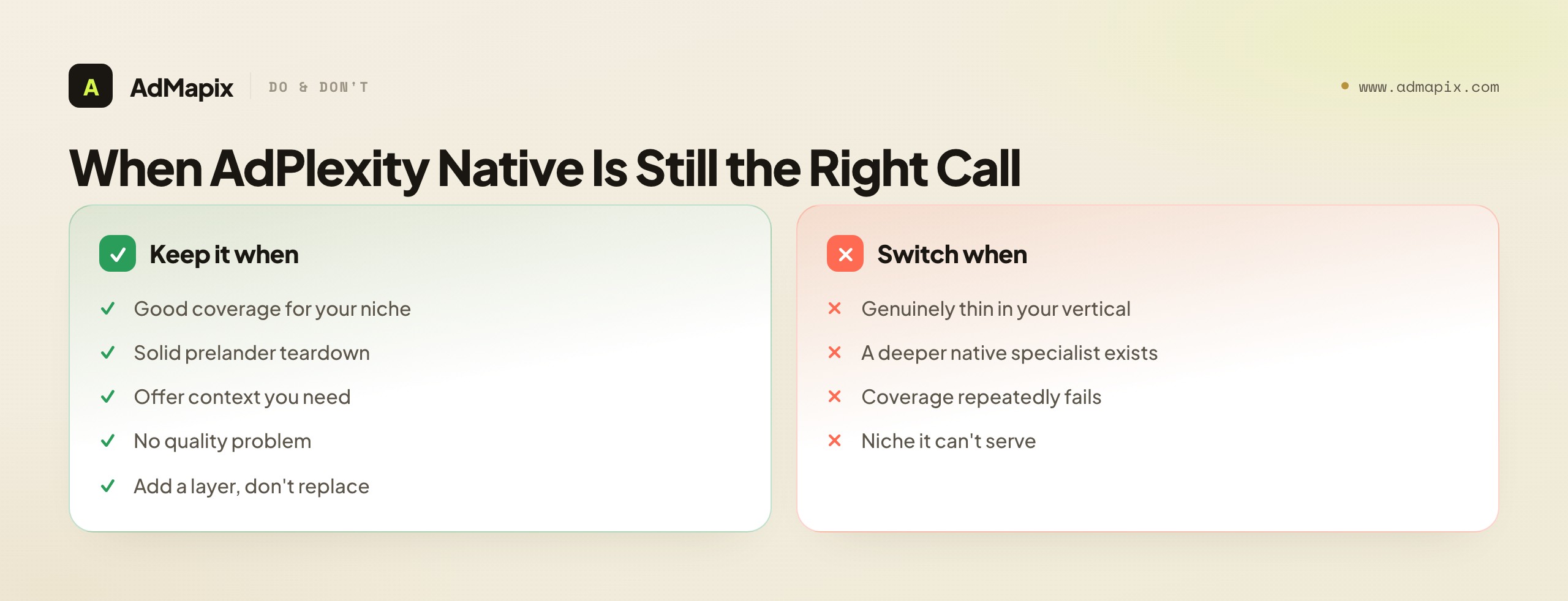
So before you switch, be honest about which it is. If the issue is that you use the native module only occasionally and the per-product price feels heavy, the fix might be a cheaper native specialist or simply a different plan — not abandoning a tool that does the native job well. If the issue is that your native findings have to feed paid-social and reports, the fix is to add a cross-network layer, not to replace the native specialist that is doing its job fine. And if AdPlexity Native genuinely returns thin coverage for your specific vertical, then a like-for-like native specialist that is deeper in your niche is the right swap. The point of an alternatives guide is not to talk you into switching; it is to help you name the gap and choose the right-sized fix — which is sometimes a new tool, sometimes an added layer, and sometimes keeping what you have.
There is also a sequencing argument for keeping a working native specialist while you test alternatives. Native research is time-sensitive — fresh angles saturate fast — so going dark on coverage while you migrate tools can cost you the very offers you are trying to catch. The disciplined migration is to run the new candidate alongside your current tool for a few weeks, test both against the four native jobs with your real niche, and only cut over once the alternative has clearly won on coverage and teardown. Migrating native research is not a one-day switch; it is a parallel run that protects your pipeline of fresh angles while you verify the alternative actually closes your gap.
A useful way to make the keep-or-switch call objective rather than emotional is to score, not vibe. Over a two-week parallel run, keep a simple tally: for each native job — coverage in your niche, teardown quality, offer context, reporting path — note which tool did it better, with a concrete example. At the end you are not deciding based on which tool felt nicer or which had a slicker interface, but on a record of which one actually delivered the artifacts your work needs. This matters because tool decisions are unusually susceptible to recency and novelty bias: a new tool feels exciting and a familiar one feels stale, and that feeling can override the boring truth that the familiar tool returns more relevant ads in your vertical. The scorecard is your defense against switching for the wrong reasons. If the new tool wins the tally, switch with confidence; if your current tool wins it, you have just saved yourself a migration and the cost of relearning a workflow — which is itself a real, if unglamorous, win.
It is also worth naming the sunk-cost trap in both directions. Some teams stay on a native tool that no longer serves them because they have years of saved research in it and dread the migration — that is sunk cost talking, and saved research that no longer helps the next decision is not a reason to keep paying. But the opposite trap is just as real: switching to a new tool because it is new and then discovering it is thinner in your niche, having abandoned a tool that was doing the job. The cure for both is the same scorecard discipline — judge the tool on whether it does your four native jobs for your real niche today, not on how much history you have in it or how fresh it feels. The right tool is the one that improves your next weekly decision, and that question is answerable with a two-week trial and an honest tally, not with loyalty or novelty.
When a Cross-Network Creative-Evidence Layer Helps
Once the missing layer is cross-network creative evidence and reporting — not native depth — a gap opens that no native specialist is built to close: turning scattered native, paid-social, and app discovery into searchable, saved, reportable creative evidence across networks, with the video structure broken down.
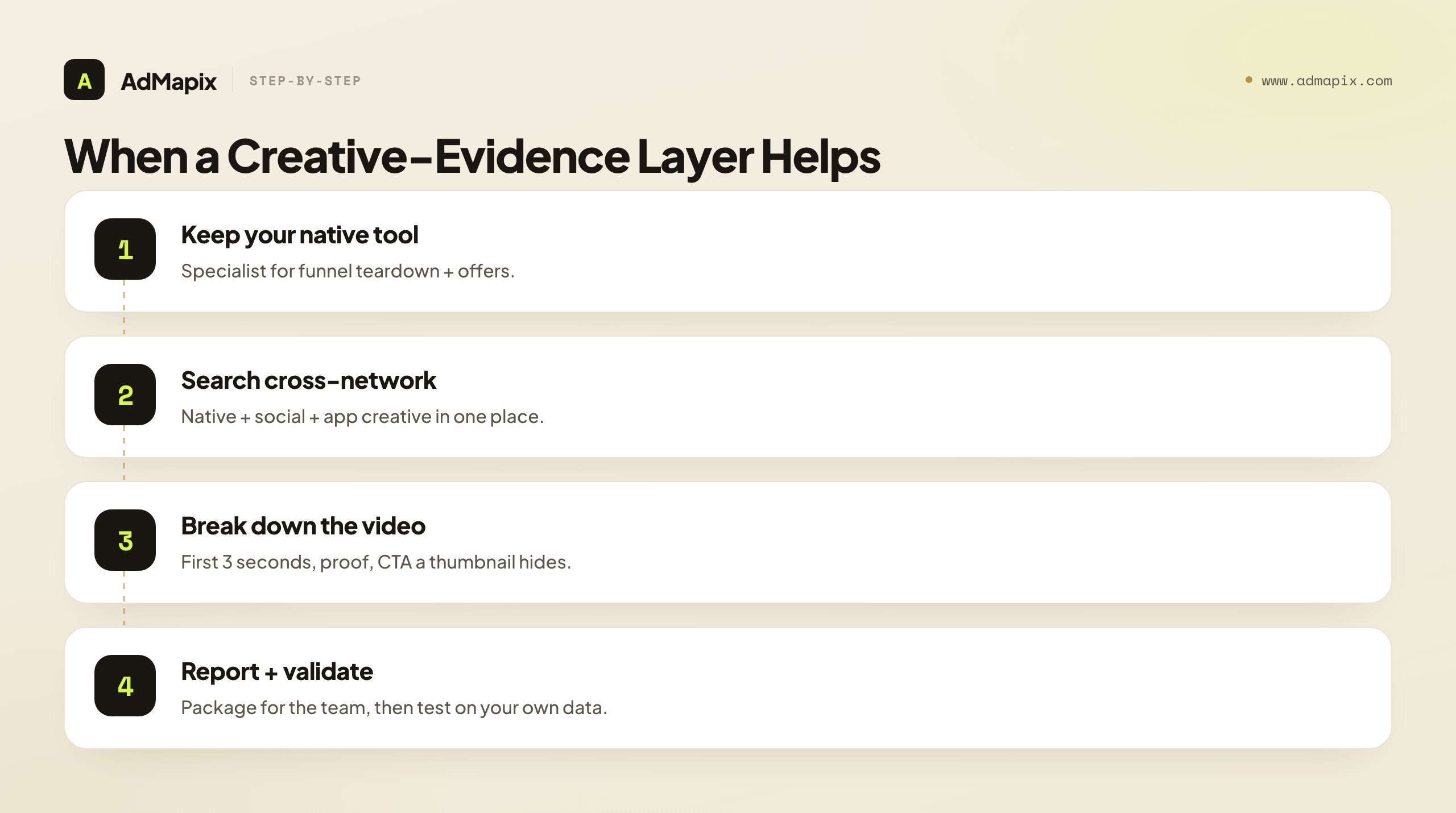
The reason this is a genuinely separate layer rather than a feature a native tool should have bolted on is that the job is different in kind. A native specialist is organized around the native funnel — the advertorial, the prelander, the offer. A cross-network creative-evidence layer is organized around the creative itself as a reusable artifact across networks — something you search, save with provenance, dissect for structure, and package into a report a teammate or client can act on without re-doing your work. That last property, shareability, is where native specialists are weakest by design: they are built for an affiliate tearing down funnels, not for a team that has to defend a cross-network creative recommendation, hand off context, and keep a living archive of what worked across native, paid-social, and app. The moment your creative research has to survive a meeting, persuade a client, or onboard a new hire, the constraint stops being "can I find the native funnel" and becomes "can I turn what I found across networks into evidence someone else trusts." That is the constraint a creative-evidence layer exists to relieve.
The clearest way to see the three-way split: a native specialist answers "which native funnel should I study and test?", AdPlexity's other modules answer the same question for push, desktop, mobile, and YouTube, and a cross-network creative-evidence layer answers "what did we learn from the creatives across networks, and what are we testing and reporting because of it?" Those are different questions, and the third compounds into better creative over time. A cross-network layer earns its place specifically when observed creatives have to become structured, shareable evidence with video analysis, for a recurring workflow — and it is honestly not the right tool when all you need is a native-network database and a prelander ripper, which a native specialist covers better.
The video-analysis point is worth drawing out, because it is where the cross-network layer does something a native specialist structurally cannot. Native research is largely a study of text and page structure — advertorials, prelanders, the written arc that sells. But the same advertiser running native is increasingly running video on paid social and app channels, and video is a different craft with a different anatomy: the first three seconds that earn the scroll-stop, the visual proof, the pacing, the on-screen text, the CTA. A native specialist has no reason to break down video structure, because video is not its channel. A cross-network creative-evidence layer treats video as a first-class object, dissecting the hook and structure the way a native tool dissects an advertorial. For a team whose competitors run both, that video breakdown is exactly the evidence a native tool cannot provide, and it is why the layer is a complement rather than a competitor — it covers the creative surfaces and the analysis depth that sit outside native's remit.
Finally, the reporting dimension is what makes the layer a team tool rather than a researcher tool, and this is the subtle line that decides whether you need it. A native specialist is built for an individual doing research — finding funnels, tearing them down, deciding what to test. That is a single-player job. The moment the research has to become a shared asset — a brief production can build from, a report a client signs off on, an archive a new hire can learn from — the constraint shifts from finding to communicating and preserving, and native specialists are not built for that shift. A cross-network layer with saved media, tagging, and reports is built for exactly the multiplayer job: turning one person's research into the team's shared, durable knowledge. If you are a solo affiliate, you may never need this and a native specialist alone is right. If you are an agency or an in-house team where research has to travel between people, the reporting layer is often the highest-leverage addition you can make — and it is leverage a deeper native database simply does not provide.
For the broader landscape beyond the native module, our guide to the best ad spy tools of 2026 compares the whole field by price, coverage, and use case, and the AdPlexity alternative guide compares seven tools across the full suite (native, push, desktop, mobile, and YouTube) rather than the native module alone. If you are weighing native specialists, Anstrex alternatives and the Anstrex vs Adbeat breakdown cover the native-and-display field, and native ad spy tools and competitor display ads go deeper on the native and display angles.
FAQ
What is the best AdPlexity Native alternative?
There is no single best one — it depends on your missing layer. If you need deeper or cheaper native coverage and native is genuinely the job, a like-for-like native specialist (the kind covering native networks, an advertorial and prelander teardown, and competitor alerts) is the most direct swap. If your native findings have to feed paid-social, app, and reports, a cross-network creative-evidence layer such as AdMapix solves a different job. Name the gap first, then pick the right-sized tool.
What makes a tool a real AdPlexity Native alternative versus a lookalike?
Coverage in your specific niche, a true post-click teardown, offer and advertiser context, and a path to a brief or report. A lookalike shows native thumbnails but cannot reveal the advertorial, prelander, and redirect chain — which is the least informative part of the funnel to see and the most important to hide. If a tool cannot tear down the full post-click path for a real ad in your vertical, it is a gallery, not a native research alternative.
Is database size a good way to compare native ad spy tools?
No. A million native ads in networks you never run on is noise. The only coverage that matters is whether a tool returns recent, relevant ads for your specific native networks, countries, and verticals — which you should test in a trial before anything else. A smaller database that is deep in your niche beats a huge one that is thin where you actually work, every time.
Should I switch from AdPlexity Native or just add a tool?
It depends on the gap. If AdPlexity Native returns thin coverage for your vertical, switch to a native specialist that is deeper in your niche. If it does the native job fine but your findings have to connect to paid-social and reports, add a cross-network layer rather than replacing it. And if the only issue is occasional use against suite-level pricing, a different plan or a cheaper native specialist may be the fix. Replacing a working tool to solve a problem it was never causing is the most common mistake.
Why is landing-page access so important for native?
Because in native, the creative is deliberately understated — it blends into editorial content to earn the click — so the persuasion happens after the click, in the advertorial and prelander. A tool that shows the thumbnail but not the advertorial, prelander, and redirect chain shows you the least informative part of the funnel. The post-click path is where the actual reason a native ad works becomes visible, which is why landing-page teardown is the criterion that most separates serious native tools from galleries.
Does native ad spy data show profitability or ROI?
No. It shows that an offer and funnel are running, not whether they convert profitably. "Running" is a weak proxy, since affiliates often test offers at a loss, and apparent run time is unreliable as a longevity signal. Use what the tool shows as hypotheses and funnel-teardown evidence, and validate against your own traffic, conversion, and post-click data before you commit budget. The tool generates the idea; only your numbers confirm it.
How do I run a coverage test before buying?
Trial the candidate and search your real native networks, countries, and verticals — not the tool's showcase examples. Check whether it returns recent, relevant ads for the niche you actually run, and whether you can tear down the post-click path for those ads. If it comes up thin on either, stop, because no other strength compensates for missing the ads you need to see. This single test disqualifies more candidates than any feature comparison.
Can a cross-network tool like AdMapix replace AdPlexity Native?
Not as a like-for-like native spy. A cross-network creative-evidence layer is built for searching creatives across networks, saving media, breaking down video structure, tagging, and reporting — the second job a native specialist does not do. Teams that depend on native-network coverage and a prelander ripper will keep a native specialist for that job. AdMapix complements the native specialist for the cross-network evidence-and-reporting job; it does not replace its native-database depth.
How should I migrate without losing fresh angles?
Run the new candidate alongside your current tool for a few weeks rather than cutting over in a day. Native research is time-sensitive — fresh angles saturate fast — so going dark on coverage during a migration can cost you the very offers you are trying to catch. Test both tools against the four native jobs with your real niche, and only cut over once the alternative has clearly won on coverage and teardown. A parallel run protects your pipeline while you verify the alternative actually closes your gap.
How much should I weigh price in the decision?
Less than coverage and teardown, but it is a legitimate gap on its own. If you use the native module only occasionally, suite-level pricing can feel heavy, and a cheaper native specialist or a different plan may be the right fix — without abandoning a tool that does the native job well. Verify current plan names, tiers, and limits on the official page the day you decide, since they change often, and validate on a monthly or trial plan before committing to a longer term for any discount.
Key Takeaways
- Name the gap before you replace anything. Native coverage, native price, and cross-network isolation are three different problems that point to three different fixes — a deeper specialist, a cheaper plan, or an added cross-network layer.
- A real native alternative must cover four jobs — niche coverage, advertorial and prelander teardown, offer context, and a path to a brief or report — or it is a lookalike, not a replacement.
- Test coverage and teardown in a trial with your real niche, and ignore database-size claims. A smaller tool deep in your vertical beats a huge one that is thin where you work.
- Treat every native offer as a hypothesis, and validate against your own traffic and conversion data. "Running" and "long-running" are weak proxies, not proof of profit.
- Add a cross-network creative-evidence layer when the gap is reporting, not native depth — it complements, never replaces, a native specialist's database and prelander teardown.
Sources
- AdPlexity — affiliate ad-intelligence suite with separate products for native, desktop, mobile, push, and YouTube (as checked June 2026).
- AdPlexity Native — the native ad-intelligence product: native-network coverage, advertiser and offer data, and landing-page access; verify current plan and limits before purchase.
- Anstrex — native and push ad spy with offer search, a landing-page ripper, competitor alerts, and broad native-network and country coverage, a common native specialist alternative (as checked June 2026).
- Anstrex pricing — Native and Push product tiers; confirm current details before deciding.
Plan names, tiers, and discounts change often, so confirm current details on each tool's official pages before deciding. All links checked as of June 21, 2026. Disclosure: AdMapix is our own product, and its data scope covers cross-network ad creative search, saved media, video analysis, tagging, and reports — separated from claims sourced to each vendor's own pages.
See what competitors are really running
Search 6M+ ad creatives, landing pages, and weekly spend across 200+ countries. No credit card, no commitment.
Related Articles
Semrush Ad Intelligence Alternative in 2026: PPC Research or Creative Evidence?
A 2026 decision framework for choosing a Semrush ad intelligence alternative — when PPC keyword and spend research wins, when competitor creative and video evidence wins, how AdClarity fits, a fair-trial method, and how to build a two-layer stack.
Moat Alternative in 2026: Ad Verification vs. Creative Intelligence
A complete 2026 buyer's guide to choosing a Moat alternative — why teams look past Oracle Moat, what Moat actually does (viewability, invalid traffic, brand safety), the critical split between the ad-verification layer and the creative-intelligence layer, a layered comparison across coverage and fit, who should choose which, a practical migration plan, the honest limits of public creative data, and where a creative-research tool like AdMapix fits.
Pathmatics Alternative in 2026: Ad Spend Intelligence vs. Creative Workflow
A complete 2026 buyer's guide to choosing a Pathmatics alternative — why teams look past Pathmatics (now Sensor Tower), what it actually measures, a layered comparison of spend-intelligence suites versus creative-workflow tools across coverage, data type, price, and fit, who should choose which, a practical migration plan, the honest limits of estimated spend, and where a lighter cross-network creative tool like AdMapix fits.