
Google Ads Auction Insights vs Transparency Center: When to Use Each
A practical comparison of Google Ads Auction Insights and Google Ads Transparency Center for PPC competitor research in 2026.
Auction Insights and Transparency Center answer different competitor research questions. Mixing them up leads to bad PPC decisions.
Google Ads Auction Insights vs Transparency Center: When to Use Each
Google Ads Auction Insights is useful when you want to understand who overlaps with you in the auctions you entered. Google Ads Transparency Center is useful when you want to inspect public ads from verified advertisers across Google surfaces.
They are not interchangeable.
Auction Insights is private account data. It is tied to your own campaign, ad group, keyword, Shopping, or Performance Max activity. Transparency Center is public ad visibility. It helps you see examples of ads a verified advertiser has run, where ads were shown, ad format, and when an ad last ran.
If you want a Google Ads competition tool, the right answer is usually both:
| Question | Better tool |
|---|---|
| Who overlaps with my auctions? | Google Ads Auction Insights |
| Are competitors showing above me? | Auction Insights |
| Which verified advertiser is running public Search, YouTube, or Display ads? | Google Ads Transparency Center |
| What creative angle or offer are they using? | Transparency Center |
| Which competitor ad is profitable? | Neither tool proves this |
| What should our next test brief be? | Use both plus your own campaign data |
For a broader free-method workflow, start with how to check competitors' Google Ads. If you specifically need the public ads database, use the Google Ads Transparency Center guide.
What Google Ads Auction Insights Actually Shows
Google's official Auction Insights help page describes the report as a way to compare your performance with other advertisers participating in the same auctions as you. That phrase matters: "same auctions" means the report is relative to your eligible impressions, not a universal competitor database.
For Search campaigns, Auction Insights can include:
| Metric | Practical meaning |
|---|---|
| Impression share | How often you received impressions out of the impressions you were eligible to receive |
| Overlap rate | How often another advertiser received an impression when your ad also received one |
| Outranking share | How often your ad ranked higher than another advertiser's ad, or showed when theirs did not |
| Position above rate | How often another advertiser showed above you when both ads appeared |
| Top of page rate | How often an ad showed above unpaid search results |
| Absolute top of page rate | How often an ad appeared as the first ad above unpaid search results |
Google also notes that the report is available for Search, Shopping, and Performance Max campaigns, with different available statistics by campaign type. Search gets the fullest view. Shopping has fewer metrics. Performance Max auction insights are segmented by Search and Shopping data where available.
The most important limitation: Auction Insights depends on activity thresholds. Google states that it does not show insights when impression share is less than 10%, and only keywords, ad groups, or campaigns that meet minimum activity thresholds will have a report.
That means Auction Insights can be excellent for high-volume account decisions and weak for low-volume experiments.
What Google Ads Transparency Center Shows
Google Ads Transparency Center is not inside your Google Ads account. It is a public transparency surface.
Google's Safety Center describes it as a searchable hub of ads across YouTube, Search, and Display served from verified advertisers. Google's launch announcement says the Ads Transparency Center can help users understand ads an advertiser has run, which ads were shown in a certain region, the last date an ad ran, and the ad format.
This makes Transparency Center useful for creative research:
| You can inspect | Why it helps |
|---|---|
| Advertiser identity | Confirms you are looking at the right brand or entity |
| Public ad examples | Reveals copy, angle, offer, format, and landing theme |
| Region visibility | Helps narrow market context |
| Last shown date | Helps separate current activity from older examples |
| Search, YouTube, and Display surfaces | Broadens research beyond one SERP check |
But Transparency Center does not show your auction overlap, your lost impression share, the competitor's conversion rate, their CPC, their budget, their ROAS, or whether an ad is profitable.
That distinction is the core of this article.
Side-by-Side: Auction Data vs Public Creative Data
Use this comparison before choosing a research workflow:
| Dimension | Auction Insights | Transparency Center |
|---|---|---|
| Data type | Private account-relative auction metrics | Public ad visibility from verified advertisers |
| Best for | Bidding, budget, impression share, overlap diagnosis | Creative research, offer research, advertiser discovery |
| Requires your account data | Yes | No |
| Shows ad creative | No | Yes |
| Shows competitor performance | No | No |
| Shows auction overlap | Yes | No |
| Useful for low-volume keywords | Often limited | Often useful if advertiser data is public |
| Best cadence | Weekly for active campaigns; more often during launches | Weekly or monthly creative sweeps |
| Biggest risk | Overreacting to impression share without conversion context | Copying ads without knowing if they work |
The clean rule:
Use Auction Insights to diagnose competitive pressure in your own auctions. Use Transparency Center to understand public advertiser messaging and creative direction.
When to Use Google Ads Auction Insights
Auction Insights is strongest when you already have enough Google Ads traffic and need to decide what to do with budget, bids, or account structure.
Use it when you need to answer:
| Question | What to look at |
|---|---|
| Are we losing visibility to a specific competitor? | Impression share, position above rate, outranking share |
| Is a new competitor entering our auctions? | Overlap rate by week or month |
| Did a bid change increase competitive pressure? | Time segments before and after the change |
| Are brand terms getting more expensive because of challengers? | Keyword-level Auction Insights |
| Is Performance Max competing differently across Search and Shopping? | PMax segmented auction insights |
For example, if your brand campaign conversion rate is stable but impression share drops while one competitor's overlap rate rises, you may need to review budgets, match types, query segmentation, landing page quality, and brand defense rules.
But do not make the mistake of treating Auction Insights as a full ad spy tool. It does not show the competitor's exact keyword list, bid, ad copy, landing page performance, or campaign profitability.
When to Use Google Ads Transparency Center
Transparency Center is strongest when you need public competitor ad examples.
Use it when you need to answer:
| Question | What to inspect |
|---|---|
| What messages are competitors repeating? | Headlines, themes, claims, calls to action |
| Are they pushing a specific offer? | Discount, free trial, demo, pricing, seasonal angle |
| Which surfaces are they using? | Search, YouTube, Display where visible |
| Is a competitor active in a region? | Region filters and recent ad examples |
| What creative patterns can we test? | Formats and repeated narratives |
Transparency Center is especially helpful for app and game marketers because it lets you separate auction pressure from creative inspiration. If you see a competitor in Auction Insights but cannot explain their messaging, Transparency Center can provide public creative context.
Still, do not assume every visible ad is a winning ad. Public visibility is not performance proof.
How to Combine Both in a Weekly Workflow
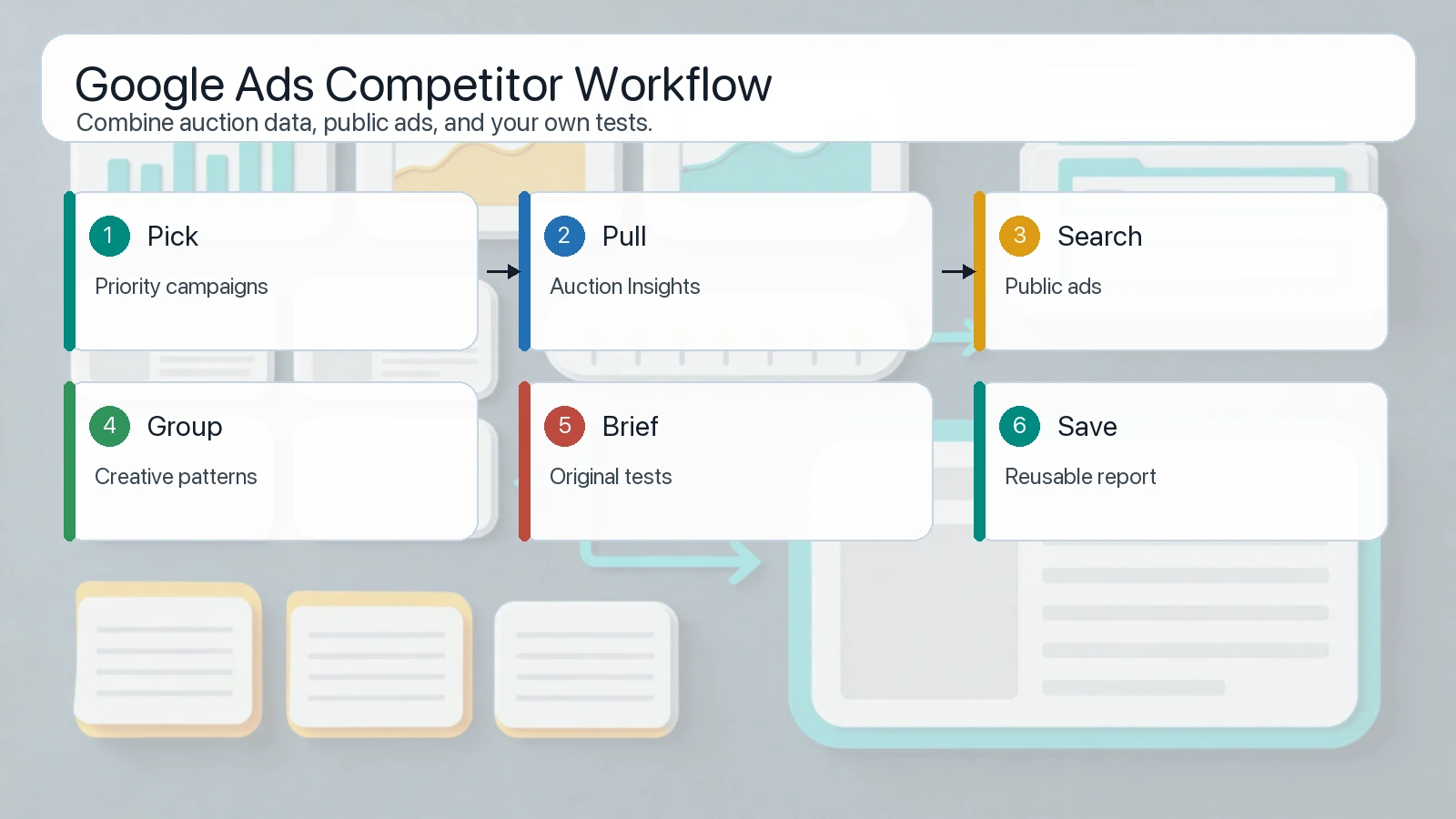
The best workflow turns auction pressure and public ad examples into testable creative briefs, not copycat campaigns.
Here is a practical weekly workflow:
| Step | Tool | Output |
|---|---|---|
| 1. Pick priority campaigns | Google Ads account | Brand, competitor, high-CAC, or high-value segments |
| 2. Pull Auction Insights | Auction Insights | Competitor overlap, impression share, position movement |
| 3. Flag changes | Spreadsheet or report | New entrants, rising overlap, lost top visibility |
| 4. Search public ads | Transparency Center | Current public creative and offer examples |
| 5. Group patterns | Research notes | Pricing claims, use cases, urgency, proof, visual style |
| 6. Write hypotheses | Team brief | "If competitor X is pushing angle Y, we should test Z" |
| 7. Save examples | AdMapix reports or your sheet | Reusable competitor archive |
| 8. Compare next week | Same cadence | Did the pattern persist or disappear? |
This workflow keeps strategy grounded. Auction Insights tells you whether a competitor is showing up in your auctions. Transparency Center helps you understand what the market can publicly see. Your own campaign data decides what to test.
If you want to save competitor views and organize them over time, use AdMapix reports. For recurring monitoring volume, compare plans on pricing.
Common Mistakes
Mistake 1: Treating Auction Insights as keyword spying
Auction Insights does not reveal a competitor's full keyword list. It only compares advertisers in overlapping auctions where your account had enough activity.
Mistake 2: Treating Transparency Center as performance data
Transparency Center can show public ad examples, but it does not show ROAS, CPA, conversion rate, budget, or profitability.
Mistake 3: Comparing different time windows
If Auction Insights uses the last 7 days and Transparency Center examples are older, your conclusions may be wrong. Save dates and use consistent windows.
Mistake 4: Copying competitor ads directly
A visible competitor ad is a research input. It is not a license to copy claims, branding, or creative structure. Convert patterns into original tests.
Mistake 5: Ignoring your own landing page and offer
If a competitor outranks you, the answer is not always "raise bids." Quality, landing page relevance, conversion rate, and offer clarity also matter.
FAQ
What is Google Ads Auction Insights?
Google Ads Auction Insights is a report inside Google Ads that compares your performance with other advertisers participating in the same auctions. It can show metrics such as impression share, overlap rate, outranking share, and top-of-page visibility where eligible.
Is Auction Insights a Google Ads competition tool?
Yes, but only for auction overlap and visibility. It is not a full competitor ad spy tool because it does not show ad creative, exact bids, budgets, conversion data, or a competitor's full keyword strategy.
Does Auction Insights show competitor keywords?
No. It can be viewed at campaign, ad group, or keyword level where eligible, but it does not disclose a competitor's keyword list.
What does Google Ads Transparency Center show?
Google Ads Transparency Center is a public hub for ads served from verified advertisers across Google surfaces such as Search, YouTube, and Display. It can help you inspect public ad examples, formats, regions, and recency signals.
Which is better for competitor research?
Use Auction Insights for account-relative auction pressure. Use Transparency Center for public creative research. Use both when you need a practical Google Ads competitor research workflow.
Conclusion
Google Ads Auction Insights and Google Ads Transparency Center solve different jobs. Auction Insights tells you who overlaps with your eligible auctions and how visibility is changing. Transparency Center shows public ad examples from verified advertisers.
The best PPC workflow does not pick one tool and ignore the other. It uses Auction Insights to identify competitive pressure, Transparency Center to study public messaging, and your own performance data to decide what to test next.
Turn these observations into your next creative study
Open the creative library and select samples for your market, network and research question.
Related Articles
How Often Does Facebook Ads Library Update? 2026 Timing & Delays
Direct answer to Facebook Ads Library update timing: how often it refreshes, why delays happen, what Meta documents, and how to monitor competitor ads without assuming real-time data.
Playable Ads: Examples, Development Workflow, and When to Use Them
A practical guide to playable ads for app marketers: examples, playable ads development workflow, technical QA, testing, and competitor research.
Competitor Ads: How to Find, Analyze, and Track Rival Campaigns
A practical guide to finding competitor ads across search, display, social, video, native, and landing pages, then turning visible patterns into campaign tests.