LinkedIn Ad Library API: What Actually Exists, What Doesn't, and the Workflow That Works in 2026
A developer-grade, honest explainer of the LinkedIn Ad Library API question. There is no public Ad Library API; LinkedIn runs a browse-only transparency website and a separate Advertising API for managing your own accounts. This guide untangles the two, explains what each returns, covers access, the legal and technical reality of scraping, the EU DSA context, and the manual-plus-tooling workflow CI teams actually use.
LinkedIn Ad Library API: What Actually Exists, What Doesn't, and the Workflow That Works in 2026
Updated June 21, 2026 — written and reviewed by the AdMapix Research team.
If you searched for a LinkedIn Ad Library API, you are almost certainly a developer, growth engineer, or competitive-intelligence builder who wants to pull competitor ad data from LinkedIn programmatically — to monitor rivals, feed a dashboard, or automate a research pipeline. The honest, load-bearing answer up front is this: there is no public LinkedIn Ad Library API. The LinkedIn Ad Library is a browse-only transparency website, not a documented data endpoint you can query at scale. What does exist is a separate product — LinkedIn's official Advertising API — but it manages your own ad accounts and campaigns and deliberately does not expose competitor transparency data. The phrase "LinkedIn Ad Library API" conflates those two unrelated things, and that confusion sends people building the wrong thing.
This guide exists to give you the real picture before you waste a sprint. We will untangle the two LinkedIn "APIs" people confuse, spell out exactly what the public Ad Library shows and withholds, walk through how Advertising API access actually works and why it won't solve a competitor-research problem, address the technical and legal reality of scraping the Ad Library, situate all of it in the EU's Digital Services Act ad-transparency regime, and lay out the manual-plus-tooling workflow that competitive-intelligence teams actually run in production. This is the developer-and-strategist companion to our broader LinkedIn ads competitor analysis workflow and the LinkedIn Ads Library interface reference; if you want the analysis methodology rather than the data-access question, start there. For the cross-channel method underneath all of it, see the competitor ad analysis framework.
TL;DR — The LinkedIn Ad Library API Question, Answered
- There is no public LinkedIn Ad Library API. The Ad Library is a browse-only transparency website. There is no documented, open endpoint to query competitor ad data at scale, and no official bulk export.
- LinkedIn's Advertising API is a different product. It exists and is well-documented, but it manages your own campaigns, creatives, audiences, and reporting. It does not — and is not designed to — return competitor transparency data.
- The two get conflated constantly. "LinkedIn Ad Library API" almost always means one of these two things; knowing which you actually need saves you from building against the wrong system.
- Advertising API access is gated. It requires creating a developer app, requesting the Advertising API product, completing an access form, and passing LinkedIn review. It is not instant, not open, and irrelevant to competitor research.
- Scraping the Ad Library is legally and technically fraught. It may violate LinkedIn's User Agreement, breaks easily, and is not a stable foundation for a production research pipeline. We say this plainly rather than hand-waving it.
- The DSA explains why the Ad Library exists at all. The EU's Digital Services Act mandates searchable ad repositories for large platforms — which is why the library is browse-only transparency, not an analytics product.
- The working pattern is manual source-of-truth plus structured tooling. Use the public Ad Library to confirm and read competitor ads by hand, and capture the findings in a structured creative-evidence layer like AdMapix — which organizes and reports, but cannot and does not invent spend, performance, or impression-level targeting data.
The Two LinkedIn "APIs" People Confuse
Almost every confused conversation about a "LinkedIn Ad Library API" collapses two completely different products into one phrase. Separating them is the first and most important step, because they have different purposes, different access models, and different answers to the question "can I get competitor data?"
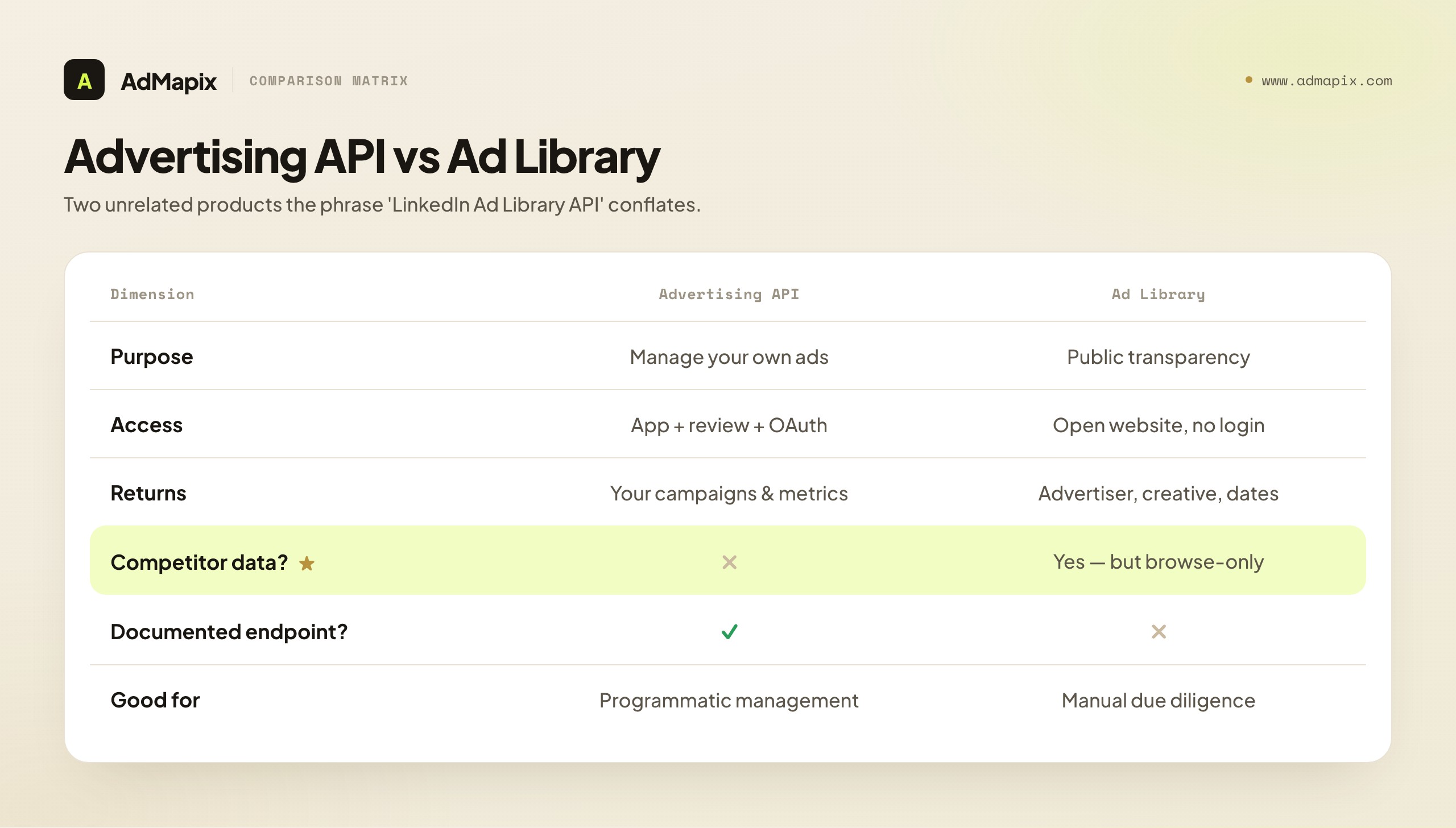
The LinkedIn Advertising API (sometimes called the Marketing API or the Ads API) is an official, documented programmatic interface for managing your own advertising. With it, an authorized application can create and edit campaigns, upload creatives, manage audiences, and pull reporting metrics — for the ad accounts you have access to. It is a real, robust, supported API. It is also entirely inward-facing: it exposes your spend, your metrics, your campaigns. It has no concept of "show me a competitor's ads," because it is a campaign-management tool, not a transparency tool.
The LinkedIn Ad Library is a public website — part of LinkedIn's ad-transparency effort — where anyone, without logging in, can search for an advertiser and see ads that have run on the platform within roughly the past year. It is outward-facing and competitor-relevant: you can look up a rival and see their creatives. But it is browse-only. There is no companion API, no documented query endpoint, no bulk export. You read it with your eyes in a browser.
So the cross of the two is what trips people up:
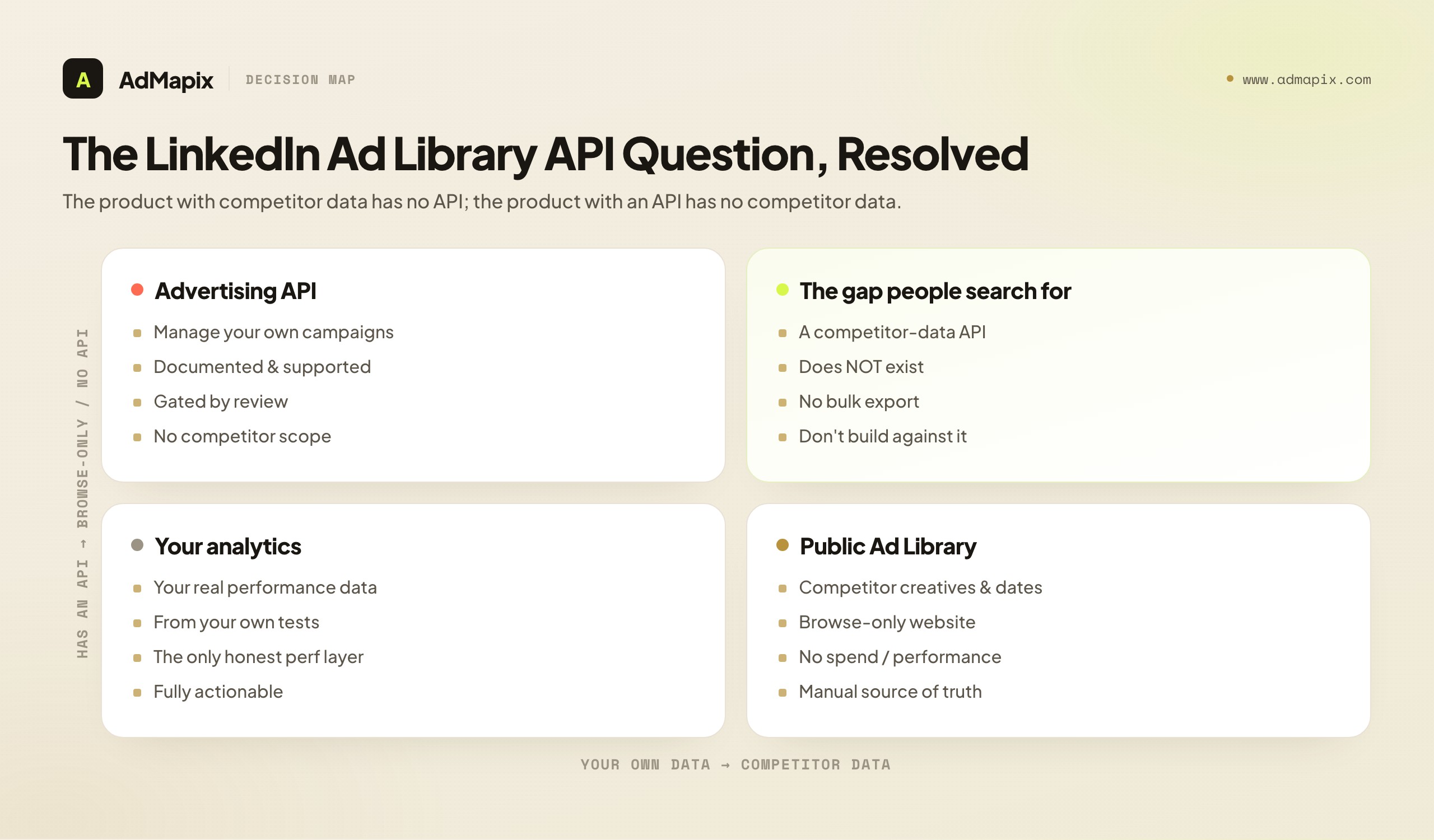
- If you want to manage your own ads programmatically → the Advertising API is the right tool, and it works well.
- If you want competitor transparency data programmatically → there is no official tool. The Advertising API won't do it (wrong scope), and the Ad Library is browse-only (no API).
That cross is the whole answer to "is there a LinkedIn Ad Library API." The product that has competitor data has no API; the product that has an API has no competitor data. Once you internalize that, you stop searching for an endpoint that does not exist and start building the workflow that actually works.
What the Public Ad Library Actually Shows (and Withholds)
Since the Ad Library is your only official source of competitor ad data on LinkedIn, it is worth being precise about what it does and does not surface — because the gaps shape every research question you can and cannot answer with it.
The Ad Library is a publicly available database of ads that have served on LinkedIn, designed for transparency rather than analytics. Per LinkedIn's own help documentation, it includes ads served at least once in roughly the last year and is open to anyone without an account. You search by advertiser (the LinkedIn Page running the ads), and you see the creatives that ran.
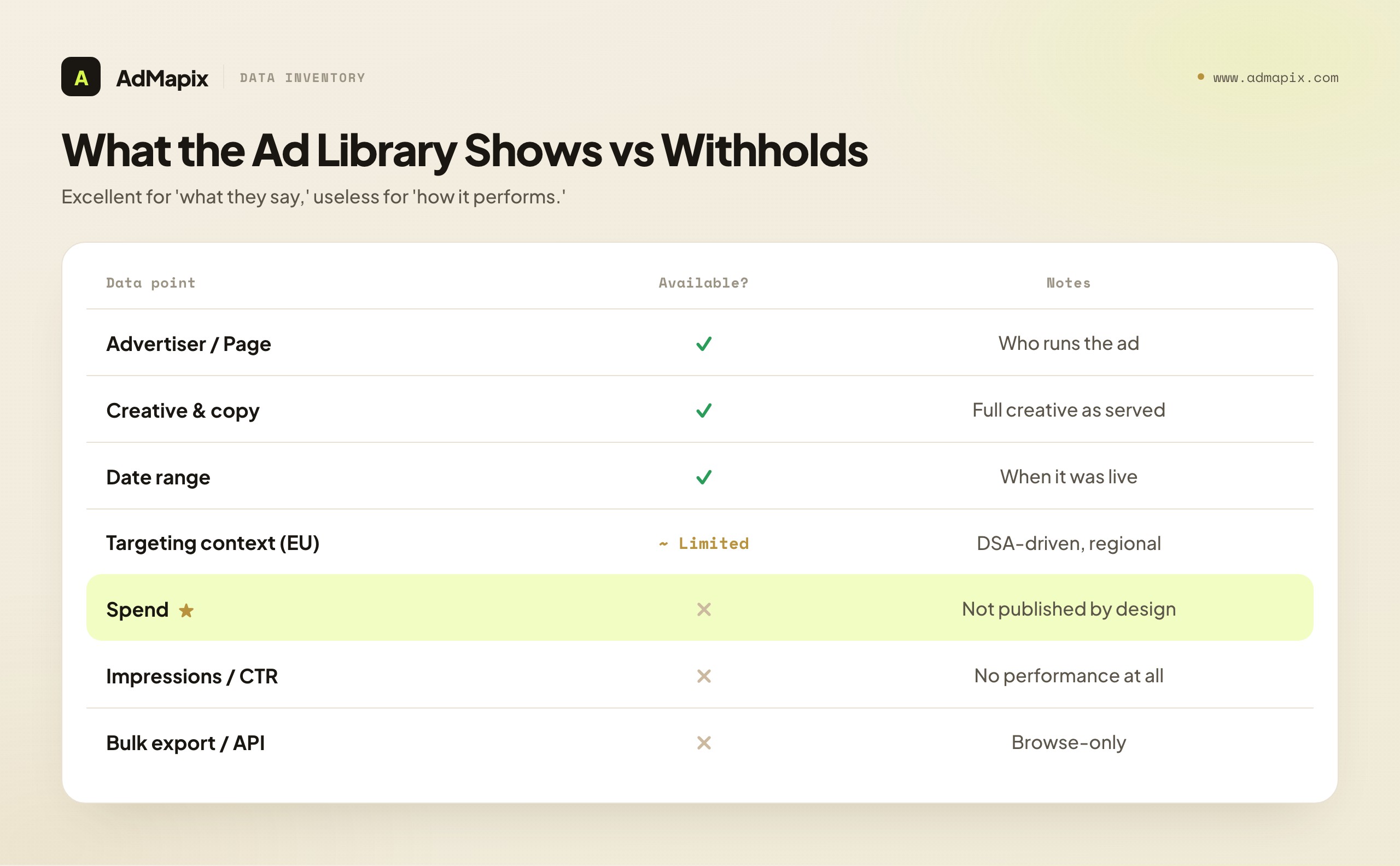
What it shows: the advertiser/Page name, the ad creative and copy, the date range the ad ran, and certain transparency details that vary by region (including, for ads targeted in the EU, some broad targeting-parameter context that the DSA requires). In short, it shows you what was said to the market and by whom.
What it withholds is just as important: it does not show spend (exact or estimated), impressions, engagement, click-through rate, conversions, or any performance metric. It does not show granular audience definitions or impression-level targeting. It does not offer a bulk export or a queryable API. It is a record of what ran, not a record of what worked.
| Data point | In the Ad Library? | Notes |
|---|---|---|
| Advertiser / Page name | Yes | The entity running the ad |
| Ad creative & copy | Yes | The full creative as served |
| Date range the ad ran | Yes | When it was live |
| Broad targeting context (EU) | Limited | DSA-driven; varies by region |
| Spend (exact or estimated) | No | Not published, by design |
| Impressions / performance | No | No CTR, engagement, conversions |
| Granular audience definitions | No | No impression-level targeting |
| Bulk export / queryable API | No | Browse-only website |
The practical consequence: the Ad Library is excellent for confirming a competitor advertises and reading what they say, and useless for measuring how much they spend or how well they perform. Any research design built on the library must live within that boundary. We expand on how to read what is available — as messaging hypotheses rather than performance proof — in the LinkedIn ads competitor analysis workflow.
How LinkedIn Advertising API Access Actually Works
Developers who land on the "Ad Library API" question sometimes pivot to "well, can I use the Advertising API to get this?" The answer is no — wrong scope — but it is worth walking through how Advertising API access works, both so you understand the product and so you can use it correctly for the things it is good for (managing your own campaigns).
LinkedIn's developer platform is documented in the official LinkedIn Marketing API documentation, and access is deliberately gated. The rough path is:
- Create a developer application in the LinkedIn Developer Portal, associated with a LinkedIn Page you administer.
- Request the Advertising API product for that app. This is a specific product you add to your app, distinct from basic profile or share APIs.
- Complete the access request form, in which LinkedIn asks about your use case, your company, and how you will use the data. They are vetting for legitimate advertising-management use.
- Pass LinkedIn's review. Access is granted after review, not instantly. Review timelines vary, and approval is conditional on a use case LinkedIn considers appropriate.
- Authenticate via OAuth 2.0 and operate within the granted scopes and rate limits, against the ad accounts your authenticated user can access.
Two things matter for the competitor-research reader. First, every step assumes you are managing advertising you have rights to — the OAuth flow grants access to accounts the authenticating user controls, not to arbitrary competitor accounts. There is no scope, anywhere in the Advertising API, that returns another company's ads, spend, or metrics. Second, even for your own data, access is reviewed and rate-limited; it is a managed relationship with LinkedIn, not an open firehose.
So the Advertising API is the correct tool if you want to, say, programmatically sync your own campaign performance into a warehouse, automate bid changes, or bulk-manage creatives across many of your own accounts. It is the wrong tool — in fact, an impossible tool — for pulling competitor transparency data. Pointing it at a competitor problem is a category error that will cost you a sprint before you discover the scopes simply do not exist.
Why There Is No Competitor-Data API (And Probably Won't Be)
It is reasonable to ask why LinkedIn offers no API for the very data it publishes openly on a website. If the Ad Library is public, why not make it queryable? Understanding the reasons helps you stop waiting for an endpoint that is unlikely to arrive and design around the reality.
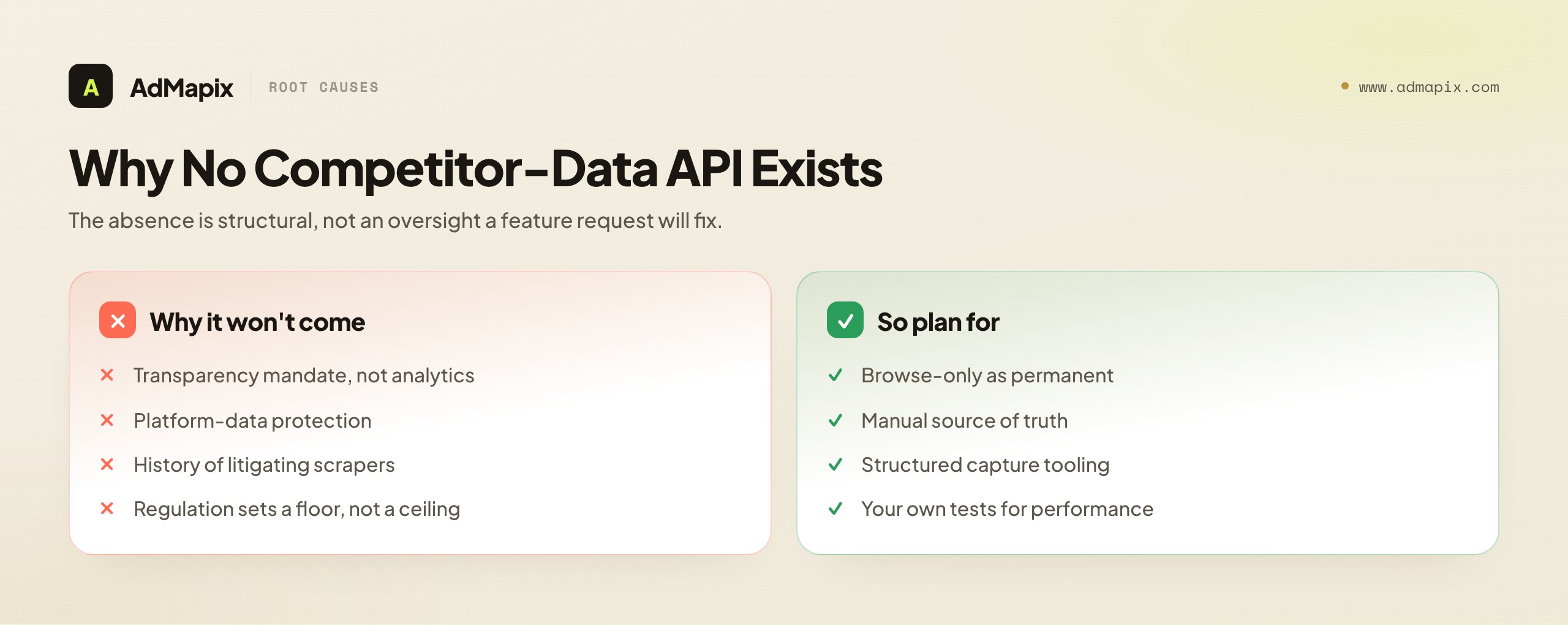
Transparency, not analytics, is the mandate. The Ad Library exists primarily to satisfy ad-transparency expectations and regulation — letting any individual look up who is running ads and see them. That goal is fully served by a browse-only website. A queryable, bulk-exportable API would turn a transparency tool into a competitive-intelligence product, which is a different thing with different incentives, and not what the library was built to be.
Platform-data protection. LinkedIn, like other large platforms, guards programmatic access to its data closely — both to protect its commercial interests and to limit abuse. Opening a competitor-data API would invite exactly the kind of large-scale automated harvesting that platforms work hard to prevent. The browse-only design is a deliberate friction that keeps the data human-accessible while discouraging industrial-scale extraction.
The legal history of platform scraping. LinkedIn in particular has a long, well-publicized history of litigating against bulk data extraction from its platform. That posture makes a sanctioned competitor-data API commercially and legally unattractive for them to offer. The same stance that makes scraping risky for you is the stance that makes an official competitor API unlikely.
Regulatory minimums, not maximums. Where transparency is mandated — most notably under the EU's Digital Services Act — the requirement is to maintain a searchable repository, which the website satisfies. Regulation sets a floor (a browsable repository), not a ceiling (a developer-friendly analytics API). Platforms generally build to the floor.
The upshot: the absence of a competitor-data API is not an oversight that a feature request will fix. It is a structural outcome of what the library is for. Plan your research function on the assumption that the official answer will remain "browse-only, no API," and you will build something durable rather than something waiting on a release that is not coming.
The Scraping Question: Honest Risks and Realities
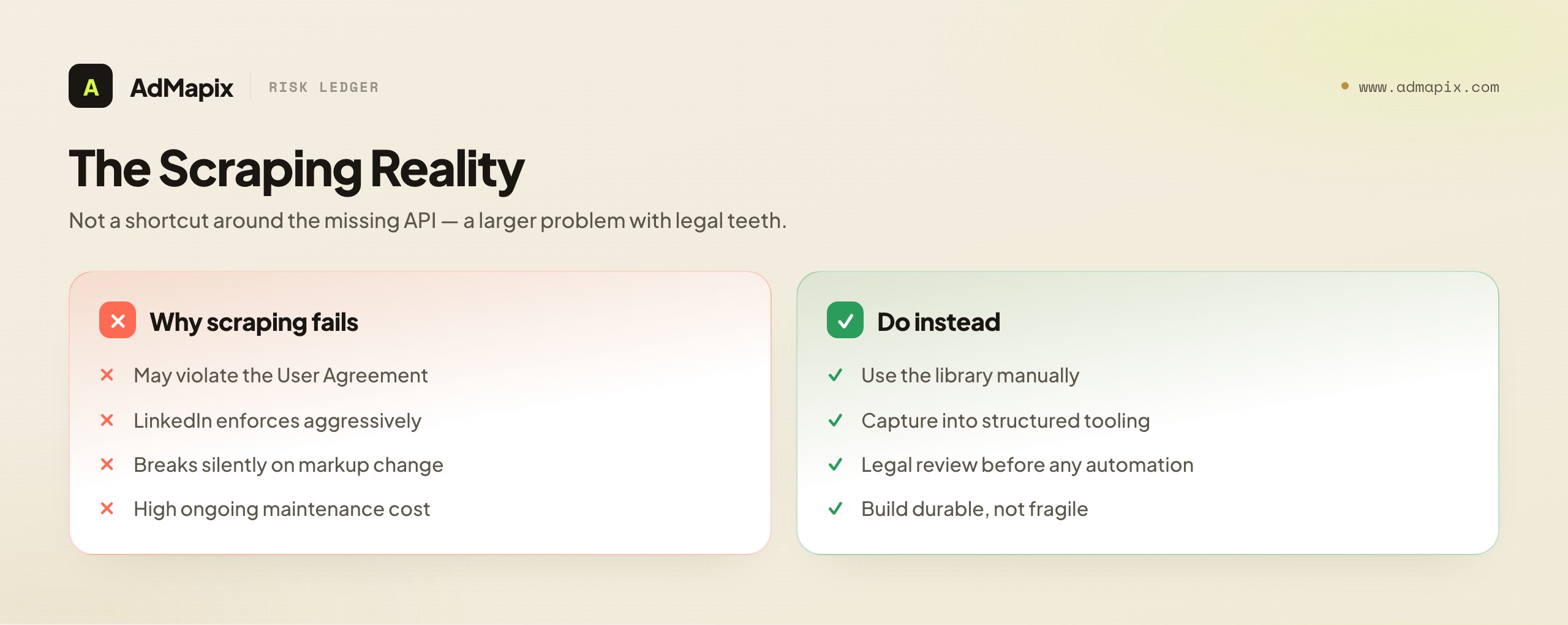
Faced with a browse-only library and no API, the obvious next thought for a developer is: "I'll just scrape it." We are going to address this directly and honestly rather than pretend the thought does not occur, because pretending helps no one. There are three reasons scraping the LinkedIn Ad Library is a poor foundation for a serious research pipeline: it is legally fraught, technically fragile, and operationally costly.
Legally fraught. Scraping LinkedIn may violate LinkedIn's User Agreement, which broadly prohibits automated data collection from the platform. LinkedIn has a documented, aggressive history of pursuing parties that scrape its data at scale. While the legal landscape around scraping publicly accessible data has genuine nuance and has been litigated in both directions, "publicly viewable" is not the same as "licensed for automated bulk extraction," and the User Agreement is a contract you accept. We are not your lawyers, and this is not legal advice — but any team treating Ad Library scraping as a casual technical task without legal review is taking on risk it has not priced. Consult counsel before building a scraping pipeline against LinkedIn.
Technically fragile. Even setting law aside, scraping the Ad Library is brittle engineering. The site is not designed for programmatic access, so it has no stable contract. Markup changes, anti-automation measures (rate limiting, bot detection, challenge pages), authentication walls, and rendering quirks all break scrapers without notice. A scraper that works today silently returns garbage next Tuesday when a class name changes. Building a research function on a foundation that can break invisibly is building on sand — and the failure mode is the worst kind, because it can corrupt your dataset without throwing an error.
Operationally costly. A scraper is not a one-time build; it is a maintenance commitment. Someone has to babysit it, detect breakage, handle blocks, rotate infrastructure, and validate that the data still reflects reality. For most teams, the engineering cost of a reliable scraper vastly exceeds the value, especially given the legal overhang. The economics rarely favor it.
The honest conclusion: scraping the Ad Library is not a shortcut around the missing API; it is a different, larger problem with legal teeth. For the overwhelming majority of competitive-intelligence use cases, the right answer is not to automate extraction of the library, but to use the library manually as a source of truth and capture findings in structured tooling — which we cover below. If you genuinely have a use case that demands automation at scale, that is a conversation for your legal team first and your engineering team second, in that order.
The DSA Context: Why the Ad Library Exists at All
To understand the LinkedIn Ad Library — and why it takes the shape it does — you have to understand the regulatory current that produced it. The single biggest force shaping platform ad transparency in this era is the European Union's Digital Services Act (DSA).
The DSA, which applies to very large online platforms operating in the EU, imposes a range of transparency obligations. Among them is a requirement that these platforms maintain a searchable, publicly accessible repository of the advertisements they serve, including information about the advertiser, the content, the period the ad was displayed, and certain targeting parameters. This is the regulatory root of modern ad libraries across the major platforms — not just LinkedIn, but Meta, TikTok, Google, and others maintain analogous repositories, substantially driven by the same regulatory pressure.
Several consequences flow from this origin and are worth holding in mind:
The library is a compliance artifact first. Its primary design goal is to satisfy a transparency mandate, not to serve marketers' analytics needs. That is why it is browse-only, why it shows creative and date range but not performance, and why there is no developer API: a searchable website meets the legal requirement, and platforms build to the requirement.
The mandated fields explain the available fields. The DSA requires advertiser identity, ad content, display period, and (for targeted ads) the main targeting parameters used. That maps closely onto what you actually see in the library — and explains why some targeting context appears for EU-targeted ads while granular, impression-level targeting and any performance data do not. The library shows roughly what regulation requires it to show, and little more.
Coverage and detail vary by jurisdiction. Because the DSA is an EU instrument, the richest transparency obligations attach to ads served in the EU. What you see for a given advertiser can differ depending on where their ads were targeted. A research design that treats the library as globally uniform will misread these regional differences.
Regulation evolves; the library will too. Ad-transparency law is an active area. The specifics of what platforms must publish can change as regulators refine requirements and enforce them. The practical lesson is to periodically re-check what the library actually surfaces rather than relying on a mental model frozen at the moment you first used it.
Knowing the DSA backdrop reframes the entire "where's the API?" frustration. The library was never built as a marketer's data product; it was built as a regulator's transparency requirement. Expecting it to behave like an analytics API is expecting a compliance document to behave like a BI tool. Once you see it as the former, its limits stop being surprising and start being predictable.
The Workflow That Actually Works
So if there is no API, scraping is fraught, and the data has hard limits, what do serious competitive-intelligence teams do on LinkedIn? They run a disciplined manual workflow with structured tooling around it. Here is the pattern that holds up in production.
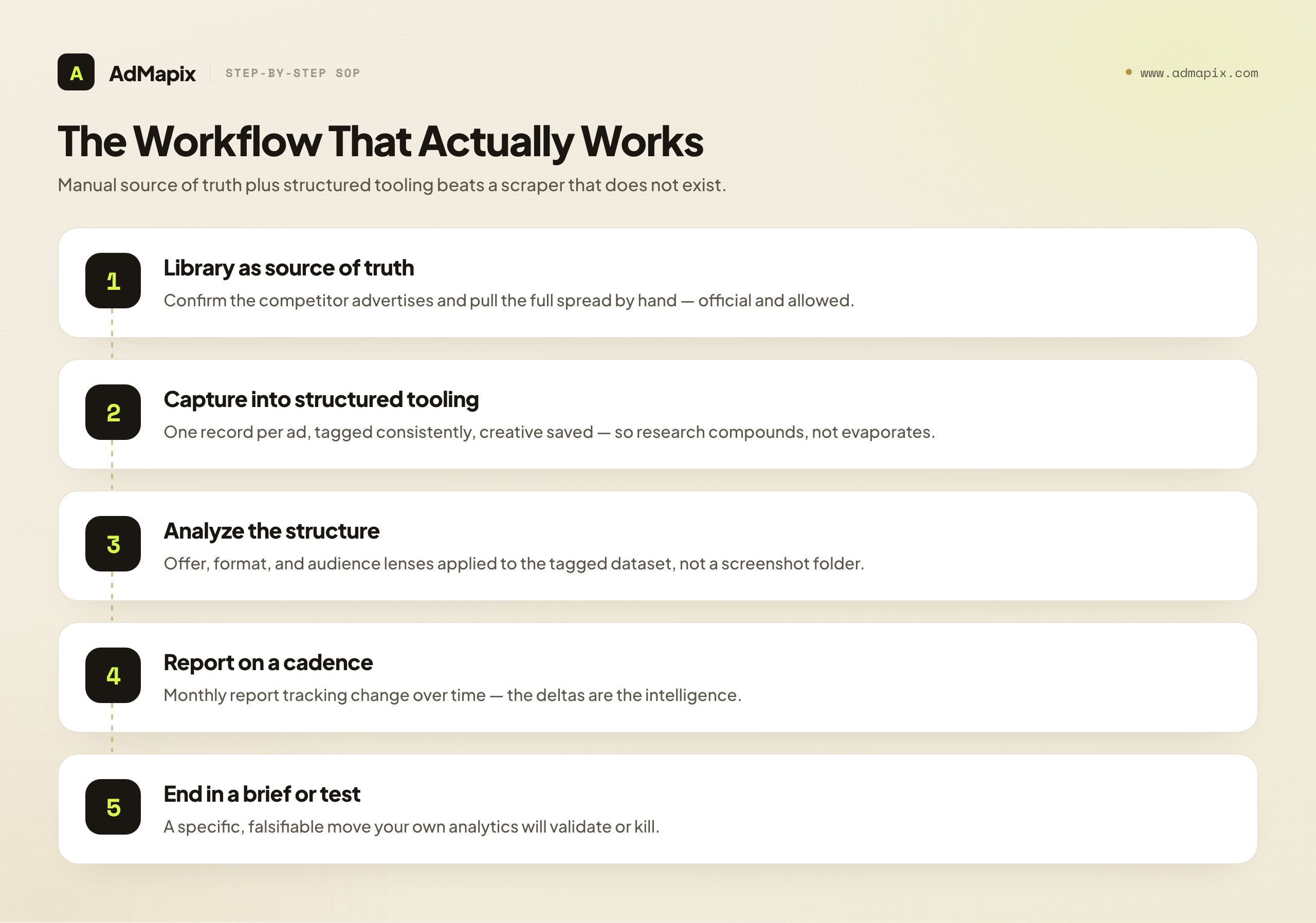
Step 1 — Use the Ad Library as your manual source of truth. When you need to know what a competitor is running, go to the Ad Library and look. Confirm they advertise, and pull the full spread of their live creatives by hand. This is the canonical, legitimate, official source. It is slower than an API call, but it is real, it is allowed, and it is the ground truth no third-party estimate can match.
Step 2 — Capture findings in a structured tool, not a screenshot folder. The failure mode of manual research is that the findings live in scattered screenshots and someone's memory, and they evaporate. The fix is to capture every competitor creative you find into a structured creative-evidence system — one record per ad, tagged consistently (audience, promise, offer, format, CTA, landing intent), with the creative saved. This is where a tool like AdMapix earns its place: it gives the manually gathered evidence a durable, searchable, reportable home so the research compounds instead of evaporating.
Step 3 — Analyze the structured evidence, not raw screenshots. Once findings are captured and tagged, the analysis lenses from our LinkedIn ads competitor analysis workflow apply: offer analysis, format-maturity reads, audience-coverage maps. The structure is what makes the analysis possible; you cannot pattern-match across a screenshot folder.
Step 4 — Report on a cadence. Convert the analysis into a recurring report (monthly suits most B2B categories) that tracks change over time — new offers, abandoned messages, segments entered or exited. The deltas are the intelligence. A standing report beats a one-off audit because the strategic value is in the trend.
Step 5 — End every cycle in a brief or test. The research only pays off when it changes what you ship. Each cycle should produce a specific, falsifiable brief that your own analytics — not the competitor data — will validate or kill.
The shape of this workflow is the answer to the API question that most people are actually looking for. They wanted an API because they wanted competitor intelligence at low effort. The intelligence is achievable; the low-effort API path is not. The achievable path is manual source of truth plus structured tooling plus disciplined analysis, and it is more durable than a scraper precisely because it does not depend on a fragile, legally exposed extraction layer.
Where AdMapix Fits — and Where It Honestly Does Not
Because this is the AdMapix blog, we owe you a precise, non-salesy account of where our own tool sits in this picture — including, emphatically, what it cannot do, because the integrity of everything above depends on not overclaiming.
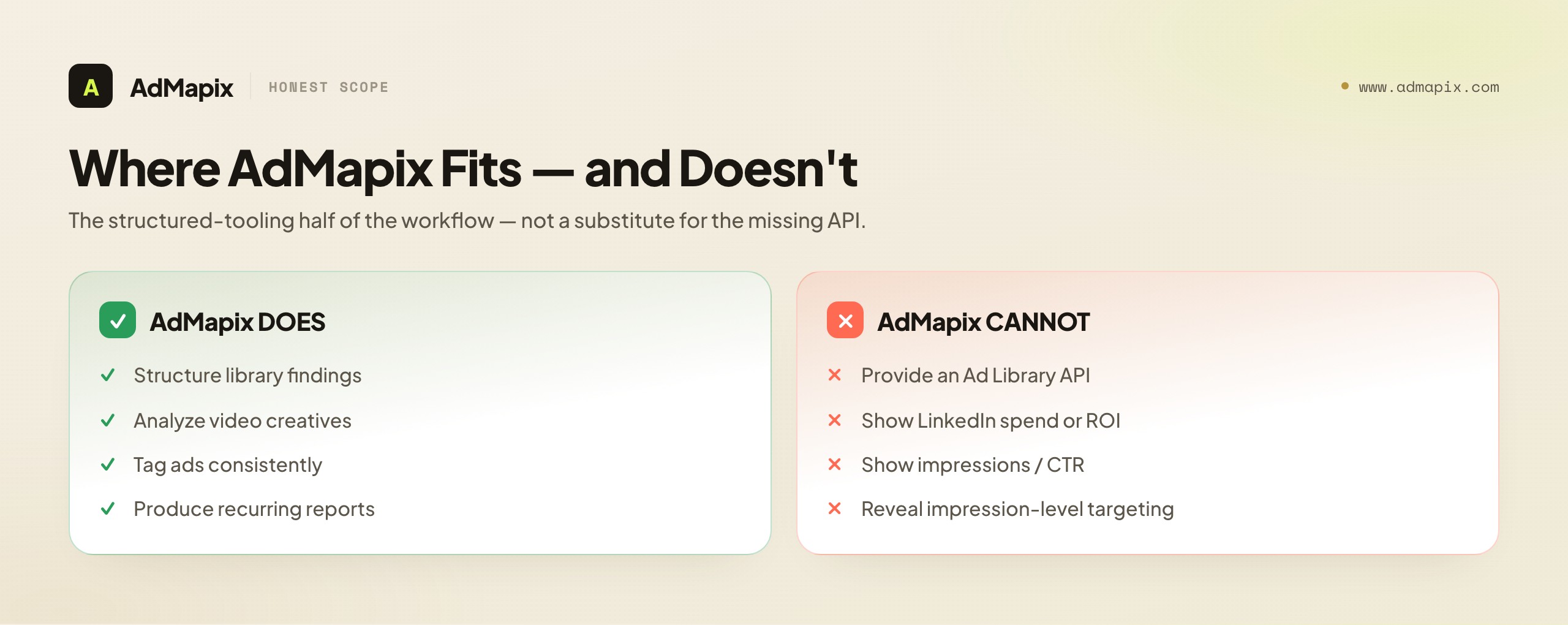
AdMapix is a creative-evidence layer. In the LinkedIn workflow, it is built for Step 2 and the steps that follow it: giving the creatives you find in the Ad Library a structured, searchable, taggable home; analyzing video creatives; tagging ads consistently; and producing the recurring competitor reports the workflow needs. It turns the manual gathering you do in the browse-only library into an organized dataset and a repeatable report, which is exactly the part that does not scale by hand once you track more than a few competitors.
What AdMapix is not, and cannot be, is a way around the data limits this entire article has described. AdMapix does not have a secret LinkedIn Ad Library API. It cannot show you a competitor's LinkedIn spend, conversion rate, ROI, impressions, or impression-level targeting — because none of that is in the public data, and no tool can derive what the platform does not publish. AdMapix organizes and reports the "what they're saying" layer — creative evidence — at scale. The "how it's performing" layer is not publicly knowable, and any vendor claiming to show you LinkedIn competitor spend or ROI is selling a model dressed up as a measurement. We would rather tell you that plainly and keep your trust than imply a capability we do not have.
So the honest framing is: there is no LinkedIn Ad Library API; the official Advertising API is the wrong scope; scraping is fraught; the working pattern is manual-library-plus-structured-tooling; and AdMapix is the structured-tooling-and-reporting half of that pattern, not a substitute for the missing API or a source of forbidden performance data. For how creative-evidence layers compare to the broader tool landscape, see best ad intelligence tools and best ad spy tools 2026.
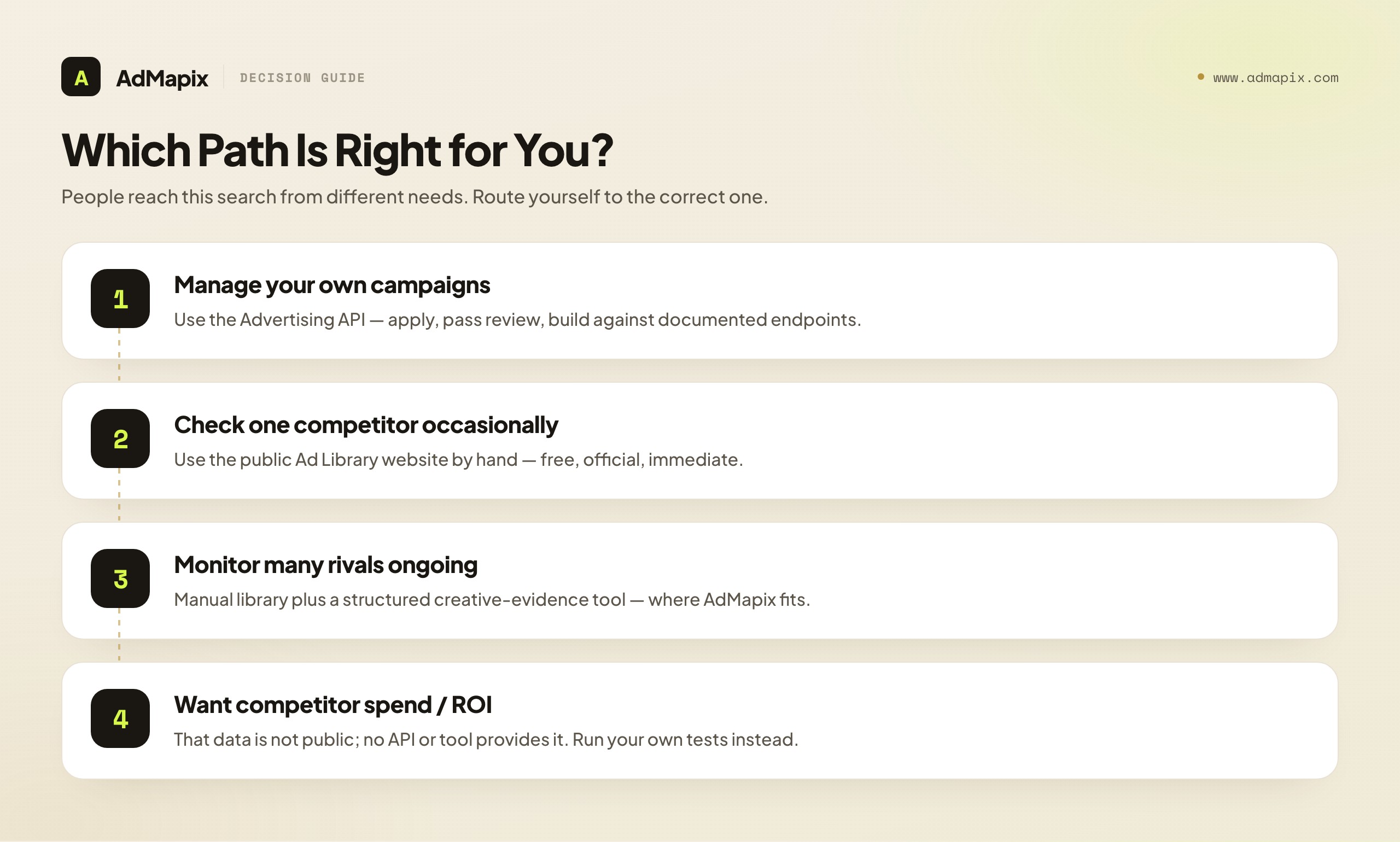
A Decision Guide: Which Path Is Right for You?
People arrive at "LinkedIn Ad Library API" from several different real needs, and the right answer depends on which need is yours. Here is a quick triage so you can route yourself to the correct path instead of building against the wrong system.
If you want to manage your own LinkedIn campaigns programmatically — sync your performance into a warehouse, automate bids, bulk-edit creatives — the Advertising API is your answer. Apply for access, pass review, build against the documented endpoints. This is a solved problem with an official tool. None of the competitor-data limitations apply, because you are working with data you own.
If you want to confirm whether a specific competitor is advertising and read what they say — a due-diligence check, a one-off look — the public Ad Library website is your answer, used by hand. No API needed, no tooling needed, free, official, and immediate. For a single competitor checked occasionally, the manual library is genuinely sufficient.
If you want ongoing, structured competitor monitoring across many rivals — a recurring report, a maintained creative dataset, trend tracking — the answer is manual library plus a structured creative-evidence tool. The library is the source of truth; the tool is where the findings live and become a report. This is where AdMapix fits, and where the manual-only approach stops scaling.
If you want competitor spend, ROI, or impression-level performance on LinkedIn — the honest answer is that data does not exist publicly, and no tool or API provides it. You can build sophisticated messaging and offer intelligence from the public creative evidence, but the performance layer is closed. The most valuable thing we can do is stop you from buying a tool that claims otherwise. Redirect that energy into rigorous creative analysis and into your own well-instrumented tests, which do yield real performance data — about your campaigns, which is the data you can actually act on.
If you specifically want a queryable, bulk-export API of competitor ad data — that is the one thing none of these paths provide, and it is the thing the search "LinkedIn Ad Library API" was hoping to find. It does not exist for the structural reasons covered above. The sooner you design around its absence, the sooner you have a working research function.
Inside the Advertising API: What It Returns and How Developers Actually Use It
Even though the Advertising API is the wrong tool for competitor research, many readers who arrive here do end up needing it for legitimate first-party work, so it is worth a concrete look at what it returns and how teams build against it. Understanding the Advertising API properly also reinforces, by contrast, exactly why it cannot serve competitor data — the boundary becomes obvious once you see the shape of the thing.
The Advertising API is organized around the objects of a campaign-management system. At the top sits the ad account, which the authenticated user must have a role on. Beneath it are campaign groups, then campaigns, then individual creatives. Alongside those are audience objects (matched audiences, saved audiences) and a reporting/analytics surface that returns performance metrics — impressions, clicks, spend, conversions — for the accounts the user controls. Every one of those objects is scoped to entities the authenticated user is authorized to see. There is no object type, anywhere in the schema, that represents "an arbitrary other company's campaign." The data model itself forecloses competitor access; it is not a permission you are missing, it is a concept that does not exist in the API.
Authentication runs on OAuth 2.0. Your application directs an account holder through a consent flow, receives an authorization code, exchanges it for an access token (and a refresh token), and then calls the API on that user's behalf within the granted scopes. Tokens expire and must be refreshed; scopes are granular and tied to the products your app has been approved for. Because the token represents a specific user's authorized access, it can never reach beyond what that user could see in the LinkedIn Campaign Manager interface — which is, again, their own accounts.
Rate limits and review gating shape the engineering experience. LinkedIn applies per-application and per-member throttles, so a production integration has to handle backoff, batching, and retry gracefully rather than hammering endpoints. Approval for the Advertising API product is conditional and reviewed, and higher tiers of access (for example, for partners building tools used by many advertisers) involve additional vetting. None of this is unusual for an enterprise marketing API, but it does mean the Advertising API is a managed relationship with LinkedIn, not a casual open dataset.
The legitimate use cases are real and valuable. Teams use the Advertising API to pipe their own campaign performance into a data warehouse for blended cross-channel reporting, to automate routine campaign operations (pausing underperformers, adjusting budgets on a schedule), to sync matched audiences from a CRM, and to build internal tooling for agencies managing many client accounts. If that is your actual need — operating on advertising you have rights to — the Advertising API is a first-class tool and you should build against the official LinkedIn Marketing API documentation with confidence. Just do not expect a door inside it to competitor data; that door was never built, and the data model shows why.
How LinkedIn's Ad Library Compares to Other Platforms
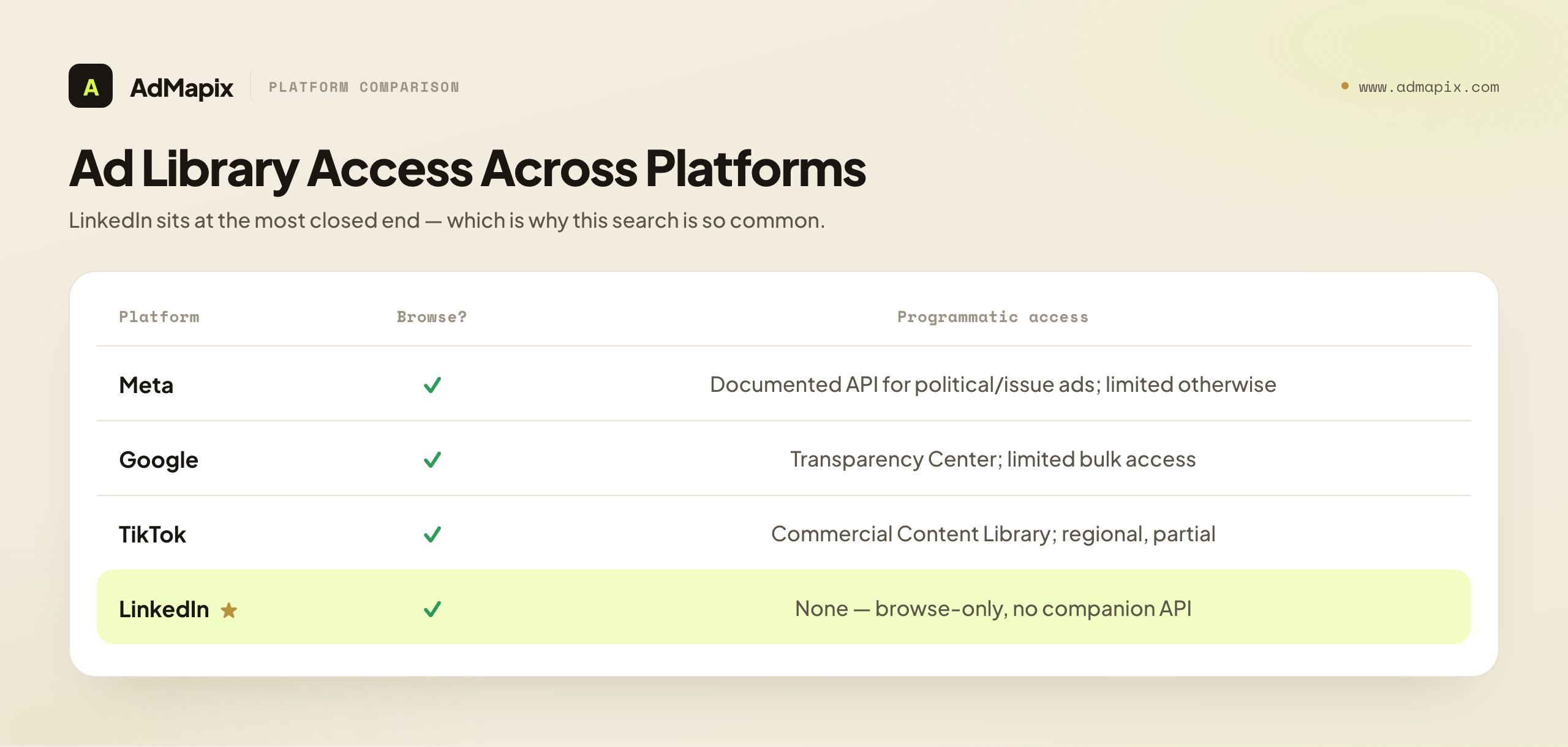
The "is there an API?" question rarely lives in isolation. Most competitive-intelligence teams research across multiple platforms, and LinkedIn's transparency posture is best understood against its peers — because the differences change what you can automate and where you have to fall back to manual work. The short version: LinkedIn's library is among the more closed of the major platform libraries when it comes to programmatic access, which is precisely why the "LinkedIn Ad Library API" search is so common and so frustrated.
Meta (Facebook and Instagram) maintains the most developed transparency offering of the major platforms. Its Ad Library is browse-able, and for certain ad categories — notably ads about social issues, elections, and politics — Meta provides a documented Ad Library API with terms, access requirements, and queryable fields. Crucially, for commercial ads outside those special categories, the programmatic access is far more limited, so even Meta is not a free competitor-spend firehose. But the existence of any documented Ad Library API at Meta is part of why people assume LinkedIn must have an equivalent. It does not.
TikTok and Google both maintain ad transparency centers driven substantially by the same DSA pressure. Google's Ads Transparency Center and TikTok's Commercial Content Library each expose searchable records, with varying degrees of programmatic or bulk access and varying regional coverage. The details shift over time and by jurisdiction, but the pattern is consistent: these are transparency surfaces with limited, regulation-shaped access — not analytics APIs returning spend and performance.
Against that field, LinkedIn sits at the more restrictive end: a browse-only library with no companion API at all. The reasons trace back to LinkedIn's particular data posture and litigation history around scraping, discussed earlier. The practical lesson for a cross-platform research function is that you cannot run one uniform automated pipeline across all platforms. Your architecture has to be heterogeneous: lean on Meta's documented API where it applies, on other platforms' partial access where available, and on manual collection plus structured tooling for LinkedIn, which offers the least programmatic surface. A team that designs for the lowest-common-denominator — manual capture into a structured evidence layer — gets a consistent workflow that works everywhere, with automation layered in only where a platform genuinely supports it. For a fuller cross-network view, our advertising intelligence guide maps the landscape.
Building a Sustainable Manual Monitoring Cadence
If the realistic answer for LinkedIn is "manual collection plus structured tooling," the obvious worry is sustainability: manual work is the thing that slips. The team commits to monthly monitoring, does it twice, and then a launch hits and it quietly dies. The way to beat that is to engineer the cadence itself — to make the manual work small, repeatable, and resistant to slipping — rather than relying on good intentions.
Fix the competitor set deliberately. The single biggest driver of manual-monitoring cost is scope creep in who you track. Pick a defined set — your true direct competitors plus a couple of aspirational or adjacent ones — and write it down. A set of five to eight is sustainable monthly; a set of twenty is not, and trying to do twenty is the most common reason monitoring collapses. Revisit the set quarterly, not weekly.
Timebox the collection pass. Treat the Ad Library pass as a fixed-time ritual: a defined block once a month where you search each competitor in the set, pull the full spread of live creatives, and capture them into your structured tool. Timeboxing turns an open-ended chore into a bounded task, which is what makes it survive contact with a busy quarter. The goal is completeness within the box, not perfection — full spread for each competitor, captured and tagged, then done.
Separate collection from analysis. A common failure is trying to collect and analyze in one sitting, which makes each pass feel enormous. Split them: collection is mechanical (search, pull, capture, tag), and can be done by a more junior team member or in low-energy time. Analysis (offer mapping, format reads, synthesis into a brief) is the higher-judgment work and gets its own block. Separating them lowers the activation energy for each and keeps the cadence alive.
Make the structured tool do the remembering. The reason manual monitoring decays is that the state lives in someone's head. When the structured evidence layer holds the full history — every captured creative, every tag, every prior report — each new pass is a delta on a maintained baseline, not a from-scratch effort. This is the specific operational reason a tool matters: not because it automates the (un-automatable) collection, but because it removes the memory burden that makes manual cadences fragile. The collection stays manual; the continuity gets automated.
Tie the report to a decision forum. A monitoring cadence survives when its output feeds a recurring decision — a monthly growth review, a creative-planning meeting, a campaign retro. If the report has a standing audience that expects it and acts on it, the cadence has a reason to live. If it is produced into a void, it dies. The most reliable way to keep manual competitor monitoring alive is to make someone downstream depend on it.
Engineered this way, the manual workflow is genuinely sustainable — not because manual work became easy, but because the cadence was designed to be small, split, supported by tooling, and tied to a decision. That is a far more robust foundation than a scraper that will break, or an API that does not exist. The teams with the best LinkedIn competitive intelligence are not the ones who found a secret endpoint; they are the ones who built a boring, durable monthly habit and stuck to it.
Common Misconceptions, Corrected
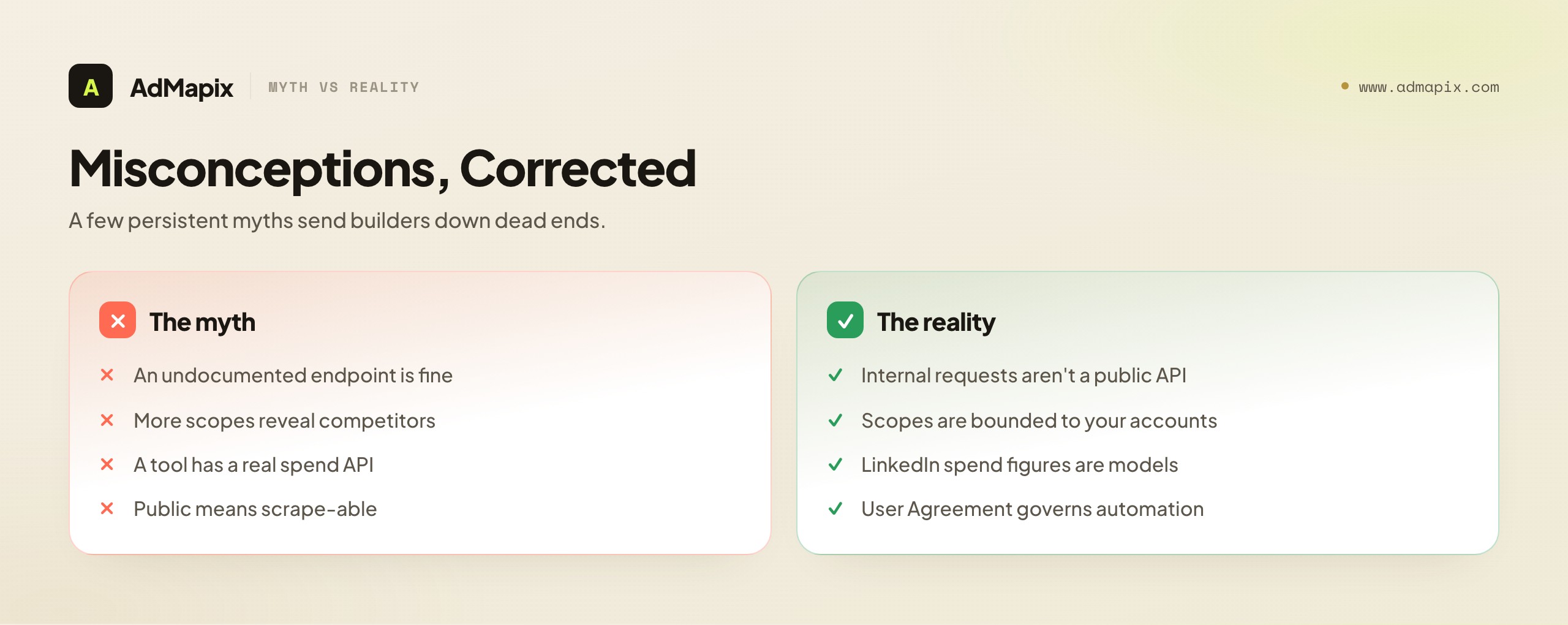
A few persistent myths send developers and marketers down dead ends. Here are the corrections, stated plainly.
"There must be an undocumented Ad Library endpoint I can hit." Even if a browser-internal request exists to render the library, treating it as a stable API is the scraping problem in disguise — undocumented, unsupported, change-without-notice, and contractually fraught. An internal request is not a public API, and building on it is building on sand with legal exposure.
"The Advertising API can see competitor ads if I get enough scopes." No. The Advertising API's scopes are bounded by what the authenticating user can access — i.e., your own accounts. There is no scope, at any tier, that returns another company's ads. More access to your own data does not become access to someone else's.
"A third-party tool has a real LinkedIn competitor-spend API." Be deeply skeptical. LinkedIn does not publish spend or performance, so any "competitor spend" figure for LinkedIn is a model, not a measurement. A model can be useful as a directional estimate if its methodology is transparent, but it is not the same thing as data, and it should never be presented to stakeholders as fact. For LinkedIn specifically, treat any precise competitor-spend claim as a red flag.
"Scraping is fine because the data is public." Public-to-view is not the same as licensed-for-automated-extraction. LinkedIn's User Agreement governs automated access, and LinkedIn enforces it. "I could see it in my browser" is not a legal defense for a scraping pipeline.
"The library has everything, so I don't need anything else." The library has creative and date range, which is a lot, but it has no performance data and no structure. Without a layer to capture, tag, and report on what you find, the library is a place you visit, not an intelligence system you operate.
"If I wait, LinkedIn will release a competitor-data API." Unlikely, for the structural reasons above: the library is a transparency mandate, not an analytics product, and LinkedIn's data posture argues against it. Build for the world as it is, not the API you wish existed.
Putting It Together: From Question to Working System
Step back, and the whole arc resolves cleanly. You came looking for a LinkedIn Ad Library API. There isn't one. But the need underneath the search — reliable, ongoing intelligence about competitor advertising on LinkedIn — is entirely achievable; it just runs through a different architecture than an API call.
That architecture is: the public Ad Library as your official, legitimate source of truth for what competitors are saying; a structured creative-evidence layer to capture, tag, and store those findings so they compound; a disciplined analysis method (offer, format, audience) to extract patterns; a recurring report to track change over time; and your own tests as the only honest source of performance data. The Advertising API sits off to the side as the right tool for managing your own campaigns, and the DSA sits underneath as the reason the transparency data exists at all. Scraping sits in the corner as a tempting shortcut that is, on inspection, a larger and riskier problem than the one it claims to solve.
The developers who succeed here are the ones who stop fighting the absence of an API and start building the workflow that the available data supports. The data has hard limits — no spend, no performance, no impression-level targeting, no bulk export — and a research function that respects those limits, captures the available evidence rigorously, and ends every cycle in a test will outperform one chasing a competitor-data API that is not coming. The honest constraints are not a dead end; they are the design spec for a system that actually works.
It is worth naming the emotional arc here, because it is the same for almost everyone who searches "LinkedIn Ad Library API." First comes the assumption that an API must exist, because the data is visibly public and an API would be the obvious way to consume it. Then comes the frustration of discovering there is none, often after some hours lost reading developer docs for the wrong product. Then comes the temptation to scrape, which feels like a clever workaround until the legal and maintenance realities surface. And finally — for the teams that end up with durable competitive intelligence — comes acceptance and redesign: the recognition that the missing API is not the obstacle it appeared to be, and that a disciplined manual-plus-tooling workflow delivers the underlying need more reliably than the imagined API would have. The faster you move through that arc, the sooner you have something that works. This article exists to let you skip straight to the last stage.
A final, practical framing for engineering leaders deciding where to spend effort: the question is never really "can we get a LinkedIn Ad Library API?" — it is "what is the cheapest reliable way to keep a current, structured, decision-ready view of competitor advertising on LinkedIn?" Framed that way, the answer is clearly not a scraper (expensive, fragile, legally exposed) and clearly not a wait for an API (it is not coming). It is a small, well-supported manual cadence feeding a structured evidence layer that handles continuity and reporting. That is a modest, achievable investment with a durable payoff — and it is the same answer whether you are a solo growth engineer or a competitive-intelligence team at scale. The constraint, properly understood, is a gift: it points you straight at the workflow that lasts.
FAQ
Is there a public LinkedIn Ad Library API?
No. The LinkedIn Ad Library is a browse-only transparency website, not a documented data endpoint. There is no public, queryable API and no official bulk export for the Ad Library's competitor ad data. The phrase "LinkedIn Ad Library API" almost always conflates the browse-only Ad Library (which has competitor data but no API) with LinkedIn's separate Advertising API (which has an API but only for your own accounts). The product with the data has no API; the product with the API has no competitor data.
What is the difference between the LinkedIn Advertising API and the Ad Library?
The Advertising API is an official, documented programmatic interface for managing your own campaigns, creatives, audiences, and reporting — it is inward-facing and gated behind an application and review. The Ad Library is a public, browse-only website showing ads that competitors (and anyone) ran on LinkedIn in roughly the past year — it is outward-facing and competitor-relevant but has no API. They serve opposite purposes: campaign management versus public transparency.
Can I use the LinkedIn Advertising API to get competitor data?
No. The Advertising API's OAuth scopes are bounded by what the authenticating user can access — your own ad accounts. There is no scope, at any access tier, that returns another company's ads, spend, or metrics. It is a campaign-management tool, not a transparency tool. Pointing it at a competitor-research problem is a category error; the data simply is not within its scope.
How do I get access to the LinkedIn Advertising API?
You create a developer app associated with a LinkedIn Page you administer, request the Advertising API product for that app, complete LinkedIn's access request form describing your use case, and pass LinkedIn's review. Access is granted after review (not instantly) and is conditional on a legitimate advertising-management use case. You then authenticate via OAuth 2.0 and operate within granted scopes and rate limits. See the official LinkedIn Marketing API documentation for current specifics.
Is it legal to scrape the LinkedIn Ad Library?
This is a real risk, not a casual technical task. Scraping may violate LinkedIn's User Agreement, which broadly prohibits automated data collection, and LinkedIn has an aggressive history of pursuing scrapers. The law around scraping publicly viewable data has nuance, but "publicly viewable" is not "licensed for automated extraction," and the User Agreement is a contract. This is not legal advice — consult counsel before building any scraping pipeline against LinkedIn. We recommend the manual-plus-tooling workflow instead.
What data can I actually get from the LinkedIn Ad Library?
The advertiser/Page name, the ad creative and copy, the date range the ad ran, and limited broad targeting context for EU-targeted ads (driven by DSA requirements). You cannot get spend, impressions, engagement, click-through rate, conversions, granular audience definitions, impression-level targeting, or a bulk export. It shows what ran and by whom, not how it performed.
Why does the Ad Library exist if it has no API?
It exists primarily as a transparency artifact, largely driven by the EU's Digital Services Act, which requires very large platforms to maintain a searchable repository of the ads they serve. A browse-only website satisfies that mandate. The library was built to meet a regulatory transparency floor, not to be a marketer's analytics API — which is why it shows creative and date range but no performance, and offers no developer endpoint.
Can any tool show me a competitor's LinkedIn ad spend?
No tool can show measured LinkedIn competitor spend, because LinkedIn does not publish spend or performance. Any "competitor spend" figure for LinkedIn is a model or estimate, not a measurement. A transparent, methodology-disclosed estimate can be directionally useful, but it should never be presented as fact, and you should treat precise competitor-spend claims for LinkedIn as a red flag. The honest, knowable layer is messaging and offers, derived from public creative evidence.
What does AdMapix do for LinkedIn competitor research, then?
AdMapix is a creative-evidence layer: it gives the creatives you find manually in the Ad Library a structured, searchable, taggable home, analyzes video creatives, tags ads consistently, and produces recurring competitor reports. It is the structured-tooling half of the manual-plus-tooling workflow. It explicitly does not provide a LinkedIn Ad Library API, and cannot show spend, ROI, impressions, or impression-level targeting — because that data is not public and no tool can derive it.
What should I build if I really need ongoing LinkedIn competitor monitoring?
Build a workflow, not a scraper: use the public Ad Library by hand as your source of truth, capture every competitor creative into a structured creative-evidence tool (tagged consistently), analyze the structured evidence with offer/format/audience lenses, report on a monthly cadence tracking change over time, and end each cycle in a falsifiable brief your own analytics will test. This pattern is durable, legitimate, and does not depend on a fragile, legally exposed extraction layer or an API that does not exist.
Related Reading
For the analysis methodology that turns Ad Library findings into decisions, read our LinkedIn ads competitor analysis workflow and the LinkedIn Ads Library interface reference. Ground your method in the competitor ad analysis framework, broaden your view with best ad intelligence tools, best ad spy tools 2026, and the advertising intelligence guide, and turn patterns into a deliverable with our competitor ad report template.
See what competitors are really running
Search 6M+ ad creatives, landing pages, and weekly spend across 200+ countries. No credit card, no commitment.
Related Articles
Playable Ad Analysis for Mobile Games: A Practical Method
A practical method for playable ad analysis in mobile games: how to reverse-engineer a competitor's playable by the job it is built to do, decode its structure beat by beat, infer which concepts are likely working, turn observations into testable briefs, and stay honest about what a public playable proves (structure and intent) versus what it never can (spend, installs, retention, ROAS).
Best Mobile Game Ad Formats Across Platforms: A 2026 UA Playbook
A platform-by-platform guide to the best mobile game ad formats in 2026: which formats do the heavy lifting on Meta, Google, TikTok, AppLovin, and Unity; why the right format depends on platform, genre, and funnel stage; a format-selection framework; a creative-testing cadence; and the honest limits of what competitor ads can and cannot tell you about which format wins.
Meta Ads Library vs Ad Intelligence Tools for Game UA (2026): Which to Use, When, and Why
A definitive 2026 comparison of the Meta Ads Library vs dedicated ad intelligence tools for mobile game user acquisition — where the free transparency library genuinely helps, the structural limits that create blind spots for game UA creative research, a side-by-side capability matrix, the exact decision criteria for when to add a paid intelligence layer, and an honest account of what neither can show.