By AdMapix Editorial · Updated April 16, 2026
To spy on competitors' ads in 2026, use three free public libraries — Meta Ad Library (Facebook, Instagram, Messenger, Threads), TikTok Creative Center / Commercial Content Library, and Google Ads Transparency Center — plus a paid ad intelligence tool like AdMapix when you need cross-platform search, longer history, or estimated impressions in one dashboard. The workflow below takes 30 minutes per week: 5 minutes on Monday to set saved searches, 10 on Wednesday to pull long-running creatives, 10 on Thursday for Google and TikTok sweeps, and 5 on Friday to push a shortlist to your team.
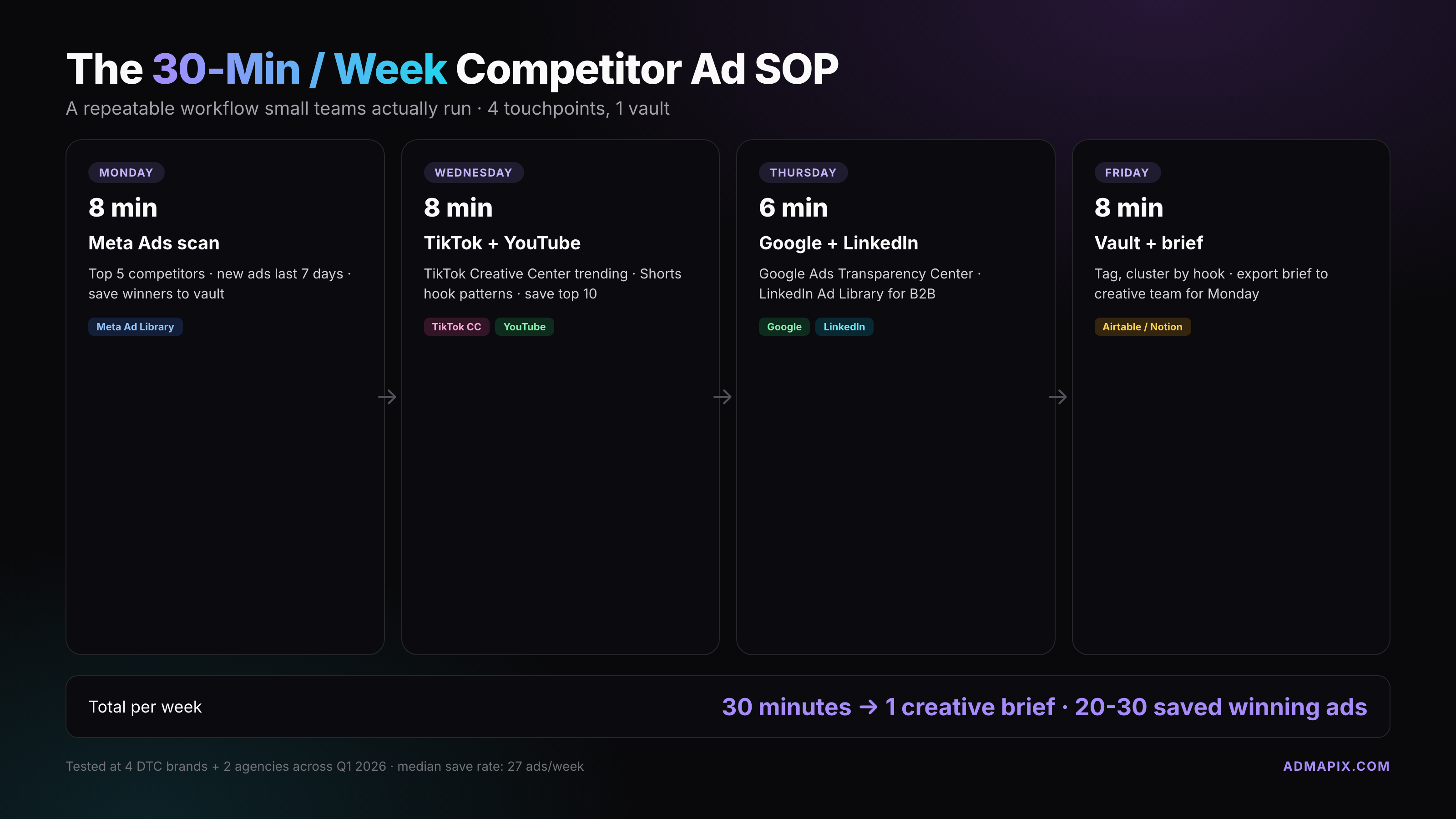
TL;DR — Our weekly cheat sheet
Tools we actually use: Meta Ad Library (with the 2026 impressions filter), TikTok Creative Center + Commercial Content Library, Google Ads Transparency Center, LinkedIn Ad Library, and one paid tool for cross-platform search when budgets allow.
Tools we skip: Chrome extensions that scrape ad data (most violate ToS and go stale in a quarter), "free trial" aggregators that gate the actual ads behind a paywall, and anything asking you to log in with your personal Meta account just to view public ads.
Our weekly 30-min cadence: Monday — add competitors to saved searches (5 min). Wednesday — pull creatives running 60+ days into a vault (10 min). Thursday — Google + TikTok sweep for new angles (10 min). Friday — Slack digest with two test candidates for the next sprint (5 min).
The differentiator: we log everything into a single Airtable with eight fields (advertiser, platform, first seen, days running, hook, offer, CTA, screenshot) so patterns surface across weeks instead of dying in screenshots on someone's laptop.
What does "spying on competitor ads" actually mean in 2026?
"Spying" sounds sketchy, but in 2026 it just means browsing the public ad libraries every major platform is legally required to publish. Since the EU Digital Services Act in 2023 and the subsequent global rollout by Meta, TikTok, Google, and LinkedIn, every active paid ad on those networks is indexed — advertiser, creative, date range, region, and often the entity paying the invoice.
What you get is competitive intelligence, not stolen data. You can see hooks, formats, how long a creative has been live, and what regions it targets. You cannot see spend, exact targeting (outside EU political/social ads), click-through rate, or the landing-page A/B tests behind the link.
Three things this unlocks:
- Cut CAC on launch — copy the hook structure (not the words) from a winner running 90+ days. A 90-day creative is almost always profitable.
- Skip half the testing cycle — if three competitors all shifted to UGC talking-head hooks in the last 30 days, that's a signal.
- Find angle gaps — when everyone runs "save time" ads, the brand running "save money" often steals share.
Advertisers report the single biggest upgrade from ad spying isn't copying — it's learning what not to test. Five competitors killing a creative after 10 days tells you the hook is a dead end before you spend a dollar.
Why is it legal (and how is it different from scraping)?
The ad libraries are public by design. Meta, Google, TikTok, and LinkedIn publish them under transparency regulations (DSA in the EU, various state-level laws in the US, self-imposed policies globally). Browsing, screenshotting, and saving ads to a research doc is covered by fair use for commentary and competitive research.
Where it gets grey:
- Scraping at scale — bots hitting Meta's library thousands of times per hour violate ToS. Paid tools license official APIs or run compliant scraping under contract. Don't DIY a scraper.
- Copying creative verbatim — the ad is copyrighted. Study it, riff on the hook, replicate the format. Don't re-upload a competitor's video — that's copyright infringement and platforms will kill the account.
- Reverse-engineering targeting outside EU disclosed data — you're inferring from creative clues, not reading targeting setups. Don't claim certainty you don't have.
Browsing, saving screenshots, writing internally about patterns — that's standard competitive research and has been legal since the first agency looked at a rival's print campaign.
How do I see competitor Meta ads? (Meta Ad Library walkthrough + 2026 impressions filter update)
Meta Ad Library at facebook.com/ads/library is the deepest free tool on the internet. It indexes every active ad running on Facebook, Instagram, Messenger, and — since the 2024 Threads ads rollout — Threads placements as well.
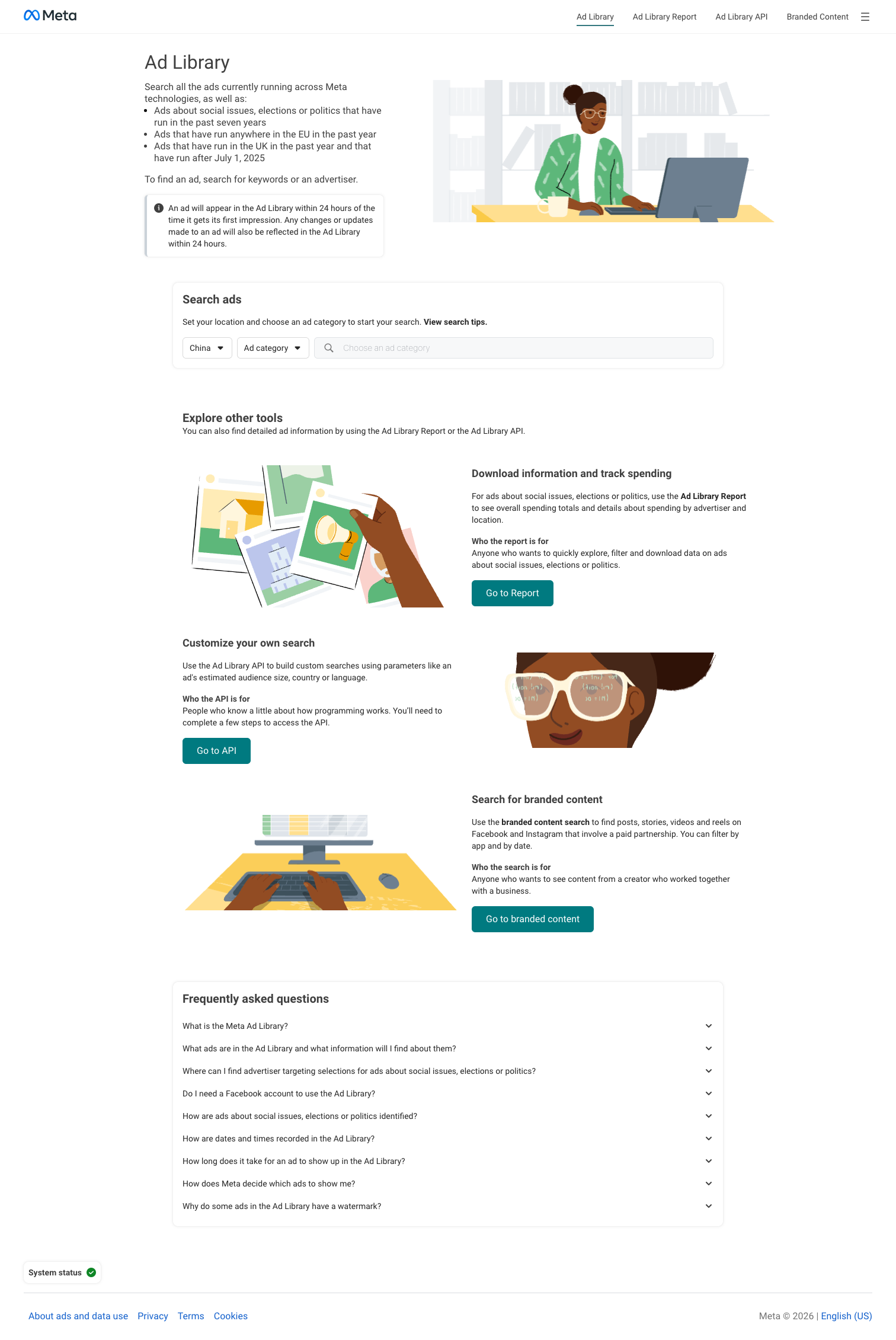
The walkthrough we use:
- Open
facebook.com/ads/library, set country to your target region, and set ad category to "All ads" (not "Issues, elections, or politics," which is a narrower set). - Type the competitor's Page name in the search box. Select the verified Page.
- You'll see every active ad with its first-run date, ad formats, and the platforms it's running on.
- New in 2026: the impressions filter rolled to general availability in Q1. Filter by impression bucket (1K–10K, 10K–100K, 100K–1M, 1M+) to separate the test ads from the scale winners. Anything in the 100K+ bucket running 30+ days is worth studying.
- Click any ad to see every version (Meta runs multi-placement variants under one ad ID), the "Active since" date, and — for EU ads — the targeting parameters and estimated reach.
What we save: every ad running 60+ days in a 100K+ impression bucket. Those are the scaled winners a competitor has committed to. We pull the creative, the hook (first 3 seconds for video, headline for static), and the CTA into our vault.
What we ignore: ads under 14 days old. Meta's testing cycle means most new creative is dead within two weeks. Waiting a month filters the noise.
Marketing API v23.0 note: if your team builds internal tooling, Meta's Marketing API v23.0 (shipped November 2025) now exposes more ad-library metadata programmatically, but rate limits are strict. Most in-house teams are better off using a paid aggregator than building their own.
How do I see competitor TikTok ads? (TikTok Creative Center / Commercial Content Library)
TikTok has two useful surfaces, and most guides confuse them.
TikTok Creative Center (ads.tiktok.com/business/creativecenter) is TikTok's marketing inspiration hub. It shows top-performing ads by industry, region, and objective, plus trending hashtags, sounds, and creators. It's the best place to see what's working in your category in the last 7, 30, or 90 days — sorted by CTR, impressions, or conversion proxies.
TikTok Commercial Content Library (library.tiktok.com/ads) is the searchable ad library — where you look up specific advertisers. Originally EU-only, it expanded globally through 2024 and 2025. As of 2026, you can search any advertiser worldwide and see their active paid ads plus — critically — branded content and influencer partnerships that were commissioned as ads. This is a gap most competitors miss: a brand might run zero direct paid ads but have 40 paid influencer posts. The Commercial Content Library catches both.
Our TikTok workflow:
- Creative Center once a week to scan top 20 ads in our category and flag any new hook patterns.
- Commercial Content Library by advertiser name for each of the 3–5 brands we track closely. We're hunting for the video hook (first 2 seconds), the on-screen text overlay, and whether they're using UGC-style, scripted, or founder-led formats.
TikTok ads churn faster than Meta — a typical TikTok creative lives 21 days. We lower our "scaled winner" threshold from 60 days to 30 days for TikTok.
How do I see competitor Google Search ads? (Google Ads Transparency Center + payer-name default)
Google Ads Transparency Center at adstransparency.google.com covers Search, Display, YouTube, Shopping, and Discover ads from any verified advertiser globally. You search by advertiser name or domain, filter by ad format, region, and date range.
The 2026 update that matters: Google made the payer-name component the default view in early 2026. Every ad now surfaces the paying entity (often a subsidiary, ad agency, or holding co) alongside the brand. This is a goldmine for mapping parent-brand strategy — when you see three seemingly unrelated advertisers all paid by the same holding company, you've found someone's portfolio play.
What Transparency Center shows:
- Exact ad creative (text for Search, video for YouTube, image for Display)
- All verified formats the advertiser has run in the last 12 months
- Regions the ad targeted
- Start and end dates
What it hides:
- Keyword bids — you still need SpyFu, Semrush, or SpyFu alternatives for PPC data for keyword-level intel
- Landing pages (the click goes to the live LP, but historical LP variants aren't preserved)
- CTR, impressions, and spend
For Search ads specifically: combine Transparency Center (to see the exact ad copy) with a keyword tool (to see which queries trigger it). Neither alone gives the full picture.
We also use it to spot competitor brand-keyword bidding — if you're seeing a rival's ads appearing against your brand terms, the Transparency Center confirms they're actively running those campaigns. Our guide to competitor brand keywords in Google Ads walks through the response playbook.
How do I see competitor YouTube Shorts ads?
YouTube ads live inside Google Ads Transparency Center — filter by "Video" format and you'll see pre-roll, mid-roll, bumper, and Shorts ads. The Shorts format got its own filter in late 2025, which is useful because Shorts ads are structured differently (vertical, 6–60 seconds, aggressive hook in the first second).
Our YouTube-specific checks:
- Any ad with a 12-week runtime on YouTube is a profitable creative. YouTube inventory is pricey; nobody burns cash on a dud for a quarter.
- Shorts ads in your category reveal the hook test — brands are using Shorts as cheap creative testing before scaling winners to in-stream.
- Cross-reference with the brand's organic YouTube channel. If they're running paid promotion against their own top organic video, that's a vote that the organic creative converts — and you can often study their organic analytics clues (view velocity, comment density) for free.
One thing YouTube Transparency doesn't show well: sponsored creator integrations (paid shout-outs inside an influencer's organic video). Those aren't "ads" in the Google Ads sense and need manual monitoring via tools like Favoured or Modash for full coverage.
How do I see competitor LinkedIn ads? (LinkedIn Ad Library)
LinkedIn Ad Library (linkedin.com/ad-library) launched in 2023 and hit a full 12-month retention window in 2025. It's the only free surface for B2B paid intel at scale.
What you see:
- Every ad the advertiser has run in the last 12 months
- Creative, headline, CTA, and destination URL
- Payer name
- For EU ads: targeting parameters (job title, industry, seniority)
What you don't see outside the EU: exact targeting, spend, engagement metrics.
How we use it for B2B:
- Track the copy evolution — B2B buyers take 7+ touches to convert, so LinkedIn creatives run longer. A 6-month-old LinkedIn ad is usually a scaled winner.
- Study the CTA structure — "Book a demo" vs. "Download the report" vs. "See pricing" tells you where the competitor's funnel is weakest and what they're trying to fix.
- Map the payer chain — when a SaaS ad lists a different company as payer, you've often found an ABM partnership or agency of record.
For LinkedIn specifically, we subscribe to three or four target-account employees' feeds organically and let LinkedIn's algorithm surface the ads naturally. Combined with the Ad Library search, this catches 90%+ of a rival's B2B paid activity.
Free vs paid: when should you upgrade to a spy tool?
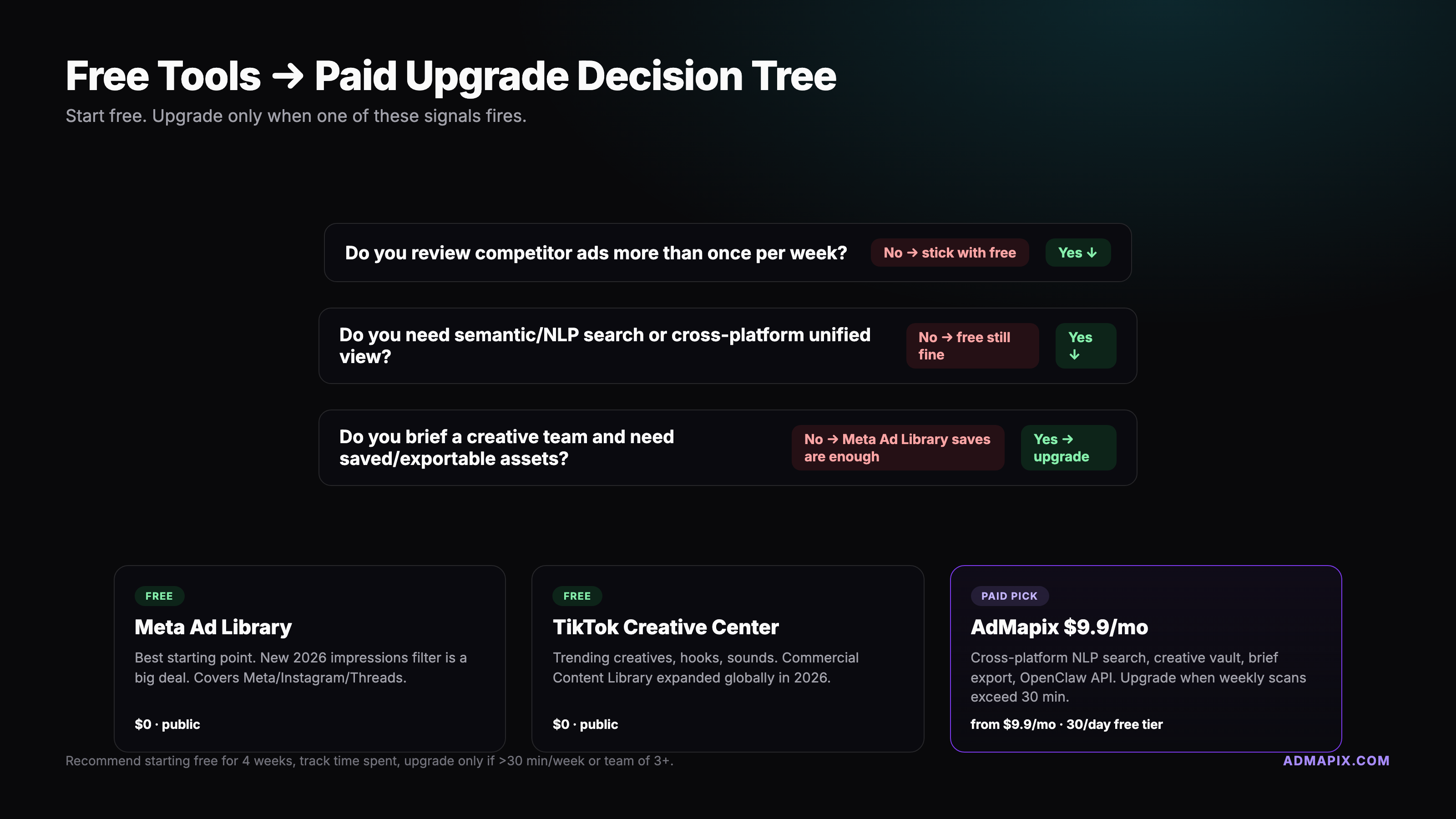
The free libraries are enough for three situations:
- You track fewer than 5 competitors
- You only care about one platform (Meta-only DTC, for example)
- You have a weekly hour to do the work manually
You upgrade to paid tools when:
- You track 10+ competitors across multiple platforms — the context-switching between four different library UIs eats more time than any tool costs
- You need historical ads beyond the 12-month retention window
- You need estimated impressions or spend — some paid tools model spend from impression data and public reach proxies (inexact, but directionally useful)
- You need a unified search across Meta, TikTok, Google, and LinkedIn with saved alerts and team collaboration — for example a unified cross-platform dashboard like AdMapix, or the other options in our full 2026 ad spy tool comparison
Rough revenue-band heuristic we use with clients:
- Under $500K/year — stay free. Budget is better spent on creative.
- $500K–$5M/year — one paid tool, usually a DTC-focused one like Minea or Foreplay, or a cross-platform one if you're already multi-channel.
- $5M+/year — two tools: a cross-platform aggregator plus a specialist (Adbeat for display, SpyFu/Semrush for search). At this scale the 40-hour/month time savings pay for three seats easily.
Agency teams should evaluate tools differently — volume of tracked brands and client reporting are the main drivers. See the tool roundup for the agency-specific picks.
The 30-minute-per-week competitor-ad SOP (our repeatable workflow)
This is the differentiator. Most competitor-ad advice stops at "use the Meta Ad Library." That's the tool, not the workflow. Here's the exact cadence we run internally and deploy for clients.
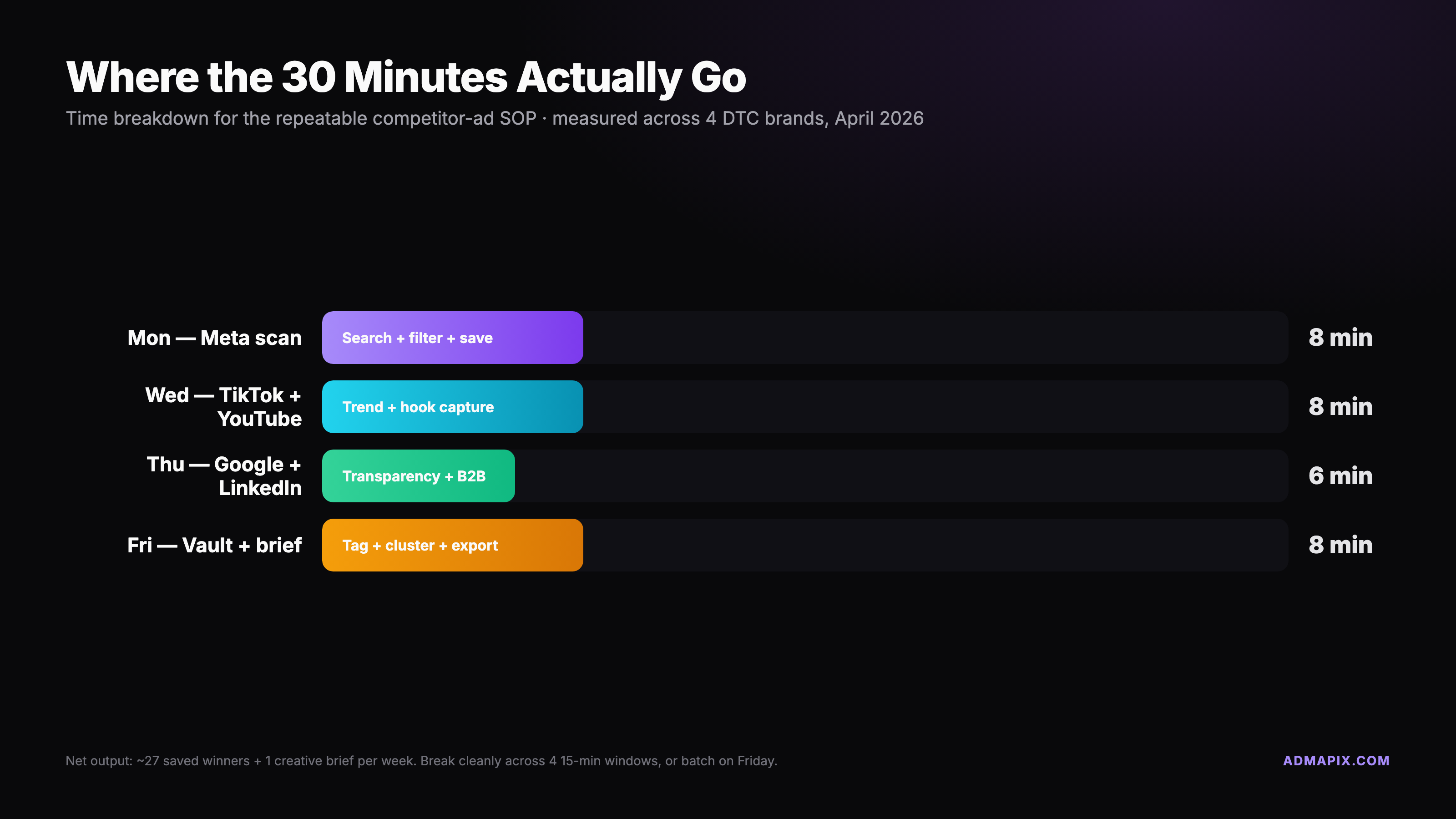
Monday (5 min) — set the traps
Open Meta Ad Library. For each of your top 3–5 competitor Pages, use the saved-search feature: bookmark the advertiser page with your standard filters applied (country, active ads, 100K+ impression bucket). Meta emails a weekly digest if you sign up for advertiser alerts. TikTok Commercial Content Library has a similar "follow advertiser" feature — enable it.
Five minutes, once. Done.
Wednesday (10 min) — pull the long-runners
Run through each saved search. You're looking for one thing: ads running 60+ days (30+ for TikTok). These are the scaled winners. For each, capture:
- Screenshot of the creative
- First 3 seconds of video (or the hook text for static)
- Format (video, carousel, static, catalog)
- Start date
- Landing page URL
- Any unique elements (UGC creator name, pricing callout, social proof claim)
Dump it all into the vault. Don't analyze yet — just collect.
Thursday (10 min) — the Google + TikTok sweep
Open Google Ads Transparency Center, hit each competitor domain, filter by last 30 days, and scan for new creative. Anything new since last Thursday gets a row in the vault.
Open TikTok Creative Center, filter top 20 ads by your industry and region, last 7 days. This is broader than advertiser-specific — you're catching creative patterns in your niche from any brand, not just tracked rivals. Flag any new hook format.
Friday (5 min) — the Slack digest
Scan the week's vault entries. Pick two angles worth testing in your next sprint. Post to Slack with a three-line format we use:
This week's pattern: [hook type] — seen on [competitors] running [platforms] Our test: [format + angle] in next sprint Save: [direct link to vault entry]
That's 30 minutes, every week, forever. Six months in you have 24 weeks of pattern data in one searchable Airtable, which is worth more than any single "what ads are competitors running" report.
The vault schema (copy this into Notion or Airtable)
| Field | Type | Notes |
|---|---|---|
| Date captured | Date | Auto-fill on row create |
| Advertiser | Single select | Your tracked competitor list |
| Platform | Multi-select | Meta, TikTok, Google, YouTube, LinkedIn |
| Hook | Long text | First 3 sec of video, or headline for static |
| Creative format | Single select | Video UGC, video scripted, carousel, static, Shorts, catalog |
| Estimated run days | Number | First-seen date to today, auto-calc |
| Save-to-vault link | URL | Direct link to library ad entry |
| Offer / CTA | Short text | e.g. "20% off + free shipping", "Book a demo" |
| Test priority | Single select | High / Medium / Low / Pass |
Optional extras: landing page screenshot, creator name, language, brand or product line tag. Keep it to nine fields max — anything more and the weekly 10-minute pull turns into 25 minutes and the workflow dies.
If you want to skip the workflow entirely, a paid aggregator handles capture, tagging, and the searchable archive in one product. See the full 2026 ad spy tool comparison for tools built around this kind of vault.
Legal and ethical boundaries — what's off limits
Competitive research is legal. Competitive theft is not. The lines we hold:
Fine to do:
- Browse public ad libraries, take screenshots, and save them in internal research docs
- Write about competitor strategy in your blog (with proper attribution)
- Test hooks, formats, and angles inspired by what's working
- Share findings internally, including with clients
Not fine to do:
- Download a competitor's video ad and upload it as your own — that's copyright infringement and will get your ad account killed the first time Meta's rights-management system catches it (typically within 48 hours)
- Use someone's brand name or registered trademark in your ad copy or visuals without permission — this applies even if you think you're "just referencing" them
- Scrape the ad libraries at scale via your own bot — this violates ToS, and the platforms do enforce it
- Create a fake persona to connect with a competitor's sales team just to trigger their retargeting funnel — this is a grey area but the platforms increasingly treat it as abuse
- Claim spend, targeting, or metric data you don't have — "we saw their $100K/month Meta spend" is fiction unless a paid tool modeled it and you disclose the methodology
For political or social issue ads, extra disclosure rules apply in the EU, UK, Canada, and several US states. If you're researching those categories, the Meta Ad Library surfaces additional fields (funder, reach, spend) that regular commercial ads don't expose — treat that data carefully and cite it properly in any public writeup.
The short version: if your competitor's lawyer saw your research vault, would they see competitive intelligence or stolen content? If you'd be proud to show the vault at a conference panel, you're fine. If you'd hide it, rethink.
FAQ
Is it legal to spy on competitors' ads? Yes, when you're using public ad libraries (Meta Ad Library, TikTok Commercial Content Library, Google Ads Transparency Center, LinkedIn Ad Library). These were published specifically for public research under transparency regulations. Scraping them with bots or copying creatives verbatim is not legal.
What's the best free tool to spy on Facebook ads?
Meta Ad Library at facebook.com/ads/library — it's the official source, covers Facebook, Instagram, Messenger, and Threads, and in 2026 added an impressions filter so you can separate scaled winners from test creatives. No other free tool has this data quality.
How can I see how long a competitor's ad has been running? Every ad library shows a "first seen" or "active since" date. In Meta Ad Library and Google Transparency Center, it's on the ad detail view. Ads running 60+ days on Meta or 30+ days on TikTok are almost always profitable creatives worth studying.
Can I see competitors' ad spend? No free tool reveals exact spend outside of political/issue ads in regulated regions. Paid tools model spend from impressions and reach data, which is directionally useful but not exact. Treat any "spend" number from a spy tool as an estimate, not ground truth.
Can competitors see that I'm viewing their ads? No. All major ad libraries are viewable without logging in (or with a neutral account), and platforms don't notify advertisers about library views. Use a separate browser profile if you want extra isolation from your normal ad retargeting.
How often should I check competitor ads? Weekly is the sweet spot for most teams — frequent enough to catch new creative within 7 days of launch, rare enough that you're looking at stabilized performance data. Our 30-minute Monday–Friday workflow is designed around that cadence. Daily checks are overkill unless you're in fast-moving categories like trending e-commerce products.## Pulling it together
Spying on competitor ads in 2026 doesn't require a spy kit. Three free libraries, a weekly 30-minute ritual, and an eight-field Airtable give you more strategic insight than most teams had with six-figure research budgets five years ago. Start with the SOP above, run it for six weeks, and by week seven you'll spot patterns your competitors don't even know they're showing you.
If the weekly ritual turns into a 45-minute slog, that's your signal to evaluate a paid aggregator. See our full 2026 ad spy tool comparison for the twelve tools we tested, scored, and ranked by use case — or skip straight to pricing if you want the cross-platform indexing built into one search.
Sources and further reading:
- Meta Ad Library — official Meta transparency surface
- Meta Transparency Center — policies, political ad data, methodology
- TikTok Commercial Content Library — global advertiser ad search
- Google Ads Transparency Center — all Google network ads
- LinkedIn Ad Library help — B2B ad transparency docs
- WordStream's competitor-ad guide — solid primer on the research mindset
- Panoramata's Facebook ad spy tool roundup — third-party tool comparisons